1
A017 US Issue 05
14 Servicing and Calibration
14.1
In case of failure first check that the mains Power Supply Unit is fully engaged in the socket and that its
lead and plug are fully engaged in the correct socket in the top of the incubator. The digital control
system may be reset to the original factory defaults by connecting the power supply while holding the OK
button. Check temperature calibration after resetting to defaults.
If the problem persists contact your distributor or Brinsea® Products Service Dept.
14.2
The functional parts of the Mini EX are modular and parts are available and are readily exchanged by a
suitably qualified person equipped with basic tools. Fitting instructions are supplied with replacement
parts.
14.3
The digital temperature display is individually calibrated during manufacture but may be re-calibrated if
required. To ensure optimal performance return the incubator to Brinsea Products Service dept. for recalibration every two years. It is not recommended that this procedure is carried out by the user.
BE CAUTIOUS OF LOW COST ANALOGUE OR DIGITAL THERMOMETERS AND
HYGROMETERS. BRINSEA® PRODUCTS LTD USES SOPHISTICATED EQUIPMENT
TRACEABLE TO INTERNATIONAL REFERENCE STANDARDS.
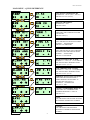
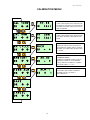
To access the Calibration Menu press all three buttons simultaneously to unlock the display.
PRESS ALL 3 BUTTONS TO UNLOCK THE CALIBRATION MENU
SELECT THE OPTION / RETURN TO THE MENU.
GO FORWARD ONE SCREEN / INCREASE THE VALUE.
GO BACK ONE SCREEN / DECREASE THE VALUE.
17