1
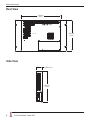
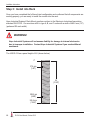
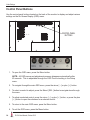
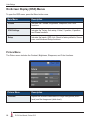
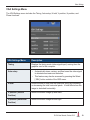
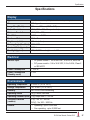
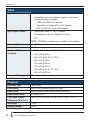
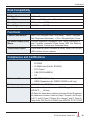
15" RACK MOUNT INDUSTRIAL MONITOR REVISION H USER MANUAL Model No. HIS-RL15- _ _ _ H Table of Contents Safety and Regulatory Information��������������������������������������������������������������������������������3 FCC Notice����������������������������������������������������������������������������������������������������������������������������� 3 Hazardous Locations�������������������������������������������������������������������������������������������������������������� 4 Waste Electrical and Electronic Equipment Directive (WEEE)����������������������������������������������� 4 Mechanical Drawings������������������������������������������������������������������������������������������������������5 Front View������������������������������������������������������������������������������������������������������������������������������� 5 Bottom View���������������������������������������������������������������������������������������������������������������������������� 5 Rear View������������������������������������������������������������������������������������������������������������������������������� 6 Side View�������������������������������������������������������������������������������������������������������������������������������� 6 Installation Instructions��������������������������������������������������������������������������������������������������7 Step 1: Prepare for Installation���������������������������������������������������������������������������������������������� 7 Step 2: Bench-test Configuration������������������������������������������������������������������������������������������� 8 Install Cable Connections������������������������������������������������������������������������������������������������������������������ 8 Install Touch Screen Driver���������������������������������������������������������������������������������������������������������������� 9 Step 3: Install into Rack������������������������������������������������������������������������������������������������������� 12 Video Settings����������������������������������������������������������������������������������������������������������������13 Setting the Timing Mode������������������������������������������������������������������������������������������������������� 13 Control Panel Buttons����������������������������������������������������������������������������������������������������������� 14 On-Screen Display (OSD) Menus����������������������������������������������������������������������������������������� 16 Picture Menu������������������������������������������������������������������������������������������������������������������������������������ 16 VGA Settings Menu�������������������������������������������������������������������������������������������������������������������������� 19 Setup Menu�������������������������������������������������������������������������������������������������������������������������������������� 20 Cleaning Instructions����������������������������������������������������������������������������������������������������23 Glass, Acrylic, and Touch Screen Window Models��������������������������������������������������������������� 23 No Protective Window (LCD Surface) Models���������������������������������������������������������������������� 23 Troubleshooting������������������������������������������������������������������������������������������������������������24 Video Troubleshooting���������������������������������������������������������������������������������������������������������� 24 Touch Screen Troubleshooting��������������������������������������������������������������������������������������������� 26 Specifications����������������������������������������������������������������������������������������������������������������27 Display���������������������������������������������������������������������������������������������������������������������������������� 27 Electrical������������������������������������������������������������������������������������������������������������������������������� 27 Environmental����������������������������������������������������������������������������������������������������������������������� 27 Video������������������������������������������������������������������������������������������������������������������������������������� 28 Physical�������������������������������������������������������������������������������������������������������������������������������� 28 Rack Compatibility���������������������������������������������������������������������������������������������������������������� 29 Functional����������������������������������������������������������������������������������������������������������������������������� 29 Compliances and Certifications�������������������������������������������������������������������������������������������� 29 Warranty Statement�������������������������������������������������������������������������������������������������������30 2 RL15H User Manual, October 2015 Safety and Regulatory Information Safety and Regulatory Information ! WARNING! To prevent fire or shock hazard, do not expose the unit to rain or moisture. Dangerously high voltages are present inside the unit. Do not disassemble the unit. Refer servicing to qualified personnel only. This equipment is not intended for use in critical applications where its failure to operate would create immediate life threatening circumstances. Applications including, but not limited to, nuclear reactor control, aerospace navigation systems and life support systems are not appropriate for this product. To be covered by UL 60950 3rd Edition, the socket-outlet shall be installed near the equipment and shall be easily accessible. DC Supplied Units only: The HISRL15 subject unit is to be powered by a Listed Power Supply suitable for the application with outputs at SELV/LPS or Class 2 levels rated 9.6-36.6VDC, 2.5 A max. The equipment is not intended to connect directly to a DC Mains source. FCC Notice This equipment has been tested and found to comply with the limits for a Class A digital device, pursuant to Part 15 of the FCC Rules. These limits are designed to provide reasonable protection against harmful interference when the equipment is operated in a commercial environment. This equipment generates, uses, and can radiate radio frequency energy and, if not installed and used in accordance with the instruction manual, may cause harmful interference to radio communications. Operation of this equipment in a residential area is likely to cause harmful interference in which case the user will be required to correct the interference at his own expense. Any changes or modifications not expressly approved by the grantee of this device could void the user’s authority to operate the device. RL15H User Manual, October 2015 3 Safety and Regulatory Information Hazardous Locations The following applies only to monitors rated for hazardous locations (model numbers HIS-RL15- _ _ HH and HIS-RL15- _ _ UH): This equipment is suitable for use in Class I, Division 2, Groups A, B, C, and D; Class II, Division 2, Groups F, G; Class III; or non-hazardous locations only. Device is open-type and is to be installed in an enclosure suitable for the environment that is only accessible with the use of a tool. WARNING – EXPLOSION HAZARD – Do not disconnect equipment unless power has been removed or the area is known to be non-hazardous. WARNING – EXPLOSION HAZARD – Substitution of any components may impair suitability for Class I, Division 2 Locations. Waste Electrical and Electronic Equipment Directive (WEEE) The following information is only for EU-member states: The mark shown to the right is in compliance with the Waste Electrical and Electronic Equipment Directive 2002/96/EC (WEEE). The mark indicates the requirement NOT to dispose of the equipment as unsorted municipal waste, but use the return and collection systems according to local law. Users should contact their supplier and check the terms and conditions of the purchase contract. When purchased directly from Hope Industrial Systems, you may contact technical support for disposal arrangements. 4 RL15H User Manual, October 2015 Mechanical Drawings Mechanical Drawings Front View 482.6 mm (19.00") 37.5 mm (1.48") 6.4 mm (0.25") 231.6 mm (9.12") 265.4 mm (10.45") 228.0 mm (8.98") 307.6 mm (12.11") 458.8 mm (18.06") Bottom View 377.8 mm (14.87") 54.2 mm (2.14") 3.2 mm (0.125") RL15H User Manual, October 2015 5 Mechanical Drawings Rear View 377.8 mm (14.87") 265.4 mm (10.45") Side View 54.2 mm (2.14") 265.4 mm (10.45") 6 RL15H User Manual, October 2015 Installation Instructions Installation Instructions Step 1: Prepare for Installation IMPORTANT! Perform the following steps BEFORE installation of the monitor into the rack. 1. Ensure that sufficient power is available. 2. Ensure that sufficient space is available to allow for proper air flow into and out of the unit. 3. Ensure that the air temperature around the unit (top and bottom) will not exceed the rated specifications of the unit. ! ff The maximum rated temperature for the HIS-RL15 is 60°C (140°F). ff Remember that heat rises – the temperature at the top of the cabinet will be much hotter than at the bottom if air inside the enclosure is not actively circulating. Even in a sealed enclosure, use of a circulation fan can greatly reduce temperature. ff Also, remember that even though this product is designed to operate at 60°C, the life span of any electronic device is shortened when it is consistently operated at high temperatures. Therefore, it is wise to take steps to keep the temperature of the ambient air around the unit as low as possible. 4. Ensure that the ambient humidity of the air around the unit does not exceed the specifications of the unit. ff The maximum rated non-condensing. humidity for the HIS-RL15 is 90% RL15H User Manual, October 2015 7 Installation Instructions Step 2: Bench-test Configuration Make sure everything works before installing into the production environment. TIP! If using a KVM extender, please refer to the installation instructions included with the KVM extender module. It is particularly important to bench-test the full configuration prior to final installation. This will help to identify and troubleshoot any system issues while configuration changes may still be easily made. Install Cable Connections All monitors are shipped with both a 6 ft. (1.8 m) VGA video cable and 6 ft. (1.8 m) power cable, unless longer cables were ordered in their place. DC models are shipped with a bench test power supply. If you ordered a touch screen monitor, you also received a 6 ft. (1.8 m) USB cable, unless a longer cable was ordered in its place. Serial (RS-232) cables may be ordered separately. The cable ports are located on the rear of the monitor. Refer to the following diagram and instructions to connect power, video, and touch screen (if applicable) to your monitor. POWER INPUT SERIAL (RS-232) USB (for Touch Screen option) DVI AND VGA VIDEO 8 RL15H User Manual, October 2015 Installation Instructions Video Connection The HIS-RL15 supports digital video through its DVI port, and analog video through its VGA port. After selecting the appropriate interface, connect one end of your video cable to the input port on the rear of the monitor and the other end to the appropriate port on your host computer or other video source. TIP! If the video source has an HDMI or DisplayPort connection, this can be converted for use with the DVI video port using a simple adapter. If the video source has a 5 wire analog RGB video output, this can be converted for use with the VGA video port using a simple adapter. Contact Hope Industrial Systems for more information. Power Connection The HIS-RL15 is available with either AC or DC power input. AC power input models are powered by 100 to 240 VAC, 0.5/0.25 A, 60/50 Hz. Connect the AC power cable to the power input port on the rear of the monitor. Connect the other end into a nearby outlet. DC power input models are powered by 9.6 to 36.6 VDC, 2.5 to 0.65 A, Class 2 or SELV/LPS. A power supply is provided for bench testing the monitor. First connect the DC power connector to the power input port on the rear of the monitor. Then connect the AC end into a nearby outlet. Install Touch Screen Driver Applies to touch screen monitors only. Instructions below apply to Windows systems. Both Serial and USB ports are present on all touch screen monitors, but only one should be used to connect the touch screen interface to the monitor. All touch screen monitors are shipped with a CD-ROM that contains documentation and drivers for all major operating systems. To be sure that you have the most current information, please check the following Internet address: http://www.HopeIndustrial.com/Touchscreen_Drivers.htm RL15H User Manual, October 2015 9 Installation Instructions IMPORTANT! If you will be using a USB connection, install the touch screen driver first, and then connect the USB cable. If you will be using a Serial connection, connect the Serial cable first, and then install the touch screen driver. USB Connection 1. Select the appropriate driver for your operating system. a. If downloading from the web address listed above, select the appropriate driver for your operating system. b. If using the included CD, insert it into the host computer's CD-ROM drive. If the CD does not automatically run, browse the contents of the CD and open the READ.ME.FIRST.htm file in a web browser. Select the appropriate driver. 2. Click to "Run" the software when prompted. Follow on-screen instructions to download and execute the touch screen driver installation. 3. A cable retention bracket comes installed on the USB port on the rear of the monitor and will help to secure the cable and ensure adequate strain relief. Without removing the bracket, route one end of the USB cable through the retention bracket and connect it to the USB input port on the monitor. Connect the other end to the USB port on the host computer. Serial (RS-232) Connection 1. Connect one end of the Serial cable to the Serial input port on the rear of the monitor. Connect the other end to the Serial port on the host computer. Tighten the captive screws on the cable connectors to ensure adequate strain relief. 2. Select the appropriate driver for your operating system. a. If downloading from the web address listed above, select the appropriate driver for your operating system. b. If using the included CD, insert it into the host computer's CD-ROM drive. If the CD does not automatically run, browse the contents of the CD and open the READ.ME.FIRST.htm file in a web browser. Select the appropriate driver. 10 RL15H User Manual, October 2015 Installation Instructions 3. Click to "Run" the software when prompted. Follow on-screen instructions to download and execute the touch screen driver installation. Calibrate the Touch Screen Once the driver has finished installing, you are ready to calibrate the touch screen. Open the touch screen's Control Panel by clicking on the "Elo Touchscreen" icon, located in the host computer's Control Panel. Under the "General" tab, click the "Align" button to start the calibration routine. RL15H User Manual, October 2015 11 Installation Instructions Step 3: Install into Rack Once you have completed the full bench-test configuration and confirmed that all components are working properly, you are ready to install the monitor into the rack. Hope Industrial Systems' Rack Mount monitors conform to the Electronic Industries Association standard EIA-310-D. Our monitors will fit in type A, B, and C racks with a width of 482.6 mm (19") (preferred EIA rack width). ! WARNING! Hope Industrial Systems will not assume liability for damage to internal electronics due to improper installation. Contact Hope Industrial Systems if you need additional assistance. The HIS-RL15 has a panel height of 6U (shown below). 0" 37.5 mm (1.48") 6U (10.45") 228.0 mm (8.98") 265.4 mm (10.45") 12 RL15H User Manual, October 2015 Video Settings Video Settings Setting the Timing Mode Setting the timing mode of your computer graphics adapter (or other video source) is important for maximizing the quality of the screen image and for minimizing eye strain. The timing mode consists of the resolution (e.g. 1024 x 768) and refresh rate (or vertical frequency; e.g. 60 Hz). After setting the timing mode, use the On-Screen Display (OSD) controls to adjust the screen image. TIP! For the best picture quality, set your computer graphics adapter timing mode to: VESA 1024 x 768 @ 60 Hz Please refer to the computer graphics adapter manufacturer's manual for instructions on setting the resolution and timing mode. In Microsoft Windows, these settings may be found at the following location: ff 2000, XP: Control Panel > Display > Settings ff Vista: Control Panel > Personalization > Display Settings ff Windows 7, 8, 10: Control Panel > Appearance and Personalization > Adjust Screen Resolution RL15H User Manual, October 2015 13 Video Settings Control Panel Buttons Use the control panel buttons located on the back of the monitor to display and adjust various settings on the On-Screen Display (OSD) menu. CONTROL PANEL BUTTONS 1. To open the OSD menu, press the Menu button. NOTE: All OSD menus and adjustments screens disappear automatically after 60 seconds. This is adjustable through the OSD Time out setting in the Setup menu. 2. To navigate through the main OSD menu, press the minus [ – ] or plus [ + ] button. 3. To select a control to adjust, press the Select [ SEL ] button to navigate down through the menu. 4. To adjust a selected control, press the minus [ – ] or plus [ + ] button, or press the plus [ + ] button to open the submenu for a selected control. 5. To return to the main OSD menu, press the Menu button. 6. To exit the OSD menu, press the Menu button. 14 RL15H User Manual, October 2015 Video Settings Button Control Functions Menu • Opens the OSD menu. • Exits the submenu. • Exits the OSD menu. Select / Navigate Down When the OSD menu IS NOT displayed: • Shortcut to Auto setup function. When the OSD menu IS displayed: • Navigates down through the OSD menu. Minus / Navigate Left When the OSD menu IS NOT displayed: • Shortcut to Brightness adjustment. When the OSD menu IS displayed: • Navigates left in the main OSD menu. • Decreases adjustments for the selected control. Plus / Navigate Right When the OSD menu IS NOT displayed: • Shortcut to select input source. When the OSD menu IS displayed: • Navigates right in the main OSD menu. • Displays the submenu for the selected control. • Increases adjustments for the selected control. Power Indicator Light • LED lit green – power is ON • LED not lit or lit red – power is OFF • LED lit orange – monitor is in Standby mode • LED flashing green – monitor is searching for display source Power Turns the monitor on and off. RL15H User Manual, October 2015 15 Video Settings On-Screen Display (OSD) Menus To open the OSD menu, press the Menu button once. Main Menu Description Picture Includes the Contrast, Brightness, Sharpness, and Color functions. VGA Settings Includes the Timing, Auto setup, H total, V position, H position, and Phase functions. Setup Includes the Inputs, OSD, Info, Reset to factory defaults, Source scan, and Advanced Setup functions. Picture Menu The Picture menu includes the Contrast, Brightness, Sharpness, and Color functions. Picture Menu Description Contrast Adjusts the difference between the image background (black level) and the foreground (white level). 16 RL15H User Manual, October 2015 Video Settings Picture Menu Description Brightness • Adjusts the background black level of the screen image. • This feature may also be accessed by pressing the minus [ – ] button outside of the OSD menu. Sharpness Adjusts the clarity of the screen to make the image sharper or softer. Color Menu The Color submenu in the Picture menu includes the Auto color, Theme mode, Gamma, Color balance, and User color functions. Color Menu Description Auto color Auto color is an auto adjust routine to compensate, for example, analog signal level drops on long VGA cables. It needs an input signal with a picture with black and full color content (white, red, blue, green). Please contact our support team for further details. NOTE: The Auto color function is only available when using the analog VGA connector. RL15H User Manual, October 2015 17 Video Settings Color Menu Description Theme mode Allows the user to select from three image modes for different usage, as well as the default "Off" setting: • Multimedia optimizes the screen for multimedia applications, such as video playback. • Desktop optimizes the screen for desktop applications. • Gaming optimizes the screen for gaming applications. Gamma Adjusts the gamma value from 0 to 7. High gamma values display whitish images and low gamma values display high contrast images. Color balance Provides several color adjustment modes, including preset color temperatures and a User color mode that allows individual adjustment of Red, Green, and Blue. The factory default setting for this product is Normal. • User color allows individual adjustment of Red, Green, and Blue. • Warm adds red to the screen for warmer white and richer red. • Normal is the factory default setting. • Cold adds blue to the screen image for cooler white. 18 RL15H User Manual, October 2015 Video Settings VGA Settings Menu The VGA Settings menu includes the Timing, Auto setup, H total, V position, H position, and Phase functions. VGA Settings Menu Description Timing Displays the timing mode (video signal input) coming from the graphics card in the computer. Auto setup • Automatically sizes, centers, and fine tunes the video signal to eliminate waviness and distortion. • This feature may also be accessed by pressing the Select [ SEL ] button outside of the OSD menu. H total Allows the user to fine tune the horizontal timing by increasing or decreasing the total horizontal pixels. H total affects how the image is stretched horizontally. V position (Vertical Position) Moves the screen image up and down. H position (Horizontal Position) Moves the screen image left and right. RL15H User Manual, October 2015 19 Video Settings VGA Settings Menu Description Phase Adjusts the focus of the screen image. Allows the user to remove any horizontal noise and sharpen the image of characters. Setup Menu The Setup menu includes the Inputs, OSD, Info, Reset to factory defaults, Source scan, and Advanced Setup functions. Setup Menu Description Inputs • Allows the user to select between VGA and DVI input. • This feature may also be accessed by pressing the plus [ + ] button outside of the OSD menu. 20 RL15H User Manual, October 2015 Video Settings Setup Menu Description OSD The OSD submenu provides several adjustments for the OSD menu settings. • Time out sets the length of time (in seconds) the OSD screen is displayed. For example, with a "60" setting, if a control is not pushed within 60 seconds, the display screen disappears. • Transparency adjusts the level of transparency of the OSD menu against the background. • Language allows the user to choose the language used in the menus and control screens. • Rotation allows the user to rotate the OSD by 0°, 90°, 180°, or 270°. A "Mirrored" setting is also available, which is a horizontal reflection of the OSD. • OSD Position allows the user to move the OSD by its x Position or y Position. • Show Logo allows the user to disable the power-on splash screen. Info Displays the monitor's Software, Software Revision, Timing mode, and Mode ID. Reset to factory defaults Returns adjustments made to the following functions back to factory default settings: Contrast, Brightness, Sharpness, Theme mode, Gamma, Color balance, User color, H total, V position, H position, Phase (at some resolutions only), Source scan. RL15H User Manual, October 2015 21 Video Settings Setup Menu Description Source scan Allows the user to turn source scan "On" or "Off." When Source scan is enabled and there is no active video signal present, the display will cycle through video connections until a video source is detected. Advanced Setup The Advanced Setup submenu contains two additional settings: • Smart ISP flashes the video board firmware. Do not activate without assistance from Hope Industrial technical support. • CVT Mode set to "On" will force the display to only render VESA CVT standard signals. When set to "Off" (the default setting) the display will use its entire internal lookup table when syncing to an incoming video signal. CVT Mode should only be set to "On" as a troubleshooting step if the display is having trouble syncing to an analog video signal. 22 RL15H User Manual, October 2015 Cleaning Instructions Cleaning Instructions ! CAUTION! DO NOT USE ABRASIVE MATERIALS, SUCH AS PAPER TOWELS OR DIRTY SHOP RAGS, ON THE DISPLAY AS IT WILL SCRATCH THE PROTECTIVE COATING. ALWAYS USE A SOFT CLOTH, PREFERABLY MADE OF COTTON. IMPORTANT! Always spray the cleaner on the cloth or towel first and then clean the monitor screen. Cleaner sprayed directly on the monitor could possibly leak inside a nonsealed unit and cause damage. Glass, Acrylic, and Touch Screen Window Models All displays with safety glass, acrylic, or resistive touch screen windows may be cleaned using any standard glass cleaner as long as there is no abrasive or oily content. Vinegar or ammonia will not hurt the screen. The anti-reflective coatings on glass window-equipped displays are physically part of the surface of the glass and resist degradation to the Military Specifications. To minimize over-run of cleaning solution, spray the cloth first and then clean the screen. No Protective Window (LCD Surface) Models Wipe the screen with a clean, soft, lint-free cloth. This will remove dust and other particles. If the screen is still not clean, apply a small amount of non-ammonia, non-alcohol based glass cleaner onto a clean, soft, lint-free cloth, then wipe the screen. RL15H User Manual, October 2015 23 Troubleshooting Troubleshooting Video Troubleshooting IMPORTANT! If using a KVM extender, first try to resolve any problems using the solutions listed below. If the problem still exists, try bypassing the KVM extender. If this fixes the problem and allows the monitor to work properly, then the KVM extender is the source of the problem. Please refer to the troubleshooting section of the KVM extender manual or contact Hope Industrial Systems for additional assistance. Symptom Causes Solutions No image on the screen and control's Power Indicator light is not lit Power cable is not plugged in. • Check power connections at the monitor and power source. No image on the screen and control's Power Indicator light is lit solid red Monitor is not powered on. Press the Power button on the monitor for 1-2 seconds to turn the monitor on and make sure the Power Indicator light is lit green. No image on the screen and control's Power Indicator light is blinking orange or blinking green Video cable is not plugged in correctly. Check the video cable connection at the monitor, PC, and/or KVM extender. PC is in Power Saving mode. Power Saving mode can usually be exited by moving the mouse or pressing a key on the keyboard. PC is not sending signal. Connect PC to another known working monitor to check the PC source signal. Analog signal is not a standard CVT signal (this does not apply to digital signals). Disable the "CVT Mode" function in the "Advanced Setup" menu located in the OSD's "Setup" menu. This allows the monitor to use the controller board's internal mode table to display signal. 24 • For DC models, check the connector polarity and ensure input voltage is 9.6 to 36.6 VDC. RL15H User Manual, October 2015 Troubleshooting Symptom Causes Solutions "Scanning Ports / No Signal" message box and no image on the screen Video cable is not plugged in correctly. Check the video cable connection at the monitor, PC, and/or KVM extender. PC is not powered on. Ensure PC is powered on. PC is not sending signal. Connect PC to another known working monitor to check the PC source signal. "VGA / Out of Range" or "DVI / Out of Range" message box and no image on the screen The source signal exceeds the maximum resolution and/or refresh rate that the monitor can handle ( > 1024 x 768 resolution or > 75 Hz refresh rate). Adjust the computer settings to the monitor's native resolution: Incorrectly displayed or partial image on the screen Monitor has not been adjusted correctly for the source signal. • Activate "Auto setup" function in the OSD's "VGA Settings" menu. This function may also be activated by pressing the Select [ SEL ] button outside of the OSD menu. 1024 x 768 @ 60 Hz • Fine tune the picture by manually adjusting the image using the settings in the OSD menu. Wrong or abnormal colors (white is not white) Screen image is dim Analog signal is not a standard CVT signal (this does not apply to digital signals). Disable the "CVT Mode" function in the "Advanced Setup" menu located in the OSD's "Setup" menu. This allows the monitor to use the controller board's internal mode table to display signal. Monitor color settings are incorrectly adjusted. Reset monitor to the default settings by activating "Reset to factory defaults" function in the OSD's "Setup" menu. Video cable is not securely connected. If any colors (red, green, or blue) are missing, check the video cable to make sure it is securely connected. Video cable is bad. Ensure no loose or broken pins in the cable connector. Shorts in cable could also cause improper image to display. Brightness and/or contrast settings are not set properly. Adjust the monitor's brightness and/ or contrast settings found in the OSD's "Picture" menu. RL15H User Manual, October 2015 25 Troubleshooting Touch Screen Troubleshooting Applies to touch screen monitors only. To be sure that you have the most current driver, please check the following Internet address: http://www.HopeIndustrial.com/Touchscreen_Drivers.htm Symptom Causes Solutions No response when touching the touch screen Touch screen driver has not been installed. Download and install the latest driver from the Hope Industrial website. Touch screen cable is not plugged in correctly. Make sure either the USB or Serial cable is securely connected to the monitor and PC. Do not connect both. If using a USB connection, does the USB cable length exceed 3 meters? USB cables have a 3 meter limitation and could cause no touch response if this is exceeded. If using a Serial connection, is the Serial cable plugged into the correct COM port? Ensure that the Serial cable is connected to the COM port being used prior to installing the touch screen driver. Touch screen driver has not been installed. Download and install the latest driver from the Hope Industrial website. Touch screen has not been calibrated. Activate the calibration utility. In Windows systems, these settings may be found at the following location: The cursor moves but does not follow my finger when touching the touch screen Control Panel > Elo Touchscreen > "General" Tab • Press the Align button. • Touch all targets as the appear to calibrate the touch screen. • Press the Green Check button when verified. 26 RL15H User Manual, October 2015 Specifications Specifications Display Type Thin-film transistor (TFT) Active Matrix Liquid Crystal Size 15" diagonal Image Size (W x H) 304 mm x 228 mm (12.0" x 9.0") Native Resolution XGA (1024 x 768, 4:3 aspect ratio) Minimum Resolution VGA (640 x 400) Pixel Pitch 0.297 mm x 0.297 mm Number of Colors 16.7 million Brightness (white) 400 nits (cd/m2) Viewing Angle (Hori/Vert) 170° / 170° Contrast Ratio (typical) 1500:1 Backlight (typical) LED; 70,000 hour brightness half-life Electrical Monitor Input • AC power models – 100 to 240 VAC, 0.5/0.25 A, 60/50 Hz • DC power models – 9.6 to 36.6 VDC, 2.5 to 0.65 A, Class 2 or SELV/LPS Power Consumption ~ 16.8 W Power Consumption (Standby mode) <4W Environmental Operating Temperature 0° to 60°C (32° to 140°F) Storage Temperature -20° to 60°C (-4° to 140°F) Humidity 20% to 90% non-condensing Operating Shock 15 g, 6 msec, half-sine Operating Vibration (sine) 1.0g, swept sine 9 – 500 Hz Transport Vibration (random) 0.1g2 / Hz, 10 – 200 Hz Altitude • Operating: up to 10,000 feet 0.03g2 / Hz, 200 – 2000 Hz • Non-operating: up to 40,000 feet RL15H User Manual, October 2015 27 Specifications Video Input Connectors • HD-15, DVI-D • Compatible inputs using optional adapter (contact Hope Industrial Systems for details): • HDMI (via HDMI to DVI adapter) • DisplayPort (via DisplayPort to DVI adapter) • BNC (via HD-15 to 5-wire BNC adapter) Input Signal Formats • RGB Analog video, 0.7 Vp-p, 75 Ohms Compatible sync modes: Separate H/V sync • DVI NOTE: NTSC/PAL composite input available (call for details) Horizontal Scan 31 – 73 kHz Vertical Scan 50– 76 Hz Supported Video Standards • 1024 x 768 @ 50, 60, 70, 72, 75 Hz • 848 x 480 @ 60 Hz • 800 x 600 @ 56, 60, 72, 75 Hz • 800 x 480 @ 60 Hz • 720 x 480 @ 60 Hz • 720 x 400 @ 70 Hz • 640 x 480 @ 60, 67, 72, 75 Hz • 640 x 400 @ 70 Hz Response Rate (typical) 35 ms Physical Enclosure Type Rack mount Panel Rating Built to IP20 standards; NEMA/UL Type 1 Bezel Finish Black Powder-Coated Carbon Steel, matte finish Depth Behind Bezel 51.2 mm (2.02") Front Bezel Outside Dimensions (W x H x D) 482.6 mm x 265.4 mm x 3.2 mm (19.0" x 10.45" x 0.125") Net Weight 11 lbs. Shipping Weight 15 lbs. 28 RL15H User Manual, October 2015 Specifications Rack Compatibility EIA Standard EIA-310-D EIA Type Rack A, B, and C Rack Width 482.6 mm (19.0") (preferred EIA width) Mounting 4 Slots, 6.4 mm (0.25") wide Panel Height 6U, 265.4 mm (10.45") Functional Control Panel Buttons Menu, SEL (Navigate Down / Auto setup), – (Minus / Navigate Left / Brightness Adjustment), + (Plus / Navigate Right), Power On-Screen Display (OSD) Menus Contrast, Brightness, Sharpness, Color, Timing, Auto setup, H total, V position, H position, Phase, Inputs, OSD, Info, Reset to factory defaults, Source scan, Advanced Setup Touch Screen Option 5-wire resistive system; emulates a mouse; Serial (RS-232) and USB interface to host computer Compliances and Certifications Electrical • UL 60950 3rd Edition / cUL Recognized Component (File No. E212889) • UL 508A Listed (File No. E318630) • FCC Class A • CAN ICES-3A/NMB-3A • CE Environmental • IEC 60721-3 (Reliability) • WEEE (Registration No. WEE/DJ1859ZX for UK only) Enclosure UL 50E (File No. E318630) Hazardous Location For monitors with model numbers HIS-RL15- _ _ HH and HIS-RL15- _ _ UH only: UL Rated for Hazardous Locations: Industrial Control Equipment for Hazardous Location: Listed for Class I, Division 2 for Groups A, B, C, and D; Class II, Division 2 for Groups F and G; Class III; Temp Code T4A (File No. E328481) per ANSI/ISA 12.12.01-2013 RL15H User Manual, October 2015 29 Warranty Statement Warranty Statement Who is Covered? This warranty covers the purchaser of this product only and is not transferable without our written consent. What Does This Warranty Cover and What is the Period of Coverage? We warrant this product to be free from defects in material and workmanship, subject to the conditions set forth below. The warranty on all industrial display products, KB-R2 and KB-M2 keyboard series, KVM2 extender series, and ENCL-TC and ENCL-PC enclosure series remains in force for a three year period beginning on the date we invoice you. The warranty period on KB-PL1 keyboards is two years, and all other keyboards carry a one year warranty. If Hope Industrial Systems repairs or replaces a product under warranty, its warranty term is not extended. What Will We Do to Correct Problems and How Do You Get Service? We will repair or replace (at our sole option) any part of the unit which proves to be defective. Replacement parts may be new or refurbished and will meet the same specifications of the original parts or unit. For orders sold through our U.S. operations, at our expense we will return the product to any location within the U.S.A. via the shipping method of our choice. Shipping fees for products returned to customers outside the U.S.A. are the responsibility of the customer. For products originally sold through Hope Industrial U.K., return shipping to and from Hope Industrial repair facilities and any EU member country (except Croatia, Cyprus, and Malta) will be provided using a pre-paid UPS shipping label sent via email. In order to receive warranty service you must get prior approval from Hope Industrial Systems. To request warranty service you can telephone us at +1 678 762 9790 or +44 (0) 20 7193 2618 in the United Kingdom or send an email to [email protected]. If we determine that warranty service is needed we will give you a Return Material Authorization (RMA) number. This RMA number must be conspicuously marked on the outside of the shipping box. Hope Industrial Systems will not accept shipments not accompanied by the RMA number. Except where otherwise noted, you must ship or deliver the product to Hope Industrial Systems Freight prepaid. What Does This Warranty Not Cover? This warranty does not cover equipment which has been damaged due to misuse, abuse, or accident such as: operating the equipment outside of published specifications; exposure to chemicals or gases not covered by specified NEMA standards; displaying fixed images for long periods of time resulting in afterimage effects; improper or unauthorized repair by anyone other than Hope Industrial Systems or a service agency authorized by Hope Industrial Systems to perform such repairs; fire, flood, “acts of God”, or other contingencies beyond the control of Hope Industrial Systems. Hope Industrial Systems’ responsibility for malfunctions and defects in hardware is limited to repair and replacement as set forth in this warranty statement. Hope Industrial Systems shall not be liable for direct, indirect, incidental, consequential, or other types of damages resulting from the use of any Hope Industrial Systems product other than the liability stated above. These warranties are in lieu of all other warranties express or implied, including, but not limited to, the implied warranties of merchantability or fitness for a particular purpose. Some states do not allow the exclusion of implied warranties or the limitation or exclusion of liability for incidental or consequential damages so the above exclusions or limitations may not apply to you. You are cautioned that the performance of this product can be affected by many factors, such as system configuration, software, application, and operator control of the system. It is your responsibility to determine suitability of this product for your purpose and application. 30 RL15H User Manual, October 2015 (This page intentionally left blank.) RL15H User Manual, October 2015 31 Hope Industrial Systems, Inc. US / International 1325 Northmeadow Parkway Suite 100 Roswell, GA 30076 United States Toll Free: (877) 762-9790 International: +1 (678) 762-9790 Fax: +1 (678) 762-9789 Sales and Customer Service: [email protected] Support and Returns: [email protected] Accounting Department: [email protected] www.HopeIndustrial.com United Kingdom Harling Road Snetterton Norwich NR16 2JU United Kingdom Phone: +44 (0) 20 7193 2618 Fax: +44 (0) 20 7117 1194 Sales and Customer Service: [email protected] Support and Returns: [email protected] Accounting Department: [email protected] www.HopeIndustrial.co.uk 32 RL15H User Manual, October 2015 © 2015 Hope Industrial Systems, Inc.