1
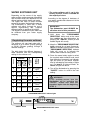
Alarm mute for the PROGRAMME
END
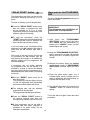
"DELAY START" button
The dishwasher start time can be set with
this button, delaying the start by 3, 6 or 9
hours.
The alarm for the programme end may be
muted as follows:
Proceed as follows to set a delayed start:
■ Press the "DELAY START" button (each
time the button is pressed the start
will be delayed by 3, 6 or 9 hours
respectively and the corresponding time
indicator light will illuminate).
IMPORTANT
The dishwasher must ALWAYS be off
before start of this procedure.
■ To start the countdown, press the
"START" button (the selected programme
indicator light will come on, while the set
time indicator light will start to flash).
1. Hold down the "PROGRAMME
SELECTION" button and at the same
time switch on the dishwasher by
pressing the "ON/OFF" button (a brief
audible signal will sound).
If a 9 hour delay is set, countdown will be
displayed by the 6h indicator light after 3
hours and the 3h indicator light after 6
hours.
2. Keep the "PROGRAMME SELECTION"
button pressed for at least 15 seconds
(during this time, 2 audible signals will
sound).
At the end of the last 3 hours (at the end
of countdown) the 3h indicator light will
stop flashing and remain on to indicate the
washing phase and the programme will
start automatically.
3. Release the button when the second
audible signal sounds (3 "PROGRAMME
SELECTION" indicator lights will come
on).
If countdown has not ended, whereby
the programme has not yet started, it is
possible to change or cancel the delayed
start and select another programme or to
select/deselect the option button, proceeding
as follows:
4. Press the same button again: the 3
indicator lights (which indicate that the
alarm is activated) will start flashing (to
indicate that the alarm is off).
■ Hold the "RESET" button down for at
least 5 seconds.
The programme indicator lights will turn
on and off individually and sequentially
and some audible signals will sound.
5. Turn off the dishwasher by pressing the
"ON/OFF" button to confirm the new
setting.
■ The delayed start and the selected
programme will be cancelled.
The programme indicator lights will flash.
To turn the alarm on again, follow the same
procedure.
■ Press the "DELAY START" button to
set another delayed start time (the
corresponding indicator light will turn on).
■ A new programme can be set after a
delayed time has been changed or
cancelled or an option button can be
selected or deselected.
22