1
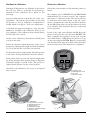
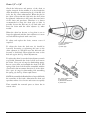
View of brake unit
Calibration
•Push ENTER min. two seconds. ”WATT” flashes.
To enter the calibration mode on the meter, press the
START / STOP and PROGRAM simultaneously for
at least two seconds.
•Adjust the workload in WATT alt. KPM / MIN with
(+/-) button.
•Confirm with SELECT.
•Press START / STOP to leave the command or wait
10 seconds.
For further description see sections "Mechanical"
resp. "Electronic calibration".
It is possible to view the current workload in kp. By
viewing the force in kp the value will change depending
of rpm and workload.
Brake unit can be adjusted while a test is running.
Monark 928 E
9