1
User Controls
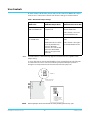
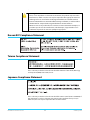
An internal Jumper block with 3 jumpers (J4) provides controls for HDMI audio, output
mode, and 8- or 10-bit video selection. Each of these settings are described below.
Table 1. Hi5 Internal Jumper Settings
Jumper #1
HDMI Video
Jumper #2
HDMI/DVI Output Mode
Installed (default) = 8-bit Installed (default) = HDMI
RGB 4:4:4 HDMI Video
output mode
Jumper #3
HDMI Embedded Audio Out
Installed (default) = 2channel HDMI audio
Audio channels 1 and 2 are
disembedded from SDI.
Removed = 10-bit YCbCr Removed = DVI output
4:2:2 HDMI Video
mode
NOTE: DVI mode should be
used only with DVI-only
monitors. Most DVI
monitors do not work with
video rates. Embedded
audio is not supported in
DVI mode.
NOTE:
Removed = 8-channel HDMI
audio
Audio channels 1 through 8
are disembedded from SDI.
SDI audio channels 1 and 2 will always appear on the RCA connectors, regardless of the
jumper setting.
To access this jumper, remove the four Phillips screws securing the back side of the Hi5
case. Once the case cover is removed, locate the jumper block. Jumper positions 1
through 3 are clearly marked on the circuit board next to the jumper J4.
1
2
3
JUMPER J4
Defaults Shown Here
1=ON, 2=ON, 3=ON
1
2
3
To keep an
“uninstalled” jumper
for future use, you
can place it over only
a single pin
NOTE:
Hi5 Mini-Converter v1.0r2
Removed jumpers can be stored inside the unit by installing them on only 1 pin.
6
www.aja.com