1
Getting Started
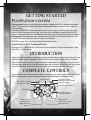
PLAYSTATION®3 system
Starting a game: Before use, carefully read the instructions supplied with the PS3™ computer entertainment
system. The documentation contains information on setting up and using your system as well as important
safety information.
Check that the MAIN POWER switch (located on the system rear) is turned on. Insert the Dragon Age: Origins
disc with the label facing up into the disc slot. Select the icon for the software title under [Game] in the PS3™
system’s home menu, and then press the S button. Refer to this manual for information on using the software.
Quitting a game: During gameplay, press and hold down the PS button on the wireless controller for at least
2 seconds. Then select “Quit Game” from the screen that is displayed.
Hint: To remove a disc, touch the eject button after quitting the game.
Saved data for PS3™ format software
Saved data for PS3™ format software is saved on the system’s hard disk. The data is displayed under “Saved
Game Utility” in the Game menu.
Introduction
Dragon Age: Origins is a modern re-imagination of an epic party-based fantasy role-playing game, dense with story
and tactical combat. Because Dragon Age: Origins doesn’t shy from that complex heritage, there’s a lot to know.
Since many of the game’s systems are deeply interrelated, keep a finger on the table of contents; you’ll need it
to find your way around when an explanation of one feature refers to another. One last note: while there was no
way to list the hundreds of spells and talents in here, you’ll find full explanations of them in the game.
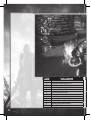
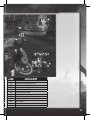
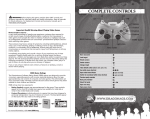
Complete Controls
Once you complete the character generation sequence described on p. 8, you will find yourself in control of your
character, and possibly in control of a second character as well, depending on the background story.
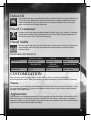
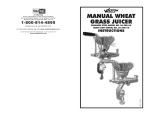
Open radial menu (hold)
Previous party member
Select full party
Switch to secondary
battle-menu shortcuts (hold)
Next party member
Use battle-menu shortcut
Change target
Take default action
(attack, talk, open, etc.)
Move character/
Lock target (click)
Manage characters
and quests
6
Rotate camera/
Center camera (click)
Open main menu













![MAPEAMENTO DE CONTROLE [CONTROLLER MAPPING]](http://vs1.manualzilla.com/store/data/006068957_1-5e2c8da72c516cb367b41ba39c141e7d-150x150.png)