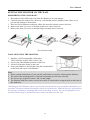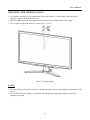
1
HS233 HSG 1155 User’s Manual OSD[4.393] Before operating the monitor, please read this manual thoroughly. This manual should be retained for future reference. This device complies with requirement of EMC directive 2004/108/EC with regard to Electromagnetic Compatibility, and 73/23/EEC and 93/68/EEC with regard to Low Voltage directive. Socket-outlet shall be near the equipment and shall be accessible. Trademark Notice: Hanns.G products incorporate High-Definition Multimedia Interface (HDMI TM) technology. HDMI, the HDMI Logo, and High-Definition Multimedia Interface are trademarks or registered trademarks of HDMI Licensing LLC in the United States and other countries., 2 User’s Manual RECYCLING INFORMATION We, the Hanns.G care very much about our environment protection strategy and firmly believe that it helps us have healthier earth via appropriate treatment and recycling of industrial technology devices at the end-of-life. These devices contain recyclable materials, which can be re-decomposed and re-integrated into brand-new marvels. On the contrary, other material can be classified to hazardous and poisoned substances. We strongly encourage you to contact the provided information to recycle this product. For more information, please visit www.hannsg.com 3 User’s Manual TABLE OF CONTENTS SAFETY NOTICE .................................................................................................. 5 PRECAUTIONS................................................................................................. 5 SPECIAL NOTES ON LCD MONITORS ...................................................... 6 BEFORE YOU OPERATE THE MONITOR ...................................................... 7 FEATURES......................................................................................................... 7 CHECKING THE CONTENTS OF THE PACKAGE .................................. 7 INSTALLATION INSTRUCTIONS ................................................................ 8 POWER............................................................................................................... 8 SETTING THE MONITOR ON THE WALL ................................................ 9 MAKING CONNECTIONS............................................................................ 10 ADJUSTING THE VIEWING ANGLE..........................................................11 OPERATING INSTRUCTIONS ......................................................................... 12 GENERAL INSTRUCTIONS......................................................................... 12 FRONT PANEL CONTROL .......................................................................... 13 HOW TO ADJUST A SETTINGS .................................................................. 14 PLUG AND PLAY............................................................................................ 16 TECHNICAL SUPPORT (FAQ) ......................................................................... 17 Q & A FOR GENERAL PROBLEMS ........................................................... 17 ERROR MESSAGE & POSSIBLE SOLUTIONS ....................................... 19 APPENDIX ............................................................................................................ 21 SPECIFICATIONS .......................................................................................... 21 4 User’s Manual SAFETY NOTICE 1. The changes or modifications not expressly approved by the party responsible for compliance could void the user's authority to operate the equipment. 2. Shielded interface cables and AC power cord, if any, must be used in order to comply with the emission limits. 3. The manufacturer is not responsible for any radio or TV interference caused by unauthorized modification to this equipment. It is the responsibilities of the user to correct such interference. 4. Only use attachments/accesories specified by the manufacturer. WARNING: To prevent fire or shock hazard, do not expose the monitor to rain or moisture. Dangerously high voltages are present inside the monitor. Do not open the cabinet. Refer servicing to qualified personnel only. PRECAUTIONS Do not use the monitor near water, e.g. near a bathtub, washbowl, kitchen sink, laundry tub, swimming pool or in a wet basement. Do not place the monitor on an unstable cart, stand, or table. If the monitor falls, it can injure a person and cause serious damage to the appliance. Use only a cart or stand recommended by the manufacturer or sold with the monitor. If you mount the monitor on a wall or shelf, use a mounting kit approved by the manufacturer and follow the kit instructions. Slots and openings in the back and bottom of the cabinet are provided for ventilation. To ensure reliable operation of the monitor and to protect it from overheating, be sure these openings are not blocked or covered. Do not place the monitor on a bed, sofa, rug, or similar surface. Do not place the monitor near or over a radiator or heat register. Do not place the monitor in a bookcase or cabinet unless proper ventilation is provided. The monitor should be operated only from the type of power source indicated on the label. If you are not sure of the type of power supplied to your home, consult your dealer or local power company. Unplug the unit during a lighting storm or when it will not be used for long period of time. This will protect the monitor from damage due to power surges. Do not overload power strips and extension cords. Overloading can result in fire or electric shock. Never push any object into the slot on the monitor cabinet. It could short circuit parts causing a fire or electric shock. Never spill liquids on the monitor. Do not attempt to service the monitor by yourself; opening or removing covers can expose you to dangerous voltages and other hazards. Please refer all servicing to qualified service personnel. The wall socket shall be installed near the equipment and shall be easily accessible. 5 User’s Manual SPECIAL NOTES ON LCD MONITORS The following symptoms are normal with LCD monitor and do not indicate a problem. Due to the nature of the fluorescent light, the screen may flicker during initial use. Turn off the Power Switch and then turn it on again to make sure the flicker disappears. You may find slightly uneven brightness on the screen depending on the desktop pattern you use. The LCD screen has effective pixels of 99.99% or more. It may include blemishes of 0.01% or less such as a missing pixel or a pixel lit all of the time. Due to the nature of the LCD screen, an afterimage of the previous screen may remain after switching the image, when the same image is displayed for hours. In this case, the screen is recovered slowly by changing the image or turning off the Power Switch for hours. If the screen suddenly flashes erratically or the backlighting fails, please contact your dealer or service center for repair. Do not attempt to repair the monitor yourself. Lamp Disposal LAMP(S) INSIDE THIS PRODUCT CONTAIN MERCURY AND MUST BE RECYCLED OR DISPOSED OF ACCORDING TO LOCAL, STATE OR FEDERAL LAWS. FOR MORE INFORMATION, CONTACT THE ELECTRONIC INDUSTRIES ALLIANCE AT WWW.EIAE.ORG. FOR LAMP SPECIFIC DISPOSAL INFORMATION CHECK WWW.LAMPRECYCLE.ORG. 6 User’s Manual BEFORE YOU OPERATE THE MONITOR FEATURES 58,4cm / 23” Wide Screen TFT Color LCD Monitor Crisp, Clear Display for Windows GP Green Product Ergonomic Design Space Saving, Compact Case Design CHECKING THE CONTENTS OF THE PACKAGE The product package should include the following items: LCD Monitor Cables and User manual Power Cord Audio Cable (optional) Warranty Card Quick Start Guide User’s Manual HDMI to DVI Cable (optional) DVI Cable (Dual link) 7 VGA Cable HDMI Cable (optional) User’s Manual INSTALLATION INSTRUCTIONS INSTALL REMOVE Figure.1. Installing and Removing the Base INSTALLATION: 1. Carefully place the monitor face down on a soft and flat surface (blanket, foam, cloth, etc) to prevent any damage to the monitor. 2. Align the base with the opening of the stand. 3. Snap the base into stand. A clear click sound will affirm that the base is connected correctly. 4. Verify that the base is securely attached to the stand by looking at the release button of the base is fully engaged in the slot of the stand. REMOVAL: 1. Carefully place the monitor face down on a soft and flat surface (blanket, foam, cloth, etc) to prevent any damage to the monitor. 2. Press the release button as indicated. 3. Follow the arrow direction to remove the base. POWER POWER SOURCE: 1. Make sure that the power cord is the correct type required in your area. 2. This LCD monitor has an Internal universal power supply that allows operation in either 100/120V AC or 220/240V AC voltage area (No user adjustment is required.) 3. Connect the AC-power cord one end to your LCD monitor’s AC-input socket, the other end to wall-outlet. 8 User’s Manual SETTING THE MONITOR ON THE WALL DISSEMBLING THE STAND BASE: 1. Disconnect all the cables and cords from the Monitor to prevent damage. 2. Carefully place the monitor face down on a soft and flat surface (blanket, foam, cloth, etc) to prevent any damage to the monitor. 3. Press the release button as indicated, follow the arrow direction to remove the base. 4. Remove the three (3) screws so that the stand cover can be removed. 5. Remove the three (3) screws so that the hinge assembly can be removed. (For reference only) WALL MOUNTING THE MONITOR: 1. Purchase a VESA compatible wall bracket: VESA 100x100, 4 holes, M4, 10 mm, 8 kg. 2. Locate your ideal Monitor position on the wall. 3. Fix the wall bracket firmly on the wall. 4. Secure the Monitor to the bracket using the 4 mount holes on the back and center of the Monitor. Note: Please read the instructions of your specific wall bracket to properly wall mount the Monitor. The pitch of the mounting holes is 100 mm horizontally and 100 mm vertically. The screws type required is metric: M4, 10 mm length. The Monitor stand base can be screwed on a table or a hard surface using the hole on the back of the stand base. *Installing the LCD Monitor requires special skill that should only be performed by qualified service personnel. Customers should not attempt to do the work themselves. Hanns.G bears no responsibility for improper mounting or mounting that results in accident or injury. You can ask qualified service personnel about using an optional bracket to mount the Monitor to the wall. 9 User’s Manual MAKING CONNECTIONS CONNECTING TO A PC Turn off your computer before performing the procedure below. 1. Connect one end of the VGA cable to the back of the monitor and connect the other end to the computer’s VGA port. 2. Connect one end of the DVI cable to the back of the monitor and connect the other end to the computer’s DVI port. 3. You must use the enclosed dual-link DVI cable for 120 Hz and 3D functionality. 4. Connect one end of the HDMI to DVI cable (optional) to the back of the monitor and connect the other end to the computer’s DVI port. 5. Connect one end of the HDMI cable (optional) to the back of the monitor and connect the other end to the computer’s HDMI port. 6. Connect the audio cable (optional) between the monitor’s HDMI Line Out and the external audio amplifier unit. 7. Plug one end of the AC power cord to the LCD monitor’s AC input socket, and the other end to Wall outlet. 8. Turn on your monitor and computer. 1 3 5 Figure.2. Connecting to a PC VGA Input 2 DVI Input HDMI Input 4 HDMI Line Out Power AC Input 10 User’s Manual ADJUSTING THE VIEWING ANGLE For optimal viewing it is recommended to look at the full face of the monitor, then adjust the monitor’s angle to your own preference. Hold the stand so you do not topple the monitor when you change the monitor’s angle. You are able to adjust the monitor’s angle from -5 to 15. Figure.3. Monitor Angle NOTES: Do not touch the LCD screen when you change the angle. It may cause damage or break the LCD screen. Be careful not to place fingers or hands near the hinges when tilting the monitor, otherwise pinching can result. 11 User’s Manual OPERATING INSTRUCTIONS GENERAL INSTRUCTIONS Press the power button to turn the monitor on or off. The other control buttons are located on the front panel of the monitor (See Figure 4). By changing these settings, the picture can be adjusted to your personal preferences. The power cord should be connected. Connect the Signal cable from the monitor to the VGA card. Press the power button to turn on the monitor. The power indicator will light up. Menu / Enter ▲ Left navigate/Brightness adjustment button ▼ Right navigate Auto adjustment / Return Input source change (Press 5 seconds) Power Button Figure.4. Control Panel Buttons 12 User’s Manual FRONT PANEL CONTROL Power Button: Press this button to switch ON/OFF of monitor’s power. Power Indicator: Blue — Power On mode. Orange — Power Saving mode. MENU: 1. Turn the OSD menu on. 2. Enter sub menu when OSD menu is ON. Adjust ▲▼: 1. Invalid when the OSD menu is off. 2. Navigate through adjustment icons when OSD is ON or adjust a function when function is activated. 【 i 】Button: 1. Press this button will start 「Auto Adjust」 function when the OSD menu is off. (The auto adjustment function is used to optimize the「horizontal position」,「vertical position」,「clock」, and「phase」). 2. When the OSD menu is off , press this button for 5 seconds to select one of the following input source 「VGA」,「DVI」,「HDMI」. 3. Exit current menu when OSD is ON. Hotkeys: 1. Power Lock and Unlock: Press the【MENU】and【▼】keys at the same time for 10 seconds to lock or unlock the power button. 2. OSD Lock and Unlock: Press the【MENU】and【▲】keys at the same time for 10 seconds to lock or unlock OSD buttons. NOTES: Do not install the monitor in a location near heat sources such as radiators or air dusts, or in a place subject to direct sunlight, or excessive dust or mechanical vibration or shock. Save the original shipping box and packing materials, as they will come in handy if you ever have to ship your monitor. For maximum protection, repackage your monitor as it was originally packed at the factory. To keep the monitor looking new, periodically clean it with a soft cloth. Stubborn stains may be removed with a cloth lightly dampened with a mild detergent solution. Never use strong solvents such as thinner, benzene, or abrasive cleaners, since these will damage the cabinet. As a safety precaution, always unplug the monitor before cleaning it. 13 User’s Manual HOW TO ADJUST A SETTINGS PICTURE BRIGHTNESS Adjust the brightness value of the display according to your preference. Select「BRIGHTNESS」option to adjust the brightness value. CONTRAST Adjust the contrast value of the display according to your preference. Select「CONTRAST」option to adjust the contrast value. H-POSITION Select the 「H-POSITION」 option to shift the screen image to the left or right. Enter the option and adjust the level. [For VGA only] V-POSITION Select the 「V-POSITION」 option to shift the screen image up or down. Enter the option and adjust the level. [For VGA only] PHASE Select the「PHASE」option to automatic optimize image. [For VGA only] CLOCK Select the 「CLOCK」option to reduce the vertical flicker of characters on the screen. Enter the option and adjust the level. [For VGA only] COLOUR-TEMP Adjust the color temperature value of the display according to your preference: 9300 /7500/ 6500/sRGB/USER. If you select USER option, 1. To adjust the red, enter the「R」option and adjust the level. 2. To adjust the green, enter the「G」option and adjust the level. 3. To adjust the blue, enter the「B」option and adjust the level. AUTO ADJUST The auto adjustment function is used to optimize the 「 H-POSITION 」 , 「 V-POSITION 」 , 「 CLOCK 」 and 「PHASE」. [For VGA Input only] OSD OSD TIMEOUT Select 「OSD TIME OUT」option to set the OSD time out from 5 to 30 seconds. Enter the option and adjust the level. DISPLAY DISPLAY MODE Select the 「DISPLAY MODE」option to change between Full and Aspect. OPTICOLOR Select the 「OPTICOLOR」 option to select optimal mode for Office or Movie or Game. 14 User’s Manual DCR Select the「DCR」option to switch the function On or Off ECO Select the「ECO」option to switch the function On or Off. SHARPNESS Select the「SHARPNESS」option to adjust the sharpness of the display. Set the value from 0 to 100. OD Select the「OD」option to switch the function On or Off. OTHER SETTINGS LANGUAGE Select 「LANGUAGE」 option to change the language of the OSD. Enter the option and select a language. [Reference only, the OSD Language depends on the selected model] INPUT SELECT Select the 「INPUT SELECT」option to change between VGA or DVI or HDMI source. RESET Select the 「RESET」option to reset to the monitor’s default setting. This will erase the current settings. INFORMATION INFORMATION Display Resolution/Horizontal frequency/Vertical frequency/Input source/SN number information. 15 User’s Manual PLUG AND PLAY Plug & Play DDC2B Feature This monitor is equipped with VESA DDC2B capabilities according to the VESA DDC STANDARD. It allows the monitor to inform the host system of its identity and, depending on the level of DDC used, communicate additional information about its display capabilities. The DDC2B is a bidirectional data channel based on the I²C protocol. The host can request EDID information over the DDC2B channel. THIS MONITOR WILL APPEAR TO BE NON-FUNCTIONAL IF THERE IS NO VIDEO INPUT SIGNAL. IN ORDER FOR THIS MONITOR TO OPERATE PROPERLY, THERE MUST BE A VIDEO INPUT SIGNAL. This monitor meets the Green monitor standards as set by the Video Electronics Standards Association (VESA) and/or the United States Environmental Protection Agency (EPA) and The Swedish Confederation Employees (NUTEK). This feature is designed to conserve electrical energy by reducing power consumption when there is no video-input signal present. When there is no video input signal this monitor, following a time-out period, will automatically switch to power saving mode. This reduces the monitor's internal power supply consumption. After the video input signal is restored, full power is restored and the display is automatically redrawn. The appearance is similar to a "Screen Saver" feature except the display is completely off. The display is restored by pressing a key on the keyboard, or clicking the mouse. 16 User’s Manual TECHNICAL SUPPORT (FAQ) Q & A FOR GENERAL PROBLEMS PROBLEM & QUESTION POSSIBLE SOLUTION Power LED is not on *Check if the Power Switch is in the ON position. *Power Cord should be connected. No Plug & Play *Check if the PC system is Plug & Play compatible. *Check if the Video Card is Plug & Play compatible. *Check if any plug pins on the VGA , DVI or HDMI connector are bent. The display is too dark or too bright. *Adjust the Contrast and Brightness Controls. Picture bounces or a wave pattern is present in the picture *Move electrical devices that may cause electrical interference. The power LED is ON (blue) but there’s no video or no picture. *Computer Power Switch should be in the ON position. *Computer Video Card should be snugly seated in its slot. *Make sure monitor’s video cable is properly connected to the computer. *Inspect monitor’s video cable and make sure none of the pins are bent. *Make sure computer is operational by hitting the CAPS LOCK key on the keyboard while observing the CAPS LOCK LED. The LED should either turn ON or OFF after hitting the CAPS LOCK key. Missing one of the primary colors (RED, GREEN, or BLUE) *Inspect the monitor’s video cable and make sure that none of the pins are bent. Screen image is not centered or sized properly. * Adjust pixel frequency CLOCK or press i Button. Picture has color defects (White does not look white) *Adjust RGB color or select color temperature. The screen resolution needs to be adjusted *Use win 2000/ME/XP Right click anywhere on desktop and select Properties>Settings>Screen Resolution. Use the silder to adjust the reslution and click Apply. No HDMI sound is outputted from monitor’s audio line out *Make sure cable connection is correct. *Make sure the video input source is “HDMI mode” *Make sure graphic card output is HDMI with audio. *Make sure PC audio volume is not mute. 17 User’s Manual Addendum related to Windows 7 When you encounter display problem under Windows 7, you need to do the following: 1. Make sure your PC computer (Hardware requirement) can support Windows 7. 2. Make sure your video card can run Windows 7. 3. If your video card can support Windows 7, need to install the latest Win 7 driver of your video card. Suggest to do the following: 1. Install the latest Windows 7 video driver of your video card. 2. Try to use the recommended display resolution that is supported by the monitor. 3. If the recommended display resolution is not working, try the second recommended display resolution. 35,56cm / 14” (16:9) 39,6cm / 15.6” (16:9) 40,64cm / 16” (16:9) 43,2cm / 17” (16:10) 47cm / 18.5” (16:9) 48,3cm / 19” (5:4) 48,3cm / 19” (16:10) 51cm / 20” (16:9) 56cm / 22” (16:10) 54,6cm / 21.5” (16:9) 58,4cm / 23” (16:9) 60cm / 23.6” (16:9) 62,5cm / 24.6 (16:9) 70cm / 27.5” (16:10) 1 1366×768@60Hz 1366×768@60Hz 1366×768@60Hz 1440×900@60Hz 1366×768@60Hz 1280×1024@60Hz 1440×900@60Hz 1600×900@60Hz 1680×1050@60Hz 2 1366×768@50Hz 1366×768@75Hz 1366×768@50Hz 1440×900@75Hz 1366×768@75Hz 1280×1024@75Hz 1440×900@75Hz 1600×900@50Hz 1680×1050@50Hz 1920×1080@60Hz 1920×1080@50Hz 1920×1200@60Hz 1920×1200@50Hz And if you still have display problem after doing the above procedure, please visit HANNS.G support and Service Website: http://www.hannsg.com Windows is a registered trademark of Microsoft Corporation. 18 User’s Manual ERROR MESSAGE & POSSIBLE SOLUTIONS CABLE NOT CONNECTED: 1. Check that the signal-cable is properly connected, If the connector is loose, tighten the connector’s screws. 2. Check the signal-cable’s connection pins for damage. INPUT NOT SUPPORT : Your computer has been set to unsuitable display mode, set the computer to display mode given in the following table. FACTORY PRESET TIMING TABLE: (VGA AND DVI INPUTS) MODE RESOLUTION 1 2 3 4 5 6 7 8 9 10 11 12 13 14 15 16 17 18 19 20 21 22 23 24 25 26 27 640×480 @60Hz 640×480 @67Hz 640×480 @72Hz 640×480 @75Hz 720×400 @70Hz 800×600 @56Hz 800×600 @60Hz 800×600 @72Hz 800×600 @75Hz 832×624 @75Hz 1024×768 @60Hz 1024×768 @70Hz 1024×768 @75Hz 1152×870 @75Hz 1152×864 @75Hz 1280×720 @60Hz 1280×800 @60Hz 1280×960 @60Hz 1280×1024 @60Hz 1280×1024 @75Hz 1360×768 @60Hz 1440×900 @60Hz 1440×900 @75Hz 1680×1050 @60Hz 1600×1200 @60Hz 1920×1080 @60Hz 1920×1080 @60Hz HORIZONTAL FREQUENCY (KHz) 31.469 35.000 37.861 37.500 31.469 35.156 37.879 48.077 46.875 49.722 48.363 56.476 60.023 68.681 67.500 44.955 49.702 60.000 63.981 79.976 47.712 55.935 70.635 65.290 75.000 67.500 66.587 19 VERTICAL FREQUENCY (Hz) 59.941 66.660 72.809 75.000 70.087 56.250 60.317 72.188 75.000 74.550 60.004 70.069 75.029 75.062 75.000 59.940 59.810 60.000 60.020 75.025 60.015 59.887 75.000 59.954 60.000 60.000 59.934 User’s Manual (HDMI INPUTS) Primary Video Format Timings MODE 1 2 3 4 5 6 7 RESOLUTION 640×480p @ 60Hz 720×480p @ 60Hz 1280×720p @ 60Hz 720×576p @ 50Hz 1280×720p @ 50Hz 1920×1080i @ 60Hz 1920×1080i @ 50Hz Secondary Video Format Timings MODE RESOLUTION 1 1920x1080p @ 25Hz 2 1920x1080p @ 30Hz 3 1920x1080p @ 50Hz 4 1920x1080p @ 60Hz ** We ensure that the monitor can be lighted under interlace signal mode, but we can not guarantee the image quality. 20 User’s Manual APPENDIX SPECIFICATIONS LCD Panel Analog Signal Input Driving system TFT Color LCD Size 58,4 cm / 23”Diagonal Pixel pitch 0.2655 mm(H) x 0.2655 mm(W) H-Frequency 30 kHz – 83 kHz V-Frequency 55 Hz – 76 Hz H-Frequency 30 kHz – 138 kHz (For Nvidia 3D mode up to 137.86 kHz) V-Frequency 56 Hz – 120 Hz (For Nvidia 3D mode up to 120 Hz) Digital Signal Input Display Colors 16.7M Colors Max. Resolution FULL HD 1920 x 1080 @60Hz Plug & Play VESA DDC2BTM Power consumption ON Mode 55W (Max) Power Saving Mode <2W OFF Mode <1W Input Terminal VGA DVI HDMI Maximum Screen Size Hor. : 509.76 mm Ver. : 286.74 mm Power Source 100-240V ~ 1.5A 50/60Hz Environmental Considerations Operating Temp:5° to 35°C Storage Temp.: -25° to 60°C Operating Humidity: 20% to 90% Dimensions 549.0 (W) x401.4 (H) x 191.7 (D)mm 21.6”(W) x 15.8”(H) x 7.5”(D) Weight (NW) 4.9 kg *** The above specification is subject to actual product specification and is subject to change without prior notice. NOTES: The Maximum Resolution will depends on the display card supporting. Related issue can refer to www.hannsg.com FAQ section. 21