1
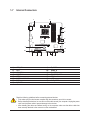
1-5 Installing an Expansion Card
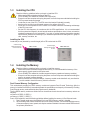
Read the following guidelines before you begin to install an expansion card:
•• Make sure the motherboard supports the expansion card. Carefully read the manual that came
with your expansion card.
•• Always turn off the computer and unplug the power cord from the power outlet before installing an
expansion card to prevent hardware damage.
1-6 Back Panel Connectors
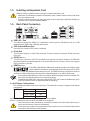
USB 2.0/1.1 Port
The USB port supports the USB 2.0/1.1 specification. Use this port for USB devices such as a USB
keyboard/mouse, USB printer, USB flash drive and etc.
PS/2 Keyboard/Mouse Port
Use this port to connect a PS/2 mouse or keyboard.
D-Sub Port
The D-Sub port supports a 15-pin D-Sub connector. Connect a monitor that supports D-Sub connection
to this port.
DVI-D Port (Note 1)
The DVI-D port conforms to the DVI-D specification and supports a maximum resolution of 1920x1200
(the actual resolutions supported depend on the monitor being used). Connect a monitor that supports
DVI-D connection to this port.
HDMI Port (Note 2)
The HDMI (High-Definition Multimedia Interface) provides an all-digital audio/
video interface to transmit the uncompressed audio/video signals and is HDCP
compliant. Connect the HDMI audio/video device to this port. The HDMI Technology can support a maximum
resolution of 1920x1200 but the actual resolutions supported depend on the monitor being used.
•• After installing the HDMI device, make sure to set the default sound playback device to HDMI. (The
item name may differ depending on your operating system.)
•• Please note the HDMI audio output only supports AC3, DTS and 2-channel-LPCM formats. (AC3
and DTS require the use of an external decoder for decoding.)
A. Dual Display Configurations:
This motherboard provides three video output ports. The table below shows the supported dual display
configurations.
Dual Display
Combination Supported or Not
D-Sub + DVI-D
Yes
D-Sub + HDMI
Yes
DVI-D + HDMI
No
(Note 1) The DVI-D port does not support D-Sub connection by adapter.
(Note 2) Simultaneous output for DVI-D and HDMI is not supported.
•• When removing the cable connected to a back panel connector, first remove the cable from your
device and then remove it from the motherboard.
•• When removing the cable, pull it straight out from the connector. Do not rock it side to side to prevent
an electrical short inside the cable connector.
- 10 -