1
Knowing the Parts
Right Side
1
1
3
4
5
6
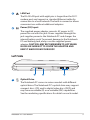
The stereo headphone jack (1/8 inch) is used to connect
the Notebook PC’s audio out signal to amplified speakers
or headphones. Using this jack automatically disables the
built-in speakers.
Microphone Input Jack
The mono microphone jack (1/8 inch) can be used to
connect an external microphone or output signals from
audio devices. Using this jack automatically disables the
built-in microphone. Use this feature for video conferencing,
voice narrations, or simple audio recordings.
2.0 USB Port (2.0/1.1)
4
3
Headphone Output Jack
2
2
The USB (Universal Serial Bus) port is compatible with USB
2.0 or USB 1.1 devices such as keyboards, pointing devices,
cameras, hard disk drives, printers, and scanners connected
in a series up to 12Mbits/sec (USB 1.1) and 480Mbits/sec
(USB 2.0). USB allows many devices to run simultaneously
on a single computer, with some peripherals acting as
additional plug-in sites or hubs. USB supports hot-swapping
of devices so that most peripherals can be connected or
disconnected without restarting the computer.
Display (Monitor) Output
The 15-pin D-sub monitor port supports a standard VGAcompatible device such as a monitor or projector to allow
viewing on a larger external display.
Notebook PC User Manual