1
TROUBLESHOOTING
Q: After I pair my Free to a Windows PC, I get a warning message that “Device driver software was not successfully installed.”
A: This is OK! Because the Free is a true cross-platform controller, it must present itself as multiple types of devices to the host
system. Your Free controller is still working properly and can be used to play games.
Q: When I connect to a mobile device (either Android or iOS) in Arcade mode, I can’t access my touch screen keyboard.
A: While in Arcade mode, the Free controller is technically recognized as a Bluetooth keyboard, which will cause a phone or tablet’s
on-screen keyboard to disappear. Unfortunately, you will have to have to unpair or turn off the Free during the times you want to
type.
Q: While I am installing the SteelSeries Engine, it unpairs my Free controller.
A: Unfortunately, this is an unavoidable part of updating the drivers. Furthermore, you'll notice if you look at the device list - the
Free controller is still considered connected by Windows. It is very important that you do not remove the Free from the devices list.
To fix this, simply turn the controller off then turn it back on.
Q: What games will work with the Free controller on my device?
A: For Windows and Mac OS X computers, just about any game that works with mouse/keyboard will work with the Free controller,
thanks to the SteelSeries Engine.
For Android or iOS devices, you can find a list of compatible games using the following links:
Android: http://www.steelseries.com/free/android
iOS: http://www.steelseries.com/free/ios
Q: What features are available in the Android version of the SteelSeries Engine?
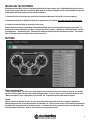
A: The Android version of the SteelSeries Engine is a great assistant for helping first time users set up their Free controller with
their tablet or phone. Once paired, the application will also allow you test out your controller, providing feedback on button presses
and analog joystick movements. Also included in the application are links to the quick start guide as well as a list of compatible
games.
CONCLUSION
This concludes the user manual for the SteelSeries Free Mobile Controller. We hope this manual answered any questions
you may have had. If you have any further questions – please refer to our website: http://faq.steelseries.com
Good luck, and have fun.
8