1
M A G M A
RedHat 9 Linux
Once the EB4 has been installed in a RedHat9-based system, its
installation can be verified by typing the following command lines:
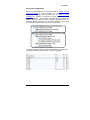
lspci –t Displays the overall structure of the PCIe expansion system
lspci –vv Lists additional information about the PCIe switch (in our
case it will list the Integrated Device Technology (IDT) information.
Ispci –vvv Displays the most comprehensive information about the
expansion system.
Below we’ve shown the output corresponding to the lscpi command:
00:00.0 Host bridge: Intel Corporation 82945G/GZ/P/PL Memory
Controller Hub (rev 02)
00:01.0 PCI bridge: Intel Corporation 82945G/GZ/P/PL PCI
Express Root Port (rev 02)
00:1b.0 Audio device: Intel Corporation 82801G (ICH7 Family) High
Definition Audio Controller (rev 01)
00:1c.0 PCI bridge: Intel Corporation 82801G (ICH7 Family) PCI
Express Port 1 (rev 01)
00:1c.2 PCI bridge: Intel Corporation 82801G (ICH7 Family) PCI
Express Port 3 (rev 01)
00:1d.0 USB Controller: Intel Corporation 82801G (ICH7 Family)
USB UHCI #1 (rev 01)
00:1d.1 USB Controller: Intel Corporation 82801G (ICH7 Family)
USB UHCI #2 (rev 01)
00:1d.2 USB Controller: Intel Corporation 82801G (ICH7 Family)
USB UHCI #3 (rev 01)
00:1d.3 USB Controller: Intel Corporation 82801G (ICH7 Family)
USB UHCI #4 (rev 01)
00:1d.7 USB Controller: Intel Corporation 82801G (ICH7 Family)
USB2 EHCI Controller (rev 01)
00:1e.0 PCI bridge: Intel Corporation 82801 PCI Bridge (rev e1)
18