1
4. Troubleshooting
Situations and their Resolutions
4. Troubleshooting
Situations and their Resolutions
This section explains some of the situations in which your system may operate in an
unexpected manner, and some possible resolutions.
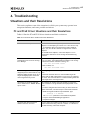
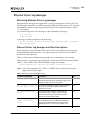
FC and FCoE Driver Situations and their Resolutions
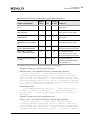
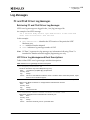
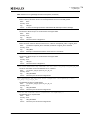
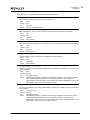
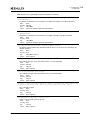
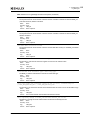
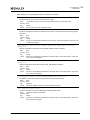
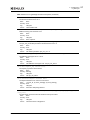
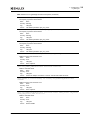
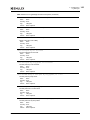
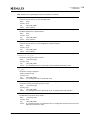
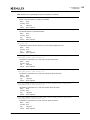
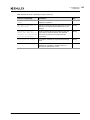
Table 4-1 lists the FC and FCoE driver situations and their resolutions.
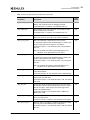
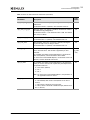
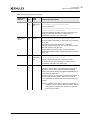
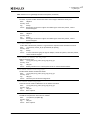
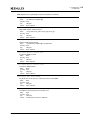
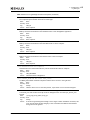
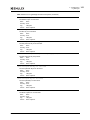
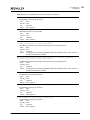
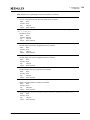
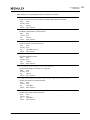
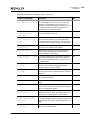
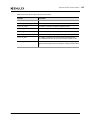
Table 4-1 FC and FCoE Driver Situations and their Resolutions
Situation
Resolution
FC link fails to come up.
If an FC link fails to come up, verify that an 8 or 16 Gb/s
adapter is not attempting to connect to a 1 Gb/s device. Only
2, 4, and 8 Gb/s devices are supported on 8 Gb/s adapters.
Only 2, 4, 8, and 16 Gb/s devices are supported on 16 Gb/s
adapters.
For LP21000 series adapters, ensure the adapter is not in
maintenance mode and it is not running the manufacturing
firmware.
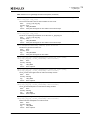
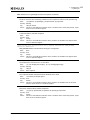
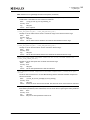
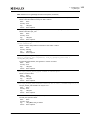
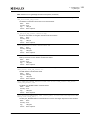
“Authentication is enabled but
If you see this message in /var/log/messages and the adapter is
authentication service is not running.” in an error state, the fcauthd daemon probably is not running.
Error Message
To determine whether fcauthd is running, run
/etc/init.d/fcauthd status.
To start fcauthd, run
/etc/init.d/fcauthd start.
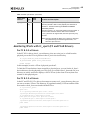
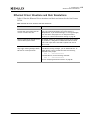
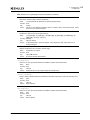
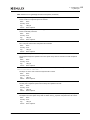
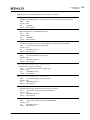
If a SAN configuration has 256 targets
mapped by the FC and FCoE driver, any
additional added targets do not get a
target ID mapping by the driver and
cause target discovery to fail.
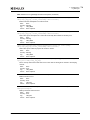
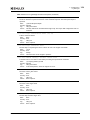
Removing targets or re-initializing the link does not solve this
issue.
Unload and reload the driver to reset available target IDs.
Ensure that the SAN configuration is correct prior to rebooting
the driver. This clears the driver’s consistent binding table and
frees target IDs for new target nodes.
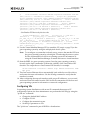
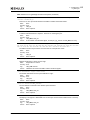
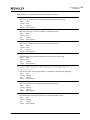
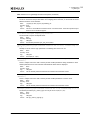
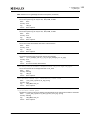
rmmod fails to unload FC and FCoE
This message can appear when you attempt to remove the
driver module due to “ERROR: Module driver and there is a Logical Volume Group dependent on the
lpfc is in use.”
driver.
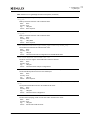
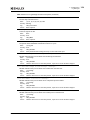
If you have configured boot from a SAN, you must reboot the
system. Otherwise, use these steps to resolved this situation:
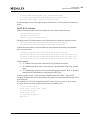
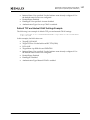
1) Make the Logical Volume Group unavailable. Type
lvchange -a n xxxxxxx
The “xxxxxxx” parameter is the Volume Group Name.
2) Stop the OneCommand Manager application.
3) Stop Device Mapper.
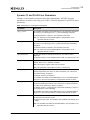
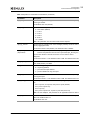
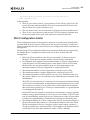
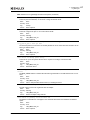
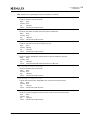
rmmod of LPFC driver hangs and
module reference count is 0.
Emulex Drivers for Linux User Manual
Due to a small race condition in the kernel, it is possible for an
rmmod command to hang. Issue the “rmmod -w” command. If
this does not help, reboot the computer.
P009417-02A Rev. A
60