1
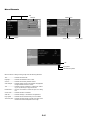
Part Names of the Projector
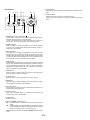
Monaural Speaker (1W)
Controls (See page E-7)
Zoom Lever
Lamp Cover (See page E-30)
Focus Ring
Lamp Cover Screw
Lens
Ventilation (outlet)
Heated air is exhausted from here
Adjustable Tilt Foot Lever
(See page E-18)
Adjustable Tilt Foot
(See page E-18)
Adjustable Tilt Foot Lever
(See page E-18)
Lens Cap
Adjustable Tilt Foot (See page E-18)
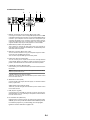
Remote Sensor (See page E-10)
Remote Sensor
(See page E-10)
Ventilation (inlet) / Filter Cover (inlet)
Built-in Security Slot (
Main Power Switch
When you plug the supplied power cable into
an active wall outlet and turn on the Main
Power switch, the POWER indicator turns
orange and the projector is in standby mode.
(See page E-17)
)*
AC Input
Connect the supplied power cable's twopin plug here, and plug the other end into
an active wall outlet. (See page E-16)
* This security slot supports the MicroSaver® Security System. MicroSaver® is a registered trademark of Kensington Microware Inc. The logo is
trademarked and owned by Kensington Microware Inc.
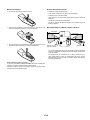
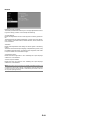
Attaching the lens cap
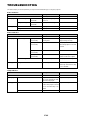
Attaching the supplied carrying handle
To attach the lens cap to the bottom with the supplied string and rivet:
You can carry the projector by attaching the supplied carrying handle
securely to the projector.
To attach the supplied carrying handle, use the supplied flathead screwdriver and two screws.
1. Thread the string through the hole on the lens cap and then tie a knot
in the string.
2. Use the rivet to attach the
string to the bottom of the
projector.
CAUTION:
When carrying the projector by the carrying handle, make sure the
two screws that attach the carrying handle to the projector cabinet
are tight.
E-6