Download BenQ MX703 User Guide Manual

Transcript
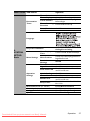
Obtaining a preferred projected image size
The distance from the projector lens to the screen, the zoom setting, and the video format
each factors in the projected image size.
Projection dimensions
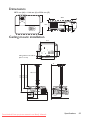
Refer to "Dimensions" on page 55 for the center of lens dimensions of this projector
before calculating the appropriate position.
Minimum zoom
Maximum zoom
Screen
Center of lens
H
H
Diagonal
Diagonal
W
W
Vertical offset
Projection distance
MX520
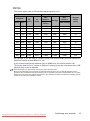
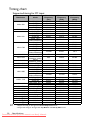
The screen aspect ratio is 4:3 and the projected picture is 4:3
Screen size
Diagonal
Inch
mm
Projection distance (mm)
W
(mm)
H
(mm)
Min
distance
(max.
zoom)
Average
Max
distance
(min.
zoom)
Vertical
offset
(mm)
30
762
610
457
1132
1189
1245
46
40
1016
813
610
1509
1585
1660
61
50
1270
1016
762
1887
1981
2075
76
60
1524
1219
914
2264
2377
2491
91
80
2032
1626
1219
3019
3170
3321
122
100
2540
2032
1524
3774
3962
4151
152
120
3048
2438
1829
4528
4755
4981
183
150
3810
3048
2286
5660
5943
6226
229
200
5080
4064
3048
7547
7925
8302
305
220
5588
4470
3353
8302
8717
9132
335
250
6350
5080
3810
9434
9906
10377
381
300
7620
6096
4572
11321
11887
12453
457
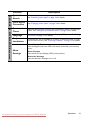
For example, if you are using an 120-inch screen, the recommended projection distance is
4755 mm and the vertical offset is 183 mm.
If your measured projection distance is 6.0 m (6000 mm), the closest match in the
"Projection distance (mm)" column is 5943 mm. Looking across this row shows that a 150''
(about 3.8 m) screen is required.
14
Positioning your projector
Downloaded From projector-manual.com BenQ Manuals