1
To ensure safety while driving
and to comply with laws,
drivers should not watch video or
operate the video device while driving.
Content
Precaution...................................... 2
Automatic Memory Storing &
Safety Information......................... 3
Program Scanning....................... 18
Disc Note....................................... 4
RDS function.................................. 18
Installation .................................... 5
Media Operation............................. 20
Electric Connection ...................... 7
Basic Operation .............................. 21
Remote Control ............................ 8
Selecting Play Mode ........................ 21
Basic Operation ............................10
On-Screen Display Function ............. 22
Loading/Ejecting a DISC ................. 10
Digital Video Special Function........24
Open/Close Monitor and Angle
Multi-Subtitle Language function....... 24
Adjustment......................... ........ 10
Multi-audio language Function.......... 24
Main Menu Operation...................... 11
Multi-angle Function........................ 24
Setting animation........................... 11
Title menu function .......................... 24
Setting disc.................................... 12
A-B Repeat function......................... 25
Setting radio................................... 12
Program function............................. 25
Setting bluetooth............................ 12
Step function................................... 25
Setting wallpaper............ ................12
Slow speed function......................... 25
Version about..................................12
Bluetooth Operation..................... 26
Setting time.......... ......................... 12
AUX Operation ............................... 29
Setting audio mode......................... 12
AV Operation.................................. 30
Setting video mode......................... 13
USB Operation ............................... 31
Setting OSD language.................... 13
Card Operation .............................. 31
Setting illumination color................. 13
SWC Operation.............................. 32
TFT display calibration. .................. 13
Parental Control............................ 33
Rear View Camera ........................ 13
Region Code.................................. 34
Control Panel ................................14
Specification ................................. 35
Unit keys ........................................14
Troubleshooting.............................36
Radio Operation............................ 17
Listening to the radio ...................... 17
Storing and Listening to a memory
station ........................................ 17
-1-
Precaution
THANK YOU FOR PURCHASING A BOSS AUDIO MULTIMEDIA PLAYER .
Before operating the unit, read this manual thoroughly and keep it handy
for future reference .
To avoid injury or accident , read the following precautions before
installing and operating the unit .
ON INSTALLATION
DO NOT install any receiver in locations where;
- it may obstruct the steering wheel and gearshift lever operations, as this
may result in a traffic accident.
- it may obstruct the operation of safety devices such as air bags, as this
may result in a fatal accident.
- it may obstruct visibility.
DO NOT operate any receiver while manipulating the steering wheel, as
this may result in a traffic accident.
The driver must not watch the monitor while driving.
IF THE DRIVER watches the monitor while driving, it may lead to
carelessness and cause an accident.
IF YOU NEED to operate the receive while driving, be sure to look ahead
carefully or you may be involved in a traffic accident.
IF THE PARKING BRAKE is not engaged.“ ParkingBrake” flashes on the
monitor, and no playback picture will be shown.
- This warning appears only when the parking brake wire is connected to
the parking brake system built in the car ( refer to the electric connection)
ABOUT THE LIQUID CRYSTAL DISPLAY (LCD) PANEL
Do not press on the LCD panel on the unit as doing so can distort the
picture or cause a malfunction . The picture may become unclear , or the
LCD panel may be damaged .
NOTES ON CLEANING
-Clean the LCD panel with a slightly damp soft cloth.
-Do not use solvents such as benzine, thinner, commercially available
cleaners or antistatic spray .
- Do not use alcohol to clean the screen .
If your car was parked in a cold or hot place, the picture may not be clear .
The monitor is not damaged . The picture will become clear the temperature in your car becomes normal .
-2-
Safety Information
CAUTION:
THIS DIGITAL VIDEO PLAYER IS A CLASS I LASER PRODUCT. HOWEVER
THIS DIGITAL VIDEO PLAYER USES A VISIBLE/INVISIBLE LASER BEAM
WHICH COULD CAUSE .
HAZARDOUS RADIATION EXPOSURE IF DIRECTED. BE SURE TO OPERATE
THE DIGITAL VIDEO PLAYER CORRECTLY AS INSTRUCTED.
USE OF CONTROLS OR ADJUSTMENTS OR PERFORMANCE OF
PROCEDURES OTHER THAN THOSE SPECIFIED HEREIN MAY RESULT IN
HAZARDOUS RADIATION EXPOSURE.DO NOT OPEN COVERS AND DO NOT
REPAIR YOURSELF. REFER SERVICING TO QUALIFIED PERSONNEL.
WARNING:
TO REDUCE THE RISK OF FIRE OR ELECTRIC SHOCK, DO NOT EXPOSE THIS
EQUIPMENT TO RAIN OR MOISTURE.
TO REDUCE THE RISK OF FIRE OR ELECTRIC SHOCK, AND ANNOYING
INTERFERENCE, USE ONLY THE RECOMMENDED ACCESSORIES.
THIS DEVICE IS INTENDED FOR CONTINUOUS OPERATION.
This product incorporates copyright protection technology that is protected
by method claims of certain U.S. Patents and other intellectual property rights
owned by Macrovision Corporation and other rights owners.Use of this
copyright protection technology must be authorized by Macro vision Corporation,
and is intended for home and other limited viewing uses only unless
otherwise authorized by Macrovision Corporation. Reverse engineering or
disassembly is prohibited.
REGION MANAGEMENT INFORMATION:
This Digital Video Player is designed and manufactured to respond to the Region
Management Information that is recorded on a Digital Video disc. If the Region
number described on the Digital Video disc does not correspond to the Region
number of this Digital Video Player, this Digital Video Player cannot play this disc.
-3-
Disc Note
Disc formats supported by this
player
Digital Digital
Video Video
Audio and Video
Disc size 12 cm
VCD
VCD
Audio and Video
Disc size 12 cm
CD
CD
Audio
Disc size 12 cm
MP3
MP3
Audio
Disc size 12 cm
Discs which cannot be played
with this player
Digital Video-RAM
CDV
CDG
Handling and Cleaning
Dirt, dust, scratches and warping disc
will cause misoperation.
Do not place stickers or make
scratches on discs.
Do not warp discs.
A disc should always be kept in its
case when not in use to prevent from
damaging.
Do not place discs in the following
places:
1.Direct sunlight
2.Dirty, dusty and damp areas
3.Near car heaters
4.On the seats or dashboard
Disc Cleaning
Use a dry soft cloth to wipe the surface.
If the disc is quite dirty, use a soft cloth
slightly moistured with isopropyl (rubbing)
alcohol. Never use solvents such as
benzine, thinner or conventional record
cleaners as they may mar the surface of
the disc.
Note:
A disc may become somewhat scratched
(although not enough to make it
-4-
unusable) depending on your handle it
and conditions in the usage environment.
Note these scratches are not an
indication of any problem with the player.
Label side
up
Do not touch
the
underside
of the disc
Do not
bend
Wipe the disc from
center
toward the outside
edge
Preparing New Discs with Rough
Spots
A new disc may have rough edges on
its inside and outside edges. If a disc
with rough edges is used, the proper
setting will not be performed and the
player will not play the disc. Therefore,
remove the rough edges in advance
by using a ball point pen or pencil as
shown on the right. To remove the
rough edges, press the s i d e o f t h e pen
or pencil against the inside and outside
edges of the disc.
Rough spots
on
outside edge
Ball point pen
or pencil
Rough spots
on inside
edge
Installation
NOTES:
Choose the mounting location where the unit will not interfere with the normal
driving function of the driver.
Before finally installing the unit, connect the wiring temporarily and make sure
it is all connected up properly and the unit and the system work properly.
Use only the parts included with the unit to ensure proper installation. The use
of unauthorized parts can cause malfunctions.
Consult with your nearest dealer if installation requires the drilling of holes or
other modifications of the vehicle.
Install the unit where it does not get in the driver ' s way and cannot injure the
passenger if there is a sudden stop, like an emergency stop.
If installation angle exceeds 30 from horizontal, the unit might not give its
optimum performance.
30
Avoid installing the unit where it would be subject to high temperature, such
as from direct sunlight, or from hot air, from the heater, or where it would be
subject to dust, dirt or excessive vibration.
DIN FRONT/REAR-MOUNT
This unit can be properly installed either from "Front"(conventional DIN
Front-mount) or "Rear"(DIN Rear-mount installation, utilizing threaded
screw holes at the sides of the unit chassis). For details, refer to the following
illustrated installation methods.
-5-
Installation
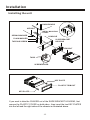
Installing the unit
DASH BOARD
HEX NUT
METAL MOUNTING
STRAP
SPRING WASHER
CONSOLE
PLAIN WASHER
SLIDE BRACKET
HOUSING
TAPPING SCREW
HEX BOLT
TABS
SCREWDRIVER
KEY PLATE
PLASTIC TRIM OUT
KEY PLATE
If you want to take the CHASSIS out of the SLIDE BRACKET HOUSING, first
remove the PLASTIC COVER on both sides , then insert the two KEY PLATES
into the left and the right sides of the chassis as illustrated above.
-6-
Electric Connection
WIRING CONNECTION
RCH IN RED
AUX2
SUBWOOFER GREY
VIDEO OUT(2) YELLOW
REAR CAMERA INPUT YELLOW
AUX 2 VIDEO IN YELLOW
LCH IN WHITE
FRONT RCA OUTPUT
CABLE
REAR OUTPUT CABLE
RCH RED
FRONT RCA RED R
VIDEO OUT YELLOW
LCH WHITE
FRONT RCA WHITE L
RADIO ANTENNA JACK
ISO CONNECTOR
RED
IGNITION SWITCH(B+)
MEMORY BACK-UP(B+)
KEY GROUND(BLACK)
KEY 1(BROWN)
KEY 2(WHITE)
FUSE
FUSE
YELLOW
GROUND(B-)
AUTO ANTENNA
FRONT
LCH SPK.
REAR
LCH SPK.
VIOLET/WHITE
BLACK
LIGHT GREEN
BLUE
WHITE
GREY
WHITE/BLACK
GREY/BLACK
VIOLET
GREEN
GREEN/BLACK
VIOLET/BLACK
(B+)12V
REAR CAMERA SWITCH
(B-)PARKING BRAKE
FRONT
RCH SPK.
REAR
RCH SPK.
Note:
the ground connection cable (parking brake B-) must be connected in order for
pictures to be played back to the monitor. If the cable has not been correctly
connected, warning message appears on the monitor.
-7-
Remote Control
2
1
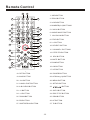
1. OSD BUTTON
19
3
2. PROG BUTTON
3. LOUD BUTTON
4
4. NUMBER(0~ 9 )BUTTONS
37
36
5. C LOCK BUTTON
20
5
21
6
6. ANGLE/MO/ST BUTTON
22
7
7. LOC/SLOW BUTTON
23
8
24
9
8. STOP BUTTON
25
10
26
9. I<< BUTTON
27
10. SELECT BUTTON
11
28
11. VOLUME+/- BUTTONS
29
12
13
30
14
12. STEP/TEL BUTTON
31
13. SRC BUTTON
33
14. MUTE BUTTON
32
15
16
15. BAND BTTON
34
17
35
16. OK BUTTON
18
17. INT BUTTON
18. RPT BUTTON
28. POWER BUTTON
19. ANG BUTTON
29. APS/ Hang Up BUTTON
20. 10+ BUTTON
30. MENU BUTTON
21. LANG/L/R/ST BUTTON
31. SETUP BUTTON
22. A-B/CLEAR BUTTON
32.
23. >II BUTTON
33. GOTO BUTTON
24. >>I BUTTON
34. PBC/TITLE BUTTON
25. ZOOM BUTTON
35. RDM BUTTON
26. EQ BUTTON
36. AF BUTTON
27. SUBT/REDIAL BUTTON
37. TA BUTTON
-8-
/
/
/
BUTTON
Remote Control
Preparing the Remote Control
Inserting the Battery
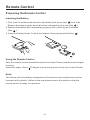
1.First push to inside as the direction indicated by the arrow (See 1 )And then
Remove the battery holder as the direction indicated by the arrow (See 2 ).
2.Replace the battery Set a new battery property with (+)side up as illustrated
(See 3 ).
3.Insert the battery holder. Push in the holder to the original position(See 4 ).
Using the Remote Control
Face the remote control towards the player front face IR mark (remote control signal
receiver).
Operation angle: About
30 degree in each the direction of the front of the IR mark.
Note :
The lithium cell in the battery compartment of remote control has been secured for
transport with a plastic . Before initial use please remove this plastic so that the
remote control is ready for operation .
-9-
Basic Operation
POWER ON/OFF
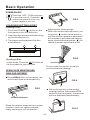
Touch the “OFF” ICON on screen
to turn the unit off . Press the“
”
onthe front panel to turn It on,
press it again to turn off .
FIG.2
LOADING/EJECTING A DISC
Loading a Disc
1. Press the POWER ( ) button on the
front panel to turn the device on .
Adjusting the viewing angle .
When the monitor does not move, you
long press
button on the panel to
turn the monitor upward or downward
at fine steps to get a desired viewing
angle ; short press that button ( ) on
remote is screen move back or out.
2. Insert the disc with printed side facing
up into the disc slot (1) .
3. The player starts playback the disc
automatically .
1
2
FIG.3
Ejecting a Disc
In disc mode, Press the
(2) button on
the front panel to eject the disc .
Do not rotate the monitor forcibly to
avoid mechanical damage .
OPEN/CLOSE MONITOR AND
ANGLE ADJUSTMENT
Press OPEN button on front panel, the
monitor will draw out automatically .
FIG.4
FIG.1
Return the monitor to the central
viewing position, then press OPEN
button on the front panel , the monitor
will turn downward automatically .
OPEN/CLOSE button
When the monitor draws out to a certain
location, it will turn upward automatically and stop at vertical position .
FIG.5
-10-
Basic Operation
When the monitor turns downward to
a certain angle, it will draw in .
FIG.6
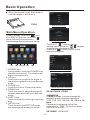
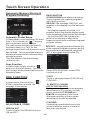
Setup interface 1
Main Menu Operation
ILLUMINATION COLOR
In many modes, touch the
icon
or In DVD/VCD mode , touch the
range to enter the main menu,
the message like following as below.
Setup interface 2
Touch the “
” section on the
setting menu, touch the “
/ ” ranges
to select the adjustment item,
Touch the “
” icon to return to the
previous playback .
10:00 AM
GENERAL
ANIMATION
(1)
(3) (2) (4) (5)
(6)
1. POWER icon
In any modes, touch the POWER icon
to switch the unit off . The monitor will
draw in automatically .
2. UP icon
Touch this icon to adjust the angle of
the monitor upward until your desired
angle .
3. CLOSE icon
Touch this icon to Close the monitor .
4. DOWN icon
Touch this icon to adjust the angle of
monitor downward until your desired
angle .
5. EJECT icon
Touch to allow for inserting or ejecting
disc.
6. SETUP icon
Touch to enter the SETTING mode,
the message will display as follow :
2 MINUTE
KEY BEEP
ON
DISC
...
RADIO
...
General setup interface1
GENERAL
BLUETOOTH
ON
WALLPAPER
...
ABOUT
...
General setup interface2
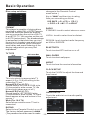
ADJUSTABLE ITEMS:
ANIMATION
In RADIO mode, you can change the
playing time of animation among of
“OFF, 10S, 30S, 1M,90S, 2M, 3M and 4M ”.
Note:
Please set the playing time of the
animation to “ 10S ” for the first, when
you turn the unit on .
KEY BEEP : ON or OFF.
-11-
Basic Operation
changes to the Parental Control
menu below .)
Key in “0000” and then turn to rating
then you can setting as follow:
KID SAFE -> G -> PG -> PG-13
-> PG R -> R ->NC-17 -> ADULT
Disc setup as follow:
DISC
FORMAT
NTSC
TV TYPE
4:3PS
RATING
ADULT
FORMAT
This player is capable of playing discs
recorded in either PAL or NTSC formats.
Make the selection based on whether
you are connecting the unit to a PAL TV
or an NTSC TV. You can also set the unit
to AUTO (auto select). The disadvantage
to autoselect is that each time you turn
the unit on it checks to see what kind of
monitor is connected, which causes a
small delay and some flickering of the
display image which you may find
unpleasant.
RADIO
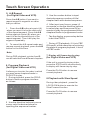
ST/MONO: touch to select stereo or mono.
LOCAL: touch to select local or distant.
REGION: touch to select radio frequency
as USA or EUROPE.
BLUETOOTH
Touch to select BT function on or off.
TV TYPE
16:9
4:3 Letter Box
WALLPAPER
Touch to select wallpaper .
ABOUT
Touch to show the version information.
4:3 Pan Scan
CLOCK SETUP
Touch the CLOCK to adjust the time and
time format.
This is to select the appropriate TV
aspect (4:3 or 16:9) according to the
connected TV set.
Normal/PS (For 4:3 TV)
Played back in the PAN & SCAN style.
(If connected to wide-screen TV, the
left and right edges are cut off.)
Normal/LB (For 4:3 TV)
Played back in LETTER BOX style.
(If connected to wide-screen TV, black
bands appear at top and bottom of the
screen.)
Wide (For 16:9 TV)
Select when a wide-screen TV set is
connected.
RATING
Select to turn Parental Control on or off.
The factory default password is 0000.
(The password must be used to make
clock setup interface
AUDIO SETUP
Touch the audio to turn to audio quality
adjustment.
audio setup interface1
-12-
audio setup interface2
Basic Operation
TREBLE: -7 to +7
Adjust treble level .
LANGUAGE
Touch to select OSD language.
BASS: -7 to +7
Adjust bass level .
ILLUMINATION COLOR
Touch to select the backlight for all
SUBWOOFER: touch to adjust subwoofer buttons. Tap auto icon the backlight
change automatically.
volume and frequency.
CALIBRATION
Touch
the arrow as show to calibration
USER -> JAZZ -> CLASSIC -> POP -> ROCK
the display.
LOUDNESS: touch to select loudness
effect as :OFF -> LOW -> MID -> HIGH
EQ: touch to select audio mode as follow:
FADER/BALANCE:
BALANCE: R 0-10 to L 0-10
Reset Factory Settings
Adjust sound balance between left
and right speakers .
RESET button is placed on the housing
and must be activated with either a
ballpoint pen or thin metal object.
FADE: F 0-10 to R 0-10
Adjust sound balance between front
and rear speakers .
VIDEO SETUP
RESET
Video setup interface
COLOR: 0 to 32
Adjust the color for the picture-lighter
or darker.
BRIGHTNESS: 0 to 32
Adjust if the picture is too bright or
too dark.
CONTRAST: 0 to 32
Adjust the contrast of the bright and
dark portion.
TINT: 0 to 32
Adjust the tint if the human skin color
is unnatural.
-Adjustable when “NTSC “ is selected
for “NTSC/PAL “ .
The RESET button is to be activated for
the following reasons:
A. Initial installation of the unit when
all wiring is completed.
B. All the function buttons do not operate.
C. Error symbol on the display.
Rear View Camera
When connecting the rear view camera
the mirror image of the rear view is automatically displayed on the monitor
when you change the gear to the back
position.
(Note: additional monitor can not display
the image.)
-13-
Control Panel
UNIT KEYS
19
18
1
3
7
MIC
2 6 9 84
21
5 10
20 11 12
13 14 15 1716
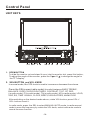
1. OPEN BUTTON
To slide the monitor out and stand it up or into the monitor slot, press this button;
To adjust the angle of the monitor, press the 5/ or 6/ to change the angle for
the TFT display.
2. SEL BUTTON and VOL KNOB
In normal mode, the VOL knob is used to increase or decrease the volume.
Press the SEL(except radio mode) to switch between BASS,TREBLE,
BALANCE, FADE,COLOR,RIGHTNESS, CONTRAST, TINT , BT, REG
(in radio mode), PI(in radio mode), TA(in radio mode), AF(in radio mode), LOUD,
SWF, EQ, TIME 12H/24H, CLOCK, BEEP,EUR/USA FREQ, ANIMATION.
After switching on the desired mode above, rotate VOL knob or press VOL+/
VOL- buttons to set it.
In radio mode, press the SEL to select MANUAL/AUTO mode, in radio manual
mode to scan the frequency by rotate the VOL knob, select radio auto mode to
cancel the scan function.
-14-
Control Panel
In BT mode, press the SEL to receive a call ,during talking,press the SEL to
transfer audio between the Car Audio System and phone; press and hold
the SEL to reject a call.
3.
(POWER On/Off )/MODE
Press it to turn on the unit, Press and hold for two seconds to switch the device off.
In playback mode, Press it repeatedly to select RADIO, DISC, USB, CARD, BT,
AUX and AV mode.
4 /5. >>| and |<< BUTTONS
In radio mode, long pressing |<< or >>| button can automatically search down
or up for an available station beginning from the current frequency; Briefly
pressing |<< or >>| button can manually search down or up for a your desired
station beginning from the current frequency.
In media mode, pressing |<< or >>| button can play the previous or next track;
continuously and long pressing |<< or >>| button can fast backwards or
forwards at the following multiple of normal speed: x2, x4, x8, x20.
6. EQ BUTTON
In any modes, touch the “EQ” range to select one of the preset sound modes:
USER/JAZZ/CLASSIC/POP/ROCK .
The information will display in the monitor as follow :
USER
JAZZ
ROCK
CLASSIC
POP
7. MUTE BUTTON
Press it button to switch of the loudspeakers for a short period. The word MUTE
flashes in the display. Press it again to cancel the mute function. This function
can also be cancelled by rotating the VOL multifunction button.
8. BND BUTTON
In Radio mode, press it repeatedly to select the desired radio band: FM1, FM2,
FM3, AM1(MW1), AM2(MW2) .
9 . RESET BUTTON
Press this button to return to factory settings.
10 . SD CARD SLOT
11 -16. PRESET STATION MEMORY AND >II, INT, RPT, RDM BUTTON
A)In RADIO mode
Go to any preset station by pressing one of the 6preset station(1-6) ,if one of
these buttons is pressed for more than 2 seconds, the stations currently being
listened to will be memorized into the selected preset button.
-15-
Control Panel
B) In DISC/USB/SD mode
During playing, press 1/>II button to pause the current playback, press again to
to continue play;
During playing, press 2/RPT button to select repeat function;
During playing, press 3/RDM button to select random function;
During DVD/VCD/CD disc playing, press 4/STOP button to stop playing and turn
to home mode, during MP3/USB/SD mode, press this button to turn to previous
mode, press again to turn to home mode;
17. AUXILIARY INPUT JACK
Insert an external device to this AUX jack in order to have audio output of the
device through the unit.
18. USB PORT
For information about connecting a USB device, please see USB operation.
19
(EJECT) BUTTON
Insert the disc, label side facing up, until the mechanism senses its presence
and draws the disc in. Press it to eject the disc.
20. LCD Display window
21. MICROPHONE
-16-
Touch Screen Operation
RADIO OPERATION
Listening to Radio
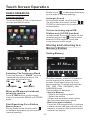
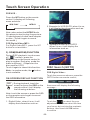
Touch the RADIO ICON in home menu
to enter the RADIO mode:
10:00 AM
Briefly touch “
” to decrease frequency
by one step of channel spacing.
Automatic Search
During Radio mode, touch and hold
(for more than 2 seconds ) either “ / ”
ICONS to start search for a radio station
automatically.
To tune in strong-signal FM
Station only (LO/DX function)
In radio mode, Press LOC button on the
icon to select
remote control or tap
select LOC/DX mode of Local and
Long-distance traffic news.
Storing and Listening to a
Memory Station
10:00 AM
Setting Memory
10:00 AM
FM1
87.50 MHz 4
87.50 90.10 98.10 87.50 107.9 100.8
Selecting The Frequency Band
Touch the screen of “ BAND ” section
repeatedly to select the band , the
message will show in turn :
FM1
FM2
AM2(MW2)
FM3
AM1(MW1)
When an FM stereo broadcast
is hard to receive
Press ST/MO button on the remote
control to select the MONO or STEREO
mode .
Start Searching For a Station
Manual Search
During Radio mode, briefly touch “
”
to increase frequency by one step of
channel spacing.
With this system, a total of 30 stations
can be stored in the memory of six
buttons. Each band stores up to six
preset stations. The stations might be
FM1, FM2, FM3, AM1(MW1), and
AM2(MW2) band.
The operation is as below :
- Store in Memory
>Select the frequency band
>Select the station
>Press and the station until it show
the frequency band your select.
- Retrieve a preset station
Touch the 1-6 ranges briefly to retrieve
a station which had been stored in the
memory in advance the chose number
is shown on display .
-17-
Touch Screen Operation
Automatic Memory Storing &
Program Scanning
10:00 AM
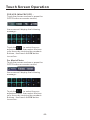
Automatic Preset Setup
In Radio Mode, touch and keep (for more
than 2 ’ S) the screen of “
” range to
active automatic station storage.
The radio searches within the current
frequency band, e.g. Fm 3 , for the
stronger signal level until the search cycle
has finished . The six strongest stations
are then allocated to the corresponding
storage locations .
Then the station of the first storage
location is set .
REG FUNCTION
at certain times some stations divide up
their programs into regional programs
with varying content .
REG ON : the message “REG ON” will
appears in the display for a few seconds .
Note :
- the display capacity is limited . It is
possible that in the double display mode
some segments of the display are deleted .
- the function REG ON prevents the
radio from switching to alternative
frequency which have a different regional
program content .
REG OFF : the program identification(PI)
of the regional program is ignored during
the search for an alternative frequency
(AF) or a program identification (PI) .
RADIO
RDS PI
MUTE
RDS TA
OFF
RDS AF
OFF
Scan Function
In Radio mode, briefly touch the “
”
section on the touch screen , the radio
briefly plays all the preset stations of the
frequency band .
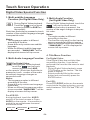
RDS FUNCTION
In home menu, then touch the “
ICON to enter the set mode, the
message in the display :
”
RADIO
ST/MONO
STEREO
LOCAL
DX
REGION
EUROPE
RDS REGIONAL
ON
ADJUSTABLE ITEMS:
REGION SET
Touch to switch the REGION function
ON and OFF.
Select RDS REGIONAL to turn RDS
function on or off.
PI SET
Touch to change between PI MUTE and
PI SOUND .
PI MUTE / PI SOUND
(only for radio operation)
I f you are in an area where two program
identifications (PI) overlap, you can
select the option PI SOUND and
PI MUTE for playback of the sound.
Alternate switching of the program
identification should be avoided .
PI SOUND :
I f switching nevertheless occurs the
sound of another station is heard for
less than one second .
-18-
Touch Screen Operation
PI MUTE :
the sound of another station is
suppressed .
TA Traffic Announcement
(Priority For Traffic Information)
In Radio mode, touch the cursor button
to switch the TA function ON and OFF .
When the TA function is activated, the
TA symbol appears in the display .
During radio operation in one FM
frequency band the search for a traffic
announcement station is started
automatically (TA SEEK) .
If an FM station is being received which
transmits the latest traffic announcements from time to time, the TP display
lights up.
When the TA function is switched on ,
the FM traffic automatically interrupt
CD operation (the word TRAFFIC
appears in the display).
The volume level is increased to the
minimum value for the transmission of
traffic announcements.
After the traffic announcements has
finished, the program that was
previously running is resumed.
Interruption of the TA Function:
If you would like to interrupt the current
traffic announcement, touch the TA
section on screen briefly . This does
switch off the TA mode .
AF FUNCTION
(Alternative Frequencies)
In Radio mode, touch the cursor button
to switch the AF function ON and OFF .
Touch the AF section on touch screen or
swing and keep the SEL knob in the
TA/AF direction for about 2 seconds ,
the AF function is activated. The AF
symbol appears in the display .
When the AF function has been switched
on, the radio continuously tests the
signal strength of the AF frequency .
The test interval for each AF frequency
depends on the signal strength of the
current station and varies from a few
minutes in the case of weak signals.
Whenever the new AF frequency is
stronger than the station that is currently
tuned in , the radio switched to this
frequency for a short time for a short
time and the message
“NEW FREQUENCY “ is displayed for
one or two seconds.
PTY FUNCTION
In Radio mode, touch screen of “PTY”
range to select the Program type .
PTY Selection of the program type
besides the stations name, some FM
stations also transmit information on the
type of program. This information can
be displayed by your car radio .
Examples of such types of program are :
SPORT NEWS POP WEATHER ......
With PTY function you can specifically
select stations transmitting a particular
type of program. Touch the PTY on screen
repeatedly to call up the PTY selection
menu. The message “PTY SEEK” then
appears briefly in the display .
When PTY has been selected the radio
start searching for corresponding PTY
information and stops when the PTY
information has been found, “NO PTY”
appears in the display. If the PTY
information being searched for no longer
exists, the PTY function automatically
switches to normal mode .
AF is a function that works with the help
of RDS (Radio Data System) and can
only be used with FM stations. The radio
searches in the background for the best
frequency reception of the station that
has been tuned into .
-19-
Touch Screen Operation
Media Operation
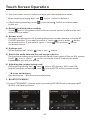
In audio play mode, the message will
display as below :
(When Parking Brake is applied .)
To skip the next track
To skip the previous track
10:00AM
Repeat Function
Random Function
Previous menu
Tap to turn to BT PHONE mode.
(after pairing and connecting a
mobile phone with bluetooth function).
The icons for other mode
(The same icon have the same function
in each mode)
In PHOTO playing ,tap to change
the photo direction.
Mute function
To select the Equalizer mode
ZOOM IN and OUT.
Fast forward
For page turning.
Fast backward
For page turning.
Intro Function
For page turning.
To decrease the volume level
For page turning.
To increase the volume level
For page turning.
Loudness Function
Subwoofer Function
Turning pre-switching for traffic
announcements on and off
Switching on and off an
Alternative frequency
Play/Pause the playing
-20-
Touch Screen Operation
BASIC OPERATION
Note:
when the JPEG disc playback, in normal
mode, you can use the cursor buttons to
rotate the picture .
Press UP to invert an image .
Press DOWN to mirror an image .
Press LEFT to rotate an image to left .
Press RIGHT to rotate an image to right .
Stopping Play
Touch the button on remote to
stop the unit playback. press the
button to start play.
Pause (still picture)
SELECTING PLAY MODES
Touch the “
” section on touch
screen during playback will stop
play temporary, touch it again to
return the normal playback .
During the Disc playback, select the
“RPT, RDM, INT ” to select your favour
play mode.
1). REPEAT FUNCTION
Rapid Forward/Rapid Reverse
FOR Digital Video :
Tap the
icon or press the RPT button
on the remote control to select REPEAT
mode as follows :
During DISC playback, touch the
screen of “
/
” range the
speed of rapid forward/reverse
changes according to the disc as
follow:
CHAPT ER REP EAT ON
REP EAT OFF
Digital Video/VCD/CD/MP3:
Normal Playback 2x
4x
8x
TI TL E REP EAT ON
REP EAT ALL
FOR VCD/CD :
Tap the
icon or press the RPT button
on the remote control to select REPEAT
mode as follows :
20x
Skipping Track
During DISC playback, Touch the
/
section on the touch screen
to skip to next/back one track.
Note :
REPEAT ONE
REPEAT OFF
FOR MP3 :
Tap the
icon or press the RPT button
on the remote control) to select REPEAT
mode as follows :
For some VCD2.0 disc (PBC-playback
control), above these buttons may be
unavailable .
REP EAT ONE
REP EAT OFF
Zoom Function
REP EAT FO LD ER (or DIR)
REP EAT ALL
2). INTRO FUNCTION
Touch the button repeatedly,
the displayshow as “ zoom 2,
zoom 3, zoom 4 , zoom ½,
zoom 1/3, zoom 1/4 , zoom off . ”
Use the direction keys ( / / /
on
remote control to move the enlarged
picture .
REPEAT ALL
FOR CD :
Tap the
icon or press the INT button
on the remote control to play the previous
10 seconds part of each track/chapter
on disc.
(Touch it again to cancel this mode)
-21-
Touch Screen Operation
T 00 1/004
C 001 /00 1
FOR VCD :
Press the INT button on the remote
control. It display will following
menu as below :
SEQ PLAY
INTR O 1
2. Example for VCD/SVCD, when it is on,
it will display the information such as:
Note: when select the INTRO Mode,
this player to start to play the previous
15 seconds part of each track/chapter
on disc. (Touch it again to cancel
this mode .)
FOR Digital Video/MP3 :
For Digital Video/MP3 , press the INT
button is not available .
3. Example for Movie or PHOTO .
When it is on, it will display the
information such as:
3). RDM(RANDOM) FUNCTION
During DISC playback, touch screen
of “
” section ( press the
RDM button on the remote control to
play in random. Each play mode the
order is different . (Depend on the
disc used for VCD).
Touch it again to cancel this function .
Note : in random mode, the
is not available .
DISC Search (GOTO)
button
FOR Digital Video :
Touch the screen as show or press the
GOTO button on remote control;
ON-SCREEN DISPLAY FUNCTION
OSD
During playback, touch the
screen or press the OSD on the
remote control, it will display
the following as below :
the screen will display the following
message :
Note: touch the screen or press the OSD
on the remote control again to cancel
the OSD information.
1. Digital Video , when it is on, it will
display the information such as:
Touch the
to select the your
adjustment item, then select the item
your favour by touching the numberic
buttons , then touch the OK button
to confirm .
-22-
Touch Screen Operation
FOR VCD (With PBC OFF) :
Touch the screen as show or press the
GOTO button on remote control;
the screen will display the following
message :
Touch the
to select the your
adjustment item, then select the item
your favour by touching the numberic
buttons , then touch the OK button
to confirm .
For Movie/Photo:
Touch the screen as show or press the
GOTO button on remote control;
the screen will display the following
message :
Touch the
to select the your
adjustment item, then select the item
your favour by touching the numberic
buttons , then touch the OK button
to confirm .
-23-
Touch Screen Operation
Digital Video Special Function
1. Multi-subtitle Language
Function (for Digital Video Only)
3. Multi-Angle Function
(for Digital Video Only)
During Digital Video playback.
Touch the
icon on touch
screen(or press the SUBT on
the remote) .
Each time the button is pressed or touch,
number of the subtitle language changes
in sequential order.
During Digital Video playback, touch the
icon on the touch screen .
Each time the button is pressed , the
number of the angel changes in sequential order .
Notes:
- The language number is different
according to the disc.
- Some discs only contain one subtitle
language.
- When no different subtitle language
are recorded, “ INVALID KEY ” will be
displayed at screen left top corner.
Notes:
- The angle number is different
according to the disc.
- The function only work for disc having
scenes recorded at different angles.
- When no different angle are recorded,
“ INVALID KEY ” will be displayed at
screen left top corner.
4. Title Menu Function
2. Multi-Audio Language Function
For Digital Video:
During Digital Video playback ,
touch the
icon on touch
screen (or press the LANG
on the remote .) Each time the button is
pressed or touch , number of the audio
soundtrack language changes on
sequential order.
Notes:
- The language number is different
according to the disc.
- Some disc only contain one language
soundtrack
- When no different language soundtrack are recorded “ INVALID KEY ” will be
display at screen left top corner.
For Digital Video:
If the Digital Video has multiple titles
recorded on the disc. It can select
preferred title from the title menu to start
playback.
- During Digital Video playback, press
TITLE button on the remote .The title
menu is display.
- Select preferred title by the cursor
button and confirmed by press the
ENTER button .
For VCD:
Press TITLE/PBC button on the remote
control while the disc is playing, you can
switch between "PBC ON"and "PBC off"
mode.
For VCD/CD:
during playback, touch the AUDIO
section of the touch screen or Press
AUDIO on the remote . It is possible to
switch the sound between monaural
and stereo sound.
MONO LEFT
MONO RIGHT
MIX-MONO
STEREO
-24-
Touch Screen Operation
5. A-B Repeat
(for Digital Video and VCD)
3 Use the number button to input
desired sequence number of title/
chapter/track with desired sequence.
Press the A-B button if you want to
repeat a specific segment on a disc
that you define:
4 After input your favour, press >II
on remote or use the direction buttons
to select play and then press OK on
remote to play the programmed titles/
chapters/tracks in programmed order.
1. Press the A-B button at a point (A)
where you want it to be the start point
of the repeat segment. Press the A-B
button again at a point (B) where you
want it to be the terminal point of the
repeat segment. Then it will play the
segment repeatedly.
* Tap the display or press stop button
to exit the PROG .
2. To cancel the A-B repeat mode and
resume normal playback, press the A-B
button for the third time.
* During VCD playback, if it is in PBC
ON mode, at the same time of entering
the state of program playback, it turns
off PBC mode.
Note:
During DVD playback, points A and B
can be selected from different chapters.
6. Program Playback
(for Digital Video and VCD)
It allows you to enter the order in which
you want some chapters/tracks in
DVD/VCD to play.
1 During playback, press the PROG
button to enter a program interface
as follows:
7. Display still frame step by step
(for Digital Video and VCD)
If the unit is currently playing video,
press the STEP button consecutively
to display still frame step by step.
Press the PLAY button to resume
normal playback.
8.Playback with Slow Speed
During video playback , press the
LOC/SLOW button to execute the
Slow Forward function.
Press the PLAY button to resume
normal playback.
PROGRAM
Program interface for DVD
2 Use the direction buttons to move
cursor onto the desired place for
inputting the sequence number.
-25-
Touch Screen Operation
Bluetooth Operation
1. Pairing and Connecting
Prior to using the bluetooth device named Boss Audio as a hands-free system for
a bluetooth-enabled mobile phone for the first time, you must pair and connect
them as follows:
*
Prior to pairing and connecting, when displaying No Video interface of radio, CD,
AUX IN or bluetooth music, the logo BT flashes in the touch screen.
*
During operation of the device named Boss Audio as a hands-free system for a
bluetooth- enabled mobile phone, place the bluetooth-enabled mobile phone
no more than 3 meters from the head unit;
Switch on the bluetooth mode of your mobile phone; then s elect the item to find a
bluetooth device and enter it; When it finds the bluetooth device of the car A/V
system, the name Boss Audio will be displayed , select it and enter it; then it will
show an interface that asks you to input a password, input 8888 and enter it; then
i t will pair and connect with the bluetooth device Boss Audio of the car A/V system,
Confirm it, then the frame of the BT logo will light all the time.
*
When finishing pairing and connect ing , the audio of the mobile phone transfers
to the car audio system whenever a call is made or received or the mobile phone
plays music .
2. BLUETOOTH PHONE
1) Make a call
(1) Dial with mobile phone directly;
(2) Dial with BT Phone, remote control, or on touch screen;
a. Touch the HAMDS-FREE icon in home menu or touch the
to turn to BT PHONE interface as follows:
icon during playing
: Same as MUTE button.
&
: Same as VOL+ and VOL- or
VOL knob.
: Tap to do disconnection.
-26-
Touch Screen Operation
b. Use the number icons or buttons to input your desired phone number;
* When inputting a wrong digit, use
c. After finishing inputting, touch
to dial out.
icon or < button to delete it.
icon or press
button on control panel
2) Redial last dialed phone number
Touch
icon or long press redial button on remote control to dial out the last
dialed phone number.
3) Answer a call
During an incoming call, the incoming telephone number displays in the the BT
PHONE interface. If you want to receive it, touch
icon or press
button
on remote control; if you want to reject it, touch
icon or press
button
on remote control.
4) Ending a call
When ending a call, touch
icon or use
button.
5) Switch the audio between the unit and your device
During phone talking using the bluetooth hands-free system of the car A/V system,
touch
icon or press
button on remote control to switch the audio
between the unit and your device.
6) Adjusting the volume during a call
During phone talking, use + and buttons to adjust volume level ; use
*
icon or VOL knob or VOL+ and VOLicon or MUTE button to mute sound .
* / # icons and buttons
they perform as * / # buttons on mobile phone.
3 . BLUETOOTH MUSIC
1 ) Touch STREAMING in home menu or pressing SOURCE button can pop up BT
MUSIC interface as follows:
USER SWF
BT
MUSIC
-27-
Touch Screen Operation
Mute function
To select the Equalizer mode
To decrease the volume level
To increase the volume level
Loudness Function
Subwoofer Function
Turning pre-switching for traffic announcements on and off
Switching on and off an Alternative frequency
Play/Pause the playing
To skip the next track
To skip the previous track
Tap to turn to BT PHONE mode. (after pairing and connecting a mobile phone
with bluetooth function).
2 ) When using your mobile phone with the bluetooth function to play audio/video ,
if it is paired and connected to the unit, the audio of the mobile phone will change
into the car A/V system .
The Boss Audio supports A2DP, which enables the user to stream audio
from their device.
3 ) T he bluetooth device of the car A/V system supports AVRCP, so these icons on
the BT Music interface except BT Music and their corresponding buttons on control
panel or on remote control are available for audio/video playback of your mobile
phone during playback. But n o fast forward/backward functions for
/
icon
and
/
buttons, and the function of resume playback after pausing or stopping
is available only for some mobile phone .
* If you don’t want to use the bluetooth function of the car A/V system , long press
SEL button to display BT, then use VOL knob or VOL+ and VOL- buttons to switch
BLUETOOTH off .
-28-
Touch Screen Operation
AUX Operation
10:00AM
On the front panel of this unit, there is an
AUX IN jack, follow the diagram below to
connect analogue replay devices(only
for the Audio connect, if you want to
connect the Video, please plug the RCA
<Video input > on the back of the unit .) .
Use this jack to replay sound of other
replay equipment such as Digital Video
players, computers, etc. Via the loudspeakers.
AUX INTERFACE 1
10:00AM
1). Please connect the external device
with stereo jack (3.5mm)plug the Aux in
socket .
AUX IN JACK FRONT PANEL
AUX IN
AUX INTERFACE 2
AUX IN
Ground
Right
Left
3). You now hear the sound from the
external device played back through
the loudspeakers .
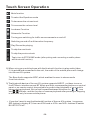
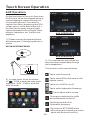
The function of the icons as follow:
Tap to mute the sound.
Tap to select EQ as the same on the
remote control.
2). In radio mode, touch the screen
of “
” ICON to enter the main menu,
touch the “ AUX ” ICON to enter the
AUX IN mode .
Tap to turn LOUD on or off.
Tap to select subwoofer frequency.
10:00 AM
Tap to adjust audio volume.
Turning pre-switching for traffic
announcements on and off
Switching on and off an
Alternative frequency
Tap to turn to BT PHONE mode.
(after pairing and connecting a mobile
phone with bluetooth function).
-29-
Touch Screen Operation
AV Operation
Please plug the RCA <Video input >
on the back of the unit .
Touch the AV IN icon to enter the AV IN
mode.
10:00 AM
As the interface show, here is only the
audio output, now tap the
icon,
the picture of the auxiliary input video
show on the display and tap the display
again to turn to audio mode.
Now you can watch the video from your
External video equipment such as
Digital Video players, computers, etc.
The function of the icons as follow:
Tap to mute the sound.
Tap to select EQ as the same on the
remote control.
Tap to turn LOUD on or off.
10:00AM
Tap to select subwoofer frequency.
Tap to adjust audio volume.
Tap to turn to BT PHONE mode.
(after pairing and connecting a mobile
phone with bluetooth function).
AV INTERFACE 1
Note: To ensure safety while driving and
to comply with lows, drivers should
not watch video or operate the
video device while driving.
10:00AM
AV INTERFACE 2
-30-
Touch Screen Operation
USB OPERATION
Card OPERATION
Following the diagram below, connect
your USB device to the front panel
USB port . If it is properly connected,
the device will be mounted and start
playing automatically.
The unit can support playback MP3/WMA/
JPEG/MP4 and Divx format which are
stored on SD memory cards .
Please read the following instructions
before you start using a memory card .
Inserting the card as follow:
SD
SD Label side
facing upward
10:00 AM
10:00 AM
5
5
10:00AM
1
10:00AM
1
001
SONG
WEDDING
MOV03247.MPG
002
CIMG3080.MOV
003
004
005
2
3
4
2
3
4
1 Current type (highlighted bar) .
1 Current type (highlighted bar) .
2 Audio play mode select.
2 Audio play mode select.
3 Picture play mode select.
3 Picture play mode select.
4 Movie play mode select,
4 Movie play mode select,
5 Current play track .
5 Current play track .
-31-
Touch Screen Operation
STEERING WHEEL CONTROL
Touch the SWC icon as follow to turn to
steering wheel control .
When electric resistance is too
low, touch this icon to increase.
When electric resistance is too
high, touch this icon to reduce.
10:00 AM
During setting, touch the
turn to home menu.
icon to
There are 2 KEY for total 12 buttons to
save, first, tap Assign to open function
save, then select button 1 in KEY 1 on
steering wheel and tap the
icon, the
icon show in button 1 position then touch
Confirm, final turn the unit on again,
the
function will save in button 1 of
KEY 1.
The function of the icons as follow:
Touch to begin function save.
After selection touch to confirm
operation.
Touch this icon to cancel the
input and resume load.
-32-
Parental Control
*
Parental Control
Q: After inserting a Digital Video disc into the disc slot, if a dialogue box pops up
and asks you to input a password, what should you do ?
A: The playing disc is locked by a rating level of parental control. If the current
rating level of parental control of the Digital Video player is lower than the one
of current disc, you must input the correct password of parental control to
unlock the parental control and enter a rating level equal to or higher than one
of the current disc in order to play the disc.
*
For factory preset password of parental control of Digital Video player, please
see the part of Media Setup Menu .
Appendix: Parental Control
Parental Control function of a Digital Video player can control playback of
movie ratings on a disc. You can set the Digital Video player to be a certain
rating level of parental control using the Media Setup Menu. If the rating level
of parental control of a disc is higher than the one of the Digital Video player,
the Digital Video player cannot play the disc.
The Digital Video movie can be designed so that the Digital Video player can
play different versions of content of a particular movie according to the different
rating levels of parental control. Depending on the D igital Video features , the
scenes that are not suitable for children will be cleared or replaced by suitable
scenes automatically.
The rating levels of Parental Control are as follows:
1
2
3
4
5
6
7
8
Unlock
Kid Safe
G
PG
PG 13
PG R
R
NC 17
Adult
-33-
Region Code for DVD
*
Region Code
If you insert a disc into the disc slot and REGION ERROR is displayed, the car
multi-media system can not play the disc. The reason is that the region codes
of the car multi-media system and the used disc do not match each other.
Appendix: Region code of D igital Video
Motion Picture Association of America (MPAA) divided the world into 6 regions, and
gave every region a region code for locking and unlocking D igital Video playback.
Basically, a coded D igital Video player can play only the discs if its region code is the
same as the code of the D igital Video player. Otherwise, it cannot play the disc.
Please note that only the D igital Video discs and D igital Video players produced by
the 8 biggest film-making companies of America impose this restriction. The D igital
Video discs and D igital Video players not produced by the 8 biggest film - making
companies of America are not restricted by the rule of region code. Generally, they
are called Free Region Code or Full Region Code.
The problems caused by area code inconsistency has motivated the production of
unlocked version D igital Video players and recodable D igital Video players .
Region codes and the countries or areas represented by region codes are as follows:
Region 1: America, Canada, East-Pacific Inlands;
Region 2: Japan, West Europe, North Europe, Egypt, South Africa, Middle East;
Region 3: South-east Asian countries include Taiwan, Hong Kong, South Korea,
Thailand, indonesia, etc.;
Region 4: Australia, New Zealand, Central South America, South Pacific Inlands;
Region 5: Russia, Mongolia, Indian Peninsula, Middle Asia, East Europe, North
Korea, North Africa, North-west Asia etc.;
Region 6: China mainland.
The 8 biggest film - making companies of America are as follows:
1. WarnerBros;
2. Columbia;
3. 20thCenturyFOX;
4. Paramount;
5. Universal;
6. UA(UnitedArtist);
7. MGM(MetroDogwynMayer);
8. WaltDisney
-34-
Specification
General :
Supply Voltage:
Current Consumption:
Signal System:
Discs Played:
12V DC (11V-15V)
Less than10 A
Compositive video 1.0Vp-p 75
(1)DIGITAL-VIDEO Disc
5"(12 cm) single-sided, single-layer
5"(12 cm) single-sided, double-layer
(2)Compact Disc (CD-DA, VIDEO CD)
5"(12cm) disc
Audio Signal Output:
Characteristics:
2ch&4ch line out
(1)Frequency Response
(2)S/N Ratio
(3)Wow and Flutter
20 Hz - 20 KHz
90 dB (JIS)
Below measurable limits
RADIO Section:
Frequency Coverage:
IF:
Sensitivity (S/N = 30 dB):
Frequency Coverage:
IF:
Sensitivity (S/N = 20 dB):
For 2 Bands
(Europe)
FM
87.5 to108 Mhz
10.7 MHz
15 dBu
MW
522 to1620 KHz
450 KHz
40 dBu
For 2 Bands
(U.S.A.)
FM
87.5 to107.9 Mhz
10.7 MHz
15dBu
AM
530 to1710 KHz
450 KHz
40 dBu
TFT Monitor:
Monitor Screen Size:
Color System:
7 Inch Wide
NTSC/PAL
BLUETOOTH:
Bluetooth specification:
V1.2 Class 2
Bluetooth profile supported: Headset, Handsfree and A2DP & AVRCP profiles
Range of frequency:
2.4GHz Spectrum
NOTE:
Specifications and design are subject to modification, without notice, due to
improvements in technology.
-35-
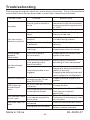
Troubleshooting
Before going through the check list, check wiring connection. If any of the problems
persist after check list has been made, consult your nearest service dealer.
SYMPTOM
No power
CAUSE
SOLUTION
The car ignition switch is
not on
The fuse is blown
If the power supply is properly
connected to the car accessory
terminal,switch the ignition key
to "ACC"
Replace the fuse
Presence of disc inside the Remove the disc in the player,
then put a new one
player.
Disc can not be
loaded or ejected
Inserting the disc in reverse Insert the compact disc with
the label facing upward
direction
The disc is extremely dirty
or defective
Clean the disc or try to play a
new one
Temperature inside the car Cool off or until the ambient
temperature return to normal
is too high
Video/image
appears
black-white
No video/image
appears
No color in picture
The color system is
set incorrectly
Please switch to correct color
system from menu
The unit is not connected
to the parking brake
detection switch
Make proper connection
according to “ wire connection ”
The parking brake is not
engaged
For safety reasons no video/
images are displayed while the
vehicle is moving.
Engaging the parking brake will
cause images to be displayed.
The disc format is not
according to the TV-set
used (PAL/NTSC)
Please choose a proper color
system.
No JPEG files are recorded
Change the disc
on the disc.
JPEG files are not recorded Change the disc Record JPEG
files using a compliant
in a compliant format
application
The built-in microcomputer Press the RESET button.
The operation keys is not operating properly
Front panel is not properly fixed
do not work
due to noise
into its place
The radio does not The antenna cable is not
Insert the antenna cable firmly
connected
work
JPEG disc can
not be played
back
The signals are too weak
Made in China
Select a station manually
88-J8200-07
-36-