1
FOLLOW THE ID SETUP STEPS
1.
Remove the battery.
2.
Press and hold the button for a minimum of 10 seconds.
3.
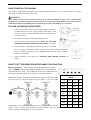
Find the 5-position dipswitch located on the back of each device.
4.
Select one of the units. You will define the ID of your system by positioning the switches of the
dipswitch in a random pattern. The ID will need to be the same for each alarm. This ID will differentiate
your alarm system from similar systems nearby.(refer to TABLE 1)
5.
Using a pen or pencil, change the switches in each of the wireless devices to match the pattern you
selected in step 3. Ensure that the sequence is not reversed.
6.
Insert a 9-volt battery to compartment. NOTE POLARITY OF CONNECTIONS. The alarms only
read the ID that has been set when they are first supplied power. Any changes to the switch after the unit
is powered will not be recognized, and will require the power to be removed, Press and hold the button
for a minimum of 10 seconds before powering again.
7.
Close battery compartment door, snapping it into place.
8.
Push test button to test alarm. See “TESTING THE SMOKE ALARM” for details.
CAUTION: Due to the loudness of the alarm, always stand at an arm’s length away from the unit
when testing.
OPERATING YOUR SMOKE ALARM
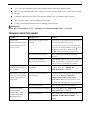
Once the smoke alarm has been installed A RED indicator light (LED) should flash approximately once a minute
to indicate the battery is healthy and the unit is operating properly.
If smoke is detected or the unit receives signals from other devices in the wireless system, the unit will produce an
alarming sound until the air is clear.
VARIOUS STATUS OF THIS ALARM
(TABLE2)
Current Status
Red LED
Horn
Description
Normal Operation
1 Flash every 45seconds
Silent
The device is on the normal self-testing
status
Local Alarm
1 Flash every 0.5seconds
Alarming sound
Fire smoke is detected by the device and
trigger the device to alarm
Remote Alarm
Off
Alarming sound
The device is triggered to alarm by
receiving the wireless alarm signal from
other device
Locate Alarm
1 Flash every 0.5seconds
Alarming sound
Only Local alarm can be in this state, but it
cannot transmit the alarm signal out
Hush
1 Flash every 10seconds
Silent
The sensitivity of the device is lower
Low Battery
1 Flash every 45seconds
1 beep every 45
sensond
Low battery warning
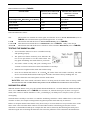
The device has TEST, HUSH, LOCATE functions which can be implemented by pressing the button with
different holding time under various status.