1
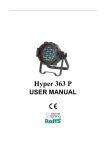
Divine Lighting Hyper 363P RGB USER MANUAL v2.0 Divine Lighting Catalog Summary… .............................................................................................................. 1 Safety Information................................................................................................... 1 Outside Dimensions ................................................................................................. 2 Features .................................................................................................................. 3 DMX Controller Functions ........................................................................................ 3 Control Panel Instructions ....................................................................................... 7 Manual instructions ................................................................................................. 7 Operating Mode Instruction .................................................................................... 9 XRL Cable Connection ............................................................................................ 10 Cable Connection Diagram..................................................................................... 11 Exploded View ....................................................................................................... 13 Illuminance List...................................................................................................... 14 Troubleshooting .................................................................................................... 15 Technical Specifications.………………………………………………………………………………………16 Please read over this manual before operating the light WWW.DIVINELIGHTING.COM 1. Summary Summary Thank you for purchasing our LED PAR lighting. Please read these instructions carefully before starting and operate the fixture according to these instructions in order to avoid any possible damages and accidents caused by misuse. Product Introduction This LED PAR color-changing projecting light is constructed of high strength die-cast aluminum. It uses high power red, green, and blue LED diodes. Each color can be independently set at 256 discrete levels. It uses a switching power supply for low weight, efficient power use, stability, and long life. It can be operated by built-in programs including dimmer, strobe, gradual change, fading, etc., or by international standard DMX 512 signal. Packing list LED Light Fixture DMX Cable User Manual 2. Safety Information Safety Notes ● Repairs should only be attempted only by qualified technicians ● Always make sure to disconnect from the power source before setting up, servicing, or moving ● Avoid direct eye exposure to the LEDs when the unit is powered on Safety Instructions ● Make sure the power supply voltage is consistent with the requirements of this light. ● Before installation, please check that the light’s fasteners and mechanical structure 1 WWW.DIVINELIGHTING.COM have arrived in good condition and without damage. ● This light is designed for indoor use only. Ambient temperature should not exceed 105 degrees Fahrenheit (40 degrees Celsius). ● This fixture may be mounted in any position provided there is adequate room for ventilation. Make sure there are no flammable or explosive objects within 1.5 feet (0.5 meters). ● Please make sure that this fixture is properly grounded. 3. Outside Dimensions Hyper 363 2 WWW.DIVINELIGHTING.COM 4. Features High quality LEDs: low consumption, high brightness, stable output, and long life Each color LED capable of 256 discrete levels, RGB can make over 16.7 million colors Linear dimming 0-100%, strobe, color change by either fading or snapping DMX512 Controller,4 button set DMX ID address with LCD display Auto run / Sound activated / Master-slave / DMX control board Switching power supply for optimal functioning Lens degree: 25º (15º or 45º lens optional) DMX512 3/6/7/8 channels 5. DMX Controller Functions 3 Channel Operation DMX Channel Value Control Function 1CH 0—255 R 0—100% 2CH 0—255 G 0—100% 3CH 0—255 B 0—100% 3 Priority WWW.DIVINELIGHTING.COM 6 Channel Operation Channel DMX Control Value Function 1CH 0-255 Master dimmer 0—100% 2CH 0-255 Red Dimming 3CH 0-255 Green Dimming 4CH 0-255 Blue Dimming 5CH 0-14 Not used 15-255 Strobe Speed 0-31 Not used 32-63 From dark to bright 64-95 From bright to dark 96-127 From dark-bright-dark 128-164 RGB Gradient 165-191 RGB dark-bright-dark Auto run 192-223 7 color snapping 224-255 Sound activated 6CH Remark Priority You must use channel 1 along with 2, 3, or 4, otherwise no output. 1 Speed adjustment when channel 6 is set between 32 - 223 2 You must use channel 1 along with 2, 3, or 4, otherwise no output. Adjust speed with channel 5. 3 Adjust speed with channel 5. (CH1, 2, 3, 4 not used) 4 WWW.DIVINELIGHTING.COM 7 Channel Operation Channel DMX Control Value Function 1CH 0-255 Master dimmer 0—100% 2CH 0-255 Red Dimming 3CH 0-255 Green Dimming 4CH 0-255 Blue Dimming 5CH 0-14 Not used 15-255 Strobe Speed 0-31 Not used 32-63 From dark to bright 64-95 From bright to dark 96-127 From dark-bright-dark 128-164 RGB Gradient 165-191 RGB dark-bright-dark Auto run 192-223 7 color snapping 224-255 Sound activated 0-9 Not used 10-29 Red 100% 30-39 R85%+Y15% 40-49 R60%+Y40% 50-69 Yellow 100% 70-79 Y85%+G15% 80-89 Y60%+G40% 90-109 Green 100% 110-119 G85%+B15% 120-129 G60%+B40% 130-149 Blue 100% 150-159 B85%+C15% 160-169 B60+C40% 170-189 Cyan 100% 190-199 C50%+M50% 200-219 Magenta 100% 220-229 M50%+W50% 230-249 W95%+Y5% 250-255 White 100% 6CH 7CH Remark Priority You must use channel 1 along with 2, 3, or 4, otherwise no output. 1 Speed adjustment when channel 6 is set between 32 - 223 3 You must use channel 1 along with 2, 3, or 4, otherwise no light. Adjust speed with channel 5. 3 Adjust speed with channel 5 (CH1, 2, 3, 4 not used) You must use channel 1, otherwise no output. 2 2 5 WWW.DIVINELIGHTING.COM 8 Channel Operation Channel DMX Control Value Function 1CH 0-255 Master dimmer 0—100% 2CH 0-255 Red Dimming 3CH 0-255 Green Dimming 4CH 0-255 Blue Dimming 5CH 0-14 Not used 15-255 Strobe Speed 0-31 Not used 32-63 From dark to bright 64-95 From bright to dark 96-127 From dark-bright-dark 128-164 RGB Gradient 165-191 RGB dark-bright-dark Auto run 192-223 7 color snapping 6CH 224-255 7CH 8CH Remark Priority You must use channel 1 along with 2, 3, or 4, otherwise no output. 1 Speed adjustment when channel 6 is set between 32 - 223 3 You must use channel 1 along with 2, 3, or 4, otherwise no light. Adjust speed with channel 5. 3 Adjust speed with channel 5 (CH1, 2, 3, 4 not used) Sound activated 0-9 Not used 10-29 Red 100% 30-39 R85%+Y15% 40-49 R60%+Y40% 50-69 Yellow 100% 70-79 Y85%+G15% 80-89 Y60%+G40% 90-109 Green 100% 110-119 G85%+B15% 120-129 G60%+B40% 130-149 Blue 100% 150-159 B85%+C15% 160-169 B60+C40% 170-189 Cyan 100% 190-199 C50%+M50% 200-219 Magenta 100% 220-229 M50%+W50% 230-249 W95%+Y5% 250-255 White 100% 0-55 56-105 106-155 156-205 206-255 nod0 (fast) nod1 nod2 nod3 nod4 (slow) You must use channel 1, otherwise no output. 2 You must use channel 1 along with 2, 3, or 4, otherwise no output. 6 1 WWW.DIVINELIGHTING.COM 6. Control Panel Instructions DMX IN/OUT DMX IN DMX OUT LED display MENU ENTER UP DOWN 4 button MENU : access the menu or return to a previous menu option ENTER: select the current menu option UP: menu selection or parameter increases DOWN: menu selection or parameter decreases 7. Manual Instructions Operating instruction: 1. MENU is used to access the menu or return to a previous menu option. It cannot be used to select and store the current menu option. Press UP / DOWN to choose a desired menu item. Here are the menu options: ”addr”: DMX mode (d001-d512) ”UErn”: Software version(UE2.0) ”nodE”: DMX dimming mode(nod0- nod4). This feature slows dimming response to mimic conventional lighting. (fast to slow – NOTE: Set to nod0 for instant dimming.) ”LEd”: Turns display on or off for stealth use.(on/Off) ”SoUA”: Sound activated mode (SouA) ”bL”: Blue color brightness adjustment mode(b000- b255) ”GL”: Green color brightness adjustment mode(g000- g255) ”rL”: Red color brightness adjustment mode (r000-r255) ”FLAS”: White color strobe(FL00-FL15) ”FAdE”: Gradual change model(FA00-FA15) 7 WWW.DIVINELIGHTING.COM ”ASC-”: Colors jumping(AC00-AC15) ”Pr--”: Built-in program (Pr00-Pr15) ”SP--”: Built-in program speed change model (SP00-SP15) “SLAU”: Slave mode (SL.AU) “CHnd”: DMX Channel mode(3CH/6CH/7CH/8CH) 2. Examples Press ENTER to access the further menu setting. This process can be saved automatically; that means you will enter the process saved previously when you activate the light next time. Example: if you want to choose DMX mode d001: Press MENU, go back to the initial setting Press UP / DOWN until you see Addr Press ENTER to choose, the display will start blinking Press UP / DOWN to change the address code to select d001 Press ENTER to select and store the current menu option. DMX mode will be stored automatically and the screen will stop blinking. DMX channel selection Press MENU, go back to the initial setting Press UP / DOWN until “CHnd” Press ENTER to access the menu items to select, the screen will now be blinking Press UP/DOWN to choose the DMX Channel: 3CH, 6CH, 7CH, 8CH Press ENTER to confirm To turn off display screen Press MENU, go back to the initial setting Press UP/DOWN,shows “LED” Press ENTER to access the menu items to select, the screen will now be glinting Press UP/DOWN to choose “oFF” Press ENTER to confirm. Display will automatically shut off after 20 seconds. Pressing any key will reactivate the menu 8 WWW.DIVINELIGHTING.COM To use the built-in program (Pr- -) Press MENU, go back to the initial setting Press UP / DOWN until Pr- Press ENTER to choose. The display will start blinking Press UP / DOWN to change the address code. Press ENTER to select and store the current menu options. DMX mode will be stored automatically and the screen will stop blinking. Pr00: red Pr01: green Pr02: blue Pr03: amber Pr04: cyan Pr05: purple Pr06: white Pr07: red strobe Pr08: green strobe Pr09: blue strobe Pr10: amber strobe Pr11: cyan strobe Pr12: purple strobe Pr13: white strobe Pr14: three color (RGB) strobe Pr15: seven color strobe Note:Pr7--- Pr15 can change the content of SP,correct the speed of jumping change, SP00 (fastest) to SP15 (slowest) 8. Operating Mode Instructions Master/Slave Master: Units are set to master mode by default. (i.e. outputting DMX signal that mirrors their own DMX input) unless a DMX controller is used. Signal lines longer than 200 feet (60 meters) or 20 lamps should use a signal amplifier. Slave: Connect all slave units to the master unit using a DMX cable. Set all slave units to SLAU mode OR address them to the same channel (typically d001). Any adjustments made to the master should be displayed on the slave units as well. To ensure proper signaling, only one light should be set as Master. Use of a DMX controller will override the signal output of a light that is using its own internal program (i.e. flash, fade) 9 WWW.DIVINELIGHTING.COM 9. XLR cable connection XLR cable: XLR/DMX connections are connected male to female as shown below: pin 1: Ground, pin 2: Negative, pin 3: Positive Noted:In order to avoid failures and interference signal transmission,we connect a resistance120Ω ( 1/4W ) at the end of the DMX connecting as below: The Conversion between 3pin and 5 pin XLR If the output of the DMX512 controller is 5PIN, please use 1pc 5PIN to 3PIN cable. 10 WWW.DIVINELIGHTING.COM 10. Cable Connection Diagram Cable connection diagram 11 WWW.DIVINELIGHTING.COM Electrical wiring diagram DSLM-PAR575-5A 显示板 Display board K1 K2 K3 K4 DC 24V IN 16P 电脑显示排线 16pin computer cable V+ GND V+ R G B C1 POWER IN DISPLAY 34063 STC12C5404 L1 DMX IN/OUT 1 2 75176 3 LM358 UR UB MIC UG 控制主板 Control board UW DSLM-PAR575-5408 DMX IN LED 铝基灯板 LED Aluminum Light Panel 灯板连接线 12 WWW.DIVINELIGHTING.COM 11. Exploded View 13 WWW.DIVINELIGHTING.COM 12. Illuminance List 14 WWW.DIVINELIGHTING.COM 13. Troubleshooting Problem Possible Cause/Solution Check that the power plug is fully inserted Cannot turn light on Check that the power switch to the lights is on Check for blown fuse on circuit Check that the DMX cable is connected to the lights DMX not functioning Check if the light is in DMX mode(d001) Check the DMX512 controller for signal output Check that the DMX cable is good When initially powered on, did the LEDs flash once? If so, the Display not bright Or LEDs not coming on power source is normal; if not, please check the voltage switch or transformer Check if the power input to the IC board is normal Check if the cable connected to the display is loose Replace the main board LEDs are connected in series first then in parallel. Check to see if any LEDs are loose Several LEDs of one color don’t light Use a multimeter to check continuity of each LED. Replace burned out LED Check whether transistor is loose or bad Check whether current limiting resistor is good Check constant current IC is normal or not (compared with the normal IC) Single color LEDs Check the switch of this color is normal or not always bright/not Change the IC control board bright Note:Only professional technicians can do above 15 WWW.DIVINELIGHTING.COM 14. Technical Specifications ● Input voltage: AC 100V-264V/47-63HZ ● Output voltage: DC24V ● Power Consumption: 108W ● Lamp Type: LED (3W) ● Lamp Spec: Red (12pcs), Green (12pcs), Blue (12pcs) ● Control Signal: DMX512, Sound activated, Auto run ● Control mode: Stand-alone/Sound activated ● Channel: 3, 4, 6, 7, 8 CH ● Color effect: RGB mixing ● Function Effect: Dimmer, Strobe, Gradual change ● Beam Angle: 25° (15° or 45° lenses optional) ● Anti-electricity intension: 1.5kV ● Insulation Resistance: >2MΩ ● Size: 330*295*220mm ● Net Weight: 5kg 16