1
4-163-319-13(1)
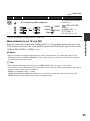
Digital HD Video Camera Recorder
Operating Guide
HDR-AX2000
Getting Started
15
Recording/
25
Playback
Editing
56
Using the Menu
65
Connecting with a
Computer
81
Troubleshooting
83
Additional Information
95
Quick Reference 109
Spanish Quick Guide/
118
Guía rápida en español
© 2009 Sony Corporation
Owner’s Record
The model and serial numbers are located on the
bottom. Record the serial number in the space
provided below. Refer to these numbers whenever
you call upon your Sony dealer regarding this
product.
Model No. HDR-AX2000
Serial No.
Model No. ACNo.
WARNING
To reduce fire or shock hazard, do
not expose the unit to rain or
moisture.
This symbol is intended to alert
the user to the presence of
uninsulated “dangerous
voltage” within the product’s
enclosure that may be of
sufficient magnitude to
constitute a risk of electric
shock to persons.
This symbol is intended to alert
the user to the presence of
important operating and
maintenance (servicing)
instructions in the literature
accompanying the appliance.
2
IMPORTANT SAFETY INSTRUCTIONS
SAVE THESE INSTRUCTIONS.
DANGER - TO REDUCE THE RISK OF FIRE
OR ELECTRIC SHOCK,
CAREFULLY FOLLOW THESE
INSTRUCTIONS.
• Read these instructions.
• Keep these instructions.
• Heed all warnings.
• Follow all instructions.
• Do not use this apparatus near water.
• Clean only with dry cloth.
• Do not block any ventilation openings. Install in accordance with the
manufacturer's instructions.
• Do not install near any heat sources such as radiators, heat registers,
stoves, or other apparatus (including amplifiers) that produce heat.
• Do not defeat the safety purpose of the polarized or grounding-type plug.
A polarized plug has two blades with one wider than the other. A
grounding type plug has two blades and a third grounding prong. The
wide blade or the third prong are provided for your safety. If the provided
plug does not fit into your outlet, consult an electrician for replacement of
the obsolete outlet.
• Protect the power cord from being walked on or pinched particularly at
plugs, convenience receptacles, and the point where they exit from the
apparatus.
• Only use attachments/accessories specified by the manufacturer.
• Use only with the cart, stand, tripod, bracket, or table specified by the
manufacturer, or sold with the apparatus. When a cart is used, use caution
when moving the cart/apparatus combination to avoid injury from tipover.
• Unplug this apparatus during lightning storms or when unused for long
periods of time.
Continued ,
3
IMPORTANT SAFETY INSTRUCTIONS (Continued)
• Refer all servicing to qualified service personnel. Servicing is required
when the apparatus has been damaged in any way, such as power-supply
cord or plug is damaged, liquid has been spilled or objects have fallen into
the apparatus, the apparatus has been exposed to rain or moisture, does
not operate normally, or has been dropped.
• If the shape of the plug does not fit the power outlet, use an attachment
plug adaptor of the proper configuration for the power outlet.
4
Read this first
Before operating this unit, please read this
manual thoroughly, and retain it for future
reference.
To handle the recorded images on
your computer
Refer to “Help” on the supplied CD-ROM
“Content Management Utility.”
CAUTION
Replace the battery with the
specified type only. Otherwise, fire
or injury may result.
Excessive sound pressure from earphones and
headphones can cause hearing loss.
Do not expose the batteries to excessive heat such
as sunshine, fire or the like.
Battery pack
If the battery pack is mishandled, the battery pack
can burst, cause a fire or even chemical burns.
Observe the following cautions.
• Do not disassemble.
• Do not crush and do not expose the battery pack
to any shock or force such as hammering,
dropping or stepping on it.
• Do not short circuit and do not allow metal
objects to come into contact with the battery
terminals.
• Do not expose to high temperature above 60°C
(140°F) such as in direct sunlight or in a car
parked in the sun.
• Do not incinerate or dispose of in fire.
• Do not handle damaged or leaking lithium ion
batteries.
• Be sure to charge the battery pack using a
genuine Sony battery charger or a device that
can charge the battery pack.
• Keep the battery pack out of the reach of small
children.
• Keep the battery pack dry.
• Replace only with the same or equivalent type
recommended by Sony.
• Dispose of used battery packs promptly as
described in the instructions.
AC Adaptor
• Use the nearby wall outlet when using the AC
Adaptor. Disconnect the AC Adaptor from the
wall outlet (wall socket) immediately if any
malfunction occurs while using your camcorder.
• Do not use the AC Adaptor placed in a narrow
space, such as between a wall and furniture.
• Even if your camcorder is turned off, AC power
(house current) is still supplied to it while
connected to the wall outlet (wall socket) via the
AC Adaptor.
For customers in the U.S.A. and
CANADA
RECYCLING LITHIUM-ION BATTERIES
Lithium-Ion batteries are
recyclable. You can help preserve
our environment by returning
your used rechargeable batteries
to the collection and recycling
location nearest you.
For more information regarding recycling of
rechargeable batteries, call toll free 1-800-8228837, or visit http://www.rbrc.org/
Caution: Do not handle damaged or leaking
Lithium-Ion batteries.
Continued ,
5
Read this first (Continued)
For customers in the U.S.A.
UL is an internationally recognized safety
organization.
The UL Mark on the product means it has
been UL Listed.
If you have any questions about this
product, you may call:
Sony Customer Information Center
1-800-222-SONY (7669).
The number below is for the FCC related
matters only.
Regulatory Information
Declaration of Conformity
Trade Name: SONY
Model No.: HDR-AX2000
Responsible Party: Sony Electronics Inc.
Address: 16530 Via Esprillo, San Diego, CA
92127 U.S.A.
Telephone Number: 858-942-2230
This device complies with Part 15 of the FCC
Rules.
Operation is subject to the following two
conditions:
(1) This device may not cause harmful
interference, and (2) this device must accept any
interference received, including interference
that may cause undesired operation.
CAUTION
You are cautioned that any changes or
modifications not expressly approved in this
manual could void your authority to operate this
equipment.
Note
This equipment has been tested and found to
comply with the limits for a Class B digital
device, pursuant to Part 15 of the FCC Rules.
These limits are designed to provide reasonable
protection against harmful interference in a
residential installation. This equipment generates,
uses, and can radiate radio frequency energy and,
if not installed and used in accordance with the
instructions, may cause harmful interference to
radio communications.
6
However, there is no guarantee that interference
will not occur in a particular installation. If this
equipment does cause harmful interference to
radio or television reception, which can be
determined by turning the equipment off and on,
the user is encouraged to try to correct the
interference by one or more of the following
measures:
– Reorient or relocate the receiving antenna.
– Increase the separation between the equipment
and receiver.
– Connect the equipment into an outlet on a
circuit different from that to which the receiver
is connected.
– Consult the dealer or an experienced radio/TV
technician for help.
The supplied interface cable must be used with the
equipment in order to comply with the limits for a
digital device pursuant to Subpart B of Part 15 of
FCC Rules.
For the State of California, USA only
Perchlorate Material - special handling may
apply, See
www.dtsc.ca.gov/hazardouswaste/perchlorate
Perchlorate Material: Lithium battery contains
perchlorate.
Representative plug of power supply cord of countries/regions around the world.
A Type
(American
Type)
B Type
(British Type)
BF Type
(British Type)
B3 Type
(British Type)
C Type (CEE
Type)
SE Type (CEE
Type)
O Type (Ocean
Type)
The representative supply voltage and plug type are described in this chart.
Depend on an area, Different type of plug and supply voltage are used.
Attention: Power cord meeting demands from each country shall be used.
- For only the United States
Use a UL Listed, 1.5-3 m (5-10 ft.), Type SPT-2 or NISPT-2, AWG no. 18 power supply cord, rated for
125 V 7 A, with a NEMA 1-15P plug rated for 125 V 15 A.”
Europe
Countries/regions
Voltage
Frequency (Hz)
Plug type
Austria
Belgium
Czech
Denmark
Finland
France
Germany
Greece
Hungary
Iceland
Ireland
Italy
Luxemburg
Netherlands
Norway
Poland
Portugal
Romania
Russia
Slovak
Spain
Sweden
Switzerland
UK
230
230
220
230
230
230
230
220
220
230
230
220
230
230
230
220
230
220
220
220
127/230
230
230
240
50
50
50
50
50
50
50
50
50
50
50
50
50
50
50
50
50
50
50
50
50
50
50
50
C
C
C
C
C
C
C
C
C
C
C/BF
C
C
C
C
C
C
C
C
C
C
C
C
BF
Countries/regions
Voltage
Frequency (Hz)
Plug type
China
Hong Kong
India
Indonesia
Japan
Korea (rep)
Malaysia
Philippines
Singapore
Taiwan
Thailand
Vietnam
220
200/220
230/240
127/230
100
220
240
220/230
230
110
220
220
50
50
50
50
50/60
60
50
60
50
60
50
50
A
BF
C
C
A
C
BF
A/C
BF
A
C/BF
A/C
Asia
Continued ,
7
Read this first (Continued)
Oceania
Countries/regions
Voltage
Frequency (Hz)
Plug type
Australia
New Zealand
240
230/240
50
50
O
O
Voltage
Frequency (Hz)
Plug type
120
120
60
60
A
A
Countries/regions
Voltage
Frequency (Hz)
Plug type
Bahamas
Costa Rica
Cuba
Dominican (rep)
El Salvador
Guatemala
Honduras
Jamaica
Mexico
Nicaragua
Panama
120/240
110
110/220
110
110
120
110
110
120/127
120/240
110/220
60
60
60
60
60
60
60
50
60
60
60
A
A
A/C
A
A
A
A
A
A
A
A
Countries/regions
Voltage
Frequency (Hz)
Plug type
Argentina
Brazil
Chile
Colombia
Peru
Venezuela
220
127/220
220
120
220
120
50
60
50
60
60
60
C/BF/O
A/C
C
A
A/C
A
Countries/regions
Voltage
Frequency (Hz)
Plug type
Iran
Iraq
Israel
Saudi Arabia
Turkey
UAE
220
220
230
127/220
220
240
50
50
50
50
50
50
C/BF
C/BF
C
A/C/BF
C
C/BF
Countries/regions
Voltage
Frequency (Hz)
Plug type
Algeria
Congo (dem)
Egypt
Ethiopia
Kenya
Nigeria
South Africa
Tanzania
Tunisia
127/220
220
220
220
240
230
220/230
230
220
50
50
50
50
50
50
50
50
50
C
C
C
C
C/BF
C/BF
C/BF
C/BF
C
North America
Countries/regions
Canada
USA
Central America
South America
Middle East
Africa
8
Notes on use
Size of memory card you can use with
your camcorder
Types of memory cards you can use in
your camcorder
• You can use the following memory cards
for this camcorder; “Memory Stick PRO
Duo” (Mark2) media, “Memory Stick
PRO-HG Duo” media, SD memory cards,
SDHC memory cards, SDXC memory
cards (Speed Class 4 or faster is required
for each SD card). However, operation
with all memory cards is not assured.
• “Memory Stick PRO Duo” media of up to
32 GB and SD cards of up to 64 GB have
been verified to operate with your
camcorder.
• In this manual, “Memory Stick PRO Duo”
(Mark2) media and “Memory Stick PROHG Duo” media are called “Memory
Stick PRO Duo” media. SD memory card,
SDHC memory card and SDXC memory
card are called SD card.
• See page 95 for the recordable time of
memory cards.
• “Memory Stick PRO Duo” media, half the
size of “Memory Stick,” or standard size
SD cards can be used for this camcorder.
• Do not attach a label or the like on
memory card or memory card adaptor.
Doing so may cause a malfunction.
Using the camcorder
• Do not hold the camcorder by the
following part.
Lens hood
LCD panel
b Notes
• A MultiMedia Card cannot be used with this
camcorder.
• Movies recorded on SDXC memory cards
cannot be imported to or played back on
computers or A/V devices not supporting the
exFAT* file system by connecting the
camcorder to these devices with the USB cable.
Confirm in advance that the connecting
equipment is supporting the exFAT system. If
you connect an equipment not supporting the
exFAT system and the format screen appears,
do not perform the format. All the data recorded
will be lost.
* The exFAT is a file system that is used for
SDXC memory cards.
Internal
microphone
Microphone (sold
separately) or
Microphone holder
Viewfinder
b Notes
• The camcorder is not dustproof, dripproof or
waterproof. See “About handling of your
camcorder” (p. 101).
• Connect cables to your camcorder with their
terminals placed the correct way. Squeezing the
terminals into your camcorder's jacks may
damage them or results in a malfunction of your
camcorder.
Continued ,
9
Read this first (Continued)
About menu items, LCD panel,
viewfinder, and lens
• A menu item that is grayed out is not
available under the current recording or
playback conditions.
• The LCD screen and the viewfinder are
manufactured using extremely highprecision technology, so over 99.99% of
the pixels are operational for effective
use. However, there may be some tiny
black points and/or bright points (white,
red, blue, or green in color) that appear
constantly on the LCD screen and/or the
viewfinder. These points are normal
results of the manufacturing process and
do not affect the recording in any way.
Black point
White, red, blue or green point
Do not expose your camcorder’s
viewfinder, lens, or LCD screen to the
sun or strong light source for extended
periods.
• Intense light sources, especially the sun
will converge on the viewfinder or lens
and damage the internal parts of your
camcorder. Avoid sunlight or other strong
light sources when storing your
camcorder. Protect this device by always
closing the lens cover or by placing it in
its bag when not in use.
About temperature of your camcorder
and battery pack
• Your camcorder has a protective function
that disables recording or playback if the
temperature of your camcorder or battery
10
pack is beyond the safely operable range.
In this case, a message appears on the
LCD screen or in the viewfinder (p. 92).
On recording
• In order to stabilize memory card operation,
it is recommended that you format the
memory card when you use it with your
camcorder for the first time. All data
recorded on the memory card will be erased
by formatting, and can not be recovered.
Save important data on the memory card on
other media such as a computer, before
formatting the memory card.
• Before starting to record, test the recording
function to make sure the picture and sound
are recorded without any problems.
• Compensation for the loss of the content of
recordings or the loss of recording
opportunities cannot be provided, even if
recording or playback is not possible due to
a malfunction of the camcorder, storage
media, etc., or even if images or sounds are
distorted due to the limits of the capabilities
of the camcorder.
• TV color systems differ depending on the
countries/regions. To view your recordings
on a TV, you need an NTSC system-based
TV.
• Television programs, films, video tapes,
and other materials may be copyrighted.
Unauthorized recording of such materials
may be contrary to the copyright laws.
• Because of the way that the image device
(CMOS sensor) reads out image signals, the
following phenomena may occur.
– The subjects passing by the frame rapidly might
appear crooked depending on the recording
conditions. (This phenomenon may be notable
in displays having high motion resolution.)
– Horizontal lines appear on the screen during
recording under fluorescent lights. The
phenomena can be reduced by adjusting the
shutter speed (p. 32).
– Images on the screen look horizontally divided
when a subject is lighted with a flash. The
phenomena can be reduced by using a slower
shutter speed.
On playing back movies
• Your camcorder is compatible with
MPEG-4 AVC/H.264 High Profile for
high definition image quality (HD)
recording. Therefore, you cannot play
back images recorded with high definition
image quality (HD) on your camcorder
with the following devices;
– Other AVCHD format compatible devices
which are not compatible with High Profile
– Devices which are not compatible with the
AVCHD format
• Movies made using this camcorder may
not play back normally on devices other
than this camcorder. Also, movies
recorded on other devices may not play
back properly on this camcorder.
• Standard (SD) image quality movies
recorded on SD memory cards cannot be
played on AV equipment of other
manufacturers.
Discs recorded with high definition
image quality (HD)
• This camcorder captures high definition
footage in the AVCHD format. DVD
media containing AVCHD footage should
not be used with DVD based players or
recorders, as the DVD player/recorder
may fail to eject the media and may erase
its contents without warning.
Save all your recorded image data
• To prevent your image data from being
lost, save all your recorded images on
external media periodically. It is
recommended that you save the image
data on a computer using the supplied
application software.
Format the recording media using
[MEDIA FORMAT] if images are not
recorded or played back properly
fragmented. As a result, you may not be
able to record and save images properly.
If this happens, save images on a separate
recordable media, such as a disc or
computer, then format the memory card
(p. 62).
Note on disposal/transfer
• Even if you delete all data or format the
memory card on your camcorder or
computer, you may not delete data from
the memory card completely. When you
transfer the memory card or your
camcorder, it is recommended that you
delete the data completely using
commercially available data deletion
software to prevent the recovery of your
data. Also, when you dispose of the
memory card, it is recommended that you
destroy the actual body of the memory
card.
About the operation of the camcorder
• You can operate the camcorder using the
SEL/PUSH EXEC dial/B/b buttons
(p. 22), V/v/B/b/EXEC buttons (p. 65),
and the touch panel. However, you cannot
use the touch panel to make some settings
such as the MENU items.
About this manual
• The images of the LCD screen and the
viewfinder used in this manual for
illustration purposes are captured using a
digital still camera, and therefore may
appear different.
• The on-screen displays in each local
language are used for illustrating the
operating procedures. Change the screen
language before using your camcorder if
necessary (p. 23).
• Design and specifications of recording
media and other accessories are subject to
change without notice.
• If you continue recording and deleting
images on a memory card for a long time,
the files on that memory card may be
11
Table of Contents
IMPORTANT SAFETY INSTRUCTIONS ................................................. 3
Read this first ........................................................................................... 5
Getting Started
Step 1: Checking supplied items ............................................................ 15
Step 2: Attaching the lens hood with lens cover .................................... 16
Step 3: Charging the battery pack ......................................................... 17
Step 4: Turning the power on and holding your camcorder properly ..... 19
Step 5: Adjusting the LCD panel and viewfinder .................................... 20
Step 6: Setting the date and time ........................................................... 22
Changing the language setting........................................................... 23
Step 7: Inserting a memory card ............................................................ 23
Recording/Playback
Recording ............................................................................................... 25
Selecting the recording format............................................................ 27
Changing the settings of your camcorder recordings ............................ 29
Adjusting the zoom.............................................................................. 29
Adjusting the focus manually .............................................................. 30
Adjusting the image brightness .......................................................... 31
Adjusting to natural color (White balance) .......................................... 33
Customizing the picture quality (Picture profile) ................................. 35
Audio setup ......................................................................................... 39
Recording with the SMOOTH SLOW REC function ............................. 41
Assigning the functions to the ASSIGN buttons ..................................... 43
Playback ................................................................................................ 45
Viewing still images ............................................................................. 47
Changing/checking the settings in your camcorder ............................... 49
Changing the screen........................................................................... 49
Displaying recording data (Data code)............................................... 49
Displaying the settings in your camcorder (Status check) ................. 50
Connecting a monitor or a TV ................................................................ 51
12
Editing
Operating the MODE menu ....................................................................56
Protecting recorded images (Protect) .....................................................57
Using the Playlist of movies ...................................................................58
Creating the Playlist ............................................................................ 58
Playing the Playlist .............................................................................. 58
Capturing still images from a movie .......................................................59
Dividing a movie .....................................................................................60
Deleting movies and still images ............................................................61
Formatting the memory card ..................................................................62
Preventing data on the memory card from being recovered ..................63
Repairing the image database file ..........................................................64
Using the Menu
Operating the menu .............................................................. 65
Menu items .............................................................................................67
(CAMERA SET) menu ....................................................................69
Settings to adjust your camcorder to the recording conditions (GAIN SET/
BACK LIGHT/STEADYSHOT, etc.)
(REC/OUT SET) menu ....................................................................73
Recording settings, input and output settings (REC FORMAT/VIDEO OUT,
etc.)
(AUDIO SET) menu .........................................................................75
Settings for the audio recording (AUDIO LIMIT/XLR SET, etc.)
(DISPLAY SET) menu .....................................................................77
Display settings of the display and the viewfinder (MARKER/VF BACKLIGHT/
DISPLAY OUTPUT, etc.)
(OTHERS) menu ...............................................................................80
Settings while recording or other basic settings (AREA SET/BEEP, etc.)
Connecting with a Computer
Saving images with a computer .............................................................81
Continued ,
13
Table of Contents (Continued)
Troubleshooting
Troubleshooting ..................................................................................... 83
Warning indicators and messages ......................................................... 92
Additional Information
Recording time of movies ...................................................................... 95
Using your camcorder abroad ................................................................ 97
File/folder structure on the memory card ............................................... 98
Maintenance and precautions ................................................................ 99
About the AVCHD format .................................................................... 99
About the memory card....................................................................... 99
About the “InfoLITHIUM” battery pack.............................................. 100
About x.v.Color.................................................................................. 101
About handling of your camcorder ................................................... 101
Specifications ....................................................................................... 105
Quick Reference
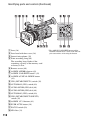
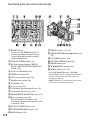
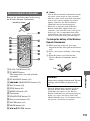
Identifying parts and controls ............................................................... 109
Wireless Remote Commander........................................................... 113
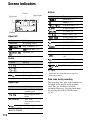
Screen indicators ................................................................................. 114
Index .................................................................................................... 115
Spanish Quick Guide/Guía rápida en español
14
118
Getting Started
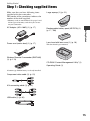
Step 1: Checking supplied items
Make sure that you have following items
supplied with your camcorder.
The number in the parentheses indicates the
number of that item supplied.
Large eyecup (1) (p. 21)
• Memory cards are not included. See pages 9 and
99 for types of memory cards that you can use
on your camcorder.
AC Adaptor (AC-L100C) (1) (p. 17)
Lens hood with lens cover (1) (p. 16)
Getting Started
Power cord (mains lead) (1) (p. 17)
Rechargeable battery pack (NP-F570) (1)
(p. 17, 100)
This lens hood is pre-mounted.
Wireless Remote Commander (RMT-845)
(1) (p. 113)
CD-ROM “Content Management Utility” (1)
Operating Guide (1)
A button-type lithium battery is already installed.
Component video cable (1) (p. 51)
A/V connecting cable (1) (p. 51)
USB cable (1) (p. 81)
15
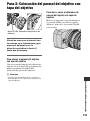
Step 2: Attaching the lens hood with lens cover
PUSH (lens hood release) button
Align the marks on the lens hood to
those on the camcorder, and turn the
lens hood in the direction of the
arrow 2 until it is locked.
To remove the lens hood with lens
cover
Turn the lens hood in the opposite direction
to the arrow 2 in the illustration while
pressing the PUSH (lens hood release)
button.
z Tips
• If you attach or remove a 72mm (2 7/8 in.) PL
filter or MC protector, remove the lens hood
with lens cover.
To open or close the shutter of the
lens hood with lens cover
Move the lens cover lever to OPEN to open
the lens cover, and move the lever to
CLOSE to close the lens cover.
16
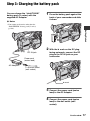
Step 3: Charging the battery pack
You can charge the “InfoLITHIUM”
battery pack (L series) with the
supplied AC Adaptor.
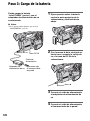
1 Press the battery pack against the
back of your camcorder and slide
it down.
b Notes
• You cannot use batteries other than the
“InfoLITHIUM” battery pack (L series)
(p. 100).
Getting Started
2 With the B mark on the DC plug
DC plug
DC IN jack
facing outwards, connect the DC
plug to the DC IN jack on your
camcorder.
Power cord
(mains lead)
AC Adaptor
To the wall outlet
(wall socket)
B mark
3 Connect the power cord (mains
lead) to the AC Adaptor.
4 Connect the power cord (mains
lead) to the wall outlet (wall
socket).
Continued ,
17
Step 3: Charging the battery pack (Continued)
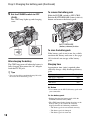
5 Set the POWER switch to OFF
(CHG).
The CHG lamp lights up and charging
starts.
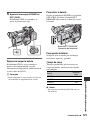
To remove the battery pack
Slide the POWER switch to OFF (CHG).
Push the BATT RELEASE (battery release)
button and remove the battery pack.
BATT RELEASE
(battery release) button
To store the battery pack
After charging the battery
The CHG lamp turns off when the battery is
fully charged. Disconnect the AC Adaptor
from the DC IN jack.
z Tips
• You can check the remaining battery life with
the status check function (p. 50).
If the battery pack is not in use for a while,
run down the battery and store it. See page
101 for details on storage of the battery
pack.
Charging time
Approximate time (min.) required when
you fully charge a fully discharged battery
pack.
Battery pack
Charging time
NP-F570 (supplied)
260
NP-F770
370
NP-F970
485
b Notes
• You cannot use the NP-F330 battery pack with
your camcorder.
On the battery pack
• Before changing the battery pack, slide the
POWER switch to OFF (CHG).
• The CHG lamp flashes during charging, or the
Battery Info (p. 50) will not be correctly
displayed under the following conditions.
– The battery pack is not attached correctly.
– The battery pack is damaged.
– The battery pack is worn-out.
18
To record or play back, set the POWER
switch to ON.
When you use your camcorder for the first
time, the [CLOCK SET] screen appears
(p. 22).
Getting Started
– The battery pack is too cold.
Remove the battery pack and put it in a warm
place.
– The battery pack is too hot.
Remove the battery pack and put it in a cool
place.
• The power will not be supplied from the battery
as long as the AC Adaptor is connected to the
DC IN jack of your camcorder, even when the
power cord (mains lead) is disconnected from
the wall outlet (wall socket).
Step 4: Turning the
power on and holding
your camcorder
properly
On the charging time
• Time measured with the camcorder at 25 °C
(77 °F). 10 °C to 30 °C (50 °F to 86 °F) is
recommended.
Using an outside power source
You can use the AC Adaptor to obtain the
AC power. While you are using the AC
Adaptor, the battery pack will not lose its
charge even when it is attached to your
camcorder.
Connect your camcorder as shown
in “Step 3: Charging the battery
pack” on page 17.
On the AC Adaptor
• Do not short-circuit the DC plug of the AC
Adaptor or battery terminal with any metallic
objects. This may cause a malfunction.
POWER switch
1 Slide the POWER switch to ON
while pressing the green button.
Press and hold the
green button.
b Notes
• The current date and time appear on the LCD
screen for a few seconds when you turn on your
camcorder after you set the date and time with
[CLOCK SET] (p. 22).
Continued ,
19
Step 4: Turning the power on and
holding your camcorder properly
(Continued)
2 Hold the camcorder properly.
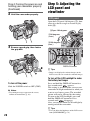
Step 5: Adjusting the
LCD panel and
viewfinder
LCD panel
Open the LCD panel 180 degrees (1), then
rotate it to the best angle to record or play
back (2).
1Open 180 degrees.
290 degrees
(max.)
3 Ensure a good grip, then fasten
2180 degrees
(max.)
the grip belt.
DISPLAY button
z Tips
• Images are displayed as mirror images on the
LCD screen, but are recorded as normal images.
To turn off the LCD backlight to make
the battery last longer
To turn off the power
Slide the POWER switch to OFF (CHG).
b Notes
• If warning messages appear on the screen,
follow the instructions (p. 93).
Press and hold the DISPLAY button for a
few seconds until
appears.
This setting is practical when you use your
camcorder in bright conditions or when you
want to save battery power. The recorded
picture will not be affected by the setting.
To turn on the LCD backlight, press and
hold the DISPLAY button for a few
seconds until
disappears.
Also, you can turn on the LCD backlight by
turning on/off the camcorder.
z Tips
• You can adjust the brightness of the LCD screen
from [LCD BRIGHT] (p. 78).
20
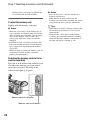
Viewfinder
You can view picture using the viewfinder
to save the battery, or when the picture on
the LCD screen is not clear.
• Do not remove the pre-attached eyecup.
Large eyecup
(supplied)
Attach with the
protruding part
at the top.
Getting Started
Viewfinder lens
adjustment lever
Move it until the picture
becomes clear.
b Notes
b Notes
• You may see primary colors shimmering in the
viewfinder when you move your line of sight.
This is not a malfunction. The shimmering
colors will not be recorded on the memory card.
z Tips
• You can adjust the brightness of the viewfinder
backlight from [VF BACKLIGHT] (p. 79).
• To display images both on the LCD display and
in the viewfinder, set [VF POWERMODE] to
[ON] (p. 79).
When the picture in the viewfinder is
hard to see
If you cannot see the picture in the
viewfinder clearly under bright
circumstances, use the supplied large
eyecup. To attach the large eyecup, stretch
it slightly and align it with the eyecup
groove in the viewfinder. You can attach
the large eyecup facing either the right or
left side.
21
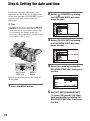
Step 6: Setting the date and time
Set the date and time when using your
camcorder for the first time. If you do not
set the date and time, [CLOCK SET] screen
appears every time you turn on your
camcorder.
2 Select
(OTHERS) by turning
the SEL/PUSH EXEC dial, then
press the dial.
z Tips
• If you do not use your camcorder for about 3
months, the built-in rechargeable battery gets
discharged and the date and time settings may
be cleared from the memory. In that case,
charge the rechargeable battery and then set the
date and time again (p. 103).
3 Select [CLOCK SET] by turning
the SEL/PUSH EXEC dial, then
press the dial.
4 Select your area by turning the
SEL/PUSH
EXEC dial
MENU
button
SEL/PUSH EXEC dial, then press
the dial.
Skip to step 4 when you set the clock for
the first time.
1 Press the MENU button.
5 Set [DST SET]/[SUMMERTIME],
[Y] (year), [M] (month), [D] (day),
hour and minute, by turning the
SEL/PUSH EXEC dial, then press
the dial.
22
Step 7: Inserting a
memory card
1 Open the cover in the direction of
the arrow.
The clock starts.
z Tips
• The date and time are automatically recorded on
the selected memory card, and can be displayed
during playback (DATA CODE button, p. 49).
Changing the language setting
You can change the on-screen displays to
show messages in a specified language.
Press the MENU button and select
(OTHERS) with the SEL/PUSH EXEC
dial. Select the screen language in
[LANGUAGE] (p. 80).
Getting Started
• Set [DST SET]/[SUMMERTIME] to [ON]
to move the time forward 1 hour.
• You can set any year up to the year 2037.
• For midnight, set it to 12:00 AM. For
midday, set it to 12:00 PM.
2 Orient the memory card’s
notched corner as shown in the
illustration, and insert into the
memory card slot until it clicks.
Memory card slot A and
its access lamp
Memory card slot B and
its access lamp
Insert with the notched corner
first, and facing down.
b Notes
• If you insert a memory card into the slot in
the wrong direction, the memory card, the
memory card slot, or image data may be
damaged.
• When you insert a new memory card in
standby mode, the [Create a new Image
Continued ,
23
Step 7: Inserting a memory card (Continued)
Database File.] screen appears. Follow the
screen indication, and touch [YES].
To eject the memory card
Lightly push the memory card once.
b Notes
• When the access lamp is lit or flashing in red,
your camcorder is reading/writing data. Do not
shake or knock your camcorder, turn the power
off, eject the memory card, or remove the
battery pack. Otherwise, image data may be
damaged.
• If [Failed to create a new Image Database File.
It may be possible that there is not enough free
space.] appears in step 2, format the memory
card (p. 62).
• When inserting or ejecting the memory card, be
careful to prevent the memory card from
popping out and dropping.
Selecting the memory card slot to be
used for recording
Press the A or B button of the memory card
slot where the memory card you want to
record on is inserted. The lamp of the
selected slot lights up in green.
Memory card slot A button
Memory card slot B button
24
b Notes
• You can only select a slot that already has a
memory card inserted.
• While movies are being recorded on the
memory card, you cannot switch the slot even if
you press the memory card slot A/B buttons.
z Tips
• When only one slot has a memory card inserted,
the slot that has the memory card is selected
automatically.
• If the memory card is fully recorded during
recording, the camcorder continues recording
automatically on the memory card inserted in
the other slot (Relay recording, p. 26).
Recording/Playback
Recording
Handle record button
Recording lamp
Recording lamp
Lens hood
POWER switch
Record button
• This camcorder can record movies in either high definition image quality (HD) or standard definition
image quality (SD). The factory setting is high definition image quality (HD) ([REC FORMAT], p. 27).
b Notes
• When the access lamp is lit or flashing in red, your camcorder is writing data on the memory card. Do not
shake or knock your camcorder, or remove the battery pack or the AC Adaptor.
• See page 95 on the recording time of movies.
• Your camcorder can record movies for about 13 hours continuously.
• If a movie file exceeds 2 GB during recording, the camcorder divides the file and create a new file
automatically.
• The menu settings, the PICTURE PROFILE settings, and the settings made by the AUTO/MANUAL
switch are stored in your camcorder when you turn the POWER switch to OFF. The access lamp lights up
while the settings are being stored. If you remove the battery pack or the AC Adaptor before turning off
the power, the settings may return to the default settings.
Recording/Playback
Your camcorder records movies on memory cards. Do the following steps to record movies.
1 Open the shutter of the lens hood.
Continued ,
25
Recording (Continued)
2 Slide the POWER switch to ON while pressing the green button.
Press and hold the green
button.
3 Press the record button or the handle record button.
[STBY] t [REC]
The recording lamp lights up during recording.
To stop the movie recording, press the record button or the handle record button again.
z Tips
• When recording in high definition image quality (HD), the aspect ratio is fixed to 16:9. When recording in
standard definition image quality (SD), you can switch the aspect ratio to 4:3 ([
WIDE REC], p. 73).
• You can change the screen display during recording (p. 49).
• Indicators displayed on the screen during recording are shown on page 114.
• The recording lamp can be set to stay off ([REC LAMP], p. 80).
• For low angle recording, the handle record button is convenient. Release the HOLD lever to enable the
handle record button. It might be helpful if you set the LCD panel face up or close it after turning it face
down, or lift the viewfinder up during the low angle recording.
• You can capture still images from the movies you recorded (p. 59).
To continue recording on memory cards, one after another (Relay recording)
Insert memory cards each in both slots A and B, so the camcorder switches memory card A (or
B) just before space on the other one runs out, and continues recording on the next memory
card automatically.
26
Insert a recordable memory card.
Small space
End
Start
REC: Recording
Small space
• Do not eject the memory card that is currently being used for recording. Replace only the memory card
whose slot lamp is off.
• Even if you press the memory card slot button, A or B, while recording movies, you cannot switch the slot
currently being used.
• When the remaining recording time of the memory card being used is less than 1 minute and the other slot
has a recordable memory card inserted, [
] or [
] appears on the camcorder screen.
The indicator turns off when the memory card is switched.
• If you start recording on a memory card with the remaining recording time of less than 1 minute, the
camcorder may not be able to relay-record. To relay-record without fail, make sure that the memory card
has more than 1 minute when you start recording.
• Seamless playback of relay-recorded movies with this camcorder is not possible.
• You can re-combine relay-recorded movies using the supplied application software (Windows only).
Recording/Playback
b Notes
Selecting the recording format
You can select the recording format (bit-rate, image quality, image size, frame rate, scanning
system). In the default setting, [
] is selected.
To change the setting
Press MENU t select
EXEC dial.
(REC/OUT SET) t [REC FORMAT] with the SEL/PUSH
Continued ,
27
Recording (Continued)
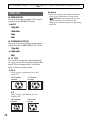
Setting value
Description
• Bit-rate
FX: max. 24 Mbps
FH: approx. 17 Mbps (average)
HQ: approx. 9 Mbps (average)
LP: approx. 5 Mbps (average)
• Image quality
HD: High definition image quality
SD: Standard definition image quality
• Image size
FX: 1920×1080
FH: 1920×1080
HQ: HD recording 1440×1080
SD recording 720×480
LP: 1440×1080
• Frame rate
either 24, 30, or 60
• Scanning system
i: interlace
p: progressive
pSCAN: Records images of progressive scanning system as interlace
signal (60i).
Setting value
If you select [
], for example, movies are recorded with following format.
• HD: High definition image quality. SD is standard definition image quality.
• 1080: Effective scanning lines
• 60: Frame rate
• i: Scanning system
• FX: Recording mode
b Notes
• The recording mode is fixed to FX or FH with the progressive scanning system.
28
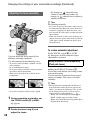
Changing the settings of your camcorder
recordings
Adjusting the zoom
Using the handle zoom
1 Set the handle zoom switch B to VAR
or FIX.
z Tips
• When you set the handle zoom switch B to
VAR, you can zoom in or out at variable
speed.
• When you set the handle zoom switch B to
FIX, you can zoom in or out at fixed speed
set in [HANDLE ZOOM] (p. 71).
b Notes
.
Using the power zoom lever
Move the power zoom lever D slightly for
a slower zoom. Move it further for a faster
zoom.
Wide view: (Wide angle)
• You cannot use the handle zoom lever A when
the handle zoom switch B is set to OFF.
• You cannot change the zoom speed of the power
zoom lever D with the handle zoom switch B.
Using the zoom ring
Recording/Playback
2 Press the handle zoom lever A to zoom
in or out.
You can zoom at the desired speed by
turning the zoom ring C. Fine adjustment
is also possible.
b Notes
Close view: (Telephoto)
• Turn the zoom ring C at a moderate speed. If
you turn it too fast, the zoom speed may lag
behind the zoom ring rotation speed, or the
operation sound of the zoom may also be
recorded.
z Tips
• The minimum distance required between your
camcorder and the subject for focus is about
1 cm (about 13/32 in.) for wide angle and about
80 cm (about 2 5/8 feet) for telephoto.
• The focus may not be adjusted at certain zoom
positions if the subject is within 80 cm (about
2 5/8 feet) from your camcorder.
• Be sure to keep your finger on the power zoom
lever D. If you move your finger off the power
zoom lever D, the operation sound of the
power zoom lever D may also be recorded.
Continued ,
29
Changing the settings of your camcorder recordings (Continued)
Adjusting the focus manually
9 changes to
when the focus
cannot be adjusted any farther. 9
changes to
when the focus cannot be
adjusted any closer.
z Tips
For focusing manually
• It is easier to focus on the subject when you use
the zoom function. Move the power zoom lever
towards T (telephoto) to adjust the focus, and
then, towards W (wide angle) to adjust the zoom
for recording.
• When you want to record a close-up image of a
subject, move the power zoom lever towards W
(wide angle) to fully magnify the image, then
adjust the focus.
To restore automatic adjustment
You can adjust the focus manually for
different recording conditions.
Use this function in the following cases.
– To record a subject behind a window covered
with raindrops.
– To record horizontal stripes.
– To record a subject with little contrast between
the subject and its background.
– When you want to focus on a subject in the
background.
Set the FOCUS switch B to AUTO.
9 disappears and the automatic focus
adjustment is restored.
Using automatic focus temporarily
(Push auto focus)
Record the subject while pressing and
holding the PUSH AUTO button C.
If you release the button, the setting returns
to manual focusing.
Use this function to shift the focus on one
subject to another. The scenes will shift
smoothly.
z Tips
– To record a stationary subject using a tripod.
1 During recording or standby, set
the FOCUS switch B to MAN.
9 appears.
2 Rotate the focus ring A and
adjust the focus.
30
• The focal distance information (for when it is
dark and hard to adjust the focus) appears for
about 3 seconds in the following cases. (It will
not be displayed correctly if you are using a
conversion lens (sold separately)).
– When you set the FOCUS switch B to
MAN and 9 appears on the screen
– When you rotate the focus ring while 9 is
displayed on the screen.
Using the expanded focus (Expanded
focus)
Adjusting the image brightness
[EXPANDED FOCUS] is assigned to the
ASSIGN 7 button (p. 43).
Press the ASSIGN 7 button.
[EXPANDED FOCUS] appears and the
center of the screen is magnified by about
2.0 times. It will be easier to confirm the
focus setting during manual focusing. The
screen returns to the original size when you
press the button again.
b Notes
z Tips
• You can select a type of an expanded image
displayed during the expanded focus
([EXPANDED FOCUS TYPE], p. 78).
Focusing on a distant subject (Focus
infinity)
Slide the FOCUS switch B to INFINITY
and hold it there.
appears on the screen.
To return to manual focus mode, release the
FOCUS switch B. This function enables
you to set focus on a distant subject even
when the focus is automatically set on a
close subject.
b Notes
• This function is only available during the
manual focus. It is not available during the
automatic focus.
You can adjust the image brightness by
adjusting the iris, gain or shutter speed, or
by reducing the light volume with the ND
filter B.
Recording/Playback
• Even though the image appears expanded on the
screen, the recorded image is not expanded.
b Notes
• You cannot use the back light function and the
spotlight function when iris, gain and shutter
speed are adjusted manually.
• [AE SHIFT] is not effective temporarily while
you adjust the iris, gain and shutter speed all
manually.
Adjusting the iris
You can manually adjust the iris to control
the volume of the light entering the lens. By
adjusting the iris, you can change or close
(
) the aperture of the lens, which is
expressed as an F value between F1.6 and
F11. The volume of the light increases the
more that you open the aperture (decreasing
F value). The volume of the light decreases
the more that you close the aperture
(increasing F value). The current F value
appears on the screen.
1 During recording or standby, set the
AUTO/MANUAL switch H to
MANUAL.
Continued ,
31
Changing the settings of your camcorder recordings (Continued)
2 When the iris is automatically adjusted,
press the IRIS button E.
next to the iris value disappears, or
the iris value appears on the screen.
3 Adjust the iris with the iris ring A.
When you assign [PUSH AUTO IRIS]
to one of the ASSIGN buttons, you can
automatically adjust the iris while
pressing and holding that ASSIGN
button. See page 43 for details on the
ASSIGN button.
z Tips
• The F value becomes close to F3.4 as the zoom
position changes from W to T even when you
open the aperture by setting the F value lower
than F3.4, such as F1.6.
• The range of focus, an important effect of the
aperture, is called the depth of field. The depth
of field gets shallower as the aperture is opened,
and deeper as the aperture is closed. Use the
aperture creatively to obtain the desired effect in
your photography.
• This is handy for making the background
blurred or sharp.
To adjust the iris automatically
Press the IRIS button E, or set the AUTO/
MANUAL switch H to AUTO.
The iris value disappears, or
appears
next to the iris value.
b Notes
• When you set the AUTO/MANUAL switch H
to AUTO, other manually adjusted items (gain,
shutter speed, white balance) also become
automatic.
Adjusting the gain
You can adjust the gain manually when you
do not want to use the AGC (automatic gain
control).
1 During recording or standby, set the
AUTO/MANUAL switch H to
MANUAL.
2 When the gain is automatically
adjusted, press the GAIN button C.
32
next to the gain value disappears, or
the gain value appears on the screen.
3 Set the gain switch F to H, M or L.
The gain value set for the selected gain
switch position appears on the screen.
You can set the gain value for each gain
switch position from [GAIN SET] of the
(CAMERA SET) menu (p. 69).
To adjust the gain automatically
Press the GAIN button C, or set the
AUTO/MANUAL switch H to AUTO.
The gain value disappears, or
appears
next to the gain value.
b Notes
• When you set AUTO/MANUAL switch H to
AUTO, other manually adjusted items (iris,
shutter speed, white balance) also become
automatic.
z Tips
• When you record high definition image quality
(HD) movies with the gain set to [-6dB] and
play them back with the data code, the gain
value is displayed as [---].
Adjusting the shutter speed
You can manually adjust and fix the shutter
speed. You can make a moving subject look
still or emphasize the movement of a
moving subject by adjusting the shutter
speed.
1 During recording or standby, set the
AUTO/MANUAL switch H to
MANUAL.
2 Press the SHUTTER SPEED button D
until the shutter speed value is
highlighted.
3 Change the shutter speed displayed on
the screen by turning the SEL/PUSH
EXEC dial G.
You can adjust the shutter speed in a
range of 1/4 second through 1/10000
second.
The denominator of the set shutter speed
appears on the screen. For example,
[100] appears on the screen when you
set the shutter speed to 1/100 second.
The larger the value on the screen, the
faster the shutter speed.
4 Press the SEL/PUSH EXEC dial G to
lock the shutter speed.
To readjust the shutter speed, do steps
2 to 4.
z Tips
To adjust the shutter speed
automatically
Press the SHUTTER SPEED button D
twice, or set the AUTO/MANUAL switch
H to AUTO.
The shutter speed value disappears, or
appears next to the shutter speed value.
b Notes
• If you change the ND filters B during
recording, the movie and sound may be
distorted.
• When adjusting the iris manually, the ND filter
icon does not flash even if the light volume
should be adjusted with the ND filter.
• If the camcorder cannot detect the ND filter
position (OFF/1/2/3),
flashes on the screen.
Make sure that the ND filter is set correctly.
z Tips
• While recording a bright subject, diffraction
may occur if you close the aperture further
down, resulting in a fuzzy focus (this is a
common phenomenon with video cameras). The
ND filter B suppresses this phenomenon and
gives better recording results.
Recording/Playback
• You can set a shutter speed between 1/3 second
and 1/10000 second with the frame rate of 24p
or 24p SCAN.
• It is difficult to focus automatically at a lower
shutter speed. Manual focusing with your
camcorder attached to a tripod is recommended.
• When recording under fluorescent lamps,
sodium lamps, or mercury lamps, the picture
may flicker or change colors, or may have
horizontal bands of noise. You may be able to
improve the situation by adjusting the shutter
speed.
flashes during the iris automatic
adjustment, set the ND filter to 3.
The ND filter indicator will stop flashing
and remain on the screen.
If
flashes, set the ND filter to OFF.
The ND filter icon will disappear from the
screen.
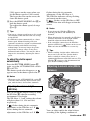
Adjusting to natural color (White
balance)
b Notes
• When you set the AUTO/MANUAL switch H
to AUTO, other manually adjusted items (iris,
gain, white balance) also become automatic.
Adjusting the volume of light
(ND filter)
You can record the subject clearly by using
the ND filter B when the recording
environment is too bright.
The ND filters 1, 2 and 3 reduce the volume
of light to about 1/4, 1/16 and 1/64,
respectively.
If
flashes during the iris automatic
adjustment, set the ND filter to 1. If
flashes during the iris automatic
adjustment, set the ND filter to 2. If
You can adjust and fix the white balance
according to the lighting conditions of
Continued ,
33
Changing the settings of your camcorder recordings (Continued)
recording environment.
You can store white balance values in
memory A (
A) and memory B (
B),
respectively. Unless a white balance is
readjusted, values will remain even after the
power has been turned off.
When you select PRESET, [OUTDOOR] or
[INDOOR] is selected, according to which
one you previously set with [WB PRESET]
in the
(CAMERA SET) menu.
1 During recording or standby, set
the AUTO/MANUAL switch D to
MANUAL.
2 Press the WHT BAL button A.
3 Set the white balance memory
switch B to any one of
PRESET/A/B.
Select A or B for recording with the
white balance setting stored in memory
A or B.
Indicator
Shooting conditions
A
(Memory A)
B
(Memory B)
• White balance values
adjusted for light
sources can be stored
in memory A and
memory B. Follow the
steps in “To save the
adjusted white balance
value in memory A or
B” (p. 34).
• Recording neon signs
or fireworks
Outdoor
([OUTDOOR]) • Recording sunset/
sunrise, just after
sunset or just before
sunrise
• Under daylight color
fluorescent lamps
34
Indicator
Shooting conditions
n
Indoor
([INDOOR])
• Under the lighting
conditions that change
in many ways, such as
a party hall
• Under strong light,
such as in a
photography studio
• Under sodium lamps
or mercury lamps
To save the adjusted white balance
value in memory A or B
1 Set the white balance memory switch to
A(
A) or B (
B) in step 3 of
“Adjusting to natural color (White
balance).”
2 Capture a white subject, such as white
paper, full-screen in the same lighting
condition as the one in which the subject
is.
3 Press the
(one push) button C.
A or
B starts flashing rapidly. It
will stay on when the white balance
adjustment is completed and the
adjusted value is stored in
A or
B.
b Notes
• When a white balance adjustment value has not
been obtained successfully,
A or
B
turns from rapid flashing to slow flashing.
Adjust the subject appropriately and set the
shutter speed to auto or around 1/60, then try
adjusting the white balance again.
• It may take a long time to adjust the white
balance, depending on the recording conditions.
If you want to perform a different operation
before completing the adjustment, set the white
balance memory switch B to another position
to temporarily suspend white balance
adjustment.
To adjust the white balance
automatically
Picture profile
number
Press the WHT BAL button A or set the
AUTO/MANUAL switch D to AUTO.
PP1
You can assign your own
setting
b Notes
PP2
• When you set the AUTO/MANUAL switch D
to AUTO, other manual adjusted items (iris,
gain, and shutter speed) also become automatic.
You can assign your own
setting.
PP3
Appropriate setting to
record people
PP4
Appropriate setting to
record film-like pictures
PP5
Appropriate setting to
record sunset
PP6
Appropriate setting to
record black and white
pictures
Customizing the picture quality
(Picture profile)
Recording condition
Recording/Playback
1 During standby, press the
PICTURE PROFILE button B.
2 Select a picture profile number
with the SEL/PUSH EXEC dial A.
You can record with the settings of the
selected picture profile.
You can customize the picture quality by
adjusting picture profile items such as
[GAMMA] and [DETAIL].
Connect your camcorder to a TV or
monitor, and adjust the picture quality
while observing the picture on the TV or
monitor screen.
Picture quality settings for different
recording conditions have been stored in
[PP1] through [PP6] as default settings.
3 Select [OK] with the SEL/PUSH
b Notes
You can change the settings stored in [PP1]
through [PP6].
• When you set [x.v.Color] in the
(CAMERA SET) menu to [ON], the picture
profile will be disabled.
EXEC dial A.
To cancel the picture profile recording
Select [OFF] in step 2 with the SEL/PUSH
EXEC dial A.
To change the picture profile
1 Press the PICTURE PROFILE button
B.
Continued ,
35
Changing the settings of your camcorder recordings (Continued)
2 Select the PICTURE PROFILE number
with the SEL/PUSH EXEC dial A.
3 Select [SETTING] with the SEL/PUSH
EXEC dial A.
4 Select an item to be adjusted with the
SEL/PUSH EXEC dial A.
5 Adjust the picture quality with the SEL/
PUSH EXEC dial A.
6 Repeat steps 4 and 5 to adjust other
items.
7 Select [
RETURN] with the SEL/
PUSH EXEC dial A.
8 Select [OK] with the SEL/PUSH EXEC
dial A.
A picture profile indicator appears.
36
GAMMA
To select a gamma curve.
Item
Description and settings
[STANDARD]
Standard gamma curve
[CINEMATONE1]
Gamma curve 1 for producing tone of film camera images
[CINEMATONE2]
Gamma curve 2 for producing tone of film camera images
COLOR MODE
To set type and level of colors.
Description and settings
[TYPE]
Selects a type of colors.
[STANDARD]
: Standard colors
[CINEMATONE1] : Film camera image-like colors good with
[GAMMA] set to [CINEMATONE1]
[CINEMATONE2] : Film camera image-like colors good with
[GAMMA] set to [CINEMATONE2]
[LEVEL]
Sets a color level when you set [TYPE] to the settings other than
[STANDARD].
1 (close to color settings of [STANDARD]) to 8 (color settings of the
selected type)
Recording/Playback
Item
COLOR LEVEL
To set the color level.
Item
Description and settings
-7 (light) to +7 (dark), -8: black and white
COLOR PHASE
To set the color phase.
Item
Description and settings
-7 (greenish) to +7 (reddish)
WB SHIFT
To set items for the white balance shift.
Item
Description and settings
[LB[COLOR TEMP]]
Sets a color temperature offset value.
-9 (bluish) to +9 (reddish)
[CC[MG/GR]]
Sets a color correct offset value.
-9 (greenish) to +9 (magentish)
Continued ,
37
Changing the settings of your camcorder recordings (Continued)
DETAIL
To set items for the detail.
Item
Description and settings
Sets the detail level.
-7 to +7
SKINTONE DETAIL
To adjust the detail of skintone areas to reduce wrinkles.
Item
Description and settings
[ON/OFF]
Suppresses details in skin-tone areas to reduce wrinkles. Select [ON]
when you want to use this function. You can also select other areas.
[LEVEL]
Sets the adjustment level.
1 (less adjust the detail) to 8 (more adjust the detail)
[COLOR SEL]
Sets color items for the detail adjustment.
[PHASE]
: Sets the color phase.
0 (purple) t 32 (red) t 64 (yellow) t
96 (green) t 127 (blue)
[RANGE]
: Sets the color range.
0 (selects no color), 1 (narrow: selects a single
color) to 31 (wide: selects multiple colors in
similar color phases and saturation)
The detail will not be adjusted when you set
[RANGE] to 0.
[SATURATION] : Sets the color saturation.
0 (selects a light color) to 31 (selects a deep color)
COPY
To copy the settings of the picture profile to another picture profile number.
RESET
To reset the picture profile to the default setting.
38
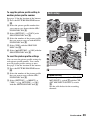
To copy the picture profile setting to
another picture profile number
Audio setup
See page 35 for the location of the buttons.
1 Press the PICTURE PROFILE button
B.
2 Select the picture profile number that
you want to copy from with the SEL/
PUSH EXEC dial A.
3 Select [SETTING] t [COPY] with
SEL/PUSH EXEC dial A.
Recording/Playback
4 Select the number of the picture profile
that you want to copy to with the SEL/
PUSH EXEC dial A.
5 Select [YES] with the SEL/PUSH
EXEC dial A.
6 Select [
RETURN] t [OK] with the
SEL/PUSH EXEC dial A.
To reset the picture profile settings
You can reset the picture profile settings by
each picture profile number. You cannot
reset all picture profile settings at once.
See page 35 for the location of the buttons.
1 Press the PICTURE PROFILE button
B.
2 Select the number of the picture profile
that you want to reset with the SEL/
PUSH EXEC dial A.
3 Select [SETTING] t [RESET] t
[YES] t [
RETURN] t [OK]
with the SEL/PUSH EXEC dial A.
Channel setting
1 Select input sources with the CH1 (INT
MIC/INPUT1) switch C and the CH2
(INT MIC/INPUT1/INPUT2) switch
D.
See the table below for the recording
channels.
Continued ,
39
Changing the settings of your camcorder recordings (Continued)
When the CH1 switch is set to
INT MIC
CH2 switch
position
INT MIC
INPUT1
INPUT2
Input channel and source
Internal
microphone
(L)
CH1
Internal
microphone
(R)
CH2*
Internal
microphone
(mono)
CH1
XLR INPUT1
CH2**
Internal
microphone
(mono)
CH1
XLR INPUT2
CH2**
b Notes
When the CH1 is set to INPUT1
CH2 switch
position
Input channel and source
INT MIC
XLR INPUT1
CH1
Internal
microphone
(mono)
CH2**
XLR INPUT1
CH1
INPUT1
CH2**
INPUT2
LINE: For inputting sound from an
audio device
MIC: For inputting sound from an
external microphone that does
not support the +48V power
source.
MIC+48V:For inputting sound from a
device that supports the +48V
power source.
When you connect a microphone to the
INPUT2 jack, set the INPUT2 switch to
an appropriate position for that
microphone.
XLR INPUT1
CH1
XLR INPUT2
CH2**
• Do not operate the INPUT1/INPUT2 switches
during recording to prevent noise from being
recorded.
• When you connect a device that supports the
+48V power source to the INPUT1 or INPUT2
jack, set the INPUT1/INPUT2 switches to MIC
prior to connecting the device. When you
disconnect the device, set the INPUT1/INPUT2
switch to MIC first, then disconnect it.
• When you connect a microphone that does not
support the +48V power source to the INPUT1
or INPUT2 jack, set the INPUT1/INPUT2
switch to MIC. If you use it with the INPUT1/
INPUT2 switch set to MIC+48V, it may be
damaged or the recorded sound may be
distorted.
Adjusting the volume
You can adjust the volume of an internal
microphone or a microphone connected to
the INPUT1/INPUT2 jacks.
z Tips
* The recording level of channel 2 is
synchronized with that of channel 1 when only
the internal microphone is used. The recording
level of channel 2 is controlled with the CH1
(AUDIO LEVEL) dial and the CH1 (AUTO/
MAN) switch.
** You can adjust the recording levels of channel 1
and channel 2 separately.
2 Set the INPUT1 switch B to an
appropriate position for the microphone
connected to the INPUT1 jack A.
40
• See page 39 on the CH1 (INT MIC/INPUT1)
and the CH2 (INT MIC/INPUT1/INPUT2)
switches.
1 Set the AUTO/MAN (CH1/CH2) switch
E of the channel to be adjusted to
MAN.
appears on the screen.
2 Turn the AUDIO LEVEL dial F to
adjust the volume during recording or
standby.
To restore automatic adjustment
Set the AUTO/MAN (CH1/CH2) switch E
of the manually adjusted channel to AUTO.
z Tips
• To check other audio settings, press the
STATUS CHECK button G.
• For other settings, see the
(AUDIO SET)
menu (p. 75).
Setting the headphone sound
4 Press the record button.
An about 6-second movie is stretched to
about 24 seconds and recorded as a
slow-motion movie.
Recording ends when [Recording...]
disappears from the screen.
To cancel [SMOOTH SLOW REC], press
the MODE button.
To change the setting
You can select the channel, CH1 or CH2, to
output from the headphone.
See [HEADPHONE OUT] on the sound at
STEREO MIX (p. 75).
Recording with the SMOOTH
SLOW REC function
Fast moving subjects and actions, which
cannot be captured under the general
recording conditions, can be recorded in
smooth moving slow-motion.
This is useful for recording fast actions
such as a golf or tennis swing.
x
REC MODE
You can select the record mode from [1080/
60i FX], [1080/60i FH], [1080/60i HQ], or
[1080/60i LP] for smooth slow recording.
Recording/Playback
Press the MENU button, and select the
setting to be changed.
x TIMING
You can use this to select when recording
starts in relation to when the record button
(handle record button) is pressed.
[6sec AFTER]*
[6sec BEFORE]
1 Press the MODE button.
2 On the LCD screen, select
[CAMERA] t [SMOOTH SLOW
REC].
3 Select the image quality.
* The default setting is [6sec AFTER].
b Notes
• Sounds cannot be recorded.
• The shutter speed is automatically set to 1/250
second when you start [SMOOTH SLOW
REC]. (You cannot set a slower shutter speed
than 1/250 second.)
• The recording time may be shorter, depending
on recording conditions.
• The image quality is lower than with the regular
recording.
Continued ,
41
Changing the settings of your camcorder recordings (Continued)
• The camcorder does not perform relay recording
with memory cards during [SMOOTH SLOW
REC]. If the space on the memory card is
insufficient, the camcorder records movies only
as long as there is space available.
• The time of the movie recorded using
[SMOOTH SLOW REC] is recorded after being
converted to slow-motion, not the time when the
movie is actually shot.
• Progressive recording is not available for
[SMOOTH SLOW REC]. The progressive
setting is changed to the interlace setting
automatically.
• Even if you change the record mode with
[
REC MODE], the record mode of the
standard definition image quality (SD) does not
change.
42
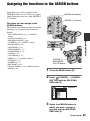
Assigning the functions to the ASSIGN buttons
Some functions can be assigned to the
ASSIGN buttons for use. You can assign a
single function to any one of the ASSIGN 1
to 7 buttons.
ASSIGN 4-6 buttons
ASSIGN 1-3 buttons
Functions you can assign to the
ASSIGN buttons
The buttons in parentheses indicate that the
functions are assigned to the buttons by
default.
Recording/Playback
• EXPANDED FOCUS (p. 31) (ASSIGN 7
button)
• PUSH AUTO IRIS (p. 31)
• IRIS RING ROTATE (p. 69)
• AE SHIFT (p. 70) (ASSIGN 5 button)
• BACK LIGHT (p. 70)
• SPOTLIGHT (p. 70)
• STEADYSHOT (p. 71)
• D.EXTENDER (p. 72)
• FADER (p. 72)
• COLOR BAR (p. 72)
• ZEBRA (p. 77) (ASSIGN 4 button)
• PEAKING (p. 77)
• MARKER (p. 77)
• REC LAMP (p. 80)
• VISUAL INDEX (p. 45) (ASSIGN 6 button)
• MODE (p. 56)
ASSIGN 7/
EXPANDED
FOCUS button
1 Press the MENU button B.
2 Select
(OTHERS) t [ASSIGN
BUTTON] with the SEL/PUSH
EXEC dial A.
3 Select the ASSIGN button to
which you want to assign a
function with the SEL/PUSH
EXEC dial A.
Continued ,
43
Assigning the functions to the ASSIGN buttons (Continued)
• [--------] appears if no function is assigned
to the ASSIGN button.
4 Select the function that you want
to assign with the SEL/PUSH
EXEC dial A.
5 Select [OK] with the SEL/PUSH
EXEC dial A.
6 Select [
RETURN] with the SEL/
PUSH EXEC dial A.
7 Press the MENU button B to hide
the menu screen.
44
Playback
VISUAL INDEX button
ASSIGN 6/VISUAL INDEX button
MODE button
DISPLAY button
VOLUME button
Recording/Playback
You can play back movies as follows:
1 Slide the POWER switch to ON.
Press and hold the
green button.
2 Press the VISUAL INDEX button.
The VISUAL INDEX screen appears after a few seconds.
Recording media
Playback mode
Previous
Next
Thumbnail
(movie)
Current movie
data (p. 46)
You can display the VISUAL INDEX screen also by pressing the MODE button, followed
by touching [PLAY] t [VISUAL INDEX] on the screen.
You can turn on or off the time and date display on the thumbnails by pressing the
DISPLAY button.
Continued ,
45
Playback (Continued)
3 Play back movies.
1 Touch the recording media you want to play back.
: Memory card A
: Memory card B
2 Touch the playback mode, and select the desired image quality of movies.
Playback mode
: High definition image quality (HD)
: Standard definition image quality (SD)
3 Touch twice the thumbnail of the movie you want to play back.
The first touch will show the information on the movie at the lower part of the screen.
A Date and time of recording started
B Resolution
C Frame rate
D Record mode
E Duration
F Time code of recording started
Time code will not be displayed correctly when you play back the memory card with no time
code, or the memory card with time code that your camcorder does not support.
• i appears with the movie that has been most recently played back or recorded. If you touch the
movie with i, you can continue playback from the previous time.
46
Your camcorder starts playing the selected movie.
Previous
Next
Stop
Fast forward
Fast reverse
Pause/Play
• You may not be able to play back movies recorded on other camcorders.
z Tips
• When playback from the selected movie reaches the last movie, the screen returns to the VISUAL INDEX
screen.
• Touch
/
during pause to play back movies slowly.
• As you repeat touching
/
during playback, movies are played back as fast as about 5 times
t about 10 times t about 30 times t about 60 times.
• Reduced-size images which enable you to view many movies at the same time on the VISUAL INDEX
screen are called “thumbnails.”
• You can operate playback using the PREV/PLAY/NEXT/STOP/PAUSE/SCAN/SLOW buttons on the
camcorder.
Recording/Playback
b Notes
To adjust the volume
Adjust the volume with the VOLUME buttons.
To return to the recording mode
Press the VISUAL INDEX button.
Viewing still images
You can create still images by capturing scenes from movies that you recorded on your
camcorder (p. 59).
View still images.
1 Touch the recording media you want to view.
: Memory card A
: Memory card B
Continued ,
47
Playback (Continued)
2 Touch the playback mode, then select
(still image).
Playback mode
3 Touch twice the thumbnail of the still image you want to view.
The first touch will show the information on the still image at the lower part of the screen.
A Date and time of recording
B Resolution
C Image size
D Playback folder
E Playback folder edge
Indicates that this is the first or the last page of the playback folder. This does not appear
when there is only 1 playback folder.
• B appears on the still image that was played back most recently.
Your camcorder displays the selected still image.
Next
VISUAL INDEX
Previous
48
Changing/checking the settings in your
camcorder
Displaying recording data (Data
code)
You can display information, including
date, time, and camera data automatically
stored during recording on the screen
during playback.
Press the DATA CODE button A
during playback or pause.
Recording/Playback
The screen changes like “date and time
display t camera data display t no
display” as you press the button.
A STEADYSHOT
Changing the screen
You can turn on and off the display of the
time code, and other information on the
screen.
Press the DISPLAY button B.
The screen indicators turn on (displayed)
and off (not displayed) as you press the
button.
In the recording mode, the screen changes
like “detailed display t simple display t
no display” as you press the button.
B Exposure
appears during playback of the
movie recorded with the iris, gain or
shutter speed automatically adjusted.
appears during playback of the
movie recorded with the iris, gain or
shutter speed manually adjusted.
C Iris
appears in the iris value display
area during playback of the movie
recorded with the iris manually adjusted
to its maximum value.
D Gain
E Shutter speed
F White balance
z Tips
• You can display the screen indicators during
playback on a TV. Select [ALL OUTPUT] of
[DISPLAY OUTPUT] (p. 79).
Continued ,
49
Changing/checking the settings in your camcorder (Continued)
b Notes
• The exposure correction value (EV), shutter
speed, iris and flash on/off will be displayed
during viewing still images.
• When you play back the memory card on other
devices, the camera data may be displayed
incorrectly. Confirm the correct camera data on
your camcorder.
1 Press the STATUS CHECK button
C.
Displaying the settings in your
camcorder (Status check)
You can check the settings of the following
items.
• Audio setup such as microphone volume
level (p. 75)
• Output signal setup ([VIDEO OUT], etc.)
(p. 74)
• Functions assigned to the ASSIGN
buttons (p. 43)
• Camera setup (p. 69)
• Memory card information
You can check the estimated used and free
spaces.
2 Turn the SEL/PUSH EXEC dial D
until a desired display shows up
on the screen.
AUDIO t OUTPUT t ASSIGN t
CAMERA t MEDIA INFO t
BATTERY INFO
Setup items are displayed according to
the settings of the camcorder when it is
turned on.
To hide the display
Press the STATUS CHECK button C.
• Battery Info
You can check the remaining capacity of
the attached battery.
50
Connecting a monitor or a TV
Playback image quality depends on the type of monitor or TV, or the jacks used to make the
connection.
Use the supplied AC Adaptor to obtain AC power (p. 19).
Refer also to the instruction manuals supplied with the device to be connected.
Jacks on your camcorder
Open the jack cover and connect the cable.
Recording/Playback
Continued ,
51
Connecting a monitor or a TV (Continued)
Connecting to a high definition TV
High definition image quality (HD) movies are played back in high
definition image quality (HD).
Standard definition image quality (SD) movies are played back in
standard definition image quality (SD).
COMPONENT IN VIDEO
HDMI IN
AUDIO
: Signal flow
Type
Camcorder
Cable
TV
Menu Setting
(REC/OUT SET)
menu t
[VIDEO OUT] t
COMPONENT
[COMPONENT
IN
OUTPUT] t
(White)
[1080i/480i] (default)
AUDIO
(p. 74)
(Red)
A/V connecting cable (supplied)
Component video cable
(supplied)
(Green) Y
(Blue) PB/CB
VIDEO
(Red) PR/CR
b Notes
• If you connect only component video plugs, audio signals are not output. Connect the white and red plugs
to output audio signals.
52
: Signal flow
Type
Camcorder
Cable
TV
HDMI IN
HDMI cable (sold separately)
Menu Setting
(REC/OUT SET)
menu t
[VIDEO OUT] t
[HDMI OUTPUT] t
[AUTO] (default) (p. 74)
b Notes
Continued ,
Recording/Playback
• Use an HDMI cable with the HDMI logo.
• Images are not output from the HDMI OUT jack of your camcorder, if copyright protection signals are
recorded in the movies.
• Your TVs may not function correctly (for example, no sound or image).
• Do not connect the HDMI OUT jack of your camcorder and HDMI OUT jack of the external device with
the HDMI cable. This may cause a malfunction.
• This camcorder is not compatible with “BRAVIA” sync.
53
Connecting a monitor or a TV (Continued)
Connecting to a 16:9 (wide) or 4:3 TV
High definition image quality (HD) movies are played back
in standard definition image quality (SD).
Standard definition image quality (SD) movies are played
back in standard definition image quality (SD).
COMPONENT IN VIDEO
VIDEO/AUDIO
AUDIO
To set the aspect ratio according to the connected TV (16:9/4:3)
Select
(REC/OUT SET) t [VIDEO OUT] t [TV TYPE] and the aspect ratio to match
your TV (p. 74).
z Tips
• When your TV is monaural (when your TV has only one audio input jack), connect the yellow plug of the
A/V connecting cable to the video input jack and connect the white (left channel) or the red (right
channel) plug to the audio input jack of your TV or VCR. When you want to play the sound in monaural
mode, use a connecting cable for that purpose.
: Signal flow
Type
Camcorder
Cable
TV
Menu Setting
(REC/OUT SET)
menu t
[VIDEO OUT] t
COMPONENT [COMPONENT
IN
OUTPUT] t
(White)
[480i] (p. 74)
AUDIO
(Red)
[VIDEO OUT] t
[TV TYPE] t
[16:9]/[4:3]* (p. 74)
(Green) Y
A/V connecting cable (supplied)
Component video cable
(supplied)
(Blue) PB/CB
VIDEO
(Red) PR/CR
b Notes
• If you connect only component video plugs, audio signals are not output. Connect the white and red plugs
to output audio signals.
54
: Signal flow
Type
Camcorder
Cable
TV
A/V connecting cable (supplied)
(Yellow)
(White)
(Red)
Menu Setting
(No other jacks should be
connected.)
(REC/OUT SET)
VIDEO menu t
[VIDEO OUT] t
AUDIO [TV TYPE] t
[16:9]/[4:3]* (p. 74)
* Change the settings according to the TV connected.
Select the connecting method with [VIDEO OUT] (p. 74) depending on the input jack of the
VCR. Connect your camcorder to the LINE IN input on the VCR. Set the input selector on the
VCR to LINE (VIDEO 1, VIDEO 2, etc.).
b Notes
• Images are output in standard definition image quality (SD) when the A/V connecting cable is used.
• When the frame rate of [REC FORMAT] is 24p or 30p, images are converted to the interlace signals by
the pull-down system to be output.
Recording/Playback
When connecting to your TV via a VCR
z Tips
• The resolution of the signal depends on the [VIDEO OUT] setting. See page 74 for details.
• If you connect your camcorder to the TV using more than one type of cable to output images, the order of
priority of the TV input jacks is as follows:
HDMI t component video t video.
• HDMI (High-Definition Multimedia Interface) is an interface to send both video/audio signals. The
HDMI OUT jack outputs high quality images and digital audio.
55
Editing
Operating the MODE menu
You can edit the recorded movies, format
memory cards, etc.
4 Touch the desired item.
Example: [DELETE]
MODE button
POWER switch
5 Operate following the
instructions on the screen.
MODE button
To hide the MODE menu screen
Touch
1 Set the POWER switch to ON.
2 Press the MODE button.
3 Touch the desired category.
Example: [EDIT] category
56
, or press the MODE button.
To return to the previous screen
Touch
.
Protecting recorded images (Protect)
Protect movies and still images to avoid
deleting them by mistake.
To undo the protection of movies and
still images
z Tips
Touch the movie or still image marked with
- in step 4.
- disappears.
• You can also protect movies and still images by
pressing the MENU button on the VISUAL
INDEX screen or the playback screen.
1 Press the MODE button.
2 Touch [EDIT] t [PROTECT].
3 To protect movies, touch [MOVIE
To protect still images, touch [PHOTO
PROTECT] t select the desired
memory card.
Editing
PROTECT] t select the desired
memory card and image quality.
4 Touch the movies or still images
to be protected.
- is displayed on the selected images.
z Tips
• Press and hold the image down to preview
the image. Touch
to return to the
previous screen.
• You can select up to 100 images at one time.
5 Touch
t [YES] t
.
57
Using the Playlist of movies
The Playlist is a list showing thumbnails of
the movies that you have selected.
The original movies are not changed even if
you edit or erase the movies added to the
Playlist.
Creating the Playlist
b Notes
• High definition image quality (HD) movies and
standard definition image quality (SD) movies
are added to individual Playlists.
from your camcorder during the operation. It
may damage the memory card.
• You cannot add still images to a Playlist.
z Tips
• You can add a maximum of 999 high definition
image quality (HD) movies, or 99 standard
definition image quality (SD) movies to the
Playlist.
• You can also add movies by pressing the
MENU button on the VISUAL INDEX screen,
the playback screen or the Playlist screen.
Playing the Playlist
1 Press the MODE button.
1 Press the MODE button.
2 Touch [EDIT] t [PLAYLIST EDIT]
t [ADD] t select the desired
memory card and image quality.
3 Touch the movie to be added to
2 Touch [PLAY] t [PLAYLIST] t
select the desired memory card
and image quality.
Movies added to the Playlist appear.
the Playlist.
is displayed on the selected movies.
3 Touch the movie you want to play
back.
The Playlist is played back from the
selected movie to the end, then the
screen returns to the Playlist screen.
z Tips
• Press and hold the image down to preview
the image. Touch
to return to the
previous screen.
4 Touch
t [YES] t
.
b Notes
• Do not remove the battery pack, the AC Adaptor
or the memory card that contains the movies
58
To erase unnecessary movies from
the Playlist
1 Press the MODE button.
2 Touch [EDIT] t [PLAYLIST EDIT]
t [ERASE] t select the desired
memory card and image quality.
• To erase all the movies from the Playlist,
touch [EDIT] t [PLAYLIST EDIT] t
[ERASE ALL] t select the desired
memory card and image quality.
3 Touch the movie to be erased from the
list.
is displayed on the selected movies.
Capturing still images
from a movie
z Tips
• Press and hold the image down to preview
the image. Touch
to return to the
previous screen.
4 Touch
t [YES] t
.
You can save a selected frame from a
recorded movie as a still image.
1 Press the MODE button.
z Tips
• Even if you erase a movie from a Playlist, the
original movie is not deleted.
• You can also erase movies by pressing the
MENU button on the Playlist screen or the
Playlist playback screen.
2 Touch [EDIT] t [PHOTO
To change the order within the Playlist
3 Touch the movie to be captured.
1 Press the MODE button.
The selected movie starts playback.
3 Touch the movie to be moved.
is displayed on the selected movies.
z Tips
• Press and hold the image down to preview
the image. Touch
to return to the
previous screen.
4 Touch
at the point where
you want to capture.
Editing
2 Touch [EDIT] t [PLAYLIST EDIT]
t [MOVE] t select the desired
memory card and image quality.
4 Touch
CAPTURE] t select the desired
memory card and image quality.
The movie pauses. Play and pause
toggles as you press
.
After you select the point with
fine adjustment with
/
, make
.
.
5 Select the destination with B/b.
6 Touch
t [YES] t
.
z Tips
• When you select multiple movies, the movies
are moved following the order appearing in the
Playlist.
• You can also reorder movies by pressing the
MENU button on the Playlist screen.
Returns to the beginning of the selected
movie
5 Touch
.
The captured still image is saved on the
memory card selected for movies. When
capturing is finished, the screen returns
to pause.
• To continue capturing, touch
, then
repeat steps from step 4.
• To capture a still image from another movie,
touch
, then repeat steps from step 3. If
you change the memory card and the image
Continued ,
59
Capturing still images from a
movie (Continued)
Dividing a movie
You can divide a movie at a designated
point.
quality of the movies, start again from the
beginning.
1 Press the MODE button.
6 Touch
t
.
2 Touch [EDIT] t [DIVIDE] t
b Notes
• The image size is fixed depending on the image
quality of the movie:
– [2.1M] with high definition image quality
(HD)
– [0.2M] in 16:9 (wide) with standard definition
image quality (SD)
– [VGA(0.3M)] in 4:3 with standard definition
image quality (SD)
• The memory card where you want to save still
images should have enough free space.
• The recording date and time of captured still
images is the same as the recording date and
time of the movies.
• If the movie you are capturing from has no data
code, the recording date and time of the still
image will be the date and time you captured
from the movie.
select the desired memory card
and image quality.
3 Touch the movie to be divided.
The selected movie starts playback.
4 Touch
at the point where you
want to divide.
The movie pauses. Play and pause
toggles as you press
.
After you select the point with
fine adjustment with
/
, make
.
Returns to the beginning of the selected
movie
5 Touch
t [YES] t
.
b Notes
• You cannot restore movies once they are
divided.
• Do not remove the battery pack, the AC Adaptor
or the memory card that contains the movies
from your camcorder during the operation. It
may damage the memory card.
60
Deleting movies and
still images
• A slight difference may occur from the point
where you touch
and the actual dividing
point, as your camcorder selects the dividing
point based in about half-second increments.
• If you divide the original movie, the movie
added to the Playlist will also be divided.
z Tips
• You can also divide a movie by pressing the
MENU button on the VISUAL INDEX screen
or the playback screen of movies.
You can free media space by deleting
movies and still images from the memory
card.
b Notes
Editing
• You cannot restore images once they are
deleted.
• Do not remove the battery pack, the AC Adaptor
or the memory card that contains the movies or
still images from your camcorder during the
operation. It may damage the memory card.
• You cannot delete protected movies and still
images. Undo the protection of the movies and
still images to delete them, before you try to
delete them (p. 57).
• If the deleted movie is included in the Playlist
(p. 58), the movie added to the Playlist is
deleted also from the Playlist.
• Save important movies and still images in
advance (p. 81).
z Tips
• You can select up to 100 images at one time.
• To delete all data recorded on the memory card
and recover all the recordable space of the
memory card, format the memory card (p. 62).
1 Press the MODE button.
2 Touch [EDIT] t [DELETE].
3 To delete movies, touch [MOVIE
DELETE] t select the desired
memory card and image quality.
To delete still images, touch [PHOTO
DELETE] t select the desired
memory card.
4 Touch the movies or still images
to be deleted.
is displayed on the selected images.
Continued ,
61
Deleting movies and still images
(Continued)
Formatting the
memory card
Formatting deletes all data from the
memory card to recover recordable free
space.
b Notes
z Tips
• Press and hold the image down to preview
the image. Touch
to return to the
previous screen.
5 Touch
t [YES] t
.
• Connect your camcorder to the wall outlet (wall
socket) using the supplied AC Adaptor to
prevent your camcorder from running out of
power during the operation.
• To avoid the loss of important images, you
should save them (p. 81) before formatting the
memory card.
• Protected movies and still images are also
deleted.
1 Press the MODE button.
2 Touch [MANAGE MEDIA] t
To delete all movies/still images at
one time
In step 3, touch [MOVIE DELETE ALL]
t select the desired memory card and
image quality t [YES] t [YES] t
.
• To delete all still images at one time, touch
[PHOTO DELETE ALL] t select the desired
memory card t [YES] t [YES] t
.
[MEDIA FORMAT].
3 Touch the memory card to be
formatted.
4 Touch [YES] t [YES] t
.
b Notes
• Protected movies and still images are not
deleted from the memory card.
z Tips
• You can also delete images by pressing the
MENU button on the VISUAL INDEX screen
or the playback screen of movies and still
images.
62
b Notes
• While [Executing...] is displayed, do not operate
the buttons on the camcorder, or disconnect the
AC Adaptor or remove the memory card from
the camcorder. (The access lamp is lit or
flashing while formatting the memory card.)
Preventing data on the memory card from being
recovered
Unintelligible data will be written on the
memory card. Thus, it may become more
difficult to recover any original data. Even
if you format the memory card, there may
be some data remaining. Therefore, when
you dispose of or transfer the memory card,
it is recommended that you perform a
[
MEDIA EMPTY]/[
MEDIA
EMPTY] operation.
The media empty screen appears.
STOP button
b Notes
1 Operate the camcorder on an
outside power source using the
AC Adaptor (p. 19).
7 Touch [YES] t [YES] t
.
Editing
• If you perform this operation, all stored data are
deleted. To avoid the loss of important images,
they should be saved (p. 81) before the
operation.
• You cannot perform this operation unless you
connect the AC Adaptor to the wall outlet (wall
socket).
• Disconnect all cables except the AC Adaptor.
Do not disconnect the AC Adaptor during the
operation.
• Do not apply any vibrations or shocks to your
camcorder during this operation.
b Notes
• It may take from several minutes to several
hours to empty recording media, depending on
the capacity. You can check the actual time
required on the LCD screen.
• If you stop the operation while [Executing...]
appears, be sure to complete the operation by
performing [MEDIA FORMAT] or emptying
when you use the memory card next time.
2 Set the POWER switch to ON.
3 Press the MODE button.
4 Touch [MANAGE MEDIA] t
[MEDIA FORMAT].
5 Touch the memory card to be
formatted.
The format screen appears.
6 Press and hold the STOP button
for more than 3 seconds.
63
Repairing the image
database file
This function checks the management
information and the consistency of movies
on the memory card, and repairs any
inconsistencies found.
b Notes
• Connect your camcorder to the wall outlet (wall
socket) using the supplied AC Adaptor to
prevent your camcorder from running out of
power during the operation.
1 Press the MODE button.
2 Touch [MANAGE MEDIA] t
[REPAIR IMAGE DB FILE].
3 Touch the memory card you want
to check the management file.
4 Touch [YES].
The management file check starts.
Touch
and quit the management
file check if no inconsistency is found.
5 Touch [YES].
After [Completed.] appears, touch
.
b Notes
• If you stop the operation while [Repairing the
Image Database File] appears, be sure to
complete the operation as described above when
you use the memory card next time.
64
Using the Menu
Operating the menu
You can change various settings or make
detailed adjustments using the menu items
displayed on the screen.
MENU button
V/v/B/b/EXEC buttons
3 Turn the SEL/PUSH EXEC dial
until the icon of the desired menu
is highlighted, then press the dial
to select the menu.
CAMERA SET (p. 69)
REC/OUT SET (p. 73)
AUDIO SET (p. 75)
DISPLAY SET (p. 77)
POWER switch
OTHERS (p. 80)
until the desired menu item is
highlighted, then press the dial to
select the item.
Using the Menu
4 Turn the SEL/PUSH EXEC dial
SEL/PUSH EXEC dial/
B/b buttons
MENU button
z Tips
• You may select menu items also with the B/b
buttons.
1 Set the POWER switch to ON.
2 Press the MENU button.
The menu screen appears.
5 Turn the SEL/PUSH EXEC dial
until the desired setting is
highlighted, then press the dial to
confirm the setting.
Continued ,
65
Operating the menu (Continued)
6 Press the MENU button to hide
the menu screen.
To return to the previous screen, select
[
RETURN].
b Notes
• The available menu items vary depending on the
context of your camcorder during recording or
playback.
66
Menu items
.
z: Functions that return to the default settings when you switch the
format, perform the functions by the MODE button, or turn off the
camcorder.
: Functions that can be assigned to the ASSIGN buttons.
(CAMERA SET) menu
(p. 69)
(DISPLAY SET) menu
(p. 77)
z
z
z
(REC/OUT SET) menu
(p. 73)
ZEBRA
PEAKING
MARKER
EXPANDED FOCUS
TYPE
CAMERA DATA
DISPLAY
AUDIO LEVEL
DISPLAY
LCD BRIGHT
LCD COLOR
LCD BACKLIGHT
LEVEL
VF BACKLIGHT
VF POWERMODE
REMAINING
DISPLAY OUTPUT
Using the Menu
GAIN SET
AGC LIMIT
MINUS AGC
IRIS RING ROTATE
WB PRESET
AWB SENS
AE SHIFT
AE RESPONSE
AUTO IRIS LIMIT
FLICKER REDUCE
BACK LIGHT
SPOTLIGHT
STEADYSHOT
AF ASSIST
HANDLE ZOOM
D.EXTENDER
FADER
x.v.Color
COLOR BAR
(AUDIO SET) menu (p. 75)
AUDIO LIMIT
HEADPHONE OUT
INT MIC SET
XLR SET
REC FORMAT
WIDE REC
VIDEO OUT
Continued ,
67
Menu items (Continued)
(OTHERS) menu (p. 80)
ASSIGN BUTTON
CLOCK SET
AREA SET
DST SET/
SUMMERTIME
LANGUAGE
BEEP
REC LAMP
REMOTE CONTROL
CALIBRATION
(SMOOTH SLOW REC)
menu (p. 41)
REC MODE
TIMING
(EDIT) menu (p. 57, 58, 60,
61)
PROTECT
ADD TO PLAYLIST
DIVIDE
DELETE
DELETE ALL
(PLAYLIST EDIT) menu
(p. 58)
ADD
MOVE
ERASE
ERASE ALL
68
(CAMERA SET)
menu
Settings to adjust your camcorder to the
recording conditions (GAIN SET/BACK
LIGHT/STEADYSHOT, etc.)
The default settings are marked with B.
The indicators in parentheses appear when
the items are selected.
See page 65 for details on selecting
menu items.
Press the MENU button t select
(CAMERA SET) with the SEL/PUSH
EXEC dial.
GAIN SET
1 Select [H], [M] or [L] with the SEL/
PUSH EXEC dial.
2 Set the gain value with the SEL/PUSH
EXEC dial, and press the dial.
You can select the value between -6 dB
and 21 dB by 3 dB. The larger the value,
the higher the gain.
3 Select [OK] with the SEL/PUSH EXEC
dial.
4 Press the MENU button to hide the
menu screen.
B ON
Enables minus gain control (up to -3 dB)
during automatic gain control, as required.
OFF
Disables minus gain control during
automatic gain control.
IRIS RING ROTATE
You can select the operating direction of
the iris ring.
B NORMAL
Makes images dark with clockwise
rotation of the iris ring.
OPPOSITE
Makes images dark with counterclockwise rotation of the iris ring.
Using the Menu
You can set gain values for H, M and L
positions of the GAIN switch. The default
settings of [H], [M] and [L] are 18 dB, 9 dB
and 0 dB, respectively.
expanded to the negative range. Especially
in a bright environment, minus gain control
allows more suitable gain setting and
enables low noise recording. The dynamic
range of the camcorder is not reduced when
you set [MINUS AGC] to [ON].
z Tips
• You can assign this function to an ASSIGN
button (p. 43).
WB PRESET
You can use the preset white balance. For
more details, see page 33.
AGC LIMIT
You can select the upper limit for the Auto
Gain Control (AGC) from [OFF] (21 dB,
the default setting), [18dB], [15dB],
[12dB], [9dB], [6dB], [3dB] and [0dB].
b Notes
• If you adjust the gain manually, you cannot
obtain the effect of [AGC LIMIT].
MINUS AGC
AWB SENS
You can set the auto white balance
operation under a reddish light source such
as an incandescent lamp or candle, or under
a bluish light source such as in outdoor
shade.
B INTELLIGENT
Automatically adjusts the white balance so
that scenes look natural for the light
source.
When you set this function to [ON], the
automatic gain control range can be
Continued ,
69
Press the MENU button t select
(CAMERA SET) with the SEL/PUSH EXEC dial.
HIGH
Automatically adjusts the white balance
while reducing redness or blueness.
AUTO IRIS LIMIT
LOW
You can select the highest iris value for the
automatic adjustment from [F11], [F9.6],
[F8], [F6.8], [F5.6], [F4.8] and [F4]. The
default setting is [F11].
Automatically adjusts the white balance
while increasing redness or blueness.
b Notes
MIDDLE
b Notes
• This function is not effective during the manual
iris adjustment.
• This is only effective when white balance is
adjusted automatically.
• [AWB SENS] is not effective under a clear sky
or the sun.
FLICKER REDUCE
B ON
Reduces flickering. Flickering of the
screen under a light source such as
fluorescent lamps will be reduced.
AE SHIFT
x ON/OFF
You can turn on or off the function. When
[ON] is selected,
and selected value
appear on the screen.
x LEVEL
You can set an offset value to adjust the
automatic exposure adjustment value from
[-7] (dark) - [0] (standard) - [+7] (bright)
with the SEL/PUSH EXEC dial. The
default setting is [0].
b Notes
• This function is not effective while you adjust
the iris, shutter speed and gain all manually.
z Tips
• You can assign an ASSIGN button to work as
[ON/OFF] (p. 43).
AE RESPONSE
You can select the speed at which the
exposure is adjusted automatically
following the changes in the brightness of
the subject. You can select the speed from
[FAST], [MIDDLE] and [SLOW]. The
default setting is [FAST].
70
OFF
Not reduce flickering.
b Notes
• Flickering may not be reduced for certain light
sources.
.
BACK LIGHT
When you set this function to [ON] (.),
you can correct backlighting. The default
setting is [OFF].
b Notes
• [BACK LIGHT] is set to [OFF] when you set
[SPOTLIGHT] to [ON].
• [BACK LIGHT] is set to [OFF] if all of iris,
gain, and shutter speed are adjusted manually.
z Tips
• You can assign this function to an ASSIGN
button (p. 43).
SPOTLIGHT
When you set this function to [ON] ( ),
you can prevent overexposure of light while
recording a subject under strong light, such
as a stage. For example, you can prevent
people's faces from being over-exposed.
The default setting is [OFF].
b Notes
• [SPOTLIGHT] is set to [OFF] when you set
[BACK LIGHT] to [ON].
• [SPOTLIGHT] is set to [OFF] if all of iris, gain,
and shutter speed are adjusted manually.
z Tips
• You can assign this function to an ASSIGN
button (p. 43).
STEADYSHOT
x SET
B STEADYSHOT
You can activate the camera-shake
reduction setting.
ACTIVE STEADYSHOT (
)
You can use the camera-shake reduction
B STANDARD
Reduces camera shakes more powerfully
while you are walking or moving around.
WIDE CONVERSION
This item is provided for using a wide
conversion lens (sold separately) in
[ACTIVE STEADYSHOT] mode, and
especially effective for Sony wide
conversion lens.
b Notes
• At the [ACTIVE STEADYSHOT] setting, the
imaging field shifts slightly to the telephoto
side, and the resolution will deteriorate slightly,
as well.
OFF
z Tips
Select [OFF] (
) when you use a
tripod (sold separately) to make images
look natural.
• You can assign an ASSIGN button to work as
[SET] (p. 43).
x STEADYSHOT TYPE
You can select a type of camera-shake
reduction for different recording situations.
HARD
Reduces camera shakes considerably.
This setting is not suitable for recording
when you are using techniques like
panning or tilting.
AF ASSIST
Using the Menu
with more powerful effect.
x ACTIVE STEADYSHOT TYPE
You can select a type of powerful camerashake reduction for different recording
situations.
When you set this function to [ON], you
can temporarily focus manually using the
focus ring during the auto focus adjustment.
The default setting is [OFF].
b Notes
• This function is effective only when the FOCUS
switch is set to AUTO (p. 30).
B STANDARD
Standard camera-shake reduction.
SOFT
Reduces camera shakes moderately. Slight
unsteadiness remains in movies, which
make the movies look as they are.
HANDLE ZOOM
You can select the zoom speed for the FIX
position of the handle zoom switch from [1]
(slow) through [8] (fast). The default setting
is [3].
WIDE CONVERSION
This item is provided for a wide
conversion lens (sold separately), and
especially effective for Sony wide
conversion lens.
Continued ,
71
Press the MENU button t select
(CAMERA SET) with the SEL/PUSH EXEC dial.
b Notes
D.EXTENDER
When you set this function to [ON]
(
), the displayed image becomes
about 1.5 times larger. The image quality
decreases because the image is digitally
processed. This function helps you to focus
on far-away subjects such as a wild bird
away at a distance. The default setting is
[OFF].
b Notes
• The function returns to the default setting when
you switch the format, perform the function by
the MODE button, or turn off the camcorder.
z Tips
• You can assign this function to an ASSIGN
button (p. 43).
FADER
1 Select [WHITE FADER] or [BLACK
FADER] during standby to fade in with the
selected effect, or recording to fade out
with the selected effect.
2 Press the record button.
The fader indicator stops flashing and
disappears when the fading is complete.
To cancel before starting the operation,
select [OFF] in step 1.
The setting will be cleared every time you
press the record button.
WHITE FADER
z Tips
• You can assign this function to an ASSIGN
button (p. 43).
x.v.Color
When you set this function to [ON]
(
), you can record with the wider
color range. Your camcorder can reproduce
brilliant and vivid colors for flowers and the
beautiful blue-green of tropical oceans.
The default setting is [OFF].
b Notes
You can add visual effects to transition
between scenes.
Fading out
• This function is automatically set to [OFF] (the
default setting) when you switch the format,
perform the function by the MODE button, or
turn off the camcorder.
• You cannot set this function when the remaining
space of the memory card is less than 1 minute.
Fading in
• The colors may not be well reproduced when
you play back a movie recorded with this
function set to [ON] on a TV that does not
support x.v.Color.
• You cannot set [x.v.Color] in the following
cases:
– When standard definition image quality (SD)
is selected.
– During recording movies
• When you set [x.v.Color] to [ON], the picture
profile will be disabled.
COLOR BAR
x ON/OFF
When you select [ON], you can display
color bars on the screen or record them on
the memory card. This function helps you
to adjust colors when you view movies
recorded with your camcorder on a TV or a
monitor. The default setting is [OFF].
b Notes
BLACK FADER
72
• This function is automatically set to [OFF]
when you turn off the camcorder.
• You cannot change the setting during recording
or expanded focus operation, or when fader is
set.
(REC/OUT SET)
menu
x TYPE
Selects a type of the color bars.
TYPE 1
Recording settings, input and output
settings (REC FORMAT/VIDEO OUT, etc.)
The default settings are marked with B.
The indicators in parentheses appear when
the items are selected.
See page 65 for details on selecting
menu items.
Press the MENU button t select
(REC/OUT SET) with the SEL/PUSH
EXEC dial.
REC FORMAT
See page 27.
TYPE 2
WIDE REC
TYPE 3
B ON
Records a movie in an aspect ratio that
matches the full screen of a 16:9 (wide)
TV.
OFF (
Using the Menu
You can record a movie in an aspect ratio
that matches that of a TV that you want to
connect. Refer also to the instruction
manuals that come with the TV.
)
Records a movie in an aspect ratio that
matches the full screen of a 4:3 TV.
TYPE 4 (75% brightness of TYPE 3)
z Tips
• You can assign an ASSIGN button to work as
[ON/OFF] (p. 43).
b Notes
• Set [TV TYPE] correctly to suite a TV that you
want to connect for playback.
• The aspect ratio will be fixed to 16:9 and you
cannot set it to 4:3 when you record movies with
high definition image quality (HD).
Continued ,
73
Press the MENU button t select
(REC/OUT SET) with the SEL/PUSH EXEC dial.
b Notes
VIDEO OUT
x HDMI OUTPUT
You can select the resolution of the output
signal from the HDMI OUT jack.
B AUTO
720p/480i
1080i/480i
480p
480i
x COMPONENT OUTPUT
You can select the resolution of the output
signal from the COMPONENT OUT jacks.
720p/480i
B 1080i/480i
480i
x TV TYPE
You need to convert the signal depending
on a type of your TV when playing back the
movie. The recorded movies are played
back as following illustrations.
B 16:9
Select to view your movies on a 16:9
(wide) TV.
16:9 format
4:3 format
movies
movies
4:3
Select to view your movies on a 4:3
standard TV.
16:9 format
movies
74
4:3 format
movies
• When you play back the standard definition
image quality (SD) movies recorded with
[
WIDE REC] set to [ON], images may
appear normal in vertical direction, but
compressed in horizontal direction, depending
on the TV.
(AUDIO SET) menu
Settings for the audio recording (AUDIO
LIMIT/XLR SET, etc.)
appears on the status check
The default settings are marked with B.
The indicators in parentheses appear when
the items are selected.
See page 65 for details on selecting
menu items.
Press the MENU button t select
(AUDIO SET) with the SEL/PUSH
EXEC dial.
AUDIO LIMIT
You can set the clipping-noise reduction
function for CH1/CH2.
B OFF
Disables the function.
ON
b Notes
• This function is available only when you set the
AUTO/MAN (CH1/CH2) switch to MAN.
HEADPHONE OUT
You can set the sound to output to the
headphone when the HEADPHONE
MONITOR switch is set to STEREO MIX.
B STEREO
Outputs in stereo.
MONO
Outputs in monaural.
INT MIC SET
x INT MIC SENS
You can set recording sensitivity of the
internal microphone.
B NORMAL
Sensitivity that is normally used in
professional recordings.
x INT MIC WIND
OFF
Disables wind noise reduction.
B ON
Enables wind noise reduction.
appears on the status check screen.
XLR SET
x XLR AGC LINK
You can select either linked or separate
AGC (Auto Gain Control) of CH1 and CH2
when using an external microphone (sold
separately).
B SEPARATE
Separately applies the AGC for CH1/CH2.
Sound inputs from CH1/CH2 will be
recorded as separate sound.
LINKED (
)
Applies the AGC of CH1 linked with that
of CH2. Sound inputs from CH1/CH2 will
be recorded as a set of sound such as stereo
sound. A appears on the status check
screen.
Using the Menu
Enables the function.
screen.
b Notes
• This function is available when the CH1 and
CH2 switches are set to AUTO and the INPUT1
and INPUT2 switches are both set to MIC or
both set to LINE (p. 39).
x AUDIO MANUAL GAIN
You can select either linked or separate
audio level control of CH1 and CH2 when
using an external microphone (sold
separately).
B SEPARATE
Separately controls the audio levels of
CH1 and CH2. Sound inputs from CH1
and CH2 will be recorded as separate
sound.
HIGH
Sensitivity that is normally used in
consumer recordings.
Continued ,
75
Press the MENU button t select
LINKED (
(AUDIO SET) with the SEL/PUSH EXEC dial.
)
Controls the audio level of CH1 linked
with that of CH2. Sound inputs from CH1
and CH2 will be recorded as a set of sound
such as stereo sound. M appears on the
status check screen.
b Notes
• This function is available when the CH1 and
CH2 switches are set to MAN and the INPUT1
and INPUT2 switches are both set to MIC or
both set to LINE (p. 39).
• When you select [LINKED], you can adjust the
volume with the AUDIO LEVEL dial of CH1
(p. 39).
x INPUT1 TRIM
You can adjust the input signal level from
INPUT1.
You can select from [-18dB], [-12dB],
[-6dB], [0dB], [+6dB] and [+12dB]. The
default setting is [0dB].
b Notes
• The setting is not effective when you set the
INPUT1 switch to LINE.
x INPUT1 WIND
B OFF
Disables wind noise reduction.
ON
Enables wind noise reduction.
appears on the status check screen.
b Notes
• The setting is not effective when you set the
INPUT1 switch to LINE.
x INPUT2 TRIM
x INPUT2 WIND
You can set INPUT2 in the same way as
INPUT1.
z Tips
• -48 dBu is set as 0 dB in your camcorder.
• Set INPUT TRIM to [0dB] for a microphone
(sold separately).
• The INPUT TRIM function adjusts the input
level from an external microphone. When using
76
a highly sensitive microphone or recording loud
sound, set this to the minus side. When using a
less sensitive microphone or recording quiet
sound, set it to the plus side.
• When recording loud sound, the sound may be
distorted at either the input point or the
recording point. If it is distorted at the input
point, adjust the sound using the INPUT TRIM
function. If it is distorted at the recording point,
lower the total volume level manually.
• If you set INPUT TRIM too far to the minus
side, the microphone volume becomes too low,
resulting in a poor signal to noise ratio.
• Test the effect of the [AUDIO SET] function
according to the microphone used or the sound
field of the recording site before actual
recording.
(DISPLAY SET)
menu
Display settings of the display and the
viewfinder (MARKER/VF BACKLIGHT/
DISPLAY OUTPUT, etc.)
x COLOR
You can select peaking color from
[WHITE], [RED] and [YELLOW]. The
default setting is [WHITE].
The default settings are marked with B.
The indicators in parentheses appear when
the items are selected.
See page 65 for details on selecting
menu items.
x LEVEL
You can select a peaking sensitivity from
[HIGH], [MIDDLE] and [LOW]. The
default setting is [MIDDLE].
Press the MENU button t select
(DISPLAY SET) with the SEL/PUSH
EXEC dial.
b Notes
• The enhanced outlines will not be recorded on
the memory card.
z Tips
ZEBRA
You can display a zebra pattern as a guide
for adjusting brightness.
x LEVEL
You can select the brightness level between
70 and 100 or 100+. The default setting is
[70].
z Tips
• The zebra pattern is a strip pattern displayed
over a part of an image on the screen when the
part is higher than the preset brightness level.
• You can assign an ASSIGN button to work as
[ON/OFF] (p. 43).
PEAKING
x ON/OFF
When you select [ON],
appears
and you can display an image on the screen
with its outlines enhanced. This function
helps you to adjust the focus. The default
setting is [OFF].
MARKER
x ON/OFF
When you select [ON], you can display
markers. The default setting is [OFF].
Markers will not be recorded on the
memory card.
Using the Menu
x ON/OFF
When you select [ON],
and the
brightness level appear on the screen. The
zebra pattern will not be recorded with the
image. The default setting is [OFF].
• You can focus more easily using this function in
combination with the expanded focus function
(p. 31).
• You can assign an ASSIGN button to work as
[ON/OFF] (p. 43).
x CENTER
When you select [ON], you can display a
marker at the center of the screen. The
default setting is [ON].
x GUIDEFRAME
When you select [ON], you can display
frame markers that help you to check
horizontal and vertical positions of a
subject. The default setting is [OFF].
b Notes
• Only the time code is output to an external
device via external output jacks when
[MARKER] is set to [ON], even if [DISPLAY
OUTPUT] is set to [ALL OUTPUT].
Continued ,
77
Press the MENU button t select
(DISPLAY SET) with the SEL/PUSH EXEC dial.
• You cannot display markers under following
conditions:
– [EXPANDED FOCUS]
– During [SMOOTH SLOW REC]
– When the current time is displayed after the
power is turned on
• You can display markers only on the LCD panel
and viewfinder. You cannot display them on an
external device.
z Tips
• The settings appear on the screen during the
manual adjustment regardless of the settings of
this function.
•
indicates that the settings are automatically
adjusted values.
• The displayed settings are different from the
settings that will be displayed when you press
the DATA CODE button (p. 49).
z Tips
• You can display all types of markers at the same
time.
• You can obtain a balanced composition by
positioning the subject at the cross points of the
guideframe marker.
• You can assign an ASSIGN button to work as
[ON/OFF] (p. 43).
AUDIO LEVEL DISPLAY
When you set this function to [ON], you
can display the audio level meter on the
screen. The default setting is [ON].
EXPANDED FOCUS TYPE
You can set a type of the expanded focus
display.
B TYPE 1
Audio level meter
Simply enlarges images.
LCD BRIGHT
TYPE 2
Enlarges and shows images in black and
white.
CAMERA DATA DISPLAY
When you set this function to [ON], you
can constantly display the iris, gain and
shutter speed settings on the screen. The
default setting is [OFF].
You can adjust the brightness of the LCD
screen. Changes in the LCD brightness will
not affect the brightness of recording
images.
z Tips
• You can also turn off the LCD backlight (p. 20).
LCD COLOR
You can adjust the color level of the LCD
panel. Changes in the LCD color level will
not affect the color level of recording
images.
Iris value
Shutter speed value
Gain value
78
LCD BACKLIGHT LEVEL
You can adjust the backlight level of the
LCD screen.
B NORMAL
Standard brightness.
BRIGHT
Brightens the LCD screen.
b Notes
• When you connect your camcorder to outside
power sources, [BRIGHT] is automatically
selected for the setting.
• When you select [BRIGHT], the recordable
time with the battery is slightly reduced.
VF BACKLIGHT
You can adjust the brightness of the
viewfinder.
B NORMAL
Standard brightness.
Brightens the viewfinder screen.
b Notes
• When you connect your camcorder to outside
power sources, [BRIGHT] is automatically
selected for the setting.
• When you select [BRIGHT], the recordable
time with the battery is slightly reduced.
Always displays the remaining recording
time available for movies.
DISPLAY OUTPUT
You can select where to output the display
information, such as time code.
B LCD PANEL
Outputs the information to the LCD screen
and viewfinder.
ALL OUTPUT
Outputs the information to the LCD
screen, viewfinder, HDMI output,
component output and video output.
b Notes
• Only the time code is output when [MARKER]
is set to [ON] and a marker is displayed on the
screen.
Using the Menu
BRIGHT
B ON
VF POWERMODE
B AUTO
Turns on the viewfinder while you close
the LCD panel or record in mirror mode.
ON
Always turns on the viewfinder.
REMAINING
AUTO
Displays the remaining recording time
available for movies when you re-enter
movie recording mode or switch to
[SMOOTH SLOW REC]. When the
remaining time is 5 minutes or more, the
display goes off after 8 seconds.
79
(OTHERS) menu
Settings while recording or other basic
settings (AREA SET/BEEP, etc.)
BEEP
The default settings are marked with B.
The indicators in parentheses appear when
the items are selected.
See page 65 for details on selecting
menu items.
Press the MENU button t select
(OTHERS) with the SEL/PUSH EXEC
dial.
OFF
Cancels the melody.
B ON
Activates a melody when you start/stop
recording, or when you are warned with
warning indicators, etc.
REC LAMP (Recording lamp)
ASSIGN BUTTON
See page 43.
CLOCK SET
See page 22.
AREA SET
You can adjust a time difference without
stopping the clock. When you use your
camcorder abroad, you can adjust the clock
to the local time.
DST SET/SUMMERTIME
You can change this setting without
stopping the clock. Set to [ON] to move the
time forward 1 hour.
B OFF
Does not set the summertime.
ON
Sets the summertime.
LANGUAGE
You can select the language to be used on
the LCD screen.
z Tips
• Your camcorder offers [ENG[SIMP]]
(simplified English) in case that you cannot find
your native tongue among the options.
80
When you set this function to [OFF], you
can turn off the camera recording lamp. The
default setting is [ON].
z Tips
• You can assign this function to an ASSIGN
button (p. 43).
REMOTE CONTROL
When you set this function to [ON], you
can use the supplied Wireless Remote
Commander (p. 113). The default setting is
[ON].
z Tips
• Set to [OFF] to prevent your camcorder from
responding to a command sent by another
remote control unit.
CALIBRATION
See page 103.
Connecting with a Computer
Saving images with a computer
Preparing a computer (Windows)
Hard disk
You can perform following operations
using “Content Management Utility.”
• Importing images to a computer
• Viewing imported images
To save movies using a computer, install
the software from the supplied CD-ROM
“Content Management Utility” beforehand.
Use commercially available software to edit
images or create discs.
Disk volume required for installation:
Approximately 100 MB
Only the NTFS or exFAT file system can be
used for importing videos or registering
them for viewing.
Step 1 Checking the computer system
OS*1
Microsoft Windows XP SP3*2/Windows
Vista SP2*3/Windows 7
CPU
– Importing movies to the computer
– Processing with standard definition image
quality (SD)
Memory
For Windows XP: 512 MB or more (1 GB or
more is recommended.) However, 256 MB
or more is sufficient for processing only the
movies with standard definition image
quality (SD).
For Windows Vista/Windows 7: 1 GB or
more
Minimum 1,024 × 768 dots
Others
USB port (this must be provided as standard,
High-Speed USB (USB 2.0 compatible))
(CD-ROM drive is necessary for
installation)
*1 Standard installation is required. Operation is
not assured if the OS has been upgraded or in
a multi-boot environment.
*2 64-bit editions and Starter (Edition) are not
supported.
*3 Starter (Edition) is not supported.
b Notes
• Operation with all computer environments is not
assured.
• The supplied software “Content Management
Utility” is not supported by Macintosh
computers.
Step 2 Installing the supplied software
“Content Management Utility”
Install “Content Management Utility”
before connecting your camcorder to a
computer.
Connecting with a Computer
Use an Intel Core 2 Duo 2.20 GHz CPU or
faster to play back videos with high
definition image quality (HD) in the FX
mode.
Videos with high definition image quality
(HD) recorded in other than the FX mode
may be played back with a slower CPU.
Depending on the performance of your video
card, videos with high definition image
quality (HD) recorded using the FX mode
may be played back with a slower CPU than
that recommended above.
For the following operations, an Intel
Pentium III 1GHz or faster is necessary.
Display
1 Confirm that your camcorder is not
connected to the computer.
2 Turn on the computer.
• Log on as an Administrator for installation.
• Close all applications running on the
computer before installing the software.
3 Place the supplied CD-ROM “Content
Management Utility” in the disc drive of
your computer.
The installation screen appears.
Continued ,
81
Saving images with a computer (Continued)
• If the screen does not appear, click [Start]
t [Computer] (in Windows XP, [My
Computer]), then double-click
[SONYCMU(E:)] (CD-ROM).
When the installation is completed, the
following icon will appear, depending
on the selection in step 8.
4 Select the language for the application
to be installed, then click [OK].
5 When the install wizard screen appears,
click [Next].
6 Confirm the license agreement, and if
you accept the terms, click [Next].
7 Select the drive or folder to install the
application, then click [Next].
8 Select the option to create the desk-top
shortcut, then click [Next].
9 Turn on your camcorder, then connect
the camcorder to the computer using the
supplied USB cable.
qd Remove the CD-ROM from the
computer.
To disconnect your camcorder from
the computer
1 Click the
icon at the bottom right of
the desktop of the computer t [Safely
remove USB Mass Storage DeviceDrive].
2 Touch [END] t [YES] on the
camcorder screen.
3 Disconnect the USB cable.
The [USB SELECT] screen appears on
the camcorder screen automatically.
0 Touch [
screen.
] or [
] on the camcorder
• If the [USB SELECT] screen does not
appear, press the MODE button, then touch
[MANAGE MEDIA] t [USB
CONNECT].
qa Click [Next].
qs Follow the on-screen instructions to
install the software.
• Restart the computer if required to complete
the installation.
82
Troubleshooting
Troubleshooting
If you run into any problems using your camcorder, follow the flow chart below.
1 Check your camcorder, referring to the items on pages 83 to 91.
2 Disconnect the power source, reconnect the power source after about 1 minute and turn
on your camcorder.
3 Press the RESET button (p. 112) with a pointed object, then turn on your camcorder.
This operation will reset the date, time and area settings.
4 Consult your Sony dealer or local authorized Sony service facility.
•
•
•
•
•
•
•
Power sources/LCD screen/Wireless Remote Commander···p. 83
Memory card···p. 85
Recording···p. 86
Playback···p. 89
Connecting to TV···p. 90
Dubbing/Editing/Connecting to other devices···p. 91
Connecting to a computer···p. 91
Power sources/LCD screen/Wireless Remote Commander
Troubleshooting
The power does not turn on or abruptly turns off.
• Attach a charged battery pack to the camcorder (p. 17).
• Use the AC Adaptor to connect to a wall outlet (wall socket) (p. 17).
The camcorder does not operate even when the power is set to on.
• Disconnect the AC Adaptor from the wall outlet (wall socket) or remove the battery pack,
then reconnect it after about 1 minute.
• Press the RESET button (p. 112) using a sharp-pointed object.
The camcorder gets warm.
• The camcorder may get warmer while you use it. This is not a malfunction.
The CHG lamp does not light up during charging the battery pack.
•
•
•
•
Set the POWER switch of the camcorder to OFF (CHG) (p. 17).
Attach the battery pack correctly (p. 17).
Connect the power plug to the wall outlet (wall socket) correctly.
The charging of the battery pack is completed (p. 17).
Continued ,
83
Troubleshooting (Continued)
The CHG lamp blinks during charging the battery pack.
• Attach the battery pack correctly (p. 17). If the CHG lamp still continues blinking, the battery
pack may be damaged. Disconnect the power plug and consult your Sony dealer.
• If the temperature of the battery pack is too high or too low, the battery pack may not be
charged and the CHG lamp may blink slowly.
The remaining battery time indicator does not indicate the correct time.
• Ambient temperature is too high or too low, or the battery pack has not been charged enough.
This is not a malfunction.
• Fully charge the battery again. If the problem persists, the battery may be worn-out. Replace
it with a new one (p. 17, 100).
• The indicated time may not be correct in certain circumstances. For example, when you open
or close the LCD panel, it takes about 1 minute to display the correct remaining battery time.
The battery pack discharges too quickly.
• Ambient temperature is too high or low, or the battery pack has not been charged enough.
This is not a malfunction.
• Fully charge the battery again. If the problem persists, the battery may be worn-out. Replace
it with a new one (p. 17, 100).
The image remains on the LCD screen.
• This occurs if you disconnect the DC plug or remove the battery pack without turning off the
power first. This is not a malfunction.
The image in the viewfinder is not clear.
• Move the viewfinder lens adjustment lever until the image appears clearly (p. 21).
The image in the viewfinder has disappeared.
• If you set [VF POWERMODE] to [AUTO], the finder light remains off while the LCD panel
is open (p. 79).
The supplied Wireless Remote Commander does not function.
• Set [REMOTE CONTROL] to [ON] (p. 80).
• Remove any obstructions between the Wireless Remote Commander and the remote sensor
of the camcorder.
• Keep strong light sources, such as sunlight or overhead lighting, away from the remote
sensor, otherwise the Wireless Remote Commander may not function properly.
• Insert a fresh battery in the compartment with its +/– terminals matching those of the
compartment (p. 113).
84
Another video device malfunctions when you use the supplied Wireless
Remote Commander.
• Select a commander mode other than DVD2 for your video device.
• Cover the sensor of your video device with black paper.
When a device is connected to the REMOTE jack, the camcorder or the device
does not operate properly.
• The connected device may react slowly to some operations, such as zooming.
Memory card
The remaining movie recording indicator is not displayed.
• Set [
REMAINING] to [ON] to always display the remaining movie recording indicator
(p. 79).
The camcorder does not operate with the memory card inserted.
• The memory card was formatted on a computer. Format them on this camcorder (p. 62).
The data file name is incorrect, or flashing.
• The file is damaged.
• Use a file format supported by your camcorder (p. 98).
• Something wrong happened to the memory card. Repair the image database file (p. 64).
Images on the memory card cannot be deleted.
• You can select no more than 100 images to be deleted on the edit screen.
• The images are protected. Release the protect function (p. 57).
Continued ,
Troubleshooting
The recording media indicator is flashing.
85
Troubleshooting (Continued)
Recording
The recording does not start when you press the record button.
• The playback screen is displayed. Finish playback operation (p. 45).
• There is no empty space on the memory card. Replace the memory card with new one, delete
unnecessary images (p. 61) or format the memory card (p. 62).
• Total number of movie scenes exceeds the recordable capacity of your camcorder (p. 96).
Delete unnecessary images (p. 61).
• The temperature of your camcorder is extremely high. Turn off your camcorder and leave it
for a while in a cool place.
• The temperature of your camcorder is extremely low. Turn off your camcorder and leave it
for a while in a warm place.
• Something wrong happened to the memory card. Repair the image database file (p. 64).
The handle zoom does not work.
• Set the handle zoom switch to FIX or VAR (p. 29).
The access lamp remains lit even after recording was stopped.
• Your camcorder is recording the scene you have just shot on the memory card.
The imaging field looks different.
• The imaging field may look different depending on the condition of your camcorder. This is
not a malfunction.
The actual recording time for movies is less than the expected recording time
of the memory card.
• Depending on the recording conditions, the time available for recording may be shorter, for
example when recording a fast moving object, etc. (p. 95).
The camcorder does not keep the setting changes.
• Some menu items return to the default setting when the power is turned off (p. 67).
• The LCD backlight setting and the EXPANDED FOCUS setting are not stored.
• You disconnected the power sources when the POWER switch was set to ON. Before
disconnecting the battery or the AC Adaptor, set the POWER switch to OFF and make sure
that the access lamp is turned off.
There is a time difference between the point when the record button is pressed
and the point that the recording movie is started or stopped actually.
• On your camcorder, there may be a slight time difference between the point where you press
the record button and the actual point that recording movie starts/stops. This is not a
malfunction.
86
The aspect ratio (16:9 (wide)/4:3) cannot be changed.
• The aspect ratio of high definition image quality (HD) movies is 16:9 (wide).
Automatic focus does not function.
• Set the FOCUS switch to AUTO to enable the automatic focus function (p. 30).
• Adjust the focus manually if the automatic focus does not work properly (p. 30).
[This function is currently not available.] appears when selecting a function on
the MODE menu.
• Try again after finishing all tasks currently selected on the MODE menu.
Menu items are grayed out or do not work.
• You cannot select grayed out display items in the current recording/playback situation.
• There are some functions you cannot activate simultaneously. The following list shows
examples of unworkable combinations of functions and menu items.
Situation
[BACK LIGHT],
[SPOTLIGHT], [ON/
OFF] of [AE SHIFT]
All of iris, gain, and shutter speed are set manually.
[FADER]
The camcorder is unable to record images.
The memory card has less than 1 minute of remaining capacity.
[COLOR BAR] is set to [ON].
[ZEBRA], [PEAKING],
[CAMERA DATA
DISPLAY]
[COLOR BAR] is set to [ON].
[ON/OFF] of [MARKER] [EXPANDED FOCUS] is set to [ON].
While the date and time are displayed when the power is turned
on.
[LCD BACKLIGHT
LEVEL],
[VF BACKLIGHT]
AC power source is being used.
[AREA SET], [DST
SET]/[SUMMERTIME]
Date and time are not set.
[COLOR BAR]
Movies are being recorded.
[FADER] is selected.
[EXPANDED FOCUS] is set to [ON].
Troubleshooting
Cannot use
Iris, gain, shutter speed, or white balance cannot be adjusted manually.
• Set the AUTO/MANUAL switch to MANUAL.
Tiny spots in white, red, blue, or green appear on the screen.
• This phenomenon appears when using a slow shutter speed (p. 32). This is not a malfunction.
Continued ,
87
Troubleshooting (Continued)
The subjects passing by the frame very fast appear crooked.
• This is called the focal plane phenomenon. This is not a malfunction. Because of the way that
the image device (CMOS sensor) reads out image signals, the subjects passing by the frame
rapidly might appear crooked depending on the recording conditions.
The LCD screen is too bright, and the subject cannot be seen.
• Set [BACK LIGHT] to [OFF].
The LCD screen is too dark, and the subject cannot be seen.
• Press and hold the DISPLAY button for a few seconds to turn on the backlight (p. 20).
Horizontal stripes appear on the image.
• This occurs when recording pictures under a fluorescent lamp, sodium lamp, or mercury
lamp. This is not a malfunction. This can be improved by changing the shutter speed (p. 32).
The image appears divided horizontally.
• This occurs when you light the subject using a flash. This can be avoided by using a shutter
speed as slow as possible (p. 32).
Black bands appear when you record a TV screen or computer screen.
• This can be improved by adjusting the shutter speed (p. 32).
Fine patterns flicker, diagonal lines look jagged.
• Adjust [DETAIL] to the negative side (p. 38).
The time code is not recorded in sequence.
• The time code may not be recorded sequentially if you change the settings with [REC
FORMAT].
88
Playback
Refer also to the “Memory card” section (p. 85).
The desired images cannot be found. Images cannot be played back.
• Select the memory card and image quality of the image you want to play back on the
VISUAL INDEX screen (p. 45).
• Image data cannot be played back if you have modified file names or folders, or have edited
the data on a computer (When viewing still images, the file name flashes). This is not a
malfunction (p. 100).
• Images recorded on other devices may not be played back, or displayed in incorrect size. This
is not a malfunction.
The data file name is displayed incorrectly, or flashing.
• The file is damaged.
• The file format is not supported on your camcorder (p. 98).
• Only the file name is displayed, if the folder structure does not conform to the universal
standard.
No sound or only a low sound is heard.
• Turn up the volume (p. 47).
• Movies recorded using [SMOOTH SLOW REC] do not have sounds.
• The memory card you are playing was recorded without setting the date and time.
• Bars will be displayed for the camera data of the movies recorded with [SMOOTH SLOW
REC] or [COLOR BAR] set to [ON].
• Bars will be displayed for the exposure correction value and flash information of the still
images created with [PHOTO CAPTURE].
Troubleshooting
“---” is displayed on the screen.
appears on the LCD screen.
• This appears when you play back movies recorded with 5.1ch surround sound. 5.1ch
surround sound is down-mixed to 2ch stereo and played back on your camcorder.
Continued ,
89
Troubleshooting (Continued)
Connecting to TV
Neither image nor sound is played back on the TV connected with the
component video cable.
• Set [VIDEO OUT] according to the requirements of the connected device (p. 74).
• When you are using the component video cable, make sure that you connect the red and white
plugs of the A/V connecting cable (p. 51).
Neither image nor sound is played back on the TV connected with the HDMI
cable.
• Pictures are not output from the HDMI OUT jack, if copyright protection signals are recorded
in the pictures.
• Signals are not output from the HDMI OUT jack when the USB jack is connected.
Neither image nor sound is played back on the TV, projector, or AV amplifier
connected with the HDMI cable.
• If you cannot view images or hear sound on the TV, projector, or AV amplifier connected
with the HDMI cable, try disconnecting and connecting the HDMI cable, or turn on your
camcorder again.
The image appears distorted on the 4:3 TV.
• This happens when viewing a movie recorded in 16:9 (wide) mode on a 4:3 TV. Select [REC/
OUT SET] t [VIDEO OUT] t [TV TYPE] t the appropriate down conversion type
(p. 74).
Black zone appears at top and bottom of a 4:3 TV screen.
• This happens when viewing a movie recorded in the 16:9 (wide) mode on a 4:3 TV. This is
not a malfunction.
90
Dubbing/Editing/Connecting to other devices
Time code and other information appear on the display of the connected
device.
• Set [DISPLAY OUTPUT] to [LCD PANEL] while connected with the A/V connecting cable
(p. 79).
Dubbing cannot be done correctly using the A/V connecting cable.
• The A/V connecting cable is not connected properly. Make sure that the A/V connecting
cable is connected to the input jack of the other device for dubbing images from your
camcorder.
Sound cannot be added to the memory card after recording.
• You cannot add sound to the memory card after recording on your camcorder.
Dubbing cannot be done correctly using the HDMI cable.
• You cannot dub movies using the HDMI cable.
Connecting to a computer
The computer does not recognize the camcorder.
Movies cannot be viewed or copied to a computer.
• Disconnect the cable from the computer, then connect it again.
• You need to install the supplied “Content Management Utility” to copy movies from your
camcorder to your computer (p. 81).
Troubleshooting
• Disconnect the cable from the computer, then connect it again securely.
• Disconnect the cable from the computer, restart the computer, then connect the computer to
your camcorder correctly.
The computer freezes.
• Disconnect the cable from your computer and camcorder. Reboot your computer, and
connect your computer and camcorder following the steps in the correct order (p. 81).
91
Warning indicators and messages
Self-diagnosis display/Warning
indicators
When an error occurs, a warning indicator
appears on the LCD screen or in the
viewfinder.
You can fix some problems associated with
the symptoms yourself. If the problem
persists even after you have tried a couple
of times, contact your Sony dealer or local
authorized Sony service facility.
C:04:ss
• The battery pack is not an
“InfoLITHIUM” battery pack. Use an
“InfoLITHIUM” battery pack (p. 100).
• Connect the DC plug of the AC
Adaptor to the DC IN jack of the
camcorder firmly (p. 19).
C:06:ss
• The battery pack is too hot. Replace the
battery pack, or remove it and put it in a
cool place.
C:13:ss
• Remove the “Memory Stick PRO Duo”
media. After installing them again,
operate your camcorder.
E (Battery level warning)
• The battery pack is nearly used up.
• Depending on the operating,
environment, or battery conditions, E
may flash, even if there are
approximately 5 to 10 minutes
remaining.
(Warning indicator pertaining
to battery pack temperature)
• The battery pack is too hot. Replace the
battery pack, or remove it and put it in a
cool place.
(Warning indicator
pertaining to memory cards)
Slow flashing
• Free spaces for recording images are
running out. For the type of memory
cards you can use with your camcorder,
see page 9.
• No memory card is inserted (p. 23).
Fast flashing
• There are not enough free spaces for
recording images. Delete unnecessary
images (p. 61), or format the memory
card (p. 62) after storing the images on
other media (p. 81).
• The image database file may be
damaged (p. 64).
C:32:ss
• Remove the power source. Reconnect it
and operate your camcorder again.
E:20:ss / E:61:ss / E:62:ss /
E:92:ss / E:94:ss
• Try the steps 2 to 4 on page 83.
(Warning indicators
pertaining to memory card
formatting)
• The memory card is damaged.
• The memory card is not formatted
correctly (p. 62).
(Warning indicator
pertaining to incompatible memory
card)
• Incompatible memory card is inserted
(p. 9).
92
- (Warning indicator
pertaining to the write-protect of the
memory card)
• Access to the memory card was
restricted on another device.
* When [BEEP] is set to [ON] (p. 80), you hear a
melody when the warning indicators appear on
the screen.
Warning messages
If messages appear on the screen, follow the
instructions.
Memory card
Data error.
Buffer overflow
• You have performed recording and
erasing operations repeatedly, or a
memory card that has been formatted
by other device is used. Copy and take
data backup to other device (such as a
computer), and then format the memory
card on the camcorder (p. 62).
• The size of the inserted memory card is
not sufficient for copying the movie(s).
Use the recommended memory card
(p. 9).
There is no Image Database File.
Movies cannot be recorded or
played. Create a new file?
• There is no image database file. Touch
[YES] to create a new image database
file.
• The management information of high
definition image quality (HD) movies
is damaged. Touch [YES] to create new
management information. The
previously recorded images on the
memory card cannot be played back on
your camcorder (Image files are not
damaged). If you execute [ REPAIR
IMAGE DB FILE] after creating new
management information, playing back
the previously recorded images may
become possible. If it does not work,
copy the image file to your computer
using the supplied software.
There is no HD movie management
information. Create new
information?
• As there is no management information
of high definition image quality (HD)
movies, the camcorder does not record
or play back movies. Touch [YES] to
create management information. You
will be able to record or play back high
definition image quality (HD) movies.
• It is possible to record standard
definition image quality (SD) movies.
Troubleshooting
• An error occurred during reading or
writing the memory card. If the
message appears after you repeat a few
times, the memory card could be
damaged. Try with another memory
card.
HD movie management information
is damaged. Create new
information?
Inconsistencies found in Image
Database File. Cannot record or play
HD movies. Do you want to repair the
Image Database File?
The Image Database File is
damaged. Movies cannot be
recorded or played. Do you want to
repair the Image Database File?
Inconsistencies found in Image
Database File. Movies cannot be
recorded or played. Do you want to
repair the Image Database File?
• As the image database file is damaged,
or has inconsistencies, the camcorder
does not record movies. Touch [YES]
to repair the image database file.
Continued ,
93
Warning indicators and messages (Continued)
Recovering data.
• Your camcorder tries to recover data
automatically if the data writing was
not performed properly.
Cannot recover data.
• Writing data onto the media of the
camcorder has failed. Attempts were
made to recover the data, but they were
unsuccessful.
Memory card A has been pulled out
during writing. Data could be
corrupted.
Memory card B has been pulled out
during writing. Data could be
corrupted.
• Reinsert the memory card, and follow
the instructions on the LCD screen.
Others
Reinsert memory card A.
Reinsert memory card B.
• Reinsert the memory card a few times.
If even then the message appears, the
memory card could be damaged. Try
with another memory card.
A format error has occurred in
memory card A.
A format error has occurred in
memory card B.
• Check the format, then format the
memory card with your camcorder if
necessary (p. 62).
Memory card A may not record or
play movies normally.
Memory card B may not record or
play movies normally.
• Use the memory card recommended for
your camcorder (p. 9).
Memory card A may not record or
play normally.
Memory card B may not record or
play normally.
• Use the memory card recommended for
your camcorder (p. 9).
94
No further selection is possible.
• You can select only 100 images at one
time for:
– Deleting movies/still images
– Protecting movies/still images, or
releasing the protection
– Editing the Playlist
Data protected.
• You tried to delete protected data.
Release the protection of the data.
Additional Information
Recording time of movies
Playing time
Estimated time of recording and
playback with each battery pack
Approximate time available when you use a
fully charged battery pack.
“HD” stands for high definition image
quality, and “SD” stands for standard image
quality.
(unit: minute)
Battery pack
LCD panel opened*
Image quality
HD
SD
Recording time
NP-F570
225
270
Approximate time available when you use a
fully charged battery pack.
NP-F770
460
550
NP-F970
690
830
(unit: minute)
Battery pack
Continuous
recording
time
* When the LCD backlight turns on
Typical
recording
time
Image quality
HD
SD
HD
SD
NP-F570
130
130
150
150
80
80
85
85
NP-F770
285
285
320
320
170
170
185
185
NP-F970
425
425
480
480
245
245
285
285
Estimated recording time of
movies
x High definition image quality (HD)
(unit: minute)
AVCHD
17 M
(FH)
AVCHD
9M
(HQ)
AVCHD
5M
(LP)
1 GB
5
(5)
6
(6)
10
(9)
20
(15)
2 GB
10
(10)
10
(10)
25
(15)
40
(35)
4 GB
20
(20)
25
(25)
50
(40)
90
(75)
8 GB
45
(45)
55
(55)
105
(80)
185
(155)
16 GB
90
(90)
115
(115)
215
(165)
375
(315)
32 GB
180
(180)
235
(235)
435
(335)
750
(630)
b Notes
• Top: When the LCD backlight is on
Bottom: When recording with the viewfinder
• Recording format
HD image quality: FX
SD image quality: HQ
• Typical recording time shows the time when
you repeat recording start/stop, zooming, and so
on.
• Times measured when using the camcorder at
25 °C (77 °F) (10 °C to 30 °C (50 °F to 86 °F) is
recommended).
• The recording and playback time will be shorter
when you use your camcorder in low
temperatures.
• The recording and playback time will be shorter
depending on the conditions under which you
use your camcorder.
Continued ,
Additional Information
AVCHD
24 M
(FX)
95
Recording time of movies (Continued)
x Standard definition image quality (SD)
(unit: minute)
SD 9 M (HQ)
1 GB
10 (10)
2 GB
25 (25)
4 GB
55 (50)
8 GB
115 (105)
16 GB
235 (210)
32 GB
475 (425)
b Notes
• The recordable time may vary depending on the
recording and subject conditions, [REC
FORMAT] (p. 27).
• The number in ( ) is the minimum recordable
time.
z Tips
• You can record movies of a maximum of 3,999
scenes with high definition image quality (HD),
and 9,999 scenes with standard definition image
quality (SD).
• The maximum continuous recording time of
movies is approximately 13 hours.
• Your camcorder uses the VBR (Variable Bit
Rate) format to automatically adjust image
quality to suit the recording scene. This
technology causes fluctuations in the recording
time of the media. Movies containing quickly
moving and complex images are recorded at a
higher bit-rate, and this reduces the overall
recording time.
• Bit-rate (movie + audio, etc.), number of pixels,
and aspect ratio of each recording mode of
movies are as follows.
– High definition image quality (HD)
FX: max. 24 Mbps 1920 × 1080/16:9
FH: approx. 17 Mbps (ave.) 1920 × 1080/16:9
HQ: approx. 9 Mbps (ave.) 1440 × 1080/16:9
LP: approx. 5 Mbps (ave.) 1440 × 1080/16:9
– Standard definition image quality (SD)
HQ: approx. 9 Mbps (ave.) 720 × 480/16:9,
4:3
• Number of pixels and aspect ratio of still images
(Still images are created from movies.)
1920 × 1080 dots/16:9
640 × 360 dots/16:9
640 × 480 dots/4:3
96
Using your camcorder abroad
Power supply
System
Used in
You can use your camcorder in any
country/region using the AC Adaptor
supplied with your camcorder within the
AC 100 V to 240 V, 50 Hz/60 Hz range.
PAL
Australia, Austria, Belgium,
China, Czech Republic,
Denmark, Finland, Germany,
Holland, Hong Kong, Hungary,
Italy, Kuwait, Malaysia,
New Zealand, Norway, Poland,
Portugal, Singapore,
Slovak Republic, Spain,
Sweden, Switzerland, Thailand,
United Kingdom, etc.
Viewing high definition image quality
(HD) movies
In countries/regions where 1080/60i is
supported, you can view the movies with
the same high definition image quality
(HD) as that of the recorded movies.
You need an NTSC-system-based and
1080/60i compatible TV (or monitor) with
component and AUDIO/VIDEO input
jacks. The component video cable
(supplied) or an HDMI cable (sold
separately) must be connected.
Viewing standard definition image
quality (SD) movies
To view standard definition image quality
(SD) movies, you need an NTSC-systembased TV with AUDIO/VIDEO input jacks.
An A/V connecting cable must be
connected.
Your camcorder is NTSC system, so its
picture can only be viewed on an NTSCsystem TV with AUDIO/VIDEO input
jacks.
System
Used in
NTSC
Bahama Islands, Bolivia,
Canada, Central America, Chile,
Colombia, Ecuador, Guyana,
Jamaica, Japan, Korea, Mexico,
Peru, Surinam, Taiwan,
the Philippines, the U.S.A.,
Venezuela, etc.
Brazil
PAL - N
Argentina, Paraguay, Uruguay.
SECAM
Bulgaria, France, Guiana, Iran,
Iraq, Monaco, Russia, Ukraine,
etc.
Simple setting of the clock by time
difference
When you are abroad, you can easily adjust
the clock to the local time by setting the
time difference. Select [AREA SET], then
set the time difference (p. 80).
Additional Information
On TV color systems
PAL - M
97
File/folder structure on the memory card
The file/folder structure is shown below. You do not usually need to acknowledge the file/
folder structure, when recording/playing back movies and still images on the camcorder.
* “Memory Stick PRO Duo” media
**SD memory card, SDHC memory card, SDXC
memory card
A Image management files
When you delete the files, you cannot
record/play back the images correctly.
The files are defaulted as hidden files
and not usually displayed.
B HD movie management information
folder
This folder contains recording data of
high definition image quality (HD)
movies. Do not try to open this folder or
access the contents of this folder from a
computer. Doing so might damage
image files, or prevent image files from
being played back.
C SD movie files (MPEG-2 files)
The extension of the files is “.MPG”.
The maximum size is 2 GB. When the
capacity of a file exceeds 2 GB, the file
becomes divided.
The file numbers go up automatically.
When the capacity of a file number
exceeds 9999, another folder is created
to record new movie files. The folder
name goes up: [101PNV01] t
[102PNV01]
D Still image files (JPEG files)
The extension of the files is “.JPG”. The
file numbers go up automatically. When
the capacity of a file number exceeds
98
9999, another folder is created to store
new still image files.
The folder name goes up: [101MSDCF]
t [102MSDCF]
• By pressing the MODE button, then selecting
[MANAGE MEDIA] t [USB CONNECT] t
[
]/[
], you can access the memory card
from the computer through USB connection.
• Do not modify the files or folders on the
camcorder from the computer. The image files
may be destroyed or may not be played back.
• Operation is not guaranteed, if you perform the
above operation.
• When you delete image files, follow the steps on
page 61. Do not delete the image files on the
camcorder directly from the computer.
• Do not format the memory card using a
computer. The camcorder may not operate
correctly.
• Do not copy the files on the memory card from
the computer. Operation is not guaranteed.
• Use the supplied application software “Content
Management Utility” to input data from the
memory card to a computer.
Maintenance and precautions
About the AVCHD format
What is the AVCHD format?
The AVCHD format is a high definition
digital video camera format used to record a
high definition (HD) signal, using efficient
data compression coding technology. The
MPEG-4 AVC/H.264 format is adopted to
compress video data, and the Dolby Digital
or Linear PCM system is used to compress
audio data.
The MPEG-4 AVC/H.264 format is capable
of compressing images at higher efficiency
than that of the conventional image
compressing format.
• Because the AVCHD format uses a data
compression system, images may be distorted in
scenes where the image, angle, or brightness
changes drastically. This is not a malfunction.
Recording and playback on your
camcorder
Video signal*: MPEG-4 AVC/H.264
1920 ×1080/60i, 1440 × 1080/60i
Audio signal: Dolby Digital 2ch
Recording media: memory card
* Data recorded in AVCHD format other than the
above mentioned cannot be played back on your
camcorder.
• 1080i specification
A high definition specification which utilizes
1,080 effective scanning lines and the interlace
system.
• A memory card formatted by a computer
(Windows OS/Mac OS) does not have
guaranteed compatibility with your camcorder.
• Data read/write speed may vary depending on
the combination of the memory card and
memory card compliant product you use.
• Damaged or lost image data will not be
compensated for, and may occur in the
following cases:
– If you eject the memory card, turn the power
off on your camcorder, or remove the battery
pack for replacement while your camcorder is
reading or writing image files on the memory
card (while the access lamp is lit or flashing).
– If you use the memory card near magnets or
magnetic fields.
• It is recommended to make a back-up of
important data on the hard disk of a computer.
• Be careful not to apply excessive force when
writing on a memo area on memory card.
• Do not attach a label or the like on memory card
or a memory card adaptor.
• Do not touch, or allow metallic objects to come
into contact with the terminals.
• Do not bend, drop or apply strong force to the
memory card.
• Do not disassemble or modify the memory card.
• Do not let the memory card get wet.
• Be careful to keep memory card out of the reach
of small children. There is danger that a child
might swallow it.
• Do not insert anything other than the compliant
size of memory card into the memory card slot.
Doing so may cause a malfunction.
• Do not use or keep the memory card in the
following locations:
– Places subject to extremely high temperature,
such as a car parked outside in the summer.
– Places under direct sunlight.
– Places with extremely high humidity or
subject to corrosive gases.
Additional Information
Based on the AVCHD format, your
camcorder records with the high definition
image quality (HD). In addition to high
definition image quality (HD), your
camcorder is capable of recording a
standard definition (SD) signal in the
conventional MPEG-2 format.
About the memory card
x On the memory card adaptor
• When inserting memory card into a memory
card adaptor, make sure the memory card is
inserted facing in the correct direction, then
insert it all the way in. Note that improper use
may cause a malfunction.
Continued ,
99
Maintenance and precautions (Continued)
On image data compatibility
• Image data files recorded on a memory card by
your camcorder conform to the “Design rule for
Camera File system” universal standard
established by the JEITA (Japan Electronics and
Information Technology Industries
Association).
• On your camcorder, you cannot play back still
images recorded on other devices (DCRTRV900 or DSC-D700/D770) that do not
conform to the universal standard. (These
models are not sold in some regions.)
• If you cannot use memory card that has been
used with another device, format it with your
camcorder (p. 62). Note that formatting erases
all information on the memory card.
• You may not be able to play back images with
your camcorder:
– When playing back image data modified on
your computer.
– When playing back image data recorded with
other devices.
About the “Memory Stick” media
Types of “Memory Stick” media
Recording
/Playback
“Memory Stick Duo” media
(with MagicGate)
_
“Memory Stick PRO Duo”
(Mark2) media
a
“Memory Stick PRO-HG Duo”
media
a*
* This product does not support 8-bit parallel data
transfer but it supports 4-bit parallel data
transfer the same as with “Memory Stick PRO
Duo” media.
• This product cannot record or play data that uses
“MagicGate” technology. “MagicGate” is a
copyright protection technology that records and
transfers the contents in an encrypted format.
100
About the “InfoLITHIUM”
battery pack
This unit is compatible with an
“InfoLITHIUM” battery pack (L series).
Your camcorder operates only with an
“InfoLITHIUM” battery pack.
“InfoLITHIUM” L series battery packs
have the
mark.
What is an “InfoLITHIUM” battery
pack?
An “InfoLITHIUM” battery pack is a
lithium-ion battery pack that has functions
for communicating information related to
operating conditions between your
camcorder and a supplied AC Adaptor.
The “InfoLITHIUM” battery pack
calculates the power consumption
according to the operating conditions of
your camcorder, and displays the remaining
battery time in minutes.
With an AC Adaptor, the remaining battery
time and charging time appear.
To charge the battery pack
• Be sure to charge the battery pack before you
start using your camcorder.
• We recommend charging the battery pack in an
ambient temperature of between 10 °C to 30 °C
(50 °F to 86 °F) until the charge lamp of the AC
Adaptor turns off. If you charge the battery pack
outside of this temperature range, you may not
be able to charge it efficiently.
To use the battery pack effectively
• Battery pack performance decreases when the
ambient temperature is 10 °C (50 °F) or below,
and the length of time you can use the battery
pack becomes shorter. In that case, do one of the
following to use the battery pack for a longer
time.
– Put the battery pack in a pocket to warm it up,
and insert it in your camcorder right before
you start taking shots.
– Use a large capacity battery pack: NP-F770/
F970 (sold separately).
• Frequent use of the LCD screen or a frequent
playback, fast forward or rewind operation
wears out the battery pack faster.
We recommend using a large capacity battery
pack: NP-F770/F970 (sold separately).
• Be sure to set the POWER switch to OFF when
not recording or playing back on your
camcorder. The battery pack is also consumed
when your camcorder is in recording standby or
playback pause.
• Have spare battery packs ready for two or three
times the expected recording time, and make
trial recordings before making the actual
recording.
• Do not expose the battery pack to water. The
battery pack is not water resistant.
About the remaining battery time
indicator
About storage of the battery pack
• If the battery pack is not used for a long time,
fully charge the battery pack and use it up on
your camcorder once a year to maintain proper
function. To store the battery pack, remove it
from your camcorder and put it in a dry, cool
place.
• To discharge the battery pack on your
camcorder completely, leave your camcorder in
recording standby until the power goes off
(p. 19).
• Battery capacity decreases over time and
through repeated use. If decreased usage time
between charges becomes significant, it is
probably time to replace it with a new one.
• Each battery’s life is governed by storage,
operating and environmental conditions.
About x.v.Color
• x.v.Color is a more familiar term for the
xvYCC standard proposed by Sony, and is
a trademark of Sony.
• xvYCC is an international standard for
color space in video. This standard can
express a wider color range than the
currently used broadcast standard.
About handling of your
camcorder
On use and care
• Do not use or store the camcorder and
accessories in the following locations.
– Anywhere extremely hot or cold. Never leave
them exposed to temperatures above 60 °C
(140 °F), such as under direct sunlight, near
heaters or in a car parked in the sun. They
may malfunction or become deformed.
– Near strong magnetic fields or mechanical
vibration. The camcorder may malfunction.
– Near strong radio waves or radiation. The
camcorder may not be able to record properly.
– Near AM receivers and video equipment.
Noise may occur.
– On a sandy beach or anywhere dusty. If sand
or dust gets in your camcorder, it may
malfunction. Sometimes this malfunction
cannot be repaired.
– Near windows or outdoors, where the LCD
screen, the viewfinder, or the lens may be
exposed to direct sunlight. This damages the
inside of the viewfinder or the LCD screen.
– Anywhere very humid.
• Operate your camcorder on DC 7.2 V (battery
pack) or DC 8.4 V (AC Adaptor).
• For DC or AC operation, use the accessories
recommended in these operating instructions.
Continued ,
Additional Information
• When the power goes off even though the
remaining battery time indicator indicates that
the battery pack has enough power to operate,
charge the battery pack fully again. Remaining
battery time will be indicated correctly. Note,
however, that the battery indication will not be
restored if it is used in high temperatures for a
long time, or if left in a fully charged state, or
when the battery pack is frequently used. Use
the remaining battery time indication as a rough
guide only.
• The E mark that indicates low battery flashes
even if there are still 5 to 10 minutes of battery
time remaining, depending on the operating
conditions or ambient temperature.
About battery life
101
Maintenance and precautions (Continued)
• Do not let your camcorder get wet, for example,
from rain or sea water. If your camcorder gets
wet, it may malfunction. Sometimes this
malfunction cannot be repaired.
• If any solid object or liquid gets inside the
casing, unplug your camcorder and have it
checked by a Sony dealer before operating it
any further.
• Avoid rough handling, disassembling,
modifying, physical shock, or impact such as
hammering, dropping or stepping on the
product. Be particularly careful of the lens.
• Do not use a deformed or damaged battery pack.
• Keep the POWER switch setting to OFF when
you are not using your camcorder.
• Do not wrap your camcorder with a towel, for
example, and operate it. Doing so might cause
heat to build up inside.
• When disconnecting the power cord (mains
lead), pull it by the plug and not the lead.
• Do not damage the power cord (mains lead)
such as by placing anything heavy on it.
• Keep metal contacts clean.
• Keep the Wireless Remote Commander and
button-type battery out of children’s reach. If
the battery is accidentally swallowed, consult a
doctor immediately.
• If the battery electrolytic liquid has leaked,
– consult your local authorized Sony service
facility.
– wash off any liquid that may have contacted
your skin.
– if any liquid gets in your eyes, wash with
plenty of water and consult a doctor.
x When not using your camcorder for a
long time
• Turn on the camcorder and record and play back
images about once a month to keep it in an
optimum state for a long time.
• Use up the battery pack completely before
storing it.
Moisture condensation
If your camcorder is brought directly from a
cold place to a warm place, moisture may
condense inside your camcorder and cause
a malfunction of your camcorder.
x If moisture condensation has occurred
Leave your camcorder for about 1 hour without
turning it on.
x Note on moisture condensation
Moisture may condense when you bring your
camcorder from a cold place into a warm place (or
vice versa) or when you use your camcorder in a
humid place as shown below.
• When you bring your camcorder from a ski
slope into a place warmed up by a heating
device.
• When you bring your camcorder from an air
conditioned car or room into a hot place outside.
• When you use your camcorder after a squall or a
shower.
• When you use your camcorder in a hot and
humid place.
x How to avoid moisture condensation
When you bring your camcorder from a cold place
into a warm place, put your camcorder in a plastic
bag and seal it tightly. Remove the bag when the
air temperature inside the plastic bag has reached
the ambient temperature (after about 1 hour).
LCD screen
• Do not exert excessive pressure on the LCD
screen, as it may cause damage.
• If your camcorder is used in a cold place, a
residual image may appear on the LCD screen.
This is not a malfunction.
• While using your camcorder, the back of the
LCD screen may heat up. This is not a
malfunction.
x To clean the LCD screen
If fingerprints or dust make the LCD screen dirty,
it is recommended you use a soft cloth to clean it.
102
On adjustment of the touch panel
(CALIBRATION)
The buttons on the touch panel may not
work correctly. If this happens, follow the
procedure below. It is recommended that
you connect your camcorder to the wall
outlet (wall socket) using the supplied AC
Adaptor during the operation.
1 Turn on the camcorder.
2 Press the MENU button t select
(OTHERS) t [CALIBRATION]
with the SEL/PUSH EXEC dial.
3 Touch “×” displayed on the screen with
the corner of memory card or the like 3
times.
• If you did not press the right spot, try the
calibration again.
• Touch [CANCEL] to cancel calibration.
• Do not use a sharp-pointed object for
calibration. Doing so may damage the LCD
screen.
On handling the casing
• If the casing is soiled, clean the camcorder body
with a soft cloth lightly moistened with water,
and then wipe the casing with a dry soft cloth.
• Avoid the following to avoid damage to the
finish.
– Using chemicals such as thinner, benzine,
alcohol, chemical cloths, repellent, insecticide
and sunscreen.
– Handling with above substances on your
hands.
– Leaving the casing in contact with rubber or
vinyl objects for a long period of time.
• Wipe the surface of the lens clean with a soft
cloth in the following instances:
– When there are fingerprints on the lens
surface.
– In hot or humid locations
– When the lens is exposed to salty air such as
at the seaside.
• Store in a well-ventilated location subject to
little dirt or dust.
• To prevent mold, periodically clean the lens as
described above.
On charging the pre-installed
rechargeable battery
Your camcorder has a pre-installed
rechargeable battery to retain the date, time,
and other settings even when the POWER
switch is set to OFF. The pre-installed
rechargeable battery is always charged
while your camcorder is connected to the
wall outlet (wall socket) via the AC
Adaptor or while the battery pack is
attached. The rechargeable battery will be
fully discharged in about 3 months if you
do not use your camcorder at all without the
AC Adaptor connected or the battery pack
attached. Use your camcorder after
charging the pre-installed rechargeable
battery.
However, even if the pre-installed
rechargeable battery is not charged, the
camcorder operation will not be affected as
long as you are not recording the date.
x Procedures
Connect your camcorder to a wall outlet
(wall socket) using the supplied AC
Adaptor, and leave it with the POWER
switch set to OFF for more than 24 hours.
Continued ,
Additional Information
b Notes
About care and storage of the lens
103
Maintenance and precautions (Continued)
Removing dust from inside the
viewfinder
1 Remove the eye piece of the
viewfinder.
Slide down the viewfinder release lever
and hold it at the position (1), then lift
the eye piece of the viewfinder as
indicated with the arrow in the
illustration (2).
2 Remove dust inside the eye piece
and viewfinder with a blower.
104
Specifications
System
36.1 - 722 mm (1 7/16 - 28 1/2 in.)
(4:3)
F1.6 - 3.4
Filter diameter: 72 mm (2 7/8 in.)
Color temperature
[AUTO]
(one push) A/B
[INDOOR] (3 200K)
[OUTDOOR] (5 800K)
Minimum illumination
1.5 lx (lux) (Fixed Shutter Speed 1/30,
auto gain, auto iris) (F 1.6)
* When [SET] of [STEADYSHOT] is set to
[STEADYSHOT] or [OFF]
Output connectors
VIDEO OUT jack
Pin connector
1 Vp-p, 75 Ω (ohms) unbalanced, sync
negative
AUDIO OUT jacks
Pin connectors
-10 dBu (at load impedance 47 kΩ
(kilohms)), Output impedance with less
than 2.2 kΩ (kilohms)
(0 dBu = 0.775 Vrms)
COMPONENT OUT jack
Mini-D jack
Y: 1 Vp-p, 75 Ω (ohms)
PB/PR, CB/CR: 0.7 Vp-p, 75 Ω (ohms)
HDMI OUT jack
HDMI connector
i (headphones) jack
Stereo-minijack (Ø 3.5 mm)
Additional Information
Video signal
NTSC color, EIA standards
HDTV 1080/60i
Video recording system
HD image quality: MPEG-4 AVC/
H.264 AVCHD
SD image quality: MPEG-2 PS
Audio recording system
Dolby Digital 2ch (48 kHz 16-bit)
Dolby Digital Stereo Creator employed
Still image recording system
DCF Ver. 2.0
Exif Ver. 2.21
MPF Baseline
Recording media (movies/still images)
“Memory Stick PRO Duo” media
SD card (Class 4 or faster)
Viewfinder
Electric viewfinder (color)
Picture: 1.1 cm (0.45 type, aspect ratio
16:9)
Total dot number:
1 226 880 (approx. 852 × 3 [RGB] ×
480)
Image device
6.0 mm (1/3 type) 3CMOS sensor
Gross: Approx. 1 120 000 pixels
Effective (movie, 16:9):
Approx. 1 040 000 pixels*
Effective (movie, 4:3):
Approx. 780 000 pixels*
Lens
G Lens
20 × (Optical), Approx. 30 × (Digital,
when [D.EXTENDER] is set to [ON])
Focal length
f=4.1 - 82.0 mm (3/16 - 3 1/4 in.)
When converted to a 35 mm still
camera*
29.5 - 590 mm (1 3/16 - 23 1/4 in.)
(16:9),
Input connectors
INPUT1/INPUT2 jacks
XLR 3-pin, female,
MIC: -48 dBu: 3 kΩ (kilohms)
(Variable in the range of between
-60 dBu and -30 dBu in 6 dBu step by
the INPUT TRIM function)
LINE: +4 dBu: 10 kΩ (kilohms)
Continued ,
105
Specifications (Continued)
(0 dBu = 0.775 Vrms)
Input/Output connectors
USB jack
mini-B
Remote jack
Stereo mini-minijack (Ø 2.5 mm)
LCD screen
Picture
8.0 cm (3.2 type, aspect ratio 16:9)
Total dot number
921 600 (1 920 × 480)
General
Power requirements
DC 7.2 V (battery pack)
DC 8.4 V (AC Adaptor)
Average power consumption
During camera recording using the
viewfinder with normal brightness:
HD recording 6.7 W
SD recording 5.9 W
During camera recording using the
LCD with normal brightness:
HD recording 6.7 W
SD recording 5.9 W
Operating temperature
0 °C to 40 °C (32 °F to 104 °F)
Storage temperature
-20 °C to +60 °C (-4 °F to +140 °F)
Dimensions (approx.)
173 × 193 × 393 mm
(6 7/8 × 7 5/8 × 15 1/2 in.) (w/h/d)
including the projecting parts
Mass (approx.)
2.1 kg (4 lb 11 oz) including the lens
hood with lens cover
2.3 kg (4 lb 15 oz) including the battery
pack (NP-F570), lens hood with lens
cover
106
AC Adaptor AC-L100C
Power requirements
AC 100 V - 240 V, 50 Hz/60 Hz
Current consumption
0.35 A - 0.18 A
Power consumption
18 W
Output voltage
DC 8.4 V*
Operating temperature
0 °C to 40 °C (32 °F to 104 °F)
Storage temperature
-20 °C to +60 °C (-4 °F to +140 °F)
Dimensions (approx.)
48 × 29 × 81 mm
(1 15/16 × 1 3/16 × 3 1/4 in.) (w/h/d)
excluding the projecting parts
Mass (approx.)
170 g (6.0 oz) excluding the power cord
(mains lead)
* See the label on the AC Adaptor for other
specifications.
Rechargeable battery pack NP-F570
Maximum output voltage
DC 8.4 V
Output voltage
DC 7.2 V
Maximum charge voltage
DC 8.4 V
Maximum charge current
3.0 A
Capacity
Typical: 15.8 Wh (2 200 mAh)
Minimum: 15.0 Wh (2 100 mAh)
Type
Li-ion
Design and specifications are subject to change
without notice.
• Manufactured under license from Dolby
Laboratories.
On trademarks
Notes on the License
• “Handycam” and
ANY USE OF THIS PRODUCT OTHER THAN
CONSUMER PERSONAL USE IN ANY
MANNER THAT COMPLIES WITH THE
MPEG-2 STANDARD FOR ENCODING
VIDEO INFORMATION FOR PACKAGED
MEDIA IS EXPRESSLY PROHIBITED
WITHOUT A LICENSE UNDER APPLICABLE
PATENTS IN THE MPEG-2 PATENT
PORTFOLIO, WHICH LICENSE IS
AVAILABLE FROM MPEG LA, L.L.C., 250
STEELE STREET, SUITE 300, DENVER,
COLORADO 80206.
•
•
•
•
•
•
•
•
•
•
•
•
All other product names mentioned herein may be
the trademarks or registered trademarks of their
respective companies. Furthermore, ™ and “®”
are not mentioned in each case in this manual.
THIS PRODUCT IS LICENSED UNDER THE
AVC PATENT PORTFOLIO LICENSE FOR
THE PERSONAL AND NON-COMMERCIAL
USE OF A CONSUMER TO
(i) ENCODE VIDEO IN COMPLIANCE WITH
THE AVC STANDARD (“AVC VIDEO”) AND
/OR
(ii) DECODE AVC VIDEO THAT WAS
ENCODED BY A CONSUMER ENGAGED IN
A PERSONAL AND
NON-COMMERCIAL ACTIVITY AND/OR
WAS OBTAINED FROM A VIDEO
PROVIDER LICENSED TO PROVIDE AVC
VIDEO.
NO LICENSE IS GRANTED OR SHALL BE
IMPLIED FOR ANY OTHER USE.
ADDITIONAL INFORMATION MAY BE
OBTAINED FROM MPEG LA, L.L.C.
SEE <HTTP://WWW.MPEGLA.COM>
“C Library,” “Expat,” “zlib,” “libjpeg,” “dtoa”
and “pcre” software are provided in your
camcorder. We provide this software based on
license agreements with their owners of
copyright. Based on requests
by the owners of copyright of these software
applications, we have an obligation to inform you
of the following. Please read the following
sections.
Read “license1.pdf” in the “License” folder on the
CD-ROM “Content Management Utility.” You
will find licenses (in English) of “C Library,”
“Expat,” “zlib,” “libjpeg,” “dtoa” and “pcre”
software.
Continued ,
Additional Information
•
are
registered trademarks of Sony Corporation.
“AVCHD” and “AVCHD” logotype are
trademarks of Panasonic Corporation and Sony
Corporation.
“Memory Stick ,” “
,” “Memory Stick
Duo,” “
,” “Memory Stick
PRO Duo,” “
,”
“Memory Stick PRO-HG Duo,”
“
,” “MagicGate,”
“
,” “MagicGate Memory
Stick” and “MagicGate Memory Stick Duo” are
trademarks of Sony Corporation.
“InfoLITHIUM” is a trademark of Sony
Corporation.
is a trademark of Sony Corporation.
“x.v.Color” is a trademark of Sony Corporation.
Dolby and the double-D symbol are trademarks
of Dolby Laboratories.
Microsoft, Windows, and Windows Vista are
trademarks or registered trademarks of U.S.
Microsoft Corporation in the U.S. and other
countries.
Macintosh and Mac OS are registered
trademarks of Apple Inc. in the U.S. and other
countries.
HDMI, HDMI logo, and High-Definition
Multimedia Interface are trademarks or
registered trademarks of HDMI Licensing LLC.
Intel, Intel Core, and Pentium are trademarks or
registered trademarks of Intel Corporation or its
subsidiaries in the United States and other
countries.
Adobe, the Adobe logo, and Adobe Acrobat are
either registered trademarks or trademarks of
Adobe Systems Incorporated in the United
States and/or other countries.
SDXC and SDHC logos are trademarks of
SD-3C, LLC.
MultiMedia Card is a trademark of
MultiMediaCard Association.
107
Specifications (Continued)
On GNU GPL/LGPL applied software
The software that is eligible for the following
GNU General Public License (hereinafter referred
to as “GPL”) or GNU Lesser General Public
License (hereinafter referred to as “LGPL”) are
included in the camcorder.
This informs you that you have a right to have
access to, modify, and redistribute source code for
these software programs under the conditions of
the supplied GPL/LGPL.
Source code is provided on the web. Use the
following URL to download it. When
downloading the source code, select HDRAX2000 as the model for your camcorder.
http://www.sony.net/Products/Linux/
We would prefer you do not contact us about the
contents of source code.
Read “license2.pdf” in the “License” folder on the
CD-ROM “Content Management Utility.” You
will find licenses (in English) of “GPL,” and
“LGPL” software.
To view the PDF, Adobe Reader is needed. If it is
not installed on your computer, you can download
it from the Adobe Systems web page:
http://www.adobe.com/
108
Quick Reference
Identifying parts and controls
The numbers in ( ) are reference pages.
A VIDEO OUT jack/AUDIO OUT jacks
(51)
B COMPONENT OUT jack (51)
C HDMI OUT jack (51)
D USB jack (81)
E CHG (charge) lamp (17)
F DC IN jack (17)
G Hook for shoulder strap (111)
S REMOTE jack
The REMOTE jack is used for
controlling playback, etc. on the video
device and peripherals connected to it.
T Grip belt (19)
U POWER switch (19)
V Record button (25)
W ASSIGN 7/EXPANDED FOCUS
button (43)
Quick Reference
H Handle zoom lever (29)
I Handle record button (25)
J Microphone holder
K Accessory shoe
L Microphone fixing clamper
M INPUT1 jack (39)
N INPUT2 jack (39)
O Cable holder
Provided for securing a microphone
cable, etc.
P INPUT2 switch (39)
Q INPUT1 switch (39)
R Zoom lever (29)
Continued ,
109
Identifying parts and controls (Continued)
A Lens (16)
B Lens hood with lens cover (16)
C Internal microphone (39)
D Front recording lamp (80)
The recording lamp flashes if the
remaining capacity of the memory card
or battery is low.
E Remote sensor (80)
F ASSIGN 4/ZEBRA button (43)
G ASSIGN 5/AE SHIFT button* (43)
H ASSIGN 6/VISUAL INDEX button
(43)
I CH1 (INT MIC/INPUT1) switch (39)
J AUTO/MAN (CH1) switch (40)
K AUDIO LEVEL(CH1) dial (40)
L AUDIO LEVEL(CH2) dial (40)
M AUTO/MAN (CH2) switch (40)
N CH2 (INT MIC/INPUT1/INPUT2)
switch (39)
O ASSIGN 1/2*/3 buttons (43)
P PUSH AUTO button (30)
Q FOCUS switch (30)
R ND filter (33)
110
* The ASSIGN 5/AE SHIFT button and the
ASSIGN 2 button have raised tactile dots for
your convenience in locating the button.
A Hook for shoulder strap
To attach a shoulder strap
B Focus ring (30)
Attach a shoulder strap (sold separately) to
the hooks for a shoulder strap.
C Lens cover lever (16)
D Zoom ring (29)
E Iris ring (31)
F GAIN button (32)
G WHT BAL button* (33)
H SHUTTER SPEED button (32)
I AUTO/MANUAL switch (31)
Quick Reference
J i (headphones) jack
For stereo mini-jack headphones
K BATT RELEASE button (18)
L Battery pack (17)
M Memory card B slot/select button/access
lamp (23)
N Memory card A slot/select button/
access lamp (23)
O
(One push) button (34)
P White balance memory switch (33)
Q Gain switch (32)
R IRIS button (31)
* WHT BAL button has a raised tactile dot for
your convenience in locating the button.
Continued ,
111
Identifying parts and controls (Continued)
A RESET button
If you press the RESET button, all
settings including the clock setting
(except the picture profile settings)
return to the default.
Q MENU button** (22, 65)
B VISUAL INDEX button (45)
T STATUS CHECK button (50)
C Playback control buttons (PREV/
PLAY*/NEXT/STOP/PAUSE/SCAN/
SLOW) (45)
U MODE button (56)
D DATA CODE button (49)
E DISPLAY button (49)
F LCD screen/touch panel (20)
G Handle zoom switch (29)
H Viewfinder (21)
I Large eyecup (21)
J Viewfinder lens adjustment lever (21)
K Viewfinder release lever (104)
L HEADPHONE MONITOR switch (41)
M Rear recording lamp (80)
The recording lamp flashes if the
remaining capacity of the memory card
or battery is low.
N STATUS CHECK button (50)
O PICTURE PROFILE button* (35)
P MODE button (56)
112
R SEL/PUSH EXEC dial/B/b buttons (22,
65)
S VOLUME buttons* (45)
V V/v/B/b/EXEC buttons (65)
W MENU button* (22, 65)
* PICTURE PROFILE button, VOLUME+
button, MENU button, and PLAY button have
raised tactile dots for your convenience in
locating the buttons.
**MENU button has a raised tactile bar for your
convenience in locating the button.
Wireless Remote Commander
Remove the insulation sheet before using
the Wireless Remote Commander.
Insulation sheet
b Notes
• Aim the Wireless Remote Commander towards
the remote sensor to operate your camcorder.
• Point the remote sensor away from strong light
sources such as direct sunlight or overhead
lighting. Otherwise, the Wireless Remote
Commander may not function properly.
• When you are operating with the Wireless
Remote Commander supplied with your
camcorder, your video device may also operate.
In that case, select a commander mode other
than DVD2 for your video device, or cover the
sensor of your video device with black paper.
To change the battery of the Wireless
Remote Commander
1 While pressing on the tab, inset your
fingernail into the slit to pull out the battery
case.
2 Place a new battery with the + side facing
up.
3 Insert the battery case back into the
Wireless Remote Commander until it
clicks.
A DATA CODE button (49)
C SCAN/SLOW buttons (45)
D . > (PREV/NEXT) buttons (45)
E PLAY button (45)
F STOP button (45)
G DISPLAY button (49)
H Transmitter
I START/STOP button (25)
J Power zoom buttons (29)
Tab
WARNING
Battery may explode if mistreated. Do not
recharge, disassemble or dispose of in
fire.
• When the lithium battery becomes weak, the
operating distance of the Wireless Remote
Commander may shorten, or the Wireless
Remote Commander may not function properly.
In this case, replace the battery with a Sony
CR2025 lithium battery. Use of another battery
may present a risk of fire or explosion.
Quick Reference
B TC RESET button
This button does not work with this
camcorder.
K PAUSE button (45)
L MODE button (56)
M b/B/v/V/ENTER buttons
113
Screen indicators
Bottom
Center
Upper right
Upper left
Indicator
Meaning
PEAKING (77)
ZEBRA (77)
STEADYSHOT (71)
D.EXTENDER (72)
x.v.Color (72)
Bottom
Manual focus (30)
9
Upper left
~
Picture profile (35)
BACK LIGHT (70)
.
Indicator
Meaning
t 60min
Remaining battery
SPOTLIGHT(70)
REC FORMAT (27)
Iris (31)
WIDE REC (73)
ND filter (33)
9dB
Gain (32)
60
Shutter speed (32)
Manual volume control
(40)
Center
Indicator
AE SHIFT (70)
Meaning
Memory card
Relay recording (26)
Auto setting (78)
n
B
A
White balance (33)
z Tips
STBY REC
Recording status (25)
E
Warning (92)
• Indicators may look different or appear at
different positions.
N
Playback indicator (45)
Data code during recording
Upper right
Indicator
Meaning
0min
Estimated remaining
recording time
Recording/playback
media
00:00:00:00
Time code
(hour:minute:second:
frame)
LCD backlight off (20)
WHITE FADER
BLACK FADER
114
FADER (72)
The recording date, time and condition are
recorded automatically on the memory
card. They are not displayed while
recording. However, you can check them
by pressing the DATA CODE button
(p. 49).
Index
A
CENTER .............................. 77
Focus.....................................30
AC Adaptor...........................17
CH1 (INT MIC/INPUT1)
switch ................................... 39
Focus infinity........................31
ACTIVE STEADYSHOT ....71
CH2 (INT MIC/INPUT1/
INPUT2) switch ................... 39
FOCUS switch......................30
AE RESPONSE ....................70
Channel setting..................... 39
AE SHIFT.......................70, 87
Charge lamp ......................... 17
G
AE SHIFT/ASSIGN 5 button
..............................................43
Charging time....................... 18
Access lamp ..........................23
AF ASSIST...........................71
AGC LIMIT..........................69
AREA SET .....................80, 87
ASSIGN BUTTON...............43
ASSIGN buttons ...................43
AUDIO LEVEL DISPLAY
..............................................78
CLOCK SET ........................ 22
COLOR BAR ................. 72, 87
COLOR LEVEL .................. 37
COLOR MODE ................... 37
COLOR PHASE .................. 37
Connect
Computer ...................... 81
TV ................................. 51
AUDIO LEVEL (CH1/CH2)
dial ........................................40
Connecting cord ................... 19
AUDIO LIMIT .....................75
COPY ................................... 38
AUDIO MANUAL GAIN....75
AUDIO SET menu ...............75
D
AUTO IRIS LIMIT...............70
DATA CODE button ........... 49
AUTO/MAN (CH1/CH2)
switch....................................40
Date and time ............... 23, 114
AUTO/MANUAL switch .....31
DETAIL ............................... 38
AWB SENS ..........................69
DISPLAY button............ 20, 49
DISPLAY OUTPUT ............ 79
DISPLAY SET menu........... 77
BACK LIGHT ................70, 87
DIVIDE ................................ 60
BATT RELEASE (battery
release) button.......................18
DST SET ........................ 80, 87
Battery ..................................17
Battery Info...........................50
BEEP ....................................80
BLACK FADER...................72
Button-type lithium battery
............................................113
C
D.EXTENDER..................... 72
CAMERA SET menu ...........69
GAIN button .........................32
GAIN SET ............................69
Gain switch ...........................32
GAMMA ..............................37
Grip belt................................20
GUIDEFRAME ....................77
H
Handle record button ............25
HANDLE ZOOM .................71
Handle zoom.........................29
Handle zoom lever................29
Handle zoom switch .............29
HEADPHONE OUT ............75
Headphones jack.................111
High definition TV ...............52
Holding the camcorder .........20
Hook for shoulder strap ......111
I
Image database file ...............64
INDOOR...............................34
Indoor ...................................34
E
“InfoLITHIUM” battery pack
............................................100
EXPANDED FOCUS .......... 31
INPUT1 ................................39
Expanded focus .................... 31
INPUT1 switch .....................39
EXPANDED FOCUS TYPE
.............................................. 78
INPUT1 TRIM .....................76
EXPANDED FOCUS/ASSIGN
7 button ................................ 43
INPUT2 ................................39
INPUT1 WIND ....................76
INPUT2 switch .....................39
CALIBRATION .................103
CAMERA DATA DISPLAY
........................................78, 87
Gain ......................................32
Quick Reference
B
DELETE............................... 61
Focus ring .............................30
F
INPUT2 TRIM .....................76
FADER........................... 72, 87
INPUT2 WIND ....................76
FLICKER REDUCE ............ 70
Insulation sheet ...................113
Continued ,
115
Index (Continued)
INT MIC SENS ....................75
Menu items .......................... 67
REC FORMAT ....................27
INT MIC SET.......................75
MIC+48V............................. 40
REC LAMP .......................... 80
INT MIC WIND...................75
MINUS AGC ....................... 69
REC SET .............................. 73
Internal microphone .............75
MODE button ...................... 56
Record button ....................... 25
IRIS ......................................31
MODE menu........................ 56
Recording .............................25
IRIS button ...........................31
Moisture condensation ....... 102
Recording format..................27
Iris ring .................................31
IRIS RING ROTATE...........69
L
Recording lamp ....................25
N
REC/OUT SET menu...........73
ND filter............................... 33
Relay recording ....................26
NTSC ................................... 97
REMAINING ....................... 79
LANGUAGE........................80
O
LCD backlight ......................20
One push button ................... 34
LCD BACKLIGHT LEVEL
........................................78, 87
OTHERS menu .................... 80
REPAIR IMAGE DB FILE
.............................................. 64
OUTDOOR.......................... 34
RESET..................................38
LCD BRIGHT ......................78
Outdoor ................................ 34
RESET button ....................112
LCD COLOR .......................78
OUTPUT SELECT .............. 74
LCD screen...........................20
Outside power source........... 19
Remote sensor ....................110
S
Screen indicators ................114
Lens ....................................103
P
SD WIDE REC..................... 73
PAL...................................... 97
Self-diagnosis display .......... 92
PEAKING...................... 77, 87
SEL/PUSH EXEC dial ...22, 65
MANAGE MEDIA ..............62
PHOTO CAPTURE............. 59
Shoulder strap.....................111
MARKER.......................77, 87
Picture profile ...................... 35
Shutter speed ........................ 32
MEDIA FORMAT ...............62
Memory card ....................9, 99
PICTURE PROFILE button
............................................. 35
SHUTTER SPEED button
.............................................. 32
Lens cover lever ...................16
M
Insert/Eject ....................23
Playback............................... 45
SKINTONE DETAIL .......... 38
Memory card slot..................23
PLAYLIST........................... 58
SMOOTH SLOW REC........ 41
“Memory Stick Duo” media
slot cover ..............................23
PLAYLIST EDIT ................ 58
Specifications .....................105
Power cord (mains lead) ...... 17
SPOTLIGHT ..................70, 87
“Memory Stick” media
........................................9, 100
POWER switch .................... 19
Status check.......................... 50
Pre-installed rechargeable
battery ................................ 103
STATUS CHECK button ..... 50
PROTECT............................ 57
Still image ............................ 59
PUSH AUTO button............ 30
SUMMERTIME.............80, 87
“Memory Stick PRO Duo”
media ..................................100
Menu.....................................65
AUDIO SET menu ........75
CAMERA SET menu....69
DISPLAY SET menu ....77
PUSH (lens hood release)
button ................................... 16
OTHERS menu .............80
R
REC/OUT SET menu....73
REC CH SELECT switch .... 39
MENU button .................22, 65
STEADYSHOT....................71
Push auto focus .................... 30
MODE menu .................56
116
REMOTE CONTROL.......... 80
Large eyecup ........................21
T
Telephoto.............................. 29
Trademark ..........................107
Transmitter .........................113
Troubleshooting ................... 83
TV .........................................51
Z
TV color systems ..................97
ZEBRA........................... 77, 87
TV TYPE ..............................74
ZEBRA/ASSIGN 4 button... 43
U
Zoom .................................... 29
USB SELECT.......................82
Using the menu ...............56, 65
Zoom lever ........................... 29
Zoom ring............................. 29
ZOOM switch ...................... 29
Using your camcorder abroad
..............................................97
V
VF BACKLIGHT ...........79, 87
VF POWERMODE ..............79
VIDEO OUT.........................74
Viewfinder ............................21
Viewfinder lens adjustment
lever ......................................21
Viewfinder release lever .....104
VISUAL INDEX button .......45
VISUAL INDEX/ASSIGN 6
button ....................................43
Volume .................................47
VOLUME buttons ................47
W
Warning indicators................92
WB PRESET ........................69
WB SHIFT............................37
White balance .......................33
White balance memory switch
..............................................34
Quick Reference
Warning messages ................93
WHITE FADER ...................72
WHT BAL button .................33
Wide angle ............................29
Wireless Remote Commander
............................................113
X
XLR AGC LINK ..................75
XLR SET ..............................75
x.v.Color ...............................72
117
Procedimientos iniciales
Paso 1: Comprobación de los elementos
suministrados
Asegúrese de que su videocámara contiene
los siguientes elementos.
El número entre paréntesis indica la
cantidad del elemento.
Ocular grande (1) (pág. 124)
• No se incluyen las tarjetas de memoria.
Adaptador de alimentación de ca
(AC-L100C) (1) (pág. 120)
Batería recargable (NP-F570) (1)
(pág. 120)
Cable de alimentación (1) (pág. 120)
Parasol del objetivo con tapa del objetivo
(1) (pág. 119)
Este parasol del objetivo está premontado.
Control remoto inalámbrico (RMT-845) (1)
CD-ROM “Content Management Utility” (1)
Tiene instalada una pila de litio tipo botón.
Cable de video componente (1)
Cable de conexión A/V (1)
Cable USB (1)
118
Guía de operaciones (1)
Paso 2: Colocación del parasol del objetivo con
tapa del objetivo
Para abrir o cerrar el obturador del
parasol del objetivo con tapa del
objetivo
Mueva la palanca de la tapa del objetivo a
la posición OPEN para abrir la tapa del
objetivo y muévala a la posición CLOSE
para cerrarla.
Botón PUSH (liberación del parasol del
objetivo)
Alinee las marcas en el parasol con
las marcas en la videocámara y gire
el parasol del objetivo en la
dirección que indica la flecha 2
hasta que se bloquee.
Para extraer el parasol del objetivo
con tapa del objetivo
Gire el parasol del objetivo en la dirección
opuesta a la de la flecha 2 de la ilustración
mientras presiona el botón PUSH
(liberación del parasol del objetivo).
z Consejos
Spanish Quick Guide/Guía rápida en español
• Si coloca o retira un filtro PL de 72 mm o el
protector MC, retire el parasol del objetivo con
tapa del objetivo.
119
Paso 3: Carga de la batería
Puede cargar la batería
“InfoLITHIUM” (serie L) con el
adaptador de alimentación de ca
suministrado.
1 Ejerza presión sobre la batería
contra la parte posterior de la
videocámara y deslícela hacia
abajo.
b Notas
• No se puede utilizar baterías que no sean
“InfoLITHIUM” (serie L).
Clavija de cc Toma DC IN
Cable de
alimentación
Adaptador de
alimentación de ca
2 Con la marca B de la clavija de cc
hacia fuera, conecte la clavija de
cc a la toma de DC IN de la
videocámara.
Al tomacorriente
de pared
Marca B
3 Conecte el cable de alimentación
al adaptador de alimentación de
ca
4 Conecte el cable de alimentación
al tomacorriente de la pared.
120
5 Ajuste el interruptor POWER en
OFF (CHG).
El indicador CHG se enciende y se
inicia el proceso de carga.
Para retirar la batería
Deslice el interruptor POWER a la posición
OFF (CHG). Presione el botón BATT
RELEASE (liberación de la batería) y retire
la batería.
Botón BATT RELEASE
(liberación de la batería)
Para guardar la batería
Si deja de usar la batería por un tiempo,
úsela hasta agotarla y guárdela.
Después de cargar la batería
Tiempo de carga
El indicador CHG se apaga cuando la
batería está completamente cargada.
Desconecte el adaptador de alimentación de
ca de la toma de DC IN.
Tiempo aproximado (m) necesario para
cargar totalmente una batería descargada
por completo.
z Consejos
• Puede comprobar la carga restante de la batería
con la función de comprobación de estado.
Batería
Tiempo de
carga
260
NP-F770
370
NP-F970
485
b Notas
• No se pueden usar baterías NP-F330 con esta
videocámara.
Continuación ,
Spanish Quick Guide/Guía rápida en español
NP-F570 (suministrada)
121
Paso 3: Carga de la batería
(Continuación)
Acerca de la batería
• Antes de cambiar la batería, ajuste el interruptor
POWER en la posición OFF (CHG).
• El indicador CHG parpadeará durante la carga o
la información de la batería no se mostrará
correctamente en las siguientes condiciones.
– La batería no está correctamente conectada.
– La batería está dañada.
– La batería está gastada.
– La batería está demasiado fría.
Remueva la batería y colóquela en un lugar
cálido.
– La batería está demasiado caliente.
Remueva la batería y colóquela en un lugar
frío.
• Cuando el adaptador de alimentación de ca esté
conectado a la toma de DC IN de la
videocámara, la batería no suministrará
alimentación, incluso si el cable de alimentación
está desconectado al tomacorriente de pared.
Tiempo de carga
• Tiempo medido con la videocámara a 25 °C
Se recomienda de 10 °C a 30 °C
Uso de una fuente de alimentación
externa
Paso 4: Encendido y
sujeción adecuados
de la videocámara
Para grabar o reproducir, coloque el
interruptor POWER en la posición ON.
La primera vez que utilice la videocámara,
aparecerá la pantalla [AJUS.RELOJ]
(pág. 125).
Interruptor POWER
1 Deslice el interruptor POWER a la
posición ON mientras presiona el
botón verde.
Mantenga
presionado el
botón verde.
Puede usar un adaptador de alimentación de
ca para obtener energía de ca
Mientras utiliza el adaptador de
alimentación de ca la batería no perderá su
carga aunque esté conectada a la cámara.
Conecte la videocámara como se
muestra en “Paso 3: Carga de la
batería” en la página 120.
Acerca del adaptador de alimentación de
ca
• Evite los cortocircuitos en la clavija de cc del
adaptador de alimentación de ca o en el terminal
de la batería con objetos metálicos. Podría
provocar una falla de funcionamiento.
122
b Notas
• La fecha y hora actuales aparecen en la pantalla
LCD por unos segundos al encender la
videocámara después de haberse ajustado la
fecha y la hora [AJUS.RELOJ] (pág. 125).
Paso 5: Ajuste del
panel LCD y el visor
2 Sostenga la videocámara
correctamente.
Panel LCD
Abra el panel LCD 180 grados (1), luego
gírelo hasta encontrar el mejor ángulo para
grabar o reproducir (2).
1Abra 180 grados.
290 grados
(máx.)
2180 grados
(máx.)
3 Asegúrese de que la sostiene
correctamente y luego ajuste la
correa de sujeción.
Botón DISPLAY
z Consejos
• Las imágenes se muestran como imágenes de
espejo en la pantalla LCD, pero se graban como
imágenes normales.
Para apagar la videocámara
Deslice el interruptor POWER a la posición
OFF (CHG).
b Notas
• Si en la pantalla aparecen mensajes de
advertencia, siga las instrucciones.
Mantenga presionado el botón DISPLAY
durante unos segundos hasta que aparezca
.
Este ajuste es práctico cuando utiliza la
videocámara en lugares muy luminosos o
cuando desea ahorrar energía. Este ajuste
no afectará a la imagen grabada. Para
encender la luz de fondo de la pantalla
LCD, mantenga presionado el botón
DISPLAY durante unos segundos hasta que
desaparezca.
Además, puede encender la luz de fondo de
la pantalla LCD al encender/apagar la
videocámara.
Spanish Quick Guide/Guía rápida en español
Para desactivar la luz de fondo de la
pantalla LCD y prolongar la duración
de la batería
Continuación ,
123
Paso 5: Ajuste del panel LCD y el visor (Continuación)
z Consejos
• Puede ajustar el brillo de la pantalla LCD en
[BRILLO LCD].
Visor
Puede ver imágenes utilizando el visor para
ahorrar energía de la batería o cuando la
imagen en la pantalla LCD no sea clara.
Palanca de ajuste del
objetivo del visor
Muévala hasta que la
imagen aparezca nítida.
b Notas
• Es posible que los colores primarios produzcan
algún resplandor cuando en el visor usted
cambie su línea visual. No se trata de una falla
de funcionamiento. Los colores
resplandecientes no se graban en la tarjeta de
memoria.
z Consejos
• Puede ajustar el brillo de la luz de fondo del
visor con [LUZ FONDO VISOR].
• Para ver imágenes tanto en la pantalla LCD
como en el visor, ajuste [M.ALIM.VISOR] en
[ACTIVADO].
Cuando tenga dificultades para ver la
imagen del visor
Si no puede ver claramente la imagen en el
visor en condiciones de brillo, use el ocular
grande suministrado. Para colocar el ocular
grande, ensánchelo un poco y alinéelo con
la ranura del ocular en el visor. Puede
124
colocar el ocular grande hacia el lado
derecho o izquierdo.
b Notas
• No retire el ocular preinstalado.
Ocular grande
(suministrado)
Coloque con la
pieza que
sobresale hacia
arriba.
Paso 6: Ajuste de la fecha y la hora
Ajuste la fecha y la hora cuando use la
videocámara por primera vez. De lo
contrario, la pantalla [AJUS.RELOJ]
aparecerá cada vez que encienda la
videocámara.
2 Seleccione
(OTROS) girando
el selector SEL/PUSH EXEC,
luego presione el selector.
z Consejos
• Si no usa la videocámara durante
aproximadamente 3 meses, la batería
recargable incorporada se descarga y es posible
que los ajustes de la fecha y la hora se borren de
la memoria. En este caso, cargue la batería
recargable y ajuste la fecha y la hora
nuevamente.
3 Seleccione [AJUS.RELOJ]
girando el selector SEL/PUSH
EXEC, luego presione el selector.
4 Seleccione el área girando el
selector SEL/PUSH EXEC y luego
presione el selector.
Selector SEL/
PUSH EXEC
Botón
MENU
1 Presione el botón MENU.
5 Ajuste [HORA VERANO], [A]
(año), [M] (mes), [D] (día), hora y
minuto, girando el selector SEL/
PUSH EXEC y luego presione el
selector.
Continuación ,
Spanish Quick Guide/Guía rápida en español
Vaya directamente al paso 4 cuando ajuste
el reloj por primera vez.
125
Paso 6: Ajuste de la fecha y la
hora (Continuación)
Paso 7: Inserción de
una tarjeta de
memoria
1 Abra la tapa en la dirección que
indica la flecha.
El reloj se pone en marcha.
• Ajuste [HORA VERANO] en la posición
[ACTIVADO] para avanzar 1 h
• Puede seleccionar cualquier año hasta el año
2037.
• Para la medianoche, ajústelo en 12:00 AM.
Para el mediodía, ajústelo en 12:00 PM.
z Consejos
• La fecha y la hora se graban automáticamente
en la tarjeta de memoria seleccionada y se
pueden ver durante la reproducción (botón
DATA CODE).
.
Cambio del ajuste de idioma
Puede cambiar las indicaciones en pantalla
para que muestren mensajes en un idioma
en particular.
Presione el botón MENU y seleccione
(OTROS) con el selector SEL/PUSH
EXEC. Seleccione el idioma de los
mensajes en pantalla en [LANGUAGE].
2 Oriente la esquina biselada de la
tarjeta de memoria como se
muestra en la ilustración e
insértela en la ranura para tarjeta
de memoria hasta que calce.
Ranura para tarjeta de memoria
A e indicador de acceso
Ranura para tarjeta de memoria
B e indicador de acceso
Inserte la esquina biselada
primero, mirando hacia abajo.
b Notas
• Si inserta una tarjeta de memoria en la
ranura en la dirección incorrecta, puede
dañarse la tarjeta de memoria, la ranura para
tarjeta de memoria o los datos de imágenes.
126
• Cuando inserta una nueva tarjeta de
memoria en modo de espera, aparece la
pantalla [Crear nuevo arch.base de datos de
imágenes.]. Siga las indicaciones en
pantalla y toque [SÍ].
Para expulsar la tarjeta de memoria
Empuje suavemente la tarjeta de memoria
una vez.
b Notas
• Cuando el indicador de acceso se enciende o
parpadea en color rojo, la videocámara está
leyendo o grabando datos. No sacuda ni golpee
la videocámara, no la apague, ni extraiga la
tarjeta de memoria ni retire la batería. De lo
contrario, se podrían dañar los datos de
imágenes.
• Si aparece [Error al crear un nuevo archivo de
base de datos de imágenes. Es posible que no
exista suficiente espacio libre.] en el paso 2,
formatee la tarjeta de memoria.
• Al insertar o expulsar la tarjeta de memoria,
tenga cuidado de evitar que la tarjeta de
memoria no salte ni se caiga.
Selección de la ranura para tarjeta de
memoria que se usará en la grabación
Botón B de la ranura para
tarjeta de memoria
b Notas
• Sólo puede seleccionar una ranura que ya tenga
una tarjeta de memoria insertada.
• Mientras se graban películas en la tarjeta de
memoria, no puede cambiar la ranura aunque
presione los botones A/B de la ranura para
tarjeta de memoria.
z Consejos
• Cuando sólo una ranura tiene una tarjeta de
memoria insertada, la ranura que tiene la tarjeta
de memoria se selecciona automáticamente.
• Si el espacio de la tarjeta de memoria se ocupa
completamente durante la grabación, la
videocámara continúa la grabación
automáticamente en la tarjeta de memoria
insertada en la otra ranura (Grabación con
relevo, pág. 130).
Spanish Quick Guide/Guía rápida en español
Presione el botón A o B de la ranura para
tarjeta de memoria donde está insertada la
tarjeta de memoria con la que desea grabar.
El indicador de la ranura seleccionada se
enciende de color verde.
Botón A de la ranura para
tarjeta de memoria
127
Grabación/Reproducción
Grabación
Botón de grabación de
la manija
Indicador de
grabación
Indicador de
grabación
Parasol del objetivo
Interruptor POWER
Botón de grabación
La videocámara graba películas en las tarjetas de memoria. Proceda de la siguiente forma para
grabar películas.
• Esta videocámara puede grabar películas con calidad de imagen de alta definición (HD) o calidad de
imagen de definición estándar (SD). El ajuste predeterminado de fábrica es calidad de imagen de alta
definición (HD) ([FORM.GRAB.], pág. 130).
b Notas
• Cuando el indicador de acceso está encendido o parpadeando de color rojo, la videocámara está
escribiendo datos en la tarjeta de memoria. No sacuda ni golpee la videocámara y no retire el adaptador de
alimentación de ca ni la batería.
• La videocámara puede grabar películas durante 13 h aproximadamente.
• Si un archivo de película excede los 2 GB durante la grabación, la videocámara divide el archivo y crea un
nuevo archivo automáticamente.
• Los ajustes de menú, los ajustes de PICTURE PROFILE y los ajustes realizados con el interruptor AUTO/
MANUAL se almacenan en la videocámara cuando ajusta el interruptor POWER en la posición OFF. El
indicador de acceso se enciende mientras se almacenan los ajustes. Si retira la batería o el adaptador de
alimentación de ca antes de apagar la videocámara, es posible que los ajustes regresen a los valores
predeterminados.
1 Abra el obturador del parasol del objetivo.
128
2 Deslice el interruptor POWER a la posición ON mientras presiona el botón
verde.
Mantenga presionado el
botón verde.
3 Presione el botón de grabación o el botón de grabación de la manija.
[ESPERA] t [GRAB.]
El indicador de grabación se enciende durante la grabación.
Para detener la grabación de una película, vuelva a presionar el botón de grabación o el
botón de grabación de la manija.
z Consejos
Continuación ,
Spanish Quick Guide/Guía rápida en español
• Al grabar con calidad de imagen de alta definición (HD), la relación de aspecto está ajustada en 16:9. Al
grabar con calidad de imagen de definición estándar (SD), puede cambiar la relación de aspecto a 4:3
([GRABACIÓN PANOR.
]).
• Puede cambiar la visualización de la pantalla durante la grabación.
• El indicador de grabación se puede desactivar ([IND.GRAB.]).
• Para grabaciones de ángulo bajo, resulta conveniente usar el botón de grabación de la manija. Suelte la
palanca HOLD para activar el botón de grabación de la manija. Tal vez resulte útil colocar el panel LCD
cara arriba o cerrarlo después de colocarlo cara abajo o levantar el visor durante este tipo de grabación.
• Puede capturar imágenes fijas a partir de las películas que grabó.
129
Grabación (Continuación)
Grabación continua en las tarjetas de memoria, una después de otra (Grabación
con relevo)
Inserte las tarjetas de memoria en las ranuras A y B, de manera que la videocámara cambie la
tarjeta de memoria A (o B) justo antes de que se termine el espacio de la otra tarjeta y continúe
grabando en la siguiente tarjeta de memoria en forma automática.
Inserte una tarjeta de memoria que se pueda grabar.
Espacio pequeño
Término
Inicio
REC: Grabación
Espacio pequeño
b Notas
• No expulse la tarjeta de memoria que se está usando actualmente para grabar. Reemplace sólo la tarjeta de
memoria cuyo indicador de ranura esté apagado.
• Aunque presione el botón de la ranura de tarjeta de memoria, no es posible cambiar la ranura que se está
usando actualmente, A o B, mientras se graban películas.
• Cuando el tiempo de grabación restante de la tarjeta de memoria que está usando es menor a 1 m y la otra
ranura tiene insertada una tarjeta de memoria que se puede grabar, aparece [
]o[
] en
la pantalla de la videocámara. El indicador se apaga cuando se cambia la tarjeta de memoria.
• Si comienza la grabación en una tarjeta de memoria con tiempo de grabación restante menor a 1 minuto,
es posible que la videocámara no pueda grabar con relevo. Para grabar con relevo sin errores, asegúrese de
que la tarjeta de memoria tenga más de 1 m al iniciar la grabación.
• Esta videocámara no puede reproducir sin cortes las películas grabadas con relevo.
• Puede volver a combinar las películas grabadas con relevo utilizando el software de aplicación
suministrado (sólo Windows).
Selección del formato de grabación
Puede seleccionar el formato de grabación (velocidad de bits, calidad de imagen, tamaño de
imagen, velocidad de cuadros, sistema de exploración). En el ajuste predeterminado,
[
] está seleccionado.
Para cambiar el ajuste
Presione MENU t seleccione
selector SEL/PUSH EXEC.
130
(AJUSTE GRAB./SALIDA) t [FORM.GRAB.] con el
Valor de ajuste
Descripción
• Velocidad de bits
FX: máx. 24 Mbps
FH: aprox. 17 Mbps (promedio)
HQ: aprox. 9 Mbps (promedio)
LP: aprox. 5 Mbps (promedio)
• Calidad de imagen
HD: Calidad de imagen de alta definición
SD: Calidad de imagen de definición estándar
• Tamaño de imagen
FX: 1920×1080
FH: 1920×1080
HQ: Grabación HD 1440×1080
Grabación SD 720×480
LP: 1440×1080
• Velocidad de cuadros
24, 30 ó 60
• Sistema de exploración
i: entrelazado
p: progresivo
pSCAN: Graba imágenes de sistema de exploración progresiva como
señal entrelazada (60i).
b Notas
• El modo de grabación se ajusta en FX o FH con el sistema de exploración progresiva.
Spanish Quick Guide/Guía rápida en español
Valor de ajuste
Por ejemplo, si selecciona [
], las películas se graban con el siguiente formato.
• HD: Calidad de imagen de alta definición. SD es la calidad de imagen de definición
estándar.
• 1080: Líneas de exploración efectivas
• 60: Velocidad de cuadros
• i: Sistema de exploración
• FX: Modo de grabación
131
Additional information on this product and answers
to frequently asked questions can be found at our
Customer Support Website.
http://www.sony.net/
Printed in Japan