1
INDICATORS
DGT
SERIES
User Manual
DGT _06_10.04_EN_U
DGT / DGT60 / DGTQ / DGTP / DGTPK / DGT20
INDEX
1. INTRODUCTION.................................................................................................................................................................3
2. MAIN TECHNICAL SPECIFICATIONS...............................................................................................................................4
3. SYMBOLS...........................................................................................................................................................................5
4. INSTALLATION ..................................................................................................................................................................6
4.1 DGT4 CASE AND DIMENSIONS ..................................................................................................................................6
4.2 DGT60 CASE AND DIMENSIONS ................................................................................................................................7
4.3 DGTQ CASE AND DIMENSIONS..................................................................................................................................8
4.4 DGTP CASE AND DIMENSIONS ..................................................................................................................................9
4.5 DGTPK CASE AND DIMENSIONS..............................................................................................................................10
4.6 DGT20 CASE AND DIMENSIONS ..............................................................................................................................11
5. POWER SUPPLY & START UP .......................................................................................................................................12
6. FRONT PANEL KEYS AND INDICATORS ......................................................................................................................13
6.1 DGT4 ...........................................................................................................................................................................13
6.2 DGT60 .........................................................................................................................................................................13
6.3 DGTQ ..........................................................................................................................................................................14
6.4 DGTP...........................................................................................................................................................................14
6.5 DGTPK ........................................................................................................................................................................15
6.6 DGT20 .........................................................................................................................................................................15
6.7 FUNCTION OF THE INDICATORS .............................................................................................................................16
6.8 FUNCTIONS OF THE KEYS: ......................................................................................................................................17
7. BASIC FUNCTIONS .........................................................................................................................................................18
7.1 SCALE ZERO ..............................................................................................................................................................18
7.2 TARE OPERATIONS...................................................................................................................................................18
7.3 LIMITATION OF THE TARE FUNCTIONS ..................................................................................................................19
7.4 AUTO POWER OFF FUNCTION.................................................................................................................................19
7.5 MULTI RANGE FUNCTIONING (for legal for trade approved instruments).................................................................20
7.6 DATE/TIME ADJUSTMENT (OPTIONAL) ...................................................................................................................20
7.7 "SCREEN SAVER" FUNCTION (OPTIONAL) .............................................................................................................20
7.8 PRINTING....................................................................................................................................................................21
7.9 REENABLING THE PRINTOUTS AND THE INDICATOR FUNCTIONS .....................................................................22
7.10 DISPLAY OF METRIC DATA (inFO) .........................................................................................................................22
7.11 SELECTION OF THE CHANNEL TO BE DISPLAYED..............................................................................................22
7.12 REMOTE CONTROL (OPTIONAL, JUST WITH DGT60 MODEL) ............................................................................23
8. SELECTABLE OPERATING MODES ..............................................................................................................................23
8.1 UNIT OF MEASURE CONVERSION (Std) .................................................................................................................24
8.2 NET/GROSS SWITCH (ntGS) .....................................................................................................................................25
8.3 INPUT/OUTPUT (in / out) ............................................................................................................................................25
8.4 MULTISCALE REPEATER (MAStr).............................................................................................................................26
8.5 ALIBI MEMORY (ALibi) (OPTIONAL) ..........................................................................................................................27
8.6 SINGLE SCALE REPEATER (rEPE) ...........................................................................................................................30
8.7 DISPLAY WITH SENSITIVITY X 10 (VISS) (TO BE USED IN TESTING DURING THE CALIBRATION) ...................31
8.8 HOLD: FREEZING THE WEIGHT ON THE DISPLAY (hLd)........................................................................................31
8.9 PEAK WEIGHT PEAKS DETECTION (PEAk) ...........................................................................................................31
8.10 HORIZONTAL TOTALIZER (Sum of lots) (tot o).......................................................................................................32
8.11 VERTICAL TOTALIZER (Sum by recipe) (tot S)........................................................................................................33
8.12 PIECE COUNTING (Coun) ........................................................................................................................................34
8.13 SIMULTANEOUS TRANSMITTER OF THE CHANNEL VALUE (tYPE: trAnSM) ......................................................36
9. SET-POINT FUNCTIONS .................................................................................................................................................37
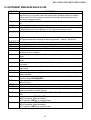
10. INSTRUMENT MESSAGES WHILE IN USE ..................................................................................................................42
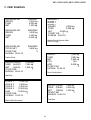
11. PRINT EXAMPLES .........................................................................................................................................................43
DECLARATION OF CONFORMITY .....................................................................................................................................44
WARRANTY .........................................................................................................................................................................44
2
DGT / DGT60 / DGTQ / DGTP / DGTPK / DGT20
1. INTRODUCTION
The purpose of this manual is to help the user get to know the weight indicator’s various functioning modes, the keys’
functions and the display indications. It is possible that one may incur into the phrase "TECH.MAN.REF.": this means that
an advanced function is being described (therefore, for the technical personnel) and which is further explained in the
corresponding technical manual.
We advise to carefully follow the instructions for programming the weight indicator; by taking actions not
indicated this manual, one could cause the scale to not work properly.
In addition to having all the characteristics of a high precision scale, the indicator has the unit of measure conversion
function, switching in the display, net/gross weight, set point on gross weight/net weight/pieces, in/out weigh, multiscale
repeater, alibi memory, hold function, peak detector, weighs totaliser and piece counter.
These features make it suitable for industrial use as well as for legal for trade use in relation with third parties and in
commerce, satisfying the frequently needed ability to transmit and print the data through its two bidirectional serial ports.
This manual has been made as carefully and exactly as possible; in any case, your suggestions are always
welcome.
WARNING
Any attempt to repair or alter the unit can expose the user to the danger of electric shock and it will void our warranty. This
instrument is covered under warranty provided that IT HAS NOT BEEN OPENED BY THE USER for any reason. If any
problem with the unit or system has been experienced please notify the manufacturer or the dealer from which the
instrument was acquired.
!!WARNING!!
For ATEX version please read carefully the ATEX attachment in this manual
Do not pour liquids on the indicator!!
Do not use solvents to clean the indicator!!
Do not expose instrument to either direct sun light or any heat sources!!
Always mount the indicator and platform in a vibration free setting!!
All indicator connections must be made respecting the norms applicable to the zone and
environment in which it will be installed.
Read carefully & apply what described in the POWER SUPPLY & START-UP section!
Do not install in an environment with any risk of explosion!!(except ATEX3GD version)
RECYCLING INSTRUCTION
The crossed-out wheeled bin on the product means that at the product end of life, it must be taken to
separate collection or to the reseller when a new equivalent type of equipment is purchased. The
adequate differentiated refuse collection in having the product recycled, helps to avoid possible
negative effects on the environment and health and supports the recycling of the materials of which the
equipment is made. The unlawful disposal of the product by the user will entail fines foreseen by the
current regulations.
3
DGT / DGT60 / DGTQ / DGTP / DGTPK / DGT20
2. MAIN TECHNICAL SPECIFICATIONS
POWER SUPPLY
MAXIMUM ABSORPTION
(without load cells)
OPERATING TEMPERATURE
DISPLAY DIVISIONS
CONVERSION SPEED
MINIMUM VOLTAGE PER DIVISION
COUNTING RESOLUTIONS
DISPLAY
INDICATIONS
KEYBOARD
TARE FUNCTION
AUTO SWITCH-OFF FUNCTION
LOAD CELL POWER SUPPLY
LOAD CELL CONNECTION
CASE
SERIAL OUTPUTS
OUTPUTS / INPUTS
12÷24 Vdc +/-10%
DGT4/DGT60/DGTQ/DGTP/DGTPK/DGT20: 100 mA at 12 V; 70 mA at 24V
DGT4AN/DGTQAN/DGTPAN/DGT20AN:
185 mA at 12 V; 90 mA at 24 V
DGT4PB/DGTQPB/DGT20PB:
410 mA at 12 V; 220 mA at 24V
DGTPPB:
70 mA at 12 V; 35mA at 24V
From -10 to +40 °C.
10000e, 3 x 3000e for legal weighing, expandable up to 800.000 for internal
use (with minimum signal coming from a 1,6mV/V cell).
200 conv./sec with automatic selection.
0.3 µV (approved instrument); 0.03 µV (non approved instrument).
1'500’000 points (with input signal equal to 3mV/V).
DGT4/DGT60/DGTQ: 6 digits, h 13 mm.
DGTP/DGTPK/DGT20 : 6 digits, h 20 mm
DGT60: 6 digits, h 60 mm
DGT4/DGT60/DGTQ/DGTP/DGT20: 6 status indicator LEDs.
DGTPK: 12 status indicator LEDs
DGT4/DGT60/DGTQ/DGTP/DGT20: Waterproof 5-key keyboard
DGTPK: Waterproof 20-key keyboard
Subtractive possible on the entire capacity.
Programmable from 1 to 255 minutes, or disinserted.
5Vdc ± 5%, 120mA (up to 8 cells of 350 Ohm each).
6 wires (CELL1) with Remote Sense, 4 wires (CELLS 2, 3, 4).
DGT4 model: Plastic console suitable for mounting on DIN bar or on the wall.
DGT60 model: STAINLESS STEEL case with fixed bracket (standard fitting) or
"STFR" adjustable bracket (OPTIONAL) for mounting or on the wall.
DGTQ model: Case for panel mounting in self-extinguishing NORYL UL 94-V0,
according to DIN 43700 norms, colour black.
DGTP model: Plastic case for panel mounting.
DGTPK/DGT20 model: PAINTED STEEL case with adjustable bracket
(standard fitting) or fixed bracket (OPTIONAL) for mounting on the wall.
1 RS485 bidirectional port configurable for connection to a PC/PLC or WEIGHT
REPEATER (DGT4, DGT4AN, DGT60, DGTQ, DGTQAN, DGTP, DGTPK,
DGTPAN , DGT20 and DGT20AN versions).
1 RS232 bidirectional port configurable for connection to a printer.
1 PROFIBUS port (DGT4PB, DGTQPB, DGT20PB and DGTPPB versions).
1 external PROFIBUS port (optional, only for DGTPK version)
2 photomosfet outputs (expandable to 6 through option for the DGTQ model,
for DGTP model 6 series outputs) NO or NC, configurable programmable
weight thresholds:
- DGT4, DGT60, DGT20 and DGTP models: 48 Vac 0,15 A max (or 60 Vdc
0,15 A max)
- DGTQ model: 48 Vac 0,12 A max (or 60 Vdc 0,12 A max)
2 configurable inputs (for DGTP/DGTPK models, 4 inputs) (optoisolator
Photocouplers): 12÷24 Vdc, 5 mA min - 20 mA max
Input reading time and output refreshing time: 1msec.
Optoisolated analogue output at 16 bit (at choice 4÷20 mA, 0÷5 Vdc or 0÷10
Vdc (DGT4AN, DGTQAN, DGT20AN and DGTP versions); the maximum
resistance applicable on the output current is 350 Ohm and the minimum
resistance applicable on the output voltage is 10 kohm.
4
DGT / DGT60 / DGTQ / DGTP / DGTPK / DGT20
3. SYMBOLS
To call the attention of the user, the following symbols are used both in the manual and on the instrument itself:
Warning! This operation must be performed only by qualified personal
CE CONFORMITY
IDENTIFIES THE CLASS OF PRECISION
"TECH.MAN.REF." means that an advanced function is being described (therefore for the technical personnel) which
will be further explained in the corresponding technical manual.
5
DGT / DGT60 / DGTQ / DGTP / DGTPK / DGT20
4. INSTALLATION
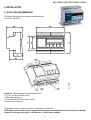
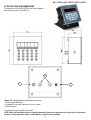
4.1 DGT4 CASE AND DIMENSIONS
The indicator has a plastic case, whose external dimensions
are shown in FIGURE 4.1.
Figure 4.1 – Measurements and dimensions in mm
1 (+) 12V / 24 Vdc power supply input
2 GND power supply input
3 Connections for serial lines / inputs / outputs
4 Connections for load cells
The instrument may be installed on the wall or on the panel on the DIN bar.
NOTE: When the identification plate is supplied separately (therefore not attached to the front panel) it is advisable
to attach it in the appropriate space on the indicator, so that it can be identified.
6
DGT / DGT60 / DGTQ / DGTP / DGTPK / DGT20
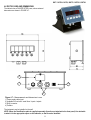
4.2 DGT60 CASE AND DIMENSIONS
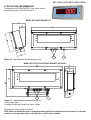
The indicator has a STAINLESS STEEL case, whose external
dimensions are shown in FIGURE 4.2 and 4.3.
MODEL WITH FIXED BRACKET (STANDARD FITTING)
2
1
Figure 4.2 – Measurements and dimensions in mm
MODEL WITH "STFR" ADJUSTABLE BRACKET (OPTIONAL)
2
1
Figure 4.3 – Measurements and dimensions in mm
1 Power supply input.
2 Available for load cells / serial lines / inputs / outputs
The instrument may be installed on the wall.
NOTE: When the identification plate is supplied separately (therefore not attached to the front panel) it is advisable
to attach it in the appropriate space on the indicator, so that it can be identified.
7
DGT / DGT60 / DGTQ / DGTP / DGTPK / DGT20
4.3 DGTQ CASE AND DIMENSIONS
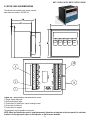
The indicator has a plastic case, whose external
dimensions are shown in FIGURE 4.4.
Figure 4.4 – Measurements and dimensions in mm
1) Power supply cable input
2) GND power supply input
3) Connections for serial lines / inputs / analogic output
4) Connection for load cell
5) Connections for outputs
The instrument may be installed on the panel.
NOTE: When the identification plate is supplied separately (therefore not attached to the front panel) it is advisable
to attach it in the appropriate space on the indicator, so that it can be identified.
8
DGT / DGT60 / DGTQ / DGTP / DGTPK / DGT20
4.4 DGTP CASE AND DIMENSIONS
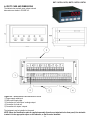
The indicator has a plastic case, whose external
dimensions are shown in FIGURE 4.5.
Figure 4.5 – Measurements and dimensions in mm
1) Power supply cable input.
2) GND power supply input.
3) Connections for serial lines / analogic output.
4) Connection for load cell.
5) Connections for inputs / outputs.
The instrument may be installed on the panel.
NOTE: When the identification plate is supplied separately (therefore not attached to the front panel) it is advisable
to attach it in the appropriate space on the indicator, so that it can be identified.
9
DGT / DGT60 / DGTQ / DGTP / DGTPK / DGT20
4.5 DGTPK CASE AND DIMENSIONS
The indicator has a PAINTED STEEL case, whose external
dimensions are shown in FIGURE 4.6.
2
1
3
Figure 4.6 – Measurements and dimensions in mm
1) Power supply cable input.
2) Available for load cells / serial lines / inputs / outputs
3) RJ45 connector
The instrument may be installed on the wall.
NOTE: When the identification plate is supplied separately (therefore not attached to the front panel) it is advisable
to attach it in the appropriate space on the indicator, so that it can be identified.
10
DGT / DGT60 / DGTQ / DGTP / DGTPK / DGT20
4.6 DGT20 CASE AND DIMENSIONS
The indicator has a PAINTED STEEL case, whose external
dimensions are shown in FIGURE 4.7.
4
1
3
2
Figure 4.7 – Measurements and dimensions in mm
1) Power supply cable input.
2) Available for load cells / serial lines / inputs / outputs
3) RJ45 connector
4) Profibus
The instrument may be installed on the wall.
NOTE: When the identification plate is supplied separately (therefore not attached to the front panel) it is advisable
to attach it in the appropriate space on the indicator, so that it can be identified.
11
DGT / DGT60 / DGTQ / DGTP / DGTPK / DGT20
5. POWER SUPPLY & START UP
INSTRUMENT POWER SUPPLY:
DGT4 , DGTQ, DGTP, DGTPK and DGT20 models
The instrument must be powered with stabilized voltage at 12 Vdc or 24 Vdc supplied from an AC/DC external charger (not
supplied) which should be connected to the 220 Vac mains voltage.
TO POWER the instrument, connect the two power supply cables (+ and -) in the appropriate terminal board (section 4
"INSTALLATION", Fig. 4.1, 4.4, 4.5) on the side or on the rear of the instrument.
DGT60 model
The instrument is powered with stabilized voltage at 12 Vdc or 24 Vdc supplied from an AC/DC internal charger (supplied)
which should be connected to the 220 Vac mains voltage.
DGT603GD model
See ATEX ATTACHMENT in this manual.
Safety norms must be respected for the connection to the mains voltage including the use of a line which has to be free
from noise generated by other electronic equipment.
Do not connect other equipment to the same socket as the one that the adapter is in.
Do not step on or crush the power supply cable
TO TURN ON THE INSTRUMENT, keep the C – ON/OFF key pressed until the indicator turns on, and then release the
key.
The display executes a start-up procedure, and will indicate:
XX.YY
is the installed software version.
The indicator has an "auto zero at start-up" function: in other words it means that if at start-up a weight within +/- 10% of the
capacity is detected, it will be zeroed; if the weight is not within this tolerance, with a non approved instrument the display
shows the present weight after a few instants, while with an approved instrument "ZEro" is shown continuously on the
display, until the weight is made to re-enter within this tolerance; the auto zero function at start-up may be disabled in the
set-up environment (only with non approved instrument); see SEtuP >> ConFiG >> Param. >> Auto-0 (TECH.MAN.REF.)
By pressing the ZERO key for an instant while the version is shown in the LED display, the indicator will show the following
in this order:
XX.YY
in which XX is the software release and YY is the sub release.
CLoCK
if there is the optional board.
09.01
in which 09 indicates the type of the instrument, 01 indicates the metrological software version.
XX.YY.ZZ
is the installed software version.
dGt, dGt60 , dGtq
, dgtk or dGtP
is the name of the installed software.
n.Ch X
number of the configured channels (if equal to 2, 3,or 4)
XXX.XXX
capacity and division of channel 1
After this, the instrument "hi rES" is displayed (in case of non approved instrument), or "LEGAL"(in case of approved
instrument), together with the gravitational acceleration value of the area of use.
Then, the instrument executes a countdown (self-check).
NOTE: the display of the other information is described in section 7.10 DISPLAY OF METRIC DATA (inFO).
TO PUT THE INSTRUMENT IN STANDBY: keep the C – ON/OFF key pressed until the message "- OFF –" appears on the
display and then release the key; just the point at the extreme left of the display remains on.
TO TURN OFF THE INSTRUMENT: take away the power supply.
12
DGT / DGT60 / DGTQ / DGTP / DGTPK / DGT20
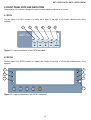
6. FRONT PANEL KEYS AND INDICATORS
The front panel of the indicator is designed for quick but simple weighing applications for the user.
6.1 DGT4
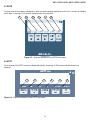
The front panel of the DGT4 consists of a display with 6 digits, 13 mm high, 6 LED function indicators and a 5-key
keyboard.
1
DGT
2
3
4
5
6
Weight
Transmitter
Figure 6.1 – Keys and indicators of the DGT4 front panel
6.2 DGT60
The front panel of the DGT60 consists of a display with 6 digits, 60 mm high, 6 LED function indicators and a 5-key
keyboard.
1
5
2
6
3
4
7
Figure 6.2 – Keys and indicators of the DGT60 front panel
13
DGT / DGT60 / DGTQ / DGTP / DGTPK / DGT20
6.3 DGTQ
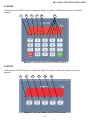
The front panel of the indicator is designed for quick but simple weighing applications for the user. It consists of a display
with 6 digits, 13 mm high, 6 LED function indicators and a 5-key keyboard.
1
2
3
5
4
NET
6
F
W1
SP1
W2
SP2
Figure 6.3 – Keys and indicators of the DGTQ front panel
6.4 DGTP
The front panel of the DGTP consists of a display with 6 digits, 20 mm high, 6 LED function indicators and a 5-key
keyboard.
1
2
3
Figure 6.4 – Keys and indicators of the DGTP front panel
14
4
5
6
DGT / DGT60 / DGTQ / DGTP / DGTPK / DGT20
6.5 DGTPK
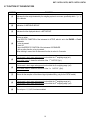
The front panel of the DGTPK consists of a display with 6 digits, 20 mm high, 12 LED function indicators and a 20-key
keyboard.
1
2
3
4
8
9
Figure 6.5 – Keys and indicators of the DGTPK front panel
6.6 DGT20
The front panel of the DGT20 consists of a display with 6 digits, 20 mm high, 6 LED function indicators and a 5-key
keyboard.
1
2
3
4
5
6
Figure 6.6 – Keys and indicators of the DGT20 front panel
15
DGT / DGT60 / DGTQ / DGTP / DGTPK / DGT20
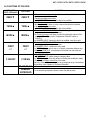
6.7 FUNCTION OF THE INDICATORS
NUMBER
FUNCTION
(1)
Indicates that the weight detected by the weighing system is near zero, specifically within - ¼ ÷ ¼
of the division.
(2)
Indication of UNSTABLE WEIGHT
(3)
Indicates that the displayed value is a NET WEIGHT.
(4)
It turns on when:
- the SPECIFIC FUNCTION of the instrument is ACTIVE, which is set in the FMODE >> FunCt
parameter
- a key is pressed.
It turns off:
- when the SPECIFIC FUNCTION of the instrument IS DISABLED.
- with an active function, a key is pressed.
When blinking it means that the instrument function is active for 5 seconds
If instrument in dual range and approved: one’s within the 1st weighing range (w1).
(5)
In the other cases: It shows the activation of the 1 st OUTPUT (Sp1).
If instrument in dual range and approved: one’s within the 2nd weighing range (w2)
(6)
In the other cases: It shows the activation of the 2
(7)
Sensor for the reception of the infrared signal (standard fitting, only for the DGT60 model).
(8)
If instrument in dual range and approved: one’s within the 1st weighing range (w1)
If instrument in dual range and approved: one’s within the 2nd weighing range (w2)
(9)
The relays nr. 1,2,3,4,5,6 has been enabled.
16
nd
OUTPUT (Sp2).
DGT / DGT60 / DGTQ / DGTP / DGTPK / DGT20
6.8 FUNCTIONS OF THE KEYS:
DGT4, DGT60,
DGTP, DGT20 KEY
FUNCTION
DGTPK KEY
ZERO ▼
ZERO ▼
TARE ▲
TARE ▲
MODE ►
MODE ►
PRINT
<┘
PRINT
<┘
C ON/OFF
C ON/Stb
F1, F2, F3, F4
NUMERIC
KEYBOARD
- Clears the displayed gross weight, if included within +/- 2% of the total
capacity.
- Cancels the negative tare value.
- In NUMERIC INPUT: decreases the digit to be modified.
- With Brief pressing: executes the semiautomatic tare.
- With Long pressing: allows to enter a manual tare from the keyboard.
- Cancels the negative tare value.
- In NUMERIC INPUT: increases the digit to be modified.
- Executes a SPECIFIC FUNCTION of the functioning mode which has been
previously set in the set-up environment.
- By Pressing at length: this allows to switch the displayed channel of the
instrument (if configured in the "Independent Channels" mode, or
"IND.CH").
- In NUMERIC INPUT: selects the digit to be modified, from left to right.
- Executes a SPECIFIC FUNCTION of the functioning mode which has been
previously set in the set-up environment.
- In NUMERIC INPUT: confirms the entry made.
- In SETUP: allows to enter a step or to confirm a parameter inside a step.
- Executes a PRINTOUT or transmission of the data from the serial port
dedicated to the printer.
- ON / STANDBY of the instrument.
- In NUMERIC INPUT: quickly clears the present value.
- In SETUP: allows to exit a step without confirming the modification made.
- Visualisation of Metric information of the scale:
Capacity, Division, Minimum weigh for each configured range, Gravitational
Acceleration Value, Number of configured Channels.
- Not used in this application
- In the numeric input phase it allows to enter the desired value
17
DGT / DGT60 / DGTQ / DGTP / DGTPK / DGT20
7. BASIC FUNCTIONS
7.1 SCALE ZERO
By pressing the ZERO key it is possible to zero a gross weight value which is within +/- 2% of the capacity; after the
zeroing, the display shows 0 weight and the relative pilot lights turn on.
7.2 TARE OPERATIONS
SEMIAUTOMATIC TARE
By pressing the TARE key any weight value present on the display is tared: the display shows "tArE" for an instant and
then 0 (net weight); the relative keys turn on.
NOTE: The semiautomatic tare will be acquired only if the weight is AT LEAST A DIVISION, STABLE (instability ~ led
off) and VALID (in other words, the OVERLOAD condition should not be created).
MANUAL TARE FROM KEYBOARD
Press TARE for a few seconds: the display shows "– tM –" and then "000000". Enter the desired value using the
following keys:
ZERO
decreases the blinking digit.
TARE
increases the blinking digit.
MODE
selects the digit to be modified (blinking); the scrolling of the digits takes place from left to right.
C– ON/OFF if pressed for an instant it quickly zeros the present value; if pressed at length it allows to return to weighing
without saving the changes made.
Confirm with the PRINT key; the value will be subtracted from the weight present on the plate and the relative pilot lights will
turn on.
If the entered value is not a multiple of the scale’s minimum division, it will be rounded off.
CANCELLING A TARE
One can manually cancel the tare value in different ways:
- unload the scale and press the TARE or ZERO key.
- carry out the tares in deduction, partially unloading the scale and pressing TARE to zero the display.
- press C – ON/OFF without unloading the scale.
- enter a manual tare equal to 0.
NOTE: it is possible to automatically cancel the tare value by doing the following:
SELECTION OF LOCKED/UNLOCKED/DISABLED TARE
Normally, when a tare value is entered (automatic, manual, or from storage) by unloading the scale plate, the display
shows the tare value with a negative sign (LOCKED TARE). For one’s convenience it is also possible to choose that the
tare value cancels itself automatically each time that the scale is unloaded (UNLOCKED TARE); or disable the tare
functions.
With the UNLOCKED tare:
- In case of SEMIAUTOMATIC TARE the net weight, before unloading the scale, may also be 0.
- In case of MANUAL TARE the net weight before unloading the scale must be greater than 2 divisions and
stable.
18
DGT / DGT60 / DGTQ / DGTP / DGTPK / DGT20
To set the type of tare:
Turn on the indicator, press the TARE key while the firmware version is displayed (the display shows the "tYPE"
menu).
- Select "F.ModE" (by pressing once the ZERO key) and press PRINT to enter in the menu.
- Press ZERO many times (to scroll ahead through the parameters) or TARE (to scroll backwards) until one finds the
"tArE t" parameter.
- Press PRINT to enter the parameter.
- With the ZERO or TARE keys select the possible options: "LoCK" (locked tare), "unLoCK" (unlocked tare), diSAb
(disabled tare).
- Confirm with PRINT.
- Press the C – ON/OFF key many times until the display shows the message "SAVE?".
- Press PRINT to confirm the changes made or another key for not saving.
The indicator stores the last selection made, also after it is turned off.
7.3 LIMITATION OF THE TARE FUNCTIONS
With approved instrument, it is possible to limit the tare functions, selecting: SEtuP >> d.SALE >> yES (TECH.MAN.REF.)
the tare operations will have the following specifications:
SCALE CAPACITY
< 100kg
≥ 100kg
FUNCTIONING
All the tare functions are disabled
- The SEMIAUTOMATIC TARE value can not be modified with a
manual tare.
- The manual tare can be entered or modified only with an
UNLOADED scale.
With approved instrument , the step d.SALE are not modifiable
7.4 AUTO POWER OFF FUNCTION
It is possible to automatically turn off the indicator (from 1 to 255 minutes), or disable it; the auto power off takes place
when, with unloaded scale, the weight has not been moved or a key has not been pressed for the time set: the display
shows the "- oFF – " blinking message, after this the indicator turns off.
For the setting, follow the procedures below:
- Turn on the scale, press the TARE key while the firmware version is displayed (the display shows the "tYPE" menu).
- Select "F.ModE" (by pressing once the ZERO key) and press PRINT to enter in the menu.
- Press ZERO many times (to scroll ahead through the parameters) or TARE (to scroll backwards) until one finds the
"AutoFF" parameter.
- Press PRINT to enter the parameter.
- With the ZERO or TARE keys select the possible options: "diSAb" (auto switch-off disabled), "EnAb" (auto switch-off
enabled).
- Confirm with PRINT; if "EnAb" has been selected, one will be asked to enter the number of minutes after which the
indicator should turn off: enter a number between 1 and 255 (using the MODE key to select the digit to be modified and
ZERO/TARE to decrease/increase it) and confirm with PRINT.
- Press many times the C – ON/OFF key until the display shows "SAVE?".
- Press PRINT to confirm the changes made or another key for not saving.
19
DGT / DGT60 / DGTQ / DGTP / DGTPK / DGT20
7.5 MULTI RANGE FUNCTIONING (for legal for trade approved instruments)
The multirange functioning allows to subdivide the scale capacity in two or three ranges, each which is up to 3000
divisions, improving in this way the first range division in the dual range.
For example, with a 10 kg cell platform it is possible to approve the weighing system with:
- A single range: 6 kg capacity and 2 g division (3000 div.).
- Dual range: 6 / 3 kg capacity and 2/1 g division (3000 + 3000 div.).
NOTES:
- For the approval of the weighing system in dual range the cell must have better technical features in comparison to the
cell used for the approval in a single range.
The multirange functioning is shown by the turning on of the relative LED which identifies the range in which one is
operating; by passing to the second range, the second range division is enabled. At this point the first range division is
restored only by passing by the gross zero of the scale.
- The selection of the range number with multirange functioning is made during the indicator’s calibration
(TECH.MAN.REF.).
7.6 DATE/TIME ADJUSTMENT (OPTIONAL)
The indicator can be fitted with the date/time option; in this case, the "CLoCK" message is shown when the instrument is
turned on. To set the date/time follow the procedure below:
- Turn on the scale, press the TARE key while the firmware version is displayed (the display shows the "tYPE" menu).
- Select "F.ModE" (by pressing once the ZERO key) and press PRINT to enter in the menu.
- Press ZERO many times (to scroll forwards through the parameters) or TARE (to scroll backwards) to find the "CLoCK"
parameter.
- Confirm with PRINT: in this order one will be asked to enter the day, month, year, hour, and minutes. The entry of each
parameter must be confirmed with PRINT.
- Press the C – ON/OFF key many times until the message "SAVE?" appears on the display.
- Press PRINT to confirm the changes made or another key to not save.
NOTE:
- the "CLoCK" parameter is not displayed if there is no date/time option.
- the clock/calendar function is standard fitted on the DGTP/DGTPK version.
7.7 "SCREEN SAVER" FUNCTION (OPTIONAL)
If the indicator is fitted with the date/time function, it is possible to enable the "Screen Saver": after a programmable time
(from 1 to 255 minutes) with the scale unloaded, the time is shown on the display, in the "HH-MM.SS" format. As soon as
a weight variation is detected, or a key is pressed, the indicator returns to viewing the current weight.
To set the function:
- Turn on the scale, press the TARE key while the firmware version is displayed (the display shows the "tYPE" menu).
- Select "F.ModE" (by pressing once the ZERO key) and press PRINT to enter in the menu.
- Press ZERO many times (to scroll forwards through the parameters) or TARE (to scroll backwards) to find the
"SCr.SAV" parameter.
- Press PRINT to enter the parameter.
- With the ZERO or TARE key select the possible options: "no" (disabled), "YES" (enabled).
- Confirm with PRINT; if one has selected "YES", one is asked to enter the number of minutes after which the indicator
should show the time: enter a number between 1 and 255 (using the MODE key to select the digit to be modified and
the ZERO/TARE keys to decrease/increase it) and confirm with PRINT.
- Press the C – ON/OFF key many times until the display shows the message "SAVE?".
- Press PRINT to confirm the changes made or another key to not save.
NOTE:
- the "SCr.SAV" parameter is not shown if there is no date/time option.
- the screen saver function is standard fitted on the DGTP/DGTPK version.
20
DGT / DGT60 / DGTQ / DGTP / DGTPK / DGT20
7.8 PRINTING
If a printer is connected, it is possible to print the programmed weight data, for example:
- 4 heading lines of 24 characters
- GROSS weight
- TARE weight
- NET weight
- ticket number
- date and time (optional)
- a CODE 39 bar code (both with the LP542S labeller as well as the TPR thermal printer).
Besides the generic printing described above, each single functioning mode will have some specific printouts, which are
described in the operating mode.
Executing printouts with NON approved scales.
In order to print with non approved scales the following conditions must exist:
- the weight must be stable;
- the gross weight must be >= 0;
- the printout is always active;
NOTE: In the totaliser modes in order to print the totalised weight the following must take place:
- the weight must be stable;
- the net weight must be >= of a division with normal or fast totalisation;
- the net weight must be >= of 10 divisions with automatic totalisation.
The printing is reactivated depending on how the "rEACT" parameter has been set in the set-up environment: passage by
zero of the NET weight, weight instability, or always (see "REENABLING OF THE PRINTOUTS AND OF THE INDICATOR
FUNCTIONS" section).
Legal for Trade scale printing.
In order to be able to print with a legal for trade scale the following conditions must exist:
− the weight must be stable;
− the net weight must be >= the minimum weight (minimum of 20 divisions).
− the printing is reactivated depending on how the "rEACT" parameter has been set in the set-up environment: passage
by zero of the NET weight, weight instability, or always (see "REENABLING OF THE PRINTOUTS AND OF THE
INDICATOR FUNCTIONS" section).
To configure the printouts, go to the "PROGRAMMING THE PRINTOUTS" section in the technical manual
(TECH.MAN.REF.).
Notes:
- The printing is confirmed by the indication on the display of the "Print" message.
- If the printout is not reenabled the display shows the "no.0.unS" message
- With the weight unstable the display shows the "unStAb" message.
21
DGT / DGT60 / DGTQ / DGTP / DGTPK / DGT20
7.9 REENABLING THE PRINTOUTS AND THE INDICATOR FUNCTIONS
While using the indicator, it is possible to incur into the "no.0.unS" error shown on the display; this means that the printing
or the function which one wants to carry out must be reenabled (in order to avoid unwanted executions).
It is possible to set the reenabling in different ways: "passage by zero of the net weight", "weigh instability" or "always".
Follow the procedure below:
- Turn on the scale, press the TARE key while the firmware version is displayed (the display shows the "tYPE" menu).
- Select "F.ModE" (by pressing once the ZERO key) and press PRINT to enter in the menu.
- Press ZERO many times (to scroll forwards through the parameters) or TARE (to scroll backwards) until one finds the
"rEACt" parameter.
- Press PRINT to enter the parameter.
- With the ZERO or TARE keys select the possible options: "ZEro" (passage by zero of the net weight), "inSt" (instability),
ALWAyS.
- Confirm with PRINT.
- Press the C – ON/OFF key many times until the message "SAVE?" is shown on the display.
- Press PRINT to confirm the changes made or another key to not save.
7.10 DISPLAY OF METRIC DATA (inFO)
The indicator is fitted with a function named "INFO", thanks to which it is possible to view the metric data and other
configuration data:
- First range capacity, first range minimum weigh, first range division.
- Second range capacity, second range minimum weigh, second range division (if set).
- Gravitational Acceleration Value.
- Number of configured Channels.
NOTES:
- The minimum weigh corresponds to 20 net weight divisions.
- The data of the second and third range appear only if actually configured.
To view the metric data:
- Keep the C – ON/OFF key pressed until the display shows "inFO", and release.
- The capacity value of the first range will appear.
- Press the ZERO key to scroll the following data, in the order (for example for channel 1):
1st range capacity ("Ch1.MAX") 1st range minimum weigh ("Ch1.Min") 1st range division ("Ch1.E") 2nd range
division ("Ch1.MAX") 2nd range minimum weigh ("Ch1.Min") 2nd range division ("Ch1.E") Gravitational
Acceleration Value ("GrAVit") Nr. of Configured Channels ("ConF.Ch") …….. and so on these repeate cyclically.
- Press the TARE key to scroll backwards through the metric data.
- Press the PRINT or C – ON/OFF key to return to weighing.
By pressing the MODE key during the display of the info for the currently active channel, it is possible to view the metric
data of the other channels (if configured); for example, if also channels 2 and 3 are configured, for the maximum capacity of
the 1st range:
1st range capacity channel 1 ("Ch1.MAX") Press MODE 1st range capacity channel 2 ("Ch2.MAX")
Press MODE 1st range capacity channel 3 ("Ch1.MAX")
7.11 SELECTION OF THE CHANNEL TO BE DISPLAYED
In all the functioning modes, excluding the "MASTER" mode (Par.8.4 – Multiscale repeater), it is possible to select the
channel to be displayed (when the instrument is configured in the "Independent Channels" Mode - see Section 4Calibration, TECH.MAN.REF.) using the MODE key:
By pressing the MODE key at length: The "Chan" message appears for a few instants.
• The nr. of channel used until that moment is displayed:
- For example, if channel 1 → "Ch 1" appears
• Select the number of channel to be displayed, using the ZERO or TARE keys
- For example, if the channels 1, 2, and 3 are configured → the items "Ch 1", "Ch 2", "Ch 3" will appear.
• Confirm the choice by pressing the PRINT key.
22
DGT / DGT60 / DGTQ / DGTP / DGTPK / DGT20
7.12 REMOTE CONTROL (OPTIONAL, JUST WITH DGT60 MODEL)
Just with the DGT60 model, with the remote control it is possible to remotely use the ZERO, TARE, MODE, PRINT keys or
just the TARE key. To choose which type of functioning follow the below procedure:
- Turn on the scale; press the TARE key while the firmware version is displayed (the display shows the "typE" menu).
- Press ZERO many times (to scroll forwards through the parameters) or TARE (to scroll backwards) until one finds the
"FModE" parameter.
- Press PRINT to enter the menu.
- Press ZERO many times (to scroll forwards through the parameters) or TARE (to scroll backwards) until one finds the
"irConF" parameter.
- Press PRINT to enter the parameter.
- With the ZERO or TARE keys select the possible options: "ir no" (disabled remote control), "ir 1" (all the remote control
keys function as the TARE key) or "ir 4" (the remote control keys functions as ZERO, TARE, MODE and PRINT).
- Confirm with PRINT.
- Press the C – ON/OFF key many times until the message "SAVE?" appears on the display.
Press PRINT to confirm the changes made or another key to not save.
NOTE: The function of the keys with PROLONGED function are not repeatable on the remote control
8. SELECTABLE OPERATING MODES
In addition to the STANDARD weighing mode - with TARE deduction and transmission of data, the indicator can carry out
one of the following functions:
UNIT OF MEASURE CONVERSION, NET/GROSS SWITCH, IN/OUT WEIGHING, MULTISCALE REPEATER, ALIBI
MEMORY, SINGLE SCALE REPEATER, DISPLAY WITH SENSITIVITY X 10, FREEZING OF THE WEIGHT ON THE
DISPLAY, PEAK DETECTOR, HORIZONTAL TOTALIZER, VERTICAL TOTALIZER, PIECE COUNTING,
SIMULTANEOUS TRANSMITTER OF THE CHANNEL VALUE.
Each functioning mode foresees the turning on of various function pilot LEDs, described in detail in the sections "KEYS
AND INDICATORS OF THE FRONT PANEL"
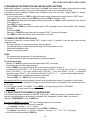
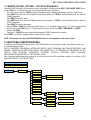
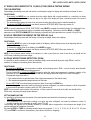
ONLY TECH MENU’
USER & TECH MENU’
F.ModE
FunCt.
Std
(!) ntGS
inout
G.t., 1St.2nd, in.out
MAStr
nuMSL (01...04)
Alibi
rEPE (§)
ViSS
hLd
PEAk
tot o
tot.Mod
norM.t, FASt.t, Auto
Max.tot
tot S
tot.Mod
norM.t, FASt.t, Auto
Max.tot
Coun
uM.APW
Max.tot
23
G, Lb, t, kG
DGT / DGT60 / DGTQ / DGTP / DGTPK / DGT20
To set the operating mode, carry out the following procedures:
- Turn on the scale, press the TARE key while the firmware version is displayed (the display shows the "tYPE" menu).
- Select "F.ModE" (by pressing once the ZERO key) and press PRINT to enter in the menu (the display shows the
"FunCt" menu).
- Press PRINT to enter the parameter.
- With the ZERO or TARE keys select the possible options:
Std
ntGS
inout
MAStr
ALibi
rEPE
UiSS
hLd
PEAK
tot o
tot S
Coun
-
Unit of measure conversion
net weight / gross weight conversion
input / output weighing
Multiscale repeater
Alibi memory
Single scale repeater
Sensitivity times ten
Freezing of the weight on the display
Peak detector
Horizontal totalizer
Vertical totalizer
Counting
Confirm with PRINT; if one has selected the inout, MAStEr, tot or, tot S or Coun mode, one will be asked to select
another operating parameter; refer to the specific functioning mode section for the relative description.
The instrument automatically goes to the following step.
Press many times the C – ON/OFF key until the display shows the message "SAVE?".
Press PRINT to confirm the changes made or another key to not save.
NOTE: Once the functioning mode is selected, and there is a printer, the standard printouts relative to the type of printer
selected in the SEtuP >> SEriAL >> CoM.Prn >> PrModE (see TECH.MAN.REF.) parameter. It is possible to activate the
default parameters by carrying out the selected print default (see section 8, TECH.MAN.REF.).
8.1 UNIT OF MEASURE CONVERSION (Std)
Simple display functioning mode with the function of conversion between the scale unit of measure and lb and viceversa.
FUNCTIONING:
- By pressing the MODE key the weight conversion between the scale unit of measure and lb is made and vice versa.
- By pressing the PRINT key at length: one directly enters the SETPOINT INPUT Menu (see section 9).
NOTES:
- If one connects various platforms to the indicator, in order to pass from one platform to the other, the weight must be
expressed in the scale unit of measure.
- The conversion takes place for any unit of measure set during the calibration.
Furthermore with APPROVED instrument
- The weight in pounds is displayed for 5 seconds, after which the display goes to the scale unit of measure.
- During the viewing in pounds it is not possible to print the weight (when pressing PRINT the message "ConV" is shown)
By pressing the PRINT key at length: one enters directly into the INPUT menu of the SET POINTS (see section 9).
24
DGT / DGT60 / DGTQ / DGTP / DGTPK / DGT20
8.2 NET/GROSS SWITCH (ntGS)
Simple functioning mode with Net / Gross conversion function.
FUNCTIONING:
- If a tare is set, by pressing MODE the display switches between the net and the gross weight and vice versa.
- By pressing PRINT at length: one enters directly into the INPUT menu of the SET POINTS (see section 9).
NOTES:
With an APPROVED instrument
- The display time of the gross weight is 5 seconds, and then the display of the net weight returns.
- While the gross weight is displayed it’s not possible to print the weight.
8.3 INPUT/OUTPUT (in / out)
Simple display functioning mode with in / out weighing function: the indicator acquires two weight values through the
confirmation of the operator and calculates the difference, automatically printing the data (if the presence of a printer has
been configured).
SETTING:
Once the in/out mode has been selected, the message "tyPE" is shown and one is asked to select with PRINT the printing
mode of the acquired data:
-
G.t. gross/tare:
PRINTED DATA
GROSS
Greater weight with unit of measure
TARE
Lesser weight with unit of measure.
NET
Difference between GROSS and TARE with unit of measure
-
1st.2nd first weigh/second weigh:
PRINTED DATA
WEIGH 1
First weight with unit of measure
WEIGH 2
Second weight with unit of measure.
NET
Difference without sign between WEIGH 1 and WEIGH 2 with unit of measure.
-
in.out input/output:
PRINTED DATA
INPUT
First weight with unit of measure.
OUTPUT
Second weight with unit of measure.
NET
Zero weight with unit of measure >> if WEIGH 1 = WEIGH 2
INPUT NET
>> if WEIGH 1 > WEIGH 2
Difference without sign between INPUT and OUTPUT with unit of measure.
OUTPUT NET
>> if WEIGH 1 < WEIGH 2
Difference without sign between INPUT and OUTPUT with unit of measure.
FUNCTIONING:
- Through the MODE key of the indicator one acquires the first weight, on the display is shown " - - 1 - - -".
- By pressing again the MODE key of the indicator one acquires the second weight, and on the display is shown "- - 2 - -".
- When the acquisition of the second weight is made, the printing of the data is commanded.
- It is possible to interrupt the weighing cycle by pressing the C – ON/OFF key after the acquisition of the first weight: On
the display the message " CLEAr ". Press PRINT to confirm the cancelling of the first acquired weight or another key to
not confirm.
- By pressing PRINT at length: one enters directly into the INPUT menu of the SET POINTS (see section 9)
25
DGT / DGT60 / DGTQ / DGTP / DGTPK / DGT20
NOTES:
- The weight is acquired if:
With a NON APPROVED scale one has a STABLE weight and GREATER than 0.
With an APPROVED scale one has a STABLE weight and GREATER than 20 divisions.
If the setting of the rEACt parameter in the set-up environment has been respected (passage by zero of the weight,
instability, or always); see the "REENABLING OF THE PRINTOUTS AND THE INDICATOR FUNCTIONS" section.
8.4 MULTISCALE REPEATER (MAStr)
The system is made up of one or more indicators (up to 4, called SLAVES), connected to one or more weighing systems,
which communicate with another indicator (called MASTER) which acts as weight repeater, on which it is possible to view
the weight of each single scale or the sum of the weight detected by the single scales.
In the MASTER, by selecting with PRINT in this operating mode, one is asked to enter the number of the SLAVES which
one wants to use: for an instant "nuMSL" is displayed; then, one enters the number (between 01 and 04).
In the SLAVES, instead, one needs to set a different functioning mode than the "MAStr" and enter a code (between 01 and
04, to identify each single SLAVE) in SEtuP >> SeriAL >> CoMPC >> PCModE >> 485 (see set-up environment,
TECH.MAN.REF.).
NOTES:
The SLAVE indicators must be of the same model as the MASTER indicator.
In this functioning mode, the printer port may have only the transmission modes to the printer and the "rEPE6" transmission
mode, see section 6.4 TRANSMISSION MODES OF THE SERIAL PORTS, TECH.MAN.REF..
FUNCTIONING
- When turned on, the MASTER predisposes itself for the connection to the SLAVES present ("ECo n" message
appears, in which n is the SLAVE number which is to be detected): when at least one SLAVE is detected, it positions
itself on the one with the lowest 485 address.
- By pressing the MODE key many times one switches from SLAVE to SLAVE, in order by 485 addresses: the display
shows "SCA n" (in which n is the SLAVE number); after this, the weight transmitted by the selected SLAVE is displayed.
In this mode, about every 10 seconds, the message "SCA n" appears, indicating the meaning of the shown data and in
which n is the number of the active scale in that moment..
- By pressing at length the MODE key the sum of the weight on all the scales is shown: the display shows "SUM", and
then the sum of the net weight on all the scales.
In the display of the sum:
- the "SUM" message appears about every 10 seconds and it indicates that the sum of the weights present on the
scales is being displayed
- The reference unit of measure is that of the connected SLAVE with the lowest address; if the other weights have
different units of measure, these are automatically converted.
- If the sum of the weights is greater than 999999, the segments in the upper part of the display are turned on.
- If the sum of the weights is less than -99999, the segments in the lower part of the display are turned on.
- If the sum of weights is not valid (because one or more slaves is in under load or overload), the segments in the
central part of the display are turned on.
- By pressing the ZERO, TARE, PRINT and C – ON/OFF keys the functionality of the key pressed in the selected slave
is transmitted.
26
DGT / DGT60 / DGTQ / DGTP / DGTPK / DGT20
EXECUTION OF THE PRINTOUTS
If there is a printer on the master, it’s possible to execute on it the printouts configured in the active slave. In order to do this
in the master one should set the transmission mode for the desired printer; this setting is made in the SEtuP >> SEriAL >>
CoMPrn >> PrModE parameter, TECH.MAN.REF.
The selection of this parameter excludes the printouts on the active slave.
On the master it’s also possible to configure a printout, which may be used when the sum of the weights on all the scales is
displayed. In order to configure this format refer to section 8 - "PROGRAMMING OF THE PRINTOUTS", TECH.MAN.REF.
Note: the printer only operates if linked at master indicator
WARNING:
- To carry out the weight repeater function it is sufficient that just one SLAVE instrument in the system be turned on.
When turned on, the MASTER places itself automatically on the first turned on SLAVE (lowest 485 address); if all the
instruments are off or if the radio signal does not reach the MASTER, on the same display the "ECo n" message is
displayed in which n is the address number of the SLAVE with which one is trying to communicate.
- If there are various slaves, in no case is it possible to transmit the functionality of the MODE key to the active slave.
- To carry out the sum function, it is necessary to have a connection with at least two SLAVES.
- In the sum mode, it isn’t possible to transmit the functionality of the ZERO, TARE and PRINT keys to the SLAVES.
- If the connection is lost with the SLAVE which is acting as a repeater, the MASTER will try to reconnect it; if after about
a second this does not happen, it connects with the following SLAVE.
- If the connection is lost with a SLAVE in the sum mode, the MASTER tries to reconnect it: if this happens, it remains in
the sum mode, otherwise it passes to the repeater mode of the following SLAVE.
- If more than one SLAVE is present and the MASTER is connected to a printer, the number of the SLAVE, from which
the weight comes from, will be shown on each printout.
- If the automatic switch off has been enabled in the MASTER, after about 5 minutes that one is connecting with the
SLAVES (in other words the ECo-n message appears on the display), it turns off.
8.5 ALIBI MEMORY (ALibi) (OPTIONAL)
The alibi memory allows to file the transmitted weight values in the computer for data processing and/or integration. The
filed values may then be recalled from the PC serial line or directly on the indicator’s display for a following check.
The storage of a weigh takes place either following the reception of the serial command or following the pressure of the
PRINT key: the indicator transmits on the PC serial line the gross and tare weights and an ID which clearly identifies the
weigh.
The ID has the following format:
<Rewriting number> — <Weigh number>
- Rewriting number: number of 5 digits which may go from 00000 to 00255; it indicates the number of complete
rewritings of the alibi memory.
- Weigh number: number of 6 digits which may go from 00000 to 131072; it indicates the weigh number in the current
rewriting of the alibi memory.
With each storage the weigh number is increased of 000001; when this reaches the 131072 value, it restarts from 000000
and the rewriting number increases of 00001.
Therefore the weigh relative to an ID may be verified just if:
- it has a rewriting number equal to the current one of the alibi memory and a weighing number equal or less than the last
value received with the "PID" command;
- it has a rewriting number equal or greater than zero, but less than 1, in comparison to the current value of the alibi
memory, and a weigh number greater than the last value received with the "PID" command.
27
DGT / DGT60 / DGTQ / DGTP / DGTPK / DGT20
example:
If the stored weigh is the following:
"PIDST,1, 1.000kg, 1.000kg,00126-131072"
and the following will be:
"PIDST,1, 1.000kg, 1.000kg,00127-000000"
The storage of a weigh is possible only if the weight is stable and valid (in other words not in under load nor in overload), if
the gross weight is equal or greater than zero.
the storage of the weigh by pressing a key is possible only if the function is active (or passage from 0 or weight instability,
or always depending on how the F.ModE >> rEACt step has been configured in the technical set-up, TECH.MAN.REF.,
and minimum weight of 20 divisions with approved instrument,).
If these conditions are not respected:
- in the response to the PID serial command one has "NO" in the place of the ID.
- there is no transmission if PRINT has been pressed.
When the weight is transmitted with the ID following the pressing of the PRINT key, the display shows for about 2 seconds
the message " tr.id ", and the transmitted string is the following:
<ESC>[II]PIDSS,B,LLLLLLLLLLUU,YYTTTTTTTTTTUU,(ID | NO)<STX>.
See the following section "Serial commands" for the string description.
NOTES:
- With approved or not approved instrument, the storage of the weigh through the PID serial command is always possible
for all the weighs from 0 to full range value.
- The PRINT key works if the serial protocol is set on ondE, rEPE.4/6, Prin.St/EX, 485, ALL.Std/Ext, StAb.St/EX
(TECH.MAN.REF.)
READING OF THE WEIGHS CARRIED OUT
In order to read the information relative to the weighs carried out:
- Press the MODE key.
- The message "rew.id" appears; now one should enter the rewriting number (from 00000 to 00255) and press PRINT.
- The message " id " appears; now one should enter the weigh number (from 000000 to 131072) and press PRINT.
- Now it is possible to view on the display the weigh information in sequence, and scroll through it with the ZERO key
(ahead) or the TARE key (backwards):
• "ch. x", in which x is the scale number (from 1 to 4).
• " um yy" in which yy is the unit of measure (kg, g, t o lb).
• gross weight (for about a second the message "GroSS" appears and then the gross weight value).
• Tare weight (for about a second the message "tArE" appears or "tArEpt" if it is a manual tare; then the tare value
appears).
- Press C – ON/OFF to return to weighing.
NOTE:
- If the alibi memory is empty, when the MODE key is pressed the message "EMPTY" appears for about a second, one
returns to weighing.
- If the entered ID is not valid, in other words, if there is no stored weigh relative to the entered ID, the message " no id"
appears and one returns to weighing.
INITIALISATION OF THE ALIBI MEMORY
It is possible to cancel all the weighs made, initialising the alibi memory; this operation can be made directly on the indicator
(see the parameter "SETUP" >> "ini.AL" of the set-up environment, TECH.MAN.REF.) or through the serial command (see
"SERIAL COMMANDS" below).
NOTES:
- It is not possible to just cancel a single weigh.
- The initialisation is possible only with a non approved instrument.
28
DGT / DGT60 / DGTQ / DGTP / DGTPK / DGT20
SERIAL COMMANDS:
Besides the commands described in the "6.6 FORMAT OF THE SERIAL COMMANDS", TECH.MAN.REF., in this
functioning mode also the commands below are available:
WEIGH STORAGE
Command:
[II]PID<CRLF> or <ESC>[II]PID<STX>
and
[II]PIDD<CRLF> or <ESC>[II]PIDD<STX>
in which:
[II] : 485 address
<ESC>: 27 ascii decimal character
<STX> : 2 ascii decimal character
Instrument response to the [II]PID<CRLF> command:
[II]PIDSS,B,LLLLLLLLLLUU,YYTTTTTTTTTTUU,(ID | NO) <CRLF>
Instrument response to the <ESC>[II]PID<STX> command:
<ESC>[II]PIDSS,B,LLLLLLLLLLUU,YYTTTTTTTTTTUU,(ID | NO)<STX>
Response of the instrument to the [II]PIDD<CRLF> command:
[II]PIDDSS,B,LLLLLLLLLLUU,YYTTTTTTTTTTUU,(ID | NO),(dd/mm/yybbhh:mm:ss|"NO DATE TIME")<CRLF>
Response of the instrument to the <ESC>[II]PIDD<STX> command:
<ESC>[II]PIDDSS,B,LLLLLLLLLLUU,YYTTTTTTTTTTUU,(ID | NO),(dd/mm/yybbhh:mm:ss|"NO DATE TIME")<STX>
In which:[II]
SS
485 address (only when transmitting in 485 mode)
OL" (weight in overload) or "UL" (weight in under load) or "ST" (stable weight) or "US" (unstable
weight) or "TL" (TILT input closed).
,
comma character (ASCII decimal 44)
B
scale number (from 1 to 4)
LLLLLLLLLL: gross weight on 10 digits
UU:
unit of measure
YY:
2 spaces in the case of null tare or semiautomatic tare, "PT" in case of manual tare
TTTTTTTTTT tare on 10 digits
ID
XXXX-YYYYYY in which:
XXXXX is the rewriting number (5 digits, from 00000 to 00255) and
YYYYYY is the weigh number (6 digits, from 000000 t0 131072).
dd/mm/yy
bb
hh:mm:ss
Date in the “dd/mm/yy” format (only with PIDD command)
2 space characters, ascii decimal 32 character (only with PIDD command)
Now in the "hh:mm:ss" format (only with PIDD command)
In the case in which the gross weight is negative or unstable, the weight is transmitted but not the ID; "NO" is in its place. In
these cases there is no storage in the alibi memory.
If the ALIBI MEMORY board is not detected, only the weight and not the date and time is sent in response to the REXD
command; and in its place there is "NO DATE TIME".
WEIGH READING
Command:
[II]ALRDXXXXX-YYYYYY <CR o CRLF>
In which:
[II]
485 address (only when transmitting in 485 mode)
XXXXX
rewriting number (from 00000 to 00255)
- character (ASCII decimal 45)
YYYYYY weigh number (from 000000 to 131072)
29
DGT / DGT60 / DGTQ / DGTP / DGTPK / DGT20
Instrument response:
[II]B,LLLLLLLLLLUU,YYTTTTTTTTTTUU<CR o CRLF>
In which:
[II]
485 address (only when transmitting in 485 mode)
B
scale number (from 1 to 4)
,
comma character (ASCII decimal 44)
LLLLLLLLLL
gross weight on 10 digits
UU
unit of measure
YY
spaces in the case of null or semiautomatic tare, PT in the case of manual tare
TTTTTTTTTT
tare weight on 10 digits
ALIBI MEMORY CANCELLATION (only with non approved instrument)
Command:
[II]ALDL <CR o CRLF>
In which
[II] 485 address (only when transmitting in the 485 mode)
Instrument response:
[II]ALDLOK <CR o CRLF> if the cancellation has been effective
[II]ALDLNO <CR o CRLF> if the cancellation has not worked
The commands are ignored if one is not in the alibi memory functioning mode.
8.6 SINGLE SCALE REPEATER (rEPE)
The system is made up of one or more indicators (named REPEATERS) which receive the data of the display or of the
weight from another indicator or from a PC/PLC (named TRANSMITTER) and which therefore act as repeaters.
In the REPEATERS once this functioning mode has been set, one should configure the "rEPE.6" or "W.rEPE" parameter in
the communication mode of the PC port (SEtuP >> SEriAL >> CoM.Pc step (TECH.MAN.REF.).
For further configuration and functioning details refer to the technical manual (SEtuP >> SeriAL >> CoM.Pc step and
section 6.4 "TRANSMISSION MODES OF THE SERIAL PORTS", TECH.MAN.REF.).
If "rEPE.6" communication protocol has been set in the REPEATER, one will need to set the "rEPE.6" communication
protocol in the TRANSMITTER on the desired port.
If "W.rEPE" communication protocol has been set in the REPEATER, one will need to set the protocol of the continuous
weight transmission on the desired port of the TRANSMITTER.
For further configuration details refer to the technical manual of the connected indicator.
FUNCTIONING
When the indicator is turned on it waits for the data; if it does not receive a correct communication string, the
communication parameters are wrong, or it does not receive any character, it remains in the test condition, in other words,
with all the central segments of the display turned on.
When the serial string of the connected instrument is identified, the indicator repeats the data of the display or the weight
string of the instrument to which it is connected.
CAREFUL:
- The keys pressed in the REPEATER are not repeated on the TRANSMITTER and vice versa.
- The indicator acts as a simple weight repeater: only the C – ON/OFF key is enabled for turning on/off.
- In this functioning mode for the printer port only the "rEPE6" transmission mode is enabled; see section 6.4
TRANSMISSION MODES OF THE SERIAL PORTS, TECH.MAN.REF..
Example of Dini Argeo REPEATER/TRASMITTER configuration:
FunCt
PCModE
bAud
REPEATER (DGT4)
rEPE
rEPE.6
9600
TRANSMITTER
(*)
rEPE.6
9600
(*) all function (excepted “MAStr”)
30
bit
n–8-1
n–8-1
DGT / DGT60 / DGTQ / DGTP / DGTPK / DGT20
8.7 DISPLAY WITH SENSITIVITY X 10 (VISS) (TO BE USED IN TESTING DURING
THE CALIBRATION)
Simple display functioning mode with the function of switching the weight for display with sensitivity increased 10 times.
FUNCTIONING:
- By pressing the MODE key one switches from the weight display with normal sensitivity to a sensitivity ten times
greater; in fact, one will note that the last digit on the right of the display will have a sensitivity equal to the scale’s
division divided by 10.
- The printout and the change of channel can only be done when the indicator has the standard sensitivity.
- By pressing the PRINT key at length: one directly enters the SETPOINT INPUT Menu (see section 9).
NOTE: In case the instrument is LEGAL FOR TRADE, when MODE is pressed, the sensitivity times 10 is displayed for five
seconds after which the instrument returns to standard weight displaying. Furthermore, with the SEtuP >> d.SALE
parameter set at YES (TECH.MAN.REF.) this displaying is possible only with capacities over or equal 100 kg (220 lb).
8.8 HOLD: FREEZING THE WEIGHT ON THE DISPLAY (hLd)
Simple display functioning mode with the function of freezing the weight shown on the display.
FUNCTIONING:
- By pressing MODE, the value of the weight is held on the display, and the display shows HoLd alternately with the
weight held value (every 5 sec).
- To release the weight value on the display, press MODE key again.
- By pressing the PRINT key at length: one directly enters the SETPOINT INPUT Menu (see section 9).
NOTE: if one connects various scales to the indicator, in order to pass from one scale to the other one should exit the
HOLD mode, unblocking the frozen weight.
8.9 PEAK WEIGHT PEAKS DETECTION (PEAk)
It is possible to use the instrument to store the maximum weight value measured during the weigh (PEAK), useful to
measure, for example, the breaking load of the materials.
FUNCTIONING:
- By pressing the MODE key: the peak mode is enabled, and the display shows –PEAk–, every 5 seconds, alternated with
the maximum weight reached up until that moment.
- The test terminates by pressing the MODE key again or when the weight peak surpasses the maximum capacity of the
instrument (for an instant PEAk.oF is displayed and then the display shows the weight on the scale once again).
The detected weight value will be:
• The maximum before a rapid decrease of the weight (measurement of the ultimate load).
• The maximum and persistent weight detected on the scale.
- To set a SET POINT one should press at length (for about 3 seconds) the PRINT key:
If the functioning of a output upon reaching a set point has been configured, one enters a submenu in which it’s possible
to choose which parameter to modify; select "InP.StP" (see section 9).
NOTE: if one connects various scales to the indicator, in order to pass from one scale to the other one should exit the
PEAK mode, unlocking the weight peaks detection.
SETTING SAMPLING TIME
It is possible to set the minimum time period of the peak impulse beyond which the measuring is accepted:
- Press PRINT at length
- If the functioning of a output upon reaching a set point has been configured, one enters a submenu in which it’s
possible to choose which parameter to modify; select "PIC.tlM".
The message -tP- appears on the display followed by a number which corresponds to the minimum time length of the
impulse expressed in hundredths of seconds.
By pressing ZERO or TARE the following settable values are proposed: 1, 2, 3, 4, 5, 10, 20, 30, 40, 50, 60, 75, 100, and
127; press PRINT to confirm the desired value, (the indicator will return to weighing).
31
DGT / DGT60 / DGTQ / DGTP / DGTPK / DGT20
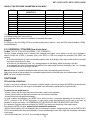
TABLE OF THE OPERATING PARAMETERS IN PEAK MODE
LENGTH
SAMPLINGS PER SECOND
(SENSITIVITY)
ACQUIRED VALUES
MEDIATED VALUES
1
400
1
1
2
200
1
1
3
100
1
1
4
100
4
2
5
50
4
2
10
25
4
2
20
12
4
2
50
6
4
2
100
6
8
2
127
6
12
2
The peak detection function is more or less sensivitive depending on the parameter that should be set. Higher the number
of samplings, and greater is the sensitivity.
If an unexpected peak is detected immediately, the sensitivity decreases.
EXAMPLE:
If 0.000Kg is on the cell of 20Kg (350 ohm), and the sampling time is equal to 1, when the PEAK mode is enabled, 0.005Kg
could be displayed.
8.10 HORIZONTAL TOTALIZER (Sum of lots) (tot o)
Tot.Mod: TYPE OF TOTALISATION (NORMAL, FAST, AUTOMATIC)
Once the totalizer operating mode is selected, both horizontal and vertical, one is asked to set the type of totalization:
normal (t.norM), fast (t.FASt) or automatic (Auto); with ZERO or TARE one changes the parameter; with PRINT one
confirms.
- In the normal totalisation, for each accumulation operation there is the display of the weigh number and the net weight
total, before the printing of the data.
- In the fast one, just the display of the "-tot-" message appears on the display, before the printing of the data.
- In the automatic one, there is the automatic acquisition of the stable weight; therefore the display of the "-tot-" message
on the display and then the printing of the data.
MAx.tot: number of consecutive totalisations after which the total is automatically printed and reset
After having carried out the set weighs, the accumulated general total is printed and reset; set a value between 0 and 63.
NOTE: the value 0 disables the function
FUNCTIONING
TOTALISATION OPERATIONS
In order to carry out the totalisation it is necessary to load the weight on the scale and press the MODE key (if the automatic
totalisation has not been set): the weight is accumulated in two total levels (a partial total and a general total).
To totalize, the net weight must be
- at least 1 division with non approved instrument and with normal or fast totalisation;
- at least 10 division with non approved instrument and with automatic totalisation;
- at least 20 divisions with approved instrument.
To avoid undesired accumulations, the "MODE" key is active just once; it reactivates depending on the setting of the "
rEACT " parameter in the SET-UP environment, in other words, either after passing by the net zero of the scale, by
instability or always (see section 7.9 "REENABLING OF THE PRINTOUTS AND THE INDICATOR FUNCTIONS").
If the presence of a printer has been configured, the "MODE" key causes also the printing of the weight values.
By pressing the MODE key again, without having reenabled the totalisation:
- with the normal totalizer, one can temporarily view on the display the number of weighs carried out and the PARTIAL NET
TOTAL accumulated until that moment (Subtotal): if the accumulated digit is more than 5 digits the visualisation takes place
in two stages.
- with the fast totalizer the " no.0.UnS " error message is displayed.
32
DGT / DGT60 / DGTQ / DGTP / DGTPK / DGT20
NOTE:
- If the gross weight is equal to zero, the indicator displays the "GroS.Er" error message is displayed.
- If the or net weight is equal to zero, the indicator displays the " Net.Err" error message is displayed.
TOTALISATION WITH PRINTING
If the presence of a printer has been configured, upon each pressing of MODE, one prints the data programmed in step
SEtuP >> SEriAL >> CoM.Prn >> Pr.ConF of the set-up environment (TECH.MAN.REF.), for example:
- Weigh number
- GROSS weight
- TARE weight
- NET weight
PRINTING AND ZEROING OF THE TOTALS
The instrument has two different total levels, a partial total and a general total, which increase upon each totalisation; these
may be printed and zeroed independently from each other.
To print and zero the PARTIAL TOTAL one should press for an instant the PRINT key (brief pressing); depending on the
type of totalisation, various messages will be displayed:
- With normal totalisation the number of weighs and the accumulated total will be displayed.
- With fast or automatic totalisation the message "totAL" will be displayed.
The number of weighs made and the NET WEIGHT TOTAL is printed.
To print and zero the GENERAL TOTAL one should press at length the PRINT key;
If the functioning of a output upon reaching a set point one enters a submenu in which it’s possible to choose which
parameter to be modified; select "Pr.G.tot".
Depending on the type of totalisation; various messages will be displayed:
- With normal totalisation the number of weighs and the accumulated total will be displayed.
- With fast or automatic totalisation the message "G.totAL" will be displayed.
The number of weighs made and the NET WEIGHT TOTAL is printed.
NOTE: All the accumulated values are automatically reset each time the instrument is turned off.
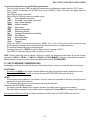
SETTING OF SET POINT
To set a SET POINT one should (like for the General Total printout) press the PRINT key for about 3 seconds.
If the functioning of a output upon reaching a set point one enters a submenu in which it’s possible to choose which
parameter to be modified; select "InP.StP." (see section 9).
8.11 VERTICAL TOTALIZER (Sum by recipe) (tot S)
Like the horizontal totaliser but with each pressing of MODE the indicated weight is totalised and automatically tared; in this
way it is possible for example to fill a container with various products.
Note: At the end of the totalisation operations, if one wants to view the gross weight on the scale one should press the C –
ON/OFF key.
33
DGT / DGT60 / DGTQ / DGTP / DGTPK / DGT20
8.12 PIECE COUNTING (Coun)
This functioning mode allows to use the instrument as a counting scale, after making a "reference operation" (described in
the "Counting Procedure") which consists in linking a sample weight to a specific quantity of pieces (REFERENCE value),
calculating in this way the "Average Piece Weight" (APW).
Upon the selection of the functioning mode in the SET-UP ENVIRONMENT ("F.Mode" >> "Funct" >> Coun") the setting of
some parameters is requested:
- "uM.APW" : Unit of Measure of the average piece weight (APW).
• Press PRINT to enter in the step.
• With the ZERO or TARE keys select the unit of measure (g / kg / t / Lb).
• Confirm with PRINT.
• Press many times the C – ON/OFF key until the display shows the message "SAVE?".
• Press PRINT to confirm the changes made or another key to not save.
Independently from the unit of measure selected, the APW has always three fixed decimals.
-
"WAit.t" : sampling interval.
Setting of the sampling time (in seconds, with a decimal); greater is the time set and more precise will the calculated
APW be.
• Press PRINT to enter the step.
• Set the desired time.
• Confirm with /PRINT.
• Press many times the C – ON/OFF key until the display shows the message "SAVE?".
• Press ENTER/PRINT to confirm the changes made or another key to not save.
FUNCTIONING:
By pressing PRINT at length it’s possible:
- to enter the known APW value (see "DISPLAY AND MODIFICATION OF AVERAGE PIECE WEIGHT" described later
on)
- set a SET POINT:
If one has configured the functioning of a output upon reaching a set point one accesses a submenu in which it’s
possible to choose which parameter to modify; select "InP.StP." (see section 9).
By pressing the MODE key:
- If there is NOT a reference one sets the REFERENCE VALUE (see "COUNTING PROCEDURE" described in the
following paragraph)
- If there is a reference one alternates the display of NR. OF PIECES / WEIGHT ON THE SCALE
By pressing the C – ON/OFF key
- One CANCELS the REFERENCE previously set (the display shows for an instant "CLEAR"; if there is no valid
reference to be cancelled the message does not appear).
- With the following pressing of the MODE key (equivalent to a first pressing of the key) it’s possible to set a NEW
REFERENCE
34
DGT / DGT60 / DGTQ / DGTP / DGTPK / DGT20
COUNTING PROCEDURE
The operations to be carried out are the following:
1) Place the empty container on the scale and press TARE to tare it.
2) Check that the zero is on the display and press the MODE button: the counting function activates
3) The display suggests a REFERENCE QUANTITY. The possible options are: 5, 10, 20, 30, 40, 50, 60, 75, 100, 200.
4) Press "ZERO" or "TARE" the number of times needed to reach the desired sample size.
5) Put the quantity of pieces chosen for the SAMPLE on the scale and press ENTER/PRINT to confirm or C – ON/OFF to
cancel the operation and return to weighing..
APW calculation:
6) Press PRINT; the display will show SAMPL and the indicator will calculate the Average Piece Weight (APW). After a
few instants the display will indicate the quantity selected put on the platform.
7) Add the rest of the items to count in the container and whose value will appear on the display.
8) Unload the scale (with the unloaded plate the message "PCS-0" will appear on the display).
The APW will remain stored until the indicator is turned off, allowing for the counting of similar pieces, without having to
repeat the REFERENCE operation.
9) By pressing the MODE key one switches from the display of the number of pieces to the display of the net weight and
vice versa.
10) To carry out a new reference operation. Press the C – ON/OFF key when the instrument displays the number of
pieces, the message "CLEAR" will appear to show the cancellation of the REFERENCE value. With the following pressing
of the MODE key it is possible to set a new REFERENCE value, repeating the operations as described from point 3)
onwards)
NOTES:
- If the number of calculated pieces is greater than 999999, the display shows just the first 6 digits on the right.
- By changing the visualisation from 1 channel to the other, the reference is not cancelled and the chosen type of
visualisation, weight or pieces, remains with the possibility of switching it by pressing MODE.
PIECE COUNTING IN EXTRACTION
1) Load a FULL container on the scale and press "TARE" to tare it.
2) Press "MODE": The display suggests various REFERENCE QUANTITIES: 5,10,20,30,40,50,60,75,100,200
3) Press "ZERO" or "TARE" various times until the chosen quantity is displayed.
4) From the container take off the same number of pieces and press "PRINT" to confirm. The display shows "SAMPL" while
the indicator calculates the Average Piece Weight. The display shows in negative the quantity extracted.
6) Continue the counting in extraction.
"Er.Mot" ERROR DUE TO WEIGHT INSTABILITY DURING THE SAMPLING
It may happen that during the sampling phase the weight is unstable and therefore it is not possible to correctly calculate
the APW. The "Er.Mot" is shown remaining for about three seconds. One should therefore repeat the sampling operation.
MINIMUM WEIGHT OF THE SAMPLE
It is advisable to use a reference quantity equal or greater than 0,1% of the scale capacity.
In any case, the weight of the reference quantity should not create an APW lower than the two internal points of the
converter (intrinsic limit of the instrument); if this condition takes place, during the sampling, the display will indicate for an
instant: "Error " and the quantity put on the plate will not be accepted. One should therefore use a higher reference
quantity.
35
DGT / DGT60 / DGTQ / DGTP / DGTPK / DGT20
DISPLAY AND MODIFICATION OF AVERAGE PIECE WEIGHT (APW)
It is possible to view or enter with the keyboard a known APW to speed up the reference operations.
- Press the PRINT key at length.
- If one has configured the functioning of a output upon reaching a set point, one accesses a submenu in which it’s
possible to choose which parameter to set; select "InP.PMU".
- The display shows " APW " and then the stored value expressed with 9 digits with five decimal digits, in the
programmed unit of measure.
- Enter the APW value using the keys in the following way:
- MODE key to choose the digit (blinking)
- ZERO key to decrease, TARE key to increase
- C – ON/OFF key to quickly clear the present value
- confirm with PRINT or press twice C – ON/OFF to exit without confirming
Example
Unit of measure of the APW in g
"0000.00000" means 0,0 g, therefore by entering "0001,05000" one will have 1,05 g.
PRINTING UNDER COUNTING MODE
If the presence of a printer has been configured, each time PRINT is pressed, while either weight or pieces are displayed,
one prints the data programmed in the SEtuP >> SEriAL >> CoM.Prn >> Pr.ConF of the set-up environment
(TECH.MAN.REF.); for example:
- GROSS weight
- TARE weight
- NET weight
- Quantity of PIECES (PCS) on the scale in that moment.
- calculated APW, expressed in the set unit of measure, with three decimal digits
8.13 SIMULTANEOUS TRANSMITTER OF THE CHANNEL VALUE (tYPE: trAnSM)
Independent channel mode which makes it possible to have the simultaneous transmission (through the serial line) of the
values read by each single channel and, through the optional alibi memory board, it’s possible to store the transmitted
weight values in the computer for data processing and/or integration. The filed values may then be recalled from the PC
serial line or directly on the indicator’s display for a following check.
NOTE: in this mode the zero tracking and the scale ZERO, TARE and PRINT key are disabled; it’s not possible to set the
functioning modes and the ALIBI mode is set automatically.
ONLY TECH MENU’
USER & TECH MENU’
tYPE
Ind.Ch.
dEP.Ch.
trAnSM.
To set this mode, carry out the following procedure:
- Turn on the scale, press TARE while the firmware version is displayed (the display shows the "tYPE" menu).
- Press PRINT to enter in the "tYPE" menu (the display shows the configured mode of use of the channels)
- Select "trAnSM" and press PRINT.
- The instrument automatically passes to the following step.
- Press many times the C – ON/OFF key until the display shows the message "SAVE?".
- Press PRINT to confirm the changes made or another key to not save.
FUNCTIONING
- By pressing the MODE key it is possible to read on the indicator the information relative to the weighs carried out, see
section "8.5 – ALIBI MEMORY", "READING OF THE EXECUTED WEIGHS" section.
- By pressing at length the MODE key one can SWITCH THE CHANNEL (if the scale has been configured as
multichannel) see section "7.11 – SELECTION OF THE CHANNEL TO BE DISPLAYED".
36
DGT / DGT60 / DGTQ / DGTP / DGTPK / DGT20
-
It’s not possible to carry out other operations.
It’s possible to only manage the functions which can be enabled through the serial commands described in the ALIBI
mode, section "8.5 – ALIBI MEMORY", section "SERIAL COMMANDS", and only some serial commands described in
section 6.5, TECH.MAN.REF.
List of usable commands:
PID, ALRD, ALDL, VER, REXT, REXTA, READ, MVOL, RAZF, CGCHN, ECHO, DISP, DINT, PCOK, STAT, KEYP,
KEYR
Note: the simulation of the pressing of the scale keys through the KEYP and KEYR commands, allows to only manage
the functions linked to the MODE key.
9. SET-POINT FUNCTIONS
The indicator is fitted with 2 inputs (optoisolator Photocouplers, and 4 in the DGTP/DGTPK version) and 2 outputs
photomosfet (expandable to 6 as an option in the DGTQ model, while it is standard fitted in the DGTP/DGTPK version),
whose electric specifications are shown in Section 2 – "Main Technical Specifications" of this manual, as well as in the
"Connection Schemes" at the end of the Technical Manual.
In the outPutS menu of the SET-UP ("SEtuP" >> "outPut"; TECH.MAN.REF.) it is possible to set the functioning mode of
each of the two outputs: the functioning mode (FunC), the normal status (open or closed, no / nC), the switching condition
(direct or upon weight stability (drCt / StbL), active hysteresis (enabling and disabling set points) or not (single set point)
(iSt.OFF / iSt.no), the sign of the configured set point (PoSit / nEGAt, only for the "set point on net weight" and "set point on
pieces" functioning modes), the output enabling time (EnAb.tM) and the delay time for enabling the output (dELAY).
Specifically, for the "Func" step, the following functioning modes are possible: none, set point on the gross weight, set point
on the net weight, set point on pieces, gross weight at zero, net weight at zero, weight instability, totalisation, set point on
the pieces’ total, pressing of the KEYS (PRINT, MODE, C, ZERO, TARA), error indication.
NOTE: some of functioning modes of the outputs are relative to the specific functioning modes of the instrument;
see the following descriptions for the details.
ONLY TECH MENU’
USER & TECH MENU’
SEtuP
outPut
out.1
FunC
0 nonE
1 GroS
out.2
no / nC
out.3 (§)
onStAt
out.4 (§)
rL.iSt
out.5 (§)
EnAb.tM
no
2 nEt
nC
3 PCS
drCt
4 Gro.0
StbL
5 nEt.0
iSt.oFF
6 Moti.
iSt.on
23 k.Pr
0,0...100,0
25 k.Mo
26 k.C
out.6 (§)
dELAY
0,0...100,0
SiGn (§)
PoSit,
nEGAt
27 k.ZE
28 k.tA
29 Err
(§) The step is displayed in the DGTQ model with the expansion board, while the step is standard fitted in the
DGTP/DGTPK version.
Figure 9.1 – Steps in the SET-UP ENVIRONMENT for the OUTPUT SETTINGS
37
DGT / DGT60 / DGTQ / DGTP / DGTPK / DGT20
If the instrument is in a single range, or in non approved dual range:
The w1/sp1 and w2/sp2 leds turn on to indicate respectively the enabling of OUTPUT 1 (sp1) and OUTPUT 2 (sp2).
Description of the configurable functionalities for the outputs ("FunC"):
0 nonE – "No Function"
No functionality is linked to the outputs, which therefore are completely inactive.
1 GroS – "Set point on the GROSS WEIGHT"
Functioing with hysteresis (rL.iSt "HYSTERESIS" parameter set at iSt.on)
By selecting this functioning mode one enables the output function on the GROSS weight; one enters two SET POINTS for
each output; a DISABLING one, which, when the gross weight is below it, disables the output; and an ENABLING one,
which when the gross weight is equal or greater than it, enables the output. By pressing PRINT at length it’s possible to
enter the SET POINT value (DISABLING and ENABLING) for each configured output:
- If the functioning mode provides for the modification of a parameter one enters a submenu in which it’s possible to
choose which parameter to modify; select InP.StP.
- The display shows " S.1 on " (output 1 ENABLING SET POINT): press PRINT, enter the weight value using the keys in
the following way:
- MODE key to choose the digit (blinking)
- ZERO key to decrease, TARE key to increase
- C – ON/OFF key to quickly clear the present value
- confirm with PRINT or press twice C – ON/OFF to exit without confirming
- The display shows " S.1 oFF " (output 1 DISABLING SET POINT): press PRINT, enter the weight value with the
keyboard and confirm with PRINT (use the C – ON/OFF key to quickly clear the present value).
- Do the same for the following outputs (if present).
- When the programming of the set points is done, exit with the C – ON/OFF key.
Functioning without hysteresis (rL.iSt "HYSTERESIS" parameter set at iSt.oFF)
The functioning mode is the same as the previous, except that one enters just one SET POINT for each output (" S.1 on " );
due to this it’s not possible to enter the " S.1 oFF " parameter.
NOTES
- If all the outputs have the "NONE" functioning mode, or if the selected functioning mode does not require the entry of a
SET POINT value, the pressing of the PRINT key at length does not allow to access the configuration of the set
points.
With the indicator off or in standby the outputs are normally open (no).
- The DISABLING SET POINT must be equal or less than the ENABLING one; if in the DISABLING SET POINT a value
is entered and confirmed which is greater than the ENABLING one, the indicator will set the set point at 0, until a valid
value is entered.
If in the ENABLING SET POINT one enters a confirms a value lower than the DISABLING one, the value will be
accepted, but the DISABLING SET POINT will be put at 0.
- The 0 value is valid on both the set point values.
- The check on the weight remains active on this value also while modifying the SET POIINT until the new value is
confirmed.
- If the weight is not valid the outputs will not be disabled.
- At start-up, the outputs are managed from when the weight is displayed and these take on the configuration set in the
set-up environment. These are not managed inside the set-up.
- The tare operations are active.
The length of the enabling impulse of the outputs for the keys linked to these is about 2 seconds (PRINT, MODE, C,
ZERO, TARE keys). The outputs are enabled by pressing the key; if the key pressing time is greater than 2 seconds the
output is disabled after 2 seconds and remains disabled until the following pressing of the key.
38
DGT / DGT60 / DGTQ / DGTP / DGTPK / DGT20
OUTPUT X STATUS
ENABLED
DISABLED
S.X oFF
S.X on
GROSS WEIGHT
Figure 9.2 – Diagram showing the output functioning with active hysteresis, in which X indicates the output number.
IMPORTANT: the weight thresholds set with the PRINT key are common to all the connected scales; therefore it is not
possible to have different thresholds for different scales. The value takes on the unit of measure and the decimals of the
selected channel; for example, if one sets 1000 one will have the following set point values:
Channel
Unit of Measure
Decimals
Set Point Value
1
kg
3
1,000 kg
2
g
0
1000 g
3
kg
2
10,00 kg
4
g
1
100,0 g
2 nEt – "Set point on NET WEIGHT"
By selecting this functioning mode, one enables, in the normal scale status, the function of the output on the NET weight;
the SET POINTS and the specifications are entered the same way as for the functioning on the gross weight but it’s
possible to set the functioning of the set points on the negative weight:
FUNCTIONING WITH HYSTERESIS (rL.iSt "HYSTERESIS" parameter set at iSt.on)
Functioning on negative weight (SiGn parameter set at PoSit)
The specifications are the same for the functioning mode on the gross weight.
Functioning on negative weight (SiGn parameter set at nEGAt)
By selecting the functioning mode on the negative weight, one enables the output function on the NEGATIVE WEIGHT; one
enters two NEGATIVE SET POINTS for each output; a DISABLING one, which, when the net weight is greater than it, the
output is disabled, an ENABLING one, which when the net weight is equal or less than it, the output is enabled. By pressing
PRINT at length it’s possible to enter the NEGATIVE SET POINT values (DISABLING and ENABLING) for each configured
output:
- If the functioning mode provides for the modification of a parameter one enters a submenun in which it’s possible to
choose which parameter to modify; select InP.StP.
- The display shows " S.1 on " (output 1 ENABLING SET POINT): press PRINT, enter the weight value using the keys in
the following way:
- MODE key to choose the digit (blinking)
- ZERO key to decrease, TARE key to increase
- C – ON/OFF key to quickly clear the present value
- confirm with PRINT or press twice C – ON/OFF to exit without confirming
- The display shows " S.1 oFF " (output 1 DISABLING SET POINT): press PRINT, enter the weight value with the
keyboard and confirm with PRINT (use the C – ON/OFF key to quickly clear the present value).
- Do the same for the following outputs (if present).
- When the programming of the set points is done, exit with the C – ON/OFF key.
39
DGT / DGT60 / DGTQ / DGTP / DGTPK / DGT20
FUNCTIONING WITHOUT HYSTERESIS (rL.iSt "HYSTERESIS" parameter set at iSt.oFF)
The functioning mode is the same as the previous, except that one enters just one SET POINT for each output (" S.1 on " );
due to this it’s not possible to enter the " S.1 oFF " parameter.
OUTPUT X STATUS
ENABLED
DISABLED
S.X.On
SX.oFF
NET WEIGHT
Figure 9.3 – Diagram showing the negative functioning of the outputs with active hysteresis, in which X indicates the output
number.
IMPORTANT: the weight thresholds set with the PRINT key are common to all the connected scales; therefore it is not
possible to have different thresholds for different scales. The value takes on the unit of measure and the decimals of the
selected channel; for example, if one sets 1000 one will have the following set point values:
Channel
Unit of Measure
Decimals
Set Point Value
1
kg
3
1,000 kg
2
g
0
1000 g
3
kg
2
10,00 kg
4
g
1
100,0 g
3 PCS – "Set point on the PIECES" (only for Counting mode)
By selecting this functioning mode, one enables, in the normal scale status, the function of the outputs on the number of
pieces shown on the display; the SET POINTS and the specifications are entered the same way as for the functioning on
the NET weight, in other words, it’s possible to set the functioning of the set points on the negative number of pieces.
4 Gro.0 – "GROSS WEIGHT AT ZERO"
By selecting this functioning mode, one enables, in the normal scale status, the function of the outputs on the GROSS
weight at 0.
5 nEt.0 – "NET WEIGHT AT ZERO"
By selecting this functioning mode, one enables, in the normal scale status, the function of the outputs on the NET weight at
0.
6 Motio – "INSTABILITY’ "
By selecting this functioning mode, one enables, in the normal scale status, the function of the outputs on the unstable
weight.
"23 K.Pr" "PRINT KEY"
By selecting this functioning mode, in the normal scale status, the output is enabled (for about 2 seconds) when the PRINT
key is pressed.
40
DGT / DGT60 / DGTQ / DGTP / DGTPK / DGT20
25.K.Mod – "MODE KEY"
By selecting this functioning mode, in the normal scale status, the output is enabled (for about 2 seconds) when the MODE
key is pressed.
26 K.C – "C KEY"
By selecting this functioning mode, in the normal scale status, the output is enabled (for about 2 seconds) when the C –
ON/OFF key is pressed.
27.K.ZEr – "ZERO KEY"
By selecting this functioning mode, in the normal scale status, the output is enabled (for about 2 seconds) when the ZERO
key is pressed.
28.K.tAr – "TARE KEY"
By selecting this functioning mode, in the normal scale status, the output is enabled (for about 2 seconds) when the TARE
key is pressed.
29 Err – "ERROR INDICATION"
By selecting this functioning mode, in the normal scale status, the output is enabled on the invalid weight (OVERLOAD /
UNDERLOAD) is enabled or without the signal coming from the cell (DISCONNECTED CELL)
NOTES:
- In the inD.Ch and TrAnSM mode the output is enabled only when the condition takes place on the selected channel.
- In the dEP.Ch modes the output is enabled when the condition takes place on any of the set channels.
41
DGT / DGT60 / DGTQ / DGTP / DGTPK / DGT20
10. INSTRUMENT MESSAGES WHILE IN USE
MESSAGE
AL.Err
BuSy
UnStAB
un.oVEr
DESCRIPTION
It is displayed when one selects the alibi memory functioning mode, and upon start-up, the
alibi memory is not connected or there are communication problems between the indicator
and the board. The "Unit of measure conversion" functioning is automatically set, but not
saved in the set-up environment.
Print under way (PRN serial port is occupied) or indicator waiting to transmit a printing to a
PC.
One is trying to print with an unstable weight.
One is trying to print with the weight in under load or in overload, in other words, with a weight
of 9 divisions greater than the capacity or of 100 divisions below the gross zero.
The weight is 9 divisions above the Maximum Capacity.
Approved instrument: the weight is under the gross zero (-100 divisions).
Non approved instrument: the weight is under the gross zero (- capacity – 9 divisions).
GroS.Er
Net.Err
LoW
no.0.unS
ConV.
no in
no out
no 1
no 2
Er.Mot
Error
Err.CLK
PREC.
ERMOT
ERPNT
Er – 11
Er – 12
Er – 37
Er – 39
One is trying to print with a not positive gross weight (equal or less than zero).
One is trying to print with a not positive net weight (equal or less than zero).
Net weight less than the minimum weight provided for the printing or the totalisation.
Weight not passed by net 0 or by instability.
In standard mode, with approved instrument, one is trying to print while the instrument is
converting the unit of measure.
In the input/output mode (set as "in.out"), one is trying to acquire a second time the input
weight.
In the input/output mode (set as "in.out"), one is trying to acquire a second time the output
weight.
In the input/output mode (set as "G.t." or "1st.2nd"), one is trying to acquire a second time the
input weight.
In the input/output mode (set as "G.t." or "1st.2nd"), one is trying to acquire a second time the
output weight.
In the counting mode, the sampling has not been made because the weight is unstable.
In the counting mode, the sampling has not been made because one should use a higher
reference quantity.
Communication problems with the date/time of the indicator: check the F.ModE >> CLoCK
step of the setup (TECH.MAN.REF.).
It is displayed if one tries to calibrate a point without first having confirmed the number of
calibration points
Weight unstable during the acquisition of a point during calibration.
During the acquisition of a calibration point a null value has been read by the converter.
Calibration error: a too small sample weight has been used; it is advisable to use a weight
equal to at least half of the scale capacity.
Calibration error: the acquired calibration point (tP1 o tP2 o tP3) is equal to the zero point
(tP0).
Scale to be calibrated, TECH.MAN.REF. (it is advisable to carry out a technical default,
"dEFAu" parameter, before proceeding).
NOTE: press the TARE key to access the setup.
Scale to be calibrated, TECH.MAN.REF. (it is advisable to carry out a technical default,
"dEFAu" parameter, before proceeding).
NOTE: press the TARE key to access the setup.
42
DGT / DGT60 / DGTQ / DGTP / DGTPK / DGT20
11. PRINT EXAMPLES
WEIGHING NR.
GROSS
TARE
NET
00000001
2,000 kg
0,500 kg
1,500 kg
WEIGHING NR.
GROSS
TARE
NET
00000002
3,000 kg
1,000 kg
2,000 kg
HEADING 1
HEADING 2
HEADING 3
HEADING 4
GROSS
8,000 kg
TARE
3,000 kg
NET
5,000 kg
TICKET NR. 1
24/08/06 16:54:10
Standard Weight Indicator Mode
(UISS, Std, ntgS)
WEIGHING NR.
TOTAL NET
TICKET NR.
24/08/06 16:54:10
00000002
2,862 kg
2
GROSS
TARE
NET
PCS
APW
TICKET NR.
24/08/06 16:54:10
Totalizer Mode
GROSS (HOLD)
3,326 kg
TARE (HOLD)
1,364 kg
NET
(HOLD)
1,926 kg
TICKET NR.
1
24/08/06 16:54:10
1,000 kg
0,500 kg
0,500 kg
100
0,005 kg
2
Piece Counting Mode
Hold Mode
SCALE 1
0.000 kg
SCALE 2
4.000 kg
SCALE 3
5.000 kg
SCALE 4
10.000 kg
SUM
19.000 kg
TICKET NR.
1
16/08/06 11:56:10
GROSS (PEAK) 1,500 kg
TARE (PEAK)
0,000 kg
NET
(PEAK) 1,500 kg
TICKET NR.
1
24/08/06 16:54:10
Peak Mode
Master Mode (Sum mode)
43
DGT / DGT60 / DGTQ / DGTP / DGTPK / DGT20
DECLARATION OF CONFORMITY
This device conforms to the essential standards and norms relative to the applicable
European regulations. The Declaration of Conformity is available in the web site
www.diniargeo.com
WARRANTY
The ONE YEAR warranty period begins on the day the instrument is delivered. It
includes spare parts and labour repair at no charge if the INSTRUMENT IS
RETURNED prepaid to the DEALER’S PLACE OF BUSINESS. Warranty covers all
defects NOT attributable to the Customer (such as improper use) and NOT caused
during transport.
If on site service is requested (or necessary), for any reason, where the instrument is
used, the Customer will pay for all of the service technician’s costs: travel time and
expenses plus room and board (if any).
the Customer pays for the transport costs (both ways), if the instrument is shipped to
DEALER or manufacturer for repair.
The WARRANTY is VOIDED if any of the following occurs: repairs or attempted
repairs are made by unauthorised personnel, connected to equipment installed by
others, or is incorrectly connected to the power supply, or instrument has defects or
damage due to carelessness or failure to follow the guidelines in this instruction
manual.
This warranty DOES NOT provide for any compensation for losses or damages
incurred by the Customer due to complete or partial failure of instruments, even during
the warranty period.
AUTHORIZED SERVICE CENTRE STAMP
44
DGT / DGT60 / DGTQ / DGTP / DGTPK / DGT20
WEIGHT INDICATOR
SERIES
DGT60
ATEX 3GD VERSION
(FOR USE IN A HAZARDOUS AREAS)
ATTACHMENT
45
DGT / DGT60 / DGTQ / DGTP / DGTPK / DGT20
INDEX
1. WARNINGS ................................................................................................................................ pag. 47
2. DESCRIPTION of the SYSTEM ................................................................................................. pag. 48
3. MARKING................................................................................................................................... pag. 48
4. INSTRUCTIONS FOR INSTALLATION IN HAZARDOUS AREA............................................... pag. 49
CE DECLARATION OF CONFORMITY ......................................................................................... pag. 51
46
DGT / DGT60 / DGTQ / DGTP / DGTPK / DGT20
WARNINGS
1.
• The use of the instrument in hazardous areas requires a special attention and special precautions during the
use, installation and maintenance
• Avoid accumulations of dust
• WARNING! electrostatic hazard, clean only with wet cloths or antistatic product
• The instrument has been approved for using in zones having precise features: do not install and use the instrument in
environments different than those provided for.
• The installation, maintenance and repair of the instrument, must be made by qualified and authorized
personnel.
• The maintenance must be made after removing the voltage/power supply of the instrument.
• Only spare parts approved by Dini Argeo must be used.
•
Do not paint.
• The ATEX safety of the weighing system is guaranteed only if the system is installed, used and taken care of following
the instructions given in this manual.
• Avoid accumulations of electrostatic charges; therefore, when using the instrument in a hazardous zone, the appropriate
work clothing must be used by the operator or the maintenance person.
• Do not cover the instrument with coverings made by materials which could have electrostatic charges
• The safety of the instrument depends on the IP65 protection degree and on the limited breathing case (nR type
of protection, see EN60079-15).
Do not tamper with or alter with the instrument’s seals (cable passings, i, locking screws tightening).
In the case of installation or maintenance must be respect the IP65 protection degree and the “limited
breathing” protection mode by closing all the holes with caps and/or cable glands for inserting cables in the
weight indicator case: close well the cap of all the cable glands with the relative appropriate cable section, the
cap of all the wires, the locking screws tightening of the indicator and the various instrument connectors (cell,
etc.), using the wrenches having the relative measurement (see the “Instructions for installation in hazardous
area” section).
• It is forbidden to modify or repair the instrument with components not conforming to the declaration CE; this action
compromises the intrinsic safety of the instrument (with a subsequent loss of the Ex approval) and the nullification of
the product warranty.
• It is forbidden to connect the instrument to modules not provided for by the declaration CE; this action compromises the
intrinsic safety of the instrument (with a subsequent loss of the Ex approval). Contact Dini Argeo srl for further
information.
• All the cables must be installed and protected in accordance with the standard norms for electrical equipment
• All the peripheral units (for instance printers, converters, etc.), which are not marked ATEX, should be installed
• Be very careful when using the instrument; any sparks could cause an explosion.
• The DFTL remote control in not ATEX certified, so it cannot be used with this indicator
47
DGT / DGT60 / DGTQ / DGTP / DGTPK / DGT20
• Avoid direct sunlight
Warning:
- Read carefully this document and apply the his technical specifications.
- This manual has been made as carefully and exactly as possible; in any case, your suggestions are always welcome.
- To make it simpler, in this document, the name DGT60 has been used for the DGT60 device as well as for the DGT60AN
and DGT60PB devices; therefore, where "DGT60" is mentioned, it is intended to be "DGT60", "DGT60AN" and "DGT60PB".
2. DESCRIPTION of the SYSTEM
The DGT60 series’ electronic weighing terminals "ATEX3GD" version are devices for hazardous areas having presence of
gas, designed and made according to the ATEX 94/9/CE directive, group II category 3GD according to the EN60079-0,
EN60079-15, EN61241-0 and EN61241-1 norms with the Eex “limited breathing” protection mode for the gas and with the
limitation for the maximum superficial temperature of the case (tD e IP) for the dust.
3. MARKING
The equipment is marked CE according to the ATEX 94/9/CE directive (attachment X):
Model XXXXXXX
S/N: xxxxx 2009
CE
Manufacturer logo: Dini Argeo srl;
Commercial code of the instrument;
Serial number and production year;
CE Markings;
II 3G Ex nR IIC T6 X
II
3
G
Ex nR IIC T6 X
Specific marking against the explosions in the presence of gas:
Group II (surface);
Category 3 equipment;
Explosive atmospheres caused by gas, fog or vapours
Protection mode, gas group, class of temperature
II 3D Ex tD A22 IP68 T130°C X
II
3
D
Ex tD A22 IP68 T130°C X
Specific marking against the explosions in the presence of dust:
Group II (surface);
Category 3 equipment
Explosive atmospheres caused by dust
Protection mode, IP Protection degree of the metallic case (according to
EN60529) and maximum superficial temperature of the case.
NOTE: The equipment have also the IP65 protection degree.
Hazardous zones
Gases, hazes or vapours
Gases, hazes or vapours
Gases, hazes or vapours
Powders
Powders
Powders
Zone 0
Zone 1
Zone 2
Zone 20
Zone 21
Zone 22
Category according to the 94/9/CE directive
1G
1G or 2G
1G, 2G or 3G
1D
1D or 2D
1D, 2D or 3D
48
DGT / DGT60 / DGTQ / DGTP / DGTPK / DGT20
4. INSTRUCTIONS FOR INSTALLATION IN HAZARDOUS AREA
The equipment must be installed and maintained according to the applicable norms relative to installations in hazardous
area (different from the mines) classified for the presence of gas as ZONE 1 or for the presence of dusts as ZONE 21; for
example: EN60079-14, EN60079-17, EN61241-14, EN61241-17, EN1127-1 or others national norms/standard.
For the power supply it is necessary use a cable with minimum section is 0,5mm².
Connect the terminal to the ground using the appropriate anti-rotation and anti-loosening plug of a cable with a minimum
section of 0,5mm².
Minimum and maximum diameter of cable which can be used with relatives cable gland:
Cable gland
min-max cable
diameters in mm
Wrench measurement in
mm
PG7
PG9
3-6
5-8
14
17
In order to connect the 230 Vac power supply:
-
-
Unscrew the indicator’s locking screws, and the one of the fixing bracket belonging to the internal power adapter
(9);
Unscrew the locking cap of the PG9 cable gland;
Put the power supply cable (7) through the PG cable gland and connect it to the internal power adapter as shown in
the figure. The wires must be installed on the lower side of the connectors. The yellow-green wire is to be
connected to the pin of the container.
Connect with the yellow-green wire (8), the pin and the central connector of the internal power adapter.
-
Lock the internal power adapter with the appropriate bracket;
Lock the fairlead cap of the cable gland;
Close the indicator making sure that the wires do not get stuck with the front panel’s seal and the case.
Tighten the locking screws.
-
49
DGT / DGT60 / DGTQ / DGTP / DGTPK / DGT20
N.B.: Make sure that the metallic box is closed well before using the indicator
To connect the cable coming from the platform or from the load cell/s:
- Unscrew the indicator’s locking screws;
- Unscrew the locking cap of the PG9 cable gland
- Pass the load cell cable in the cable gland and connect it to the indicator following the instructions shown in
section 2 of the technical manual (TECH.MAN.REF.).
- Closing well the cap of cable gland;
- Close the indicator making sure that the wires do not get stuck with the front panel’s seal and the case.
- Tighten the locking screws.
N.B.: Make sure that the metallic box is closed well before using the indicator
50
DGT / DGT60 / DGTQ / DGTP / DGTPK / DGT20
DECLARATION OF CE CONFORMITY
DINI ARGEO Srl,
Via della Fisica, 20
41042 Spezzano di Fiorano - MODENA - ITALY
We
Declare under our responsibility that the following product:
- "DGT60XX3GD" series’ electronic weighing terminal
Described in this declaration conform to the following directives:
-
EMC 2004/108/CE Directive
2006/95/EU Directive
ATEX 94/9/CE Directive
90/384/CE Directive
The conformity is confirmed by the observance of the following norms:
•EN 60079-0: 2004
•EN 60079-15:2006
•EN 61241-0:2007
•EN 61241-1:2006
•EN 1127-1:1997
•EN 13463-1:2001
• EN 61000-6-2:2005, EN 61000-6-4:2007, EN
61326-1:2006, EN 55011:2007
• EN 61010-1:2001,
• EN 45501:1992 (°)
(°) the EN 45501 norm is cited when the instrument is submitted to a metric verification (“stamping”)
Markings:
-
II 3G Ex nR IIC T6 X
II 3D Ex tD A22 IP68 T130°C X
Spezzano di Fiorano, 30/10/2009
Signature
Marco Bertoni
President
51