1
OPERATION MANUAL
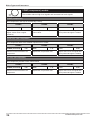
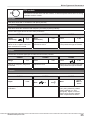
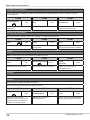
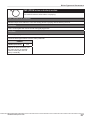
Thank you very much for purchasing the ZOOM G2Nu/G2.1Nu (in this manual, we
will call it the G2Nu/G2.1Nu). Please read this manual carefully to learn about all the
functions of the G2Nu/G2.1Nu so that you will be able to use it fully for a long time.
Keep this manual in a convenient place for reference when necessary.
Contents
Usage and Safety Precautions . . . . . . . . . . . . . . . 2
Terms Used in This Manual. . . . . . . . . . . . . . . . . . 3
G2Nu Part Names . . . . . . . . . . . . . . . . . . . . . . . . 4
G2.1Nu Part Names . . . . . . . . . . . . . . . . . . . . . . . 6
Select a Patch and Play (Play Mode) . . . . . . . . . . 8
Using the Tuner. . . . . . . . . . . . . . . . . . . . . . . . . . 10
Using the Looper. . . . . . . . . . . . . . . . . . . . . . . . . 13
Using Rhythms (Rhythm Mode) . . . . . . . . . . . . . 16
Creating and Changing Patches (Edit Mode) . . . 18
Saving and Copying Patches (Store Mode) . . . . 22
Using Direct Mode. . . . . . . . . . . . . . . . . . . . . . . . 24
Patch Pre-selection (PRE SELECT). . . . . . . . . . 25
Using a Foot Switch. . . . . . . . . . . . . . . . . . . . . . 26
Using an Expression Pedal. . . . . . . . . . . . . . . . . 27
Set the control parameter and adjustment range. . 27
Adjusting the built-in expression pedal . . . . . . . . . 28
Using Audio Interface Functions. . . . . . . . . . . . . 29
Set the master level, tempo, and tuner
standard pitch. . . . . . . . . . . . . . . . . . . . . . . . . . . .
Set the direct monitoring and recording levels. . . .
Set the display backlight and contrast. . . . . . . . . .
Setting the battery type . . . . . . . . . . . . . . . . . . . . .
Check the current version . . . . . . . . . . . . . . . . . . .
30
30
31
31
31
Upgrading the Firmware Version. . . . . . . . . . . . . 32
Effect Types and Parameters . . . . . . . . . . . . . . . 33
COMP (compressor) module . . . . . . . . . . . . . . .
EFX module . . . . . . . . . . . . . . . . . . . . . . . . . . . .
ZNR (ZOOM noise reduction) module . . . . . . . .
DRIVE module . . . . . . . . . . . . . . . . . . . . . . . . . .
EQUALIZER module
(low and middle frequency range) . . . . . . . . . . .
EQUALIZER module (high frequency range) . .
MODULATION module . . . . . . . . . . . . . . . . . . .
DELAY module . . . . . . . . . . . . . . . . . . . . . . . . .
REVERB module . . . . . . . . . . . . . . . . . . . . . . . .
TOTAL module . . . . . . . . . . . . . . . . . . . . . . . . . .
34
35
37
38
40
40
41
46
47
48
Troubleshooting. . . . . . . . . . . . . . . . . . . . . . . . . . 49
Recording and playback with DAW software . . . . 29
Specifications . . . . . . . . . . . . . . . . . . . . . . . . . . . 50
Changing Various Settings (Global Menus). . . . . 30
Rhythm List. . . . . . . . . . . . . . . . . . . . . . . . . . . . . 51
Open the global menus . . . . . . . . . . . . . . . . . . . . . 30
© ZOOM CORPORATION
Copying or reproduction of this document in whole or in part without
permission is prohibited.
Usage and Safety Precautions
Safety Precautions
In this manual, symbols are used to highlight warnings and cautions that you should read to avoid accidents.
The meanings of these symbols are as follows.
This symbol indicates explanations about extremely
dangerous matters. If users ignore this symbol and
handle the device the wrong way, serious injury or
death could result.
This symbol indicates explanations about dangerous
matters. If users ignore this symbol and handle the
device the wrong way, bodily injury and damage to
the equipment could result.
Please observe the following safety tips and precautions to
ensure safe use of this unit
Power considerations
Since power consumption of this unit is high, we recommend the use of an AC adapter. If you use batteries, use
alkaline batteries.
AC adapter operation
• Always use a DC9V center minus 500-mA AC adapter
(ZOOM AD-16). Use of an adapter other than that specified could damage the unit or cause malfunction and pose
a safety hazard.
• Always connect the AC adapter to an AC outlet that
supplies the rated voltage required by the adapter.
• When disconnecting the AC adapter from an AC outlet,
always grasp the adapter itself.
• During lightning or when not using the unit for an
extended period, disconnect the AC adapter from the
AC outlet.
Battery operation
• Use 4 conventional 1.5-V AA batteries (or nickel metal
hydride batteries).
• Carefully read the safety indications on the batteries
before use.
• When not using the unit for an extended period, remove
the batteries from the unit.
• If battery leakage should occur, thoroughly wipe the
battery compartment and the battery terminals to
remove battery fluid.
• Close the battery compartment cover when using the
G2Nu/G2.1Nu.
Use environment considerations
Avoid using the unit in any of the following conditions
that could cause malfunction.
● Extremely hot or cold places
● Near heaters and other heat sources
● Places that are extremely humid or exposed to splashing water
● Sandy or dusty places
● Places with lots of vibrations
• The G2Nu/G2.1Nu is a precision instrument. Do not
apply excessive force to the switches and other controls.
Exposing the unit to strong impacts, including applying
excessive force, dropping it or bumping it, could cause
it to break.
• Do not put foreign objects, including coins and wires, or
liquids, including water, soft drinks and alcohol, into the
G2Nu/G2.1Nu.
Connecting cables and input and output jacks
You should always turn OFF the power to the unit and all
other equipment before connecting or disconnecting any
cables. Also make sure to disconnect all connection cables
and the AC adapter before moving the unit.
Alterations
Never open the case or attempt to modify the product in
any way since this can result in damage to the unit. Zoom
Corporation will not take responsibility for any damage to
the unit caused by alterations.
Volume
Do not use the G2Nu/G2.1Nu at a loud volume for a long
time since this could cause hearing impairment.
Usage precautions
Electrical interference with other equipment
In consideration of safety, the G2Nu/G2.1Nu has been designed
to provide maximum protection against the emission of electromagnetic radiation from the device and to minimize external
electromagnetic interference. However, equipment that is very
susceptible to interference or that emits powerful electromagnetic waves should not be placed near the G2Nu/G2.1Nu, as
interference could occur. In such a case, place the G2Nu/G2.1Nu
and the other equipment sufficiently far apart.
With any type of digital control device, the G2Nu/G2.1Nu
included, electromagnetic interference could cause malfunction
and could corrupt or destroy data. Please use caution.
Cleaning
Use a soft cloth to clean the panels if they become dirty. If necessary, slightly moisten the cloth. Never use cleansers, wax, or solvents such as paint thinner, benzene or alcohol.
Malfunction
If the unit should malfunction, disconnect the AC adapter and
turn the power OFF immediately. Then, disconnect all other connected cables.
Prepare information including the model name, serial number,
specific symptoms related to the malfunction, your name,
address and telephone number and contact the store where you
bought the unit or ZOOM support.
Please keep this manual in a convenient place for future
reference.
Handling
• Never put objects filled with liquids, such as vases, on
the unit since this could cause electric shock.
• Never place candles and other burning objects on top of
the G2Nu/G2.1Nu. Doing so could cause a fire.
2
ZOOM G2Nu/G2.1Nu
Terms Used in This Manual
Terms Used in This Manual
BANK 9
Modules
Types
COMP
EFX
ZNR
DRIVE
EQUALIZER
MODULATION
DELAY
REVERB
COMP
AutoWah
ZNR
EQ
Chorus
Delay
Hall
Rack
Comp
Resonance
Noise
Gate
FD
Combo
M
Comp
Booster
Tremolo
Dirty
Gate
VX
Combo
VintageCE
Echo
Room
StereoCho
Spring
US Blues
Ensemble
Analog
DLY
● Module
PATCH 0
BANK 0 PATCH 1
BANK
J
PATCH 0
PATCH
0 1
BANK
C
PATCH
BANK B PATCH
1
PATCH
BANK
A 0 0
PATCH 9
PATCH
PATCH
PATCH
0 1 1
PATCH
PATCH 9
PATCH 1
PATCH 9
PATCH 9
PATCH9
PATCH 9
Arena
● Bank
As shown in the illustration above, you can use up
to 8 effect units simultaneously. Each of these units
is called a "module."
● Effect type
Among the modules, some allow different "effect
types" to be activated. For example, when using the
MODULATION module (modulation/delay effects)
you can choose one of several effect types, including
chorus, flanger and delay.
● Parameter
Variables that determine the application of an effect
are called "parameters." If we imagine each module
as a separate effect pedal, then each parameter
would be a knob on that pedal.
A set of 10 patches is called a "bank."
This unit has a total of 20 banks, including user
banks A–J, which can be edited and saved and preset
banks 0–9, which can only be recalled. (See the
illustration at the top right.)
● Mode
Each operation status of the G2Nu/G2.1Nu is called
a "mode." Depending on the currently selected
mode, the functions of keys and knobs change. The
modes include the play mode in which you choose a
patch and play your instrument, the rhythm mode in
which you can play back a rhythm pattern, the edit
mode in which you can create and change patches,
and the store mode in which you can save patches.
● Patch
The ON/OFF status of each module and the parameter settings are stored in units called "patches." Use
patches to recall and save effects.
Operating the unit on batteries
1.
Turn the unit over and open the battery
compartment cover on the bottom.
2.
Insert 4 AA batteries into the battery compartment.
3.
Close the cover.
When the remaining charge is low, “Low Battery!” appears on the
display. When operating with batteries, you can check the amount
of remaining charge in the top right corner of the display when in
play, rhythm and direct modes.
Remaining battery charge
Latch
Press the latch to release
Cover
it and raise the cover.
ZOOM G2Nu/G2.1Nu
When operating with an AC adapter
or USB bus power, an adapter or
USB icon appears instead.
3
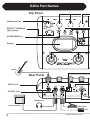
G2Nu Part Names
Top Panel
Module selector
EFFECT TYPE/BANK
[▼]/[▲] keys
STORE/SWAP key
Display
Guitar
Rear Panel
INPUT jack
OUTPUT jack
Headphones
Guitar amplifier
FP01/FP02
FS01
4
ZOOM G2Nu/G2.1Nu
G2Nu Part Names
Parameter knobs 1–3
DIRECT key
Bottom Panel
RHYTHM [►/■] key
USB/GLOBAL key
TAP key
[▼]/[▲] foot switches
eco switch
USB connector
Computer
POWER switch
When the eco switch is ON:
• If the unit is not used for about 25 minutes, it will
enter power standby mode.
• As long as there is a signal input from a guitar, the
unit will not enter standby mode.
When in power standby:
• The unit functions at the minimum necessary level
to prevent battery drain and wasteful power
consumption.
• Guitar signal input is ignored.
• Any operation causes the unit to return to normal.
ZOOM AC adapter (AD-16)
DC9V AC adapter jack
CONTROL IN jack
ZOOM G2Nu/G2.1Nu
5
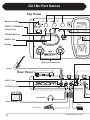
G2.1Nu Part Names
Top Panel
Module selector
EFFECT TYPE/BANK
[▼]/[▲] keys
STORE/SWAP key
DIRECT key
Display
[▼]/[▲] foot switches
Guitar
Rear Panel
INPUT jack
OUTPUT jack
Headphones
Guitar amplifier
FS01
FP01/FP02
6
ZOOM G2Nu/G2.1Nu
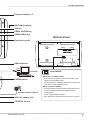
G2.1Nu Part Names
Parameter knobs 1–3
RHYTHM [►/■] key
TAP key
PEDAL ASSIGN key
USB/GLOBAL key
Bottom Panel
Expression pedal
USB connector
Computer
POWER switch
ZOOM AC adapter (AD-16)
DC9V AC adapter jack
eco switch
When the eco switch is ON:
• If the unit is not used for about 25 minutes, it will
enter power standby mode.
• As long as there is a signal input from a guitar, the
unit will not enter standby mode.
When in power standby:
• The unit functions at the minimum necessary level
to prevent battery drain and wasteful power
consumption.
• Guitar signal input is ignored.
• Any operation causes the unit to return to normal.
CONTROL IN jack
ZOOM G2Nu/G2.1Nu
7
Select a Patch and Play (Play Mode)
1.Turn the power on
Minimize the volume of the amp.
■ When using batteries
Turn the POWER switch ON.
■ When using an AC adapter
Connect the AC adapter, and turn the POWER switch ON.
When using an amp, turn its power on and raise its volume.
HINT
Turn the POWER switch OFF and connect the USB connector to
a computer to operate the unit using bus power (→P29).
2. Set the unit to play mode
Turn the module selector to "PLAY."
Turn one of the parameter knobs (1–3) to open the following screen.
Functions of
Parameter knobs 1–3
Current settings of
Parameter knobs 1–3
Bank name/
patch number
HINT
Patch name
Immediately after turning the power ON, play mode is
activated regardless of the position of the module selector.
DRIVE module
distortion depth
Patch volume
DRIVE module tone
HINT
8
• If you do not save changed parameters (→ P22), all changes will be lost
when you select a different patch.
• When using headphones or a mixer, we recommend that you use the direct
mode (→ P24), which simulates the sound of a guitar cabinet.
• Adjust the volume for all patches using the master level (→P30).
ZOOM G2Nu/G2.1Nu
Select a Patch and Play (Play Mode)
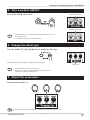
3.Select a patch
Press the [▲] foot switch to select the next patch.
Press repeatedly to cycle through the banks and patches in order from
A0–A9...J0–J9→00–09...90–99→A0.
Press the [▼] foot switch to select the previous patch.
HINT
Using pre-select mode (→P25), you can jump directly to a patch
that is far from the current patch.
4.Switch banks
Use the bank [▼]/[▲] keys to change to the next or previous bank.
HINT
You can also connect an external foot switch (FS01) and use
it to change banks (→P26).
ZOOM G2Nu/G2.1Nu
9
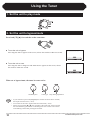
Using the Tuner
1.Set the unit to play mode
2.Set the unit to bypass/mute
Press both [▼]/[▲] foot switches at the same time.
■ To set the unit to bypass
After "Bypass/Tuner" appears on the screen, release the switches within one second.
■ To set the unit to mute
After "Bypass/Tuner" disappears and "Mute/Tuner" appears on the screen, release
the switches within one second.
When set to bypass/mute, the tuner becomes active.
Standard pitch
NOTE
10
Tuner type Drop tuning adjustment
• If you continue to press both [▼]/[▲] foot switches for more than 2 seconds,
the looper becomes active (→P13).
• You cannot set the unit to bypass/mute from edit mode (→P18).
• When you press both [▼]/[▲] foot switches at the same time, the foot switch
that is momentarily pressed first could change the tone in some cases. Please
avoid making sound when pressing the switches.
ZOOM G2Nu/G2.1Nu
Using the Tuner
3. Select the tuner type
Turn Parameter knob 2 to select the tuner type.
■ CHROMATIC
The chromatic tuner shows the nearest pitch name (semitone) and how far
the sound input is from that pitch.
■ Other tuner types
Depending on the selected type, the nearest string name and how far the
sound input is from that pitch is shown. Select from the following tunings.
Display
GUITAR
OPEN A
OPEN D
OPEN E
OPEN G
DADGAD
String number/Note name
Meaning
Standard tuning for guitars, including 7-string guitars
In open A tuning, the open strings make an A chord
In open D tuning, the open strings make a D chord
In open E tuning, the open strings make an E chord
In open G tuning, the open strings make a G chord
This alternate tuning is often used for tapping, etc.
7
B
6
E
5
A
E
A
D
A
4
D
3
G
2
B
1
E
E
A
C#
E
D
F#
A
D
E
B
E
G#
B
E
D
G
D
G
B
D
D
A
D
G
A
D
4. Tune the guitar
Play the open string that you want to tune, and adjust the pitch.
■ When set to CHROMATIC
The name of the nearest note, and the pitch accuracy is shown.
Low (flat)
Correct pitch
High (sharp)
■ When set to other tuner types
The number of the nearest string, and the pitch accuracy is shown. For example,
when tuning the 3rd string, if 4 or a higher number appears, raise the pitch, and
if 2 or a lower number appears, lower the pitch. After the correct number
appears fine tune the string.
String number (when the 3rd string is tuned correctly)
HINT
You can also use the keys above the display to check the pitch.
Low (flat)
ZOOM G2Nu/G2.1Nu
Correct pitch
High (sharp)
11
Using the Tuner
5.Drop tuning
You can tune a string 1 to 3 semitones lower than usual for drop tuning.
Turn Parameter knob 3 to lower the tuning one ( ♭ ×1), two ( ♭ ×2) or three ( ♭ ×3) semitones.
Drop tuning
As shown in the illustration at right, if the tuning is lowered by one semitone ( ♭ ×1)
when using the "GUITAR" tuner type, E ♭ is shown as the correct pitch when tuning
the 6th string.
NOTE
Drop tuning cannot be used with the CHROMATIC tuner.
6.Change the frequency of the tuner's standard pitch.
Turn Parameter knob 1.
Standard pitch
The standard pitch of middle A can be set in a range from 435–445 Hz.
(Default value: 440 Hz)
NOTE
If you change the standard pitch in tuner mode, the setting is reset to the default
value whenever the power is turned OFF and ON again.
If you want this setting to be saved, set it using the global parameters (→ P30).
7.Return to play mode
Press either [▼]/[▲] foot switch.
12
ZOOM G2Nu/G2.1Nu
Using the Looper
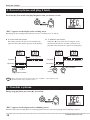
1.Activate the looper
In play mode, press both [▼]/[▲] foot switches until "LOOPER"
appears on the screen.
Recording time
NOTE
Tempo
Volume of
recorded phrase
When the looper is activated, the DELAY module is turned OFF.
2.Set the recording time
Turn Parameter knob 1 to select the recording time.
■ Note mark
Set the recording time by setting the tempo and the number of quarter notes. For
example, the recording time is two beats at the current tempo when set to " ♩ ×2."
■ Manual
Use the foot switch to start and stop recording.
Record time
3.Adjust the tempo
Turn Parameter knob 2 to set the tempo.
Tempo
Tempo can be set in a range from 40–250 BPM (beats per minute). If you selected a note
mark in step 2, recording time is calculated according to the tempo.
HINT
You can also adjust the tempo using the TAP key (→P17).
ZOOM G2Nu/G2.1Nu
13
Using the Looper
4.Record a phrase and play it back
Press the [▲] foot switch, and play the phrase that you want to record.
"REC" appears on the display and recording starts.
Depending on the recording method chosen in step 2, recording occurs as follows.
■ If a note mark was chosen
Recording continues for the set time and then loop
playback starts (and "PLAY" appears on the display).
■ If "Manual" was chosen
When the [▲] foot switch is pressed again, or the
maximum time (about 5 seconds) is reached, loop
playback starts (and "PLAY" appears on the display).
Loop playback
Loop playback
Playback
Playback
Recording
Recording
Set time
[▲] foot switch
HINT
[▲]
foot
switch
[▲] foot switch
When using the looper, the unit can also play a rhythm (→P16). However, the
parameter knobs only control the looper.
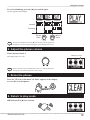
5.Overdub a phrase
During loop playback, press the [▲] foot switch.
"REC" appears on the display and overdubbing starts.
When the end of the recorded phrase is reached, playback returns to the loop beginning and overdubbing continues.
14
ZOOM G2Nu/G2.1Nu
Using the Looper
To end overdubbing, press the [▲] foot switch again.
"PLAY" appears on the display.
Loop
playback
Overdubbing
Loop
playback
Playback
Recording
[▲] foot
switch
HINT
[▲] foot
switch
To stop loop playback, press the [▼] foot switch ("STOP" appears on
the display). To start loop playback again, press the [▲] foot switch.
6.Adjust the phrase volume
Turn Parameter knob 3.
The setting range is 0–100.
NOTE
PHRASE volume
Please note that if you turn Parameter knob 1 or 2 when a phrase has
already been recorded, that phrase will be erased.
7.Erase the phrase
Press the [▼] foot switch until "CLEAR" appears on the display
to erase the recorded phrase.
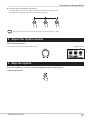
8.Return to play mode
PRESS both [▼]/[▲] foot switches.
ZOOM G2Nu/G2.1Nu
15
Using Rhythms (Rhythm Mode)
1. Activating rhythm mode
In play mode, press the RHYTHM [ ▶ / ■ ] key to start playing
a rhythm pattern.
Rhythm pattern
Rhythm tempo
Rhythm volume
NOTE
When rhythm mode is activated, the REVERB module is turned OFF.
HINT
• When using the tuner or the looper, you can also play a rhythm.
However, the parameter knobs will control the tuner or looper.
• When in rhythm mode, you can use the [▼]/[▲] foot switches and
bank [▼]/[▲] keys to change the patch.
2. Select the rhythm pattern
Turn Parameter knob 1 (pattern types →P51).
Rhythm pattern
3. Adjust the tempo
Tempo can be set in a range from 40–250 BPM (beats per minute).
Tempo
■ Set the tempo with a number
Turn Parameter knob 2 to set the BPM.
16
ZOOM G2Nu/G2.1Nu
Using Rhythms (Rhythm Mode)
■ Set the tempo by tapping (Tap tempo)
Press the Tap key two or more times at the desired tempo. The tempo is set
automatically according to the interval between key presses.
HINT
You can use a FS01 foot switch (sold separately) to adjust the tempo (→P26).
4. Adjust the rhythm volume
Turn Parameter knob 3.
The volume can be set in a range from 0–100.
Rhythm volume
5. Stop the rhythm
Press the rhythm [ ▶ / ■ ] key to stop the rhythm playback and return to
ordinary play mode.
ZOOM G2Nu/G2.1Nu
17
Creating and Changing Patches (Edit Mode)
1. Select a patch to edit (→P9)
2. Select a module to edit
Turn the module selector to the module you want to edit.
This activates edit mode.
The selected module is shown larger.
Parameter
The edit screen opens automatically.
HINT
The edit screen does not open if the selected module is OFF.
Parameter 1 of the
current effect type
HINT
18
Parameter 2 of the
current effect type
Effect type
Parameter 3 of the
current effect type
• The EQ module is a single module, but it is separated into "EQ Lo" and "EQ Hi" screens for
editing.
• The TOTAL module is a special module that you can use to set the overall patch volume (patch
level) and to edit the patch name, for example.
ZOOM G2Nu/G2.1Nu
Creating and Changing Patches (Edit Mode)
3. Turn a module ON/OFF
Press either [▼]/[▲] foot switch.
Module ON (dark)
Module OFF (light)
HINT
• The EQ module can be turned ON/OFF from either the "EQ Lo" or
the "EQ Hi" screen.
• The TOTAL module cannot be turned OFF.
4. Change the effect type
Press the EFFECT TYPE [▼]/[▲] keys to change the effect type.
The parameters shown change according to the effect type.
HINT
Effect type
• The EQ module has only one effect type.
• See pages 33–48 for information about the effect types and
parameters included in each module.
5. Adjust the parameters
Turn parameter knobs 1–3.
HINT
Parameters related to time and frequency can also be set with Tap tempo (→P17).
ZOOM G2Nu/G2.1Nu
19
Creating and Changing Patches (Edit Mode)
6. Adjust the volume of the patch (patch level)
Turn the module selector to "TOTAL" and use the effect type [▼]/[▲]
keys to select "PatchLvl." Turn Parameter knob 1.
HINT
Patch level
• Patch level can also be adjusted in play mode.
• Adjust the master level to change the volume of all patches (→P30).
7. Change the patch name
Turn the module selector to "TOTAL" and use the effect type [▼]/[▲]
keys to select "PatchName."
Cursor
Use parameter knobs 1–3 to change the name.
Change the character/symbol
at the cursor position one
character at a time.
Change the type of character/
symbol at the cursor position
(uppercase letters, lowercase letters,
numbers and symbols).
Move the cursor
The following characters and symbols can be used.
! # $ % & ' () +, -. ; = @ [] ^ _ ` { } ~
A–Z, a–z, 0–9, (space)
20
ZOOM G2Nu/G2.1Nu
Creating and Changing Patches (Edit Mode)
For example, to change "Patch01" to "Patch02" use Parameter knob 3 to move
the cursor and Parameter knob 1 to change the character/symbol.
The cursor is on
the character that
can be changed
Use Parameter knob 3
to move the cursor
Turn Parameter knob 1
to the right to change
the number to "2."
8. Finish editing
Turn the module selector to "PLAY" to return to the play mode.
NOTE
If you change to another patch, all edits will be lost.
Save the patch to keep your edits (→P22).
ZOOM G2Nu/G2.1Nu
21
Saving and Copying Patches (Store Mode)
1. Activate store mode
Select the patch that you want to save or copy, and press the STORE/SWAP key.
■ To save the patch
Release the STORE/SWAP key quickly.
"Store?" appears on the display.
Patch to save
■ To swap the patch
Continue pressing the key until "Swap?" appears on the display.
Location to
save patch
Patch to swap
HINT
• Swapping can only be between patches in the user (A–J) banks.
• When the unit is shipped from the factory, the user banks contain
the same patches as the preset banks.
Second patch
to swap
2. Select the location to save or the other patch to swap
Use the [▼]/[▲] foot switches.
HINT
To switch banks, use the bank [▼]/[▲] keys.
NOTE
Swapping can only be between patches in the user (A–J) banks.
22
ZOOM G2Nu/G2.1Nu
Saving and Copying Patches (Store Mode)
3. Execute patch saving/swapping
Press the STORE/SWAP key.
When "COMPLETE!" appears, the patch will be saved to the destination
location or swapped with the second patch.
HINT
To cancel this operation, turn the Module selector instead of pressing the STORE/
SWAP key.
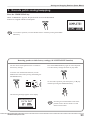
Restoring patches to their factory settings (ALL INITIALIZE function)
You can restore all the patches in the A–J banks to
Press the STORE/SWAP key again to restore all patch-
their factory settings.
es to their factory settings and return to play mode.
To use the ALL INITIALIZE function, turn the
POWER switch ON while pressing and holding the
STORE/SWAP key.
To cancel this operation, press the rhythm [ ▶ / ■ ] key
instead of pressing the STORE/SWAP key.
The following message appears on the display.
NOTE
ZOOM G2Nu/G2.1Nu
Executing ALL INITIALIZE erases all the
patches saved in the user banks. Use this
function with caution.
23
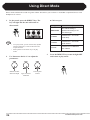
Using Direct Mode
Direct mode simulates the sound of a guitar cabinet. This allows you to achieve a sound that is optimized for use with
headphones or a mixer.
1.
In play mode, press the DIRECT key. The
key will light and the unit will switch to
direct mode.
■ Cabinet types
Type
NOTE
• As in play mode, you can use the edit, rhythm
and store functions, as well as the tuner and
looper functions.
• Select patches in the same way as in play
mode.
2.
Use Parameter knobs 1–3 to adjust the
parameters.
DRIVE module
distortion depth
24
Type of cabinet
simulated
3.
Description
MATCHED
This cabinet setting is
optimized according to the
drive effect type.
COMBO
Simulates a 2 x 12 Fender
combo amp.
TWEED
Simulates a 4 x 10 Fender
tweed cabinet.
STACK
Simulates a 4x12 Marshall
stack cabinet.
Press the DIRECT key to turn its light OFF
and return to play mode.
Overall patch
volume
ZOOM G2Nu/G2.1Nu
Patch Pre-selection (PRE SELECT)
The pre-select mode allows you to select a bank and patch in advance, and only switch to that patch after you confirm
the selection. This function is convenient during a live performance when you want to prepare switching to a patch
that is saved in a distant position.
1.
Turn the power ON while pressing the [▲]
foot switch.
HINT
"PRE SELECT" appears on the screen and the
unit starts in pre-select mode.
3.
To change the patch, press both [▼]/[▲]
foot switches at the same time.
HINT
2.
If you enter edit mode or store mode when the
screen for step 2 is open, the current patch is the
one affected.
To return to the usual patch order, turn the power
OFF and ON again.
Use the [▼]/[▲] foot switches and bank
[▼]/[▲] keys to select the next patch.
Patch selection is the same as in ordinary play
mode. However, the patch does not change until
confirmation is completed in step three.
Current patch
ZOOM G2Nu/G2.1Nu
Next patch to be selected
25
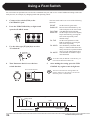
Using a Foot Switch
You can connect an optional foot switch to the CONTROL IN jack, and use it to control additional settings of the unit
with your feet, for example, by changing banks and operating effects.
1.
Connect a foot switch (FS01) to the
CONTROL IN jack.
2.
Press the USB/GLOBAL key to light it and
open the GLOBAL menu.
3.
Use the effect type [▼]/[▲] keys to select
"FootSwitch."
The foot switch can be set to one of the following
functions.
BP/MT
Set the unit to bypass/mute.
BANK UP Increase the bank number by one
with each press of the foot switch.
RHYTHM Turn Rhythm mode ON/OFF.
BPM TAP Set the tempo used for the rhythm,
looper and effect by pressing the
foot switch repeatedly at the
desired tempo.
DL TAP
Set the Time parameter of the
DELAY module by pressing the
foot switch repeatedly.
DL HOLD Turn hold delay ON/OFF. Hold
delay is a function that allows the
delay sound to be repeated without
decay (see the illustration below).
DL MUTE Turn the DELAY module's input
mute ON/OFF.
To use DL TAP, DL HOLD or DL MUTE, you
must turn the DELAY module ON.
HINT
4.
Turn Parameter knob 1 to set the foot
switch function.
5.
Foot switch function
Sound
source
Delay sound
After making the setting, press the USB/
GLOBAL key again to turn its light out.
HINT
The foot switch function setting affects all
patches. Moreover, this setting is saved even
when the power is turned OFF.
Hold delay
Hold
Press the foot switch
26
Press again
ZOOM G2Nu/G2.1Nu
Using an Expression Pedal
Use the G2.1Nu's built-in expression pedal or an optional connected expression pedal (FP01/FP02) to control volume
and effect parameters in real time.
Set the control parameter and
adjustment range
1.
Select a patch that uses the expression
pedal.
NOTE
2.
When using the G2Nu, connect an optional
expression pedal (FP01/FP02) to the CONTROL
IN jack.
Set the module selector to "TOTAL" and
use the effect type [▼]/[▲] keys to select
"RTM."
Select control
destination
Turn Parameter knob 1 to set the module to
be controlled by the expression pedal.
Destination
(DEST) display
Parameter controlled
OFF
(None)
(None)
VOLUME
VOLUME
Volume
EFX
EFX
EFX module
DRIVE
DRIVE
DRIVE module
MOD
MODULATION
MODULATION module
DELAY
DELAY
DELAY module
REVERB
REVERB
REVERB module
HINT
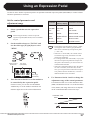
Set range
(minimum)
Set range
(maximum)
3.
Indicator
4.
• In the Effect Type Parameters section, a pedal
icon appears next to effect types/parameters
that can be controlled by an expression pedal
(→ P33– 48).
• When set to "VOLUME," the volume cannot
exceed the range set by the master level and
patch level parameters.
• For settings other than "VOLUME," if you press
the built-in expression pedal until it stops and
then push it down farther, you can turn the controlled module ON/OFF.
• When the controlled module is OFF, the indicator next to it blinks (on the G2.1Nu). In this
state, you can press hard on the built-in expression pedal to turn the module ON, or choose a
different module to be controlled.
Use Parameter knobs 2 and 3 to change the
adjustment range of the control parameter.
Use Parameter knob 2 to set the minimum value
On the G2.1Nu, you can also use the PEDAL
(MIN) and Parameter knob 3 to set the maximum
ASSIGN key to set the module controlled. The
value (MAX). The range that can be set depends
indicator lights next to the selected destination.
on the controlled module selected in step 3.
Parameter value
MAX
MIN
When MAX > MIN
Parameter value
MAX
27
ZOOM G2Nu/G2.1Nu
MIN
Parameter value
Using an Expression Pedal
MAX
The minimum value can be set higher than the
2.
maximum
MIN value. Set this way, the effect is
Press the pedal all the way back toward the
heel, and press the STORE/SWAP key.
smallest when the pedal is fully pressed and
largest when it is
fullyMAX
up. > MIN
When
Parameter value
MAX
Press pedal back
MIN
The display should appear as below.
When MAX < MIN
5.
HINT
When you are finished setting the
expression pedal, turn the module selector
to "PLAY" to return to play mode.
The expression pedal setting will be lost if you
select a different patch. Save the patch if
necessary (→P22).
Adjusting the built-in expression pedal
3.
Press the pedal all the way forward, lift
your foot and then press the STORE/SWAP
key.
After you finish making the adjustment, the unit
enters play mode.
(G2.1Nu only)
The G2.1Nu expression pedal has been adjusted for
optimal performance when shipped from the factory,
but you can adjust its sensitivity if necessary. If there
does not seem to be much effect even when you press
the pedal, or the volume or tone changes greatly even
Press down hard so that
contact occurs here.
Pedal rises slightly when
you remove your foot.
when the pedal is only pressed lightly, use the
following procedures to readjust it.
1.
28
Turn the power on while pressing the
PEDAL ASSIGN key.
HINT
If "ERROR!" appears on the screen, return to
step 2 and repeat the calibration.
ZOOM G2Nu/G2.1Nu
Using Audio Interface Functions
Recording and playback with DAW
software
This unit can be used with computers running the
following operating systems
■ Compatible OS
● Windows XP SP2 or later
Windows Vista or later
● Mac OS X (10.4.6/10.5/10.6 or later)
For recording and playback, this unit supports the
following formats.
■ Quantization (bit-rate)
16-bit
■ Sampling frequency
32/44.1/48 kHz
The unit will be recognized by the computer as an
audio device when it is connected by the USB cable.
When running Windows, install a dedicated ASIO
driver to make low-latency audio recording and
playback possible.
HINT
You can connect a guitar to the unit's input jack,
apply effects to its sound, and record it on an audio
track in digital audio workstation (DAW) software
(Figure 1 below).
You can output a mix of the playback sound from
DAW software audio tracks and the connected guitar
with effects applied through the unit's output jack
(Figure 2 below).
When necessary, you can turn OFF the sound of the
guitar that passes directly to the output jack before
going to the computer (turn direct monitoring OFF)
(Figure 3 below). For details, see "Setting the direct
monitoring and recording levels" (→P30).
For details about recording, playback and other
functions, please see the DAW software manual.
HINT
If you turn the power switch OFF and connect
the unit to a computer by USB, it will operate on
bus power from that computer.
• When using direct monitoring, if the DAW
software has an echo back function (which
sends the input signal directly to the output
during recording), always turn it OFF. If you
record with it ON, the signal output will
sound like it has been processed with a
flanger.
• You can also adjust the recording level sent to
the DAW software (→P30).
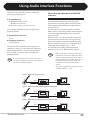
Figure 1. Signal flow during recording
INPUT
DAW
software
G2Nu/G2.1Nu
Effects
USB
USB
OUTPUT
Figure 2. Signal flow during playback (direct monitoring ON)
INPUT
G2Nu/G2.1Nu
DAW
software
Effects
USB
OUTPUT
USB
Figure 3: Signal flow during playback (direct monitoring OFF)
INPUT
G2Nu/G2.1Nu
DAW
software
Effects
USB
OUTPUT
ZOOM G2Nu/G2.1Nu
USB
29
Changing Various Settings (Global Menus)
Using the global menus, you can change various settings related to the master level, display, USB and other items.
Settings made to global parameters affect all patches.
Open the global menus
2.
Press the USB/GLOBAL key to open the GLOBAL
menu.
HINT
When you are done changing the settings,
press the USB/GLOBAL key to turn its
light OFF.
The tuner's standard pitch will be saved even
when the power is turned OFF.
Set the direct monitoring and
recording levels
HINT
• See "Using a foot switch" for details about the
"FootSwitch" global parameter (→P26).
• When in bypass, mute or looper mode, you
cannot open the GLOBAL menu.
1.
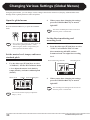
Set the master level, tempo, and tuner
standard pitch
Press the effect type [▼]/[▲] keys to select
"USB." Use Parameter knob 1 to turn
direct monitoring ON/OFF, and use
Parameter knob 2 to adjust the recording
level.
Direct monitoring ON/OFF
1.
Master level
Tempo Tuner standard pitch
2.
HINT
HINT
30
Recording level
Use the effect type [▼]/[▲] keys to select
"GLOBAL," and use the Parameter knobs
1–3 to adjust the master level (knob 1),
tempo (knob 2), and tuner standard pitch
(knob 3).
When you are done changing the settings,
press the USB/GLOBAL key to turn its
light OFF.
The recording level setting will be saved even
when the power is turned OFF.
You can also use the Tap key to adjust the
tempo (→P17).
ZOOM G2Nu/G2.1Nu
Changing Various Settings (Global Menus)
Set the display backlight and contrast
1.
Use the effect type [▼]/[▲] keys to select
"DISPLAY." Use Parameter knob 1 to
adjust the backlight and Parameter knob 2
to adjust the contrast.
Backlight
Contrast
2.
When you are done changing the setting,
press the USB/GLOBAL key to turn its
light OFF.
HINT
The battery type setting is saved even when the
power is turned OFF.
Check the current version
1.
Use the effect type [▼]/[▲] keys to select
"VERSION."
The following screen appears.
Current version information
2.
When you are done changing the settings,
press the USB/GLOBAL key to turn its
light OFF.
The backlight and contrast settings will be saved
even when the power is turned OFF.
HINT
2.
Setting the battery type
1.
Use the effect type [▼]/[▲] keys to select
"BATTERY," and turn Parameter knob 1
to set the battery type to one of the
following.
HINT
When you are done checking the version
information, press the USB/GLOBAL key
to turn its light OFF.
See the next page for how to upgrade the version.
● ALKALINE
Use this setting for alkaline or oxyride (oxy
nickel hydroxide) batteries.
● NiMH
Use this setting for nickel metal hydride
batteries that can be recharged and reused.
Battery type
NOTE
Set the battery type that you are using in order to
display the remaining battery charge accurately.
ZOOM G2Nu/G2.1Nu
31
Upgrading the Firmware Version
1.
HINT
2.
Download the latest version upgrade
application from the ZOOM website
(http://www.zoom.co.jp/).
3.
Launch the version upgrade application,
and conduct the version upgrade.
See the ZOOM website for the upgrade
You must connect the unit to a computer to
procedures. When you complete the version
upgrade the version.
upgrade, "Please Restart" appears on the screen.
See the previous page for how to confirm the
current version.
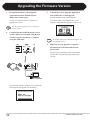
Confirm that the POWER switch is set to
"OFF." While pressing both [▼]/[▲] foot
switches, connect the unit to a computer
using the USB cable.
NOTE
4.
Do not disconnect the USB cable during the version upgrade process.
When the version upgrade is complete,
disconnect the USB cable and turn the
power OFF.
Turn the power ON again in the usual manner,
and the unit will start operating with the new
version.
USB cable
Computer
If connection with the computer is successful, the
following message appears on the display.
32
ZOOM G2Nu/G2.1Nu
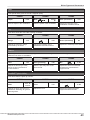
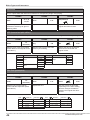
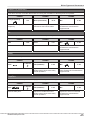
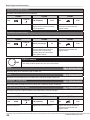
Effect Types and Parameters
Effect type name
When the module is
ON, use the effect
type [▼]/[▲] keys to
select.
Module knob
Parameters 1–3
Shows the position to
recall the module.
Shows the effect parameters that
can be adjusted with Parameter
knobs 1–3 and their setting ranges.
Module name
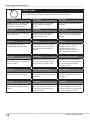
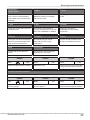
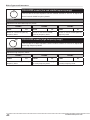
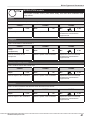
DELAY module
This delay module allows the use of a hold function.
Delay
This long delay has a maximum length of 5000 mS.
Echo
This tape echo simulation has a long delay with a maximum length of 5000 mS.
The four effect types above have the same parameters.
PARM1
Time
Sets the delay time.
1 – 5000 mS
PARM2
F.B
(feedback)
PARM3
0 – 100
Adjusts the feedback amount.
Mix
0 – 100
Adjusts the amount of effected
sound that is mixed with the
original sound.
Tap
You can use the TAP key to set a parameter that has this icon shown next to it. When a module/effect
type with this option is selected in EDIT mode, the parameter interval (modulation frequency, delay
time, etc.) can be set by repeatedly tapping the TAP key.
Tempo mark
When a note mark is shown next to a parameter, the tempo set using the GLOBAL menu (→P30) can
be synchronized to note intervals. For example, if the Time Parameter of the DELAY module is set to
an 8th note, the delay time will be equivalent to an 8th note at the current tempo.
Expression pedal
When a pedal icon is shown next to a parameter, it can be controlled with an expression pedal. If you
set the module to be controlled by the expression pedal (→P27), you can control the parameter in real
time when you select a patch that uses it. With the G2Nu, you will need to connect an external
expression pedal (FP01/FP02).
Delay tap, hold delay and delay mute
Effect types that show these icons allow you to use a foot switch to set the delay time (DELAY TAP), to
turn the hold delay function ON/OFF (HOLD) and to turn the DELAY module input mute ON/OFF
(MUTE). To use these functions, you must connect a foot switch, set the function (→P26) and activate a
compatible effect type.
Note: Manufacturer names and product names mentioned in the following table are trademarks or registered trademarks of
their respective owners. The names are used only to illustrate sonic characteristics and do not indicate any affiliation with
ZOOM CORPORATION.
ZOOM G2Nu/G2.1Nu
33
Effect Types and Parameters
COMP (compressor) module
This module reduces high level signals and increases low level signals.
COMP (compressor)
This compressor in the style of the MXR Dyna Comp.
PARM1
Sense (sensitivity)
PARM2
0 –10
Adjusts the compressor sensitivity.
Higher values result in higher
sensitivity.
ATTCK (attack)
PARM3
Slow, Fast
Sets compressor attack speed to
Fast or Slow.
Level
2–100
Adjusts the level of the signal after
it has passed through the module.
RackComp (rack compressor)
This compressor allows more detailed adjustment than COMP.
PARM1
THRSH (threshold)
PARM2
0–50
Sets the level that activates the
compressor.
Ratio
PARM3
1–10
Adjusts the compression ratio.
Level
2–100
Adjusts the level of the signal after
it has passed through the module.
M Comp (M compressor)
This compressor provides a more natural sound.
PARM1
THRSH (threshold)
PARM2
0–50
Sets the level that activates the
compressor.
34
Ratio
PARM3
1–10
Adjusts the compression ratio.
Level
2–100
Adjusts the level of the signal after
it has passed through the module.
ZOOM G2Nu/G2.1Nu
Effect Types and Parameters
EFX module
This module includes wah and filter effects, as well as special effects such as a ring
modulator and an octaver.
AutoWah
This effect varies wah in accordance with picking intensity.
Resonance
This effect varies the resonance filter frequency according to picking intensity.
The two effect types above have the same parameters.
PARM1
Sense
(sensitivity)
PARM2
-10–−1,
1–10
Adjusts the sensitivity of the effect.
When set to a negative value, the
filter movement is reversed.
PARM3
Reso
(resonance)
0–10
Adjusts the intensity of the
resonance sound.
Level
2–100
Adjusts the level of the signal after
it has passed through the module.
Booster
The booster increases signal gain to make the sound more powerful.
PARM1
Range
PARM2
1–5
Adjusts the frequency range that
is boosted.
Tone
PARM3
0–10
Adjusts the tone.
Level
2–100
Adjusts the level of the signal after
it has passed through the module.
Tremolo
This effect varies the volume at a regular rate.
PARM1
Depth
Adjust the depth of the
modulation.
ZOOM G2Nu/G2.1Nu
PARM2
0–100
Rate
PARM3
0–50
Adjusts the rate of the modulation.
Wave
UP 0–9,
DWN 0–9,
TRI 0–9
Sets the modulation waveform to
"UP" (rising sawtooth), "DWN"
(falling sawtooth) or "TRI"
(triangular). Higher numerical
values cause stronger clipping,
which emphasizes the effect.
35
Effect Types and Parameters
RingMod (ring modulator)
This effect produces a metallic ringing sound. Adjusting the "Freq" parameter results in a drastic change of
sound character.
PARM1
Freq (frequency)
PARM2
1–50
Sets the frequency of the
modulation.
PARM3
Tone
0–10
Adjusts the tone.
Bal (balance)
0–100
Adjusts the balance between
original and effect sounds.
SlowATTCK (slow attack)
This effect slows the attack of each note, resulting in a violin-like performance.
PARM1
Time
PARM2
1–50
Adjusts the attack time.
PARM3
Curve
0–10
Set the curve of volume change
during attack.
Level
2–100
Adjusts the level of the signal after
it has passed through the module.
Octave
Adds an effect sound one octave below the unaffected sound.
PARM1
Tone
PARM2
0–10
Adjusts the tone of the effect.
OctLV (octave level)
PARM3
0 –100
Adjusts the volume of the effect.
DryLV
(dry level)
0–100
Adjusts the volume of the
unaffected sound.
PedalVox
This simulates a vintage Vox wah pedal.
PedalCry
This simulates a vintage CRYBABY wah pedal.
The two effect types above have the same parameters.
PARM1
Freq (frequency)
PARM2
1–50
Adjusts the emphasized
frequency. When an expression
pedal is not used, the effect is
similar to a half open pedal.
36
DryMX (dry mix)
Adjusts the mix with the
unaffected sound.
PARM3
0–10
Level
2–100
Adjusts the level of the signal after
it has passed through the module.
ZOOM G2Nu/G2.1Nu
Effect Types and Parameters
ZNR (ZOOM noise reduction) module
This module reduces noise when not playing.
ZNR (ZOOM noise reduction)
ZOOM's unique noise reduction cuts noise during pauses in playing without affecting the tone.
NoiseGate
This is a noise gate that cuts the sound during playing pauses.
DirtyGate
This vintage style gate features a characteristic way of closing.
The three effect types above have the same parameter.
PARM1
THRSH (threshold)
1–16
Adjusts the effect sensitivity. Set
the value as high as possible
without causing the sound to
decay unnaturally.
ZOOM G2Nu/G2.1Nu
37
Effect Types and Parameters
DRIVE module
This module includes 29 types of distortion and acoustic simulators.
FD Combo
VX Combo
US Blues
Modeled sound of a Fender Twin
Reverb ('65), which is loved by
guitarists in various genres.
Modeled sound of a VOX AC30
combo amplifier operating in
Class A.
Crunch sound of a Fender Tweed
Bassman.
BG Crunch
HW Stack
MS Crunch
Crunch sound of a Mesa Boogie
MkIII combo amp.
Modeled sound of the legendary
Hiwatt Custom 100 all-tube
amplifier from the UK.
The crunch sound of the Marshall
1959 that has given birth to many
legends.
PV Drive
DZ Drive
The high gain sound of a
JCM2000 Marshall stack amp.
The high gain sound of a Peavey
5150 developed in cooperation
with a world-famous hard rock
guitarist.
The 3-channel high gain sound of
a Diezel Herbert, which is a
handmade German guitar
amplifier that allows control of
three independent channels.
BG Drive
OverDrive
T Scream (tube scream)
The high gain sound of the Mesa
Boogie Dual Rectifier red channel
(Vintage mode).
Simulation of the Boss OD-1, the
compact effect box that was the
first to take the "overdrive" title.
Simulation of the Ibanez TS808,
which is loved by many guitarists
as a booster and has inspired
numerous clones.
Governor
Dist + (distortion plus)
Dist 1 (distortion 1)
Simulation of the Guv'nor
distortion effect from Marshall.
Simulation of the MXR distortion+
effect that made distortion popular
worldwide.
Simulation of the Boss DS-1
distortion pedal, which has been a
long-seller.
Squeak
FuzzSmile
GreatMuff
Simulation of the popular Pro Co
Rat famous for its edgy distortion
sound.
Simulation of the Fuzz Face,
which has made rock history with
its humorous panel design and
smashing sound.
Simulation of the ElectroHarmonix Big Muff, which is loved
by famous artists around the world
for its fat, sweet fuzz sound.
MS Drive
38
ZOOM G2Nu/G2.1Nu
Effect Types and Parameters
MetalWRLD
(Metal World)
HotBox
Z Clean
Simulation of the Boss Metal
Zone, which is characterized by
long sustain and a powerful lower
midrange.
Simulation of the compact
Matchless Hotbox pre-amplifier
with a built-in tube.
ZOOM original unadorned clean
sound.
Z Wild
Z MP1
Z Bottom
A high gain sound with even more
overdrive boost.
An original sound created by
merging characteristics of an ADA
MP1 and a MARSHALL JCM800.
A high gain sound that
emphasizes low and middle
frequencies.
Z Dream
Z Scream
Z Neos
A high gain sound for lead playing
based on the Mesa Boogie Road
King Series II Lead channel.
An original high gain sound
balanced from low to high
frequencies.
A crunch sound modeled on the
sound of a modified VOX AC30.
Lead
ExtremeDS
A bright and smooth distortion
sound.
This distortion effect boasts the
highest gain in the world.
The 29 effect types above have the same parameters.
PARM1
PARM2
0–100
Gain Adjusts the gain (distortion depth).
Tone
PARM3
0–30
Adjusts the tone.
Level
1–100
Adjusts the level of the signal after
it has passed through the module.
Aco.Sim (acoustic simulator)
This effect changes the tone of an electric guitar to make it sound like an acoustic guitar.
PARM1
Top
PARM2
0–10
Adjusts the unique string tone of
acoustic guitars.
ZOOM G2Nu/G2.1Nu
Body
PARM3
0–10
Adjusts the body resonance of
acoustic guitars.
Level
1–100
Adjusts the level of the signal after
it has passed through the module.
39
Effect Types and Parameters
EQUALIZER module (low and middle frequency range)
This unit has a six band equalizer. Set the module selector to "EQ Lo" to adjust the
three low and middle frequency bands.
EQ LOW
Adjusts the low and middle frequency bands.
PARM1
160Hz
PARM2
±12
Boosts or cuts the low (160 Hz)
frequency band.
400Hz
PARM3
±12
Boosts or cuts the low-middle
(400 Hz) frequency band.
800Hz
±12
Boosts or cuts the middle (800 Hz)
frequency band.
EQUALIZER module (high frequency range)
This unit has a six band equalizer. Set the module selector to "EQ Hi" to adjust the
three high frequency bands.
EQ HIGH
Adjusts the high frequency bands
PARM1
3.2kHz
PARM2
±12
Boosts or cuts the high (3.2 kHz)
frequency band.
40
6.4kHz
PARM3
±12
Boosts or cuts the extremely high
(6.4 kHz) frequency band.
12kHz
±12
Boosts or cuts the harmonics
(12 kHz) frequency band.
ZOOM G2Nu/G2.1Nu
Effect Types and Parameters
MODULATION module
This module includes chorus, pitch shifter, delay, echo and other modulation and
delay effects.
Chorus
This effect mixes a shifted pitch with the original sound to add movement and thickness.
PARM1
Depth
PARM2
0–100
Sets the depth of the modulation.
Rate
PARM3
1–50
Sets the speed of the modulation.
0–100
Mix
Adjusts the amount of effected
sound that is mixed with the
original sound.
VintageCE
This is a simulation of the BOSS CE-1.
PARM1
Comp
(compressor)
PARM2
0–9
Sets the sensitivity of the
compressor.
Rate
PARM3
1–50
Sets the speed of the modulation.
0–100
Mix
Adjusts the amount of effected
sound that is mixed with the
original sound.
StereoCho (stereo chorus)
This is a stereo chorus with a clear tone.
PARM1
Depth
PARM2
0–100
Sets the depth of the modulation.
Rate
PARM3
1–50
Sets the speed of the modulation.
0–100
Mix
Adjusts the amount of effected
sound that is mixed with the
original sound.
Ensemble
This is a chorus ensemble that features three-dimensional movement.
PARM1
Depth
PARM2
0–100
Sets the depth of the modulation.
ZOOM G2Nu/G2.1Nu
Rate
PARM3
1–50
Sets the speed of the modulation.
Mix
0–100
Adjusts the amount of effected
sound that is mixed with the
original sound.
41
Effect Types and Parameters
Phaser
This effect adds a phasing variation to the sound.
PARM1
Rate
PARM2
0–50
Sets the speed of the modulation.
PARM3
4 STG, 8
STG, inv 4,
inv 8
Color
Sets the tone of the effect type to
either regular 4 stage (4 STG) or 8
stage (8 STG) or inverted 4 stage
(inv 4) or 8 stage.
Level
2–100
Adjusts the level of the signal after
it has passed through the module.
Flanger
This effect adds variation and strong undulations to the sound.
PARM1
Depth
PARM2
0–100
Sets the depth of the modulation.
Rate
PARM3
0–50
Sets the speed of the modulation.
Reso (resonance)
±10
Adjusts the intensity of the
modulation resonance.
DynaFLNGR (dynamic flanger)
The volume of the effect sound changes according to the input signal level with this dynamic flanger.
PARM1
Depth
PARM2
0–100
Sets the depth of the modulation.
Rate
PARM3
0–50
Sense (sensitivity)
±10
Sets the speed of the modulation.
Adjusts the sensitivity of the effect.
When the input signal becomes
louder, positive values increase
the effect while negative values
decrease it.
PARM2
PARM3
Vibrato
This effect automatically adds vibrato.
PARM1
Depth
0–100
Sets the depth of the modulation.
42
Rate
0–50
Sets the speed of the modulation.
Bal (balance)
0–100
Adjusts the balance between
original and effect sounds.
ZOOM G2Nu/G2.1Nu
Effect Types and Parameters
Step
This special effect gives the sound a stepped quality.
PARM1
Depth
PARM2
0–100
Sets the depth of the modulation.
Rate
PARM3
0–50
Sets the speed of the modulation.
Reso (resonance)
0–10
Adjusts the intensity of the
modulation resonance sound.
Cry
This effect varies the sound like a talking modulator.
PARM1
Range
PARM2
1–10
Adjusts the frequency range
processed by the effect.
Reso (resonance)
PARM3
0–10
Adjusts the intensity of the
modulation resonance sound.
Sense (sensitivity)
±10
Adjusts the sensitivity of the effect.
Detune
By mixing an effect sound that is slightly pitch-shifted with the original sound, this effect type has a chorus effect
without much sense of modulation.
PARM1
Cent
PARM2
±50
Adjusts the detuning in cents,
which are fine increments of
1/100-semitone.
PreD (pre-delay)
PARM3
0–50
Sets the pre-delay time of the
effect sound.
0–100
Mix Adjusts the amount of effected
sound that is mixed with the
original sound.
PitchSHFT (pitch shifter)
This effect shifts the pitch up or down.
PARM1
Shift
PARM2
-12–-1, dt,
1–12, 24
Adjusts the pitch shift amount in
semitones. Selecting "dt" gives a
detuning effect.
ZOOM G2Nu/G2.1Nu
Tone
Adjusts the tone.
PARM3
0–10
Bal (balance)
0–100
Adjusts the balance between
original and effect sounds.
43
Effect Types and Parameters
MonoPitch
This is a pitch shifter with little sound variance for monophonic (single note) playing.
PARM1
PARM2
-12–-1, dt,
1–12, 24
Shift
Adjusts the pitch shift amount in
semitones. Selecting "dt" gives a
detuning effect.
PARM3
Tone
0–10
Adjusts the tone.
Bal (balance)
0–100
Adjusts the balance between
original and effect sounds.
HPS (harmonized pitch shifter)
This intelligent pitch shifter outputs the effect sound with the pitch shifted according to scale and key settings.
PARM1
PARM2
±6
(See below)
Scale
Sets the pitch of the pitch-shifted
sound added to the original sound
(see Table 1).
PARM3
Key
C–B
Sets the tonic (root) of the scale
used for pitch shifting.
0–100
Mix
Adjusts the amount of effected
sound that is mixed with the
original sound.
Table 1
Setting
Interval
Setting
6th down
5th down
4th down
3
4
5
−3
3rd down
6
−m
m
3rd down
3rd up
−6
−5
−4
Scale used
Major
Minor
Scale used
Interval
3rd up
4th up
5th up
Major
6th up
PDL Pitch (pedal pitch)
Use an expression pedal to change the pitch in real time with this effect.
PARM1
PARM2
1–9
(See below)
Color
Sets the type of pitch change
control with the expression pedal
(see Table 2).
Tone
PARM3
0–10
Adjusts the tone.
0–100
Bend
Sets the amount of pitch shift.
Depending on the Color setting,
this also changes the balance
between the original and effect
sounds.
Table 2
Color
44
Pedal min
Pedal max
Color
Pedal min
Pedal max
1
0 cents
+1 octave
6
-1 octave + original
+1 octave + original
2
0 cents
+2 octaves
7
-700 cents + original
+500 cents + original
3
0 cents
-100 cents
8
Doubling
Detuned + original
4
0 cents
-2 octave
9
-∞ (0 Hz) + original
+1 octave + original
5
0 cents
-∞
ZOOM G2Nu/G2.1Nu
Effect Types and Parameters
CombFLTR (comb filter)
This effect uses the comb filter that results from fixing the modulation of the flanger like an equalizer.
PARM1
PARM2
Freq (frequency)
1–50
This sets the emphasized
frequency.
Reso (resonance)
PARM3
−10–10
Adjusts the intensity of the
resonance sound of the effect.
Mix
0–100
Adjusts the amount of effected
sound that is mixed with the
original sound.
Air
This effect reproduces the ambience of a room to create spatial depth.
PARM1
PARM2
Size
1–100
Sets the size of the space.
Tone
PARM3
0–10
Adjusts the tone.
0–100
Mix
Adjusts the amount of effected
sound that is mixed with the
original sound.
Delay
The maximum delay of this effect is 2000 mS.
PARM1
PARM2
1–2000 mS
Time
Sets the delay time.
F.B (feedback)
PARM3
0–100
Adjusts the feedback amount.
Higher values cause more delay
sound repetitions.
0–100
Mix
This adjusts the amount of the
effect sound that is mixed with the
original sound.
TapeEcho
This effect simulates a tape echo. Changing the "Time" parameter changes the pitch of the echoes.
PARM1
Time
PARM2
1–1200 mS
Sets the delay time.
ZOOM G2Nu/G2.1Nu
F.B (feedback)
PARM3
0–100
Adjusts the feedback amount.
Higher values cause more delay
sound repetitions.
Mix
0–100
Adjusts the amount of effected
sound that is mixed with the
original sound.
45
Effect Types and Parameters
ModDelay (modulation delay)
This delay effect allows the use of modulation.
PARM1
PARM2
1–2000 mS
Time Sets the delay time.
F.B (feedback)
PARM3
0–100
Adjusts the feedback amount.
Higher values cause more delay
sound repetitions.
0–100
Mix Adjusts the amount of effected
sound that is mixed with the
original sound.
DynaDelay (dynamic delay)
This dynamic delay adjusts the volume of the effect sound according to the input signal level.
PARM1
PARM2
1–2000 mS
Time
Sets the delay time.
Sense (sensitivity)
PARM3
±10
Adjusts the effect sensitivity. As
the input becomes louder, the
effect sound increases with
positive values and decreases
with negative values.
0–100
Mix Adjusts the amount of effected
sound that is mixed with the
original sound.
DELAY module
This delay module allows the use of a hold function.
Delay
This long delay has a maximum length of 5000 mS.
Echo
This tape echo simulation has a long delay with a maximum length of 5000 mS.
AnalogDLY (analog delay)
This analog delay simulation has a long delay with a maximum length of 5000 mS.
PingPongD (ping-pong delay)
This ping-pong delay outputs the delay sound alternately to the left and right.
The four effect types above have the same parameters.
PARM1
Time Sets the delay time.
46
PARM2
1–5000 mS
F.B (feedback)
PARM3
0–100
Adjusts the feedback amount.
Mix 0–100
Adjusts the amount of effected
sound that is mixed with the
original sound.
ZOOM G2Nu/G2.1Nu
Effect Types and Parameters
ReverseDL (reverse delay)
This reverse delay is a long delay with a maximum length of 2500 mS.
PARM1
PARM2
10–2500 mS
Time Sets the delay time.
F.B (feedback)
PARM3
0–100
Adjusts the feedback amount.
Bal (balance)
0–100
Adjusts the balance between
original and effect sounds.
REVERB module
This module has various reverbs, an early reflections effect and a multi-tap delay.
Hall
This reverb effect simulates the acoustics of a concert hall.
Room
This reverb effect simulates the acoustics of a room.
Spring
This reverb effect simulates a spring reverb.
Arena
This reverb effect simulates the acoustics of a large enclosure such as a sports arena.
TiledRoom
This reverb effect simulates the acoustics of a tiled room.
The 5 effect types above have the same parameters.
PARM1
Decay
Sets the duration of the
reverberations.
ZOOM G2Nu/G2.1Nu
PARM2
1–30
Tone
Adjusts the tone.
PARM3
0–10
Mix 0–100
Adjusts the amount of effected
sound that is mixed with the
original sound.
47
Effect Types and Parameters
EarlyRef (early reflections)
This effect reproduces only the early reflections of reverb.
PARM1
PARM2
Decay
1–30
Adjusts the duration of the reverb.
Shape
PARM3
−10–10
Adjusts the effect envelope. When
negative, it is reversed. At 0, the
effect is a gate reverb. When
positive, it is a decay-type.
0–100
Mix
Adjusts the amount of effected
sound that is mixed with the
original sound.
MultiTapD (Multi-tap delay)
This effect produces several delay sounds with different delay times.
PARM1
PARM2
1–3000 mS
Time Sets the base delay time.
PTTRN (pattern)
PARM3
1–8
Sets the tap pattern, which varies
from rhythmical to random
patterns.
0–100
Mix
Adjusts the amount of effected
sound that is mixed with the
original sound.
TOTAL module
Sets parameters for the entire patch.
PatchLvl (patch level)
Sets the overall volume for the patch.
PARM1
P-LVL (patch level)
2–100
Sets the overall patch volume.
RTM (real time modulation)
Sets the module/parameter controlled by the expression pedal (→P27).
PARM1
PARM2
PARM3
DEST (control destination)
MIN (minimum value)
MAX (maximum value)
Sets the module controlled by the
expression pedal.
Sets the value sent to the
parameter when the pedal is fully
up.
Sets the value sent to the
parameter when the pedal is fully
down.
PatchName
Changes the patch name (→P20).
48
ZOOM G2Nu/G2.1Nu
Troubleshooting
● The unit will not turn ON
• Confirm that the POWER switch is set to "ON."
• When using bus power, confirm that the switch is
"OFF" before connecting the USB cable.
• When using batteries, confirm that they are still
charged.
● No sound or very low volume
• Check the connections (→P4–7).
• Adjust the patch level (→P20).
• Adjust the master level (→P30).
• When adjusting the volume with an expression
pedal, make sure that a suitable volume setting
has been set with the pedal.
• Confirm that unit is not in mute mode (→P10).
• The unit might have switched to standby to save
power (→P5, 7). In standby, audio input and
output are disabled.
● The reverb effect is not working
If the unit is in rhythm mode, the REVERB module
is disabled. Stop the rhythm and exit rhythm mode
to use the reverb effect (→P17).
● The delay effect is not working
If the looper is activated, the DELAY module is
disabled. Stop using the looper (→P15).
● The expression pedal is not working well
• Check the expression pedal settings (→P27).
• Adjust the expression pedal (→P28).
● The recorded level in a DAW is low
Check the recording level setting (→P30).
● Batteries lose their charge quickly
• Are you using manganese batteries? Alkaline
batteries should provide 6.5 hours of operation.
• Check the battery setting (→P31). Set the type of
● There is a lot of noise
• Check the shielded cables that you are using for
defects.
battery being used for a more accurate display of
the remaining charge.
• Use only a genuine ZOOM AC adapter.
• Try adjusting the ZNR module settings again.
● Cannot change patches
The unit might be in "pre-select mode" (→P25). If
it is, turn the power OFF and ON again to restart in
the normal mode.
● Sound is distorted/tone is extreme
• Try adjusting the Gain and Level parameters of
the DRIVE module.
• The unit might be in direct mode (→P24), which
simulates the sound of an amplifier cabinet.
ZOOM G2Nu/G2.1Nu
49
Specifications
Effect types: 83 types
Effect modules: Max. 8 simultaneous modules
Number of user banks/patches: 10 patches x 10 banks
Preset banks/patches: 10 patches x 10 banks
Sampling frequency: 96 kHz
A/D conversion: 24-bit with 64x oversampling
D/A conversion: 24-bit with 64x oversampling
Signal processing: 32-bit
Frequency characteristics: 20–40 kHz +1 dB, -3 dB (10 kΩ load)
Display: LCD
Input: Standard monaural phone jack
Rated input level: -20 dBm*
Input impedance: 1 MΩ
Output: Standard stereo phone jack (line/headphones)
Maximum output level: Line: +5 dBm*
(with output load impedance of 10 kΩ or more)
Headphones: 20 mW + 20 mW (into 32 Ω load)
Control input: For FP02/FS01
S/N (equivalent input noise): 120 dB
Noise floor (residual noise): -100 dBm*
Power: AC adapter: DC9V (center minus plug), 500 mA
(ZOOM AD-16)
Batteries: 6.5 hours of continuous operation using 4 AA
alkaline batteries when BACKLIGHT set to LOW
USB: Bus power
Dimensions: G2Nu: 166 mm (D) ×160 mm (W) ×64 mm (H)
G2.1Nu: 169 mm (D) ×260 mm (W) ×67 mm (H)
Weight: G2Nu: 800 g (without batteries)
G2.1Nu: 1300 g (without batteries)
Options: FP02 expression pedal and FS01 foot switch
*0 dBm = 0.775 Vrms
50
ZOOM G2Nu/G2.1Nu
Rhythm List
#
PatternName
TimSig
#
PatternName
TimSig
1
8Beat1
4/4
21
Pop3
4/4
2
8Beat2
4/4
22
Dance1
4/4
3
8Beat3
4/4
23
Dance2
4/4
4
8SHFFL
4/4
24
Dance3
4/4
5
16Beat1
4/4
25
Dance4
4/4
6
16Beat2
4/4
26
3Per4
3/4
7
16SHFFL
4/4
27
6Per8
3/4
8
Rock
4/4
28
5Per4_1
5/4
9
Hard
4/4
29
5Per4_2
5/4
10
Metal1
4/4
30
Latin
4/4
11
Metal2
4/4
31
Ballad1
4/4
12
Thrash
4/4
32
Ballad2
3/4
13
Punk
4/4
33
Blues1
4/4
14
DnB
4/4
34
Blues2
3/4
15
Funk1
4/4
35
Jazz1
4/4
16
Funk2
4/4
36
Jazz2
3/4
17
Hiphop
4/4
37
Metro3
3/4
18
R'nR
4/4
38
Metro4
4/4
19
Pop1
4/4
39
Metro5
5/4
20
Pop2
4/4
40
Metro
ZOOM G2Nu/G2.1Nu
51
FCC regulation warning (for U.S.A.)
This equipment has been tested and found to comply with the limits for a Class B digital device, pursuant
to Part 15 of the FCC Rules. These limits are designed to provide reasonable protection against harmful
interference in a residential installation. This equipment generates, uses, and can radiate radio frequency
energy and, if not installed and used in accordance with the instructions, may cause harmful interference
to radio communications. However, there is no guarantee that interference will not occur in a particular
installation. If this equipment does cause harmful interference to radio or television reception, which can be
determined by turning the equipment off and on, the user is encouraged to try to correct the interference
by one or more of the following measures:
• Reorient or relocate the receiving antenna.
• Increase the separation between the equipment and receiver.
• Connect the equipment to an outlet on a circuit different from that to which the receiver is connected.
• Consult the dealer or an experienced radio/TV technician for help.
For EU Countries
Declaration of Conformity:
This product complies with the requirements of
EMC Directive 2004/108/EG,
Low Voltage Directive 2006/95/EC and
EuP Directive 2005/32/EC
Disposal of Old Electrical & Electronic
Equipment
(Applicable in European countries with separate collection systems)
This symbol on the product or on its packaging indicates that this product
shall not be treated as household waste. Instead it shall be handed over to
the applicable collection point for the recycling of electrical and electronic
equipment. By ensuring this product is disposed of correctly, you will help
prevent potential negative consequences for the environment and human
health, which could otherwise be caused by inappropriate waste handling
of this product. The recycling of materials will help to conserve natural
resources. For more detailed information about recycling of this product,
please contact your local city office, your household waste disposal
service or the shop where you purchased the product.
ZOOM CORPORATION
4-4-3 Surugadai, Kanda, Chiyoda-ku, Tokyo 101-0062 Japan
http://www.zoom.co.jp
G2Nu/G2.1Nu - 5000 - 1
USB/Cubase LE 4 Startup Guide
USB/Cubase LE 4 Startup Guide
This USB/Cubase LE 4 Startup Guide explains how to install Cubase LE 4 on a computer, make connections and settings for this unit, and perform recording.
Cubase LE 4 installation
Connections and preparation
To connect this unit to a computer running Windows Vista (or
Windows XP) and to enable audio input/output, proceed as
follows. The installation description uses Windows Vista as an
example.
Use Cubase LE 4 to record
Windows Vista / XP
Bring up the "Sound" window from the Control Panel
and make the input device setting for the computer.
Cubase LE 4 installation
Cubase LE 4 installation
Connections and preparation
Connections and preparation
To bring up the "Sound" window, select "Control Panel" from the
Start menu and click "Hardware and Sound", then click "Sound".
The ASIO driver software is required to enable use of Cubase LE 4 for
audio input and output with a computer. Refer to the read_me file
included in the download package for instructions on how to install
the driver correctly.
Install Cubase LE 4 on the Macintosh.
When the contents of the DVD-ROM appear, open the "Cubase LE 4
for MacOS X" folder by double-clicking it, and then double-click the
"Cubase LE 4.mpkg" file to start the installation process.
In the "Sound" window, verify that "USB Audio CODEC" is listed
under the Play and Record devices and that the device is checked. (To
switch between Play and Record, click the tabs at the top of the
window.)
If the device is not checked, right-click on the icon for the device and
click "Set as Default Device" so that a check mark appears.
If nothing happens when you insert the DVD-ROM, open the Start
menu and select "Computer" ("My Computer" in Windows XP). Then
double-click the "Cubase LE 4" DVD-ROM icon to display the
contents of the DVD-ROM.
Connect this unit to the computer using a USB cable.
Guitar or other instrument
or
This unit
Batteries
The device indication in the left section of the window now shows
"ZOOM ASIO Driver" as the ASIO driver.
Click on this indication to select it, and then click the "Control Panel"
button in the right section of the Device Setup window.
Then click here
Computer
This unit
[OUTPUT] jack
Click here...
USB cable
Audio system or other
hi-fi playback equipment
NOTE
• If you monitor the audio signal during recording via the audio output
of the computer, there will be an audible delay. Be sure to use the
[OUTPUT] jack of this unit to monitor the signal.
• When this unit is operated on USB bus power via the USB cable,
insufficient power may result in unstable operation or error
indications appearing on the display. In such a case, power the
device from an AC adapter or batteries.
• Use a high-quality USB cable and keep the connection as short as
possible. If USB bus power is supplied to this unit via a USB cable
that is more than 3 meters in length, the low voltage warning
indication may appear.
HINT
No special steps are necessary for canceling the USB connection.
Simply disconnect the USB cable from the computer.
When you connect this unit for the first time to a computer running
Windows Vista, a message saying "New Hardware Found" will appear.
Before proceeding, wait a while until this message disappears.
Macintosh
[INPUT] jack
Guitar or other instrument
[INPUT] jack
Batteries
AC adapter
[OUTPUT] jack
When the installation of Cubase LE 4 is complete, a screen asking
about installation of activation (software license authentication)
management software appears. Install this software, because it is
required for registering Cubase LE 4.
or
Connect this unit to the computer using a USB cable.
ASIO driver
NOTE
AC adapter
If another device is selected, use the pull-down menu to change the
selection to "USB Audio CODEC".
When the setting has been made, close Audio MIDI Setup.
Start Cubase LE 4. Then access the "Devices" menu,
select "Device Setup..." and click "VST Audio
System".
To start Cubase LE 4, double-click the Cubase LE 4 shortcut icon that
was created on the desktop. After startup, select "ZOOM ASIO
Driver" as the ASIO driver in the right section of the Device Setup
window. When you change the ASIO driver selection, a confirmation
message appears. Click the "Switch" button.
HINT
MacOS X
Insert the supplied "Cubase LE 4" DVD-ROM into the
DVD drive of the Macintosh.
The contents of the DVD-ROM appear automatically. If nothing
happens when you insert the DVD-ROM, double-click the "Cubase LE
4" icon shown on the desktop.
When you insert the DVD-ROM, a screen asking what you want to do
appears. Select "Open folder to view files".
When the contents of the DVD-ROM are shown, open the "Cubase
LE 4 for Windows" folder by double-clicking on it, and then doubleclick the executable "Setup" ("Setup.exe") file to start the installation
process.
Use Cubase LE 4 to record
To connect this unit to a computer running MacOS X and enable
audio input/output, proceed as follows.
Download the latest ASIO driver from the web site of
ZOOM Corporation (http://www.zoom.co.jp) and install
the driver.
Insert the supplied "Cubase LE 4" DVD-ROM into the
DVD drive of the computer, and perform the
installation steps.
Use Cubase LE 4 to record
Start Cubase LE 4. Then access the "Devices" menu,
select "Device Setup..." and click "VST Audio
System".
To start Cubase LE 4, double-click on the Cubase LE 4 icon that was
placed in the "Applications" folder during installation.
After startup, be sure to verify that "USB Audio CODEC (2)" is
selected as ASIO driver in the right section of the Device Setup
window.
USB cable
Audio system or other
hi-fi playback equipment
NOTE
• If you monitor the audio signal during recording via the audio output
of the computer, there will be an audible delay. Be sure to use the
[OUTPUT] jack of this unit to monitor the signal.
• When this unit is operated on USB bus power via the USB cable,
insufficient power may result in unstable operation or error
indications appearing on the display. In such a case, power the
device from an AC adapter or batteries.
• Use a high-quality USB cable and keep the connection as short as
possible. If USB bus power is supplied to this unit via a USB cable
that is more than 3 meters in length, the low voltage warning
indication may appear.
HINT
No special steps are necessary for canceling the USB connection.
Simply disconnect the USB cable from the computer.
The window that appears lets you set the latency and sampling
frequency for the ASIO driver. The latency should be set to a value
that is as low as possible without causing sound dropouts during
recording and playback.
Open the "Applications" folder and then the "Utilities"
folder, and double-click "Audio MIDI Setup".
The Audio MIDI Setup screen appears. Click "Audio Devices" and
check whether "USB Audio CODEC" is selected as default input/
default output.
If another item is selected, use the pull-down menu to change the
selection to "USB Audio CODEC (2)".
When the setting has been made, click the OK button to close the
window.
Continued overleaf
When the setting is complete, click the OK buttons in the respective
windows to return to the startup condition of Cubase LE 4.
Continued overleaf
Continued from front
Cubase LE 4 installation
Connections and preparation
From the "Devices" menu of Cubase LE 4, select "VST
Connections" and select the device containing the
string "Zm In (Out)" ( "USB Audio CODEC" for MacOS
X) as input port and output port.
Use Cubase LE 4 to record
Windows Vista / XP
HINT
New audio track
MacOS X
Check the recorded content.
When the monitoring button is enabled, the level meter next to the
fader shows the input level to the audio track. When the monitoring
button is disabled, the meter fader shows the audio track output level.
To play the recording, perform the following steps.
While playing your instrument, adjust the output level
of this unit to achieve a suitable recording level for
Cubase LE 4.
Make the following settings for the newly created
audio track.
Use the tabs at top (top center for Mac OS X) left to switch between
input and output, and verify that "Zm In (Out)" is selected as device
port. If another device is selected, click the device port field and
change the selection.
1. Move the fader of
the master channel
(as displayed in
step 13) fully
down.
If the Inspector is not shown, click here to
toggle the Inspector show/hide setting.
4. Raise
the fader of the
master channel to obtain
a suitable volume.
Level meter
Access the "File" menu and select "New Project".
The new project window appears. Here you can select a project
template.
Inspector (area for making detailed
track settings)
Make sure that the "Empty" template is selected, and
click the OK button.
A window for selecting the project file save location appears.
After specifying a suitable project file save location
(such as the desktop), click the OK button (Choose
button in MacOS X).
Select the input/output path for the track.
(The path name assigned to the this unit
in step 6 is shown here.) To select a
different path, click this section and
select a new path from the menu that
appears.
A new project is created, and the project window for controlling most
of the Cubase LE 4 operations appears.
HINT
The Inspector shows information about the currently selected track. If
nothing is shown, click on the track to select it.
Connect the guitar or other instrument to the [INPUT]
jack of this unit and select the desired patch.
The sound selected here will be recorded on the computer via the
[USB] port.
Access the "Devices" menu of Cubase LE 4 and
select "Mixer".
The mixer window appears.
This window shows the channel assigned to the created track, and the
master channel.
Project window
The recording level for Cubase LE 4 can be checked with the level
meter for the channel that is assigned to the recording standby track.
Set the level as high as possible without causing the meter to reach the
end of the scale.
To adjust the level, do not use the fader of Cubase LE 4. Instead
change the recording level and gain settings at this unit.
• While the monitoring button is enabled, the direct signal input to
this unit and the signal routed to the computer and then returned to
this unit will be output simultaneously from this unit, causing a
flanger-like effect in the sound. To accurately monitor the sound
also while adjusting the recording level, temporarily set the output
device port for the VST connection (step 6) to "Not Connected".
• The level meter as in the above illustration shows the signal level
after processing in this unit. When you pluck a guitar string the
meter may register with a slight delay, but this is not a defect.
When the recording level has been adjusted, click the
monitoring button to disable it.
Mixer window
transport panel to start
playback.
HINT
If no sound is heard when you click the Play button after recording,
check the VST connection settings (step 6) once more.
NOTE
To continue using Cubase LE 4, a process called activation (license
authentication and product registration) is necessary. When you start
Cubase LE 4, a screen offering to register the product will appear.
Select "Register Now". A web site for registration will open in your
Internet browser. Follow the instructions on that page to register and
activate the product.
For optimum enjoyment
Verify that the transport panel is being shown.
While using Cubase LE 4, other applications may slow down
drastically or a message such as "Cannot synchronize with USB audio
interface" may appear. If this happens frequently, consider taking the
following steps to optimize the operation conditions for Cubase LE 4.
If the transport panel is not shown, access the "Transport" menu and
select "Transport Panel".
To start recording, click the Record button in the
transport panel.
Stop button
Click recording standby
button so that it lights up in
red, to activate recording
standby condition.
In this example, set the number of tracks to "1" and select stereo, then
click the OK button.
A new stereo audio track is added to the project window.
Channel assigned to audio track
3. Click the Play button in the
The input level is no longer shown on the meter, and the signal
returned to this unit via the computer is muted.
In this condition, only the signal before sending to the computer can
be monitored via the [OUTPUT] jack of this unit.
Click monitoring button so
that it lights up in orange.
Select stereo/mono setting
the button in the
transport panel to move
to the beginning of the
project.
(1) Shut down other applications besides Cubase LE 4.
In particular, check for resident software and other utilities.
he Add Track window for specifying the number of audio tracks and
the stereo/mono setting appears.
Select number of tracks
2. Use
Play button
NOTE
Perform the following steps here.
To create a new audio track, access the "Project"
menu and select "Add track". In the submenu that
appears, select "Audio".
Go to beginning of project
Master channel
Record button
Recording starts.
As you play your instrument, the waveform appears in real time in the
project window.
To stop recording, click the Stop button in the transport panel.
(2) Reduce plug-ins (effects, instruments) used by Cubase LE
4.
When there is a high number of plug-ins, the computer's
processing power may not be able to keep up. Reducing
the number of tracks for simultaneous playback can also be
helpful.
(3) Power the unit from an AC adapter.
When a device designed to use USB power is powered via
the USB port, the current supply may sometimes fluctuate,
leading to problems. See if using an AC adapter improves
operation.
If applications still run very slowly or the computer itself does not
function properly, disconnect this unit from the computer and shut
down Cubase LE 4. Then reconnect the USB cable and start Cubase
LE 4 again.