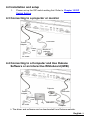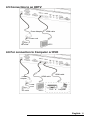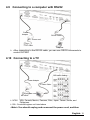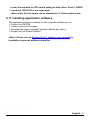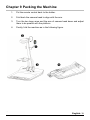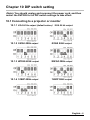
1
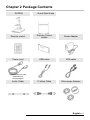
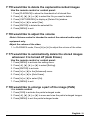
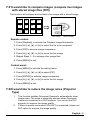
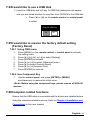
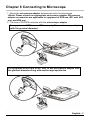
Document Camera DVP509 VISUAL PRESENTER User Manual DVP509 User Manual 00 Table of Contents Copyright Information ....................................................................................... 3 Chapter 1 Safety Instructions .......................................................................... 4 Precautions .................................................................................................. 5 FCC Warning................................................................................................ 5 EN55022 (CE Radiation) Warning ............................................................... 5 Chapter 2 Package Contents ............................................................................ 6 Chapter 3 Product Overview ............................................................................ 7 3.1 Relative Operation Position ................................................................ 7 Chapter 4 Installation and Connections.......................................................... 8 4.1 4.1 System diagram.................................................................................. 8 Installation and setup .......................................................................... 9 4.2 4.3 Connecting to a projector or monitor .................................................. 9 Connecting to a Computer and Use Dukane Software or an 4.4 Interactive Whiteboard (IWB) ............................................................. 9 Connecting to an HDTV ................................................................... 10 4.5 For connection to Computer or DVD ................................................ 10 4.6 4.7 Connecting to a computer, projector, and monitor simultaneously .. 11 Connecting to Audio Input and Output ............................................. 11 4.8 4.9 Connecting to a computer with RS232 ............................................. 12 Connecting to a TV ........................................................................... 12 4.10 Installing application software........................................................... 13 Chapter 5 Start Using ...................................................................................... 14 Chapter 6 Control Panel/Remote Control and Setting Menu ...................... 16 6.1 Functions of control panel and remote control ................................. 16 6.2 Setting menu .................................................................................... 18 Chapter 7 Descriptions of Major Functions .................................................. 24 7.1 I would like to automatically adjust the image to have the best 7.2 brightness and focusing performance .............................................. 24 I would like to switch image sources ................................................ 24 7.3 I would like to set the image source of VGA OUT2 .......................... 24 7.4 I would like to switch the image mode .............................................. 24 English - 1 7.5 I would like to make text clearer and photos more colorful .............. 24 7.6 7.7 I would like to zoom in/out images ................................................... 25 I would like to use the manual focus ................................................ 25 7.8 I would like to adjust the brightness ................................................. 25 7.9 I would like to turn on/off the lamp .................................................... 25 7.10 I would like to freeze images ............................................................ 26 7.11 I would like to rotate the image ......................................................... 26 7.12 I would like to capture images .......................................................... 26 7.13 I would like to record images ............................................................ 27 7.14 I would like to view captured/recorded images ................................ 28 7.15 I would like to delete the captured/recorded images ........................ 29 7.16 I would like to adjust the volume ...................................................... 29 7.17 I would like to automatically delete the stored images whenever it is turned off (Auto Erase) ..................................................................... 29 7.18 I would like to enlarge a part of the image (PAN) ............................. 29 7.19 I would like to use the MASK and Spotlight function ........................ 30 7.20 I would like to play the slides (Slide Show) ...................................... 31 7.21 I would like to compare images (compare live images with stored image files (PIP)) .............................................................................. 32 7.22 I would like to reduce the image noise (Projector Type) .................. 32 7.23 I would like to change the power on image ...................................... 33 7.24 I would like to use a USB disk .......................................................... 34 7.25 I would like to resume the factory default setting (Factory Reset) ... 34 7.26 Computer-related functions .............................................................. 34 Chapter 8 Connecting to Microscope ........................................................... 37 Chapter 9 Packing the Machine ..................................................................... 39 Chapter 10 DIP switch setting ........................................................................ 40 10.1 Connecting to a projector or monitor ................................................ 40 10.2 Connecting to a TV/DVD .................................................................. 41 Chapter 11 Troubleshooting ........................................................................... 42 Appendix 1 ....................................................................................................... 45 English - 2 Copyright Information Copyrights Dukane Corp . All rights reserved. Dukane is a trademark that is currently being registered by Dukane Corp. Copying, reproducing or transmitting this file is not allowed if a license is not provided by Dukane unless copying this file is for the purpose of backup after purchasing this product. In order to keep improving the product, Dukane hereby reserves the right to make changes to product specifications without prior notice. The information in this file is subject to change without prior notice. To fully explain or describe how this product should be used, this manual may refer to names of other products or companies without any intention of infringement. Disclaimer of warranties: Dukane is neither responsible for any possible technological, editorial errors or omissions, nor responsible for any incidental or related damages arising from providing this file, using, or operating this product. DUKANE CORP AV SERVICE DEPT 2900 Dukane Drive St Charles, IL 60174 800-676-2487 / 630-762-4032 Fax 630-584-5156 [email protected] http://www.dukane.com/av/service/ English - 3 Chapter 1 Safety Instructions Always follow these safety instructions when setting up and using the Document Camera: 1. Do not place Document Camera in tilted position. 2. Do not place the Document Camera on an unstable trolley, stand or table. 3. Do not use the Document Camera near water or source of heat. 4. Use attachments only as recommended. 5. Use the type of power source indicated on the Document Camera. If you are not sure of the type of power available, consult your dealer or local electricity company for advice. 6. Place the Document Camera on a place that it can be unplugged easily. 7. Always take the following precautions when handling the plug. Failure to do so may result in sparks or fire. Ensure the plug is free of dust before inserting it into a socket. Ensure that the plug is inserted into the socket securely. 8. Do not overload wall sockets, extension cords or multi-way plug boards as this may cause fire or electric shock. 9. Do not place the Document Camera where the cord can be stepped on as this may result in fraying or damage to the lead or the plug. 10. Unplug the Document Camera from the wall socket before cleaning. Use a damp cloth for cleaning. Do not use liquid or aerosol cleaners. 11. Do not block the slots and openings in the Document Camera case. They provide ventilation and prevent the Document Camera from overheating. Do not place the Document Camera on a sofa, rug or other soft surface or in a built-in installation unless proper ventilation is provided. 12. Never push objects of any kind through cabinet slots. Never allow liquid of any kind to spill into the Document Camera. 13. Except as specifically instructed in this User Manual, do not attempt to operate this product by yourself. Opening or removing covers may expose you to dangerous voltages and other hazards. Refer all servicing to licensed service personnel. 14. Unplug the Document Camera during thunderstorms or if it is not going to be used for an extended period. Do not place the Document Camera or remote control on top of vibrating equipment or heated objects such as a car, etc. 15. Unplug the Document Camera from the wall outlet and refer serving to licensed service personnel when the following situations happen: If the power cord or plug becomes damaged or frayed. If liquid is spilled into it or the Document Camera has been exposed to rain or water. <Note> Using an incorrect battery type in the remote control may result in breakdown. Follow local instructions on how to dispose of used batteries. English - 4 Precautions Warning: To reduce the risk of fire or electric shock, do not expose this appliance to rain or moisture. This Document Camera has a 3-wire AC line Plug. This is a safety feature to ensure that the plug will fit into the power outlet. Do not try to disable this safety feature. If the Document Camera will not be used for an extended time, unplug it from the power socket. Note Risk of Electric Shock DO NOT OPEN Caution: To reduce the risk of electric shock, do not remove cover (or back). No user-serviceable parts inside. Refer servicing to licensed service personnel. This symbol indicates This symbol indicates that that this equipment may there are important contain dangerous operating and voltage which could maintenance instructions cause electric shock. in this User Manual with this unit. FCC Warning This Document Camera has been tested and found to comply with the limits for a Class A computer device, pursuant to Article 15-J of FCC Rules. These limits are designed to provide reasonable protection against harmful interference in a commercial installation. EN55022 (CE Radiation) Warning This product is intended for use in a commercial, industrial, or educational environment. It is not intended for residential use. This is a Class A product. In a residential environment it may cause radio interference, in which case the user may be required to take adequate measures. The typical use is in a conference room, reception room or hall. English - 5 Chapter 2 Package Contents DVP509 Quick Start Guide Remote control Remote Control Holder Power Adapter Power cord USB cable VGA cable C-Video Cable Microscope Adapter Appearance may vary depending on country/region Audio Cable English - 6 Chapter 3 Product Overview 2 1 3 4 6 5 5 7 8 9 1. Lens 2. Remote sensor 3. Remote Control Holder 4. Camera arm 5. Auxiliary floodlight and lamp arm 6. DIP switch setting 7. Input/output port 8. Backlight 9. Control panel 3.1 Relative Operation Position Projector Computer English - 7 Chapter 4 Installation and Connections 4.1 System diagram Projector or monitor 或營幕\ Projector or monitor DVD or Computer 或營幕\ Computer HDTV Computer Speaker TV Computer Computer English - 8 4.2 Installation and setup 1. Please set up the DIP switch setting first. Refer to Chapter 10 DIP Switch Setting. 4.3 Connecting to a projector or monitor VGA cable Power Adapter Power cord Monitor or projector AC outlet 4.4 Connecting to a Computer and Use Dukane Software or an Interactive Whiteboard (IWB) Projector USB cable Power Adapter VGA cable Power cord AC outlet USB cable Computer The driver and software can be downloaded from Dukane website. English- 9 4.5 Connecting to an HDTV Power Adapter HDMI cable Power cord AC outlet HDTV 4.6 For connection to Computer or DVD HDMI cable HDMI cable Power Adapter Power cord AC outlet HDTV DVD or Computer English- 10 4.7 Connecting to a computer, projector, and monitor simultaneously Power Adapter VGA cable VGA cable VGA cable Power cord AC outlet Projector Monitor Computer Press [SOURCE] button to switch the image source. For VGA 1 setting, refer to 7.2 I would like to switch image sources. For VGA 2 setting, refer to 7.3 I would like to set the image source of VGA OUT2. 4.8 Connecting to Audio Input and Output Power Adapter Power cord AC outlet Speaker Computer English- 11 4.9 Connecting to a computer with RS232 Power Adapter RS232 Cable Power cord AC outlet Computer After connecting to the RS232 cable, you can use RS232 commands to control DVP509. 4.10 Connecting to a TV DIP switch setting Power Adapter C-Video Cable Power cord AC outlet NTSC: USA, Canada, Mexico, Panama, Chile, Japan, Taiwan, Korea, and Philippines. PAL: Countries/regions not listed above <Note> You should unplug and reconnect the power cord, and then English- 12 restart the machine for DIP switch setting to take effect. Once C-VIDEO is enabled, VGA OUT is not supported. <Note> Only the live image can be displayed in C-Video output mode. 4.11 Installing application software The application software installed on the computer enables you to: Control the DVP509 Capture and record images. Annotate the image, highlight important details and save it. Support the full screen function. <Note> Please refer to Podium View™ software user manual for installation steps and software operation. English- 13 Chapter 5 Start Using <Note>: Please adjust it to be suitable for the local voltage frequency of 50/60 Hz. For the frequency in actual use, please refer to the manual (Appendix 1). 1. Pull up the camera and the camera arm. The camera should aim at the center of the presenter. 2. Pull up the lamp arm to a proper position. 3. Place an object to be displayed under the camera. 4. Press [POWER] on. on the remote control or control panel to power 5. Press control panel [AUTO TUNE] You are ready to present. button to optimize the image. 6. Each time the camera head is moved, press [AUTO TUNE] on the remote control or control panel to refocus the lens. <Note>: According to your request, you can adjust the camera head slightly to aim at the center of the documents when the anchor of lens was reached. English- 14 When using the remote control, aim at the remote sensor on the DVP509, and press the power button. Once DVP509 is turned on, the LED on the control panel will flash a few times and stay lit. Please contact your distributor if the LED does not light up. English- 15 Chapter 6 Control Panel/Remote Control and Setting Menu 6.1 Functions of control panel and remote control <Remark> The below functions are listed alphabetically Name ,,, Function Descriptions Turn on and off the Document Camera. Operation Remote control/ Control panel Remote control/ Control panel AUTO TUNE Move up, down, left or right to select the needed function. Automatically adjust the image to have the Remote control/ best brightness and focusing performance. Control panel BRT+/- Adjust the brightness of the image. / CAPTURE /DEL ENTER Capture and save images to USB disk (priority) or internal memory while displaying live images. Delete files from the USB disk (priority) or internal memory while reading the stored files (in Playback mode). Activate/Enter functions. LAMP Freeze the current image to remain temporarily on the screen. Press again to defreeze. Lamp mode toggle switch. MASK Activate Mask/Spotlight mode. MENU Activate the setting menu/exit the menu. PAN Enable/Disable the partial enlarged mode. FREEZE Remote control/ Control panel Remote control/ Control panel Remote control/ Control panel Remote control/ Control panel Remote control/ Control panel Remote control Remote control/ Control panel Remote control English- 16 PIP Image comparison (to compare live images with stored image files). PLAYBACK Read files stored in the USB disk (priority) Remote control/ or internal memory. Control panel RECORD Record motion images. Press [Record] to record images to USB disk and press [Record] again to stop recording. Screen rotation 0°/180°/Flip/Mirror ROTATE SOURCE 1 SOURCE 2 ZOOM +// Remote control Remote control/ Control panel Remote control Switch between different image sources of VGA OUT (1) and HDMI OUT: Remote control/ 1. Live images (default). Control panel 2. VGA IN / HDMI IN. Switch between different image sources of VGA OUT (2) Control panel VGA Out (VGA OUT(1)) / VGA IN Increase or decrease the image size. Remote control/ Control panel English- 17 6.2 Setting menu 6.2.1 Main menu <Remark> Press [MENU] on the remote control or control panel to display the setting menu. Auto Tune Slide Show Automatically adjust the image to have the best brightness and focusing performance. Show the photos or videos stored in the USB disk (priority) or internal memory in slide mode. PAN Manual Focus Enable/Disable the partial enlarged mode. Manual Focus. LAMP Rotate Lamp mode toggle switch. Screen rotation 0°/180°/Flip/Mirror PIP Settings Image comparison (to compare live images with stored image files). Set up various functions. Brightness Photo/Text Adjust the brightness of the image. Select Photo/Text/Gray Mode. Mask Zoom Activate the mask mode. Increase or decrease the image size. Mode Spotlight Select image mode. Activate the spotlight mode. English- 18 6.2.2 Setting menu st 1 Level Major Items 2 nd Capture Mode Capture Time Capture Capture Interval Storage rd Level Minor 3 Level Items Adjustment Values Single Capture/ Time Lapse/ Record/Off 1. 1 hr 2. 2 hr 3. 4 hr 4. 8 hr 5. 24 hr 6. 48 hr 7. 72 hr 1. 3 sec 2. 5 sec 3. 10 sec 4. 30 sec 5. 1 min 6. 2 min 7. 5 min Image Quality 1. 2. 3. High Medium Low Slide Show Enter Delay 1. 2. 3. 4. 5. 6. Copy To USB Disk Enter Delete All Yes/No Format Yes/No 0.5 sec 1 sec 3 sec 5 sec 10 sec Manual Function Descriptions Use the left and right arrow keys to select capture mode. Use the left and right arrow keys to select the capture time. <Note> This will be active only when capture mode is set to time lapse Use the left and right arrow keys to select the capture interval. <Note> This will be active only when capture mode is set to time lapse Use the left and right arrow keys to select the image quality for the captured images and recorded videos Show the photos or videos stored in the USB disk (priority) or internal memory in slide mode. Use the left and right arrow keys to select the delay time. Select manual mode to switch images manually. Use the left and right arrow keys to select, and then press [ENTER] to confirm to copy files from internal memory to USB disk. Use the left and right arrow keys to select, press [ENTER] to confirm the deletion of all images from the USB disk (priority) or internal memory. Use the left and right arrow keys to select, and then press [ENTER] to format the USB disk (priority) or internal memory. English- 19 Auto Exposure On/Off Regardless of outside environment, the machine will adjust the brightness to the optimal condition. Use the left and right arrow keys to select. Regardless of outside light or color, the machine will adjust the color to the optimal condition; Press [ENTER] to execute. Auto White Balance Enter Audio Volume 0~A~Max Use the left and right arrow keys to adjust the volume. Projector Type DLP/LCD Use the left and right arrow keys to select the projector type and reduce image noise. Digital Zoom On/Off Use the left and right arrow keys to turn on/off digital zoom. Control Language Advanced Lock Down 1. 2. 3. 4. 5. 6. 7. 8. 9. 10. 11. 12. 13. 14. 15. 16. 17. 18. 19. English 繁體中文 简体中文 Deutsch Français Español Русский Nederlands Suomi Polski Italiano Português Svenska dansk ČESKY العربية 日本語 한국의 ελληνικά On/Off English Traditional Chinese Simplified Chinese German French Spanish Russian Dutch Finnish Polish Italian Portuguese Swedish Danish Czech Arabic Japanese Korean Greek Use the left and right arrow keys in the Language option to select the preferred language. Use the left and right arrow keys to turn on/off the lock down function. You can set the password when [On] is selected. English- 20 Use the left and right arrow keys to turn on/off the auto erase function. When [On] is selected, the stored images will automatically be deleted when the system is turned off. Read the value of the current image mode. Use the left and right arrow keys to select, and then confirm by pressing [ENTER]. Store the value of the current image mode. Use the left and right arrow keys to select, and then confirm by pressing [ENTER]. Auto Erase On/Off Preset Load Yes/No Preset Save Yes/No Splash Screen Settings Enter Open Splash Screen Setting window Factory Reset Yes/No Use the left and right arrow keys to select, and then confirm by pressing [ENTER] to restore the factory defaults. Firmware Version NA Display FW version 6.2.3 Mask mode setting menu 2 nd Level Major Items 3rd Level Minor Items Live Transparency Step MASK Mode V Size H Size Exit th 4 Level Adjustment Values Function Descriptions Press [ENTER] to return to live image. Use the left and right arrow keys 0~2~3 to adjust the transparency of the mask. Use the left and right arrow keys Large/Medium/Small to select the step of the mask. Use the left and right arrow keys 0~A~Max to select the vertical height of the mask. Use the left and right arrow keys 0~A~Max to select the horizontal length of the mask. Press [ENTER] to confirm your Enter selection and exit the mask mode setting menu. Enter English- 21 6.2.4 Spotlight mode setting menu 2 nd Level Major Items 3rd Level Minor Items Live Shape Transparency Spotlight Step Mode V Size H Size Exit th 4 Level Adjustment Values Press [ENTER] to return to live image. Use the left and right arrow keys to select the shape of the Ellipse/Rectangle spotlight zone. Use the left and right arrow keys 0~2~3 to adjust the transparency of the border in the spotlight mode. Use the left and right arrow keys Large/Medium/Small to select the step of the spotlight zone. Use the left and right arrow keys 0~A~Max to adjust the height of the spotlight zone. Use the left and right arrow keys 0~A~Max to adjust the width of the spotlight zone. Press [ENTER] to confirm your Enter selection and exit the spotlight mode setting menu. Enter 6.2.5 Splash Screen Setting 2 nd Level Major Items Splash Screen Setting Function Descriptions 3rd Level Minor Items Power On Image Setting Power On Logo Show Time th 4 Level Adjustment Values Function Descriptions Default/Customer Select to use [Default/ Customer] power on image 4 ~ 30 sec Set up power on logo show time Power On Image Select Enter Exit Enter Select power on image. Only pictures in JPEG format are supported Press [ENTER] to confirm your selection and exit splash screen setting window. English- 22 6.2.6 Annotation Tools After the mouse is connected, right click or left click and hold the mouse to start the tools. <Note> When the setting menu is activated, the tools cannot be used. Icon Description Custom tool 1 Custom tool 2 Eraser Clear all Open setting menu of the annotation tool Exit the annotation tool 6.2.7 Setting menu of the annotation tool 2 nd Level Major Items th Line Width 4 Level Adjustment Values Pen/Line/ Ellipse / Rectangle Red/Blue/Black/ Green/Pink/Whit e/Cyan/Yellow 1~3~10 Pen/Line/ Ellipse / Rectangle Red/Blue/Black/ Green/Pink/Whit e/Cyan/Yellow 1~3~10 Line Width 1~3~10 3rd Level Minor Items Tools Select Color Select Line Width Tools Select Color Select Function Descriptions Select an annotation tool Select the pen color Select the line width Select an annotation tool Select the pen color Select the line width Select the line width English- 23 Chapter 7 Descriptions of Major Functions 7.1 I would like to automatically adjust the image to have the best brightness and focusing performance Use the remote control or control panel: 1. Press [AUTO TUNE] for the best brightness and focusing performance. 7.2 I would like to switch image sources Live image is the default image source of VGA OUT (1) and HDMI OUT. Press [SOURCE] on the remote control or control panel to have DVP509 switch among the following images sources: 1. Live images (default). 2. VGA IN /HDMI IN 7.3 I would like to set the image source of VGA OUT2 The default of image source is based on VGA OUT (1). Press [SOURCE 2] on the control panel to have DVP509 switch among the following images sources: 1. VGA OUT(1). 2. VGA IN. 7.4 I would like to switch the image mode Use the remote control or control panel: 1 2 3 4 Press [MENU] to activate the setting menu. Press [], [], [], or [] to select [Image Mode]. Press [] or [] to the [Normal/Film/Slide/Microscope]. Press [MENU] to exit. 7.5 I would like to make text clearer and photos more colorful 7.5.1 Photo/Text mode descriptions The default [Photo/Text] mode is in Photo (Photo mode). To change this setting, please use the remote control or the control panel to activate the options of the setting menu. [Photo] (default): for viewing photos or text with photos, making photos more colorful. English- 24 [Text]: for viewing text files, making the text clearer. [Gray]: for viewing black & white photos which will make the grayscale differentiation distinct. 7.5.2 Set up Photo/Text mode To change the settings, please use the remote control or the control panel: 1. Press [MENU] to activate the setting menu. 2. Press [], [], [], or [] to select [Photo/Text]. (Please refer to 7.5.1 Photo/Text mode descriptions to make the best choice.) 3. Press [ENTER] to activate. 4. Press [] or [] to select the [Photo/Text/Gray]. 5. Press [MENU] to exit. 7.6 I would like to zoom in/out images 1. Press [ZOOM+] on the remote control or control panel to zoom in images. 2. Press [ZOOM-] on the remote control or control panel to zoom out images. 7.7 I would like to use the manual focus Use the remote control or control panel: 1. Press [MENU] to activate the setting menu. 2. Press [], [], [], or [] to select [Manual Focus]. 3. Press [MENU] to exit. 7.8 I would like to adjust the brightness If you use the remote control or the control panel: 1. Press [BRT +] to make it brighter. 2. Press [BRT -] to make it darker. 7.9 I would like to turn on/off the lamp The default of the lamp is Arm lamp. When using the remote control or control panel: 1. Press [LAMP] to switch On/Off. (in the sequence of arm lamp/backlight/OFF) English- 25 7.10 I would like to freeze images 1. Press [FREEZE] on the remote control or control panel to freeze the current image on the screen. Press again to defreeze. 7.11 I would like to rotate the image Remote control: 1.Press [ROTATE] key to rotate the screen. (The sequence of switching is: 0°/180°/Flip/Mirror) Control panel: 1. Press [MENU] to activate the setting menu. 2. Press [], [], [], or [] to select [Rotate]. 3. Press [ENTER] to activate. 4. Press [] or [] to switch the rotation method. (The sequence of switching is: 0°/180°/Flip/Mirror) 5. Press [MENU] to exit. 7.12 I would like to capture images 7.12.1 Capture and save images 1. Press [CAPTURE/DEL] on the remote control or control panel to capture and save images. You cannot capture images when the capture mode is set to [Disable]. If it is set to [Continuous], you can capture images continuously. Press [CAPTURE/DEL] to start capturing continuously, or press [CAPTURE/DEL] again to exit. To change the quality of captured images, please refer to 7.12.2 Setting the quality of captured images. To change the settings of captured images, please refer to 7.12.3 Setting continuous capture. 7.12.2 Setting the quality of captured images 1. Press [MENU] on the remote control or control panel to activate the setting menu. 2. Press [], [], [], or [] to select [Setting]. English- 26 3. 4. 5. 6. 7. Press [ENTER] to activate. Press [] or [] to the [Capture] menu. Press [] to find [Image Quality]. Press [] or [] to select among [High/Medium/Low]. Press [MENU] to exit. 7.12.3 Setting continuous capture 1. Press [MENU] on the remote control or control panel to activate the setting menu. 2. Press [], [], [], or [] to select [Setting]. 3. Press [ENTER] to activate. 4. Press [] or [] to the [Capture] menu. 5. Press [] ] to the [Capture Mode]. 6. Press [] or [] to select [Time Lapse]. 7. Press [] to find [Capture Time]; Press [], or [] to set capture time. 8. Press [] to find [Capture Interval]; Press [], or [] to set interval time. 9. Press [MENU] to exit. 7.13 I would like to record images <Note> Connect USB disk to DVP509 to start recording images. 7.13.1 Recording motion images <Remark> You may not be able to capture or record images when [Capture Image] mode is set to [Disable]. Use the remote control or control panel: 1. Press [RECORD] on the remote control to start recording images. 2. Record sounds with the built-in microphone of the control panel. 3. Press [RECORD] again to stop recording. 7.13.2 Setting the quality of captured images 1. Press [MENU] on the remote control or control panel to activate the setting menu. 2. Press [], [], [], or [] to select [Setting]. 3. Press [ENTER] to activate. 4. Press [] or [] to the [Capture] menu. English- 27 5. Press [] to find [Image Quality]. 6. Press [] or [] to select among [High/Medium/Low]. 7. Press [MENU] to exit. 7.13.3 Recording setup 1. Press [MENU] on the remote control or control panel to activate the setting menu. 2. Press [], [], [], or [] to select [Setting]. 3. Press [ENTER] to activate. 4. Press [] or [] to the [Capture] menu. 5. Press [] ] to the [Capture Mode]. 6. Press [] or [] to select [Record]. 7. Press [MENU] to exit. <Remark> When the [Capture Image] mode is set to [Record], the function of [Capture] on the control panel is changed to image recording. 7.13.4 Playing images For playing videos, please refer to 7.14 I would like to view captured/recorded images. 7.14 I would like to view captured/recorded images 1. Press [PLAYBACK] on the remote control or control panel to display thumbnails of all stored files. 2. Press [], [], [], or [] to select the thumbnail you want to play. 3. Press [ENTER] to play. 4. When the video is played, press [FREEZE] to pause/play the video or press [ENTER] to stop playing. 5. Press [] or [] to select the next or previous audio/video file. 6. Press [] or [] to adjust the volume of the video. 7. Press [MENU] to exit. <Note> An external speaker must be connected to AUDIO OUT to play sound when you use VGA OUT. English- 28 7.15 I would like to delete the captured/recorded images Use the remote control or control panel: 1. Press [PLAYBACK] to show the thumbnails of all stored files. 2. Press [], [], [], or [] to select the file you want to delete. 3. Press [CAPTURE/DEL] to display a [Delete File] window. 4. Press [] or [] to select [Yes]. 5. Press [ENTER] to delete the selected file. 6. Press [MENU] to exit. 7.16 I would like to adjust the volume <Note> Volume control is intended to control the external audio output equipment only. Adjust the volume of the video. 1. In PLAYBACK mode, Press [] or [] to adjust the volume of the video. 7.17 I would like to automatically delete the stored images whenever it is turned off (Auto Erase) Use the remote control or control panel: 1. Press [MENU] to activate the setting menu. 2. Press [], [], [], or [] to select [Setting]. 3. Press [ENTER] to activate. 4. Press [] or [] to the [Advanced] menu. 5. Press [] or [] to [Auto Erase]. 6. Press [] or [] to select [On]. 7. Press [MENU] to exit. 7.18 I would like to enlarge a part of the image (PAN) Use remote control: 1. Press [PAN] to activate the partial enlarged mode. 2. Press [], [], [], or [] to move and view the partial enlarged images. 3. Press [MENU] to exit the partial enlarged mode. English- 29 Use control panel: 1. Press [MENU] to activate the setting menu. 2. Press [], [], [], or [] to select [PAN]. 3. Press [ENTER] to execute. 4. Press [], [], [], or [] to move and view the partial enlarged images. 5. Press [MENU] to exit the partial enlarged mode. 7.19 I would like to use the MASK and Spotlight function 7.19.1 I would like to use the mask or spotlight mode Use remote control: 1. Press [MASK] key to enter the Mask/Spotlight mode menu. Press [] or [] to select mode. 2. Press [ENTER] to enter the mask or spotlight mode. 3. Press [], [], [], or [] to move the zone position. 4. Press [MASK] again to return to live image. Use control panel: 1. Press [MENU] to activate the setting menu. 2. Press [] or [] to select [Mask]. Press [ENTER] to activate mask mode or select [Spotlight] and press [ENTER] to activate spotlight mode. 3. Press [], [], [], or [] to move the zone position. 4. Press [MENU] to activate the image OSD menu. 5. Press [] or [] to select [Live Image]. 6. Press [ENTER] to return to live image. 7.19.2 I would like to set the size of mask In Mask mode, use the remote control or control panel: 1. Press [MENU] to activate the image OSD menu. 2. Press [] or [] to select the item to be modified [Transparency/Step/ V Size/H Size]. (For details, please refer to 6.2 Setting Menu.) 3. Press [] or [] to perform the modification. 4. Press [MENU] to exit the image OSD menu and return to the mask mode. English- 30 7.19.3 I would like to set spotlight function In Spotlight mode, use the remote control or control panel: 1. Press [MENU] to activate the image OSD menu. 2. Press [] or [] to select the item to be modified [Shape/Transparency/ Step/V Size/H Size]. (For details, please refer to 6.2 Setting Menu.) 3. Press [] or [] to perform the modification. 4. Press [MENU] to exit the image OSD menu and return to spotlight mode. 7.20 I would like to play the slides (Slide Show) 7.20.1 Setting delay time 1. Press [MENU] on the remote control or control panel to activate the setting menu. 2. Press [], [], [], or [] to select [Setting]. 3. Press [ENTER] to activate. 4. Press [] or [] to the [Storage] menu. 5. Press [] to find [Delay]. 6. Press [] or [] to select the delay time between [0.5 sec/1 sec/ 3 sec/5 sec/10 sec/Manual]. 7. Press [MENU] to exit. 7.20.2 Playing/Pausing/Stopping the slide show <Note> Upper limit: The maximum size of single photo is 7 MB. If you use the remote control or the control panel 1. Press [MENU] to activate the setting menu. 2. Press [], [], [], or [] to select [Slide Show]. 3. Press [ENTER] to play. 4. Press [ENTER] again to pause/play. 5. Press [MENU] to exit. English- 31 7.21 I would like to compare images (compare live images with stored image files (PIP)) This function will compare and contrast a live image with a stored image. C1 C2 C3 C4 C5 C6 C7 C8 C10 C11 C12 Live image Stored image Remote control: 1. Press [Playback] to activate the Playback image thumbnails. 2. Press [], [], [], or [] to select the file to be compared. 3. Press [PIP] to execute image comparison. 4. Press [], [], [], or [] to move the live image. 5. Repeat Steps 1 - 3 to change other image files. 6. Press [MENU] to exit. Control panel: 1. Press [MENU] to activate the setting menu. 2. Press [], [], [], or [] to select [PIP]. 3. Press [ENTER] to activate image comparison. 4. Press [], [], [], or [] to move the live image. 5. Press [MENU] to exit. 7.22 I would like to reduce the image noise (Projector Type) 1. 2. This function enables Document Camera to automatically clear image noise. The noise is especially obvious when Document Camera is connected to a DLP projector. You can set the DLP projector to improve the image quality. If there is special noise when VGA OUT is connected, please set DLP option to improve the image quality. English- 32 2.1. Press [MENU] on the remote control or control panel to activate the setting menu. 2.2. Press [], [], [], or [] to select [Setting]. 2.3. Press [ENTER] to activate. 2.4. Press [] or [] to select [Control]. 2.5. Press [] to [Projector Type]. 2.6. Press [] or [] to select [LCD/DLP]. 2.7. Press [MENU] to exit. 7.23 I would like to change the power on image <Note> The power on image file must be less than 5 MB and in JPEG format. 1. Press [MENU] on the remote control or control panel to activate the setting menu. 2. Press [], [], [], or [] to select [Setting]. 3. Press [ENTER] to activate. 4. Press [] or [] to select [Advanced] menu. 5. Press [] to select [Power On Image Setting]. 6. Press [ENTER] to activate. 7. Press [] or [] to select [Power On Image Setting] and press [] or [] to select [Default/Customer]. 8. Press [] or [] to select [Power On Logo Show time] and press [] or [] to set up the time. 9. Skip to Step 11 if you select [Default] in Step 7. 10. Press [] or [] to [Power On Image Select] and press [ENTER] to read selected file. 11. Press [] to [Exit] and press [ENTER] to exit. English- 33 7.24 I would like to use a USB disk 1. Insert the USB disk and a [Copy To USB Disk] dialog box will appear, and you are asked whether to copy files from DVP509 to the USB disk. Press [] or [] on the remote control or control panel to select. Copy To USB Disk Yes No 7.25 I would like to resume the factory default setting (Factory Reset) 7.25.1 Using OSD menu 1. 2. 3. 4. 5. 6. 7. Press [MENU] on the remote control or control panel to activate the setting menu. Press [], [], [], or [] to select [Setting]. Press [ENTER] to activate. Press [] or [] to select [Advanced] menu. Press [] to select [Factory Reset]. Press [] or [] to select [Yes]. Press [ENTER] to execute. 7.25.2 Use Compound Key 1. Use the control panel, and press [ENTER] + [MENU] simultaneously to restore the initial value. <Note> Before using the compound keys, please remove all VGA-IN devices. 7.26 Computer-related functions Ensure that the USB cable is connected and the drivers are installed before using the computer-related functions. Refer to Chapter 4 Installation and Connections in this user manual English- 34 7.26.1 I would like to insert a photo in MS-Paint 1. Click [File/From Scanner or Camera] in MS-Paint as shown in the bottom left figure. 2. Click [Capture] to get the live images, as shown in the top right figure. 3. Click the image as shown in the right side of the top right figure. 4. Click [Get Picture]. It will capture the photo of live image. <Remark> Support Windows XP Operation System only. 7.26.2 I would like to insert photos in Photoshop 1. Click [File/Read-in/WIA-USB Video Device] in Photoshop 2. Click [Capture], and click the image as shown in the right side of the figure below. Then click [Get Picture]. English- 35 English- 36 Chapter 8 Connecting to Microscope 1 Mount the microscope adapter accessories onto the microscope <Note> Please choose an appropriate microscope adapter. Microscope adapter accessories are applicable to eyepieces of Ø 28 mm, Ø 31 mm, Ø 33 mm, and Ø 34 mm. 2 The lens of DVP509 connects with the microscope adapter For eyepieces of Ø 33 mm or Ø 34 mm, only fit one microscope adapter (with the greatest diameter). For eyepieces of Ø 28 mm or Ø 31 mm, fit one microscope adapter with the greatest diameter along with another appropriate one. English- 37 3 Select the [Microscope] mode 3.1. If you use the remote control or the control panel 3.1.1. Press [MENU] to enter the setting menu. 3.1.2. Press [], [], [], or [] to select [Image Mode]. 3.1.3. Press [] or [] to the [Microscope]. 3.1.4. Press [MENU] to exit. 4 If the image is not clear 4.1. Please adjust the focus of microscope 4.2. Press [AUTO TUNE] button on the control panel to activate the auto focus 5 Digital zoom 5.1. If you use the remote control or the control panel 5.1.1. Press [MENU] to enter the setting menu. 5.1.2. Press [] or [] to the [Control]. 5.1.3. Press [] to select [Digital Zoom]. 5.1.4. Press [] or [] to the [On]. 5.1.5. Press [ZOOM +] / [ZOOM - ]. <Note> Please reset to normal mode after using the microscope, otherwise, you are unable to use zoom in/out function. 1. Press [MENU] on the remote control or control panel to enter the setting menu. 2. Press [], [], [], or [] to select [Image Mode]. 3. Press [] or [] to the [Normal]. 4. Press [MENU] to exit. English- 38 Chapter 9 Packing the Machine 1. Put the remote control back to the holder. 2. Fold back the camera head to align with the arm. 3. Turn the two lamp arms and the arm of camera head down and adjust them to be parallel with the platform. 4. Finally, fold the machine as in the following figure. English- 39 Chapter 10 DIP switch setting <Note> You should unplug and reconnect the power cord, and then restart the DVP509 for all DIP switch settings to take effect. 10.1 Connecting to a projector or monitor 10.1.1 XGA 60 Hz output (default values) XGA 50 Hz output 10.1.2 SXGA 60Hz output SXGA 50Hz output 10.1.3 WXGA 60Hz output WXGA 50Hz output 10.1.4 1080P 60Hz output 1080P 50Hz output English- 40 10.2 Connecting to a TV/DVD 10.2.1 NTSC: USA, Taiwan, Panama, Philippines, Canada, Chile, Japan, Korea, and Mexico. 60Hz 50Hz 10.2.2 PAL: Countries/regions not listed above. 60Hz 50Hz <Remark> VGA is not supported once C-VIDEO is enabled. English- 41 Chapter 11 Troubleshooting This chapter describes problems you may encounter while using DVP509. If you have questions, please refer to related chapters and follow all the suggested solutions. If the problem still occurred, please contact our distributors or service center. No. Problems Solutions 1 Boot without Make sure you have plugged in the power cord. power signal 2 No image 1. Check the power. output from the 2. Check all cable connections. Refer to Chapter 4 DVP509 Installation and Connections in this manual. 3. Check the [Source], refer to 7.2 I would like to switch image sources of Chapter 7 Descriptions of Major Functions. 4. Check the settings for the source of the projector. Please refer to the user manual of the projector. 5. Check if DIP switch is properly set. Please refer to Chapter 10 DIP Switch Setting for related settings. 3 Unable to focus Probably the document is too close. Press [ZOOM -] on the remote control or control panel. Or pull away the distance between document and lens, then press [AUTO TUNE] to activate auto focus. 4 The image is Check the Auto Image setting of your projector. Please incomplete refer to the user manual of the projector or check for the DIP switch setting. 5 Dukane Dukane Document Camera, B-Works 2, and Document other applications cannot be used simultaneously. Only Camera, one application can be executed at a time. Please close B-Works 2, and the currently running applications and then execute the other application to be used. applications cannot be used simultaneously 6 When DVP509 is Please make sure the arm lamp is set to [Off]. For the turned on, the switch-on or -off of arm lamp, please refer to 7.9 I would auxiliary like to turn on/off the lamp of Chapter 7 floodlight do Descriptions of Major Functions. not light 7 DVP509 fails to 1. Check to see if the stored data have reached the store images or maximum size of the USB disk (priority) or internal react memory. 2. Please make sure if the capture function is set to continuous mode or the time for capture is set to be English- 42 8 9 The images outputted from DVP509 are too bright, dark or vague. Unable to record images long. For the related setting, please refer to 7.12 I would like to capture images of Chapter 7 Descriptions of Major Functions. Press [AUTO TUNE] button to automatically adjust the image to have the best brightness and focusing performance. 1. Check to see if the stored data have reached the maximum size of the USB disk. 2. The recording function is not supported in the internal memory. Please make sure that USB disk is inserted for image recording. The operating steps in the manual may be not applicable to the machine due to improvement in functions. Check to see if the Firmware version of your machine is up-to-date. 1 Please go to Dukane's official website to check whether the latest version is available for update. www.dukane.com\av 2 The steps to check the FW version are as below: 2.1 Press [MENU] on the remote control or control panel to activate the setting menu. 2.2 Press [], [], [], or [] to select [Setting]. 2.3 Press [ENTER] to activate. 2.4 Press [] or [] to select [Advanced] menu. 2.5 View [Firmware Version]. If you are not sure whether it is the latest version, please consult your distributor for advice. 10 The operating steps in the manual are not applicable to the machine 11 How to unlock the locked device 1. Press [MENU] on the remote control or control panel to activate the setting menu. 2. Press [], [], [], or [] to select [Setting]. 3. Press [ENTER] to activate. 4. Press [] or [] to select [Advanced] menu. 5. Press [] to [Lock Down]. 6. Press [] or [] to select [Off] and cancel the password setting function. 12 After using the USB cable to connect to a computer, modify VGA OUT (1) to VGA IN. After using the USB cable to connect to a computer, only Live Image output is available. English- 43 13 VGA IN/HDMI IN image output is not available through USB The output image is not clear with water ripples Please refer to the Appendix 1 in the manual to confirm the applicable voltage frequency, and reset it according to the instruction in Chapter 10 DIP Switch Setting. English- 44 Appendix 1 English English Bulgaria Burma Burundi Cambodia 50 50 50 50 50 50 50 50 60 60 50 50 50 60 50 50 50 60 50 50 50 50 Cameroon 50 Gabon 50 Japan Canada 60 50 50 50 50 50 50 50 50 50 50 50 50 50 50 50 50 50 50 50 50 50 50 50 60 50 60 60 50 Afghanistan Algeria Angola Antiqua Argentina Australia Austria Azores Bahamas Bahrain Bangladesh Babados Belgium Bermuda Bolivia Botswana Brazil CanaryIslan-d Central Africa Rep. Ceylon Chad Channel Island Chile Libya Luxembourg Macao Madeiral Majokca Island Malagasy Malawi Malaysia China Colombia Congo Costa Rica Cuba Cyprus Czechoslov-akia Dahomey Den mark Dominican Dubai Ecuador Egypt Region or Country Frequency English Region or Country Frequency Region or Country Frequency Power frequency for each country in the world Equatorial Guinea Ethiopia 50 60 50 60 60 50 50 50 50 60 50 60 50 60 50 50 Guam Grenada Guatemala Guinea Gayana Haiti Hawaii Honduras Hong Kong Hungary Ice land India Indonesin Iran Iraq Ireland 60 50 60 50 50 60 60 60 50 50 50 50 50 50 50 50 Faeroe Island 50 Isle of Man 50 Fiji Finland France French Guiana 50 50 50 50 50 50 50 50 50 60 50 50 60 50 50 50 60 50 60 60 50 50 50 50 60 El Salvador Gambia Germany Ghana Gibraltar Great Britain Greece Greenland Oman Pakistan Panama Paraguay Peru Philippines Poland Portugal Israel Italy Ivory Coast Jamaica Jordan Kenya Korea Kuwait Lebanon Lesotho Liberia Syria Tahiti R.O.C. Taiwan Tanzania Thailand Togo Rep.of Tonga Trinidad English- 45 English Mali Rep. Malta Martinique Mauritania Mauritius 50 50 50 50 50 Mexico 60 Monaco Montserrat Morocco 50 60 50 50 50 50 50 50 60 50 50 50 60 Switzerland Mozambique Nepal Netherlands New Caledonia New Zealand Nicaragua Niger Nigeria Norway Okinawa Puerto Rico Qatar Rhodesia Romania Rwanda Saudi Arabia Scotland Senegal Sierra Leone Singapore Somalia South Africa Rep. Spain Sri Lanka Sudan Surinam Swaziland Sweden 60 50 50 50 50 50 60 50 50 50 50 50 50 50 50 50 60 50 50 50 Region or Country English Frequency Region or Country Frequency English Frequency Region or Country Tobago Tunisia Turkey Uganda USA. 60 50 50 50 60 USSR 50 United Kingdom Upper Volta Uruguay Venezuela Viet-Nam Virgin Island Western Samoa 50 50 50 60 50 60 50 50 50 50 50 50 Yeman(Aden) Yemen(Arab) Yugoslavia Zaire Rep. of Zambia English- 46