1
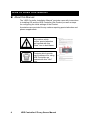
Proxy Server Manual 2 HDE Controller X Proxy Server Manual Please note that this user manual may be subjected to change due to product upgrades without any prior notice. HDE and HDE Controller is a registered trademark of HDE, Inc. All group names and product names listed in this manual are registered trademarks to each of the groups and products respectively. This manual may only be copied by printing in PDF format. Any other forms of copying, transferring, loaning, adapting, translating, or public distribution of this manual is not allowed. Reprinting or reproducing this manual without HDE's permission is strictly forbidden. © 2011 HDE, Inc. Proxy Server 3 How to Read this Manual About this Manual The “HDE Controller Installation Manual” provides users with instructions to installing OS and the HDE Controller (this Product) as well as steps for configuring the initial settings of the Product. Annotations are provided for any matters requiring special attention and phrase supplements. Any matters which require special attention are marked with this "Alert" icon in bold frame. Contents which provide useful reference for using HDE Controller are marked with this "Hint" icon. 4 HDE Controller X Proxy Server Manual HDE Controller X Proxy Server Proxy Server Summary A proxy server reduces network traffic and enhances the speed of response towards end-users by caching the contents of Web pages which are frequently accessed by the users. The caching function for Web browsers such as Internet Explorers only allows one individual user to access and use the cache stored; however, by using a proxy server, the server will be able to cache the data from external Websites when multiple accesses to the same Website are made from within the network, allowing the server to display the cached contents quickly without having the need to continuously access the www. Additionally, this will reduce the amount of unnecessary accesses leaving the network; hence, reducing network traffic. HDE Controller allows users to construct a Proxy Server with either one of the following three proxies. Normal Proxy Server Construct a proxy server which can be used by configuring the proxy settings from the client browser. Transparent Proxy Server Construct a proxy server which passes all viewed Websites via proxy without the need for users to perform any configuration in their browsers. z Setup a Transparent Proxy By constructing a proxy server as transparent proxy and applying firewall, the client machine within the firewall will be able to access the Internet without being aware of the proxy server. 6 HDE Controller X Proxy Server Manual This is enabled by incorporating both the port forward function and transparent proxy settings. Therefore, even if the proxy server is not the firewall, users are still able to construct a transparent proxy by setting appropriate port forwarding in their firewalls. Please port forward all accesses made by the firewall (machines or routers subjected to transferring the client packets) to port number 80 of external hosts (used for external Web access) to the proxy port of the proxy server. First, please configure the proxy server as a normal proxy. Transparent proxy will not be able to function correctly if normal proxy is not constructed. Once the normal proxy is operational, go to the "Firewall Settings" menu and select "Use as Transparent Proxy". Click the "Configure" button to complete your configuration. Please configure the settings for port forwarding if the firewall and the proxy are not on the same machine. httpd Accelerator Construct a proxy server which caches the Web server setup within the network and answers all external inquiries in place of the Web server (opposite of how a normal proxy server operates). z Setup a httpd Accelerator This section will introduce an example in constructing a proxy server which caches the Web server setup within the network and answers all external inquiries in place of the Web server (opposite of how a normal proxy server operates). First, you must construct the httpd accelerator on port number 80 of www.example.com which will be accessed by the client. We will assume that the actual contents of www.example.com are located on the Web server operating on port number 81. To operate according to this example, you must go to the "Web Server Settings" menu and set the port which the Web server operates on to 81. Proxy Server 7 In this case, first specify port number 80 for "Basic Settings" - "Port Number". If you wish to deny incoming external accesses, make sure to only enter the network addresses within the network to the list in "Access Control". Next, select the "Firewall Settings" menu. Check the "Use as a HTTP Accelerator" box. Enter "www.example.com", which contains the actual content, for "Accelerated Server" and "81" for "HTTP Port Number of Accelerated Server". Click the "Configure" button to complete your configuration. Your configuration should be correct if the same contents are displayed when http://www.example.com:81/ and http://www.example.com/ are accessed. The above example used the same server for the sake of simplicity; however, it is also possible to perform similar configuration on different hosts. It is also possible to execute the httpd accelerator on the Firewall such that the actual Web server is constructed on a safe location within the Firewall. In such case, enter the name of the machine within the Firewall as the "Accelerated Server" and the port number which the Web server operates on as the "HTTP Port Number of Accelerated Server". Additionally, you may also use the Web filtering function if you are using it as a proxy server. For the filtering method, it utilizes the backlist Web filtering method which incorporates the use of the proxy server. 8 HDE Controller X Proxy Server Manual 1. Basic Settings Basic Settings Configure the basic settings for the proxy server. Select the “Basic Settings” menu. z Port Number Specify the port number used to access the proxy server. Under normal circumstances, set the port number to "80" if using HTTP accelerator. Otherwise, if operating the Web server on the same server machine, set the Web server port number to a number other than "80". z Cache Directory Specify the directory you wish to store the cache in. Please specify a directory with sufficient disk space. z Cache Capacity Specify the cache capacity. Please make sure that you have sufficient disk space left on your system. Proxy Server 9 Access Control Click the “Access Control Settings” tab. For "Access Control Settings", enter the IP address or domain names you wish to allow use of proxy in "Allowed Sites". Please refer to the table below for input formats. Separate each FQDNs or IP addresses with a space or new line if multiple entries. Click the "Configure" button to complete your configuration. Please be sure to set access control as enabling proxy use externally will allow third-parties to access and the proxy server and use up the bandwidth. Also, un-restrict can be used as aids to illegal accesses such as hacking. 10 HDE Controller X Proxy Server Manual 2. Firewall Settings Please be sure to set access control as enabling proxy use externally will allow third-parties to access and the proxy server and use up the bandwidth. Also, non-restricted access settings can be used as aids to illegal accesses such as hacking. Select the type of Firewall you wish to setup. In this case, select "Use as a normal proxy". Click the "Configure" button to complete your configuration. At this point, you may now use the proxy server by specifying the name of the machine which has the proxy operating on Web browsers such as Internet Explorer and Firebox, or the IP address and the port number specified in the proxy server basic settings. If you are still unable to view any page when the proxy server is configured, go to the "Service Status" menu and make sure that "Proxy (squid)" is operational. Proxy Server 11 3. Web Filter Settings HDE Controller allows the use of Web filtering using squidGuard which incorporates blacklist filtering method. Users may also create and manage their own filter categories and enter the URLs and domain names they wish to filter in groups. Configure the settings for Web filtering. Select the "Web Filter Setting" menu to proceed to the "Category Settings" screen. First, check the “Enable Web Filtering” box. Then select the category boxes of the contents you wish to filter. The blacklist will be selectable after you have uploaded the blacklist. Users will be redirected to this URL if any prohibited URL is accessed. Create and specify the Web-page to be displayed as error. Click the "Web Filtering Settings" menu and then the "Redirect Settings" tab. 12 HDE Controller X Proxy Server Manual Enter the URL of the error Web-page. Click the "Configure" button after entry to save your settings. Web filtering is now enabled. Proxy Server 13 4. My Category Management This section will explain how to change the lists under My Categories and delete existing categories. First, select the "My Category Settings" menu. z Edit My Category To edit an existing category, click the "Edit" button beside each category names in the list of categories and proceed to the editing screen. On the editing screen, enter the URL list and domain list if you wish to add more filtering targets to the category. You may also delete filtering targets directly from the list. After you have finished editing the URL and domain lists, click the "OK" button to return to the previous screen and click the "Configure" button to save your settings. z Delete My Category To delete an existing category, click the “Delete” button beside each category names in the list of categories. Click the “Configure” button to save your settings. 14 HDE Controller X Proxy Server Manual 5. Create My Category Create a new custom category for Web filtering. Proceed to the "Create My Category" screen. Enter the "Category Name" in English. For the "Domain List", enter the IP address or the host name of the contents you wish to filter. Any access towards servers specified by the domain names or IP addresses specified here will be subjected to Web filtering. Please input one entry per line if multiple entries. Please refer to the Hint on the screen for input formats. For the "URL List", enter the URLs you which to filter out. For example, If you enter "www.example.co.jp/weather" in the URL List, z “www.example.co.jp/auction” can be accessed. z “www.example.co.jp/weahter/” cannot be accessed z “www.example.co.jp/weather/tokyo” cannot be accessed. Please input one entry per line if multiple entries. Please refer to the Hint on the screen for input formats. After you have finished all entries, click the "Configure" button to complete your configuration. You may create additional categories in the future using the same method. Proxy Server 15 6. Upload Blacklist By incorporating the database of harmful Websites into the Web filtering function, users will be able to easily filter out additional Websites that are considered dangerous. HDE Controller allows the use of the blacklist distributed by squidGuard. First, obtain a copy of the up-to-date blacklist from http://www.squidguard.org/ by downloading the blacklist on to your Windows client. The blacklist will be in tar.gz format. Next, select the "Upload Blacklist" menu and click the "Browse" button and select the blacklist file you have downloaded. Click the “Upload” button to upload the blacklist file. Once upload is complete, you will be able to select the “Blacklist” category in the Web Filter Settings menu Please note that the blacklist files are constantly being updated on the Website. Please be sure to update your blacklist regularly by downloading new versions of the blacklist from the Website. 16 HDE Controller X Proxy Server Manual 7. Upstream Proxy Settings Configure the settings for the upstream proxy server. You must configure this setting if this proxy server is located inside the Firewall and must go through other proxy servers in order to access the Internet. If you set both "Default Upstream Proxy" and "Upstream Proxy for Specific Domains", any inquiries other than for the domain list will be sent to the default upstream proxy. To delete each upstream proxy server, leave the "Upstream Server Name" and "Port Number" text boxes as blank. Please check the condition of your upstream proxy server before enabling the use of ICP as some upstream proxy servers will deny connection if ICP is enabled. Proxy Server 17 HDE Controller PRO / LG User Manual April 30, 2011 1st Ed. 10.0-001 HDE, Inc. 16-28, Nanpeidaicho, Shibuya, TOKYO, 150-0036 JAPAN