1
Overture Technical Report Series
No. TR-003
April 2013
Tutorial for Overture/VDM-SL
by
Peter Gorm Larsen
John Fitzgerald
Sune Wolff
Nick Battle
Kenneth Lausdahl
Augusto Ribeiro
Kenneth Pierce
Steve Riddle
Overture – Open-source Tools for Formal Modelling
Tutorial to Overture/VDM-RT
Document history
Month
Year
January 2010
March
2010
May
2010
February 2011
April
2013
Version Version of Overture.exe
0.1.5
0.2
1
0.2
2
1.0.0
3
2.0.0
ii
Contents
3
An Introduction to Overture Tool Support for VDM-SL
3.1 Introduction . . . . . . . . . . . . . . . . . . . . . .
3.2 Getting Hold of the Software . . . . . . . . . . . . .
3.3 Using the Overture Perspective . . . . . . . . . . . .
3.4 Getting Started using Templates . . . . . . . . . . .
3.5 Debugging . . . . . . . . . . . . . . . . . . . . . . .
3.5.1 The Debug configuration . . . . . . . . . . .
3.5.2 The Debug Perspective . . . . . . . . . . . .
3.5.3 Breakpoints . . . . . . . . . . . . . . . . . .
3.6 Test coverage . . . . . . . . . . . . . . . . . . . . .
3.7 Combinatorial Testing . . . . . . . . . . . . . . . .
3.8 Proof Obligations . . . . . . . . . . . . . . . . . . .
3.9 A Command-Line Interface . . . . . . . . . . . . . .
3.10 Summary . . . . . . . . . . . . . . . . . . . . . . .
.
.
.
.
.
.
.
.
.
.
.
.
.
.
.
.
.
.
.
.
.
.
.
.
.
.
.
.
.
.
.
.
.
.
.
.
.
.
.
.
.
.
.
.
.
.
.
.
.
.
.
.
.
.
.
.
.
.
.
.
.
.
.
.
.
.
.
.
.
.
.
.
.
.
.
.
.
.
.
.
.
.
.
.
.
.
.
.
.
.
.
.
.
.
.
.
.
.
.
.
.
.
.
.
.
.
.
.
.
.
.
.
.
.
.
.
.
.
.
.
.
.
.
.
.
.
.
.
.
.
.
.
.
.
.
.
.
.
.
.
.
.
.
.
.
.
.
.
.
.
.
.
.
.
.
.
.
.
.
.
.
.
.
.
.
.
.
.
.
.
.
.
.
.
.
.
.
.
.
.
.
.
.
.
.
.
.
.
.
.
.
.
.
.
.
.
.
.
.
.
.
.
.
.
.
.
.
.
1
1
2
3
6
8
8
10
10
12
14
16
17
20
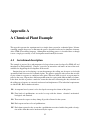
A A Chemical Plant Example
25
A.1 An informal description . . . . . . . . . . . . . . . . . . . . . . . . . . . . . . . . 25
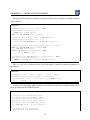
A.2 A VDM-SL model of the Alarm example . . . . . . . . . . . . . . . . . . . . . . 26
iii
Chapter 3
An Introduction to Overture Tool Support
for VDM-SL
Preamble
This is an introduction to the Overture Integrated Development Environment (IDE) and its facilities
for supporting modelling and analysis in VDM-SL. It may be used as a substitute for Chapter 3
of “Modelling Systems – Practical Tools and Techniques in Software Development”1 or as a freestanding guide. Additional material is available on the book’s web site www.vdmbook.com.
Throughout this guide we will refer to the textbook as “the book” and the book’s web site simply
as “the web site”.
We will use examples based on the alarm case study introduced in Chapter 2 of the book.
For readers using this as a free-standing guide, an informal explanation of the case study and its
VDM-SL model are given in Appendix A.
We will introduce the Overture tools during a “hands-on” tour of their functionality, providing
enough detail to allow you to use Overture for serious applications, including the exercises in the
book. However, this is by no means a complete guide to Overture2 ; more information can be
obtained from
www.overturetool.org.
3.1
Introduction
Models in VDM are formal in the sense that they have a precisely described semantics, making it
possible to analyse models in order to confirm or refute claims about them. Such an analysis often
1
John Fitzgerald and Peter Gorm Larsen. Modelling Systems – Practical Tools and Techniques in Software Development, Cambridge University Press, 2nd edition 2009.
2
Note that the Overture tool suite support three different VDM dialects; VDM-SL (Specification Language), VDM++
and VDM-RT (Real Time) so although this tutorial illustrate how to use Overture with VDM-SL models you will see
multiple references to these dialects.
1
Tutorial to Overture/VDM-RT
reveals gaps in the developer’s and the client’s understanding of the system, allowing these to be
resolved before an expensive commitment is made to program code. The process of analysing
claims about systems modelled in this way is termed validation and is discussed in greater depth
in Chapter 10 of the book.
Section 3.2 describes how to obtain the Overture tools. Section 3.3 introduces terminology
used by Eclipse-based tools like Overture. Section 3.4 describes the features that support the
construction and editing of VDM-SL models. Section 3.5 describes the testing and debugging
features and Section 3.6 describes how line coverage from using the debugger can be covered and
displayed. This is followed with Section 3.7 with an explanation about a combinatorial testing
feature available in Overture. Afterwards Section 3.8 describes the facilities for automatically
generating the checks (called proof obligations) that must be performed in order to ensure that a
VDM-SL model is consistent and meaningful. Finally, Section 3.9 shows how parts of Overture’s
functionality can be accessed through a command line interface, allowing batch-mode testing.
3.2
Getting Hold of the Software
Overture is an open source tool, developed by a community of volunteers and built on the Eclipse
platform. The project to develop the tools is managed using SourceForge. The best way to run
Overture is to download a special version of Eclipse with the Overture functionality already preinstalled. If you go to:
http://sourceforge.net/projects/overture
you can use the Download Now button to automatically download a pre-installed versions of Overture for your operating system. Supported systems are: Windows, Linux and Mac3 . Note that
when you have extracted all files from the zip file with the Overture executable for your selected
operating system you will find the first time you start it up it will ask you for selecting a workspace.
Here we simply recommend you to chose the default one it is selecting and tick off the box for “use
this as the default and do not ask again”. A welcome screen will also only the first time introduce
you to the overall mission of the Overture open source initiative.
A large library of sample VDM-SL models, including all those needed for the exercises in the
book, is available and can be downloaded from the URL4 :
http://overture.sourceforge.net/examples/ExamplesVDM_SL.zip
You can import the example library zip folder as described in Section 3.3. Finally, in order to make
use of the test coverage feature described in Section 3.6 it is necessary to have the text processing
system called LATEX and its pdflatex feature. This can for example be obtained from:
http://miktex.org/2.9/
3
It is planned to develop an update facility, allowing updates to be applied directly from within the generic Eclipse
platform without requiring a reinstallation. However, this can be a risky process because of the dependencies on
non-Overture components and so is not yet supported.
4
The library files are created to be used with Eclipse, but can be opened with file compression programs like Winrar
on Windows but it is not necessary to open it at all.
2
CHAPTER 3. AN INTRODUCTION TO OVERTURE TOOL SUPPORT FOR VDM-SL
Note for users of VDMTools R
Overture provides a new open source VDM tool set, but it can also work with VDMTools R .
VDMTools, originally developed IFAD A/S, is now maintained and developed by SCSK (see
http://www.vdmtools.jp/en/). From Overture it is also possible automatically to transfer
a project over to VDMTools.
3.3
Using the Overture Perspective
Eclipse is an open source platform based around a workbench that provides a common look and
feel to a large collection of extension products. Thus if a user is familiar with one Eclipse product,
it will generally be easy to start using a different product on the same workbench. The Eclipse
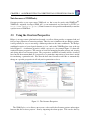
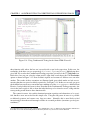
workbench consists of several panels known as views, such as the VDM Explorer view at the top
left of Figure 3.1. A collection of panels is called a perspective, for example Figure 3.1 shows the
standard Overture perspective. This consists of views for managing Overture projects and viewing
and editing files in an Overture project. The perspectives available in Overture will be described
later, but for the moment think of a perspective as a particular composition of views that is useful
for conducting a particular task. Note that the first time Overture would like to automatically
change to a specific perspective it will ask you for permission to do so.
Figure 3.1: The Overture Perspective
The VDM Explorer view allows you to create, select, and delete Overture projects and navigate
between the files in these projects. Start by importing the alarm project. This can be done by
3
Tutorial to Overture/VDM-RT
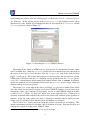
right-clicking the explorer view and selecting Import, followed by General → Existing Projects
into Workspace. In this way the projects from examplesSL.zip file mentioned above can be
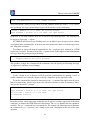
imported very easily. Initially it is recommended that you only import the AlarmErrSL and the
AlarmSL projects as shown in Figure 3.25 .
Figure 3.2: Importing the Alarm VDM-SL Projects
Depending on the dialect of VDM used in a given project, a corresponding Overture editor
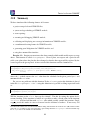
will be available here. When the AlarmSL project have been imported one can right click on
the project in the Explorer view and then select the Properties item in the menu and then
Figure 3.3 will pop up. This include the properties set for this project and here there are specific
VDM options. Note here that there is a language version option that for the AlarmSL project
set to vdm10 which indicates that it include non-standard features such as traces. In addition,
options are gathered here for additional checks where the AlarmSL project simply follow the
standard settings used for new projects.
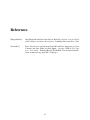
The Outline view, to the right of the editor (see Figure 3.4), presents an outline of the model
in the file selected in the editor. It displays any declared VDM-SL modules, as well as their state
components, values, types, functions and operations. In case of a flat VDM-SL model the module
is called DEFAULT. Figure 3.1 shows the outline view on the right hand side. Clicking on an
operation or function name will move the cursor in the editor to the definition of the operation or
function. At the top of the outline view there is a button to determine what is displayed in the
outline view (it is possible to hide different kinds of definitions, for example).
The Problems view displays messages about the projects on which you are working. This
includes information generated by Overture, such as warnings and errors. Note that all errors and
warnings also appear as tooltips in the VDM-SL editor.
5
You need both of these to carry out various exercises throughout this chapter.
4
CHAPTER 3. AN INTRODUCTION TO OVERTURE TOOL SUPPORT FOR VDM-SL
Figure 3.3: Properties for the AlarmSL Project
Figure 3.4: The Outline View connected to the Editor view
In the standard Overture perspective there is a VDM Quick Interpreter view in a pane in the
same area as the problems view. This can be used for evaluation of standard VDM expressions
independent of all VDM projects incorporated in your Overture IDE. This can be very convenient
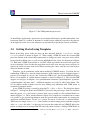
to gain understanding of the different VDM operators. In Figure 3.5 it is possible to see how a
couple of expressions (typed in at the box at the botton of the view) are evaluated6 . Note that in
order to get a console where you are able to make use of definitions you need to use the console
launch mode as described in Section 3.5.1 below.
Most of the other features of the workbench, such as the menus and toolbars, are similar to those
6
If errors appear in this evaluation the current version of the Overture IDE simply yield a Fatal error where it is
anticipated that later releases will provide more helpful run-time errors to the users.
5
Tutorial to Overture/VDM-RT
Figure 3.5: The VDM quick interpreter view
of other Eclipse applications, apart from a special menu with Overture-specific functionality. One
convenient feature is a toolbar of shortcuts to switch between different perspectives that appears
on the right side of the screen; the shortcuts vary dynamically depending on context and history.
3.4
Getting Started using Templates
Before proceeding, please make sure that you have imported both the AlarmErrSL and the
AlarmSL projects as shown in Figure 3.2. When editing a VDM-SL model, the Overture IDE
parses the content of the editor buffer continuously as changes are made. Any parse errors will be
reported in the problems view, as well as being highlighted in the editor. See the bottom of Figure
3.1. Each time a VDM-SL model file is saved the editor type-checks the model and reports any
errors or warnings. Note also that the suggestions made in the error messages may not always be
entirely the action you may wish to take when correcting the source since the tool cannot guess
what you intended to write.
Templates can be particularly useful when modifying VDM-SL models. If you hit the key
combination CTRL+space after the initial characters of the template needed, Overture triggers a
proposal. For example, if you type ”fun” followed by CTRL+space, the Overture IDE will propose
the use of an implicit or explicit function template as shown in Figure 3.6. The Overture IDE
supports several types of template: cases, quantifications, functions (explicit/implicit), operations
(explicit/implicit) and many more7 . Additional templates can easily be added in the future. The
use of templates makes it much easier for users lacking deep familiarity with VDM syntax to
nevertheless construct models.
A new VDM-SL project is created by choosing File → New → Project. The dialog box shown
in Figure 3.7 will appear. Ensure that VDM-SL is selected as the project type, click Next and then
name the project Test and if next is selected again it gets possible to select standard libraries as
shown in Figure 3.8. These standard libraries require users to make use of modules but in return
it is possible to get standard input/output, math and general utility functionality by selecting the
appropriate standard libraries. In this Test project we can try to select the IO standard library.
Afterwards one simply select Finish. Now you have an almost empty project (with the exception
of the IO.vdmsl file in the lib directory) and you can then either add new VDM-SL files to the
project or simply paste in existing VDM-SL source files from elsewhere. Adding a VDM-SL file to
7
It is possible to see and enhance the complete list of these by selecting Window → Preferences → VDM → Templates.
6
CHAPTER 3. AN INTRODUCTION TO OVERTURE TOOL SUPPORT FOR VDM-SL
Figure 3.6: Explicit function template
a project you can rightclick on the project and then select New → VDM-SL Module and then give a
meaningfull name (e.g. Test) to the module you would like to start defining and press Finish.
This will create a new file with a module with the selected name and with space for the different
kinds of definitions you can make inside such a VDM-SL module.
Exercise 3.1 Try to create a new Test VDM-SL project and update the test.vdmsl file
before exports all with:
imports from IO all
in order to make use of the IO standard library in the Test module. Inside IO there is for example
a definition of a function called print and that can for example be used in an operation as:
Try: nat ==> nat
Try(n) ==
(IO‘print(n);
return n + 1)
Insert this and later on when you have learned how to create a debug configuration you can try to
see what happens when Try is debugged. 2
7
Tutorial to Overture/VDM-RT
Figure 3.7: Creating a New VDM-SL Project
Figure 3.8: The VDM-SL Standard Libraries
3.5
Debugging
This section describes facilities for debugging a model by stepping through the evaluation of functions and operations. The alarm example is used. The following test file (testalarm.vdmsl)
can be found in the alarm project and it is provided in Appendix A.2.
By using the values defined in this test file, it is possible to exercise the system in order to
check whether, for this test, the correct expert is paged as a result of a given alarm.
3.5.1
The Debug configuration
Before the debugging can be initiated in Overture, a debug configuration must be created by rightclicking the project and choosing Debug As → Debug configuration.
8
CHAPTER 3. AN INTRODUCTION TO OVERTURE TOOL SUPPORT FOR VDM-SL
The debug configuration dialog have 3 different launch modes:
Entry Point: This is the standard Eclipse approach where one decides before debugging which
operation/function to call.
Remote Console: This is an advanced option that enables remote control of the interpreter and
this is described in the Overture user manual [Larsen&13].
Console: This will simply start up a console where the user interactive can debug different operations/functions defined in the selected project8 .
Here we will start with using the traditional Eclipse approach with an “Entry Point” launch
configuration which requires the project name, the class and the operation/function used as the
entry point of the test. When the AlarmSL project was imported you also automatically got a
basic launch configuration called AlarmSL. This one simply calls Run(e1) but you can change
it to call something else by chosing a different function from the Browse dialog. Figure 3.9 shows
the AlarmSL debug configuration for the alarm model. Note the three different debug options
here. Two of these are not explained further here but the one called Generate Coverage is
important for you to check in case you would like to collect test coverage information as explained
below in Section 3.6. The class and operation/function name can be chosen from a Browse dialog;
if the operation or function has arguments, these must be typed in manually between the brackets
of the entry point function/operation. If this is not typed such that the overall expression is type
correct an error will be shown at the top of the debug configuration window. This means that one
need to change the Operation line for example from:
NumberOfExperts((Period) peri, (Plant) plant)
to for example:
NumberOfExperts(p2, plant1)
Once the configuration is ready, the model can be debugged. If one have already set a breakpoint on one of the lines that will be executed, this will change the main perspective of the Overture
IDE to the Debug perspective. If no breakpoints are set the result is simply shown in the Debug
Console view in the lower part of the Overture perspective. Breakpoints can easily be set by double
clicking in left margin in the editor view. When the debugger reaches the location of a breakpoint,
evaluation suspends and the user can inspect the values of variables and step through the VDM-SL
model line by line. So for NumberOfExperts try to set such a breakpoint in line 349 and debug
again.
8
For VDMTools users this will be a familiar console corresponding to a VDM model that has been initialised in
VDMTools’ interpreter.
9
Line numbers can be added in the editor by right clicking in the left-hand-side margin of the editor view and selecting
Show Line Numbers.
9
Tutorial to Overture/VDM-RT
Figure 3.9: The debug configuration dialog
3.5.2
The Debug Perspective
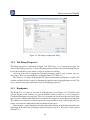
The Debug perspective is illustrated in Figure 3.10. The Debug view is located in the upper left
corner of the Debug perspective. It shows all running models and the call stacks belonging to them.
It also shows whether a given model is stopped, suspended or running.
At the top of the view are buttons for controlling debugging such as; stop, step into, step over
and resume. These are standard Eclipse debugging buttons (see Table 3.1).
The Variables view shows all the variables in a given context when a breakpoint is reached. The
variables and their displayed values are automatically updated when stepping through a model. The
view is located in the upper right hand corner in the Debug perspective.
3.5.3
Breakpoints
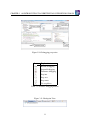
The Breakpoints view gives an overview of all breakpoints set (see Figure 3.11). From this view
you can navigate to the location of a given breakpoint, disable or delete it, or set its properties.
Conditional breakpoints are supported. These are a powerful tool for the developer since they allow
you to specify a condition that must be true in order for the debugger to stop at the given breakpoint.
The condition can either be a boolean expression using variables in scope at the breakpoint, or it
can be a hit count after which the breakpoint should become active.
You can make a simple breakpoint conditional by right clicking on the breakpoint mark in the
left margin of the editor and selecting the option Breakpoint properties. This opens a dialog shown
in Figure 3.12.
10
CHAPTER 3. AN INTRODUCTION TO OVERTURE TOOL SUPPORT FOR VDM-SL
Figure 3.10: Debugging perspective
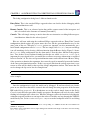
Button Explanation
Resume debugging
Suspend debugging
Terminate debugging
Step into
Step over
Step return
Use step filters
Table 3.1: Overture debugging buttons
Figure 3.11: Breakpoint View
11
Tutorial to Overture/VDM-RT
Figure 3.12: Conditional breakpoint options
The Expressions view allows you to enter watch expressions whose values are automatically
displayed and updated when stepping. “Watch expressions” can be added manually or created by
selecting create watch expression from the Variables view. It is possible to edit existing expressions. Like the Breakpoints view, this view is hidden in the upper right hand corner in Figure 3.10.
Exercise 3.2 Use the interpreter to evaluate the following expressions:
NumberOfExperts(p2,plant1)
NumberOfExperts(p3,plant1)
ExpertIsOnDuty(e1,plant1)
ExpertIsOnDuty(e2,plant1)
ExpertIsOnDuty(e3,plant1)
2
3.6
Test coverage
It is often useful to know how much of a model has been exercised by a set of tests10 . This gives
some insight into the thoroughness of a test suite and may also help to identify parts of the model
that have not been assessed, allowing new tests to be devised to cover these. When any evaluation
is performed on a VDM-SL model, the interpreter records the lines of the VDM-SL model that
10
Note that this feature is not yet supported for models using unicode characters such a Japanese identifiers.
12
CHAPTER 3. AN INTRODUCTION TO OVERTURE TOOL SUPPORT FOR VDM-SL
Figure 3.13: The generated pdf file with test coverage information
are executed. This permits the line coverage to be examined after a test to identify the parts of the
VDM-SL model that have not yet been exercised – coverage is cumulative, so a set of tests can be
executed and their total coverage examined at the end.
In our simple example, the different tests in the exercise above does cause the majority of the
VDM-SL model to be executed, but for demonstration purposes let us start by cleaning the model
(right click on the project and select Clean). If we simply take the AlarmSL debug launch
configuration the ExpertIsOnDuty function in alarm.vdmsl is called by the Run function.
Remember that whenever test coverage information is desired the Generate Coverage option
must be selected as shown in Figure 3.9. Once the debugger has completed and the result is written
out in the console it is possible to right click on the AlarmSL project and select the Latex
→ PdfLatex the coverage information that have been gathered in any expressions that have been
debugged since the last change to a file have been saved or the project have been cleaned will be
turned into a pdf file. The AlarmSL.pdf file is placed in the generated/latex directory as
shown in Figure 3.13 and it includes the VDM definitions from all the files included in the project
including coverage information. Note that whenever the model is adjusted or it is cleaned so it gets
type checked again all the files in the generated directory are deleted.
The coverage information is provided in a way where uncovered expressions are shown in red
in the generated pdf file. In addition after the content of each VDM-SL source file a table with
coverage overview is provided in tabular form. For the alarm.vdmsl file this looks like:
Function or operation Coverage Calls
ExpertIsOnDuty
100.0%
1
ExpertToPage
0.0%
0
NumberOfExperts
0.0%
0
QualificationOK
100.0%
12
13
Tutorial to Overture/VDM-RT
alarm.vdmsl
64.0%
13
where the ExpertIsOnDuty function is fully covered by just one call (due to the fact that its
body is simply one line) and here the QualificationOK function is called 12 times because it
is used inside the invariant of the Plant type11 .
3.7
Combinatorial Testing
The previous sections have shown how to test and debug models manually. However, Overture also
contains a feature enabling more automation in the testing process, making more comprehensive
high-volume testing feasible. It is possible to write regular expressions, as traces, that one would
like to expand into a large set of individual tests.
In order to illustrate how this can be used, we extend the testalarm.vdmsl file with a few
definitions illustrating the principles. However, the value of this feature is most significant when
we deal with operations that update state components because then test sequencing is important to
be able to detect more subtle errors. When new traces are incorporated in a VDM project you may
need to press the Refresh button ( ) in the CT Overview view.
In order to do the automation, Overture needs to know about the combinations of function calls
that you would like to have carried out, so it is necessary to write a kind of regular expression
called a trace in the VDM-10 version. VDM-SL has been extended such that traces can be written
directly as a part of a VDM-SL model. Here the definition looks like:
traces
Test1: let a in set alarms
in
let p in set ps
in
(NumberOfExperts(p,plant1);
pre_ExpertToPage(a,p,plant1);
let ex in set exs
in
post_ExpertToPage(a,p,plant1,ex))
Test2: let ex in set exs
in
ExpertIsOnDuty(ex,plant1)
The nested let-be statements in the trace called Test1 yield all possible combinations of their
variable bindings whereas manual debugging will just select a few combinations. The cardinality
of these sets determines the overall number of test cases, each being formed as a sequence of
11
Note that the coverage from the combinatorial testing feature described in Section 3.7 is not taken into account in the
current version of the Overture IDE, but this will be enabled in a later release.
14
CHAPTER 3. AN INTRODUCTION TO OVERTURE TOOL SUPPORT FOR VDM-SL
Figure 3.14: Using Combinatorial Testing for the Alarm VDM-SL model
three function calls, where the last one is nested inside a new let-be expression. In this case, the
cardinality of the three sets are respectively 4 (alarms), 5 (ps) and 8 (exs). Multiplying these
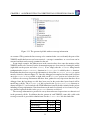
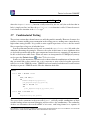
gives 160. If you select the Combinatorial Testing perspective you will see the CT Overview view.
Inside this view you can select the alarm project, right click it and choose the Full Evaluation
option as shown in Figure 3.15. Now Overture expands and executes all 160 test cases one after
another. The results of these executions are illustrated with green check marks and red crosses,
meaning that the tests passed or failed respectively. See Figure 3.14. In this case we only get green
check marks but you can try to extend the traces making use of the ChangeExpert function from
Exercise 3 and possibly find errors in that. Note that in the Combinatorial Testing perspective, the
view in the lower region is able to show the individual steps of a selected test case, along with the
corresponding results from its three function calls.
The syntax for traces also enables function/operation repetition and alternatives to be specified, but these were not needed for this simple case. Using the full power of traces it is possible
to efficiently generate and execute very large test suites. Naturally, this is most likely to find
inconsistencies when the model attempts to define its essential predicates (invariants, pre and postconditions)12 .
12
Note that when using repetitions and sequencing in combination it is easy to define traces that expands to hundreds of
thousands of test cases and naturally their execution may then be very slow if one executes them all.
15
Tutorial to Overture/VDM-RT
Figure 3.15: Invoking the combinatorial testing feature
3.8
Proof Obligations
Overture can also generate the Proof Obligations for a VDM-SL model. These are boolean expressions which highlight areas of the VDM-SL model where some constraint must be met in order
to guarantee internal consistency (i.e. no run-time errors will occur while debugging if these are
all satisfied). This includes type and class invariants or function or operation pre/post conditions.
Each proof obligation should evaluate to true. Understanding these in detail are explained further
in Chapter 10.
This feature is invoked by right clicking on the project in the Explorer view and then selecting
the Proof Obligations -> Generate Proof Obligations entry. This will start up a proof obligation
perspective with a special PO view. For the alarm example this view looks like in Figure 3.16. Here
Figure 3.16: The Proof Obligation view for the Alarm VDM-SL model
16
CHAPTER 3. AN INTRODUCTION TO OVERTURE TOOL SUPPORT FOR VDM-SL
the fifth proof obligation is related to the satisfiability of the ExpertToPage function which is
defined as follows:
ExpertToPage(a:Alarm,peri:Period,plant:Plant) r: Expert
pre peri in set dom plant.schedule and
a in set plant.alarms
post r in set plant.schedule(peri) and
a.quali in set r.quali;
Here the proof obligation records the constraint that, for all possible arguments satisfying the
pre-condition, the post-condition allows at least one possible valid result of the function. This is
described as a proof obligation as follows:
(forall a:Alarm, peri:Period, plant:Plant &
pre_ExpertToPage(a, peri, plant) =>
exists r:Expert & post_ExpertToPage(a, peri, plant, r))
In general, users check proof obligations by inspecting the VDM-SL model, though new Overture tools are being developed to check the majority of proof obligations automatically using formal
proof and related techniques. You can also note in Figure 3.16 that in the Proof Obligation Explorer view there is a status field and in there a few of the proof obligations have a checkmark.
This is used to indidate that these proof obligations are trivially satisfied. It is also possible to get
rid of such proof obligations in the list by pressing the Filter proved button at the top of the Proof
Obligation Explorer view.
3.9
A Command-Line Interface
So far only the graphical user interface of Overture has been presented but the core of Overture
also provides a simple command line interface. This is useful for the automatic batch execution
of tests, though the command line also provides a full set of interactive execution and debugging
commands which can be useful when examining batch tests.
Overture is written in Java, and so to run it from the command line, the Overture jar file13
should be executed with a Java JRE (version 7 or later):
java -jar Overture-2.0.0.jar
If the jar file is executed with no further options like this, it will print a list of available options
and exit. The most important option is the VDM dialect that the tool should use. In the case of
our alarm example, we want to use VDM-SL for which the option is -vdmsl. After this, we can
simply specify the names of the VDM-SL model files to load, or the name of a directory from
which to load all VDM-SL model files:
13
See the Overture documentation at sourceforge.net/projects/overture for the location of the jar file or
use the script or windows bat file incorporating this.
17
Tutorial to Overture/VDM-RT
java -jar Overture-2.0.0.jar -vdmsl AlarmSL
That will perform a syntax and type check of all the VDM-SL model files in the AlarmSL directory, producing any errors and warning messages on the console, before terminating:
Parsed 1 module in 0.11 secs. No syntax errors
Type checked 1 module in 0.093 secs. No type errors
In the case of our alarm example, there are no syntax or type checking errors. Any warnings can
be suppressed using the -w option.
If a VDM-SL model has no type checking errors, it can either be given an expression to evaluate
as an option on the command line, or the user can enter an interactive mode to evaluate expressions
and debug their execution.
To evaluate an expression from the command line, the -e option is used, followed by a VDM
expression to evaluate. You may also find the -q option useful, as this suppresses the informational
messages about the parsing and type checking:
java -jar Overture-2.0.0.jar -vdmsl -q -e
"ExpertIsOnDuty(e1, pl)" AlarmSL
This produces a single line of output for the evaluation, since the parsing and checking messages
are suppressed, and there are no warnings:
{mk_token("Monday day"), mk_token("Tuesday day")}
Clearly a batch of test evaluations could be performed automatically by running a series of
similar commands and saving the output results for comparison against expected results.
To run the command line interpreter interactively, the -i command line option must be given.
Instead of terminating after the type check, this will cause Overture to enter its interactive mode,
and give the interactive > prompt:
Parsed 1 module in 0.14 secs. No syntax errors
Type checked 1 module in 0.11 secs. No type errors
Initialized 1 module in 0.094 secs.
Interpreter started
>
From this prompt, various interactive commands can be given to evaluate expressions, debug their
evaluation, or examine the VDM-SL model environment. The help command lists the commands
available. The quit command leaves the interpreter. For example, the following session illustrates
the evaluation of a Run operation, and a debug session with a breakpoint at the start of the same
operation:
18
CHAPTER 3. AN INTRODUCTION TO OVERTURE TOOL SUPPORT FOR VDM-SL
> print Run(e1)
= {mk_token("Monday day"), mk_token("Tuesday day")}
Executed in 0.015 secs.
> break ExpertIsOnDuty
Created break [1] in ’DEFAULT’ (AlarmSL\alarm.vdmsl)
at line 39:6
39:{peri| peri in set dom sch & ex in set sch(peri)};
> print Run(e1)
Stopped break [1] in ’DEFAULT’ (AlarmSL\alarm.vdmsl)
at line 39:6
39:{peri| peri in set dom sch & ex in set sch(peri)};
[MainThread-9]> print sch
sch = {mk_token("Tuesday night") |->
{mk_Expert(mk_token(174), {<Elec>, <Chem>,
<Bio>, <Mech>})},
mk_token("Monday day") |->
{mk_Expert(mk_token(181), {<Elec>, <Mech>}),
mk_Expert(mk_token(169), {<Chem>, <Bio>}),
mk_Expert(mk_token(134), {<Elec>})},
mk_token("Monday night") |->
{mk_Expert(mk_token(174), {<Elec>, <Chem>,
<Bio>, <Mech>})},
mk_token("Tuesday day") |->
{mk_Expert(mk_token(134), {<Elec>}),
mk_Expert(mk_token(154), {<Bio>, <Chem>, <Elec>}),
mk_Expert(mk_token(190), {<Mech>, <Bio>})}}
[MainThread-9]> continue
= {mk_token("Monday day"), mk_token("Tuesday day")}
Executed in 18.281 secs.
>
Notice that the print command is available at the breakpoint to examine the runtime state of
the system. In the example, we print out the value of the sch variable. The help command
is context sensitive, and will list the extra debugging commands available at a breakpoint, such
as continue, step, stack, list and so on. The full set of commands is described in the
Overture User Guide14 .
14
Supplied with the Overture documentation.
19
Tutorial to Overture/VDM-RT
3.10
Summary
We have introduced the following features of Overture:
• project setup of selected VDM-SL files;
• syntax and type checking of VDM-SL models;
• error reporting;
• executing and debugging VDM-SL models;
• collecting and displaying test coverage information on VDM-SL models;
• a combinatorial testing feature for VDM-SL models;
• generating proof obligations for VDM-SL models; and
• using the command-line interface.
Exercise 3.3? Imagine an extension to the alarm example which would enable experts to swap
duties. This function is called ChangeExpert. Given a plant, two experts and a period it will
yield a new plant where the plan has been changed so that the first expert will be replaced by the
second expert in the given period. A first version of this function could be formulated as
ChangeExpert: Plant * Expert * Expert * Period -> Plant
ChangeExpert(mk_Plant(plan,alarms),ex1,ex2,peri) ==
mk_Plant(plan ++ {peri |-> plan(peri)\{ex1} union {ex2}},
alarms)
where the \ symbol removes the ex1 value from the schedule for the given period peri and
union adds the ex2 value.
Do you see any problems with this function? In the AlarmSL project this definition is placed
in the file changeexpert.vdmsl. using this definition it is possible to debug expressions such
as:
ChangeExpert(plant1,e4,e7,p3)
ChangeExpert(plant1,e3,e7,p3)
Will the invariant on the Plant data type be violated? Test this by setting the option for invariant checking. If the invariant is broken it is possible to make a break point for the invariant
inv Plant itself and call that with a Plant value which possibly satisfies the invariant. Single
stepping inside this makes it easier to discover how the invariant is broken15 . If necessary, add
15
Note that in the current version of the Overture IDE violating such invariants an execution error (206) with error 4079
will occur so to see what is going on it is advisable to put a breakpoint in the ChangeExpert function and then step
into it, so you can see the evaluation of the invariant.
20
CHAPTER 3. AN INTRODUCTION TO OVERTURE TOOL SUPPORT FOR VDM-SL
the pre-condition needed to complete the function. Try to generate the proof obligations for the
changeexpert.vdmsl file and see if you can find the proof obligation ensuring that the invariant cannot be broken. 2
21
Tutorial to Overture/VDM-RT
22
References
[Fitzgerald&98]
John Fitzgerald and Peter Gorm Larsen. Modelling Systems – Practical Tools
and Techniques in Software Development. Cambridge University Press, 1998.
[Larsen&13]
Peter Gorm Larsen and Kenneth Lausdahl and Peter Jørgensen and Joey
Coleman and Sune Wolff and Nick Battle. Overture VDM-10 Tool Support: User Guide. Technical Report TR-2010-02, The Overture Initiative,
www.overturetool.org, April 2013. 130 pages.
23
Tutorial to Overture/VDM-RT
24
Appendix A
A Chemical Plant Example
This appendix presents the requirements for a simple alarm system for a chemical plant. It forms
a running example that serves to illustrate the process described earlier and to introduce elements
of the VDM-SL modelling language. Although the modelling process is described here as though
it were a single-pass activity, a real development would usually be iterative.
A.1
An informal description
The example is inspired by a subcomponent of a large alarm system developed by IFAD A/S and
introduced in [Fitzgerald&98]. Chapter 3 provides an interactive and hands-on tour of the tools
available for supporting the development of the model.
Imagine that you are developing a system that manages the calling out of experts to deal with
operational faults discovered in a chemical plant. The plant is equipped with sensors that are able
to raise alarms in response to conditions in the plant. When an alarm is raised, an expert must be
called to the scene. Experts have different qualifications for coping with different kinds of alarms.
It has been decided to produce a model to ensure that the rules concerning the duty schedule and
the calling out of experts are correctly understood and implemented. The individual requirements
are labelled R1, R8 for further reference:
R1. A computer-based system is to be developed to manage the alarms of this plant.
R2. Four kinds of qualifications are needed to cope with the alarms: electrical, mechanical,
biological, and chemical.
R3. There must be experts on duty during all periods allocated in the system.
R4. Each expert can have a list of qualifications.
R5. Each alarm reported to the system has a qualification associated with it along with a description of the alarm that can be understood by the expert.
25
Tutorial to Overture/VDM-RT
R6. Whenever an alarm is received by the system an expert with the right qualification should be
found so that he or she can be paged.
R7. The experts should be able to use the system database to check when they will be on duty.
R8. It must be possible to assess the number of experts on duty.
In the next section the development of a model of an alarm system to meet these requirements
is initiated. The purpose of the model is to clarify the rules governing the duty roster and calling
out of experts to deal with alarms.
A.2
A VDM-SL model of the Alarm example
This section presents the full VDM-SL model of the alarm example. However, it does so without
any explanatory text. That is placed in the VDM-SL book so if you are a newcommer to VDM-SL
please read that there.
types
Plant :: schedule : Schedule
alarms
: set of Alarm
inv mk_Plant(schedule,alarms) ==
forall a in set alarms &
forall peri in set dom schedule &
QualificationOK(schedule(peri),a.quali);
Schedule = map
inv sch ==
forall exs in
exs <>
forall
Period to set of Expert
set rng sch &
{} and
ex1, ex2 in set exs &
ex1 <> ex2 => ex1.expertid <> ex2.expertid;
Period = token;
Expert :: expertid : ExpertId
quali
: set of Qualification
inv ex == ex.quali <> {};
ExpertId = token;
Qualification = <Elec> | <Mech> | <Bio> | <Chem>;
Alarm :: alarmtext : seq of char
quali
: Qualification
26
APPENDIX A. A CHEMICAL PLANT EXAMPLE
The functionality from the requirements presented above can be defined in a number of functions as follows.
functions
NumberOfExperts: Period * Plant -> nat
NumberOfExperts(peri,plant) ==
card plant.schedule(peri)
pre peri in set dom plant.schedule;
ExpertIsOnDuty: Expert * Plant -> set of Period
ExpertIsOnDuty(ex,mk_Plant(sch,-)) ==
{peri| peri in set dom sch & ex in set sch(peri)};
ExpertToPage(a:Alarm,peri:Period,plant:Plant) r: Expert
pre peri in set dom plant.schedule and
a in set plant.alarms
post r in set plant.schedule(peri) and
a.quali in set r.quali;
QualificationOK: set of Expert * Qualification -> bool
QualificationOK(exs,reqquali) ==
exists ex in set exs & reqquali in set ex.quali
The ChangeExpert function below is not correct but it is used for exercise/test purposes in
this tutorial.
functions
ChangeExpert: Plant * Expert * Expert * Period -> Plant
ChangeExpert(mk_Plant(plan,alarms),ex1,ex2,peri) ==
mk_Plant(plan ++ {peri |-> plan(peri)\{ex1} union {ex2}},
alarms)
In order to test the model different values can be defined. Such value definitions make use of
the types defined in the VDM-SL model.
values
p1:Period =
p2:Period =
p3:Period =
p4:Period =
p5:Period =
ps : set of
mk_token("Monday day");
mk_token("Monday night");
mk_token("Tuesday day");
mk_token("Tuesday night");
mk_token("Wednesday day");
Period = {p1,p2,p3,p4,p5};
eid1:ExpertId = mk_token(134);
eid2:ExpertId = mk_token(145);
27
Tutorial to Overture/VDM-RT
eid3:ExpertId
eid4:ExpertId
eid5:ExpertId
eid6:ExpertId
eid7:ExpertId
eid8:ExpertId
e1:Expert
e2:Expert
e3:Expert
e4:Expert
e5:Expert
e6:Expert
e7:Expert
e8:Expert
exs : set
=
=
=
=
=
=
mk_token(154);
mk_token(165);
mk_token(169);
mk_token(174);
mk_token(181);
mk_token(190);
= mk_Expert(eid1,{<Elec>});
= mk_Expert(eid2,{<Mech>,<Chem>});
= mk_Expert(eid3,{<Bio>,<Chem>,<Elec>});
= mk_Expert(eid4,{<Bio>});
= mk_Expert(eid5,{<Chem>,<Bio>});
= mk_Expert(eid6,{<Elec>,<Chem>,<Bio>,<Mech>});
= mk_Expert(eid7,{<Elec>,<Mech>});
= mk_Expert(eid8,{<Mech>,<Bio>});
of Expert = {e1,e2,e3,e4,e5,e6,e7,e8};
s: map Period to set of Expert
= {p1 |-> {e7,e5,e1},
p2 |-> {e6},
p3 |-> {e1,e3,e8},
p4 |-> {e6}};
a1:Alarm = mk_Alarm("Power supply missing",<Elec>);
a2:Alarm = mk_Alarm("Tank overflow",<Mech>);
a3:Alarm = mk_Alarm("CO2 detected",<Chem>);
a4:Alarm = mk_Alarm("Biological attack",<Bio>);
alarms: set of Alarm = {a1,a2,a3,a4};
plant1: Plant = mk_Plant(s,{a1,a2,a3,a4})
A basic explicit operation for test purposes can be defined as below.
operations
Run: Expert ==> set of Period
Run(e) == return ExpertIsOnDuty(e, plant1);
In the new VDM-10 variant of VDM-SL traces have been incorporated since they can be
used with tool support for combinatorial testing purposes.
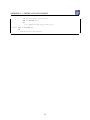
traces
Test1: let a in set alarms
in
let p in set ps
in
(NumberOfExperts(p,plant1);
28
APPENDIX A. A CHEMICAL PLANT EXAMPLE
pre_ExpertToPage(a,p,plant1);
let ex in set exs
in
post_ExpertToPage(a,p,plant1,ex))
Test2: let ex in set exs
in
ExpertIsOnDuty(ex,plant1)
29