1
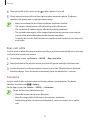
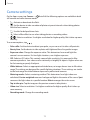
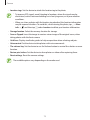
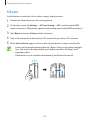
SM-A500F
SM-A500FQ
SM-A500G
SM-A500H
SM-A500HQ
SM-A500F/DS
SM-A500FU
SM-A500G/DS
SM-A500H/DS
SM-A500Y
User Manual
English. 05/2015. Rev.1.0
www.samsung.com
Table of Contents
Read me first
Network connectivity
Getting started
38 Mobile data
38Wi-Fi
39 Tethering and Mobile hotspot
7 Package contents
8 Device layout
10 Using the SIM or USIM card and
battery
18 Using a memory card
21 Turning the device on and off
21 Locking and unlocking the screen
Motions & usability features
41 Motions and gestures
44 Multi window
47 One-handed operation
Personalising
Basics
22
25
29
31
31
33
35
35
36
37
48
50
51
52
53
54
Managing the Home and Apps screens
Setting wallpaper and ringtones
Changing the screen lock method
Private mode
Easy mode
Transferring data from your previous
device
55 Setting up accounts
Using the touch screen
Home screen layout
Notifications and quick setting panels
Opening apps
Installing or uninstalling apps
Entering text
Screen capture
My Files
Power saving feature
Viewing help information
Phone
56 Making calls
58 Receiving calls
59 Options during calls
2
Table of Contents
Contacts
81Internet
82Music
84Video
86Studio
87Clock
89Calculator
89Memo
90 Voice Recorder
91Dropbox
92Flipboard
92Radio
94 Google apps
61 Adding contacts
61 Importing and exporting contacts
62 Searching for contacts
Messages & email
63Messages
65Email
Camera
67 Basic shooting
69 Shooting modes
72 Camera settings
Connecting with other
devices
96Bluetooth
98 Wi-Fi Direct
100NFC (NFC-enabled models)
102 S Beam
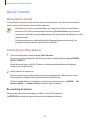
103 Quick Connect
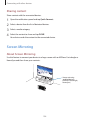
104 Screen Mirroring
106 Mobile printing
Gallery
74 Viewing content on the device
75 Viewing content stored on other
devices
Safety assistance
76 Emergency mode
77 Help message
Device & data manager
107 Upgrading the device
108 Transferring files between the device
and a computer
109 Backing up and restoring data
109 Performing a data reset
Useful apps and features
78 S Finder
78 S Planner
80 S Voice
3
Table of Contents
Settings
110 About Settings
110 Quick settings
110Connections
115Device
119Personalisation
122System
127Applications
Appendix
128Troubleshooting
133 Removing the battery (non-removable
type)
4
Read me first
Please read this manual before using the device to ensure safe and proper use.
• Descriptions are based on the device’s default settings.
• Some content may differ from your device depending on the region, service provider,
model specifications, or device’s software.
• Content (high quality content) that requires high CPU and RAM usage will affect the
overall performance of the device. Apps related to the content may not work properly
depending on the device’s specifications and the environment that it is used in.
• Samsung is not liable for performance issues caused by apps supplied by providers other
than Samsung.
• Samsung is not liable for performance issues or incompatibilities caused by edited
registry settings or modified operating system software. Attempting to customise the
operating system may cause the device or apps to work improperly.
• Software, sound sources, wallpapers, images, and other media provided with this device
are licensed for limited use. Extracting and using these materials for commercial or other
purposes is an infringement of copyright laws. Users are entirely responsible for illegal
use of media.
• You may incur additional charges for data services, such as messaging, uploading and
downloading, auto-syncing, or using location services depending on your data plan. For
large data transfers, it is recommended to use the Wi-Fi feature.
• Default apps that come with the device are subject to updates and may no longer be
supported without prior notice. If you have questions about an app provided with
the device, contact a Samsung Service Centre. For user-installed apps, contact service
providers.
• Modifying the device’s operating system or installing softwares from unofficial sources
may result in device malfunctions and data corruption or loss. These actions are violations
of your Samsung licence agreement and will void your warranty.
• Depending on the region or model, some devices are required to receive approval from
the Federal Communications Commission (FCC). If your device is approved by the FCC,
you can view the FCC ID of the device. To view the FCC ID, tap Apps → Settings →
About device.
5
Read me first
Instructional icons
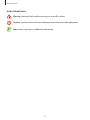
Warning: situations that could cause injury to yourself or others
Caution: situations that could cause damage to your device or other equipment
Note: notes, usage tips, or additional information
6
Getting started
Package contents
Check the product box for the following items:
• Device
• Quick start guide
• The items supplied with the device and any available accessories may vary
depending on the region or service provider.
• The supplied items are designed only for this device and may not be compatible
with other devices.
• Appearances and specifications are subject to change without prior notice.
• You can purchase additional accessories from your local Samsung retailer. Make
sure they are compatible with the device before purchase.
• Use only Samsung-approved accessories. Using unapproved accessories may cause
the performance problems and malfunctions that are not covered by the warranty.
• Availability of all accessories is subject to change depending entirely on
manufacturing companies. For more information about available accessories, refer
to the Samsung website.
7
Getting started
Device layout
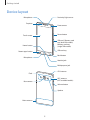
Proximity/Light sensor
Microphone
Earpiece
Front camera
Power button
Touch screen
SIM card / Memory card
tray (dual SIM models)
Memory card tray
(single SIM models)
Home button
SIM card tray
Recent apps button
Back button
Microphone
Headset jack
Multipurpose jack
GPS antenna
Flash
NFC antenna
(NFC-enabled models)
Rear camera
Volume button
Speaker
Main antenna
8
Getting started
• Do not cover the antenna area with your hands or other objects. This may cause
connectivity problems or drain the battery.
• Using a Samsung-approved screen protector is recommended. Unapproved screen
protectors may cause the sensors to malfunction.
• Do not allow water to contact the touch screen. The touch screen may malfunction
in humid conditions or when exposed to water.
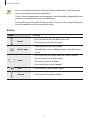
Buttons
Button
Function
Power
• Press and hold to turn the device on or off.
• Press to turn on or lock the screen.
• Tap to open the list of recent apps.
Recent apps
Home
• Tap and hold to access additional options for the current
screen.
• Press to turn on the screen while the screen is locked.
• Press to return to the Home screen.
• Press twice to launch S Voice.
• Press and hold to launch Google.
Back
• Tap to return to the previous screen.
Volume
• Press to adjust the device volume.
9
Getting started
Using the SIM or USIM card and battery
Installing the SIM or USIM card
Insert the SIM or USIM card provided by the mobile telephone service provider.
• Only nano-SIM cards work with the device.
• Some LTE services may not be available depending on the service provider. For
more information about service availability, contact your service provider.
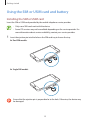
1 Insert the ejection pin into the hole on the SIM card tray to loosen the tray.
► Dual SIM models:
► Single SIM models:
Ensure that the ejection pin is perpendicular to the hole. Otherwise, the device may
be damaged.
10
Getting started
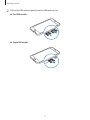
2 Pull out the SIM card tray gently from the SIM card tray slot.
► Dual SIM models:
► Single SIM models:
11
Getting started
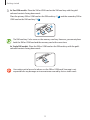
3 ► Dual SIM models: Place the SIM or USIM card on the SIM card tray with the goldcoloured contacts facing downwards.
Place the primary SIM or USIM card on the SIM card tray 1 ( 1 ) and the secondary SIM or
USIM card on the SIM card tray 2 ( 2 ).
2
1
The SIM card tray 2 also serves as the memory card tray. However, you cannot place
both the SIM or USIM card and the memory card at the same time.
► Single SIM models: Place the SIM or USIM card on the SIM card tray with the goldcoloured contacts facing downwards.
Use caution not to lose or let others use the SIM or USIM card. Samsung is not
responsible for any damages or inconveniences caused by lost or stolen cards.
12
Getting started
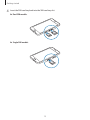
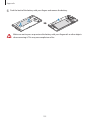
4 Insert the SIM card tray back into the SIM card tray slot.
► Dual SIM models:
► Single SIM models:
13
Getting started
Removing the SIM or USIM card
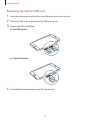
1 Insert the ejection pin into the hole on the SIM card tray to loosen the tray.
2 Pull out the SIM card tray gently from the SIM card tray slot.
3 Remove the SIM or USIM card.
► Dual SIM models:
► Single SIM models:
4 Insert the SIM card tray back into the SIM card tray slot.
14
Getting started
Using dual SIM or USIM cards (dual SIM models)
If you insert two SIM or USIM cards, you can have two phone numbers or service providers for
a single device.
Activating SIM or USIM cards
On the Home screen, tap Apps → Settings → SIM card manager. Tap one or both of the
switches for the SIM or USIM cards to activate them.
Changing the display name and icon of SIM or USIM cards
On the Home screen, tap Apps → Settings → SIM card manager. Select a SIM or USIM card
and tap Register name or Select icon. Set a display name and icon for each card.
Switching between cards
When two SIM or USIM cards are activated, card selection icons appear on the dashboard of
the notifications panel. Open the notifications panel and then select a card.
15
Getting started
Charging the battery
Use the charger to charge the battery before using it for the first time. A computer can be also
used to charge the battery by connecting them via the USB cable.
Use only Samsung-approved chargers, batteries, and cables. Unapproved chargers or
cables can cause the battery to explode or damage the device.
• When the battery power is low, the battery icon appears empty.
• If the battery is completely discharged, the device cannot be turned on
immediately when the charger is connected. Allow a depleted battery to charge for
a few minutes before turning on the device.
• If you use multiple apps at once, network apps, or apps that need a connection
to another device, the battery will drain quickly. To avoid disconnecting from the
network or losing power during a data transfer, always use these apps after fully
charging the battery.
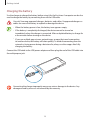
Connect the USB cable to the USB power adaptor and then plug the end of the USB cable into
the multipurpose jack.
Connecting the charger improperly may cause serious damage to the device. Any
damage caused by misuse is not covered by the warranty.
16
Getting started
• The device can be used while it is charging, but it may take longer to fully charge
the battery.
• If the device receives an unstable power supply while charging, the touch screen
may not function. If this happens, unplug the charger from the device.
• While charging, the device may heat up. This is normal and should not affect the
device’s lifespan or performance. If the battery gets hotter than usual, the charger
may stop charging.
• If the device is not charging properly, take the device and the charger to a
Samsung Service Centre.
After fully charging, disconnect the device from the charger. First unplug the charger from the
device, and then unplug it from the electric socket.
To save energy, unplug the charger when not in use. The charger does not have a
power switch, so you must unplug the charger from the electric socket when not in
use to avoid wasting power. The charger should remain close to the electric socket
and easily accessible while charging.
Reducing the battery consumption
Your device provides options that help you save the battery power. By customising these
options and deactivating features in the background, you can use the device longer between
charges:
• When you are not using the device, switch to sleep mode by pressing the Power button.
• Close unnecessary apps using the task manager.
• Deactivate the Bluetooth feature.
• Deactivate the Wi-Fi feature.
• Deactivate auto-syncing of apps.
• Decrease the backlight time.
• Decrease the screen brightness.
17
Getting started
Using a memory card
Installing a memory card
Your device accepts memory cards with maximum capacities of 64 GB. Depending on the
memory card manufacturer and type, some memory cards may not be compatible with your
device.
• Some memory cards may not be fully compatible with the device. Using an
incompatible card may damage the device or the memory card, or corrupt the data
stored in it.
• Use caution to insert the memory card right-side up.
• The device supports the FAT and the exFAT file systems for memory cards. When
inserting a card formatted in a different file system, the device asks to reformat the
memory card.
• Frequent writing and erasing of data shortens the lifespan of memory cards.
• When inserting a memory card into the device, the memory card’s file directory
appears in the My Files → SD card folder.
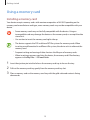
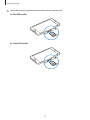
1 Insert the ejection pin into the hole on the memory card tray to loosen the tray.
2 Pull out the memory card tray gently from the memory card tray slot.
3 Place a memory card on the memory card tray with the gold-coloured contacts facing
downwards.
18
Getting started
4 Insert the memory card tray back into the memory card tray slot.
► Dual SIM models:
► Single SIM models:
19
Getting started
Removing the memory card
Before removing the memory card, first unmount it for safe removal. On the Home screen, tap
Apps → Settings → Storage → Unmount SD card.
1 Insert the ejection pin into the hole on the memory card tray to loosen the tray.
2 Pull out the memory card tray gently from the memory card tray slot.
3 Remove the memory card.
4 Insert the memory card tray back into the memory card tray slot.
Do not remove the memory card while the device is transferring or accessing
information. Doing so can cause data to be lost or corrupted or can damage the
memory card or device. Samsung is not responsible for losses that result from the
misuse of damaged memory cards, including the loss of data.
Formatting the memory card
A memory card formatted on a computer may not be compatible with the device. Format the
memory card on the device.
On the Home screen, tap Apps → Settings → Storage → Format SD card → FORMAT SD
CARD → ERASE EVERYTHING.
Before formatting the memory card, remember to make backup copies of all
important data stored in the device. The manufacturer’s warranty does not cover loss
of data resulting from user actions.
20
Getting started
Turning the device on and off
Press and hold the Power button for a few seconds to turn on the device.
When you turn on your device for the first time or after performing a data reset, follow the onscreen instructions to set up your device.
To turn off the device, press and hold the Power button, and then tap Power off.
Follow all posted warnings and directions from authorised personnel in areas where
the use of wireless devices is restricted, such as aeroplanes and hospitals.
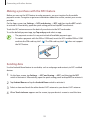
Locking and unlocking the screen
Pressing the Power button turns off the screen and locks it. Also, the screen turns off and
automatically locks if the device is not used for a specified period.
To unlock the screen, press the Power button or the Home button and flick your finger in any
direction within the unlock screen area.
You can change the unlock code to unlock the screen. Refer to Changing the screen lock
method for more information.
21
Basics
Using the touch screen
• Do not allow the touch screen to come into contact with other electrical devices.
Electrostatic discharges can cause the touch screen to malfunction.
• To avoid damaging the touch screen, do not tap it with anything sharp or apply
excessive pressure to it with your fingertips.
• The device may not recognise touch inputs close to the edges of the screen, which
are outside of the touch input area.
• Leaving the touch screen idle for extended periods may result in afterimages
(screen burn-in) or ghosting. Turn off the touch screen when you do not use the
device.
• It is recommended to use fingers when you use the touch screen.
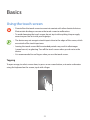
Tapping
To open an app, to select a menu item, to press an on-screen button, or to enter a character
using the keyboard on the screen, tap it with a finger.
22
Basics
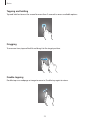
Tapping and holding
Tap and hold an item or the screen for more than 2 seconds to access available options.
Dragging
To move an item, tap and hold it and drag it to the target position.
Double-tapping
Double-tap on a webpage or image to zoom in. Double-tap again to return.
23
Basics
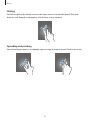
Flicking
Flick left or right on the Home screen or the Apps screen to see another panel. Flick up or
down to scroll through a webpage or a list of items, such as contacts.
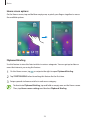
Spreading and pinching
Spread two fingers apart on a webpage, map, or image to zoom in a part. Pinch to zoom out.
24
Basics
Home screen layout
Home screen
The Home screen is the starting point for accessing all of the device’s features. It displays
widgets, shortcuts to apps, and more. Widgets are small apps that launch specific app
functions to provide information and convenient access on your Home screen.
To view other panels, scroll left or right, or tap one of the screen indicators at the bottom of
the screen. To customise the Home screen, refer to Managing the Home screen.
A widget
A folder
An app
Screen indicators
Favourite apps
25
Basics
Home screen options
On the Home screen, tap and hold an empty area, or pinch your fingers together to access
the available options.
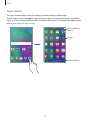
Flipboard Briefing
Use this feature to view the latest articles in various categories. You can get up to date on
news that interests you using this feature.
1 On the Home screen, tap or swipe to the right to open Flipboard Briefing.
2 Tap START READING when launching this feature for the first time.
3 Swipe upwards to browse articles in each news category.
To deactivate Flipboard Briefing, tap and hold an empty area on the Home screen.
Then, tap Home screen settings and deselect Flipboard Briefing.
26
Basics
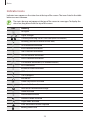
Apps screen
The Apps screen displays icons for all apps, including newly installed apps.
On the Home screen, tap Apps to open the Apps screen. To view other panels, scroll left or
right, or select a screen indicator at the bottom of the screen. To customise the Apps screen,
refer to Managing the Apps screen.
Access additional
options.
An app
Screen indicators
27
Basics
Indicator icons
Indicator icons appear on the status bar at the top of the screen. The icons listed in the table
below are most common.
The status bar may not appear at the top of the screen in some apps. To display the
status bar, drag down from the top of the screen.
Icon
Meaning
No signal
/
Signal strength
/
Currently accessing SIM or USIM card (dual SIM models)
Roaming (outside of normal service area)
GPRS network connected
EDGE network connected
UMTS network connected
HSDPA network connected
HSPA+ network connected
/
LTE network connected (LTE-enabled models)
Wi-Fi connected
Bluetooth feature activated
GPS activated
Call in progress
Missed call
Smart stay feature activated
Synced with the web
New text or multimedia message
Alarm activated
Mute mode activated
Vibration mode activated
Flight mode activated
Error occurred or caution required
Battery power level
28
Basics
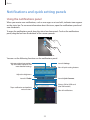
Notifications and quick setting panels
Using the notifications panel
When you receive new notifications, such as messages or missed calls, indicator icons appear
on the status bar. To see more information about the icons, open the notifications panel and
view the details.
To open the notifications panel, drag the status bar downwards. To close the notifications
panel, drag the bar from the bottom of the screen upwards.
You can use the following functions on the notifications panel.
Launch Settings.
Activate or deactivate options.
Tap and hold a button to view
more detailed settings.
View all quick setting buttons.
Adjust the brightness.
Launch S Finder.
Launch Quick Connect.
Select a SIM or USIM card.
(dual SIM models)
Tap a notification and perform
various actions.
Clear all notifications.
29
Basics
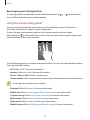
Rearranging quick setting buttons
To rearrange quick setting buttons on the notifications panel, tap
item, and then drag the item to another location.
→
, tap and hold an
Using the quick setting panel
You can activate or deactivate some features on the notifications panel. To activate or
deactivate more features, open the quick setting panel.
To open the quick setting panel, drag the status bar downwards with two fingers.
Alternatively, tap on the notifications panel. To close the quick setting panel, drag the bar
from the bottom of the screen upwards.
Tap the following options to activate or deactivate them. You can view more detailed settings
if you tap and hold a button.
• Wi-Fi: Refer to Wi-Fi for more information.
• Location: Refer to Location for more information.
• Sound / Vibrate / Mute: Select a sound mode.
• Screen rotation: Allow or prevent the interface from rotating when you rotate the device.
Some apps do not allow screen rotation.
• Bluetooth: Refer to Bluetooth for more information.
• Mobile data: Refer to Data usage or Mobile networks for more information.
• U. power saving: Refer to Ultra power saving mode for more information.
• Multi window: Refer to Multi window for more information.
• Flight mode: Refer to Flight mode for more information.
• Mobile hotspot: Refer to Tethering and Mobile hotspot for more information.
30
Basics
• Screen Mirroring: Refer to Screen Mirroring for more information.
• NFC (NFC-enabled models): Refer to NFC (NFC-enabled models) for more information.
• Sync: When you activate this feature, the device automatically syncs apps, such as
calendar or email.
• Smart stay: When you activate this feature, the screen stays on as long as you look at it.
• Power saving: Refer to Power saving feature for more information.
• Private mode: Refer to Private mode for more information.
Opening apps
On the Home screen or the Apps screen, select an app icon to open it.
To open the list of recently-used apps, tap
and select an app icon to open.
Closing an app
→ , and then tap END next to an app to close it. To close all running apps, tap END
Tap
→ .
ALL. Alternatively, tap
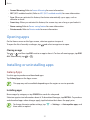
Installing or uninstalling apps
Galaxy Apps
Use this app to purchase and download apps.
Tap Galaxy Apps on the Apps screen.
This app may not be available depending on the region or service provider.
Installing apps
Browse apps by category or tap SEARCH to search for a keyword.
Select an app to view information about it. To download free apps, tap INSTALL. To purchase
and download apps where charges apply, tap the button that shows the app’s price.
To change the auto update settings, tap
then select an option.
31
→ Settings → Auto update apps, and
Basics
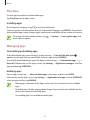
Play Store
Use this app to purchase and download apps.
Tap Play Store on the Apps screen.
Installing apps
Browse apps by category or tap
to search for a keyword.
Select an app to view information about it. To download free apps, tap INSTALL. To purchase
and download apps where charges apply, tap the price and follow the on-screen instructions.
To change the auto update settings, tap
then select an option.
→ Settings → Auto-update apps, and
Managing apps
Uninstalling or disabling apps
To disable default apps, open the Apps screen and tap → Uninstall/disable apps.
appears on the apps that you can disable. Select an app and tap DISABLE.
To uninstall downloaded apps, open the Apps screen and tap → Downloaded apps → →
Uninstall. Alternatively, on the Apps screen, tap Settings → Application manager, select an
app, and then tap UNINSTALL.
Enabling apps
On the Apps screen, tap → Show disabled apps, select apps, and then tap DONE.
Alternatively, on the Apps screen, tap Settings → Application manager, scroll to DISABLED,
select an app, and then tap ENABLE.
• Hiding apps: Hide apps in the Apps screen only. You can continue to use hidden
apps.
• Disabling apps: Disable selected default apps that cannot be uninstalled from the
device. You cannot use disabled apps.
• Uninstalling apps: Uninstall downloaded apps.
32
Basics
Entering text
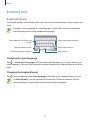
Keyboard layout
A keyboard appears automatically when you enter text to send messages, create memos, and
more.
Text entry is not supported in some languages. To enter text, you must change the
input language to one of the supported languages.
Enter uppercase. For all caps, tap
it twice.
Delete a preceding character.
Enter punctuation marks.
Break to the next line.
Change the keyboard settings.
Enter a space.
Changing the input language
Tap → Select input languages, and then select the languages to use. If you select two or
more languages, you can switch between the input languages by sliding the space key left or
right.
Changing the keyboard layout
Tap
, select a language under Input languages, and then select a keyboard layout to use.
On 3x4 keyboard, a key has three or four characters. To enter a character, tap the
corresponding key repeatedly until the desired character appears.
33
Basics
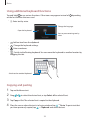
Using additional keyboard functions
Tap and hold to use various functions. Other icons may appear instead of
on the last function that was used.
depending
• : Enter text by voice.
Change the language.
Open the keyboard.
Start or pause entering text by
voice.
• : Add an item from the clipboard.
• : Change the keyboard settings.
• : Enter emoticons.
• : Switch to the floating keyboard. You can move the keyboard to another location by
dragging the tab.
Switch to the standard keyboard.
Copying and pasting
1 Tap and hold over text.
2 Drag or to select the desired text, or tap Select all to select all text.
3 Tap Copy or Cut. The selected text is copied to the clipboard.
4 Place the cursor where the text is to be inserted and tap → Paste. To paste text that
you have previously copied, tap
→ Clipboard and select the text.
34
Basics
Screen capture
Capture a screenshot while using the device.
Press and hold the Home button and the Power button simultaneously. The image is saved
→ Album → Screenshots folder. After capturing a screenshot, you can
in the Gallery →
edit the image and share it with others.
You can also capture screenshots using other methods. Refer to Palm swipe to capture for
more information.
It is not possible to capture a screenshot while using some apps.
My Files
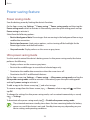
Use this app to access various files stored in the device or in other locations, such as cloud
storage services.
Tap My Files on the Apps screen.
Search for files or folders.
Access additional options.
View files by categories.
View the download history.
View files stored in the device.
View files saved in cloud storage
services.
35
Basics
Power saving feature
Power saving mode
Save the battery power by limiting the device’s functions.
On the Apps screen, tap Settings → Power saving → Power saving mode, and then tap the
Power saving mode switch to activate it. Alternatively, open the quick setting panel and tap
Power saving to activate it.
Select from the following options:
• Restrict background data: Prevent apps that are running in the background from using a
mobile data connection.
• Restrict performance: Limit various options, such as turning off the backlight for the
Recent apps button and the Back button.
• Greyscale mode: Display colours on the screen as grey tones.
Ultra power saving mode
Use this mode to extend the device’s battery power. In ultra power saving mode, the device
performs the following:
• Displays colours on the screen as grey tones.
• Restricts the available apps to essential and selected apps only.
• Deactivates the mobile data connection when the screen turns off.
• Deactivates the Wi-Fi and Bluetooth features.
On the Apps screen, tap Settings → Power saving → Ultra power saving mode, and tap the
Ultra power saving mode switch to activate it. Alternatively, open the quick setting panel
and tap U. power saving to activate it.
To add an app to the Home screen, tap
and select an app.
To remove an app from the Home screen, tap → Remove, select an app with
tap OK.
, and then
To change the settings for ultra power saving mode, such as network connectivity or sound,
tap → Settings.
To deactivate ultra power saving mode, tap → Disable ultra power saving mode.
The estimated maximum standby time shows the time remaining before the battery
power runs out if the device is not used. Standby time may vary depending on your
device settings and operating conditions.
36
Basics
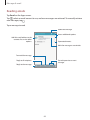
Viewing help information
To view help information to learn how to use the device and apps, open the Apps screen and
tap Settings → Help.
To view help information for an app while you are using the app, tap → Help.
Some apps may not include help information.
37
Network connectivity
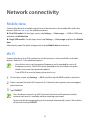
Mobile data
Connect the device to a mobile network to use the Internet or share media files with other
devices. Refer to Data usage for additional options.
► Dual SIM models: On the Apps screen, tap Settings → Data usage → a SIM or USIM card,
and then tick Mobile data.
► Single SIM models: On the Apps screen, tap Settings → Data usage, and then tick Mobile
data.
Alternatively, open the quick setting panel and tap Mobile data to activate it.
Wi-Fi
Connect the device to a Wi-Fi network to use the Internet or share media files with other
devices. Refer to Wi-Fi for additional options.
• Your device uses a non-harmonised frequency and is intended for use in all
European countries. The WLAN can be operated in the EU without restriction
indoors, but cannot be operated outdoors.
• Turn off Wi-Fi to save the battery when not in use.
1 On the Apps screen, tap Settings → Wi-Fi, and then tap the Wi-Fi switch to activate it.
2 Select a network from the Wi-Fi networks list. Networks that require a password appear
with a lock icon.
3 Tap CONNECT.
Once the device connects to a Wi-Fi network, the device will reconnect to that
network each time it is available without requiring a password.
To prevent the device connecting to the network automatically, select it from the list
of networks and tap FORGET.
38
Network connectivity
Tethering and Mobile hotspot
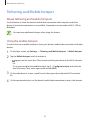
About tethering and mobile hotspots
Use this feature to share the device’s mobile data connection with computers and other
devices if an Internet connection is unavailable. Connections can be made via Wi-Fi, USB, or
Bluetooth.
You may incur additional charges when using this feature.
Using the mobile hotspot
Use your device as a mobile hotspot to share your device’s mobile data connection with other
devices.
1 On the Apps screen, tap Settings → Tethering and Mobile hotspot → Mobile hotspot.
2 Tap the Mobile hotspot switch to activate it.
• appears on the status bar. Other devices can find your device in the Wi-Fi networks
list.
• To set a password for the mobile hotspot, tap → Configure hotspot and select the
level of security. Then, enter a password and tap SAVE.
3 On the other device’s screen, search for and select your device from the Wi-Fi networks
list.
4 On the connected device, use the device’s mobile data connection to access the Internet.
39
Network connectivity
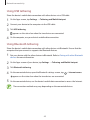
Using USB tethering
Share the device’s mobile data connection with other devices via a USB cable.
1 On the Apps screen, tap Settings → Tethering and Mobile hotspot.
2 Connect your device to the computer via the USB cable.
3 Tick USB tethering.
appears on the status bar when the two devices are connected.
4 On the computer, use your device’s mobile data connection.
Using Bluetooth tethering
Share the device’s mobile data connection with other devices via Bluetooth. Ensure that the
computer that you connect to supports the Bluetooth feature.
1 Pair your device with the other device via Bluetooth. Refer to Pairing with other Bluetooth
devices for more information.
2 On the Apps screen of your device, tap Settings → Tethering and Mobile hotspot.
3 Tick Bluetooth tethering.
4 On the connected device, open the Bluetooth settings screen, tap → Internet access.
appears on the status bar when the two devices are connected.
5 On the connected device, use the device’s mobile data connection to access the Internet.
The connection methods may vary depending on the connected devices.
40
Motions & usability features
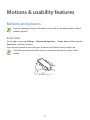
Motions and gestures
Excessive shaking or impact on the device may result in unintended inputs. Control
motions properly.
Smart alert
On the Apps screen, tap Settings → Motions and gestures → Smart alert, and then tap the
Smart alert switch to activate it.
If you have missed calls or new messages, the device will vibrate when you pick it up.
This feature may not work if the screen is turned on or the device is not on a flat
surface.
41
Motions & usability features
Mute
On the Apps screen, tap Settings → Motions and gestures → Mute, and then tap the Mute
switch to activate it.
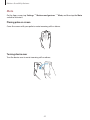
Placing palm on screen
Cover the screen with your palm to mute incoming calls or alarms.
Turning device over
Turn the device over to mute incoming calls or alarms.
42
Motions & usability features
Palm swipe to capture
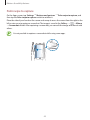
On the Apps screen, tap Settings → Motions and gestures → Palm swipe to capture, and
then tap the Palm swipe to capture switch to activate it.
Place the side of your hand on the screen and sweep it across the screen from the right to the
→ Album
left or vice versa to capture a screenshot. The image is saved in the Gallery →
→ Screenshots folder. After capturing a screenshot, you can edit the image and share it with
others.
It is not possible to capture a screenshot while using some apps.
43
Motions & usability features
Multi window
About Multi window
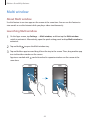
Use this feature to run two apps on the screen at the same time. You can use this feature to
view emails or use the Internet while you play a video simultaneously.
Launching Multi window
1 On the Apps screen, tap Settings → Multi window, and then tap the Multi window
switch to activate it. Alternatively, open the quick setting panel and tap Multi window to
activate it.
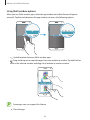
2 Tap and hold to open the Multi window tray.
3 Tap and hold an app icon and drag it from the tray to the screen. Then, drag another app
icon to the other window on the screen.
App icons marked with
same time.
can be launched in separate windows on the screen at the
44
Motions & usability features
Creating a Multi window combination
Use this feature to save the combination of the currently-running Multi window apps.
1 Launch two apps in a split-screen Multi window.
2 Open the Multi window tray and tap → Create.
The Multi window combination is added at the top of the Multi window tray.
To delete Multi window combinations, open the Multi window tray, tap
Multi window combination, and then tap DELETE.
→ Edit, select a
Adjusting the window size
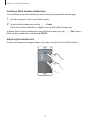
Drag the circle between the app windows up or down to adjust the size of the windows.
45
Motions & usability features
Using Multi window options
When you use Multi window apps, select the app window and a blue frame will appear
around it. Tap the circle between the app windows to access the following options:
• : Switch locations between Multi window apps.
• : Drag and drop text or copied images from one window to another. Tap and hold an
item in the selected window and drag it to a location in another window.
Some apps may not support this feature.
• : Close the app.
46
Motions & usability features
One-handed operation
You can switch to one-handed operation mode to conveniently operate the device with one
hand.
On the Apps screen, tap Settings → Display and wallpaper → One-handed operation, and
then tap the One-handed operation switch to activate it.
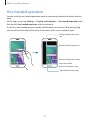
To switch to one-handed operation mode, hold the device in one hand. Then, quickly drag
your thumb from the edge of the screen to the centre of the screen and back again.
Enlarge or reduce the screen
size.
Return to the full screen view.
Return to the previous screen.
Adjust the volume.
Return to the Home screen.
Open the list of recent apps.
47
Personalising
Managing the Home and Apps screens
Managing the Home screen
Adding items
Tap and hold an app or a folder from the Apps screen, and then drag it to the Home screen.
To add widgets, open the Home screen, tap and hold an empty area, tap Widgets, tap and
hold a widget, and then drag it to the Home screen.
Moving and removing an item
Tap and hold an item on the Home screen, and then drag it to a new location.
To move the item to another panel, drag it to the side of the screen.
You can also move frequently-used apps to the shortcuts area at the bottom of the Home
screen.
To remove an item, tap and hold the item. Then, drag it to Remove that appears at the top of
the screen.
Creating a folder
1 On the Home screen, tap and hold an app, and then drag it to Create folder that appears
at the top of the screen.
2 Enter a folder name.
3 Tap , select the apps to move to the folder, and then tap DONE.
48
Personalising
Managing panels
On the Home screen, tap and hold an empty area to add, move, or remove a panel.
To add a panel, scroll left to the last panel, and then tap
.
To move a panel, tap and hold a panel preview, and then drag it to a new location.
To remove a panel, tap and hold a panel preview, and then drag it to Remove at the top of
the screen.
To set a panel as the main Home screen, tap
.
Managing the Apps screen
Changing the sorting method
On the Apps screen, tap → Sort by and select a sorting method.
Hiding apps
Hide apps that you do not want to see on the Apps screen.
On the Apps screen, tap → Hide apps, select apps, and then tap DONE.
To display hidden apps, tap → Show hidden apps, select apps, and then tap DONE.
Moving items
On the Apps screen, tap → Edit. Tap and hold an item and drag it to a new location.
To move the item to another panel, drag it to the side of the screen.
To move an item to a new panel, drag it to Create page that appears at the top of the screen.
Creating folders
→ Create folder. Alternatively, tap → Edit, tap and hold an
app, and then drag it to Create folder that appears at the top of the screen.
1 On the Apps screen, tap
2 Enter a folder name.
3 Tap , select the apps to move to the folder, and then tap DONE.
49
Personalising
Setting wallpaper and ringtones
Setting wallpaper
Set an image or photo stored in the device as wallpaper for the Home screen or the locked
screen.
1 On the Home screen, tap and hold an empty area, and then tap Wallpapers. Alternatively,
on the Apps screen, tap Settings → Display and wallpaper → Wallpaper.
2 Select a screen to change or apply wallpaper to.
3 Scroll left or right and select from images displayed at the bottom of the screen.
To select photos taken by the device’s camera or other images, tap From Gallery.
4 Tap SET AS WALLPAPER or DONE.
Changing ringtones
Change ringtones for incoming calls and notifications.
On the Apps screen, tap Settings → Sounds and notifications.
► Dual SIM models: To set a ringtone for incoming calls, tap Ringtone → a SIM or USIM card
→ Ringtones, select a ringtone, and then tap OK. To use a song stored in the device or in
your account as a ringtone, tap ADD.
To set a ringtone for notifications, tap Ringtone → a SIM or USIM card → Notifications, select
a ringtone, and then tap OK.
► Single SIM models: To set a ringtone for incoming calls, tap Ringtones, select a ringtone,
and then tap OK. To use a song stored in the device or in your account as a ringtone, tap ADD.
To set a ringtone for notifications, tap Notification ringtone, select a ringtone, and then tap
OK.
50
Personalising
Changing the screen lock method
You can change the way that you lock the screen to prevent others from accessing your
personal information.
On the Apps screen, tap Settings → Lock screen → Screen lock, and then select a screen
lock method. The device requires an unlock code whenever unlocking it.
If the unlock code is forgotten, take the device to a Samsung Service Centre to reset it.
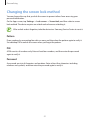
Pattern
Draw a pattern by connecting four dots or more, and then draw the pattern again to verify it.
Set a backup PIN to unlock the screen when you forget the pattern.
PIN
A PIN consists of numbers only. Enter at least four numbers, and then enter the password
again to verify it.
Password
A password consists of characters and numbers. Enter at least four characters including
numbers and symbols, and then enter the password again to verify it.
51
Personalising
Private mode
About private mode
Use this mode to prevent others from using or accessing specific content, such as images and
documents, stored on the device. You can save content to a specific location and deactivate
private mode to hide items securely.
Hiding content
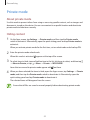
1 On the Apps screen, tap Settings → Private mode, and then tap the Private mode
switch to activate it. Alternatively, open the quick setting panel and tap Private mode to
activate it.
When you activate private mode for the first time, set an unlock code and a backup PIN.
2 Enter the private mode unlock code.
When this mode is activated,
appears at the top of the screen.
3 To select items to hide, tap and hold an item in the list, tick items to select, and then tap
→ Move to Private, or tap → Move → Private → MOVE HERE.
Items that are moved to private mode appear with
on them.
4 When you have selected the items to hide, open the Apps screen, tap Settings → Private
mode, and then tap the Private mode switch to deactivate it. Alternatively, open the
quick setting panel and tap Private mode to deactivate it.
The selected items will disappear from the screen.
Ensure that all files are saved or moved properly before deactivating private mode.
52
Personalising
Viewing hidden content
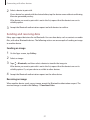
You can only view hidden items when private mode is activated.
1 On the Apps screen, tap Settings → Private mode, and then tap the Private mode
switch to activate it. Alternatively, open the quick setting panel and tap Private mode to
activate it.
2 Enter the private mode unlock code.
3 On the Apps screen, tap My Files → Private.
All items moved in private mode appear on the screen.
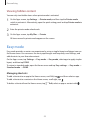
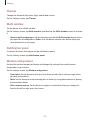
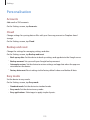
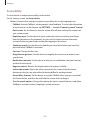
Easy mode
Easy mode provides an easier user experience by using a simpler layout and bigger icons on
the Home screen. You can access the most popular apps and frequently-used settings, and
add shortcuts to your favourite contacts.
On the Apps screen, tap Settings → Easy mode → Easy mode, select apps to apply simpler
layout, and then tap DONE.
To return to standard mode, open the Home screen and tap Easy settings → Easy mode →
Standard mode → DONE.
Managing shortcuts
To add a shortcut to an app to the Home screen, scroll left, tap
, and then select an app.
To add a shortcut to a contact on the Home screen, scroll right, tap
.
To delete a shortcut from the Home screen, tap → Edit, select an app or contact with
53
.
Personalising
Transferring data from your previous device
Using backup accounts
You can transfer backup data from your previous device to your new device using your
Google or Samsung account. Refer to Backing up and restoring data for more information.
Using Samsung Smart Switch
You can transfer data of the previous device to a new device via Smart Switch. Visit
www.samsung.com/smartswitch for more information.
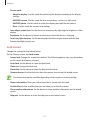
Samsung Smart Switch is not supported on some devices or computers.
Using Smart Switch Mobile
Use this app to transfer data from your previous device to your new device. You can
download the app from Galaxy Apps or Play Store.
1 On your device, tap Smart Switch.
2 On your device, select an option depending on the previous device type and follow the
on-screen instructions.
If the previous device is an Android device, ensure that the Smart Switch Mobile app is
installed on the device. Refer to the help for more information.
Using Smart Switch with computers
Use this feature to import a backup of your data (from selected manufacturer’s
mobile devices) from a computer to your device. You can download the app from
www.samsung.com/smartswitch.
1 Back up data from a previous device to the computer. For more information, contact the
device’s manufacturer.
2 On the computer, launch Smart Switch.
54
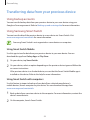
Personalising
3 Connect your current device to the computer using the USB cable.
4 On the computer, click the manufacturer of the previous device and follow the on-screen
instructions to transfer data to your device.
Using Samsung Kies
Import a backup of your data from your computer via Samsung Kies to restore data on your
device. You can also back up data to the computer via Samsung Kies. Refer to Connecting
with Samsung Kies for more information.
Setting up accounts
Adding accounts
Some apps used on your device require a registered account. Create accounts to have the
best experience with your device.
On the Apps screen, tap Settings → Accounts → Add account and select an account service.
Then, follow the on-screen instructions to complete the account setup.
To sync content with your accounts, select an account and tick items to sync.
Removing accounts
On the Apps screen, tap Settings → Accounts, select an account, and then tap → Remove
account.
55
Phone
Making calls
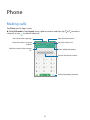
Tap Phone on the Apps screen.
► Dual SIM models: Tap Keypad, enter a phone number, and then tap
voice call, or tap to make a video call.
or
to make a
View call and message logs.
View favourite contacts.
Enter the number using the
keypad.
View the contacts list.
Add the number to the contacts
list.
Access additional options.
Preview the phone number.
Delete a preceding character.
56
Phone
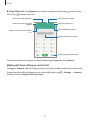
► Single SIM models: Tap Keypad, enter a phone number, and then tap
call, or tap to make a video call.
to make a voice
View call and message logs.
View favourite contacts.
Enter the number using the
keypad.
View the contacts list.
Access additional options.
Add the number to the contacts
list.
Preview the phone number.
Delete a preceding character.
You can also make calls to phone numbers listed in Logs, Favourites, and Contacts.
Making calls from call logs or contacts list
Tap Logs or Contacts, and then drag a contact or a phone number to the right to make a call.
To deactivate the call by dragging an icon to the right feature, tap → Settings → Contacts,
and then deselect Swipe to call or message.
57
Phone
Making an international call
Tap Keypad.
► Dual SIM models: Tap and hold 0 until the + sign appears. Enter the country code, area
code, and phone number, and then tap or .
To block outgoing international calls, tap → Settings → Call → More settings → a SIM or
USIM card → Call barring. Then, select a call type and tick International calls.
► Single SIM models: Tap and hold 0 until the + sign appears. Enter the country code, area
code, and phone number, and then tap .
To block outgoing international calls, tap → Settings → Call → More settings → Call
barring. Then, select a call type and tick International calls.
Receiving calls
Answering a call
When a call comes in, drag
outside the large circle.
Rejecting a call
When a call comes in, drag
outside the large circle.
To send a message when rejecting an incoming call, drag the reject message bar upwards.
To create various rejection messages, open the Apps screen and tap Phone → → Settings
→ Call → Call rejection → Rejection messages → .
Missed calls
If a call is missed,
appears on the status bar. Open the notifications panel to view the list of
missed calls. Alternatively, on the Apps screen, tap Phone → Logs to view missed calls.
58
Phone
Options during calls
During a voice call
The following actions are available:
• : Increase the volume.
• Add call: Dial a second call.
• Keypad: Open the keypad.
• End call: End the current call.
• Speaker: Activate or deactivate the speakerphone. When using the speakerphone, speak
into the microphone at the top of the device and keep the device away from your ears.
• Mute: Turn off the microphone so that the other party cannot hear you.
• Bluetooth: Switch to a Bluetooth headset if it is connected to the device.
Tap to view more options.
When you launch apps during a call, a pop-up window for the call screen ( ) appears. You can
continue your phone conversation while using apps.
To move the pop-up window, drag it to another location.
To delete the pop-up window, tap and hold it, and then tap OK.
To return to the call screen, tap the pop-up window.
59
Phone
During a video call
Tap the screen to use the following options:
• → Hide me: Hide your image from the other party.
• → Outgoing image: Select an image to show it to the other party.
• → Capture image: Capture the other party’s image.
• → Record video: Record a video of the other party’s images.
• → Memo: Create a memo.
• → Messages: Send a message.
• → Keypad: Open the keypad.
• → Turn off speaker / Turn on speaker: Activate or deactivate the speakerphone. When
using the speakerphone, speak into the microphone at the top of the device and keep
the device away from your ears.
• → Switch to headset / Switch to phone: Switch sound output to a connected
Bluetooth headset or back to the device’s speaker.
• Switch: Switch between the front and rear cameras.
• Mute: Turn off the microphone so that the other party cannot hear you.
• End call: End the current call.
60
Contacts
Adding contacts
Moving contacts from other devices
You can move contacts from other devices to your device. Refer to Transferring data from
your previous device for more information.
Creating contacts manually
1 On the Apps screen, tap Contacts → Contacts.
2 Tap and enter contact information.
• : Add an image.
• /
: Add or delete a contact field.
3 Tap SAVE.
To add a phone number to the contacts list from the keypad, tap Keypad, enter the number,
and then tap Add to Contacts.
Importing and exporting contacts
Import contacts from storage services to your device or export contacts from the device to
storage services.
On the Apps screen, tap Contacts → Contacts.
Tap → Settings → Contacts → Import/export contacts, and then select an import or
export option.
61
Contacts
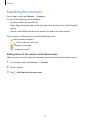
Searching for contacts
On the Apps screen, tap Contacts → Contacts.
Use one of the following search methods:
• Scroll up or down the contacts list.
• Drag a finger along the index at the right side of the contacts list to scroll through it
quickly.
• Tap the search field at the top of the contacts list and enter search criteria.
Once a contact is selected, take one of the following actions:
• : Add to favourite contacts.
• /
: Make a voice or video call.
• : Compose a message.
• : Compose an email.
Adding shortcuts for contacts to the Home screen
Add shortcuts to contacts that you frequently communicate with on the Home screen.
1 On the Apps screen, tap Contacts → Contacts.
2 Select a contact.
3 Tap → Add shortcut to home screen.
62
Messages & email
Messages
Sending messages
Send text messages (SMS) or multimedia messages (MMS).
You may incur additional charges for sending or receiving messages when you are
roaming.
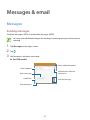
1 Tap Messages on the Apps screen.
2 Tap .
3 Add recipients and enter a message.
► Dual SIM models:
Access additional options.
Enter recipients.
Select contacts from the
contacts list.
Enter a message.
Attach files.
Send the message.
Enter emoticons.
63
Messages & email
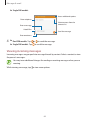
► Single SIM models:
Access additional options.
Enter recipients.
Select contacts from the
contacts list.
Enter a message.
Attach files.
Send the message.
Enter emoticons.
4 ► Dual SIM models: Tap
► Single SIM models: Tap
or
to send the message.
to send the message.
Viewing incoming messages
Incoming messages are grouped into message threads by contact. Select a contact to view
the person’s messages.
You may incur additional charges for sending or receiving messages when you are
roaming.
While viewing a message, tap to view more options.
64
Messages & email
Email
Setting up email accounts
Tap Email on the Apps screen.
Set up an email account when opening Email for the first time.
Enter the email address and password. Tap NEXT for a private email account or tap MANUAL
SETUP for a company email account. After that, follow the on-screen instructions to complete
the setup.
To set up another email account, tap
→ MANAGE ACCOUNTS →
.
If you have more than one email account, you can set one as the default account. Tap
MANAGE ACCOUNTS → → Set default account.
→
Sending emails
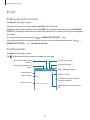
Tap Email on the Apps screen.
Tap
at the bottom of the screen to compose a message.
Discard the message.
Save the message for later
delivery.
Send the message.
Attach images, videos and
others.
Access additional options.
Add recipients.
Add a CC or BCC.
Enter a subject.
Insert files into the message, or
use editing options.
Enter a message.
Add recipients from the contacts
list.
65
Messages & email
Reading emails
Tap Email on the Apps screen.
Tap , select an email account to use, and new messages are retrieved. To manually retrieve
new messages, tap .
Tap a message to read.
Delete the message.
Access additional options.
Add this email address to the
contacts list or view other
options.
Open attachments.
Mark the message as a reminder.
Forward the message.
Reply to all recipients.
Go to the previous or next
message.
Reply to the message.
66
Camera
Basic shooting
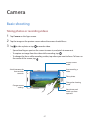
Taking photos or recording videos
1 Tap Camera on the Apps screen.
2 Tap the image on the preview screen where the camera should focus.
3 Tap to take a photo or tap to record a video.
• Spread two fingers apart on the screen to zoom in, and pinch to zoom out.
• To capture an image from the video while recording, tap
.
• To change the focus while recording a video, tap where you want to focus. To focus on
the centre of the screen, tap .
Display current
mode.
Start recording a
video.
Switch between the
front and rear
cameras.
Take a photo.
Change the shooting
mode.
Change camera
settings.
View photos and
videos you have
captured.
67
Camera
• The camera automatically shuts off when unused.
• Make sure that the lens is clean. Otherwise, the device may not work properly in
some modes that require high resolutions.
• The front camera lens is suitable for taking wide-angle photos. Minor distortion
may occur in wide-angle photos and does not indicate device performance
problems.
Launching Camera on the locked screen
To quickly take photos of special moments, launch Camera on the locked screen.
On the locked screen, drag outside the large circle. If is not shown, open the Apps
screen, tap Settings → Lock screen, and then tick Camera shortcut.
This feature may not be available depending on the region or service provider.
Camera etiquette
• Do not take photos or record videos of other people without their permission.
• Do not take photos or record videos where legally prohibited.
• Do not take photos or record videos in places where you may violate other people’s
privacy.
68
Camera
Shooting modes
Auto
Use this mode to allow the camera to evaluate the surroundings and determine the ideal
mode for the photo.
On the Apps screen, tap Camera → MODE → Auto.
Selfie
Use this mode to take a self-portrait using the front camera.
1 On the Apps screen, tap Camera.
2 Tap to use the front camera.
3 Tap MODE → Selfie.
4 Show your palm to the screen or tap
to take a photo of yourself.
Wide selfie
Use this mode to take a wide self-portrait using the front camera. The device identifies the
in Gallery.
photo with
1 On the Apps screen, tap Camera.
2 Tap to use the front camera.
3 Tap MODE → Wide selfie.
69
Camera
4 Show your palm to the screen or tap to take a photo of yourself.
5 Slowly rotate the device left and then right to take a panoramic photo. The device
combines the photos into a single panoramic image.
• Make sure to keep the blue frame inside the viewfinder window.
• The subjects should remain still while taking wide self-portraits.
• The resolution of a photo may be affected by lighting conditions.
• The top and bottom parts of the image displayed on the preview screen may be
cut out of the photo depending on the shooting conditions.
• To get the best results, hold the device in your hand and stretch out your arm as far
as possible.
Rear-cam selfie
Use this mode to allow the camera to detect and focus your face automatically when you take
a self-portrait using the rear camera.
1 On the Apps screen, tap Camera → MODE → Rear-cam selfie.
2 Move the frame to the position where your face will appear and adjust the frame size.
3 Position the device so the rear camera is aimed at your face. When the face is detected,
the device beeps. Then, the device automatically takes the photo after 2 seconds.
Panorama
Use this mode to take a photo composed of many photos strung together. The device
in Gallery.
identifies the photo with
On the Apps screen, tap Camera → MODE → Panorama.
To get the best shot, follow these tips:
• Move the camera slowly in one direction.
• Keep the image within the frame on the camera’s viewfinder.
• Avoid taking photos of indistinct backgrounds, such as an empty sky or a plain
wall.
70
Camera
Night
Use this mode to take a photo in low-light conditions, without using the flash.
On the Apps screen, tap Camera → MODE → Night.
Animated GIF
Use this mode to create an animated photo from a series of photos.
On the Apps screen, tap Camera → MODE → Animated GIF.
Managing shooting modes
Select the shooting modes to appear on the mode selection screen.
1 On the Apps screen, tap Camera → MODE → Manage modes.
2 Tick the modes to add to the modes list.
• Beauty face: Take a photo with lightened faces for gentler images.
• Continuous shot: Take a series of photos of moving subjects.
• HDR (Rich tone): Take photos with rich colours and reproduce details even in bright
and dark areas.
• Shot & more: Take a series of photos and modify them by applying various effects
using the shooting modes.
Downloading shooting modes
Download more shooting modes from Galaxy Apps.
On the Apps screen, tap Camera → MODE → Download.
71
Camera
Camera settings
On the Apps screen, tap Camera → . Not all of the following options are available in both
still camera and video camera modes.
• : Activate or deactivate the flash.
• : Set the device to take a number of photos at preset intervals when taking photos
with the front camera.
• : Use this for delayed-time shots.
• : Select a filter effect to use when taking photos or recording videos.
• / : Select a resolution. Use higher resolution for higher quality. But it takes up more
memory.
.
To use more options, tap
• Palm selfie: Set the device to detect your palm, so you can use it to take self-portraits.
• Beauty face: Set the device to take a photo with lightened faces for gentler images.
• Exposure value: Change the exposure value. This determines how much light the
camera’s sensor receives. For low-light situations, use a higher exposure.
• ISO: Select an ISO value. This controls camera light sensitivity. It is measured in filmcamera equivalents. Low values are for stationary or brightly-lit objects. Higher values are
for fast-moving or poorly-lit objects.
• White balance: Select an appropriate white balance, so images have a true-to-life colour
range. The settings are designed for specific lighting situations. These settings are similar
to the heat range for white-balance exposure in professional cameras.
• Metering modes: Select a metering method. This determines how light values are
calculated. Centre-weighted measures background light in the centre of the scene. Spot
measures the light value at a specific location. Matrix averages the entire scene.
• Tap to take pics: Tap the image on the preview screen to take photos.
• Video size: Select a resolution. Use higher resolution for higher quality. But it takes up
more memory.
• Recording mode: Change the recording mode.
72
Camera
• Location tags: Set the device to attach the location tag to the photo.
• To improve GPS signals, avoid shooting in locations where the signal may be
obstructed, such as between buildings or in low-lying areas, or in poor weather
conditions.
• When you share a photo with the location tag attached, the location information
may be exposed to others. To avoid this, when viewing the photo, tap → More
info → , and then tap under Location to delete your location information.
• Storage location: Select the memory location for storage.
• Save as flipped: Invert the image to create a mirror-image of the original scene, when
taking photos with the front camera.
• Grid lines: Display viewfinder guides to help composition when selecting subjects.
• Voice control: Set the device to take photos with voice commands.
• The volume key: Set the device to use the Volume button to control the shutter or zoom
function.
• Review pics/videos: Set the device to show photos or videos after capturing them.
• Reset settings: Reset the camera settings.
The available options vary depending on the mode used.
73
Gallery
Viewing content on the device
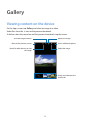
On the Apps screen, tap Gallery and select an image or a video.
Video files show the
icon on the preview thumbnail.
To hide or show the menu bar and the preview thumbnails, tap the screen.
Send the image to others.
Modify the image.
Move to the previous screen.
Access additional options.
Search for other devices to view
the image.
Delete the image.
Image and video preview
thumbnails
74
Gallery
Viewing content stored on other devices
Search for content that is stored in other devices and view it on your device.
Tap Gallery on the Apps screen.
Accessing content on a nearby device
To use this feature, open the Apps screen, tap Settings → NFC and sharing → Nearby
devices, and then tap the Nearby devices switch to activate it. Refer to Nearby devices for
more settings.
On the Gallery main screen, tap
and select a device in Nearby devices to access content.
You can view content on the devices with the content sharing feature activated.
75
Safety assistance
Emergency mode
About emergency mode
Use this mode to extend the device’s standby time when you are in an emergency situation.
When this mode is activated, the screen brightness decreases and battery consumption is
reduced by restricting some features. You can also turn on the flash, sound alarms, and send
your location information to others in a message.
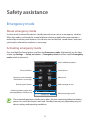
Activating emergency mode
Press and hold the Power button, and then tap Emergency mode. Alternatively, on the Apps
screen, tap Settings → Safety assistance → Emergency mode, and then tap the Emergency
mode switch to activate it.
Access additional options.
Turn on the flash.
Sound alarms.
Send your current location
information in a message.
Make a call.
Add more apps to use.
Browsing the Internet.
Remaining battery power and
estimated battery standby time
Make an emergency call.
The estimated maximum standby time shows the time remaining before the battery
power runs out if the device is not used. Standby time may vary depending on your
device settings and operating conditions.
76
Safety assistance
Deactivating emergency mode
To deactivate emergency mode, press and hold the Power button, and then tap Emergency
mode. Alternatively, tap → Disable Emergency mode. Emergency mode is deactivated.
Help message
About help message
You can preset contacts to send a message to in an emergency. Send messages to your
primary contacts by quickly pressing the Power button three times.
On the Apps screen, tap Settings → Safety assistance.
Adding primary contacts
1 On the Apps screen, tap Settings → Safety assistance.
2 Tap Manage primary contacts → Create primary contact.
3 Tap Create contact and enter contact information or tap Select from contacts to add an
existing contact as a primary contact.
Setting help messages
On the Apps screen, tap Settings → Safety assistance → Send help messages, and then tap
the Send help messages switch to activate it. Select content to include in help messages.
Sending help messages
In an emergency situation, quickly press the Power button three times. The device sends
messages to your primary contacts. The messages include your location information.
77
Useful apps and features
S Finder
Use this app to search for content on the device. You can apply various filters and view the
search history.
Open the notifications panel and tap S Finder.
Searching for content
Tap the search field and enter a keyword, or tap
and say a keyword.
To get more refined results, tap filters under the search field.
You can set the search parameters using the available filters or select search categories. Tap
→ Settings → Select search category.
S Planner
Creating events or tasks
1 Tap S Planner on the Apps screen.
2 Tap . Alternatively, select a date with no events or tasks in it and tap the date again.
If the date already has saved events or tasks in it, tap the date and tap
.
3 Select either event or task and enter details.
• Add event: Set a start and end date for an event. You can set an optional repeat
setting.
• Add task: Add a task to do on a specific date. You can set an optional priority setting.
78
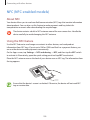
Useful apps and features
Select an item.
Select a calendar to use or sync
with.
Enter a title.
Attach a map showing the
location of the event.
Set a start and end date for the
event.
Add more details.
4 Tap SAVE to save the event or task.
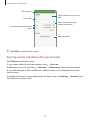
Syncing events and tasks with your accounts
Tap S Planner on the Apps screen.
To sync events and tasks with your accounts, tap → Sync now.
To add accounts to sync with, tap → Calendars → Add account. Then, select an account
to sync with and sign in. When an account is added, a green circle is displayed next to the
account name.
To change an account’s syncing option, open the Apps screen, tap Settings → Accounts, and
then select an account service.
79
Useful apps and features
S Voice
About S Voice
Use this app to command the device by voice to perform various features.
Tap S Voice on the Apps screen. Alternatively, press the Home button twice.
To deactivate the access by pressing the Home button, tap → Settings, and then deselect
Open via the home key.
This app may not be available depending on the region or service provider.
Setting the language
Tap → Settings → Language, and then select a language.
The selected language is applied to S Voice only, not to the language displayed on
the device.
Using S Voice
When you launch S Voice, the device starts voice recognition and the microphone icon turns
blue.
Say a voice command.
If you say a command and the device recognises it, the microphone icon at the bottom of the
screen flashes green. Then, the device performs the command.
Tips for better voice recognition:
• Speak clearly.
• Speak in quiet places.
• Do not use offensive or slang words.
• Avoid speaking in dialectal accents.
The device may not recognise your commands or may perform unwanted commands
depending on your surroundings or how you speak.
80
Useful apps and features
Waking up S Voice in standby mode
If S Voice is not used for a certain period, it automatically switches to standby mode.
Tap the microphone icon or say “Hi Galaxy” to the device to resume voice recognition.
Changing the wake-up command
You can change the wake-up command from “Hi Galaxy”. The wake-up command is used to
launch S Voice when the device is in standby mode.
Tap → Settings → Voice wake-up → Set wake-up command.
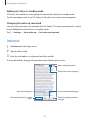
Internet
1 Tap Internet on the Apps screen.
2 Tap the address field.
3 Enter the web address or a keyword, and then tap Go.
To view the toolbars, drag your finger downwards slightly on the screen.
Access additional options.
Refresh the current webpage.
Open the homepage.
View bookmarked webpages.
Move to the previously-visited
page.
Open the webpage window
manager.
81
Useful apps and features
Music
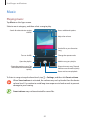
Playing music
Tap Music on the Apps screen.
Select a music category, and then select a song to play.
Search for other devices to play
the file.
Access additional options.
Adjust the volume.
Set the file as your favourite
song.
Turn on shuffle.
Change the repeat mode.
Open the playlist.
Add the song to a playlist.
Skip to the previous song. Tap
and hold to move backwards
quickly.
Skip to the next song. Tap and
hold to move forwards quickly.
Pause and resume playback.
To listen to songs at equal volume levels, tap → Settings, and then tick Smart volume.
When Smart volume is activated, the volume may end up louder than the device
volume level. Use caution to avoid long-term exposure to loud sounds to prevent
damage to your hearing.
Smart volume may not be activated for some files.
82
Useful apps and features
To set a personalised sound while listening to songs with a headset, tap → Settings →
Adapt Sound → On.
When you activate this option for the first time, tap START to adjust the sound. The device
starts a series of sound tests to adjust the sound level and starts to beep. Tap YES if you can
hear the beep or NO if you cannot. Repeat this step for each test until the sound adjustment
is finished. Then, tick Music sound and tap DONE to apply the option when you listen to
music.
When you turn the volume up to level 14 or higher, the adapt sound option is not
applied to music playback. If you turn the volume down to level 13 or lower, the
option is reapplied.
Playing music stored on other devices
Search for music that is stored on other devices and play it on your device.
Tap Music on the Apps screen.
Accessing music on a registered device
To use this feature, sign in to your Samsung account.
On the Music main screen, tap DEVICES and select a device in Registered devices to access
and play music. You can play the song on the devices that are registered to Samsung link. Visit
link.samsung.com for more information.
• Ensure that the registered devices are turned on and connected to a Wi-Fi or
mobile network.
• You may incur additional charges when you access content stored on other devices
via the mobile network.
Accessing music on a nearby device
To use this feature, open the Apps screen, tap Settings → NFC and sharing → Nearby
devices, and then tap the Nearby devices switch to activate it. Refer to Nearby devices for
more settings.
On the Music main screen, tap DEVICES and select a device in Nearby devices to access and
play music. You can play the song on the devices with the content sharing feature activated.
83
Useful apps and features
Video
Playing videos
Tap Video on the Apps screen.
Select a video to play.
Adjust the volume.
Search for other
devices to play the
file.
Access additional
options.
Move forwards or
backwards by
dragging the bar.
Pause and resume
playback.
Change screen ratio.
Switch to the
pop-up video player.
Skip to the previous
video. Tap and hold
to move backwards
quickly.
Skip to the next
video. Tap and hold
to move forwards
quickly.
To customise the control panel location during playback, tap → Settings, tick Mini
controller, and then tap CLOSE. Then, tap or to move the control panel to either side of
the screen.
This feature is available only in landscape orientation.
84
Useful apps and features
Playing videos stored on other devices
Search for videos that are stored in other devices and play them on your device.
Tap Video on the Apps screen.
Accessing a video on a registered device
To use this feature, sign in to your Samsung account.
On the Video main screen, tap DEVICES and select a device in Registered devices to access
and play the video. You can play the video on the devices registered to Samsung link. Visit
link.samsung.com for more information.
• Ensure that the registered devices are turned on and connected to a Wi-Fi or
mobile network.
• You may incur additional charges when you access content stored on other devices
via the mobile network.
Accessing a video on a nearby device
To use this feature, open the Apps screen, tap Settings → NFC and sharing → Nearby
devices, and then tap the Nearby devices switch to activate it. Refer to Nearby devices for
more settings.
On the Video main screen, tap DEVICES and select a device in Nearby devices to access
and play the video. You can play the video on devices that have the content sharing feature
activated.
85
Useful apps and features
Studio
Edit images or videos by applying various effects.
1 Tap Studio on the Apps screen.
2 Select an option and edit images or videos.
Edit images by applying various
effects.
Combine several images
together to create a collage.
Apply various effects to the
images you have taken in Shot &
more mode.
Trim video segments.
3 When you are finished editing images or videos, tap
86
or DONE.
Useful apps and features
Clock
Alarm
On the Apps screen, tap Clock → Alarm.
Setting alarms
Tap in the alarms list, set an alarm time, select the days on which the alarm will repeat, set
other various alarm options, and then tap DONE. To activate or deactivate alarms, tap next
to the alarm in the alarms list.
• Snooze: Set an interval and the number of times for the alarm to repeat after the preset
time.
• Smart alarm: Set a time and tone for the smart alarm. A smart alarm starts at a low
volume a few minutes before a preset alarm is scheduled to sound. The volume of the
smart alarm increases gradually until you turn it off or the preset alarm sounds.
Stopping alarms
Drag outside the large circle to stop an alarm. If you have previously enabled the snooze
option, drag outside the large circle to repeat the alarm after a specified length of time.
Deleting alarms
Tap → Delete, select alarms, and then tap DONE.
87
Useful apps and features
World clock
On the Apps screen, tap Clock → World clock.
Creating clocks
Tap
and enter a city name or select a city from the cities list.
To apply summer time, tap and hold a clock, and then tap
Deleting clocks
Tap → Delete, select clocks, and then tap DONE.
Stopwatch
On the Apps screen, tap Clock → Stopwatch.
Tap START to time an event. Tap LAP to record lap times.
Tap STOP to stop timing. To clear lap times, tap RESET.
Timer
On the Apps screen, tap Clock → Timer.
Set the duration, and then tap START.
Drag
outside the large circle when the timer goes off.
88
.
Useful apps and features
Calculator
Use this app for simple or complex calculations.
Tap Calculator on the Apps screen.
Rotate the device to landscape orientation to display the scientific calculator. If Screen
rotation is disabled, tap → Scientific calculator.
To see the calculation history, tap
To clear the history, tap
to hide the keypad.
→ CLEAR HISTORY.
Memo
Use this app to create memos and organise them by category.
Tap Memo on the Apps screen.
Composing memos
Tap on the memos list and enter a memo. While composing a memo, use the following
options:
• : Create or set a category.
• : Insert images.
• : Make a voice recording to insert.
To save the memo, tap SAVE.
To edit a memo, tap a memo, and then tap the content of the memo.
Searching for memos
Tap
on the memos list and enter a keyword to search for memos that include the keyword.
89
Useful apps and features
Voice Recorder
Recording voice memos
Tap Voice Recorder on the Apps screen.
Tap to start recording. Speak into the microphone. Tap
recording, tap . Tap to finish recording.
While recording a voice memo, tap
to pause recording. To cancel
to insert a bookmark.
Access additional options.
Recording elapsed time
Display the list of voice memos.
Change the recording mode.
Start recording.
To set the device to remove background noise, tap → Settings, and then tick Noise
reduction.
90
Useful apps and features
Playing voice memos
Tap Voice Recorder on the Apps screen.
Tap
and select a voice memo to play.
• : Trim the voice memo.
• : Set a portion of the voice memo for loop playback.
• : Adjust the playback speed.
• : Skip a silent portion in the voice memo.
• : Insert bookmarks in the voice memo.
• /
• : Pause or resume playback.
/
: Skip to the previous or next voice memo.
Dropbox
Use this app to save and share files with others via Dropbox cloud storage. When you save
files to Dropbox, your device automatically syncs with the web server and any other devices
that have Dropbox installed.
This app may not be available depending on the region or service provider.
Tap Dropbox on the Apps screen.
When you launch this app for the first time or restart it after performing a data reset, follow
the on-screen instructions to finish the setup.
Use the following functions:
• : Upload or open files. Tap → Upload here to upload files.
• : View the uploaded photos or videos. Tap
• : Open files in the favourites list.
• : View notifications.
91
to share or delete files, or create albums.
Useful apps and features
Flipboard
Use this app to view live social network updates and news in a personalised magazine format.
Tap Flipboard on the Apps screen.
This app may not be available depending on the region or service provider.
When you launch this app for the first time or restart it after performing a data reset, follow
the on-screen instructions to finish the setup.
On the Flipboard main screen, select from various news articles and subscriptions.
Radio
Listening to the FM radio
Tap Radio on the Apps screen.
Before you use this app, you must connect a headset, which serves as the radio antenna.
The FM radio scans and saves available stations automatically when running for the
first time.
Tap to turn on the FM radio. Select the radio station you want from the stations list and tap
to return to the FM radio screen.
92
Useful apps and features
Adjust the volume.
Record a song from the FM radio.
Access additional options.
Add the current radio station to
the favourites list.
Enter radio station frequency
manually.
Fine-tune the frequency.
Turn the FM radio on or off.
View information about the
current station.
View the list of favourite stations.
Search for an available radio
station.
Scanning radio stations
Tap Radio on the Apps screen.
Tap → Scan, and then select a scan option. The FM radio scans and saves available stations
automatically.
Select the radio station you want from the stations list and tap
screen.
93
to return to the FM radio
Useful apps and features
Google apps
Google provides entertainment, social network, and business apps. You may require a Google
account to access some apps. Refer to Setting up accounts for more information.
To view more app information, access each app’s help menu.
Some apps may not be available or may be labelled differently depending on the
region or service provider.
Chrome
Search for information and browse webpages.
Gmail
Send or receive emails via the Google Mail service.
Google+
Share your news and follow updates that your family, friends, and others share. You can also
back up your photos and videos, and more.
Maps
Find your location on the map, search for locations, and view location information for various
places.
Play Music
Discover, listen to, and share music on your device.
Play Movies & TV
Watch videos stored on your device and download various content to watch from Play Store.
94
Useful apps and features
Play Books
Download various books from Play Store and read them.
Play Newsstand
Read news and magazines that interest you in one convenient location.
Play Games
Download games from Play Store and play them with others.
Drive
Store your content on the cloud, access it from anywhere, and share it with others.
YouTube
Watch or create videos and share them with others.
Photos
Manage photos, albums, and videos that you have saved on the device and uploaded to
Google+.
Hangouts
Chat with your friends individually or in groups and use images, emoticons, and video calls
while you are chatting.
Google
Search quickly for items on the Internet or your device.
Voice Search
Search quickly for items by saying a keyword or phrase.
Google Settings
Configure settings for some features provided by Google.
95
Connecting with other devices
Bluetooth
About Bluetooth
Bluetooth creates a direct wireless connection between two devices over short distances. Use
Bluetooth to exchange data or media files with other devices.
• Samsung is not responsible for the loss, interception, or misuse of data sent or
received via Bluetooth.
• Always ensure that you share and receive data with devices that are trusted
and properly secured. If there are obstacles between the devices, the operating
distance may be reduced.
• Some devices, especially those that are not tested or approved by the Bluetooth
SIG, may be incompatible with your device.
• Do not use the Bluetooth feature for illegal purposes (for example, pirating copies
of files or illegally tapping communications for commercial purposes).
Samsung is not responsible for the repercussion of illegal use of the Bluetooth
feature.
Pairing with other Bluetooth devices
1 On the Apps screen, tap Settings → Bluetooth, tap the Bluetooth switch to activate it,
and then tap SCAN.
The detected devices are listed.
To set the device as visible to other devices, tap the device name.
96
Connecting with other devices
2 Select a device to pair with.
If your device has paired with the device before, tap the device name without confirming
the auto-generated passkey.
If the device you want to pair with is not in the list, request that the device turns on its
visibility option.
3 Accept the Bluetooth authorisation request on both devices to confirm.
Sending and receiving data
Many apps support data transfer via Bluetooth. You can share data, such as contacts or media
files, with other Bluetooth devices. The following actions are an example of sending an image
to another device.
Sending an image
1 On the Apps screen, tap Gallery.
2 Select an image.
3 Tap → Bluetooth, and then select a device to transfer the image to.
If the device you want to pair with is not in the list, request that the device turns on its
visibility option. Or, set your device as visible to other devices.
4 Accept the Bluetooth authorisation request on the other device.
Receiving an image
When another device sends you an image, accept the Bluetooth authorisation request. The
received image is saved in the Gallery → Download folder.
97
Connecting with other devices
Unpairing Bluetooth devices
1 On the Apps screen, tap Settings → Bluetooth.
The device displays the paired devices in the list.
2 Tap next to the device’s name to unpair.
3 Tap Unpair.
Wi-Fi Direct
About Wi-Fi Direct
Wi-Fi Direct connects devices directly via a Wi-Fi network without requiring an access point.
Connecting to other devices
1 On the Apps screen, tap Settings → Wi-Fi, and then tap the Wi-Fi switch to activate it.
2 Tap → Wi-Fi Direct.
The detected devices are listed.
3 Select a device to connect to.
To change the device name, tap → Rename device.
4 Accept the Wi-Fi Direct authorisation request on the other device to confirm.
98
Connecting with other devices
Sending and receiving data
You can share data, such as contacts or media files, with other devices. The following actions
are an example of sending an image to another device.
Sending an image
1 On the Apps screen, tap Gallery.
2 Select an image.
3 Tap → Wi-Fi Direct, and then select a device to transfer the image to.
4 Accept the Wi-Fi Direct authorisation request on the other device.
Receiving an image
When another device sends you an image, accept the Wi-Fi Direct authorisation request. The
received image is saved in the Gallery → Download folder.
Ending the device connection
1 On the Apps screen, tap Settings → Wi-Fi.
2 Tap → Wi-Fi Direct.
The device displays the connected devices in the list.
3 Tap END CONNECTION → OK to disconnect the devices.
99
Connecting with other devices
NFC (NFC-enabled models)
About NFC
Your device allows you to read near field communication (NFC) tags that contain information
about products. You can also use this feature to make payments and buy tickets for
transportation or events after downloading the required apps.
The device contains a built-in NFC antenna around the rear camera lens. Handle the
device carefully to avoid damaging the NFC antenna.
Using the NFC feature
Use the NFC feature to send images or contacts to other devices, and read product
information from NFC tags. If you insert a SIM or USIM card that has a payment feature, you
can use the device to make payments conveniently.
On the Apps screen, tap Settings → NFC and sharing → NFC, and then tap the NFC switch
to activate it. Alternatively, open the quick setting panel and tap NFC to activate it.
Place the NFC antenna area on the back of your device near an NFC tag. The information from
the tag appears.
Ensure that the device’s screen is unlocked. Otherwise, the device will not read NFC
tags or receive data.
100
Connecting with other devices
Making a purchase with the NFC feature
Before you can use the NFC feature to make payments, you must register for the mobile
payment service. To register or get more information about the service, contact your service
provider.
On the Apps screen, tap Settings → NFC and sharing → NFC, and then tap the NFC switch
to activate it. Alternatively, open the quick setting panel and tap NFC to activate it.
Touch the NFC antenna area on the back of your device to the NFC card reader.
To set the default payment app, tap Tap and pay and select an app.
• The payment services list may not include all available payment apps.
• To make a payment with the SIM or USIM card, insert the NFC-enabled SIM or USIM
card into the SIM card tray slot 1 ( 1 ). The SIM card tray slot 2 ( 2 ) does not support
the NFC feature.
2
1
Sending data
Use the Android Beam feature to send data, such as webpages and contacts, to NFC-enabled
devices.
1 On the Apps screen, tap Settings → NFC and sharing → NFC, and then tap the NFC
switch to activate it. Alternatively, open the quick setting panel and tap NFC to activate it.
2 Tap Android Beam and tap the Android Beam switch to activate it.
3 Select an item and touch the other device’s NFC antenna to your device’s NFC antenna.
4 When Touch to beam. appears on the screen, tap your device’s screen to send the item.
101
Connecting with other devices
S Beam
Use this feature to send data, such as videos, images, and documents.
1 Activate the S Beam feature on the receiving device.
2 On the Apps screen, tap Settings → NFC and sharing → NFC, and then tap the NFC
switch to activate it. Alternatively, open the quick setting panel and tap NFC to activate it.
3 Tap S Beam and tap the S Beam switch to activate it.
4 Select a file and touch the other device’s NFC antenna to your device’s NFC antenna.
5 When Touch to beam. appears on the screen, tap your device’s screen to send the file.
• Do not send copyright-protected data via S Beam. Doing so may violate copyright
laws. Samsung is not responsible for any liabilities caused by the illegal use of
copyrighted data.
• If both devices try to send data simultaneously, the file transfer may fail.
102
Connecting with other devices
Quick Connect
About Quick connect
Use this feature to easily search and connect to nearby devices. You can also conveniently
share content stored on your device with computers.
• If the device you want to connect does not support the Quick connect feature,
activate its Wi-Fi Direct feature before launching Quick Connect on your device.
• Connection methods may vary depending on the type of connected devices or the
shared content.
• Device name may vary depending on the Bluetooth devices to pair with. For
example, the device name can be shown as BT MAC.
Connecting to other devices
1 Open the notifications panel and tap Quick Connect.
If you are using this feature for the first time, select a visibility option and tap ENABLE
QUICK CONNECT.
When the panel opens, the Wi-Fi feature is activated automatically and the device
searches for nearby devices.
2 Select a device to connect to.
The next steps may vary depending on the connected device. Follow the on-screen
instructions to complete the connection between the devices.
To allow nearby devices to search for your device and connect to it, tap MORE → Set
device visibility → Device visibility, and then select an option.
Re-searching for devices
If the desired device does not appear in the list, search for the device.
Tap REFRESH and select the device from the list of detected devices.
103
Connecting with other devices
Sharing content
Share content with the connected devices.
1 Open the notifications panel and tap Quick Connect.
2 Select a device from the list of detected devices.
3 Select a media category.
4 Select the content to share and tap DONE.
Your device sends the content to the connected device.
Screen Mirroring
About Screen Mirroring
Use this feature to connect your device to a large screen with an AllShare Cast dongle or
HomeSync and then share your contents.
Screen mirroring
-enabled devices
(AllShare Cast dongle,
HomeSync)
104
Connecting with other devices
• This feature may not be available depending on the region or service provider.
• Some files may be buffered during playback, depending on the network
connection.
• To save energy, deactivate this feature when not in use.
• If you specify a Wi-Fi frequency, AllShare Cast dongles or HomeSync may not be
detected or connected.
• If you play videos or games on a TV, select an appropriate TV mode to get the best
experience.
Viewing content on a TV
Before you connect your device to a TV, connect the screen mirroring-enabled device to the
TV. To set up the connection, refer to the device’s user manual. The following actions are an
example of viewing content on a TV connected via an AllShare Cast dongle.
1 Connect the AllShare Cast dongle to the TV using an HDMI cable.
2 On the TV, select a connection mode, such as HDMI mode, to connect an external device.
3 On the Apps screen, tap Settings → NFC and sharing → Screen Mirroring.
The detected devices are listed.
4 Select a device to connect to.
Your device’s screen appears on the TV screen.
If you connect the device for the first time, tap and hold the dongle’s name in the list and
enter the PIN shown on the TV screen.
5 Open or play a file, and then control the display with the keys on your device.
105
Connecting with other devices
Mobile printing
Connect the device to a printer via Wi-Fi or Wi-Fi Direct, and print images or documents.
Some printers may not be compatible with the device.
Adding printer plug-ins
Add printer plug-ins for printers you want to connect the device to.
On the Apps screen, tap Settings → NFC and sharing → Printing → Download plug-in, and
search for a printer plug-in in Play Store. Select a printer plug-in and install it.
Connecting to a printer
On the Apps screen, tap Settings → NFC and sharing → Printing, select a printer plug-in,
and then tap the switch at the top right of the screen to activate it. The device searches for
printers that are connected to the same Wi-Fi network as your device. Select a printer to use
as the default printer.
To add printers manually, select a printer plug-in, tap → Add printer → ADD PRINTER,
enter details, and then tap OK.
To change print settings, select a printer plug-in and tap → Settings.
Printing content
While viewing content, such as images or documents, tap → Print →
and then select a printer.
106
→ All printers,
Device & data manager
Upgrading the device
The device can be upgraded to the latest software.
Upgrading over the air
The device can be directly upgraded to the latest software by the firmware over-the-air
(FOTA) service.
On the Apps screen, tap Settings → About device → Software updates → Update now.
Upgrading with Samsung Kies
Download the latest version of Samsung Kies from the Samsung website. Launch Samsung
Kies and connect the device to the computer. Samsung Kies automatically recognises the
device and shows available updates in a dialogue box, if any. Click the Update button in the
dialogue box to start upgrading. Refer to the Samsung Kies help for more information about
how to upgrade.
• Do not turn off the computer or disconnect the USB cable while the device is
upgrading.
• While upgrading the device, do not connect other media devices to the computer.
Doing so may interfere with the update process.
107
Device & data manager
Transferring files between the device and a
computer
Move audio, video, image, or other types of files from the device to the computer, or vice
versa.
Do not disconnect the USB cable from the device when you are transferring files.
Doing so may cause data loss or device damage.
• Do not disconnect the device from the computer when you play files saved in the
device on the connected computer. After you finish playing the file, disconnect the
device from the computer.
• The devices may not connect properly if they are connected via a USB hub. Directly
connect the device to the computer’s USB port.
Connecting as a media device
1 Connect the device to the computer using the USB cable.
2 Open the notifications panel, and then tap Connected as a media device → Media
device (MTP).
Tap Camera (PTP) if your computer does not support Media Transfer Protocol (MTP) or
not have any appropriate driver installed.
3 Transfer files between your device and the computer.
Connecting with Samsung Kies
Samsung Kies is a computer app that manages media contents and personal information
with Samsung devices. Download the latest Samsung Kies from the Samsung website.
1 Connect the device to the computer using the USB cable.
Samsung Kies launches on the computer automatically. If Samsung Kies does not launch,
double-click the Samsung Kies icon on the computer.
2 Transfer files between your device and the computer.
Refer to the Samsung Kies help for more information.
108
Device & data manager
Backing up and restoring data
Keep your personal information, app data, and settings safe on your device. You can back up
your sensitive information to a backup account and access it later.
Using a Google account
1 Tap Settings on the Apps screen.
2 Tap Backup and reset and tick Back up my data.
3 Tap Backup account and select an account as the backup account.
To restore data, you must sign in to your Google account via the setup wizard. You can
launch and open the setup wizard by performing a factory data reset on the device.
If you do not sign in to your Google account via the setup wizard, you cannot restore
the backup data.
Using a Samsung account
On the Apps screen, tap Settings → Accounts → Add account → Samsung account, and
then sign in to your Samsung account.
Tap Samsung account → Backup, tick the items to back up, and then tap BACK UP NOW →
BACK UP.
To restore data, open the Apps screen, tap Settings → Accounts → Samsung
account → Restore, select the items, and then tap RESTORE NOW.
Performing a data reset
Delete all settings and data on the device. Before performing a factory data reset, ensure you
back up all important data stored on the device. Refer to Backing up and restoring data for
more information.
On the Apps screen, tap Settings → Backup and reset → Factory data reset → RESET
DEVICE → ERASE EVERYTHING. The device automatically restarts.
109
Settings
About Settings
Use this app to configure the device, set app options, and add accounts.
Tap Settings on the Apps screen.
To search for settings by entering keywords, tap
.
You can change the view mode to separate tabs or a list. Tap → View as and select a view
mode.
Quick settings
View the list of your favourite setting options.
To edit the list of favourite setting options, tap → Edit quick settings, select a setting
option, and then tap DONE.
Connections
Wi-Fi
Activate the Wi-Fi feature to connect to a Wi-Fi network and access the Internet or other
network devices.
On the Settings screen, tap Wi-Fi, and then tap the Wi-Fi switch to activate it.
The device can maintain a stable network connection by automatically selecting either
the Wi-Fi or mobile network to use the strongest signal. To automatically switch between
networks, tick Smart network switch.
110
Settings
To use options, tap .
• Scan: Search for available networks.
• Wi-Fi Direct: Activate Wi-Fi Direct and connect devices directly via Wi-Fi to share files.
• Advanced: Customise Wi-Fi settings.
• WPS push button: Connect to a secured Wi-Fi network with a WPS button.
• WPS PIN entry: Connect to a secured Wi-Fi network with a WPS PIN.
• Help: View help information for Wi-Fi.
Setting Wi-Fi sleep policy
Tap → Advanced → Keep Wi-Fi on during sleep.
When the screen is turned off, the device automatically turns off Wi-Fi connections.
When this happens, the device automatically accesses mobile networks if it is set
to use them. This may incur data transfer fees. To avoid additional charges, set this
option to Always.
Bluetooth
Activate the Bluetooth feature to exchange information over short distances.
On the Settings screen, tap Bluetooth, and then tap the Bluetooth switch to activate it.
To use more options, tap .
• Visibility timeout: Set duration that the device is visible.
• Received files: View received files via Bluetooth.
• Rename device: Change the device name.
• Help: View help information for Bluetooth.
111
Settings
Tethering and Mobile hotspot
Use the device as a mobile hotspot to share the device’s mobile data connection with other
devices. Refer to Tethering and Mobile hotspot for more information.
On the Settings screen, tap Tethering and Mobile hotspot.
• Mobile hotspot: Use the mobile hotspot to share the device’s mobile data connection
with computers or other devices through the Wi-Fi network. You can use this feature
when the network connection is not available.
• USB tethering: Use USB tethering to share the device’s mobile data connection with
a computer via USB. When connected to a computer, the device is used as a wireless
modem for the computer.
• Bluetooth tethering: Use Bluetooth tethering to share the device’s mobile data
connection with computers or other devices via Bluetooth.
Flight mode
This disables all wireless functions on your device. You can use only non-network services.
On the Settings screen, tap Flight mode.
Data usage
Keep track of your data usage amount and customise the settings for the limitation.
On the Settings screen, tap Data usage.
• Mobile data: Set the device to use data connections on any mobile network.
• Set mobile data limit: Set a limit for mobile data usage.
To use more options, tap .
• Restrict background data: Set the device to disable sync in the background while using
a mobile network.
• Show Wi-Fi usage: Set the device to show your data usage via Wi-Fi.
• Mobile hotspots: Select mobile hotspots to prevent apps that are running in the
background from using them.
112
Settings
Location
Change settings for location information permissions.
On the Settings screen, tap Location, and then tap the Location switch to activate it.
• Mode: Select a method to collect your location data.
• Recent location requests: View which apps request your current location information
and their battery usage.
• Location services: View the location services your device is using.
• My places: Set up profiles that will be used for specific locations when you use GPS, Wi-Fi,
or Bluetooth features to find your current location.
SIM card manager (dual SIM models)
Activate your SIM or USIM cards and customise the SIM card settings.
On the Settings screen, tap SIM card manager.
• Voice call: Select a SIM or USIM card for voice calls.
• Video call: Select a SIM or USIM card for video calls.
• Data service network: Select a SIM or USIM card for data service.
• Dual SIM always on: Set the device to allow incoming calls from the other SIM or USIM
card during a call.
When this feature is enabled, you may incur additional charges for call forwarding
depending on the region or service provider.
113
Settings
NFC and sharing (NFC-enabled models)
Customise settings to control connections with other devices.
On the Settings screen, tap NFC and sharing.
NFC
Activate the NFC feature to read or write NFC tags that contain information.
• Android Beam: Turn on the Android Beam feature to send data, such as webpages and
contacts, to NFC-enabled devices.
• S Beam: Activate the S Beam feature to send data, such as videos, images, and
documents, to devices that support NFC and Wi-Fi Direct.
• Tap and pay: Set the default payment app for mobile payments.
The payment services list may not include all available payment apps.
Nearby devices
Change settings for sharing content when you connect the device to nearby devices. All
devices must support Wi-Fi direct or be connected to the same access point.
• Device name: View the media server name for your device.
• Content to share: Set the device to share your content with other devices.
• Allowed devices: View the list of devices that can access your device.
• Denied devices: View the list of devices that are blocked from accessing your device.
• Download to: Select a memory location for saving media files.
• Receive files from other devices: Set the device to accept uploads from other devices.
Printing
Configure settings for printer plug-ins installed on the device. You can search for available
printers or add one manually to print files.
Screen Mirroring
Activate the screen mirroring feature and share your display with others.
114
Settings
More networks
Customise settings to control networks.
On the Settings screen, tap More networks.
Default messaging app
Select the default app to use for messaging.
Mobile networks
• Mobile data: Set the device to use data connections on any mobile network.
• Data roaming: Set the device to use data connections when you are roaming.
• Access Point Names: Set up access point names (APNs).
• Network mode SIM 1 / Network mode SIM 2 (dual SIM models): Select a network type.
Network mode (single SIM models): Select a network type.
• Network operators: Search for available networks and manually register a network.
VPN
Set up and connect to virtual private networks (VPNs).
Device
Sounds and notifications
Change settings for various sounds on the device.
On the Settings screen, tap Sounds and notifications.
• Sound mode: Set the device to use sound mode or silent mode.
• Vibration intensity: Adjust the force of the vibration notification.
• Vibrate when ringing: Set the device to vibrate and play a ringtone for incoming calls.
• Ringtone (dual SIM models):
– – Ringtones: Add or select a ringtone for incoming calls.
– – Notifications: Select a ringtone for events, such as incoming messages and missed
calls.
115
Settings
• Ringtones (single SIM models): Add or select a ringtone for incoming calls.
• Vibrations: Add or select a vibration pattern.
• Notification ringtone (single SIM models): Select a ringtone for events, such as incoming
messages and missed calls.
Display and wallpaper
Change the display settings.
On the Settings screen, tap Display and wallpaper.
• Brightness: Set the brightness of the display.
• Wallpaper:
– – Home screen: Select a background image for the Home screen.
– – Lock screen: Select a background image for the locked screen.
– – Home and lock screen: Select a background image for the Home screen and the
locked screen.
– – S View window: Change the wallpaper of the S view window screen.
• Font:
– – Font style: Change the font type for display text.
– – Font size: Change the font size.
• One-handed operation: Set the device to activate one-handed operation mode.
• Screen rotation: Set the content to rotate automatically when the device is turned.
• Smart stay: Set the device to prevent the display backlight from turning off while you are
looking at the display.
• Screen timeout: Set the length of time the device waits before turning off the display’s
backlight.
116
Settings
• Screen mode:
– – Adaptive display: Use this mode for optimising the display according to the display
settings.
– – AMOLED cinema: Use this mode for dim surroundings, such as in a dark room.
– – AMOLED photo: Use this mode to make the display tone look like real colours.
– – Basic: Use this mode for normal surroundings.
• Auto adjust screen tone: Set the device to save power by adjusting the brightness of the
display.
• Daydream: Set the device to launch a screensaver when the device is charging.
• Touch key light duration: Set the duration that the Recent apps button and the Back
button’s backlight remains on.
Lock screen
Change the settings for the locked screen.
On the Settings screen, tap Lock screen.
• Screen lock: Change the screen lock method. The following options may vary depending
on the screen lock feature selected.
• Dual clock: Set the device to show the dual clock.
• Clock size: Change the clock size.
• Show date: Set the device to show the date with the clock.
• Camera shortcut: Set the device to show the camera shortcut on the locked screen.
This feature may not be available depending on the region or service provider.
• Owner information: Enter your information that is shown with the clock.
• Unlock effect: Select an effect that you see when you unlock the screen.
• Show weather information: Set the device to show weather information on the locked
screen.
• Help text: Set the device to show the help text on the locked screen.
117
Settings
Themes
Change the theme for the Home, Apps, and locked screens.
On the Settings screen, tap Themes.
Multi window
Set the device to use Multi window.
On the Settings screen, tap Multi window, and then tap the Multi window switch to activate
it.
• Open in multi window view: Set the device to activate the Multi window feature when
you open files from My Files or Video. Also, the device activates this feature when you
view attachments in messages.
Notification panel
Customise the items that appear on the notifications panel.
On the Settings screen, tap Notification panel.
Motions and gestures
Activate the motion recognition feature and change the settings that control motion
recognition on your device.
On the Settings screen, tap Motions and gestures.
• Smart alert: Set the device to alert you if you have missed calls or new messages when
you pick up the device.
• Mute: Set the device to mute incoming calls or alarms by using palm motions or placing
the device face down.
• Palm swipe to capture: Set the device to capture a screenshot when you sweep your
hand to the left or right across the screen.
118
Settings
Personalisation
Accounts
Add email or SNS accounts.
On the Settings screen, tap Accounts.
Cloud
Change settings for syncing data or files with your Samsung account or Dropbox cloud
storage.
On the Settings screen, tap Cloud.
Backup and reset
Change the settings for managing settings and data.
On the Settings screen, tap Backup and reset.
• Back up my data: Set the device to back up settings and app data to the Google server.
• Backup account: Set up or edit your Google backup account.
• Automatic restore: Set the device to restore settings and app data when the apps are
reinstalled on the device.
• Factory data reset: Reset settings to the factory default values and delete all data.
Easy mode
Set the device to easy mode.
On the Settings screen, tap Easy mode.
• Standard mode: Set the device to standard mode.
• Easy mode: Set the device to easy mode.
• Easy applications: Select apps to apply simpler layouts.
119
Settings
Accessibility
Use this feature to improve accessibility to the device.
On the Settings screen, tap Accessibility.
• Vision: Customise the settings to improve accessibility for visually impaired users.
– – TalkBack: Activate TalkBack, which provides voice feedback. To view help information
to learn how to use this feature, tap SETTINGS → Launch “Explore by touch” tutorial.
– – Dark screen: Set the device to turn the screen off at all times to keep the content on
your screen private.
– – Rapid key input: Set the device to enter a character when you release your finger
from the character on the keyboard. You can use this feature to enter characters
instead of releasing your finger and double-tapping on the screen.
– – Speak passwords: Set the device to read the password aloud when you enter the
password while TalkBack is activated.
– – Font size: Change the font size.
– – Magnification gestures: Set the device to magnify the screen and to zoom in on a
specific area.
– – Notification reminder: Set the device to alert you to notifications that you have not
checked at the interval.
– – Negative colours: Reverse the display colours to improve visibility.
– – Colour adjustment: Adjust the colour scheme for the screen when the device
determines that you are colour blind or having difficulty reading content.
– – Accessibility shortcut: Set the device to activate TalkBack when you press and hold
the Power button, and then tap and hold the screen with two fingers.
– – Text-to-speech options: Change the settings for text-to-speech features used when
TalkBack is activated, such as languages, speed, and more.
120
Settings
• Hearing: Customise the settings to improve accessibility for users with hearing
impairment.
– – Flash notification: Set the flash to blink when you have incoming calls, new messages,
or notifications.
– – Turn off all sounds: Set the device to mute all device sounds, such as media sounds,
and the caller’s voice during a call.
– – Samsung subtitles (CC): Set the device to display closed captions on content
supported by Samsung and to change the closed caption settings.
– – Google subtitles (CC): Set the device to display closed captions on content supported
by Google and to change the closed caption settings.
– – Sound balance: Set the device to adjust the sound balance when using a headset.
– – Mono audio: Set the device to switch the sound output from stereo to mono when a
headset is connected.
– – Auto haptic: Set the device to vibrate when playing sounds in downloaded apps, such
as games.
• Dexterity and interaction: Customise the settings to improve accessibility for users who
have reduced dexterity.
– – Assistant menu: Set the device to show the assistive shortcut icon that helps you
access functions supported by external buttons or features on the notifications panel.
You can also edit the menu on the shortcut icon.
– – Tap and hold delay: Set the recognition time for tapping and holding the screen.
– – Interaction control: Activate interaction control mode to restrict the device’s reaction
to inputs while using apps.
• Direct access: Set the device to open selected accessibility menus when you press the
Home button three times quickly.
• Answering and ending calls: Change the method of answering or ending calls.
• Single tap mode: Set the device to control incoming calls or notifications by tapping the
button instead of dragging it.
• Manage accessibility: Export or import the accessibility settings to share them with
other devices.
• Services: View accessibility services installed on the device.
121
Settings
Private mode
Set the device to prevent others from accessing your personal content by activating private
mode.
On the Settings screen, tap Private mode, and then tap the Private mode switch to activate
it.
• Private mode access type: Set or change the unlock method to activate private mode.
System
Language and input
Change the settings for text input. Some options may not be available depending on the
selected language.
On the Settings screen, tap Language and input.
Language
Select a display language for all menus and apps.
Default
Select a default keyboard type for text input.
Samsung keyboard
The available options may vary depending on the region or service provider.
• English(UK): Select a default keyboard layout.
• Select input languages: Select languages for text input.
• Predictive text: Activate predictive text mode to predict words based on your input and
show word suggestions. You can also customise the word prediction settings.
• Auto replace: Set the device to correct misspelled and incomplete words by tapping the
space bar or punctuation mark.
122
Settings
• My hot keys: Set number shortcuts to frequently-used text. You can tap and hold a
number key to insert the preset text.
• Auto capitalise: Set the device to automatically capitalise the first character after a final
punctuation mark, such as a full stop, question mark, or exclamation mark.
• Auto spacing: Set the device to automatically insert a space between words.
• Auto punctuate: Set the device to insert a full stop when you double-tap the space bar.
• Keyboard swipe:
– – None: Set the device to deactivate the keyboard swipe feature.
– – Continuous input: Set the device to enter text by sweeping on the keyboard.
– – Cursor control: Enable the smart keyboard navigation feature to move the cursor by
scrolling the keyboard.
• Sound: Set the device to sound when a key is touched.
• Vibration: Set the device to vibrate when a key is touched.
• Character preview: Set the device to display a large image of each character tapped.
• Reset settings: Reset Samsung keyboard settings.
Google voice typing
• Choose input languages: Select languages for text input.
• Block offensive words: Set the device to prevent the device from recognising offensive
words in voice inputs.
• Offline speech recognition: Download and install language data for offline voice input.
Text-to-speech options
• Preferred TTS engine: Select a speech synthesis engine. To change the settings for
speech synthesis engines, tap .
• Speech rate: Select a speed for the text-to-speech feature.
• Listen to an example: Listen to the spoken text for an example.
• Default language status: View the status of the default language for the text-to-speech
feature.
123
Settings
Notification readout
Set the device to read aloud notifications when you have incoming calls, messages, or events.
Pointer speed
Adjust the pointer speed for the mouse or trackpad connected to your device.
Date and time
Access and alter the following settings to control how the device displays the time and date.
On the Settings screen, tap Date and time.
If the battery remains fully discharged or removed from the device, the time and date
is reset.
• Automatic date and time: Automatically update the time and date when moving across
time zones.
• Set date: Set the current date manually.
• Set time: Set the current time manually.
• Automatic time zone: Set the device to receive time zone information from the network
when you move across time zones.
• Select time zone: Set the home time zone.
• Use 24-hour format: Display time in 24-hour format.
• Select date format: Select a date format.
Safety assistance
Activate emergency mode and set primary contacts and messages. Refer to Emergency mode
for more information.
On the Settings screen, tap Safety assistance.
• Emergency mode: Set the device to activate emergency mode and reduce battery
consumption by using basic functions, such as calling.
• Send help messages: Set the device to send help messages by pressing the Power
button three times.
• Manage primary contacts: Select or edit the recipients for help messages.
124
Settings
Accessories
Change the accessory settings.
On the Settings screen, tap Accessories.
• Automatic unlock: Set the device to unlock automatically when the cover is flipped
open. You can use this feature only for some screen lock methods.
• S View window wallpaper: Change the wallpaper of the S view window screen.
• Select items to display: Customise the information that appears on the S view window
screen.
Power saving
Activate power-saving mode and change the settings for power-saving mode. Refer to Power
saving feature for more information.
On the Settings screen, tap Power saving.
• Power saving mode: Activate power-saving mode and change the settings for powersaving mode.
• Ultra power saving mode: Extend standby time and reduce battery consumption by
displaying a simpler layout and allowing limited access to an app.
The estimated maximum standby time shows the time remaining before the battery
power runs out if the device is not used. Standby time may vary depending on your
device settings and operating conditions.
• Display battery percentage: Set the device to display the remaining battery life.
Storage
View memory information for your device and memory card, or format a memory card.
On the Settings screen, tap Storage.
Formatting a memory card permanently deletes all data from it.
The actual available capacity of the internal memory is less than the specified
capacity because the operating system and default apps occupy part of the memory.
The available capacity may change when you upgrade the device.
125
Settings
Security
Change settings for securing the device and the SIM or USIM card.
On the Settings screen, tap Security.
• Device administrators: View device administrators installed on the device. You can allow
device administrators to apply new policies to the device.
• Unknown sources: Set the device to allow the installation of apps from unknown
sources.
• Encrypt device: Set a password to encrypt data saved on the device. You must enter the
password each time you turn on the device.
Charge the battery before enabling this setting because it may take more than an
hour to encrypt your data.
• Encrypt external SD card: Set the device to encrypt files on a memory card.
If you reset your device to the factory defaults with this setting enabled, the device
will not be able to read your encrypted files. Disable this setting before resetting the
device.
• Remote controls: Set the device to allow control of your lost or stolen device remotely
via the Internet. To use this feature, you must sign in to your Samsung account.
• SIM change alert: Activate or deactivate the Find my mobile feature which helps locate
the device when lost or stolen.
• Go to website: Access the Find my mobile website (findmymobile.samsung.com). You
can track and control your lost or stolen device from the Find my mobile website.
• Reactivation lock: Set the device to require your Samsung account after the device has
been reset to prevent others from reactivating the device.
• Set up SIM card lock:
– – Lock SIM card: Activate or deactivate the PIN lock feature to require the PIN before
using the device.
– – Change SIM PIN: Change the PIN used to access SIM or USIM data.
• Make passwords visible: Set the device to display passwords as they are entered.
• Security policy updates: Set the device to check and download security updates.
126
Settings
• Send security reports: Set the device to automatically send the updated security reports
to Samsung.
• Storage type: Set a storage type for credential files.
• Trusted credentials: Use certificates and credentials to ensure secure use of various apps.
• Install from device storage: Install encrypted certificates stored on the USB storage.
• Clear credentials: Erase the credential contents from the device and reset the password.
Help
View help information to learn how to use the device and apps or configure important
settings.
On the Settings screen, tap Help.
About device
Access device information, edit the device name, or update device software.
On the Settings screen, tap About device.
Applications
Application manager
View and manage the apps on your device.
On the Settings screen, tap Application manager.
Default applications
Select a default setting for using apps.
On the Settings screen, tap Default applications.
Application settings
Customise the settings for each app.
On the Settings screen, tap Application settings.
127
Appendix
Troubleshooting
Before contacting a Samsung Service Centre, please attempt the following solutions. Some
situations may not apply to your device.
When you turn on your device or while you are using the device, it
prompts you to enter one of the following codes:
• Password: When the device lock feature is enabled, you must enter the password you set
for the device.
• PIN: When using the device for the first time or when the PIN requirement is enabled, you
must enter the PIN supplied with the SIM or USIM card. You can disable this feature by
using the Lock SIM card menu.
• PUK: Your SIM or USIM card is blocked, usually as a result of entering your PIN incorrectly
several times. You must enter the PUK supplied by your service provider.
• PIN2: When you access a menu requiring the PIN2, you must enter the PIN2 supplied with
the SIM or USIM card. For more information, contact your service provider.
Your device displays network or service error messages
• When you are in areas with weak signals or poor reception, you may lose reception. Move
to another area and try again. While moving, error messages may appear repeatedly.
• You cannot access some options without a subscription. For more information, contact
your service provider.
Your device does not turn on
When the battery is completely discharged, your device will not turn on. Fully charge the
battery before turning on the device.
128
Appendix
The touch screen responds slowly or improperly
• If you attach a protective cover or optional accessories to the touch screen, the touch
screen may not function properly.
• If you are wearing gloves, if your hands are not clean while touching the touch screen,
or if you tap the screen with sharp objects or your fingertips, the touch screen may
malfunction.
• The touch screen may malfunction in humid conditions or when exposed to water.
• Restart your device to clear any temporary software bugs.
• Ensure that your device software is upgraded to the latest version.
• If the touch screen is scratched or damaged, visit a Samsung Service Centre.
Your device freezes or has fatal errors
If your device freezes or hangs, you may need to close apps or turn off the device and turn it
on again. If your device is frozen and unresponsive, press and hold the Power button and the
Volume button down simultaneously for more than 7 seconds to restart it.
If this does not solve the problem, perform a factory data reset. On the Apps screen,
tap Settings → Backup and reset → Factory data reset → RESET DEVICE → ERASE
EVERYTHING. Before performing the factory data reset, remember to make backup copies of
all important data stored in the device.
If the problem is still not resolved, contact a Samsung Service Centre.
Calls are not connected
• Ensure that you have accessed the right cellular network.
• Ensure that you have not set call barring for the phone number you are dialling.
• Ensure that you have not set call barring for the incoming phone number.
Others cannot hear you speaking on a call
• Ensure that you are not covering the built-in microphone.
• Ensure that the microphone is close to your mouth.
• If using a headset, ensure that it is properly connected.
129
Appendix
Sound echoes during a call
Adjust the volume by pressing the Volume button or move to another area.
A cellular network or the Internet is often disconnected or audio
quality is poor
• Ensure that you are not blocking the device’s internal antenna.
• When you are in areas with weak signals or poor reception, you may lose reception. You
may have connectivity problems due to issues with the service provider’s base station.
Move to another area and try again.
• When using the device while moving, wireless network services may be disabled due to
issues with the service provider’s network.
The battery icon is empty
Your battery is low. Charge the battery.
The battery does not charge properly (For Samsung-approved
chargers)
• Ensure that the charger is connected properly.
• Visit a Samsung Service Centre and have the battery replaced.
The battery depletes faster than when first purchased
• When you expose the device or the battery to very cold or very hot temperatures, the
useful charge may be reduced.
• Battery consumption increases when you use messaging features or some apps, such as
games or the Internet.
• The battery is consumable and the useful charge will get shorter over time.
130
Appendix
Your device is hot to the touch
When you use apps that require more power or use apps on your device for an extended
period of time, your device may feel hot to the touch. This is normal and should not affect
your device’s lifespan or performance.
Error messages appear when launching the camera
Your device must have sufficient available memory and battery power to operate the camera
app. If you receive error messages when launching the camera, try the following:
• Charge the battery.
• Free some memory by transferring files to a computer or deleting files from your device.
• Restart the device. If you are still having trouble with the camera app after trying these
tips, contact a Samsung Service Centre.
Photo quality is poorer than the preview
• The quality of your photos may vary, depending on the surroundings and the
photography techniques you use.
• If you take photos in dark areas, at night, or indoors, image noise may occur or images
may be out of focus.
Error messages appear when opening multimedia files
If you receive error messages or multimedia files do not play when you open them on your
device, try the following:
• Free some memory by transferring files to a computer or deleting files from your device.
• Ensure that the music file is not Digital Rights Management (DRM)-protected. If the file is
DRM-protected, ensure that you have the appropriate licence or key to play the file.
• Ensure that the file formats are supported by the device. If a file format is not supported,
such as DivX or AC3, install an app that supports it. To confirm the file formats that your
device supports, visit www.samsung.com.
131
Appendix
• Your device supports photos and videos captured with the device. Photos and videos
captured by other devices may not work properly.
• Your device supports multimedia files that are authorised by your network service
provider or providers of additional services. Some content circulated on the Internet,
such as ringtones, videos, or wallpapers, may not work properly.
Another Bluetooth device is not located
• Ensure that the Bluetooth wireless feature is activated on your device.
• Ensure that the Bluetooth wireless feature is activated on the device you wish to connect
to.
• Ensure that your device and the other Bluetooth device are within the maximum
Bluetooth range (10 m).
If the tips above do not solve the problem, contact a Samsung Service Centre.
A connection is not established when you connect the device to a
computer
• Ensure that the USB cable you are using is compatible with your device.
• Ensure that you have the proper driver installed and updated on your computer.
• If you are a Windows XP user, ensure that you have Windows XP Service Pack 3 or higher
installed on your computer.
• Ensure that you have Samsung Kies or Windows Media Player 10 or higher installed on
your computer.
Your device cannot find your current location
GPS signals may be obstructed in some locations, such as indoors. Set the device to use Wi-Fi
or a mobile network to find your current location in these situations.
132
Appendix
Data stored in the device has been lost
Always make backup copies of all important data stored in the device. Otherwise, you cannot
restore data if it is corrupted or lost. Samsung is not responsible for the loss of data stored in
the device.
A small gap appears around the outside of the device case
• This gap is a necessary manufacturing feature and some minor rocking or vibration of
parts may occur.
• Over time, friction between parts may cause this gap to expand slightly.
Removing the battery (non-removable type)
• These instructions are only for your service provider or an authorised repair agent.
• Damage or faults caused by the unauthorised removal of the battery are not
covered by the warranty.
• To remove or replace the battery, contact your service provider or an authorised
repair agent.
1 Remove the SIM card or memory card trays from the device before starting battery
removal.
2 Slightly lift the bottom of the front panel, and then disconnect the cable to separate the
front panel from the case.
Do not completely separate the front panel from the case before disconnecting the
cable. This may result in damage to the device.
133
Appendix
3 Remove the Home button, and then loosen and remove the screws.
4 Remove the circuit board by lifting it out of the case using an opening tool, then put the
case aside and place the circuit board face down on a flat work surface.
5 Disconnect the battery connector as shown in the image below.
134
Appendix
6 Push the back of the battery with your fingers and remove the battery.
Make sure not to press or puncture the battery with your fingernails or other objects
when removing it. This may cause explosion or fire.
135
Copyright
Copyright © 2015 Samsung Electronics
This guide is protected under international copyright laws.
No part of this guide may be reproduced, distributed, translated, or transmitted in any form or
by any means, electronic or mechanical, including photocopying, recording, or storing in any
information storage and retrieval system, without the prior written permission of Samsung
Electronics.
Trademarks
• SAMSUNG and the SAMSUNG logo are registered trademarks of Samsung Electronics.
• Bluetooth® is a registered trademark of Bluetooth SIG, Inc. worldwide.
• Wi-Fi®, Wi-Fi Protected Setup™, Wi-Fi CERTIFIED Passpoint™, Wi-Fi Direct™, Wi-Fi
CERTIFIED™, and the Wi-Fi logo are registered trademarks of the Wi-Fi Alliance.
• All other trademarks and copyrights are the property of their respective owners.