1
FEMA ELECTRÓNICA . Series M . M60-CR
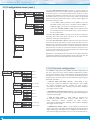
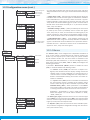
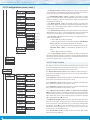
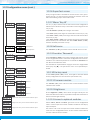
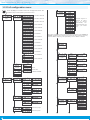
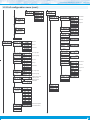
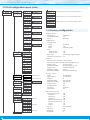
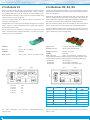
1.13 Full configuration menu
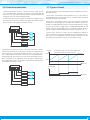
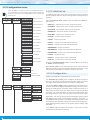
Press ‘SQ’ (<) for 1 second to access the ‘Configuration menu’. See
section 1.12 for a description of each menu entry.
0.00.00 to 99.59.99
Function
mode
View format
Function
on channel ‘B’
0.00.00 to 99.59.59
Function assigned to
channel ‘B’. Selecting a ‘B’ function
automatically
activates connection type
‘Con.2’ (see section
1.6)
0.00.00 to 99.23.59
0.00 to 9999.59
0.00 to 9999.59
0.00 to 9999.23
0 to 999999
0.0 to 99999.9
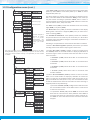
Next menu entry gives access to the configuration parameters of the ‘channel ‘B’
function’ (‘Fn.b’) previously selected. If no function has been selected, menu entry
indicates ‘Fn.b.n’. Following is an explanation for menus ‘Fn.b.1’ to ‘Fn.b.6’.
0.00 to 9999.99
0 to 999999
0.0 to 99999.9
Function B.1
control up / down
0.00 to 9999.99
0 to 999999
0.0 to 99999.9
0.00 to 9999.99
Function B.2
cycles
‘on alarm 1’
‘on alarm 2’
Up
Counting
direction
Preset value
-199999 to 999999
Preset
Configuration
On power-up
‘on alarm 3’
Down
Delay
Seconds
on ‘reset’
Function B.3
accumulated
Format
Reset
State
Flash
Count
‘Flash on stop’
Function B.4
exceeded
‘Flash on start’
activates by edge
Rear reset
14
activates by level
Format