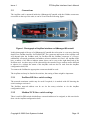
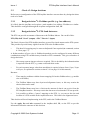
1
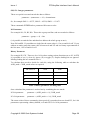
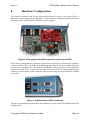
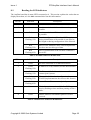
PTS/AnyBus Interface Software User’s Manual Issue 1 September 2003 MAN543 Copyright Notice Copyright 2003 Quin Systems Limited. All rights reserved. Reproduction of this document, in part or whole, by any means, without the prior written consent of Quin Systems Limited is strictly prohibited. SERVOnet is a registered trade mark of Quin Systems Ltd. Software Version This manual reflects the following firmware/software versions: • PTS Firmware version 2.3.1.1 or later • PTS/AnyBus interface version 1.1 Important Notice Quin Systems reserves the right to make changes without notice in the products described in this document in order to improve design or performance and for further product development. Examples given are for illustration only, and no responsibility is assumed for their suitability in particular applications. Although every attempt has been made to ensure the accuracy of the information in this document, Quin Systems assumes no liability for inadvertent errors. Suggestions for improvements in either the products or the documentation are welcome and should be addressed to:Quin Systems Limited Oaklands Business Centre Oaklands Park Wokingham Bershire RG41 2FD Telephone: Facsimilie: E-Mail: WWW Site: 0118 977 1077 0118 977 6728 [email protected] http://www.quin.co.uk/ Issue 1 PTS/AnyBus Interface User’s Manual Contents 1. Introduction 1.1 General 1.2 Structure of this manual 5 5 5 2. Overview of Fieldbus Functionality 2.1 Basic Functionality (Fieldbus independent) 2.2 Profibus-DP slave for PTS systems 2.3 Modbus/TCP slave for PTS systems 6 6 8 8 3. Getting started guide 3.1 Check #1: Equipment and Connections 3.1.1 PTS 3.1.2 Fieldbus Master 3.2 Connections 3.2.1 Profibus-DP Slave switch settings 3.2.2 Modbus/TCP Slave switch settings 3.3 Check #2: Design decisions 3.3.1 Design decision #1: Fieldbus specific (e.g. bus address) 3.3.2 Design decision #2: PTS Send data area 3.3.3 Design decision #3: PTS Receive data area 3.4 Check #3: Configuring PTS 3.5 Check #4: Configuring Fieldbus Master 3.6 Potential Problems 9 9 9 9 10 10 10 11 11 11 12 13 13 13 4. Configuring the PTS to use the AnyBus interface 4.1 Hardware 4.2 Software License Key 4.3 Configuration Shell 4.3.1 Accessing the Shell 4.3.2 Apply Configuration 4.3.3 Clear Mapping 4.3.4 CmdPoll Command 4.3.5 Default Variables 4.3.6 Force Mapping 4.3.7 Info Command 4.3.8 IO Command 4.3.9 List Command 4.3.10 Map a Variable/Array Index/PTS command 4.3.11 Poll interval 4.3.12 Quit/Exit from Shell 4.3.13 Restore Configuration 4.3.14 Save Configuration 4.3.15 Unmap a Variable/Array index/PTS command 4.3.16 Upload Configuration 14 14 14 15 15 16 16 16 16 16 17 17 18 19 21 21 21 22 22 22 5. Fieldbus specific configuration and operation 5.1 Profibus-DP slave 5.1.1 Hardware switch settings 5.1.2 Busaddr Command 23 23 23 23 Copyright © 2003 Quin Systems Limited Page 3 Issue 1 PTS/AnyBus Interface User’s Manual 5.1.3 Mapping AnyBus Profibus-DP slave in the Profibus Master 5.2 Modbus/TCP slave 5.2.1 Hardware switch settings 5.2.2 gateway command 5.2.3 IP command 5.2.4 subnet command 5.2.5 timeout command 23 24 24 24 24 24 24 6. Programming the PTS 6.1 Host I/O 6.2 PTS Variables 6.3 PTS Arrays 6.4 PTS Commands 6.4.1 PTS Command Parameter encoding rules 25 25 26 26 28 28 7. Troubleshooting 7.1 Why isn’t the fieldbus working? 7.2 Apply command not used 7.3 Error messages 7.4 Watchdog LED 31 31 31 32 33 8. Hardware Configuration 8.1 Reading the LED indicators 34 35 Copyright © 2003 Quin Systems Limited Page 4 Issue 1 PTS/AnyBus Interface User’s Manual 1. Introduction 1.1 General This manual relates to the following versions of firmware in the PTS unit: AnyBus Interface PTS Host software Version 1.1 QManager/QControl4 Version 2.3.1.1 or later This document describes the PTS/AnyBus interface implemented on a QManager or QControl4. The AnyBus interface supports a number of different fieldbus interfaces, of which the following are detailed in this document: • Profibus-DP slave • Modbus/TCP slave For other fieldbus interfaces available using AnyBus please contact Quin Systems Ltd. 1.2 Structure of this manual This manual provides details of configuring and using the AnyBus interface in the PTS. The user must be familiar with the operation of the relevant fieldbus, especially with fieldbus configuration and master (e.g. PLC) operation. • Overview of Fieldbus Functionality. This chapter provides fieldbus related information - what functionality is provided by the AnyBus interface for the PTS. • Getting Started Guide. This chapter forms a quick reference for the tasks that need to be undertaken to configure and use the PTS/AnyBus interface. • Configuring AnyBus interface. This chapter provides details on configuring the PTS/ AnyBus interface. • Fieldbus specific AnyBus configuration. This chapter provides additional configuration information that is specific to particular fieldbusses. • Programming PTS system. This chapter shows how to program the PTS to work with the AnyBus interface. • Troubleshooting. This chapter highlights what information the PTS can provide to help troubleshoot the fieldbus connection. • Installation of AnyBus card. This chapter provides hardware installation details for the AnyBus card. Copyright © 2003 Quin Systems Limited Page 5 Issue 1 PTS/AnyBus Interface User’s Manual 2. Overview of Fieldbus Functionality 2.1 Basic Functionality (Fieldbus independent) The AnyBus interface for a PTS provides a means of connecting the PTS Motion control to one of many popular industrial fieldbusses. This connection can be used for higher level (machine) control, HMI and factory information systems. The PTS system is designed to provide flexible and powerful motion control features, the AnyBus interface allows a PLC, HMI, Scada or similar to command and monitor the PTS system in a high level manner. The individual fieldbus will almost certainly provide the overall structure and limitations for this communication, due to it’s individual features. Broadly PTS provides three categories of communication to/from the fieldbus: • Host I/O: this is virtual (no wires) digital inputs and outputs (input into the PTS, output from the PTS) that allow instructions and signals to be passed between the PTS and the fieldbus. This replaces wiring to a PLC for instance. Up to 64 inputs and outputs can be mapped onto the fieldbus. PTS Host digital inputs can be assigned as DI lines, allowing a change in the input to run the assigned PTS user code. • PTS variables and array indexes. PTS variables form a database of information within the PTS system (e.g. product length). A number of these can be mapped to either the send to or receive from the fieldbus. These provide the fieldbus with the ability to transfer decimal information to/from the PTS for product setup, configuration, status, error etc. Each mapped item can be of different sizes (amount of data it can hold) to optimise the use of the fieldbus. PTS variables that are received from the fieldbus can be assigned as trigger variables in the PTS, and any change in the value of the data on the fieldbus that is mapped to the variable will cause the trigger variable to activate and run the assigned PTS user code. • PTS commands. Individual commands (such as DP - display position, or SV - set velocity) can be mapped to either the send to or receive from the fieldbus. This allows direct communication with PTS commands, simplifying the PTS user code. For PTS commands mapped send to fieldbus the data is updated at a configureable rate (optimise to reduce processor load). For PTS commands mapped receive from the fieldbus the PTS command is actioned whenever the fieldbus data changes. The choice of fieldbus will provide certain constraints on the amount of data available to/from the PTS system; as well as the update rates possible. It is also for the user to optimise data and update rates to ensure that information is fresh and response to change is fast, with respect to the operation of the machine. Copyright © 2003 Quin Systems Limited Page 6 Issue 1 PTS/AnyBus Interface User’s Manual The PTS to fieldbus interface provided by the AnyBus card works as follows: • Firstly it requires configuring, via the PB command. • Whenever the PTS starts it reloads the saved AnyBus configuration. • The fieldbus and master (e.g.) PLC needs the same configuration. • The master (e.g. PLC) needs to understand the mapping of PTS host I/O, variables, array indexes and commands that the PTS is using. Once configuration is correct the AnyBus card will automatically start transferring data to/from the fieldbus by endlessly operating the following procedure. • The AnyBus card will provide the PTS with an up-to-date copy of the fieldbus data (PTS receive image). • If host I/O is configured this data will be read. It will be compared with the current setting of the host digital inputs. Any difference will cause the appropriate digital input to change. If a DI line is associated with that particular input it will be triggered. • If the poll interval has elapsed the remainder of the fieldbus to PTS data will be read. This will then be compared with the ’map’ defined in the PTS. For a variable/array index the fieldbus data will be compared with the current value of the variable/array index; if they are different the PTS will be updated. For a trigger variable this will cause it to operate. For a PTS command the value compared is stored in the PTS AnyBus interface (to avoid fetching it for comparison purposes every time) and starts at 0. Any change from this will cause the appropriate PTS command to be issued with the new value as parameter. • The PTS releases its hold on the AnyBus card fieldbus receive image and asks to be able to write to the AnyBus card fieldbus send image. • Now the host I/O digital outputs (if configured) are transferred to the PTS send image. • If the poll interval has elapsed the PTS variables and array indexes that are mapped to send onto the fieldbus are transferred to the AnyBus card. The local copy of any PTS command mapped is also transferred. • The AnyBus card is instructed to send this data onto the fieldbus. • If the command poll interval has elapsed the PTS will query the next PTS command in the send map and store the value locally (for loading into the send image next poll cycle). • The AnyBus interface will then pause for up to 4ms, the poll interval counters will be incremented and the process will start again. Copyright © 2003 Quin Systems Limited Page 7 Issue 1 2.2 PTS/AnyBus Interface User’s Manual Profibus-DP slave for PTS systems The Profibus-DP slave complies with Fieldbus type: PROFIBUS-DP EN 50 170 (DIN 19245); Protocol version: ver. 1.10 The Profibus-DP network is designed for high speed data communication between central controllers (PLCs, PCs, etc.) and distributed field devices (I/O, drives, etc.). At the physical level the network consists of a twisted pair, two wire cable using RS-485 signals at baud rates from 9.6kB up to 12MB. Data communication between the central controller (the master) and the field devices (the slaves) happens cyclically. On each cycle the master device reads the input data from the slaves and writes the output data to the slaves. The amount of data read or written is limited to 512 bytes and is fixed during network configuration. The Profibus-DP slave for PTS using the AnyBus card provides: • Up to 244 bytes send. • Up to 244 bytes receive. • Up to 416 bytes total send + receive. • Configureable bus address and optional network terminator. • Auto sensing baud rate 9.6kB to 12MB. • Hardware prepared for DP-V1 extensions. A more typical data quantity would be up to 32 bytes send and 32 bytes receive. For full technical specification refer to FIELDBUS APPENDIX - ANYBUS-S PROFIBUS DP DOC. NO ABS-PDP-1.32 available from Quin Systems, on the PTS Toolkit CD or http:// www.anybus.com 2.3 Modbus/TCP slave for PTS systems The Modbus/TCP slave interface complies with Modbus/TCP specification 1.0. It's possible to use up to eight Modbus/TCP connections simultaneously. The module supports all the Modbus commands according to class 0 and class 1, and some of the commands in class 2. Modbus/TCP is an implementation of the popular serial protocol encapsulated in TCP/IP Ethernet packets. Access is provided to registers within the PTS which can be configured using the AnyBus shell. This access is via Modbus commands 1, 2, 3, 4 and 23 for read; in either byte or word addressing. For write Modbus commands 5, 6, 15, 16, 22 and 23 may be used. The PTS/AnyBus interface provides a maximum of 512 bytes send and 512 bytes receive. For full technical specification refer to FIELDBUS APPENDIX - ANYBUS-S ETHERNET MODBUS/TCP DOC. NO ABS-ETH-MBTCP-1.91 available from Quin Systems, on the PTS Toolkit CD or http://www.anybus.com Copyright © 2003 Quin Systems Limited Page 8 Issue 1 3. PTS/AnyBus Interface User’s Manual Getting started guide This section forms a guide to configuring the PTS/AnyBus interface and should be used as a check list; follow the references to other sections of this manual. 3.1 Check #1: Equipment and Connections There are two distinct parts to the configuration of the PTS/AnyBus interface: 3.1.1 PTS The PTS system should be equipped with AnyBus daughter board and software key; see section 4. on page 14 of this manual. Configuring the PTS is done via PTS Terminal, part of PTS Toolkit 2000. You need to be familiar with PTS Terminal and have a serial or ethernet connection to the PTS system. 3.1.2 Fieldbus Master You need to be familiar with the use and configuration of your chosen fieldbus master. Typically this means having an "information" file which provides information about the slave device. These can be obtained from Quin Systems Ltd., the PTS Toolkit 2000 CD or at http:/ /www.anybus.com/ Copyright © 2003 Quin Systems Limited Page 9 Issue 1 3.2 PTS/AnyBus Interface User’s Manual Connections The AnyBus card is mounted inside the QManager/QControl4 with the fieldbus connectors accessible on the top of the unit; as can be seen from the following figure: Figure 1. Photograph of AnyBus interface on QManager/QControl4 In this photograph of the top of a QManager/QControl4 the red section is a cut-away showing detail of an AnyBus interface for Profibus-DP. The connector and layout of the AnyBus card will depend upon the fieldbus used; for Profibus-DP the fieldbus connector is a D-type, additionally a network terminator and address selector switches are fitted. All AnyBus cards have a matrix of 4 LEDs to indicate status; these can be seen at the right hand end of the Profibus card. As these may well be obscured by the encoder D-type sockets and be difficult to observe in a cabinet the status of the AnyBus card can also be read from the AnyBus configuration shell, PB. To connect the fieldbus the appropriate connector should be used. The AnyBus card may be fitted with switches, the setting of these might be important: 3.2.1 Profibus-DP Slave switch settings The network terminator switch may be used if required; it is marked with ON showing the switch setting to activate it. The Profibus network address can be set via the rotary switches or via the AnyBus configuration shell. 3.2.2 Modbus/TCP Slave switch settings There is an 8 bit DIP switch which allows a network address to be assigned, or this can also be done via the AnyBus configuration shell. Copyright © 2003 Quin Systems Limited Page 10 Issue 1 PTS/AnyBus Interface User’s Manual Check #2: Design decisions 3.3 Before any (re)configuration of the PTS/AnyBus interface can start three key design decisions need to be made. Design decision #1: Fieldbus specific (e.g. bus address) 3.3.1 It is likely that the AnyBus card requires a node number, bus address, IP address or similar. This should be configured through the AnyBus configuration shell, PB. Design decision #2: PTS Send data area 3.3.2 The PTS can provide an amount of data sent to the Fieldbus Master. Be careful of this: PTS (PB) shell "Send" (output) = PLC "Receive" (input) The first 0-8 bytes of the PTS/AnyBus interface are used for virtual outputs on the PTS system. This provides up to 64 binary signals from the PTS to the fieldbus master. • This host I/O mapping may be removed/adjusted if not required (io command, section 4.3.8 on page 17). A further number of bytes (size is fieldbus dependent) can be configured in many different combinations using PTS variables/array elements or PTS commands. This gives a number of design decisions: • How many separate integer values are required. This is decided by the information that is required from the PTS, e.g. status codes and faults codes. • For each separate integer value how much data is required (choose from 1 byte, 2 byte or 4 byte, as explained in section section 4.3.10 on page 19 of this manual). But note: • There may be problems with the chosen mapping if it breaks fieldbus rules (e.g. module size on Profibus). • The Fieldbus Master may have byte/word alignment issues; so this may restrict the choices that can be made. • The Fieldbus Master may have a limit on the amount of data it can receive from the PTS/AnyBus interface - this may restrict the data area to less than the PTS can provide. • It is possible to define a "sparse" mapping on the PTS, i.e. you can set the size and location of a PTS variable in the Anybus data area. This allows for alignment issues. This decision will need implementing in the PTS, and in the Fieldbus Master. Use the apply, list and info command in the AnyBus shell, PB, on the PTS to provide information about the outcome of this decision. Copyright © 2003 Quin Systems Limited Page 11 Issue 1 PTS/AnyBus Interface User’s Manual Design decision #3: PTS Receive data area 3.3.3 The PTS can receive data from the fieldbus. Be careful of this: PTS (PB) shell "Receive" (input) = PLC "Send" (output) The first 0-8 bytes of the PTS/AnyBus interface are used for virtual inputs on the PTS system. This provides 64 binary signals from the fieldbus master to the PTS. • This host I/O mapping may be removed/adjusted if not required (io command, section 4.3.8 on page 17). A further number of bytes (size is fieldbus dependent) can be configured in many different combinations using PTS variables or array indexes. This gives a number of design decisions: • How many separate integer values are required. This is decided by the information that is required by the PTS, e.g. instructions or configuration values. • For each separate integer value how much data is required (choose from 1 byte, 2 byte or 4 byte, as explained in section section 4.3.10 on page 19 of this manual). But note: • There may be problems with the chosen mapping if it breaks fieldbus rules (e.g. module size on Profibus). • The Fieldbus Master may have a limit on the amount of data it can send to the PTS/ Anybus interface - this may restrict the data area to less than the PTS can accept. • The send data area does not need to be an exact duplicate of the receive data area; different PTS variables and different data sizes can be used. • It is possible to define a "sparse" mapping on the PTS, i.e. you can set the size and location of a PTS variable in the Anybus data area. This allows for alignment issues. This decision will need implementing in the PTS, and in the Fieldbus Master. Use the apply, list and info command in the AnyBus shell, PB, on the PTS to provide information about the outcome of this decision. Copyright © 2003 Quin Systems Limited Page 12 Issue 1 3.4 PTS/AnyBus Interface User’s Manual Check #3: Configuring PTS Using PTS Terminal enter the PB configuration shell on the PTS system. Using the commands documented in section 4.3 on page 15 of this manual create the PTS variable mapping you have decided upon; following these generic steps: • clear to remove any previous configuration. • set the fieldbus address, e.g. node number or IP address. • io to select how much host I/O is to be used. • map to map a PTS variables, arrays or commands to send and receive data areas (repeat this step until finished). • apply which checks the map for validity and initialises the AnyBus card for use. • list and info to display the results of this work. • save to store this configuration in NVM. • upload to make a record of the configuration (and save the text to PC disk). • quit to end this configuration. 3.5 Check #4: Configuring Fieldbus Master The Fieldbus Master will typically require a configuration file to tell it the capabilities of the PTS/AnyBus interface. How this is done is dependent upon the configuration software used; however the following generic steps will apply: • Install (import) the configuration file into the Fieldbus Master configuration software. • Insert (add) the PTS to the fieldbus network. Look for AnyBus. (you will not find any reference to PTS or Quin). • Configure this addition; bus address, network speed and I/O configuration (send/ receive data area size and type - use the information in the info command from the PTS AnyBus configuration shell, PB). 3.6 Potential Problems There is no automated cross-checking between the PTS configuration, and the Fieldbus Master configuration. Many fieldbusses will not communicate properly unless both the master and slave (PTS) are using matching configurations. Use the info command in the PTS AnyBus shell, PB, to obtain important information about the configuration, state and operation of the fieldbus. Furthermore there is no checking for the PTS variable/array index/command element mapping on the fieldbus master; so it is possible to address only parts of variables/array indexes/ commands, or overlap addresses; use the list command in the PTS AnyBus shell, PB, to obtain an address list of the host I/O and PTS variables/array indexes/commands. Copyright © 2003 Quin Systems Limited Page 13 Issue 1 PTS/AnyBus Interface User’s Manual 4. Configuring the PTS to use the AnyBus interface 4.1 Hardware Before switching the PTS on check that the AnyBus interface board is in place on the processor board. Without this interface board the AnyBus software will not work. Refer to Hardware Configuration on page 34 for a diagram of the QManager/QControl4 and AnyBus interface board. The AnyBus interface board may have some switches for setting network addresses or similar. Often these can be overridden by software configuration. This is detailed in section 5. on page 23. 4.2 Software License Key The software for the AnyBus interface will not operate unless a software key has been entered to enable this option. The software key is different for each PTS and can be obtained from your sales office given the system serial number which can be found by using the SK command as shown below. To enable the software the following command should be entered on Port A (the main programming port) in privileged mode. You enter the text in bold while the PTS displays something similar to the rest. 1> SK Serial number: 006545 Feature Version Key New feature ? anybus Version ? 1.1 Key ? abcd OK Note that the feature name (anybus) must be entered in lower case exactly as shown above. Note also that it is necessary to turn the power off and back on again to run the AnyBus software. The key value is dependent on the unit serial number and should be obtained from your Quin sales office. If the software needs to be disabled, first make a note of the software key in case it is needed in the future. Then proceed as above but simply press the Return key in response to the “Version ?” prompt as follows. 1> SK Serial number: 006545 Feature Version Key anybus 1.1 ABCD New feature ? anybus Version ? Feature anybus removed Copyright © 2003 Quin Systems Limited Page 14 Issue 1 PTS/AnyBus Interface User’s Manual 4.3 Configuration Shell 4.3.1 Accessing the Shell The AnyBus configuration shell is a command interface specific to AnyBus which allows you to fully configure and diagnose the AnyBus board and the fieldbus network in use. Use PTS Terminal, part of PTS Toolkit 2000. Connect to the PTS via serial or ethernet; and ensure the PTS is in privileged mode (PM). To enter the shell type the PB command: 1> PB pb> The pb> prompt shows that the configuration shell is ready for a new command. Typing help makes the shell display a list of available commands as follows (note fieldbus specific commands have been missed from this list): pb> help AnyBus Programming Shell command list ===================================== apply Apply settings now clear Unmap all variables/arrays and PTS commands cmdpoll Set poll interval for updating PTS commands in send map default Reset mapping to the default force Same as map but does not check for overlap information Display anybus configuration information io Set quantity of host digital I/O help Display list of commands list Display current I/O, variable and PTS command mapping map CH<n>/<cmd>[<param>] [<addr>] recv|send [byte|word|long] [signed|unsigned] map <var> [<addr>] recv|send [byte|word|long] [signed|unsigned] Map variable/array/PTS command - items in [] are optional poll Set poll interval for send/recv data other than host I/O quit Quit from this shell restore Restore settings NVM save Save settings NVM stat Statistics unmap CH<n>/<cmd> recv|send unmap <var> recv|send Unmap variable/array/PTS command from receive or send map upload Output current settings (as a log file) If AnyBus is not enabled an error message is displayed instead: 1> PB AnyBus is not enabled 1> In this case you need to enter a software license key as described in section 4.2 on page 14 and cycle the power to the PTS to start the AnyBus software. The remainder of this section lists these commands in alphabetic order: Copyright © 2003 Quin Systems Limited Page 15 Issue 1 4.3.2 PTS/AnyBus Interface User’s Manual Apply Configuration The apply command configures the AnyBus interface for use; it applies all the settings of <fieldbus specific>, io, poll and map. This command should be issued after changes have been made and before any attempt is made to use the AnyBus interface. 4.3.3 Clear Mapping The clear command clears the variable mapping. It is equivalent to unmapping all mapped variables/array indexes/PTS commands. It is normally used to clear to a known empty state before downloading a configuration file. 4.3.4 CmdPoll Command The cmdpoll command sets the delay between successive queries of PTS commands for data. This is used when PTS commands are mapped to the PTS send image via the map command. When the PTS send image is updated a local copy of the PTS command parameter is used. This local copy is updated (one at a time) when the cmdpoll interval elapses. For example if cmdpoll is set to 16, and CH1/DP, CH2/DP, CH3/DP and CH4/DP are mapped to the PTS send image then each of these values will be updated approximately four times per second. {16 cycles per update, 4 updates, AnyBus interface does approximately 256 cycles per second}. 4.3.5 Default Variables The default command maps the default set of variables onto AnyBus. This results in variables $R1 to $R12 being mapped as long (4 bytes) on the receive image; and $P1 to $P12 being mapped as long (4 bytes) on the send image. The default command does NOT change the setting of any other command. 4.3.6 Force Mapping The force command does the same as the map command but does not ask for confirmation if you are about to overwrite an existing entry. It is not intended to be used directly as it is less safe than the map command. It is provided mainly for use by the upload command described section 4.3.16 on page 22. Copyright © 2003 Quin Systems Limited Page 16 Issue 1 4.3.7 PTS/AnyBus Interface User’s Manual Info Command The info command produces a textual output of the current status and configuration of the PTS AnyBus interface: Information Report ================== Hardware -------AnyBus S module Serial: A000A50E Fieldbus type: Profibus-DP Bootloader s/w: V1.21 Application s/w: V2.00 Fieldbus s/w: V1.11 Module s/w: V1.12 Configuration ------------PTS is sending: 56 bytes PTS is receiving: 56 bytes Bus address: 11 Status ---------System is initialised Fieldbus: off-line Checking LEDS: Off-line (no diagnostic) This text provides some very necessary information required to configure the fieldbus master, and also to help diagnose faults. The following lines should be checked: • Firmware name and version. Ensure this is the right type of AnyBus card. • Configuration. This information is required to set up the fieldbus master correctly. • Status. This can have a number of messages depending upon the state of the fieldbus. Additionally the LEDs are read by this command and summarised here. 4.3.8 IO Command The IO command enables or disables the host I/O mapping onto AnyBus. Default is IO 8 i.e. 8 bytes of host I/O (all 64 lines) mapped to AnyBus. Any number of bytes between 0 and 8 is valid; and changes the mapping (see list). Typing IO without a parameter will display the current setting. Note: the host I/O commands work in PTS whatever the setting of this AnyBus configuration parameter. If you address unused lines (not mapped) they will have no effect. Copyright © 2003 Quin Systems Limited Page 17 Issue 1 4.3.9 PTS/AnyBus Interface User’s Manual List Command The list command shows how host I/O, variables, array indexes and commands are mapped onto the receive and send process data images as shown in the following example: pb> list Fieldbus PTS |Fieldbus PTS Offset Receive |Offset Send 0 I/P Grp 10 | 0 O/P Grp 10 1 I/P Grp 11 | 1 O/P Grp 11 2 I/P Grp 12 | 2 O/P Grp 12 3 I/P Grp 13 | 3 O/P Grp 13 4 I/P Grp 14 | 4 O/P Grp 14 5 I/P Grp 15 | 5 O/P Grp 15 6 I/P Grp 16 | 6 O/P Grp 16 7 I/P Grp 17 | 7 O/P Grp 17 8 $R1 (4) | 8 CH1/DP (4) 12 $R2 (4) | 12 CH3/DP (4) 16 $R3 (4) | 16 $P3 (4) 20 $R4 (4) | 20 $P4 (4) 24 $R5 (4) | 24 $P5 (4) 28 $R6 (4) | 28 $P6 (4) 32 $R7 (4) | 32 $P7 (4) 36 $R8 (4) | 36 $P8 (4) 40 $R9 (4) | 40 $P9 (4) 44 $R10 (4) | 44 $P10 (4) 48 $R11 (4) | 48 $P11 (4) 52 $R12 (4) | 52 $P12 (4) 55-END OF RECV IMG-| 55-END OF SEND IMG- The left hand pair of columns show the mapping for data received by the PTS from the fieldbus master. The right hand pair of columns show the mapping for data sent by the PTS to the fieldbus master. The address column shows the byte address within the data image for the object in the next column. The first 8 addresses are used for host I/O groups 10 to 17 (when enabled). Addresses above the host I/O mapping are used for variables/array indexes/PTS commands. In this case the receive and send columns show the variable name followed by the number of bytes mapped in brackets, as well as PTS channel 1 + 3 DP (display position). Copyright © 2003 Quin Systems Limited Page 18 Issue 1 PTS/AnyBus Interface User’s Manual pb> list Fieldbus PTS Offset Receive 0 I/P Grp 10 1 I/P Grp 11 2 I/P Grp 12 3 $PRD (2u) 5 CH1/SV (4) |Fieldbus PTS |Offset Send | 0 O/P Grp 10 | 1 O/P Grp 11 | 2 O/P Grp 12 | 3 CH1/DV (4) | | 7 CH2/RB (2) 9 $Y1[1] (1u) | 9 $STS (2) 10 $Y1[2] (1u) | 11 $Y1[3] (1u) | 11 $ERR (4) 11-END OF RECV IMG-| | 14-END OF SEND IMG- This second example shows a mapping with host I/O limited to 3 bytes (24 lines), and PTS variables, array indexes and PTS commands of different sizes and at different locations. The number in brackets is the number of bytes, and the u (e.g. 1u) means unsigned value. 4.3.10 Map a Variable/Array Index/PTS command The map command maps the specified variable, array index or PTS command onto AnyBus at the address given. If no address is given the item is mapped at the first available address if possible. The item is mapped onto the receive or send process data images by specifying recv or send respectively. The number of bytes mapped can be 1, 2 or 4 by specifying byte, word or long respectively. By default the item is mapped as 4 bytes. If an item is mapped to the PTS receive image as less than 4 bytes its range depends upon whether it is signed or not. Parameter Options Default Comments Variable Array index CH<n>/<cmd> None None Must be specified Address None First available Optional Image recv None Must be specified long See next table send Size byte word long Signed/Unsigned signed signed unsigned Table 1: Map Command Parameters The signed/unsigned parameter used for PTS receive provides "sign extension" to ensure the PTS item (all of which are internally 4 bytes) correctly store the fieldbus information. Copyright © 2003 Quin Systems Limited Page 19 Issue 1 PTS/AnyBus Interface User’s Manual The signed/unsigned parameter does not apply to 4 byte information in the receive map, or to any of the send map. The PTS send map must be interpreted by the fieldbus master; and the user can therefore choose whether to pass signed or unsigned information. This choice must be carefully adhered to in the PTS Send/Recv Size Signed/ Unsigned Range Recv byte signed -128 to +127 unsigned 0 to 255 signed -32768 to 32767 unsigned 0 to 65535 long - -2147483648 to 2147483647 byte - word - the fieldbus master must choose whether to interpret these as signed or unsigned long - word Send Table 2: Effects of signed/unsigned on mapped items The example shows variable $V10 being mapped at address 20 in the receive image with a size of 2 bytes. As the signed/unsigned parameter is not defined this will receive signed data i.e. 32768 to +32767. > map v10 20 recv word When an item is mapped at a specific address a check is made to see if there is already another item overlapping the space. If there is, a message similar to the one below is displayed asking if you want to replace the current item: Mapped address overlaps a receive item Do you want to overwrite with new item ? (Y/N) The new mapping is only made if you respond with Y or y to the message. Copyright © 2003 Quin Systems Limited Page 20 Issue 1 PTS/AnyBus Interface User’s Manual The next example shows array element $VA[11] being mapped at the next available address in the send image with a size of 4 bytes. The signed/unsigned parameter is unnecessary > map va[11] send This example shows the position of channel 1 mapped to the send image (as a long value). > map CH1/DP send The next example shows the speed of channel 7 mapped to the receive image, taking an unsigned value. > map CH7/SV recv word unsigned 4.3.11 Poll interval The poll interval specifies the scanning interval for updating PTS variables, array indexes and PTS commands to/from the fieldbus. Every 4ms (approx.) the PTS will scan the send and receive image for host I/O (if enabled). Every 4ms * Poll interval the PTS will scan the AnyBus send and receive image for PTS variables, array indexes and PTS commands. This value may be set in the range 0 to 255 inclusive; default value is 2. Setting poll to 0 will have a detrimental effect on PTS system performance. N.B. PTS variables and array indexes are updated immediately. PTS commands are stored locally in the AnyBus interface; and there is a difference between the send/recv processes: A received PTS command that differs from the local copy will be sent immediately to the PTS. The PTS send information for each PTS command is updated cyclically using the cmdpoll setting. 4.3.12 Quit/Exit from Shell The exit or quit command exits from the shell back to the normal PTS prompt. NOTE: Remember to use the apply command to apply any changes you have made and the save command to store any changes in non-volatile memory. 4.3.13 Restore Configuration The restore command restores the variable mapping saved in non-volatile memory. The configuration is automatically restored from non-volatile memory on power-up. This command is mainly used to restore the configuration to a known state after you have been experimenting with different settings. (the apply command is automatically run as part of the restore command). Copyright © 2003 Quin Systems Limited Page 21 Issue 1 4.3.14 PTS/AnyBus Interface User’s Manual Save Configuration The save command saves the current variable mapping to non-volatile memory. This configuration will be restored automatically when the unit next powers up. The configuration is not automatically saved so it is important to use the save command whenever you change any setting so that the changes are not lost when you power down. 4.3.15 Unmap a Variable/Array index/PTS command The unmap command unmaps the specified variable, array index or PTS command. You must specify both the variable/array index name/PTS channel + command and which image (send/ recv). The following example shows variable $V10 being removed from the receive image, and CH1/DP being removed from the send image. > unmap v10 recv > unmap CH1/DP send 4.3.16 Upload Configuration The upload command causes all the configuration to be listed to the screen in the form of shell commands. If the result of upload is captured to a file it can be downloaded later to set the AnyBus interface to the same state. This function should be used to keep a record of configuration. Copyright © 2003 Quin Systems Limited Page 22 Issue 1 PTS/AnyBus Interface User’s Manual 5. Fieldbus specific configuration and operation 5.1 Profibus-DP slave There is only one specific configuration for Profibus-DP slave, namely the Profibus address. However there is also the requirement to correctly configure the Profibus Master, and that is detailed in this section as well. 5.1.1 Hardware switch settings The Profibus-DP slave has three switches. Nearest the Profibus connector is a network terminator which can be switched off if not required. The two rotary switches set the Profibus bus address. These can be used, or the busaddr command used instead as this allows a wider range of addresses to be selected. 5.1.2 Busaddr Command The busaddr command sets/reads the Profibus address for the PTS. This can be set to any number between 0 and 126 inclusive (0 means use DIP switch setting). To read the current value use the info command or type busaddr without any parameter. Note: A non-zero value overrides the DIP switches. There is no direct confirmation of the DIP switch setting from the PB shell. 5.1.3 Mapping AnyBus Profibus-DP slave in the Profibus Master Profibus requires the Profibus master to be informed of the capabilities and configuration of each slave device. To do this configuration software is often used; following these generic steps: • The configuration software requires details about the AnyBus card. This is done by importing the hms_1003.gsd file into the configuration software. This GSD file can be obtained from Quin Systems, found on the PTS Toolkit 2000 CD or downloaded from http://www.anybus.com • The AnyBus node requires adding to the Profibus network. This is often a drag and drop action; look for "AnyBus" in the list of devices. • The AnyBus node will require its node address setting - set this to the same as the busaddr command in the PB shell. • The AnyBus node will require a module list creating. This tells the Profibus Master how much data is being sent/received by the AnyBus/PTS system. The total size of the send and receive areas is shown by the info command in the PB shell. The Profibus master will receive the data the PTS is sending. Select "input" modules to make up the total size of data the PTS is sending. The order and size of the individual Copyright © 2003 Quin Systems Limited Page 23 Issue 1 PTS/AnyBus Interface User’s Manual modules is for the user to decide; byte alignment issues and splitting an item across modules must be considered. The Profibus master will send the data that the PTS is receiving. Select "output" modules to make up the total size of data that the PTS is receiving. Again order and size of individual modules is for the user to decide. IMPORTANT: the total size of send and receive MUST match otherwise the Profibus will not work. • Finally the Profibus Master needs to know the make up of the AnyBus/PTS data. Use the list command in the PB shell to show how the data is mapped to individual I/O lines, variables, array indexes and PTS commands. Create the same mapping (by defining symbols for instance) in the Profibus master. Once these steps are complete the Profibus system should communicate and the info command in the PB shell will report the status of this. 5.2 Modbus/TCP slave Modbus/TCP requires Ethernet configuration - note is this the Ethernet interface fitted to the AnyBus board, which is separate from the Ethernet interface fitted to the front panel of the QManager/QControl4. It is assumed that the user is familiar with configuring Ethernet networks. 5.2.1 Hardware switch settings There is a row of 8 DIP switches which allow an IP address to be set; however these only allow a restricted set of addresses; see the IP command in section 5.2.3 on page 24 for more details. 5.2.2 gateway command This sets the default gateway for the AnyBus card. Use the info command to read these settings. 5.2.3 IP command This sets the IP address of the AnyBus card in dotted notation (e.g. 192.168.200.225). Use the info command to read these settings. Setting the IP address to 0.0.0.0 will instruct the AnyBus DIP switches to be used for IP address, gateway and subnet mask. This means the IP address will be 192.168.0.X where X is the DIP switch setting. The subnet mask will be 255.255.255.0 and there will be no gateway. 5.2.4 subnet command This sets the subnet mask of the AnyBus card in dotted notation. A typical setting is 255.255.255.0. Use the info command to read these settings. 5.2.5 timeout command The Modbus protocol has a timeout parameter and this can be changed from its default using this command. The value is in seconds, default being 60 seconds. Copyright © 2003 Quin Systems Limited Page 24 Issue 1 6. PTS/AnyBus Interface User’s Manual Programming the PTS This chapter provides a brief overview to programming the PTS system to use the AnyBus interface. 6.1 Host I/O The PTS host I/O bits map onto the fieldbus such that when the fieldbus master writes to an output bit (w.r.t to master) the result appears in the corresponding PTS host input bit. Similarly when the fieldbus master reads an input bit it gets the contents of the corresponding PTS host output bit. The PTS supports 8 host input groups (10 - 17) and 8 host output groups (10 - 17). Note that the host I/O is system wide and is not channel or node specific like the standard I/O. The host inputs are supported by a subset of the normal input commands as follows: • BIg:[n] Inhibit function input. • DIg:n±/... Define function input (restricted). • EIg:[n] Enable function input. • IIg:n± If input true do command line. • LIg List input line definitions. • MIg:[n] Mask function input. • RIg:[n] Read input line(s) in group g. The host outputs are similarly supported by a subset of the normal output commands as follows: • COg:[n] Clear output line n in group g. • IOg:n± If output true do command line. • LOg List output line definitions. • ROg:[n] Read output line state(s) in group g. • SOg:[n] Set output line n in group g. The following example shows host input line 10:5 being defined as a function input to execute sequence 200. When the fieldbus master sets output number 5 then the corresponding host input is set and the function input is triggered to execute sequence 200. DI10:5+/XS200 Copyright © 2003 Quin Systems Limited Page 25 Issue 1 6.2 PTS/AnyBus Interface User’s Manual PTS Variables The variable database is a centralized facility which is accessible to all tasks in the PTS system and holds a set of integer variables. Because variables are generally accessible, it is possible for the user to change a variable index via Profibus and for the variable index to be used subsequently to set a motor parameter in the PTS. Similarly a variable index can be set to some motor parameter, such as the position, which can then be read over Profibus. A variable can also be set up to trigger execution of a command string on the PTS. A variable can be set to a constant value using ‘=’ (equals). For example the following command sets the variable $SPD to a value of 5000. 1> $SPD=5000 A variable can be used in place of a numeric parameter in most commands. For example the following command sets the velocity to the value of the variable $SPD which is currently 5000. If the variable has not been assigned a value, then the “undefined variable” error message is displayed. 1> SV$SPD Conversely it is possible to query a parameter and place the result in a variable. The following example updates variable $SPD with the current velocity value. 1> $SPD=SV A variable (not an array index) can be defined as a trigger variable so that when it is updated a string of commands is executed. The following example defines $SPD as a trigger variable which causes the velocity to be set to the value of $SPD each time the variable is updated. 1> $SPD>CH1/SV$SPD 6.3 PTS Arrays An array is effectively a block of variables which can be referenced by the index number. Before an array can be used it must be created using the IA command, for example: IA$A[10] This creates an array $A with 10 elements $A[1], $A[2], $A[3] up to $A[10]. Each element of the array can be used in the same way as a variable namely as a command parameter or with query commands. The following example shows a position being read into an array element and then being used in an expression. CH1/$A[1]=DP/RF(100+$A[1]) The array index can be a constant, a variable or an expression. The following example sets the elements of a speed array to ascending values. IA$V[10] $I=1 $V[$I]=($I*1000)/$I=($I+1)/RP9 Copyright © 2003 Quin Systems Limited Page 26 Issue 1 PTS/AnyBus Interface User’s Manual Arrays are particularly useful with AnyBus when you have a number of different products and you need to set up a number of parameters for each product. Say for example you are designing a cut to length machine which must be able to make 20 different products. For each product there is a cut length, a registration offset and a maximum machine speed. This would normally require 60 variables, a switch sequence and 20 set up sequences similar to the following to change product. ES100 XS(100+PNO) ES101 $M01=$L1 RF$R1 SV($S1/2) ES102 $M01=$L2 .... .... ES120 $M01=$L20 RF$R20 SV($S20/2) Sequence 100 is run when a new product number ($PNO) is selected. This switches to a set up sequence (101 to 120) which sets the master axis length for the Motion Generator, sets the reference offset and sets the initial speed at half the maximum. If you use arrays, however, the solution becomes much simpler. You only need 3 arrays and a single sequence. IA$LEN[20] IA$RF[20] IA$MAX[20] ES100 $M01=$LEN[$PNO] RF$RF[$PNO] SV($MAX[$PNO]/2) You now only need one set up sequence because you can use the product number ($PNO) as an array index to select the correct array element for the product. Not only is the solution simpler, it is also much easier to make changes. To increase the number of different products all you have to do is to increase the array sizes and increase the upper limit on $PNO. Sequence 100 does not need to change. Without arrays any change to the number of products means writing a lot of extra sequences. If you use arrays, changes to the product handling (change the initial speed to 3/4 of maximum for example) involve changing a single sequence. Without arrays you would have to change dozens of sequences and it would be very easy for mistakes to creep in. Copyright © 2003 Quin Systems Limited Page 27 Issue 1 6.4 PTS/AnyBus Interface User’s Manual PTS Commands PTS commands form the basis for programming a PTS system. They are used individually, in sequences or from triggers such as trigger variables and DI lines. The AnyBus interface additionally lets you map PTS commands directly onto the fieldbus. However a number of rules apply: • The PTS channel number must be provided, in the form CH<n>. No checking is performed to ensure the channel number is valid: if invalid (too high, not present) the PTS will not process the command (but will still spend processor time attempting to execute the function). • For the PTS Send map the PTS command must return a value. For example CH1/DP returns the current motor position. Another example is CH3/R515 which reads input line 3 from group 2. Full encoding rules are given below. • For the PTS Receive map the PTS command must accept a value. For example CH2/ SV or CH1/XS (note the channel number even though it will not be used). • No error reporting is supplied: if a PTS command cannot be read for some reason, or cannot be written (e.g. parameter out of range) there will be no indication on the fieldbus. • Some PTS commands require the parameter to be encoded; the rules are shown below. • Configuration and list commands (such as CF, LA) cannot be used in the AnyBus interface. • PTS commands in the send map are polled for their values using the cmdpoll setting. The number of commands and the update frequency will determine the processor load from this function; be sure to limit this to the minimum required. • PTS commands in the receive map are sent whenever the value changes. Ensure the fieldbus is not continuously changing the value as this will cause high processor load. 6.4.1 PTS Command Parameter encoding rules This section contains an overview of the various encoding rules required for some PTS commands Numeric (integer) parameters Many PTS commands simple take a numerical parameter, e.g. SV. There will be limits to the range of individual parameters. Copyright © 2003 Quin Systems Limited Page 28 Issue 1 PTS/AnyBus Interface User’s Manual SM, SN - Integer parameters These are special cases and encode the data as follows parameter = (numerator << 16) + denominator So, for example SM1/1 = 65537, SM1/2 = 65538, SM2/1 = 131073 These commands EITHER take a parameter OR return a value. IO Parameter For example SO, CO, RI, RO. These take a group and line; and are encoded as follows: parameter = (group << 8) + line (it is possible to omit the line and therefore address the whole group at once) Note: RO and RI: If you address a single line the return value is 1 for on and 0 for off. If you address an entire group the return value is between 0 and 255 and is a binary representation of the line state, 1 for on and 0 for off. Binary Parameter For example SP, CW. These are 8 or 16 bit values setting various functions on or off. In PTS it is possible to set (1), clear (0), ignore (X) or toggle (T). Surplus leading bits are ignored. Missing leading bits are assumed to be 0. To calculate these need to decide for each bit, using the following table to calculate the AND_mask + XOR_mask values as required: Bit VALUE AND XOR 0 0 0 1 0 1 X 1 0 T 1 1 Table 3: Binary parameter encoding rules Once calculated the parameter is worked out by combining the two masks If 8 bit parameter parameter = (AND_mask << 8) | XOR_mask If 16 bit parameter parameter = (AND_mask << 16) | XOR_mask The return value of these commands (when queried) is a number between 0 and 255, for 8 bit parameters representing a binary bitfield, or 0 and 65535 for 16 bit parameters. Copyright © 2003 Quin Systems Limited Page 29 Issue 1 PTS/AnyBus Interface User’s Manual Digital I/O line + sign For example DR For +: parameter = 0x4000 | ((group << 8) + line) For -: parameter = 0xC000 | ((group << 8) + line) No sign: parameter = ((group << 8) + line) The no-sign case is used for un-defining the function, for example DR1:5 undefines DR1:5+ OR DR1:5-. BinaryIO Parameter For example MG, BG. These both take a group number and a binary bit field (b_param) which specifies which lines to mask/block. b_param is a number between 0 and 255, representing a binary code for the digital lines. To set a value follow this formula: parameter = 0x01000000 | ((group << 16) + b_param) To read a value omit both the flag number and the line: parameter = (group << 16) Nodechan-Parameter An example of this type of parameter is ML, used in the MLnode:channel format. parameter = (node << 8) + chan Groupmask-Parameter For example OC. parameter = (group << 8) + mask Decimalsign Parameter For example XP; where XP4- means run the profile backwards… For a + sign: parameter = 0x0100 | value For a - sign: parameter = 0xFF00 | value (n.b. value must be in the range 0 to 255) Copyright © 2003 Quin Systems Limited Page 30 Issue 1 7. PTS/AnyBus Interface User’s Manual Troubleshooting This chapter is intended to give troubleshooting and diagnostic information. It is imperative that the user is familiar with both the fieldbus and the fieldbus master configuration, as these are outside the scope of this document. 7.1 Why isn’t the fieldbus working? Many fieldbusses require the slave (or all slaves) and the master to be correctly configured, and this often means "compatible" i.e. that both are expecting the same quantity of information or messages on the field. Use the info command in the AnyBus shell to obtain important information about the configuration of the AnyBus card for the fieldbus in question; this will include: • The size of the send and receive images • The network address • A read-out of the status as shown on the LEDs on the AnyBus card This information should reveal the state and configuration of the fieldbus, or rather the slave device. Cross-check that the fieldbus master configuration matches this. 7.2 Apply command not used If you make changes to the send/receive image in the AnyBus shell, these need applying before they will take effect. The apply command will update the fieldbus; here is part of the list command output - and as can be seen the receive image ends before the end of the mapped items - because something has been added via the map command; but no apply command has been issued: 36 $R8 (4) | 40 $R9 (4) | 44 $R10 (4) | 48 $R11 (4) | 52 $R12 (4) | 55-END OF RECV IMG-| 56 $I[1] (4) | 36 $P8 (4) 40 $P9 (4) 44 $P10 (4) 48 $P11 (4) 52 $P12 (4) 55-END OF SEND IMG- This also applies to other commands such as IO - in fact any command that can change the mapping in the send or receive images, or fieldbus specific configuration, requires an apply command to update the AnyBus/fieldbus system. After changes such as these it may also be necessary to reconfigure the fieldbus master, and restart the fieldbus. Copyright © 2003 Quin Systems Limited Page 31 Issue 1 7.3 PTS/AnyBus Interface User’s Manual Error messages There are a number of error messages that the AnyBus shell may report; these are listed here with explanations: OK Report from various functions, such as apply, when the function succeeds. Problem saving - file write failure This means the save command did not work - contact Quin Systems. Problem saving - cannot create file This means the save command did not work - contact Quin Systems. APPLY command failed (both send and receive maps are empty) Some data is required - so map some data and/or Host I/O. APPLY command failed (receive image too large) Some fieldbusses limit the size of map, reduce the number of items. APPLY command failed (send image too large) Some fieldbusses limit the size of map, reduce the number of items. APPLY command failed (total send + receive image too large) Some fieldbusses limit the total size of both maps, reduce the number of items. APPLY command failed This can fail for a number of reasons which are hardware specific: (AnyBus board not working) (INIT command not accepted) (timeout waiting for AnyBus board) (AnyBus hardware check failed) for all of these please contact Quin Systems. Invalid entry (range <number>-<number>) Any command that takes an entry within a certain range (e.g. Profibus node address) can report this error if the entry is out of the valid range. Nothing specified The map, unmap and force command report this if there is nothing after the command name. Invalid PTS command specification The map, unmap and force command report this if the PTS command cannot be evaluated (format CH<number>/<command>[<parameter>]). Invalid parameter for MAP command This is reported by the map command if the AnyBus shell cannot interpret the information such as byte/word/long and signed/unsigned. Invalid variable specified Copyright © 2003 Quin Systems Limited Page 32 Issue 1 PTS/AnyBus Interface User’s Manual The map, unmap and force command report this if no variable is specified, or if the text given is not a valid PTS variable/array name. Mapped address is out of range or Invalid address specified The map and force command reports this if the address given is not in the valid range (or does not make sense as a number). Please specify SEND or RECV The map, unmap and force command report this if the send/recv parameter is missing. Invalid parameter for MAP command [more text] The map and force command report this for any parameter(s) not recognised. No space for new item The map routine reports this if the new item would overlap an old item, and you choose not to overwrite the old item; hence the new item cannot fit - there is not space for it in the map. No file found (set to default) The restore command will report this is there is nothing saved. Item not found The unmap command reports this if the given variable/array index/PTS command cannot be found in the given map (send or recv) - so it cannot be unmapped. 7.4 Watchdog LED The AnyBus card is fitted with a watchdog LED. This is a surface-mount two colour LED located on the AnyBus card. It tends to be in a white case, and it’s location differs for different fieldbusses. This LED gives some basic diagnostics: Watchdog function Colour Frequency Red 2 Hz Module not initialised Green 2 Hz Module initialised and running OK Green 1 Hz RAM check fault Red 1 Hz DPRAM check fault Red 4 Hz ASIC and FLASH ROM check fault Table 4: Watchdog indication on AnyBus board During normal operation this LED will flash green at 1 Hz. During the apply command this LED will briefly go out, and flash at 2 Hz, before reverting to 1 Hz. Copyright © 2003 Quin Systems Limited Page 33 Issue 1 8. PTS/AnyBus Interface User’s Manual Hardware Configuration The AnyBus expansion card for the QManager/QControl4 is fitted to the main PCB by a multiway connector and some spacing pillars. As the metal case requires the appropriate cutout the fitting of this card should be performed by Quin Systems. Figure 2. Photograph of AnyBus expansion card on main PCB In the above photograph the expansion card has been coloured red. Note that the multiway connector fitted to the main PCB (of the QManager/QControl4) has more sockets than there are pins on the AnyBus card. The AnyBus card should be fitted so that pin 1 of the multiway connector is filled. Pin 1 is nearest the top edge of the main PCB. This means that the spare socket(s) is at the bottom of the connector, away from the edge of the PCB and the fieldbus connectors. Figure 3. AnyBus Status LEDs numbering The above annotated photograph shows the numbering (in red) of the status LEDs fitted to the AnyBus board. Copyright © 2003 Quin Systems Limited Page 34 Issue 1 PTS/AnyBus Interface User’s Manual 8.1 Reading the LED indicators The AnyBus board has 4 status LED’s mounted to it. This section explains the codes that are displayed on them; n.b. the info command also lists this information: LED no. Indication Description 1 - 2 Green 3 Red On when module is Off-line and no data exchange is possible. 4 Red Flashing 1 Hz Error in configuration: IN and/or OUT length set during initialisation of the module is not equal to the length set during configuration of the network. Red Flashing 2 Hz Error in User Parameter data: current implementation does not use this type of data. Red Flashing 4 Hz Error in initialisation of the Profibus communication ASIC. Not Used. On when module is Online and data exchange is possible. Table 5: Profibus Status LED indication LED no. Indication Description 1 Green 2 Green Flashing 1 Hz IP address is set by software, not the DIP switches. Red Flashing 1 Hz The Ethernet MAC address is incorrect. Please contact Quin Systems. Red Flashing 2 Hz The module failed to load configuration from FLASH (implementation does not use this feature). Red Flashing 4 Hz Internal Error. Please contact Quin Systems. On when connected to an Ethernet network. 3 Green This indicates the number of Modbus/TCP connections by flashing n times and then pausing off for a while. 4 Green Flashes whenever an Ethernet packet is sent or received. Table 6: Modbus/TCP Status LED indication Copyright © 2003 Quin Systems Limited Page 35 Issue 1 PTS/AnyBus Interface User’s Manual Index $P $R = variable assignment 16 16 26 A apply configuration arrays IA command mapping unmapping 8 19 I/O enable/disable IA create array info command information input line definitions introduction IP address 17 26 17 17 25 5 24 L C clear mapping CmdPoll Configuration configuration shell configuring hardware PTS cycle of operation 15 6 25 17 I 16 26 26 16, 19 22 B baud rate byte help command Host I/O host I/O enable/disable 16 16 17 15 34 14 7 LED indicators Profibus LI license key disable enable list input line definitions list variables long 35 25 14 14 14 25 18 19 E encoding rules for PTS commands error messages Profibus is not enabled Profibus shell undefined variable Ethernet addresses exit from shell 28 15 32 26 24 21 16 24 23 H Hardware hardware configuration 16 19 8 24 8 non-volatile memory 21, 22 O G gateway address GSD file map default variables map variable Modbus commands Modbus timeout Modbus/TCP N F force variable M 17 34 Copyright © 2003 Quin Systems Limited operation cycle 7 P PB command Poll interval Profibus address 15 21 23 Page 36 Issue 1 Profibus GSD Profibus-DP programming PTS PTS arrays PTS command encoding PTS commands PTS Terminal PTS variables PTS/AnyBus Interface User’s Manual 23 8 25 6 28 6 9 6 R recv restore configuration 19 21 S save configuration scan send shell accessing apply busaddr clear default error messages exit force gateway help info IO IP list mapvar poll interval Profibus address quit 22 21 19 15 15 16 23 16 16 32 21 16 24 15 17 17 24 18 19 21 23 21 Copyright © 2003 Quin Systems Limited restore save subnet timeout unmap upload SK command software license key software versions Status subnet address 21 22 24 24 22 22 14 14 5 17 24 T timeout (Modbus) trigger variable Troubleshooting 24 26 31 U undefined variable unmap variable upload configuration 26 22 22 V variables as parameters assignment default mapping query command trigger unmapping 26 26 16 16, 19 26 26 22 W Watchdog LED word 33 19 Page 37 Issue 1 Copyright © 2003 Quin Systems Limited PTS/AnyBus Interface User’s Manual Page 38