1
Product Overview
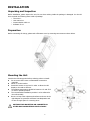
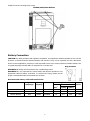
SP5000 Brilliant single Model
SP2000/3000 Brilliant
SP5000 Brilliant parallel Model
1. LCD display
NOTE: For parallel model installation and operation,
please check separate parallel installation guide for
the details.
2. Status indicator
3. Charging indicator
4. Fault indicator
5. Function buttons
6. Power on/off switch
7. AC input
8. AC output
9. PV input
10. Battery input
11. Circuit breaker
12. RS232 communication port
13. Parallel communication cable (only for parallel model)
314. Current sharing cable (only for parallel model)
15. Dry contact