1
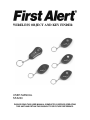
WIRELESS OBJECT AND KEY FINDER
USER MANUAL
SFA200
PLEASE READ THIS USER MANUAL COMPLETELY BEFORE OPERATING
THIS UNIT AND RETAIN THIS BOOKLET FOR FUTURE REFERENCE.
COMPLIANCE WITH FCC REGULATIONS
This device complies with Part 15 of the FCC Rules. Operation is subject to the following
two conditions:
(1) this device may not cause harmful interference, and
(2) this device must accept any interference received, including interference that
may cause undesired operation.
NOTE : This equipment has been tested and found to comply with the limits for a Class
B digital device, pursuant to Part 15 of the FCC Rules. These limits are designed to
provide reasonable protection against harmful interference in a residential installation.
This equipment generates uses and can radiate radio frequency energy and, if not
installed and used in accordance with the instructions, may cause harmful interference
to radio communications. However, there is no guarantee that interference will not occur
in a particular installation. If this equipment does cause harmful interference to radio or
television reception, which can be determined by turning the equipment off and on, the
user is encouraged to try to correct the interference by one or more of the following
measures:
- Reorient or relocate the receiving antenna.
- Increase the separation between the equipment and receiver.
- Connect the equipment into an outlet on a circuit different from that to which the
receiver is connected.
- Consult the dealer or an experienced radio/TV technician for help.
CAUTION: Changes or modifications not expressly approved by the party
responsible for compliance could void the user’s authority to operate the
equipment.
CAUTION
Follow the advice below for safe operations
• This product is intended solely for non-commercial & non-industrial use. Do
not use for any other purpose.
• Do not immerse in water/liquid.
• Do not press the Function Buttons with a ball point pen or any other pointed
object.
• Do not expose the product to direct sunlight for extended periods.
• To avoid damage to internal circuitry, do not expose the product to excessive
humidity or dust.
• Do not drop the product or subject it to a strong impact.
• Do not twist or bend.
ON CONDENSATION
• When left in a heated room where it is warm and damp, water
droplets or condensation may form inside the unit.
• When there is condensation inside the unit, the unit may not function
normally.
• Let it stands for 1 to 2 hours before turning the power on, or gradually heat
the room up and dry the unit before use.
E-1
PRODUCT FEATURES
•
•
•
1 x Transmitter
4 x Receivers
Operates on 433 Mhz
The SFA200 will help you find up to 4 items within 145 feet of the transmitter
(open area).
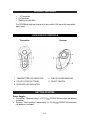
LOCATION OF CONTROLS
Transmitter
Receiver
1 TRANSMITTER LED INDICATOR
4 COLOR CODED MARKING
2 COLOR CODED BUTTONS
5 ON/OFF SWITCH
3 RECEIVER LED INDICATOR
GETTING STARTED
Power Supply :
• Transmitter : Powered using 1 x DC 3V
CR1632 lithium button cell battery
(included).
• Receiver : Each receiver is powered by 2 x DC 6V
CR2032 lithium button
cell batteries (included).
E-2
•
Remove the battery insulator tabs by pulling them out of the battery
compartments on the transmitter and receivers before first use.
Note : Remove and reinstall the batteries if there is no response after pulling out
the insulation tab.
WARNING
DO NOT INGEST BATTERY, CHEMICAL BURN HAZARD
This product contains a coin/button cell battery. If the coin/button cell battery is
swallowed, it can cause severe internal burns in just 2 hours and can lead to
death.
Keep new and used batteries away from children. If the battery compartment
does not close securely, stop using the product and keep it away from children.
If you think batteries might have been swallowed or placed inside any part of the
body, seek immediate medical attention.
BATTERY WARNING
1. Be sure that the batteries are installed correctly. Wrong polarity may damage
the unit
2. Use only the size and type of batteries specified.
3. Do not mix old and new batteries.
4. If the unit is not to be used for an extended period of time, remove the
batteries. Old or leaking batteries can cause damage to the unit and may
void the warranty.
5. Do not try to recharge batteries not intended to be recharged; they can
overheat and rupture. (Follow battery manufacturer’s directions)
6. Do not dispose of batteries in fire, batteries may leak or explode.
PAIRING THE TRANSMITTER WITH THE RECEIVERS
1. The transmitter will automatically turn ON when you remove the battery
insulator tab from the battery compartment on the transmitter.
2. Remove the battery insulator tabs from the receivers.
3. Slide the receiver ON/OFF SWITCH (#5) to the ON position.
4. The LED INDICATOR (#3) on the receiver will flash and a beeping sound will
start. The receiver is now ready for pairing with the transmitter.
5. Press the COLOR CODED BUTTON (#2) on the transmitter that matches the
COLOR CODED MARKING (#4) on the receiver that is beeping.
6. The beep sound will stop and the transmitter is now paired with that receiver.
7. Repeat steps 3 to 6 to pair the other 3 receivers.
Note :
• Make sure the transmitter and receiver are close to each other when pairing.
• If the pairing fails, the beep sound will continue and will not stop.
E-3
•
•
If the pairing fails, turn off the receiver (slide the RECEIVER ON/OFF
SWITCH (#5 ) to the OFF position to reset the receiver. Repeat steps 3 to 6
to try again.
The LED INDICATOR (#3) on the receiver will continue to flash when it is
turned on.
HOW TO FIND THE LOST OBJECT
Attach one of the SFA200 receivers to an object like a set of keys, or something
else that easily gets misplaced. Press the COLOR CODED BUTTON (#2) on the
transmitter. The LED (#1) on the transmitter will turn on for about 4 seconds. The
receiver with same COLOR CODED MARKING (#4) as the button you pressed
on the transmitter will start beeping, and continue beeping for about 10 seconds.
NOTE : Do not press any other button on the transmitter when the
TRANSMITTER LED INDICATOR (#1) is ON.
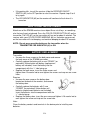
BATTERY REPLACEMENT
Transmitter
• Unscrew the three screws on the back cover and remove
the back cover of the SFA200 transmitter.
• Carefully replace the battery with a new “CR1632” (or
equivalent) lithium button cell battery (replacement
battery not included). Insert the battery into the
compartment with the “+” side facing up.
• Replace the back cover, insert the three screws and
tighten them. Be careful not to over tighten the screws and strip out the screw
holes.
Receiver
• Unscrew the one screw on the battery door
located on the back of the receiver, and remove
the battery door.
• Carefully replace the batteries with 2 new
“CR2032” (or equivalent) lithium button cell
batteries (replacement batteries not included).
Insert the batteries into the compartment with the
“+” side facing up.
• Replace the battery door, insert the one screw and tighten it. Be careful not to
over tighten the screw and strip out the screw hole.
Note :
Clean the battery contacts and terminals in the device prior to installing new
batteries.
E-4
CARE AND MAINTENANCE
•
•
•
Do not use harsh or abrasive cleaners or pads on this product.
A soft, dry or damp (with water) cloth may be used to clean the SFA200.
Store the product in a cool, dry place when not in use.
SPECTRA GREEN NOTICE
At Spectra, environmental and social
responsibility is a core value of our
business. We are dedicated to continuous
implementation of responsible initiatives
with an aim to conserve and maintain the
environment through responsible recycling.
Please visit us at http://www.spectraintl.com/green.htm for more information
on Spectra’s green initiatives or to find a recycler in your area.
©2014 BRK Brands Inc. All rights reserved. First Alert® is a registered trademark
of the First Alert Trust.
1 YEAR LIMITED WARRANTY AND SERVICE
VALID IN THE U.S.A ONLY
This product is manufactured, distributed or sold by SPECTRA MERCHANDISING
INTERNATIONAL, INC., official licensee for this product. All right, title and interest to
use the “First Alert” logo trademarks and the “First Alert” trade dress are exclusively
licensed by BRK Brands, Inc. and are used under license from BRK Brands, Inc.. Please
contact SPECTRA’s Service Department for questions/comments, warranty, support, or
service related to this product.
SPECTRA MERCHANDISING INTERNATIONAL, INC. warrants that this product 1) is
free from defects in materials and workmanship and 2) conforms to its specifications for
a period of 1 year from the date of original customer purchase and provided the product
is utilized within the U.S.A. This warranty is not assignable or transferable. Our
obligation under this warranty is the repair or replacement of the defective unit or any
part thereof, except batteries, when it is returned to the SPECTRA Service Department,
accompanied by proof of the date of original consumer purchase, such as a duplicated
copy of a sales receipt.
You must pay all shipping charges required to ship the product to SPECTRA for
warranty service. If the product is repaired or replaced under warranty, the return
E-5
charges will be at SPECTRA’s expense. There are no other express warranties other
than those stated herein.
This warranty is valid only in accordance with the conditions set forth below:
1. The warranty applies to the SPECTRA product only while:
a. It remains in the possession of the original purchaser and proof of purchase is
demonstrated
b. It has not been subjected to accident, misuse, abuse, improper service, usage
outside the descriptions and warnings covered within the owner’s manual or nonSPECTRA approved modifications
c. Claims are made within the warranty period
2. This warranty does not cover damage or equipment failure caused by electrical
wiring not in compliance with electrical codes or SPECTRA owner’s manual
specifications, or failure to provide reasonable care and necessary maintenance as
outlined in the owner’s manual.
3. Warranty of all SPECTRA products applies to residential use only and is void when
products are used in a nonresidential environment or installed outside the United
States.
This warranty gives you specific legal rights, and you may also have other rights which
vary from state to state. TO OBTAIN SERVICE please remove all batteries (if any) and
pack the unit carefully and send it prepaid by insured parcel post or UPS to SPECTRA at
the address shown below. IF THE UNIT IS RETURNED WITHIN THE WARRANTY
PERIOD shown above, please include a proof of purchase (dated cash register receipt)
so that we may establish your eligibility for warranty service and repair of the unit without
cost. Also include a note with a description explaining how the unit is defective. A
customer service representative may need to contact you regarding the status of your
repair, so include your name, address, phone number and e-mail address to speed the
process.
IF THE UNIT IS OUTSIDE THE WARRANTY PERIOD, please include a check for
$12.00 to cover the cost of repair, handling and return postage. All out of warranty
returns must be sent prepaid.
It is recommended that you contact SPECTRA first at 1-800-777-5331 or by e-mail at
[email protected] for updated information on the unit requiring service. In some
cases the model you have may be discontinued and SPECTRA reserves the right to
offer alternative options for repair or replacement.
SPECTRA MERCHANDISING INTERNATIONAL, INC.
4230 North Normandy Avenue,
Chicago, IL60634, USA.
1-800-777-5331
To register your product, visit the link below on the website to enter your information.
http://www.spectraintl.com/wform.htm
0514
Printed in China
E-6