1
DJ SYSTEM
XDJ-AERO
http://pioneerdj.com/support/
The Pioneer website shown above offers FAQs, information on software and various other types of information
and services to allow you to use your product in greater comfort.
http://rekordbox.com/
For inquiries on rekordbox™, please see the online support site indicated above.
Operating Instructions
Contents
How to read this manual
In this manual, names of channels and buttons indicated on the product, names of menus in the software, etc., are indicated within square
brackets ([ ]). (e.g. [MASTER] channel, [ON/OFF], [File] menu)
Before start
Features........................................................................................................ 3
What’s in the box......................................................................................... 4
Before you start
Playable USB devices.................................................................................. 5
Playable music file formats........................................................................ 5
Functions usable in combination with a computer................................. 6
About the rekordbox (Mac/Windows) music management software.... 7
Installing the driver software...................................................................... 8
Connections
Connecting the input/output terminals................................................... 10
Connecting by wireless LAN..................................................................... 11
Part names and functions
Power & wireless section.......................................................................... 15
USB device section.................................................................................... 15
Player section............................................................................................. 16
Browse section.......................................................................................... 18
Mixer section.............................................................................................. 20
Effect section.............................................................................................. 21
Basic Operation
Installing rekordbox (iOS/Android).......................................................... 22
Importing tracks........................................................................................ 22
Loading tracks............................................................................................ 22
Outputting sound...................................................................................... 23
Mixing using the faders............................................................................. 24
Disconnecting links................................................................................... 24
Advanced Operation
Using the auto mix function..................................................................... 25
Using the sample launch function.......................................................... 25
Using the jog drum function.................................................................... 26
Using the QUANTIZE function................................................................. 26
Using the SYNC function.......................................................................... 26
Using the DJ software............................................................................... 26
About the playback history (HISTORY).................................................... 26
Changing the settings
About the auto standby function.............................................................. 27
Setting preferences................................................................................... 27
List of WLAN INFORMATION items......................................................... 27
List of WLAN SETTING items.................................................................... 28
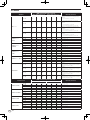
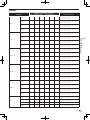
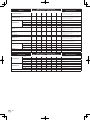
List of MIDI Messages
1 Player....................................................................................................... 29
2 Effects...................................................................................................... 30
3 Mixer........................................................................................................ 31
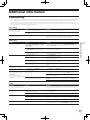
Additional information
Troubleshooting......................................................................................... 33
Error messages.......................................................................................... 35
Block Diagram........................................................................................... 36
List of icons displayed on the main unit display section........................ 36
About trademarks and registered trademarks....................................... 36
Cautions on copyrights............................................................................. 36
Using the online support site................................................................... 37
2
En
Before start
Before start
Features
BEAT DISPLAY
This unit is a DJ system integrating a DJ player and DJ mixer in a single
unit and carrying over the high operability of Pioneer’s DJ products, the
world standard for club equipment. Full-fledged DJ performances can
be made easily using tracks not only on USB devices and computers but
also on mobile devices (smartphones, tablets, etc.).
The beat position corresponding to the track’s BPM and the position of
playback are shown on the main unit display. Furthermore, the number
of beats in loops and beat effects are displayed, allowing you to check
the beat visually for scratch, loop and effect performances.
MULTI MEDIA, MULTI FORMAT
In addition to music files stored on flash memory or other USB devices,
music files stored on mobile devices and computers can also be
played. The unit can also be used as a DJ software controller and audio
interface.
USB REC
Sound played on this unit during DJ performances can easily be
recorded on USB devices (flash memory devices, etc.). The recorded
sound can also be played on this unit.
BEAT SYNC
This unit is equipped with a wireless LAN function. DJ performances are
possible with mobile devices or computers connected by wireless LAN.
This function can be used to automatically synchronize the tempo (BPM)
and beat positions on the left and right decks based on the tracks’ GRID
information as analyzed with rekordbox. Genuine beat mixing is possible
easily, without moving the [TEMPO] sliders.
rekordbox (iOS/Android)
JOG DRUM
rekordbox, a smartphone application that can be downloaded free of
charge, can be used for the management (analysis, settings, creation,
history storage) of music files on mobile devices. Using music files managed with rekordbox (iOS/Android) in combination with this unit makes
it possible to achieve outstanding DJ performances.
! In this manual, the iOS/Android edition of rekordbox is referred to as
“rekordbox (iOS/Android)”.
The jog dial’s mode can be switched to produce sound when the jog
dial is touched. This function allows this unit to be used like a sampler.
Furthermore, the sampled sound can be scratched by turning the jog
dial at this time.
WIRELESS CONNECTION
rekordbox (Mac/Windows)
The included rekordbox (Mac/Windows) music management software
can be used for the management (analysis, settings, creation, history
storage) of music files on computers. Using music files managed with
rekordbox (Mac/Windows) in combination with this unit makes it possible to achieve outstanding DJ performances.
! In this manual, the Mac/Windows edition of rekordbox is referred to
as “rekordbox (Mac/Windows)”. “rekordbox” is used to indicate the
editions of rekordbox (Mac/Windows) and rekordbox (iOS/Android)
simultaneously.
LINK EXPORT
When a mobile device or computer is connected by wireless LAN,
rekordbox music files and management data can be exchanged directly.
USB EXPORT
rekordbox (Mac/Windows) music files and management data can be
exchanged using a USB device.
SOUND CARD
This unit is equipped with a dedicated interface for controlling other
brands of DJ software and a MIDI interface. It also has a built-in sound
card, allowing simple connection to other devices.
SAMPLE LAUNCH
Sampled sound sources registered in this unit can be easily loaded onto
the respective decks simply by pressing a button.
QUANTIZE
This unit is equipped with a QUANTIZE function letting you set points
on beat for tracks analyzed with rekordbox, even if buttons are pressed
roughly. When setting auto loop beats and beat effects, the points are
automatically set to the beat nearest the position at which the button
was pressed.
AUTO MIX
Tracks registered in playlists can automatically be played alternately on
[DECK1] and [DECK2]. When the point 30 seconds before the end of
the currently playing track is reached, the two tracks are automatically
mixed and playback of the next track starts.
AUTO BEAT LOOP
Loops can be set automatically without breaking the beat by pressing the [AUTO BEAT LOOP] control. The loop’s number of beats can
be changed by turning the [AUTO BEAT LOOP] control clockwise or
counterclockwise.
BEAT EFFECT
Beat effects are provided for each of the decks. Beat effects can be
applied individually to the tracks currently playing on the respective
deck. Beat effects can also be applied to other devices connected to the
mixer section’s input terminals.
En
3
SOUND COLOR FILTER
Each channel is equipped with a SOUND COLOR FILTER function for
achieving filter effects easily simply by turning the controls. This lets you
arrange and mix tracks intuitively during DJ performances.
3BAND EQ
This unit is equipped with a 3-band equalizer allowing the volume of
the high, medium and low frequency ranges to be adjusted separately.
Not only can the tone be adjusted to your tastes, the sound for a certain
range can be turned completely off by turning the control all the way
counterclockwise (isolator function).
EXTERNAL INPUT
This unit is equipped with inputs for connecting such external devices
as CD players or analog players. DJ performances are possible using the
two sets of inputs, [CH 1] (channel 1) and [CH 2] (channel 2).
What’s in the box
! CD-ROM (containing rekordbox (Mac/Windows), the driver software
and the operating instructions. The rekordbox (Mac/Windows)
license key is attached.)
! AC adapter
! Power cord
! Warranty card
! Read Before Use (Important)
! Quick Start Guide
! Software license notice
4
En
Before you start
This unit supports USB mass storage class USB devices (external hard
disks, portable flash memory devices, digital audio players, etc.).
Folder layers
Max. 8 layers
Max. number of
folders
1 000 folders
Max. number
of files
10 000 files (1 000 files for files not managed by rekordbox
(Mac/Windows))
Supported file
systems
FAT16, FAT32 and HFS+
When there are many folders or files, some time may be required for
loading.
Folders and files exceeding the limits cannot be displayed.
USB devices that cannot be used
! Optical disc type devices such as external DVD/CD drives, etc., are
not supported.
! USB hubs cannot be used.
Cautions on using USB devices
! Some USB devices may not operate properly on this unit. Note that
Pioneer will accept no responsibility whatsoever for any loss of data
recorded on USB devices resulting from connection to this unit.
! It may happen that, when a current above the allowable level is
detected in this unit’s USB port, the [USB STOP] indicator flashes,
the power supply to the USB device is cut off and communications
with the USB device are interrupted. To restore normal operation,
disconnect the USB device from this unit. Avoid reusing USB devices
for which an excess current has been detected. If normal operation
is not restored (if communications cannot be established) after the
above procedure is performed, try turning off this unit’s power then
turning it back on.
! If the USB device is split into multiple partitions, only the first partition can be used.
! USB devices equipped with flash card readers may not operate.
! Depending on the USB device you are using, the desired performance may not be achieved.
! For devices formatted in MAC OS Extended (Journaled), the rekordbox (Mac/Windows) library information cannot be used.
Before you start
Playable USB devices
Playable music file formats
This unit supports music files in the formats shown below.
Type
File extension
Compatible formats
Bit depth
Bit rate
Sampling frequency
Encoding method
MP3
.mp3
MPEG-1
16 bit
32 kbps to
320 kbps
44.1 kHz, 48 kHz
CBR, VBR
AAC
.m4a, .aac and .mp4
MPEG-4 AAC LC
16 bit
16 kbps to
320 kbps
44.1 kHz, 48 kHz
CBR, VBR
WAV
.wav
WAV
16 bit, 24 bit
—
44.1 kHz, 48 kHz
Uncompressed PCM
AIFF
.aif, .aiff
AIFF
16 bit, 24 bit
—
44.1 kHz, 48 kHz
Uncompressed PCM
About MP3 files
About WAV and AIFF files
MP3 files can have a constant bit rate (CBR) or a variable bit rate (VBR).
Both types of files can be played on this unit, but the search and super
fast search functions are slower with VBR files. If your priority is operability, we recommend recording MP3 files in CBR.
File transfer via wireless LAN is not supported for WAV and AIFF files.
About AAC files
! AAC is the abbreviation of “Advanced Audio Coding”, a basic format
of audio compression technology used for MPEG-2 and MPEG-4.
! The file format and extension of AAC data depends on the application used to create the data.
! On this unit, in addition to AAC files encoded with iTunes® and with
the extension “.m4a”, files with the extensions “.aac” and “.mp4” files
can also be played. However, AAC files that are copyright-protected,
such as those purchased from the iTunes Store, cannot be played.
Also, depending on the version of iTunes in which the file was
encoded, it may not be possible to play the file.
En
5
Functions usable in combination with a computer
About the included CD-ROM
This unit can be used in combination with a computer when the software
is installed onto the computer from the included CD-ROM.
The included CD-ROM contains the following two software programs.
rekordbox (Mac/Windows) music management
software
Music files used for DJ play can be managed. The management information can be transferred using USB devices (page 7).
Driver software
When operating DJ software on the computer using this unit, the sound
of the music file that is playing can be output from this unit (page 8).
Software end user license agreement
This Software End User License Agreement (“Agreement”) is between
you (both the individual installing the Program and any single legal
entity for which the individual is acting) (“You” or “Your”) and PIONEER
CORPORATION (“Pioneer”).
TAKING ANY STEP TO SET UP OR INSTALL THE PROGRAM MEANS
THAT YOU ACCEPT ALL OF THE TERMS OF THIS LICENSE AGREEMENT.
PERMISSION TO DOWNLOAD AND/OR USE THE PROGRAM IS
EXPRESSLY CONDITIONED ON YOUR FOLLOWING THESE TERMS.
WRITTEN OR ELECTRONIC APPROVAL IS NOT REQUIRED TO MAKE
THIS AGREEMENT VALID AND ENFORCEABLE. IF YOU DO NOT
AGREE TO ALL OF THE TERMS OF THIS AGREEMENT, YOU ARE NOT
AUTHORIZED TO USE THE PROGRAM AND MUST STOP INSTALLING IT
OR UNINSTALL IT, AS APPLICABLE.
1Definitions
1 “Documentation” means written documentation, specifications
and help content made generally available by Pioneer to aid in
installing and using the Program.
2 “Program” means all or any part of Pioneer’s software licensed to
You by Pioneer under this Agreement.
2 Program license
1 Limited License. Subject to this Agreement’s restrictions,
Pioneer grants to You a limited, non-exclusive, nontransferable,
license (without the right to sublicense):
a To install a single copy of the Program on the hard disk
drive of Your computer, to use the Program only for Your
personal purpose complying with this Agreement and the
Documentation (“Authorized Use”);
b To use the Documentation in support of Your Authorized Use;
and
c To make one copy of the Program solely for backup purposes, provided that all titles and trademark, copyright and
restricted rights notices are reproduced on the copy.
2 Restrictions. You will not copy or use the Program or
Documentation except as expressly permitted by this Agreement.
You will not transfer, sublicense, rent, lease or lend the Program,
or use it for third-party training, commercial time-sharing or
service bureau use. You will not Yourself or through any third
party modify, reverse engineer, disassemble or decompile the
Program, except to the extent expressly permitted by applicable
law, and then only after You have notified Pioneer in writing of
Your intended activities. You will not use the Program on multiple
processors without Pioneer’s prior written consent.
3 Ownership. Pioneer or its licensor retains all right, title and
interest in and to all patent, copyright, trademark, trade secret
and other intellectual property rights in the Program and
Documentation, and any derivative works thereof. You do not
acquire any other rights, express or implied, beyond the limited
license set forth in this Agreement.
6
En
4 No Support. Pioneer has no obligation to provide support,
maintenance, upgrades, modifications or new releases for the
Program or Documentation under this Agreement.
3 Warranty disclaimer
THE PROGRAM AND DOCUMENTATION ARE PROVIDED “AS IS”
WITHOUT ANY REPRESENTATIONS OR WARRANTIES, AND YOU
AGREE TO USE THEM AT YOUR SOLE RISK. TO THE FULLEST EXTENT
PERMISSIBLE BY LAW, PIONEER EXPRESSLY DISCLAIMS ALL
WARRANTIES OF ANY KIND WITH RESPECT TO THE PROGRAM AND
DOCUMENTATION, WHETHER EXPRESS, IMPLIED, STATUTORY,
OR ARISING OUT OF COURSE OF PERFORMANCE, COURSE OF
DEALING OR USAGE OF TRADE, INCLUDING ANY WARRANTIES
OF MERCHANTABILITY, FITNESS FOR A PARTICULAR PURPOSE,
SATISFACTORY QUALITY, ACCURACY, TITLE OR NON-INFRINGEMENT.
4 Damages and remedies for breach
You agree that any breach of this Agreement’s restrictions would cause
Pioneer irreparable harm for which money damages alone would be
inadequate. In addition to damages and any other remedies to which
Pioneer may be entitled, You agree that Pioneer may seek injunctive
relief to prevent the actual, threatened or continued breach of this
Agreement.
5Termination
Pioneer may terminate this Agreement at any time upon Your breach of
any provision. If this Agreement is terminated, You will stop using the
Program, permanently delete it from the computer where it resides, and
destroy all copies of the Program and Documentation in Your possession, confirming to Pioneer in writing that You have done so. Sections
2.2, 2.3, 2.4, 3, 4, 5 and 6 will continue in effect after this Agreement’s
termination.
6 General terms
1 Limitation of Liability. In no event will Pioneer or its subsidiaries
be liable in connection with this Agreement or its subject matter,
under any theory of liability, for any indirect, incidental, special,
consequential or punitive damages, or damages for lost profits,
revenue, business, savings, data, use, or cost of substitute procurement, even if advised of the possibility of such damages or if
such damages are foreseeable. In no event will Pioneer’s liability
for all damages exceed the amounts actually paid by You to
Pioneer or its subsidiaries for the Program. The parties acknowledge that the liability limits and risk allocation in this Agreement
are reflected in the Program price and are essential elements of
the bargain between the parties, without which Pioneer would
not have provided the Program or entered into this Agreement.
2 The limitations or exclusions of warranties and liability contained
in this Agreement do not affect or prejudice Your statutory rights
as consumer and shall apply to You only to the extent such limitations or exclusions are permitted under the laws of the jurisdiction where You are located.
3 Severability and Waiver. If any provision of this Agreement is held
to be illegal, invalid or otherwise unenforceable, that provision
will be enforced to the extent possible or, if incapable of enforcement, deemed to be severed and deleted from this Agreement,
and the remainder will continue in full force and effect. The
waiver by either party of any default or breach of this Agreement
will not waive any other or subsequent default or breach.
4 No Assignment. You may not assign, sell, transfer, delegate or
otherwise dispose of this Agreement or any rights or obligations
under it, whether voluntarily or involuntarily, by operation of law
or otherwise, without Pioneer’s prior written consent. Any purported assignment, transfer or delegation by You will be null and
void. Subject to the foregoing, this Agreement will be binding
upon and will inure to the benefit of the parties and their respective successors and assigns.
5 Entire Agreement. This Agreement constitutes the entire agreement between the parties and supersedes all prior or contemporaneous agreements or representations, whether written or
oral, concerning its subject matter. This Agreement may not be
Cautions on installing the software
Read Software end user license agreement carefully before installing
rekordbox (Mac/Windows) and the driver software.
! The included CD-ROM contains installation programs in the following 12 languages.
English, French, German, Italian, Dutch, Spanish, Portuguese,
Russian, Chinese (simplified characters), Chinese (traditional characters), Korean, Japanese.
! When using an operating system in any language besides the ones
listed above, select [English] during the installation procedure.
rekordbox
(Mac/
Windows)
Driver
software
Mac OS X (10.5.8, 10.6 or 10.7)
1
1
Windows® 7
Home Premium/
Professional/Ultimate
1
1
Supported operating systems
32-bit version
64-bit version
1
Windows Vista®
32-bit version
Home Basic/
Home Premium/Business/ 64-bit version
Ultimate (SP2 or later)
1
Windows® XP
Home Edition/
Professional (SP3 or later)
32-bit version
1
1
1
1
1
1
1
1
1 When using a 64-bit version of Windows, the driver software can only be used for
32-bit applications.
About the rekordbox (Mac/
Windows) music management
software
rekordbox (Mac/Windows) is a software program for purchasers of the
XDJ-AERO or other Pioneer DJ players to manage the music files they
use for DJ play.
— rekordbox (Mac/Windows) may be used for classifying and searching
for music files stored on your computer as well as creating playlists,
all of which can help improve your DJ performance.
— rekordbox (Mac/Windows) allows the detecting, measuring, and editing of beats, tempos (BPM), and other elements of your music files
prior to a performance.
Before you start
modified or amended without Pioneer’s prior and express written
consent, and no other act, document, usage or custom will be
deemed to amend or modify this Agreement.
6 You agree that this Agreement shall be governed and construed
by and under the laws of Japan.
Installing rekordbox (Mac/Windows)
For Mac OS X
Read Cautions on installing the software carefully before installing
rekordbox (Mac/Windows).
! Authorization of the computer’s administrator is required to install
and uninstall rekordbox (Mac/Windows).
Log on as the user which was set as the computer’s administrator
before installing.
1 When the included CD-ROM is inserted into the
computer’s CD drive, the CD drive opens on the screen.
Double-click the [CD_menu.app] icon.
! If the CD drive does not open on the screen when the CD-ROM is
inserted, use Finder to open the CD drive, then double-click the
[CD_menu.app] icon.
Minimum operating environment for rekordbox
(Mac/Windows)
Check that the computer provides the operating environment described
below before starting installation.
For Mac OS X
CPU
Macintosh computer equipped with
a Dual-Core 1.6 GHz or greater Intel®
processor
For Windows® 7,
PC/AT compatible computer equipped
Windows Vista® and with a Dual-Core 2.0 GHz or greater
®
Intel® processor
Windows XP
Required
memory
1 GB or more of RAM
Hard disk
250 MB or more of free space (not including space for storing
music files, etc.)
Optical drive
Optical disc drive on which the CD-ROM can be read
Sound
Audio output to speakers, headphones, etc. (internal or external
audio device)
Internet
connection
For user registration and inquiries, use a web browser supporting 128-bit SSL (Safari 2.0 or greater, Internet Explorer® 6.0 or
greater, etc.).
USB port
A USB port for connection of a USB device (flash memory, hard
disc, etc.) is required to transfer music files to the USB device.
!
!
!
!
Full functionality is not guaranteed on all computers, even those meeting the
operating environment requirements described above.
Even with the required memory capacity indicated for the operating environment
above, in the cases described below the software may not provide full functionality and performance due to lack of memory. In this case, take the necessary
measures to ensure sufficient free memory. We recommend adding extra
memory in order to achieve stable performance.
— When there are many tracks being managed in the rekordbox (Mac/
Windows) library
— When resident programs and services are running
Depending on the computer’s power settings and other factors, the CPU and
hard disk processing capacity may be insufficient. When using laptop computers in particular, always keep the AC power connected and adjust the computer’s settings to maximize performance when using rekordbox (Mac/Windows).
Note that problems may arise with the functionality of rekordbox (Mac/Windows)
depending on other software running on your computer.
2 When the CD-ROM’s menu is displayed, select
[rekordbox: Install Music Management Software], then
click [Start].
! To close the CD-ROM menu, click [Exit].
3 Install rekordbox (Mac/Windows) following the
instructions on the screen.
En
7
For Windows® 7, Windows Vista® and Windows® XP
Read Cautions on installing the software carefully before installing
rekordbox (Mac/Windows).
! Authorization of the computer’s administrator is required to install
and uninstall rekordbox (Mac/Windows).
Log on as the user registered as the computer’s administrator before
installing rekordbox (Mac/Windows).
1 Insert the included CD-ROM into the computer’s CD
drive.
The CD-ROM menu is displayed.
! If the CD-ROM menu does not appear when the CD-ROM is inserted,
open the CD drive from [Computer (or My Computer)] in the [Start]
menu, then double-click the [CD_menu.exe] icon.
2 When the CD-ROM’s menu is displayed, select
[rekordbox: Install Music Management Software], then
click [Start].
Installing the driver software
This driver software is designed exclusively for inputting and outputting
sound from the computer. To use this unit connected to a computer on
which a Windows or Mac OS is installed, first install this driver software
on the computer.
Before installing the driver software
!Read Cautions on installing the software on page 7 carefully.
! Turn off this unit’s power switch, then disconnect the USB cable
connecting this unit and the computer.
! If any other programs are running on the computer, quit them.
! To install or uninstall the driver software, you need to be authorized
by the administrator of your computer. Log on as the administrator of
your computer before proceeding with the installation.
! If you connect this unit to your computer without installing the driver
software first, an error may occur on your computer depending on
the system environment.
! If installation of the driver software is interrupted after it has started,
start the installation procedure over again from the beginning.
For Mac OS X
1 When the included CD-ROM is inserted into the
computer’s CD drive, the CD drive opens on the screen.
Double-click the [CD_menu.app] icon.
! If the CD drive does not open on the screen when the CD-ROM is
inserted, use Finder to open the CD drive, then double-click the
[CD_menu.app] icon.
! To close the CD-ROM menu, click [Exit].
2 When the CD-ROM menu appears, select [Install
Driver Software(XDJ-AERO_Driver)], then click [Start].
3 Install rekordbox (Mac/Windows) following the
instructions on the screen.
! Click [Cancel] to cancel installation after it has started.
Launching rekordbox (Mac/Windows)
Log on as the user which was set as the computer’s administrator before
using rekordbox (Mac/Windows).
! When rekordbox (Mac/Windows) is started up for the first time, the
license key must be input. The license key is affixed to the CD-ROM
package.
! When rekordbox (Mac/Windows) is started up, the operating instructions can be viewed from the rekordbox (Mac/Windows) [Help]
menu.
For Mac OS X
Open the [Application] folder with Finder, then doubleclick [rekordbox (Mac/Windows) 1.x.x.app].
! The 1.x.x indicates the rekordbox (Mac/Windows) version.
For Windows® 7, Windows Vista® and Windows® XP
Click on the Windows [Start] menu button, then [All
Programs] > [Pioneer] > [rekordbox (Mac/Windows)
1.x.x] > [rekordbox (Mac/Windows) 1.x.x].
! The 1.x.x indicates the rekordbox (Mac/Windows) version.
8
En
! To close the CD-ROM menu, click [Exit].
3 Proceed with installation according to the instructions
on the screen.
For Windows® 7, Windows Vista® and
Windows® XP
1 Insert the included CD-ROM into the computer’s CD
drive.
The CD-ROM menu is displayed.
! If the CD-ROM menu does not appear when the CD-ROM is inserted,
open the CD drive from [Computer (or My Computer)] in the [Start]
menu, then double-click the [CD_menu.exe] icon.
2 When the CD-ROM menu appears, select [Install
Driver Software(XDJ-AERO_Driver)], then click [Start].
Click the Windows [Start] menu>[All Programs]>
[Pioneer]>[XDJ-AERO]>[XDJ-AERO Settings Utility].
Before you start
! To close the CD-ROM menu, click [Exit].
3 Proceed with installation according to the instructions
on the screen.
If [Windows Security] appears on the screen while the installation is
in progress, click [Install this driver software anyway] and continue
with the installation.
! When installing on Windows XP
If [Hardware Installation] appears on the screen while the installation is in progress, click [Continue Anyway] and continue with the
installation.
! When the installation program is completed, a completion message
appears.
Connecting this unit and computer
1 Connect this unit to your computer via a USB cable.
For instructions on connections, see Connecting the input/output terminals on page 10.
2 Press [STANDBY/ON] button.
! If the buffer size is made large, drops in audio data (breaks in the
sound) occur less easily, but the time lag due to the delay in the
transfer of the audio data (latency) increases.
Checking the version of the driver
software
For Mac OS X
Click [Macintosh HD] icon > [Application] > [Pioneer] >
[XDJ-AERO] > [XDJ-AERO driver version display utility].
[XDJ-AERO driver version display utility] is displayed.
For Windows® 7, Windows Vista® and Windows® XP
Turn on the power of this unit.
3 Press the [
MIDI] button.
The [CONTROL MODE] screen appears on the main unit display.
! The message [Installing device driver software] may appear when
this unit is first connected to the computer or when it is connected to
a different USB port on the computer. Wait a while until the message
[Your devices are ready for use] appears.
! When installing on Windows XP
—[Can Windows connect to Windows Update to search for
software?] may appear while the installation is in progress.
Select [No, not this time], then click [Next] to continue
installation.
—[What do you want the wizard to do?] may appear while
the installation is in progress. Select [Install the software
automatically (Recommended)], then click [Next] to continue
installation.
— If [Hardware Installation] appears on the screen while the
installation is in progress, click [Continue Anyway] and continue with the installation.
Click the Windows [Start] menu>[All Programs]>
[Pioneer]>[XDJ-AERO]>[XDJ-AERO Settings Utility].
Adjusting the buffer size (when using
Windows ASIO)
This unit functions as an audio device conforming to the ASIO
standards.
! If an application using this unit as the default audio device (DJ
software, etc.) is running, quit that application before adjusting the
buffer size.
Checking the latest information on the
driver software
For the latest information on the driver software for exclusive use with
this unit, visit our website shown below.
http://pioneerdj.com/support/
En
9
Connections
!
!
Connect the power cord after all the connections between devices have been completed.
Be sure to turn off the power and unplug the power cord from the power outlet whenever making or changing connections.
Refer to the operating instructions for the component to be connected.
Be sure to use the power cord and AC adapter included with this product.
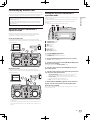
Connecting the input/output terminals
Rear panel, front panel
To power outlet
Power cord (included)
DJ player
Component, amplifier,
powered speaker, etc.
Computer
Analog player
Headphones
Microphone
DJ
software
To audio input terminals
Audio cable
USB cable
To audio output
terminals
Audio cable
AC adapter (included)
To audio output To ground
terminals terminals
Audio cable
ground wire
R L
R L
DC IN
1
USB
23
R
To
microphone
Microphone cable
To
headphones
Headphones
cord
R L
SIGNAL
GND
L
L
R
MASTER OUT2
MASTER OUT1(TRS)
4
5
LINE PHONO R
L
PHONO2 / LINE2
6 7
LINE PHONO R
L
6 7
1Cord hook
PHONES
dB
0dB
MIC ATT.
PHONO1 / LINE1
8
MIC
9 ab
c
6LINE, PHONO selector switch
Catch the AC adapter’s power cord and USB cable on this hook
when using this unit.
! The sound will be interrupted if the AC adapter or USB cable is
disconnected during playback.
Using the cord hook
Fasten the AC adapter’s power cord and USB cable in place by hooking
them on the cord hook. This prevents the power cord and USB cable
from being accidentally pulled and the plugs from being disconnected
from the terminals.
USB cable
Switches the function of the [PHONO/LINE] terminals.
7PHONO1/LINE1 and PHONO2/LINE2 terminals
Connect a phono level output device (analog player (for MM cartridges), etc.) or a line level output device (DJ player, etc.) here.
Switch the terminals’ function according to the connected device
using the [LINE, PHONO] selector switch on this unit’s rear panel.
8SIGNAL GND terminal
Connects an analog player’s ground wire here. This helps reduce
noise when the analog player is connected.
9Kensington security slot
aMIC ATT. control
DC IN
Cord hook
USB
AC adapter’s power cord
2DC IN terminal
Connect the included AC adapter’s DC plug here. Wait until all connections of the equipment are completed before connecting the
power cord.
Be sure to use the power cord and AC adapter included with this
product.
3
USB terminal
Connect to a computer.
! A USB hub cannot be used.
4MASTER OUT 2 terminals
Connect to a power amplifier, etc.
5MASTER OUT 1 terminals
Connect powered speakers, etc., here.
Compatible with balanced or unbalanced output for a TRS
connector.
10
En
Adjusts the audio level input to the [MIC] terminal.
! The gain of the sound input to the microphone differs greatly
according depending on the microphone being used. The
[MIC ATT.] control on this unit’s rear panel is used to adjust
the audio level according to the microphone before DJ performances. During DJ performances, use the [MIC LEVEL] control
on the top of this unit to adjust the microphone’s volume.
bMIC jack
Connects a microphone here.
cPHONES jacks
Connect headphones here.
Both stereo phone plugs (Ø 6.3 mm) and stereo mini phone plugs (Ø
3.5 mm) can be used.
! There are two input jacks, both a stereo phones jack and a mini
phones jack, but do not use both simultaneously. If both are used
simultaneously, when one is disconnected and/or connected, the
volume of the other may increase or decrease suddenly.
Connecting by wireless LAN
On this unit, wireless LAN connections can be used to connect to mobile
devices or computers supporting wireless LAN connections and hold DJ
performances using music files on the mobile devices or computers.
Set the wireless LAN function’s operation mode before connecting this
unit by wireless LAN.
The buttons and controls below are used for making the wireless LAN
function’s operation mode settings and wireless LAN connection
settings.
! By default, the access point (AP) mode is set.
12
About the wireless LAN function’s
operation mode
5
1
STANDBY/ON
On this unit, the wireless LAN function’s operation mode can be
switched according to the usage purpose. There are two operation
modes for the wireless LAN function, as described below.
rekordbox
2
3
4
WPS
TIME
BACK
AUTO CUE
QUANTIZE
TOP
MIDI
INFO
UTILITY
Access point (AP) mode
In this case, this unit is the main unit on the LAN network. Data is
exchanged directly with the mobile devices or computers through wireless connections.
34
Connections
To make DJ performances using a wireless LAN, the LINK EXPORT
function must be used after making the wireless LAN connection then
establishing the link.
For instructions on establishing the link, see the User’s Manual for
rekordbox (iOS/Android) or the Operating Instructions for rekordbox
(Mac/Windows).
Setting the wireless LAN function’s
operation mode
USB
8
1
2
3
4
5
6
7
8
76
STANDBY/ON indicator
STANDBY/ON button
WPS indicator
WPS button
Link indicators
Rotary selector
BACK(TOP) button
INFO(UTILITY) button
1 Press [STANDBY/ON] button.
Turn on the power of this unit.
The [STANDBY/ON] indicator lights green.
2 Press the [INFO(UTILITY)] button for over 1 second.
The [UTILITY] screen is displayed.
3 Turn the rotary selector, select [WLAN SETTING], then
press the rotary selector.
See page 28 for the list of [WLAN SETTING] items.
WLAN client mode
In this case, this unit is a sub unit on the LAN network. Data is
exchanged with the mobile devices or computers via a wireless LAN
access point device.
4 Turn the rotary selector, select [MODE], then press
the rotary selector.
5 Turn the rotary selector, select the mode you want to
set, then press the rotary selector.
—[ACCESS POINT(AP)]: Sets this unit to the access point (AP)
mode. This unit is set as the master unit on the network.
—[WLAN CLIENT]: Sets this unit to the WLAN client mode. This
unit is set as a sub unit on the network.
—[OFF]: Turns the wireless LAN function off.
6 When [APPLY CHANGES?] appears on the main unit
display, turn the rotary selector to select [YES], then
press the rotary selector.
Now make the connection settings for the access point (AP) or WLAN
client mode (page 12).
! Only one unit of the XDJ-AERO can be linked to one wireless LAN
access point.
Furthermore, this unit cannot be linked to a wireless LAN access
point to which another Pioneer product (DJ player or DJ mixer) is
linked.
En
11
Setting the wireless LAN connections in
the access point (AP) mode
If the device to be connected supports the WPS standard, make the connection settings using the WPS button, the WPS PIN or manually.
If the device to be connected does not support the WPS standard, make
the connection settings manually.
! Before starting, turn on this unit’s power.
! If connections cannot be established approximately 2 minutes after
the connection settings operations below are performed, the [WPS]
indicator turns off.
! With connection settings in the access point (AP) mode, note that
connection with the mobile device or computer is not established if
no link indicator is lit, even if the [WPS] indicator is off.
! When using this unit as an access point, it is not possible to export
data from a computer via this unit to mobile devices.
Connecting using the [WPS] button
1 Select connection by WPS button (PBC connection)
with the WPS connection function of a mobile device or
computer.
! See your device’s operating instructions for instructions on connecting using the WPS button.
2 Press this unit’s [WPS] button for over 1 second.
The [WPS] indicator flashes.
Once the setting is completed, the [WPS] indicator turns off.
Connecting by inputting the WPS PIN code
6 From the wireless LAN connection settings on the
mobile device or computer, display the connectable
[SSID]s.
! See your device’s operating instructions for instructions on searching for or displaying connectable [SSID]s.
7 On the mobile device or computer, select the [SSID]
checked in step 3.
8 Input the password you made a note of in step 5.
Setting the wireless LAN connections in
the WLAN client mode
If the access point to which you want to connect supports the WPS
standard, make the connection settings using the WPS button, the WPS
PIN code or manually.
If the access point to which you want to connect does not support the
WPS standard, make the connection settings manually.
! Before starting, turn on this unit’s power.
! If connections cannot be established approximately 2 minutes after
the connection settings operations below are performed, the [WPS]
indicator turns off.
! Previously connected devices are connected automatically with
priority, without making the settings.
Connecting using the [WPS] button
1 Press the access point’s WPS button.
! See your device’s operating instructions for instructions on connecting using the WPS button.
1 Check the PIN code in the WPS connection function on
the mobile device or computer.
2 Press this unit’s [WPS] button for over 1 second.
2 Press the [INFO(UTILITY)] button for over 1 second.
Connecting by inputting this unit’s WPS PIN code
3 Turn the rotary selector, select [WLAN SETTING], then
press the rotary selector.
1 Press the [INFO(UTILITY)] button for over 1 second.
! See your device’s operating instructions for instructions on checking
the WPS PIN code.
4 Turn the rotary selector, select [INPUT WPS PINCODE],
then press the rotary selector.
5 Use the rotary selector to input the mobile device’s or
computer’s PIN code.
The [WPS] indicator flashes.
Once the setting is completed, the [WPS] indicator turns on.
2 Turn the rotary selector, select [WLAN SETTING], then
press the rotary selector.
3 Turn the rotary selector, select [Show PINCODE], then
press the rotary selector.
Once the setting is completed, the [WPS] indicator turns off.
This unit’s PIN code is displayed.
Make a note of the PIN code.
Connecting by manual input
4 Press the rotary selector.
1 Press the [INFO(UTILITY)] button for over 1 second.
5 With access point WPS connection settings, input the
PIN code displayed in step 3.
2 Turn the rotary selector, select [WLAN
INFORMATION], then press the rotary selector.
3 Turn the rotary selector, select [SSID], then press the
rotary selector.
Make a note of the [SSID] for future reference.
! The first 11 characters of the [SSID] are displayed. Turn the rotary
selector to display the portion that is not initially displayed.
4 Press the [BACK(TOP)] button.
Press to return to the previous screen.
5 Turn the rotary selector, select [PASSWORD], then
press the rotary selector.
Make a note of the [PASSWORD] for future reference.
The [WPS] indicator turns on.
Once the setting is completed, the [WPS] indicator turns on.
! See your device’s operating instructions for instructions on inputting
the PIN code.
Connecting by manual input
1 Press the [INFO(UTILITY)] button for over 1 second.
2 Check the access point’s [SSID] and password.
! See your device’s operating instructions for instructions on checking
the [SSID] and password.
3 Turn the rotary selector, select [WLAN SETTING], then
press the rotary selector.
4 Turn the rotary selector, select [SELECT SSID], then
press the rotary selector.
A maximum of 50 access points in the surrounding area are displayed.
12
En
5 Turn the rotary selector, select the [SSID] checked in
step 2, then press the rotary selector.
! If the corresponding device’s [SSID] is not displayed on the list of
access points in the area, or to specify an [SSID] that is intentionally
not displayed through use of a stealth function, etc., the device can
be specified by selecting [OTHER] then inputting the SSID/security
(encryption) type/password.
Connections
6 Use the rotary selector to input the [PASSWORD].
Once the setting is completed, the [WPS] indicator turns on.
Checking the current wireless LAN
settings
1 Press the [INFO(UTILITY)] button for over 1 second.
The [UTILITY] screen is displayed.
2 Turn the rotary selector, select [WLAN
INFORMATION], then press the rotary selector.
See page 27 for the list of [WLAN INFORMATION] items.
3 Select the item you want to check, then press the
rotary selector.
The settings are displayed.
! When the [BACK(TOP)] button is pressed, the screen returns to the
[WLAN INFORMATION] screen.
4 Press the [INFO(UTILITY)] button.
The [UTILITY] screen closes.
En
13
Part names and functions
2
1
1
STANDBY/ON
2
3
5
4
WPS
PHONO1/
TRIM
DECK1 LINE1
5V
AUTO CUE
QUANTIZE
TOP
INFO
AUTO
BEAT LOOP
TRANS
FLANGER
LEVEL/DEPTH
ECHO
LEVEL
3
MID
10
16
UTILITY
USB
LOW
AUTO
BEAT LOOP
9
TRANS
CH1
E
PL
M CH
SA AUN
L
FILTER
9
MASTER
FILTER
HI
1
3
16
WIDE
MASTER
TEMPO
SE
A
TEMPO
CH2
SHIFT
SHIFT
10
9
8
7
6
5
4
3
2
1
0
CUE
3
MASTER
CROSS F.
CURVE
10
9
8
7
6
5
4
3
2
1
0
CUE
3
MASTER
THRU
SYNC
SYNC
FWD
REV
PLAY/PAUSE
REV
PLAY/PAUSE
PHONES
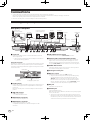
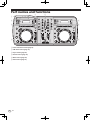
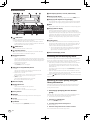
1Power & wireless section (page 15)
2USB device section (page 15)
3Player section (page 16)
4Browse section (page 18)
5Mixer section (page 20)
6Effect section (page 21)
En
10
4
H
RC
H
RC
J
DR OG
UM
2
E
PL
M CH
SA AUN
L
MIC
AUTO MIX
TEMPO
ROLL
NK
BA
ON/OFF
9
SE
A
CH1
14
6
LEVEL/DEPTH
ECHO
TEMPO
LOW
CH2
MASTER
TEMPO
FLANGER
6
LEVEL
NK
BA
FX SELECT
BEAT
EQ
9
0
4
INFO
0
LOW
WIDE
4
MIDI
9
MASTER
TEMPO
2
9
BACK
AUTO CUE
QUANTIZE
LEVEL
ROLL
6
1
9
MIXING
MID
TIME
rekordbox
HI
MIC
CUE
FX SELECT
BEAT
9
HEADPHONES
MASTER
REC
UTILITY
USB
6
DECK2 LINE2
MASTER
LEVEL
HI
USB
STOP
MIDI
PHONO2/
TRIM
500mA
BACK
J
DR OG
UM
4
TIME
rekordbox
FWD
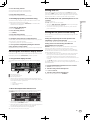
Power & wireless section
12
34
USB device section
5
1
2
3
4
5V
STANDBY/ON
500mA
WPS
USB
STOP
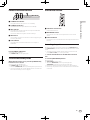
1STANDBY/ON indicator
2STANDBY/ON button
Part names and functions
MASTER
REC
This lights when this unit’s power is on or in standby.
1 2 3
This switches this unit’s power between on and standby.
3WPS indicator
This lights when connection with an access point is established
when in the WLAN client mode.
The indicator flashes during WPS connection settings.
4WPS button
This is used for wireless LAN connection to devices supporting connection by WPS button.
5Link indicators
This lights when a link with the mobile device or computer is
established.
To turn the power on
Press [STANDBY/ON] button.
Turn on the power of this unit.
The [STANDBY/ON] indicator lights green.
To set to the standby mode
When this unit’s power is on, press the [STANDBY/ON]
button for over 1 second.
This unit is set to the standby mode.
The [STANDBY/ON] indicator lights red.
! When the [STANDBY/ON] button is pressed again, the power turns on.
! This unit is equipped with an auto standby function. For details, see
About the auto standby function on page 27.
1USB device insertion slot
Insert USB devices here.
2MASTER REC button
This is used to record the sound output from this unit on a USB
device.
3USB STOP button
Press this for over 2 seconds before disconnecting USB devices from
this unit.
Recording the performance
The same sound as the sound being output from the [MASTER OUT 1]
and [MASTER OUT 2] terminals can be recorded as a WAV file on a USB
device.
! The name of the files created when the sound is recorded is in the
format [REC***.WAV] (*** is a 3-digit number).
1 Connect the USB device to the USB device insertion
slot.
2 Press the [MASTER REC] button.
Recording starts.
The [MASTER REC] indicator lights.
! When the [MASTER REC] button is pressed again, the
[MASTER REC] indicator turns off and recording stops.
! Recording is possible for about 90 minutes on a 1 GB USB device.
! Recording is not possible on devices formatted in MAC OS Extended
(Journaled).
En
15
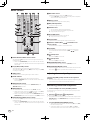
Player section
1
2
3
4
5
6
/
AUTO
BEAT LOOP
TRANS
FLANGER
ECHO
ROLL
1
2
3
4
TEMPO
6
10
16
WIDE
NK
BA
E
PL
M CH
SA AUN
L
MASTER
TEMPO
H
RC
J
DR OG
UM
SE
A
TEMPO
SHIFT
bCUE
button
!Press:
Sets a cue point or moves the cue point.
![SHIFT] + press:
When auto cue is off, the playback position moves to the beginning of the track.
When auto cue is on, the playback position moves to the auto
cue’s cue point.
= Setting auto cue (p.19)
Setting the cue point for auto cueing (p.19)
cSHIFT button
When another button is pressed while pressing the [SHIFT] button, a
different function is called out.
CUE
MASTER
SYNC
FWD
REV
PLAY/PAUSE
Press the [f (PLAY/PAUSE)] button.
PHONES
c b a
9 87
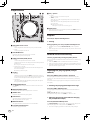
1AUTO BEAT LOOP control
!Turn:
Set the length of the auto beat loop’s loop in units of beats.
!Press:
Turns loop playback on and off.
2JOG DRUM button
Use this to turn the jog drum function on and off.
= Using the jog drum function (p.26)
Pausing
During playback, press the [f (PLAY/PAUSE)] button.
! Playback resumes when [f (PLAY/PAUSE)] button is pressed
again.
! When the jog dial is turned while pausing, the position can be moved
in units of 10 msec.
Forward and reverse scanning
3SAMPLE LAUNCH (BANK) button
Turn the jog dial while pressing the [SHIFT] button.
4Jog dial
Adjusting the playing speed (Tempo
control)
!Press:
Turns the sample launch function on and off.
Sampled sound sources can be played when the sample launch
function is on.
= Using the sample launch function (p.25)
! Press for over 1 second:
Browses to the sampled sound source bank and displays it on
the main unit display.
= Selecting the bank (p.25)
!Scratch
When the jog dial is set to the [VINYL] mode and the jog dial is
turned while pressing down on its top, the sound is played in the
direction and at the speed at which the jog dial is turned.
! Pitch bend
The playing speed can be adjusted by turning the outer part of
the jog dial during playback.
5TEMPO RANGE button
The [TEMPO] slider’s range of variation switches each time this is
pressed.
6MASTER TEMPO button
Use this to turn the master tempo function on and off.
7TEMPO slider
Use this to adjust the track playing speed.
8SYNC button
Synchronizes to the master deck’s tempo.
= Using the SYNC function (p.26)
9MASTER indicator
This lights when the SYNC function is set to “MASTER”.
af (PLAY/PAUSE) button
Use this to play/pause tracks.
16
Playback
En
The track is fast-forwarded/fast-reversed in the direction in which the jog
dial is spun.
! When the [SHIFT] button is released, this function is canceled.
! When you stop the jog dial from spinning, normal playback resumes.
! The fast-forward/fast-reverse speed can be adjusted according to the
speed at which the jog dial is spun.
Move the [TEMPO] slider forward or backward.
The playing speed increases when the slider is moved to the [+] side
(towards you), decreases when the slider is moved to the [–] side (away
from you).
The rate at which the playing speed is changed is indicated on the main
unit display.
Selecting the playing speed adjustment range
Press the [TEMPO RANGE] button.
The playing speed adjustment range switches each time the button is
pressed.
[WIDE, ±16, ±10, ±6] lights on the main unit display.
The adjustment range when set to [WIDE] is –100 % to +16%.
Adjusting the playing speed without changing
the pitch (Master Tempo)
Press the [MASTER TEMPO] button.
The [MASTER TEMPO] indicator lights. The pitch does not change even
when the playing speed is changed with the [TEMPO] slider.
! The sound is digitally processed, so the sound quality changes.
3 Spin the jog dial in the desired direction and at the
desired speed.
Setting Cue
1 During playback, press the [f (PLAY/PAUSE)]
button.
Playback is paused.
2 Press the [CUE
The sound is played according to the direction and speed at which the
jog dial is spun by spinning the top of the jog dial while pressing it.
4 Release your hand from the top of the jog dial.
Normal playback resumes.
] button.
Adjusting the cue point position
Pitch bend
During playback, spin the outer section of the jog dial
without touching the top.
The playing speed increases when spun clockwise, decreases when
spun counterclockwise. When spinning is stopped, playback returns to
the normal speed.
1 Turn the jog dial while pausing at a cue point.
The [f (PLAY/PAUSE)] and [CUE ] indicators flash.
The cue point can be fine-adjusted in units of 10 msec.
Jog drum
2 Press the [CUE
For details on the jog drum function, see Using the jog drum function on
page 26.
] button.
The position at which the button was pressed is set as the new cue point.
! When a new cue point is set, the previously set cue point is canceled.
Part names and functions
The point at which the track is paused is set as the cue point.
The [f (PLAY/PAUSE)] indicator flashes and the [CUE ] indicator
lights. No sound is output at this time.
! When a new cue point is set, the previously set cue point is canceled.
Returning to Cue Point (Back Cue)
During playback, press the [CUE
] button.
The set immediately returns to the currently set cue point and pauses.
! When the [f (PLAY/PAUSE)] button is pressed, playback starts
from the cue point.
Checking Cue Point (Cue Point Sampler)
Keep pressing the [CUE
cue point.
] button after returning to the
Playback starts from the set cue point. Playback continues while the
button is held in.
Setting the loop automatically based on
the track’s tempo (Auto Beat Loop)
1 During playback, turn the [AUTO BEAT LOOP] control
to set the length for loop playback in number of beats.
The main unit display switches to the beat display.
2 Press the [AUTO BEAT LOOP] control to start loop
playback.
The loop out point is set automatically according to the track’s tempo
(BPM) and loop playback starts.
! Loop playback cannot be performed properly if the BPM value is not
displayed.
! When auto beat loop is set, the cue point moves to the loop in point.
! When the [AUTO BEAT LOOP] control is pressed during loop playback, loop playback is canceled.
Operating the jog dial
! The top of the jog dial has an embedded switch. Do not place objects
on the jog dial or subject it to strong forces.
! Water or other liquids getting into the set will lead to malfunction.
Scratch
1 Press the [JOG DRUM] button.
The jog dial indicator lights blue.
Switch the jog dial to the VINYL mode.
2 During playback, press the top of the jog dial.
Playback stops.
En
17
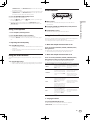
Browse section
1234
rekordbox
5
6
7
TIME
8
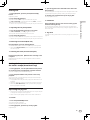
cTime display (minutes, seconds, milliseconds)
dPlaying speed display
BACK
The value changes according to the position of the [TEMPO] slider.
AUTO CUE
QUANTIZE
MIDI
ePlaying speed adjustment range display
INFO
UTILITY
USB
9
ab
c
d
e
This indicates the range in which the playing speed can be adjusted
with respect to the original playing speed recorded on the medium.
fBPM
Displays BPM (Beats Per Minute) of the track currently being played.
gPlaying address display
i
1
h
g
f
USB button
Use this to browse the contents of the USB device connected to this
unit and display them on the main unit display.
! When rekordbox (Mac/Windows) library information is stored
on the USB device, the main unit display switches to the browse
display mode when the button is pressed.
2
MIDI button
This unit switches to the PC control mode.
3
rekordbox button
A list of the mobile devices and computers connected to this unit
and on which rekordbox is installed is displayed.
4INFO(UTILITY) button
!Press:
The main unit display switches to the information display mode.
When in the information display mode, the bottom section of the
display switches between the track name and beat display each
time the button is pressed.
! Press for over 1 second:
The [UTILITY] screen is displayed.
The track is displayed as a bar graph. The current playback position is displayed as a white vertical line. When the elapsed time is
displayed, the left edge of the graph lights. When the remaining time
is displayed, the display turns off from the left side. The entire graph
flashes slowly when there are less than 30 seconds remaining in
the track, then begins flashing rapidly when less than 15 seconds
remain.
hCaching meter
When tracks are loaded from a device connected by wireless LAN,
the amount of data loaded into this unit is displayed here. When all
the indicators on the caching meter are lit, this indicates that one
track’s worth of data has been loaded into this unit.
! This is not displayed when tracks are loaded from a USB device
or for tracks with long playing times (MP3 files with lengths of
approximately 10 minutes or greater, etc.).
iInformation display section
Switching the browse display mode
5TIME (AUTO CUE,QUANTIZE) button
There are two types of browse display modes: library browse and folder
browse. The display mode differs according to whether or not rekordbox
(Mac/Windows) library information is stored on the USB device.
— When library information is stored on the USB device: The information is displayed in the library browse mode. The music files are
displayed in the categories (album, artist, etc.) set with rekordbox
(Mac/Windows).
The category types can be changed in the [Preferences] in rekordbox
(Mac/Windows).
— When no library information is stored on the USB device: The information is displayed in the folder browse mode. The folders and tracks
on the medium are displayed in a tree structure.
When the [
USB] button is pressed, the mode switches to the browse
display mode.
6Main unit display
Searching for tracks quickly using the
library information
!Press:
The main unit display’s time display mode switches to the
elapsed time or remaining time display.
! Press for over 1 second:
When pressed for over 1 second, auto cue turns on and off.
= Setting the cue point for auto cueing (p.19)
![SHIFT] + press:
This turns the QUANTIZE function on and off.
= Using the QUANTIZE function (p.26)
7BACK(TOP) button
!Press:
The screen moves back to the layer above.
! Press for over 1 second:
Press for over 1 second to move to the top layer.
8Rotary selector
9REMAIN
This lights when the time display is set to the remaining time.
aA. CUE
This lights when auto cue is set.
bQUANTIZE
This is displayed when [QUANTIZE] is turned on.
When library information created using rekordbox (Mac/Windows) is
recorded on the USB device, the library information can be used to
quickly search for tracks.
Searching by specifying the first character
(jump)
When the item names in the category are sorted in alphabetical order,
you can move to items beginning with the specified character.
! This function may not work for some categories.
1 Press the [
USB] button.
Switch to the [BROWSE] display.
2 Turn the rotary selector then press it.
Select the category.
3 Press the rotary selector for at least 1 second.
The mode switches to the character jump mode.
18
En
4 Turn the rotary selector.
Setting auto cue
The character displayed in the top left switches.
Select the character to which you want to move.
When a track is loaded or cued (by pressing the [CUE] button while
pressing the [SHIFT] button), the cue point is automatically set at the
point directly before the sound starts, skipping the silent section at the
beginning of the track, or to the cue point saved using rekordbox.
5 Press the rotary selector.
The display switches to the item selected in step 4.
Searching by inputting a character string
1 Press the [
USB] button.
Switch to the [BROWSE] display.
2 Turn the rotary selector.
Press the [TIME (AUTO CUE, QUANTIZE)] button for over
1 second.
Auto cue is set to on.
[A. CUE] lights on the main unit display.
! When the [TIME (AUTO CUE, QUANTIZE)] button is pressed again
for over 1 second, auto cue is set to off.
! The auto cue level setting remains in the memory, even when the
power is turned off.
Select [SEARCH].
Setting the cue point for auto cueing
3 Press the rotary selector.
The cue point to be set as the auto cue can be selected using one of the
methods below.
The display switches to the character input screen.
4 Using the rotary selector to input characters.
Turn the rotary selector and select the desired character, then press the
rotary selector to enter that character.
! Repeat this operation to input other characters.
5 Once you have completed inputting the character
string, press the rotary selector.
Only items containing the character string you have input are displayed.
Switching the information display mode
The bottom section of the display switches between the track name and
beat display each time the [INFO(UTILITY)] button is pressed.
Using the beat display function
This displays the beat and playback position of the currently playing
track.
Setting the cue point by the acoustic pressure level
identified as a silent section (8 levels)
Part names and functions
This function lets you display only the artists, albums, tracks or files
containing the character string you input.
! Categories not selected in the [Preferences] in rekordbox (Mac/
Windows) are not displayed.
–36 dB, –42 dB, –48 dB, –54 dB, –60 dB, –66 dB, –72 dB and –78 dB
Setting so that cues stored using rekordbox are
automatically set as cue points
MEMORY: The cue point stored with rekordbox that is nearest to the
beginning of the track is set as the cue point for auto cueing.
For instructions on storing cues using rekordbox (Cue Point Memory),
see the rekordbox (iOS/Android) User’s Manual or the rekordbox (Mac/
Windows) Operating Instructions.
! With tracks for which no cue point has been saved using rekordbox,
the cue point is automatically set at the point directly before the
sound starts, skipping the silent section at the beginning of the
track. The acoustic pressure identified as a silent section at this time
is -60 dB.
! The [A. CUE] indicator on the main unit display is highlighted.
The setting of the cue point for auto cueing can be changed using one of
the methods below.
1 Press the [INFO(UTILITY)] button for over 1 second.
The [UTILITY] screen is displayed.
2 Turn the rotary selector then press it.
Select [AUTO CUE LEVEL].
1
1
2
3
!
2
3
Beat display section
Auto loop display section
Effect display section
When display of track name is selected in the information display
mode, the mode automatically switches to the beat display when one
of the operations below is performed.
—Scratch
— Auto beat loop setting
— Effect setting
3 Turn the rotary selector then press it.
Select the acoustic pressure level or [MEMORY].
When the sample launch function is on
The statuses of the sampled sound sources assigned to the respective
[FX SELECT] buttons are indicated on the beat display section.
! The numbers on the beat display indicate the numbers at the bottom
of the respective [FX SELECT] buttons.
! When the numbers of the beat display section are not displayed, this
indicates that no sampled sound sources are assigned.
! The selected sampled sound source is highlighted.
= Using the sample launch function (p.25)
En
19
Mixer section
2 3 45
1
PHONO1/
TRIM
DECK1 LINE1
32
6
7
8MIC LEVEL control
Adjusts the audio level input to the [MIC] terminal.
! Use the [MIC ATT.] control on this unit’s rear panel to adjust the
audio level before DJ performances.
PHONO2/
TRIM
DECK2 LINE2
MASTER
LEVEL
HI
9
HI
9MIC EQ control
9
This adjusts the microphone’s sound quality.
HEADPHONES
MIC
MIXING
LEVEL
j
MID
CUE
9
MID
9
8
aMIC (ON/OFF) button
9
bFILTER control
a
b
c
cAUTO MIX button
0
MASTER
EQ
LEVEL
i
LOW
9
LOW
9
LOW
0
HI
LEVEL
h
g
b
CH1
CH2
FILTER
MASTER
9
FILTER
9
MIC
AUTO MIX
CH1
d
ON/OFF
CH2
10
9
8
7
6
5
4
3
2
1
0
10
9
8
7
6
5
4
3
2
1
0
CROSS F.
CURVE
Turns the microphone on/off.
— Turn clockwise to apply the high pass filter.
— Turn counterclockwise to apply the low pass filter.
= Using the filter function (p.21)
This turns the auto mix function on and off.
= Using the auto mix function (p.25)
dChannel fader
d
Adjusts the level of audio signals output in each channel.
eCROSS F. CURVE (THRU,
selector switch)
,
) (crossfader curve
This switches the crossfader curve characteristics.
THRU
fCrossfader
The sound of the respective channels is output according to the
,
] selector
curve characteristics selected with the [THRU,
switch.
f
e
g
(CH2) button
The sound of [CH 2] is monitored.
1DECK1/PHONO1/LINE1 selector switch
This selects the [CH 1] input source from among the devices connected to this unit.
! When set to [PHONO/LINE], the mixer section can be used as a
DJ mixer. In this case, the effect sections of the respective decks
can be used.
2EQ (HI, MID, LOW) controls
These adjust the sound quality of the respective channels.
These adjust the [HI] (high range), [MID] (middle range) and [LOW]
(low range), respectively.
3TRIM control
Adjusts the level of audio signals input in each channel.
4LEVEL indicator
This displays the audio levels of the respective channels.
! Press the [MASTER] button to switch the channel whose audio
level is displayed.
h
(CH1) button
The sound of [CH 1] is monitored.
iHEADPHONES LEVEL control
Adjusts the audio level output from the [PHONES] terminal.
jHEADPHONES MIXING control
Adjusts the balance of the monitor volume between the sound of the
deck whose [
] button is pressed and the master sound.
Adjusting the sound quality
Turn the [HI], [MID], [LOW] controls for the respective
channels.
! The sound for that range can be turned completely off by turning the
control all the way counterclockwise (isolator function).
5MASTER LEVEL control
Adjusts the audio level output from the [MASTER OUT 1] and
[MASTER OUT 2] terminals.
6MASTER button
This switches the channel indicated on the [LEVEL] indicator.
— When off: The audio level input to [CH 1] (channel 1) and [CH 2]
(channel 2) is displayed on the [LEVEL] indicator.
— When lit: The audio level output from the [MASTER OUT 1] and
[MASTER OUT 2] terminals is displayed on the [LEVEL] indicator.
7DECK2/PHONO2/LINE2 selector switch
This selects the [CH 2] input source from among the devices connected to this unit.
! When set to [PHONO/LINE], the mixer section can be used as a
DJ mixer. In this case, the effect sections of the respective decks
can be used.
20
En
Monitoring sound with headphones
1 Connect headphones to the [PHONES] terminal.
For instructions on connections, see Connecting the input/output terminals on page 10.
2 Press the [
(CH1)] or [
(CH2)] button.
Select the channel you want to monitor.
! This operation is not necessary to monitor the sound output from the
[MASTER OUT 1] and [MASTER OUT 2] terminals (the sound of the
master channel).
3 Turn the [HEADPHONES MIXING] control.
— When turned counterclockwise: The volume of [CH 1] and [CH 2]
becomes relatively louder.
— At the center position: The volume of the [CH 1] and [CH 2]
sound is the same as the volume of the sound output from the
[MASTER OUT 1] and [MASTER OUT 2] terminals (the sound of
the master channel).
— When turned clockwise: The volume of the sound output from the
[MASTER OUT 1] and [MASTER OUT 2] terminals (the sound of
the master channel) becomes relatively louder.
Effect section
FX SELECT
BEAT
4 Turn the [HEADPHONES LEVEL] control.
Sound is output from the headphones.
FLANGER
ECHO
ROLL
1
2
3
4
1
2
3
1BEAT control
This is used to select the beat multiple to which the effect is
synchronized.
2FX SELECT (TRANS, FLANGER, ECHO, ROLL) buttons
Using a microphone
1 Press the [MIC (ON/OFF)] button.
2 Turn the [MIC LEVEL] control clockwise.
The sound of the microphone is output from the speakers.
! Adjust the [MIC ATT.] control on the rear panel as necessary (page
10).
Adjusting the sound quality
Turn the [MIC EQ] control.
— When turned fully clockwise, the attenuation of the bass sound is
maximum.
— When turned fully counterclockwise, the attenuation of the treble
sound is maximum.
Turns the effects on and off.
3LEVEL/DEPTH control
Adjusts the quantitative parameter of the effect.
Using the beat effect function
This unit is equipped with four effect buttons. Effects can be applied to
the sound by pressing one of the effect buttons.
For a description of the respective effects, see the table below.
When the sample launch function is off
Press one of the [FX SELECT (TRANS, FLANGER, ECHO,
ROLL)] buttons.
The button that was pressed flashes and the effect is applied.
! When the button is pressed again, the effect turns off.
Using the filter function
When the sample launch function is on
The sound of the high or low range is filtered out, greatly changing the
tone.
Press one of the [FX SELECT (TRANS, FLANGER, ECHO,
ROLL)] buttons while pressing the [SHIFT] button.
Turn the [FILTER] control.
The button that was pressed flashes and the effect is applied.
! When the button is pressed again, the effect turns off.
— Right: An effect as if the low range was gradually cut is achieved.
— Left: An effect as if the high range was gradually cut is achieved.
Part names and functions
! When the [
(CH1)] button or [
(CH2)] button is pressed again,
monitoring is canceled.
! Monitoring of the sound output from the [MASTER OUT 1] and
[MASTER OUT 2] terminals (the sound of the master channel) cannot be canceled.
LEVEL/DEPTH
TRANS
Effect Name
Descriptions
LEVEL/DEPTH
TRANS
Cuts the sound according to
the beat multiple set with the
[BEAT] control.
Sets the balance between
the original sound and the
effect sound.
FLANGER
Creates a one-cycle flanger
effect according to the beat
multiple set with the [BEAT]
control.
The further the control is
turned clockwise, the more
the effect is stressed.
When turned all the way
counterclockwise, only the
original sound is output.
ECHO
Outputs a delay sound
several times that attenuates
gradually according to the
beat multiple set with the
[BEAT] control.
The delay sound fades out in
tempo with the track, even
after the input sound is cut.
Use this to set the balance
between the original sound
and the echo sound.
ROLL
Records the input sound at
the point the [ROLL] button
is pressed and repeatedly
outputs the recorded sound
according to the beat multiple set with the [BEAT]
control.
Sets the balance between
the original sound and the
roll sound.
Varying the effect
Turn the [LEVEL/DEPTH] control.
The effect changes according to the direction in which the
[LEVEL/DEPTH] control is turned and its position.
En
21
Basic Operation
Preparations must be made using the procedure shown on the diagram
below in order to make DJ performances using a wireless LAN.
Internet
1. Installing rekordbox (iOS/Android)
2. Importing tracks
3. Connecting by wireless LAN (page 11)
4. Loading tracks
5. Outputting sound
Loading tracks
There are four ways to load tracks into this unit, as described below.
— Loading tracks from mobile devices or computers via wireless LAN
— Loading tracks on USB devices connected to this unit from mobile
devices by browsing via wireless LAN
— Using this unit’s rotary selector to load tracks from a mobile device
or computer via wireless LAN
— Loading tracks from USB devices
To make DJ performances using a wireless LAN, the LINK EXPORT
function must be used after making the wireless LAN connection then
establishing the link.
For making wireless LAN connections, see Connecting by wireless LAN
on page 11.
For instructions on establishing the link, see the User’s Manual for
rekordbox (iOS/Android) or the Operating Instructions for rekordbox
(Mac/Windows).
When a link is established with a mobile device or computer, one of
link indicators 1 to 4 lights. (Which link indicator(s) light(s) depends on
the number of units connected simultaneously.)
! The maximum total number of units (mobile devices and/or computers) with which links can be established simultaneously is four.
Loading tracks from mobile devices or
computers via wireless LAN
1 Connect the mobile device or computer to this unit
via wireless LAN.
Installing rekordbox (iOS/Android)
Download the rekordbox (iOS/Android) application
using a mobile device or computer, then install it on the
mobile device.
rekordbox (iOS/Android) can be used on your mobile device.
! The rekordbox (iOS/Android) application can be downloaded from
the App Store or Google Play.
Importing tracks
In order to play tracks (music files) on a mobile device or computer on
this unit, the tracks must first be analyzed then added to the rekordbox
library.
! The following describes the procedure for importing tracks into
rekordbox on a mobile device.
For the procedure for importing tracks into rekordbox on a computer,
see the Operating Instructions for rekordbox (Mac/Windows).
1 At the rekordbox (iOS/Android) top menu, tap the
import button.
A list of music files on the mobile device is displayed.
2 Tap the music file you want to add to the library.
2 Launch rekordbox on the mobile device or computer
and establish the link.
3 Operate rekordbox on the mobile device or computer
to select the track.
4 Operate rekordbox on the mobile device or computer
to load tracks into this unit’s decks.
! Mobile device: Tap the deck into which you want to load the tracks.
! Computer: Drag and drop the tracks to the deck into which you
want to load them.
Track loading starts. The jog dial indicator on the deck on which the
track is being loaded flashes.
Once playback is possible, the jog dial indicator stops flashing, remaining lit, the track name is displayed on the main unit display and playback
starts (by factory default).
Loading tracks on USB devices connected
to this unit from mobile devices by
browsing via wireless LAN
1 Connect the mobile device by wireless LAN.
2 Launch rekordbox on the mobile device and establish
the link.
The selected music file is displayed in gray.
! Multiple music files can be selected simultaneously. To add all the
displayed music files, tap the add all tracks button.
3 Connect the USB device to this unit’s USB device
insertion slot.
3 Tap the import button.
4 Operate rekordbox on the mobile device to select the
track.
Analysis of the music file(s) begins.
Once analysis of the music file(s) is completed, the track(s) is (are)
added to the rekordbox (iOS/Android) library.
5 Operate rekordbox on the mobile device to select the
deck on which the track is to be loaded, then tap.
Track loading starts. The jog dial indicator on the deck on which the
track is being loaded flashes.
Once playback is possible, the jog dial indicator stops flashing, remaining lit, the track name is displayed on the main unit display and playback
starts (by factory default).
22
En
Using this unit’s rotary selector to load
tracks from a mobile device or computer
via wireless LAN
1 Connect the mobile device or computer to this unit
via wireless LAN.
2 Launch rekordbox on the mobile device or computer
and establish the link.
3 Press this unit’s [
When playing tracks via wireless LAN, playback may become impossible due to deterioration of the communication conditions. In this
case, loop playback begins automatically and [EMERGENCY LOOP] is
displayed on the main unit display.
When communications conditions recover, the [EMERGENCY LOOP]
display turns off. Press the [AUTO BEAT LOOP] control at this time to
cancel looping.
rekordbox] button.
The mobile devices or computers connected to this unit are displayed on
the main unit display.
4 Turn this unit’s rotary selector to select the mobile
device or computer, then press the rotary selector.
Use this unit’s rotary selector to select the mobile device or computer to
be operated.
5 Turn this unit’s rotary selector to select the track from
the track collection in rekordbox on the mobile device or
computer.
! To move to lower layers in a folder, select the folder then press the
rotary selector.
! To return to a higher level, press the [BACK (TOP)] button.
! When the [BACK (TOP)] button is pressed for over 1 second, the
screen returns to the topmost layer (only when using a mobile
device).
6 Press this unit’s rotary selector.
Track loading starts. The jog dial indicator on the deck on which the
track is being loaded flashes.
Once playback is possible, the jog dial indicator stops flashing, remaining lit, the track name is displayed on the main unit display and playback
starts (by factory default).
Loading tracks from USB devices
1 Connect the USB device to the USB device insertion slot.
2 Press the [
Before outputting sound, check that this unit and the surrounding
devices are properly connected. For instructions on connecting, see
Connecting the input/output terminals on page 10 or Connecting by wireless LAN on page 11.
Set the volume of the power amplifiers connected to the [MASTER OUT
1] and [MASTER OUT 2] terminals to an appropriate level. Note that very
loud sounds will be output if the volume is set too high.
USB] button.
The tracks on the USB device are displayed on the main unit display.
3 Turn the rotary selector.
Select the track.
! To move to lower layers in a folder, select the folder then press the
rotary selector.
! To return to a higher level, press the [BACK (TOP)] button.
! When the [BACK (TOP)] button is pressed for over 1 second, the
screen moves back to the layer above.
4 Press the rotary selector.
The track is loaded and playback begins.
When recorded on a USB device, some time may be required for loading
the track, depending on the USB device.
Disconnecting USB devices
Always perform the following procedure to disconnect USB devices.
Pulling the USB device out without performing this procedure could
make the USB device unreadable.
When turning this unit’s power off, be sure to remove the USB device
first.
1 Press the [USB STOP] button for over 2 seconds.
The USB indicator turns off.
To output the sound of channel 1 [CH 1]
Basic Operation
For rekordbox (Mac/Windows) on the computer, click
at the bottom left of the screen.
The XDJ-AERO icon is displayed on the screen and tracks can be loaded
from rekordbox (Mac/Windows) to this unit.
Outputting sound
To output the sound of [CH 2] (channel 2), replace [CH 1] with [CH 2],
[DECK1] with [DECK2] and [PHONO1/LINE1] with [PHONO2/LINE2] in
the procedure below.
1 Switch the [DECK1, PHONO1/LINE1] selector switch in
the [CH 1] section.
Select the input source for [CH 1] from among the devices connected to
this unit.
—[DECK1]: Selects the USB device or the unit connected by wireless LAN.
—[PHONO1/LINE1]: Selects the device connected to the
[PHONO1/LINE1] terminals.
2 Press the [MASTER] button at the center of this unit.
Set so that the [MASTER] button is off.
! When the [MASTER] button is off, the audio level input to [CH 1] and
[CH 2] is displayed on the [LEVEL] indicator.
3 Turn the [CH 1] [TRIM] control clockwise.
Adjusts the audio level input to the [CH 1] terminal.
The [LEVEL] indicator lights when sound is properly being input to
[CH 1].
Adjust the [TRIM] control so that the orange indicator lights where the
track’s volume is highest (at the climax, etc.)
Be careful that the red indicator does not light, or the sound could be
distorted.
4 Move the [CH 1] channel fader to the back side.
The level of the sound output from the [CH 1] terminals is adjusted.
5 Switch [CROSS F. CURVE THRU,
curve selector switch).
,
] (the crossfader
This switches the crossfader curve characteristics.
—[THRU]: Choose this when you do not want to use the crossfader.
—[ ]: Set here for a curve that rises gradually.
—[ ]: Set here for a curve that rises steeply. (When the crossfader
moves away from either the left or right edge, the sound is immediately output from the opposite side.)
6 Set the crossfader.
Switch the channel whose sound is output from the speakers.
— Left edge: The [CH 1] sound is output.
— Center position: The sound of [CH 1] and [CH 2] is mixed and
output.
— Right edge: The [CH 2] sound is output.
! This operation is not necessary when the [CROSS F. CURVE (THRU,
,
)] selector switch is set to [THRU].
7 Press the [MASTER] button at the center of this unit.
Set so that the [MASTER] button is lit.
! When the [MASTER] button is lit, the audio level output from the
[MASTER OUT 1] and [MASTER OUT 2] terminals is displayed on
the [LEVEL] indicator.
2 Disconnect the USB device.
En
23
8 Turn the [MASTER LEVEL] control clockwise.
Sound is output from the speakers.
The [LEVEL] indicator lights.
Adjust the [MASTER LEVEL] control so that the orange indicator lights
where the track’s volume is highest (at the climax, etc.).
Be careful that the red indicator does not light, or the sound could be
distorted.
Mixing using the faders
Prepare the unit in advance so that the sound of [CH 1] is being output
from the speakers. For instructions on preparation, see Outputting
sound on page 23.
For instructions on monitoring the sound, see Monitoring sound with
headphones on page 20.
Mixing using the channel faders
1 Set [CROSS F. CURVE THRU, ,
curve selection switch) to [THRU].
] (the crossfader
2 Switch the [DECK2, PHONO2/LINE2] selector switch in
the [CH 2] section.
3 Turn the [CH 2] [TRIM] control clockwise.
4 Press the [
(CH2)] button.
The sound of [CH 2] is monitored from the headphones.
5 Turn the [HEADPHONES MIXING] control.
This adjusts the balance of the monitor volume between the sound
output from the [MASTER OUT 1] and [MASTER OUT 2] terminals (the
sound of [CH 1]) and the sound of [CH 2].
6 Operate [DECK2].
While checking the sound over the headphones, adjust the tempo of
[CH 2] track to match the tempo of [CH 1] track.
7 While moving the [CH 2] channel fader to the back,
move the [CH 1] channel fader to the front.
While checking the sound output from the speakers, operate the channel faders to substitute the sound of [CH 1] with the sound of [CH 2].
Mixing is completed once only the [CH 2] sound is being output from the
speakers.
Mixing using the crossfader
1 Set [CROSS F. CURVE THRU, , ] (the crossfader
curve selector switch) to [ ] or [ ].
2 Operate [CH 2].
Operate as described in steps 2 to 6 under Mixing using the channel
faders on page 24.
3 Move the crossfader gradually to the right.
While checking the sound output from the speakers, operate the crossfader to substitute the sound of [CH 1] with the sound of [CH 2].
Mixing is completed once only the [CH 2] sound is being output from the
speakers.
Disconnecting links
Links with mobile devices can be disconnected.
! For instructions on disconnecting links with computers, see the
Operating Instructions for rekordbox (Mac/Windows).
1 Press the [INFO(UTILITY)] button for over 1 second.
The [UTILITY] screen is displayed.
24
En
2 Turn the rotary selector to select [LINK DISCONNECT],
then press the rotary selector.
A list of the mobile devices on which rekordbox (iOS/Android) is installed
and with which links with this unit are established is displayed on the
main unit display.
3 Turn the rotary selector to select the mobile device
whose link you want to disconnect, then press the rotary
selector.
The link with the selected mobile device is disconnected.
Advanced Operation
Using the auto mix function
Auto mixing playlists on USB devices
1 Press the [AUTO MIX] button.
The auto mix function turns on.
2 Connect the USB device to the USB device insertion
slot.
3 Press the [
2 Press an [FX SELECT] button.
The sampled sound source assigned to that button is played.
! Sampled sound sources can be operated using this unit’s player
section.
! The maximum length of sampled sound sources is 2 seconds.
! When auto beat loop is turned on while a sampled sound source
is playing, the loop is played at the speed of 120 BPM when the
[TEMPO] slider is at the center position.
! The SYNC function does not work with sampled sound sources.
! The auto cue function does not work with sampled sound sources.
The beginning of the sound is the cue point.
! When the sample launch function is turned off, the track returns to
the track that was loaded before the sample launch function was
turned on.
Advanced Operation
Use this function to automatically play the selected playlist continuously.
When the point 30 seconds before the end of the currently playing track
is reached, the two tracks are crossfaded (when using the SYNC function) or faded in and out (in other cases), and playback of the next track
starts.
! The track following the first track played when the auto mix function
was turned on is switched to by cutting in.
! When a track that is not included on the playlist is loaded and
played after turning the auto mix function on, repeat playback is set
between one or two tracks.
! The auto mix function cannot be used in the following cases:
— When the [DECK, PHONO/LINE] selector switch on either of the
decks is set to [PHONO/LINE].
— When the sample launch function is being used on either of the
decks.
— When the PC control mode is being used on either of the decks.
! When the auto mix function is turned on, auto cue turns on simultaneously. Auto cue cannot be turned off while the auto mix function is
on.
! When the [SAMPLE LAUNCH] button is pressed for the first time
after the power is turned on, [INTERNAL SAMPLES] (this unit’s
internal samples) is selected.
! Playlists on a USB device connected to this unit and the internal
samples preloaded in this unit can be selected as the bank.
! This operation is not possible when the DJ software is being controlled using MIDI messages.
Using the beat effect function while
sampled sound sources are loaded
! When the sample launch function is on, the beat effect can be
turned on and off by pressing an [FX SELECT] button while pressing
the [SHIFT] button.
! The beat effect is applied according to the BPM of the opposite deck.
USB] button.
4 Select the playlist to be auto mixed.
Selecting the bank
5 Load the tracks on the playlist.
Playlists on a USB device connected to this unit and the internal samples preloaded in this unit can be selected as the bank.
The first four tracks in the selected bank are assigned to [FX SELECT]
buttons 1 – 4, and the first two seconds of the four respective tracks can
be played as sampled sound sources.
! The tracks from the fifth track on are not displayed on the bank selection screen.
! For instructions on creating playlists, see the rekordbox (iOS/
Android) User’s Manual or the rekordbox (Mac/Windows) Operating
Instructions.
! The first two seconds of the first four tracks in the selected playlist
are sampled.
! When rekordbox’s “Extracting loops and outputting them to WAVE
files” function is used, tracks consisting of samples of any desired
section of a track can be created.
For details, see the rekordbox (iOS/Android) User’s Manual or the
rekordbox (Mac/Windows) Operating Instructions.
! When the [AUTO MIX] button is pressed again, the auto mix function turns off.
Auto mixing rekordbox (iOS/Android) or
rekordbox (Mac/Windows) playlists
1 Press the [AUTO MIX] button.
The auto mix function turns on.
2 Load the tracks from the rekordbox (iOS/Android) or
rekordbox (Mac/Windows) playlist.
For instructions on loading tracks from rekordbox (iOS/Android) or
rekordbox (Mac/Windows), see Loading tracks from mobile devices or
computers via wireless LAN on page 22.
! When the [AUTO MIX] button is pressed again, the auto mix function turns off.
1 Press the [SAMPLE LAUNCH(BANK)] button for over 1
second.
The bank selection screen appears on the main unit display.
Using the sample launch function
2 Turn the rotary selector to select the bank, then press
the rotary selector.
A list of the tracks in the selected bank is displayed.
Playing sampled sound sources
3 Turn the rotary selector to select a track in the bank,
then press the rotary selector.
1 Press the [SAMPLE LAUNCH(BANK)] button.
The sample launch function switches on and the sampled sound
sources in the selected bank are assigned to the [FX SELECT] buttons.
Simultaneously, the selected track is loaded as the sampled sound
source and cued to the beginning, and the pause mode is set.
! To re-register the internal sampled sound source at the [FX SELECT]
buttons, select [INTERNAL SAMPLES].
The sample launch function switches on and the sampled sound
sources are assigned to the [FX SELECT] buttons.
The track currently playing on the deck stops, the sampled sound source
is loaded in its place and cued to the beginning, and the pause mode is
set.
En
25
Using the jog drum function
This function can be used to switch to a mode in which sound is output
when the jog dial is touched. This enables DJ performances combining
sampler functions and scratching.
! Use the procedure below to restore the currently playing track’s
tempo (BPM) to its original tempo after turning the SYNC function
off.
— First move the tempo slider to the position of the synchronized
tempo (BPM), then set it back to the center position.
— Reload the same track.
1 Press the [JOG DRUM] button.
The jog dial indicator lights red.
Switch the jog dial to the jog drum mode.
Using the DJ software
2 Set a cue point at the point at which the sound you
want to use as the sample starts.
This unit also outputs the operating data for the buttons and dials in
MIDI format. If you connect a computer with a built-in MIDI-compatible
DJ software via a USB cable, you can operate the DJ software on this
unit. The sound of music files being played on the computer can also be
output from the XDJ-AERO.
To use this unit as an audio device, install the driver software on the
computer beforehand (page 8). This unit must also be selected in the DJ
software’s audio output device settings. For details, see your DJ software’s operating instructions.
For information about setting cue points, see Setting Cue on page 17.
3 Press the top of the jog dial.
Playback starts from the set cue point.
When you release the jog dial, playback stops.
! The currently playing sound can be scratched by scratching while
touching the jog dial.
When the jog dial is released after scratching, the track returns to
the cue point and playback resumes from there.
! It is also possible to use the sound loaded into this unit using the
[SAMPLE LAUNCH] button with the jog drum function.
1 Connect the USB port on this unit to your computer.
For instructions on connections, see Connecting the input/output terminals on page 10.
2 Press the [
Using the QUANTIZE function
This function can be used to play auto beat loops, apply beat effects,
etc., in tempo with the currently playing track based on the track’s GRID
information as analyzed with rekordbox.
! Music files must be analyzed with rekordbox (Mac/Windows) in
advance in order to use the QUANTIZE function. For instructions
on analyzing music files with rekordbox (Mac/Windows), also refer
to the User’s Manual for rekordbox (iOS/Android) or the Operating
Instructions for rekordbox (Mac/Windows).
! The QUANTIZE function does not work with the [ROLL] and [ECHO]
effects.
Press the [TIME (AUTO CUE, QUANTIZE)] button while
pressing the [SHIFT] button.
The QUANTIZE function turns on.
When auto beat loops are played or beat effects are applied, they are
played in tempo with the track.
! When the [TIME (AUTO CUE, QUANTIZE)] button is pressed again
while pressing the [SHIFT] button, the QUANTIZE function turns off.
Using the SYNC function
This function can be used to automatically synchronize the tempo (BPM)
and beat positions on the left and right decks based on the tracks’ GRID
information as analyzed with rekordbox.
! Music files must be analyzed with rekordbox (Mac/Windows) in
advance in order to use the SYNC function. For instructions on
analyzing music files with rekordbox (Mac/Windows), also refer to
the User’s Manual for rekordbox (iOS/Android) or the Operating
Instructions for rekordbox (Mac/Windows).
! The following describes the procedure for synchronizing the [DECK2]
track to the [DECK1] track.
1 Play a track that has been analyzed with rekordbox
on [DECK1].
The deck on which a track that has been analyzed with rekordbox is
played first is set as the MASTER for the SYNC function.
2 Play a track that has been analyzed with rekordbox
on [DECK2].
3 Press the [SYNC] button for [DECK2].
[DECK2] is synchronized to the tempo (BPM) and beat positions of the
track playing on [DECK1].
! When the [SYNC] button is pressed again, the SYNC function turns
off.
26
En
MIDI] button.
[MIDI CONTROL] appears on the main unit display.
3 Launch the DJ software.
Communication with the DJ software starts.
The DJ software can be operated using this unit’s buttons and controls.
! It may not be possible to use some buttons to operate the DJ
software.
! For messages output by this unit, see List of MIDI Messages on page
29.
Changing the [MIXER MODE]
There are two types of DJ software mixing modes, one for mixing using
an external mixer and one for mixing within the DJ software. On this unit,
either mixing mode can be used by changing the [MIXER MODE] setting
on the [UTILITY] screen.
1 Press the [INFO(UTILITY)] button for over 1 second.
The [UTILITY] screen is displayed.
2 Turn the rotary selector, select [MIXER MODE], then
press the rotary selector.
3 Turn the rotary selector, select the mode you want to
set, then press the rotary selector.
—[XDJ-AERO]: The sound is mixed using this unit’s mixer section.
The DJ software can be operated using this unit’s player section.
—[PC]: The sound is mixed within the DJ software. This unit’s
[MASTER LEVEL] control, [
(CH1)] button and [
(CH2)]
button can be used.
Set the DJ software’s audio output settings as described below.
MASTER OUT L :PIONEER XDJ AERO 1
MASTER OUT R :PIONEER XDJ AERO 2
MONITOR OUT L :PIONEER XDJ AERO 3
MONITOR OUT R :PIONEER XDJ AERO 4
! To close the [UTILITY] screen, press the [INFO(UTILITY)] button.
About the playback history
(HISTORY)
When tracks managed with rekordbox are played, the playback history is
registered at [HISTORY].
! The playback history is stored on the playback device.
! The maximum number of tracks that can be recorded is 999.
! The playback history is not recorded if there is not enough free space
on the playback device or if the device is write-protected.
! A new [HISTORY] is created each time the power is turned on and off
or the USB device is disconnected then reconnected.
Changing the settings
1 Press the [INFO(UTILITY)] button for over 1 second.
The [UTILITY] screen is displayed.
2 Use the rotary selector to change the setting.
! When the [BACK (TOP)] button is pressed, the previous screen
reappears.
3 Press the rotary selector.
The changed settings are stored.
! To close the [UTILITY] screen, press the [INFO(UTILITY)] button.
About the auto standby function
When the auto standby function is turned on, the power is automatically
set to the standby mode after the set time has passed with all of the
conditions below met.
— That none of this unit’s buttons or controls are operated.
— That this unit’s channel level indicator is not lit.
— That the USB device’s recording and playback functions are not in use.
— That no computer is connected to the USB port (type B port) on this
MIDI] button is pressed.
unit’s rear panel while the [
Setting preferences
Selection items
WLAN INFORMATION
For details, see List of WLAN INFORMATION items on page 27.
Descriptions
WLAN SETTING
For details, see List of WLAN SETTING items on page 28.
LINK DISCONNECT
Disconnected the link with rekordbox on the mobile device or computer.
MIXER MODE
XDJ-AERO*/PC
Sets the mode for operating DJ software.
For details, see Using the DJ software on page 26.
AUTO CUE LEVEL
MEMORY*/–78 dB/–72 dB/–66 dB/
–60 dB/–54 dB/–42 dB/–36 dB
Sets the auto cue level. For instructions on setting, see Setting
the cue point for auto cueing on page 19.
LANGUAGE
—
Sets the main unit display’s language.
LCD CONTRAST
1 – 3* – 5
Sets the main unit display’s contrast.
LCD COLOR
BLUE*/MAGENTA/RED/WHITE
Sets the main unit display’s backlight.
LCD INVERSION
NEGATIVE*/POSITIVE
Inverts the main unit display’s tone.
AUTO STANDBY
OFF/20 min*/40 min/60 min
Set the time until the standby mode is set.
For details, see About the auto standby function on page 27.
LOAD LOCK
ON/OFF*
Sets whether or not new tracks can be loaded on a deck on
which a track is playing.
VERSION No.
—
Displays this unit’s software version.
Changing the settings
Options settings
*: Setting upon purchase
List of WLAN INFORMATION items
When [MODE] at [WLAN SETTING] is set to [OFF], only [MODE] and [MAC ADDRESS] are displayed.
Item
MODE
Displays the operation mode of this unit’s wireless LAN function.
SSID
When in the access point mode, displays this unit’s [SSID]. When in the WLAN client mode, displays the [SSID] only when connected to an access point.
SECURITY
1
Displays the currently set security (encryption) type.
PASSWORD 1
Displays the currently set password.
IP ADDRESS
When in the access point mode, “192.168.1.1” is displayed. When in the WLAN client mode, displays the acquired IP address.
SUBNET MASK
When in the access point mode, “255.255.255.0” is displayed. When in the WLAN client mode, displays the acquired subnet mask.
MAC ADDRESS
Displays this unit’s MAC address.
1 Not displayed in the WLAN client mode.
En
27
List of WLAN SETTING items
When [MODE] at [WLAN SETTING] is set to [OFF], only [MODE] and [RESET TO DEFAULT] are displayed.
Setting item 1
Setting item 2
Setting ranges
Description
MODE
—
OFF/ACCESS POINT(AP)*/
WLAN CLIENT
Used to set this unit’s operation mode.
INPUT WPS PINCODE 1
—
0 to 9 (max. 8 characters)
When in the access point mode, input the PIN code of the sub unit
to be connected to this unit here to authorize connection.
SSID
A to Z, a to z, 0 to 9, symbols
(max. 32 characters)
Used to set this unit’s [SSID].
SECURITY
OPEN / WPA / WPA2
Used to set this unit’s security (encryption) type.
PASSWORD
A to Z, a to z, 0 to 9, symbols
(max. 64 characters)
Used to set this unit’s password.
NETWORK SETTING
OTHERS
1
IP ADDRESS
Sets this unit’s IP address.
SUBNET MASK
Sets this unit’s subnet mask.
CHANNEL NO.
CH1 to AUTO*
This unit uses the 2.4 GHz band. If there is a wireless LAN network
on the same band in the area and the waves cause interference,
making connections and communications instable, try changing
the channel manually. (By default, this is set to [AUTO] and a
relatively free channel is selected automatically.)
DHCP SERVER
ENABLE*/DISABLE
Used to set whether or not to enable this unit’s DHCP server
function.
[ENABLE]: Enables the DHCP server function.
[DISABLE]: Disables the DHCP server function.
CHANNEL WIDTH
20 MHz*/40 MHz
Used to set the frequency band’s width.
Only set [40 MHz] when communications are possible by
IEEE802.11n. Otherwise leave this at [20 MHz].
KEY RENEWAL INTERVAL
0minute to 60minute* to
1440minute
When [WPA] or [WPA2] is set at [SECURITY] under [NETWORK
SETTING], the encryption key’s renewal interval can be set.
When this setting is made, the encryption key is renewed automatically at specific intervals, maintaining a more secure status.
1
RESET TO DEFAULT
SELECT SSID
2
DHCP CLIENT
2
IP ADDRESS/SUBNET MASK
—
YES/NO*
Resets the settings at [WLAN SETTING] to the factory defaults.
—
Method of selection + input
method
A maximum of 50 receivable networks (SSIDs) in the surrounding
area are displayed. Use [OTHER] at the very bottom to specify an
[SSID] that is not displayed.
—
ENABLE*/DISABLE
Used to select whether to acquire the network settings automatically using the DHCP function on the connected network side or to
set them manually.
[ENABLE]: Acquire the IP address, subnet mask, etc., automatically.
[DISABLE]: Input the IP address, subnet mask, etc., manually.
—
000:000:000:000 to
255:255:255:255
(Set to 192:168:1:1/255:255:255:0
upon purchase.)
When in the access point mode, the fixed values below are set.
IP address: 192.168.1.1
Subnet mask: 255.255.255.0
When [DHCP CLIENT] is set to [DISABLE], the values must be input
manually.
*: Setting upon purchase
1 Not displayed in the WLAN client mode.
2 Items marked “**” are not displayed in the access point (AP) mode.
28
En
List of MIDI Messages
Of the 3 bytes in MIDI messages, the first and second bytes are expressed in decimal, the third byte in hexadecimal.
MIDI channel
MIDI ch. Value
Deck A
1
n=0
Deck B
2
n=1
Deck C
3
n=2
Deck D
4
n=3
Effect A/C
5
n=4
Effect B/D
6
n=5
Mixer
7
n=6
1 Player
SW Name
MIDI message (this unit to computer)
When SHIFT button is off
When SHIFT button is on
Remarks (dd values)
Bn
64
dd
Bn
65
dd
Difference count value from when previously
operated
! Turn clockwise: 1 – (max) 30
! Turn counterclockwise: 127 – (min) 98
Rotary selector (press)
9n
66
dd
9n
67
dd
OFF=0, ON=127
BACK button
9n
68
dd
—
—
—
OFF=0, ON=127
TIME/AUTO CUE button
9n
62
dd
9n
63
dd
OFF=0, ON=127
PLAY/PAUSE button
9n
11
dd
9n
71
dd
OFF=0, ON=127
CUE button
9n
12
dd
9n
72
dd
OFF=0, ON=127
AUTO BEAT LOOP control (turn)
Bn
19
dd
9n
79
dd
Difference count value from when previously
operated
! Turn clockwise: 1 – (max) 30
! Turn counterclockwise: 127 – (min) 98
AUTO BEAT LOOP control (press)
9n
20
dd
9n
80
dd
OFF=0, ON=127
JOG DRUM button
9n
21
dd
—
—
—
OFF=0, ON=127
SAMPLE LAUNCH button
9n
23
dd
—
—
—
OFF=0, ON=127
MASTER TEMPO button
9n
26
dd
9n
86
dd
OFF=0, ON=127
TEMPO RANGE button
9n
27
dd
9n
87
dd
OFF=0, ON=127
SYNC button
9n
88
dd
9n
92
dd
OFF=0, ON=127
Bn
0
MSB
Bn
5
MSB
Bn
32
LSB
Bn
37
LSB
0–16383
0 at – side, 16383 at + side
TEMPO adjustment control
Jog dial (when outer section turned)
Bn
1
dd
Bn
6
dd
Difference count from previous operation
! Increases from 64 when turned clockwise, decreases from 64 when turned
counterclockwise.
The cumulative difference count when the
jog dial is turned 1 rotation is 1215.
Jog dial (when top section turned)
Bn
2
dd
Bn
7
dd
Difference count from previous operation
! Increases from 64 when turned clockwise, decreases from 64 when turned
counterclockwise.
The cumulative difference count when the
jog dial is turned 1 rotation is 1215.
Jog dial (when top section pressed)
9n
54
dd
9n
103
dd
OFF=0, ON=127
Indicator name
MIDI message (computer to this unit)
When SHIFT button is off
When SHIFT button is on
Remarks (dd values)
PLAY/PAUSE
9n
11
dd
9n
71
dd
Off = 0, lit = 127
CUE
9n
12
dd
9n
72
dd
Off = 0, lit = 127
AUTO BEAT LOOP LED
9n
20
dd
9n
80
dd
Off = 0, lit = 127
JOG DRUM
9n
21
dd
—
—
—
Off = 0, lit = 127
SAMPLE LAUNCH
9n
23
dd
—
—
—
Off = 0, lit = 127
MASTER TEMPO
9n
26
dd
9n
86
dd
Off = 0, lit = 127
SYNC
9n
88
dd
9n
92
dd
Off = 0, lit = 127
MASTER LED
9n
89
dd
9n
93
dd
Off = 0, lit = 127
Blue
9n
55
dd
9n
56
dd
Off = 0, lit = 127
Red
9n
57
dd
9n
58
dd
Off = 0, lit = 127
Jog dial illumination
(4-point lighting)
List of MIDI Messages
Rotary selector (turn)
En
29
2 Effects
SW Name
MIDI message (this unit to computer)
When SHIFT button is off
When SHIFT button is on
Deck A
B4
0
dd
B4
16
dd
Difference count value from when previously
operated
! Turn clockwise: 1 – (max) 30
! Turn counterclockwise: 127 – (min) 98
Deck B
B5
0
dd
B5
16
dd
Difference count value from when previously
operated
! Turn clockwise: 1 – (max) 30
! Turn counterclockwise: 127 – (min) 98
Deck C
B4
8
dd
B4
24
dd
Difference count value from when previously
operated
! Turn clockwise: 1 – (max) 30
! Turn counterclockwise: 127 – (min) 98
Deck D
B5
8
dd
B5
24
dd
Difference count value from when previously
operated
! Turn clockwise: 1 – (max) 30
! Turn counterclockwise: 127 – (min) 98
Deck A
94
70
dd
94
98
dd
OFF=0, ON=127
Deck B
95
70
dd
95
98
dd
OFF=0, ON=127
Deck C
94
74
dd
94
102
dd
OFF=0, ON=127
Deck D
95
74
dd
95
102
dd
OFF=0, ON=127
Deck A
94
71
dd
94
99
dd
OFF=0, ON=127
Deck B
95
71
dd
95
99
dd
OFF=0, ON=127
Deck C
94
75
dd
94
103
dd
OFF=0, ON=127
Deck D
95
75
dd
95
103
dd
OFF=0, ON=127
Deck A
94
72
dd
94
100
dd
OFF=0, ON=127
Deck B
95
72
dd
95
100
dd
OFF=0, ON=127
Deck C
94
76
dd
94
104
dd
OFF=0, ON=127
Deck D
95
76
dd
95
104
dd
OFF=0, ON=127
Deck A
94
73
dd
94
101
dd
OFF=0, ON=127
Deck B
95
73
dd
95
101
dd
OFF=0, ON=127
Deck C
94
77
dd
94
105
dd
OFF=0, ON=127
Deck D
95
77
dd
95
105
dd
OFF=0, ON=127
Deck A
B4
B4
2
34
MSB
LSB
B4
B4
18
50
MSB
LSB
0–16383
When turned fully counterclockwise: 0 / When
turned fully clockwise: 16383
Deck B
B5
B5
2
34
MSB
LSB
B5
B5
18
50
MSB
LSB
0–16383
When turned fully counterclockwise: 0 / When
turned fully clockwise: 16383
Deck C
B4
B4
10
42
MSB
LSB
B4
B4
26
58
MSB
LSB
0–16383
When turned fully counterclockwise: 0 / When
turned fully clockwise: 16383
Deck D
B5
B5
10
42
MSB
LSB
B5
B5
26
58
MSB
LSB
0–16383
When turned fully counterclockwise: 0 / When
turned fully clockwise: 16383
BEAT control
FX SELECT button
(TRANS)
FX SELECT button
(FLANGER)
FX SELECT button
(ECHO)
FX SELECT button (ROLL)
LEVEL/DEPTH
Indicator name
FX SELECT (TRANS)
FX SELECT (FLANGER)
FX SELECT (ECHO)
FX SELECT (ROLL)
30
En
Remarks (dd values)
MIDI message (computer to this unit)
When SHIFT button is off
When SHIFT button is on
Remarks (dd values)
Deck A
94
70
dd
94
98
dd
Off = 0, lit = 127
Deck B
95
70
dd
95
98
dd
Off = 0, lit = 127
Deck C
94
74
dd
94
102
dd
Off = 0, lit = 127
Deck D
95
74
dd
95
102
dd
Off = 0, lit = 127
Deck A
94
71
dd
94
99
dd
Off = 0, lit = 127
Deck B
95
71
dd
95
99
dd
Off = 0, lit = 127
Deck C
94
75
dd
94
103
dd
Off = 0, lit = 127
Deck D
95
75
dd
95
103
dd
Off = 0, lit = 127
Deck A
94
72
dd
94
100
dd
Off = 0, lit = 127
Deck B
95
72
dd
95
100
dd
Off = 0, lit = 127
Deck C
94
76
dd
94
104
dd
Off = 0, lit = 127
Deck D
95
76
dd
95
104
dd
Off = 0, lit = 127
Deck A
94
73
dd
94
101
dd
Off = 0, lit = 127
Deck B
95
73
dd
95
101
dd
Off = 0, lit = 127
Deck C
94
77
dd
94
105
dd
Off = 0, lit = 127
Deck D
95
77
dd
95
105
dd
Off = 0, lit = 127
3 Mixer
SW Name
MIDI message (this unit to computer)
When SHIFT button is off
When SHIFT button is on
Remarks (dd values)
B6
B6
3
35
MSB
LSB
—
—
—
—
—
—
0–16383
When turned fully counterclockwise: 0 / When
turned fully clockwise: 16383
Deck B
B6
B6
4
36
MSB
LSB
—
—
—
—
—
—
0–16383
When turned fully counterclockwise: 0 / When
turned fully clockwise: 16383
Deck C
B6
B6
5
37
MSB
LSB
—
—
—
—
—
—
0–16383
When turned fully counterclockwise: 0 / When
turned fully clockwise: 16383
Deck D
B6
B6
6
38
MSB
LSB
—
—
—
—
—
—
0–16383
When turned fully counterclockwise: 0 / When
turned fully clockwise: 16383
Deck A
B6
B6
7
39
MSB
LSB
—
—
—
—
—
—
0–16383
When turned fully counterclockwise: 0 / When
turned fully clockwise: 16383
Deck B
B6
B6
8
40
MSB
LSB
—
—
—
—
—
—
0–16383
When turned fully counterclockwise: 0 / When
turned fully clockwise: 16383
Deck C
B6
B6
9
41
MSB
LSB
—
—
—
—
—
—
0–16383
When turned fully counterclockwise: 0 / When
turned fully clockwise: 16383
Deck D
B6
B6
10
42
MSB
LSB
—
—
—
—
—
—
0–16383
When turned fully counterclockwise: 0 / When
turned fully clockwise: 16383
Deck A
B6
B6
11
43
MSB
LSB
—
—
—
—
—
—
0–16383
When turned fully counterclockwise: 0 / When
turned fully clockwise: 16383
Deck B
B6
B6
12
44
MSB
LSB
—
—
—
—
—
—
0–16383
When turned fully counterclockwise: 0 / When
turned fully clockwise: 16383
Deck C
B6
B6
13
45
MSB
LSB
—
—
—
—
—
—
0–16383
When turned fully counterclockwise: 0 / When
turned fully clockwise: 16383
Deck D
B6
B6
14
46
MSB
LSB
—
—
—
—
—
—
0–16383
When turned fully counterclockwise: 0 / When
turned fully clockwise: 16383
Deck A
B6
B6
15
47
MSB
LSB
—
—
—
—
—
—
0–16383
When turned fully counterclockwise: 0 / When
turned fully clockwise: 16383
Deck B
B6
B6
16
48
MSB
LSB
—
—
—
—
—
—
0–16383
When turned fully counterclockwise: 0 / When
turned fully clockwise: 16383
Deck C
B6
B6
17
49
MSB
LSB
—
—
—
—
—
—
0–16383
When turned fully counterclockwise: 0 / When
turned fully clockwise: 16383
Deck D
B6
B6
18
50
MSB
LSB
—
—
—
—
—
—
0–16383
When turned fully counterclockwise: 0 / When
turned fully clockwise: 16383
Deck A
B6
B6
27
59
MSB
LSB
—
—
—
—
—
—
0–16383
When turned fully counterclockwise: 0 / When
turned fully clockwise: 16383
Deck B
B6
B6
28
60
MSB
LSB
—
—
—
—
—
—
0–16383
When turned fully counterclockwise: 0 / When
turned fully clockwise: 16383
Deck C
B6
B6
29
61
MSB
LSB
—
—
—
—
—
—
0–16383
When turned fully counterclockwise: 0 / When
turned fully clockwise: 16383
Deck D
B6
B6
30
62
MSB
LSB
—
—
—
—
—
—
0–16383
When turned fully counterclockwise: 0 / When
turned fully clockwise: 16383
Deck A
B6
B6
19
51
MSB
LSB
—
—
—
—
—
—
0–16383
0 at lower limit, 16383 at upper limit
Deck B
B6
B6
21
53
MSB
LSB
—
—
—
—
—
—
0–16383
0 at lower limit, 16383 at upper limit
Deck C
B6
B6
23
55
MSB
LSB
—
—
—
—
—
—
0–16383
0 at lower limit, 16383 at upper limit
Deck D
B6
B6
25
57
MSB
LSB
—
—
—
—
—
—
0–16383
0 at lower limit, 16383 at upper limit
TRIM control
EQ [HI] control
EQ [MID] control
EQ [LOW] control
FILTER control
Channel fader
En
List of MIDI Messages
Deck A
31
SW Name
When SHIFT button is on
Remarks (dd values)
HEADPHONES MIXING control
B6
B6
1
33
MSB
LSB
—
—
—
—
—
—
0–16383
When turned fully counterclockwise: 0 / When
turned fully clockwise: 16383
HEADPHONES LEVEL control
B6
B6
2
34
MSB
LSB
—
—
—
—
—
—
0–16383
When turned fully counterclockwise: 0 / When
turned fully clockwise: 16383
Deck A
96
84
dd
—
—
—
OFF=0, ON=127
Deck B
96
85
dd
—
—
—
OFF=0, ON=127
Deck C
96
86
dd
—
—
—
OFF=0, ON=127
Deck D
96
87
dd
—
—
—
OFF=0, ON=127
MIC ATT. control
B6
B6
20
52
MSB
LSB
—
—
—
—
—
—
0–16383
When turned fully counterclockwise: 0 / When
turned fully clockwise: 16383
MIC EQ control
B6
B6
22
54
MSB
LSB
—
—
—
—
—
—
0–16383
When turned fully counterclockwise: 0 / When
turned fully clockwise: 16383
MIC (ON/OFF) button
96
70
dd
—
—
—
OFF=0, ON=127
MASTER VOL control
B6
B6
0
32
MSB
LSB
—
—
—
—
—
—
0–16383
When turned fully counterclockwise: 0 / When
turned fully clockwise: 16383
Crossfader
B6
B6
31
63
MSB
LSB
—
—
—
—
—
—
0–16383
0 at lower limit, 16383 at upper limit
HEADPHONE CUE
THRU
Crossfader curve
96
65
dd
—
—
—
OFF=0, ON=127
96
66
dd
—
—
—
OFF=0, ON=127
96
67
dd
—
—
—
OFF=0, ON=127
MASTER button
96
68
dd
—
—
—
OFF=0, ON=127
AUTO MIX button
96
69
dd
—
—
—
OFF=0, ON=127
Indicator name
CH LEVER METER
HEADPHONE CUE
AUTO MIX button
32
MIDI message (this unit to computer)
When SHIFT button is off
En
MIDI message (computer to this unit)
When SHIFT button is off
When SHIFT button is on
Remarks (dd values)
Deck A
B6
71
dd
—
—
—
0 to 127 All off = 0, all on = 127
Deck B
B6
72
dd
—
—
—
0 to 127 All off = 0, all on = 127
Deck C
B6
73
dd
—
—
—
0 to 127 All off = 0, all on = 127
Deck D
B6
74
dd
—
—
—
0 to 127 All off = 0, all on = 127
Deck A
96
84
dd
—
—
—
Off = 0, lit = 127
Deck B
96
85
dd
—
—
—
Off = 0, lit = 127
Deck C
96
86
dd
—
—
—
Off = 0, lit = 127
Deck D
96
87
dd
—
—
—
Off = 0, lit = 127
96
69
dd
—
—
—
Off = 0, lit = 127
Additional information
Troubleshooting
! Incorrect operation is often mistaken for trouble or malfunction. If you think that there is something wrong with this component, check the points
below. Sometimes the trouble may lie in another component. Inspect the other components and electrical appliances being used. If the trouble
cannot be rectified after checking the items below, ask your nearest Pioneer authorized service center or your dealer to carry out repair work.
! This unit may not operate properly due to static electricity or other external influences. In this case, proper operation may be restored by turning the
power off, waiting 1 minute, then turning the power back on.
Power supply
Problem
Check
Remedy
The power is not turned on.
None of the indicators light.
Is the power cord properly connected?
Plug in the power cord to an AC outlet. (page 10)
Is the [STANDBY/ON] switch for power supply
set to [ON]?
Set the [STANDBY/ON] switch for power supply to [ON]. (page 15)
The [STANDBY/ON] indicator flashes
and the power does not turn on.
—
Normal operation can sometimes be restored by unplugging the power cord,
waiting at least 1 minute, then plugging the power cord back in.
If the symptom persists, unplug the power cord and request repairs.
Audio output
Check
Remedy
No sound or small sound.
Are the [DECK1, PHONO1/LINE1] and [DECK2,
PHONO2/LINE2] selector switches set to the
proper positions?
Switch the channel’s input source using the [DECK1, PHONO1/LINE1] and
[DECK2, PHONO2/LINE2] selector switches. (Page 23)
Are the [TRIM] control, channel faders, crossfader
and [MASTER LEVEL] control set to the proper
positions?
Set the [TRIM] control, channel faders, crossfader and [MASTER LEVEL] control
to the proper positions. (Page 23)
Is the [LINE, PHONO] selector switch on this
unit’s rear panel properly set?
Properly set the [LINE, PHONO] selector switch on this unit’s rear panel according to the connected device. (page 10)
Is the [MASTER LEVEL] control set to the proper
position?
Adjust [MASTER LEVEL] so that the orange indicator on the master level indicator lights at the peak level. (Page 23)
Is the [TRIM] control set to the proper position?
Adjust [TRIM] so that the orange indicator on the channel level indicator lights
at the peak level. (Page 23)
Is the [LINE, PHONO] selector switch on this
unit’s rear panel properly set?
Properly set the [LINE, PHONO] selector switch on this unit’s rear panel according to the connected device. (page 10)
Is the sound level input to the [MIC] terminal set to
an appropriate level?
Set the audio level input to the terminals to a suitable level for the connected
devices.
No sound is produced, or sound is
distorted or noisy.
Is this unit placed near a TV?
Turn the TV’s power off or install this unit and TV away from each other.
Microphone sound is not output or
volume is low.
Are the [MIC ATT.] and [MIC LEVEL] controls set
to the proper positions?
Set the [MIC ATT.] and [MIC LEVEL] controls to the proper positions.
Sound is distorted when an analog
player is connected to this unit’s
[PHONO/LINE] terminals.
Or, lighting of the channel level
indicator does not change even when
the [TRIM] control is turned.
Have you connected an analog player with a builtin phono equalizer?
For analog players with built-in phono equalizers, use with the [LINE, PHONO]
selector switch on this unit’s rear panel switched to [LINE]. (page 10)
Distorted sound.
Additional information
Problem
If the analog player with built-in phono equalizer has a PHONO/LINE selector
switch, switch it to PHONO.
Is an audio interface for computers connected
between the analog player and this unit?
If the output of the audio interface for computers is line level, use with the [LINE,
PHONO] selector switch on this unit’s rear panel switched to [LINE]. (page 10)
If the analog player has a PHONO/LINE selector switch, switch it to PHONO.
Display
Problem
Check
Remedy
The playing address display is not
—
displayed in the remaining time mode.
When playing files recorded in VBR, it may happen that the set cannot detect the
length of the track immediately and that some time is required for the playing
address display to appear.
The category is not displayed.
Is the rekordbox (Mac/Windows) library information stored on the USB device?
Use a device onto which the library information has been exported from rekordbox (Mac/Windows).
Is the USB device write-protected?
Cancel the USB device’s write-protection so that this unit can write on it.
Caching meter is not displayed.
Nothing is displayed.
Are you playing a track from a USB device?
The caching meter is not displayed when playing tracks from USB devices.
Is a track over 10 minutes in length loaded?
The caching meter is not displayed when tracks over 10 minutes in length are
loaded.
Is a WAV file loaded?
—
Is the auto standby function activated?
This unit is shipped with the auto standby function turned on. If you do not want
to use the auto standby function, set [AUTO STANDBY] to [OFF]. (page 27)
En
33
Functions and operations
Problem
Check
Remedy
Can’t crossfade.
,
)] (crossIs the [CROSS F. CURVE (THRU,
fader curve selector) switch set to [THRU]?
Set the [CROSS F. CURVE (THRU,
,
)] (crossfader curve selector) switch
to a position other than [THRU]. (Page 23)
Back cue function does not work.
Is a cue point set?
Set a cue point. (page 17)
No effect.
Is one of the [FX SELECT] buttons (TRANS,
FLANGER, ECHO or ROLL) pressed?
Press one of the [FX SELECT] buttons (TRANS, FLANGER, ECHO or ROLL). (page
21)
Is the [LEVEL/DEPTH] control set to the center
position?
Turn the [LEVEL/DEPTH] control clockwise or counterclockwise. (page 21)
Is the [BEAT] control set to the proper position?
Set the [BEAT] control to the proper position. (page 21)
[SYNC] function does not work.
Has the music file been analyzed?
Analyze the file. (page 26)
[SYNC] function does not work even
when files are analyzed.
Is the beat grid irregular?
Is the beat grid properly tapped?
Set the beat grid properly. (page 26)
Are the BPMs of the tracks in the two decks too
different?
The [SYNC] function will not work properly if the BPM of the track on the deck for
which the [SYNC] button is pressed is outside the adjustable tempo range of the
track on the deck for which the [SYNC] button is not pressed.
Are you scratching?
The [SYNC] function is disabled when scratching.
Is the external device or microphone properly
connected?
Check the connection of the external device or microphone. (page 10)
Is the channel you want to record properly
selected?
Select the channel you want to record properly.
Is a track on a playlist selected?
Select a track on a playlist.
Are there at least two playable tracks on the
playlist?
Put at least two playable tracks on the playlist.
Are the [DECK1, PHONO1/LINE1] and [DECK2,
PHONO2/LINE2] selector switches set to the
proper positions?
When the [DECK1, PHONO1/LINE1] and [DECK2, PHONO2/LINE2] selector
switches are set to the [PHONO/LINE] side, the auto mixing function cannot be
used. Set both selector switches to the [DECK] side. (page 25)
Recording is not possible.
Auto mixing is not possible.
Settings are not stored in the memory. Has the power been turned off directly after
changing the setting?
After changing settings, wait at least 10 seconds before turning the power off.
USB devices
Problem
Check
Remedy
USB device is not recognized.
Is the USB device properly connected?
Connect the device securely (all the way in).
Time is required to read USB devices
(flash memory drives and hard discs).
Playback does not start when a track
is loaded from a USB device.
34
Is the USB device connected via a USB hub?
USB hubs cannot be used.
Is the USB device supported by this unit?
This unit supports such USB mass storage class USB devices as external hard
disks and portable flash memory devices.
Is the file format supported by this unit?
Check the file format of the connected USB device. For the file formats supported by this unit, see Playable USB devices on page 5.
Are you using a USB device (such as a bus powerdriven hard disk) whose current is higher than this
unit’s rated current (500 mA)?
Use a USB device within this unit’s rated current (such as a hard disk driven by
an AC adapter or other external power supply).
—
Turn the power off, wait 1 minute, then turn the power back on.
Is there a large number of folders or files recorded
on the USB device?
When there are many folders or files, some time may be required for loading.
Are files other than music files stored on the USB
device?
When files other than music files are stored in folders, time is required to read
them as well. Do not store files or folders other than music files on the USB
device.
Are the files playable?
See Playable music file formats on page 5.
Is the auto cue function activated?
Press the [TIME(AUTO CUE, QUANTIZE)] button for over 1 second to cancel the
auto cue function. (page 19)
No sound is produced or the sound is Is the [MASTER LEVEL] control set to the proper
faint when playing a track recorded on position?
a USB device.
Adjust the [MASTER LEVEL] control so that the master level indicator’s orange
indicator lights at the peak level before recording. (Page 23)
Sound is distorted when playing a
track recorded on a USB device.
Is the [TRIM] control set to the proper position?
Adjust the [TRIM] control so that the channel level indicator’s orange indicator
lights at the peak level before recording. (Page 23)
File cannot be played.
Is the file copyright-protected (by DRM)?
Copyright-protected files cannot be played.
Music files cannot be played.
Are the music files damaged?
Play music files that are not damaged.
En
DJ software
Problem
Check
Remedy
DJ software on a computer cannot be
operated.
Is the driver software properly set?
Set the driver software properly. (Page 8)
DJ software’s sound is not properly
output.
Are the DJ software’s output settings and this
unit’s [MIXER MODE] setting properly set?
Check the DJ software’s settings, then check this unit’s settings on the
[UTILITY] screen and set the proper signal path. (page 26)
Sound of the DJ software is not
output.
Are the connection cables properly connected?
Connect the connection cables properly. (page 10)
Is the included USB cable properly connected?
Connect the computer and this unit directly using the included USB cable. USB
hubs cannot be used. (page 10)
Are terminals or plugs dirty?
Wipe any dirt off terminals and plugs before connecting.
Are the connected components and amplifiers
properly set?
Set the external input selection and volume on the components and amplifiers
properly.
Is this unit’s [MIXER MODE] properly set?
Set this unit’s [MIXER MODE] according to the DJ software’s audio output
settings. (page 26)
Is the driver software’s latency value suitable?
Set the driver software’s latency to a suitable value. (Page 8)
Sound being played is interrupted
when using DJ software.
Set the DJ software’s latency to a suitable value.
Wireless LAN
Problem
Check
Remedy
Tracks cannot be loaded via wireless
connection.
Is the wireless LAN connection properly
connected?
Is the link established?
Connect the mobile device or computer and this unit properly by wireless LAN.
(page 11)
Are over four mobile devices or computers
connected?
The maximum total number of units (computer and/or mobile devices) that can
be connected simultaneously is four. Disconnect unnecessary connections at
[LINK DISCONNECT] on the [UTILITY] screen. (page 24)
Is the [LOAD LOCK] function on?
Set [LOAD LOCK] on the [UTILITY] screen to [OFF], or pause the currently playing track before loading. (page 27)
Is the wireless LAN connection properly
connected?
Connect the mobile device or computer and this unit properly by wireless LAN.
(page 11)
For instructions on establishing the link, see the User’s Manual for rekordbox
(iOS/Android) or the Operating Instructions for rekordbox (Mac/Windows).
Are over four mobile devices or computers
connected?
The maximum total number of units (computer and/or mobile devices) that can
be connected simultaneously is four. Disconnect unnecessary connections at
[LINK DISCONNECT] on the [UTILITY] screen. (page 24)
Are you using this unit for something other than
loading tracks?
When using this unit as an access point, using it for something other than loading tracks may hinder DJ performances.
Is the wireless LAN connection properly
connected?
Is the link established?
Connect the mobile device or computer and this unit properly by wireless LAN.
(page 11)
Are 2 tracks being loaded simultaneously?
Is the device to which you are trying to transfer the
track far away?
Are other wireless signals being used nearby?
In these cases, track loading may be slow.
Loop playback starts suddenly on
tracks loaded via wireless LAN.
Is the wireless LAN connection properly
connected?
The wireless LAN connection may have been cut. Check the connection status.
(Emergency loop function)
Connection with mobile device is not
possible, mobile device cannot be
operated or no sound is produced.
Is there a device producing electromagnetic waves Either install this unit away from the device producing electromagnetic waves or
in the 2.4 GHz band (microwave oven, other wirestop using the device producing electromagnetic waves.
less LAN device, etc.) nearby?
Track loading does not finish or is
slow.
Jog dial indicator does not stop
flashing.
Are the mobile device and this unit too far apart or
is there an obstacle between them?
Additional information
Links cannot be established.
For instructions on establishing the link, see the User’s Manual for rekordbox
(iOS/Android) or the Operating Instructions for rekordbox (Mac/Windows).
For instructions on establishing the link, see the User’s Manual for rekordbox
(iOS/Android) or the Operating Instructions for rekordbox (Mac/Windows).
Install in the same room within a line-of-sight distance (with no obstacles) of 40
meters. (This line-of-sight distance is rough indication. The actual distance at
which communications are possible may differ, depending on the surrounding
environment.)
Error messages
When this unit cannot operate normally, an error code appears on the display. Check the table below and take the measures indicated. If an error code
not shown on the table below is displayed, or if the same error code is displayed again after taking the indicated action, contact your store of purchase
or a nearby Pioneer service station.
Error code
Error type
E-8304
DECODE ERROR
E-8305
DATA FORMAT ERROR
E-8306
NO FILE
Description of error
Cause and action
Music files that cannot be played normally are loaded.
The music files are not in an authorized format.
Replace them with music files in an authorized
format.
Track recorded in the library, playlist, etc., has been
deleted from the USB device and cannot be played.
To play the track, load it back onto the USB device.
En
35
Block Diagram
USB rekordbox
File Music
DECK1
Trim
USB rekordbox
Trim
DECK2
PHONO2/LINE2
Beat
Effect
(ROLL)
EQ
BPM
Detect
SAMPLE
Beat
Effect
Level
Meter
PC DECK A
File Music
Sound
Color FX
(Filter)
BPM
Detect
SAMPLE
PHONO1/LINE1
Beat
Effect
(ROLL)
EQ
Sound
Color FX
(Filter)
Beat
Ch A
Effect
(ECHO)
CH
Fader
CUE 1
Cross
Fader
Master
LEVEL
Beat
Ch B
Effect
(ECHO)
Master
Mix
PC MASTER
Beat
Effect
MASTER OUT
Level
Meter
CH
Fader
MIC
MASTER
Level
Meter
PC DECK A
PC DECK B
PC DECK B
CUE 2
MASTER
MIXER MODE XDJ-AERO
PC CONTROL(USB)
PC
AUDIO
CUE1
MIXER MODE PC
PC MASTER
CUE2
PC PHONES
MIC
LEVEL
EQ
MIC
List of icons displayed on the main
unit display section
Genre
Playback is not possible
Artist
Playing
Album
Played
Track/file name
Folder
Playlist
History
Remixer
Rating
Original artist
Time
rekordbox
HEAD
PHONES
MIXING
HEAD
PHONES
LEVEL
PHONES OUT
PC PHONES
About trademarks and registered
trademarks
! Pioneer and rekordbox are trademarks or registered trademarks of
the PIONEER CORPORATION.
!Microsoft®, Windows Vista®, Windows® and Internet Explorer® are
either registered trademarks or trademarks of Microsoft Corporation
in the United States and/or other countries.
! Apple, Macintosh, Mac OS, Safari, iTunes and Finder are registered
trademarks of Apple Inc. in the United States and other countries.
! Android and Google Play are trademarks of Google Inc.
! Intel and Pentium are trademarks of Intel Corporation in the U.S. and
other countries.
! ASIO is a trademark of Steinberg Media Technologies GmbH.
The names of companies and products mentioned herein are the trademarks of their respective owners.
This product has been licensed for nonprofit use. This product has not
been licensed for commercial purposes (for profit-making use), such
as broadcasting (terrestrial, satellite, cable or other types of broadcasting), streaming on the Internet, Intranet (a corporate network) or other
types of networks or distributing of electronic information (online digital music distribution service). You need to acquire the corresponding
licenses for such uses. For details, see http://www.mp3licensing.com.
Cautions on copyrights
rekordbox restricts playback and duplication of copyright-protected
music contents.
! When coded data, etc., for protecting the copyright is embedded in
the music contents, it may not be possible to operate the program
normally.
! When rekordbox detects that coded data, etc., for protecting the
copyright is embedded in the music contents, processing (playback,
reading, etc.) may stop.
Recordings you have made are for your personal enjoyment and according to copyright laws may not be used without the consent of the copyright holder.
! Music recorded from CDs, etc., is protected by the copyright laws of
individual countries and by international treaties. It is the full responsibility of the person who has recorded the music to ensure that it is
used legally.
! When handling music downloaded from the Internet, etc., it is the
full responsibility of the person who has downloaded the music to
ensure that it is used in accordance with the contract concluded
with the download site.
36
En
Using the online support site
Additional information
Before making inquiries on rekordbox operating procedures or technical
issues, read the rekordbox operating instructions and online manual and
check the FAQ provided on the rekordbox online support site.
<rekordbox online support site>
http://rekordbox.com
! User registration on the rekordbox online support site is required
prior to making inquiries concerning rekordbox.
! You will need to enter your license key during user registration, so
please have it handy. Also, be sure not to forget the login name (your
e-mail address) and the password specified for your user registration, as well as the license key.
! PIONEER CORPORATION collects your personal information for the
following purposes:
1 To provide customer support for your purchased product
2 To inform you of product or event information by e-mail
3 To obtain feedback collected by survey for product planning
purposes
— Your personal information is kept confidential corresponding to
the privacy policy set forth by our company.
— Pioneer’s privacy policy can be viewed on the rekordbox online
support site.
! When making inquiries regarding rekordbox, please be sure to furnish your computer type and specifications (CPU, installed memory,
other connected peripherals, etc.), the operating system and version
used, as well as concrete information regarding the issue at hand.
— To inquire about configuring your computer with non-Pioneer
peripheral devices and to obtain the corresponding technical
support, contact the specific manufacturer or retailer.
! Further version updates are anticipated for improved functionality
and performance of rekordbox. Update programs will be available for
download on the rekordbox online support site. We strongly recommend you perform these updates and always use the latest version of
rekordbox.
! The software screens used in these operating instructions are from
the development stage and may differ from the actual screens.
— The specifications and design of this product are subject to
change without notice.
! © 2012 PIONEER CORPORATION.
All rights reserved.
PIONEER CORPORATION
1-1, Shin-ogura, Saiwai-ku, Kawasaki-shi, Kanagawa 212-0031, Japan
<DRI1063-C>
En
37