1
Preparation for use
4.6
4
PULSAR turn-off
To turn-off the PULSAR follow the instructions and the operations here below listed.
To turn-off the device it is necessary to pass through the STANDBY condition and
then proceed with manual turning-off.
•
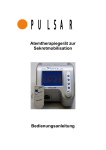
Keep pressed for around 3 sec.
the “ON/OFF“ T4 membrane key
(see alongside figure) located on
the control keyboard on the front
side of the PULSAR.
•
On the monitor two options are
highlighted
o
No
o
Yes
•
Pressing the T4 = No (ON/OFF)
key the PULSAR returns in
STANDBY condition.
•
Pressing the T3 = Yes key the
PULSAR turns-off.
4-10