1
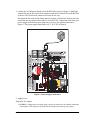
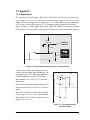
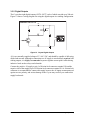
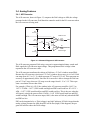
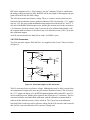
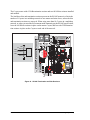
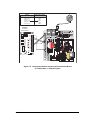
Coyote (BL2500)
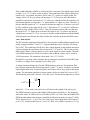
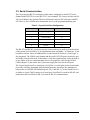
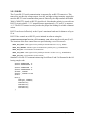
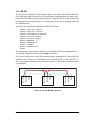
C-Programmable Single-Board Computer with Ethernet
User’s Manual
019–0120 •
041215–H
BL2500 User’s Manual
Part Number 019-0120 • 041215–H • Printed in U.S.A.
©2002–2004 Z-World Inc. • All rights reserved.
Z-World reserves the right to make changes and
improvements to its products without providing notice.
Trademarks
Rabbit and Rabbit 3000 are registered trademarks of Rabbit Semiconductor.
RabbitNet is a trademark of Z-World Inc.
Dynamic C is a registered trademark of Z-World Inc.
Z-World, Inc.
2900 Spafford Street
Davis, California 95616-6800
USA
Telephone: (530) 757-3737
Fax: (530) 753-5141
www.zworld.com
Coyote (BL2500)
TABLE OF CONTENTS
Chapter 1. Introduction
1
1.1 Features .................................................................................................................................................1
1.1.1 OEM Versions...............................................................................................................................2
1.2 Development and Evaluation Tools......................................................................................................3
1.2.1 Development Kit ...........................................................................................................................3
1.2.2 Software ........................................................................................................................................4
1.2.3 Connectivity Tools........................................................................................................................4
1.2.4 DIN Rail Mounting .......................................................................................................................5
1.3 RabbitNet Peripheral Cards ..................................................................................................................6
1.4 CE Compliance .....................................................................................................................................7
1.4.1 Design Guidelines .........................................................................................................................8
1.4.2 Interfacing the BL2500 to Other Devices .....................................................................................8
Chapter 2. Getting Started
9
2.1 Preparing the BL2500 for Development...............................................................................................9
2.2 BL2500 Connections ..........................................................................................................................10
2.2.1 Hardware Reset ...........................................................................................................................12
2.3 Installing Dynamic C ..........................................................................................................................13
2.4 Starting Dynamic C ............................................................................................................................14
2.5 PONG.C ..............................................................................................................................................15
2.6 Where Do I Go From Here? ...............................................................................................................15
2.7 Using the Coyote In High-Vibration Environments ...........................................................................16
Chapter 3. Subsystems
17
3.1 Coyote Pinouts ....................................................................................................................................18
3.1.1 Headers........................................................................................................................................19
3.2 Indicators ............................................................................................................................................20
3.2.1 LEDs ...........................................................................................................................................20
3.3 Digital I/O ...........................................................................................................................................21
3.3.1 Digital Inputs...............................................................................................................................21
3.3.2 Digital Outputs............................................................................................................................22
3.4 Analog Features ..................................................................................................................................23
3.4.1 A/D Converter.............................................................................................................................23
3.4.2 D/A Converters ...........................................................................................................................24
3.5 Serial Communication ........................................................................................................................27
3.5.1 RS-232 ........................................................................................................................................28
3.5.2 RS-485 ........................................................................................................................................29
3.5.3 Programming Port .......................................................................................................................31
3.5.4 RabbitNet Ports ...........................................................................................................................32
3.5.5 Ethernet Port ...............................................................................................................................32
3.6 Other Hardware...................................................................................................................................33
3.6.1 Clock Doubler .............................................................................................................................33
3.6.2 Spectrum Spreader ......................................................................................................................33
3.7 Memory...............................................................................................................................................34
3.7.1 SRAM .........................................................................................................................................34
3.7.2 Flash Memory .............................................................................................................................34
User’s Manual
Chapter 4. Software
35
4.1 Running Dynamic C........................................................................................................................... 35
4.1.1 Upgrading Dynamic C................................................................................................................ 36
4.1.2 Accessing and Downloading Dynamic C Libraries ................................................................... 37
4.2 Programming Cable............................................................................................................................ 38
4.2.1 Switching Between Program Mode and Run Mode ................................................................... 38
4.2.2 Detailed Instructions: Changing from Program Mode to Run Mode ......................................... 38
4.2.3 Detailed Instructions: Changing from Run Mode to Program Mode ......................................... 38
4.3 Sample Programs................................................................................................................................ 39
4.3.1 General Coyote Operation .......................................................................................................... 39
4.3.2 Digital I/O................................................................................................................................... 39
4.3.3 Serial Communication ................................................................................................................ 39
4.3.4 A/D Converter Inputs ................................................................................................................. 40
4.3.5 D/A Converter Outputs............................................................................................................... 40
4.3.6 Using System Information from the RabbitCore Module .......................................................... 41
4.4 Coyote Libraries ................................................................................................................................. 42
4.5 Coyote Function Calls........................................................................................................................ 43
4.5.1 Board Initialization ..................................................................................................................... 43
4.5.2 Digital I/O................................................................................................................................... 44
4.5.3 LEDs........................................................................................................................................... 46
4.5.4 Serial Communication ................................................................................................................ 47
4.5.5 A/D Converter Inputs ................................................................................................................. 48
4.5.6 Analog Outputs........................................................................................................................... 51
4.5.7 RabbitNet Port ............................................................................................................................ 55
Chapter 5. Using the TCP/IP Features
57
5.1 TCP/IP Connections ........................................................................................................................... 57
5.2 TCP/IP Sample Programs................................................................................................................... 59
5.2.1 How to Set IP Addresses in the Sample Programs..................................................................... 59
5.2.2 How to Set Up your Computer’s IP Address for a Direct Connection ...................................... 60
5.2.3 Run the PINGME.C Demo......................................................................................................... 61
5.2.4 Running More Demo Programs With a Direct Connection ....................................................... 62
5.3 Where Do I Go From Here? ............................................................................................................... 62
Appendix A. Specifications
63
A.1 Electrical and Mechanical Specifications.......................................................................................... 64
A.1.1 Exclusion Zone .......................................................................................................................... 66
A.1.2 Physical Mounting..................................................................................................................... 67
A.2 Conformal Coating ............................................................................................................................ 68
A.3 Jumper Configurations ...................................................................................................................... 69
A.4 Use of Rabbit 3000 Parallel Ports ..................................................................................................... 70
Appendix B. Power Supply
73
B.1 Power Supplies .................................................................................................................................. 73
B.2 Batteries and External Battery Connections...................................................................................... 74
B.2.1 Power to VRAM Switch ............................................................................................................ 75
B.2.2 Reset Generator.......................................................................................................................... 75
B.3 Chip Select Circuit............................................................................................................................. 75
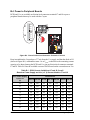
B.4 Power to Peripheral Boards ............................................................................................................... 76
Appendix C. Demonstration Board Connections
77
C.1 Assemble Wire Harness..................................................................................................................... 77
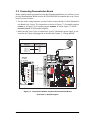
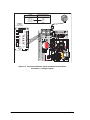
C.2 Connecting Demonstration Board ..................................................................................................... 79
Coyote (BL2500)
Appendix D. RabbitNet
83
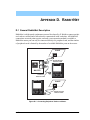
D.1 General RabbitNet Description..........................................................................................................83
D.2 Physical Implementation....................................................................................................................85
D.2.1 Control and Routing ...................................................................................................................85
D.3 Function Calls ....................................................................................................................................86
D.3.1 Status Byte .................................................................................................................................92
Appendix E. Programming Cable
93
Notice to Users
97
Index
99
Schematics
User’s Manual
101
Coyote (BL2500)
1. INTRODUCTION
The Coyote single-board computer gives OEM designers
extremely low-cost embedded control for high-volume applications. Two standard models—one with Ethernet, one without—
feature the Rabbit 3000® microprocessor running at 29.4 MHz,
with standard 256K flash and 128K SRAM. These compact
boards are rich with the I/O (including one A/D input and two
D/A outputs) designers need for embedded control and monitoring applications, and the Coyote's compact board size of 3.95" ×
3.95" (100 × 100 mm) is easily mountable in standard 100 mm
DIN rail trays.
Customized BL2500 models can be manufactured in volume in
OEM versions to user-specified configurations. Pin-compatible
RabbitCore modules allow multiple configurations of the Coyote
with Ethernet and memory options.
1.1 Features
• Rabbit 3000® microprocessor operating at 29.4 MHz (option for 44.2 MHz with
10/100Base-T Ethernet interface)
• 128K SRAM and 256K flash memory standard, optional 512K SRAM/512K flash
• 24 digital I/O: 9 protected and filtered digital inputs, 7 high-speed protected but unfiltered digital inputs, and 8 digital outputs sinking up to 200 mA at up to 36 V DC
• one 8-bit analog input channel
• two 9-bit PWM analog output channels
• six serial ports, including RabbitNet™ expansion ports
• one 10/100-compatible RJ-45 Ethernet port with standard 10Base-T interface (optional
10/100Base-T interface)
• 4 user-programmable LEDs.
• battery-backed real-time clock.
• watchdog supervisor.
• onboard backup battery for real-time clock and SRAM
User’s Manual
1
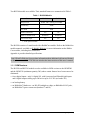
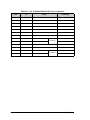
Two BL2500 models are available. Their standard features are summarized in Table 1.
Table 1. BL2500 Models
Feature
BL2500
BL2510
Microprocessor
Rabbit 3000® running at 29.4 MHz
Flash Memory
256K*
Static RAM
128K*
Ethernet Connections
RabbitCore Module Used
Yes
No
RCM3010
RCM3110
Yes
Yes
A/D Converter Input
* 512K options available
The BL2500 consists of a main board with a RabbitCore module. Refer to the RabbitCore
module manuals, available on Z-World’s Web site, for more information on the RabbitCore modules, including their schematics.
Appendix A provides detailed specifications.
Visit Z-World’s Web site for up-to-date information about additional add-ons and features
as they become available. The Web site also has the latest revision of this user’s manual.
1.1.1 OEM Versions
The BL2500 and BL2510 models are also available in OEM versions as the OEM2500
and the OEM2510 (minimum quantity 500) where certain features have been removed or
eliminated:
• fewer digital inputs—only 16 digital I/O, with 8 protected and filtered digital inputs
and 8 digital outputs sinking up to 200 mA at up to 36 V DC (no header J12)
• no backup battery
• no RabbitNet™ hardware—no RS-422/multiplexer chips, no RabbitNet RJ-45 jacks,
no RabbitNet™ power connectors (headers J7 and J8)
2
Coyote (BL2500)
1.2 Development and Evaluation Tools
1.2.1 Development Kit
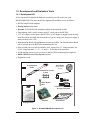
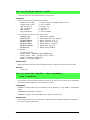
A Development Kit contains the hardware essentials you will need to use your
BL2500/OEM2500. The items in the Development Kit and their use are as follows.
• BL2500 single-board computer.
• Getting Started instructions.
• Dynamic C CD-ROM, with complete product documentation on disk.
• Programming cable, used to connect your PC serial port to the BL2500.
• 12 V AC adapter, used to power the BL2500. An AC adapter is supplied with development kits sold in the North American market. If you are using your own power supply, it
must provide 8 to 40 V DC.
• Demonstration Board with pushbutton switches and LEDs. The Demonstration Board
can be hooked up to the BL2500 to demonstrate the I/O.
• Parts to build your own wire assemblies: wire, twenty-five 0.1" crimp terminals; ten
0.156" crimp terminals; 1 × 2, 1 × 4, and 1 × 10 friction-lock connectors.
• Nylon machine screws to serve as legs for the BL2500 board during development.
• Rabbit 3000 Processor Easy Reference poster.
• Registration card.
AC Adapter
Programming
Cable
DIAG
(North American
kits only)
Nylon Machine Screws
& Nuts
PROG
Demo Board
Wire
Friction-Lock Connectors
& Crimp Terminals
Coyote (BL2500)
Getting Started
Development Kit Contents
·
·
·
·
·
·
·
·
·
·
·
·
J1
The BL2500/OEM2500 Development Kit contains the following items:
• BL2500 single-board computer.
market. A friction-lock Molex® connector is provided to allow overseas users to connect their own
power supply with a DC output of 8–40 V DC.)
H2
• 10-pin header to DE9 programming cable with integrated level-matching circuitry.
• Getting Started instructions.
• Demonstration Board with pushbutton switches and LEDs. The Demonstration Board can be hooked up
to the BL2500 to demonstrate the I/O.
• Parts to build your own wire assemblies: twenty-five 0.1" crimp terminals; ten 0.156" crimp terminals;
BL2500
SW3
SW4
BUZZER
H
Getting Started
SW2
1
SW1
If you haven’t yet installed Dynamic C,
insert the CD from the Development Kit in
your PC’s CD-ROM drive. If the installation program does not auto-start, then run
the setup.exe program in the root directory of the Dynamic C CD.
2-
board during development.
• Rabbit 3000 Processor Easy Reference poster.
Installing Dynamic C
· ·1
· · 8-7
· · 6-5
· · 4-3
1 × 2, 1 × 4, and 1 × 10 Molex connectors.
• Registration card.
LED1 LED2 LED3 LED4
· · 1-2
· · 3-4 DEMO BOARD
· · 5-6
• Dynamic C SE CD-ROM, with complete product documentation on disk.
• Nylon machine screws to serve as legs for the BL2500
BU
Z
L ZE
E
D R
LE 4
D
LE 3
D
LE 2
D
K 1
+5
V
SW
4
SW
3
SW
2
SW
1
G
N
D
• AC adapter, 12 V DC, 500 mA. (Included only with Development Kits sold for the North American
Demo Board
Figure 1. BL2500/OEM2500 Development Kit
User’s Manual
3
1.2.2 Software
The Coyote is programmed using version 7.33 or later of Z-World’s Dynamic C. A compatible version is included on the Development Kit CD-ROM. Web-based technical support is
included at no extra charge.
Z-World also offers add-on Dynamic C modules and source code. In addition to the Webbased technical support included at no extra charge, a one-year telephone-based technical
support module is also available for purchase. Visit our Web site at www.zworld.com or
contact your Z-World sales representative or authorized distributor for further information.
1.2.3 Connectivity Tools
Z-World also has available additional tools and parts to allow you to make your own wiring assemblies in quantity to interface with the friction-lock connectors on the Coyote.
• Connectivity Kit (Z-World Part No. 101-0581)—Six 1 × 10 friction-lock connectors
(0.1" pitch) with sixty 0.1" crimp terminals; and two 1 × 4 friction-lock connectors
(0.156" pitch) and two 1 × 2 friction-lock connectors (0.156" pitch) with fifteen 0.156"
crimp terminals. Each kit contains sufficient parts to interface with one Coyote board
(some parts may be left over).
• Crimp tool (Z-World Part No. 998-0013) to secure wire in crimp terminals.
Table 3 in Chapter 3 provides information on specific friction-lock connectors and crimp
terminals to be used with the various headers on the BL2500. Contact your authorized
Z-World distributor or your Z-World sales representative at +1(530)757-3737 for more
information.
4
Coyote (BL2500)
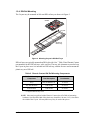
1.2.4 DIN Rail Mounting
The Coyote may be mounted in 100 mm DIN rail trays as shown in Figure 2.
D
+
GN
D
DC
IN
N/CWE
PO
D
9
D
3
R
7
2
R
7
3
R
7
5
9
R22
R23
R8
9
R1
7
R8
5
48
5
J4
GN
D
Q
3
Q
7Q
6
R
3
0
C T
VCOU
R
Q
2
D
7
Q
4
D
8
J7
D
6D
4
D
1
0
R
R
R 663
64
R 8
7
4
0
R
E
S
IS
TO
R
S
C T
VCOU
R
R
6
5
R7
TE
R
M
IN
AT
IO
N
IN
N/CWE
PO
J8
R
6
9
R8
C12
1
D
S1
R
S
R
PW
IN
R
D
C35
C36
DC
Q
1
U1
J2
STU NOT
FFED
Q
5
C16
C
2
D1
5
3
R
5
R 7
R
6
5
R 0
R
4
R
6
5
2
6
9
1
T
AC
R
3
R
15
C1
RR
1 9
0
R
1
2
D
0
8
GN
R4
6
GN
1
Inputs
D
GN
Tray Side
D
Dig
5
1
4
1
3
OS S
CM
5, RT
-48 PO
RS RIAL
SE
1
2
11
D
GN
J9
0
9
K
LN
GN
V
3.3
1
0
1
IN
0
0
U8
DC
0
1
DS
C
VC
0
2
2
ND
R
1
R
1
6
AG
0
3
C
C 3
R 4
R 11
1
4
R
2
1
0
4
DS
DA
C5
0
5
R
R 5
8
0
0
6
32
-2
RS
DA
0
7
0
ND
D
1
JP
AG
GN
2
JP
0
0
0
3
JP
AD
0
1
4
JP
V
R76
D
7
C4
JC
7
6
R4
7
R
R 81
8
0
3.3
0
2
8
R7
4
7
R2
S2
3
6
C4
4
C34
R67
C
LK
SC
R7
R66
0
3
C4
R70
0
4
1
C33
U9
0
5
C4
R71
S3
R8
2
R3
9
R2 8
R2
C
Rx
D
D
Y3
2
C4
3
Q1
R2
S4
TxC
GN
0
R5 1 2
R5
R5 C30
U9
U5
D
5+
D
GN
48
J4
8
8
R3
0
6
5
C27C24
D1
0
7
J1
0
Y2
C3
C28
+K
GN
R3
U5
R
5
9
R8 R27
3
9
PW
48
2
5
R1 7
R1 2
R2
9
C1
1
R3 0 1
R4
R4 7
R1
R2
R1
E
C
RP
8
R2
6
C2
LIN
VC
R9
4
C1
C1
U6
3
C3
R8
2
6
R8
0
C2 1
R2
C31
C3
R2
2
R8
8
6
C2
0
2
C2
9
58
R4 8 R
R4 7
R4 6
R4
5
R5
R2
J1
8
R1
3
1
BT
R29
8
U6
C2
6
C20C21
C19 R35
R34
R32R33
R1
C1
6
R5
4
R4 5
R4 3
R4 2
R4
ry
te
Ba
K
TION
8
R1
C1
5
J3
2
JA
5
R2
C17
C26
C22C24C23C25 R39
R38
R36R37
C29
Inputs
C1
4
U4
7
C1
U2D
D
GN
Dig
4
R1
3
C1
C11
T
0
1
4
R2
3
C7
NE
J1
1
J1
M
C1
5
C1
1
C1 2
R1 1
R1
T
IT
Outpu
ts
C
2
C3
R4
R5
R
0
C7 4
R9
3
R2 5
C1
U2R2
1
R9
C9
NE
BB
Dig
ND
C1
1
IT
JB
C1
BB
RA
CAU
OU
Y1
1
M
C
R C4
RP
RA
C8
GR
C6
R13
J3
C6
L1
U
E
Rx
E
Tx
0
R1
S1
D2
D
GN
F
C1
R6
R
R 7
4
J5
TV
Tx
F
Rx
J6
U
1
BL2500
Modular PC
Board Trays
DIN Rail
Figure 2. Mounting Coyote in DIN Rail Trays
DIN rail trays are typically mounted on DIN rails with “feet.” Table 2 lists Phoenix Contact
part numbers for the DIN rail trays, rails, and feet. The tray side elements are used to keep
the Coyote in place once it is inserted in a DIN rail tray, and the feet are used to mount the
plastic tray on a DIN rail.
Table 2. Phoenix Contact DIN Rail Mounting Components
DIN Rail Mounting
Component
Phoenix Contact
Part Description
Phoenix Contact
Part Number
Trays
UM 100-PROFIL cm*
19 59 87 4
Tray Side Elements
UM 108-SE
29 59 47 6
Foot Elements
UM 108-FE
29 59 46 3
* Length of DIN rail tray in cm
NOTE: Other major suppliers besides Phoenix Contact also offer DIN rail mounting
hardware. Note that the width of the plastic tray should be 100 mm (3.95") since that is
the width of the Coyote. 108 mm plastic trays may be used with spacers.
User’s Manual
5
1.3 RabbitNet Peripheral Cards
RabbitNet™ is an SPI serial protocol that uses a robust RS-422 differential signalling
interface (twisted-pair differential signaling) to run at a fast 1 Megabit per second serial
rate. The Coyote has two RabbitNet ports, each of which can support one peripheral card.
Distances between a master processor unit and peripheral cards can be up to 10 m or 33 ft.
The following low-cost peripheral cards are currently available.
• Digital I/O
• A/D converter
• D/A converter
• Relay card
• Display/Keypad interface
Appendix D provides additional information on RabbitNet peripheral cards and the RabbitNet protocol. Visit Z-World’s Web site for up-to-date information about additional addons and features as they become available.
6
Coyote (BL2500)
1.4 CE Compliance
Equipment is generally divided into two classes.
CLASS A
CLASS B
Digital equipment meant for light industrial use
Digital equipment meant for home use
Less restrictive emissions requirement:
less than 40 dB µV/m at 10 m
(40 dB relative to 1 µV/m) or 300 µV/m
More restrictive emissions requirement:
30 dB µV/m at 10 m or 100 µV/m
These limits apply over the range of 30–230 MHz. The limits are 7 dB higher for frequencies above 230 MHz. Although the test range goes to 1 GHz, the emissions from Rabbitbased systems at frequencies above 300 MHz are generally well below background noise
levels.
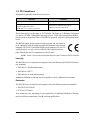
The BL2500 single-board computer has been tested and was found to
be in conformity with the following applicable immunity and emission
standards. The BL2510 and OEM single-board computers are also CE
qualified as they are sub-versions of the BL2500 single-board computer. Boards that are CE-compliant have the CE mark.
NOTE: Earlier versions of the BL2500 that do not have the CE mark are not CE-compliant.
Immunity
The BL2500 series of single-board computers meets the following EN55024/1998 immunity standards.
• EN61000-4-3 (Radiated Immunity)
• EN61000-4-4 (EFT)
• EN61000-4-6 (Conducted Immunity)
Additional shielding or filtering may be required for a heavy industrial environment.
Emissions
The BL2500 series of single-board computers meets the following emission standards.
• EN55022:1998 Class B
• FCC Part 15 Class B
Your results may vary, depending on your application, so additional shielding or filtering
may be needed to maintain the Class B emission qualification.
User’s Manual
7
1.4.1 Design Guidelines
Note the following requirements for incorporating the BL2500 series of single-board
computers into your application to comply with CE requirements.
General
• The power supply provided with the Tool Kit is for development purposes only. It is the
customer’s responsibility to provide a CE-compliant power supply for the end-product
application.
• When connecting the BL2500 single-board computer to outdoor cables, the customer is
responsible for providing CE-approved surge/lightning protection.
• Z-World recommends placing digital I/O or analog cables that are 3 m or longer in a
metal conduit to assist in maintaining CE compliance and to conform to good cable
design practices.
• When installing or servicing the BL2500, it is the responsibility of the end-user to use
proper ESD precautions to prevent ESD damage to the BL2500.
Safety
• All inputs and outputs to and from the BL2500 series of single-board computers must
not be connected to voltages exceeding SELV levels (42.4 V AC peak, or 60 V DC).
• The lithium backup battery circuit on the BL2500 single-board computer has been
designed to protect the battery from hazardous conditions such as reverse charging and
excessive current flows. Do not disable the safety features of the design.
1.4.2 Interfacing the BL2500 to Other Devices
Since the BL2500 series of single-board computers is designed to be connected to other
devices, good EMC practices should be followed to ensure compliance. CE compliance is
ultimately the responsibility of the integrator. Additional information, tips, and technical
assistance are available from your authorized Z-World distributor, and are also available
on our Web site at www.zworld.com.
8
Coyote (BL2500)
2. GETTING STARTED
Chapter 2 explains how to connect the programming cable and
power supply to the BL2500.
2.1 Preparing the BL2500 for Development
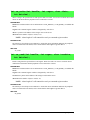
Position the BL2500 as shown below in Figure 3. Attach the four nylon 4-40 × ¼ machine
screws and nuts supplied with the Development Kit in the holes at the corners as shown.
C1
GND
JP1
RS-2
32
JP2
R22
R23
R28
JP3
RP2
R15
R17
R22
R89
R27
C26
R88
J4
GND
DCIN
N/C
VCC
POWER OUT
GND
DCIN
GND
N/C
VCC
POWER OUT
D5
U8
U10
C44
DS2
DS1
J7
J8
C41
R83
Y3
C46
C47
R46 R47
R86
C14
JC
LNK
ACT
J4
NO
STUF T
FED
C5
C16
R50
R51
R52
C18
R31
R40
R41
R17
C38
GND
JP4
+ PWR IN
D1 J2
R7
R4
C16
R23
C28
C35
C36
R18
R82
C19
U6
RxE
C6
C12
R20
R30
C25
R85
R24
R19
U6
U5
R19
C3
C15
R11
C11
R12 C15
GND
R20
R4
R5
C14
RxF TxF
TxE
C10
C9
C12
3.3V
RS-4
SERI85, CM
AL PO OS
RTS
R21
U1
J3
R29R32
R2
C24C27
R33
C33
U9 C34
U5
RxC
Inputs
DS1
Y2
J6
GROUND
RP1
R1
C 6
C33
R71
R67
R70
R58 R
66
J9
Dig
DS2
Y1
RCM1
C30
R77
R78
R79
R5
R8
C3
C4
R11
R14
R16
R26 R9
C22
C42
R27
R84
RCM1
C4
C7
R90
U2
R24
R25
C13
C20
R21 C23
R56
R76
GND
DS4
DS3
R13
C1
D1
R49
R48
R47
R46
R44
R45
R43
R42
485+
TxC
SCLKC
3.3V AD0 AGND DA0 DA1 AGND VCC DCIN
R6
R1
U4
R32
BT1
C31
Inputs
C21
C20
C19 RR35
34
R33
C29
Dig
17C2
8
C264 C25 R39
C22 C23 R38
R37
R36
R29
R18
R15
JA
R14
Q1
J1
RABB
ITNE
T
R91
485
R73
R75
GND
GND
U9
R55
C32
VCC
C13
C17
C18
D9
R30
R63
R64
R68
R74
R72
12
13
D8
Q7 Q6
R62
R65
R69
14
R59
R61
R60
J12
08
09
15
R54
R53
R57
10
tery
D10
07
U2
Q5
04
11
D7
CAU
TION
Bat
03
D3
Q3
Q2
D6D4
Q4
05
06
C11
PW
R
ts
Outpu
Q1
02
L1
C6
JB
C7
K LI
NE
Dig
+K
J11 J10
00
01
C8
R2
R3 R1
C2
R9
R10 R12
U3
06
07
GND
TVS1
D2
GND
J5
J3
RABB
ITNE
T
GN
D
00
01
02
03
04
05
GND
R87
R81
R80
RS485 TERMINATION RESISTORS
RabbitCore
Module
Figure 3. Attach Nylon Screws to BL2500 Board
NOTE: You will have to remove the RabbitCore module to install one screw under the
module. When replacing the RabbitCore module, it is important that you line up the pins
on the module exactly with the corresponding pins on the BL2500. The header pins may
become bent or damaged if the pin alignment is offset, and the module will not work.
Permanent electrical damage may also result if a misaligned module is powered up.
The nylon screws serve as standoffs to facilitate handling the BL2500 during development, and protect the bottom of the printed circuit board against scratches or short circuits
while you are working with the BL2500.
User’s Manual
9
2.2 BL2500 Connections
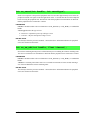
1. Connect the programming cable to download programs from your PC and to program
and debug the BL2500.
NOTE: Use only the programming cable that has a red shrink wrap around the RS-232
level converter (Z-World part number 101-0513). If you are using a BL2500/OEM2500
with the optional 10/100Base-T Ethernet interface, you will need the programming
cable that has a blue shrink wrap around the RS-232 level converter (Z-World part
number 101-0542). Other Z-World programming cables might not be voltagecompatible or their connector sizes may be different.
Connect the 10-pin PROG connector of the programming cable to header J3 on the
BL2500’s RabbitCore module. Ensure that the colored edge lines up with pin 1 as shown.
There is a small dot on the circuit board next to pin 1 of header J3. (Do not use the DIAG
connector, which is used for monitoring only.) Connect the other end of the programming
cable to a COM port on your PC. Make a note of the port to which you connect the cable,
as Dynamic C will need to have this parameter configured. Note that COM1 on the PC is
the default COM port used by Dynamic C.
J3
PROG
U1
C1
GND
+ PWR IN
D1 J2
R7
R4
NOT
STUFFED
3.3V AD0 AGND DA0 DA1 AGND VCC DCIN
R2
R3 R1
R6
C4
R11
R14
DCIN
RS-232
C16
R12
R11
C16
C15
R20
JP1
R27
C26
R30
C25
C30
J4
GND
C38
U8
R83
R81
R80
C35
C36
C42
Y3
DS2 DS1
JC
C44
R87
R86
C46
R46 R47
C47
LNK ACT
U10
C41
R78
R79
R85
R19
RP2
C19 R15
R88R17
R22
R23
C28
Y2
R9
C14
R89
R31
R40
R41
U6
R17
R24
R19
C34
R20
JP2
C12
C11
U6
R50
R51
R52
C24
R33
DCIN
N/C VCC
POWER OUT
GND
J7
D5
GND
DS1
R21
R77
R84
C12
3.3V
RS-485, CMOS
SERIAL PORTS
GND
DS2
C10
C9
C27
C20
R21 C23
C33
C33
SCLKC
U5
RxC
Dig Inputs
GND
R28
C18
U5
Q1
R26
U9
R27
R76
GND
DS4
DS3
R82
JP3
R23
C6
JP4
J3
PROG
D1
485+
TxC
R22
GND
N/C VCC
POWER OUT
J8
RP1
R18
C3
485
R75
J9
15
C15
R4
C4C14R5
R71
R73
14
VCC
R18
C22
R32
R29
R28
R72
13
C32
C7
U9
R70
12
R74
R55
R66
R69
C18
R56
R67
11
R63
R64
R68
RCM1
C13
R14
R16
10
C13
R58
R65
Y1
U2
C17
R49
R48
R47
R46
R44
R45
R43
R42
R62
08
Color
shrink wrap
C31
J12
R61
C17C26 C25 R39
C24 C23 R38
R37
C22
R36
R60
Programming Cable
R59
D9
R30
C21
C20 R35
C19 R34
R33
R32
Dig Inputs
R57
GND
R54
BT1
R53
C29
07
R29
06
D8
Q6
Q7
JA
R90
R24
R25
R91
U4
D10
05
09
D7
Q4
Q5
04
CAUTION
Battery
03
Q3
Q2
GND
GROUND
RCM1
C1
D6D4
02
D3
U2
Q1
01
C11
00
TxE RxE
JB
R1
+K
C8
DIAG
Colored edge
J11 J10
L1
R16
C6
C7
K LINE PWR
Dig Outputs
07
R15
R13
U3
06
To
PC COM port
R9
R10 R12
D2
05
RxF TxF
C3
03
04
J6
R5
R8
C2
C5
J4
02
TVS1
J1
RABBITNET
01
GND
J5
J3
RABBITNET
GND
00
GND
RS485 TERMINATION RESISTORS
Figure 4. Programming Cable Connections
10
Coyote (BL2500)
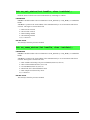
2. Connect the AC adapter to header J2 on the BL2500 as shown in Figure 5. Match the
friction lock tab on the friction-lock connector to the back of header J2 on the BL2500
as shown. The friction-lock connector will only fit one way.
Development Kits sold outside North America include a friction lock friction-lock connector that may be connected to header J2 on the BL2500. Connect the leads from your
power supply to the friction-lock connector to preserve the polarity indicated in
Figure 5. The power supply should deliver 8 V–40 V DC at 500 mA.
+
U1
C1
GND
+ PWR IN
D1 J2
R7
R4
NOT
STUFFED
3.3V AD0 AGND DA0 DA1 AGND VCC DCIN
R2
R3 R1
R6
DCIN
C4
R11
R14
C16
U5
C30
C38
U8
JP1
R83
Y3
U10
JC
C46
R46 R47
C47
LNK ACT
R81
R80
C42
C44
R87
R86
C35
C36
R78
R79
R85
R19
J4
GND
C41
R77
R84
R20
JP2
R27
C26
R30
C25
C24
R33
N/C VCC
POWER OUT
GND
J7
D5
GND
DS1
R21
C34
DS2
C12
3.3V
RS-485, CMOS
SERIAL PORTS
GND
C33
SCLKC
U5
RxC
Dig Inputs
GND
C19 R15
R88R17
R22
R23
C28
R20
R24
R19
Y2
RP2
JP4
C15
C33
JP3
C16
R12
R11
C12
C11
U6
R50
R51
R52
R9
C14
R89
U9
R27
R76
GND
DS4
DS3
R26
R28
R31
R40
R41
U6
R17
R71
485+
TxC
R82
C10
C9
Q1
C20
R21 C23
485
R75
RS-232
R23
C6
DS2 DS1
DCIN
J8
J3
C27
D1
C32
VCC
J9
15
C22
R32
R29
R28
R73
14
R18
U9
R70
R72
13
R74
R66
12
C18
R56
R55
R67
R69
R63
R64
R68
R18
C3
C18
R14
R16
10
C13
C17
R58
R65
C15
R4
C4C14R5
U2
R49
R48
R47
R46
R44
R45
R43
R42
R62
08
C17C26 C25 R39
C24 C23 R38
R37
C22
R36
R60
J12
R61
C21
C20 R35
C19 R34
R33
R32
GND
R59
R30
C31
R57
D9
BT1
Dig Inputs
07
R54
C29
R53
C7
D8
Q6
Q7
R29
06
RP1
D10
05
C13
R91
Y1
RCM1
R90
R24
R25
U4
04
11
D7
Q4
Q5
CAUTION
03
Battery
02
Q3
Q2
JA
C1
D6D4
GROUND
RCM1
R1
C8
D3
Q1
01
GND
C6
U2
00
TxE RxE
JB
C11
J11 J10
L1
C7
+K
K LINE PWR
Dig Outputs
07
R16
R22
GND
N/C VCC
POWER OUT
U3
06
R15
R13
05
09
R9
R10 R12
D2
RxF TxF
C3
03
04
J6
R5
R8
C2
C5
J4
02
TVS1
J1
RABBITNET
01
GND
J5
J3
RABBITNET
GND
00
GND
RS485 TERMINATION RESISTORS
Figure 5. Power Supply Connections
3. Apply power.
Plug in the AC adapter.
CAUTION: Unplug the power supply while you make or otherwise work with the connections
to the headers. This will protect your BL2500 from inadvertent shorts or power spikes.
User’s Manual
11
2.2.1 Hardware Reset
A hardware reset is done by unplugging the AC adapter, then plugging it back in, or by
shorting out the reset pads on the back of the Bl2500 (see Figure 6).
RESET
pads
RESET
© 2004 Z-WORLD, INC.
175-0295
Figure 6. Location of RESET Pads
12
Coyote (BL2500)
2.3 Installing Dynamic C
If you have not yet installed Dynamic C version 7.33 (or a later version), do so now by
inserting the Dynamic C CD from the BL2500/OEM2500 Development Kit in your PC’s
CD-ROM drive. The CD will auto-install unless you have disabled auto-install on your PC.
If the CD does not auto-install, click Start > Run from the Windows Start button and
browse for the Dynamic C setup.exe file on your CD drive. Click OK to begin the
installation once you have selected the setup.exe file.
The online documentation is installed along with Dynamic C, and an icon for the documentation menu is placed on the workstation’s desktop. Double-click this icon to reach the
menu. If the icon is missing, create a new desktop icon that points to default.htm in the
docs folder, found in the Dynamic C installation folder.
The latest versions of all documents are always available for free, unregistered download
from our Web sites as well.
The Dynamic C User’s Manual provides detailed instructions for the installation of
Dynamic C and any future upgrades.
NOTE: If you have an earlier version of Dynamic C already installed, the default installation of the later version will be in a different folder, and a separate icon will appear on
your desktop.
User’s Manual
13
2.4 Starting Dynamic C
Once the BL2500 is connected to your PC and to a power source, start Dynamic C by double-clicking on the Dynamic C icon or by double-clicking on dcrabXXXX.exe in the Dynamic
C root directory, where XXXX are version-specific characters.
Dynamic C defaults to using the serial port on your PC that you specified during installation. If the port setting is correct, Dynamic C should detect the BL2500 and go through a
sequence of steps to cold-boot the BL2500 and to compile the BIOS. (Some versions of
Dynamic C will not do the initial BIOS compile and load until the first time you compile a
program.)
If you receive the message No Rabbit Processor Detected, the programming
cable may be connected to the wrong COM port, a connection may be faulty, or the target
system may not be powered up. First, check both ends of the programming cable to ensure
that it is firmly plugged into the PC and the programming port.
If there are no faults with the hardware, select a different COM port within Dynamic C.
From the Options menu, select Communications. Select another COM port from the list,
then click OK. Press <Ctrl-Y> to force Dynamic C to recompile the BIOS. If Dynamic C
still reports it is unable to locate the target system, repeat the above steps until you locate the
active COM port. You should receive a Bios compiled successfully message
once this step is completed successfully.
If Dynamic C appears to compile the BIOS successfully, but you then receive a communication error message when you compile and load a sample program, it is possible that your
PC cannot handle the higher program-loading baud rate. Try changing the maximum
download rate to a slower baud rate as follows.
• Locate the Serial Options dialog in the Dynamic C Options > Communications
menu. Select a slower Max download baud rate.
If a program compiles and loads, but then loses target communication before you can
begin debugging, it is possible that your PC cannot handle the default debugging baud
rate. Try lowering the debugging baud rate as follows.
• Locate the Serial Options dialog in the Dynamic C Options > Communications
menu. Choose a lower debug baud rate.
14
Coyote (BL2500)
2.5 PONG.C
You are now ready to test your set-up by running a sample program.
Find the file PONG.C, which is in the Dynamic C SAMPLES folder. To run the program,
open it with the File menu (if it is not still open), compile it using the Compile menu, and
then run it by selecting Run in the Run menu. The STDIO window will open on the PC
and will display a small square bouncing around in a box.
This program shows that the CPU is working. The sample program described in
Section 5.2.3, “Run the PINGME.C Demo,” tests the TCP/IP portion of the board.
2.6 Where Do I Go From Here?
NOTE: If you purchased your BL2500 through a distributor or Z-World partner, contact
the distributor or Z-World partner first for technical support.
If there are any problems at this point:
• Check the Z-World Technical Bulletin Board at www.zworld.com/support/bb/.
• Use the Technical Support e-mail form at www.zworld.com/support/.
If the sample program ran fine, you are now ready to go on to explore other BL2500 features and develop your own applications.
Chapter 3, “Subsystems,” provides a description of the BL2500’s features, Chapter 4,
“Software,” describes the Dynamic C software libraries and introduces some sample programs. Chapter 5, “Using the TCP/IP Features,” explains the TCP/IP features.
User’s Manual
15
2.7 Using the Coyote In High-Vibration Environments
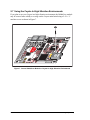
If you plan to use your Coyote in a high-vibration environment, the RabbitCore module
may be secured more solidly to a swage on the Coyote main board using a 2-56 × ¼"
machine screw as shown in Figure 7.
C1
GND
32
RS-2
JP1
JP2
R23
R22
JP3
R89
R27
R88 J4
Y3
DCIN
N/C
VCC
POWER OUT
GND
DCIN
GND
N/C
VCC
POWER OUT
J7
J8
D5
DS1
DS2
U10
C46
C47
R46 R47 JC
ACT
U8
R83
LNK
J4
N
STUOT
FFE
D
R7
R4
C5
R28
RP2
JP4
+ PWR IN
D1 J2
C16
R82 C14
R15
R17
R22
R23
R30
C25
C35
C36
U1
R18
R26
R9
C16
R20
R86
C44
R85
GND
GND
C41
R78
R79
R19
R24
C38
RxE
C6
C12
U6
C28
R20
C3
C19
U6
C18
R31
R40
R41
R17
C33
U9 C34
GND
R21
C26
R50
R51
R52
RxF TxF
TxE
GROUND
C10
C9
C
R67
R71
R70
R58 R
66
R84
C12
3.3V
RS-4
SER 85, CM
IAL OS
POR
TS
DS2
Y2
R16
C15
C30
R77
3.3V AD0 AGND DA0 DA1 AGND VCC DCIN
J3
R19
C2427
R33
R29R32
R49
R48
R47
R46
R44
R4
R435
R42
U5
RxC
SCLKC
DS1
R13
RP1
U5
CR
D1
C33
C42
R27
R4
C11
R12 C15
R11
U4
171C6
R2
2
C26 C2 R 8
C224 C235 R339
R38
R367
Q1
R56
R76
J9
Dig
Inpu
ts
GND
R6
C1
C11
C
2
C210
C19 RR35
3
R34
R323
C31
GND
DS4
TxC
DS3
C20
R21 C23
C22
BT1
485+
R75
GND
R29
C32
VCC
R18
R15
Y1
RCM1
C14
J6
R5
R8
C3
C4
R11
R14
JA
RCM1
R5
C4
R14
485
R73
14
R55
R74
R69
C18
D9
U9
R72
C13
C17
TION
R61
R63
R64
R68
R65
15
R30
R62
09
D8
Q7 Q6
C7
R90
U2R24
R25
C13
R91
CAU
Ba
J12
R59
C29
Dig
Inpu
ts
R57
R60
GND
10
D7
D10
R54
R53
08
11
Q3
Q2
D6D4
tter
y
04
05
12
D3
Q4
Q5
06
13
C8
U2
Q1
01
02
03
L1
C6
JB
C7
KL
INE
PW
R
Dig
Outpu
ts
J11 J10
00
R1
06
07
07
R9
R10 R12
U3
+K
R2
R3 R1
C2
D2
05
J1
RAB
BIT
NET
ITN
ET
J3
03
04
TVS1
GND
J5
D
RAB
B
GN
00
01
02
GND
R87
R81
R80
RS485 TERMINATION RESISTORS
Figure 7. Secure RabbitCore Module to Coyote for High-Vibration Environments
16
Coyote (BL2500)
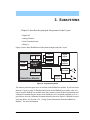
3. SUBSYSTEMS
Chapter 3 describes the principal subsystems for the Coyote.
• Digital I/O
• Analog Features
• Serial Communication
• Memory
Figure 8 shows these Rabbit-based subsystems designed into the Coyote.
32 kHz 14 MHz
osc
osc
SRAM
Flash
RABBIT
3000
®
Programming
Port
Digital
Inputs
RS-232
RS-485
Digital
Outputs
A/D
Converter
Ethernet
(BL2500/BL2550)
RabbitCore Module
Analog
Outputs
Figure 8. Coyote Subsystems
The memory and microprocessor are located on the RabbitCore module. If you have more
than one Coyote or other Z-World products built around RabbitCore modules, take care
not to swap the RabbitCore modules since they contain system ID block information and
calibration constants that are unique to the board they were originally installed on. It is a
good idea to save the calibration constants should you need to replace a RabbitCore module in the future. See Section 4.3.6, “Using System Information from the RabbitCore
Module,” for more information.
User’s Manual
17
3.1 Coyote Pinouts
The Coyote pinouts are shown in Figure 9.
RabbitNet
GND
TxE
RxE
DCIN
n.c.
GND
JP1
R4 C3
R5
C6
JP2
C4
C12
C16
C11 C15
R12
R11
R9
C14
RP2
R20
C20
R21 C23
R24
R19
R16
R18
JP4
U5
R14
C18
R23
Y2
R27
C26
J4
C38
RS-485
C42
Y3
C44
DS4
DS3
DS2
DS1
DS2 DS1
Clocked
CMOS
Ethernet
C41
GND
C33
R30
C25
Vcc
RS-485+
RS-485
GND
TxC
RxC
CLKC
+3.3 V
Q1
C24
R33
R32
R29
R28
U9
C19 R15
R17
R22
U6
C22
J12
J9
JP3
C10
C9
C13
C17
C46
R46 R47
C47
LNK ACT
DCIN
n.c.
Vcc
Vcc
J3
C7
U2
D1
GND
Y1
RP1
CAUTION
Digital
Inputs
RS-232
C1
J11
GND
IN08
IN09
IN10
IN11
IN12
IN13
IN14
IN15
J6
J8
J7
J10
Battery
Digital
Inputs
IN00
IN01
IN02
IN03
IN04
IN05
IN06
IN07
+K
GND
J1
R1
K
+K
GND
Digital
Outputs
J2
GND
J3
OUT0
OUT1
OUT2
OUT3
OUT4
OUT5
OUT6
OUT7
RxF
TxF
GND
Power
Supply
DCIN
Vcc
GND
DA1
DA0
AGND
AD0
+3.3 V
J5
Analog
Input
DCIN
J4
Analog
Ground
Analog
Outputs
GND
Figure 9. Coyote Pinouts
18
Coyote (BL2500)
3.1.1 Headers
Standard Coyote models are equipped with five 1 × 10 friction-lock connector terminals
(J1, J3, J9, J11, and J12) where pin 9 is removed to polarize the connector terminals, a 2 × 5
RS-232 signal header, a 2 × 5 programming header, and an RJ-45 Ethernet jack on the
RabbitCore module.
The RJ-45 jacks at J4 and J5 labeled RabbitNet are serial I/O expansion ports for use with
digital I/O and analog I/O boards currently being developed. The RabbitNet jacks do not
support Ethernet connections. Be careful to connect your Ethernet cable to the jack labeled
Ethernet.
Two 4-pin 0.156" friction-lock connector terminals at J7 and J8 are installed to supply
power (DCIN and +5 V) to the peripheral boards currently being developed for use with
the RabbitNet. Two 2-pin 0.156" friction-lock connector terminals at J2 and J10 are for
power supply and +K connections.
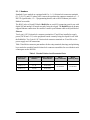
Table 3 lists Molex connector part numbers for the crimp terminals, housings, and polarizing
keys needed to assemble female friction-lock connector assemblies for use with their male
counterparts on the BL2500.
Table 3. Female Friction-Lock Connector Parts
Friction-Lock
Connector
Used with BL2500
Headers
Molex Housing
Part Number
Molex
Crimp Terminals
Molex
Polarizing Keys
0.1" 1 × 10
J1, J3, J9, J11, J12
22-01-2107
08-50-0113
15-04-9209
0.156" 1 × 4
J7, J8
09-50-3041
08-50-0108
15-04-0219
0.156" 1 × 2
J2, J10
09-50-3021
User’s Manual
19
3.2 Indicators
3.2.1 LEDs
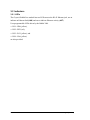
The Coyote’s RabbitCore module has two LEDs next to the RJ-45 Ethernet jack, one to
indicate an Ethernet link (LNK) and one to indicate Ethernet activity (ACT).
User-programmable LEDs driven by the Rabbit 3000
• DS1—PB6 (yellow),
• DS2—PB7 (red),
• DS3—PA7 (yellow), and
• DS4—PA6 (yellow)
are also provided.
20
Coyote (BL2500)
3.3 Digital I/O
3.3.1 Digital Inputs
The Coyote has 16 digital inputs, IN00–IN15. IN00–IN13 and IN15 are each protected
over a range of –36 V to +36 V, and IN14 is protected over a range of –36 V to +5 V. The
inputs are factory-configured to be pulled up to +3.3 V; IN00–IN07 can also be pulled up
to +K or they can be pulled down to 0 V by changing a surface-mounted 0 Ω resistor.
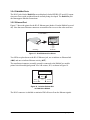
Figure 10 shows a sample digital input circuit. IN00-IN07 and IN15 are protected against
noise spikes by a low-pass filter composed of a 22 kΩ series resistor and a 10 nF capacitor.
+K
R55
R56 R58
+3.3 V
0W
Factory
Default
100 kW
22 kW
10 nF
Rabbit 3000
Microprocessor
GND
Figure 10. Coyote Digital Inputs [Pulled Up—Factory Default]
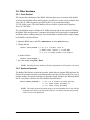
The actual switching threshold between a zero
and a one is between 0.9 V and 2.3 V for all 16
inputs.
IN00–IN13 and IN15 are each fully protected
over a range of -36 V to +36 V, and can handle
short spikes of ±40 V. IN14 is protected over a
range of -36 V to +5 V.
Normal Switching
Levels
+40 V
Digital Input Voltage
Coyote series boards can be made to order in
volume with the digital inputs pulled up to +K
or pulled down to 0 V. Contact your authorized
Z-World distributor or your Z-World Sales
Representative at +1(530)757-3737 for more
information.
+36 V
Spikes
Spikes
+3.3 V
40 V
Spikes
Figure 11. Coyote Digital Input
Protected Range
User’s Manual
21
3.3.2 Digital Outputs
The Coyote has eight digital outputs, OUT0–OUT7, each of which can sink up to 200 mA.
Figure 12 shows a wiring diagram for using the digital outputs in a sinking configuration.
SINKING OUTPUTS
+K
Current
Flow
Figure 12. Coyote Digital Outputs
+K is an externally supplied voltage of 3.3–40 V DC, and should be capable of delivering
all the load currents. Although a connection to a +K supply is not absolutely required with
sinking outputs, it is highly recommended to protect against current spikes when driving
inductive loads such as relays and solenoids.
Connect the positive +K supply to pin 1 of friction-lock connector terminal J10 and the
negative side of the supply to pin 2 of friction-lock connector terminal J10. A friction-lock
connector is recommended to connect this supply because the +K inputs are not protected
against reverse polarity, and serious damage to the Coyote may result if you connect this
supply backwards.
22
Coyote (BL2500)
3.4 Analog Features
3.4.1 A/D Converter
The A/D converter, shown in Figure 13, compares the DA0 voltage to AD0, the voltage
presented to the A/D converter. DA0 therefore cannot be used for the D/A converter when
the A/D converter is being used.
+3.3 V
R11
24.9 kW
AD0
2
R14
100 W
DA0
R1
100 W
C4
100 nF
3
R5
10 kW
6
5
R8
24.9 kW
DA0 too low
–
LM324
8
10 kW
+
–
LM324
+
R16
14
R2
10 kW
PB2
PB3
DA0 too high
Figure 13. Schematic Diagram of A/D Converter
The A/D converter programs DA0 using a successive-approximation binary search until
DA0 equals the A/D converter input voltage. That programmed DA0 voltage is then
reported as the A/D converter value.
The A/D converter transforms the voltage at DA0 into a 13.2 mV window around DA0.
Because the A/D converter circuit uses a 13.2 mV window, the accuracy is ±6.6 mV. DA0
can range from 0.1 V to 3.1 V, which represents 227 steps of 13.2 mV. This represents an
accuracy of approximately 8 bits. Since the D/A converter is able to change the DA0 output in 3.22 mV steps, there are 930 steps over the range from 0.1 V to 3.1 V. This represents a resolution of more than 9 bits.
For example, if DA0 is 1.650 V, the window in the A/D converter would be 1.643 V to
1.657 V. If AD0 > 1.657 V, PB2 would read high and PB3 would read low. If 1.643 V <
AD0 < 1.657 V, PB2 would read low and PB3 would read low. This is the case when the
A/D input is exactly the same as DA0. If AD0 < 1.643 V, PB2 would read low and PB3
would read high. The A/D converter input, AD0, is the same as DA0 only when both PB2
and PB3 are low.
PB3 can be imagined to be a “DA0 voltage is too high” indicator. If DA0 is larger than the
analog voltage presented at AD0, then PB3 will be true (high). If this happens, the program will need to reduce the DA0 voltage.
User’s Manual
23
PB2 can be imagined to be a “DA0 voltage is too low” indicator. If DA0 is smaller than
the analog voltage presented at AD0, then PB2 will be true (high). If this happens, the program will need to raise the DA0 voltage.
The A/D converter has no reference voltage. There is a relative accuracy between measurements, but no absolute accuracy without calibration. This is because the +3.3 V supply
can vary ±5%, the pulse-width modulated outputs might not reach the full 0 V and 3.3 V
rails out of the Rabbit 3000 microprocessor, and the gain resistors used in the circuit have
a 1% tolerance. For these reasons, each Coyote needs to be calibrated individually, with
the constants held in software, to be able to rely on an absolute accuracy. The Coyote has
this calibration support.
An A/D conversion takes less than 100 ms with a 29.4 MHz Coyote.
3.4.2 D/A Converters
Two D/A converter outputs, DA0 and DA1, are supplied on the Coyote. These are shown
in Figure 14.
R6
DA0
24.9 kW
8
–
LM324
+
R4
1.0 kW
9
R7
10
C2
100 nF
24.9 kW
PF6
R12
10 kW
R13
DA1
24.9 kW
14
R15
1.0 kW
–
LM324
+
13
R10
12
C5
100 nF
24.9 kW
PF7
R9
10 kW
Figure 14. Schematic Diagram of D/A Converters
The D/A converters have no reference voltage. Although they may be fairly accurate from
one programmed voltage to the next, they do not have absolute accuracy. This is because
the +3.3 V supply can change ±5%, the PWM outputs might not achieve the full 0 V and 3.3 V
rail out of the processor, and the gain resistors in the circuit have a 1% tolerance. The D/A
converters therefore need individual calibration, with the calibration constants held in
software before absolute accuracy can be relied on. The Coyote has such calibration.
Note that DA0 is used to provide a reference voltage for the A/D converter and is unavailable for D/A conversion when the A/D converter is being used.
24
Coyote (BL2500)
Pulse-width modulation (PWM) is used for the D/A conversion. The digital signal, which
is either 0 V or 3.3 V, will be a train of pulses. This means that if the signal is taken to be
usually at 0 V (or ground), the pulses will be some 3.3 V pulses of varying width. The
voltage will be 0 V for a given time, then jump to 3.3 V for a given time, then back to
ground for a given time, then back to 3.3 V, and so on. A hardware filter that consists of a
resistor and capacitor averages the 3.3 V signal and the 0 V signal over time. Therefore, if
the time that the signal is at 3.3 V is equal to the time the signal is 0 V, the duty cycle will
be 50%, and the average signal will be 1.65 V. If the time at 3.3 V is only 25% of the time,
then the average voltage will be 0.825 V. Thus, the software needs to only vary the time
the signal is at 3.3 V with respect to the time the signal is at 0 V to achieve any desired
voltage between 0 and 3.3 V. It is very easy to do pulse-width modulation with the Rabbit
3000 microprocessor because the chip’s architecture includes an advanced PWM feature.
3.4.2.1 DA0 and DA1
The RC networks supporting DA0 and DA1 converts pulse-width modulated signals to an
analog voltage between 0 V and 3.3 V. A digital signal that varies with time is fed from
PF6 or PF7. The resolution of the DA0 or DA1 output depends on the smallest increment
of time to change the on/off time (the time between 3.3 V and 0 V). The Coyote uses the
Rabbit 3000’s Port F control registers to clock out the signal at a timer timeout. The dedicated PWM hardware has 10 bits of resolution, and so that the voltage can be varied in
1/1024 increments. The resolution is thus about 3 mV (3.3 V/1024).
R6 and R13 are present solely to balance the op amp input current bias. R4 and R15 help
to achieve a voltage close to ground for a 0% duty cycle.
A design constraint dictates how fast the PWM hardware must run. The hardware filter
has a resistor-capacitor filter that averages the 0 V and 3.3 V values. Its effect is to smooth
out the digital pulse train. It cannot be perfect, and so there will be some ripple in the output
voltage. The maximum signal decay between pulses will occur when DA1 is set to 1.65 V.
This means the pulse train will have a 50% duty cycle. The maximum signal decay will be
1.65 V × 1 – e
–t ⎞
⎛ ------⎝ RC-⎠
where RC = 2.5 ms, and t is the pulse on or off time (not the length of the total cycle).
The PWM hardware is driven at the Rabbit 3000 frequency divided by 2. The frequency
achievable with a 29.4 MHz clock is (29.4 MHz/2)/1024 = 14.3 kHz. Since the Rabbit 3000
PWM spreader enhances the frequency fourfold, the effective frequency becomes 57.4 kHz.
This is a period of 1/f = 17.4 µs. For a 50% duty cycle, half of the period will be high (8.7
µs at 3.3 V), and half will be low (8.7 µs at 0 V). Thus, a 29.4 MHz Coyote has t = 8.7 µs.
User’s Manual
25
Based on the standard capacitor discharge formula, this means that the maximum voltage
change will be
1.65 V × 1 – e
8.7 µs⎞
⎛ –----------------⎝ 2.5 ms-⎠
= 5.73 mV
This is a ripple of approximately 6 mV peak-to-peak.
Table 4 lists typical uncalibrated DA0 or DA1 voltages measured for various duty cycle
values with a load larger than 1 MΩ.
Table 4. Typical Uncalibrated DA0 or DA1 Voltages for Various Duty Cycles
Duty Cycle
(%)
Voltage
(V)
Programmed Count
0
0.086
1
50
1.628
512
100
3.244
1023
The full D/A converter voltage range of 0–3.3 V cannot be realized because of the voltage
tolerances associated with the voltage regulator, the Rabbit 3000 PWM output, and the opamp rail. The circuit can achieve an actual voltage range of 0.1–3.3 V.
It is important to remember that the DA0 or DA1 output voltage will not be realized instantaneously after programming in a value. There is a settling time because of the RC time
constant (24.9 kΩ × 100 nF), which is 2.5 ms. For example, the voltage at any given time is
V = VP – (VP – VDA)e(-t/RC)
where V is the voltage at time t, VP is the programmed voltage, VDA is the last DA0 or
DA1 output voltage from the D/A converter, and RC is the time constant (2.5 ms). The
settling will be within 99.326% (or within about 22 mV for a 3.3 V change in voltage)
after five time constants, or 12.5 ms. Six time constants, 15 ms, will allow settling to
within 99.75% (or to within about 8 mV for a 3.3 V change in voltage). Seven time constants, 17.5 ms, will allow settling to within 99.91% (or to within about 3 mV for a 3.3 V
change in voltage).
An LM324 op amp, which can comfortably source 10 mA throughout the D/A converter
range, drives the D/A converter output. If the output voltage is above 1 V, the D/A converter can comfortably sink 10 mA. Below 1 V, the D/A converter can only sink a maximum of 100 µA.
To summarize, DA0 and DA1 are factory-calibrated, with the calibration constants stored
in flash memory. DA0 and DA1 can be programmed with a resolution of 3 mV and a
peak-to-peak ripple of 6 mV over the range from 0.1 to 3.1 V. The settling time to within 3
mV is 17.5 ms.
26
Coyote (BL2500)
3.5 Serial Communication
The Coyote has two RS-232 serial ports, which can be configured as one RS-232 serial
channel (with RTS/CTS) or as two RS-232 (3-wire) channels. The Coyote also has one RS485 serial channel, one clocked CMOS serial channel, and two SPI serial ports with RS422. There is also a CMOS serial channel that serves as the programming/debug port.
Table 5. Coyote Serial Port Configuration
Serial Port
Use
Header
A
Programming Port
J3 (RabbitCore module)
B
RabbitNet SPI (RS-422)
J4/J5
C
Clocked CMOS
J9
D
RS-485
J9
E
RS-232
J6
F
RS-232
J6
The RS-232 and RS-485 serial ports operate in an asynchronous mode up to the baud rate
of the system clock divided by 8. An asynchronous port can handle 7 or 8 data bits. A 9th
bit address scheme, where an additional bit is sent to mark the first byte of a message, is
also supported. The CMOS serial channel and the two RS-422 SPI ports can also be operated in the clocked serial mode. In this mode, a clock line synchronously clocks the data in
or out. Either of the two communicating devices can supply the clock for the clocked
CMOS channel. As the master, the Coyote must supply the clock for the SPI ports.
The Coyote boards use all six serial ports. Serial Port A is used in the clocked serial mode
to provide cold-boot, download, and emulation functions. Serial Port B is multiplexed
between the two SPI RS-422 RabbitNet ports, SPI_1 and SPI_2. Clocked Serial Port C is
available as a basic CMOS voltage-level serial port. Serial Port D is used for RS-485 communication, and Serial Ports E and F are used for RS-232 communication.
User’s Manual
27
3.5.1 RS-232
The Coyote RS-232 serial communication is supported by an RS-232 transceiver. This
transceiver provides the voltage output, slew rate, and input voltage immunity required to
meet the RS-232 serial communication protocol. Basically, the chip translates the Rabbit
3000’s CMOS/TTL signals to RS-232 signal levels. Note that the polarity is reversed in an
RS-232 circuit so that a +3.3 V output becomes approximately -6 V and 0 V is output as
+6 V. The RS-232 transceiver also provides the proper line loading for reliable communication.
RS-232 can be used effectively at the Coyote’s maximum baud rate for distances of up to
15 m.
RS-232 flow control on an RS-232 port is initiated in software using the
serXflowcontrolOn function call from RS232.LIB, where X is the serial port (E or F).
The locations of the flow control lines are specified using a set of five macros.
SERX_RTS_PORT—Data register for the parallel port that the RTS line is on (e.g., PGDR).
SERX_RTS_SHADOW—Shadow register for the RTS line's parallel port (e.g., PGDRShadow).
SERX_RTS_BIT—The bit number for the RTS line.
SERX_CTS_PORT—Data register for the parallel port that the CTS line is on (e.g., PCDRShadow).
SERX_CTS_BIT—The bit number for the CTS line.
Standard 3-wire RS-232 communication using Serial Ports E and F is illustrated in the following sample code.
#define EINBUFSIZE 15
#define EOUTBUFSIZE 15
#define FINBUFSIZE 15
#define FOUTBUFSIZE 15
#ifndef _232BAUD
#define _232BAUD 115200
#endif
main(){
serEopen(_232BAUD);
serFopen(_232BAUD);
serEwrFlush();
serErdFlush();
serFwrFlush();
serFrdFlush();
}
28
Coyote (BL2500)
3.5.2 RS-485
The Coyote has one RS-485 serial channel, which is connected to the Rabbit 3000 Serial
Port D through an RS-485 transceiver. The half-duplex communication uses PA4 to control the transmit enable on the communication line. Using this scheme a strict master/slave
relationship must exist between devices to insure that no two devices attempt to drive the
bus simultaneously.
Serial Port D is configured in software for RS-485 as follows.
#define
#define
#define
#define
#define
#define
ser485open serDopen
ser485close serDclose
ser485wrFlush serDwrFlush
ser485rdFlush serDrdFlush
ser485putc serDputc
ser485getc serDgetc
#define DINBUFSIZE 15
#define DOUTBUFSIZE 15
#ifndef _485BAUD
#define _485BAUD 115200
#endif
The configuration shown above is based on circular buffers. RS-485 configuration may
also be done using functions from the PACKET.LIB library.
GND
RS485+
RS-485
GND
RS485+
RS-485
GND
RS485+
RS-485
The Coyote can be used in an RS-485 multidrop network spanning up to 1200 m (4000 ft),
and there can be as many as 32 attached devices. Connect the 485+ to 485+ and 485– to
485– using single twisted-pair wires as shown in Figure 15. Note that a common ground is
recommended.
Figure 15. Coyote Multidrop Network
User’s Manual
29
The Coyote comes with a 220 Ω termination resistor and two 681 Ω bias resistors installed
and enabled.
The load these bias and termination resistors present to the RS-485 transceiver limits the
number of Coyotes in a multidrop network to one master and nine slaves, unless the bias
and termination resistors are removed. When using more than 10 Coyotes in a multidrop
network, or when you need the full common-mode immunity per the RS-485 specification,
leave the 681 Ω bias resistors in place on the master Coyote, and leave the 220 Ω termination resistors in place on the Coyote at each end of the network.
U1
C1
GND
+ PWR IN
D1 J2
R7
R4
NOT
STUFFED
3.3V AD0 AGND DA0 DA1 AGND VCC DCIN
R2
R3 R1
R6
C4
R11
R14
C16
C18
R20
R30
C25
C24
R33
Y2
U8
R83
R85
R19
R87
U10
C35
C36
R78
R79
R86
R81
R80
C42
Y3
JC
C44
R20
JP1
C38
C41
C34
GND
R21
R77
R84
C12
3.3V
GND
RS-485, CMOS
SERIAL PORTS
GND
DS2
DS1
C33
SCLKC
U5
RxC
Dig Inputs
GND
J4
GND
U9
R27
R76
GND
DS4
DS3
JP2
R27
C26
C30
R71
485+
TxC
RP2
C19 R15
R88R17
R22
R23
C28
R24
C27
R19
R50
R51
R52
C33
R89
R31
R40
R41
U6
R17
JP4
U5
C20
R21 C23
R9
C14
JP3
C16
C12
C15
R32
R29
R28
Q1
R28
C11
R11
U6R12
R18
R26
C10
C9
D1
C22
R82
C46
R46 R47
C47
LNK ACT
N/C VCC
POWER OUT
J7
D5
J3
C6
485
R75
RS-232
R23
R18
C3
DS2 DS1
DCIN
J8
RP1
C18
R22
GND
N/C VCC
POWER OUT
DCIN
R1
C15
R4
C4C14 R5
R14
R16
C32
VCC
J9
15
C1
R73
R74
C7
U9
R70
13
C17
R56
R55
R66
R72
R63
R64
R68
R67
R69
12
C13
R58
10
C17C26 C25 R39
C24 C23 R38
R37
C22
R36
R65
C13
U2
R49
R48
R47
R46
R44
R45
R43
R42
R62
08
14
R61
C21
C20 R35
C19 R34
R33
R32
J12
R59
C31
R60
D9
R30
Y1
RCM1
R90
R24
R25
R91
BT1
R57
GND
C29
R53
R54
R29
06
JA
D8
Q6
Q7
D10
05
11
D7
GND
GROUND
RCM1
U4
04
09
Q3
Q2
Q4
Q5
07
C11
02
03
C7
D6D4
TxE RxE
JB
U2
7
D3
Q1
01
Dig Inputs
R19
681 W
00
CAUTION
bias
J11 J10
L1
R16
C6
C8
Battery
485
6
+K
K LINE PWR
termination
R20
220 W
U5
Dig Outputs
485+
R21
681 W
07
R15
R13
U3
06
bias
R9
R10 R12
D2
05
RxF TxF
C3
03
04
J6
R5
R8
C2
C5
J4
02
TVS1
J1
RABBITNET
01
GND
J5
J3
RABBITNET
GND
00
GND
RS485 TERMINATION RESISTORS
R21
R20
R19
Figure 16. RS-485 Termination and Bias Resistors
30
Coyote (BL2500)
3.5.3 Programming Port
The RabbitCore module on the Coyote has a 10-pin programming header. The programming port uses the Rabbit 3000’s Serial Port A for communication, and is used for the following operations.
• Programming/debugging
• Cloning
• Remote program download/debug over an Ethernet connection via the RabbitLink
EG2100
The programming port is used to start the Coyote in a mode where the Coyote will download a program from the port and then execute the program. The programming port transmits information to and from a PC while a program is being debugged.
The Rabbit 3000 startup-mode pins (SMODE0, SMODE1) are presented to the programming port so that an externally connected device can force the Coyote to start up in an
external bootstrap mode. The Coyote can be reset by Dynamic C via the /RST line on the
programming port.
The Rabbit 3000 status pin is also presented to the programming port. The status pin is an
output that can be used to send a general digital signal.
NOTE: Refer to the Rabbit 3000 Microprocessor User’s Manual for more information
related to the bootstrap mode.
3.5.3.1 Alternate Uses of the Programming Port
The programming port may also be used as an application port with the DIAG connector
on the programming cable.
All three clocked Serial Port A signals are available as
• a synchronous serial port
• an asynchronous serial port, with the clock line usable as a general CMOS input
• two general CMOS inputs and one general CMOS output.
Two startup mode pins, SMODE0 and SMODE1, are available as general CMOS inputs
after they are read during the initial boot-up. The logic state of these two pins is very
important in determining the startup procedure after a reset.
/RES_IN is an external input used to reset the Rabbit 3000 microprocessor.
The status pin may also be used as a general CMOS output.
See Appendix E, “Programming Cable,” for more information.
User’s Manual
31
3.5.4 RabbitNet Ports
The RJ-45 jacks labeled RabbitNet are multiplexed clocked SPI RS-422 serial I/O expansion ports for use with peripheral boards currently being developed. The RabbitNet jack
does not support Ethernet connections.
3.5.5 Ethernet Port
Figure 17 shows the pinout for the RJ-45 Ethernet port (header J4 on the RabbitCore module). Note that some Ethernet connectors are numbered in reverse to the order used here.
ETHERNET
1
8
1.
2.
3.
6.
RJ-45 Plug
E_Tx+
E_Tx
E_Rx+
E_Rx
RJ-45 Jack
Figure 17. RJ-45 Ethernet Port Pinout
Two LEDs are placed next to the RJ-45 Ethernet jack, one to indicate an Ethernet link
(LNK) and one to indicate Ethernet activity (ACT).
The transformer/connector assembly ground is connected to the RabbitCore module
printed circuit board digital ground via a 0 Ω resistor, R31, as shown in Figure 18.
RJ-45 Ethernet Plug
R31
Board
Ground
Chassis
Ground
Figure 18. Isolation Resistor R31
on RabbitCore Module
The RJ-45 connector is shielded to minimize EMI effects to/from the Ethernet signals.
32
Coyote (BL2500)
3.6 Other Hardware
3.6.1 Clock Doubler
The Coyote takes advantage of the Rabbit 3000 microprocessor’s internal clock doubler.
A built-in clock doubler allows half-frequency crystals to be used to reduce radiated emissions. The 29.4 MHz frequency specified for the Coyote is generated using a
14.7456 MHz crystal. The clock doubler will not work for crystals with a frequency
above 26.7264 MHz.
The clock doubler may be disabled if 29.4 MHz clock speeds are not required. Disabling
the Rabbit 3000 microprocessor’s internal clock doubler will reduce power consumption
and further reduce radiated emissions. The clock doubler is disabled with a simple change
to the BIOS as described below.
1. Open the BIOS source code file, RABBITBIOS.C in the BIOS directory.
2. Change the line
#define CLOCK_DOUBLED 1 //
//
//
//
set to 1 to double clock if
Rabbit 2000: crystal <= 12.9024 MHz,
Rabbit 3000: crystal <= 26.7264 MHz,
or to 0 to always disable clock doubler
to read as follows.
#define CLOCK_DOUBLED 0
3. Save the change using File > Save.
NOTE: Disabling the clock doubler will lead to degradation of A/D and D/A conversion.
3.6.2 Spectrum Spreader
The Rabbit 3000 features a spectrum spreader, which helps to mitigate EMI problems. By
default, the spectrum spreader is on automatically, but it may also be turned off or set to a
stronger setting. The means for doing so is through a simple change to the following BIOS
line in a way that is similar to the clock doubler described above.
#define ENABLE_SPREADER 1
// Set to 0 to disable spectrum spreader,
// 1 to enable normal spreading, or
// 2 to enable strong spreading.
NOTE: The strong spectrum-spreading setting is not recommended since it may limit the
maximum clock speed or the maximum baud rate. It is unlikely that the strong setting
will be used in a real application.
User’s Manual
33
3.7 Memory
3.7.1 SRAM
The Coyote’s RabbitCore module is designed to accept 128K to 512K of SRAM packaged
in an SOIC case. The standard Coyote’s RabbitCore modules come with 128K of SRAM.
3.7.2 Flash Memory
The Coyote is also designed to accept 128K to 512K of flash memory. The standard Coyote’s RabbitCore modules comes with one 256K flash memory.
NOTE: Z-World recommends that any customer applications should not be constrained
by the sector size of the flash memory since it may be necessary to change the sector
size in the future.
A Flash Memory Bank Select jumper configuration option based on 0 Ω surface-mounted
resistors exists at header JP2 on the RabbitCore module. This option, used in conjunction
with some configuration macros, allows Dynamic C to compile two different co-resident
programs for the upper and lower halves of the 256K flash in such a way that both programs start at logical address 0000. This is useful for applications that require a resident
download manager and a separate downloaded program. See Technical Note 218, Implementing a Serial Download Manager for a 256K Flash, for details.
34
Coyote (BL2500)
4. SOFTWARE
Dynamic C is an integrated development system for writing
embedded software. It runs on an IBM-compatible PC and is
designed for use with Z-World single-board computers and other
devices based on the Rabbit® microprocessor.
Chapter 4 provides the libraries, function calls, and sample programs related to the Coyote.
4.1 Running Dynamic C
You have a choice of doing your software development in the flash memory or in the static
RAM included on the Coyote. The advantage of working in RAM is to save wear on the
flash memory, which is limited to about 100,000 write cycles.
NOTE: An application can be developed in RAM, but cannot run standalone from RAM
after the programming cable is disconnected. Standalone applications can only run from
flash memory.
The disadvantage of using flash memory for debug is that interrupts must be disabled for
approximately 5 ms whenever a break point is set in the program. This can crash fast interrupt routines that are running while you stop at a break point or single-step the program.
Flash memory or RAM is selected on the Options > Compiler menu.
Dynamic C provides a number of debugging features. You can single-step your program,
either in C, statement by statement, or in assembly language, instruction by instruction.
You can set break points, where the program will stop, on any statement. You can evaluate
watch expressions. A watch expression is any C expression that can be evaluated in the
context of the program. If the program is at a break point, a watch expression can view any
expression using local or external variables.
User’s Manual
35
4.1.1 Upgrading Dynamic C
4.1.1.1 Patches and Bug Fixes
Dynamic C patches that focus on bug fixes are available from time to time. Check the Web
site
• www.zworld.com/support/
for the latest patches, workarounds, and bug fixes.
The default installation of a patch or bug fix is to install the file in a directory (folder) different from that of the original Dynamic C installation. Z-World recommends using a different directory so that you can verify the operation of the patch without overwriting the
existing Dynamic C installation. If you have made any changes to the BIOS or to libraries,
or if you have programs in the old directory (folder), make these same changes to the
BIOS or libraries in the new directory containing the patch. Do not simply copy over an
entire file since you may overwrite a bug fix. Once you are sure the new patch works
entirely to your satisfaction, you may retire the existing installation, but keep it available
to handle legacy applications.
4.1.1.2 Upgrades
Dynamic C installations are designed for use with the board they are included with, and
are included at no charge as part of our low-cost kits. Dynamic C is a complete software
development system, but does not include all the Dynamic C features. Z-World also offers
add-on Dynamic C modules containing the popular µC/OS-II real-time operating system,
as well as PPP, Advanced Encryption Standard (AES), and other select libraries. In addition to the Web-based technical support included at no extra charge, a one-year telephonebased technical support module is also available for purchase.
36
Coyote (BL2500)
4.1.2 Accessing and Downloading Dynamic C Libraries
The libraries needed to run the Coyote are available on the CD included with the Development Kit, or they may be downloaded from http://www.zworld.com/support/downloads/
on Z-World’s Web site. You may need to download upgraded or additional libraries to run
selected RabbitNet peripheral boards.
When downloading the libraries from the Web site, click on the product-specific links
until you reach the links for the BL2500 download. Once you have downloaded the selfextracting ZIP file, the following instructions will help you to add the libraries and sample
programs to your existing Dynamic C installation.
1. Double-click on the file name of the self-extracting ZIP file.
2. The extracting program will prompt you for a folder in which to place the files.
3. Enter the drive letter and the name of the Dynamic C folder where the libraries and
samples are to be added, for example, C:\DCRabbit801.
4. Click the UnZip button.
The files from the ZIP directory will then load automatically in your Dynamic C folder.
Additional folders will be created as needed, and the LIB.DIR, DEFAULT.H, and BOARDTYPES.LIB files will be overwritten with the information needed to use the Coyote.
You will be able to use the revamped Dynamic C installation with the Coyote and you will
continue to be able to use this installation with all the other Z-World products you were
able to use before.
User’s Manual
37
4.2 Programming Cable
The programming cable has a voltage-level converter board in the middle of the cable since
the Coyote programming port supports 3.3 V CMOS logic levels, and not the higher voltage
RS-232 levels that are used by PC serial ports. When the programming cable is connected,
Dynamic C running on the PC can hard-reset the Coyote and cold-boot it. The cold boot
includes compiling and downloading a BIOS program that stays resident while you work. If
you crash the target, Dynamic C will automatically reboot and recompile the BIOS if it
senses that a target communication error occurred or that the BIOS source code has changed.
4.2.1 Switching Between Program Mode and Run Mode
The Coyote is automatically in Program Mode when the PROG connector on the programming cable is attached, and is automatically in Run Mode when no programming cable is
attached. See Figure 19.
Program Mode
NOT
STUFFED
R81
R80
R86
D5
JP1
JP1
GND
JP2
JP2
JP3
JP4
N/C VCC
POWER OUT
J7
JP3
RS-232
C42
Y3
JC
C44
R87
C46
R46 R47
C47
LNK ACT
DCIN
R22
R23
U8
R83
DS2 DS1
GND
N/C VCC
POWER OUT
3.3V AD0 AGND DA0 DA1 AGND VCC DCIN
U1
RS-232
DCIN
J8
C34
R85
R19
J4
GND
C38
C41
C33
R78
R79
R20
R22
C30
U10
J1
JP4
C16
R27
C26
R30
C25
Y2
C35
C36
GND
R23
J4
C1
GND
+ PWR IN
D1 J2
R7
R4
C16
+ PWR IN
D1 J2
R7
R4
C5
C1
GND
C5
R23
C33
RP2
C19 R15
R88R17
R22
U9
LNK ACT
C16
R20
C24
R33
R50
R51
R52
R9
C14
R89
R31
R40
R41
U6
R17
R24
C28
C20
R21 C23
R71
R70
R67
R66
R21
R26
R28
C12
C15
R19
R58
J4
DCIN
GND
N/C VCC
POWER OUT
DCIN
N/C VCC
POWER OUT
GND
J7
J8
U8
C6
R82
R12
R11
R32
R29
R28
Q1
R77
R84
C12
DS2 DS1
GND
C10
C9
C11
U6
C27
R16
U10
U1
J3
U5
D1
C17C26 C25 R39
R38
C24
C22 C23 R37
R36
R18
U9
R76
C35
C36
3.3V AD0 AGND DA0 DA1 AGND VCC DCIN
NOT
STUFFED
J1
RP1
R18
C3
C18
R14
C18
R49
R48
R47
R46
R44
R45
R43
R42
GND
GND
DS2
DS1
GND
R13
R1
C1
U4
C31
DS3
U5
D5
RS485 TERMINATION RESISTORS
C17
C22
R27
TxC
SCLKC
RS-485, CMOS
SERIAL PORTS
GND
BT1
R75
3.3V
C47
C21
C20 R35
C19 R34
R33
R32
VCC
RxC
R46 R47
C7
C15
R4
C4C14R5
485
DS4
TxE RxE
Y1
RCM1
C13
U2
C13
R56
R55
C32
485+
RxF TxF
JA
U2
R73
R74
GND
C46
R30
R63
R64
R68
GND
JC
C11
13
Dig Inputs
R81
R80
R72
J9
R87
R65
R69
12
R16
GROUND
RCM1
R90
R24
R25
R91
D9
R62
10
11
Y3
R54
R59
R61
R15
JB
C7
09
15
C42
C44
R85
R19
R57
R60
08
J4
R83
C41
R20
R53
C29
R30
C25
C34
R21
R86
07
GND
L1
D8
Q6
Q7
R29
R23
C24
R33
C33
DS1
R78
R79
D10
J12
GND
C38
D7
Q4
Q5
05
14
R77
R84
C12
GND
RS-485, CMOS
SERIAL PORTS
3.3V
GND
DS2
RP2
U9
DS3
SCLKC
U5
RxC
Dig Inputs
TxC
GND
C14
R27
C26
03
06
C19 R15
R88R17
R22
C30
02
Q3
Q2
Battery
R20
R24
C28
Y2
R9
Dig Inputs
C16
C15
R19
C33
C8
D3
D6D4
Q1
04
C12
R12
R11
R50
R51
R52
R71
R70
R27
R76
R75
DS4
C10
C9
C11
U6
C27
U9
R26
R89
R31
R40
R41
U6
R17
00
01
R28
C4
R11
R14
C6
CAUTION
J3
U5
R32
R29
R28
485+
Dig Outputs
RP1
R16
Q1
C20
R21 C23
485
J9
15
VCC
R18
C22
R56
R55
C32
GND
14
C18
C6
R82
C18
R14
D1
R73
R74
R67
13
R63
R64
R68
R66
R72
C17
R58
R69
12
C7
U2
C13
R49
R48
R47
R46
R44
R45
R43
R42
R65
10
11
C31
R62
08
09
BT1
J12
R59
R61
R91
+K
J11 J10
R18
C15
R4 C3
C4C14R5
K LINE PWR
R1
R30
Programming Cable
C17C26 C25 R39
R38
C24
C22 C23 R37
R36
R54
U4
Dig Inputs
R57
R60
C21
C20 R35
C19 R34
R33
R32
R53
C29
07
D9
R29
06
GND
D8
Q6
Q7
JA
PROG
D10
05
U3
J6
R5
R8
C3
R9
R10 R12
D2
06
Y1
RCM1
C13
R2
R3 R1
C2
05
GROUND
RCM1
R90
R24
R25
TVS1
03
04
JB
U2
D7
Q4
Q5
04
GND
07
C1
C11
03
Battery
02
Q3
Q2
CAUTION
01
D6D4
DIAG
C8
D3
Q1
R16
TxE RxE
C6
C7
Dig Outputs
00
K LINE PWR
To
PC COM port
+K
J11 J10
L1
01
02
C4
R11
R14
R6
U3
07
R15
R13
05
00
RxF TxF
C3
R9
R10 R12
D2
RABBITNET
04
J6
R5
R8
C2
J5
J3
R2
R3 R1
R6
TVS1
03
RABBITNET
RABBITNET
01
06
GND
J5
J3
RABBITNET
GND
00
02
Run Mode
GND
RS485 TERMINATION RESISTORS
RESET BL2500 when changing mode:
Remove, then reapply power
or short out RESET pads on other side of board
after removing or attaching programming cable.
Figure 19. Coyote Program Mode and Run Mode Set-Up
4.2.2 Detailed Instructions: Changing from Program Mode to Run Mode
1. Disconnect the programming cable from header J3 of the Coyote’s RabbitCore module.
2. Reset the Coyote by unplugging the AC adapter, then plugging it back in, or by momentarily
shorting the reset pads on the other side of the printed-circuit board.
The Coyote is now ready to operate in the Run Mode.
4.2.3 Detailed Instructions: Changing from Run Mode to Program Mode
1. Attach the programming cable to header J3 of the Coyote’s RabbitCore module.
2. Reset the Coyote by unplugging the AC adapter, then plugging it back in, or by momentarily
shorting the reset pads on the other side of the printed-circuit board. Alternatively, you may
press <Ctrl-Y> on your PC if Dynamic C is running.
The Coyote is now ready to operate in the Program Mode.
38
Coyote (BL2500)
4.3 Sample Programs
Sample programs are provided in the Dynamic C SAMPLES folder. The sample program
PONG.C demonstrates the output to the STDIO window. The various directories in the
SAMPLES folder contain specific sample programs that illustrate the use of the corresponding Dynamic C libraries.
The SAMPLES\BL2500 folder provides sample programs specific to the Coyote. Each
sample program has comments that describe the purpose and function of the program. Follow the instructions at the beginning of the sample program.
To run a sample program, open it with the File menu (if it is not still open), compile it using
the Compile menu, and then run it by selecting Run in the Run menu. The Coyote must be
in Program mode (see Section 4.2, “Programming Cable,”) and must be connected to a PC
using the programming cable as described in Section 2.2, “BL2500 Connections.”
More complete information on Dynamic C is provided in the Dynamic C User’s Manual.
4.3.1 General Coyote Operation
The following sample programs are found in the SAMPLES\BL2500.
• CONTROLLED.C—Uses the D/A converters to vary the brightness of the LEDs on the
Demonstration Board.
• FLASHLEDS.C—Uses cofunctions and costatements to flash LEDs on the Coyote at
different intervals.
• TOGGLESWITCH.C—Uses costatements to detect switches presses on the Demonstration Board with press and release debouncing. Corresponding LEDs will turn on or off.
4.3.2 Digital I/O
The following sample programs are found in the IO subdirectory in SAMPLES\BL2500.
• DIGIN.C—This program demonstrates the use of the digital inputs and the function
call digIn() using the Demonstration Board to see an input channel toggle from
HIGH to LOW when pressing a pushbutton on the Demonstration Board.
• DIGOUT.C—This program demonstrates the use of the digital outputs and the function
call digOut() using the Demonstration Board to see the logic levels of output channels in the STDIO window and the state of the corresponding LEDs on the Demonstration Board.
4.3.3 Serial Communication
The following sample programs are found in the SERIAL subdirectory in SAMPLES\BL2500.
• FLOWCONTROL.C—Demonstrates hardware flow control by sending a pattern of *
characters out of Serial Port E (PG6) at115,200 bps. One character at a time is received
from PG6 and is displayed. In this example, PG3 is configured as the CTS input,
detecting a clear to send condition, and PG2 is configured as the RTS output, signaling
a ready condition. This demonstration can be performed with either one or two boards.
User’s Manual
39
• SIMPLE3WIRE.C—Demonstrates basic initialization for a simple RS-232 3-wire loopback displayed in the STDIO window.
• SWITCHCHAR.C—This program transmits and then receives an ASCII string on Serial
Ports E and F when a switch is pressed. It also displays the serial data received from
both ports in the STDIO window.
• SIMPLE485MASTER.C—This program demonstrates a simple RS-485 transmission of
lower case letters to a slave. The slave will send back converted upper case letters back
to the master Coyote and display them in the STDIO window. Use SIMPLESLAVE.C to
program the slave.
• SIMPLE485SLAVE.C—This program demonstrates a simple RS-485 transmission of
lower case letters to a master Coyote. The slave will send back converted upper case
letters back to the master Coyote and display them in the STDIO window. Use
SIMPLEMASTER.C to program the master Coyote.
4.3.4 A/D Converter Inputs
The following sample programs are found in the ADC subdirectory in SAMPLES\BL2500.
• AD0.C—This program reads and displays the voltage on channel AD0 and its equivalent value to the STDIO window.
• ADCCALIB.C—This program demonstrates how to recalibrate one single-ended A/D
converter channel using two known voltages to generate constants that are then rewritten
into the user block data area.
• COF_ANAIN.C—This program demonstrates the use of the analog input driver as a
cofunction. Connect DA1 to AD0 to provide an input voltage. When the program runs,
it will read the input voltage ten times while another costate is executed concurrently.
The values will be printed out at the end of the program.
• DA2AD.C—This program allows the user to input a voltage in the Dynamic C STDIO
window for DA1 to output. The user needs to connect DA1 to AD0. The program will
display the voltage read in the STDIO window.
4.3.5 D/A Converter Outputs
The following sample program is found in the DAC subdirectory in SAMPLES\BL2500.
• DAC.C—Demonstrates pulse-width modulation as an analog output voltage by displaying the voltage entered and measuring the voltage output.
• DACCALIB.C—Demonstrates how to recalibrate one single-ended analog output channel using two known voltages to generate constants for that channel that are then rewritten into the user block data area.
• PWM.C—Demonstrates pulse-width modulation as an analog output.
40
Coyote (BL2500)
4.3.6 Using System Information from the RabbitCore Module
Calibration constants for the A/D converter are stored in the simulated EEPROM area of
the flash memory. You may find it useful to retrieve the calibration constants and save
them for future use, for example, if you should need to replace the RabbitCore module on
the Coyote.
The following sample programs, found in the ADC subdirectory in SAMPLES\BL2500\,
illustrate how to save or retrieve the calibration constants. Note that both sample programs
prompt you to use a serial number for the Coyote. This serial number can be any 5-digit
number of your choice, and will be unique to a particular Coyote. Do not use the MAC
address on the bar code label of the RabbitCore module attached to the Coyote since you
may at some later time use that particular RabbitCore module on another Coyote, and the
previously saved calibration data would no longer apply.
• UPLOADCALIB.C—This program demonstrates reading calibration constants from a
controller's user block in flash memory and transmitting the file using a serial port with
a PC serial utility such as Tera Term.
NOTE: Use the sample program DNLOADCALIB.C to retrieve the data and rewrite it to
the single-board computer.
• DNLOADCALIB.C—This program demonstrates how to retrieve your analog calibration
data to rewrite them back to simulated EEPROM in flash using a serial utility such as
Tera Term.
NOTE: Calibration data must be saved previously in a file by the sample program
UPLOADCALIB.C.
NOTE: In addition to loading the calibration constants on the replacement RabbitCore
module, you will also have to add the product information for the Coyote to the ID
block associated with the RabbitCore module. The sample program
WRITE_IDBLOCK.C, available on the Z-World Web site at
http://www.zworld.com/support/feature_downloads.shtml, provides specific instructions and an example.
User’s Manual
41
4.4 Coyote Libraries
With Dynamic C running, click File > Open, and select Lib. The following list of
Dynamic C libraries and library directories will be displayed. Two library directories
provide libraries of function calls that are used to develop applications for the Coyote.
• BL2500—libraries associated with features specific to the Coyote. The functions in the
BL25xx.LIB library are described in Section 4.5, “Coyote Function Calls.”.
• RN_CFG_BL25.LIB—used to configure the BL2500 for use with RabbitNet peripheral
boards.
• TCPIP—libraries specific to using TCP/IP functions.
Other generic functions applicable to all devices based on the Rabbit 3000 microprocessor
are described in the Dynamic C Function Reference Manual.
42
Coyote (BL2500)
4.5 Coyote Function Calls
4.5.1 Board Initialization
void brdInit (void);
Call this function at the beginning of your program. This function initializes Parallel Ports A through G
for use with the Coyote. The ports are initialized according to Table A-3.
Summary of initialization
1. RS-485 is not initialized.
2. RS-232 is not initialized.
3. Unused configurable I/O are either pulled-up inputs or outputs set high.
4. PWM for DA0 and DA1 set to 57,600 Hz, and output voltage is zero. Uses functions
pwm_init(), pwmOutConfig(), and pwmOut().
5. Calibration constants for analog channels AD0, DA0, and DA1 are read from flash user block.
User’s Manual
43
4.5.2 Digital I/O
void digOut(int channel, int value);
Sets the state of digital outputs OUT0–OUT7, whereOUT0–OUT7 are sinking outputs.
A run-time error will occur for the following conditions:
1. channel or value is out of range.
2. brdInit was not called first.
PARAMETERS
channel is the digital output channels (0–7)
value is the output value (0 or 1)
RETURN VALUE
None.
SEE ALSO
digIn, digBankOut
void digBankOut(int bank, int value);
Writes the state of a block of designated digital output channels. The bank consists of OUT0–OUT7.
This call is faster than setting the individual channels, but does not output states simultaneously. States
are written in succession from OUT7–OUT0.
A run-time error will occur for the following conditions:
1. bank or value is out of range.
2. brdInit was not called first.
PARAMETERS
bank is 0 for the bank of digital output channels (0–7)
value is an 8-bit output value, where each bit corresponds to one channel. OUT0 is the least significant
bit 0
RETURN VALUE
None.
EXAMPLE
To send out odd channels high:
void digBankOut(0, 0xaa);
SEE ALSO
digOut, digBankIn
44
Coyote (BL2500)
int digIn(int channel);
Reads the state of an input channel (IN00–IN15).
A run-time error will occur for the following conditions:
1. channel out of range.
2. brdInit was not executed before executing digIn.
PARAMETER
channel is the input channel number (0–15)
RETURN VALUE
The logic state of the input (0 or 1).
SEE ALSO
digOut, digBankIn
int digBankIn(int bank);
Reads the state of a block of designated digital input channels. One bank consists of IN0–IN07, and the
other bank consists of IN08–IN15. This call is faster than reading the individual channels, but does not
read the states simultaneously. States are read in succession from IN15–IN08 or from IN07–IN00.
A run-time error will occur for the following conditions:
1. bank is out of range.
2. brdInit was not called first.
PARAMETER
bank is 0 for the bank of digital inputs IN00–IN07, 1 for the bank of digital inputs IN08–IN15
RETURN VALUE
An input value in the lower byte, where each bit corresponds to one channel. IN00 and IN08 are in the
bit 0 place.
EXAMPLE
To read inputs 8 to 15:
int digBankIn(1);
SEE ALSO
digIn, digBankOut
User’s Manual
45
4.5.3 LEDs
void ledOut(int led, int value);
LED on/off control.
PARAMETERS
led is the LED to control
0 = LED DS1
1 = LED DS2
2 = LED DS3
3 = LED DS4
value is used to control whether the LED is on or off
0 = OFF
1 = ON
RETURN VALUE
None.
46
Coyote (BL2500)
4.5.4 Serial Communication
Library files included with Dynamic C provide a full range of serial communications support. The RS232.LIB library provides a set of circular-buffer-based serial functions. The
PACKET.LIB library provides packet-based serial functions where packets can be delimited by the 9th bit, by transmission gaps, or with user-defined special characters. Both
libraries provide blocking functions, which do not return until they are finished transmitting or receiving, and nonblocking functions, which must be called repeatedly until they
are finished. For more information, see the Dynamic C Function Reference Manual and
Technical Note 213, Rabbit 2000 Serial Port Software.
Use the following function calls with the Coyote.
void ser485Tx(void);
Enables the RS485 transmitter. Transmitted data get echo'ed back into the receive data buffer. These
echo'ed data could be used to know when to disable the transmitter by using one of the following
methods:
Byte mode—disable the transmitter after the same byte that is transmitted is detected in the receive
data buffer.
Block data mode—disable the transmitter after the same number of bytes transmitted is detected in the
receive data buffer.
RETURN VALUE
None.
SEE ALSO
ser485Rx, serXopen
void ser485Rx(void);
Disables the RS-485 transmitter. This puts the Coyote in listen mode, which allows it to receive data
from the RS-485 interface.
RETURN VALUE
None.
SEE ALSO
ser485Tx, serXopen
User’s Manual
47
4.5.5 A/D Converter Inputs
unsigned int anaIn(unsigned int channel);
Uses D/A converter channel DA0 to search through the full voltage range for a match to the input voltage
on AD0. This is done using a 10-step successive-approximation binary search.
Call pwmOutConfig() and pwm_init() before using this function. An exception error will occur if
these functions were not been called previously.
NOTE: DA0 should not be used when AD0 is in use.
PARAMETER
channel is channel number 0 for AD0.
RETURN VALUE
An integer value between 0 and 1024 that corresponds to a voltage between 0.0 and 3.3 V on the analog
input channel.
-1 if the return value is out of range.
SEE ALSO
cof_anaIn, anaInVolts
void cof_anaIn(int channel, int *value);
This function is the cofunction version of the analog input for analog input channel AD0. This version
will do one step for each call in a costate, and will take 10 steps to complete the A/D conversion.
NOTE: All the restrictions for anaIn apply to cof_anaIn.
PARAMETERS
channel is 0 for channel AD0
value is a pointer to an integer between 0 and 1024 corresponding to a voltage between 0.0 and 3.1 V
that will be returned in value
RETURN VALUE
An integer value between 0 and 1024 that corresponds to a voltage between 0.0 and 3.1 V on the analog
input channel.
-1 if the return value is out of range.
SEE ALSO
anaIn
48
Coyote (BL2500)
float anaInVolts(unsigned int channel,
unsigned int gaincode);
Reads the state of a single-ended analog input channel and converts the state to a calibrated corresponding voltage value.
PARAMETER
channel is 0 for channel AD0
RETURN VALUE
A voltage value for the analog input channel.
ADOVERFLOW is returned (defined macro = -4096) on overflow or if the return value is out of range.
SEE ALSO
anaIn, pwmOutConfig, pwm_init
int anaInCalib(int channel, int value1,
float volts1,int value2, float volts2);
Calibrates the response of the A/D converter channel as a linear function using the two conversion points
provided. Values are calculated and placed into global table _adcCalibS for analog inputs to be stored
later into simulated EEPROM using the function anaInEEWr().
Each channel will have a linear constant and a voltage offset.
PARAMETERS
channel is 0 for channel AD0
value1 is the first A/D converter value (0–1023)
volts1 is the voltage corresponding to the first A/D converter value (0–3.1 V)
value2 is the second A/D converter value (0–1023)
volts2 is the voltage corresponding to the second A/D converter value (0–3.1 V)
RETURN VALUE
0 if sucessful
-1 if not able to make calibration constants
SEE ALSO
anaIn, anaInEERd, anaInEEWr
User’s Manual
49
int anaInEERd(unsigned int channel);
Reads the calibration constants, gain, and offset for an input based on its designated channel code position into global table _adcCalibS. The constants are stored in the top 1K of the reserved user block
memory area. Use the sample program USERBLOCKINFOR.C in SAMPLES\BL2500 to get the
addresses reserved for the calibration data constants and the addresses available for use by your application program.
NOTE: This function cannot be run in RAM.
PARAMETERS
channel is 0 for channel AD0
RETURN VALUE
0 if sucessful
-1 if invalid address or range
SEE ALSO
anaInEEWr, anaInCalib
int anaInEEWr(unsigned int channel);
Writes the calibration constants, gain, and offset for an input based on its designated channel code position from global table _adcCalibS. The constants are stored in the top 1K of the reserved user block
memory area. Use the sample program USERBLOCKINFOR.C in SAMPLES\BL2500 to get the
addresses reserved for the calibration data constants and the addresses available for use by your application program.
NOTE: This function cannot be run in RAM.
PARAMETER
channel is 0 for channel AD0
RETURN VALUE
0 if sucessful
-1 if invalid address or range
SEE ALSO
anaInEERd, anaInCalib
50
Coyote (BL2500)
4.5.6 Analog Outputs
unsigned long pwm_init(unsigned long frequency);
This function from the R3000.LIB library in Lib\Rabbit3000 sets the base frequency for the
PWM pulses and enables the PWM driver on all four channels. The base frequency is the frequency
without pulse spreading. Pulse spreading will increase the frequency by a factor of 4.
PARAMETER
frequency is the frequency (in Hz)
RETURN VALUE
Actual frequency set. This will be the closest possible match to the requested frequency.
void pwmOutConfig(unsigned int channel,
int pwmoption);
Option flags are used to enable features on an individual PWM channels. Use pwm_init() to set the
frequency.
An exception error will occur if brdInit() has not been called previously.
PARAMETERS
channel is the PWM output channel to set: 0 for DA0, 1 for DA1.
pwmoption is used to set the PWM options as a combination of the following bit masks:
PWM_NORMAL—sets normal push-pull logic output.
PWM_SPREAD—Set pulse spreading. The duty cycle is spread over four separate pulses to increase
the pulse frequency. Use this option for A/D and D/A conversions.
PWM_OPENDRAIN—sets the PWM output pin to be open-drain. This mask is usually not used.
RETURN VALUE
None.
SEE ALSO
pwm_init, brdInit
User’s Manual
51
int pwmOut(unsigned int channel, int rawdata);
Sets a voltage (0 to Vdd) on an analog output channel given a data point on the 1024 clock count cycle.
Call pwmOutConfig() and pwm_init() before using this function. (An exception error will occur
if these functions were not been called previously.)
PARAMETERS
channel is the PWM output channel to write: 0 for DA0, 1 for DA1
rawdata is data value (0–1024) for a 1024 clock count cycle. The value may be calculated using the
percent duty cycle value (percentage that is on or high) of the 1024 clock count cycle, for example,
0.25*1024.
RETURN VALUE
0 if successful
SEE ALSO
pwmOutConfig, pwm_init
void pwmOutVolts(unsigned int channel,
int rawdata);
Sets the voltage of an analog output channel by using the previously set calibration constants to calculate the cor-
rect data values.
Call pwmOutConfig() and pwm_init() before using this function. (An exception error will occur
if these functions were not been called previously.)
PARAMETERS
channel is the output channel 0 or 1 to write: 0 for DA0, 1 for DA1
voltage is the voltage desired on the output channel (0–3.3 V)
RETURN VALUE
None.
SEE ALSO
pwmOut, pwmOutConfig, pwm_init
52
Coyote (BL2500)
int anaOutCalib(int channel, int value1,
float volts1,int value2, float volts2);
Calibrates the response of the D/A converter channel as a linear function using the two conversion points
provided. Values are calculated and placed into global table _dacCalibS for analog inputs to be stored
later into simulated EEPROM using the function anaOutEEWr().
Each channel will have a linear constant and a voltage offset.
PARAMETERS
channel is the output channel 0 or 1: 0 for DA0, 1 for DA1
value1 is the first D/A converter value (0–1023)
volts1 is the voltage corresponding to the first D/A converter value (0–3.3 V or Vref)
value2 is the second D/A converter value (0–1023)
volts2 is the voltage corresponding to the second D/A converter value (0–3.3 V or Vref)
RETURN VALUE
0 if sucessful
-1 if not able to make calibration constants
SEE ALSO
pwmOut, anaOutEERd, anaOutEEWr
int anaOutEERd(unsigned int channel);
Reads the calibration constants, gain, and offset for an output based on its designated channel code position into global table _adcCalibS. The constants are stored in the top 1K of the reserved user block
memory area. Use the sample program USERBLOCKINFOR.C in SAMPLES\BL2500 to get the
addresses reserved for the calibration data constants and the addresses available for use by your application program.
NOTE: This function cannot be run in RAM.
PARAMETERS
channel is the output channel 0 or 1: 0 for DA0, 1 for DA1
RETURN VALUE
0 if sucessful
-1 if invalid address or range
SEE ALSO
anaOutEEWr, anaOutCalib
User’s Manual
53
int anaOutEEWr(unsigned int channel);
Writes the calibration constants, gain, and offset for an output based on its designated channel code position from global table _adcCalibS. The constants are stored in the top 1K of the reserved user block
memory area. Use the sample program USERBLOCKINFOR.C in SAMPLES\BL2500 to get the
addresses reserved for the calibration data constants and the addresses available for use by your application program.
NOTE: This function cannot be run in RAM.
PARAMETER
channel is the output channel 0 or 1: 0 for DA0, 1 for DA1
RETURN VALUE
0 if sucessful
-1 if invalid address or range
SEE ALSO
anaOutEERd, anaOutCalib
54
Coyote (BL2500)
4.5.7 RabbitNet Port
The function calls described in this section are used to configure the BL2500 for use with
RabbitNet peripheral boards. The user’s manual for the specific peripheral board you are
using contains additional function calls related to the RabbitNet protocol and the individual peripheral board.
Add the following lines at the start of your program.
#define RN_MAX_DEV 10 // max number of devices
#define RN_MAX_DATA 16 // max number of data bytes in any transaction
#define RN_MAX_PORT 2 // max number of serial ports
Set the following bits in RNSTATUSABORT to abort transmitting data after the status byte is
returned. This does not affect the status byte and still can be interpreted. Set any bit combination to abort:
bit 7—device busy is hard-coded into driver
bit 5—identifies router or slave
bits 4,3,2—peripheral-board-specific bits
bit 1—command rejected
bit 0—watchdog timeout
#define RNSTATUSABORT 0x80
// hard-coded driver default to abort if the peripheral board is busy
void rn_sp_info();
Provides rn_init() with the serial port control information needed for BL2500 series controllers.
RETURN VALUE
None.
void rn_sp_close(int port);
Deactivates the BL2500 RabbitNet port as a clocked serial port. This call is also used by rn_init().
PARAMETERS
portnum = 0
RETURN VALUE
None
SEE ALSO
rn_sp_init
User’s Manual
55
void rn_sp_enable(int portnum);
This is a macro that enables or asserts the BL2500 RabbitNet port select prior to data transfer.
PARAMETERS
portnum = 0
RETURN VALUE
None
void rn_sp_disable(int portnum);
This is a macro that disables or deasserts the BL2500 RabbitNet port select to invalidate data transfer.
PARAMETERS
portnum = 0
RETURN VALUE
None.
56
Coyote (BL2500)
5. USING THE TCP/IP FEATURES
Chapter 5 discusses using the TCP/IP features on the Coyote
boards.
5.1 TCP/IP Connections
Before proceeding you will need to have the following items.
• If you don’t have an Ethernet connection, you will need to install a 10Base-T Ethernet
card (available from your favorite computer supplier) in your PC.
• Two RJ-45 straight-through Ethernet cables and a hub, or an RJ-45 crossover Ethernet
cable.
The Ethernet cables and Ethernet hub are available from Z-World in a TCP/IP tool kit.
More information is available at www.zworld.com.
1. Connect the AC adapter and the programming cable as shown in Chapter 2, “Getting
Started.”
2. Ethernet Connections
• If you do not have access to an Ethernet network, use a crossover Ethernet cable to connect the Coyote to a PC that at least has a 10Base-T Ethernet card.
• If you have an Ethernet connection, use a straight-through Ethernet cable to establish
an Ethernet connection to the Coyote from an Ethernet hub. These connections are
shown in Figure 20.
Coyote
Board
User’s PC
Coyote
Board
Ethernet
cables
Ethernet
crossover
cable
Hub
Direct Connection
(network of 2 computers)
To additional
network
elements
Direct Connection Using a Hub
Figure 20. Ethernet Connections
User’s Manual
57
3. Apply Power
Plug in the AC adapter. The Coyote is now ready to be used.
NOTE: A hardware RESET is accomplished by unplugging the AC adapter, then plugging it back in, or by momentarily grounding the reset pins on the back of the Coyote.
When the PROG connector of the programming cable connects the Coyote to your PC,
and Dynamic C is running, a RESET occurs when you press <Ctrl-Y>.
The green LNK light on the Coyote’s RabbitCore module is on when the Coyote is properly connected either to an Ethernet hub or to an active Ethernet card. The orange ACT
light flashes each time a packet is received.
58
Coyote (BL2500)
5.2 TCP/IP Sample Programs
We have provided a number of sample programs demonstrating various uses of TCP/IP for
networking embedded systems. These programs require that you connect your PC and the
Coyote together on the same network. This network can be a local private network (preferred for initial experimentation and debugging), or a connection via the Internet.
5.2.1 How to Set IP Addresses in the Sample Programs
With the introduction of Dynamic C 7.30 we have taken steps to make it easier to run
many of our sample programs. You will see a TCPCONFIG macro. This macro tells
Dynamic C to select your configuration from a list of default configurations. You will
have three choices when you encounter a sample program with the TCPCONFIG macro.
1. You can replace the TCPCONFIG macro with individual MY_IP_ADDRESS,
MY_NETMASK, MY_GATEWAY, and MY_NAMESERVER macros in each program.
2. You can leave TCPCONFIG at the usual default of 1, which will set the IP configurations
to 10.10.6.100, the netmask to 255.255.255.0, and the nameserver and gateway
to 10.10.6.1. If you would like to change the default values, for example, to use an IP
address of 10.1.1.2 for the Coyote board, and 10.1.1.1 for your PC, you can edit
the values in the section that directly follows the “General Configuration” comment in
the TCP_CONFIG.LIB library. You will find this library in the LIB\TCPIP directory.
3. You can create a CUSTOM_CONFIG.LIB library and use a TCPCONFIG value greater
than 100. Instructions for doing this are at the beginning of the TCP_CONFIG.LIB
library in the LIB\TCPIP directory.
There are some other “standard” configurations for TCPCONFIG that let you select different features such as DHCP. Their values are documented at the top of the
TCP_CONFIG.LIB library in the LIB\TCPIP directory. More information is available in
the Dynamic C TCP/IP User’s Manual.
IP Addresses Before Dynamic C 7.30
Most of the sample programs use macros to define the IP address assigned to the board and
the IP address of the gateway, if there is a gateway. Instead of the TCPCONFIG macro, you
will see a MY_IP_ADDRESS macro and other macros.
#define
#define
#define
#define
MY_IP_ADDRESS "10.10.6.170"
MY_NETMASK "255.255.255.0"
MY_GATEWAY "10.10.6.1"
MY_NAMESERVER "10.10.6.1"
In order to do a direct connection, the following IP addresses can be used for the Coyote:
#define MY_IP_ADDRESS "10.1.1.2"
#define MY_NETMASK "255.255.255.0"
// #define MY_GATEWAY "10.10.6.1"
// #define MY_NAMESERVER "10.10.6.1"
In this case, the gateway and nameserver are not used, and are commented out. The IP
address of the board is defined to be 10.1.1.2. The IP address of you PC can be defined
as 10.1.1.1.
User’s Manual
59
5.2.2 How to Set Up your Computer’s IP Address for a Direct Connection
When your computer is connected directly to the Coyote via an Ethernet connection, you
need to assign an IP address to your computer. To assign the PC the address
10.10.6.101 with the netmask 255.255.255.0, do the following.
Click on Start > Settings > Control Panel to bring up the Control Panel, and then double-click the Network icon. Depending on which version of Windows you are using, look
for the TCP/IP Protocol/Network > Dial-Up Connections/Network line or tab. Doubleclick on this line or select Properties or Local Area Connection > Properties to bring
up the TCP/IP properties dialog box. You can edit the IP address and the subnet mask
directly. (Disable “obtain an IP address automatically.”) You may want to write down the
existing values in case you have to restore them later. It is not necessary to edit the gateway address since the gateway is not used with direct connect.
Coyote
Board
IP 10.10.6.101
Netmask
255.255.255.0
User’s PC
Ethernet
crossover
cable
Direct Connection PC to Coyote Board
60
Coyote (BL2500)
5.2.3 Run the PINGME.C Demo
Connect the crossover cable from your computer’s Ethernet port to the Coyote’s RJ-45
Ethernet connector. Open this sample program from the SAMPLES\TCPIP\ICMP folder,
compile the program, and start it running under Dynamic C. When the program starts running, the green LNK light on the Coyote should be on to indicate an Ethernet connection is
made. (Note: If the LNK light does not light, you may not have a crossover cable, or if you
are using a hub perhaps the power is off on the hub.)
The next step is to ping the board from your PC. This can be done by bringing up the MSDOS window and running the ping program:
ping 10.10.6.100
or by Start > Run
and typing the command
ping 10.10.6.100
Notice that the orange ACT light flashes on the Coyote while the ping is taking place, and
indicates the transfer of data. The ping routine will ping the board four times and write a
summary message on the screen describing the operation.
User’s Manual
61
5.2.4 Running More Demo Programs With a Direct Connection
The sample programs discussed in this section use the Demonstration Board from the
BL2500/OEM2500 Development Kit to illustrate their operation. Appendix C, “Demonstration Board Connections,” contains diagrams of typical connections between the Coyote and the Demonstration Board used to run these sample programs.
The program SMPTP.C (SAMPLES\BL2500\TCPIP\) uses the SMTP library to send an
e-mail when a switch on the Demonstration Board is pressed.
The program BROWSELED.C (SAMPLES\BL2500\TCPIP\) demonstrates a basic controller running a Web page. Two “LEDs” are created on the Web page, and two buttons on
the Demonstration Board then toggle them. Users can change the status of the lights from
the Web browser. The LEDs on the Demonstration Board match the ones on the Web page.
As long as you have not modified the TCPCONFIG 1 macro in the sample program, enter
the following server address in your Web browser to bring up the Web page served by the
sample program.
http://10.10.6.100
Otherwise use the TCP/IP settings you entered in the TCP_CONFIG.LIB library.
The program PINGLED.C (SAMPLES\BL2500\TCPIP\) demonstrates ICMP by pinging a remote host. It will flash LEDs DS1 and DS2 on the Demonstration Board when a
ping is sent and received.
5.3 Where Do I Go From Here?
NOTE: If you purchased your Coyote through a distributor or Z-World partner, contact
the distributor or Z-World partner first for technical support.
If there are any problems at this point:
• Check the Z-World Technical Bulletin Board at www.zworld.com/support/bb/.
• Use the Technical Support e-mail form at www.zworld.com/support/.
If the sample programs ran fine, you are now ready to go on.
Additional sample programs are described in the Dynamic C TCP/IP User’s Manual.
Refer to the Dynamic C TCP/IP User’s Manual to develop your own applications. An
Introduction to TCP/IP provides background information on TCP/IP, and is available on
Z-World’s Web site.
62
Coyote (BL2500)
APPENDIX A. SPECIFICATIONS
Appendix A provides the specifications for the Coyote.
User’s Manual
63
A.1 Electrical and Mechanical Specifications
Figure A-1 shows the mechanical dimensions for the Coyote.
RJ-45 jack extends
0.16" (4.0 mm)
past edge of
board
R27
J4
RP2
Y3
JC
R83
C33
R77
SCLKC
3.94
3.50
RS485 TERMINATION RESISTORS
R85
R19
R20
GND
GND
R73
R75
R72
13
R69
3.3V
(100)
(88.9)
R81
R80
R87
DS4
DS3
485+
TxC
485
VCC
C32
RxC
R74
R65
R63
R64
R68
GND
J9
RS-485, CMOS
SERIAL PORTS
3.94
0.20
(5.1)
3.55
(90.2)
0.20
Dig Inputs
GND
15
14
11
10
09
08
07
06
05
04
03
02
J12
R62
R59
R61
R57
R60
GND
R53
Dig Inputs
DS2
R30
U5
DS1
C31
R21
R27
C12
C29
R54
R86
R78
R76
Q4
Q5
R79
C22
U9
R67
R55
C18
Q1
R66
R84
R18
R14
C42
C38
C30
Y2
R50
R51
R52
C20
R21 C23
R56
R70
R58
D10
D7
Q3
D6D4
Q2
Battery
Q1
01
00
+K
J11 J10
07
06
05
04
03
02
01
C34
C33
BT1
D9
D8
Q6
Q7
C8
J7
GND
00
C26
R31
R40
R41
U6
R17
C18
C13
D2
D3
1.57
GND
C19 R15
R88R17
R22
R9
C14
R82
C4C14 R5
C7
C13
R91
C17
C6
JB
L1
(39.9)
U9
R49
R48
R47
R46
R44
R45
R43
R42
U3
TVS1
D5
J8
N/C VCC
POWER OUT
Dig Outputs
R32
R29
R28
R71
C21
C20 R35
C19 R34
R33
R32
R29
C24
R33
R16
C17C26 C25 R39
R38
C24
C22 C23 R37
R36
CAUTION
DCIN
J3
C28
C27
D1
U2
GND
(9.4)
R19
U5
NOT
STUFFED
N/C VCC
POWER OUT
J4
0.37
R28
R26
R18
C6
C3
C15
R4
RCM1
Y1
RCM1
R90
R24
R25
R15
R9
R10 R12
U2
JA
GROUND
R16
R2
R3 R1
C2
C5
DCIN
(24.6)
R89
GND
TxE RxE
RxF TxF
C4
R11
R14
C3
R5
R8
J6
RS-232
R23
+ PWR IN
RJ-45 jacks extend
0.18" (4.6 mm)
past edge of
board
R22
D1 J2
0.97
C15
R11
C41
R30
C25
C35
C36
C11
U6R12
U10
JP1
C16
C9
C11
K LINE PWR
U8
JP2
R7
R4
C1
3.50
JP3
U1
GND
(4.9)
R24
C1
C7
RABBITNET
GND
0.19
R23
U4
RABBITNET
DS1
3.3V AD0 AGND DA0 DA1 AGND VCC DCIN
J5
C16
C12
R20
J3
RP1
R1
C10
(14.0)
JP4
J1
R13
R6
0.55
0.63
(16.0)
(64.0)
GND
(88.9)
(88.9)
2.52
(6.1)
12
0.24
This mounting hole
is located under the
RabbitCore module.
(6.1)
3.50
0.24
Diameter of mounting
holes = 0.12" (3 mm)
(5.1)
(14)
0.54
(100)
(1.6)
3.94
(100)
(29)
0.063
(13)
0.50
(11)
0.44
1.16
Figure A-1. Coyote Dimensions
NOTE: All measurements are in inches followed by millimeters enclosed in parentheses.
64
Coyote (BL2500)
Table A-1 lists the electrical, mechanical, and environmental specifications for the Coyote.
Table A-1. Coyote Specifications
Feature
BL2500
Rabbit 3000® at 29.4 MHz
Microprocessor
10/100-compatible
with 10Base-T interface
Ethernet Port
Flash Memory
—
256K standard, 512K (2 × 256K) option
SRAM
128K standard, 512K option
3 V lithium coin type, 1000 mA·h, supports RTC and SRAM*
Backup Battery
LEDs
4, user-programmable
16†: 15 protected to ±36 V DC, 1 protected from -36 V to +5 V DC,
switching threshold is 1.5 V nominal
Digital Inputs
Digital Outputs
Analog Inputs
BL2510
8: sink up to 200 mA each, 36 V DC max.
One 10-bit resolution, 8-bit accuracy, input range 0.1–3.1 V, 10 samples/s
Two 9-bit PWM, 0.1–3.1 V DC,
worst-case 17 ms settling time to within 5 mV of final value
(built-in RC settling time constant = 2.5 ms)
Analog Outputs
6 serial ports:
one RS-485
Serial Ports
Serial Rate
•
•
•
•
•
two RS-232 or one RS-232 (with CTS/RTS)
one clocked serial port multiplexed to two RS-422 SPI master ports*
one CMOS level asynchronous or clocked serial port
one serial port dedicated for programming/debug
Max. asynchronous rate = CLK/8,
Max. synchronous rate = CLK/2
Real-Time Clock
Timers
Yes
Ten 8-bit timers (6 cascadable, 3 are reserved for internal peripherals),
one 10-bit timer with 2 match registers
Watchdog/Supervisor
Power
Temperature
Humidity
Connectors
Unit Size
Yes
8–40 V DC (RabbitNet peripheral boards are limited to 32 V DC max.)
1 W typ. with no load
0.8 W typ. with no load
-40°C to +70°C
5% to 95%, noncondensing
Friction-lock connectors:
five polarized 9-position terminals with 0.1" pitch
two 2-position power terminals with 0.156" pitch
two 4-position terminals with 0.156" pitch
3.94" × 3.94" × 1.16"
(100 mm × 100 mm × 29 mm)
3.94" × 3.94" × 0.80"
(100 mm × 100 mm × 20 mm)
* not present on standard OEM versions
† only 8 protected inputs on standard OEM versions
User’s Manual
65
A.1.1 Exclusion Zone
(6)
0.25
It is recommended that you allow for an “exclusion zone” of 0.25" (6 mm) around the
Coyote in all directions when the Coyote is incorporated into an assembly that includes
other components. An “exclusion zone” of 0.12" (3 mm) is recommended below the
Coyote. Figure A-2 shows this “exclusion zone.”
(4)
0.15
(29)
1.16
Exclusion
Zone
4.85
0.25
(6)
(123)
0.25
(6)
Figure A-2. Coyote “Exclusion Zone”
66
Coyote (BL2500)
A.1.2 Physical Mounting
Figure A-3 shows position information to assist with interfacing other boards with the
Coyote.
3.250
(82.5)
3.225
(81.9)
1.650
(41.9)
1.380
0.710
(35.0)
(18.0)
0.379
R4 C3
R5
C4
(24.1)
(16.0)
0.950
C6
U2
C10
C9
Q7
C12
C16
C11 C15
R12
R11
C13
C17
R9
C14
RP2
R20
R16
C20
R21 C23
R24
R19
D1
R18
JP4
U5
R14
C18
R23
C33
Y2
R30
C25
Q1
C24
R33
R32
R29
R28
U9
C19 R15
R17
R22
U6
C22
J12
(10.2)
JP1
C7
JP2
J3
D7
JP3
J11
RP1
(61.0)
C1
2.400
Y1
R1
J10
CAUTION
(69.2)
J6
J8
Battery
2.725
(33.0)
1.300
J7
J1
0.630
J2
J3
0.400
(5.2)
0.205
(0.64)
0.025
(9.6)
R27
C26
J4
C38
J9
C44
DS2 DS1
Y3
C46
R46 R47
C47
LNK ACT
C41
C42
GND
0.400
(10.2)
Figure A-3. User Board Footprint for Coyote
User’s Manual
67
A.2 Conformal Coating
The areas around the crystal oscillator and the battery backup circuit on the Coyote’s RabbitCore module have had the Dow Corning silicone-based 1-2620 conformal coating
applied. The conformally coated areas are shown in Figure A-4. The conformal coating
protects these high-impedance circuits from the effects of moisture and contaminants over
time, and helps to maintain the accuracy of the real-time clock.
U1
C1
GND
+ PWR IN
D1 J2
R7
R4
NOT
STUFFED
3.3V AD0 AGND DA0 DA1 AGND VCC DCIN
R2
R3 R1
R6
C4
R11
R14
DCIN
C16
C16
R20
R30
C25
C24
R33
Y2
JP1
J4
GND
C38
U8
R83
R87
R81
R80
R86
U10
C35
C36
R78
R79
C42
Y3
JC
C46
R46 R47
C47
LNK ACT
R20
JP4
R27
C26
C30
C44
N/C VCC
POWER OUT
GND
J7
D5
R21
R77
R84
R85
R19
Conformally coated
area
C41
GND
DS1
C34
DS2
C12
3.3V
RS-485, CMOS
SERIAL PORTS
GND
C33
DS3
SCLKC
U5
RxC
Dig Inputs
GND
RP2
C19 R15
R88R17
R22
R23
C28
R24
R19
R50
R51
R52
C33
R89
R31
R40
R41
U6
R17
DS2 DS1
DCIN
J8
U5
C20
R21 C23
R9
C14
U9
R27
R76
GND
DS4
JP2
C12
C15
U9
C10
C11
R11
U6R12
R18
R26
R28
C18
R71
485+
TxC
R82
JP3
C6
485
R75
RS-232
R23
R18
C3
C9
Q1
R22
GND
N/C VCC
POWER OUT
J3
C27
D1
R32
R29
R28
C32
VCC
J9
15
R16
R73
R74
R55
R70
R72
13
C22
R56
R66
12
R63
R64
R68
R67
R69
C17C26 C25 R39
R38
C24
C22 C23 R37
R36
10
C15
R4
C4C14 R5
R14
C18
R58
R65
C13
C17
R49
R48
R47
R46
R44
R45
R43
R42
R62
08
14
R61
C21
C20 R35
C19 R34
R33
R32
J12
C31
R60
R59
D9
R30
BT1
Dig Inputs
R57
GND
R54
C29
R53
07
R29
06
RP1
D10
05
C7
U2
D8
Q6
Q7
Y1
RCM1
C13
R91
U4
04
11
D7
Q4
Q5
CAUTION
03
Battery
02
Q3
Q2
JA
R90
R24
R25
C1
D6D4
GND
GROUND
RCM1
R1
C8
D3
Q1
01
TxE RxE
C6
U2
00
R16
JB
C11
J11 J10
L1
C7
+K
K LINE PWR
Dig Outputs
07
R15
R13
U3
06
09
R9
R10 R12
D2
05
RxF TxF
C3
03
04
J6
R5
R8
C2
C5
J4
02
TVS1
J1
RABBITNET
01
GND
J5
J3
RABBITNET
GND
00
GND
RS485 TERMINATION RESISTORS
Figure A-4. Coyote’s RabbitCore Module Areas Receiving Conformal Coating
Any components in the conformally coated area may be replaced using standard soldering
procedures for surface-mounted components. A new conformal coating should then be
applied to offer continuing protection against the effects of moisture and contaminants.
NOTE: For more information on conformal coatings, refer to Technical Note 303,
Conformal Coatings.
68
Coyote (BL2500)
A.3 Jumper Configurations
Figure A-5 shows the header and jumper locations used to configure the various Coyote options.
R1
Y1
RP1
JP1
C1
R4 C3
R5
C4
C6
JP2
J3
C12
C16
C11 C15
R12
R11
C13
C17
R9
C14
RP2
C20
R21 C23
R20
R16
R18
R24
R19
D1
C19 R15
R17
R22
U6
R23
C22
U9
C33
Y2
R30
C25
Q1
C24
R33
R32
R29
R28
R58
R55
R56
JP4
U5
R14
C18
JP3
C10
C9
Battery
CAUTION
C7
U2
R27
C26
J4
C38
C44
DS2 DS1
Y3
R21 R20R19
C46
R46 R47
C47
LNK ACT
C41
C42
GND
Figure A-5. Location of Coyote Configurable Positions
(RabbitCore module is not shown)
Table A-2 lists the configuration options. 0 Ω surface mount resistors are used for all the
positions except JP10 and J8, which use standard pluggable jumpers.
Table A-2. Coyote Jumper Configurations
Description
Pins Connected
R58 Pulled up to +3.3 V
IN00–IN07
Factory
Default
×
R56 Pulled down
R55 Pulled up to +K
RS-485 Bias and Termination
Resistors
User’s Manual
R20 Termination resistor
×
R19
Bias resistors
R21
×
69
A.4 Use of Rabbit 3000 Parallel Ports
Figure A-6 shows the Rabbit 3000 parallel ports.
PC0, PC2, PC4
PA0PA7
PB0,
PB4PB7 PB1PB3
PD4PD5
Port A
Port B
(+Ethernet Port)
Port C
(Serial Ports B & D)
PC1, PC3, PC5
PG2, PG6
PG0, PG1,
PG3PG5, PG7
PC6
Port G
RABBIT
3000
(Serial Ports E & F)
Programming
Port
PB1, PC7, /RES
(Serial Port A)
Ethernet
Port
4 Ethernet signals
RAM
Real-Time Clock
Watchdog
11 Timers
Slave Port
Clock Doubler
Backup Battery
Support
Port D
PE1,
PE3PE7
Port E
PF6, PF7
Port F
PF0PF5
Port G
PG0PG1,
PG4PG5
/RES_IN
/IORD
/RESET,
/IOWR,
STATUS
SMODE0
SMODE1
(+Serial Ports)
Misc. I/O
Flash
Figure A-6. Coyote Rabbit-Based Subsystems
Table A-3 lists the Rabbit 3000 parallel ports and their use in the Coyote.
Table A-3. Use of Rabbit 3000 Parallel Ports
70
Port
I/O
Signal
Initial State
PA0
Output
OUT0
Low
PA1
Output
OUT1
Low
PA2
Output
OUT2
Low
PA3
Output
OUT3
Low
PA4
Output
RS-485 Transmit Enable
PA5
Output
SPI Select
Low (= select SPI1)
(high selects SPI2)
PA6
Output
LED DS4
High (disabled)
PA7
Output
LED DS3
High (disabled)
PB0
Output
CLKB SPI
High
PB1
Input
Programming Port Clock
High
PB2
Input
AD0 Low Comparator
Driven by comparator
PB3
Input
AD0 High Comparator
Driven by comparator
Low (disables transmit)
Coyote (BL2500)
Table A-3. Use of Rabbit 3000 Parallel Ports (continued)
Port
I/O
Signal
Initial State
PB4
Output
OUT6
Low
PB5
Output
OUT7
Low
PB6
Output
LED DS1
High (disabled)
PB7
Output
LED DS2
High (disabled)
PC0
Output
TXD RS-485
Inactive high
Serial Port D
PC1
Input
RXD RS-485
Inactive high
PC2
Output
Configurable
Low
PC3
Input
PC4
Output
IN14
Pulled up to 3.3 V
TXB SPI
Inactive high
Serial Port B
PC5
Input
PC6
Output
RXB SPI
Inactive high
TXA Programming Port
Inactive high
Serial Port A
PC7
Input
RXA Programming Port
Inactive high
PD0
Output
Realtek RSTDRV
Inactive high
PD1
Output
Not Used
High
PD2
Output
Ethernet
High
PD3
Output
Ethernet
High
PD4
Output
OUT4
Low
PD5
Output
OUT5
Low
PD6
Output
Ethernet
High
PD7
Output
Ethernet
High
PE0
Output
Not Used
High
PE1
Input
PE2
Output
PE3
Input
IN01
Pulled up to 3.3 V
PE4
Input
IN13
Pulled up to 3.3 V
PE5
Input
IN12
Pulled up to 3.3 V
PE6
Input
IN02
Pulled up to 3.3 V
PE7
Input
IN03
Pulled up to 3.3 V
PF0
Input
IN15
Pulled up to 3.3 V
PF1
Input
Configurable
Pulled up to 3.3 V
PF2
Input
IN08
Pulled up to 3.3 V
User’s Manual
IN00
Realtek AEN
Pulled up to 3.3 V
High
71
Table A-3. Use of Rabbit 3000 Parallel Ports (continued)
Port
I/O
Signal
Initial State
PF3
Input
IN09
Pulled up to 3.3 V
PF4
Input
IN10
Pulled up to 3.3 V
PF5
Input
IN11
Pulled up to 3.3 V
PF6
Output
DA0
High
PF7
Output
DA1
High
PG0
Input
IN04
Pulled up to 3.3 V
PG1
Input
IN05
Pulled up to 3.3 V
PG2
Output
TXF RS-232
High
Serial Port F
PG3
Input
RXF RS-232
High
PG4
Input
IN06
Pulled up to 3.3 V
PG5
Input
IN07
Pulled up to 3.3 V
PG6
Output
TXE RS-232
High
Serial Port E
PG7
72
Input
RXE RS-232
High
Coyote (BL2500)
APPENDIX B. POWER SUPPLY
Appendix B describes the power circuitry provided on the
Coyote.
B.1 Power Supplies
Power is supplied to the Coyote via the friction-lock connector terminal at J2. The Coyote
has an onboard +5 V switching power regulator from which a +3.3 V linear regulator
draws its supply. Thus both +5 V and +3.3 V are available. The Coyote is protected
against reverse polarity by a diode at D1 as shown in Figure B-1.
DCIN
POWER
IN
J2
1
2
D1
1N5819
SWITCHING POWER REGULATOR
DCIN
C1
47 µF
+5 V
3
U3
330 µH
LM2575
LINEAR POWER
REGULATOR +3.3 V
340 µF
LM1117
U10
1
2
10 µF
L1
D2
1N5819
Figure B-1. Coyote Power Supply
The input voltage range is from 8 V to 40 V DC.
There is provision on the printed-circuit board for a transorb to be installed at TVS1 in
parallel with C1 to provide suppression for positive noise pulses above 51 V. This part is
only needed when the Coyote will be used in industrial environments where a clean source
of power cannot be guaranteed, and is not part of the normal factory build.
User’s Manual
73
B.2 Batteries and External Battery Connections
The SRAM and the real-time clock have battery backup. Power to the SRAM and the realtime clock (VRAM) on the Coyote’s RabbitCore module is provided by two different
sources, depending on whether the main part of the Coyote is powered or not. When the
Coyote is powered normally, and Vcc is within operating limits, the SRAM and the realtime clock are powered from Vcc. If power to the board is lost or falls below 2.93 V, the
VRAM and real-time clock power will come from the battery. The reset generator circuit
controls the source of power by way of its /RESET output signal.
A soldered-in 1000 mA·h lithium battery provides power to the real-time clock and SRAM
when external power is removed from the circuit board. The drain on the battery is less than
10 µA when there is no external power applied to the Coyote, and so the expected shelf life
of the battery is more than
1000 mA·h
--------------------------- = 11.4 years.
10 µA
The drain on the battery is typically less than 4 µA when external power is applied, and so
the expected battery in-service life is
1000 mA·h
--------------------------- = 28 years.
4 µA
Since the nominal shelf life of the lithium battery is 10–20 years, the in-service life should
not be of concern.
NOTE: The SRAM contents and the real-time clock settings will be lost if the battery is
replaced with no power applied to the Coyote. Exercise care if you replace the battery
while external power is applied to the Coyote.
74
Coyote (BL2500)
B.2.1 Power to VRAM Switch
The VRAM switch on the Coyote’s RabbitCore module, shown in Figure B-2, allows the
battery backup to provide power when the external power goes off. The switch provides
an isolation between Vcc and the battery when Vcc goes low. This prevents the Vcc line
from draining the battery.
+3.3 V
VRAM
RESOUT
Figure B-2. VRAM Switch
The field-effect transistor provides a very small voltage drop between Vcc and VRAM
(<100 mV, typically 10 mV) so that the board components powered by Vcc will not have a
significantly different voltage than VRAM.
When the Coyote is not in reset, the RESOUT line will be high. This allows VRAM to
nearly equal Vcc.
When the Coyote is in reset, the RESOUT line will go low. This provides an isolation
between Vcc and VRAM.
B.2.2 Reset Generator
The Coyote’s RabbitCore module uses a reset generator to reset the Rabbit 3000 microprocessor when the voltage drops below the voltage necessary for reliable operation. The
reset typically occurs at 2.93 V (2.63 V for the BL2510).
B.3 Chip Select Circuit
The current drain on the battery in a battery-backed circuit must be kept at a minimum.
When the Coyote is not powered, the battery keeps the SRAM memory contents and the
real-time clock (RTC) going. The SRAM has a powerdown mode that greatly reduces
power consumption. This powerdown mode is activated by raising the chip select (CS)
signal line. Normally the SRAM requires Vcc to operate. However, only 2 V is required
for data retention in powerdown mode. Thus, when power is removed from the circuit, the
battery voltage needs to be provided to both the SRAM power pin and to the CS signal
line. The CS control circuit accomplishes this task for the SRAM’s chip select signal line.
User’s Manual
75
B.4 Power to Peripheral Boards
DCIN and Vcc are available on friction-lock connector terminals J7 and J8 to power
peripheral boards that may be used with the Coyote.
GND
DCIN
Y1
DCIN
n.c.
Vcc
DCIN
n.c.
GND
C1
RP1
JP1
+K
GND
R1
Vcc
J8
J7
J10
C7
R4 C3
C6
JP2
J3
U2
C10
C9
C12
C13
C17
C16
C11 C15
R12
R11
DCIN
CAUTION
Battery
n.c.
R5
C4
R9
C14
RP2
R20
R16
C20
R21 C23
R24
R19
D1
R18
JP4
U5
R14
C18
C19 R15
R17
R22
U6
R23
C22
C33
Y2
R30
C25
R32
R29
R28
C24
R33
Q1
U9
JP3
GND
J2
Vcc
DCIN
J8
GND
n.c.
GND
J7
Power
Supply
Vcc
R27
C26
J4
C38
C44
DS2 DS1
Y3
C46
R46 R47
C47
LNK ACT
C41
C42
GND
Figure B-3. Pinout Friction-Lock Connector Terminals J7 and J8
Keep in mind that the Coyote draws 377 mA from the Vcc supply, and that the diode at D1
(shown in Figure B-1) can handle at most 1 A at VRAW, so that leaves the remaining current
capacity to be shared among the DCIN and Vcc pins on friction-lock connector terminals
J7 and J8. Table B-1 lists the available current at DCIN based on the current drawn at Vcc.
Table B-1. DCIN Current Available at J7 and J8 (in mA)
Based on Power Supply and Vcc (= 5 V) Current Used at J7 and J8
VRAW Power Supply
Input at J2
(V)
76
Current at Vcc
100 mA 200 mA 300 mA 400 mA 500 mA 600 mA 623 mA
8.0
545
450
355
260
164
69
47
8.5
574
484
395
306
216
127
107
9.0
599
515
431
347
263
178
159
10
641
566
490
415
340
265
248
12
703
641
579
517
455
393
378
18
805
764
723
682
642
601
591
24
855
824
794
763
733
703
696
30
884
860
836
811
787
763
750
40
913
895
877
859
841
823
819
Coyote (BL2500)
APPENDIX C.
DEMONSTRATION BOARD CONNECTIONS
Appendix C shows how to connect the Demonstration Board to
the Coyote.
C.1 Assemble Wire Harness
Before you can connect the Demonstration Board to the Coyote to run the sample programs based on the Demonstration Board, you will need to assemble a wiring harness
using the friction-lock connectors and crimp terminals supplied with the BL2500/OEM2500
Development Kit. In addition, you will need:
• Wire—22 to 30 AWG (0.33 mm2 to 0.049 mm2) for the 0.1" crimp terminals,
22 to 26 AWG (0.33 mm2 to 0.13 mm2) for the 0.156" crimp terminals
• Wire cutters and wire insulation stripper
• Crimp tool (pliers may be used, but a crimp tool provides a better crimp with a stronger
force)
Z-World sells a crimp tool and a Connectivity Kit that contains additional friction-lock
connectors and crimp terminals. Table 3 in Chapter 3 provides information on specific
friction-lock connectors and crimp terminals to be used with the various headers on the
BL2500. Contact your authorized Z-World distributor or your Z-World Sales Representative at +1(530)757-3737 for more information.
User’s Manual
77
Follow these steps to build your wire harness.
1. Prepare a few lengths of wire about 30 cm (12") long. The wires should have different
colors of insulation to facilitate identifying the connections.
2. Trim about 2–3 mm (0.1") of insulation from your wire.
3. Position the wire in the crimp terminal as shown in Figure C-1.
1 Crimp wire.
Crimp
2 insulation.
Figure C-1. Crimp Wire in Crimp Terminal
4. Use a crimp tool or pliers to first crimp the bare wire, then the insulation as shown in
Figure C-1.
5. Insert the crimp terminals with wires into the friction-lock connector with the tab on the
crimp terminal facing the opening on the side of the friction-lock connector. Insert the
crimp terminal until the tab snaps into place in the side opening.
Tab
Plug this hole to
polarize connector.
Insert with tab facing
side opening.
Molex
connector
Side
opening
Figure C-2. Insert Crimp Terminals Into Friction-Lock Connector
6. Repeat these steps until all the wires and crimp terminals have been assembled.
TIP: Use different wire colors to help you color-code your harness.
TIP: On 10-pin friction-lock connectors, insert a plug into the hole indicated in Figure C-2
to polarize your connector to help prevent offsetting the connector by one pin when you
attach it to your Coyote. Polarizing plugs are not included in Z-World’s Connectivity
Kit.
78
Coyote (BL2500)
C.2 Connecting Demonstration Board
Before running sample programs based on the Demonstration Board, you will have to connect the Demonstration Board from the BL2500/OEM2500 Development Kit to the Coyote
board. Proceed as follows.
1. Use one of the wiring harnesses you have built to connect header J1 on the Demonstration Board to the Coyote. The connections are shown in Figure C-3 for sample program
DIGIN.C, in Figure C-4 for sample program DIGOUT.C, and in Figure C-5 for the
BL2500\TCPIP TCP/IP sample programs.
2. Make sure that your Coyote is connected to your PC and that the power supply is connected to the Coyote and plugged in as described in Chapter 2, “Getting Started.”
BL2500
(Header J11)
Demonstration Board
(Screw Terminals J1)
+ PWR IN
D1 J2
R7
R4
TVS1
NOT
STUFFED
R2
R3 R1
U1
C1
DCIN
C4
R11
R14
C16
C30
U8
JP1
R83
R87
R81
R80
R86
U10
C35
C36
C42
Y3
JC
C44
R20
J4
GND
C38
C41
C34
R21
R78
R79
R85
R19
JP2
R27
C26
R30
C25
C33
GND
DS1
R77
R84
C12
3.3V
GND
·
·
·
·
·
·
·
·
·
·
·
·
GND
SW1
SW2
SW3
SW4
+5V
K
LED1
LED2
LED3
LED4
BUZZER
··
··
··
··
2-1
4-3
6-5
8-7
H1
RS-485, CMOS
SERIAL PORTS
GND
DS2
C19 R15
R88R17
R22
R23
C28
R20
R24
R19
Y2
RP2
JP4
C15
C24
R33
R50
R51
R52
C33
JP3
C16
R12
R11
C12
C11
U6
C27
C20
R21 C23
R9
C14
R89
R31
R40
R41
U6
R17
U9
SCLKC
U5
RxC
GND
C10
C9
U5
D1
R27
R76
GND
DS4
DS3
R26
R28
C18
R71
485+
TxC
R82
C46
R46 R47
C47
LNK ACT
N/C VCC
POWER OUT
J7
D5
J3
C6
485
R75
RS-232
R23
RP1
R18
C3
DS2 DS1
DCIN
J8
R1
Q1
U9
R70
VCC
J9
Dig Inputs
BUZZER
15
R18
C22
R32
R29
R28
R73
14
C18
R16
13
C32
R66
R72
C15
R4
C4C14R5
R14
R56
R55
R67
R69
12
R63
R64
R68
R74
C7
U4
10
C13
C17
R58
R65
C17C26 C25 R39
R38
C24
C22 C23 R37
R36
R62
08
C13
U2
R49
R48
R47
R46
R44
R45
R43
R42
J12
R61
C21
C20 R35
C19 R34
R33
R32
R60
D9
R30
C31
GND
R54
R59
Y1
RCM1
R90
R24
R25
R91
BT1
R57
C29
R53
07
RCM1
D8
Q6
Q7
R29
06
CAUTION
D10
05
11
Battery
04
09
D7
Q4
Q5
Dig Inputs
LED1 LED2 LED3 LED4
SW4
DEMO BOARD
SW3
03
Q3
Q2
JA
U2
D6D4
02
GND
GROUND
JB
C1
D3
Q1
01
TxE RxE
C6
C8
C11
00
L1
C7
+K
J11 J10
K LINE PWR
07
R16
R22
GND
N/C VCC
POWER OUT
06
R15
R13
U3
Dig Outputs
H2
1-2
3-4
5-6
SW2
··
··
··
SW1
J1
R9
R10 R12
D2
05
RxF TxF
C3
03
04
J6
R5
R8
C2
C5
J4
02
R6
01
GND
RABBITNET
00
3.3V AD0 AGND DA0 DA1 AGND VCC DCIN
J5
J3
RABBITNET
GND
Jumpers:
H1: None
H2: As shown
+
J1
+5V
GND
SW1
SW2
SW3
SW4
GND
K (J7, 3)
GND (J11, 9)
IN00 (J11, 1)
IN01 (J11, 2)
IN02 (J11, 3)
IN03 (J11, 4)
GND
RS485 TERMINATION RESISTORS
Figure C-3. Connections Between Coyote and Demonstration Board
for DIGIN.C Sample Program
User’s Manual
79
+5V
LED1
LED2
LED3
LED4
R7
R4
NOT
STUFFED
R2
R3 R1
U1
+ PWR IN
D1 J2
TVS1
C5
J4
DCIN
C16
R23
C28
R20
R24
R19
C30
U8
JP1
JP2
R83
R87
R81
R80
R86
U10
C35
C36
R78
R79
C42
Y3
JC
C44
R20
J4
GND
C38
C41
R21
R77
R84
R85
R19
JP3
R27
C26
R30
C25
GND
DS1
C34
DS2
C12
3.3V
GND
·
·
·
·
·
·
·
·
·
·
·
·
GND
SW1
SW2
SW3
SW4
+5V
K
LED1
LED2
LED3
LED4
BUZZER
··
··
··
··
2-1
4-3
6-5
8-7
H1
RS-485, CMOS
SERIAL PORTS
GND
U5
RxC
SCLKC
C33
J9
Dig Inputs
GND
JP4
C15
Y2
RP2
C19 R15
R88R17
R22
U9
R27
R76
GND
DS4
DS3
RS-232
C16
R12
R11
C12
C11
U6
C24
R33
R50
R51
R52
C33
R71
485+
TxC
C10
C9
C27
C20
R21 C23
R9
C14
R89
R31
R40
R41
U6
R17
485
R75
R26
R28
C46
R46 R47
C47
LNK ACT
N/C VCC
POWER OUT
J7
D5
J3
C6
R82
C18
U5
Q1
U9
R70
VCC
R23
RP1
D1
R18
C22
R32
R29
R28
C32
R18
C3
DS2 DS1
DCIN
J8
R1
C18
R16
R73
C15
R4
C4C14R5
R14
R56
R55
R66
13
R74
C7
U4
R72
R63
R64
R68
R67
R69
12
C13
C17
R58
10
C17C26 C25 R39
R38
C24
C22 C23 R37
R36
R65
C13
U2
R49
R48
R47
R46
R44
R45
R43
R42
R62
08
15
R61
C21
C20 R35
C19 R34
R33
R32
J12
C31
R60
D9
R30
Y1
RCM1
R90
R24
R25
R91
BT1
GND
R54
R59
GROUND
RCM1
D8
Q6
Q7
R29
R57
C29
R53
07
Dig Inputs
BUZZER
06
CAUTION
D10
05
14
D7
Q4
Q5
04
11
Battery
03
Q3
Q2
GND
JA
U2
D6D4
02
TxE RxE
JB
C1
D3
Q1
01
R16
C6
C8
C11
00
L1
C7
+K
J11 J10
K LINE PWR
07
R15
R13
U3
06
09
R9
R10 R12
D2
05
RxF TxF
C3
C4
R11
R14
R22
GND
N/C VCC
POWER OUT
04
J6
R5
R8
C2
03
Dig Outputs
SW4
LED1 LED2 LED3 LED4
SW3
DEMO BOARD
02
R6
01
C1
RABBITNET
00
GND
J5
J3
RABBITNET
GND
H2
1-2
3-4
5-6
SW2
··
··
··
SW1
J1
+
3.3V AD0 AGND DA0 DA1 AGND VCC DCIN
Jumpers:
H1: None
H2: As shown
Demonstration Board
(Screw Terminals J1)
J1
K (J7, 3)
OUT0 (J3, 1)
OUT1 (J3, 2)
OUT2 (J3, 3)
OUT3 (J3, 4)
GND
BL2500
(Header J3/J7)
GND
RS485 TERMINATION RESISTORS
Figure C-4. Connections Between Coyote and Demonstration Board
for DIGOUT.C Sample Program
80
Coyote (BL2500)
BL2500
(Header J3/J7/J11)
Demonstration Board
(Screw Terminals J1)
K (J7, 3)
GND (J11, 9)
IN00 (J11, 1)
IN01 (J11, 2)
OUT0 (J3, 1)
OUT1 (J3, 2)
+5V
GND
SW1
SW2
LED1
LED2
+
R2
R3 R1
U1
C1
GND
+ PWR IN
D1 J2
R7
R4
TVS1
NOT
STUFFED
3.3V AD0 AGND DA0 DA1 AGND VCC DCIN
DCIN
C16
C30
JP1
J4
GND
C38
U8
R83
U10
C41
R87
R81
R80
R86
C35
C36
R78
R79
C42
Y3
JC
C44
R20
JP2
R27
C26
R30
C25
R21
R77
R84
R85
R19
C19 R15
R88R17
R22
R23
C28
R20
R24
R19
GND
DS1
C34
DS2
C12
3.3V
GND
·
·
·
·
·
·
·
·
·
·
·
·
GND
SW1
SW2
SW3
SW4
+5V
K
LED1
LED2
LED3
LED4
BUZZER
··
··
··
··
2-1
4-3
6-5
8-7
H1
RS-485, CMOS
SERIAL PORTS
GND
U5
RxC
SCLKC
RP2
JP4
C15
C24
R33
Y2
JP3
C16
R12
R11
C12
C11
U6
C27
R50
R51
R52
C33
C33
J9
Dig Inputs
GND
C10
C9
U5
C20
R21 C23
R9
C14
R89
R31
R40
R41
U6
R17
U9
R27
R76
GND
DS4
DS3
R26
R28
C18
R71
485+
TxC
R82
C46
R46 R47
C47
LNK ACT
N/C VCC
POWER OUT
J7
D5
J3
C6
485
R75
RS-232
R23
R18
C3
DS2 DS1
DCIN
J8
RP1
D1
Q1
U9
R70
VCC
R22
GND
N/C VCC
POWER OUT
R1
C1
R18
C22
R32
R29
R28
R73
C18
R16
13
C32
R66
R72
C15
R4
C4C14R5
R14
R56
R55
R67
R69
12
R63
R64
R68
R74
C7
U4
10
C13
C17
R58
BUZZER
R65
C13
U2
R49
R48
R47
R46
R44
R45
R43
R42
R62
08
C17C26 C25 R39
R38
C24
C22 C23 R37
R36
R61
C21
C20 R35
C19 R34
R33
R32
J12
C31
R60
D9
R30
Y1
RCM1
R90
R24
R25
R91
BT1
GND
R54
R59
GROUND
RCM1
D8
Q6
Q7
R29
R57
C29
R53
07
CAUTION
06
15
Battery
D10
05
14
D7
Q4
Q5
04
11
Q3
Q2
GND
JA
U2
D6D4
02
03
C11
D3
Q1
01
TxE RxE
JB
C7
00
K LINE PWR
+K
J11 J10
L1
R16
C6
C8
Dig Inputs
LED1 LED2 LED3 LED4
SW4
DEMO BOARD
SW3
Dig Outputs
07
R15
R13
1-2
3-4
5-6
SW2
U3
06
09
R9
R10 R12
D2
05
RxF TxF
C3
C4
R11
R14
03
04
J6
R5
R8
C2
C5
J4
02
R6
01
J1
RABBITNET
00
GND
J5
J3
H2
··
··
··
SW1
J1
RABBITNET
GND
Jumpers:
H1: None
H2: As shown
GND
RS485 TERMINATION RESISTORS
Figure C-5. Connections Between Coyote and Demonstration Board
for TCP/IP SMPT.C Sample Program
User’s Manual
81
82
Coyote (BL2500)
APPENDIX D. RABBITNET
D.1 General RabbitNet Description
RabbitNet is a high-speed synchronous protocol developed by Z-World to connect peripheral cards to a master and to allow them to communicate with each other. All RabbitNet
connections are made point to point, and until a port-expansion method is available, a
RabbitNet master port can only be connected directly to a peripheral card, and the number
of peripheral cards is limited by the number of available RabbitNet ports on the master.
SLAVE
Straight-through
Ethernet cable
SLAVE
Rabbit 3000®
Microprocessor
MASTER
Crossover
Ethernet cable
MASTER
SLAVE
Straight-through
Ethernet cable
Figure D-1. Connecting Peripheral Cards to a Master
User’s Manual
83
Use a straight-through Ethernet cable to connect the master to slave peripheral cards, unless
you are using a device such as the OP7200 that could be used either as a master or a slave. In
this case you would use a crossover cable to connect an OP7200 that is being used as a slave.
Distances between a master unit and peripheral cards can be up to 10 m or 33 ft.
The following low-cost peripheral cards are currently available.
• Digital I/O
24 inputs, 16 push/pull outputs, 4 channels of 10-bit A/D conversion with ranges of
0 to 10 V, 0 to 1 V, and -0.25 to +0.25 V. The following connectors are used:
Signal = 0.1" friction-lock connectors
Power = 0.156" friction-lock connectors
RabbitNet = RJ-45 connector
• A/D converter
8 channels of programmable-gain 12-bit A/D conversion, configurable as current measurement and differential-input pairs. 2.5 V reference voltage is available on the connector. The following connectors are used:
Signal = 0.1" friction-lock connectors
Power = 0.156" friction-lock connectors
RabbitNet = RJ-45 connector
• D/A converter
8 channels of 0–10 V 12-bit D/A conversion. The following connectors are used:
Signal = 0.1" friction-lock connectors
Power = 0.156" friction-lock connectors
RabbitNet = RJ-45 connector
• Relay card
6 relays rated at 250 V AC, 1200 V·A or 100 V DC up to 240 W. The following connectors are
used:
Relay contacts = screw-terminal connectors
Power = 0.156" friction-lock connectors
RabbitNet = RJ-45 connector
• Display/Keypad interface
allows you to connect your own keypad with up to 64 keys and one character liquid
crystal display from 1 × 8 to 4 × 40 characters with or without backlight using standard
1 × 16 or 2 × 8 connectors. The following connectors are used:
Signal = 0.1" headers or sockets
Power = 0.156" friction-lock connectors
RabbitNet = RJ-45 connector
Visit Z-World’s Web site for up-to-date information about additional cards and features as
they become available.
84
Coyote (BL2500)
D.2 Physical Implementation
There are four signaling functions associated with a RabbitNet connection. From the master’s point of view, the transmit function carries information and commands to the peripheral card. The receive function is used to read back information sent to the master by the
peripheral card. A clock is used to synchronize data going between the two devices at high
speed. The master is the source of this clock. A slave select (SS) function originates at the
master, and when detected by a peripheral card causes it to become selected and respond
to commands received from the master.
The signals themselves are differential RS-422, which are series-terminated at the source.
With this type of termination, the maximum frequency is limited by the round-trip delay
time of the cable. Although a peripheral card could theoretically be up to 45 m (150 ft)
from the master for a data rate of 1 MHz, Z-World recommends a practical limit of 10 m
(33 ft).
Connections between peripheral cards and masters are done using standard 8-conductor
Ethernet cables. Masters and peripheral cards are equipped with RJ-45 8-pin female connectors. The cables may be swapped end for end without affecting functionality.
D.2.1 Control and Routing
Control starts at the master when the master asserts the slave select signal (SS). Then it
simultaneously sends a serial command and clock. The first byte of a command contains
the address of the peripheral card if more than one peripheral card is connected.
A peripheral card assumes it is selected as soon as it receives the select signal. For direct
master-to-peripheral-card connections, this is as soon as the master asserts the select signal. The connection is established once the select signal reaches the addressed slave. At
this point communication between the master and the selected peripheral card is established, and data can flow in both directions simultaneously. The connection is maintained
so long as the master asserts the select signal.
User’s Manual
85
D.3 Function Calls
The function calls described in this section are used with all RabbitNet peripheral cards,
and are available in the RNET.LIB library in the Dynamic C RABBITNET folder.
int rn_init(char portflag, char servicetype);
Resets, initializes, or disables a specified RabbitNet port on the master single-board computer. During
initialization, the network is enumerated and relevant tables are filled in. If the port is already initialized,
calling this function forces a re-enumeration of all devices on that port.
Call this function first before using other RabbitNet functions.
PARAMETERS
portflag is a bit that represents a RabbitNet port on the master single-board computer (from 0 to the
maximum number of ports). A set bit requires a service. If portflag = 0x03, both RabbitNet ports 0
and 1 will need to be serviced.
servicetype enables or disables each RabbitNet port as set by the port flags.
0 = disable port
1 = enable port
RETURN VALUE
0
int rn_device(char pna);
Returns an address index to device information from a given physical node address. This function will
check device information to determine that the peripheral card is connected to a master.
PARAMETER
pna is the physical node address, indicated as a byte.
7,6—2-bit binary representation of the port number on the master
5,4,3—Level 1 router downstream port
2,1,0—Level 2 router downstream port
RETURN VALUE
Pointer to device information. -1 indicates that the peripheral card either cannot be identified or is not
connected to the master.
SEE ALSO
rn_find
86
Coyote (BL2500)
int rn_find(rn_search *srch);
Locates the first active device that matches the search criteria.
PARAMETER
srch is the search criteria structure rn_search:
unsigned int flags;
unsigned int ports;
char productid;
char productrev;
char coderev;
long serialnum;
//
//
//
//
//
//
status flags see MATCH macros below
port bitmask
product id
product rev
code rev
serial number
Use a maximum of 3 macros for the search criteria:
RN_MATCH_PORT
RN_MATCH_PNA
RN_MATCH_HANDLE
RN_MATCH_PRDID
RN_MATCH_PRDREV
RN_MATCH_CODEREV
RN_MATCH_SN
//
//
//
//
//
//
//
match
match
match
match
match
match
match
port bitmask
physical node address
instance (reg 3)
id/version (reg 1)
product revision
code revision
serial number
For example:
rn_search newdev;
newdev.flags = RN_MATCH_PORT|RN_MATCH_SN;
newdev.ports = 0x03; //search ports 0 and 1
newdev.serialnum = E3446C01L;
handle = rn_find(&newdev);
RETURN VALUE
Returns the handle of the first device matching the criteria. 0 indicates no such devices were found.
SEE ALSO
rn_device
int rn_echo(int handle, char sendecho,
char *recdata);
The peripheral card sends back the character the master sent. This function will check device information
to determine that the peripheral card is connected to a master.
PARAMETERS
handle is an address index to device information. Use rn_device() or rn_find() to establish the
handle.
sendecho is the character to echo back.
recdata is a pointer to the return address of the character from the device.
RETURN VALUE
The status byte from the previous command. -1 means that device information indicates the peripheral
card is not connected to the master.
User’s Manual
87
int rn_write(int handle, int regno, char *data,
int datalen);
Writes a string to the specified device and register. Waits for results. This function will check device information to determine that the peripheral card is connected to a master.
PARAMETERS
handle is an address index to device information. Use rn_device() or rn_find() to establish the
handle.
regno is the command register number as designated by each device.
data is a pointer to the address of the string to write to the device.
datalen is the number of bytes to write (0–15).
NOTE: A data length of 0 will transmit the one-byte command register number.
RETURN VALUE
The status byte from the previous command. -1 means that device information indicates the peripheral
card is not connected to the master, and -2 means that the data length was greater than 15.
SEE ALSO
rn_read
int rn_read(int handle, int regno, char *recdata,
int datalen);
Reads a string from the specified device and register. Waits for results. This function will check device
information to determine that the peripheral card is connected to a master.
PARAMETERS
handle is an address index to device information. Use rn_device() or rn_find() to establish the
handle.
regno is the command register number as designated by each device.
recdata is a pointer to the address of the string to read from the device.
datalen is the number of bytes to read (0–15).
NOTE: A data length of 0 will transmit the one-byte command register number.
RETURN VALUE
The status byte from the previous command. -1 means that device information indicates the peripheral
card is not connected to the master, and -2 means that the data length was greater than 15.
SEE ALSO
rn_write
88
Coyote (BL2500)
int rn_reset(int handle, int resettype);
Sends a reset sequence to the specified peripheral card. The reset takes approximately 25 ms before the
peripheral card will once again execute the application. Allow 1.5 seconds after the reset has completed
before accessing the peripheral card. This function will check peripheral card information to determine
that the peripheral card is connected to a master.
PARAMETERS
handle is an address index to device information. Use rn_device() or rn_find() to establish the
handle.
resettype describes the type of reset.
0 = hard reset—equivalent to power-up. All logic is reset.
1 = soft reset—only the microprocessor logic is reset.
RETURN VALUE
The status byte from the previous command. -1 means that device information indicates the peripheral
card is not connected to the master.
int rn_sw_wdt(int handle, float timeout);
Sets software watchdog timeout period. Call this function prior to enabling the software watchdog timer.
This function will check device information to determine that the peripheral card is connected to a master.
PARAMETERS
handle is an address index to device information. Use rn_device() or rn_find() to establish the
handle.
timeout is a timeout period from 0.025 to 6.375 seconds in increments of 0.025 seconds. Entering a
zero value will disable the software watchdog timer.
RETURN VALUE
The status byte from the previous command. -1 means that device information indicates the peripheral
card is not connected to the master.
User’s Manual
89
int rn_enable_wdt(int handle, int wdttype);
Enables the hardware and/or software watchdog timers on a peripheral card. The software on the peripheral card will keep the hardware watchdog timer updated, but will hard reset if the time expires. The
hardware watchdog cannot be disabled except by a hard reset on the peripheral card. The software watchdog timer must be updated by software on the master. The peripheral card will soft reset if the timeout set
by rn_sw_wdt() expires. This function will check device information to determine that the peripheral
card is connected to a master.
PARAMETERS
handle is an address index to device information. Use rn_device() or rn_find() to establish the
handle.
wdttype
0 enables both hardware and software watchdog timers
1 enables hardware watchdog timer
2 enables software watchdog timer
RETURN VALUE
The status byte from the previous command. -1 means that device information indicates the peripheral
card is not connected to the master.
SEE ALSO
rn_hitwd, rn_sw_wdt
int rn_hitwd(int handle, char *count);
Hits software watchdog. Set the timeout period and enable the software watchdog prior to using this
function. This function will check device information to determine that the peripheral card is connected to
a master.
PARAMETERS
handle is an address index to device information. Use rn_device() or rn_find() to establish the
handle.
count is a pointer to return the present count of the software watchdog timer. The equivalent time left in
seconds can be determined from count × 0.025 seconds.
RETURN VALUE
The status byte from the previous command. -1 means that device information indicates the peripheral
card is not connected to the master.
SEE ALSO
rn_enable_wdt, rn_sw_wdt
90
Coyote (BL2500)
int rn_rst_status(int handle, char *retdata);
Reads the status of which reset occurred and whether any watchdogs are enabled.
PARAMETERS
handle is an address index to device information. Use rn_device() or rn_find() to establish the
handle.
retdata is a pointer to the return address of the communication byte. A set bit indicates which error
occurred. This register is cleared when read.
7—HW reset has occurred
6—SW reset has occurred
5—HW watchdog enabled
4—SW watchdog enabled
3,2,1,0—Reserved
RETURN VALUE
The status byte from the previous command.
int rn_comm_status(int handle, char *retdata);
PARAMETERS
handle is an address index to device information. Use rn_device() or rn_find() to establish the
handle.
retdata is a pointer to the return address of the communication byte. A set bit indicates which error
occurred. This register is cleared when read.
7—Data available and waiting to be processed MOSI (master out, slave in)
6—Write collision MISO (master in, slave out)
5—Overrun MOSI (master out, slave in)
4—Mode fault, device detected hardware fault
3—Data compare error detected by device
2,1,0—Reserved
RETURN VALUE
The status byte from the previous command.
User’s Manual
91
D.3.1 Status Byte
Unless otherwise specified, functions returning a status byte will have the following format
for each designated bit.
7
×
6
5
4
3
2
1
0
00 = Reserved
01 = Ready
10 = Busy
11 = Device not connected
×
0 = Device
1 = Router
×
0 = No error
×
1 = Communication error*
Reserved for individual peripheral
cards
×
Reserved for individual peripheral
cards
×
0 = Last command accepted
1 = Last command unexecuted
×
×
0 = Not expired
1 = HW or SW watchdog timer
expired†
* Use the function rn_comm_status() to determine which error occurred.
† Use the function rn_rst_status() to determine which timer expired.
92
Coyote (BL2500)
APPENDIX E. PROGRAMMING CABLE
Appendix E provides additional theoretical information for the
Rabbit 3000™ microprocessor when using the DIAG and PROG
connectors on the programming cable. The PROG connector is
used only when the programming cable is attached to the programming connector (header J3) while a new application is
being developed. Otherwise, the DIAG connector on the programming cable allows the programming cable to be used as an
RS-232 to 3.3 V converter for serial communication, which is
appropriate for monitoring or debugging an Coyote system
while it is running.
User’s Manual
93
The programming port, which is shown in Figure E-1, can serve as a convenient communications port for field setup or other occasional communication need (for example, as a diagnostic port). If the port is simply to perform a setup function, that is, write setup
information to flash memory, then the controller can be reset through the programming
port and a cold boot performed to start execution of a special program dedicated to this
functionality.
PROGRAMMING PORT PIN ASSIGNMENTS
(Rabbit LQFP pins are shown in parenthesis)
1
2
3
4
5
6
7
8
9
10
Programming Port
Pin Numbers
1.
2.
3.
4.
5.
6.
7.
8.
9.
RXA (66)
GND
CKLKA (117)
+5 V/+3 V
/RESET
TXA (67)
n.c.
STATUS (output) (4)
SMODE0 (45)
10. SMODE1 (44)
~50 kW
~50 kW
~10 kW
~50 kW
~50 kW
+
+
+
GND
GND
Figure E-1. Programming Port Pin Assignments
When the PROG connector is used, the /RESET line can be asserted by manipulating
DTR and the STATUS line can be read as DSR on the serial port. The target can be
restarted by pulsing reset and then, after a short delay, sending a special character string at
2400 bps. To simply restart the BIOS, the string 80h, 24h, 80h can be sent. When the
BIOS is started, it can tell whether the programming cable is connected because the
SMODE1 and SMODE0 pins are sensed as being high.
Alternatively, the DIAG connector can be used to connect the programming port. The
/RESET line and the SMODE1 and SMODE0 pins are not connected to this connector.
The programming port is then enabled as a diagnostic port by polling the port periodically
to see if communication needs to begin or to enable the port and wait for interrupts. The
pull-up resistors on RXA and CLKA prevent spurious data reception that might take place
if the pins floated.
If the clocked serial mode is used, the serial port can be driven by having two toggling
lines that can be driven and one line that can be sensed. This allows a conversation with a
device that does not have an asynchronous serial port but that has two output signal lines
and one input signal line.
The line TXA (also called PC6) is zero after reset if the cold-boot mode is not enabled. A
possible way to detect the presence of a cable on the programming port is for the cable to
connect TXA to one of the SMODE pins and then test for the connection by raising PC6
(by configuring it as a general output bit) and reading the SMODE pin after the cold-boot
mode has been disabled. The value of the SMODE pin is read from the SPCR register.
94
Coyote (BL2500)
Once you establish that the programming port will never again be needed for programming, it is possible to use the programming port for additional I/O lines. Table E-1 lists the
pins available for this alternate configuration.
Table E-1. Coyote Programming Port Configurations
Pin
Pin Name
Default Use
Notes
1
RXA
2
GND
3
CLKA
4
VCC
5
RESET
6
TXA
8
STATUS
Output
9
SMODE0
Input
Must be low when Coyote
boots up
10
SMODE1
Input
Must be low when Coyote
boots up
User’s Manual
Serial Port A
Alternate Use
PC7—Input
PB1—Bitwise or parallel
programmable input
Connected to reset generator U1 on Coyote’s
RabbitCore module
Serial Port A
PC6—Output
95
96
Coyote (BL2500)
NOTICE TO USERS
Z-WORLD PRODUCTS ARE NOT AUTHORIZED FOR USE AS CRITICAL COMPONENTS IN LIFESUPPORT DEVICES OR SYSTEMS UNLESS A SPECIFIC WRITTEN AGREEMENT REGARDING
SUCH INTENDED USE IS ENTERED INTO BETWEEN THE CUSTOMER AND Z-WORLD PRIOR
TO USE. Life-support devices or systems are devices or systems intended for surgical implantation into the
body or to sustain life, and whose failure to perform, when properly used in accordance with instructions for
use provided in the labeling and user’s manual, can be reasonably expected to result in significant injury.
No complex software or hardware system is perfect. Bugs are always present in a system of any size. In
order to prevent danger to life or property, it is the responsibility of the system designer to incorporate
redundant protective mechanisms appropriate to the risk involved.
All Z-World products are 100 percent functionally tested. Additional testing may include visual quality control inspections or mechanical defects analyzer inspections. Specifications are based on characterization of
tested sample units rather than testing over temperature and voltage of each unit. Z-World products may
qualify components to operate within a range of parameters that is different from the manufacturer’s recommended range. This strategy is believed to be more economical and effective. Additional testing or burn-in
of an individual unit is available by special arrangement.
User’s Manual
97
98
Coyote (BL2500)
INDEX
A
A/D converter inputs
calibration constants
board serial number ....... 41
B
battery connections ............... 74
board serial number .............. 41
C
CE compliance ........................ 7
design guidelines ................. 8
chip select circuit .................. 75
clock doubler ........................ 33
connections
Ethernet cable ................... 57
connectivity tools
Connectivity Kit .................. 4
crimp tool ............................ 4
friction-lock connector parts
....................................... 19
D
Demonstration Board
hookup instructions ........... 79
digital I/O sample programs .......................... 79
wires .................................... 3
Development Kit
crimp terminals ................... 3
Dynamic C software ........... 3
friction-lock connectors ...... 3
power supply ....................... 3
software ............................... 3
digital I/O
SMODE0 .......................... 31
SMODE1 .......................... 31
digital inputs ......................... 21
dimensions
BL2500 ............................. 64
DIN rail mounting .................. 4
components ......................... 5
Dynamic C ........................ 4, 35
add-on modules ............. 4, 36
COM port .......................... 14
debugging features ............ 35
downloading RabbitNet
libraries ......................... 37
installation ......................... 13
sample programs ............... 39
starting .............................. 14
telephone-based technical
support ...................... 4, 36
upgrades and patches ........ 36
E
Ethernet cables ...................... 57
Ethernet connections ............. 57
steps .................................. 57
Ethernet port ......................... 32
handling EMI and noise .... 32
pinout ................................ 32
exclusion zone ...................... 66
F
features .................................... 1
flash memory
lifetime write cycles .......... 35
flash memory bank select ..... 34
friction-lock connectors
parts ................................... 19
I
IP addresses .......................... 60
how to set .......................... 59
how to set PC IP address ... 60
J
J7
power to peripheral boards 76
J8
power to peripheral boards 76
User’s Manual
jumper configurations ........... 69
digital inputs ..................... 69
JP1 (RS-485 bias and termination resistors) ................ 69
jumper locations ................ 69
M
memory ................................. 34
models ..................................... 2
BL2500 ............................... 2
BL2510 ............................... 2
OEM versions ..................... 2
P
peripheral boards .................... 6
power from BL2500 ......... 76
peripheral cards
connection to master ... 83, 84
physical mounting ................. 67
pinout
BL2500 headers ................ 18
Ethernet port ..................... 32
programming port ............. 94
power management ............... 73
power supply ..................... 3, 73
battery backup ................... 74
chip select circuit .............. 75
connections ....................... 10
switching voltage regulator 73
VRAM switch ................... 75
Program Mode ...................... 38
programming
flash vs. RAM ................... 35
programming cable ............. 3
programming port ............. 31
programming cable ................. 3
connections ....................... 10
DIAG connector ................ 94
programming port ................. 31
configurations ................... 95
pinout ................................ 94
used as diagnostic port ...... 94
99
R
Rabbit 3000
parallel ports ......................70
RabbitNet ................................6
Ethernet cables to connect
peripheral cards .......83, 84
general description ............83
peripheral cards .................84
physical implementation ...85
RabbitNet port ...................32
reset
hardware ............................12
reset generator ...................75
RS-485 network ....................29
termination and bias resistors .................................30
Run Mode ..............................38
S
sample programs ...................39
A/D converter inputs
AD0.C ............................40
ADCALIB.C ..................40
COF_ANAIN.C .............40
DA2AD.C ......................40
DNLOADCALIB.C ......41
UPLOADCALIB.C .......41
CONTROLLED.C .............39
D/A converter
DAC.C ...........................40
DACCALIB.C ...............40
PWM.C ..........................40
digital I/O
DIGIN.C ..................39, 79
DIGOUT.C ........39, 79, 80
FLASHLEDS.C .................39
how to set IP address .........59
PONG.C ............................15
serial communication
FLOWCONTROL.C .....39
SIMPLE3WIRE.C .........40
SIMPLE485MASTER.C 40
SIMPLE485SLAVE.C ..40
SWITCHCHAR.C .........40
TCP/IP ...................59, 79, 81
PINGME.C ....................61
SSI.C ..............................62
TOGGLESWITCH.C ........39
100
serial communication
programming port ..............31
RabbitNet port ...................32
RS-232 description ............28
RS-485 network ................29
RS-485 termination and bias
resistors .........................30
serial ports
Ethernet port ......................32
setup ......................................10
power supply connections .10
programming cable connections ...............................13
software ...................................4
A/D converter
anaIn ..............................48
anaInCalib .....................49
anaInEERd .....................50
anaInEEWr ....................50
anaInVolts .....................49
cof_anaIn .......................48
board initialization ............43
brdInit ............................43
D/A converter
anaOutCalib ...................53
anaOutEERd ..................53
anaOutEEWr .................54
long pwm_init ................51
pwmOut .........................52
pwmOutConfig ..............51
pwmOutVolts ................52
downloading RabbitNet
libraries .........................37
libraries ..............................42
BL2500 ..........................42
PACKET.LIB ................47
RN_CFG_BL25.LIB .....42
RNET.LIB .....................86
RS232.LIB .....................47
TCP/IP ...........................42
RabbitNet port ...................55
macros ...........................55
rn_sp_close ....................55
rn_sp_disable .................56
rn_sp_enable ..................56
rn_sp_info ......................55
RNET.LIB
rn_comm_status .............91
rn_device .......................86
rn_echo ..........................87
rn_enable_wdt ...............90
rn_find ...........................87
rn_hitwd .........................90
rn_init ............................86
rn_read ...........................88
rn_reset ..........................89
rn_rst_status ...................91
rn_sw_wdt .....................89
rn_write .........................88
sample programs ...............39
PONG.C ........................15
serial communication
ser485Rx ........................47
ser485Tx ........................47
specifications
BL2500
dimensions .....................64
electrical ........................65
exclusion zone ...............66
temperature ....................65
header footprint .................67
physical mounting .............67
relative pin 1 locations ......67
status byte ..............................92
subsystems ............................17
T
TCP/IP connections ...............57
10Base-T Ethernet card .....57
additional resources ...........62
Ethernet hub ......................57
steps ...................................57
Coyote (BL2500)
SCHEMATICS
090-0158 Coyote (BL2500) Schematic
www.zworld.com/documentation/schemat/090-0158.pdf
090-0042 Demonstration Board Schematic
www.zworld.com/documentation/schemat/090-0042.pdf
090-0128 Programming Cable Schematic
www.zworld.com/documentation/schemat/090-0128.pdf
The schematics included with the printed manual were the latest revisions available at the
time the manual was last revised. The online versions of the manual contain links to the
latest revised schematic on the Web site. You may also use the URL information provided
above to access the latest schematics directly.
The Coyote consists of a main board with a RabbitCore module. Refer to the RabbitCore
module manuals for more information on the RabbitCore modules, including their schematics.
User’s Manual
101