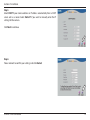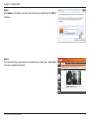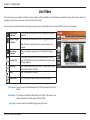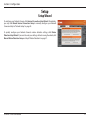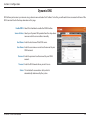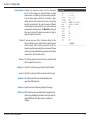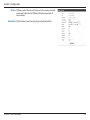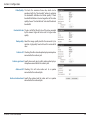
1
Version 1.00 | 09/14/2015 User Manual HD Covert Network Camera DCS-1201 Preface D-Link reserves the right to revise this publication and to make changes in the content hereof without obligation to notify any person or organization of such revisions or changes. Information in this document may become obsolete as our services and websites develop and change. Manual Revisions Revision Date 1.00 09/14/2015 Description DCS-1201 Revision A1 with firmware version 1.00 Trademarks D-Link and the D-Link logo are trademarks or registered trademarks of D-Link Corporation or its subsidiaries in the United States or other countries. All other company or product names mentioned herein are trademarks or registered trademarks of their respective companies. Copyright © 2015 D-Link Corporation. All rights reserved. This publication may not be reproduced, in whole or in part, without prior expressed written permission from D-Link Corporation. D-Link DCS-1201 User Manual 2 Table of Contents Product Overview......................................................... 4 Package Contents.................................................................. 4 Introduction............................................................................. 5 System Requirements.......................................................... 5 Features..................................................................................... 6 Hardware Overview.............................................................. 7 Back............................................................................................ 7 Front........................................................................................... 8 Connecting the Camera....................................................10 Configuring the Camera....................................................12 Mounting the Camera........................................................15 Configuration.............................................................17 Using the Configuration Interface.................................17 Live Video...............................................................................19 Setup........................................................................................21 Setup Wizard.....................................................................21 Network Setup..................................................................26 Dynamic DNS....................................................................29 Image Setup......................................................................30 Audio and Video...............................................................33 Preset....................................................................................35 Motion Detection............................................................37 D-Link DCS-1201 User Manual Tamper Detection............................................................38 Time and Date...................................................................39 Event Setup........................................................................40 SD Card................................................................................48 Advanced................................................................................49 DI and DO...........................................................................49 HTTPS...................................................................................50 Access List...........................................................................51 SNMP....................................................................................52 Maintenance..........................................................................54 Device Management......................................................54 System.................................................................................55 Firmware Upgrade...........................................................56 Status.......................................................................................57 Device Info.........................................................................57 Logs......................................................................................58 Help......................................................................................59 Technical Specifications.............................................60 Regulatory Information.............................................64 3 Section 1: Product Overview Product Overview Package Contents DCS-1201 HD Covert Network Camera (includes control box and camera) Camera cover Flat mounting bracket Angled mounting bracket CD-ROM with User Manual and software Quick Installation Guide If any of the above items are missing, please contact your reseller. Safety Notice: Installation and servicing should be done by certified technicians so as to conform to all local codes and prevent voiding your warranty. D-Link DCS-1201 User Manual 4 Section 1: Product Overview Introduction Congratulations on your purchase of the DCS-1201 HD Covert Network Camera. The DCS-1201 is a professional surveillance and security solution for small, medium, and large enterprises alike. It provides an excellent way to discreetly keep watch over an area without sacrificing quality or functionality. The DCS-1201 is a complete system with a built-in CPU and incorporates a web server, allowing it to transmit excellent real-time HD resolution video for security and outdoor surveillance. It incorporates Power over Ethernet (PoE), allowing it to be easily installed in a variety of locations without the need for supplemental power cabling. It also includes audio in and out jacks, DI/DO connectors, and a microSD slot, making it an extremely versatile surveillance solution. The DCS-1201 can be accessed remotely, controlled and configured from any PC/Notebook over your local network or through the Internet via a web browser. The simple installation and intuitive web-based interface offer easy configuration across the full range of its advanced feature set, including granular control over multiple video streams with different configurations and multicast video streams which helps you manage your network load. System Requirements • Computer with Microsoft Windows® 8, 7, or Vista® (for CD-ROM Setup Wizard), Mac OS, or Linux • Internet Explorer 7, Firefox 20, or Safari 6 or higher • Existing 10/100 Ethernet-based network with an available 802.3af Power over Ethernet (PoE) port D-Link DCS-1201 User Manual 5 Section 1: Product Overview Features Installs Anywhere This tiny camera can easily be placed in walls or ceilings, or in tight corners, and the 15 meter camera cable gives you a wealth of installation options. High Quality Footage The DCS-1201 camera may be small, but it delivers HD video at 720P, giving you a sharp image with the detail you need. Simple to Maintain The DCS-1201 is a stand-alone system with a built-in CPU, requiring no special hardware or software. The DCS-1201 can be viewed and managed through most web browsers, including Internet Explorer®. Supports a Variety of Platforms With support for TCP/IP networking, HTTP, and other Internet related protocols, the DCS-1201 can also be integrated easily into other Internet/ Intranet applications because of its standards-based features. The DCS-1201 works with any 10/100 Ethernet network, making the DCS-1201 easy to integrate into your existing network environment. Advanced Event Management The DCS-1201 can be set up to send e-mail notifications with snapshots when an event occurs, such as when motion is detected. Events can be triggered from several sources, such as motion detection and time based events. PoE (Power over Ethernet) for Flexible Installation The DCS-1201 can draw all the power it needs from a PoE switch or PoE injector for a simple and clutter-free installation. Remote Monitoring Utility The D-ViewCam application adds enhanced features and functionality for the Network Camera and allows administrators to configure and access the Network Camera from a remote site via Intranet or Internet. Other features include image monitoring, recording images to a hard drive, viewing up to 32 cameras on one screen, and taking snapshots. D-Link DCS-1201 User Manual 6 Section 1: Product Overview Hardware Overview Back 1 2 3 4 5 1 DC power connector Connects to an optional 12 V / 1.5 A power adapter (not included). 2 Power terminal Connects to a power source. (Pin +: 8-28 V DC input, Pin -: Ground) 3 LAN status LED Indicates connection to a wired network and traffic status. 4 LAN (PoE) port RJ-45 connector for Ethernet which can also be used to power the camera using Power over Ethernet (PoE). 5 microSD card slot D-Link DCS-1201 User Manual Insert a microSD card for storing recorded images and video locally. 7 Section 1: Product Overview Front 6 6 Audio in jack 7 Audio out jack 8 Status LED 9 Camera port 10 DI/DO connectors 11 Reset button D-Link DCS-1201 User Manual 7 8 9 10 11 Connects to a microphone. Connects to a speaker. Indicates the camera's current status. Connects to camera cable. I/O connectors for external devices. Press and hold for 10 seconds to reset camera back to the factory default settings. 8 Section 1: Product Overview 12 13 14 15 16 12 Camera lens 13 Mounting holes 14 Camera cable Connects to control box. 15 Camera cover Snaps onto camera when mounted on a wall. 16 Flat mounting bracket 17 Angled mounting bracket D-Link DCS-1201 User Manual 17 Fixed lens to record video of the surrounding area. Used when mounting camera to a wall or the angled mounting bracket. Holds camera when doing a discreet wall installation. Allows camera to be mounted on a wall at an angle. 9 Section 2: Installation Connecting the Camera Connect the camera cable to the CAM port on the control box. You can power the DCS-1201 three different ways: through PoE, through the power terminal, or through a power adapter. Powering the camera through PoE (Class 2): Connect an Ethernet cable to the LAN(PoE) port on the control box. Connect the other end of the cable to your PoE switch or PoE injector. D-Link DCS-1201 User Manual 10 Section 2: Installation Powering the camera through the power terminal: Connect your power source to the power terminal on the control box. The specifications for the power terminal are as shown below. Pin + : 8-28 V DC input Pin - : Ground Connect an Ethernet cable to the LAN(PoE) port on the control box. Connect the other end of the cable to your network. Powering the camera through a power adapter (not included): Connect a 12 V 1.5 A power adapter to the power connector of the control box. Connect an Ethernet cable to the LAN(PoE) port on the control box. Connect the other end of the cable to your network. D-Link DCS-1201 User Manual 11 Section 2: Installation Configuring the Camera Step 1 Insert the DCS-1201 CD into your computer's CD-ROM drive. Click Setup Wizard and follow the instructions to install the Setup Wizard. If the Autorun function on your computer is disabled, or if the D-Link Launcher fails to start automatically, click the Start button and type D:\autorun.exe (where D: represents the drive letter of your CD-ROM drive) and press Enter. Step 2 Click on the D-Link Setup Wizard SE icon that was created in your Windows Start menu (Start > D-Link > Setup Wizard SE). D-Link DCS-1201 User Manual 12 Section 2: Installation Step 3 The Setup Wizard will appear and display the MAC address and IP address of your camera(s). If you have a DHCP server on your network, a valid IP Address will be displayed. If your network does not use a DHCP server, the network camera's default static IP 192.168.0.20 will be displayed. Select your camera, then click the Wizard button to continue. Step 4 Enter the Admin ID and password. When logging in for the first time, the default Admin ID is admin with the password left blank. Click the checkboxes if you wish to change the admin ID and password for the camera, and enter the new ID and password you wish to use. Click Next to continue. D-Link DCS-1201 User Manual 13 Section 2: Installation Step 5 Select DHCP if your camera obtains an IP address automatically from a DHCP server such as a router. Select Static IP if you want to manually enter the IP settings for the camera. Click Next to continue. Step 6 Take a moment to confirm your settings and click Restart. D-Link DCS-1201 User Manual 14 Section 2: Installation Mounting the Camera It is highly recommended that you configure and test your camera before mounting it. Mounting directly on a wall/ceiling Use the included screws to mount the camera in the desired location, then attach the camera cover. Covert installation Drill a hole 9 mm in diameter in the wall/ceiling, which should be no more than 5 mm thick. Peel off the adhesive backing on the flat mounting bracket and attach it to the inside of the wall/ceiling. Insert the camera, and use the screw and washer to secure the camera in the mounting bracket as shown. D-Link DCS-1201 User Manual 15 Section 2: Installation Mounting using the angled mounting bracket Attach the angled mounting bracket to the wall/ceiling using the included screw. Attach the camera to the angled mounting bracket with the included screws as shown. You can adjust the pivot of the angled mounting bracket by using the included hex wrench. Mounting the control box Use 4 screws to attach the mounting plates to the control box, then use 2 screws to mount the control box in the desired location. D-Link DCS-1201 User Manual 16 Section 3: Configuration Configuration Using the Configuration Interface After completing the Camera Installation Wizard, you are ready to use your camera. The camera’s built-in Web configuration utility is designed to allow you to easily access and configure your DCS-1201. At the end of the wizard, click Link, or enter the IP address of your camera into a web browser, such as Firefox. To log in, use the User name admin and the password you created in the Installation Wizard. If you did not create a password, the default password is blank. After entering your password, click OK. Step 1 Click on the D-Link Setup Wizard SE icon that was created in your Windows Start menu (Start > D-Link > Setup Wizard SE). Step 2 Select the camera and click Link to access the web configuration. The Setup Wizard will automatically open your web browser to the IP address of the camera. D-Link DCS-1201 User Manual 17 Section 3: Configuration Step 3 Enter admin as the default username and leave the password blank. Click OK to continue. Step 4 This section displays your camera’s live video. You can select your video profile and view or operate the camera. D-Link DCS-1201 User Manual 18 Section 3: Configuration Live Video This section shows your camera’s live video. You may select any of the available icons listed below to operate the camera. You may also select your language using the drop-down menu on the left side of the screen. You can zoom in and out on the live video image using your mouse. Right-click to zoom out or left-click to zoom in on the image. Digital Input Indicator Motion Trigger Indicator This indicator will change color when a digital input signal is detected. This indicator will change color when a trigger event occurs. Stop Note: The video motion feature for your camera must be enabled. When a recording is in progress, this indicator will change color. This control pad can be used to electronically pan, tilt, and zoom (ePTZ) within the camera's predefined view area, if one has been defined. Starts the automatic panning function. The ROI will pan from back and forth within the FOV. Stops the camera ePTZ motion. Preset Path Starts the camera's motion along the predefined path. Recording Indicator Control Pad Auto Pan ePTZ Speed: You may select a value between 0 and 10. 0 is the slowest and 10 is the fastest. Global View: This window indicates the total field of view (FOV) of the camera. The red box indicates the visible region of interest (ROI). Language: You may select the interface language using this menu. D-Link DCS-1201 User Manual 19 Section 3: Configuration Video Profile 1 Set a Storage Folder Video Profile 2 Enable/Mute Audio In (from a microphone) Full screen mode Enable/Mute Audio Out (to a speaker) Take a Snapshot Start/Stop Digital Output Record a Video Clip Go To: If any presets have been defined, you can select them here to move the (Preset List) camera to the selected preset. D-Link DCS-1201 User Manual 20 Section 3: Configuration Setup Setup Wizard To configure your Network Camera, click Internet Connection Setup Wizard. Alternatively, you may click Manual Internet Connection Setup to manually configure your Network Camera and skip to "Network Setup" on page 26. To quickly configure your Network Camera’s motion detection settings, click Motion Detection Setup Wizard. If you want to enter your settings without running the wizard, click Manual Motion Detection Setup and skip to"Motion Detection" on page 37. D-Link DCS-1201 User Manual 21 Section 3: Configuration Internet Connection Setup Wizard This wizard will guide you through a step-by-step process to configure your new D-Link Camera and connect the camera to the internet. Click Next to continue. Select how the camera will connect to the Internet. If your camera is connected to a router, or if you are unsure how your camera will connect to the Internet, select DHCP Connection. Select Static IP if your Internet Service Provider has provided you with connection settings, or if you wish to set a static address within your home network. Enter the correct configuration information and click Next to continue. If you are using PPPoE, select Enable PPPoE and enter your user name and password. Click Next to continue. D-Link DCS-1201 User Manual 22 Section 3: Configuration If you have a Dynamic DNS account and would like the camera to update your IP address automatically, Select Enable DDNS and enter your host information. Click Next to continue. Enter a name for your camera and click Next to continue. Configure the correct time to ensure that all events will be triggered as scheduled. Click Next to continue. If you have selected DHCP, you will see a summary of your settings, including the camera's IP address. Please write down all of this information as you will need it in order to access your camera. Click Apply to save your settings. D-Link DCS-1201 User Manual 23 Section 3: Configuration Motion Detection Setup Wizard This wizard will guide you through a step-by-step process to configure your camera's motion detection functions. Click Next to continue. Step 1 This step will allow you to enable or disable motion detection, specify the detection sensitivity, and adjust the camera’s ability to detect movement. You may specify whether the camera should capture a snapshot or a video clip when motion is detected. Refer to "Motion Detection" on page 37 for information about how to configure motion detection. Step 2 This step allows you to enable motion detection based on a customized schedule. Specify the day and hours. You may also choose to always record whenever motion is detected. D-Link DCS-1201 User Manual 24 Section 3: Configuration Step 3 This step allows you to specify how you will receive event notifications from your camera. You may choose not to receive notifications, or to receive notifications via e-mail or FTP. Please enter the relevant information for your e-mail or FTP account. Click Next to continue. Step 4 You have completed the Motion Detection Wizard. Please verify your settings and click Apply to save them. Please wait a few moments while the camera saves your settings and restarts. D-Link DCS-1201 User Manual 25 Section 3: Configuration Network Setup Use this section to configure the network connections for your camera. All relevant information must be entered accurately. After making any changes, click the Save Settings button to save your changes. LAN Settings: This section lets you configure settings for your local area network. DHCP: Select this connection if you have a DHCP server running on your network and would like your camera to obtain an IP address automatically. If you choose DHCP, you do not need to fill out the IP address settings. Static IP Client: You may obtain a static or fixed IP address and other network information from your network administrator for your camera. A static IP address may simplify access to your camera in the future. IP Address: Enter the IP address that the camera will use on your network. You may need to get this information from your ISP or network administrator. Subnet Mask: Enter the subnet mask that your camera will use on the network. The default value is “255.255.255.0.” This is used to determine if the destination is part of the same subnet. Default Router: Enter the address of the router or gateway your camera will use on the network. The gateway is used to forward frames to destinations in a different subnet. Invalid gateway settings may cause transmissions to a different subnet to fail. D-Link DCS-1201 User Manual 26 Section 3: Configuration Primary DNS: Enter the primary domain name server that translates names to IP addresses. Secondary DNS: Enter the secondary domain name server used to back up the Primary DNS. Enable UPnP Presentation: Enabling this setting allows your camera to be configured as a UPnP device on your network. Enable UPnP Port Forwarding: Enabling this setting allows the camera to add port forwarding entries into the router automatically on a UPnP capable network. Enable PPPoE: Enable this setting if your network uses PPPoE. User Name / Password: Enter the username and password for your PPPoE account. Re-enter your password in the Confirm Password field. You may obtain this information from your ISP. HTTP Port: Enter the port to use for HTTP access to the camera. The default port number is 80. Access Name for Stream 1~3: Enter a name to use for HTTP streaming access. The default name is video#.mjpg, where # is the number of the stream. HTTPS Port: Enter the port to use for HTTPS access to the camera. You may use a PC with a secure browser to connect to the HTTPS port of the camera. The default port number is 443. Authentication: Choose to enable or disable RTSP digest authentication. Digest authentication uses MD5 hashes. D-Link DCS-1201 User Manual 27 Section 3: Configuration RTSP Port: Enter the port number to use for RTSP streaming to mobile devices. The default port number is 554. You may specify the address of a particular stream. For instance, live1.sdp can be accessed at rtsp://x.x.x.x/video1.sdp where the x.x.x.x represents the IP address of your camera. Enable CoS: Enabling CoS allows you to specify the Class of Service for different types of traffic so you can prioritize their transmission on your network. CoS helps provide prioritization for Layer 2 traffic. Enable QoS: Enabling QoS allows you to specify the Quality of Service for different types of traffic so you can prioritize their transmission on your network. QoS helps provide prioritization for Layer 3 traffic. If the camera is connected to a router that itself implements QoS, the router's settings will override the QoS settings of the camera. Enable IPv6: Enabling this setting will enable use of the IPv6 protocol. Click the IPv6 Information button to see the camera's current IPv6 details, or you can check Manually setup the IP address to manually set up the IP address, specify a default router, and set the primary DNS. Enable Multicast for stream: The DCS-1201 allows you to multicast each of the available streams via a group address and specify the TTL value for each stream. Enter the ports and TTL settings you wish to use if you do not want to use the defaults. Enable Bonjour: Enable this to allow other network devices to connect to this camera using Bonjour. Bonjour Name: Enter a name to use to identify this camera through Bonjour. D-Link DCS-1201 User Manual 28 Section 3: Configuration Dynamic DNS DDNS allows you to access your camera using a domain name instead of an IP address. To do this, you will need to have an account with one of the DDNS services listed in the drop-down box on this page. Enable DDNS: Select this checkbox to enable the DDNS function. Server Address: Select your Dynamic DNS provider from the drop-down menu or enter the server address manually. Host Name: Enter the host name of the DDNS server. User Name: Enter the user name or e-mail used to connect to your DDNS account. Password: Enter the password used to connect to your DDNS account. Timeout: Enter the DNS timeout values you wish to use. Status: This indicates the connection status, which is automatically determined by the system. D-Link DCS-1201 User Manual 29 Section 3: Configuration Image Setup In this section, you can configure the video image settings for your camera. Enable Privacy Mask: The Privacy Mask setting allows you to specify up to 3 rectangular areas on the camera's image to be blocked/ excluded from recordings and snapshots. You may click and drag the mouse cursor over the camera image to draw a mask area. Right clicking on the camera image brings up the following menu options: Disable All: Disables all mask areas Enable All: Enables all mask areas Reset All: Clears all mask areas. Mirror: This will mirror the image horizontally. Flip: This will flip the image vertically. If the camera is installed upside down, Flip and Mirror should both be checked. Anti Flicker: Select the frequency used by your power lines to avoid interference or distortion. White Balance: Use the drop-down box to change white balance settings to help balance colors for different environments. You can choose from Auto, Outdoor, Indoor, Fluorescent, and Push Hold. D-Link DCS-1201 User Manual 30 Section 3: Configuration Exposure Mode: Changes the exposure mode. Use the drop-down box to set the camera for Indoor, Outdoor, or Night environments, or to Moving to capture moving objects. The Low Noise option will focus on creating a highquality picture with reduced noise when monitoring low-light environments. You can also create 3 different custom exposure modes that let you set the minimum and maximum shutter speeds. The Max Gain setting will allow you to control the maximum amount of gain to apply to brighten the picture. Shutter: If you are using one of the Customize settings for the Exposure Mode, you can set the minimum and maximum shutter speeds. Faster shutter speeds will result in a clearer image, but require brighter environments. Slower shutter speeds provide better image exposure for darker environments, but may blur motion. Denoise: This setting controls the amount of noise reduction that will be applied to the picture. Brightness: Adjust this setting to compensate for backlit subjects. Contrast: Adjust this setting to alter the color intensity/strength. Saturation: This setting controls the amount of coloration, from grayscale to fully saturated. Sharpness: Specify how much sharpening to apply to the image. WDR Level: WDR makes it easier to see objects that may appear dark due to strong backlighting conditions during the daytime. Higher WDR levels will make it easier to see objects in shadows. D-Link DCS-1201 User Manual 31 Section 3: Configuration 3D Filter: 3D filtering reduces the amount of image noise when viewing a low-light environment. Higher levels of 3D filtering will apply stronger levels of noise reduction. Reset Default: Click this button to reset the image settings to the factory defaults. D-Link DCS-1201 User Manual 32 Section 3: Configuration Audio and Video You may configure up to 3 video profiles with different settings for your camera. Hence, you may set up different profiles for your computer and mobile display. After making any changes, click the Save Settings button to save your changes. Number of active profiles: Use the drop-down box to specify how many video profiles you want the camera to use. You can set up to three profiles. Aspect ratio: Set the aspect ratio of the video to 4:3 standard or 16:9 widescreen. Click Save after changing this setting. Mode: Set the video codec to be used to JPEG, MPEG-4, or H.264. Frame size / View window area: Frame size determines the total capture resolution, and View window area determines the Live Video viewing window size. If the Frame size is larger than the Live Video size, you can use the ePTZ controls to look around. 16:9 1280 x 720, 800 x 450, 640 x 360 4:3 1024 x 768, 800 x 600, 640 x 480 Note: If your View window area is the same as your Frame size, you will not be able to use the ePTZ function. Intra Frame Period: Specify the intra frame period (also known as the key frame interval) to use. Lower values will produce higherquality video, but require more bandwidth. Maximum frame rate: A higher frame rate provides smoother motion for videos, and requires more bandwidth. Lower frame rates will result in stuttering motion, and require less bandwidth. D-Link DCS-1201 User Manual 33 Section 3: Configuration Video Quality: This limits the maximum frame rate, which can be combined with the "Fixed quality" option to optimize the bandwidth utilization and video quality. If fixed bandwidth utilization is desired regardless of the video quality, choose "Constant bit rate" and select the desired bandwidth. Constant bit rate: The bps will affect the bit rate of the video recorded by the camera. Higher bit rates result in higher video quality. Fixed quality: Select the image quality level for the camera to try to maintain. High quality levels will result in increased bit rates. Audio in off: Checking this will mute audio picked up by a microphone connected to the audio in jack. Audio in gain level: Specify how much gain to add to audio picked up by a microphone connected to the audio in jack. Audio out off: Checking this will mute audio sent to a speaker connected to the audio out jack. Audio out volume level: Specify the volume level for audio sent to a speaker connected to the audio out jack. D-Link DCS-1201 User Manual 34 Section 3: Configuration Preset This screen allows you to set preset points for the ePTZ function of the camera, which allows you to look around the camera's viewable area by using a zoomed view. Presets allow you to quickly go to and view a specific part of the area your camera is covering, and you can create preset sequences, which will automatically change the camera's view between the different presets according to a defined order and timing you can set. Note: If your View window area is the same as your Frame size, you will not be able to use the ePTZ function. Video Profile: This selects which video profile to use. ePTZ Speed: Specify the speed to use for ePTZ panning. 1 is the slowest and 10 is the fastest. Arrow Buttons and Home Button: Use these buttons to move to a specific part of the viewing area, which you can then set as a preset. Click the Home button to return to the center of the viewing area. Input Preset Name: Enter the name of the preset you want to create, then click the Add button to make a new preset. If an existing preset has been selected from the Preset List, you can change its name by typing in a new name, then clicking the Rename button. Preset List: Click this drop-down box to see a list of all the presets that have been created. You can select one, then click the GoTo button to change the displayed camera view to the preset. Clicking the Remove button will delete the currently selected preset. Preset Sequence: This section allows you to create a preset sequence, which automatically moves the camera's view between a set of preset views. D-Link DCS-1201 User Manual 35 Section 3: Configuration Preset List: To add a preset to the sequence, select it from the dropdown box at the bottom of this window, set the Dwell time to determine how long the camera view will stay at that preset, then click the Add button. The preset name will appear in the list, followed by the dwell time to view that preset for. You can rearrange your presets in the sequence by selecting a preset in the sequence, then clicking the arrow buttons to move it higher or lower in the current sequence. Clicking the trash can button will remove the currently selected preset from the sequence. If you want to change the dwell time for a preset, select it from the list, enter a new dwell time, then click the Update button. D-Link DCS-1201 User Manual 36 Section 3: Configuration Motion Detection Motion detection enables the camera to monitor the video feed for movement. Here, you can specify what part of the image to monitor for motion and adjust the sensitivity settings that determine whether motion is detected by the camera or not. After making any changes, click the Save Settings button to save your changes. Enable Video Motion: Select this box to enable the motion detection feature of your camera. Note: If you do not draw an area to monitor for motion, motion will not be detected by the camera. Sensitivity: Specifies how sensitive motion detection will be from 0% to 100%. A low sensitivity setting means that there must be large changes between two images in order to detect motion, and a high sensitivity setting means that even small changes will cause motion to be detected. Draw Motion Area: Use your mouse to click and drag on the areas that you would like to monitor for motion. Erase Motion Area: To erase a motion detection area, simply click on the red square that you wish to remove. Right click on the camera image to bring up the following menu options: Select All: Draws a motion detection area over the entire screen. Clear All: Clears any motion detection areas that have been drawn. Restore: Restores the previously specified motion detection areas. D-Link DCS-1201 User Manual 37 Section 3: Configuration Tamper Detection Tamper detection allows the camera to detect when its view has been tampered with, such as if the camera has been redirected, blocked, defocused, or spray painted. Tampering is detected after the camera's view is changed significantly for longer than the trigger duration you specify. Enable camera tampering Select this box to enable the tamper detection feature detection: of your camera. Specify the trigger duration you wish to use. D-Link DCS-1201 User Manual 38 Section 3: Configuration Time and Date This section allows you to automatically or manually configure, update, and maintain the internal system clock for your camera. After making any changes, click the Save Settings button to save your changes. Time Zone: Select your time zone from the drop-down menu. Enable Daylight Saving: Select this to enable Daylight Saving Time. Auto Daylight Saving: Select this option to allow your camera to configure the Daylight Saving settings automatically. Set Date and Time Manually: Selecting this option allows you to configure the Daylight Saving date and time manually. Offset: Sets the amount of time to be added or removed when Daylight Saving is enabled. Start Time / End Time: Set the date and time to start using and stop using daylight saving. Synchronize with NTP Server: Enable this feature to obtain time automatically from an NTP server. NTP Server: Network Time Protocol (NTP) synchronizes the DCS-1201 with an Internet time server. Choose the one that is closest to your location. Set Date and Time Manually: This option allows you to set the time and date manually. Copy Your Computer's Time This will synchronize the time information from your PC. Settings: D-Link DCS-1201 User Manual 39 Section 3: Configuration Event Setup The DCS-1201 has a versatile event system that lets you configure the camera to perform certain actions when an event occurs. For example, when motion is detected, you can have snapshots sent to an FTP server or e-mail address. You can also configure the camera to take regular video recordings according to a schedule you define. Before setting up an evevnt, you will need to specify the following: Server: This is a destination for media to be sent to, such as an e-mail address or FTP server. Media: This is the media that will be sent, such as snapshots, video clips, or a system log. You can then set up Events and Recordings: Event: This is the actual trigger event that the camera is monitoring for, and the action that it will take. Event triggers include motion detection, loss of network connection, system reboot, and other events. Recording: This lets you set up a schedule for regular video recording. Action Event Condition ex. Motion detection, Periodically, System reboot Media (what to send) ex. Snapshot, Video Clips D-Link DCS-1201 User Manual Server (where to send) ex. Email, FTP 40 Section 3: Configuration The Event Setup page includes 4 different sections. • Server • Media • Event • Recording 1. To add a new server, media, event, or recording item, click Add. A screen will appear and allow you to update the fields accordingly. 2. To delete the selected item from the server, media, event, or recording drop-down menus, click the Delete button next to it. 3. Click on an item to edit it. Add Server You can configure up to 5 servers (destinations) to save snapshots and/or video to. After making any changes, click the Save Settings button to save your changes. Server Name: Enter the name for the server. E-mail: If you want to use an e-mail address for your server, select this and enter the settings for your target e-mail account. FTP: If you want to use an FTP server for your server, select this and enter the settings for your target FTP server. Network Storage: If you want to use a network storage device for your server, select this and enter its settings here. You can only specify a network storage device for one of your server entries. SD Card: Select this to use an inserted microSD card as your server. D-Link DCS-1201 User Manual 41 Section 3: Configuration Add Media There are three types of media: Snapshot, Video Clip, and System Log. After making any changes, click the Save Settings button to save your changes. Media Name: Enter a unique name for the media you want to create. Snapshot: Select this option to set the media type to snapshots. Source: Set the video profile to use as the media source. Refer to "Audio and Video" on page 33 for more information on video profiles. Send pre-event image(s) [0~3]: Set the number of pre-event images to take. Pre-event images are images taken before the main event snapshot is taken. Send post-event image(s) [0~7]: Set the number of post-event images to take. Post-event images are images taken after the main event snapshot is taken. You can set up to 7 post-event images to be taken. For example: If both Send pre-event images and Send postevent images are set to four, a total of 9 images will be saved after a trigger is activated. 1 pic. 2 pic. 3 pic. 4 pic. 5 pic. 6 pic. 7 pic. 8 pic. 9 pic. The moment the trigger is activated. D-Link DCS-1201 User Manual 42 Section 3: Configuration File name prefix: Enter the prefix to add to the saved file name. SNAPSHOTS20080104_100341 File name prefix Date and time suffix The format is: YYYYMMDD_HHMMSS Add date and time suffix to file Check this to add the date and time the snapshot was name: recorded as a file name suffix. Video clip: Select this option to set the media type to video clips. Source: Set the video profile to use as the media source. Refer to "Audio and Video" on page 33 for more information on video profiles. Pre-event recording: This sets how many seconds to record before the main event video clip starts. You can record up to 4 seconds of pre-event video. Maximum duration: Set the maximum length of video to record for your video clips. Maximum file size: Set the maximum file size to record for your video clips. File Name Prefix: This is the prefix that will be added to the filename of saved video clips. System log: Select this option to set the media type to system logs. This will send the system log, but will not record any snapshots or video. D-Link DCS-1201 User Manual 43 Section 3: Configuration Add Event Create and schedule up to 3 events with their own settings here. After making any changes, click the Save Settings button to save your changes. Event name: Enter a name for the event. Enable this event: Select this box to activate this event. Priority: Set the priority for this event. The event with higher priority will be executed first. Delay: Specify the delay time before allowing this event to be triggered again. This is used for both motion detection events and digital input triggers. Trigger: Specify the input type that triggers the event. Video Motion Detection: Selecting this will trigger the event when motion is detected during live video monitoring. Make sure you have enabled motion detection and specified what part of the image to monitor for motion. For more details, refer to "Motion Detection" on page 37. Periodic: Selecting this will trigger the event in specified intervals. The trigger interval unit is in minutes. System Boot: Selecting this will trigger an event when the system boots up. Network Lost: Selecting this will trigger an event when the camera's connection to the network is lost. Tamper Detection: Selecting this will trigger an event when tampering has been detected. For more details, refer to "Tamper Detection" on page 38. D-Link DCS-1201 User Manual 44 Section 3: Configuration Event Schedule: Specify when you want to monitor for this event. Select which days to monitor for this event, then select Always or enter the time interval to monitor for the specified event. Action: If you have created Server and Media entries, you will see them appear here. Select which Server you want to send to and which Media you want the camera to send. You can also trigger a signal on the D/O port by enabling the option, then specifying how many seconds to send a signal for. D-Link DCS-1201 User Manual 45 Section 3: Configuration Add Recording Here you can configure and schedule a regular video recording. After making any changes, click the Save Settings button to save your changes. Recording entry name: Enter a name for the recording. Enable this recording: Select this to enable this recording. Priority: Set the priority for this recording. A recording with a higher priority will be the one used if two recordings will happen at the same time. Source: Select the video profile to use as the recording source. Recording schedule: Use the checkboxes to set which days to record video on. Select Always to record for the entire day, or select From and specify the period of time you want to record using the dropdown boxes. Destination: Select the Server to save the recording file to. If you created a server entry for network storage, you can select SAMBA to save to it. If you created a server entry for the microSD card slot, you can select SD to save to it. D-Link DCS-1201 User Manual 46 Section 3: Configuration Total cycling recording size: Specify the amount of disk space to use for this recording (between 200 MB and 2 TB). When this space is full, the oldest recordings will be deleted to make room for new recordings. For example, if each recording file is 6 MB, and the total cycling recording size is 600 MB, then the camera will record 100 files in the specified destination. After that, the oldest file will be deleted to make space for new ones. Please note that if the amount of free disk space is not enough, the recording will stop. Before you set up this option, please make sure your storage drive has enough free space. Also, it is recommended that you do not save other files in the same folder as your recording files. Size of each file for recording: If this is selected, files will be separated based on the file size you specify. Time of each file for recording: If this is selected, files will be separated based on the maximum length you specify. File Name Prefix: The prefix name will be added to the file name of the recording file(s). D-Link DCS-1201 User Manual 47 Section 3: Configuration SD Card Here you may browse and manage the recorded files which are stored on the microSD card. Video is stored in the Video folder, and snapshots are stored in the Picture folder. You can playback video and view snapshots by clicking on the appropriate folder, then clicking on the file you want to view. Files Per Page: Use the drop-down box to specify how many files to show per page. To change pages, use the drop-down box on the right. Refresh: Click this to refresh the file and folder information from the microSD card. Format SD Card: Click this icon to automatically format the microSD card and create the Video and Picture folders. Deleting Files and Folders: To delete files and folders, click on the checkbox next to the files or folders you want to delete, then click the OK button. D-Link DCS-1201 User Manual 48 Section 3: Configuration Advanced DI and DO This screen allows you to control the behavior of digital input and digital output devices. The I/O connector provides the physical interface for digital output (DO) and digital input (DI) that is used for connecting a variety of external alarm devices such as IR-Sensors and alarm relays. The digital input is used for connecting external alarm devices and once triggered images will be taken and e-mailed. After making any changes, click the Save Settings button to save your changes. DI and DO: The camera can receive signals from an external device, and can send a signal when an event is triggered. Specify whether you want the active state to be N.C. or N.O. for the digital input and digital output ports. N.C. stands for Normally Closed. This means that the normal state of the circuit is closed. Therefore, events are triggered when the device status changes to "Open." N.O. stands for Normally Open. This means that the normal state of the circuit is open. Therefore, events are triggered when the device status changes to "Closed." D-Link DCS-1201 User Manual 49 Section 3: Configuration HTTPS This page allows you to install and activate an HTTPS certificate for secure access to your camera. After making any changes, click the Save Settings button to save your changes. Enable HTTPS Secure Connection: Enable HTTPS connections. You will need to create a certificate using the settings below. Create Certificate Method: Choose the way the certificate should be created. Three options are available: Create a self-signed certificate automatically Create a self-signed certificate manually Create a certificate request and install Status: Displays the status of the certificate. Note: The certificate cannot be removed while HTTPS is still enabled. To remove the certificate, you must first uncheck Enable HTTPS secure connection. D-Link DCS-1201 User Manual 50 Section 3: Configuration Access List Here you can set access permissions for users to view your DCS-1201. Allow list: The list of IP addresses that have access rights to the camera. Note: When adding entries to the Allow list, make sure the first entry includes the IP address of the computer or device you are using to access the camera. Otherwise, you may be blocked from accessing the camera after adding the entry to the Allow list. Start IP address: The starting IP address of the IP address range for the devices (such as a computer) that have permission to access the video of the camera. End IP address: The ending IP address of the IP address range for the devices (such as a computer) that have permission to access the video of the camera. Click Add to save your changes. Note: You can create seven entries for both the Allow list and the Deny list. Delete allow list: Select an entry to remove from the Allow List, then click Delete. Deny list: The list of IP addresses that have no access rights to the camera. Delete deny list: Select an entry to remove from the Deny List, then click Delete. Alowed List Denied List Note: All addresses in the Deny List will be denied access, even if they are also in the Allow List. D-Link DCS-1201 User Manual 51 Section 3: Configuration SNMP Here you can set the SNMP settings for the camera, which allow for SNMP management of the camera. Enable SMNPv1, SNMPv2c: Enable this option to allow for SNMPv1 and SNMPv2c management of the camera. Read/Write Community: Enter a name for the read/write community of your SNMP server. Read Only Community: Enter a name for the read-only community of your SNMP server. Enable SNMPv3: Enable this option to allow SNMPv3 management of the camera. Read/Write Security Name: Enter a name for the read/write community of your read/ write SNMP server. Authentication Type: Enter the type of authentication used by your read/write SNMP server. Authentication Password: Enter the authentication password used for your read/ write SNMP server. Encryption Password: Enter the encryption password used for your read/write SNMP server. D-Link DCS-1201 User Manual 52 Section 3: Configuration Read Only Security Name Enter a name for the read-only community of your readonly SNMP server. Authentication Type: Enter the type of authentication used by your read-only SNMP server. Authentication Password: Enter the authentication password used for your readonly SNMP server. Encryption Password: Enter the encryption password used for your read-only SNMP server. D-Link DCS-1201 User Manual 53 Section 3: Configuration Maintenance Device Management You may modify the name and administrator’s password of your camera, as well as add and manage the user accounts for accessing the camera. You may also use this section to create a unique name and configure the OSD settings for your camera. Admin Password Setting: Set a new password for the administrator’s account. Add User Account: Add a new user account. User Name: Enter the user name for the new account. Password: Enter the password for the new account. User List: All the existing user accounts will be displayed here. You may delete accounts included in the list, but you may want to reserve at least one as a guest account. IP Camera Name: Create a unique name for your camera that will be added to the file name prefix when creating a snapshot or a video clip. Enable OSD: Select this option to enable the On-Screen Display feature for your camera. Label: Enter a label for the camera, which will be shown on the OSD when it is enabled. Show Time: Select this option to enable the time-stamp display on the video screen. LED: You may specify whether or not to illuminate the status LED on the camera. D-Link DCS-1201 User Manual 54 Section 3: Configuration System In this section, you may backup, restore and reset the camera configuration, or reboot the camera. Save To Local Hard Drive: You may save your current camera configuration as a file on your computer. Load From Local Hard Drive: Locate a pre-saved configuration by clicking Browse and then restore the pre-defined settings to your camera by clicking Load Configuration. Restore to Factory Defaults: You may reset your camera and restore the factory settings by clicking Restore Factory Defaults. Reboot Device: This will restart your camera. Enable Schedule Reboot: If you want your camera to reboot on a regular schedule, check the Enable Schedule Reboot checkbox, then select the days and time you want the camera to reboot on. CSRF Protection: Select this to enable cross-site request forgery (CSRF) protection for your camera. D-Link DCS-1201 User Manual 55 Section 3: Configuration Firmware Upgrade The camera's current firmware version will be displayed on this screen. You may visit the D-Link Support Website to check for the latest available firmware version. To upgrade the firmware on your DCS-1201, please download and save the latest firmware version from the D-Link Support Page to your local hard drive. Locate the file on your local hard drive by clicking the Browse button. Select the file and click the Upload button to start upgrading the firmware. Current Firmware Version: Displays the detected firmware version. Current Product Name: Displays the camera model name. File Path: Locate the file (upgraded firmware) on your hard drive by clicking Browse. Upload: Uploads the new firmware to your camera. D-Link DCS-1201 User Manual 56 Section 3: Configuration Status Device Info This page displays detailed information about your device and network connection. D-Link DCS-1201 User Manual 57 Section 3: Configuration Logs This page displays the log information of your camera. You may download the information by clicking Download. You may also click Clear to delete the saved log information. D-Link DCS-1201 User Manual 58 Section 3: Configuration Help This page provides helpful information regarding camera operation. D-Link DCS-1201 User Manual 59 Appendix A: Technical Specifications Technical Specifications Camera Camera Hardware Profile • 1/3” Megapixel progressive CMOS sensor • Minimum illumination: • Color mode: 0.1 lux • B/W mode: 0.02 lux • Minimum object distance 0.5 m • Lens focal length: 2.8 mm • Aperture: F2.0 • Angle of view (16:9): • (H) 84 ° • (V) 44 ° • (D) 100 ° Image Features • Configurable image size, quality, frame rate, and bit rate • Time stamp and text overlays • Configurable motion detection windows • Configurable privacy mask zones • Configurable exposure time, brightness, saturation, contrast, sharpness • Wide Dynamic Range (WDR) • 3D filtering Video Compression • Simultaneous H.264/MPEG-4/MJPEG format compression • H.264/MPEG-4 multicast streaming • JPEG for still images Video Resolution • 16:9 - 1280 x 720, 800 x 450, 640 x 360 at up to 30 fps1 • 4:3 - 1024 x 768, 800 x 600, 640 x 480 at up to 30 fps1 Audio Support • G.711 External Device Interfaces • 10/100 BASE-TX Ethernet port with PoE (Class 2) • 1 DI / 1 DO • DC12 V, 100 mA Output • Camera port • Power terminal (8 ~ 28 V DC) • micro SD/SDHC/SDXC card Slot, accepts cards up to 64 GB • Audio input / output Network Protocols • IPv6 • IPv4 • TCP/IP • UDP • ICMP • DHCP client • NTP client (D-Link) • DNS client • DDNS client (D-Link) • SMTP client • FTP client • HTTP / HTTPS • Samba client • PPPoE • UPnP port forwarding • RTP / RTSP/ RTCP • IP filtering • QoS • CoS • Multicast • ONVIF compliant • SNMP • Bonjour Security • Administrator and user group protection • Password authentication • HTTP and RTSP authentication Network D-Link DCS-1201 User Manual 60 Appendix A: Technical Specifications System Management System Requirements for Web Interface • Browser: Internet Explorer Event Management • Motion detection • Event notification and uploading of snapshots/video clips via e-mail or FTP • Supports multiple SMTP and FTP servers • Multiple event notifications • Multiple recording methods for easy backup Remote Management • Take snapshots/video clips and save to local hard drive • Configuration interface accessible via web browser OS Support • Windows 8/7 • iPhone/iPad/Android D-ViewCam™ System Requirements • Operating System: Microsoft Windows 8/7 • Web Browser: Internet Explorer 7 or higher • Protocol: Standard TCP/IP D-ViewCam™ Software Functions • Remote management/control of up to 32 cameras • Supports all management functions provided in the web interface • Viewing of up to 32 cameras on one screen • Scheduled motion triggered, or manual recording options General Weight • 385 grams (1.15 lbs) ± 5% Power • Input: 100 to 240 V AC, 50/60 Hz • Output: 12 V DC 1.5 A Power Consumption • 5.0 watts ± 5% (using PoE Class 2) • 5.3 watts ± 5% (using 8 to 28 V DC power terminal) Temperature • Operating: 0 to 40 °C (32 to 104 °F) • Storage: -20 to 70 °C (-4 to 158 °F) Humidity • Operating: 20% to 80% non-condensing • Storage: 5% to 95% non-condensing Certifications • CE • CE LVD • FCC • C-Tick D-Link DCS-1201 User Manual 61 Appendix A: Technical Specifications Dimensions Control Box Camera D-Link DCS-1201 User Manual 62 Appendix A: Technical Specifications Camera Mounts D-Link DCS-1201 User Manual Camera Cover Flat Mounting Bracket Angled Mounting Bracket 63 Appendix B: Regulatory Information Regulatory Information Federal Communication Commission Interference Statement: This equipment has been tested and found to comply with the limits for a Class A digital device, pursuant to part 15 of the FCC Rules. These limits are designed to provide reasonable protection against harmful interference when the equipment is operated in a commercial environment. This equipment generates, uses, and can radiate radio frequency energy and, if not installed and used in accordance with the instruction manual, may cause harmful interference to radio communications. Operation of this equipment in a residential area is likely to cause harmful interference in which case the user will be required to correct the interference at his own expense. Non-modification Statement: Any changes or modifications not expressly approved by the party responsible for compliance could void the user’s authority to operate this equipment. Caution: This device complies with Part 15 of the FCC Rules. Operation is subject to the following two conditions: (1) This device may not cause harmful interference, and (2) this device must accept any interference received, including interference that may cause undesired operation. Industry Canada Statement: This Class A digital apparatus complies with Canadian ICES-003. Cet appareil numérique de la classe A est conforme à la norme NMB-003 du Canada. European Union CE EMI Class A Warning This is a Class A product. In a domestic environment, this product may cause radio interference, in which case the user may be required to take adequate measures. D-Link DCS-1201 User Manual 64 Appendix B: Regulatory Information Safety Instructions Please adhere to the following safety guidelines to help ensure your own personal safety and protect your system from potential damage. Any acts taken that are inconsistent with ordinary use of the product, including improper testing, etc., and those not expressly approved by D-Link may result in the loss of product warranty. Unless expressly approved by an authorized representative of D-Link in writing, you may not and may not permit others to: • Disassemble or reverse engineer the device or attempt to derive source code (underlying ideas, algorithms, or structure) from the device or from any other information provided by D-Link, except to the extent that this restriction is expressly prohibited by local law. • Modify or alter the device. • Remove from the device any product identification or other notices, including copyright notices and patent markings, if any. To reduce the risk of bodily injury, electrical shock, fire, and damage to the device and other equipment, observe the following precautions: Power Sources • Observe and follow service markings. • Do not push any objects into the openings of your device unless consistent with the authorized operation of the device. Doing so can cause a fire or an electrical shock by shorting out interior components. • The powering of this device must adhere to the power specifications indicated for this product. • Do not overload wall outlets and/or extension cords as this will increase the risk of fire or electrical shock. • Do not rest anything on the power cord or on the device (unless the device is made and expressly approved as suitable for stacking). • Position system cables and power cables carefully; route cables so that they cannot be stepped on or tripped over. Be sure that nothing rests on any cables. • Operate the device only from the type of external power source indicated on the electrical ratings label. • To help avoid damaging your device, be sure the voltage selection switch (if provided) on the power supply is set to match the power available at your location. • Also be sure that attached devices are electrically rated to operate with the power available in your location. • Use only approved power cable(s). If you have not been provided a power cable for your device or for any AC -powered option intended for your device, purchase a power cable that is approved for use in your country and is suitable for use with your device. The power cable must be rated for the device and for the voltage and current marked on the device's electrical ratings label. The voltage and current rating of the cable should be greater than the ratings marked on the device. D-Link DCS-1201 User Manual 65 Appendix B: Regulatory Information • To help prevent an electrical shock, plug the device and peripheral power cables into properly grounded electrical outlets. These cables are equipped with three-prong plugs to help ensure proper grounding. Do not use adapter plugs or remove the grounding prong from a cable. If you must use an extension cable, use a 3-wire cable with properly grounded plugs. • Observe extension cable and power strip ratings. Ensure that the total ampere rating of all products plugged into the extension cable or power strip does not exceed 80 percent of the ampere ratings limit for the extension cable or power strip. • To help protect your device from sudden, transient increases and decreases in electrical power, use a surge suppressor, line conditioner, or uninterruptible power supply (UPS). • Do not modify power cables or plugs. Consult a licensed electrician or your power company for site modifications. Always follow your local/national wiring rules. • When connecting or disconnecting power to hot-pluggable power supplies, if offered with your device, observe the following guidelines. • Install the power supply before connecting the power cable to the power supply. • Unplug the power cable before removing the power supply. • If the system has multiple sources of power, disconnect power from the device by unplugging all power cables from the power supplies. Servicing/Disassembling • Do not service any product except as expressly set forth in your system documentation. • Opening or removing covers that are marked with the triangular symbol with a lightning bolt may expose you to an electrical shock. Only a trained service technician should service components inside these compartments. • To reduce the risk of electrical shock, never disassemble this device. None of its internal parts are user-replaceable; therefore, there is no reason to access the interior. • Do not spill food or liquids on your system components, and never operate the device in a wet environment. If the device gets wet, see the appropriate section in your troubleshooting guide or contact your trained service provider. • Use the device only with approved equipment. • Move products with care; ensure that all casters and/or stabilizers are firmly connected to the system. Avoid sudden stops and uneven surfaces. Environment • Do not use this device near water (e.g. near a bathtub, sink, laundry tub, fish tank, in a wet basement or near a swimming pool). • Do not use this device in areas with high humidity. D-Link DCS-1201 User Manual 66 Appendix B: Regulatory Information • This device must not be subjected to water or condensation. • Keep your device away from radiators and heat sources. Also, do not block cooling vents. Cleaning • Always unplug the power before cleaning this device. • Do not use liquid or aerosol cleaners of any kind. Use only compressed air that is recommended for electronic devices. • Use a dry cloth for cleaning. Protecting Against Electrostatic Discharge Static electricity can harm delicate components inside your system. To prevent static damage, discharge static electricity from your body before you touch any of the electronic components, such as the microprocessor. You can do so by periodically touching an unpainted metal surface on the chassis. You can also take the following steps to help prevent damage from electrostatic discharge (ESD): 1. When unpacking a static-sensitive component from its shipping carton, do not remove the component from the antistatic packing material until you are ready to install the component in your system. Just before unwrapping the antistatic packaging, be sure to discharge static electricity from your body. 2. When transporting a sensitive component, first place it in an antistatic container or packaging. 3. Handle all sensitive components in a static-safe area. If possible, use antistatic floor pads, workbench pads, and an antistatic grounding strap. D-Link DCS-1201 User Manual 67 Appendix B: Regulatory Information Disposing of and Recycling Your Product ENGLISH This symbol on the product or packaging means that according to local laws and regulations this product should be not be disposed of in the household waste but sent for recycling. Please take it to a collection point designated by your local authorities once it has reached the end of its life, some will accept products for free. By recycling the product and its packaging in this manner you help to conserve the environment and protect human health. D-Link and the Environment At D-Link, we understand and are committed to reducing any impact our operations and products may have on the environment. To minimise this impact D-Link designs and builds its products to be as environmentally friendly as possible, by using recyclable, low toxic materials in both products and packaging. D-Link recommends that you always switch off or unplug your D-Link products when they are not in use. By doing so you will help to save energy and reduce CO2 emissions. To learn more about our environmentally responsible products and packaging please visit www.dlinkgreen.com DEUTSCHDE Dieses Symbol auf dem Produkt oder der Verpackung weist darauf hin, dass dieses Produkt gemäß bestehender örtlicher Gesetze und Vorschriften nicht über den normalen Hausmüll entsorgt werden sollte, sondern einer Wiederverwertung zuzuführen ist. Bringen Sie es bitte zu einer von Ihrer Kommunalbehörde entsprechend amtlich ausgewiesenen Sammelstelle, sobald das Produkt das Ende seiner Nutzungsdauer erreicht hat. Für die Annahme solcher Produkte erheben einige dieser Stellen keine Gebühren. Durch ein auf diese Weise durchgeführtes Recycling des Produkts und seiner Verpackung helfen Sie, die Umwelt zu schonen und die menschliche Gesundheit zu schützen. D-Link und die Umwelt D-Link ist sich den möglichen Auswirkungen seiner Geschäftstätigkeiten und seiner Produkte auf die Umwelt bewusst und fühlt sich verpflichtet, diese entsprechend zu mindern. Zu diesem Zweck entwickelt und stellt D-Link seine Produkte mit dem Ziel größtmöglicher Umweltfreundlichkeit her und verwendet wiederverwertbare, schadstoffarme Materialien bei Produktherstellung und Verpackung. D-Link empfiehlt, Ihre Produkte von D-Link, wenn nicht in Gebrauch, immer auszuschalten oder vom Netz zu nehmen. Auf D-Link DCS-1201 User Manual 68 Appendix B: Regulatory Information diese Weise helfen Sie, Energie zu sparen und CO2-Emissionen zu reduzieren. Wenn Sie mehr über unsere umweltgerechten Produkte und Verpackungen wissen möchten, finden Sie entsprechende Informationen im Internet unter www.dlinkgreen.com. FRANÇAISFR Ce symbole apposé sur le produit ou son emballage signifie que, conformément aux lois et règlementations locales, ce produit ne doit pas être éliminé avec les déchets domestiques mais recyclé. Veuillez le rapporter à un point de collecte prévu à cet effet par les autorités locales; certains accepteront vos produits gratuitement. En recyclant le produit et son emballage de cette manière, vous aidez à préserver l’environnement et à protéger la santé de l’homme. D-Link et l’environnement Chez D-Link, nous sommes conscients de l'impact de nos opérations et produits sur l'environnement et nous engageons à le réduire. Pour limiter cet impact, D-Link conçoit et fabrique ses produits de manière aussi écologique que possible, en utilisant des matériaux recyclables et faiblement toxiques, tant dans ses produits que ses emballages. D-Link recommande de toujours éteindre ou débrancher vos produits D-Link lorsque vous ne les utilisez pas. Vous réaliserez ainsi des économies d’énergie et réduirez vos émissions de CO2. Pour en savoir plus sur les produits et emballages respectueux de l’environnement, veuillez consulter le www.dlinkgreen. com ESPAÑOLES Este símbolo en el producto o el embalaje significa que, de acuerdo con la legislación y la normativa local, este producto no se debe desechar en la basura doméstica sino que se debe reciclar. Llévelo a un punto de recogida designado por las autoridades locales una vez que ha llegado al fin de su vida útil; algunos de ellos aceptan recogerlos de forma gratuita. Al reciclar el producto y su embalaje de esta forma, contribuye a preservar el medio ambiente y a proteger la salud de los seres humanos. D-Link y el medio ambiente En D-Link, comprendemos y estamos comprometidos con la reducción del impacto que puedan tener nuestras actividades y nuestros productos en el medio ambiente. Para reducir este impacto, D-Link diseña y fabrica sus productos para que sean lo más ecológicos posible, utilizando materiales reciclables y de baja toxicidad tanto en los productos como en el embalaje. D-Link DCS-1201 User Manual 69 Appendix B: Regulatory Information D-Link recomienda apagar o desenchufar los productos D-Link cuando no se estén utilizando. Al hacerlo, contribuirá a ahorrar energía y a reducir las emisiones de CO2. Para obtener más información acerca de nuestros productos y embalajes ecológicos, visite el sitio www.dlinkgreen.com ITALIANOIT La presenza di questo simbolo sul prodotto o sulla confezione del prodotto indica che, in conformità alle leggi e alle normative locali, questo prodotto non deve essere smaltito nei rifiuti domestici, ma avviato al riciclo. Una volta terminato il ciclo di vita utile, portare il prodotto presso un punto di raccolta indicato dalle autorità locali. Alcuni questi punti di raccolta accettano gratuitamente i prodotti da riciclare. Scegliendo di riciclare il prodotto e il relativo imballaggio, si contribuirà a preservare l'ambiente e a salvaguardare la salute umana. D-Link e l'ambiente D-Link cerca da sempre di ridurre l'impatto ambientale dei propri stabilimenti e dei propri prodotti. Allo scopo di ridurre al minimo tale impatto, D-Link progetta e realizza i propri prodotti in modo che rispettino il più possibile l'ambiente, utilizzando materiali riciclabili a basso tasso di tossicità sia per i prodotti che per gli imballaggi. D-Link raccomanda di spegnere sempre i prodotti D-Link o di scollegarne la spina quando non vengono utilizzati. In questo modo si contribuirà a risparmiare energia e a ridurre le emissioni di anidride carbonica. Per ulteriori informazioni sui prodotti e sugli imballaggi D-Link a ridotto impatto ambientale, visitate il sito all'indirizzo www. dlinkgreen.com NEDERLANDSNL Dit symbool op het product of de verpakking betekent dat dit product volgens de plaatselijke wetgeving niet mag worden weggegooid met het huishoudelijk afval, maar voor recyclage moeten worden ingeleverd. Zodra het product het einde van de levensduur heeft bereikt, dient u het naar een inzamelpunt te brengen dat hiertoe werd aangeduid door uw plaatselijke autoriteiten, sommige autoriteiten accepteren producten zonder dat u hiervoor dient te betalen. Door het product en de verpakking op deze manier te recyclen helpt u het milieu en de gezondheid van de mens te beschermen. D-Link DCS-1201 User Manual 70 Appendix B: Regulatory Information D-Link en het milieu Bij D-Link spannen we ons in om de impact van onze handelingen en producten op het milieu te beperken. Om deze impact te beperken, ontwerpt en bouwt D-Link zijn producten zo milieuvriendelijk mogelijk, door het gebruik van recycleerbare producten met lage toxiciteit in product en verpakking. D-Link raadt aan om steeds uw D-Link producten uit te schakelen of uit de stekker te halen wanneer u ze niet gebruikt. Door dit te doen bespaart u energie en beperkt u de CO2-emissies. Breng een bezoek aan www.dlinkgreen.com voor meer informatie over onze milieuverantwoorde producten en verpakkingen POLSKIPL Ten symbol umieszczony na produkcie lub opakowaniu oznacza, że zgodnie z miejscowym prawem i lokalnymi przepisami niniejszego produktu nie wolno wyrzucać jak odpady czy śmieci z gospodarstwa domowego, lecz należy go poddać procesowi recyklingu. Po zakończeniu użytkowania produktu, niektóre odpowiednie do tego celu podmioty przyjmą takie produkty nieodpłatnie, dlatego prosimy dostarczyć go do punktu zbiórki wskazanego przez lokalne władze. Poprzez proces recyklingu i dzięki takiemu postępowaniu z produktem oraz jego opakowaniem, pomogą Państwo chronić środowisko naturalne i dbać o ludzkie zdrowie. D-Link i środowisko W D-Link podchodzimy w sposób świadomy do ochrony otoczenia oraz jesteśmy zaangażowani w zmniejszanie wpływu naszych działań i produktów na środowisko naturalne. W celu zminimalizowania takiego wpływu firma D-Link konstruuje i wytwarza swoje produkty w taki sposób, aby były one jak najbardziej przyjazne środowisku, stosując do tych celów materiały nadające się do powtórnego wykorzystania, charakteryzujące się małą toksycznością zarówno w przypadku samych produktów jak i opakowań. Firma D-Link zaleca, aby Państwo zawsze prawidłowo wyłączali z użytku swoje produkty D-Link, gdy nie są one wykorzystywane. Postępując w ten sposób pozwalają Państwo oszczędzać energię i zmniejszać emisje CO2. "Aby dowiedzieć się więcej na temat produktów i opakowań mających wpływ na środowisko prosimy zapoznać się ze stroną internetową www.dlinkgreen.com." D-Link DCS-1201 User Manual 71 Appendix B: Regulatory Information ČESKYCZ Tento symbol na výrobku nebo jeho obalu znamená, že podle místně platných předpisů se výrobek nesmí vyhazovat do komunálního odpadu, ale odeslat k recyklaci. Až výrobek doslouží, odneste jej prosím na sběrné místo určené místními úřady k tomuto účelu. Některá sběrná místa přijímají výrobky zdarma. Recyklací výrobku i obalu pomáháte chránit životní prostředí i lidské zdraví. D-Link a životní prostředí "Ve společnosti D-Link jsme si vědomi vlivu našich provozů a výrobků na životní prostředí a snažíme se o minimalizaci těchto vlivů. Proto své výrobky navrhujeme a vyrábíme tak, aby byly co nejekologičtější, a ve výrobcích i obalech používáme recyklovatelné a nízkotoxické materiály." "Společnost D-Link doporučuje, abyste své výrobky značky D-Link vypnuli nebo vytáhli ze zásuvky vždy, když je nepoužíváte. Pomůžete tak šetřit energii a snížit emise CO2." Více informací o našich ekologických výrobcích a obalech najdete na adrese www.dlinkgreen.com. MAGYARHU Ez a szimbólum a terméken vagy a csomagoláson azt jelenti, hogy a helyi törvényeknek és szabályoknak megfelelően ez a termék nem semmisíthető meg a háztartási hulladékkal együtt, hanem újrahasznosításra kell küldeni. Kérjük, hogy a termék élettartamának elteltét követően vigye azt a helyi hatóság által kijelölt gyűjtőhelyre. A termékek egyes helyeken ingyen elhelyezhetők. A termék és a csomagolás újrahasznosításával segíti védeni a környezetet és az emberek egészségét. A D-Link és a környezet A D-Linknél megértjük és elkötelezettek vagyunk a műveleteink és termékeink környezetre gyakorolt hatásainak csökkentésére. Az ezen hatás csökkentése érdekében a D-Link a lehető leginkább környezetbarát termékeket tervez és gyárt azáltal, hogy újrahasznosítható, alacsony károsanyag-tartalmú termékeket gyárt és csomagolásokat alkalmaz. A D-Link azt javasolja, hogy mindig kapcsolja ki vagy húzza ki a D-Link termékeket a tápforrásból, ha nem használja azokat. Ezzel segít az energia megtakarításában és a széndioxid kibocsátásának csökkentésében. Környezetbarát termékeinkről és csomagolásainkról további információkat a www.dlinkgreen.com weboldalon tudhat meg. D-Link DCS-1201 User Manual 72 Appendix B: Regulatory Information NORSKNO Dette symbolet på produktet eller forpakningen betyr at dette produktet ifølge lokale lover og forskrifter ikke skal kastes sammen med husholdningsavfall, men leveres inn til gjenvinning. Vennligst ta det til et innsamlingssted anvist av lokale myndigheter når det er kommet til slutten av levetiden. Noen steder aksepteres produkter uten avgift. Ved på denne måten å gjenvinne produktet og forpakningen hjelper du å verne miljøet og beskytte folks helse. D-Link og miljøet Hos D-Link forstår vi oss på og er forpliktet til å minske innvirkningen som vår drift og våre produkter kan ha på miljøet. For å minimalisere denne innvirkningen designer og lager D-Link produkter som er så miljøvennlig som mulig, ved å bruke resirkulerbare, lav-toksiske materialer både i produktene og forpakningen. D-Link anbefaler at du alltid slår av eller frakobler D-Link-produkter når de ikke er i bruk. Ved å gjøre dette hjelper du å spare energi og å redusere CO2-utslipp. "For mer informasjon angående våre miljøansvarlige produkter og forpakninger kan du gå til www.dlinkgreen.com" DANSKDK Dette symbol på produktet eller emballagen betyder, at dette produkt i henhold til lokale love og regler ikke må bortskaffes som husholdningsaffald, mens skal sendes til genbrug. Indlever produktet til et indsamlingssted som angivet af de lokale myndigheder, når det er nået til slutningen af dets levetid. I nogle tilfælde vil produktet blive modtaget gratis. Ved at indlevere produktet og dets emballage til genbrug på denne måde bidrager du til at beskytte miljøet og den menneskelige sundhed. D-Link og miljøet Hos D-Link forstår vi og bestræber os på at reducere enhver indvirkning, som vores aktiviteter og produkter kan have på miljøet. For at minimere denne indvirkning designer og producerer D-Link sine produkter, så de er så miljøvenlige som muligt, ved at bruge genanvendelige materialer med lavt giftighedsniveau i både produkter og emballage. D-Link anbefaler, at du altid slukker eller frakobler dine D-Link-produkter, når de ikke er i brug. Ved at gøre det bidrager du til at spare energi og reducere CO2-udledningerne. Du kan finde flere oplysninger om vores miljømæssigt ansvarlige produkter og emballage på www.dlinkgreen.com D-Link DCS-1201 User Manual 73 Appendix B: Regulatory Information SUOMIFI Tämä symboli tuotteen pakkauksessa tarkoittaa, että paikallisten lakien ja säännösten mukaisesti tätä tuotetta ei pidä hävittää yleisen kotitalousjätteen seassa vaan se tulee toimittaa kierrätettäväksi. Kun tuote on elinkaarensa päässä, toimita se lähimpään viranomaisten hyväksymään kierrätyspisteeseen. Kierrättämällä käytetyn tuotteen ja sen pakkauksen autat tukemaan sekä ympäristön että ihmisten terveyttä ja hyvinvointia. D-Link ja ympäristö D-Link ymmärtää ympäristönsuojelun tärkeyden ja on sitoutunut vähentämään tuotteistaan ja niiden valmistuksesta ympäristölle mahdollisesti aiheutuvia haittavaikutuksia. Nämä negatiiviset vaikutukset minimoidakseen D-Link suunnittelee ja valmistaa tuotteensa mahdollisimman ympäristöystävällisiksi käyttämällä kierrätettäviä, alhaisia pitoisuuksia haitallisia aineita sisältäviä materiaaleja sekä tuotteissaan että niiden pakkauksissa. Suosittelemme, että irrotat D-Link-tuotteesi virtalähteestä tai sammutat ne aina, kun ne eivät ole käytössä. Toimimalla näin autat säästämään energiaa ja vähentämään hiilidioksiidipäästöjä. "Lue lisää ympäristöystävällisistä D-Link-tuotteista ja pakkauksistamme osoitteesta www. dlinkgreen.com" SVENSKASE Den här symbolen på produkten eller förpackningen betyder att produkten enligt lokala lagar och föreskrifter inte skall kastas i hushållssoporna utan i stället återvinnas. Ta den vid slutet av dess livslängd till en av din lokala myndighet utsedd uppsamlingsplats, vissa accepterar produkter utan kostnad. Genom att på detta sätt återvinna produkten och förpackningen hjälper du till att bevara miljön och skydda människors hälsa. D-Link och miljön På D-Link förstår vi och är fast beslutna att minska den påverkan våra verksamheter och produkter kan ha på miljön. För att minska denna påverkan utformar och bygger D-Link sina produkter för att de ska vara så miljövänliga som möjligt, genom att använda återvinningsbara material med låg gifthalt i både produkter och förpackningar. D-Link rekommenderar att du alltid stänger av eller kopplar ur dina D-Link produkter när du inte använder dem. Genom att göra detta hjälper du till att spara energi och minska utsläpp av koldioxid. För mer information om våra miljöansvariga produkter och förpackningar www.dlinkgreen.com D-Link DCS-1201 User Manual 74 Appendix B: Regulatory Information PORTUGUÊSPT Este símbolo no produto ou embalagem significa que, de acordo com as leis e regulamentações locais, este produto não deverá ser eliminado juntamente com o lixo doméstico mas enviado para a reciclagem. Transporte-o para um ponto de recolha designado pelas suas autoridades locais quando este tiver atingido o fim da sua vida útil, alguns destes pontos aceitam produtos gratuitamente. Ao reciclar o produto e respectiva embalagem desta forma, ajuda a preservar o ambiente e protege a saúde humana. A D-Link e o ambiente Na D-Link compreendemos e comprometemo-nos com a redução do impacto que as nossas operações e produtos possam ter no ambiente. Para minimizar este impacto a D-Link concebe e constrói os seus produtos para que estes sejam o mais inofensivos para o ambiente possível, utilizando meteriais recicláveis e não tóxicos tanto nos produtos como nas embalagens. A D-Link recomenda que desligue os seus produtos D-Link quando estes não se encontrarem em utilização. Com esta acção ajudará a poupar energia e reduzir as emissões de CO2. Para saber mais sobre os nossos produtos e embalagens responsáveis a nível ambiental visite www.dlinkgreen.com D-Link DCS-1201 User Manual 75