1
Phaser® 7760
color laser printer
User Guide
Guide d’utilisation
Guida dell'utente
Benutzerhandbuch
Guía del usuario
Guia do Usuário
Gebruikershandleiding
Användarhandbok
www.xerox.com/office/support
Copyright © 2006 Xerox Corporation. All Rights Reserved. Unpublished rights reserved under the copyright laws of the United
States. Contents of this publication may not be reproduced in any form without permission of Xerox Corporation.
Copyright protection claimed includes all forms of matters of copyrighted materials and information now allowed by statutory or
judicial law or hereinafter granted, including without limitation, material generated from the software programs which are
displayed on the screen such as styles, templates, icons, screen displays, looks, etc.
XEROX®, CentreWare®, Made For Each Other®, Phaser®, PhaserCal®, PhaserMatch®, PhaserSMART®, PrintingScout™,
TekColor™, and Walk-Up® are trademarks of Xerox Corporation in the United States and/or other countries.
Acrobat®, Adobe® Reader®, Adobe Type Manager®, ATM™, Illustrator®, PageMaker®, Photoshop®, PostScript®, Adobe
Brilliant® Screens, Adobe Garamond®, Adobe Jenson™, Birch®, Carta®, IntelliSelect®, Mythos®, Quake®, and Tekton® are
trademarks of Adobe Systems Incorporated in the United States and/or other countries.
Apple®, AppleTalk®, Bonjour™, EtherTalk®, LaserWriter®, LocalTalk®, Macintosh®, Mac OS®, TrueType®, Apple Chancery®,
Chicago®, Geneva®, Monaco®, New York®, and QuickDraw® are trademarks of Apple Computer, Inc. in the United States and/or
other countries.
Marigold™ and Oxford™ are trademarks of Alpha Omega Typography.
Avery™ is a trademark of Avery Dennison Corporation.
HP-GL®, HP-UX®, and PCL®are trademarks of Hewlett-Packard Corporation in the United States and/or other countries.
Hoefler Text was designed by the Hoefler Type Foundry.
IBM® and AIX® are trademarks of International Business Machines Corporation in the United States and/or other countries.
ITC Avant Guard Gothic®, ITC Bookman®, ITC Lubalin Graph®, ITC Mona Lisa®, ITC Symbol®, ITC Zapf Chancery®, and
ITC Zapf Dingbats® are trademarks of International Typeface Corporation.
Bernhard Modern™, Clarendon™, Coronet™, Helvetica™, New Century Schoolbook™, Optima™, Palatino™, Stempel
Garamond™, Times™, and Univers™ are trademarks of Linotype-Hell AG and/or its subsidiaries.
Macromedia® and Flash® are trademarks of Macromedia, Inc.
Windows®, Windows NT®, Windows Server™, and Wingdings® are trademarks of Microsoft Corporation in the United States
and/or other countries.
Albertus™, Arial™, Gill Sans™, Joanna™, and Times New Roman™ are trademarks of Monotype Imaging Inc.
Antique Olive® is a trademark of M. Olive.
Eurostile™ is a trademark of Nebiolo.
Novell®, NetWare®, NDPS®, NDS®, Novell Directory Services®, IPX™, and Novell Distributed Print Services™are trademarks
of Novell, Incorporated in the United States and/or other countries.
SunSM, Sun Microsystems™, and Solaris® are trademarks of Sun Microsystems, Incorporated in the United States and/or other
countries.
SWOP® is a trademark of SWOP, Inc.
UNIX® is a trademark in the United States and other countries, licensed exclusively through X/Open Company Limited.
As an ENERGY STAR® partner, Xerox Corporation has determined that this product meets the ENERGY STAR guidelines for energy
efficiency. The ENERGY STAR name and logo are registered U.S. marks.
PANTONE® Colors generated may not match PANTONE-identified standards. Consult current PANTONE Publications for
accurate color. PANTONE® and other Pantone, Inc. trademarks are the property of Pantone, Inc. © Pantone, Inc., 2000.
Contents
1
Printer Features
Parts of the Printer . . . . . . . . . . . . . . . . . . . . . . . . . . . . . . . . . . . . . . . . . . . . . . . . . . . . . . . . .
Front-Right View . . . . . . . . . . . . . . . . . . . . . . . . . . . . . . . . . . . . . . . . . . . . . . . . . . . .
Rear-Left View . . . . . . . . . . . . . . . . . . . . . . . . . . . . . . . . . . . . . . . . . . . . . . . . . . . . . .
Front-Left View . . . . . . . . . . . . . . . . . . . . . . . . . . . . . . . . . . . . . . . . . . . . . . . . . . . . .
Internal Components . . . . . . . . . . . . . . . . . . . . . . . . . . . . . . . . . . . . . . . . . . . . . . . . . .
Options . . . . . . . . . . . . . . . . . . . . . . . . . . . . . . . . . . . . . . . . . . . . . . . . . . . . . . . . . . . .
1-2
1-2
1-3
1-3
1-4
1-5
Printer Configurations . . . . . . . . . . . . . . . . . . . . . . . . . . . . . . . . . . . . . . . . . . . . . . . . . . . . . .
Standard Features . . . . . . . . . . . . . . . . . . . . . . . . . . . . . . . . . . . . . . . . . . . . . . . . . . . .
Available Configurations . . . . . . . . . . . . . . . . . . . . . . . . . . . . . . . . . . . . . . . . . . . . . .
Options . . . . . . . . . . . . . . . . . . . . . . . . . . . . . . . . . . . . . . . . . . . . . . . . . . . . . . . . . . . .
1-6
1-6
1-7
1-7
Control Panel . . . . . . . . . . . . . . . . . . . . . . . . . . . . . . . . . . . . . . . . . . . . . . . . . . . . . . . . . . . . . 1-9
Control Panel Features . . . . . . . . . . . . . . . . . . . . . . . . . . . . . . . . . . . . . . . . . . . . . . . . 1-9
Control Panel Layout . . . . . . . . . . . . . . . . . . . . . . . . . . . . . . . . . . . . . . . . . . . . . . . . 1-10
Information Pages . . . . . . . . . . . . . . . . . . . . . . . . . . . . . . . . . . . . . . . . . . . . . . . . . . . 1-11
Menu Map . . . . . . . . . . . . . . . . . . . . . . . . . . . . . . . . . . . . . . . . . . . . . . . . . . . . . . . . . 1-11
Sample Pages . . . . . . . . . . . . . . . . . . . . . . . . . . . . . . . . . . . . . . . . . . . . . . . . . . . . . . 1-11
More Information . . . . . . . . . . . . . . . . . . . . . . . . . . . . . . . . . . . . . . . . . . . . . . . . . . . . . . . . 1-13
Resources . . . . . . . . . . . . . . . . . . . . . . . . . . . . . . . . . . . . . . . . . . . . . . . . . . . . . . . . . 1-13
Xerox Support Centre . . . . . . . . . . . . . . . . . . . . . . . . . . . . . . . . . . . . . . . . . . . . . . . . 1-14
2
Network Basics
Overview of Network Setup and Configuration . . . . . . . . . . . . . . . . . . . . . . . . . . . . . . . . . . 2-2
Setting Up the Network . . . . . . . . . . . . . . . . . . . . . . . . . . . . . . . . . . . . . . . . . . . . . . . . . . . . .
Choosing a Connection Method . . . . . . . . . . . . . . . . . . . . . . . . . . . . . . . . . . . . . . . . .
Connecting via USB . . . . . . . . . . . . . . . . . . . . . . . . . . . . . . . . . . . . . . . . . . . . . . . . . .
Connecting via Ethernet (Recommended) . . . . . . . . . . . . . . . . . . . . . . . . . . . . . . . . .
2-3
2-3
2-3
2-4
Configuring the Network Address. . . . . . . . . . . . . . . . . . . . . . . . . . . . . . . . . . . . . . . . . . . . .
TCP/IP and IP Addresses . . . . . . . . . . . . . . . . . . . . . . . . . . . . . . . . . . . . . . . . . . . . . .
Automatically Setting the Printer’s IP Address (Windows) . . . . . . . . . . . . . . . . . . . .
Dynamic Methods of Setting the Printer’s IP Address . . . . . . . . . . . . . . . . . . . . . . . .
Manually Setting the Printer’s IP Address . . . . . . . . . . . . . . . . . . . . . . . . . . . . . . . . .
2-5
2-5
2-5
2-6
2-8
Installing the Printer Drivers . . . . . . . . . . . . . . . . . . . . . . . . . . . . . . . . . . . . . . . . . . . . . . . . . 2-9
Available Drivers . . . . . . . . . . . . . . . . . . . . . . . . . . . . . . . . . . . . . . . . . . . . . . . . . . . . 2-9
Windows 98 SE or Later and Windows 2000 or Later . . . . . . . . . . . . . . . . . . . . . . . 2-10
Macintosh OS 9.x . . . . . . . . . . . . . . . . . . . . . . . . . . . . . . . . . . . . . . . . . . . . . . . . . . . 2-11
Macintosh OS X, Version 10.2 and Higher . . . . . . . . . . . . . . . . . . . . . . . . . . . . . . . 2-12
Phaser® 7760 Color Laser Printer
i
Contents
3
Printing Basics
Overview of Basic Steps . . . . . . . . . . . . . . . . . . . . . . . . . . . . . . . . . . . . . . . . . . . . . . . . . . . . 3-2
Supported Paper and Media. . . . . . . . . . . . . . . . . . . . . . . . . . . . . . . . . . . . . . . . . . . . . . . . . .
Paper Usage Guidelines . . . . . . . . . . . . . . . . . . . . . . . . . . . . . . . . . . . . . . . . . . . . . . .
Paper That Can Damage Your Printer . . . . . . . . . . . . . . . . . . . . . . . . . . . . . . . . . . . .
Paper Storage Guidelines . . . . . . . . . . . . . . . . . . . . . . . . . . . . . . . . . . . . . . . . . . . . . .
Supported Paper Sizes and Weights . . . . . . . . . . . . . . . . . . . . . . . . . . . . . . . . . . . . . .
3-3
3-3
3-4
3-4
3-5
Loading Paper . . . . . . . . . . . . . . . . . . . . . . . . . . . . . . . . . . . . . . . . . . . . . . . . . . . . . . . . . . . . 3-9
Loading Paper in Tray 1 (MPT) . . . . . . . . . . . . . . . . . . . . . . . . . . . . . . . . . . . . . . . . . 3-9
Using Manual Feed in Tray 1 (MPT) . . . . . . . . . . . . . . . . . . . . . . . . . . . . . . . . . . . . 3-16
Loading Paper in Trays 2–5 . . . . . . . . . . . . . . . . . . . . . . . . . . . . . . . . . . . . . . . . . . . 3-17
Selecting Printing Options. . . . . . . . . . . . . . . . . . . . . . . . . . . . . . . . . . . . . . . . . . . . . . . . . .
Selecting Printing Preferences (Windows) . . . . . . . . . . . . . . . . . . . . . . . . . . . . . . . .
Selecting Options for an Individual Job (Windows). . . . . . . . . . . . . . . . . . . . . . . . .
Selecting Options for an Individual Job (Macintosh) . . . . . . . . . . . . . . . . . . . . . . . .
3-24
3-24
3-25
3-27
Printing on Both Sides of the Paper. . . . . . . . . . . . . . . . . . . . . . . . . . . . . . . . . . . . . . . . . . .
Automatic 2-Sided Printing Guidelines . . . . . . . . . . . . . . . . . . . . . . . . . . . . . . . . . .
Binding Edge Options . . . . . . . . . . . . . . . . . . . . . . . . . . . . . . . . . . . . . . . . . . . . . . . .
Selecting 2-Sided Printing . . . . . . . . . . . . . . . . . . . . . . . . . . . . . . . . . . . . . . . . . . . .
3-30
3-30
3-31
3-31
Printing on Specialty Media . . . . . . . . . . . . . . . . . . . . . . . . . . . . . . . . . . . . . . . . . . . . . . . .
Printing Transparencies. . . . . . . . . . . . . . . . . . . . . . . . . . . . . . . . . . . . . . . . . . . . . . .
Printing Envelopes . . . . . . . . . . . . . . . . . . . . . . . . . . . . . . . . . . . . . . . . . . . . . . . . . .
Printing Labels . . . . . . . . . . . . . . . . . . . . . . . . . . . . . . . . . . . . . . . . . . . . . . . . . . . . .
Printing Glossy Paper . . . . . . . . . . . . . . . . . . . . . . . . . . . . . . . . . . . . . . . . . . . . . . . .
Printing Custom Size Paper . . . . . . . . . . . . . . . . . . . . . . . . . . . . . . . . . . . . . . . . . . .
3-33
3-33
3-36
3-38
3-40
3-45
Choosing Output Options . . . . . . . . . . . . . . . . . . . . . . . . . . . . . . . . . . . . . . . . . . . . . . . . . .
Output Trays . . . . . . . . . . . . . . . . . . . . . . . . . . . . . . . . . . . . . . . . . . . . . . . . . . . . . . .
Offsetting Output . . . . . . . . . . . . . . . . . . . . . . . . . . . . . . . . . . . . . . . . . . . . . . . . . . .
Stapling Output . . . . . . . . . . . . . . . . . . . . . . . . . . . . . . . . . . . . . . . . . . . . . . . . . . . . .
Using the Hole Puncher . . . . . . . . . . . . . . . . . . . . . . . . . . . . . . . . . . . . . . . . . . . . . .
3-48
3-48
3-49
3-50
3-51
Phaser® 7760 Color Laser Printer
ii
Contents
4
Print Quality
Controlling the Quality of Your Prints . . . . . . . . . . . . . . . . . . . . . . . . . . . . . . . . . . . . . . . . . 4-2
Selecting a Print-Quality Mode. . . . . . . . . . . . . . . . . . . . . . . . . . . . . . . . . . . . . . . . . . 4-2
Adjusting Color. . . . . . . . . . . . . . . . . . . . . . . . . . . . . . . . . . . . . . . . . . . . . . . . . . . . . . 4-3
Solving Print-Quality Problems. . . . . . . . . . . . . . . . . . . . . . . . . . . . . . . . . . . . . . . . . . . . . . . 4-5
Light Lines or Streaks in One Color . . . . . . . . . . . . . . . . . . . . . . . . . . . . . . . . . . . . . . 4-6
Dark Lines, Smudges, or Streaks Through All Colors . . . . . . . . . . . . . . . . . . . . . . . . 4-7
Repeating Defects . . . . . . . . . . . . . . . . . . . . . . . . . . . . . . . . . . . . . . . . . . . . . . . . . . . . 4-8
Colors Align Incorrectly . . . . . . . . . . . . . . . . . . . . . . . . . . . . . . . . . . . . . . . . . . . . . . . 4-9
Incomplete Fusing. . . . . . . . . . . . . . . . . . . . . . . . . . . . . . . . . . . . . . . . . . . . . . . . . . . 4-10
Image Is Offset . . . . . . . . . . . . . . . . . . . . . . . . . . . . . . . . . . . . . . . . . . . . . . . . . . . . . 4-11
Solid Fills Appear Mottled or Blotchy, Blacks Appear Blue . . . . . . . . . . . . . . . . . . 4-12
Poor Transparency Print Quality. . . . . . . . . . . . . . . . . . . . . . . . . . . . . . . . . . . . . . . . 4-13
All Colors Are Too Light or Too Dark . . . . . . . . . . . . . . . . . . . . . . . . . . . . . . . . . . . 4-14
Grays Are Not Neutral . . . . . . . . . . . . . . . . . . . . . . . . . . . . . . . . . . . . . . . . . . . . . . . 4-14
Colors Vary Between Computers . . . . . . . . . . . . . . . . . . . . . . . . . . . . . . . . . . . . . . . 4-15
Colors Do Not Match . . . . . . . . . . . . . . . . . . . . . . . . . . . . . . . . . . . . . . . . . . . . . . . . 4-15
Printed Colors Do Not Match Monitor Colors . . . . . . . . . . . . . . . . . . . . . . . . . . . . . 4-16
PANTONE Colors Do Not Match . . . . . . . . . . . . . . . . . . . . . . . . . . . . . . . . . . . . . . 4-16
Color Settings Not Applied. . . . . . . . . . . . . . . . . . . . . . . . . . . . . . . . . . . . . . . . . . . . 4-16
Print Area Is Not Centered on the Paper. . . . . . . . . . . . . . . . . . . . . . . . . . . . . . . . . . 4-17
5
Maintenance
Cleaning the Printer . . . . . . . . . . . . . . . . . . . . . . . . . . . . . . . . . . . . . . . . . . . . . . . . . . . . . . . . 5-2
Cleaning the Outside of the Printer. . . . . . . . . . . . . . . . . . . . . . . . . . . . . . . . . . . . . . . 5-2
Cleaning the Laser Window . . . . . . . . . . . . . . . . . . . . . . . . . . . . . . . . . . . . . . . . . . . . 5-3
Adding Staples. . . . . . . . . . . . . . . . . . . . . . . . . . . . . . . . . . . . . . . . . . . . . . . . . . . . . . . . . . . . 5-6
Adding Staples to the Regular Stapler . . . . . . . . . . . . . . . . . . . . . . . . . . . . . . . . . . . . 5-6
Adding Staples to the Booklet Stapler . . . . . . . . . . . . . . . . . . . . . . . . . . . . . . . . . . . . 5-9
Emptying the Punch Waste Box . . . . . . . . . . . . . . . . . . . . . . . . . . . . . . . . . . . . . . . . . . . . . 5-12
Ordering Supplies . . . . . . . . . . . . . . . . . . . . . . . . . . . . . . . . . . . . . . . . . . . . . . . . . . . . . . . .
Consumables . . . . . . . . . . . . . . . . . . . . . . . . . . . . . . . . . . . . . . . . . . . . . . . . . . . . . . .
Routine Maintenance Items . . . . . . . . . . . . . . . . . . . . . . . . . . . . . . . . . . . . . . . . . . .
When to Order Supplies . . . . . . . . . . . . . . . . . . . . . . . . . . . . . . . . . . . . . . . . . . . . . .
Recycling Supplies . . . . . . . . . . . . . . . . . . . . . . . . . . . . . . . . . . . . . . . . . . . . . . . . . .
5-14
5-14
5-14
5-14
5-15
Moving and Repacking the Printer . . . . . . . . . . . . . . . . . . . . . . . . . . . . . . . . . . . . . . . . . . .
Precautions for Moving the Printer . . . . . . . . . . . . . . . . . . . . . . . . . . . . . . . . . . . . . .
Moving the Printer Within the Office . . . . . . . . . . . . . . . . . . . . . . . . . . . . . . . . . . . .
Preparing the Printer for Shipment . . . . . . . . . . . . . . . . . . . . . . . . . . . . . . . . . . . . . .
5-16
5-16
5-16
5-16
Phaser® 7760 Color Laser Printer
iii
Contents
6
Troubleshooting
Clearing Paper Jams . . . . . . . . . . . . . . . . . . . . . . . . . . . . . . . . . . . . . . . . . . . . . . . . . . . . . . . 6-2
Preventing Jams . . . . . . . . . . . . . . . . . . . . . . . . . . . . . . . . . . . . . . . . . . . . . . . . . . . . . 6-2
Jams in the Printer. . . . . . . . . . . . . . . . . . . . . . . . . . . . . . . . . . . . . . . . . . . . . . . . . . . . 6-2
Jams in the Finisher. . . . . . . . . . . . . . . . . . . . . . . . . . . . . . . . . . . . . . . . . . . . . . . . . . 6-17
Getting Help . . . . . . . . . . . . . . . . . . . . . . . . . . . . . . . . . . . . . . . . . . . . . . . . . . . . . . . . . . . .
Control Panel Messages . . . . . . . . . . . . . . . . . . . . . . . . . . . . . . . . . . . . . . . . . . . . . .
PrintingScout Alerts . . . . . . . . . . . . . . . . . . . . . . . . . . . . . . . . . . . . . . . . . . . . . . . . .
PhaserSMART Technical Support . . . . . . . . . . . . . . . . . . . . . . . . . . . . . . . . . . . . . .
Web Links . . . . . . . . . . . . . . . . . . . . . . . . . . . . . . . . . . . . . . . . . . . . . . . . . . . . . . . . .
A
User Safety
Index
Phaser® 7760 Color Laser Printer
iv
6-23
6-23
6-23
6-24
6-24
Printer Features
This chapter includes:
■
■
■
■
Parts of the Printer on page 1-2
Printer Configurations on page 1-6
Control Panel on page 1-9
More Information on page 1-13
Phaser® 7760 Color Laser Printer
1-1
Parts of the Printer
Parts of the Printer
This section includes:
■
■
■
■
Front-Right View on page 1-2
Rear-Left View on page 1-3
Internal Components on page 1-4
Options on page 1-5
Front-Right View
1
4
5
2
6
3
7760-147
1. Tray 1 (Multi-Purpose Tray)
2. Front door
3. Tray 2
4. Top output tray
5. Right door
6. Power switch
Phaser® 7760 Color Laser Printer
1-2
Parts of the Printer
Rear-Left View
1
2
3
4
7760-099
1. USB connection
2. Ethernet 10/100/1000 Base-Tx connection
3. Circuit breaker
4. Power cord connection
Front-Left View
1
2
3
4
7760-155
1. Door A
2. Door D
3. Tray 1 (MPT)
4. Door B
Phaser® 7760 Color Laser Printer
1-3
Parts of the Printer
Internal Components
6
7
2
1
3
4
5
7760-100
1. Transfer Roller
2. Fuser
3. Accumulator Belt Cleaner
4. Imaging Units
5. Waste Cartridge
6. Toner Cartridges
7. Accumulator Belt
Phaser® 7760 Color Laser Printer
1-4
Parts of the Printer
Options
3
4
5
1
6
2
7760-098
1. Trays 3-5, (2500-Sheet High-Capacity Feeder)
2. Finisher Door (Finisher with booklet maker)
3. Finisher Upper Output Tray
4. Finisher Stacker Output Tray
5. Cover 5 (Finisher Door 5)
6. Finisher Booklet Output Tray
10
11
12
13
7
8
14
9
7760-156
7. Door B
8. Door C
9. Trays 3-5 (1500-Sheet High-Capacity Feeder)
10. Horizontal transport (top output tray with finisher installed)
11. Punch Waste Box
12. Staple unit
13. Saddle staple unit
14. Booklet drawer
Phaser® 7760 Color Laser Printer
1-5
Printer Configurations
Printer Configurations
This section includes:
■
■
■
Standard Features on page 1-6
Available Configurations on page 1-7
Options on page 1-7
Standard Features
■
■
■
■
■
■
■
■
■
■
■
Maximum print speed:
■ 35 ppm (pages per minute) color
■ 45 ppm monochrome
Connections:
■ USB
■ Ethernet 10/100/1000 Base-Tx
Internal Hard Drive which enables the following job types:
■ Personal prints
■ Personal saved prints
■ Proof prints
■ Saved prints
■ Secure prints
■ Printing with saved jobs
Memory: 512 MB
Fonts:
■ PostScript
■ PCL
Trays:
■ Tray 1 (Multi-Purpose Tray)
■ Tray 2
Custom sizes including banners
Automatic 2-sided printing
Maximum resolution (dpi): 1200 dpi x 1200 dpi
Standard, enhanced, and photo print-quality modes
PhaserCal Software
Phaser® 7760 Color Laser Printer
1-6
Printer Configurations
Available Configurations
The Phaser 7760 Color Laser Printer is available in three configurations.
Printer Configurations
Features
7760DN
7760GX
7760DX
1500-Sheet High-Capacity Feeder
(Trays 3, 4, and 5)
Optional
Standard
No
2500-Sheet High-Capacity Feeder
(Trays 3, 4, and 5)
Optional
No
Standard
Finisher
Optional
Optional
Optional
PhaserMatch Software
Optional
Standard
Standard
Options
The following options can be purchased separately for the Phaser 7760 Color Laser Printer.
Print the Configuration page to see which options are installed on your printer. To print the
Configuration page, see Information Pages on page 1-11.
Additional Trays
Tray 1 (MPT) and Tray 2 are standard on all configurations. The following additional feeders
are available:
■
■
1500-Sheet High-Capacity Feeder, with three full width 500-sheet trays
(Trays 3, 4, and 5)
2500-Sheet High-Capacity Feeder, with one full width tray (Tray 3) and two Letter-/
A4-size trays (Trays 4 and 5)
Finishers
Two types of finishers are available. Both provide stapling and hole punching for a variety of
paper and media.
■
■
Advanced Finisher
Professional Finisher: Can also fold and saddle staple output to create booklets.
These finishers are available with either a 3-hole punch or a 2-/4-hole punch.
Note: If you add a finisher to the Phaser 7760DN configuration, you must also add a
1500-Sheet High-Capacity Feeder or a 2500-Sheet High-Capacity Feeder.
Memory
All configurations have two memory slots supporting 512 MB DDR RAM modules. The
maximum memory is 1 GB.
Phaser® 7760 Color Laser Printer
1-7
Printer Configurations
PhaserCal and PhaserMatch Software
PhaserMatch Color Management and PhaserCal Color Calibration software provide
instrument-based color calibration tools. These applications use spectrophotometer
measurements to achieve optimum calibration and can be used to create custom TekColor
Corrections for your Phaser 7760 printer.
PhaserCal software is a subset of PhaserMatch and comes standard on all Phaser 7760 Color
Laser Printer configurations. PhaserMatch software is standard on the Phaser 7760GX and
Phaser 7760DX configurations.
To order PhaserMatch software for the Phaser 7760DN, go to www.xerox.com/office/
7760supplies.
See also:
PhaserMatch and PhaserCal 4.0 User Guide at www.xerox.com/office/7760support
Phaser® 7760 Color Laser Printer
1-8
Control Panel
Control Panel
This section includes:
■
■
■
■
■
Control Panel Features on page 1-9
Control Panel Layout on page 1-10
Menu Map on page 1-11
Information Pages on page 1-11
Sample Pages on page 1-11
Control Panel Features
The control panel:
■
■
■
■
■
Displays the printer’s operating status (for example, Printing, Ready to Print), printer
errors, and warnings.
Prompts you to load paper, order and replace supplies, and clear jams.
Enables you to access tools and information pages to help resolve problems.
Enables you to change printer and network settings.
Enables you to access supply status.
Phaser® 7760 Color Laser Printer
1-9
Control Panel
Control Panel Layout
1
2
3
5
4
6
7
8
7760-161
4. Back button
1. Status Indicator LED:
Green: Printer is ready to print.
Returns to the previous menu item.
Orange: Warning condition, printer continues
to print.
5. Up Arrow button
Red: Startup sequence or error condition.
6. Down Arrow button
Blinking: Printer is busy or warming up.
2. Graphic display indicates status messages
and menus.
3. Cancel button
Cancels the current print job.
Scrolls upward through the menus.
Scrolls downward through the menus.
7. OK button
Accepts the setting selected.
8. Help (?) button
Displays a help message with information
about the printer, such as printer status, error
messages, and maintenance information.
Phaser® 7760 Color Laser Printer
1-10
Control Panel
Information Pages
Your printer comes with a set of information pages to help you obtain the best results from
your printer. Access these pages from the control panel. Print the Menu Map to see where
these information pages are located in the control panel menu structure.
Note: This print icon appears before the titles of information pages that can
be printed. When the page is highlighted on the control panel, press the
OK button to print that page.
For example, to print the Configuration page or the Supplies Usage page to view current
information about your printer, do the following:
1. On the control panel, select Information, and then press the OK button.
2. Select Information Pages, and then press the OK button.
3. Select Configuration Page or Supplies Usage Page, and then press the OK button to
print.
Note: You can also print information pages from CentreWare Internet Services (IS) and from
the printer driver.
Menu Map
The Menu Map helps you navigate the control panel menus. To print the Menu Map:
1. On the control panel, select Information, and then press the OK button.
2. Select Menu Map, and then press the OK button to print.
Note: Print the Menu Map to see other information pages available for printing.
Sample Pages
Your printer comes with a set of sample pages that demonstrate different printer functions.
To print sample pages:
1. On the control panel, select Information, and then press the OK button.
2. Select Sample Pages, and then press the OK button.
3. Select the desired sample page, and then press the OK button to print.
Phaser® 7760 Color Laser Printer
1-11
Control Panel
Color Sampler Pages
The color sampler pages are designed to help you select colors to use in your print jobs. Each
sampler page lists either the percentages of cyan, magenta, yellow, and black that are used, or
the amounts (from 0 to 255) of red, green, and blue that are used.
Note: Before you print the sampler pages, select the appropriate PostScript Setup settings for
the default print-quality mode and color correction from the Printer Setup menu on the control
panel.
To print the color sampler pages:
1. On the control panel, select Information, and then press the OK button.
2. Select Sample Pages, and then press the OK button.
3. Select either CMYK Sampler Pages or RGB Sampler Pages, and then press the
OK button to print.
See also:
Advanced Features Guide at www.xerox.com/office/7760support
Phaser® 7760 Color Laser Printer
1-12
More Information
More Information
This section includes:
■
■
Resources on page 1-13
Xerox Support Centre on page 1-14
Resources
Obtain information regarding your printer and its capabilities from the following sources.
Information
Source
Setup Guide*
Packaged with printer
Quick Reference Guide*
Packaged with printer
User Guide (PDF)*
Software and Documentation CD-ROM
Advanced Features Guide (PDF)
www.xerox.com/office/7760support
Quick Start Tutorials
www.xerox.com/office/7760support
Video Tutorials
www.xerox.com/office/7760support
Recommended Media List
www.xerox.com/paper
Printer Management Tools
www.xerox.com/office/pmtools
Knowledge Base
www.xerox.com/office/7760support
PhaserSMART
www.phaserSMART.com
Technical Support
www.xerox.com/office/7760support
Information about menu selection or error
messages on control panel
Control panel Help (?) button
Information pages
Control panel menu
* Also available on the Support website.
Phaser® 7760 Color Laser Printer
1-13
More Information
Xerox Support Centre
The Xerox Support Centre is a utility that is installed during printer driver installation. It is
available for printers with Windows 2000 and later or Mac OS X, version 10.2 and higher.
The Xerox Support Centre appears on the desktop for Windows printers or is placed in the
Mac OS X dock. It provides a central location for accessing the following information:
■
■
■
■
■
■
User manuals and video tutorials
Solutions to troubleshooting problems
Printer and supplies status
Supplies ordering and recycling
Answers to frequently asked questions
Default printer driver settings (Windows only)
To start the Xerox Support Centre utility:
1. Select one of the following options:
■ Windows: Double-click the Xerox Support Centre icon
on your desktop.
■ Macintosh: Click the Xerox Support Centre icon in the
dock.
2. Select your printer from the Select Printer drop-down list.
See also:
Using the Xerox Support Centre tutorial at www.xerox.com/office/7760support
Note: If your printer is connected via USB, Xerox Support Centre features requiring a
network connection are unavailable.
Phaser® 7760 Color Laser Printer
1-14
Network Basics
This chapter includes:
■
■
■
■
Overview of Network Setup and Configuration on page 2-2
Setting Up the Network on page 2-3
Configuring the Network Address on page 2-5
Installing the Printer Drivers on page 2-9
This chapter provides basic information about setting up and connecting to your printer.
See also:
Advanced Features Guide at www.xerox.com/office/7760support
Phaser® 7760 Color Laser Printer
2-1
Overview of Network Setup and Configuration
Overview of Network Setup and Configuration
To set up and configure the network:
1.
2.
3.
4.
Turn on the printer and the computer.
Connect the printer to the network using the recommended hardware and cables.
Print the Configuration page and keep if for referencing network settings.
Configure the printer’s network address, which is required to identify the printer on the
network.
■ Windows operating systems: Run the Installer on the Software and Documentation
CD-ROM to automatically set the printer’s IP address if the printer is connected to an
established TCP/IP network. You can also manually set the printer’s IP address on the
control panel.
■ Macintosh systems: Manually set the printer’s network address (for TCP/IP) on the
control panel.
5. Install the driver software on the computer from the Software and Documentation
CD-ROM. For information on driver installation, see the section in this chapter for the
specific operating system you are using.
Note: If the Software and Documentation CD-ROM is not available, you can download the
latest driver from www.xerox.com/office/drivers.
For more detailed networking information, see the Advanced Features Guide at
www.xerox.com/office/7760support.
Phaser® 7760 Color Laser Printer
2-2
Setting Up the Network
Setting Up the Network
This section includes:
■
■
■
Choosing a Connection Method on page 2-3
Configuring the Network Address on page 2-5
Connecting via Ethernet (Recommended) on page 2-4
Choosing a Connection Method
Connect the printer via Ethernet or USB. A USB connection is a direct connection and not
used for networking. An Ethernet connection is used for networking. Hardware and cabling
requirements vary for the different connection methods. Cabling and hardware are generally
not included with your printer and must be purchased separately.
Connecting via USB
If you are connecting to one computer, a USB connection offers fast data speeds. However, a
USB connection is not as fast as an Ethernet connection. To use USB, PC users must have
Microsoft Windows 98 SE, Windows 2000, or Windows XP. Macintosh users must use
Mac OS 9.x and higher.
USB Connection
A USB connection requires a standard A/B USB cable. This cable is not included with your
printer and must be purchased separately. Verify that you are using the correct USB cable for
your connection.
1. Connect one end of the USB cable to the printer and turn it on.
2. Connect the other end of the USB cable to the computer.
See also:
Installing the Printer Drivers on page 2-9
Phaser® 7760 Color Laser Printer
2-3
Setting Up the Network
Connecting via Ethernet (Recommended)
Ethernet can be used for one or more computers. It supports many printers and systems on an
Ethernet network. An Ethernet connection is recommended because it is faster than a USB
connection. It also allows you direct access to CentreWare Internet Services (IS).
CentreWare IS provides a simple interface that enables you to manage, configure, and monitor
networked printers from your desktop using an embedded web server. For complete
information about CentreWare IS, click the Help button in CentreWare IS to go to the
CentreWare IS Online Help.
Network Connection
Depending on your particular setup, the following hardware and cabling is required for
Ethernet.
■
■
■
■
If you are connecting to one computer, an Ethernet RJ-45 crossover cable is required.
If you are connecting to one or more computers with a hub, an Ethernet hub and two
twisted-pair (category 5/RJ-45) cables are required.
If you are connecting to one or more computers using a cable or DSL router, a cable or
DSL router and two or more twisted-pair (category 5/RJ-45) cables are required. (One
cable for each device.)
If you are connecting to one or more computers with a hub, connect the computer to the
hub with one cable, and then connect the printer to the hub with the second cable. Connect
to any port on the hub except the uplink port.
TCP/IP and EtherTalk are the most common protocols used with Ethernet. To print using a
TCP/IP protocol, each computer and printer requires a unique IP address.
See also:
Configuring the Network Address on page 2-5
Installing the Printer Drivers on page 2-9
Phaser® 7760 Color Laser Printer
2-4
Configuring the Network Address
Configuring the Network Address
This section includes:
■
■
■
■
TCP/IP and IP Addresses on page 2-5
Automatically Setting the Printer’s IP Address (Windows) on page 2-5
Dynamic Methods of Setting the Printer’s IP Address on page 2-6
Manually Setting the Printer’s IP Address on page 2-8
TCP/IP and IP Addresses
If your computer is on a large network, contact your network administrator for the appropriate
TCP/IP addresses and additional configuration information.
If you are creating your own small Local Area Network or connecting the printer directly to
your computer using Ethernet, follow the procedure for automatically setting the printer’s
Internet Protocol (IP) address.
PCs and printers primarily use TCP/IP protocols to communicate over an Ethernet network.
With TCP/IP protocols, each printer and computer must have a unique IP address. It is
important that the addresses are similar, but not the same; only the last digit needs to be
different. For example, your printer can have the address 192.168.1.2 while your computer has
the address 192.168.1.3. Another device can have the address 192.168.1.4.
Generally, Macintosh computers use either TCP/IP or the EtherTalk protocol to talk to a
networked printer. For Mac OS X systems, TCP/IP is preferred. Unlike TCP/IP, however,
EtherTalk does not require printers or computers to have IP addresses.
Many networks have a Dynamic Host Configuration Protocol (DHCP) server. A DHCP server
automatically programs an IP address into every PC and printer on the network that is
configured to use DHCP. A DHCP server is built into most cable and DSL routers. If you use a
cable or DSL router, see your router’s documentation for information on IP addressing.
See also:
Knowledge Base at www.xerox.com/office/7760support
Automatically Setting the Printer’s IP Address (Windows)
If the printer is connected to a small established TCP/IP network without a DHCP server, use
the installer on the Software and Documentation CD-ROM to detect or assign an IP address to
your printer. For further instructions, insert the Software and Documentation CD-ROM into
your computer’s CD-ROM drive. After the Installer launches, follow the prompts for
installation.
Note: For the automatic Installer to function, the printer must be connected to an established
TCP/IP network.
Phaser® 7760 Color Laser Printer
2-5
Configuring the Network Address
Dynamic Methods of Setting the Printer’s IP Address
Set the printer’s IP address using any of the following methods. DHCP is enabled by default on
all Phaser printers.
■
■
■
DHCP
CentreWare IS
AutoIP
Information Required for Manual IP Addressing
Information
Comments
Internet Protocol (IP) address of the printer
Format is xxx.xxx.xxx.xxx, where xxx represents
a decimal number from 0–255.
Network Mask
If you are unsure, leave this blank; the printer
chooses an appropriate mask.
Default Router/Gateway address
Router address is required to communicate with
the host device from anywhere other than the
local network segment.
Enabling DHCP on the Printer
Verify that the printer DHCP protocol is enabled by setting the control panel or by using
CentreWare IS. DHCP is enabled by default on all Phaser printers.
Note: To determine the printer’s IP address, select Printer Identification on the control panel.
See also:
Control Panel Features on page 1-9
Changing or Modifying the IP Address Using CentreWare IS
CentreWare IS provides a simple interface that enables you to manage, configure, and monitor
networked printers from your desktop using an embedded web server. For complete
information about CentreWare IS, click the Help button in CentreWare IS to go to the
CentreWare IS Online Help.
After setting the printer’s IP address, you can modify TCP/IP settings using CentreWare IS.
1.
2.
3.
4.
5.
6.
Launch your web browser.
Enter the printer’s IP address in the browser’s Address field (http://xxx.xxx.xxx.xxx).
Click Properties.
Select the Protocols folder on the left sidebar.
Select TCP/IP.
Enter or modify the settings, and then click Save Changes at the bottom of the page.
Phaser® 7760 Color Laser Printer
2-6
Configuring the Network Address
Using Host Names with the Domain Name Service (DNS)
The printer supports DNS through an embedded DNS resolver. The DNS resolver protocol
communicates with one or more DNS servers to resolve the IP address for a given host name
or the host name for a given IP address.
To use an IP host name for the printer, the system administrator must configure one or more
DNS servers and a local DNS domain name space database. To set up the printer for DNS,
supply a maximum of two DNS name server IP addresses.
Dynamic Domain Name Service (DDNS)
The printer supports Dynamic DNS through DHCP. You must have DHCP enabled on the
printer for DDNS to function. Your network’s DHCP server must also support Dynamic DNS
updates through option 12 or option 81 support. See your network administrator for details.
1.
2.
3.
4.
5.
6.
7.
Launch your web browser.
Enter the printer’s IP address in the browser’s Address field (http://xxx.xxx.xxx.xxx).
Select Properties.
Select the Protocols folder on the left sidebar.
Select TCP/IP.
In the BOOTP/DHCP Settings section, set the BOOTP/DHCP option to ON.
To enable DDNS, enter the following DDNS/WINS settings information:
■ DDNS: Set to ON.
■ Release Host Name: Set to NO.
■ DDNS/WINS Name: Use the default name provided by Xerox or enter another name.
■ Primary WINS Server (optional)
■ Secondary WINS Server (optional)
8. Click Save Changes when you are finished entering the settings.
Phaser® 7760 Color Laser Printer
2-7
Configuring the Network Address
Manually Setting the Printer’s IP Address
Note: Verify that your computer has a properly configured IP address for your network.
Contact your network administrator for more information.
If you are on a network without a DNS server, or in an environment where the network
administrator assigns printer IP addresses, you can use this method to manually set the IP
address. Manually setting the IP address overrides DHCP and AutoIP. Alternatively, if you are
in a small office with a single PC and use a dialup modem connection, you can manually set
the IP address.
1.
2.
3.
4.
5.
6.
7.
On the control panel, select Printer Setup, and then press the OK button.
Select Connection Setup, and then press the OK button.
Select Network Setup, and then press the OK button.
Select TCP/IP Setup, and then press the OK button.
Select DHCP/BOOTP, and then press the OK button to select Off.
Select TCP/IP Address, and then press the OK button.
Enter the printer’s IP address, and then press the OK button.
See also:
Advanced Features Guide at www.xerox.com/office/7760support
Phaser® 7760 Color Laser Printer
2-8
Installing the Printer Drivers
Installing the Printer Drivers
This section includes:
■
■
■
■
Available Drivers on page 2-9
Windows 98 SE or Later and Windows 2000 or Later on page 2-10
Macintosh OS 9.x on page 2-11
Macintosh OS X, Version 10.2 and Higher on page 2-12
Available Drivers
To access special printing options, use a Xerox printer driver.
Xerox provides drivers for a variety of page description languages and operating systems. The
following printer drivers are available:
Printer Driver
Source*
Description
Windows PostScript Driver
CD-ROM and
Web
The PostScript driver is recommended to take
full advantage of your system's custom
features and genuine Adobe® PostScript®.
(Default printer driver)
PCL Driver
Web only
The Printer Command Language driver can
be used for applications requiring PCL.
Note: For Windows 2000 and Windows XP
only.
Xerox Walk-Up Printing Driver
(Windows)
Web only
This driver enables printing from a PC to any
Xerox PostScript-enabled printer. This is
especially helpful for mobile professionals
who travel to multiple locations and need to
print to different printers.
Macintosh OS 9.x Driver
CD-ROM and
Web
This driver enables printing from a Mac OS
9.x operating system.
Mac OS X (version 10.2 and
higher) Driver
CD-ROM and
Web
This driver enables printing from a Mac OS X
(version 10.2 and higher) operating system.
UNIX Driver
Web only
This driver enables printing from a UNIX
operating system.
* Go to www.xerox.com/office/drivers for the latest printer drivers.
Phaser® 7760 Color Laser Printer
2-9
Installing the Printer Drivers
Windows 98 SE or Later and Windows 2000 or Later
To install the printer driver from the Software and Documentation CD-ROM:
1. Insert the CD-ROM into the computer’s CD-ROM drive. If the installer does not launch,
do the following:
a. Click Start, and then click Run.
b. In the Run window, type: <CD drive>:\INSTALL.EXE.
2. Select your desired language from the list.
3. Select Install Printer Driver.
4. Select the installation method you want to use, and then follow the onscreen instructions.
See also:
Advanced Features Guide at www.xerox.com/office/7760support
Knowledge Base at www.xerox.com/office/7760support
Phaser® 7760 Color Laser Printer
2-10
Installing the Printer Drivers
Macintosh OS 9.x
USB
A USB-connected printer does not display in the Chooser. To create a desktop USB printer:
1. Insert the Software and Documentation CD-ROM into the CD-ROM drive.
2. Use the Desktop Printer Utility to create a desktop USB printer. The utility is located in
the PhaserTools folder that is created during the software installation.
See also:
Advanced Features Guide at www.xerox.com/office/7760support
Knowledge Base at www.xerox.com/office/7760support
EtherTalk
Note: If you use EtherTalk, Macintosh computers do not require IP addresses.
Follow these steps to install the printer driver:
1. Open the AppleTalk Control Panel.
2. Verify that the Ethernet port is the selected network port.
3. Double-click the installer on the Software and Documentation CD-ROM to install the
printer driver.
4. Open the Chooser, and then click the LaserWriter driver.
5. From the right column of the Chooser, select the printer, and then click Create to create
the desktop printer.
Phaser® 7760 Color Laser Printer
2-11
Installing the Printer Drivers
Macintosh OS X, Version 10.2 and Higher
Set up your printer using Bonjour (Rendezvous), create a desktop USB connection, or use an
LPD/LPR connection for Macintosh OS X, version 10.2 and higher.
Note: If you are using the PhaserMatch software, use the LPD/LPR connection method.
Other connection methods cause PhaserMatch color corrections to become unaccessible.
Macintosh OS X, Version 10.2 and 10.3
Bonjour (Rendezvous) Connection
To install the printer driver from the Software and Documentation CD-ROM:
1. Insert the CD-ROM into the CD-ROM drive and select the VISE installer to install the
printer software.
2. When installation is complete, select one of the following options:
■ Open the Print Center utility for Mac OS X, version 10.2.x.
■ Open the Printer Setup Utility for Mac OS X, version 10.3.x.
Note: To locate utilities on the Macintosh hard drive, open the Applications folder, and
then open the Utilities folder.
3.
4.
5.
6.
7.
Confirm that the first drop-down menu is set to Bonjour (Rendezvous).
Select the printer in the window.
Select Xerox from the list of manufacturers in the lower drop-down menu.
Select the appropriate printer model from the list of available devices.
Click the Add button.
See also:
Advanced Features Guide at www.xerox.com/office/7760support
Knowledge Base at www.xerox.com/office/7760support
Phaser® 7760 Color Laser Printer
2-12
Installing the Printer Drivers
USB Connection
To install the printer driver from the Software and Documentation CD-ROM:
1. Insert the CD-ROM into the CD-ROM drive.
■ Open the Print Center utility for Mac OS X, version 10.2.x.
■ Open the Printer Setup Utility for Mac OS X, version 10.3.x.
Note: To locate utilities on the Macintosh hard drive, open the Applications folder, and
then open the Utilities folder.
2.
3.
4.
5.
6.
7.
Click the Add button.
Select USB from the drop-down menu.
Select the printer in the window.
Select Xerox from the manufacturers in the drop-down menu.
Select the appropriate printer configuration from the list of available printers.
Click the Add button.
LPD/LPR Connection
To install the printer driver from the Software and Documentation CD-ROM:
1. Insert the CD-ROM into the CD-ROM drive and select the VISE installer to install the
printer software.
2. Once installation is complete, select one of the following options:
■ Open the Print Center utility for Mac OS X, version 10.2.x.
■ Open the Printer Setup Utility for Mac OS X, version 10.3.x.
Note: To locate utilities on the Macintosh hard drive, open the Applications folder, and
then open the Utilities folder.
3. Click the Add button.
4. Select one of the following options:
■ Mac OS X, Version 10.2: Select IP Printing from the pull-down menu. Enter the
printer’s IP address in the Printer Address field. Select Xerox from the Printer
Model pull-down menu, and then select the corresponding PPD file. Click the Add
button. The printer is added to the list.
■ Mac OS X, Version 10.3: Select IP Printing from the first pull-down menu. Select
LPD/LPR from the second pull-down menu. Enter the printer’s IP address in the
Printer Address field. Verify that the Queue Name field is blank. Select Xerox from
the Printer Model pull-down menu, and then select the corresponding PPD file. Click
the Add button. The printer is added to the list.
Phaser® 7760 Color Laser Printer
2-13
Installing the Printer Drivers
Macintosh OS X, Version 10.4
Bonjour Connection
To install the printer driver from the Software and Documentation CD-ROM:
1. Insert the CD-ROM into the CD-ROM drive.
2. Open the Printer Setup Utility.
Note: To locate utilities on the Macintosh hard drive, open the Applications folder, and
then open the Utilities folder.
3. Click the Add button.
4. Select the Default Browser in the Printer Browser.
5. Select the Bonjour printer in the list of available printers. If the Printer Browser:
■ Selects the appropriate printer from the Print Using drop-down list, go to Step 8.
■ Does not select the appropriate printer from the Print Using drop-down list, go to
Step 6.
6. Select Xerox from the list of manufacturers in the lower drop-down menu.
7. Select the appropriate printer from the list of available printers.
8. Click the Add button.
USB Connection
To install the printer driver from the Software and Documentation CD-ROM:
1. Insert the CD-ROM into the CD-ROM drive.
2. Open the Printer Setup Utility.
Note: To locate utilities on the Macintosh hard drive, open the Applications folder, and
then open the Utilities folder.
3. Click the Add button.
4. Select the Default Browser in the upper left corner of the Printer Browser.
5. Select the USB-connected printer in the printers window. The Printer Browser selects the
appropriate printer configuration in the Print Using drop-down list.
■ If the appropriate printer configuration is selected, proceed to Step 8.
■ If the appropriate printer configuration is not selected, proceed to Step 6.
6. Select Xerox from the manufacturers in the drop-down menu.
7. Select the appropriate printer configuration from the list of available printers.
8. Click the Add button. The printer is displayed as an available printer in the Printer Setup
Utility.
Phaser® 7760 Color Laser Printer
2-14
Installing the Printer Drivers
LPD Connection
To install the printer driver from the Software and Documentation CD-ROM:
1. Insert the CD-ROM into the CD-ROM drive and select the VISE installer to install the
printer software.
2. Once installation is complete, open the Printer Setup Utility.
Note: To locate utilities on the Macintosh hard drive, open the Applications folder, and
then open the Utilities folder.
3.
4.
5.
6.
7.
Click the Add button.
Select IP Printer from the upper left corner of the Printer Browser.
Select LPD from the pull-down menu.
Enter the printer’s IP address in the Address field.
Click the Add button. The printer is added to the list.
Phaser® 7760 Color Laser Printer
2-15
Printing Basics
This chapter includes:
■
■
■
■
■
■
■
Overview of Basic Steps on page 3-2
Supported Paper and Media on page 3-3
Loading Paper on page 3-9
Selecting Printing Options on page 3-24
Printing on Both Sides of the Paper on page 3-30
Printing on Specialty Media on page 3-33
Choosing Output Options on page 3-48
See also:
Using paper trays video tutorials at www.xerox.com/office/7760support
Phaser® 7760 Color Laser Printer
3-1
Overview of Basic Steps
Overview of Basic Steps
1. Load paper in the tray.
2. If you are prompted by the control panel, either confirm the paper type and size or change
it as required.
3. From the software application, access the Print dialog box, and then select printing
options in the printer driver.
4. Send the job to the printer from the software application’s Print dialog box.
See also:
Loading Paper on page 3-9
Phaser® 7760 Color Laser Printer
3-2
Supported Paper and Media
Supported Paper and Media
This section includes:
■
■
■
■
Paper Usage Guidelines on page 3-3
Paper That Can Damage Your Printer on page 3-4
Paper Storage Guidelines on page 3-4
Supported Paper Sizes and Weights on page 3-5
Your printer is designed to be used with a variety of paper types. Follow the guidelines in this
section to ensure the best print quality and to avoid jams.
For best results, use Xerox printing media specified for your Phaser 7760 Color Laser Printer.
They are guaranteed to produce excellent results with your printer.
For information about recommended paper and specialty media, see the Recommended Media
List at www.xerox.com/paper.
To order paper, transparencies, or other specialty media, contact your local reseller or go to
www.xerox.com/office/supplies.
Caution: Damage caused by using unsupported paper, transparencies, and other specialty
media is not covered by the Xerox warranty, service agreement, or Total Satisfaction
Guarantee. The Total Satisfaction Guarantee is available in the United States and Canada.
Coverage may vary outside these areas; please contact your local representative for details.
Paper Usage Guidelines
The printer trays accommodate most sizes and types of paper, transparencies, or other
specialty media. Follow these guidelines when loading paper and media in the trays:
■
■
■
■
■
■
■
■
Envelopes, labels, and extra thick card stock can be printed from Tray 1 (MPT) only.
Transparencies and custom size paper can be printed from Tray 1 (MPT) and Tray 2.
Fan paper, transparencies, or other specialty media before loading in the paper tray.
Use only paper envelopes. Do not use envelopes with windows, metal clasps, or adhesives
with release strips.
All envelopes should be printed single-sided only.
Do not load paper above the fill line on the inside of the paper guide.
Adjust the paper guides to fit the paper size.
If excessive jams occur, use paper or other media from a new package.
See also:
Printing on Specialty Media on page 3-33
Phaser® 7760 Color Laser Printer
3-3
Supported Paper and Media
Paper That Can Damage Your Printer
Your printer is designed to use a variety of media types for print jobs. However, some media
can cause poor output quality, increased paper jams, or damage to your printer.
Unacceptable media includes:
■
■
■
■
■
■
■
■
■
■
■
■
■
■
Rough or porous media, such as inkjet paper
Plastic media
Paper that has been folded or wrinkled
Paper that has been photocopied
Paper with staples
Carbonless paper
Envelopes with windows, metal clasps, or adhesives with release strips
Padded envelopes
Non-laser glossy paper
Transparencies other than the Xerox Digital Color Clear Transparencies
Label stock that has one or more labels removed from a sheet
Media that is less than 75 g/m2 (20 lb. Bond) or more than 255 g/m2 (90 lb. Cover)
Embossed, coated, or pre-printed paper with heat tolerances below 210° C (322° F)
Media that melts, offsets, or discolors at temperatures less than 210° C (322° F) for
0.2 seconds.
See also:
Printing Envelopes on page 3-36
Paper Storage Guidelines
Providing good storage conditions for your paper and other media contributes to optimum
print quality.
■
■
■
■
■
■
■
Store paper in dark, cool, relatively dry locations. Most paper items are susceptible to
damage from ultraviolet (UV) and visible light. UV radiation, which is emitted by the sun
and fluorescent bulbs, is particularly damaging to paper items. The intensity and length of
exposure to visible light on paper items should be reduced as much as possible.
Maintain constant temperatures and relative humidity.
Avoid attics, kitchens, garages, and basements for storing paper. Inside walls are drier than
outside walls where moisture can collect.
Store paper flat. Paper should be stored on pallets, cartons, shelves, or in cabinets.
Avoid having food or drinks in the area where paper is stored or handled.
Do not open sealed packages of paper until you are ready to load them into the printer.
Leave paper in the original packaging. For most commercial cut-size grades, the ream
wrapper contains an inner lining that protects the paper from moisture loss or gain.
Leave the media inside the bag until you are ready to use it; reinsert unused media in the
bag and reseal it for protection. Some specialty media is packaged inside resealable plastic
bags.
Phaser® 7760 Color Laser Printer
3-4
Supported Paper and Media
Supported Paper Sizes and Weights
The following sections provide information about paper sizes and weights that can be used in
the printer trays. For more detailed information about paper and other media, print the Paper
Tips page:
1. On the control panel, select Information, and then press the OK button.
2. Select Information Pages, and then press the OK button.
3. Select Paper Tips Page, and then press the OK button to print.
See also:
Printing on Specialty Media on page 3-33
Recommended Media List at www.xerox.com/paper
Phaser® 7760 Color Laser Printer
3-5
Supported Paper and Media
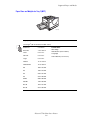
Paper Sizes and Weights for Tray 1 (MPT)
7760-169
Tray 1 (MPT)
75–255 g/m2 (20–72 lb. Bond, 22–90 lb. Cover)
Statement
5.5 x 8.5 in.
Executive
7.25 x 10.5 in.
Letter
8.5 x 11 in.
US Folio
8.5 x 13 in.
Legal
8.5 x 14 in.
Tabloid
11.0 x 17.0 in.
Tabloid Extra
12.0 x 18.0 in.
A6
105 x 148 mm
A5
148 x 210 mm
A4
210 x 297 mm
A3
297 x 420 mm
SRA3
320 x 450 mm
ISO B5
176 x 250 mm
B5 JIS
182 x 257 mm
B4 JIS
257 x 364 mm
Custom Sizes
Short Edge:
100–305 mm (3.95–12.00 in.)
Long Edge:
140–1200 mm (5.5–47.25 in.)
Phaser® 7760 Color Laser Printer
3-6
Supported Paper and Media
Tray 1 (MPT)
#10 Commercial
4.12 x 9.5 in.
Monarch
3.87 x 7.5 in.
A7
5.25 x 7.25 in.
DL
110 x 220 mm
C6
114 x 162 mm
C5
162 x 229 mm
C4
229 x 324 mm
B5
176 x 250 mm
Phaser® 7760 Color Laser Printer
3-7
Supported Paper and Media
Paper Sizes and Weights for Trays 2–5
7760-104
Trays 2–5
75–216 g/m2 (18–57 lb. Bond, 22–80 lb. Cover)
Statement
5.5 x 8.5 in.
Letter
8.5 x 11 in.
US Folio
8.5 x 13 in.
Legal
8.5 x 14 in.
Tabloid
11.0 x 17.0 in.
A5
148 x 210 mm
A4
210 x 297 mm
A3
297 x 420 mm
B5 JIS
182 x 257 mm
B4 JIS
257 x 364 mm
Custom Sizes (Tray 2 only)*
Short Edge:
140–297 mm (5.5–11.70 in.)
Long Edge:
182–432 mm (7.15–17.00 in.)
*Transparencies and custom sizes can be loaded in Tray 2 only.
Note: Only Letter-, A4-, and B5-size paper can be loaded in Trays 4 and 5 on the 2500-Sheet
High-Capacity Feeder.
Phaser® 7760 Color Laser Printer
3-8
Loading Paper
Loading Paper
This section includes:
■
■
■
Loading Paper in Tray 1 (MPT) on page 3-9
Using Manual Feed in Tray 1 (MPT) on page 3-16
Loading Paper in Trays 2–5 on page 3-17
Note: Most paper sizes can be loaded in the trays either long-edge feed or short-edge feed,
however, printing long-edge feed is recommended to optimize the life of the printer, supplies,
and print speed.
Loading Paper in Tray 1 (MPT)
Use Tray 1 (MPT) the following paper types:
■
Plain, Colored, Preprinted, and Prepunched paper: 75–90 g/m2 (20–24 lb. Bond)
■
Heavy plain paper, letterhead: 91–105 g/m2 (25–28 lb. Bond)
■
Thin card stock: 106–169 g/m2 (50–60 lb. Cover)
■
Thick card stock: 170–220 g/m2 (65–80 lb. Cover)
■
Extra thick card stock: 221–255 g/m2 (81–90 lb. Cover)
■
Thin glossy paper: 120–169 g/m2 (50–60 lb. Cover)
■
Thick glossy paper: 170–220 g/m2 (65–80 lb. Cover)
Envelopes
Labels
Xerox Digital Color Clear Transparency
Custom size paper, including banner
■
■
■
■
See also:
Paper Sizes and Weights for Tray 1 (MPT) on page 3-6
Note: If you change the paper in Tray 1 (MPT), select the correct paper type and size on the
control panel.
Phaser® 7760 Color Laser Printer
3-9
Loading Paper
Long-Edge Feed
Place Letter, A4, B5 JIS, ISO B5, Statement, Executive, and paper shorter than 305 mm
(12.0 in.) or wider than 140 mm (5.5 in.) long-edge feed (LEF).
Note: If your printer has a finisher with a booklet maker, you must load paper short-edge feed
to print booklets; see Short-Edge Feed on page 3-13.
To load paper or other media in Tray 1 (MPT):
1. Open Tray 1 (MPT).
7760-027
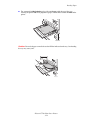
2. Load the paper or other media with the long edge entering the printer first.
■ For single-sided printing, place the side to be printed facedown, with the top of the
page towards the front of the printer. Prepunched holes should enter the printer last.
7760-108
Phaser® 7760 Color Laser Printer
3-10
Loading Paper
■
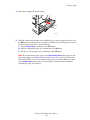
For automatic 2-sided printing, place side one faceup, with the top of the page
towards the front of the printer. Prepunched holes should enter the printer first.
7760-119
Caution: Do not load paper or media above the fill line indicated on the tray. Overloading
the tray may cause jams.
MAX
7760-107
Phaser® 7760 Color Laser Printer
3-11
Loading Paper
3. Adjust the paper guides to the size of the paper.
7760-049
4. When the control panel prompts you to confirm the type and size of paper in the tray, press
the OK button to use the current tray setup. If you loaded a new size or type of paper in the
tray, do the following:
a. Select Change setup, and then press the OK button.
b. Select the appropriate paper type, and then press the OK button.
c. Select the appropriate paper size, and then press the OK button. For some sizes that
can be loaded in either direction, you need to select the size with the letters LEF
(Long-Edge Feed). If you loaded a custom paper size, select New Custom Size for
the paper size and follow the prompts; see Printing Custom Size Paper from
Tray 1 (MPT) on page 3-45 for more information.
Phaser® 7760 Color Laser Printer
3-12
Loading Paper
Short-Edge Feed
Use short-edge feed for Labels, Legal, Tabloid, Tabloid Extra, A3, A5, A6, US Folio, B4 JIS,
SRA3, and paper that is narrower than 140 mm (5.5 in.) or longer than 305 mm (12.0 in.).
Note: If your printer has a finisher with a booklet maker, you must load paper short-edge feed
to print booklets.
1. Open Tray 1 (MPT).
7760-027
2. Load the paper or other media with the short edge against the printer.
■ For single-sided printing, place the side to be printed facedown, with the top of the
page entering the printer last. Place prepunched paper with the holes toward the back
of the printer.
7760-109
Phaser® 7760 Color Laser Printer
3-13
Loading Paper
For automatic 2-sided printing, place side one faceup, with the top of the page
entering the printer last. Place prepunched paper with the holes toward the front of the
printer.
X
O
R
XE
■
7760-120
Caution: Do not load paper or media above the fill line indicated on the tray. Overloading
the tray may cause jams.
MAX
7760-068
Phaser® 7760 Color Laser Printer
3-14
Loading Paper
3. Adjust the guides to fit the paper.
7760-105
4. When the control panel prompts you to confirm the type and size of paper in the tray, press
the OK button to use the current tray setup. If you loaded a new size or type of paper in the
tray, do the following:
a. Select Change setup, and then press the OK button.
b. Select the appropriate paper type, and then press the OK button.
c. Select the appropriate paper size, and then press the OK button. For some sizes that
can be loaded in either direction, you need to select the size with the letters SEF
(Short-Edge Feed). If you loaded a custom paper size, select New Custom Size for
the paper size and follow the prompts; see Printing Custom Size Paper from
Tray 1 (MPT) on page 3-45 for more information.
See also:
Printing on Specialty Media on page 3-33
Printing Custom Size Paper on page 3-45
Phaser® 7760 Color Laser Printer
3-15
Loading Paper
Using Manual Feed in Tray 1 (MPT)
If you are using paper, such as letterhead, and do not want others to use it by mistake, you can
have the printer prompt you when it is time to load the paper for your print job.
Selecting Manual Feed Using Windows
To select manual feed using Windows 2000, Windows XP, or Windows Server 2003:
1.
2.
3.
4.
5.
6.
In the Windows printer driver, click the Paper/Quality tab.
Select Force Printing from a Specific Tray, and then select Tray 1 (MPT) from the list.
Select Manual Feed, and then click OK to save the driver settings.
Submit your print job.
When prompted by the control panel, remove the paper from Tray 1 (MPT).
Load the appropriate paper for your job into the tray.
Selecting Manual Feed Using Macintosh
To select manual feed using Macintosh:
1.
2.
3.
4.
5.
In the Print dialog box, select Paper Feed from the drop-down list.
Select Manual Feed in the All pages from drop-down list.
Submit your print job.
When prompted by the control panel, remove the paper from Tray 1 (MPT).
Load the appropriate paper for your job into the tray.
See also:
Loading Paper in Tray 1 (MPT) on page 3-9
Phaser® 7760 Color Laser Printer
3-16
Loading Paper
Loading Paper in Trays 2–5
Use Trays 2–5 for the following paper types:
■
Plain, Colored, Preprinted, and Prepunched paper: 75–90 g/m2 (20–24 lb. Bond)
■
Heavy plain paper, letterhead: 91–105 g/m2 (25–28 lb. Bond)
■
Thin card stock: 106–169 g/m2 (50–60 lb. Cover)
■
Thick card stock: 170–220 g/m2 (65–80 lb. Cover)
■
Thin glossy paper: 120–169 g/m2 (50–60 lb. Cover)
■
Thick glossy paper: 170–220 g/m2 (65–80 lb. Cover)
Xerox Digital Color Clear Transparency (Tray 2 Only)
■
Note: Custom size paper can be loaded in Tray 2 only.
See also:
Paper Sizes and Weights for Trays 2–5 on page 3-8
Printing on Specialty Media on page 3-33
Phaser® 7760 Color Laser Printer
3-17
Loading Paper
Long-Edge Feed
Use long-edge feed for all paper types and sizes, except paper that is longer than 297 mm
(11.7 in.).
Note: If your printer has a finisher with a booklet maker, you must load paper short-edge feed
to print booklets; see Short-Edge Feed on page 3-21.
To load paper or other media in Trays 2-5:
1. Pull out the tray.
7760-110
2. Fan the paper to release sheets that are stuck together.
7760-106
3. Load the paper with the long edge towards the left side of the tray.
■ For single-sided printing, insert the side to be printed faceup, with the top of the
paper at the front of the tray. Prepunched holes should be on the right side of the tray.
7760-059
Phaser® 7760 Color Laser Printer
3-18
Loading Paper
■
For automatic 2-sided printing, insert the side to be printed facedown, with the top of
the paper at the front of the tray. Prepunched holes should be on the left side of the
tray.
7760-062
M
AX
Caution: Do not load paper or media above the fill line indicated on the tray. Overloading
the tray may cause jams.
7760-061
4. Adjust the guides to fit the paper.
7760-111
Phaser® 7760 Color Laser Printer
3-19
Loading Paper
5. Push the tray completely into the printer.
7760-023
6. When the control panel prompts you to confirm the type and size of paper in the tray, press
the OK button to use the current tray setup. If you loaded a new type of paper in the tray or
loaded a custom size in Tray 2, do the following:
a. Select Change setup, and then press the OK button.
b. Select the appropriate paper type, and then press the OK button.
c. For Tray 2, select the paper size, and then press the OK button.
Note: If you loaded custom size paper, select New Custom Size for the paper size and
follow the prompts; see Printing Custom Size Paper from Tray 2 on page 3-46 for more
information. If Tray 2 was set for custom size paper and you loaded standard-size paper,
select Auto-Sensed for the paper size; the tray guides are then used by the printer to
determine the paper size in the tray.
Phaser® 7760 Color Laser Printer
3-20
Loading Paper
Short-Edge Feed
Use short-edge feed for Letter, A4, B5 JIS, and paper longer than 297 mm (11.7 in.).
Note: If your printer has a finisher with a booklet maker, you must load paper short-edge feed
to print booklets.
1. Pull out the tray.
7760-110
2. Fan the paper to release sheets that are stuck together.
7760-106
3. Load the paper with the long edge of the paper facing the front of the tray.
■ For single-sided printing, insert the side to be printed faceup, with the top of the
paper towards the left of the tray. Prepunched holes should be at the front of the tray.
7760-116
Phaser® 7760 Color Laser Printer
3-21
Loading Paper
■
For 2-sided printing, insert the side to be printed facedown, with the top of the paper
towards the right side of the tray. Prepunched holes should be towards the front of the
tray.
7760-063
M
AX
Caution: Do not load paper or media above the fill line indicated on the tray. Overloading
the tray may cause jams.
7760-168
4. Adjust the paper guides to the size of the paper.
7760-111
Phaser® 7760 Color Laser Printer
3-22
Loading Paper
5. Push the tray completely into the printer.
7760-023
6. When the control panel prompts you to confirm the type and size of paper in the tray, press
the OK button to use the current tray setup. If you loaded a new type of paper in the tray or
loaded a custom size in Tray 2, do the following:
a. Select Change setup, and then press the OK button.
b. Select the appropriate paper type, and then press the OK button.
c. For Tray 2, select the paper size, and then press the OK button.
Note: If you loaded custom size paper, select New Custom Size for the paper size and
follow the prompts; see Printing Custom Size Paper from Tray 2 on page 3-46 for more
information. If Tray 2 was set for custom size paper and you loaded standard-size paper,
select Auto-Sensed for the paper size; the tray guides are then used by the printer to
determine the paper size in the tray.
See also:
Printing on Specialty Media on page 3-33
Phaser® 7760 Color Laser Printer
3-23
Selecting Printing Options
Selecting Printing Options
This section includes:
■
■
■
Selecting Printing Preferences (Windows) on page 3-24
Selecting Options for an Individual Job (Windows) on page 3-25
Selecting Options for an Individual Job (Macintosh) on page 3-27
See also:
Advanced Features Guide at www.xerox.com/office/7760support
Selecting Printing Preferences (Windows)
Printer preferences control all of your print jobs, unless you override them specifically for a
job. For example, if you want to use automatic 2-sided printing for most jobs, set this option in
printer settings.
To select printer preferences:
1. Select one of the following options:
■ Windows 98 SE, Windows 2000, Windows Server 2003: Click Start, select
Settings, and then click Printers. Go to Step 2.
■ Windows XP: Click Start, and then select Printers and Faxes. Go to Step 2.
2. In the Printers folder, right-click the icon for your printer.
3. From the pop-up menu, select Printing Preferences or Properties.
4. Make selections on the driver tabs, and then click the OK button to save your selections.
Note: For more information about Windows printer driver options, click the Help button on
the printer driver tab to view the online help.
Phaser® 7760 Color Laser Printer
3-24
Selecting Printing Options
Selecting Options for an Individual Job (Windows)
If you want to use special printing options for a particular job, change the driver settings before
sending the job to the printer. For example, if you want to use Photo print-quality mode for a
particular graphic, select this setting in the driver before printing that job.
1. With the desired document or graphic open in your application, access the Print dialog
box.
2. Select the Phaser 7760 Color Laser Printer and click its Properties button to open the
printer driver.
3. Make selections from the driver tabs. See the following table for specific printing options.
Note: In Windows 2000, Windows XP, and Windows Server 2003, you can save current
printing options with a distinctive name and apply them to other print jobs. Select either
the Paper Quality, Output Options, or TekColor tab, and then select a Saved Setting.
Click the Help button for more information.
4. Click the OK button to save your selections.
5. Print the job.
See the following table for specific printing options:
Printing Options for Windows Operating Systems
Operating
System
Windows 2000,
Windows XP, or
Windows Server
2003
Driver Tab
Printing Options
Layout tab
■
Orientation
■
Automatic 2-sided printing
■
Pages per sheet
■
Document size, paper type, and tray selection
■
Print quality
■
Cover pages
■
Saved settings
■
Stapling
■
Hole punching
■
Paper destination
■
End of job notification
■
Secure prints, personal prints, personal saved
prints, proof prints, and saved prints
■
Separation pages
■
Saved settings
■
Color corrections
■
Black and white conversion
■
Color adjustments
■
Saved settings
Paper/Quality tab
Output Options tab
TekColor tab
Phaser® 7760 Color Laser Printer
3-25
Selecting Printing Options
Printing Options for Windows Operating Systems (Continued)
Operating
System
Driver Tab
Printing Options
Windows 98 SE
Setup tab
■
Paper type, size, and tray selection
■
Orientation
■
Automatic 2-sided printing
■
Print quality
■
End of job notification
■
Stapling
■
Hole punching
■
Secure prints, proof prints, and saved prints
■
Separation pages
■
Cover pages
■
Color corrections
■
Black & white conversion
Output Options tab
TekColor tab
Phaser® 7760 Color Laser Printer
3-26
Selecting Printing Options
Selecting Options for an Individual Job (Macintosh)
To select print settings for a particular job, change the driver settings before sending the job to
the printer.
1. With the document open in your application, click File, and then click Print.
2. Select the desired printing options from the menus and drop-down lists that are displayed.
Note: In Macintosh OS X, click Save Preset on the Print menu screen to save the current
printer settings. You can create multiple presets and save each with its own distinctive
name and printer settings. To print jobs using specific printer settings, click the applicable
saved preset in the Presets list.
3. Click Print to print the job.
See the following table for specific printing options:
Macintosh PostScript Driver Settings
Operating System
Driver Drop-Down Title
Printing Options
Mac OS X, version
10.4
Copies & Pages
■
Copies
■
Pages
■
Pages per sheet
■
Layout direction
■
Border
■
2-sided printing
■
Reverse page order
■
Print (all, odd, even)
ColorSync
■
Color conversion
Cover Page
■
Cover pages
Paper Feed
■
Paper source
Finishing Options
■
Stapling
■
Hole punching
■
Paper destination
■
Offset collated sets
Job Types
■
Secure prints, personal prints, personal
saved prints, proof prints, and saved prints
Image Quality
■
Print quality
■
Color correction and sRGB neutral grays
■
Image smoothing
■
Paper types
■
Separation pages
Layout
Paper Handling
Printer Features
Phaser® 7760 Color Laser Printer
3-27
Selecting Printing Options
Macintosh PostScript Driver Settings (Continued)
Operating System
Driver Drop-Down Title
Printing Options
Mac OS X, version
10.2 and 10.3
Copies & Pages
■
Copies
■
Pages
■
Pages per sheet
■
Layout direction
■
Border
■
Two-sided printing
■
Reverse page order
■
Print (all, odd, even)
ColorSync
■
Color conversion
Cover Page
■
Cover pages
Paper Feed
■
Paper source
Finishing Options
■
Stapling
■
Hole punching
■
Paper destination
■
Offset collated sets
Job Types
■
Secure prints, personal prints, proof prints,
and saved prints
Image Quality
■
Print quality
■
RGB color corrections neutral grays
■
Image smoothing
■
Paper types
■
Separation pages
■
Copies
■
Pages
■
Paper source
Color Matching
■
Print color
Cover Page
■
Cover pages
Layout
■
Pages per sheet
■
Border
■
Two-sided printing
■
Print quality
■
Image smoothing
■
Secure prints, personal prints, proof prints,
and saved prints
Layout
Paper Handling
Printer Features
Mac OS 9.x
General
Print Quality
Job Types
Phaser® 7760 Color Laser Printer
3-28
Selecting Printing Options
Macintosh PostScript Driver Settings (Continued)
Operating System
Driver Drop-Down Title
Printing Options
Advanced Options
■
Paper destination
■
Paper types
■
Offset collated sets
■
Separation pages
■
Stapling
■
Hole punching
■
Destination
■
Offset collated sets
Finishing Options
Phaser® 7760 Color Laser Printer
3-29
Printing on Both Sides of the Paper
Printing on Both Sides of the Paper
This section includes:
■
■
■
Automatic 2-Sided Printing Guidelines on page 3-30
Binding Edge Options on page 3-31
Selecting 2-Sided Printing on page 3-31
Note: For information about manual two-sided printing, go to the Knowledge Base at
www.xerox.com/office/7760support.
Automatic 2-Sided Printing Guidelines
To use the printer’s automatic 2-sided printing (duplex) feature:
■
The paper must have a length of 148–432 mm (5.83–17 in.).
■
The paper must have a weight of 75–169 g/m2 (20–40 lb. Bond).
The paper type must be: Plain Paper, Heavy Plain Paper, Preprinted, Prepunched,
Colored Paper, Letterhead, Thin Card Stock, or Thin Glossy Paper.
■
The following paper and media cannot be used for 2-sided printing:
■
■
■
■
■
■
Thick and Extra Thick Card Stock
Thick Glossy Paper
Transparencies
Envelopes
Labels
Any die-cut specialty media, such as business cards
See also:
Supported Paper and Media on page 3-3
Phaser® 7760 Color Laser Printer
3-30
Printing on Both Sides of the Paper
Binding Edge Options
When you use the printer driver to select 2-sided printing, also select the binding edge, which
determines how the pages turn. The actual outcome depends on the orientation (portrait or
landscape) of images on the page, as displayed in the following illustrations.
Portrait
Landscape
Bind on Side Edge
Bind on Top Edge
Bind on Side Edge
Bind on Top Edge
Flip on Long Edge
Flip on Short Edge
Flip on Short Edge
Flip on Long Edge
Selecting 2-Sided Printing
To perform automatic 2-sided printing:
1. Load paper into the tray:
Tray 1 (MPT)
■
■
Long-Edge Feed: Insert side one faceup with the long edge entering the printer first
and the top of the page towards the front of the printer. Prepunched holes enter the
printer first.
Short-Edge Feed: Insert side one faceup with the short edge entering the printer first
and the top of the page towards the left side of the printer. Prepunched holes are at the
back of the tray.
Trays 2-5
Long-Edge Feed: Insert side one facedown with the long edge towards the left side
of the printer and the top of the paper at the front of the tray. Prepunched holes are
towards the left side of the printer.
■ Short-Edge Feed: Insert side one facedown, with the short edge towards the left side
of the printer and the top of the paper towards the right side of the tray. Prepunched
holes should be towards the front of the tray.
2. In the printer driver, select 2-sided printing. The location of the selection depends on your
computer’s operating system.
■
Phaser® 7760 Color Laser Printer
3-31
Printing on Both Sides of the Paper
To select automatic 2-sided printing:
Operating System
Steps
Windows 98 SE
1. Select the Setup tab.
2. Select Print on 2 Sides.
3. Select or deselect Bind On Top Edge.
Windows 2000,
Windows XP, or
Windows Server 2003
2. Select either Flip On Long Edge or Flip On Short Edge under Print
On Both Sides (Duplex).
1. Select the Layout tab.
Mac OS 9.x
1. In the Print dialog box, select Layout.
2. Select Print on Both Sides.
3. Click the Binding icon that matches the edge to bind.
Mac OS X, version
10.2 and higher
1. In the Print dialog box, select Duplex.
2. Select Print on Both Sides.
3. Click the Binding icon that matches the edge to bind.
See also:
Loading Paper in Tray 1 (MPT) on page 3-9
Loading Paper in Trays 2–5 on page 3-17
Phaser® 7760 Color Laser Printer
3-32
Printing on Specialty Media
Printing on Specialty Media
This section includes:
■
■
■
■
■
Printing Transparencies on page 3-33
Printing Envelopes on page 3-36
Printing Labels on page 3-38
Printing Glossy Paper on page 3-40
Printing Custom Size Paper on page 3-45
Printing Transparencies
Transparencies can be printed from Tray 1 (MPT) and Tray 2. They should be printed on one
side only.
For best results, use only Xerox Digital Color Clear Transparency Film. For more information,
see the Recommended Media List at www.xerox.com/paper.
To order paper, transparencies, or other specialty media, contact your local reseller or go to
www.xerox.com/office/supplies.
Caution: Damage caused by using unsupported paper, transparencies, and other specialty
media is not covered by the Xerox warranty, service agreement, or Total Satisfaction
Guarantee. The Total Satisfaction Guarantee is available in the United States and Canada.
Coverage may vary outside these areas; please contact your local representative for details.
Guidelines
■
■
■
■
Remove all paper before loading transparencies in the tray.
Do not load more than 50 transparencies in Tray 1 (MPT). Do not load more than
200 transparencies in Tray 2. Overloading the tray may cause the printer to jam.
Handle transparencies by the edges using both hands to avoid fingerprints and creases,
which can cause poor print quality.
After loading the transparencies in the tray, use the control panel to change the paper
type to Xerox Transparency.
Phaser® 7760 Color Laser Printer
3-33
Printing on Specialty Media
Printing Transparencies from Tray 1 (MPT)
1. Open Tray 1 (MPT).
7760-027
2. Insert the transparencies into the tray and adjust the paper guides to match the size of the
transparencies.
■ Place the long edge of the transparencies entering the printer first.
■ Do not load more than 50 transparencies.
MAX
7760-121
3. When the control panel prompts you to confirm the type and size of paper in the tray:
a. Select Change setup, and then press the OK button.
b. Select Xerox Transparency, and then press the OK button.
c. Select the transparency size, and then press the OK button.
Note: For some sizes that can be loaded in either direction, you need to select the size
with the letters LEF (Long-Edge Feed) if you loaded the long edge of the paper to enter the
printer first or SEF (Short-Edge Feed) if you loaded the short edge to enter the printer first.
4. In the printer driver, select Transparency as the paper type and/or select Tray 1 (MPT) as
the paper source.
Phaser® 7760 Color Laser Printer
3-34
Printing on Specialty Media
Printing Transparencies from Tray 2
1. Pull out Tray 2.
7760-023
2. Insert the transparencies into the tray and adjust the paper guides to fit the transparency
size.
7760-122
Note: Do not load transparencies above the transparency fill line inside the tray.
3. Push the tray completely into the printer.
4. When the control panel prompts you to confirm the type and size of paper in the tray:
a. Select Change setup, and then press the OK button.
b. Select the Xerox Transparency, and then press the OK button.
c. Select the transparency size, and then press the OK button.
Note: For some sizes that can be loaded in either direction, you need to select the size
with the letters LEF (Long-Edge Feed) if you loaded the long edge of the paper along the
left side of the tray or SEF (Short-Edge Feed) if you loaded the short edge along the left
side of the tray.
5. In the printer driver, select Transparency as the paper type and/or select Tray 2 as the
paper source.
Phaser® 7760 Color Laser Printer
3-35
Printing on Specialty Media
Printing Envelopes
Envelopes can be printed from Tray 1 (MPT) only.
See also:
Paper Sizes and Weights for Tray 1 (MPT) on page 3-6
Guidelines
■
■
■
■
■
■
Use only paper envelopes specified in the Supported Paper Sizes and Weights table.
Successful envelope printing is highly dependent on the quality and construction of the
envelopes. Use envelopes made specifically for laser printers.
It is recommended that you maintain constant temperatures and relative humidity.
Store unused envelopes in their packaging to avoid the effects of moisture and dryness
which can affect print quality and cause wrinkling. Excessive moisture can cause the
envelopes to seal before or during printing.
Avoid padded envelopes; purchase envelopes that lie flat on a surface.
Remove air bubbles from the envelopes before loading by setting a heavy book on top of
the envelopes.
If wrinkling or embossing problems occur, use a different brand of envelopes made
specifically for laser printers.
Caution: Never use envelopes with windows or metal clasps; they can damage the printer.
Damage caused by using unsupported envelopes is not covered under the Xerox warranty,
service agreement, or Total Satisfaction Guarantee. The Total Satisfaction Guarantee is
available in the United States and Canada. Coverage may vary outside these areas, please
contact your local representative for details.
Phaser® 7760 Color Laser Printer
3-36
Printing on Specialty Media
Printing Envelopes from Tray 1 (MPT)
1. Open Tray 1 (MPT).
7760-027
2. Insert the envelopes into Tray 1 (MPT), and adjust the paper guides to match the size of
the envelopes.
■ Place the side to be printed facedown.
■ Place the flap faceup and entering the printer first.
7760-123
3. When the control panel prompts you to confirm the type and size of paper in the tray:
a. Select Change setup, and then press the OK button.
b. Select Envelope as the paper type, and then press the OK button.
c. Select the appropriate envelope size, and then press the OK button.
Note: For some sizes that can be loaded in either direction, you need to select the size
with the letters LEF (Long-Edge Feed) if you loaded the long edge of the paper to enter the
printer first or SEF (Short-Edge Feed) if you loaded the short edge to enter the printer first.
4. In the printer driver, select Tray 1 (MPT) as the paper source and/or select Envelope as
the paper type.
Phaser® 7760 Color Laser Printer
3-37
Printing on Specialty Media
Printing Labels
Labels can be printed from Tray 1 (MPT) only.
To order paper, transparencies, or other specialty media, contact your local reseller or go to
www.xerox.com/office/supplies.
See also:
Paper Sizes and Weights for Tray 1 (MPT) on page 3-6
Guidelines
■
■
■
■
■
■
Do not use vinyl labels.
Print only on one side of the sheet of labels.
Do not use any sheet where labels are missing; it may damage the printer.
Store unused labels flat in their original packaging. Leave the sheets of labels inside the
original packaging until ready to use. Return any unused sheets of labels to the original
packaging and reseal it.
Do not store labels in extremely dry or humid conditions or extremely hot or cold
conditions. Storing them in extreme conditions may cause print-quality problems or cause
them to jam in the printer.
Rotate stock frequently. Long periods of storage in extreme conditions can cause labels to
curl and jam the printer.
Phaser® 7760 Color Laser Printer
3-38
Printing on Specialty Media
Printing Labels from Tray 1 (MPT)
1. Open Tray 1 (MPT).
7760-027
2. Load the labels in Tray 1 (MPT).
■ Insert the label sheets long-edge feed.
■ Place the labels sheets facedown.
■ Place the top of the page towards the front of the printer.
7760-124
3. Adjust the paper guides to match the size of the sheets.
4. When the control panel prompts you to confirm the type and size of paper in the tray:
a. Select Change setup, and then press the OK button.
b. Select Labels as the paper type, and then press the OK button.
c. Select the appropriate size of the label sheets with the letters LEF (Long-Edge Feed),
and then press the OK button.
5. In the printer driver, select Tray 1 (MPT) as the paper source and/or select Labels as the
paper type.
Phaser® 7760 Color Laser Printer
3-39
Printing on Specialty Media
Printing Glossy Paper
Glossy paper can be printed from any tray within the following weight range:
■
Thin Glossy Paper: 120–169 g/m2 (50–60 lb. Cover)
■
Thick Glossy Paper: 170–220 g/m2 (65–80 lb. Cover)
Note: Glossy paper should be printed on one side only.
To order paper, transparencies, or other specialty media, contact your local reseller or go to
www.xerox.com/office/supplies.
Guidelines
■
■
■
■
■
Do not open sealed packages of glossy paper until you are ready to load them into the
printer.
Leave glossy paper in the original wrapper, and leave the packages in the shipping carton
until ready to use.
Remove all other paper from the tray before loading glossy paper.
Load only the amount of glossy paper you are planning to use. Do not leave glossy paper
in the tray when you are finished printing. Reinsert unused glossy paper in the original
wrapper and seal.
Rotate stock frequently. Long periods of storage in extreme conditions can cause glossy
paper to curl and jam the printer.
Phaser® 7760 Color Laser Printer
3-40
Printing on Specialty Media
Printing Glossy Paper from Tray 1 (MPT)
1. Open Tray 1 (MPT).
7760-027
2. Fan the glossy paper to release sheets that may be stuck together.
7760-106
Phaser® 7760 Color Laser Printer
3-41
Printing on Specialty Media
3. Insert the glossy paper into Tray 1.
■ Use long-edge feed (with the long edge entering the printer first) for Letter- and
A4- size paper.
■ Use short-edge feed (with the short edge entering the printer first) for Tabloid,
Tabloid Extra, A3, and SRA3 paper.
■ For single-sided printing, place the side to be printed facedown.
■ For automatic 2-sided printing, place side one faceup.
MAX
7760-125
Note: Do not load glossy paper above the transparency fill line inside the tray.
Overloading the tray may cause jams.
4. Adjust the paper guides to match the size of the paper.
5. When the control panel prompts you to confirm the type and size of paper in the tray:
a. Select Change setup, and then press the OK button.
b. Select Thin Glossy Paper or Thick Glossy Paper (for paper over 170 g/m2) as the
paper type, and then press the OK button.
c. Select the appropriate paper size, and then press the OK button.
Note: For some sizes that can be loaded in either direction, you need to select the size
with the letters LEF (Long-Edge Feed) if you loaded the long edge of the paper to enter the
printer first or SEF (Short-Edge Feed) if you loaded the short edge to enter the printer first.
6. In the printer driver, select the Thin Glossy Paper or Thick Glossy Paper as the paper
type or Tray 1 (MPT) as the paper source.
Phaser® 7760 Color Laser Printer
3-42
Printing on Specialty Media
Printing Glossy Paper from Trays 2-5
1. Pull out the tray.
7760-110
2. Fan the paper to release sheets that are stuck together.
7760-106
M
AX
3. Insert glossy paper with the long edge along the left side of the tray.
■ For single-sided printing, place the side to be printed faceup.
■ For automatic 2-sided printing place side one facedown.
7760-112
Note: Do not load glossy paper above the transparency fill line inside the tray.
Overloading the tray may cause jams.
4. Adjust the paper guides to the size of the paper.
Phaser® 7760 Color Laser Printer
3-43
Printing on Specialty Media
5. Push the tray all the way back into the printer.
7760-023
6. When the control panel prompts you to confirm the type and size of paper in the tray:
a. Select Change setup, and then press the OK button.
b. Select Thin Glossy Paper or Thick Glossy Paper (for paper over 170 g/m2) as the
paper type, and then press the OK button.
c. If you loaded the glossy paper in Tray 2, select the appropriate paper size, and then
press the OK button.
Note: For some sizes that can be loaded in either direction, you need to select the size
with the letters LEF (Long-Edge Feed) since you loaded the long edge of the paper along
the left side of the tray.
7. In the printer driver, select the Thin Glossy Paper or Thick Glossy Paper as the paper
type or the appropriate tray as the paper source.
Phaser® 7760 Color Laser Printer
3-44
Printing on Specialty Media
Printing Custom Size Paper
In addition to the wide variety of standard paper sizes that you can use for printing, you can
also print on custom size paper within the following dimensions.
Tray 1 (MPT)
Tray 2
Short Edge
100–305 mm (3.95–12.00 in.)
140–297 mm (5.5–11.70 in.)
Long Edge
140–1200 mm (5.5–47.25 in.)
182–432 mm (7.15–17.00 in.)
Printing Custom Size Paper from Tray 1 (MPT)
1. Open Tray 1 (MPT).
7760-167
7760-166
Long-Edge Feed
Short-Edge Feed
2. Insert custom size paper in Tray 1 (MPT) and adjust the guides to fit the paper.
3. When the control panel prompts you to confirm the type and size of paper in the tray:
a. Select Change setup, and then press the OK button.
b. Select the appropriate paper type, and then press the OK button.
c. Select New Custom Size, and then press the OK button.
d. If the measurement shown for the short edge of the paper is correct, press the
OK button. Otherwise, select Change, press the OK button, use the Up Arrow or
Down Arrow button to scroll to the correct measurement, and then press the
OK button.
e. If the measurement shown for the long edge of the paper is correct, press the
OK button. Otherwise, select Change, press the OK button, use the Up Arrow or
Down Arrow button to scroll to the correct measurement, and then press the
OK button.
f. If the control panel prompts you for the paper orientation, select Long-Edge Feed if
you loaded the long edge of the paper to enter the printer first or select
Short-Edge Feed if you loaded the short edge to enter the printer first.
4. In the printer driver, select Tray 1 (MPT) as the paper source.
Phaser® 7760 Color Laser Printer
3-45
Printing on Specialty Media
Printing Custom Size Paper from Tray 2
1. Open Tray 2.
7760-165
7760-164
Long-Edge Feed
Short-Edge Feed
2. Insert custom size paper in Tray 2 and adjust the guides to fit the paper.
3. When the control panel prompts you to confirm the type and size of paper in the tray:
a. Select Change setup, and then press the OK button.
b. Select the appropriate paper type, and then press the OK button.
c. Select New Custom Size, and then press the OK button.
d. If the measurement shown for the short edge of the paper is correct, press the
OK button. Otherwise, select Change, press the OK button, use the Up Arrow or
Down Arrow button to scroll to the correct measurement, and then press the
OK button.
e. If the measurement shown for the long edge of the paper is correct, press the
OK button. Otherwise, select Change, press the OK button, use the Up Arrow or
Down Arrow button to scroll to the correct measurement, and then press the
OK button.
f. If the control panel prompts you for the paper orientation, select Long-Edge Feed if
you loaded the long edge of the paper along the left side of the tray or select
Short-Edge Feed if you loaded the short edge along the left side of the tray.
4. In the printer driver, select Tray 2 as the paper source.
Phaser® 7760 Color Laser Printer
3-46
Printing on Specialty Media
Turning Off Custom Size Printing for Tray 2
Note: When you have finished using custom paper in Tray 2, select Auto-Sensed as the
paper size when you load the standard-size paper. The tray guides are then used by the printer
to determine the paper size in the tray.
On the control panel:
1.
2.
3.
4.
5.
Select Printer Setup, and then press the OK button.
Select Paper Handling Setup, and then press the OK button.
Select Tray 2 Setup, and then press the OK button.
Select Change, and then press the OK button.
Select Auto-Sensed, and then press the OK button. The paper size is set to match the
tray’s paper guides.
Phaser® 7760 Color Laser Printer
3-47
Choosing Output Options
Choosing Output Options
This section includes:
■
■
■
Offsetting Output on page 3-49
Stapling Output on page 3-50
Using the Hole Puncher on page 3-51
Output Trays
The printer has one output tray located on the top of the printer. If a finisher is installed the
following output options are available:
■
■
■
■
Top output tray (horizontal transport)
Finisher upper output tray
Finisher stacker output tray
Finisher booklet output tray
Note: If you select stapling or hole punching in the printer driver, the output automatically
goes to a finisher output tray.
Selecting an Output Tray from the Printer Driver
To select an output tray for a specific print job:
Operating System
Steps
Windows 98 SE,
Windows 2000,
Windows XP,
Windows Server 2003
1. Select the Output Options tab.
Mac OS 9 or
Mac OS X, version
10.2 and higher
1. In the Print dialog box, select Finishing Options from the drop-down
list.
2. Select the ouput tray from the Paper Destination drop-down list.
2. Select the output tray from the Paper Destination drop-down list.
See also:
Stapling Output on page 3-50
Using the Hole Puncher on page 3-51
Phaser® 7760 Color Laser Printer
3-48
Choosing Output Options
Offsetting Output
When you send output to the top output tray or the finisher stacker tray, the copies or jobs can
be offset in the tray. Offsetting shifts the pages in the output tray for each job or each copy of a
collated job.
Note: If a finisher is installed, the top output tray no longer offsets.
Selecting Offsetting from the Printer Driver
To select offsetting for a specific print job:
Operating System
Steps
Windows 2000,
Windows XP,
Windows Server 2003
1. Select the Layout tab.
Mac OS 9 or
Mac OS X, version
10.2 and higher
1. In the Print dialog box, select Finishing Options from the drop-down
list.
2. Click the Advanced button.
3. Set Offset Collated Sets to On.
2. Click Offset Collated Sets to select it.
Phaser® 7760 Color Laser Printer
3-49
Choosing Output Options
Stapling Output
If your printer has a finisher, you can have the printer staple sets of up to 50 sheets of 75 g/m2
(20 lb. Bond Paper).
If your printer has a finisher with the booklet maker, you can have the printer saddle staple and
fold sets of up to 15 sheets to make a booklet. It can also fold sets of up to 5 sheets without
stapling.
Use the following guidelines when stapling paper:
■
■
■
To be stapled, the sheets of paper must have a width between 203–297 mm (8–11.7 in.)
and height between 182–432 mm (7.2–17 in.).
Extra Thick Card Stock, glossy paper, transparencies, labels, and envelopes are not
stapled.
To use the booklet maker, the paper size must be Letter (short-edge feed), US Folio, Legal,
Tabloid, A4 (short-edge feed), A3, or B4 JIS.
Stapling Options
The following stapling options are available from the printer driver:
■
■
■
■
■
■
■
None (default): The prints are not stapled.
Front: Inserts one staple in each set of copies. (For portrait long-edge feed paper,
staples the upper-left corner.)
Rear: Inserts one staple in each set of copies. (For portrait long-edge feed paper,
staples the lower-left corner.)
Dual: Inserts two staples in each set of copies. (For portrait long-edge feed paper,
staples the left edge.)
Quadruple: Inserts four staples in each set of copies. (For portrait long-edge feed
paper, staples the left edge.)
Saddle: Inserts two staples on the center line of each set of copies. Each set is then
folded along the center line and sent to the lower tray of the finisher.
Fold (No Staple): Each set of copies is folded along the center line and sent to the
lower tray of the finisher.
See also:
Advanced Features Guide at www.xerox.com/office/7760support
Stapling Orientation
The sample image in the printer driver displays the location of the staples, which changes
depending on the orientation of the page and the paper feed direction (long-edge feed or
short-edge feed).
See also:
Loading Paper on page 3-9
Phaser® 7760 Color Laser Printer
3-50
Choosing Output Options
Selecting Stapling From the Printer Driver
To select a stapling option for a specific print job:
Operating System
Steps
Windows 98 SE,
Windows 2000,
Windows XP,
Windows Server 2003
1. Select the Output Options tab.
Mac OS 9 or
Mac OS X, version
10.2 and higher
1. In the Print dialog box, select Finishing Options from the drop-down
list.
2. Select the stapling option from the Stapling drop-down list.
2. Select the stapling option.
Using the Hole Puncher
If your printer has a finisher, you can have the printer punch holes in the paper after it is
printed. Your finisher will have either the 3-hole or the 2-/4-hole punch options.
Note: Hole punching is not available when printing booklets.
Use the following guidelines when selecting hole punching options:
■
■
■
The edge of the paper to be punched must be 257 mm (10.12 in.), 267 mm (10.5 in.),
270 mm (10.63 in.), 279 (11 in.), or 297 mm (11.7 in.).
Thick Card Stock, Extra Thick Card Stock, Thick Glossy Paper, transparencies, labels,
and envelopes are not punched.
If you select Quadruple for stapling and 4 Holes for hole punching, the paper is not
punched.
Hole Punching Options
■
■
■
■
None (default): Holes are not punched.
2 Holes: Punches 2 holes 80 mm (3.15 in.) apart.
3 Holes: Punches 3 holes 108 mm (4.25 in.) apart.
4 Holes: Punches 4 holes 80 mm (3.15 in.) apart.
Hole Orientation
The sample image displayed in the driver shows the location of the holes, which depend on the
orientation of the page and the paper feed direction (long-edge feed or short-edge feed).
Phaser® 7760 Color Laser Printer
3-51
Choosing Output Options
Selecting Hole Punching from the Printer Driver
To select a hole punching option for a specific print job:
Operating System
Steps
Windows 98 SE,
Windows 2000,
Windows XP,
Windows Server 2003
1. Select the Output Options tab.
Mac OS 9 or
Mac OS X, version
10.2 and higher
1. In the Print dialog box, select Finishing Options from the drop-down
list.
2. Select the number of holes from the Hole Punching drop-down list.
3. Select Finisher Output Tray from the Paper Destination drop-down
list.
2. Select the number of holes under Hole Punching.
3. Select Finisher Output Tray from the Paper Destination drop-down
list.
Phaser® 7760 Color Laser Printer
3-52
.
Print Quality
This chapter includes:
■
■
Controlling the Quality of Your Prints on page 4-2
Solving Print-Quality Problems on page 4-5
Phaser® 7760 Color Laser Printer
4-1
Controlling the Quality of Your Prints
Controlling the Quality of Your Prints
This chapter includes:
■
■
Selecting a Print-Quality Mode on page 4-2
Adjusting Color on page 4-3
See also:
Advanced Features Guide at www.xerox.com/office/7760support
Selecting a Print-Quality Mode
The print-quality mode and TekColor correction directly control the quality of your prints. The
print-quality mode and paper type directly control the print speed. You can change these
settings in the printer driver or on the control panel.
Note: Driver settings override the settings selected on the control panel.
The following table describes the print-quality modes:
Print-Quality Mode
Type of Print Job
Standard
General-purpose mode for crisp, bright color prints at high speed.
Recommended for most office use and quick prints.
Enhanced
High-quality mode for fine lines and sharp text. Recommended for
detailed prints.
Photo
Highest-quality mode for very smooth color shades. Recommended for
printing photographs or when using graphic arts applications and press
matches.
Phaser® 7760 Color Laser Printer
4-2
Controlling the Quality of Your Prints
To select the print-quality mode in a supported driver:
Operating System
Steps
Windows 98 SE
1. Select the Setup tab.
2. Select a print-quality mode.
Windows 2000,
Windows XP, or
Windows Server 2003
1. Select the Paper/Quality tab.
Mac OS 9.x
1. In the Print dialog box, select General.
2. Select a print-quality mode.
2. Select Print Quality from the drop-down list.
3. Select the desired mode for Quality.
Mac OS X, version
10.2 and higher
1. In the Print dialog box, select Image Quality from the drop-down list.
2. Select a print-quality mode from the Print Quality drop-down list.
Adjusting Color
The TekColor correction options provide simulations of different color devices. Automatic is
the default correction for general image processing. See the following table to determine what
option you want to use.
TekColor Correction
Description
Automatic
Applies the best color correction to each graphic
element: text, artwork, and photographs.
Office Color
Press Match
sRGB Display
Approximates the colors on a CRT computer display.
sRGB Vivid
Produces brighter, more saturated colors than sRGB
Display.
LCD Display
Approximates the colors on a LCD computer monitor.
Custom Colors
Uses an RGB custom color correction developed for
your printer using PhaserMatch software.
SWOP Press
Matches Specifications for Web Offset Publications.
Euroscale
Matches FOGRA glossy paper specification.
Commercial
Approximates U.S. commercial press target.
SNAP Press
Matches Specifications for Newsprint Advertising
Production.
Japan Color
Matches Japan Color 2001 specification.
ISO Coated
Matches FOGRA 27L specification.
ISO Uncoated
Matches FOGRA 29L specification.
Custom Colors
Uses a CMYK custom color correction developed for
your printer using PhaserMatch software.
Phaser® 7760 Color Laser Printer
4-3
Controlling the Quality of Your Prints
TekColor Correction
Description
None
Applies no color correction. Use with other color
management tools, such as ICC (International Color
Consortium) profiles, ColorSync, or the PANTONE®
Color Chart for your printer.
Black and White
Converts all colors to shades of gray.
Use Printer Control
Panel Setting
Uses the color correction set in the printer. The color
correction can be set in the printer using either the
control panel or the CentreWare software (if available).
To select the color correction in a supported driver:
Operating System
Steps
Windows 98 SE,
Windows 2000,
Windows XP, or
Windows Server 2003
1. Select the TekColor tab.
Mac OS 9.x
1. In the Print dialog box, select General.
2. Select the desired color correction. Some of the color corrections are
grouped under Office Color or Press Match.
2. Select TekColor from the drop-down list.
3. Select the desired color correction for Color.
Mac OS X, version
10.2 and higher
1. In the Print dialog box, select Image Quality from the drop-down list.
2. Select the desired color correction from the Color Correction dropdown list.
See also:
Knowledge Base at www.xerox.com/office/7760support
Phaser® 7760 Color Laser Printer
4-4
Solving Print-Quality Problems
Solving Print-Quality Problems
This section includes:
■
■
■
■
■
■
■
■
■
■
■
■
■
■
■
■
Light Lines or Streaks in One Color on page 4-6
Dark Lines, Smudges, or Streaks Through All Colors on page 4-7
Repeating Defects on page 4-8
Colors Align Incorrectly on page 4-9
Incomplete Fusing on page 4-10
Image Is Offset on page 4-11
Solid Fills Appear Mottled or Blotchy, Blacks Appear Blue on page 4-12
Poor Transparency Print Quality on page 4-13
All Colors Are Too Light or Too Dark on page 4-14
Grays Are Not Neutral on page 4-14
Colors Vary Between Computers on page 4-15
Colors Do Not Match on page 4-15
Printed Colors Do Not Match Monitor Colors on page 4-16
PANTONE Colors Do Not Match on page 4-16
Color Settings Not Applied on page 4-16
Print Area Is Not Centered on the Paper on page 4-17
See also:
Knowledge Base at www.xerox.com/office/7760support
Advanced Features Guide at www.xerox.com/office/7760support
Phaser® 7760 Color Laser Printer
4-5
Solving Print-Quality Problems
Light Lines or Streaks in One Color
Problem
Thin, light or white lines appear in only one color.
Solution
1. Open the front door.
2. Remove the waste cartridge.
3. Clean the laser window for the color affected with the laser window cleaner wand. See
Cleaning the Laser Window on page 5-3.
Note: The laser window cleaner wand is located inside the front door. Insert the wand
until the arrow aligns with the front plate of the printer.
4. Return the waste cartridge to the printer.
5. If the problem continues after cleaning the laser window, replace the imaging unit that
corresponds to the color affected.
Phaser® 7760 Color Laser Printer
4-6
Solving Print-Quality Problems
Dark Lines, Smudges, or Streaks Through All Colors
Problem
Dark or light marks appear on the page in all colors and/or in non-printed areas.
Solution
1. Verify that the paper you are using is the correct type for the printer. See Supported Paper
and Media on page 3-3.
2. Verify that the paper is properly loaded in the tray, and the correct paper type is selected in
the Paper Tray Setup menu. See Loading Paper on page 3-9.
If the problem continues, remove toner print smears:
1. On the control panel, select Troubleshooting, select Print Quality Problems, and then
select Remove Print Smears.
Several cleaning pages are printed.
2. Repeat Step 1 until no toner appears on the pages.
If the problem is not resolved by removing the toner print smears, follow these steps.
1. On the control panel, select Troubleshooting, select Print Quality Problems, and then
select Repeating Defects Page.
The Repeating Defects page prints with instructions for identifying defective units.
2. Replace the item(s) identified on the Repeating Defects page to correct the problem.
If the problem continues, replace the belt cleaner assembly or the accumulator belt.
Note: If the Transfer Roller is replaced, on the control panel, select Information, select
Supplies Info, and then select Reset Transfer Roller Life.
Phaser® 7760 Color Laser Printer
4-7
Solving Print-Quality Problems
Repeating Defects
Problem
Spots or lines appear at regular intervals on the
page, in the direction the paper moves through
the printer, in only one color.
Spots or lines appear at regular intervals on the
page, in the direction the paper moves through
the printer, in all colors and/or in non-printed
areas.
Solution
Print the Repeating Defects page to view instructions for correcting the problem. To print the
Repeating Defects page:
1. On the control panel, select Troubleshooting, and then press the OK button.
2. Select Print Quality Problems, and then press the OK button.
3. Select Repeating Defects, and then press the OK button.
The Repeating Defects page prints.
4. Follow the instructions on the page to measure the distance between the defects and
identify the item causing the defects.
5. Replace the item causing the defects.
7400-206
Note: If the Transfer Roller is replaced, on the control panel, select Information, select
Supplies Info, and then select Reset Transfer Roller Life.
If the Accumulator Belt is replaced, on the control panel, select Troubleshooting, select
Service Tools, and then select Reset Accumulator Belt Life.
Phaser® 7760 Color Laser Printer
4-8
Solving Print-Quality Problems
Colors Align Incorrectly
Problem
Color has shifted outside the designated area or is superimposed over another color.
Solution
1. Open and close the front door. The printer performs an automatic registration calibration
with the next print.
Phaser® 7760 Color Laser Printer
4-9
Solving Print-Quality Problems
Incomplete Fusing
Problem
Toner appears to be missing from the print, or rubs off easily.
Solution
1. Verify that the paper you are using is the correct type for the printer. See Supported Paper
and Media on page 3-3.
2. Verify that the paper is properly loaded in the tray, and the correct paper type is selected in
the Paper Tray Setup menu. See Loading Paper on page 3-9.
If the problem continues:
1. Do one of the following:
■ Tray 1 (MPT): Remove and re-insert the paper.
■ Tray 2-5: Open and close the selected paper tray. The control panel prompts you to
confirm or change the paper type.
2. On the control panel, select Change, press the OK button, and then do one of the
following:
■ Select the correct paper type, and then press the OK button.
■ Select the next heavier type of paper, and then press the OK button.
Note: Paper types from lightest to heaviest are: Plain Paper, Heavy Plain Paper, Thin Card
Stock, Thick Card Stock, Extra Thick Card Stock.
Phaser® 7760 Color Laser Printer
4-10
Solving Print-Quality Problems
Image Is Offset
Problem
Toner appears to have been pulled off the page and placed about 84 mm (3.3 in.) across
the page from where it should be.
Solution
1. Verify that the paper you are using is the correct type for the printer. See Supported Paper
and Media on page 3-3.
2. Verify that the paper is properly loaded in the tray, and the correct paper type is selected in
the Paper Tray Setup menu. See Loading Paper on page 3-9.
If the problem continues:
1. Do one of the following:
■ Tray 1 (MPT): Remove and re-insert the paper.
■ Tray 2-5: Open and close the selected paper tray. The control panel prompts you to
confirm or change the paper type.
2. On the control panel, select Change, press the OK button, and then do one of the
following:
■ Select the correct paper type, and then press the OK button.
■ Select the next lighter type of paper, and then press the OK button.
Note: Paper types from heaviest to lightest are: Extra Thick Card Stock, Thick Card Stock,
Thin Card Stock, Heavy Plain Paper, and Plain Paper.
Phaser® 7760 Color Laser Printer
4-11
Solving Print-Quality Problems
Solid Fills Appear Mottled or Blotchy, Blacks Appear Blue
Problem
Solution
1. Verify that the paper you are using is the correct type for the printer. See Supported Paper
and Media on page 3-3.
2. Verify that the paper is properly loaded in the tray, and the correct paper type is selected in
the Paper Tray Setup menu. See Loading Paper on page 3-9.
If the problem continues, adjust the toner transfer setting for the paper type being used:
1. Load paper into Tray 1 (MPT). The control panel prompts you to change the paper type.
2. On the control panel, do one of the following:
■ Press the OK button to confirm the paper type. Proceed to Step 3.
■ Follow these steps:
a. Select Change to change the paper type, and then press the OK button.
b. Scroll the correct paper type, and then press the OK button.
c. Scroll to the correct paper size, and then press the OK button.
d. Proceed to Step 3.
3. Select Printer Setup, select Calibration Setup, select Calibrate for Paper, and then
select Calibrate for Paper Pages.
4. Follow the instructions on the Calibrate for Paper Pages to adjust the toner transfer setting.
Phaser® 7760 Color Laser Printer
4-12
Solving Print-Quality Problems
Poor Transparency Print Quality
Problem
Print-quality defects are occurring on the transparency film:
■
■
■
Light and/or dark spots.
Smeared toner
Light bands on the print
Caution: Damage caused by using unsupported paper, transparencies, and other specialty
media is not covered by the Xerox warranty, service agreement, or Total Satisfaction
Guarantee. The Total Satisfaction Guarantee is available in the United States and Canada.
Coverage may vary outside these areas; please contact your local representative for details.
To order paper, transparencies, or other specialty media, contact your local reseller or go to
www.xerox.com/office/supplies.
Solution
1. Using non-recommended transparency film can cause print-quality problems or damage
the printer’s fuser. See the Recommended Media List at www.xerox.com/paper.
2. Verify that the paper is properly loaded in the tray, and that Transparency is the selected
paper type in the Paper Tray Setup menu. See Loading Paper on page 3-9.
Phaser® 7760 Color Laser Printer
4-13
Solving Print-Quality Problems
All Colors Are Too Light or Too Dark
Problem
Colors appear faded or too dark.
Solution
1. Use a different TekColor correction in the printer driver.
Note: Setting the TekColor correction to Automatic produces the best results for most
documents.
2. Verify the print-quality mode selected is appropriate for the paper type.
3. If the problem continues, in the Xerox printer driver (Windows 2000 or later), select the
TekColor tab, click the More Options button, and then adjust the Lightness level.
4. If the problem continues, calibrate the colors using the procedures on the Color
Calibration Tutorial page. To print the Color Calibration Tutorial page:
a. On the control panel, select Troubleshooting, and then press the OK button.
b. Select Print Quality Problems, and then press the OK button.
c. Select Calibrate Colors, and then press the OK button.
d. Select Tutorial Page, and then press the OK button.
e. Follow the instructions on the page.
See also:
Adjusting Color on page 4-3
Grays Are Not Neutral
Problem
The grays on the printed page are not neutral; they contain color tints.
Solution
Follow the procedures on the Color Calibration Tutorial page to calibrate the printer’s colors.
To print the Color Calibration Tutorial page:
1.
2.
3.
4.
5.
On the control panel, select Troubleshooting, and then press the OK button.
Select Print Quality Problems, and then press the OK button.
Select Calibrate Colors, and then press the OK button.
Select Tutorial Page, and then press the OK button.
Follow the instructions on the page.
Phaser® 7760 Color Laser Printer
4-14
Solving Print-Quality Problems
Colors Vary Between Computers
Problem
The colors printed from one computer do not match the colors printed from a different
computer.
Solution
To prevent color differences in print jobs:
1. Confirm that the driver settings for Print Quality and Color Correction are identical on
both computers.
2. Adjust the settings as needed.
Note: Driver settings override the settings selected on the control panel.
See also:
Adjusting Color on page 4-3
Colors Do Not Match
Problem
The color produced by the printer is different from the color that it must match.
Solution
For help with color matching problems, go to www.xerox.com/office/7760support.
If the problem continues, follow these steps to ensure that the colors produced by the printer
are accurate:
1. Confirm that the settings for Print Quality and Color Correction are identical in the
printer driver and on the control panel.
2. Print the RGB Sampler pages or CMYK Sampler pages.
a. On the control panel, highlight Information, and then press the OK button.
b. Select Sample Pages, and then press the OK button.
c. Select RGB Sampler Pages or CMYK Sampler Pages, and then press the OK
button.
3. Use the values on the color sampler to set the colors in your document.
See also:
Advanced Features Guide at www.xerox.com/office/7760support
Phaser® 7760 Color Laser Printer
4-15
Solving Print-Quality Problems
Printed Colors Do Not Match Monitor Colors
Problem
The color produced by the printer looks different from the color that appears on the monitor.
Solution
See also:
Advanced Features Guide at www.xerox.com/office/7760support
PANTONE Colors Do Not Match
Problem
The colors printed on the document do not match the Phaser 7760 Color Laser Printer
PANTONE color chart.
Solution
For information about PANTONE color matching, go to www.xerox.com/office/7760support.
Color Settings Not Applied
Problem
If you change color settings on the control panel, it does not affect the colors in the printed
document.
Solution
To change color settings:
1. In the printer driver, change the settings for Print Quality and Color Correction.
See also:
Adjusting Color on page 4-3
Note: Driver settings override the settings selected on the control panel.
Phaser® 7760 Color Laser Printer
4-16
Solving Print-Quality Problems
Print Area Is Not Centered on the Paper
Problem
The printed area appears outside the margins on the page.
Solution
1.
2.
3.
4.
On the control panel, select Paper Tray Setup, and then press the OK button.
Select the tray you are using, and then press the OK button.
Verify that the tray is set to the correct paper size.
If the problem continues, use the Calibrate Margins page to shift the print area on the
paper. The print area appears as a dashed rectangle on the Calibrate Margins page; the
printer does not print outside this rectangle.
a. On the control panel, select Troubleshooting, and then press the OK button.
b. Select Print Quality Problems, and then press the OK button.
c. Select Calibrate Margins, and then press the OK button.
d. Select Calibrate Margins Page, and then press the OK button.
e. Select the appropriate tray to calibrate, and then press the OK button.
f. Follow the instructions on the Calibrate Margins page.
See also:
Advanced Features Guide at www.xerox.com/office/7760support
Phaser® 7760 Color Laser Printer
4-17
.
Maintenance
This chapter includes:
■
■
■
■
■
Cleaning the Printer on page 5-2
Adding Staples on page 5-6
Emptying the Punch Waste Box on page 5-12
Ordering Supplies on page 5-14
Moving and Repacking the Printer on page 5-16
See also:
Maintenance video tutorials at www.xerox.com/office/7760support
Replacing supplies video tutorials at www.xerox.com/office/7760support
Phaser® 7760 Color Laser Printer
5-1
Cleaning the Printer
Cleaning the Printer
■
■
Cleaning the Outside of the Printer on page 5-2
Cleaning the Laser Window on page 5-3
For safety information, see User Safety on page A-1.
Cleaning the Outside of the Printer
To remove stains, clean the outside of the printer using a soft, damp cloth moistened with a
mild neutral detergent. Do not spray detergent directly onto the printer.
Warning: To prevent electric shock, turn the printer off and unplug the power cord from the
electrical outlet before cleaning the printer.
Use only an approved toner vacuum to clean the printer. Do not lubricate the printer with oil.
Phaser® 7760 Color Laser Printer
5-2
Cleaning the Printer
Cleaning the Laser Window
1. Open the front door.
7760-008
2. Open the waste cartridge door.
7760-024
3. Remove the waste cartridge.
7760-158
Note: Be careful not to spill the toner by tipping the waste cartridge.
Phaser® 7760 Color Laser Printer
5-3
Cleaning the Printer
4. Remove the laser cleaning wand from the front door.
7760-160
5. Insert the laser cleaning wand into the slot, there is a slot for each imaging unit labeled one
through four.
6. Push the wand all the way into the printer until you hear a click or the arrow on the wand
aligns with the front of the printer.
Note: If you fail to insert the laser cleaning wand fully into the printer, the laser window
will not be cleaned properly.
1
2
3
2x
7760-159
7. Repeat Steps 4 and 5 for each slot.
8. Place the laser cleaning wand back inside the front door.
Phaser® 7760 Color Laser Printer
5-4
Cleaning the Printer
9. Reinsert the waste cartridge and close the waste cartridge door.
7760-026
10. Close the front door.
7760-008
Phaser® 7760 Color Laser Printer
5-5
Adding Staples
Adding Staples
This section includes:
■
■
Adding Staples to the Regular Stapler on page 5-6
Adding Staples to the Booklet Stapler on page 5-9
Note: The staple cartridges used in the booklet stapler are different from the staple cartridges
used in the regular stapler.
Adding Staples to the Regular Stapler
When the control panel displays a message that staple cartridge R1 needs to be replaced,
follow these steps.
1. Open the finisher door.
7760-075
2. Pull the staple unit to the front of the finisher.
7760-076
Phaser® 7760 Color Laser Printer
5-6
Adding Staples
3. Remove the stapler by the handle.
R4
2c
3
XE R1
7760-077
4. If present, remove the empty staple cartridge.
7760-080
5. Insert a new staple cartridge.
7760-081
Phaser® 7760 Color Laser Printer
5-7
Adding Staples
6. Insert the stapler in the finisher.
R4
2c
3
XE R1
7760-078
7. Close the finisher door.
7760-003
Phaser® 7760 Color Laser Printer
5-8
Adding Staples
Adding Staples to the Booklet Stapler
When the control panel displays a message that staple cartridge R2 or R3 needs to be replaced,
follow these steps.
1. Open the finisher door.
7760-075
2. Pull out the booklet stapler.
7760-094
Phaser® 7760 Color Laser Printer
5-9
Adding Staples
3. Remove the empty staple cartridges.
Note: Usually both cartridges are empty at the same time. You may need to replace both
of them.
7760-095
4. Insert the new staple cartridges.
7760-140
5. Push the booklet stapler into the printer.
7760-141
Phaser® 7760 Color Laser Printer
5-10
Adding Staples
6. Close the finisher door
7760-003
Phaser® 7760 Color Laser Printer
5-11
Emptying the Punch Waste Box
Emptying the Punch Waste Box
1. Open the finisher door.
7760-075
2. Remove the punch waste box.
7760-084
3. Empty the waste.
4. Insert the punch waste box into the finisher.
7760-085
Phaser® 7760 Color Laser Printer
5-12
Emptying the Punch Waste Box
5. Close the finisher door.
7760-003
Phaser® 7760 Color Laser Printer
5-13
Ordering Supplies
Ordering Supplies
This section includes:
■
■
■
■
Consumables on page 5-14
Routine Maintenance Items on page 5-14
When to Order Supplies on page 5-14
Recycling Supplies on page 5-15
Certain consumables and routine maintenance items need to be ordered occasionally. Each
item includes installation instructions in the package.
Consumables
■
■
Toner Cartridges (Cyan, Magenta, Yellow, Black)
Staple Pack (if the optional finisher is installed)
Routine Maintenance Items
■
■
■
■
■
■
■
Imaging Units (Cyan, Magenta, Yellow, Black)
Fuser
Transfer Roller
Accumulator Belt
Belt Cleaner Assembly
Waste Cartridge
Feed Roller Kit
When to Order Supplies
The control panel displays a warning when the supply nears its replacement time. Verify that
you have replacements on hand. It is important to order these supplies when the messages first
appear to avoid interruptions to your printing. The control panel displays an error message
when the supply must be replaced.
To view the current status of your printer supplies, print the Supplies Usage page:
1. On the control panel, select Information, and then press the OK button.
2. Select Supplies Info, and then press the OK button.
3. Select Supplies Usage Page to print.
Phaser® 7760 Color Laser Printer
5-14
Ordering Supplies
To order supplies, contact your local reseller or go to the Xerox Supplies website at
www.xerox.com/office/7760supplies.
Caution: Use of non-Xerox supplies is not recommended. The Xerox Warranty, Service
Agreements, and Total Satisfaction Guarantee do not cover damage, malfunction, or
degradation of performance caused by use of non-Xerox supplies, or the use of Xerox supplies
not specified for this printer. The Total Satisfaction Guarantee is available in the United States
and Canada. Coverage may vary outside these areas; please contact your local representative
for details.
Recycling Supplies
For information on Xerox supplies recycling programs, go to www.xerox.com/gwa.
Phaser® 7760 Color Laser Printer
5-15
Moving and Repacking the Printer
Moving and Repacking the Printer
This section includes:
■
■
■
Precautions for Moving the Printer on page 5-16
Moving the Printer Within the Office on page 5-16
Preparing the Printer for Shipment on page 5-16
See also:
User Safety on page A-1
Precautions for Moving the Printer
To view precautions and guidelines for safely moving your printer, see the User Safety
appendix in this user guide.
Moving the Printer Within the Office
The printer can be safely moved from one location within an office to another as long as it
travels in an upright position, gently over smooth surfaces. Any jarring movement, such as
pushing the printer over a raised door threshold or across a parking lot, can damage the printer.
Preparing the Printer for Shipment
Caution: Do not remove the toner cartridges; leave them locked in the normal operating
position.
Repack the printer using the original packing material and boxes or a Xerox repackaging kit.
Additional instructions for repacking the printer are provided in the repackaging kit. If you do
not have all the original packaging, or are unable to repackage the printer, contact your local
Xerox service representative.
Caution: Damage to the printer resulting from improper moving or failure to repackage the
printer properly for shipment, is not covered by the warranty, service agreement, or Total
Satisfaction Guarantee. The Total Satisfaction Guarantee is available in the United States and
Canada. Coverage may vary outside these areas; please contact your local representative for
details.
Phaser® 7760 Color Laser Printer
5-16
Troubleshooting
This chapter includes:
■
■
Preventing Jams on page 6-2
Getting Help on page 6-23
See also:
Troubleshooting video tutorials at www.xerox.com/office/7760support
Print Quality on page 4-1
Phaser® 7760 Color Laser Printer
6-1
Clearing Paper Jams
Clearing Paper Jams
This section includes:
■
■
■
Preventing Jams on page 6-2
Jams in the Printer on page 6-2
Jams in the Finisher on page 6-17
Preventing Jams
To reduce the frequency of paper jams, follow the guidelines and instructions in Printing
Basics which includes information about supported paper and other media, guidelines for
paper and media usage, and instructions for properly loading paper and media in the trays. Do
not overload the paper trays.
Jams in the Printer
This section includes:
■
■
■
■
■
■
Jam at the Fuser on page 6-3
Jam at the Duplex Unit on page 6-5
Jam at Tray 1 (MPT) on page 6-7
Jam at Tray 2 on page 6-9
Jam at Tray 3, 4, or 5 on page 6-11
Jam at Left Door (A, B, or C) on page 6-14
Phaser® 7760 Color Laser Printer
6-2
Clearing Paper Jams
Jam at the Fuser
Follow these steps to clear the jam.
1. Push up on the latch on the left side of the printer to open Left Door A.
Warning: Use caution, components behind the left door may be hot.
7760-010
2. Lift the release latch located on the right side of the fuser.
7760-040
Phaser® 7760 Color Laser Printer
6-3
Clearing Paper Jams
3. Remove the jammed paper. Confirm that all paper fragments are removed.
7760-041
4. Push down the release latch.
7760-042
5. Close Left Door A.
7760-015
Phaser® 7760 Color Laser Printer
6-4
Clearing Paper Jams
Jam at the Duplex Unit
Follow these steps to clear the jam.
1. Open Tray 1 (MPT).
7760-027
2. Open Left Door D.
7760-028
3. Remove the jammed paper.
7760-029
Phaser® 7760 Color Laser Printer
6-5
Clearing Paper Jams
4. Close Left Door D.
7760-030
Phaser® 7760 Color Laser Printer
6-6
Clearing Paper Jams
Jam at Tray 1 (MPT)
Follow these steps to clear the jam.
1. Remove paper from Tray 1 (MPT). Confirm that all paper fragments are removed.
7760-046
2. Remove the jammed paper from Tray 1 (MPT). Confirm that all paper fragments are
removed.
7760-047
3. If you did not find paper in Step 2, push up the latch on the left side of the printer to open
Left Door A.
7760-010
Warning: Use caution, components behind the left door may be hot.
Phaser® 7760 Color Laser Printer
6-7
Clearing Paper Jams
4. Remove the jammed paper. Confirm that all paper fragments are removed.
7760-048
5. Close Left Door A.
7760-015
6. Replace the paper in the tray.
Note: Do not load paper above the fill line.
MAX
7760-068
Phaser® 7760 Color Laser Printer
6-8
Clearing Paper Jams
Jam at Tray 2
Follow these steps to clear the jam.
1. Open Left Door B.
7760-050
2. Remove the jammed paper. Confirm that all paper fragments are removed.
7760-051
3. Close Left Door B.
7760-052
Phaser® 7760 Color Laser Printer
6-9
Clearing Paper Jams
4. Pull Tray 2 out of the printer.
7760-053
5. Remove any crumpled paper from the tray.
7760-054
6. Verify that the paper is loaded correctly in the tray and that the guides are pressed firmly
against the paper.
7760-055
7. Push Tray 2 completely back into the printer.
Phaser® 7760 Color Laser Printer
6-10
Clearing Paper Jams
Jam at Tray 3, 4, or 5
Follow these steps to clear the jam.
1. Open Left Door C.
7760-043
2. Remove the jammed paper. Confirm that all paper fragments are removed.
7760-044
3. Close Left Door C.
7760-045
Phaser® 7760 Color Laser Printer
6-11
Clearing Paper Jams
4. Pull out the tray specified on the control panel.
7760-133
5. Remove crumpled paper from the tray.
7760-134
Note: If you have a high-capacity feeder, lift the cover on the left side of the tray and
remove the jammed paper.
7760-135
Phaser® 7760 Color Laser Printer
6-12
Clearing Paper Jams
6. Verify that the paper is loaded correctly in the tray and that the guides are pressed firmly
against the paper.
7760-136
7. Push the tray completely into the printer.
7760-137
Phaser® 7760 Color Laser Printer
6-13
Clearing Paper Jams
Jam at Left Door (A, B, or C)
Follow these steps to clear the jam.
1. Open the left door (A, B, or C) specified on the control panel.
Door A
7760-010
Door B
Door C
7760-043
7760-050
Phaser® 7760 Color Laser Printer
6-14
Clearing Paper Jams
2. Remove the jammed paper. Confirm that all paper fragments are removed.
Door A
7760-041
Door B
Door C
7760-044
7760-051
Phaser® 7760 Color Laser Printer
6-15
Clearing Paper Jams
3. Close the left door.
Door A
7760-015
Door B
Door C
7760-045
7760-052
Phaser® 7760 Color Laser Printer
6-16
Clearing Paper Jams
Jams in the Finisher
This section includes:
■
■
■
■
■
■
Jam Under the Top Output Tray on page 6-17
Jam at the Finisher - Area 2 on page 6-18
Jam at the Finisher - Area 3 on page 6-19
Jam at the Finisher - Area 4 on page 6-20
Jam at Finisher Cover on page 6-21
Finisher Stacker Output Tray Jammed on page 6-22
Jam Under the Top Output Tray
Follow these steps to clear the jam.
1. Open the top output tray.
7760-034
2. Remove any jammed paper. Confirm that all paper fragments are removed.
7760-035
3. Close the top output tray.
7760-036
Phaser® 7760 Color Laser Printer
6-17
Clearing Paper Jams
Jam at the Finisher - Area 2
Follow these steps to clear the jam.
1. Open the finisher door.
7760-075
2. Open the handle (2a or 2b) specified on the control panel.
3. If necessary, rotate knob 2c counterclockwise.
4. Pull the jammed paper out of the finisher. Confirm that all paper fragments are removed.
2a
2c
2b
7760-163
5. Close handle 2a and/or 2b by moving them to the left.
6. Close the finisher door.
Phaser® 7760 Color Laser Printer
6-18
Clearing Paper Jams
Jam at the Finisher - Area 3
Follow these steps to clear the jam.
1. Open the finisher door.
7760-075
2. Open handle 3 by pulling it down.
3
7760-170
3. Pull the jammed paper out of the finisher. Confirm that all paper fragments are removed.
4. Close handle 3.
5. Close the finisher door.
7760-003
Phaser® 7760 Color Laser Printer
6-19
Clearing Paper Jams
Jam at the Finisher - Area 4
Follow these steps to clear the jam.
1. Open the finisher door.
7760-075
2. Pull out the booklet drawer (labeled 4).
7760-157
3. Remove the jammed paper. Confirm that all paper fragments are removed.
4. Close the finisher door.
7760-003
Phaser® 7760 Color Laser Printer
6-20
Clearing Paper Jams
Jam at Finisher Cover
Follow these steps to clear the jam.
1. Lift the finisher cover (Door 5).
5
7760-031
2. Remove the jammed paper.
7760-032
3. Close the finisher cover (Door 5).
7760-033
Phaser® 7760 Color Laser Printer
6-21
Clearing Paper Jams
Finisher Stacker Output Tray Jammed
Follow these steps to clear the jam.
1. Pull the jammed paper out of the stacker output tray.
7760-032
2. Open the finisher door.
7760-075
3. Close the finisher door.
7760-003
Phaser® 7760 Color Laser Printer
6-22
Getting Help
Getting Help
This section includes:
■
■
■
■
Control Panel Messages on page 6-23
PrintingScout Alerts on page 6-23
PhaserSMART Technical Support on page 6-24
Web Links on page 6-24
Xerox provides several automatic diagnostic tools to help you produce and maintain print
quality.
See also:
Xerox Support Centre on page 1-14
Control Panel Messages
The control panel provides you with information and troubleshooting help. When an error or
warning condition occurs, the control panel displays a message informing you of the problem.
In many cases, the control panel also displays an animated graphic showing the location of the
problem, such as the location of a paper jam.
Press the Help button on the control panel to view additional information about the message or
menu displayed. The Help button is labeled with a ? symbol.
7760-170
PrintingScout Alerts
PrintingScout is a tool that is installed with your Xerox printer driver. It automatically checks
the printer status when you send a print job. If the printer is unable to print your job,
PrintingScout automatically displays an alert on your computer screen to let you know that the
printer needs attention. Click the alert to view instructions explaining how to fix the problem.
Phaser® 7760 Color Laser Printer
6-23
Getting Help
PhaserSMART Technical Support
PhaserSMART Technical Support is an automated, internet-based support system that uses
your default web browser to send diagnostic information from your printer to the Xerox
website for analysis. PhaserSMART Technical Support examines the information, diagnoses
the problem, and proposes a solution. If the problem is not resolved with the solution,
PhaserSMART Technical Support assists you in opening a Service Request with Xerox
Customer Support.
To access PhaserSMART Technical Support:
1. Open your browser and go to www.phaserSMART.com.
2. Enter your printer’s IP address in the browser window.
3. Follow the instructions on the screen.
Web Links
Xerox provides several websites that offer additional help on your Phaser 7760 Printer. A set
of Xerox links is installed in your web browser’s Favorites folder when you install the Xerox
printer drivers on your computer. The Troubleshooting tab in your Windows printer driver
also includes useful links. Use the following websites to obtain more information.
Resource
Link
PhaserSMART Technical Support automatically diagnoses
problems on your networked printer and proposes
solutions:
www.phasersmart.com
Technical support information for your printer, includes
online Technical Support, Knowledge Base, driver
downloads, documentation, video tutorials, and much
more:
www.xerox.com/office/7760support
Supplies for your printer:
www.xerox.com/office/7760supplies
A resource for tools and information, such as interactive
tutorials, printing templates, helpful tips, and customized
features to meet your individual needs:
www.colorconnection.xerox.com
Local sales and support center:
www.xerox.com/office/contacts
Printer registration:
www.xerox.com/office/register
Material Safety Data Sheets identify materials, and provide
information on safely handling and storing hazardous
materials:
www.xerox.com/office/msds
(U.S. and Canada)
Information about recycling supplies:
www.xerox.com/gwa
www.xerox.com/environment _europe
(European Union)
Phaser® 7760 Color Laser Printer
6-24
User Safety
Your printer and the recommended supplies have been designed and tested to meet strict safety
requirements. Attention to the following information ensures the continued safe operation of
your printer.
Electrical Safety
■
■
■
■
■
Use the power cord supplied with your printer.
Plug the power cord directly into a properly grounded electrical outlet. Make sure each
end of the cord is securely connected. If you do not know if an outlet is grounded, ask an
electrician to check the outlet.
Do not use a ground adapter plug to connect the printer to an electrical outlet that does not
have a ground connection terminal.
Do not use an extension cord or power strip.
Verify that the printer is plugged into an outlet that is capable of providing the correct
voltage and power. Review the printer’s electrical specification with an electrician if
necessary.
Warning: Avoid the potential of electrical shock by ensuring that the printer is properly
grounded. Electrical products may be hazardous if misused.
■
■
■
■
Do not place the printer in an area where people might step on the power cord.
Do not place objects on the power cord.
Do not block the ventilation openings. These openings are provided to prevent overheating
of the printer.
Do not drop paper clips or staples into the printer.
Warning: Do not push objects into slots or openings on the printer. Making contact with a
voltage point or shorting out a part could result in fire or electrical shock.
If you notice unusual noises or odors:
1. Turn off the printer immediately.
2. Disconnect the power cord from the electrical outlet.
3. Call an authorized service representative to correct the problem.
Phaser® 7760 Color Laser Printer
A-1
The power cord is attached to the printer as a plug-in device at the back of the printer. If it is
necessary to disconnect all electrical power from the printer, disconnect the power cord from
the electrical outlet.
Warning: Do not remove the covers or guards that are fastened with screws unless you are
installing optional equipment and are specifically instructed to do so. Power should be OFF
when performing these installations. Except for user-installable options, there are no parts that
you can maintain or service behind these covers.
Note: Leave the printer on for optimum performance; it does not pose a safety hazard.
The following are hazards to your safety:
■
■
■
The power cord is damaged or frayed.
Liquid is spilled into the printer.
The printer is exposed to water.
If any of these conditions occur, do the following:
1. Turn off the printer immediately.
2. Disconnect the power cord from the electrical outlet.
3. Call an authorized service representative.
Laser Safety
With specific regard to lasers, this printer complies with laser product performance standards
set by governmental, national, and international agencies and is certified as a Class 1 Laser
Product. The printer does not emit hazardous light because the beam is totally enclosed during
all modes of customer operation and maintenance.
Maintenance Safety
■
■
■
Do not attempt any maintenance procedure that is not specifically described in the
documentation supplied with your printer.
Do not use aerosol cleaners. The use of supplies that are not approved may cause poor
performance and could create a hazardous condition.
Do not attempt to open, reuse, or burn any consumables or routine maintenance items. For
information on Xerox supplies recycling programs, go to www.xerox.com/gwa.
Phaser® 7760 Color Laser Printer
A-2
Operational Safety
Your printer and supplies were designed and tested to meet strict safety requirements. These
include safety agency examination, approval, and compliance with established environmental
standards.
Your attention to the following safety guidelines helps to ensure the continued, safe operation
of your printer.
Printer Location
Place the printer in a dust-free area within a temperature range of 50° F to 90° F (10° C to
32° C) and within the following humidity range:
■
■
Optimal Print Quality: 50% – 70%
Operating: 20% – 80%
Printer Clearance
Place the printer in an area where there is adequate space for ventilation, operation, and
servicing. The recommended minimal spacing is:
Overhead Clearance:
■
60.96 cm (24.0 in.) above the printer
Total Height Requirements:
■
■
■
Printer: 49.3 cm (19.4 in.)
1500-Sheet Feeder: 36.4 cm (14.3 in.)
2500-Sheet High-Capacity Feeder: 36.4 cm (14.3 in.)
Total Width Requirements:
■
Finisher: 61 cm (24 in.) on the right side of the printer
Other Clearances:
■
■
■
■
42.5 cm (16.7 in.) in front of the printer
13 cm (5.3 in.) behind the printer
36.8 cm (14.5 in.) on the left side of the printer
5 cm (1.96 in.) on the right side of the printer, without the finisher
Phaser® 7760 Color Laser Printer
A-3
Operational Guidelines
■
■
■
■
■
■
Do not block or cover the slots and openings on the printer. The printer may overheat
without adequate ventilation.
For optimum performance, use the printer at elevations below 2,000 m (6,562 ft.).
Do not place the printer near a heat source.
Do not place the printer in direct sunlight to avoid exposure of light-sensitive components
when the doors are open.
Do not place the printer in line with the cold air flow from an air conditioning system.
Place the printer on a level, solid non-vibrating surface with adequate strength for the
weight of the printer. It should be within 2° of horizontal with all four feet in solid contact
with the surface. The base printer weight without any packaging materials is
approximately 89 kg (196 lb.).
Printing Safety Guidelines
■
■
Wait 10-15 seconds between turning the printer off and on.
Keep hands, hair, neckties, etc., away from the exit and feed rollers.
When the printer is printing:
■
■
■
Do not remove the paper source tray that you selected in either the printer driver or control
panel.
Do not open the doors.
Do not move the printer.
Printer Supplies
■
■
Use the supplies specifically designed for your printer. The use of unsuitable materials
may cause poor performance and a possible safety hazard.
Follow all warnings and instructions marked on, or supplied with, the printer, options, and
supplies.
Caution: Use of non-Xerox supplies is not recommended. The Xerox Warranty, Service
Agreements, and Total Satisfaction Guarantee do not cover damage, malfunction, or
degradation of performance caused by use of non-Xerox supplies, or the use of Xerox supplies
not specified for this printer. The Total Satisfaction Guarantee is available in the United States
and Canada. Coverage may vary outside these areas; please contact your local representative
for details.
Phaser® 7760 Color Laser Printer
A-4
Moving the Printer
Follow these guidelines to avoid injuring yourself or damaging the printer:
■
Turn off the printer and unplug all power cables before moving the printer.
■
Always use four people to lift the printer.
Alway lift the printer from the designated lift points.
■
7760-162
■
Do not place any food or liquids on the printer.
Caution: Damage to the printer resulting from improper moving or failure to repackage the
printer properly for shipment, is not covered by the warranty, service agreement, or Total
Satisfaction Guarantee. The Total Satisfaction Guarantee is available in the United States and
Canada. Coverage may vary outside these areas; please contact your local representative for
details.
Phaser® 7760 Color Laser Printer
A-5
Symbols Marked on Product
The following symbols may be marked on your product.
Use caution (or draws attention to a particular
component). See the manual(s) for information.
Avoid pinching fingers in the printer. Use caution
to avoid personal injury.
Hot surface on or in the printer. Use caution to
avoid personal injury.
Do not touch.
Do not burn the item.
It may take 30 minutes for the fuser to cool down.
00:30
This product contains a laser unit. See the
manual(s) for information.
Phaser® 7760 Color Laser Printer
A-6
Index
Numerics
2-sided printing, 3-30
automatic, 3-30
binding edge options, 3-31
selecting, 3-31
A
accumulator belt
ordering supplies, 5-14
adding staples, 5-6
regular stapler, 5-6
adjusting color, 4-3
all colors too light or too dark, 4-14
AutoIP
manually setting the printer’s IP
address, 2-8
setting the printer’s IP address
dynamically, 2-6
automatic
2-sided printing, 3-30
TekColor correction, 4-3
automatically setting the printer’s IP address
(Windows only), 2-5
available printer drivers, 2-9
B
basic printing, 3-2
belt cleaner assembly
ordering supplies, 5-14
binding edge printing options, 3-31
black and white, 4-3
booklet stapler
adding staples, 5-9
C
calibrate
colors, 4-14
margins, 4-17
caution symbols, A-6
CentreWare IS
changing or modifying the printer’s IP
address, 2-6
setting the printer’s IP address
dynamically, 2-6
changing the IP address using
CentreWare IS, 2-6
choosing a network connection, 2-3
cleaning
laser window, 5-3
printer, 5-2
color correction
selecting in the printer driver, 4-3
color sampler pages, 1-12
colors
adjusting, 4-3
align incorrectly, 4-9
all colors too light or too dark, 4-14
calibrating, 4-14
change settings on the control panel, 4-16
color settings not applied, 4-16
dark lines, smudges, or streaks through
all colors, 4-7
description, 4-3
grays contain color tints, 4-14
grays not neutral, 4-14
light or dark lines appear in one
color, 4-6
PANTONE colors do not match, 4-16
printed colors do not match monitor
colors, 4-16
produced by printer are incorrect, 4-15
smudges or smears in one color, 4-6
vary between computers, 4-15
configuration page
information pages, 1-11
configuring the network address, 2-5
connection
Ethernet, 2-4
USB, 2-3
consumables, 5-14
control panel, 1-9
change color settings, 4-16
controlling print quality, 4-2
features and layout, 1-9
information pages, 1-11
layout, 1-10
Menu Map, 1-11
Phaer® 7760 Color Laser Printer
Index-1
Index
messages, 6-23
printing sample pages, 1-11
custom size paper, 3-45
single-sided printing, 3-45
supported for Tray 1 (MPT), 3-6, 3-8,
3-45
supported for Trays 2-n, 3-45
custom size printing
2-sided printing, 3-45
D
dark lines in all colors, 4-7
dark lines in one color, 4-6
database
local Domain Name Service (DNS) name
space, 2-7
default router/gateway address, 2-6
DHCP
enable for Dynamic Domain Name
Service (DDNS), 2-7
enabled by default on Phaser printers, 2-6
manually setting the printer’s IP
address, 2-8
setting the printer’s IP address
dynamically, 2-6
Domain Name Service (DNS)
local domain name space database, 2-7
using host names, 2-7
drivers
available, 2-9
description, 2-9
installing, 2-9
Macintosh OS 9.x, 2-11
Macintosh OS X version 10.2 and
10.3, 2-12
Macintosh OS X version 10.4, 2-14
PCL, 2-9
PostScript, 2-9
selecting 2-sided printing, 3-31
selecting hole punching, 3-52
selecting stapling, 3-51
setting the default output tray, 3-48
UNIX, 2-9
Windows 2000 or later, 2-10
Windows 98 SE or later, 2-10
Xerox Support Centre, 1-14
duplex entrance
paper jam, 6-3
duplex unit
paper jam, 6-5
Dynamic Domain Name Service
(DDNS), 2-7
dynamically setting the printer’s IP
address, 2-6
E
electrical safety, A-1
emptying the waste punch box, 5-12
enhanced print-quality mode, 4-2
envelopes, 3-36
guidelines, 3-36
printing from Tray 1 (MPT), 3-37
error and warning messages, 6-23
Ethernet connection, 2-4
F
features
printer configurations, 1-7
standard, 1-6
feed roller kit
ordering supplies, 5-14
finisher
door paper jam, 6-18, 6-20, 6-21
hole puncher, 3-51
paper jam, 6-17
saddle stapler paper jam, 6-17
stapler, 3-50
stapler paper jam, 6-17
upper output tray paper jam, 6-22
format
IP address, 2-6
fuser
ordering supplies, 5-14
fusing
incomplete, 4-10
G
getting help, 6-23
PhaserSMART, 6-24
PrintingScout Alerts, 6-23
technical support, 1-13
web links, 6-24
glossy paper, 3-40
printing from Tray 1 (MPT), 3-41
printing guidelines, 3-40
Phaer® 7760 Color Laser Printer
Index-2
Index
guidelines
automatic 2-sided printing, 3-30
envelopes, 3-36
glossy paper, 3-40
labels, 3-38
operational, A-4
paper storage, 3-4
paper usage, 3-3
printing on both sides of the paper, 3-30
printing safety, A-4
H
hole puncher, 3-51
options, 3-51
selecting hole punching from the printer
driver, 3-52
host names
using with Domain Name Service
(DNS), 2-7
I
image
offset, 4-11
imaging unit
ordering supplies, 5-14
information
about your printer, 1-13
Advanced Features Guide, 1-13
information pages, 1-13
PhaserSMART, 1-13
printer management tools, 1-13
Quick Reference Guide, 1-13
Setup Guide, 1-13
technical support, 1-13
User Guide, 1-13
video tutorials, 1-13
Xerox Support Centre, 1-14
information pages, 1-11
configuration page, 1-11
Menu Map, 1-11
Paper Tips page, 3-5
inside the printer, 1-4
installing printer drivers, 2-9
Mac OS 9.x, 2-11
Mac OS X, version 10.2 and 10.3, 2-12
Mac OS X, version 10.4, 2-14
Windows 98 SE or later, 2-10
IP address
changing or modifying using
CentreWare IS, 2-6
dynamically setting, 2-6
format, 2-6
router address, 2-6
setting automatically (Windows
only), 2-5
J
jams
clearing, 6-2
duplex unit, 6-5
finisher, 6-17
finisher area 2, 6-18
finisher area 3, 6-19
finisher area 4, 6-20
finisher cover 5, 6-21
finisher stacker output tray, 6-22
fuser, 6-3
left door, 6-14
preventing, 6-2
Tray 1 (MPT), 6-7
Tray 2, 6-9
Tray 3, 4, or 5, 6-11
under top output tray, 6-17
job
individual printing options
Macintosh, 3-27
Windows, 3-25
selecting a print-quality mode, 4-2
selecting printing options
Windows, 3-25
L
labels, 3-38
guidelines, 3-38
printing from Tray 1 (MPT), 3-39
laser safety, A-2
lifting the printer, 5-16
light lines in one color, 4-6
lines, smudges, streaks, 4-7
loading paper
Tray 1 (MPT), 3-9
Trays 2-n, 3-17
Local Area Network (LAN), 2-5
Phaer® 7760 Color Laser Printer
Index-3
Index
M
N
Macintosh
manual feed, 3-16
PostScript driver settings, 3-27
selecting printing options for an
individual job, 3-27
Xerox Support Centre, 1-14
Macintosh OS 9.x
printer drivers, 2-11
Macintosh OS X version 10.2 and 10.3
printer drivers, 2-12
Macintosh OS X version 10.4, 2-14
Macintosh printer drivers
PostScript driver settings, 3-27
maintenance
adding staples, 5-6
consumables, 5-14
emptying the waste punch box, 5-12
ordering supplies, 5-14
routine maintenance items, 5-14
safety, 5-16, A-2
manual feed, 3-16
Macintosh, 3-16
Windows, 3-16
manually setting the printer’s IP address, 2-8
overrides AutoIP, 2-8
overrides DHCP, 2-8
margins
printed area does not fit on the
paper, 4-17
maximum resolution (dpi), 1-6
media
supported, 3-3
unacceptable types, 3-4
memory, 1-7
Menu Map, 1-11
messages
control panel, 6-23
PrintingScout, 6-23
modes
print-quality, 4-2
modifying the IP address using
CentreWare IS, 2-6
monitor
colors do not match printed color, 4-16
moving the printer
precautions, 5-16
preparing for shipment, 5-16
within the office, 5-16
network
choosing a network connection, 2-3
configuring the network address, 2-5
creating a Local Area
Network (LAN), 2-5
mask, 2-6
setup and configuration, 2-2
TCP/IP and IP addresses, 2-5
network connection, 2-4
Ethernet, 2-4
O
Office Color, 4-3
offsetting output, 3-49
operating systems
printer drivers, 2-9
operational guidelines, A-4
operational safety, A-3
options
additional trays, 1-7
advanced finisher, 1-7
internal hard drive, 1-7
memory, 1-7
printer, 1-7
printing, 3-24
ordering supplies, 5-14
output options
hole punching, 3-51
offsetting output, 3-49
selecting, 3-48
stapling, 3-50
output tray
default, 3-48
P
paper
custom sizes, 3-45
damaging to printer, 3-4
damaging to the printer, 3-4
envelopes, 3-36
feeding manually in Tray 1 (MPT), 3-16
glossy, 3-40
labels, 3-38
loading in the paper trays, 3-9
printing on specialty media, 3-33
storage guidelines, 3-4
supported, 3-3
Phaer® 7760 Color Laser Printer
Index-4
Index
supported for Tray 1 (MPT), 3-6, 3-8
supported sizes and weights, 3-5
transparencies, 3-33
types, 3-3
types supported by the stapler, 3-50
unacceptable media types, 3-4
usage guidelines, 3-3
paper jams
clearing, 6-2
door (letter), 6-14
door Tray 2, 6-9
door Tray 3, 4, or 5, 6-11
duplex entrance, 6-3
duplex unit, 6-5
finisher saddle stapler, 6-17
finisher top output tray, 6-17
finisher, area 2, 6-18
finisher, area 3, 6-19
finisher, area 4, 6-20
fuser, 6-3
in the finisher, 6-17
in the printer, 6-2
misfeed at Tray 1 (MPT), 6-7
misfeed at Tray 2, 6-9, 6-11
preventing, 6-2
Tray 1 (MPT), 6-7
PCL, 2-9
fonts, 1-6
PhaserCal software, 1-8
PhaserMatch software, 1-8
PhaserSMART, 1-13
technical support, 1-13, 6-24
photo print-quality mode, 4-2
PostScript, 2-9
fonts, 1-6
preparing the printer for shipment, 5-16
pre-printed paper, 3-9
Press Match, 4-3
TekColor, 4-3
print
adjusting color, 4-3
image is offset, 4-11, 4-12
print job
selecting a print-quality mode, 4-2
print quality
modes, 4-2
solving problems, 4-5
print speed
maximum, 1-6
printer
advanced features, 1-7
available configurations, 1-7
caution symbols, A-6
changing or modifying the IP address
using CentreWare IS, 2-6
configurations, 1-7
connection, 1-6
control panel features, 1-9
drivers, 2-9
fonts, 1-6
information resources, 1-13
location guidelines, A-3
maximum print speed, 1-6
maximum resolution (dpi), 1-6
moving within the office, 5-16
options, 1-7
paper jams, 6-2
precautions for moving, 5-16
preparing for shipment, 5-16
printed colors are incorrect, 4-15
registration, 6-24
safety clearances, A-3
selecting hole punching from the printer
driver, 3-52
setting the IP address, 2-5
standard features, 1-6
supplies, A-4
trays, 1-6
views, 1-2, 1-3, 1-4, 1-5
printer driver
available, 2-9
controlling print quality, 4-2
installing, 2-9
Layout tab, 3-25
Macintosh OS 9.x, 2-11
Macintosh OS X version 10.2 and
10.3, 2-12
Macintosh OS X version 10.4, 2-14
operating systems, 2-9
Output Options tab, 3-25
page description languages, 2-9
Paper/Quality tab, 3-25
PCL, 2-9
PostScript, 2-9
PostScript driver settings
(Macintosh), 3-27
selecting hole punching, 3-52
selecting stapling, 3-51
Phaer® 7760 Color Laser Printer
Index-5
Index
setting the default output tray, 3-48
TekColor tab, 3-25
UNIX, 2-9
Windows 2000 or later, 2-10
Windows 98 SE or later, 2-10
Xerox Support Centre, 1-14
printing
2-sided, 3-31
automatic 2-sided, 3-30
basics, 3-2
binding edge options, 3-31
custom size paper, 3-45
envelopes, 3-36
glossy paper, 3-40
labels, 3-38
Layout tab, 3-25
margins, 3-6, 3-8
on both sides of the paper, 3-30
options
Macintosh, 3-27
selecting, 3-25, 3-27
Windows, 3-25
Output Options tab, 3-25
Paper Quality tab, 3-25
safety guidelines, A-4
selecting 2-sided, 3-31
selecting individual job printing options
Macintosh, 3-27
Windows, 3-25
selecting options, 3-24
selecting output options, 3-48
selecting printing preferences
(Windows), 3-24
TekColor tab, 3-25
transparencies, 3-33
two-sided pages, 3-30
PrintingScout alerts, 6-23
print-quality mode
enhanced, 4-2
photo, 4-2
standard, 4-2
print-quality problems
all colors too light or too dark, 4-14
blacks appear blue, 4-12
color settings not applied, 4-16
colors align incorrectly, 4-9
colors do not match, 4-15
colors vary between computers, 4-15
dark lines, smudges, or streaks, 4-7
fusing incomplete, 4-10
grays not neutral, 4-14
light or dark lines in one color, 4-6
marks or voids appear regularly on the
page, 4-8
poor transparency, 4-13
repeating defects, 4-8
solid fills mottled or blotchy, 4-12
R
recycling supplies, 5-15
registering your printer, 6-24
repacking the printer, 5-16
repeating defects, 4-8
resolution
maximum (dpi), 1-6
router address
IP address, 2-6
routine maintenance items, 5-14
S
safety
electrical, A-1
laser, A-2
maintenance, A-2
operational, A-3
printing guidelines, A-4
symbols, A-6
user, A-1
sample pages
printing, 1-11
selecting
2-sided printing, 3-31
a print-quality mode, 4-2
hole punching, 3-52
hole punching options, 3-51
output options, 3-48
printing options, 3-24
printing options for an individual job
Macintosh, 3-27
Windows, 3-25
printing preferences (Windows), 3-24
stapling from the printer driver, 3-51
setting
printer’s IP address dynamically, 2-6
printer’s IP address manually, 2-8
the printer’s IP address automatically
(Windows only), 2-5
setting up the network, 2-2, 2-3
Phaer® 7760 Color Laser Printer
Index-6
Index
solving print-quality problems, 4-5
specialty media, 3-33
custom size paper, 3-45
envelopes, 3-36
glossy paper, 3-40
labels, 3-38
transparencies, 3-33
standard print-quality mode, 4-2
stapler, 3-50
adding booklet staples, 5-9
adding staples, 5-6
options, 3-50
selecting stapling from the printer
driver, 3-51
staple orientation, 3-50
supported paper types, 3-50
staples
adding, 5-6
supplies, A-4
ordering, 5-14
recycling, 5-15
when to order, 5-14
Support Centre, 1-14
supported paper and media, 3-3, 3-5
supported paper sizes and weights, 3-5
Tray 1 (MPT), 3-6, 3-8
symbols marked on product, A-6
T
TCP/IP addresses, 2-5
technical support, 1-13
TekColor correction
automatic, 4-3
office color, 4-3
toner
missing from the print or is easy to rub
off, 4-10
transfer roller
ordering supplies, 5-14
transparencies, 3-33
guidelines, 3-33
printing from Tray 1 (MPT), 3-34
printing from Trays 2-n, 3-35
Tray 1 (MPT)
loading paper, 3-9
manually feeding paper, 3-16
paper and media types, 3-6
paper jam, 6-7
printing envelopes, 3-37
printing glossy paper, 3-41
printing labels, 3-39
printing transparencies, 3-34
supported paper sizes and weights, 3-6
Tray 2
custom size printing, 3-46
trays
additional, 1-7
offsetting output, 3-49
options, 1-7
setting the default output tray, 3-48
Trays 2-5
supported paper sizes and weights, 3-8
Trays 2-n
loading paper, 3-17
printing transparencies, 3-35
Trays 3-n
paper jam, 6-14
troubleshooting
all colors too light or too dark, 4-14
color settings not applied, 4-16
colors align incorrectly, 4-9
colors do not match, 4-15
colors vary between computers, 4-15
dark lines, smudges or streaks in all
colors, 4-7
fusing incomplete, 4-10
grays not neutral, 4-14
light or dark lines in one color, 4-6
PANTONE colors do not match, 4-16
paper jams, 6-2
PhaserSMART, 1-13
print image is offset, 4-11, 4-12
printed area does not fit on the
paper, 4-17
printed colors do not match monitor
colors, 4-16
print-quality, 4-5
repeating defects, 4-8
technical support, 1-13
turning off the printer, A-5
two-sided printing, 3-30
automatic, 3-30
binding edge options, 3-31
selecting, 3-31
Phaer® 7760 Color Laser Printer
Index-7
Index
U
unacceptable paper and media, 3-4
usage guidelines
paper, 3-3
USB connection, 2-3
user safety, A-1
using host names with Domain Name Service
(DNS), 2-7
W
warning and error messages, 6-23
waste cartridge
ordering supplies, 5-14
waste punch box
emptying, 5-12
web links, 6-24
website resources, 6-24
Windows
install printer drivers for Windows 2000
or later, 2-10
install printer drivers for Windows 98 SE
or later, 2-10
manual feed, 3-16
printing options, 3-25
selecting printing options for an
individual job, 3-25
Xerox Support Centre, 1-14
Windows PostScript driver, 2-9
X
Xerox
supplies recycling programs, 5-15
supplies website, 5-14
Support Centre, 1-14
website resources, 6-24
Phaer® 7760 Color Laser Printer
Index-8