1
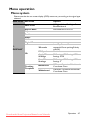
FUNCTION
4. SYSTEM SETUP:
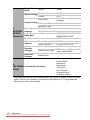
Basic menu
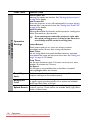
Operation
Settings
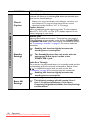
Panel Key
Lock
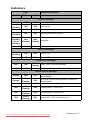
DESCRIPTION
Direct Power On
Selecting On enables the function. See "Starting up the projector"
on page 26 for details.
Auto Power Off
Allows the projector to turn off automatically if no input signal is
detected after a set period of time. See "Setting Auto Power Off"
on page 62 for details.
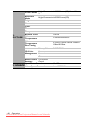
Quick Cooling
Selecting On enables the function and the projector cooling time
will be shortened to a few seconds.
If you attempt to restart the projector right after
the quick cooling process, it may not be turned on
successfully and will rerun its cooling fans.
Instant Restart
When instant restart is on, users can restart projector
immediately within 90 secs after turning off projector.
Blank Timer
Sets the image blank time when the Blank feature is activated,
once elapsed the image will return to the screen. See "Hiding the
image" on page 42 for details.
Sleep Timer
Sets the auto-shutdown timer. The timer can be set to a value
between 30 minutes and 12 hours.
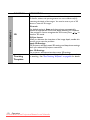
Fan Speed
This function is only available when a dust filter is installed.
Selecting High enables the function.
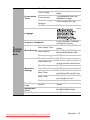
Disables or enables all panel key functions except Power on the
projector and keys on the remote control.
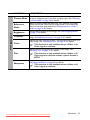
Allows you to select which background color will display when
no signal is input into the projector. Four options are available:
BenQ logo, Black, Blue, or Purple.
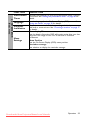
Allows you to select which logo screen will display during
Splash Screen projector start-up. Three options are available: BenQ logo, Black
screen, or Blue screen.
Background
Color
56
Operation
Downloaded from ProjectorsManual.com Manuals