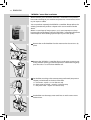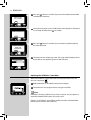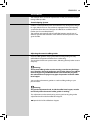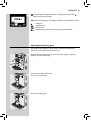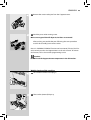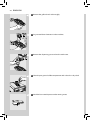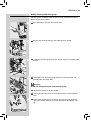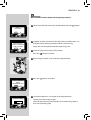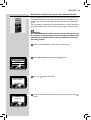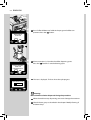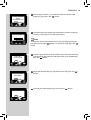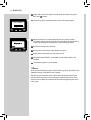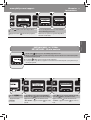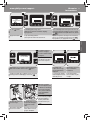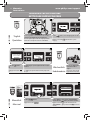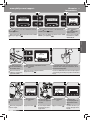
1
Register your product and get support at 02 English www.philips.com/welcome Type HD8851 02 EN USER MANUAL PLEASE READ THIS USER MANUAL CAREFULLY BEFORE USING THE MACHINE. IMPORTANT SAFEGUARDS When using electrical appliances, basic safety precautions should always be followed, including the following: 1. Read all instructions. 2. Do not touch hot surfaces. Use handles or knobs. 3. To protect against fire, electric shock and injury to persons do not immerse cord, plugs, or appliance in water or other liquid. 4. Close supervision is necessary when the appliance is used by or near children. 5. Unplug from outlet when not in use and before cleaning. Allow to cool before putting on or taking off parts, and before cleaning the appliance. 6. Do not operate any appliance with a damaged cord or plug or after the appliance malfunctions, or has been damaged in any manner. Return appliance to the nearest authorized service facility for examination, repair or adjustment. 7. The use of accessory attachments not recommended by the appliance manufacturer may result in fire, electric shock or injury to persons. 8. Do not use outdoors. 9. Do not let cord hang over edge of table or counter, or touch hot surfaces. 10. Do not place on or near a hot gas or electric burner, or in a heated oven. 11. Always attach plug to appliance first, then plug cord into wall outlet. To disconnect, turn any control to “off”, then remove plug from wall outlet. 12. Do not use appliance for other than intended use. 13. Save these instructions. SAVE THESE INSTRUCTIONS CAUTION This appliance is for household use only. Any servicing, other than cleaning and user maintenance, should be performed by an authorized service center. Do not immerse machine in water. To reduce the risk of fire or electric shock, do not disassemble the machine. There are no parts inside the machine serviceable by the user. Repair should be done by authorized service personnel only. 1. Check voltage to be sure that the voltage indicated on the nameplate corresponds with your voltage. 2. Never use warm or hot water to fill the water tank. Use cold water only. 3. Keep your hands and the cord away from hot parts of the appliance during operation. 4. Never clean with scrubbing powders or harsh cleaners. Simply use a soft cloth dampened with water. 5. For optimal taste of your coffee, use purified or bottled water. Periodic descaling is still recommended every 2-3 months. 6. Do not use caramelized or flavored coffee beans. INSTRUCTIONS FOR THE POWER SUPPLY CORD A. A short power-supply cord (or detachable power-supply cord) is to be provided to reduce risks resulting from becoming entangled in or tripping over a longer cord. B. Longer detachable power-supply cords or extension cords are available and may used if care is exercised in their use. C. If a long detachable power-supply cord or extension cord is used, 1. The marked electrical rating of the detachable power-supply cord or extension cord should be at least as great as the electrical rating of the appliance 2. If the appliance is of the grounded type, the extension cord should be a grounding-type 3-wire cord, and 3. The longer cord should be arranged so that it will not drape over the counter top or table top where it can be pulled on by children or tripped over. 2 ENGLISH Congratulations on your purchase of a Saeco Energica Pure full automatic espresso machine! To fully benefit from the support that Saeco offers, please register your product at www.philips.com/welcome. This user manual applies to HD8851. The machine is suitable for preparing espresso coffee using whole beans and is equipped with a Cappuccinatore to prepare the perfect cappuccino in a fast and easy way. In this user manual you will find all the information you need to install, use, clean and descale your machine. CONTENTS IMPORTANT..................................................................................................... 4 Safety instructions ....................................................................................................................................4 Warning ....................................................................................................................................................4 Caution .....................................................................................................................................................5 Compliance with standards ......................................................................................................................5 INSTALLATION ................................................................................................. 6 Product overview ......................................................................................................................................6 General description ...................................................................................................................................7 PREPARING FOR USE ........................................................................................ 8 Machine packaging ...................................................................................................................................8 Machine installation.................................................................................................................................8 USING THE MACHINE FOR THE FIRST TIME ........................................................12 Automatic rinse/self-cleaning cycle ........................................................................................................12 Manual rinse cycle...................................................................................................................................12 Measuring and programming water hardness ........................................................................................14 “INTENZA+” water filter installation .......................................................................................................16 Replacing the “INTENZA+” water filter....................................................................................................18 ADJUSTMENTS ................................................................................................19 Saeco Adapting System ...........................................................................................................................19 Adjusting the ceramic coffee grinder.......................................................................................................19 Adjusting the aroma (coffee strength) ....................................................................................................20 Adjusting the dispensing spout...............................................................................................................21 Adjusting the coffee length ....................................................................................................................22 ESPRESSO, COFFEE AND LONG COFFEE BREWING ...............................................23 Espresso, coffee and long coffee brewing using coffee beans ................................................................23 Espresso, coffee and long coffee brewing using pre-ground coffee .........................................................24 CAPPUCCINO BREWING ...................................................................................26 Adjusting the cappuccino length.............................................................................................................29 SPECIAL BEVERAGES .......................................................................................31 ENGLISH Latte Macchiato.......................................................................................................................................32 Hot milk .................................................................................................................................................32 Hot water dispensing ..............................................................................................................................33 BEVERAGE PROGRAMMING .............................................................................34 Cappuccino programming .......................................................................................................................35 Hot water programming .........................................................................................................................36 MACHINE PROGRAMMING ...............................................................................37 General menu .........................................................................................................................................38 Display menu ..........................................................................................................................................38 Water menu ............................................................................................................................................39 Maintenance menu .................................................................................................................................40 Factory Setting ........................................................................................................................................40 CLEANING AND MAINTENANCE ........................................................................41 Daily cleaning of the machine .................................................................................................................41 Daily cleaning of water tank....................................................................................................................42 Daily cleaning of the Cappuccinatore: “CLEAN” cycle (after each use) ......................................................43 Weekly cleaning of the machine ............................................................................................................45 Weekly cleaning of the brew group.........................................................................................................47 Monthly cleaning of the Cappuccinatore .................................................................................................49 Monthly lubrication of the brew group...................................................................................................52 Monthly cleaning of the brew group with “Coffee Oil Remover”..............................................................53 Monthly Cleaning of the Coffee Bean Hopper..........................................................................................55 DESCALING.....................................................................................................55 MEANING OF THE DISPLAY...............................................................................60 TROUBLESHOOTING ........................................................................................62 ENERGY SAVING ..............................................................................................65 Stand-by .................................................................................................................................................65 Disposal ..................................................................................................................................................66 TECHNICAL SPECIFICATION ..............................................................................67 GUARANTEE AND SERVICE ...............................................................................67 Guarantee ...............................................................................................................................................67 Service ....................................................................................................................................................67 ORDERING MAINTENANCE PRODUCTS .............................................................68 3 4 ENGLISH IMPORTANT Safety instructions This machine is equipped with safety features. Nevertheless read the safety instructions carefully and only use the machine as described in these instructions to avoid accidental injury or damage. Keep this user manual for future reference. The term WARNING and this sign warn against possible severe injuries, danger to life and/or damage to the machine. The term CAUTION and this sign warn against slight injuries and/or damage to the machine. Warning • Connect the machine to a wall socket which is properly wired. Its main voltage should comply with the technical data of the appliance. • Do not let the mains cord hang over the edge of a table or counter, or touch hot surfaces. • Never immerse the machine, mains plug or mains cord in water (danger of electrical shock). • Never direct the hot water jet towards body parts (danger of burning). • Do not touch hot surfaces. Use handles and knobs. • Remove the mains plug from the wall socket: - If a disturbance occurs. If the machine will not be used for a long time. Before cleaning the machine. Pull on the plug, not on the mains cord. Do not touch the mains plug with wet hands. • Do not use the machine if the mains plug, the mains cord or the machine itself is damaged. • Do not make any modifications to the machine or its mains cord. Only have repairs carried out by a service centre authorized by Philips to avoid a hazard. • This machine is not intended for use by persons (including children) with reduced physical, sensory or mental capabilities, or lack of experience and knowledge, unless they have been given supervision or instruction concerning use of the machine by a person responsible for their safety. ENGLISH 5 • Children should be supervised to ensure that they do not play with the machine. • Never insert fingers or other objects into the coffee grinder. Caution • The machine is for household use only. It is not intended for use in environments such as staff kitchens of shops, offices, farms or other work environments. • Always put the machine on a flat and stable surface. • Do not place the machine on a hot plate, directly next to a hot oven, heater or similar source of heat. • Only put coffee beans into the coffee bean hopper. If ground coffee, instant coffee or any other substance is put in, it may damage the machine. • Allow the machine to cool before putting on or taking off . • Never use warm or hot water to fill the water tank. Use cold water only. • Never clean with scrubbing powders or harsh cleaners. Simply use a soft cloth dampened with water. • Descale your machine regularly. The machine indicates when descaling is needed. Not doing this will make your appliance stop working properly. In this case repair is not covered under your warranty! • Do not keep the machine at temperature below 0 degree Celsius. Residue water in the heating system may freeze and cause damage. • Do not leave water in the water tank when the machine is not used over a longer period of time. The water can become contaminated. Use fresh water every time you use the machine. Compliance with standards The machine complies with art.13 of the Italian Legislative Decree dated 25 July 2005, no. 151 “Implementation of the directives 2005/95/EC, 2002/96/EC and 2003/108/EC on the restriction of the use of certain hazardous substances in electrical and electronic equipment, as well as waste disposal”. This machine complies with EU directive 2002/96/EC. 6 INSTALLATION Product overview 11 1 2 6 7 8 3 9 12 13 15 4 14 10 5 37 25 17 16 18 22 21 23 26 27 29 30 28 24 19 20 31 32 33 34 35 36 38 ENGLISH General description 1. Water tank 2. Pre-ground coffee compartment 3. Service door 4. Dispensing spout 5. Full drip tray indicator 6. Coffee bean hopper with lid 7. Grinder adjustment 8. Control panel 9. Seat for hot water dispenser/ Cappuccinatore 10. Drip tray (external) 11. Brew group 12. Coffee grounds drawer 13. Drip tray (internal) 14. Service door button 15. Power cord socket 16. Power button 17. Cappuccinatore 18. Coffee oil remover – to be purchased separately 19. Descaling solution – to be purchased separately 20. INTENZA+ water filter – to be purchased separately 21. Pre-ground coffee scoop 22. Grease for brew group 23. Water hardness test 24. Cleaning brush 25. Power cord 26. Espresso button 27. Coffee button 28. Cappuccino button 29. Long coffee button 30. “Special beverage” button 31. “Aroma” - Pre-ground coffee button 32. “OK” button 33. “ESC” button 34. “MENU” button 35. Cappuccinatore cleaning cycle activation button (Clean) 36. Stand-by button 37. Hot water dispenser 38. Cappuccinatore suction tube holder 7 8 ENGLISH PREPARING FOR USE Machine packaging The original packaging has been designed and constructed to protect the machine during transport. We recommend keeping the packaging material for possible future transport. Machine installation 1 Remove the drip tray with grill from the packaging. 2 Remove the machine from the packaging. 3 For best use, it is recommended to: • • • Choose a safe, level surface, where there will be no danger of overturning it or being injured. Choose a location that is sufficiently well-lit, clean and near an easily reachable socket. Allow for a minimum distance from the sides of the machine as shown in the illustration. 4 Attach the drip tray (external) with grill to the machine. Make sure it is placed correctly. Note: The drip tray collects the water that comes out of the dispensing spout during each rinse/self-cleaning cycle as well as coffee that might be spilled during beverage preparation. Empty and clean the drip tray daily and each time the full drip tray indicator is raised. Caution: NEVER remove the drip tray when the machine has just been turned on. Wait a couple of minutes, since the machine will carry out a rinse/ self-cleaning cycle. ENGLISH 5 Fit the Cappuccinatore suction tube holder into the first lower slot of the machine. Note: only use the first lower slot since it allows for a better handling of the suction tube. 6 Rotate the support by 90°, then push it downwards until it locks. Note: the support is designed to hold the Cappuccinatore suction tube during use, allowing for a better hygiene and user comfort level. 7 Open the lid and remove the water tank by the handle. 9 10 ENGLISH 8 Rinse the water tank under fresh water. 9 Fill the tank with fresh water up to the MAX level and re-insert it into the machine. Make sure it is fully inserted. Caution: Never fill the water tank with warm, hot, sparkling water or any other liquid, as this may cause damage to the water tank and the machine. 10 Open the lid of the coffee bean hopper and take out the inner lid. 11 Slowly pour coffee beans into the hopper. Put the inner lid back and close the lid. Note: Do not pour too many coffee beans into the coffee bean hopper as this will reduce the grinding performance of the machine. Caution: Only coffee beans must be put into the coffee bean hopper. Ground coffee, instant coffee, caramelized coffee or any other object may damage the machine. 12 Insert the plug into the socket located on the back of the machine. 13 Insert the plug on the other end of the power cord into a wall socket with suitable power voltage. ENGLISH 11 14 Switch the power button to “I” to turn on the machine. 15 This page will be displayed. Select the desired language by pressing LINGUA ITALIANO ENGLISH DEUTSCH the scrolling buttons “ ” or “ ” . 16 Press the “ LANGUAGE ITALIANO ENGLISH DEUTSCH ” button to confirm. Note: If no language is selected, you will be requested to select it the next time the machine is started. 17 The machine is heating-up. HEATING UP… 12 ENGLISH USING THE MACHINE FOR THE FIRST TIME Automatic rinse/self-cleaning cycle When warm-up is completed, the machine automatically performs a rinse/ self-cleaning cycle of the internal circuit with fresh water. This takes less than a minute. 18 Place a container under the dispensing spout to catch the small amount of water which will be dispensed. 19 This page will be displayed. Wait for the cycle to finish automatically. RINSING STOP Note: You can stop dispensing by pressing the “ ” button. 20 When the above steps are complete, the machine shows this display. Manual rinse cycle You need to initiate this, when using the machine for the first time. During this process you activate the coffee brewing cycle and fresh water flows through the dispensing spout. This takes a few minutes. 1 Insert the water dispenser to its limit until it locks in position with a “CLICK”. ENGLISH 13 2 Place a container under the coffee and the hot water dispenser. 3 Select the pre-ground coffee brewing function by pressing the “ ” button. The machine shows this icon. 4 Press the “ 5 Press the “ INSERT GROUND COFFEE AND PRESS OK OK ESC SPECIAL BEVERAGES HOT MILK HOT WATER ” button. ” button. The machine starts dispensing water. Note: Do not add pre-ground coffee into the compartment. 6 When the dispensing has finished, press the “ ” button. 7 Press the “ ” button to scroll the pages. Press “ ” to select HOT WA- TER. 14 ENGLISH 8 Once the water has been dispensed, remove and empty the container. 9 Repeat the process from step 5 to step 8 until the water tank is empty. Then, continue with step 10. 10 At the end, fill the water tank again up to the MAX level. Now the machine is ready for brewing coffee. Note: When you haven’t used the machine for 2 or more weeks, the machine will automatically perform an automatic rinse/self-cleaning cycle after you switch it on. Thereafter you need to initiate the manual rinse cycle as described above. The automatic rinse/self-cleaning cycle is also initiated automatically when starting up the machine (with cold boiler), when the machine is preparing to go into stand-by mode or after you have pressed the “ ” button to turn off the machine (after a coffee has been brewed). Measuring and programming water hardness Measuring water hardness is very important for defining the frequency in which the machine has to be descaled and to install the “INTENZA+” water filter (for more detail on the water filter see next chapter). To measure the water hardness follow the steps below: 1 Immerse the water hardness test strip provided with the machine in water for 1 second. Note: The test strip can only be used for one measurement. 2 Wait for one minute. ENGLISH 15 3 Check how many squares have changed the colour to red and then Note: The numbers on the water hardness test strip correspond to the water hardness adjustment settings. More precisely: 1 = 1 (very soft water) 2 = 2 (soft water) 3 = 3 (hard water) 4 = 4 (very hard water) The letters correspond to the references that are located at the base of the “INTENZA+” water filter (see next chapter for this). 1 Intenza Aroma System B A 2 3 4 Machine water hardness setting C consult the table. 4 Now you can program the water hardness setting. Press “ ” but- ton to access the machine main menu. Note: The machine is supplied with standard water hardness setting, suitable for most of the type of water. 5 Press the “ ” button to scroll down the pages. Press “ MENU BEVERAGE MENU MACHINE MENU 1 ” to select MACHINE MENU. 2 6 Press the “ ” button to select WATER MENU. Press “ ” to confirm. MACHINE MENU DISPLAY MENU 1 WATER MENU MAINTENANCE 2 7 Select HARDNESS option by pressing the “ WATER MENU HARDNESS ENABLE FILTER ACTIVATE FILTER hardness value. ” button and set the water 16 ENGLISH “INTENZA+” water filter installation We recommend you to install the “INTENZA+” water filter as this prevents lime scale to build up in your machine and preserves a more intense aroma to your espresso coffee. You can purchase separately the INTENZA+ water filter. Please refer to the ordering maintenance products chapter in this user manual for further details. Water is a crucial part of every espresso, so it’s most important to always have it professionally filtered. Using the “INTENZA+” water filter will prevent mineral deposits from building up and improve your water quality. 1 Remove the small white filter from the water tank and store it in a dry place. 2 Remove the “INTENZA+” water filter from its packaging, immerse it vertically (with the opening positioned upwards) in cold water and gently press the sides so as to let the air bubbles out. 3 Set the filter according to the measurements performed (see previous chapter) and indicated on the base of the filter: A = Soft water – equals 1 or 2 on the test strip B = Hard water (standard) – equals 3 on the test strip C = Very hard water – equals 4 on the test strip 4 Put the filter into the empty water tank. Press it until it cannot move further down. ENGLISH 17 5 Fill the water tank with fresh water up to the MAX level and put it back in the machine. 6 Place a large container (1,5 lt) under the water dispenser. 7 Press the “ MENU BEVERAGE MENU MACHINE MENU 1 ” button to access the machine main menu. 8 Press the “ ” button to scroll down the pages. Select “MACHINE MENU” and press “ ”. 2 9 Press the “ ” button to select WATER MENU. Press “ ” to confirm. MACHINE MENU DISPLAY MENU 1 WATER MENU MAINTENANCE 2 10 Select ACTIVATE FILTER, and then press “ ”. WATER MENU ENABLE FILTER ACTIVATE FILTER 1 2 11 Press the“ ACTIVATE FILTER? OK ESC ” button to confirm that you want to start the filter activation procedure. 18 ENGLISH 12 Press the“ INSERT FILTER. FILL THE TANK ” button to confirm that you have inserted the water filter and filled the water tank. OK 13 The machine reminds you to install the hot water dispenser. Check that INSERT WATER SPOUT it is correctly installed. Press“ ” to confirm. OK 14 Press the“ PLACE A CONTAINER UNDER THE WATER SPOUT OK ” button to confirm that a container is placed under the hot water dispenser. 15 The machine starts dispensing water. This page will be displayed. Once ACTIVATE FILTER the machines stop dispensing, remove the container. Replacing the “INTENZA+” water filter When the “INTENZA+” water filter needs to be replaced with a new one, . this icon is displayed 1 Replace the filter as described in the previous chapter. 2 The machine is now programmed to manage a new filter. Note: If the filter is already installed and you want to remove - but not replace it, select the “ENABLE FILTER” option and set it to OFF. If there is no “INTENZA+” water filter installed, insert the small white filter previously removed into the water tank. ENGLISH 19 ADJUSTMENTS The machine allows for certain adjustments so that you can brew the best tasting coffee possible. Saeco Adapting System Coffee is a natural product and its characteristics may change according to its origin, blend and roast. The machine is equipped with a self-adjusting system that allows the use of all types of coffee beans available on the market (not for caramelized beans). The machine automatically adjusts itself after brewing several cups of coffee to optimize the extraction of the coffee to the compactness of the ground coffee. Adjusting the ceramic coffee grinder Ceramic coffee grinders always guarantee accurate grinding for every coffee blend and prevent the beans from overheating. This provides for full aroma preservation, delivering the truly Italian taste in every cup. Warning: The ceramic coffee grinder contains moving parts that may be dangerous. Therefore, do not insert fingers and/or other objects. Turn off the machine by pressing the ON/OFF button and remove the plug from the socket before carrying out any type of operation inside the coffee bean hopper. You can adjust the ceramic grinders to set the coffee grinding to your personal taste. Warning: The grinder adjustment knob, inside the coffee bean hopper, must be turned only when the ceramic coffee grinder is working. This adjustment can be carried out by pressing and turning the grinder adjustment knob inside the coffee bean hopper. 1 Open the lid of the coffee bean hopper. 20 ENGLISH 2 Press and turn the grinder adjustment knob one notch at a time. You will taste the difference after brewing 2-3 cups of espresso. 3 The reference marks on the coffee bean hopper lid indicate the grind setting. There are 8 different grind settings to choose from: - Very coarse grind ( ) : Lighter taste, for dark roasted coffee blends To - Very fine grind ( ) : bolder taste, for light roasted coffee blends When you adjust the ceramic coffee grinder to a finer setting, your coffee will taste stronger. For a milder coffee taste, adjust the ceramic coffee grinder to a coarser setting. Adjusting the aroma (coffee strength) Choose your favorite coffee blend and adjust the amount of coffee to be grounded until they meet your personal taste. You can also select the preground coffee function. Note: Selection must be made prior to selecting coffee. CAPPUCCINO COFFEE QUANTITY PREBREWING COFFEE TEMPERATURE The machine allows you to adjust the right quantity of ground coffee for each product. The standard adjustment for each product can be set in the “BEVERAGE MENU” (see the Beverage Programming chapter, Coffee Quantity option). ENGLISH 21 1 To temporarily change the amount of coffee ground, press the “ ” button on the control panel. 2 The aroma changes by one degree, according to the selected amount: = mild dose = medium dose = strong dose = The beverage is brewed by using the pre-ground coffee Adjusting the dispensing spout The height of the dispensing spout can be adjusted to better fit the dimensions of the cups that you wish to use. Move the dispensing spout up or down with your fingers to adjust its height as shown in the image. The recommended positions are: For the use of small cups; For the use of large cups; 22 ENGLISH For the use of latte macchiato cups. Note: The dispensing spout can also be removed to allow the use of very large containers. Two cups can be placed under the dispensing spout to brew two cups of coffee at the same time. Adjusting the coffee length The machine allows you to adjust the amount of brewed coffee or milk according to your taste and the size of your cups. ”“ ”“ ”“ ” is pressed, Each time one of the buttons “ the machine brews a pre-set amount of product. Each button may be individually programmed for a specific brew setting. The following procedure describes the programming of the “ button. ” 1 Place a cup under the dispensing spout. 2 Press and hold the“ ” button until the “MEMO” icon is displayed. Then release the button. The machine is now programming. The machine starts brewing coffee. ESPRESSO MEMO ENGLISH 23 3 When the icon is displayed, press the“ ” button as soon as the desired amount of coffee is reached. ESPRESSO MEMO Now the button is programmed; each time it is pressed, the machine will brew the same amount of espresso that was just programmed. STOP Note: ”“ ”“ ” buttons, the same steps should To program the “ be followed. You should always use the “ ” button to stop brewing coffee when the desired amount of coffee is reached. You can also adjust the beverage length through the “BEVERAGE MENU” (see the Beverage Programming chapter, Coffee Length option). ESPRESSO, COFFEE AND LONG COFFEE BREWING Before brewing coffee, make sure that there are no warnings shown on the display, and that the water tank and coffee bean hopper are filled. Espresso, coffee and long coffee brewing using coffee beans 1 Place 1 or 2 cups under the dispensing spout. 2 Press the “ the “ ” button for an espresso, the “ ” button for a long coffee. ” button for a coffee, 3 To brew 1 cup of espresso, coffee or long coffee, press the desired ESPRESSO button once. This page will be displayed. 24 ENGLISH 4 To brew 2 cups of espresso, coffee or long coffee, press the desired 2 x ESPRESSO button twice consecutively. This page will be displayed. Note: In this operating mode, the machine automatically grinds and doses the correct amount of coffee. Brewing two espressos requires two grinding and brewing cycles, automatically carried out by the machine. 5 After the pre-brewing cycle, coffee begins to pour out of the dispenESPRESSO sing spout. STOP 6 Coffee brewing stops automatically when the pre-programmed level is ESPRESSO reached; it is possible to stop earlier by pressing “ ” button. STOP Espresso, coffee and long coffee brewing using pre-ground coffee This function allows to use pre-ground and decaffeinated coffee. With the pre-ground coffee function you can only brew one coffee at a time. 1 To select the pre-ground coffee function, press the “ ” button until this icon is displayed. 2 Place a cup under the dispensing spout. ENGLISH 25 3 Press the “ the “ ” button for an espresso, the “ ” button for a coffee, ” button for a long coffee. The brewing cycle starts. 4 This page will be displayed. INSERT GROUND COFFEE AND PRESS OK OK ESC 5 Lift the pre-ground coffee compartment lid and add one scoop of pre-ground coffee to the compartment. Use only the measuring scoop supplied with the machine. Then close the pre-ground coffee compartment lid. Warning: Add only pre-ground coffee to the pre-ground coffee compartment. Other substances and objects may cause severe damages to the machine. Such damages will not be covered by warranty. 6 Press “ INSERT GROUND COFFEE AND PRESS OK OK ESC ” to confirm and start brewing. 7 After the pre-brewing cycle, coffee begins to pour out of the dispensing spout. 8 Coffee brewing stops automatically when the pre-programmed level is reached; it is possible to stop earlier by pressing the “ ” button. After brewing the product, the machines returns to the main menu. Repeat the steps described above to brew more coffees using pre-ground coffee. 26 ENGLISH Note: If the OK button to start brewing is not pressed within 30 seconds the machine will return to the main menu and discharge any inserted coffee into the coffee grounds drawer. If no pre-ground coffee is poured into the compartment, only water will be dispensed. If the dose is excessive and 2 or more measuring scoops of coffee are used, the machine will not brew the product. Only water will be dispensed and any ground coffee will be discharged into the coffee grounds drawer. CAPPUCCINO BREWING Warning: Danger of scalding! Dispensing may be preceded by short sprays of milk and steam. Risk of burning. Never touch the Cappuccinatore while brewing: risk of scalding! Wait until the brewing is over before removing the Cappuccinatore. 1 Press the side buttons to remove the water dispenser (if installed). 2 Fit the suction tube in the tube holder. ENGLISH 27 3 Insert the Cappuccinatore into its seat until it locks into place. Check that it cannot slide away. 4 Fill 1/3 of a container with cold milk. Note: Use cold (~5°C / 41°F) milk with a protein content of at least 3% to ensure optimum results when preparing a cappuccino. You can use whole milk or low-fat milk depending on your personal taste. 5 Remove the suction tube from the tube holder and put it into the milk container. Caution: Make sure that the suction tube is clean on the outside for hygienic reasons. 6 Place a cup under the Cappuccinatore. 7 Press the “ ” button to start the brewing process. 28 ENGLISH 8 The machine is heating up. CAPPUCCINO PLEASE WAIT … 9 When the machine shows the following page, the machine pours CAPPUCCINO frothed milk. The pouring can be stopped earlier by pressing the “ ” button. STOP CAPPUCCINO 10 Once the milk froth has been poured, the machine brews coffee. The pouring can be stopped earlier by pressing the “ ” button. STOP 11 Remove the cup. 12 Place the container back in the fridge for correct milk storage. Caution: After frothing the milk, clean the Cappuccinatore and the suction tube by dispensing a small amount of hot water into a container. For detailed cleaning instructions please see the “Cleaning and Maintenance” chapter. Note: After dispensing cappuccino, it is possible to brew an espresso or dispense hot water straight after. ENGLISH 29 For preparing a latte macchiato or a hot milk, see chapter SPECIAL BEVERAGES. Note: The “WARNING CLEANING” function can be activated, if desired; this function reminds you when the Cappuccinatore needs to be cleaned. To activate this function, refer to the machine programming section. Adjusting the cappuccino length Each time the “ ” button is pressed, the machine brews a pre-set quantity of cappuccino into the cup. The machine allows you to adjust the amount of cappuccino according to your taste and the size of your cups. 1 Insert the suction tube in the milk container. 2 Place a cup under the Cappuccinatore. 30 ENGLISH 3 Press and hold the “ ” button until the “MEMO” notice appears on the display. Then release the button. The machine is now programming. 4 The machine is heating up. CAPPUCCINO MEMO PLEASE WAIT … 5 When the machine shows the following icon, the machine starts to CAPPUCCINO MEMO pour milk froth into the cup. When the desired milk froth quantity is ” button. reached, press the “ STOP 6 Once the milk froth has been brewed, the machine starts brewing cofCAPPUCCINO MEMO fee. When the desired coffee quantity is reached, press the “ ”button. STOP Now the “ ” button is programmed. Every time it is pressed, the machine will brew the same amount that has just been set. ENGLISH 31 SPECIAL BEVERAGES The machine is designed to brew more coffee products than the ones described before. For this follow the steps below. 1 Press the“ ” button to enter the SPECIAL BEVERAGES menu. 2 Select the desired beverage by pressing the “ ” or “ ” scrolling butSPECIAL BEVERAGES LATTE MACCHIATO HOT MILK HOT WATER ton. 3 When the desired beverage has been selected, press the “ SPECIAL BEVERAGES HOT MILK HOT WATER ” button to start the preparation. Note: ” button, but do not select a product, the machiWhen you press the“ ne returns to the main menu after 10 seconds. The Special products function allows you to brew only one beverage at a time. To brew more beverages, just repeat steps 1-3. 32 ENGLISH Latte Macchiato Warning: Danger of scalding! Dispensing may be preceded by short sprays of milk and steam. Risk of burning. Never touch the Cappuccinatore while brewing: risk of scalding! Wait until the brewing is over before removing the Cappuccinatore. 1 Insert the suction tube in the milk container. Place a cup under the Cappuccinatore. 2 Press the “ ” button to enter the SPECIAL BEVERAGES menu. 3 After selecting “LATTE MACCHIATO” by pressing the “ ” or “ ” scrolling SPECIAL BEVERAGES LATTE MACCHIATO HOT MILK HOT WATER button, confirm with “ ”. 4 Once the milk froth has been poured, the machine brews coffee. The pouring can be stopped earlier by pressing the “STOP” button. Hot milk Warning: Danger of scalding! Dispensing may be preceded by short sprays of milk and steam. Risk of burning. Never touch the Cappuccinatore while brewing: risk of scalding! Wait until the brewing is over before removing the Cappuccinatore. 1 Insert the suction tube in the milk container. Place a cup under the Cappuccinatore. ENGLISH 33 2 Press the “ ” button to enter the SPECIAL BEVERAGES menu 3 After selecting “HOT MILK” by pressing the “ ” or “ ”.scrolling button, SPECIAL BEVERAGES LATTE MACCHIATO HOT MILK HOT WATER confirm with “ ”. 4 The machine starts brewing hot milk. The brewing can be stopped earlier by pressing the “STOP” button. Hot water dispensing Warning: Danger of scalding! Dispensing may be preceded by short sprays of hot water and steam. Risk of burning. Wait until the end of the cycle before removing the hot water dispenser. 1 Install the hot water dispenser. 2 Place a container under the hot water dispenser. 3 Press the “ ” button to enter the SPECIAL BEVERAGES menu. 4 After selecting HOT WATER by pressing the “ ” or “ ” scrolling button, SPECIAL BEVERAGES HOT MILK HOT WATER confirm with “ ”. 34 ENGLISH 5 Hot water is dispensed. The dispensing can be stopped earlier by presHOT WATER sing the ”STOP” button. STOP 6 At the end, remove the container with the desired quantity of water. BEVERAGE PROGRAMMING You can program the machine to optimize the coffee taste to your personal preferences. For each beverage it is possible to customize the settings. 1 Press the“ 2 Press the “ MENU BEVERAGE MENU MACHINE MENU ” button to access the machine main menu. ” button to access the BEVERAGE MENU. Note: By pressing the “ ” or “ ” scrolling button, and confirming with “ can choose the option of your choice. ” you ENGLISH 35 Cappuccino programming The following procedure describes the programming of a cappuccino. BEVERAGE MENU CAFFE’ LUNGO CAPPUCCINO SPECIAL BEVERAGES Below the settings of the each submenu are explained. You can select these by pressing the “ ” or “ ” scrolling button. Confirm your settings with “ ” . Press “ ” to select CAPPUCCINO from the beverage menu. CAPPUCCINO COFFEE QUANTITY PREBREWING COFFEE TEMPERATURE COFFEE QUANTITY PREBREWING COFFEE TEMPERATURE This setting adjusts the amount of coffee which will be ground for beverage brewing. GROUND COFFEE = The beverage is brewed by using the pre-ground coffee MILD = mild dose MEDIUM = medium dose STRONG = strong dose This setting enables the pre-brewing function. During pre-brewing the coffee is slightly dampened to bring out the aroma in full. OFF: pre-brewing function is not performed. LOW: pre-brewing function is active. HIGH: pre-brewing function is longer in order to bring out the coffee taste. This setting adjusts the temperature for coffee brewing. LOW: low temperature. NORMAL: medium temperature. HIGH: high temperature. 36 ENGLISH COFFEE LENGTH By adjusting the bar on the display by pressing the “ ” or “ ” scrolling button, you can choose the quantity of water used for coffee brewing. Press “ ” to confirm. COFFEE LENGHT MILK QUANTITY By adjusting the bar on the display by pressing the “ ” or “ ” scrolling button, you can choose the quantity of milk to be used for the selected beverage. Press “ ” to confirm. MILK QUANTITY Note: The milk managing options are only shown for beverages with milk. DEFAULT For each beverage it is possible to reset the original factory settings. After selecting this function, the customized settings are deleted. To exit programming, press the “ESC” button one or more times until the main menu is displayed. Hot water programming The following procedure describes the programming of hot water. 1 Select SPECIAL BEVERAGES from the beverage menu by pressing the “ ” BEVERAGE MENU CAPPUCCINO SPECIAL BEVERAGES or “ ” scrolling button. Press “ ” to confirm. ENGLISH 37 SPECIAL BEVERAGES HOT MILK HOT WATER 2 Select HOT WATER by pressing the “ ” or “ ” scrolling button. Press “ ” to confirm. HOT WATER WATER QUANTITY DEFAULT WATER QUANTITY WATER QUANTITY DEFAULT By adjusting the bar on the display by pressing the “ ” or “ ” scrolling button, you can choose the quantity of hot water to be dispensed. Press “ ” to confirm. Reset the original factory settings. After selecting this function, the customized settings are deleted. MACHINE PROGRAMMING 1 Press the“ ” button to access the machine main menu. 2 Select MACHINE MENU by pressing the “ ” or “ ” scrolling button. MENU BEVERAGE MENU MACHINE MENU Press the “ ” to confirm. 38 ENGLISH General menu GENERAL MENU TONE STAND-BY SETTINGS The general menu allows you to change the operation settings. The TONE function de-/activates the sound feedback. The STAND-BY SETTINGS set the time interval for the machine to go into stand-by mode after the last brewing. The stand-by time varies from 15, 30, 60 and 180 minutes. The default time value is 30 minutes. Display menu DISPLAY MENU LANGUAGE BRIGHTNESS The display menu allows you to set the language and the display brightness. This setting is important to automatically adjust the parameters of the machine according to your country. ENGLISH 39 Water menu WATER MENU HARDNESS ENABLE FILTER ACTIVATE FILTER The WATER MENU allows adjusting water parameters for optimal coffee. Under HARDNESS, you can set the level of water hardness. To measure water hardness, refer to chapter “MEASURING AND PROGRAMMING WATER HARDNESS” By enabling the filter, the machine notifies the user when the water filter needs to be replaced. OFF: warning disabled. ON: warning enabled (the warning is automatically set when the filter is activated). To activate the filter after its installation or replacement. Refer to the chapter “INTENZA+ Water Filter Installation”. 40 ENGLISH Maintenance menu MAINTENANCE COUNTERS BREW GROUP CLEAN CAPPUC. WASHING START WASHING WARNING CLEANING DESCALING The MAINTENANCE MENU allows setting all the functions for correct machine maintenance. The COUNTERS function shows how many products have been brewed for every single type of coffee since the last reset. The BREW GROUP CLEAN function enables the monthly cleaning of the brew group (please see chapter “Monthly Cleaning of the Brew Group”). The CAPPUCC.WASHING function enables the monthly cleaning of the Cappuccinatore (please see chapter “Monthly cleaning of the Cappuccinatore”). This function manages the automatic cleaning of the Cappuccinatore after each use. This function starts the cleaning procedure as described in the section “Monthly cleaning of the Cappuccinatore”. This function manages the warning message which reminds the user to clean the Cappuccinatore after 10 minutes since last use. The warning message is displayed only if the Cappuccinatore is on. The DESCALING function activates the descaling cycle. (please see chapter “Descaling”). Factory Setting FACTORY SETTINGS Activating the FACTORY SETTINGS will restore all machine settings to default values. In this case all the personal parameters will be lost. ENGLISH 41 CLEANING AND MAINTENANCE Daily cleaning of the machine Caution: Timely cleaning and maintenance of your machine is very important as it prolongs the life of your machine. Your machine gets exposed to moist, coffee and lime scale continuously! In this chapter it is described in detail which activities you need to perform at which frequency. Not doing this will ultimately make your machine stop working properly. This repair is NOT covered by your warranty! - Note: Use a soft, dampened cloth to clean the machine. Do not wash any of its parts in the dishwasher. Do not use alcohol, solvents, and/or abrasive objects to clean the machine. Do not immerse the machine in water. Do not dry the machine and/or its components using a microwave and/or standard oven. Empty and clean the coffee ground drawer and (internal) drip tray daily with the machine turned on. Please follow the steps below: 1 Press the button and open the service door. 2 Remove the (internal) drip tray and coffee grounds drawer. 42 ENGLISH 3 Empty the coffee grounds drawer and wash it with fresh water. 4 Empty and wash the (internal) drip tray and the cover with fresh water. 5 Correctly reinstall all the components. 6 Insert the tray and the coffee grounds drawer and close the service door. Note: If the coffee ground drawer is emptied when the machine is off, the coffee grounds counter is not reset. In this case the machine might display the “EMPTY COFFEE GROUNDS DRAWER” message too soon. Daily cleaning of water tank 1 Remove the small white filter or the “INTENZA+” water filter (if installed) from the water tank and wash it with fresh water. 2 Put the small white filter back or the “INTENZA+” water filter (if installed) in its housing by gently pressing and turning it at the same time. 3 Fill the water tank with fresh water. ENGLISH 43 Daily cleaning of the Cappuccinatore: “CLEAN” cycle (after each use) After each brewing of a milk beverage the Cappuccinatore must be washed and cleaned. It is important that you clean the Cappuccinatore daily or after each use as it preserves hygiene and ensures perfect milk froth consistency. This cycle may also be manually activated by pressing the “ the control panel. This can be done at any time. ” button on 1 Insert the suction tube in a container filled with fresh water. Place a container under the dispensing spout. 2 Press the “ 3 Press the “ INSERT CAPPUCC. HOSE IN A CONTAINER WITH 1/2 L WATER OK ESC ” button to start the cleaning cycle. ” button to start the cleaning cycle for the Cappuccinato- re. Note: to exit the cycle at any moment, press the “ ” button. 4 The machine warms the system up. CAPPUCC. CLEANING PLEASE WAIT... ESC Once the warm-up is complete, the machine performs an assisted wash cycle for the Cappuccinatore. Wait until the cycle is complete. 44 ENGLISH 5 Only once the cycle is complete press the side buttons and remove the Cappuccinatore. 6 Remove the suction tube from the Cappuccinatore. 7 Lift the cover to detach it from the Cappuccinatore. 8 Remove the valve from the Cappuccinatore. 9 Remove the ring from the Cappuccinatore. ENGLISH 45 10 Remove the suction tube joint from the Cappuccinatore. 11 Wash the parts under running water. Make sure any possible milk deposits/residues are removed. After washing, reassemble the parts following the same procedure used for disassembly, but in reverse order. Note: the “WARNING CLEANING” function can be activated, if desired; this function reminds you when the Cappuccinatore needs to be cleaned. To activate this function, refer to the machine programming section. Caution: Do NOT wash the Cappuccinatore components in the dishwasher. Weekly cleaning of the machine 1 Turn off the machine and unplug it. 2 Take out the (external) drip tray. 46 ENGLISH 3 Remove the grill and wash it thoroughly. 4 Dry, reassemble and reinsert it in the machine. 5 Remove the dispensing spout and wash it with water. 6 Clean the pre-ground coffee compartment with a brush or a dry cloth. 7 Wash the hot water dispenser under running water. ENGLISH 47 Weekly cleaning of the brew group The brew group should be cleaned every time the coffee bean hopper is filled or at least once a week. 1 Press the button and open the service door. 2 Remove the (internal) drip tray and coffee grounds drawer. 3 To remove the brew group, press the «PUSH» button and pull it by the handle. 4 Thoroughly wash the brew group with fresh, lukewarm water and carefully clean the upper filter. Caution: Do not use detergent/soap to clean the brew group. 5 Let the brew group air-dry thoroughly. 6 Thoroughly clean the inside of the machine using a soft, dampened cloth. 7 Make sure the brew group is in the rest position; the two reference signs must match. If they do no match, proceed as described in step (8). 48 ENGLISH 8 Gently pull down the lever until it is in contact with the brew group base and the two reference signs on the side of the brew group do match. 9 Make sure the hook to lock the brew group is in the correct position by firmly pressing the “PUSH” button until you hear a click. Check if the hook is at the top end position. If it is not, please try again. 10 Insert the brew group in its seat again until it locks into place without pressing the “PUSH” button. 11 Insert the (internal) drip tray and coffee grounds drawer and close the service door. ENGLISH 49 Monthly cleaning of the Cappuccinatore In the monthly cleaning cycle we use the Saeco Milk Circuit Cleaner to keep the entire circuit clean of milk residues. You can purchase separately the Milk Circuit Cleaner. Please refer to the maintenance products page for further details. 1 Make sure that the Cappuccinatore is correctly installed. 2 Select the MAINTENANCE option in the machine menu. 3 Select CAPPUCC.WASHING and press the “ ” button to confirm. MAINTENANCE BREW GROUP CLEAN CAPPUCC. WASHING DESCALING 4 Press the “ ” button to confirm. 5 Press the “ ” button to confirm. CAPPUCC. WASHING START WASHING WARNING CLEANING START CAPPUCC. WASHING? OK ESC 6 Fill the tank with fresh water up to the MAX level. Press the “ REFILL WATER TANK OK ” button. 50 ENGLISH 7 Pour the milk cleaner bag into a container. Add ½ lt of lukewarm water and let it dissolve completely. 8 Insert the suction tube in the container. 9 Press the “ ” button to confirm. INSERT CAPPUCC. HOSE IN A CONTAINER WITH DETERGENT OK 10 Place a large container (1,5 lt ) under the Cappuccinatore. 11 Press the “ ” button to confirm. PLACE A CONTAINER UNDER DISPENSING SPOUTS OK 12 The machine performs a wash cycle of the Cappuccinatore. CAPPUCC. WASHING The bar shows the washing progress. Wait until the cycle stops automatically. ENGLISH 51 Warning: Never drink the solution dispensed during the procedure. 13 Fill the tank with fresh water up to the MAX level. Press the “ ” button. REFILL WATER TANK OK 14 Carefully wash the container used for the solution and fill it with 1/2 (a INSERT CAPPUCC. HOSE IN A CONTAINER WITH 1/2 L WATER OK half ) litre of fresh drinking water that will be used for rinsing. Empty the container placed under the dispensing spout. 15 Insert the suction hose in the used container. Press the “ ” button to confirm. 16 Place a large container (1,5 lt ) under the Cappuccinatore. 17 Press the “ ” button to confirm. PLACE A CONTAINER UNDER DISPENSING SPOUTS OK 18 The machine performs a rinse cycle of the Cappuccinatore. CAPPUCC. RINSING The bar shows the rinsing progress. Wait until the cycle stops automatically. The machine will go back to the normal operating cycle. 52 ENGLISH Monthly lubrication of the brew group Lubricate the brew group after approximately 500 cups of coffee or once a month. You can purchase separately the Saeco grease to lubricate the brew group. Please refer to the maintenance products page in this user manual for further details. Caution: Before lubricating the brew group, clean it under fresh water and dry it, as described in the “Weekly Cleaning of the Brew Group” chapter. 1 Apply the lubricant evenly on both side guides. 2 Lubricate the shaft too. 3 Insert the brew group in its seat until it locks into place (see “Weekly Cleaning of the Brew Group” chapter). 4 Insert the (internal) drip tray and coffee grounds drawer and close the service door. ENGLISH 53 Monthly cleaning of the brew group with “Coffee Oil Remover” Besides weekly cleaning, we recommend running this cleaning cycle with the “Coffee Oil Remover” after approximately 500 cups of coffee or once a month. This operation completes the maintenance process of the brew group. You can purchase separately the “Coffee Oil Remover” and the “Maintenance Kit”. Please refer to the maintenance products page for further details. Caution: The “Coffee Oil Remover” tablets are to be used for cleaning only and do not have a descaling function. For the descaling procedure use the Saeco descaling solution and follow the procedure described in the “Descaling” chapter. 1 Select the “MAINTENANCE” option in the machine menu. 2 Select “BREW GROUP CLEAN”. Press the “ ” button. MAINTENANCE COUNTERS BREW GROUP CLEAN CAPPUCC. WASHING 3 Press the “ ” button to confirm. PERFORM BREW GROUP CLEANING? OK ESC 4 Fill the water tank with fresh water up to the MAX level. Press the “ REFILL WATER TANK OK button. ” 54 ENGLISH 5 Put a “Coffee Oil Remover” tablet in the pre-ground coffee compartment. Press the “ ” button. INSERT GROUP CLEAN TAB OK 6 Place a container (1,5 lt) under the coffee dispensing spout. Press the “ ” button to start the cleaning cycle. PLACE A CONTAINER UNDER THE DISPENSING SPOUT OK 7 This icon is displayed. The bar shows the cycle progress. BREW GROUP CLEAN Warning: Never drink the solution dispensed during the procedure. 8 When the machine stops dispensing, remove and empty the container. 9 Clean the brew group as described in the chapter “Weekly Cleaning of the Brew Group ENGLISH 55 Monthly Cleaning of the Coffee Bean Hopper Clean the coffee bean hopper once a month when it is empty with a damp cloth to remove coffee oil. Thereafter refill it with coffee beans. DESCALING The descaling process takes approx. 35 minutes. Lime scale builds up inside the machine during use. It needs to be removed regularly as it may clog the water and coffee circuit of your machine. The machine indicates when descaling is needed. Caution: Not doing this will ultimately make your machine stop working properly, and in this case repair is NOT covered by your warranty. Use the Saeco decalcifier only. Its formula has been designed to ensure better machine performance. You can purchase separately the Saeco decalcifier. Please refer to chapter “Ordering Maintenance Products” for further information. Warning: Never drink the decalcifier or any products dispensed until the cycle has been carried out to the end. Never use vinegar as a decalcifier. Note: During the descaling cycle do not switch off the machine. If this has happened, you need to restart the descaling cycle from the very beginning. 56 ENGLISH To execute the descaling cycle, follow the steps below: 1 In the MACHINE MENU, select the “MAINTENANCE” option. 2 Select “DESCALING” and confirm with “ MAINTENANCE CAPPUCC. WASHING DESCALING Note: If you press the “ 3 Press “ ”. ” button by mistake, press the “ ” button to quit. ” button to confirm. START DESCALING? OK ESC 4 Remove the water tank, and if installed, remove the INTENZA+ water FILL TANK WITH DESCALING SOLUTION OK filter. Pour the entire content of the Saeco decalcifier. Then fill the water tank with fresh water up to the MAX level. Press the “ ” button. 5 Empty the (internal) / (external) drip tray. Press the “ ” button. EMPTY TRAY UNDER BREW GROUP OK 6 Insert the hot water dispensing spout. Press the “ INSERT WATER SPOUT OK ” button. ENGLISH 57 7 Place a large container (1.5 l) under the coffee and the hot water PLACE A CONTAINER UNDER DISPENSING SPOUTS OK dispensing spout. Press the “ ” button. 8 The machine will start dispensing the descaling solution at intervals. STEP 1/2 DESCALING PAUSE The bar on the display shows the cycle progress. Note: To empty the container during the process, the descaling cycle may be ” button. To resume the cycle, press the “ ” paused by pressing the “ button. 9 The message indicates the end of the first step. The water tank needs RINSE TANK & FILL WITH WATER to be rinsed. Fill the water tank with fresh water up to the MAX level. Press the “ ” button. OK 10 Empty the (internal) drip tray and place it back. Then, press the “ EMPTY TRAY UNDER BREW GROUP button. OK 11 Insert the hot water dispensing spout. Press the “ INSERT WATER SPOUT OK ” button. ” 58 ENGLISH 12 Empty the container and place it back under the dispensing spout. Press the “ ” button. 13 The rinsing cycle is activated. The bar shows the cycle progress. STEP 2/2 RINSING PAUSE 14 When the amount of water needed for the rinse cycle has been completely dispensed, the machine automatically ends the descaling process by showing this display after a short heating up phase. 15 Remove and empty the container. 16 Remove and wash the hot water dispensing spout. 17 Empty the (internal) drip tray and place it back. 18 Place back the “INTENZA+” water filter into the water tank if it was installed. 19 The descaling cycle is now complete. Note: At the end of the descaling cycle, wash the brew group as described in the “Weekly Cleaning of the Brew Group” chapter. The rinsing cycle is performed in order to have the circuit cleaned with a preset amount of water to ensure proper machine performance. If the water tank is not filled up to MAX level, the machine might require two or more cycles. ENGLISH 59 MEANING OF THE DISPLAY Help Message Displayed How to Reset the Message Close the bean hopper inner cover. CLOSE HOPPER DOOR Fill the coffee beans hopper. ADD COFFEE The brew group must be inserted into the machine. INSERT BREW GROUP Insert the coffee grounds drawer and the internal drip tray. INSERT COFFEE GROUNDS DRAWER Empty the coffee grounds drawer. EMPTY COFFEE GROUNDS DRAWER Note: The used grounds drawer must be emptied only when the machine requires it and with the machine on. If you empty the drawer with the machine turned off it will not record the emptying operation. Close the service door. CLOSE FRONT DOOR Remove the water tank and fill it. REFILL WATER TANK Open the service door and empty the internal drip tray. EMPTY DRIP TRAY Warning: If this operation is performed when the machine is on, it will record the used grounds drawer emptying and will reset the counter; therefore, it is necessary to empty the coffee grounds as well. 60 ENGLISH Help Message Displayed How to Reset the Message Insert the hot water dispenser to start dispensing. Press ESC to exit. INSERT WATER SPOUT ESC Insert the Cappuccinatore to start pouring. Press ESC to exit. INSERT CAPPUCCINATORE ESC INSERT CAPPUCCINATORE COVER Insert the Cappuccinatore cover to start brewing; see point (7) of sect. “Daily Cleaning of the Cappuccinatore”. Press “ESC” to exit. ESC INSERT VALVE INTO CAPPUCCINATORE Insert the valve in the Cappuccinatore to start brewing; see point (8) of sect. “Daily Cleaning of the Cappuccinatore”. Press “ESC” to exit. ESC The machine needs to be descaled. Follow the steps described in the “Descaling” chapter of this manual. Please note that not descaling your machine will ultimately make it stop working properly. In this case repair is NOT covered under your warranty. The machine needs the “INTENZA+” water filter to be replaced. Red light flashes. Press the “ RESTART TO SOLVE ” button to exit the stand-by mode. Take note of the code (E xx) shown in the display at the bottom. Turn off the machine. After 30 seconds, turn it on again. Try this 2 or 3 times. If the machine does not start, contact the Philips SAECO hotline in your country and tell them the code shown in the display. You can find its contact details in the warranty booklet by-packed separately or on www.philips.com/support. ENGLISH 61 TROUBLESHOOTING This chapter summarizes the most common problems you could encounter with your machine. If you are unable to solve the problem with the information below, visit www.philips.com/support for a list of frequently asked questions or contact the Philips Saeco hotline in your country. You find its contact details in the warranty booklet by-packed separately or on www.philips.com/support. Machine actions Causes Solutions The machine does not switch on. The machine is not connected to the electric network. Connect the machine to the electric network. The power button is set to “0”. Check that the power button is set to “I”. The drip tray gets filled although no water is drained. Sometimes water is drained automatically by the machine into the drip tray to manage the rinsing of the circuits and ensure optimum machine performance. This is seen as normal machine behavior. Coffee is not hot enough. The cups are cold. Preheat the cups with hot water or use the hot water dispenser. Beverage temperature in the programming menu is set to low. Ensure that the temperature is set to Normal or High in the beverage programming menu. Cold milk is being added to the coffee. Cold milk will reduce the temperature of the end product. Therefore please pre-heat the milk before adding it. No hot water is dispensed. The hot water dispenser is clogged Clean the hot water dispenser (please or dirty. refer to chapter “Cleaning and Maintenance”). Check if it is clogged by looking into the dispensing spout. Use a pin or needle to make a hole through the limestone. The machine is not filling the cup. The machine has not been programmed. Enter the beverage programming menu and adjust the coffee length setting to your liking for every beverage. Coffee has not enough crema (see note). The blend is unsuitable, coffee is not freshly roasted or the grind is too coarse. Change coffee blend or adjust the grind as explained in chapter “Adjusting the Ceramic Coffee Grinder”. The coffee beans or the preground coffee are too old. Ensure that fresh coffee beans or preground coffee are being used. The Cappuccinatore is dirty or not inserted correctly. Verify the correct cleaning of the Cappuccinatore and its insertion. The milk was not frothed. 62 ENGLISH Machine actions Causes Solutions The machine circuit is clogged by Descale the machine. The machine takes a long time to warm up or limescale. the amount of water dispensed from the wand is too little. The brew group cannot be removed. The brew group is out of place. Turn the machine on. Close the service door. The brew group automatically returns to the initial position. The coffee grounds drawer is inserted. Remove the coffee grounds drawer before removing the brew group. The brew group cannot be The brew group is not in rest inserted. position. There is a lot of coffee ground under or on the brew group. Ensure that the brew group is in rest position. Both arrows must look towards each other. Please refer to chapter “Monthly Lubrication of the Brew Group”. Gear is not in initial position. Insert the drip tray with the coffee grounds drawer and then close the service door. Turn the machine on. The gear automatically returns to the initial position so the brew group can be inserted. The coffee you are using may not be suitable for automatic machines. It may be necessary to change the type of coffee or the coffee grinder settings (please refer to chapter “Adjusting the Ceramic Coffee Grinder”). The machine is adjusting the The machine automatically adjusts grinder due to new coffee beans or itself after brewing several cups of pre-ground coffee. coffee to optimize the extraction of the coffee to the compactness of the ground coffee. It may take up to 2-3 products until the grinder is adjusted. This is not a failure of your machine. The machine produces coffee grounds that are either too wet or too dry. The grinder needs to be adjusted. By adjusting the ceramic coffee grinder, the quality of the puck can be adjusted. When the pucks are too wet, make the grind coarser. When the pucks are too dry, make the grind finer. Please refer to chapter “Adjusting the Ceramic Coffee Grinder”. ENGLISH 63 Machine actions Causes The machine grinds the There is no water. coffee beans but no coffee comes out (see note). Coffee is too weak (see note). Coffee is brewed slowly (see note). Coffee leaks out of the dispensing spout. Solutions Fill the water tank and prime the circuit (please refer to chapter “Manual Rinse Cycle”). The brew group is dirty. Clean the brew group (“Weekly Cleaning of the Brew Group”). This might occur when the machine is automatically adjusting the dose. Brew a few coffees as described in chapter “Saeco Adapting System”. The dispensing spout is dirty. Clean the dispensing spout. This might occur when the machine is automatically adjusting the dose. Brew a few coffees as described in chapter “Saeco Adapting System”. The coffee is too coarse. Change coffee blend or adjust the grind as explained in chapter “Adjusting the Ceramic Coffee Grinder”. The coffee grind is too fine. Change coffee blend or adjust the grind as explained in chapter “Adjusting the Ceramic Coffee Grinder”. Circuits are clogged. Perform a descaling cycle. The brew group is dirty. Clean the brew group (please refer to chapter “Weekly Cleaning of the Brew Group”). The dispensing spout is clogged. Clean the dispensing spout and its holes. Note: These problems can be considered normal if the coffee blend has been changed or if the machine has just been installed. In this case wait until the machine performs a self-adjusting operation as described in chapter “Saeco Adapting System”. 64 ENGLISH ENERGY SAVING Stand-by The Saeco full automatic espresso machine is designed for energy savingproven by the Class A energy label. After a certain time of inactivity that can be programmed individually (see chapter “Machine Programming”), the machine turns off automatically. If a product has been brewed, the machine performs a rinsing cycle. In stand-by mode, the energy consumption is below 1Wh. To turn on the machine, press “ ” button (if power button on the back of the machine is set to “I”). If the boiler is cold the machine performs a rinsing cycle. The machine status can be manually changed to stand-by mode by holding the STAND-BY button for 3 seconds. Note: 1 The stand-by mode cannot be activated if the service door is left open. 2 When the stand-by mode is activated, the machine may perform a rinse cycle. The cycle can be interrupted by pressing the “ ” button. The machine can be turned on again by 1 pressing any of the control panel buttons. 2 opening the service door (when closing the door the machine goes back to standby mode). The red light on the “ mode. ” button flashes when the machine is in stand-by ENGLISH 65 Disposal Do not throw away the machine with the normal household waste at the end of its life, but hand it in at an official collection point for recycling. By doing this, you help to preserve the environment. - The packing materials can be recycled. Machine: unplug the machine and cut the power cord Deliver the appliance and power cord to a service center or public waste disposal facility. This product complies with EU directive 2002/96/EC. The symbol on the product or on its packaging indicates that this product may not be treated as household waste. Instead it shall be handed over to the applicable collection point for the recycling of electrical and electronic equipment. By ensuring this product is disposed of correctly, you will help prevent potential negative consequences for the environment and human health, which could otherwise be caused by inappropriate waste handling of this product. For more detailed information about recycling of this product, please contact your local city office, your household waste disposal service or the shop where you purchased the product. 66 ENGLISH TECHNICAL SPECIFICATION The manufacturer reserves the right to make changes to the technical specifications of the product Nominal Voltage - Power Rating Power Supply See label on the appliance Housing material Thermoplastic material Size (w x h x d) 245 x 360 x 420 mm Weight 13.4 Kg Power Cord Length 1200 mm Control Panel On the front Size of cup 110 mm Water Tank 1.5 liters – Removable type Coffee bean hopper capacity 300 gr Coffee grounds drawer capacity 11 Pump pressure 15 bar Boiler Stainless steel type Safety mechanisms Boiler pressure safety valve – Double safety thermostat. Safety mechanisms Thermal fuse GUARANTEE AND SERVICE Guarantee For detailed information on your warranty and related conditions, please read the warranty booklet by-packed separately. Service We want to ensure that you remain satisfied with your machine. If not done already, please register your product on www.philips.com/welcome so that we can stay in contact with you and send you cleaning and descaling reminders. If you need service or support, please visit the Philips website at www.philips.com/support or contact the Philips Saeco hotline in your country. You find its phone number in the warranty booklet by packed separately or on www.philips.com/support. ENGLISH 67 ORDERING MAINTENANCE PRODUCTS For cleaning and descaling, use Saeco maintenance products only. You can purchase these at the Philips online shop at www.shop.philips.com/ service, your local dealer or at authorised service centers. If you have any difficulties obtaining maintenance products for your machine, please contact the Philips Saeco hotline in your country. You find its contact details in the warranty booklet by-packed separately or on www.philips.com/support. Overview of maintenance products - Decalcifier CA6700 - Intenza+ Water Filter CA6702 - Grease HD5061 - Coffee Oil Remover CA6704 68 ENGLISH - Milk Circuit Cleaner CA6705 - Maintenance Kit CA 6706 69 EN 02 Rev.00 del 15-09-12 02 The manufacturer reserves the right to make changes without prior notice. www.philips.com/saeco English www.philips.com/welcome Italiano Register your product and get support at Type HD8851 Português Español Français Deutsch INSTRUCTIONS READ THESE INSTRUCTIONS CAREFULLY BEFORE USING THE MACHINE. CHECK ON WWW.PHILIPS.COM/SUPPORT TO DOWNLOAD THE LATEST USER MANUAL Welcome to Philips Saeco! Register on WWW.PHILIPS.COM/WELCOME and you will receive tips and updates on how to take care of your machine. This booklet contains quick instructions on how to operate your machine properly. The machine package includes a CD with the entire manual in your language. Put the CD in your PC’s CD drive and you will be guided to the desired document. You may also go to www.philips.com/support to download the latest version of the user manual (refer to the type number listed on the cover page). EN Benvenuto nel mondo Philips Saeco! Registrati sul sito WWW.PHILIPS.COM/WELCOME per ricevere consigli e aggiornamenti sulla manutenzione. In questo libretto sono riportate le istruzioni in breve per il corretto funzionamento della macchina. Nell’imballo della macchina potete trovare un CD contenente il manuale completo nella lingua desiderata. Inserite il CD nel lettore del vostro computer e sarete guidati nel trovare il documento desiderato. Potete consultare il sito www.philips.com/support per ricercare (utilizzare il codice riportato in prima pagina) e scaricare l’ultima versione del manuale d’uso. IT Herzlich Willkommen in der Welt von Philips Saeco! Registrieren Sie sich auf der Internetseite WWW.PHILIPS.COM/WELCOME und erhalten Sie Hinweise und Aktualisierungen zur Wartung. In diesem Heft werden die Hinweise für den korrekten Betrieb der Maschine in Kurzform dargestellt. In der Verpackung der Maschine befindet sich eine CD, die das gesamte Handbuch in der gewünschten Sprache enthält. Legen Sie die CD in das Lesegerät Ihres PC ein und Sie werden zum gewünschten Dokument geführt. Darüber hinaus können Sie die neueste Version des Bedienungshandbuchs auf der Internetseite www.philips.com/support herunterladen. Nehmen Sie dabei auf die Modellnummer Bezug, die auf der ersten Seite angegeben wird. DE Bienvenue dans le monde Philips Saeco ! Enregistrez-vous sur le site WWW.PHILIPS.COM/WELCOME et retrouvez les conseils et les mises à jour concernant l’entretien de votre appareil. Ce mode d’emploi fournit de brèves instructions pour le bon fonctionnement de la machine. L’emballage de la machine contient un CD avec le manuel complet dans la langue souhaitée. Insérez le CD dans le lecteur de votre PC et laissez-vous guider vers le document souhaité. De plus, vous pouvez télécharger la dernière version du manuel d’utilisateur depuis le site www.philips.com/support (reportez-vous au numéro de modèle indiqué à la première page). FR ¡Bienvenido al mundo Philips Saeco! Regístrese en la página WWW.PHILIPS.COM/WELCOME para recibir consejos y actualizaciones relativos al mantenimiento. En este manual encontrará las instrucciones resumidas para el correcto funcionamiento de la máquina. En el embalaje de la máquina se incluye un CD con el manual completo en el idioma deseado. Introduzca el CD en el reproductor de su PC; se le guiará hasta el documento deseado. También puede visitar la página www.philips.com/support para buscar (utilice el código indicado en la primera página) y descargar la última versión del manual de uso. ES Bem-vindo ao mundo Philips Saeco! Registe-se no site WWW.PHILIPS.COM/WELCOME para receber conselhos e actualizações relativos à manutenção. Neste livreto estão indicadas, de forma reduzida, as instruções para o funcionamento correcto da máquina. Na embalagem da máquina encontra-se um CD que contém o manual completo no idioma desejado. Introduza o CD no leitor do seu PC e será guiado para odocumento desejado. Além disso, pode descarregar a última versão do manual de utilização a partir do sítio www.philips.com/support (refira o número de modelo indicado na primeira página). PT Italiano English IT Congratulazioni per aver scelto l’espresso perfetto! Deutsch Congratulations on choosing perfect espresso! This home barista is your gateway to a world of professionally prepared Italian coffee specialties. Treat your senses to perfect espresso by Philips Saeco – certified by Italian Tasters – Centro Studi Assaggiatori, Italy’s #1 center for sensory analysis. Get more info on the certification and learn about your new machine’s specific settings at www.philips.com/saeco Français EN Questa macchina da caffè sarà il tuo barista personale, la tua porta d’accesso per un mondo di autentiche specialità di caffè italiane preparate in modo professionale. Prepara i tuoi sensi a gustare tutto il piacere dell’espresso Philips Saeco certificati dal Centro Studi Assaggiatori (Italian Tasters), l’istituto di analisi sensoriale n° 1 in Italia. Per ulteriori informazioni sulla certificazione del prodotto e sulle impostazioni specifiche della tua nuova macchina consulta il sito www.philips.com/saeco Dieser "Barista" für Zuhause öffnet Ihnen die Türen für professionell zubereiteten, italienischen Genuss.Verwöhnen Sie Ihre Sinne mit einem perfekten Espresso von Philips Saeco, ausgezeichnet vom italienischen Studienzentrum Verkoster (Centro Studi Assaggiatori - Italian Tasters), dem führenden Institut für sensorische Analysen in Italien.Weitere Informationen zur Zertifizierung und zur besonderen Einstellung Ihrer neuen Maschine finden Sie unter www.philips.com/saeco. FR Félicitations pour avoir choisi le café expresso parfait ! Cette machine à café sera votre barman personnel, votre porte d'accès à un monde d'authentiques cafés italiens, préparés de manière professionnelle. Préparez vos sens à goûter aux plaisirs des cafés expresso Philips Saeco certifiés par le Centre d'Études des Dégustateurs (Centro Studi Assaggiatori - Italian Tasters), l'institut d'analyse sensorielle numéro 1 en Italie. Pour plus d'informations sur la certification du produit et sur les réglages spécifiques de votre nouvelle machine, consultez le site www.philips.com/saeco ES ¡Felicidades por haber elegido el café exprés perfecto! Esta máquina de café se convertirá en su barman personal, su puerta de acceso a un mundo de auténticas especialidades italianas de café preparadas de forma profesional. Regale a sus sentidos todo el placer del café exprés Philips Saeco, certificado por el Centro de Estudios de Catadores (Centro Studi Assaggiatori - Italian Tasters), el instituto de análisis sensorial n° 1 en Italia. Para más información sobre la certificación del producto y sobre las configuraciones específicas de su nueva máquina, consulte la página www.philips.com/saeco PT Parabéns por ter escolhido o expresso perfeito! Esta máquina de café será o seu barista pessoal, a sua porta de acesso para um mundo de autênticas especialidades de cafés italianos concebidos de forma profissional. Prepare os seus sentidos para saborear todo o prazer do expresso Philips Saeco certificado pelo Provadores italianos (Centro Studi Assaggiatori - Italian Tasters), o instituto de análises sensoriais n.º 1 em Itália. Para obter mais informações sobre a certificação do produto e sobre as programações específicas da sua nova máquina, consulte o site www.philips.com/saeco. Español Herzlichen Glückwunsch, dass Sie sich für den perfekten Espresso entschieden haben! Português DE EN - CONTENT - PAG.8 SAFETY INSTRUCTIONS ........................................................................................................................................................................................8 FIRST INSTALLATION..........................................................................................................................................................................................10 FIRST ESPRESSO ................................................................................................................................................................................................12 MY FAVORITE ESPRESSO ....................................................................................................................................................................................12 ADJUSTING THE CERAMIC COFFEE GRINDER .......................................................................................................................................................13 FIRST CAPPUCCINO ............................................................................................................................................................................................13 WATER DISPENSER ............................................................................................................................................................................................14 “SPECIAL” BEVERAGES .......................................................................................................................................................................................14 DESCALING ........................................................................................................................................................................................................15 CAPPUCCINATORE CLEANING .............................................................................................................................................................................18 BREW GROUP CLEANING....................................................................................................................................................................................21 MENU FOR CUSTOMIZATION AND MAINTENANCE ...............................................................................................................................................22 BEVERAGE MENU ................................................................................................................................................................................................................................22 MACHINE MENU .................................................................................................................................................................................................................................23 MEANING OF THE DISPLAY .................................................................................................................................................................................24 ACCESSORIES .....................................................................................................................................................................................................67 IT - INDICE - PAG.9 NORME DI SICUREZZA ..........................................................................................................................................................................................9 PRIMA INSTALLAZIONE......................................................................................................................................................................................10 PRIMO ESPRESSO ..............................................................................................................................................................................................12 IL MIO ESPRESSO IDEALE ...................................................................................................................................................................................12 REGOLAZIONE MACINACAFFÈ IN CERAMICA .......................................................................................................................................................13 PRIMO CAPPUCCINO ..........................................................................................................................................................................................13 EROGATORE ACQUA ............................................................................................................................................................................................14 BEVANDE “SPECIAL”...........................................................................................................................................................................................14 DECALCIFICAZIONE ............................................................................................................................................................................................15 PULIZIA CAPPUCCINATORE ................................................................................................................................................................................18 PULIZIA DEL GRUPPO CAFFÈ ..............................................................................................................................................................................21 MENU PERSONALIZZAZIONE E MANUTENZIONE .................................................................................................................................................22 MENU BEVANDA .................................................................................................................................................................................................................................22 MENU MACCHINA ...............................................................................................................................................................................................................................23 SIGNIFICATO DEL DISPLAY .................................................................................................................................................................................24 ACCESSORI.........................................................................................................................................................................................................67 DE - INHALT - S. 28 SICHERHEITSHINWEISE .....................................................................................................................................................................................28 ERSTE INSTALLATION .........................................................................................................................................................................................30 ERSTER ESPRESSO .............................................................................................................................................................................................32 MEIN LIEBLINGS-ESPRESSO ...............................................................................................................................................................................32 EINSTELLUNG KERAMIKMAHLWERK ..................................................................................................................................................................33 ERSTER CAPPUCCINO .........................................................................................................................................................................................33 WASSERDÜSE ....................................................................................................................................................................................................34 GETRÄNKE "SPECIAL" .........................................................................................................................................................................................34 ENTKALKUNG ....................................................................................................................................................................................................35 REINIGUNG CAPPUCCINATORE ...........................................................................................................................................................................38 REINIGUNG DER BRÜHGRUPPE..........................................................................................................................................................................41 PERSONALISIERUNGS- UND WARTUNGSMENÜ...................................................................................................................................................42 GETRÄNKEMENÜ ................................................................................................................................................................................................................................42 MASCHINENMENÜ ..............................................................................................................................................................................................................................43 BEDEUTUNG DER DISPLAYANSICHTEN ...............................................................................................................................................................44 ZUBEHÖR ..........................................................................................................................................................................................................67 English PRESCRIPTIONS DE SÉCURITÉ ............................................................................................................................................................................26 PREMIÈRE INSTALLATION ..................................................................................................................................................................................30 PREMIER CAFÉ EXPRESSO ..................................................................................................................................................................................32 MON CAFÉ EXPRESSO IDÉAL ...............................................................................................................................................................................32 RÉGLAGE DU MOULIN À CAFÉ EN CÉRAMIQUE .....................................................................................................................................................33 PREMIER CAPPUCCINO ......................................................................................................................................................................................33 BUSE DE DISTRIBUTION DE L'EAU .......................................................................................................................................................................34 BOISSONS « SPECIAL » .......................................................................................................................................................................................34 DÉTARTRAGE .....................................................................................................................................................................................................35 NETTOYAGE CAPPUCCINATORE ...........................................................................................................................................................................38 NETTOYAGE DU GROUPE DE DISTRIBUTION ........................................................................................................................................................41 MENU PERSONNALISATION ET ENTRETIEN .........................................................................................................................................................42 Italiano FR - TABLE DES MATIÈRES- PAG.26 MENU BOISSON ..................................................................................................................................................................................................................................42 MENU MACHINE .................................................................................................................................................................................................................................43 NORMAS DE SEGURIDAD ....................................................................................................................................................................................48 PRIMERA INSTALACIÓN .....................................................................................................................................................................................50 PRIMER CAFÉ EXPRÉS ........................................................................................................................................................................................52 MI CAFÉ EXPRÉS IDEAL.......................................................................................................................................................................................52 REGULACIÓN DEL MOLINILLO DE CAFÉ DE CERÁMICA..........................................................................................................................................53 PRIMER CAPUCHINO..........................................................................................................................................................................................53 SALIDA DE AGUA ................................................................................................................................................................................................54 BEBIDAS “SPECIAL”............................................................................................................................................................................................54 DESCALCIFICACIÓN ............................................................................................................................................................................................55 LIMPIEZA DEL CAPPUCCINATORE .......................................................................................................................................................................58 LIMPIEZA DEL GRUPO DE CAFÉ ...........................................................................................................................................................................61 MENÚ DE PERSONALIZACIÓN Y MANTENIMIENTO...............................................................................................................................................62 Français ES - ÍNDICE - PÁG. 48 Deutsch SIGNIFICATION DE L'AFFICHEUR .........................................................................................................................................................................44 ACCESSOIRES .....................................................................................................................................................................................................67 PT - ÍNDICE - PÁG.49 INDICAÇÕES PARA A SEGURANÇA .......................................................................................................................................................................49 PRIMEIRA INSTALAÇÃO......................................................................................................................................................................................50 PRIMEIRO EXPRESSO .........................................................................................................................................................................................52 O MEU EXPRESSO IDEAL .....................................................................................................................................................................................52 AJUSTE DO MOINHO DE CAFÉ DE CERÂMICA........................................................................................................................................................53 PRIMEIRO CAPPUCCINO.....................................................................................................................................................................................53 DISTRIBUIDOR DE ÁGUA ....................................................................................................................................................................................54 BEBIDAS “SPECIAL”............................................................................................................................................................................................54 DESCALCIFICAÇÃO .............................................................................................................................................................................................55 LIMPEZA DO CAPPUCCINATORE ..........................................................................................................................................................................58 LIMPEZA DO GRUPO CAFÉ ..................................................................................................................................................................................61 MENU DE PERSONALIZAÇÃO E MANUTENÇÃO .....................................................................................................................................................62 MENU BEBIDA.....................................................................................................................................................................................................................................62 MENU MÁQUINA.................................................................................................................................................................................................................................63 SIGNIFICADO DO VISOR......................................................................................................................................................................................64 ACESSÓRIOS ......................................................................................................................................................................................................67 Português SIGNIFICA DE LOS MENSAJES DE LA PANTALLA ...................................................................................................................................................64 ACCESORIOS ......................................................................................................................................................................................................67 Español MENÚ BEBIDA.....................................................................................................................................................................................................................................62 MENÚ MÁQUINA.................................................................................................................................................................................................................................63 IMPORTANT SAFEGUARDS When using electrical appliances, basic safety precautions should always be followed, including the following: 1. Read all instructions. 2. Do not touch hot surfaces. Use handles or knobs. 3. To protect against fire, electric shock and injury to persons do not immerse cord, plugs, or appliance in water or other liquid. 4. Close supervision is necessary when the appliance is used by or near children. 5. Unplug from outlet when not in use and before cleaning. Allow to cool before putting on or taking off parts, and before cleaning the appliance. 6. Do not operate any appliance with a damaged cord or plug or after the appliance malfunctions, or has been damaged in any manner. Return appliance to the nearest authorized service facility for examination, repair or adjustment. 7. The use of accessory attachments not recommended by the appliance manufacturer may result in fire, electric shock or injury to persons. 8. Do not use outdoors. 9. Do not let cord hang over edge of table or counter, or touch hot surfaces. 10. Do not place on or near a hot gas or electric burner, or in a heated oven. 11. Always attach plug to appliance first, then plug cord into wall outlet. To disconnect, turn any control to “off”, then remove plug from wall outlet. 12. Do not use appliance for other than intended use. 13. Save these instructions. SAVE THESE INSTRUCTIONS INSTRUCTIONS FOR THE POWER SUPPLY CORD A. A short power-supply cord (or detachable power-supply cord) is to be provided to reduce risks resulting from becoming entangled in or tripping over a longer cord. B. Longer detachable power-supply cords or extension cords are available and may used if care is exercised in their use. C. If a long detachable power-supply cord or extension cord is used, 1. The marked electrical rating of the detachable power-supply cord or extension cord should be at least as great as the electrical rating of the appliance 2. If the appliance is of the grounded type, the extension cord should be a grounding-type 3-wire cord, and 3. The longer cord should be arranged so that it will not drape over the counter top or table top where it can be pulled on by children or tripped over. English This appliance is for household use only. Any servicing, other than cleaning and user maintenance, should be performed by an authorized service center. Do not immerse machine in water. To reduce the risk of fire or electric shock, do not disassemble the machine. There are no parts inside the machine serviceable by the user. Repair should be done by authorized service personnel only. 1. Check voltage to be sure that the voltage indicated on the nameplate corresponds with your voltage. 2. Never use warm or hot water to fill the water tank. Use cold water only. 3. Keep your hands and the cord away from hot parts of the appliance during operation. 4. Never clean with scrubbing powders or harsh cleaners. Simply use a soft cloth dampened with water. 5. For optimal taste of your coffee, use purified or bottled water. Periodic descaling is still recommended every 2-3 months. 6. Do not use caramelized or flavored coffee beans. Italiano CAUTION 8 Safety instructions Norme di sicurezza EN - Safety instructions www.philips.com/support • This machine is equipped with safety features. Nevertheless read the safety instructions carefully and only use the machine as described in these instructions to avoid accidental injury or damage. • Keep this user manual for future reference. • Warnings • Connect the machine to a wall socket which is properly wired. Its main voltage should comply with the technical data of the appliance. • Do not let the mains cord hang over the edge of a table or counter, or touch hot surfaces. • Never immerse the machine, mains plug or mains cord in water (danger of electrical shock). • Never direct the hot water jet towards body parts (danger of burning). • Do not touch hot surfaces. Use handles and knobs. • Remove the mains plug from the wall socket. - If a disturbance occurs. - If the machine will not be used for a long time. - Before cleaning the machine. Pull on the plug, not on the mains cord. Do not touch the mains plug with wet hands. • Do not use the machine if the mains plug, the mains cord or the machine itself is damaged. • Do not make any modifications to the machine or its mains cord. Only have repairs carried out by a service centre authorized by Philips to avoid a hazard. • This machine is not intended for use by persons (including children) with reduced physical, sensory or mental capabilities, or lack of experience and knowledge, unless they have been given supervision or instruction concerning use of the machine by a person responsible for their safety. • Children should be supervised to ensure that they do not play with the machine. • Never insert fingers or other objects into the ceramic coffee grinder. Cautions • • • • • • The machine is for household use only. It is not intended for use in environments such as staff kitchens of shops, offices, farms or other work environments. Always put the machine on a flat and stable surface. Do not place the machine on a hot plate, directly next to a hot oven, heater or similar source of heat. Only put coffee beans into the coffee bean hopper. If ground coffee, instant coffee or any other substance is put in, it may damage the machine. Allow the machine to cool before putting on or taking off parts, and before cleaning the machine. Never use warm or hot water to fill the water tank. Use cold water only. • Never clean with scrubbing powders or harsh cleaners. Simply use a soft cloth dampened with water. Descale your machine regularly. The machine indicates when descaling is needed. Not doing this will make your appliance stop working properly. In this case repair is not covered under your warranty! Do not keep the machine at temperature below 0 degree Celsius or 32 degrees Fahrenheit. Residue water in the heating system may freeze and cause damage. Do not leave water in the water tank when the machine is not used over a longer period of time. The water can become contaminated. Use fresh water every time you use the machine. Disposal - The packing materials can be recycled. Appliance: Unplug the appliance and cut the power cord. Deliver the appliance and power cord to a service center or public waste disposal facility. In compliance with art.13 of the Italian Legislative Decree dated 25 July 2005, no. 151 “Implementation of the directives 2005/95/EC, 2002/96/EC and 2003/108/EC on the restriction of the use pf certain hazardous substances in electrical and electronic equipment, as well as waste disposal”. This product complies with eu directive 2002/96/EC. on the product or on its packaging indicates that this The symbol product may not be treated as household waste. Instead it shall be handed over to the applicable collection point for the recycling of electrical and electronic equipment. By ensuring this product is disposed of correctly, you will help prevent potential negative consequences for the environment and human health, which could otherwise be caused by inappropriate waste handling of this product. For more detailed information about recycling of this product, please contact your local city office, your household waste disposal service or the shop where you purchased the product. La macchina è dotata di dispositivi di sicurezza. Tuttavia è necessario leggere attentamente le indicazioni per la sicurezza descritte nelle presenti istruzioni d’uso in modo da evitare danni accidentali a persone o cose. • • • Conservare questo manuale per eventuali riferimenti futuri. Attenzione • Collegare la macchina ad una presa a muro adeguata, la cui tensione principale corrisponda ai dati tecnici dell’apparecchio. • Evitare che il cavo d’alimentazione penda dal tavolo o dal bancone o che tocchi superfici calde. • Non immergere mai la macchina, la presa di corrente o il cavo d’alimentazione in acqua: pericolo di shock elettrico! • Non dirigere mai il getto dell’acqua calda verso parti del corpo: pericolo di scottature! • Non toccare superfici calde. Utilizzare i manici e le manopole. • Togliere la spina dalla presa: - se si verificano delle anomalie; - se la macchina rimarrà inutilizzata per lungo tempo; - prima di procedere alla pulizia della macchina. Tirare dalla spina e non dal cavo d’alimentazione. Non toccare la spina con le mani bagnate. • Non utilizzare la macchina se la spina, il cavo d’alimentazione o la macchina stessa sono danneggiati. • Non alterare né modificare in alcun modo la macchina o il cavo d’alimentazione. Tutte le riparazioni devono essere eseguite da un centro assistenza autorizzato da Philips per evitare qualsiasi pericolo. • La macchina non è destinata ad essere utilizzata da persone (compresi i bambini) con ridotte capacità fisiche, mentali o sensoriali o con esperienza e/o competenze insufficienti, a meno che non siano sotto la supervisione di una persona responsabile della loro sicurezza o non vengano da essa istruite sull’uso dell’apparecchio. • I bambini devono essere sorvegliati per assicurarsi che non giochino con l’apparecchio. • Non inserire mai le dita o altri oggetti nel macinacaffè in ceramica. Avvertenze • • • • • La macchina è prevista esclusivamente per l’impiego domestico e non è indicata per l’utilizzo in ambienti quali mense o zone cucina di negozi, uffici, fattorie o altri ambienti lavorativi. Posizionare sempre la macchina su una superficie piana e stabile. Non posizionare la macchina su superfici calde, in prossimità di forni caldi, riscaldatori o sorgenti di calore similari. Immettere nel contenitore sempre e soltanto caffè in grani. Caffè in polvere, solubile, nonché altri oggetti, se inseriti nel contenitore caffè in grani, possono danneggiare la macchina. Lasciare raffreddare la macchina prima di inserire o rimuovere qualsiasi componente e prima di procedere alla sua pulizia. • • Non immettere mai nel serbatoio acqua calda o bollente. Utilizzare solo acqua fredda. Per la pulizia non utilizzare polveri abrasive o detergenti aggressivi. È sufficiente un panno morbido inumidito con acqua. Effettuare la decalcificazione della macchina regolarmente. Sarà la macchina ad indicare quando è necessario procedere alla decalcificazione. Se questa operazione non viene svolta, il vostro apparecchio smetterà di funzionare correttamente. In questo caso la riparazione non è coperta da garanzia! Non tenere la macchina a temperature inferiori a 0°C o 32°F. L’acqua residua all’interno del sistema di riscaldamento potrebbe congelare e danneggiare la macchina. Non lasciare acqua nel serbatoio se la macchina non verrà utilizzata per un lungo periodo. L’acqua potrebbe subire delle contaminazioni. Ogni volta che si usa la macchina, utilizzare acqua fresca. Smaltimento - I materiali d’imballaggio possono essere riciclati. Apparecchio: staccare la spina dalla presa e tagliare il cavo elettrico. Consegnare l’apparecchio e il cavo d’alimentazione a un centro assistenza o a una struttura pubblica per lo smaltimento dei rifiuti. Ai sensi dell’art. 13 del Decreto Legislativo 25 luglio 2005, n. 151 “Attuazione delle Direttive 2005/95/CE, 2002/96/CE e 2003/108/CE, relative alla riduzione dell’uso di sostanze pericolose nelle apparecchiature elettriche ed elettroniche, nonché allo smaltimento dei rifiuti”. Questo prodotto è conforme alla Direttiva europea 2002/96/CE. riportato sul prodotto o sulla sua confezione indica che Il simbolo il prodotto non può essere trattato come rifiuto domestico, ma deve essere consegnato al centro di raccolta competente per poterne riciclare i componenti elettrici ed elettronici. Provvedendo al corretto smaltimento del prodotto, contribuite a salvaguardare l’ambiente e le persone da possibili conseguenze negative che potrebbero derivare da una gestione non corretta del prodotto nella sua fase finale di vita. Per maggiori informazioni sulle modalità di riciclo del prodotto vi preghiamo di contattare l’ufficio locale di competenza, il vostro servizio di smaltimento rifiuti domestici oppure il negozio presso il quale avete acquistato il prodotto. English IT - Norme di sicurezza Italiano Safety instructions 9 Norme di sicurezza www.philips.com/support 10 Instructions Istruzioni www.philips.com/support FIRST INSTALLATION PRIMA INSTALLAZIONE H2O IT EN MAX Attach the external drip tray. Fit the Cappuccinatore suction tube holder into the first lower slot of the machine. Inserire la vasca raccogli- Inserire il supporto del gocce esterna. tubo di aspirazione del Cappuccinatore nella prima scanalatura inferiore della macchina. Rotate the support by 90°, Open the lid and remove the Rinse and fill the water tank then push it downwards until water tank by the handle. with fresh water. it locks. Ruotare il supporto di 90°, Sollevare il coperchio ed Sciacquare e riempire il serquindi spingerlo verso il estrarre il serbatoio dell'ac- batoio con acqua fresca. basso fino allo scatto in po- qua utilizzando la maniglia. sizione. IT EN CLICK! Make sure the dispensing Open the lid of the coffee spout is in correct position. bean hopper and take out the inner lid. Verificare che l'erogatore sia Sollevare il coperchio del nella posizione corretta. contenitore caffè in grani ed estrarre il coperchio interno. Slowly pour coffee beans into the hopper. Put the inner lid Insert the plug into the sockback and close the lid. et located on the back of the machine. Versare lentamente il caffè in grani nel contenitore. Riposi- Inserire la spina nella presa zionare il coperchio interno e chiudere quello esterno. di corrente posta sul retro della macchina. IT EN 1 LANGUAGE ITALIANO ENGLISH DEUTSCH HEATING UP… 2 Insert the plug on the other Switch the power button Select the desired language by pressing the scrolling buttons The machine is heating up. end of the power cord into a to “I”. or . Press the button to confirm wall socket . Inserire la spina all’estre- Portare l’interruttore su “I”. Selezionare la lingua desiderata premendo i tasti di scorri- La macchina è in fase di rimento o . Premere il tasto mità opposta del cavo di per confermare. scaldamento. alimentazione in una presa di corrente a muro. Instructions 11 Istruzioni Italiano www.philips.com/support English RINSING IT EN STOP Place a container under the The machine performs an Upon completion this display After first installation, once you switch on the power button, automatic rinse cycle. the “ ” button flashes. To turn on the machine press any dispensing spout. appears. button. Posizionare un contenitore La macchina esegue un ciclo Al termine del processo vie- Dopo la prima installazione, alla pressione dell'interruttore di risciacquo automatico. sotto l’erogatore. ne visualizzata la schermata generale, il tasto “ ” lampeggia. Premere un tasto qualsiasi per accendere la macchina. in alto. MANUAL RINSE CYCLE CICLO DI RISCIACQUO MANUALE IT EN 2 Insert the water dispenser to its limit until it locks in position with a “CLICK”. Inserire l'erogatore dell'acqua fino allo scatto in posizione con un “CLICK”. Place a container under the coffee and the water dispenser. Posizionare un recipiente sotto l’erogatore del caffè e l'erogatore dell'acqua. Press the the button untill the button. Premere il tasto Premere il tasto INSERT GROUND COFFEE AND PRESS OK OK 1 ESC 2 icon is displayed. Press fino a visualizzare il simbolo . . SPECIAL BEVERAGES HOT MILK HOT WATER 3 EN Do not add pre-ground coffee in the compartment. Press the Empty the container and Press the button. Select “HOT WATER” by pressing the button. Wait until the pouring has finished. place it back. button. Then press the button. IT 1 Non aggiungere caffè pre-macinato nello scompartimen- Vuotare il contenitore e Premere il tasto . Selezionare “ACQUA CALDA” preto. Premere il tasto . Attendere fino al termine dell'e- reinserirlo in posizione. mendo il tasto . Premere quindi il tasto . rogazione. 12 Instructions Istruzioni www.philips.com/support H2O HOT WATER STOP EN When the hot water dispens- Repeat step 22-24 until the water tank is empty. ing procedure is complete, empty the container. IT MAX Fill the water tank again up to the MAX level. Then the machine is ready for use. Terminata l’erogazione di Ripetere la procedura dal punto 22 al punto 24 fino a svuo- Riempire nuovamente il serbatoio dell'acqua fino al livelacqua calda, vuotare il con- tare il serbatoio dell'acqua. lo MAX. Al termine della procedura, la macchina è pronta tenitore. all'uso. IT EN FIRST ESPRESSO PRIMO ESPRESSO Adjust the dispensing spout. Press the button to brew espresso or.. Regolare l’erogatore. Premere il tasto per erogare un espresso o... button to ...press the brew coffee or... ...premere il tasto per erogare un caffè o... ...press the button to brew a long coffee. ...premere il tasto per erogare un caffè lungo. At the end of the process, remove the cup. Al termine del processo, rimuovere la tazzina. MY FAVORITE ESPRESSO IL MIO ESPRESSO IDEALE ESPRESSO ESPRESSO MEMO MEMO STOP IT EN OK Press and hold the button until the “MEMO” is displayed. Tenere premuto il tasto fino a visualizzare il simbolo “MEMO”. The machine is programming; after few seconds the machine starts brewing. Macchina in fase di programmazione: dopo pochi secondi la macchina avvia l'erogazione. Wait until the desired quan- .... press to stop. Stored! tity is reached... To program the , , . buttons, the same steps should be followed. Attendere fino al raggiun- .... premere per interrompere il processo. Memorizzato! gimento della quantità de- Attenersi alla medesima procedura per la programmaziosiderata... ne dei tasti , e . Instructions 13 Istruzioni www.philips.com/support Italiano ADJUSTING THE CERAMIC COFFEE GRINDER REGOLAZIONE MACINACAFFÈ IN CERAMICA La manopola per la regolazione del grado di macinatura, posta all’interno del contenitore caffè in grani, DEVE essere ruotata solo quando il macinacaffè in ceramica è in funzione. IT EN English The grinder adjustment knob, inside the coffee bean hopper, MUST be turned only when the ceramic coffee grinder is working. Press and turn the grinder adjustment knob one notch at a time. Premere e ruotare di uno scatto alla volta la manopola di regolazione della macinatura. Select ( ). Lighter taste, for Select ( ). Bolder taste, for Brew 2-3 products to taste dark roasted coffee blends light roasted coffee blends. the difference. If coffee is watery, change grinders setting. Selezionare ( ). Gusto più Selezionare ( ). Gusto più Erogare 2-3 prodotti per guleggero, per miscele con to- forte, per miscele con tosta- stare la differenza. Se il caffè statura scura. tura chiara. è acquoso, modificare le impostazioni del macinacaffè. FIRST CAPPUCCINO PRIMO CAPPUCCINO Dispensing may be preceded by short sprays of milk and steam. Risk of burning. All’inizio dell’erogazione possono verificarsi brevi spruzzi di latte e vapore. Pericolo di ustioni! IT EN Press the side buttons to remove the water dispenser (if installed). Premere i pulsanti laterali per estrarre l'erogatore dell'acqua (se installato). Fit the suction tube in the Insert the Cappuccinatore tube holder. into its seat until it locks into place. Inserire il tubo di aspirazio- Inserire il Cappuccinatore ne nel supporto. nella sua sede fino allo scatto in posizione. Remove the suction tube from the tube holder. Estrarre il tubo di aspirazione dal supporto. CAPPUCCINO IT EN PLEASE WAIT … Put the suction tube into the milk container. Inserire il tubo di aspirazione nel contenitore del latte. Place a cup under the Cap- Press the button to brew a cappuccino. puccinatore. Posizionare una tazzina sot- Premere il tasto per erogare un cappuccino. to il Cappuccinatore. The machine is heating up. La macchina è in fase di riscaldamento. 14 Instructions Istruzioni CAPPUCCINO CAPPUCCINO STOP EN STOP IT www.philips.com/support The machine pours frothed The machine brews coffee. milk. La macchina eroga schiuma La macchina eroga caffè. di latte. Remove the cup. Prelevare la tazzina. WATER DISPENSER EROGATORE ACQUA REMOVING THE WATER DISPENSER IT EN RIMOZIONE DELL’EROGATORE ACQUA Press the side buttons to remove the Cappuccinatore (if installed). Premere i pulsanti laterali per estrarre il Cappuccinatore (se installato). Remove the suction tube from the tube holder (if installed). Estrarre il tubo di aspirazione dal supporto (se installato). Insert the water dispenser to its limit until it locks in position with a “CLICK”. Inserire l'erogatore dell'acqua fino allo scatto in posizione con un “CLICK”. Press the side buttons to remove the water dispenser. Premere i pulsanti laterali per estrarre l'erogatore dell'acqua. “SPECIAL” Beverages Bevande “SPECIAL” SPECIAL BEVERAGES LATTE MACCHIATO HOT MILK HOT WATER EN Press the menu IT 1 Premere il tasto SPECIAL. SPECIAL BEVERAGES HOT MILK HOT WATER 1 2 button to enter the SPECIAL BEVERAGES Place a container under the Select the desired beverage by pressing the or button. water dispenser. per accedere al menu BEVANDE Posizionare un contenitore Selezionare la bevanda desiderata premendo il tasto sotto l'erogatore dell'acqua. . o Instructions 15 Istruzioni IT EN SPECIAL BEVERAGES HOT MILK HOT WATER Press the SPECIAL BEVERAGES LATTE MACCHIATO HOT MILK HOT WATER button to start the preparation. Premere il tasto per avviare la preparazione. SPECIAL BEVERAGES LATTE MACCHIATO HOT MILK HOT WATER In the special beverages, you can also find latte macchiato and hot milk. Tra le bevande speciali sono disponibili anche latte macchiato e latte caldo. EN When the symbol is displayed, you need to descale the machine. Not doing this will ultimately make your appliance stop working properly. In this case repair is not covered under your warranty.’ IT DESCALING - approx. 35 min. DECALCIFICAZIONE - circa 35 min. Se viene visualizzato il simbolo è necessario procedere alla decalcificazione. Se questa operazione non viene svolta, l'apparecchio smetterà di funzionare correttamente. In questo caso la riparazione non è coperta da garanzia. IT EN MENU BEVERAGE MENU MACHINE MENU Press the Premere il tasto MACHINE MENU WATER MENU MAINTENANCE FACTORY SETTINGS button. Press the button to select the “MACHINE MENU” ; press the Press the button to select the “MAINTENANCE” ; press the button to enter the menu. button to enter the menu. . Premere il tasto per selezionare la voce “MENU MACCHI- Premere il tasto per selezionare la voce “MANUTENZIONA”; premere il tasto NE”; premere il tasto per accedere al menu. per accedere al menu. English Italiano www.philips.com/support 16 Instructions Istruzioni www.philips.com/support H2O MAINTENANCE CAPPUCC. WASHING DESCALING START DESCALING? OK ESC IT EN MAX Press the button to select the “DESCALING” ; press the button to enter the menu. button to start Remove the INTENZA water filter (if installed) and pour the Press the the DESCALING cycle. entire Saeco descaler in the water tank. Do not use vignegar as descaler. Fill with fresh water up to the MAX level. Premere il tasto per selezionare l'opzione “DECALCIFICA- Premere il tasto per Rimuovere il filtro acqua INTENZA (se installato) e versare ZIONE”; premere il tasto avviare il ciclo di DECALCI- l'anticalcare Saeco nel serbatoio dell'acqua. Non utilizzare per accedere al menu. FICAZIONE. aceto come anticalcare. Riempire con acqua fresca fino al livello MAX. FILL TANK WITH DESCALING SOLUTION IT EN OK Press the button and open Remove the drip tray and Empty the drip tray and cofthe service door. coffee grounds drawer fee grounds drawer and put it back. Premere il pulsante e aprire Rimuovere la vasca racco- Svuotare la vasca raccolo sportello di servizio. gligocce e il cassetto racco- gligocce e il cassetto racglifondi. coglifondi e rimetterli in posizione. Place the water tank back in the machine. button. Press the Reinserire il serbatoio dell'acqua nella macchina. Premere il tasto . EMPTY TRAY UNDER BREW GROUP IT EN OK Close the service door. Press the INSERT WATER SPOUT OK button. Chiudere lo sportello di ser- Premere il tasto vizio. . Insert the hot water dispens- Press the button. ing spout. Inserire l’erogatore dell’ac- Premere il tasto . qua calda. Place a container under the hot water/steam wand. Posizionare un contenitore sotto il tubo vapore/acqua calda. Instructions 17 Istruzioni Italiano www.philips.com/support PAUSE button. To empty the container during the process, the descaling cybutton. To resume cle may be paused by pressing the button. the cycle, press the Il ciclo di decalcificazione viene avviato. Per svuotare il contenitore durante il processo e mettere La barra consente di visualizzare lo stato di avanzamento. in pausa il ciclo di decalcificazione, premere il tasto . Per proseguire con il ciclo, premere il tasto . . IT Premere il tasto PAUSE The descaling cycle is activated. The bar shows the progress. EN Press the STEP 1/2 DESCALING Repeat the operations described from step 9 to step 17, then continue with step 21. RINSE TANK & FILL WITH WATER IT EN OK STEP 2/2 RINSING Ripetere le operazioni descritte dal punto 9 al punto 17, quindi passare al punto 21. The rinse cycle is activated. The bar shows the progress. Il ciclo di risciacquo viene avviato. La barra indica lo stato di avanzamento del processo. At the end of the first step, fill the water tank with fresh wabutton. ter up to the MAX level. Press the Al termine della prima fase, riempire il serbatoio con acqua fresca fino al livello MAX. Premere il tasto . IT EN During the rinsing cycle if the water tank is not filled up to MAX level, the machine might require two or more cycles Durante il ciclo di risciacquo, se il serbatoio non viene riempito fino al livello MAX, la macchina può richiedere l’esecuzione di due o più cicli. Remove and wash the water Empty and rinse the drip dispenser. tray. Remove and rinse the brew group. Estrarre l'erogatore dell'ac- Vuotare e risciacquare la vaqua e lavarlo. sca raccogligocce. Estrarre e risciacquare il gruppo caffè. PAUSE At the end of the second step, the machine is ready for use. Al termine della seconda fase, la macchina è pronta per l'uso. English STEP 1/2 DESCALING PLACE A CONTAINER UNDER DISPENSING SPOUTS OK 18 Instructions Istruzioni www.philips.com/support EN Daily IT CAPPUCCINATORE CLEANING PULIZIA CAPPUCCINATORE Quotidiana Insert the suction tube in a container filled with fresh water. Press the button to start the cleaning cycle. Place a container under the dispensing spout. Inserire il tubo di aspirazione in un contenitore pieno di Premere il tasto per avviare il ciclo di pulizia. acqua fresca. Posizionare un contenitore sotto l’erogatore. INSERT CAPPUCC. HOSE IN A CONTAINER WITH 1/2 L WATER OK button. EN Press the CAPPUCC. CLEANING PLEASE WAIT... ESC ESC . IT Premere il tasto The machine warms the system up. Wait until the cycle is complete. Weekly Il riscaldamento del sistema ha inizio. Attendere fino al termine del ciclo. Settimanale Wash all components of the Cappuccinatore with lukewarm water. Lavare tutti i componenti del Cappuccinatore con acqua tiepida. EN Monthly Press the IT MENU BEVERAGE MENU MACHINE MENU Mensile Premere il tasto button. . Press the button to select the “MACHINE MENU” ; press the button to enter the menu. Premere il tasto per selezionare la voce “MENU MACCHINA”; premere il tasto per accedere al menu. Instructions 19 Istruzioni IT EN MACHINE MENU WATER MENU MAINTENANCE FACTORY SETTINGS MAINTENANCE BREW GROUP CLEAN CAPPUCC. WASHING DESCALING START CAPPUCC. WASHING? OK ESC button to select the MAINTENANCE” menu. Press the button to select the “CAPPUCC.WASHING” menu. Press the button to Then press . start the CAPPUCC.WASH. ING cycle. Premere il tasto per selezionare il menu “MANUTENZIO- Premere il tasto per selezionare il menu “LAVAGGIO Premere il tasto per NE”, quindi premere . CAPPUCC.”, quindi premere . avviare il ciclo di LAVAGGIO CAPPUCC. Press the Then press H2O REFILL WATER TANK OK IT EN MAX Rinse the water tank and fill it with fresh water up to MAX level. Risciacquare il serbatoio e riempirlo con acqua fresca fino al livello MAX. Place the water tank back in the machine. button. Press the Pour the Saeco Milk Circuit Cleaner into a container. Add ½ lt of lukewarm water and let it dissolve completely. Reinserire il serbatoio dell'acqua nella macchina. Premere il tasto . Versare il Saeco Milk Circuit Cleaner in un contenitore. Aggiungere ½ l di acqua tiepida e attendere che il prodotto si sciolga completamente. INSERT CAPPUCC. HOSE IN A CONTAINER WITH DETERGENT PLACE A CONTAINER UNDER DISPENSING SPOUTS OK CAPPUCC. WASHING EN Insert the suction tube in the Press the container. IT OK button. Inserire il tubo di aspirazio- Premere il tasto ne nel contenitore. . Place a large container (1,5 Press the lt) under the Cappuccinatore. button. Inserire un contenitore ca- Premere il tasto piente (1,5 l) sotto il Cappuccinatore. . The machine performs a wash cycle of the Cappuccinatore. Wait.. La macchina esegue un ciclo di lavaggio del Cappuccinatore. Attendere.. English Italiano www.philips.com/support 20 Instructions Istruzioni REFILL WATER TANK REFILL WATER TANK IT EN OK EN PLACE A CONTAINER UNDER DISPENSING SPOUTS OK button. Premere il tasto IT INSERT CAPPUCC. HOSE IN A CONTAINER WITH 1/2 L WATER OK OK When the machine stops dispensing, fi ll the tank with fresh water up to the MAX level. Al termine dell'erogazione, riempire il serbatoio con acqua fresca fino al livello MAX. Press the www.philips.com/support . Place back the water tank. Press the button. Wash the container thor- Insert the suction tube in the Place a container under the oughly and fill it with fresh container. Press the cappuccinatore. water. button. Reinserire il serbatoio Lavare a fondo il conteni- Inserire il tubo di aspirazio- Inserire un contenitore sotdell'acqua in posizione. tore e riempirlo con acqua ne nel contenitore. Premere to il Cappuccinatore. Premere il tasto . fresca. il tasto . REFILL WATER TANK CAPPUCC. RINSING OK Place back the water tank. button. Press the The rinse cycle is activated. The bar shows the cycle progress. Reinserire il serbatoio Il ciclo di risciacquo viene dell'acqua in posizione. avviato. La barra consente Premere il tasto . di visualizzare lo stato di avanzamento del ciclo. At the end of the cycle, the machine returns to the normal operating mode. Disassemble and wash the Cappuccinatore. Al termine del ciclo, la macchina torna alla modalità di funzionamento normale. Smontare e lavare il Cappuccinatore. IT EN IT EN English BREW GROUP CLEANING PULIZIA DEL GRUPPO CAFFÈ Italiano Instructions 21 Istruzioni www.philips.com/support Press the button and open Remove the drip tray and Remove the brew group: Pull the service door. coffee grounds drawer. it by the handle and press the «PUSH» button. Premere il pulsante e aprire Rimuovere la vasca racco- Estrarre il gruppo caffè tilo sportello di servizio. gligocce e il cassetto racco- rando l’apposita maniglia e glifondi. premendo il tasto «PUSH». Firmly press the “PUSH” but- Insert the washed and dried ton. brew group. DO NOT PRESS THE “PUSH” BUTTON. Premere a fondo il tasto Inserire il gruppo caffè lava“PUSH”. to e asciugato. NON PREMERE IL TASTO “PUSH”. Carry out maintenance to the Check the alignment. brew group. Eseguire la manutenzione Verificare l'allineamento. del gruppo caffè. Insert the coffee grounds Close the service door. drawer and the drip tray. Inserire il cassetto racco- Chiudere lo sportello di glifondi e la vasca raccogli- servizio. gocce. 22 Instructions Istruzioni www.philips.com/support MENU FOR CUSTOMIZATION AND MAINTENANCE PERSONALIZZAZIONE E MANUTENZIONE When you enter the programming mode: button = (confirms a selection or a change you have made) MENU BEVERAGE MENU MACHINE MENU button = (scrolls up the menu) button = (scrolls down the menu) button = (confirms when you exit a selection) Quando si entra nella modalità programmazione: Press the Premere il tasto button. . tasto = (conferma una selezione o una modifica effettuata) tasto = (scorre il menu verso l’alto) tasto = (scorre il menu verso il basso) tasto = (conferma l’uscita da una selezione) BEVERAGE MENU MENU BEVANDA CAPPUCCINO COFFEE QUANTITY PREBREWING COFFEE TEMPERATURE EN BEVERAGE MENU CAFFE’ LUNGO CAPPUCCINO SPECIAL BEVERAGES You can program the machine to optimize the coffee taste to Press the button to select the beverage Press the button to select the setting that your personal preferences. For each beverage it is possible to that you want ot customize; press the you want to adjust; then, press . Refer to button to confirm. the user manual for more details. button. customize the settings. Press the IT MENU BEVERAGE MENU MACHINE MENU La macchina può essere programmata per adattare il gu- Premere il tasto per selezionare la besto del caffè alle preferenze dell'utente. Per ogni bevanda vanda che si desidera personalizzare, quinè possibile personalizzare le impostazioni. Premere il tasto di premere il tasto per confermare. . Premere il tasto per selezionare le impostazioni che si desiderano regolare, quindi premere il tasto . Per maggiori dettagli consultare il manuale d'uso. Instructions 23 Istruzioni www.philips.com/support English Italiano MACHINE MENU MENU MACCHINA MENU BEVERAGE MENU MACHINE MENU IT EN MENU BEVERAGE MENU MACHINE MENU Press the Premere il tasto button. Press the button to select the “MACHINE MENU” ; press the button to enter the menu. . Premere il tasto per selezionare la voce “MENU MACCHINA”; premere il tasto per accedere al menu. IT EN MACHINE MENU GENERAL MENU DISPLAY MENU WATER MENU EN DISPLAY MENU The machine menu allows you to customize the operation This menu allows you to change the tone, the ecomode and This menu allows you to settings. It has 3 submenus. the stand-by. change the language and the display brightness. Il menu macchina consente di personalizzare le imposta- Questo menu consente di modificare il segnale acustico, Questo menu consente di zioni di funzionamento. Sono presenti tre sottomenu. l'ecomode e la modalità stand-by. modificare la lingua e la luminosità del display. WATER MENU IT GENERAL MENU MAINTENANCE This menu allows you to set water hardness and manage the This menu allows you to perform maintenance operations. water filter. Questo menu consente di impostare la durezza dell'acqua Questo menu consente di eseguire operazioni di manue gestire il filtro dell'acqua. tenzione. FACTORY SETTINGS This function allows you to restore all factory settings. Questa funzione consente di ripristinare i valori di fabbrica. 24 Instructions Istruzioni www.philips.com/support MEANING OF THE DISPLAY SIGNIFICATO DEL DISPLAY EN CLOSE FRONT DOOR Close the service door. EMPTY DRIP TRAY INSERT COFFEE GROUNDS DRAWER CLOSE HOPPER DOOR REFILL WATER TANK Open the service door and Insert the coffee grounds Close the bean hopper inner Remove the water tank and fill it. empty the internal drip tray. drawer and the internal drip cover. IT tray. Chiudere lo sportello di ser- Aprire lo sportello di servi- Inserire il cassetto raccogli- Chiudere il coperchio inter- Estrarre il serbatoio dell'acvizio. zio e svuotare la vasca rac- fondi e la vasca raccogligoc- no del contenitore caffè in qua e riempirlo. cogligocce interna. ce interna. grani. INSERT BREW GROUP INSERT CAPPUCCINATORE ADD COFFEE ESC EN ESC INSERT VALVE INTO CAPPUCCINATORE The brew group must be in- Insert the Cappuccinatore to Insert the Cappuccinatore Insert the valve in the Cap- Fill the coffee beans hopper . serted into the machine. start pouring. cover to start brewing. puccinatore to start brewing. IT ESC INSERT CAPPUCCINATORE COVER Il gruppo caffè deve essere Inserire il Cappuccinatore Inserire il coperchio del Inserire la valvola nel Cap- Riempire il contenitore caffè inserito nella macchina. per avviare l’erogazione. Cappuccinatore per avviare puccinatore per avviare l'e- in grani. l'erogazione. rogazione. Instructions 25 Istruzioni English Italiano www.philips.com/support RESTART TO SOLVE IT EN EMPTY COFFEE GROUNDS DRAWER Remove and empty the coffee The machine needs to be des- Replace the “Intenza” water An event has occurred which requires the machine restart. Take grounds drawer with the ma- caled. Go to the Maintenance filter with a new one. note of the code (E xx) shown at the bottom. Switch off the machine turned on. menu to select and start the chine, wait 30 seconds and then switch it on again. If the probcycle. lem persists, Philips SAECO hotline in your country and inform them the code shown in the display. A macchina accesa, rimuo- È necessario decalcificare Sostituire il filtro “Intenza”. vere e svuotare il cassetto la macchina. Accedere al raccoglifondi. menu di manutenzione per selezionare e avviare il ciclo. INSERT WATER SPOUT EN Insert the water dispenser to start dispensing. IT ESC Inserire l'erogatore dell'acqua per avviare l’erogazione. Si è verificato un evento che richiede il riavvio della macchina. Prendere nota del codice (E xx) riportato in basso. Spegnere la macchina, attendere 30 secondi e riaccenderla. Se il problema persiste, contattare la hotline Philips SAECO del proprio Paese e comunicare il codice indicato sul display. IMPORTANT Lors de l’utilisation d’appareils électriques, il est indispensable de respecter toujours les précautions de sécurité principales, y compris les suivantes : 1. Lire toutes les instructions. 2. Ne pas toucher de surfaces chaudes. Utiliser les poignées ou les boutons. 3. Afin d’éviter tout incendie, choc électrique et blessure, ne pas plonger le cordon, la fiche ou l’appareil dans l’eau ou dans n’importe quel liquide. 4. Il est nécessaire de contrôler attentivement lorsque l’appareil est utilisé par des enfants ou à leur proximité. 5. Débrancher de la prise de courant lorsque l’appareil n’est pas en service et avant son nettoyage. Laisser refroidir l’appareil aussi bien avant de retirer et de mettre en place ses accessoires qu’avant de le nettoyer. 6. Ne pas utiliser l’appareil avec un cordon ou une fiche détériorés, après un mauvais fonctionnement de l’appareil ou son endommagement de n’importe quelle manière. Renvoyer l’appareil au centre d’assistance agréé le plus proche pour tout contrôle, réparation et réglage. 7. L’utilisation d’accessoires non recommandés par le constructeur de l’appareil pourrait engendrer des incendies, des chocs électriques et des blessures. 8. Ne pas utiliser à l’extérieur. 9. Ne pas laisser les cordons pendre des bords de la table ou du plan de travail, ni toucher des surfaces chaudes. 10. Ne pas placer près du feu ou sur une cuisinière, électrique et à gaz, ou dans un four chaud. 11. Toujours brancher le cordon d’alimentation à la machine d’abord et ensuite à la prise de courant sur le mur. Pour débrancher, éteindre toute commande en appuyant sur « OFF » et ensuite enlever la fiche de la prise de courant sur le mur. 12. Ne pas utiliser l’appareil pour toute autre utilisation non prévue. 13. Garder ces instructions. CONSERVER CES INSTRUCTIONS INSTRUCTIONS SUR LE CORDON ÉLECTRIQUE A. Votre appareil est muni d’un cordon électrique court ou d’un cordon d’alimentation détachable, afin d’éviter de trébucher ou de s’emmêler avec un câble plus long. B. Des cordons détachables plus longs ou bien des rallonges sont disponibles et ne peuvent être utilisés que si l’on prend toutes les précautions d’usage. C. En cas d’utilisation d’un long cordon d‘alimentation détachable ou d’une rallonge : 1. La tension électrique de fonctionnement marquée sur le cordon d’alimentation détachable ou sur la rallonge doit être au moins égale à celle de l’appareil. 2. Si la fiche de l’appareil a une connexion de terre, la rallonge devrait être une rallonge de terre à 3 fils et 3. La rallonge ne devra pas encombrer le plan de travail ou le dessus de table, afin d’éviter que les enfants la tirent ou trébuchent accidentellement. Français La machine est réservée à un usage domestique. Tout entretien, en dehors du nettoyage et de l’entretien usuel par l’usager, doit être fait par un service après-vente autorisé. Ne pas plonger la base dans l’eau. Pour éviter les courts-circuits et les décharges électriques, ne pas démonter la base. Elle ne contient aucune pièce qui demande un entretien de la part de l’usager. Toute réparation doit être effectuée par le personnel d’un service après-vente autorisé. 1. Vérifier si le voltage correspond bien aux spécifications apparaissant sur la plaque signalétique. 2. Ne jamais mettre de l’eau tiède ou chaude dans le réservoir ; mais toujours de l’eau froide. 3. Ne pas toucher les surfaces chaudes de l’appareil pendant le fonctionnement et en écarter le cordon électrique. 4. Ne pas utiliser d’alcool éthylique, de solvants, d’essences, de poudre à récurer et/ou d’objets abrasifs pour le nettoyage de la machine. 5. Utiliser de l’eau purifiée ou en bouteille pour assurer le bon goût du café. Il sera toutefois nécessaire de procéder au détartrage de votre machine tous les 2-3 mois. 6. Ne pas utiliser du café ou préparation à base de sucre (ex : caramel) ou mélangé avec toute autre recette. Deutsch PRÉCAUTIONS 28 Sicherheitshinweise Prescriptions de sécurité DE - Sicherheitshinweise Die Maschine ist mit Sicherheitsvorrichtungen ausgestattet. Dennoch sollten die in der vorliegenden Bedienungsanleitung beschriebenen Sicherheitshinweise aufmerksam gelesen werden, um eventuell Personen- und Sachschäden zu vermeiden. Dieses Handbuch sollte für eventuelle spätere Konsultationen aufbewahrt werden. Achtung Die Maschine an einer geeigneten Wandsteckdose anschließen, deren Hauptspannung den technischen Daten des Geräts entspricht. • Ein Herabhängen des Netzkabels vom Tisch oder der Theke oder die Auflage desselben auf heißen Flächen sollte vermieden werden. • Die Maschine, die Steckdose oder das Netzkabel dürfen keinesfalls in Wasser getaucht werden: Gefahr von Stromschlägen! • Den Heißwasserstrahl keinesfalls auf Körperteile richten: Verbrühungsgefahr! • Heiße Oberflächen sollten nicht berührt werden. Die Griffe und Kurbeln benutzen. • Den Stecker von der Steckdose abziehen: - wenn Störungen auftreten; - wenn die Maschine für einen längeren Zeitraum nicht benutzt wird; - bevor die Maschine gereinigt wird. Am Stecker, und nicht am Netzkabel ziehen. Den Stecker nicht mit nassen Händen berühren. • Die Maschine nicht benutzen, wenn der Stecker, das Netzkabel oder die Maschine selbst beschädigt sind. • Die Maschine oder das Netzkabel dürfen keinesfalls verändert werden. Alle Reparaturen müssen durch ein von Philips autorisiertes Kundendienstzentrum ausgeführt werden, um jede Gefahr zu vermeiden. • Die Maschine ist nicht dazu bestimmt, von Personen (einschließlich Kindern) mit eingeschränkten körperlichen oder geistigen Fähigkeiten oder einer Beeinträchtigung der Sinnesorgane und/oder von Personen ohne ausreichende Erfahrung oder Kompetenz verwendet zu werden, es sei denn, sie werden von einer Person überwacht, die für ihre Sicherheit verantwortlich ist oder sie werden im Gebrauch der Maschine geschult. • Kinder müssen beaufsichtigt werden, um sicherzustellen, dass diese nicht mit dem Gerät spielen. • Keinesfalls die Finger oder andere Gegenstände in das Keramikmahlwerk einführen. www.philips.com/support • In den Behälter dürfen ausschließlich Kaffeebohnen eingefüllt werden. Pulverkaffee, Instantkaffee oder andere Gegenstände können Schäden an der Maschine verursachen, wenn sie in den Kaffeebohnenbehälter eingefüllt werden. Bevor Teile eingebaut oder herausgenommen werden, und bevor die Reinigung vorgenommen wird, sollte abgewartet werden, bis die Maschine abkühlt. Keinesfalls heißes oder kochendes Wasser in den Tank füllen. Ausschließlich kaltes Wasser verwenden. Für die Reinigung sollten keine Scheuerpulver oder aggressive Reinigungsmittel verwendet werden. Für die Reinigung des Geräts ist ein weiches, leicht mit Wasser getränktes Tuch ausreichend. Die Maschine sollte regelmäßig entkalkt werden. Die Maschine zeigt an, wann die Entkalkung erforderlich ist. Wird dieser Vorgang nicht ausgeführt, so treten Betriebsstörungen auf Ihrem Gerät auf. In diesem Fall wird die Reparatur nicht durch die Garantie gedeckt! Die Maschine darf keinen Temperaturen unter 0°C oder 32°F ausgesetzt werden. Das im Heizsystem verbliebene Restwasser könnte gefrieren und die Maschine beschädigen. Wird die Maschine für einen längeren Zeitraum nicht benutzt, so darf kein Wasser im Wassertank gelassen werden. Das Wasser könnte verunreinigt werden. Bei jeder Verwendung der Maschine ist frisches Wasser zu benutzen. • • • • Hinweise • • • Die Maschine ist ausschließlich für die Verwendung im Haushalt bestimmt und eignet sich nicht für den Einsatz in Umgebungen wie Kantinen oder Küchenbereichen von Geschäften, Büros, Bauernhöfen oder anderen Arbeitsbereichen. Die Maschine stets auf einer flachen und stabilen Fläche aufstellen. Die Maschine nicht auf heißen Flächen, in der Nähe von heißen Öfen, Heizgeräten oder ähnlichen Wärmequellen abstellen. • • • Entsorgung - Die Verpackungsmaterialien können recycelt werden. Gerät: Den Stecker von der Steckdose abziehen und das Stromkabel zerschneiden. Das Gerät und das Netzkabel bei einem Kundendienstzentrum oder einer öffentlichen Einrichtung für die Abfallentsorgung abgeben. Gemäß Art. 13 der italienischen Gesetzesverordnung Nr. 151 vom 25. Juli 2005 “Umsetzung der Richtlinien 2005/95/EG, 2002/96/EG und 2003/108/ EG, hinsichtlich der Verringerung des Einsatzes von Gefahrenstoffen in elektrischen und elektronischen Geräten sowie zur Abfallentsorgung”. Dieses Produkt entspricht den Vorgaben der Europäischen Richtlinie 2002/96/EG. Das auf dem Produkt oder auf seiner Verpackung abgebildete Symbol weist darauf hin, dass das Produkt nicht als normaler Hausmüll behandelt werden darf, sondern an einer zuständigen Sammelstelle abgegeben werden muss, damit die elektrischen und elektronischen Bestandteile recycelt werden können. Durch Ihren Beitrag zur korrekten Entsorgung dieses Produkts schützen Sie die Umwelt und die Gesundheit Ihrer Mitmenschen vor negativen Folgen, die durch eine falsche Entsorgung des Produktes am Ende seines Betriebslebens entstehen können. Weitere Informationen zum Recycling des Produktes erhalten Sie von Ihrer zuständigen Gemeinde, der Müllabfuhr oder dem Geschäft, in dem Sie das Produkt gekauft haben. • La machine est dotée de dispositifs de sécurité. Il est toutefois nécessaire de lire attentivement les prescriptions de sécurité contenues dans le présent mode d’emploi afin d’éviter des dommages accidentels aux personnes ou aux choses. • Conserver ce manuel pour toute référence à venir. • • Attention • Brancher la machine à une prise murale appropriée, dont la tension principale correspond aux données techniques de l’appareil. • Le câble d’alimentation ne doit pas pendre de la table ou du comptoir et ne doit pas être en contact avec des surfaces chaudes. • Ne jamais plonger la machine, la prise de courant ou le câble d’alimentation dans l’eau : danger de choc électrique ! • Ne jamais diriger le jet d’eau chaude vers des parties du corps : danger de brûlures ! • Ne pas toucher les surfaces chaudes. Utiliser les poignées et les boutons. • Débrancher la fiche de la prise murale : - en cas d’anomalies ; - si la machine reste inactive pendant une longue période ; - avant de procéder au nettoyage de la machine. Tirer la fiche et non sur le câble d’alimentation. Ne pas toucher la fiche avec les mains mouillées. • Ne pas utiliser la machine si la fiche, le câble d’alimentation ou la machine sont endommagés. • Ne pas altérer ni modifier d’aucune façon la machine ou le câble d’alimentation. Toutes les réparations doivent être effectuées par un centre d’assistance agréé par Philips pour éviter tout danger. • La machine ne doit pas être utilisée par des personnes (y compris les enfants) ayant de faibles capacités physiques, mentales ou sensorielles, sans expérience et/ou aux compétences insuffisantes, à moins qu’elles ne soient sous la supervision d’une personne responsable de leur sécurité ou formées par cette personne en ce qui concerne l’utilisation de l’appareil. • Il faut s’assurer que les enfants n’aient jamais la possibilité de jouer avec cet appareil. • Ne jamais insérer les doigts ou d’autres objets dans le moulin à café en céramique. Avertissements • • • • Cette machine est destinée uniquement à un usage domestique et n’est pas indiquée pour une utilisation dans des cantines ou dans les espaces cuisine de magasins, bureaux, fermes ou d’autres environnements de travail. Toujours poser la machine sur une surface plane et stable. Ne pas placer la machine sur des surfaces chaudes, proches de fours chauds, de réchauffeurs ou d’autres sources de chaleur similaires. Ne verser que du café en grains dans le réservoir. Le café moulu, soluble ou autres objets, si insérés dans le réservoir à café en grains, peuvent endommager la machine. • • Laisser refroidir la machine avant d’insérer ou de retirer des pièces ou avant de procéder à son nettoyage. Ne jamais verser dans le réservoir de l’eau chaude ou bouillante. Utiliser uniquement de l’eau froide. Pour le nettoyage ne pas utiliser de produits abrasifs ou des détergents agressifs. Un chiffon doux et imbibé d’eau est suffisant. Effectuer régulièrement le détartrage de la machine. La machine signalera quand il sera nécessaire de procéder au détartrage. Si cette opération n’est pas effectuée, votre appareil cesse de fonctionner correctement. En pareil cas, la réparation n’est pas couverte par la garantie ! Éviter de garder la machine à des températures inférieures à 0°C ou 32°F. L’eau résiduelle à l’intérieur du système de chauffage pourrait geler et endommager la machine. Ne pas laisser d’eau dans le réservoir si la machine n’est pas utilisée pendant une longue période. L’eau pourrait être contaminée. Utiliser de l’eau fraîche à chaque utilisation de la machine. Élimination - Les matériaux d’emballage peuvent être recyclés. Appareil : ôter la fiche de la prise de courant et couper le câble électrique. Livrer l’appareil et le câble d’alimentation à un centre d’assistance ou à une structure publique d’élimination des déchets. Aux termes de l’art.13 du Décret Législatif Italien n° 151 du 25 juillet 2005, « Application des Directives 2005/95/CE, 2002/96/CE et 2003/108/CE, relatives à la limitation de l’utilisation des substances dangereuses dans les équipements électriques et électroniques et à l’élimination des déchets ». Ce produit est conforme à la Directive européenne 2002/96/CE. sur le produit ou sur l’emballage indique que le proLe symbole duit ne peut pas être traité comme un déchet ménager, mais doit être livré à la décharge spécialisée compétente pour recycler les composants électriques et électroniques. En assurant la correcte élimination du produit, vous contribuez à sauvegarder l’environnement et les personnes de possibles conséquences négatives qui pourraient dériver d’une gestion non correcte du produit dans la phase finale de son cycle de vie. Pour plus d’informations sur les modalités de recyclage du produit, prière de contacter le bureau local compétent, votre service d’élimination des déchets ménagers ou le magasin auprès duquel vous avez acheté le produit. Français FR - Prescriptions de sécurité Deutsch Sicherheitshinweise 29 Prescriptions de sécurité www.philips.com/support 30 Hinweise Instructions www.philips.com/support ERSTE INSTALLATION PREMIÈRE INSTALLATION H2O FR DE MAX Die externe Abtropfschale einsetzen. Den Halter des Ansaugschlauchs des Cappuccinatore in die erste untere Nut der Maschine einlegen. Insérer le bac d’égouttement Insérer le support du tuyau externe. d'aspiration du Cappuccinatore dans la première fente inférieure de la machine. Den Halter um 90° drehen, Den Deckel anheben und dann nach unten drücken, bis den Wassertank am Griff er in Position einrastet. herausnehmen. Den Wassertank spülen und mit frischem Wasser auffüllen. Tourner le support de 90°, Soulever le couvercle et reti- Rincer et remplir le réservoir puis le pousser vers le bas rer le réservoir à eau en utili- avec de l’eau fraîche. jusqu'à l'enclenchement. sant la poignée. FR DE CLICK! Überprüfen, ob der Auslauf sich in der korrekten Position befindet. Den Deckel des Kaffeebohnenbehälters anheben und den inneren Deckel herausnehmen. S'assurer que la buse de dis- Soulever le couvercle du tribution est dans la bonne réservoir à café en grains et position. retirer le couvercle interne. Die Kaffeebohnen langsam in den Behälter einfüllen. Den inneren Deckel wieder aufsetzen und den Außendeckel schließen. Verser doucement le café en grains dans le réservoir. Remettre Brancher la fiche sur la prise le couvercle interne et fermer le couvercle externe. de courant placée au dos de l'appareil. FR DE 1 Den Stecker am gegenüber Den Schalter auf “I” stellen. liegenden Ende des Netzkabels in eine Wandsteckdose einstecken. Brancher la fiche à l'extrémité Mettre l'interrupteur sur « I ». opposée du câble d'alimentation sur une prise de courant murale. Den Stecker in die Steckdose auf der Rückseite der Maschine einstecken. LANGUAGE ITALIANO ENGLISH DEUTSCH HEATING UP… 2 Die gewünschte Sprache durch Druck der Tasten oder anwählen. Zur Bestätigung die Taste drücken. Die Maschine befindet sich in der Aufheizphase. Sélectionner la langue souhaitée en appuyant sur les touches La machine est en phase de de défilement ou . Appuyer sur la touche pour chauffage. confirmer. Hinweise 31 Instructions www.philips.com/support RINSING Einen Behälter unter den Auslauf stellen. Die Maschine führt einen automatischen Spülzyklus aus. Am Ende des Vorgangs wird obige Bildschirmansicht angezeigt. Placer un récipient sous la buse de distribution. La machine effectue un cycle À la fin du processus, la de rinçage automatique. page-écran ci-dessus s'affiche. Nach der ersten Installation blinkt die Taste “ ” nach Druck des Hauptschalters. Eine beliebige Taste drücken, um die Maschine einzuschalten. Après la première installation, lorsque l'on appuie sur l'interrupteur général la touche « » clignote. Appuyer sur une touche quelconque pour allumer la machine. Deutsch FR DE STOP Français MANUELLER SPÜLZYKLUS CYCLE DE RINÇAGE MANUEL FR DE 2 Die Wasserdüse einsetzen, bis diese mit einem “KLICK” in Position einrastet. Insérer la buse de distribution de l’eau jusqu'au « CLICK », synonyme d'enclenchement. Einen Behälter unter den Kaffeeauslauf und die Wasserdüse stellen. Placer un récipient sous la buse de distribution du café et sous la buse de distribution de l'eau. Die Taste Die Taste drücken, bis das Symbol drücken. angezeigt wird. Appuyer sur la touche jusqu’à ce que le symbole s'affiche. Appuyer sur la touche . INSERT GROUND COFFEE AND PRESS OK OK 1 ESC 2 SPECIAL BEVERAGES HOT MILK HOT WATER 3 DE Keinen vorgemahlenen Kaffee in das Fach einfüllen. Die Taste drücken. Das Ende der Ausgabe abwarten. Den Behälter leeren und wieder einsetzen. Die Taste drücken. Durch Druck der Taste die Option “HEISSWASSER” anwählen. Dann die Taste drücken. FR 1 Ne pas ajouter de café prémoulu dans le compartiment. Appuyer sur la touche . Attendre jusqu'à la fin de la distribution. Vider le récipient et le replacer dans sa position. Appuyer sur la touche . Sélectionner « EAU CHAUDE » en appuyant sur la touche . Appuyer ensuite sur la touche . 32 Hinweise Instructions www.philips.com/support H2O HOT WATER STOP DE Nach Abschluss der Ausgabe des heißen Wassers den Behälter leeren. Den Vorgang ab Punkt 22 bis Punkt 24 wiederholen, bis der Wassertank leer ist. Anschließend den Wassertank erneut bis zum Füllstand MAX füllen. Nach Beendigung des Vorgangs ist die Maschine betriebsbereit. FR MAX Une fois la distribution d'eau chaude terminée, vider le récipient. Répéter la procédure du point 22 au point 24 jusqu’à vider le réservoir à eau. Remplir à nouveau le réservoir à eau jusqu'au niveau MAX. À la fin de la procédure, la machine est prête à l'emploi. FR DE ERSTER ESPRESSO PREMIER CAFÉ EXPRESSO Den Kaffeeauslauf einstellen. Die Taste für die Ausgabe eines Espresso drücken oder ... Régler la buse de distriAppuyer sur la touche bution. pour distribuer un café expresso ou... für die .... die Taste Ausgabe eines Kaffees drücken oder ... ...appuyer sur la touche pour distribuer un café ou... .... die Taste für die Ausgabe eines großen Kaffees drücken. ...appuyer sur la touche pour distribuer un café allongé. Nach Abschluss des Vorgangs die Tasse entnehmen. À la fin du processus, retirer la tasse. MEIN LIEBLINGS-ESPRESSO MON CAFÉ EXPRESSO IDÉAL ESPRESSO ESPRESSO MEMO MEMO STOP DE Die Taste gedrückt halten, bis das Symbol “MEMO” angezeigt wird. FR OK Garder enfoncée la touche jusqu'à ce que le symbole « MEMO » ne s'affiche. Maschine in Programmierungsphase: Nach einigen Sekunden startet die Maschine die Ausgabe. Machine en phase de programmation : après quelques secondes la machine démarre la distribution. Abwarten, bis die gewünsch- .... die Taste drücken, um den Vorgang abzubrechen. Gete Menge erreicht ist... speichert! Die Programmierung der Tasten , und erfolgt mit der gleichen Vorgehensweise. Attendre que la quantité souhaitée ait été atteinte... ...appuyer sur pour interrompre le processus. Mémorisé ! Suivre la même procédure pour la programmation des touches , et . Hinweise 33 Instructions www.philips.com/support Anwahl vornehmen ( ). Leichteres Aroma, für Mischungen mit dunkler Röstung. Appuyer sur le bouton de réglage de la mouture et le tourner d'un cran à la fois. Sélectionner ( ). Goût plus léger, pour des mélanges à torréfaction foncée. Anwahl vornehmen ( ). Stär- 2-3 Produkte ausgeben, keres Aroma, für Mischungen um den Unterschied wahrmit heller Röstung. zunehmen. Ist der Kaffee wässrig, die Einstellungen des Mahlwerks ändern. Sélectionner ( ). Goût plus Distribuer 2-3 produits pour fort, pour des mélanges à savourer la différence. Si le torréfaction claire. café est aqueux, modifier les réglages du moulin à café. ERSTER CAPPUCCINO PREMIER CAPPUCCINO Zu Beginn der Ausgabe können Milch- und Dampfspritzer auftreten. Verbrennungsgefahr! Il peut y avoir quelques légères éclaboussures de lait et de vapeur au début de la distribution. Danger de brûlures ! FR DE Die seitlichen Tasten drücken, um die Wasserdüse abzunehmen (soweit diese installiert ist). Appuyer sur les boutons latéraux pour enlever la buse de distribution de l'eau (si installée). Den Ansaugschlauch in den Halter einstecken. Den Cappuccinatore in seine Aufnahme einstecken, bis er einrastet. Den Ansaugschlauch aus dem Halter herausnehmen. Insérer le tuyau d'aspiration dans le support. Introduire le Cappuccinatore dans son logement jusqu’à l’enclenchement. Retirer le tuyau d'aspiration du support. CAPPUCCINO DE Den Ansaugschlauch in den Milchbehälter einstecken. Eine kleine Tasse unter den Cappuccinatore stellen. Die Taste FR PLEASE WAIT … Mettre le tuyau d’aspiration dans le réservoir à lait. Placer une petite tasse sous le Cappuccinatore. Appuyer sur la touche für die Ausgabe eines Cappuccino drücken. Die Maschine befindet sich in der Aufheizphase. pour distribuer un cappuccino. La machine est en phase de chauffage. Deutsch Den Drehknopf für die Mahlgradeinstellung drücken und um jeweils eine Position drehen. Français Der Drehknopf für die Mahlgradeinstellung, der sich im Kaffeebohnenbehälter befindet, DARF NUR DANN gedreht werden, wenn sich das Keramikmahlwerk in Betrieb befindet. Le bouton de réglage du degré de mouture situé à l’intérieur du réservoir à café en grains DOIT être tourné seulement lorsque le moulin à café en céramique est en fonctionnement. FR DE EINSTELLUNG KERAMIKMAHLWERK RÉGLAGE DU MOULIN À CAFÉ EN CÉRAMIQUE 34 Hinweise Instructions CAPPUCCINO CAPPUCCINO DE STOP FR www.philips.com/support Die Maschine gibt Milchschaum aus. La machine distribue de la mousse de lait. STOP Die Maschine gibt Kaffee aus. Die Tasse entnehmen. La machine distribue du café. Retirer la tasse. WASSERDÜSE BUSE DE DISTRIBUTION DE L'EAU ABNAHME DER WASSERDÜSE FR DE ENLÈVEMENT DE LA BUSE DE DISTRIBUTION DE L’EAU Die seitlichen Tasten drücken, um den Cappuccinatore abzunehmen (soweit dieser installiert ist). Appuyer sur les boutons latéraux pour enlever le Cappuccinatore (si installé). Den Ansaugschlauch aus dem Halter herausnehmen (soweit dieser installiert ist). Die Wasserdüse einsetzen, bis diese mit einem “KLICK” in Position einrastet. Die seitlichen Tasten drücken, um die Wasserdüse abzunehmen. Retirer le tuyau d'aspiration du support (si installé). Insérer la buse de distribution de l’eau jusqu'au « CLICK », synonyme d'enclenchement. Appuyer sur les boutons latéraux pour enlever la buse de distribution de l'eau. Getränke “SPEZIAL” Boissons « SPECIAL » SPECIAL BEVERAGES LATTE MACCHIATO HOT MILK HOT WATER SPECIAL BEVERAGES HOT MILK HOT WATER 1 DE Die Taste zu öffnen. FR 1 drücken, um das Menü GETRÄNKE SPEZIAL Appuyer sur la touche SONS SPECIAL. pour accéder au menu BOIS- Einen Behälter unter die Wasserdüse stellen. Das gewünschte Getränk durch Druck der Taste anwählen. 2 oder Placer un récipient sous la Sélectionner la boisson souhaitée en appuyant sur la touche buse de distribution de l’eau. ou . Hinweise 35 Instructions www.philips.com/support Appuyer sur la touche SPECIAL BEVERAGES LATTE MACCHIATO HOT MILK HOT WATER drücken, um die Zubereitung zu starten. pour démarrer la préparation. SPECIAL BEVERAGES LATTE MACCHIATO HOT MILK HOT WATER Unter den Spezialgetränken können auch Latte Macchiato und heiße Milch ausgegeben werden. Parmi les boissons spéciales sont également disponibles le lait noisette et le lait chaud. Deutsch DE Die Taste FR SPECIAL BEVERAGES HOT MILK HOT WATER DE Wird das Symbol angezeigt, so muss die Entkalkung vorgenommen werden. Wird dieser Vorgang nicht ausgeführt, so treten Betriebsstörungen auf dem Gerät auf. In diesem Fall wird die Reparatur nicht durch die Garantie gedeckt. FR Si le symbole s'affiche, il est nécessaire de procéder au détartrage. Si cette opération n'est pas effectuée, l'appareil cesse de fonctionner correctement. En pareil cas, la réparation n'est pas couverte par la garantie. FR DE MENU BEVERAGE MENU MACHINE MENU Die Taste drücken. Appuyer sur la touche . Français ENTKALKUNG - ca. 35 Min. DÉTARTRAGE - 35 min environ. Die Taste drücken und die Option “MASCHINENMENÜ” anwählen. Die Taste drücken, um das Menü zu öffnen. MACHINE MENU WATER MENU MAINTENANCE FACTORY SETTINGS Die Taste drücken, um die Option “WARTUNG” anzuwählen. Die Taste drücken, um das Menü zu öffnen. Appuyer sur la touche pour sélectionner la fonction Appuyer sur la touche pour sélectionner la fonction « MENU MACHINE » ; appuyer sur la touche pour accéder « ENTRETIEN » ; appuyer sur la touche pour accéder au au menu. menu. 36 Hinweise Instructions www.philips.com/support H2O MAINTENANCE CAPPUCC. WASHING DESCALING START DESCALING? OK ESC FR DE MAX Die Taste drücken, um die Option “ENTKALKUNG” anzuwählen. Die Taste drücken, um das Menü zu öffnen. drücken, um Die Taste den Zyklus der ENTKALKUNG zu starten. Appuyer sur la touche pour sélectionner l'option « DÉTARTRAGE » ; appuyer sur la touche pour accéder au menu. Appuyer sur la touche pour démarrer le cycle de DÉTARTRAGE. Den Wasserfilter INTENZA (soweit vorhanden) entfernen und den Entkalker Saeco in den Wassertank einfüllen. Keinen Essig als Entkalker benutzen. Mit frischem Wasser bis zum Füllstand MAX auffüllen. Enlever le filtre à eau INTENZA (si installé) et verser l'anticalcaire Saeco dans le réservoir à eau. Ne pas utiliser de vinaigre comme anticalcaire. Remplir avec de l'eau fraîche jusqu'au niveau MAX. FILL TANK WITH DESCALING SOLUTION DE Den Wassertank wieder in die Maschine einsetzen. Die Taste drücken. Die Taste drücken und die Servicetür öffnen. FR OK Réinsérer le réservoir à eau dans la machine. Appuyer sur la touche . Appuyer sur la touche et ouvrir la porte de service. EMPTY TRAY UNDER BREW GROUP Die Abtropfschale und den Kaffeesatzbehälter abnehmen. Enlever le bac d'égouttement et le tiroir à marc. INSERT WATER SPOUT DE OK FR Die Abtropfschale und den Kaffeesatzbehälter leeren und wieder einsetzen. Vider le bac d'égouttement et le tiroir à marc puis les replacer dans leur position. OK Die Servicetür schließen. Die Taste Fermer la porte de service. Appuyer sur la touche drücken. . Die Heißwasserdüse einsetzen. Die Taste Insérer la buse de distribution de l'eau chaude. Appuyer sur la touche drücken. . Einen Behälter unter die Dampf-/Heißwasserdüse stellen. Placer un récipient sous la buse de vapeur/eau chaude. Hinweise 37 Instructions www.philips.com/support STEP 1/2 DESCALING PLACE A CONTAINER UNDER DISPENSING SPOUTS OK PAUSE Der Entkalkungszyklus wird gestartet. Anhand der Leiste kann der Fortschritt des Vorgangs angezeigt werden. drücken. Appuyer sur la touche . Le cycle de détartrage démarre. La barre permet de vérifier l'état d'avancement. PAUSE Um den Entkalkungszyklus kurzzeitig zu unterbrechen und den Behälter während des Vorgangs zu entleeren, wird die Taste gedrückt. Um den Zyklus fortzusetzen, die Taste drücken. Pour vider le récipient au cours du processus et mettre sur pause le cycle de détartrage, appuyer sur la touche . Pour reprendre le cycle, appuyer sur la touche . RINSE TANK & FILL WITH WATER FR DE FR DE OK Die in Punkt 9 bis Punkt 17 beschriebenen Vorgänge wiederholen. Danach zu Punkt 21 übergehen. Répéter les opérations décrites du point 9 au point 17, passer ensuite au point 21. Nach Abschluss der ersten Phase den Tank bis zum Füllstand MAX mit frischem Wasser füllen. Die Taste drücken. Enlever la buse de distribution de l'eau et la laver. Die Abtropfschale leeren und ausspülen. Die Brühgruppe herausnehmen und ausspülen. Vider et rincer le bac d'égouttement. Retirer et rincer le groupe de distribution. STEP 2/2 RINSING PAUSE Der Spülzyklus wird gestartet. Die Leiste zeigt den Fortschrittsstatus des Vorgangs an. Le cycle de rinçage démarre. La barre indique l’état d’avancement du processus. À la fin de la première phase, remplir le réservoir avec de l’eau fraîche jusqu’au niveau MAX. Appuyer sur la touche . Die Wasserdüse herausnehmen und reinigen. Français Deutsch FR DE Die Taste STEP 1/2 DESCALING Während des Spülzyklus besteht die Möglichkeit, dass die Maschine die Ausführung von zwei oder mehr Zyklen fordert, wenn der Tank nicht bis zum Füllstand MAX gefüllt wurde. Pendant le cycle de rinçage, si le réservoir n’est pas rempli jusqu’au niveau MAX, la machine peut demander l’exécution de deux cycles ou plus. Nach Abschluss der zweiten Phase ist die Maschine betriebsbereit. À la fin de la deuxième phase, la machine est prête à l'emploi. 38 Hinweise Instructions www.philips.com/support DE Täglich FR REINIGUNG CAPPUCCINATORE NETTOYAGE CAPPUCCINATORE Quotidien Den Ansaugschlauch in einen Behälter mit frischem Wasser einstecken. Einen Behälter unter den Auslauf stellen. Insérer le tuyau d’aspiration dans un récipient plein d’eau fraîche. Placer un récipient sous la buse de distribution. INSERT CAPPUCC. HOSE IN A CONTAINER WITH 1/2 L WATER FR DE OK Die Taste drücken, um den Reinigungszyklus zu starten. Appuyer sur la touche nettoyage. pour démarrer le cycle de CAPPUCC. CLEANING PLEASE WAIT... ESC ESC drücken. Appuyer sur la touche Die Taste . Die Aufheizung des Systems beginnt. Das Ende des Zyklus abwarten. Wöchentlich Le chauffage du système démarre. Attendre jusqu'à la fin du cycle. Hebdomadaire Alle Teile des Cappuccinatore mit lauwarmen Wasser reinigen. Laver tous le composants du Cappuccinatore à l’eau tiède. DE Monatlich FR MENU BEVERAGE MENU MACHINE MENU Mensuel Die Taste drücken. Appuyer sur la touche . Die Taste drücken und die Option “MASCHINENMENÜ” anwählen. Die Taste drücken, um das Menü zu öffnen. Appuyer sur la touche pour sélectionner la fonction « MENU MACHINE » ; appuyer sur la touche pour accéder au menu. Hinweise 39 Instructions www.philips.com/support MAINTENANCE BREW GROUP CLEAN CAPPUCC. WASHING DESCALING START CAPPUCC. WASHING? OK ESC Die Taste drücken, um das Menü “WARTUNG” anzuwählen, Die Taste drücken, um das Menü “WASCHEN CAPPUCC.” dann drücken. anzuwählen, dann drücken. drücken, Die Taste um den Zyklus WASCHEN CAPUCC. zu starten. Appuyer sur la touche pour sélectionner le menu « ENTRE- Appuyer sur la touche pour sélectionner le menu « LAVAGE Appuyer sur la touche TIEN », puis appuyer sur . CAPPUCC. », puis appuyer sur . pour démarrer le cycle de LAVAGE CAPPUCC. Français Deutsch FR DE MACHINE MENU WATER MENU MAINTENANCE FACTORY SETTINGS H2O REFILL WATER TANK OK FR DE MAX Den Tank ausspülen und bis zum Füllstand MAX mit frischem Wasser füllen. Rincer le réservoir et le remplir avec de l’eau fraîche jusqu’au niveau MAX. Den Wassertank wieder in die Maschine einsetzen. drücken. Die Taste Réinsérer le réservoir à eau dans la machine. Appuyer sur la touche . INSERT CAPPUCC. HOSE IN A CONTAINER WITH DETERGENT PLACE A CONTAINER UNDER DISPENSING SPOUTS OK FR DE OK Den Ansaugschlauch in den Behälter einstecken. Die Taste Mettre le tuyau d'aspiration dans le récipient. Appuyer sur la touche Den Saeco Milk Circuit Cleaner in einen Behälter schütten. ½ l lauwarmes Wasser hinzugeben und abwarten, bis sich das Produkt vollständig auflöst. Verser le Saeco Milk Circuit Cleaner dans un récipient. Ajouter ½ l d'eau tiède, puis attendre que le produit soit entièrement dissout. Einen großen Behälter Die Taste (1,5 l) unter den Cappuccinatore stellen. drücken. . Placer un récipient suffisamment grand (1,5 l) sous le Cappuccinatore. CAPPUCC. WASHING drücken. Appuyer sur la touche . Die Maschine führt einen Reinigungszyklus des Cappuccinatore aus. Bitte warten... La machine effectue un cycle de lavage du Cappuccinatore. Attendre.. 40 Hinweise Instructions REFILL WATER TANK REFILL WATER TANK FR DE OK Den Behälter gründlich reinigen und mit frischem Wasser füllen. Den Ansaugschlauch in den Einen Behälter unter den Behälter einstecken. Die Taste Cappuccinatore stellen. drücken. Replacer le réservoir dans sa position. Appuyer sur la touche . Laver soigneusement le récipient et le remplir d'eau fraîche. Mettre le tuyau d'aspiration Placer un récipient sous le dans le récipient. Appuyer sur Cappuccinatore. la touche . CAPPUCC. RINSING OK Den Wassertank wieder in seine Position einsetzen. Die Taste drücken. DE drücken. Appuyer sur la touche Den Wassertank wieder in seine Position einsetzen. Die Taste drücken. REFILL WATER TANK PLACE A CONTAINER UNDER DISPENSING SPOUTS OK FR INSERT CAPPUCC. HOSE IN A CONTAINER WITH 1/2 L WATER OK OK Nach Ende der Ausgabe, den Tank mit frischem Wasser bis zum Füllstand MAX auffüllen. À la fin de la distribution, remplir le réservoir avec de l’eau fraîche jusqu'au niveau MAX. Die Taste www.philips.com/support . Replacer le réservoir dans sa position. Appuyer sur la touche . Der Spülzyklus wird gestartet. Die Leiste zeigt den Fortschrittsstatus des Zyklus an. Le cycle de rinçage démarre. La barre permet de vérifier l'état d'avancement du cycle. Nach Abschluss des Zyklus kehrt die Maschine in die normale Betriebsart zurück. Den Cappuccinatore demontieren und reinigen. À la fin du cycle, la machine revient à la modalité de fonctionnement normal. Démonter et laver le Cappuccinatore. Hinweise 41 Instructions www.philips.com/support FR DE FR Appuyer sur la touche et ouvrir la porte de service. Die Taste “PUSH” kräftig drücken. Appuyer à fond sur la touche « PUSH ». Die Abtropfschale und den Kaffeesatzbehälter abnehmen. Die Brühgruppe herausnehmen, indem am entsprechenden Griff gezogen und die Taste «PUSH» gedrückt wird. Enlever le bac d'égouttement Retirer le groupe de et le tiroir à marc. distribution en tirant sur la poignée prévue à cet effet et en appuyant sur la touche « PUSH ». Die Wartung der Brühgruppe Die Ausrichtung überprüfen. ausführen. Die gereinigte und abgetrocknete Brühgruppe einsetzen. DIE TASTE “PUSH” NICHT DRÜCKEN. Insérer le groupe de distribution lavé et essuyé. NE PAS APPUYER SUR LA TOUCHE « PUSH ». Den Kaffeesatzbehälter und die Abtropfschale einsetzen. Die Servicetür schließen. Introduire le tiroir à marc et le bac d'égouttement. Fermer la porte de service. Procéder à l'entretien du groupe de distribution. Vérifier l'alignement. Deutsch Die Taste drücken und die Servicetür öffnen. Français DE REINIGUNG DER BRÜHGRUPPE MENU PERSONNALISATION ET ENTRETIEN 42 Hinweise Instructions www.philips.com/support PERSONALISIERUNGS- UND WARTUNGSMENÜ PERSONNALISATION ET ENTRETIEN Bei der Öffnung des Programmiermodus: Taste MENU BEVERAGE MENU MACHINE MENU = (Bestätigung einer Anwahl oder einer vorgenommenen Änderung) Taste = (Überfliegen des Menüs nach oben) Taste = (Überfliegen des Menüs nach unten) Taste = (Bestätigung des Verlassens einer Anwahl) En modalité programmation : Die Taste touche drücken. Appuyer sur la touche . = (confirme une sélection ou une modification effectuée) touche = (déroule le menu vers le haut) touche = (déroule le menu vers le bas) touche = (confirme la sortie d'une sélection) GETRÄNKEMENÜ MENU BOISSON FR DE MENU BEVERAGE MENU MACHINE MENU BEVERAGE MENU CAFFE’ LUNGO CAPPUCCINO SPECIAL BEVERAGES CAPPUCCINO COFFEE QUANTITY PREBREWING COFFEE TEMPERATURE Die Maschine kann programmiert werden, um den Geschmack des Kaffees an die Vorlieben des Benutzers anzupassen. Für jedes Getränk können die Einstellungen personalisiert werden. Die Taste drücken. Die Taste drücken, um das Getränk anzu- Die Taste drücken, um die Einstellungen wählen, das personalisiert werden soll, dann anzuwählen, die eingestellt werden sollen, die Taste zur Bestätigung drücken. dann die Taste drücken. Für ausführlichere Informationen ist auf das Bedienungshandbuch Bezug zu nehmen. La machine peut être programmée pour adapter le goût du café aux préférences de l'utilisateur. Il est possible de personnaliser les réglages pour chaque boisson. Appuyer sur la touche . Appuyer sur la touche pour sélectionner la boisson que l'on souhaite personnaliser puis appuyer sur la touche pour confirmer. Appuyer sur la touche pour sélectionner les paramètres que l'on souhaite régler puis appuyer sur la touche . Pour plus de détails veuillez consulter le manuel d'utilisation. Hinweise 43 Instructions www.philips.com/support MASCHINENMENÜ MENU MACHINE MENU BEVERAGE MENU MACHINE MENU Die Taste drücken und die Option “MASCHINENMENÜ” anwählen. Die Taste drücken, um das Menü zu öffnen. drücken. Appuyer sur la touche . Appuyer sur la touche pour sélectionner la fonction « MENU MACHINE » ; appuyer sur la touche pour accéder au menu. Deutsch Die Taste Français FR DE MENU BEVERAGE MENU MACHINE MENU FR DE MACHINE MENU GENERAL MENU DISPLAY MENU WATER MENU Im Maschinenmenü können die Betriebseinstellungen personalisiert werden. Es sind drei Untermenüs vorhanden. In diesem Menü können das Tonsignal, der Öko-Modus und die Betriebsart Standby geändert werden. Le menu machine permet de personnaliser les réglages de fonctionnement. Trois sous-menus sont à disposition. Ce menu permet de modifier le signal acoustique, le mode éco et la modalité stand-by. DE WATER MENU FR GENERAL MENU MAINTENANCE In diesem Menü können die Wasserhärte eingestellt und der Wasserfilter verwaltet werden. In diesem Menü können die Wartungsvorgänge ausgeführt werden. Ce menu permet de régler la dureté de l'eau et de gérer le filtre à eau. Ce menu permet d'effectuer les opérations d'entretien. DISPLAY MENU In diesem Menü können die Sprache und die Helligkeit des Displays geändert werden. Ce menu permet de modifier la langue et la luminosité de l'afficheur. FACTORY SETTINGS Mit dieser Funktion können alle werkseitigen Einstellungen wiederhergestellt werden. Cette fonction permet de rétablir tous les réglages d'usine. 44 Hinweise Instructions www.philips.com/support BEDEUTUNG DER DISPLAYANSICHTEN SIGNIFICATION DE L'AFFICHEUR FR DE CLOSE FRONT DOOR Die Servicetür schließen. Fermer la porte de service. INSERT BREW GROUP EMPTY DRIP TRAY Die Servicetür öffnen und die Den Kaffeesatzbehälter und interne Abtropfschale leeren. die interne Abtropfschale einsetzen. Ouvrir la porte de service et Introduire le tiroir à marc vider le bac d'égouttement et le bac d'égouttement interne. interne. INSERT CAPPUCCINATORE DE ESC FR INSERT COFFEE GROUNDS DRAWER Die Brühgruppe muss in die Den Cappuccinatore Maschine eingesetzt werden. einsetzen, um die Ausgabe zu starten. Le groupe de distribution doit Insérer le Cappuccinatore être inséré dans la machine. pour démarrer la distribution. INSERT CAPPUCCINATORE COVER ESC Den Deckel auf den Cappuccinatore setzen, um die Ausgabe zu starten. Insérer le couvercle du Cappuccinatore pour démarrer la distribution. CLOSE HOPPER DOOR REFILL WATER TANK Den internen Deckel des Kaffeebohnenbehälters schließen. Fermer le couvercle interne du réservoir à café en grains. Den Wassertank herausnehmen und füllen. INSERT VALVE INTO CAPPUCCINATORE Retirer le réservoir à eau et le remplir. ADD COFFEE ESC Das Ventil in den Cappuccinatore einsetzen, um die Ausgabe zu starten. Insérer la soupape dans le Cappuccinatore pour démarrer la distribution. Den Kaffeebohnenbehälter auffüllen. Remplir le réservoir à café en grains. Hinweise 45 Instructions www.philips.com/support RESTART TO SOLVE Lorsque la machine est allumée, enlever et vider le tiroir à marc. INSERT WATER SPOUT FR DE ESC Die Heißwasserdüse einsetzen, um die Ausgabe zu starten. Insérer la buse de distribution de l'eau pour démarrer la distribution. Den Filter “Intenza” wechseln. Il faut détartrer la machine. Remplacer le filtre Accéder au menu d'entretien « Intenza ». pour sélectionner et démarrer le cycle. Es ist ein Ereignis aufgetreten, das den Neustart der Maschine erfordert. Den unten aufgeführten Code (E xx) notieren. Die Maschine ausschalten, 30 Sekunden warten und erneut einschalten. Besteht das Problem weiterhin, so ist die Hotline Philips SAECO im jeweiligen Land zu kontaktieren, dort wird der auf dem Display angezeigte Code genannt. Il s'est produit un événement demandant le redémarrage de la machine. Noter le code (E xx) s'affichant en bas. Éteindre la machine, attendre 30 secondes puis la remettre en marche. Si le problème persiste, contacter le centre d’assistance Philips SAECO de votre Pays et communiquer le code indiqué sur l'afficheur. Deutsch Bei eingeschalteter Maschine Die Maschine muss entkalkt den Kaffeesatzbehälter her- werden. Das Menü Wartung ausnehmen und entleeren. öffnen, um den Zyklus anzuwählen und zu starten. Français FR DE EMPTY COFFEE GROUNDS DRAWER Français Deutsch 48 Normas de seguridad Indicações para a segurança ES - Normas de seguridad La máquina está provista de dispositivos de seguridad. No obstante, es necesario leer atentamente las instrucciones de seguridad que aquí se describen para evitar daños accidentales a personas o cosas. www.philips.com/support • • • Conservar este manual para posibles referencias en el futuro. • Atención • Conectar la máquina a una toma de pared adecuada, cuya tensión principal se corresponda con la indicada en los datos técnicos del aparato. • Evitar que el cable de alimentación cuelgue de la mesa o la barra o que toque superficies calientes. • No sumergir la máquina, la toma de corriente o el cable de alimentación en agua: ¡peligro de choque eléctrico! • No dirigir nunca el chorro de agua caliente hacia partes del cuerpo: ¡riesgo de quemaduras! • No tocar las superficies calientes. Usar los asideros y mandos correspondientes. • Desconectar el enchufe de la toma: - si se producen anomalías; - si la máquina no va a utilizarse durante un largo período; - antes de proceder a la limpieza de la máquina. Tirar del enchufe y no del cable de alimentación. No tocar el enchufe con las manos mojadas. • No utilizar la máquina si el enchufe, el cable de alimentación o la propia máquina están dañados. • No alterar ni modificar de ninguna forma la máquina o el cable de alimentación. Para evitar riesgos, todas las reparaciones deberán ser efectuadas por un centro de asistencia técnica autorizado por Philips. • Esta máquina no está destinada a ser utilizada por personas (niños incluidos) con capacidades físicas, mentales o sensoriales reducidas o que no dispongan de una suficiente experiencia y/o competencias, a menos que la utilicen bajo la supervisión de una persona responsable de su seguridad o que sean instruidas por dicho responsable en cómo usarla. • Vigilar a los niños para asegurarse de que no jueguen con el aparato. • No introducir nunca los dedos u otros objetos en el molinillo de café de cerámica. Advertencias • • • • La máquina está exclusivamente destinada al uso doméstico y no está indicada para ser utilizada en sitios como comedores o cocinas de tiendas, oficinas, haciendas u otros lugares de trabajo. Colocar siempre la máquina sobre una superficie plana y estable. No colocar la máquina sobre superficies calientes o cerca de hornos calientes, calefactores o fuentes de calor similares. Introducir siempre en el contenedor sólo café en grano. La máquina podría resultar dañada si se introdujese en el contenedor de café en grano cualquier otro producto, como café molido o soluble. • • Dejar enfriar la máquina antes de introducir o extraer cualquiera de sus componentes y antes de proceder a su limpieza. No introducir nunca en el depósito agua caliente o hirviendo. Utilizar sólo agua fría. No utilizar para la limpieza polvos abrasivos o detergentes agresivos. Es suficiente con utilizar un paño suave humedecido con agua. Efectuar la descalcificación de la máquina regularmente. Cuando sea necesario proceder a la descalcificación, la máquina lo indicará. El aparato dejará de funcionar correctamente en caso de no llevar a cabo dicha operación. ¡La reparación no estará cubierta por la garantía! No someter la máquina a temperaturas inferiores a 0°C o 32°F. El agua residual del interior del sistema de calentamiento podría congelarse y dañar la máquina. No dejar agua en el depósito si la máquina no va a utilizarse durante un largo período. El agua podría sufrir contaminaciones. Utilizar agua fresca cada vez que se utilice la máquina. Eliminación - Los materiales de embalaje pueden reciclarse. Aparato: desconectar la máquina de la toma de corriente y cortar el cable de alimentación. Entregar el aparato y el cable de alimentación a un centro de asistencia o a un organismo público de eliminación de desechos. De conformidad con el art. 13 del Decreto Legislativo italiano del 25 de julio de 2005, n.° 151 “Aplicación de las Directivas 2005/95/CE, 2002/96/CE y 2003/108/CE relativas a la reducción del uso de sustancias peligrosas en aparatos eléctricos y electrónicos y a la eliminación de sus residuos”. Este producto cumple con la directiva europea 2002/96/CE. estampado en el producto o en su embalaje indica que El símbolo el producto no puede ser tratado como desecho doméstico sino que debe entregarse al centro de recogida competente para que sus componentes eléctricos y electrónicos puedan ser reciclados. Al proceder a la correcta eliminación del producto estará contribuyendo a proteger al medio ambiente y a las personas de posibles consecuencias negativas que podrían derivar de una gestión incorrecta del producto en su fase final de vida. Para más información sobre el reciclaje del producto, póngase en contacto con la oficina local competente, con su servicio de eliminación de desechos domésticos o bien con la tienda donde adquirió el producto. Normas de seguridad 49 Indicações para a segurança www.philips.com/support • A máquina está dotada de dispositivos de segurança. Contudo, é necessário que leia atentamente as indicações para a segurança descritas nas presentes instruções de utilização, de modo a evitar danos acidentais a pessoas ou coisas. • Guarde este manual para eventuais consultas futuras. • • Atenção • Advertências • • • • A máquina destina-se exclusivamente à utilização doméstica e não está indicada para uso em ambientes como cafés ou cozinhas de lojas, escritórios, fábricas ou outros ambientes de trabalho. Posicione sempre a máquina sobre uma superfície plana e estável. Não posicione a máquina sobre superfícies quentes, nas proximidades de fornos aquecidos, aquecedores ou fontes de calor semelhantes. Coloque sempre no recipiente somente café em grãos. Café em pó, solúvel, bem como outros objectos, se forem inseridos no recipiente de café em grãos, podem danificar a máquina. • • Eliminação - Os materiais da embalagem podem ser reciclados. Aparelho: desligue a ficha da tomada e corte o cabo eléctrico. Entregue o aparelho e o cabo de alimentação a um centro de assistência ou a uma entidade pública para a eliminação dos resíduos. Nos termos do art. n.º 13 do Decreto Legislativo italiano de 25 de Julho de 2005, n.º 151 “Aplicação das Directivas 2005/95/CE, 2002/96/CE e 2003/108/CE, respeitantes a redução do uso de substâncias perigosas nas aparelhagens eléctricas e electrónicas, além da eliminação dos lixos”. Este produto está em conformidade com a Directiva europeia 2002/96/CE. colocado sobre o produto ou sobre a embalagem, O símbolo indica que o produto não pode ser tratado como lixo doméstico; ao contrário, deve ser entregue num centro de recolha para reciclagem dos componentes eléctricos e electrónicos. A eliminação adequada do produto contribui para proteger o meioambiente e as pessoas das possíveis consequências negativas que poderiam advir de uma gestão incorrecta do produto na sua fase final de vida útil. Para mais informações sobre os modos de reciclagem do produto pedimos-lhe que contacte o escritório local responsável, o seu serviço de eliminação dos resíduos domésticos ou a loja na qual adquiriu o produto. Español Ligue a máquina a uma tomada de parede adequada, cuja tensão principal corresponda aos dados técnicos do aparelho. • Evite que o cabo de alimentação penda da mesa ou da bancada, ou ainda que toque superfícies quentes. • Nunca mergulhe a máquina, a ficha de corrente ou o cabo de alimentação em água: risco de choque eléctrico! • Nunca dirija o jacto de água quente para as partes do corpo: perigo de queimaduras! • Não toque superfícies quentes. Utilize as pegas e os botões. • Retire a ficha da tomada: - se forem verificadas anomalias; - se a máquina permanecer inutilizada por um longo período de tempo; - antes de realizar a limpeza da máquina. Puxe pela ficha, não pelo cabo de alimentação. Não toque na ficha com as mãos molhadas. • Não utilize a máquina se a ficha, o cabo de alimentação ou a própria máquina estiverem danificados. • Não altere nem modifique de modo algum o cabo de alimentação. Todas as reparações devem ser realizadas por um centro de assistência autorizado pela Philips, para evitar qualquer perigo. • A máquina não se destina a ser utilizada por pessoas (incluindo crianças) com reduzidas capacidades físicas, mentais ou sensoriais ou com experiência e/ou competências insuficientes, a não ser que estejam sob a supervisão de uma pessoa responsável pela sua segurança ou que sejam ensinadas instruídas por essa mesma pessoa a utilizar o aparelho. • As crianças devem ser supervisionadas para assegurar-se de que não estejam a brincar com o aparelho. • Jamais insira os dedos ou outros objectos no moinho de café de cerâmica. Deixe a máquina arrefecer antes de introduzir ou remover peças e antes de realizar a sua limpeza. Nunca deite água quente ou a ferver no reservatório. Utilize apenas água fria. Não utilize pós abrasivos ou detergentes agressivos para a limpeza. É suficiente um pano macio humedecido com água. Efectue a descalcificação da máquina regularmente. A máquina indicará quando for necessária realizar a descalcificação. Se esta operação não for realizada, o seu aparelho deixará de funcionar correctamente. Neste caso, a reparação não está coberta pela garantia! Não mantenha a máquina em temperaturas inferiores a 0°C ou 32°F. A água restante dentro do sistema de aquecimento poderia congelar e danificar a máquina. Não deixe água no reservatório se a máquina não for utilizada por um longo período. A água poderia sofrer contaminações. Sempre que utilizar a máquina, use água fresca. Português PT - Indicações para a segurança 50 Instrucciones Instruções www.philips.com/support PRIMERA INSTALACIÓN PRIMEIRA INSTALAÇÃO H2O PT ES MAX Introducir la bandeja de goteo Introducir el soporte del tubo externa. de aspiración del Cappuccinatore en la primera ranura inferior de la máquina. Introduza a bandeja de Introduza o suporte do tubo limpeza exterior. de aspiração do Cappuccinatore na primeira estria inferior da máquina. Girar el soporte 90° y, a continuación, empujarlo hacia abajo hasta que quede encajado. Rode o suporte 90° e, em seguida, empurre-o para baixo até ao seu engate na devida posição. Levantar la tapa y extraer el Enjuagar y llenar el depósito depósito de agua por el asi- con agua fresca. dero. Levante a tampa e extraia o Enxagúe e encha o reservatóreservatório de água utilizan- rio com água fresca. do a pega. PT ES CLICK! Comprobar que la salida de café esté correctamente posicionada. Verifique se o distribuidor está na posição correcta. Levantar la tapa del contenedor de café en grano y extraer la tapa interna. Levante a tampa do recipiente de café em grãos e extraia a tampa interior. Verter lentamente el café en grano en el contenedor. Volver a Introducir la clavija en la toma colocar la tapa interna y cerrar la tapa externa. de corriente ubicada en la parte trasera de la máquina. Deite lentamente o café em grãos no recipiente. Coloque Introduza a ficha na tomada novamente a tampa interior e feche a exterior. de corrente posicionada na parte traseira da máquina. PT ES 1 Conectar el enchufe del ex- Poner el interruptor en “I”. tremo opuesto del cable de alimentación a una toma de corriente de pared. Introduza a ficha da extreColoque o interruptor na midade oposta do cabo de posição "I". alimentação numa tomada de corrente de parede. LANGUAGE ITALIANO ENGLISH DEUTSCH HEATING UP… 2 Seleccionar el idioma deseado pulsando los botones de despla- La máquina está en fase de zamiento o . Pulsar el botón para confirmar. calentamiento. Seleccione o idioma desejado pressionando as teclas de deslocamento ou . Pressione a tecla para confirmar. A máquina está na fase de aquecimento. Instrucciones 51 Instruções www.philips.com/support RINSING PT ES STOP Colocar un recipiente bajo la La máquina realiza un ciclo de Una vez terminado el procesalida de café. enjuague automático. so, se visualiza la pantalla de arriba. Posicione um recipiente A máquina efectua o ciclo de No final do processo é visualienxagúe automático. debaixo do distribuidor. zado o ecrã acima. Tras la primera instalación, al pulsar el interruptor general, el botón “ ” comienza a pardear. Pulsar cualquier botón para encender la máquina. Após a primeira instalação, quando pressionar o interruptor geral, a tecla “ ” pisca. Pressione uma tecla qualquer para ligar a máquina. CICLO DE ENJUAGUE MANUAL CICLO DE ENXAGÚE MANUAL Colocar un recipiente bajo la salida de café y la salida de agua. Coloque um recipiente debaixo do distribuidor de café e distribuidor de água. Pulsar el botón el botón hasta visualizar el símbolo . Pressione a tecla sione a tecla até visualizar o símbolo . . Pulsar . PresEspañol Introducir la salida de agua hasta oír el “CLIC” que indica que ha quedado encajada. Introduza o distribuidor de água ouvir um "CLIQUE" indicando o seu engate na devida posição. 1 Português PT ES 2 INSERT GROUND COFFEE AND PRESS OK OK ESC 2 SPECIAL BEVERAGES HOT MILK HOT WATER 3 PT ES 1 No añadir café premolido en el compartimento. Pulsar el botón Vaciar el recipiente y volver a Pulsar el botón . Seleccionar “AGUA CALIENTE” pulsando . Esperar a que el suministro termine. colocarlo. el botón . A continuación, pulsar el botón . Não adicione café pré-moído no compartimento. Pressione a tecla . Aguarde até ao final da distribuição. Esvazie o recipiente e Pressione a tecla . Seleccione “ÁGUA QUENTE” ao presvolte a introduzi-lo na devida sionar a tecla . Em seguida, pressione a tecla . posição. 52 Instrucciones Instruções www.philips.com/support H2O HOT WATER STOP ES Una vez finalizado el suminis- Repetir el procedimiento del punto 22 al 24 hasta vaciar el de- Volver a llenar el depósito de agua hasta el nivel MAX. Tras este tro de agua caliente, vaciar el pósito de agua. procedimiento, la máquina está lista para ser utilizada. recipiente. PT MAX Depois de terminada a distribuição de água quente, esvazie o recipiente. Repita o procedimento do ponto 22 ao ponto 24 até esvaziar o reservatório de água. Encha novamente o reservatório de água até ao nível MÁX. No final do procedimento, a máquina está pronta para ser utilizada. ES PRIMER CAFÉ EXPRÉS PRIMEIRO EXPRESSO Ajustar la salida de café. PT Ajuste o distribuidor. para Pulsar el botón suministrar un café exprés o... Pressione a tecla para distribuir um expresso ou... ... pulsar el botón para ... pulsar el botón para suministrar un café largo. suministrar un café o... ...pressione a tecla ...pressione a tecla para distribuir para distribuir um café ou... um café longo. Una vez terminado el proceso, retirar la taza. No final do processo, retire a chávena. MI CAFÉ EXPRÉS IDEAL O MEU EXPRESSO IDEAL ESPRESSO ESPRESSO MEMO MEMO STOP PT ES OK Mantener pulsado el botón Máquina en fase de prograhasta que se mues- mación: tras unos segundos, tre el símbolo “MEMO”. la máquina da inicio al suministro. Mantenha pressionada a Máquina em fase de tecla até visualizar programação: após alguns o símbolo “MEMO”. segundos, a máquina inicia a distribuição. Esperar a que se alcance la ... pulsar para interrumpir el proceso. ¡Memorizado! cantidad deseada... Para programar los botones , y , realizar el mismo procedimiento. Aguarde até ao alcance da quantidade desejada... .... pressione para interromper o processo. Memorizado! Efectue o mesmo procedimento para programar as teclas , e . Instrucciones 53 Instruções www.philips.com/support PT ES REGULACIÓN DEL MOLINILLO DE CAFÉ DE CERÁMICA AJUSTE DO MOINHO DE CAFÉ DE CERÂMICA El mando de regulación del grado de molido, que se encuentra en el interior del contenedor de café en grano, DEBE girarse sólo con el molinillo de café de cerámica en funcionamiento. O botão para o ajuste do grau de moagem, colocado no interior do recipiente de café em grãos, Presionar y girar el mando de regulación del grado de molido DEVE ser rodado apenas quando o moinho de café un paso cada vez. em cerâmica estiver em funcionamento. Pressione e gire o botão de ajuste de moagem com um disparo de cada vez. Seleccionar ( ). Sabor más Seleccionar ( ). Sabor más Suministrar 2-3 productos ligero, para mezclas con torre- fuerte, para mezclas con torre- para probar la diferencia. Si facción oscura. facción clara. el café está acuoso, modificar la configuración del molinillo de café. Seleccione ( ). Gosto mais Seleccione ( ). Gosto mais Distribua 2-3 produtos para suave, para misturas com forte, para misturas com saborear a diferença. Se o torrefacção escura. torrefacção clara. café estiver aquoso, modifique as programações do moinho de café. PRIMER CAPUCHINO PRIMEIRO CAPPUCCINO PT Español Presionar los pulsadores laterales para extraer la salida de agua (en caso de que esté instalada). Pressione os botões laterais para extrair o distribuidor de água (se estiver instalado). Introducir el tubo de aspira- Introducir el Cappuccinatore Extraer el tubo de aspiración ción en el soporte. en su alojamiento hasta que del soporte. quede encajado. Introduza o tubo de aspiração Introduza o Cappuccinatore Extraia o tubo de aspiração no suporte. na sua sede até ao engate na do suporte. devida posição. CAPPUCCINO ES Introducir el tubo de aspira- Colocar una taza bajo el Cap- Pulsar el botón ción en el recipiente de leche. puccinatore. PT PLEASE WAIT … Introduza o tubo de aspiração Posicione uma chávena deno recipiente de leite. baixo do Cappuccinatore. Pressione a tecla para suministrar un capuchino. para distribuir um cappuccino. La máquina está en fase de calentamiento. A máquina está na fase de aquecimento. Português ES Al principio del suministro se pueden producir pequeñas salpicaduras de leche y vapor. ¡Riesgo de quemaduras! Durante o início da distribuição podem verificar-se breves salpicos de leite e vapor. Perigo de queimaduras! 54 Instrucciones Instruções CAPPUCCINO CAPPUCCINO ES STOP PT www.philips.com/support STOP La máquina suministra la cre- La máquina suministra el café. Retirar la taza. ma de leche. A máquina distribui espuma A máquina distribui café. Retire a chávena. de leite. SALIDA DE AGUA DISTRIBUIDOR DE ÁGUA EXTRACCIÓN DE LA SALIDA DE AGUA PT ES REMOÇÃO DO DISTRIBUIDOR DE ÁGUA Presionar los pulsadores laterales para extraer el Cappuccinatore (en caso de que esté instalado). Pressione os botões laterais para extrair o Cappuccinatore (se estiver instalado). Extraer el tubo de aspiración Introducir la salida de agua del soporte (en caso de que hasta oír el “CLIC” que indica esté instalado). que ha quedado encajada. Presionar los pulsadores laterales para extraer la salida de agua. Extraia o tubo de aspiração do suporte (se estiver instalado). Pressione os botões laterais para extrair o distribuidor de água. Introduza o distribuidor de água ouvir um "CLIQUE" indicando o seu engate na devida posição. Bebidas “SPECIAL” Bebidas "SPECIAL" SPECIAL BEVERAGES LATTE MACCHIATO HOT MILK HOT WATER ES Pulsar el botón PT 1 Pressione a tecla SPECIAL. para acceder al menú BEBIDAS SPECIAL. para aceder ao menu BEBIDAS SPECIAL BEVERAGES HOT MILK HOT WATER 1 2 Colocar un recipiente bajo la Seleccionar la bebida deseada pulsando los botones salida de agua. o . Coloque um recipiente debai- Seleccione a bebida desejada pressionando a tecla xo do distribuidor de água. ou . Instrucciones 55 Instruções www.philips.com/support ES Pulsar el botón PT SPECIAL BEVERAGES HOT MILK HOT WATER Pressione a tecla SPECIAL BEVERAGES LATTE MACCHIATO HOT MILK HOT WATER para dar inicio a la preparación. para iniciar a preparação. SPECIAL BEVERAGES LATTE MACCHIATO HOT MILK HOT WATER Otras bebidas especiales disponibles son la leche manchada y la leche caliente. Entre as bebidas especiais estão disponíveis igualmente leite macchiato e leite quente. Se visualizar o símbolo , é necessário proceder à descalcificação. Se esta operação não for realizada, o aparelho deixará de funcionar correctamente. Neste caso, a reparação não está coberta pela garantia. Português Español ES Se debe proceder a la descalcificación cuando se muestre el símbolo . En caso de no llevar a cabo dicha operación, la máquina dejará de funcionar correctamente. La reparación no estará cubierta por la garantía. PT DESCALCIFICACIÓN - 35 min aprox. DESCALCIFICAÇÃO - cerca de 35 min. PT ES MENU BEVERAGE MENU MACHINE MENU Pulsar el botón Pressione a tecla MACHINE MENU WATER MENU MAINTENANCE FACTORY SETTINGS Pulsar el botón para seleccionar la opción “MENÚ MÁQUINA”; Pulsar el botón para seleccionar la opción “MANTENIMIENpulsar el botón para acceder al menú. TO”; pulsar el botón para acceder al menú. . . Pressione a tecla para seleccionar a opção “MENU MÁQUINA”; pressione a tecla para entrar no menu. Pressione a tecla para seleccionar a opção “MANUTENÇÃO”; pressione a tecla para entrar no menu. 56 Instrucciones Instruções www.philips.com/support H2O MAINTENANCE CAPPUCC. WASHING DESCALING START DESCALING? OK ESC PT ES MAX Pulsar el botón para seleccionar la opción “DESCALCIFICA- Pulsar el botón para dar CIÓN”; pulsar el botón para acceder al menú. inicio al ciclo de DESCALCIFICACIÓN. Pressione a tecla para seleccionar a opção “DESCALCIFICA- Pressione a tecla para ÇÃO”; pressione a tecla para entrar no menu. iniciar o ciclo de DESCALCIFICAÇÃO. Quitar el filtro de agua INTENZA+ (en su caso) y verter el producto descalcificante Saeco en el depósito de agua. No utilizar vinagre como antical. Rellenar con agua fresca hasta el nivel MAX. Remova o filtro de água INTENZA (se presente) e verta o anticalcário Saeco para o reservatório de água. Não utilize azeite como anticalcário. Encha com água fresca até ao nível MÁX. FILL TANK WITH DESCALING SOLUTION PT ES OK Volver a introducir el depósito de agua en la máquina. Pulsar el botón . Presionar el pulsador y abrir la Extraer la bandeja de goteo y Vaciar la bandeja de goteo y puerta de servicio. el cajón de recogida de posos. el cajón de recogida de posos y volver a instalarlos. Pressione o botão para abrir a Remova a bandeja de Esvazie a bandeja de limpeza portinhola de serviço. limpeza e a gaveta de recolha e a gaveta de recolha das das borras. borras e volte a colocá-las na devida posição. Volte a colocar o reservatório de água na máquina. Pressione a tecla . EMPTY TRAY UNDER BREW GROUP PT ES OK Cerrar la puerta de servicio. Pulsar el botón Feche a portinhola de serviço. Pressione a tecla INSERT WATER SPOUT OK . . Introducir la salida de agua Pulsar el botón . caliente. Introduza o distribuidor de Pressione a tecla . água quente. Colocar un recipiente bajo la salida de agua caliente. Coloque um recipiente debaixo do tubo de vapor/ água quente. Instrucciones 57 Instruções www.philips.com/support Pressione a tecla PAUSE Da comienzo el ciclo de descalcificación. La barra permite visualizar el progreso del ciclo. . O ciclo de descalcificação é iniciado. A barra permite visualizar o estado de avanço. . RINSE TANK & FILL WITH WATER ES Una vez finalizada la primera fase, llenar el depósito con agua fresca hasta el nivel MAX. Pulsar el botón . PT OK No final da primeira fase, encha o reservatório com água fresca até ao nível MÁX. Pressione a tecla . Repetir las operaciones descritas del punto 9 al punto 17; a continuación, pasar al punto 21. Repita as operações descritas do ponto 9 ao ponto 17 e depois passe ao ponto 21. ES PT Para poner en pausa el ciclo de descalcificación y poder vaciar el recipiente durante el proceso, pulsar el botón . Para reanudar el ciclo, pulsar el botón . Para esvaziar o recipiente durante o processo e colocar o ciclo de descalcificação em pausa, pressione a tecla . Para prosseguir com o ciclo, pressione a tecla . STEP 2/2 RINSING PAUSE Da comienzo el ciclo de enjuague. La barra indica el progreso del proceso. O ciclo de enxagúe é iniciado. A barra indica o estado de avanço do processo. Durante el ciclo de enjuague, en caso de no llenar el depósito hasta el nivel MAX, la máquina puede requerir la ejecución de dos o más ciclos. Durante o ciclo de enxagúe, se o reservatório não for enchido até ao nível MÁX, a máquina pode necessitar da execução de dois ou mais ciclos. Extraer la salida de agua y Vaciar y enjuagar la bandeja lavarla. de goteo. Extraer y enjuagar el grupo de café. Retire o distribuidor de água Esvazie e enxagúe a bandeja e lave-o. de limpeza. Extraia e enxagúe o grupo café. PAUSE Una vez finalizada la segunda fase, la máquina está lista para ser utilizada. No final da segunda fase, a máquina está pronta para ser utilizada. Español ES PT Pulsar el botón STEP 1/2 DESCALING Português STEP 1/2 DESCALING PLACE A CONTAINER UNDER DISPENSING SPOUTS OK 58 Instrucciones Instruções www.philips.com/support PT ES LIMPIEZA DEL CAPPUCCINATORE LIMPEZA DO CAPPUCCINATORE Introducir el tubo de aspiración en un recipiente lleno de agua Pulsar el botón fresca. Colocar un recipiente bajo el Cappuccinatore. Introduza o tubo de aspiração num recipiente cheio de água Pressione a tecla fresca. Posicione um recipiente debaixo do distribuidor. Diaria Diária INSERT CAPPUCC. HOSE IN A CONTAINER WITH 1/2 L WATER ES OK . PT Pressione a tecla El sistema comienza a calentarse. Esperar a que el ciclo termine. . para iniciar o ciclo de limpeza. CAPPUCC. CLEANING PLEASE WAIT... ESC ESC Pulsar el botón para dar inicio al ciclo de limpieza. Inicia o aquecimento do sistema. Aguarde até ao final do ciclo. Semanal Semanal Lavar todos los componentes del Cappuccinatore con agua tibia. Lave todos os componentes do Cappuccinatore com água morna. PT ES MENU BEVERAGE MENU MACHINE MENU Mensual Mensal Pulsar el botón Pressione a tecla . . Pulsar el botón para seleccionar la opción “MENÚ MÁQUINA”; pulsar el botón para acceder al menú. Pressione a tecla para seleccionar a opção “MENU MÁQUINA”; pressione a tecla para entrar no menu. Instrucciones 59 Instruções www.philips.com/support MACHINE MENU WATER MENU MAINTENANCE FACTORY SETTINGS MAINTENANCE BREW GROUP CLEAN CAPPUCC. WASHING DESCALING START CAPPUCC. WASHING? ES ESC Pulsar el botón para seleccionar el menú “MANTENIMIENTO”; Pulsar el botón para seleccionar el menú “LAVADO CAPP.”; a Pulsar el botón para dar a continuación, pulsar . continuación, pulsar . inicio al ciclo de LAVADO CAPP. PT OK Pressione a tecla para seleccionar o menu “MANUTENÇÃO” Pressione a tecla para seleccionar o menu “LAVAGEM e, em seguida, pressione . CAPPUCC.” e, em seguida, pressione . H2O Pressione a tecla para iniciar o ciclo de LAVAGEM CAPPUCC. REFILL WATER TANK OK Volver a introducir el depósito de agua en la máquina. Pulsar el botón . Volte a colocar o reservatório de água na máquina. Pressione a tecla . Verter el Saeco Milk Circuit Cleaner en un recipiente. Añadir ½ l de agua templada y esperar a que el producto se disuelva por completo. Verta o Saeco Milk Circuit Cleaner num recipiente. Adicione ½ l de água morna e aguarde que o produto se derreta completamente. Español Enjuagar el depósito y llenarlo con agua fresca hasta el nivel MAX. Enxagúe o reservatório e encha-o com água fresca até ao nível MÁX. Português PT ES MAX INSERT CAPPUCC. HOSE IN A CONTAINER WITH DETERGENT PLACE A CONTAINER UNDER DISPENSING SPOUTS OK ES Introducir el tubo de aspira- Pulsar el botón ción en el recipiente. PT OK Introduza o tubo de aspiração Pressione a tecla no recipiente. Colocar un recipiente grande Pulsar el botón (1,5 l) bajo el Cappuccinatore. . . Coloque um recipiente com capacidade suficiente (1,5 l) debaixo do Cappuccinatore. Pressione a tecla . . CAPPUCC. WASHING La máquina realiza un ciclo de lavado del Cappuccinatore. Esperar... A máquina efectua um ciclo de lavagem do Cappuccinatore. Aguarde… 60 Instrucciones Instruções REFILL WATER TANK REFILL WATER TANK PT ES OK Volver a introducir el depósito de agua. Pulsar el botón . Volte a colocar o reservatório de água na devida posição. Pressione a tecla . PLACE A CONTAINER UNDER DISPENSING SPOUTS OK REFILL WATER TANK . ES Pressione a tecla INSERT CAPPUCC. HOSE IN A CONTAINER WITH 1/2 L WATER OK OK Cuando el suministro haya finalizado, llenar el depósito con agua fresca hasta el nivel MAX. No final da distribuição, encha o reservatório com água fresca até ao nível MÁX. Pulsar el botón PT www.philips.com/support . Lavar bien el recipiente y lle- Introducir el tubo de aspiranarlo con agua fresca. ción en el recipiente. Pulsar el botón . Lave bem o recipiente e Introduza o tubo de aspiração encha-o com água fresca. no recipiente. Pressione a tecla . Colocar un recipiente bajo el Cappuccinatore. Coloque um recipiente debaixo do Cappuccinatore. CAPPUCC. RINSING OK Volver a introducir el depósito de agua. Pulsar el botón . Volte a colocar o reservatório de água na devida posição. Pressione a tecla . Da comienzo el ciclo de enjuague. La barra permite visualizar el progreso del ciclo. O ciclo de enxagúe é iniciado. A barra permite visualizar o estado de avanço do ciclo. Una vez finalizado el ciclo, la máquina vuelve al modo de funcionamiento normal. Desmontar y lavar el Cappuccinatore. No final do ciclo, a máquina regressa ao menu de funcionamento normal. Desmonte e lave o Cappuccinatore. Instrucciones 61 Instruções www.philips.com/support Presionar hasta el fondo el Introducir el grupo de café una pulsador “PUSH”. vez limpio y seco. NO PRESIONAR EL PULSADOR “PUSH”. Pressione totalmente a tecla Introduza o grupo café lava“PUSH”. do e seco. NÃO PRESSIONE A TECLA “PUSH”. Realizar el mantenimiento del Comprobar la alineación. grupo de café. Realize a manutenção do grupo café. Introducir el cajón de recogida Cerrar la puerta de servicio. de posos y la bandeja de goteo. Introduza a gaveta de recolha Feche a portinhola de serviço. das borras e a bandeja de limpeza. Verifique o alinhamento. Español Presionar el pulsador y abrir la Extraer la bandeja de goteo y Extraer el grupo de café tiranpuerta de servicio. el cajón de recogida de posos. do de la empuñadura específica y presionando el pulsador «PUSH». Pressione o botão para abrir a Remova a bandeja de Retire o grupo café portinhola de serviço. limpeza e a gaveta de recolha segurando-o com a pega das borras. apropriada e pressionando a tecla «PUSH». Português PT ES PT ES LIMPIEZA DEL GRUPO DE CAFÉ LIMPEZA DO GRUPO CAFÉ 62 Instrucciones Instruções www.philips.com/support MENÚ DE PERSONALIZACIÓN Y MANTENIMIENTO MENU DE PERSONALIZAÇÃO E MANUTENÇÃO Una vez en el modo de programación: botón MENU BEVERAGE MENU MACHINE MENU = (confirmar una selección o una modificación efectuada) botón = (desplazar el menú hacia arriba) botón = (desplazar el menú hacia abajo) botón = (confirmar la salida de una selección) Quando entra no modo de programação: Pulsar el botón Pressione a tecla tecla . . = (confirma uma selecção ou uma modificação efectuada) tecla = (percorre o menu para cima) tecla = (percorre o menu para baixo) tecla = (confirma a saída de uma selecção) MENÚ BEBIDA MENU BEBIDA PT ES MENU BEVERAGE MENU MACHINE MENU BEVERAGE MENU CAFFE’ LUNGO CAPPUCCINO SPECIAL BEVERAGES Se puede programar la máquina para adaptar el sabor del café Pulsar el botón para seleccionar la bebida a las preferencias del usuario. Es posible personalizar la configu- que se desea personalizar y, a continuación, ración de cualquiera de las bebidas disponibles. Pulsar el botón pulsar el botón para confirmar. . A máquina pode ser programada para adaptar o sabor do café às preferências do utilizador. Para cada bebida é possível personalizar as definições. Pressione a tecla . CAPPUCCINO COFFEE QUANTITY PREBREWING COFFEE TEMPERATURE Pulsar el botón para seleccionar las configuraciones que se desea ajustar y, a continuación, pulsar el botón . Para más detalles, consultar el manual de uso. Pressione a tecla para seleccionar a bebi- Pressione a tecla para seleccionar as da que se deseja personalizar e, em seguida, programações que se deseja ajustar e, em sepressione a tecla para confirmar. guida, pressione a tecla . Para obter mais informações, consulte o manual de utilização. Instrucciones 63 Instruções www.philips.com/support MENÚ MÁQUINA MENU MÁQUINA MENU BEVERAGE MENU MACHINE MENU . PT ES MACHINE MENU GENERAL MENU DISPLAY MENU WATER MENU ES GENERAL MENU DISPLAY MENU El menú máquina permite personalizar las configuraciones de Este menú permite modificar la señal acústica, el modo eco y el Este menú permite modificar funcionamiento. Cuenta con tres submenús. modo stand-by. el idioma y la luminosidad de la pantalla. O menu máquina permite personalizar as programações de Este menu permite modificar o sinal acústico, o modo eco e o Este menu permite modificar funcionamento. Estão presentes três submenus. modo de stand-by. o idioma e a luminosidade do visor. WATER MENU PT Pressione a tecla para seleccionar a opção “MENU MÁQUINA”; pressione a tecla para entrar no menu. MAINTENANCE Este menú permite configurar la dureza del agua y gestionar el Este menú permite efectuar las operaciones de mantenimiento. filtro de agua. Este menu permite programar a dureza da água e gerir o Este menu permite efectuar as operações de manutenção. filtro da água. FACTORY SETTINGS Esta función permite restablecer los valores de fábrica. Esta função permite restaurar os valores de fábrica. Español Pressione a tecla Pulsar el botón para seleccionar la opción “MENÚ MÁQUINA”; pulsar el botón para acceder al menú. . Português ES Pulsar el botón PT MENU BEVERAGE MENU MACHINE MENU 64 Instrucciones Instruções www.philips.com/support SIGNIFICADO DE LOS MENSAJES DE LA PANTALLA SIGNIFICADO DO VISOR PT ES CLOSE FRONT DOOR EMPTY DRIP TRAY Cerrar la puerta de servicio. Abrir la puerta de servicio y vaciar la bandeja de goteo interna. Feche a portinhola de serviço. Abra a portinhola de serviço e esvazie a bandeja de limpeza interior. INSERT BREW GROUP INSERT CAPPUCCINATORE PT ES ESC INSERT COFFEE GROUNDS DRAWER Introducir el cajón de recogida de posos y la bandeja de goteo interna. Introduza a gaveta de recolha das borras e a bandeja de limpeza interior. INSERT CAPPUCCINATORE COVER ESC El grupo de café debe estar in- Introducir el Cappuccinatore Introducir la tapa del Captroducido en la máquina. para dar inicio al suministro. puccinatore para dar inicio al suministro. O grupo café deve ser intro- Introduza o Cappuccinatore Introduza a tampa do duzido na máquina. para iniciar a distribuição. Cappuccinatore para iniciar a distribuição. CLOSE HOPPER DOOR REFILL WATER TANK Cerrar la tapa interna del con- Extraer el depósito de agua y tenedor de café en grano. llenarlo. Feche a tampa interna do recipiente de café em grãos. INSERT VALVE INTO CAPPUCCINATORE Extraia o reservatório de água e encha-o. ADD COFFEE ESC Introducir la válvula del Cappuccinatore para dar inicio al suministro. Introduza a válvula no Cappuccinatore para iniciar a distribuição. Llenar el contenedor de café en grano. Encha o recipiente de café em grãos. www.philips.com/support Instrucciones 65 Instruções RESTART TO SOLVE Con la máquina encendida, Es necesario descalcificar la Sustituir el filtro “Intenza”. extraer y vaciar el cajón de re- máquina. Acceder al menú de cogida de posos. mantenimiento para seleccionar y dar inicio al ciclo. Com a máquina ligada, retire É necessário descalcificar a Substituir o filtro "Intenza". e esvazie a gaveta de recolha máquina. Aceda ao menu de das borras. manutenção para seleccionar e iniciar o ciclo. Se ha detectado un suceso que requiere el reinicio de la máquina. Tomar nota del código (E xx) indicado en la parte inferior. Apagar la máquina, esperar 30 segundos y volver a encenderla. Si el problema persiste, contactar con la línea de asistencia al cliente de Philips SAECO del país y comunicar el código indicado en la pantalla. Foi verificado um evento que requer o reinício da máquina. Tome nota do código (E xx) que é indicado abaixo. Desligue a máquina, aguarde 30 segundos e volte a ligá-la. Se o problema persistir, contacte a hotline (linha directa) da Philips SAECO do respectivo país e indique o código apresentado no visor. INSERT WATER SPOUT PT ES ESC Introducir la salida de agua para dar inicio al suministro. Introduza o distribuidor de água para iniciar a distribuição. Português Español PT ES EMPTY COFFEE GROUNDS DRAWER 66 Accessories go to www.shop.philips.com/service to buy accessories Accessories 67 go to www.shop.philips.com/service to buy accessories Accessories EN IT DE FR ES Kit Manutenção nº produto: CA6706 Pastillas desengrasantes n.° del producto: CA6704 Pastilhas desengordurantes nº produto: CA6704 Visita il negozio online Philips per verificare la disponibilità e le opportunità di acquisto nel tuo Paese. DE Visit Philips onlineshop to check availability and purchasing opportunities in your country. FR EN Kit de mantenimiento n.° del producto: CA6706 Coffee oil remover product number: CA6704 Pastiglie sgrassanti n. prodotto: CA6704 Kaffeefettlöser-Tabletten Produktnr.: CA6704 Tablettes de dégraissage n° produit : CA6704 IT Kit d’entretien n° produit : CA6706 ES PT EN IT DE FR ES PT Wartungsset Produktnr.: CA6706 PT Descalcificante nº produto: CA6700 EN Producto descalcificante n.° del producto: CA6700 IT FR Détartrant n° produit : CA6700 Kit Manutenzione n. prodotto: CA6706 DE DE Entkalker Produktnr.: CA6700 Maintenance kit product number: CA6706 FR IT Decalcificante n. prodotto: CA6700 Limpiador del circuito de leche n.° del producto: CA6705 Sistema limpeza circuito do leite nº produto: CA6705 ES EN Decalcifier product number: CA6700 ES Filtro de agua INTENZA+ n.° del producto: CA6702 Filtro de água INTENZA+ nº produto: CA6702 Milk circuit cleaner product number: CA6705 Sistema di pulizia circuito latte n. prodotto: CA6705 Reiniger Milchsystem Produktnr.: CA6705 Système de nettoyage du circuit du lait n° produit : CA6705 PT INTENZA+ water filter product number: CA6702 Filtro acqua INTENZA+ n. prodotto: CA6702 Wasserfilter INTENZA+ Produktnr.: CA6702 Filtre à eau INTENZA+ n° produit : CA6702 PT PT ES FR DE IT EN Accessori - Zubehör -Accessoires Accesorios - Acessórios Besuchen Sie den Online-Shop Philips für die Verfügbarkeit und die Kaufmöglichkeiten in Ihrem Land. Visitez le magasin en ligne Philips pour vérifier la disponibilité et les opportunités d’achat dans votre Pays. Visite la tienda en línea de Philips para comprobar la disponibilidad y las ofertas de compra en su país. Visite a loja online Philips para verificar a disponibilidade e as oportunidades de compra no seu país. Rev.00 del 15-11-12 Il produttore si riserva il diritto d`apportare qualsiasi modifica senza preavviso. The manufacturer reserves the right to change the features of the product without prior notice. Der Hersteller behält sich das Recht vor, Änderungen am Produkt ohne Vorankündigung vorzunehmen. Le producteur se réserve le droit d‘apporter des modifications au produit sans aucun préavis. El fabricante se reserva el derecho a realizar modificaciones en el producto sin previo aviso. O fabricante reserva-se o direito de efectuar modificações ao produto sem aviso prévio.