1
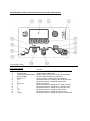
4. TIG – Expert Mode Your welding machine is actually capable of a lot more than has been explained. To enable the further functions the machine must be switched from the standard mode to the Expert mode. The instructions on how to switch over to the expert mode is described in chapter 7. In the expert mode the welder has the capability of further adjusting the welding parameters in 5 sub-menus; this enables an optimum setting of the welding parameters. TIG Menu selection: Press menu button 1 Sub-menu “1. Pulse Menu” is now active Continue to press button 1 until the desired sub-menu is reached Exiting the TIG menu is achieved by going through all the available sub menus to the beginning or simply by pressing by pressing button I 1. The software will return to the last used welding programme. 1 1 Puls 2 Start 3 DC 3 AC 4 Job 5 Nadel 2 3 4