1
User's Manual
Satellite P770/P775
Series
Satellite P770/P775
Table of Contents
Preface
General Precautions
Chapter 1
Getting Started
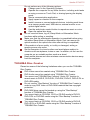
Equipment checklist ............................................................................. 1-1
Getting Started ....................................................................................... 1-2
Chapter 2
The Grand Tour
Front with the display closed ............................................................... 2-1
Left side .................................................................................................. 2-3
Right side ............................................................................................... 2-5
Back ........................................................................................................ 2-6
Underside ............................................................................................... 2-6
Front with the display open .................................................................. 2-8
Remote Controller ............................................................................... 2-13
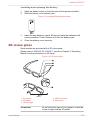
3D vision glass .................................................................................... 2-18
Internal Hardware Components ......................................................... 2-19
Chapter 3
Operating Basics
Using the Touch Pad ............................................................................. 3-1
The Keyboard ......................................................................................... 3-2
NVIDIA® 3D VISION™ ........................................................................... 3-5
Optical disc drives ................................................................................ 3-7
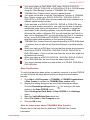
TOSHIBA VIDEO PLAYER ................................................................... 3-18
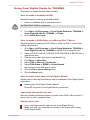
Using WinDVD BD for TOSHIBA ........................................................ 3-21
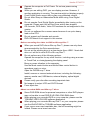
Wireless communications .................................................................. 3-24
LAN ....................................................................................................... 3-28
Optional devices .................................................................................. 3-29
Memory media slot .............................................................................. 3-30
Memory media ..................................................................................... 3-30
Media care ............................................................................................ 3-31
Inserting a memory media .................................................................. 3-32
Removing a memory media ................................................................ 3-33
Additional memory module ................................................................ 3-34
TV Tuner ............................................................................................... 3-38
External monitor .................................................................................. 3-40
HDMI ..................................................................................................... 3-41
Security lock ........................................................................................ 3-45
User's Manual
ii
Satellite P770/P775
Optional TOSHIBA Accessories ........................................................ 3-46
Sound System ...................................................................................... 3-46
Video mode .......................................................................................... 3-48
Computer Handling ............................................................................. 3-48
Heat dispersal ...................................................................................... 3-50
Chapter 4
Utilities & Advanced Usage
Utilities and Applications ...................................................................... 4-1
Special features ..................................................................................... 4-6
Using the TOSHIBA Sleep Utility ......................................................... 4-9
Using the TOSHIBA Face Recognition .............................................. 4-11
TOSHIBA Password Utility ................................................................. 4-15
HW Setup .............................................................................................. 4-16
TOSHIBA PC Health Monitor .............................................................. 4-21
Using the Hard Disk Drive (HDD) Protection .................................... 4-22
TOSHIBA HDD Protection Properties ................................................ 4-23
TOSHIBA Button Support ................................................................... 4-25
System Recovery ................................................................................ 4-26
Chapter 5
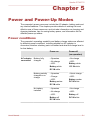
Power and Power-Up Modes
Power conditions ................................................................................... 5-1
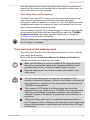
Monitoring of power condition ............................................................. 5-2
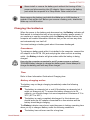
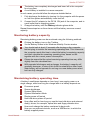
Battery .................................................................................................... 5-3
Power-up modes .................................................................................... 5-9
Panel power on/off ................................................................................ 5-9
System automatic Sleep/Hibernation ................................................ 5-10
Chapter 6
Troubleshooting
Problem solving process ...................................................................... 6-1
Hardware and system checklist ........................................................... 6-4
TOSHIBA support ................................................................................ 6-16
Appendix A
Specifications
Appendix B
AC Power Cord and Connectors
Appendix C
Legal Footnotes
Appendix D
Information for Wireless Devices
Index
Glossary
User's Manual
iii
Satellite P770/P775
Copyright
© 2011 by TOSHIBA Corporation. All rights reserved. Under the copyright
laws, this manual cannot be reproduced in any form without the prior
written permission of TOSHIBA. No patent liability is assumed, with respect
to the use of the information contained herein.
First edition March 2011
Copyright authority for music, movies, computer programs, databases and
other intellectual property covered by copyright laws belongs to the author
or to the copyright owner. Copyrighted material can be reproduced only for
personal use or use within the home. Any other use beyond that stipulated
above (including conversion to digital format, alteration, transfer of copied
material and distribution on a network) without the permission of the
copyright owner is a violation of copyright or author's rights and is subject
to civil damages or criminal action. Please comply with copyright laws in
making any reproduction from this manual.
Disclaimer
This manual has been validated and reviewed for accuracy. The
instructions and descriptions it contains are accurate for your computer at
the time of this manual’s production. However, succeeding computers and
manuals are subject to change without notice. TOSHIBA assumes no
liability for damages incurred directly or indirectly from errors, omissions or
discrepancies between the computer and the manual.
Trademarks
Intel, Intel SpeedStep, Intel Core and Centrino are trademarks or registered
trademarks of Intel Corporation.
Windows, Microsoft and Windows logo are registered trademarks of
Microsoft Corporation.
Bluetooth is a trademark owned by its proprietor and used by TOSHIBA
under license.
HDMI, the HDMI logo and High-Definition Multimedia Interface are
trademarks or registered trademarks of HDMI Licensing LLC.
Manufactured under license from Dolby Laboratories. Dolby and the
double-D symbol are trademarks of Dolby Laboratories.
WinDVD is a trademark of the Corel Corporations. DVD MovieFactory is a
trademark of the Corel Corporations.
Labelflash is a trademark of YAMAHA CORPORATION.
Photo CD is a trademark of Eastman Kodak Company.
ConfigFree is a trademark of TOSHIBA Corporation.
TouchPad is a trademark of Synaptics, Inc.
Wi-Fi is a registered trademark of the Wi-Fi Alliance.
User's Manual
iv
Satellite P770/P775
Secure Digital and SD are trademarks of SD Card Association.
Memory Stick, Memory Stick Duo, Memory Stick PRO, Memory Stick PRO
Duo and Memory Stick Micro are trademarks or registered trademarks of
Sony Corporation.
MultiMediaCard and MMC are trademarks of MultiMediaCard Association.
xD-Picture Card is a trademark of FUJIFILM Corporation.
Blu-ray Disc™, Blu-ray™, Blu-ray 3D™, BD-Live™, BONUSVIEW™,
BDXL™ and the logos are trademarks of the Blu-ray Disc Association.
Atheros is a registered trademark of Atheros Communication, Inc.
Realtek is a registered trademark of Realtek Semiconductor Corporation.
Broadcom is registered trademark of Broadcom Corporation.
Other trademarks and registered trademarks not listed above may be used
in this manual.
FCC information
FCC notice "Declaration of Conformity Information"
This equipment has been tested and found to comply with the limits for a
Class B digital device, pursuant to part 15 of the FCC rules. These limits
are designed to provide reasonable protection against harmful interference
in a residential installation. This equipment generates, uses and can
radiate radio frequency energy and, if not installed and used in accordance
with the instructions, may cause harmful interference to radio
communications. However, there is no guarantee that interference will not
occur in a particular installation. If this equipment does cause harmful
interference to radio or television reception, which can be determined by
turning the equipment off and on, the user is encouraged to try to correct
the interference by one or more of the following measures:
Reorient or relocate the receiving antenna.
Increase the separation between the equipment and receiver.
Connect the equipment into an outlet on a circuit different from that to
which the receiver is connected.
Consult the dealer or an experienced radio/TV technician for help.
Only peripherals complying with the FCC class B limits may be attached to
this equipment. Operation with non-compliant peripherals or peripherals not
recommended by TOSHIBA is likely to result in interference to radio and
TV reception. Shielded cables must be used between the external devices
and the computer’s External RGB monitor port, Universal Serial Bus (USB
2.0 and 3.0) ports, HDMI port and microphone jack. Changes or
modifications made to this equipment, not expressly approved by
TOSHIBA or parties authorized by TOSHIBA could void the user’s authority
to operate the equipment.
FCC conditions
User's Manual
v
Satellite P770/P775
This device complies with part 15 of the FCC Rules. Operation is subject to
the following two conditions:
1.
2.
This device may not cause harmful interference.
This device must accept any interference received, including
interference that may cause undesired operation.
Contact
Address:
TOSHIBA America Information Systems, Inc.
9740 Irvine Boulevard
Irvine, California 92618-1697
Telephone:
(949) 583-3000
EU Declaration of Conformity
This product is carrying the CE-Mark in accordance with
the related European Directives. Responsible for CEMarking is TOSHIBA Europe GmbH, Hammfelddamm 8,
41460 Neuss, Germany. The complete and official EU
Declaration of Conformity can be found on TOSHIBA’s
web site http://epps.toshiba-teg.com on the Internet.
CE compliance
This product is labelled with the CE Mark in accordance with the related
European Directives, notably Electromagnetic Compatibility Directive
2004/108/EC for the notebook and the electronic accessories including the
supplied power adapter, the Radio Equipment and Telecommunications
Terminal Equipment Directive 1999/5/EC in case of implemented
telecommunication accessories and the Low Voltage Directive 2006/95/EC
for the supplied power adapter. Furthermore the product complies with the
Ecodesign Directive 2009/125/EC (ErP) and its related implementing
measures.
This product and the original options are designed to observe the related
EMC (Electromagnetic Compatibility) and safety standards. However,
TOSHIBA cannot guarantee that this product still observes these EMC
standards if options or cables not produced by TOSHIBA are connected or
implemented. In this case the persons who have connected/implemented
those options/cables have to provide assurance that the system (PC plus
options/cables) still fulfils the required standards. To avoid general EMC
problems, the following guidance should be noted:
Only CE marked options should be connected/implemented
Only best shielded cables should be connected
Working environment
User's Manual
vi
Satellite P770/P775
This product was designed to fulfil the EMC (Electromagnetic Compatibility)
requirements to be observed for so-called “Residential, commercial and
light industry environments”. TOSHIBA do not approve the use of this
product in working environments other than the above mentioned
“Residential, commercial and light industry environments”.
For example, the following environments are not approved:
Industrial Environments (e.g. environments where a mains voltage of
380 V three-phase is used)
Medical Environments
Automotive Environments
Aircraft Environments
Any consequences resulting from the use of this product in working
environments that are not approved are not the responsibility of TOSHIBA.
The consequences of the use of this product in non-approved working
environments may be:
Interference with other devices or machines in the near surrounding
area.
Malfunction of, or data loss from, this product caused by disturbances
generated by other devices or machines in the near surrounding area.
Therefore TOSHIBA strongly recommend that the electromagnetic
compatibility of this product should be suitably tested in all non-approved
working environments before use. In the case of automobiles or aircraft,
the manufacturer or airline respectively should be asked for permission
before use of this product.
Furthermore, for general safety reasons, the use of this product in
environments with explosive atmospheres is not permitted.
VCCI Class B Information
この装置は、クラスB情報技術装置です。この装置は、家庭環境で使
用することを目的としていますが、この装置がラジオやテレビジョン
受信機に近接して使用されると、受信障害を引き起こすことがあります。
取扱説明書に従って正しい取り扱いをしてください。
VCCI-B
Video Standard Notice
THIS PRODUCT IS LICENSED UNDER THE AVC, THE VC-1 AND
MPEG-4 VISUAL PATENT PORTFOLIO LICENSE FOR THE PERSONAL
AND NON-COMMERCIAL USE OF A CONSUMER FOR (I) ENCODING
VIDEO IN COMPLIANCE WITH THE ABOVE STANDARDS ("VIDEO")
AND/OR (II) DECODING AVC, VC-1 AND MPEG-4 VIDEO THAT WAS
ENCODED BY A CONSUMER ENGAGED IN A PERSONAL AND
NONCOMMERCIAL ACTIVITY AND/OR WAS OBTAINED FROM A
VIDEO PROVIDER LICENSED BY MPEG LA TO PROVIDE SUCH
User's Manual
vii
Satellite P770/P775
VIDEO. NO LICENSE IS GRANTED OR SHALL BE IMPLIED FOR ANY
OTHER USE. ADDITIONAL INFORMATION INCLUDING THAT
RELATING TO PROMOTIONAL, INTERNAL AND COMMERCIAL USES
AND LICENSING MAY BE OBTAINED FROM MPEG LA, L.L.C. SEE
HTTP://WWW.MPEGLA.COM.
Canadian regulatory information (Canada only)
This digital apparatus does not exceed the Class B limits for radio noise
emissions from digital apparatus as set out in the Radio Interference
Regulation of the Canadian Department of Communications.
Note that Canadian Department of Communications (DOC) regulations
provide, that changes or modifications not expressly approved by
TOSHIBA Corporation could void your authority to operate this equipment.
This Class B digital apparatus meets all requirements of the Canadian
Interference-Causng Equipment Regulations.
Cet appareil numérique de la class B respecte toutes les exgences du
Règlement sur le matériel brouileur du Canada.
Following information is only valid for EU-member
States:
Disposal of products
The crossed out wheeled dust bin symbol indicates that
products must be collected and disposed of separately
from household waste. Integrated batteries and
accumulators can be disposed of with the product. They
will be separated at the recycling centres.
The black bar indicates that the product was placed on the
market after August 13, 2005.
By participating in separate collection of products and
batteries, you will help to assure the proper disposal of
products and batteries and thus help to prevent potential
negative consequences for the environment and human
health.
For more detailed information about the collection and
recycling programmes available in your country, please
visit our website (http://eu.computers.toshiba-europe.com)
or contact your local city office or the shop where you
purchased the product.
Disposal of batteries and/or accumulators
User's Manual
viii
Satellite P770/P775
The crossed out wheeled dust bin symbol indicates that
batteries and/or accumulators must be collected and
disposed of separately from household waste.
If the battery or accumulator contains more than the
specified values of lead (Pb), mercury (Hg), and/or
cadmium (Cd) defined in the Battery Directive (2006/66/
EC), then the chemical symbols for lead (Pb), mercury
(Hg) and/or cadmium (Cd) will appear below the crossed
out wheeled dust bin symbol.
By participating in separate collection of batteries, you will
help to assure the proper disposal of products and
batteries and thus help to prevent potential negative
consequences for the environment and human health.
For more detailed information about the collection and
recycling programmes available in your country, please
visit our website (http://eu.computers.toshiba-europe.com)
or contact your local city office or the shop where you
purchased the product.
These symbols may not stick depending on the country and region where
you purchased.
Disposing of the computer and the computer's
batteries
Discard this computer in accordance with applicable laws and
regulations. For further information, contact your local government.
This computer contains rechargeable batteries. After repeated use,
the batteries will finally lose their ability to hold a charge and you will
need to replace them. Under certain applicable laws and regulation, it
may be illegal to dispose of old batteries by placing them in the trash.
Please be kind to our shared environment. Check with your local
government authority for details regarding where to recycle old
batteries or how to dispose of them properly.
REACH - Compliance Statement
The new European Union (EU) chemical regulation, REACH (Registration,
Evaluation, Authorization and Restriction of Chemicals), entered into force
on 1 June 2007. TOSHIBA will meet all REACH requirements and is
committed to provide our customers with information about the chemical
substances in our products according to REACH regulation.
Please consult the following website www.toshiba-europe.com/computers/
info/reach for information about the presence in our articles of substances
included on the candidate list according to article 59(1) of Regulation (EC)
No 1907/2006 („REACH“) in a concentration above 0.1 % weight by weight.
User's Manual
ix
Satellite P770/P775
Following information is only for Turkey:
Compliant with EEE Regulations: TOSHIBA meets all requirements of
Turkish regulation 26891 “Restriction of the use of certain hazardous
substances in electrical and electronic equipment”.
The number of possible pixel failures of your display is defined
according to ISO 13406-2 standards. If the number of pixel failures is
less than this standard, they will not be counted as defect or failure.
Battery is a consumption product, since the battery time depends on
the usage of your computer. If the battery can not be charged at all,
then it is a defect or failure. The changes in battery time is not a defect
or failure.
Optical disc drive safety instructions
Be sure to check the precautions at the end of this section.
The drive model employs a laser system. To ensure proper use of this
product, please read this instruction manual carefully and retain for
future reference. Should the unit ever require maintenance, contact an
authorized service location.
Use of controls, adjustments or the performance of procedures other
than those specified may result in hazardous radiation exposure.
To prevent direct exposure to the laser beam, do not try to open the
enclosure.
1. Panasonic System Networks
Blu-ray™ Combo drive UJ141
Blu-ray™ Writer drive UJ240
2. TOSHIBA SAMSUNG STORAGE TECHNOLOGY
DVD SuperMulti with Double Layer TS-L633F/TS-L633W with
Labelflash™
User's Manual
x
Satellite P770/P775
TOSHIBA SAMSUNG STORAGE
TECHNOLOGY KOREA
CORPORATION 416, MEATAN-3
DONG, YEONGTONG-GU, SUWON
CITY, GYEONGGI, 443-742, KOREA
3. SONY Optiarc, Inc.
DVD Super Multi AD-7710H/AD-7713H with Labelflash™
Complies with 21 CFR, Chapter 1,
Subchapter J.
Sony Optiarc Inc.
1-11-1 Osaki Shinagawa-ku, Tokyo,
141-0032, Japan
4. Hitachi-LG Data Storage, Inc.
Blu-ray™ Combo drive CT31F
Blu-ray™ Writer drive BT11F
Hitachi-LG Data Storage, Inc.
22-23,KAIGAN 3-CHOME,
MINATO-KU,TOKYO,108-0022
JAPAN
Precautions
CAUTION: This appliance contains
a laser system and is classified as a
“CLASS 1 LASER PRODUCT.” To
use this model properly, read the
instruction manual carefully and
keep this manual for your future
reference. In case of any trouble
with this model, please contact your
nearest “AUTHORIZED service
station.” To prevent direct exposure
to the laser beam, do not try to open
the enclosure.
User's Manual
xi
Satellite P770/P775
Preface
Congratulations on your purchase of this computer. This powerful notebook
computer provides excellent expansion capability, includes multimedia
functionality, and is designed to provide years of reliable, high-performance
computing.
This manual tells how to set up and begin using your computer. It also
provides detailed information on configuring your computer, basic
operations and care, using optional devices and troubleshooting.
Conventions
This manual uses the following formats to describe, identify, and highlight
terms and operating procedures.
Abbreviations
On first appearance, and whenever necessary for clarity, abbreviations are
enclosed in parentheses following their definition. For example: Read Only
Memory (ROM). Acronyms are also defined in the Glossary.
Icons
Icons identify ports, dials, and other parts of your computer. The indicator
panel also uses icons to identify the components it is providing information
on.
Keys
The keyboard keys are used in the text to describe many computer
operations. A distinctive typeface identifies the key top symbols as they
appear on the keyboard. For example, ENTER identifies the ENTER key.
Key operation
Some operations require you to simultaneously use two or more keys. We
identify such operations by the key top symbols separated by a plus sign
(+). For example, CTRL + C means you must hold down CTRL and at the
same time press C. If three keys are used, hold down the first two and at
the same time press the third.
ABC
User's Manual
When procedures require an action such as
clicking an icon or entering text, the icon's name or
the text you are to type in is represented in the
typeface you see to the left.
xii
Satellite P770/P775
Display
ABC
Names of windows or icons or text generated by
the computer that appear on its display screen are
presented in the type face you see to the left.
Messages
Messages are used in this manual to bring important information to your
attention. Each type of message is identified as shown below.
Indicates a potentially hazardous situation, which could result in death or
serious injury, if you do not follow instructions.
Pay attention! A caution informs you that improper use of equipment or
failure to follow instructions may cause data loss or damage your
equipment.
Please read. A note is a hint or advice that helps you make best use of
your equipment.
Terminology
This term is defined in this document as follows:
User's Manual
Start
The word "Start" refers to the "
Windows 7.
HDD or Hard disk
drive
Some models are equipped with a "Solid State
Drive (SSD)" instead of a hard disk drive.In this
manual, the word "HDD" or "Hard disk drive"
also refers to the SSD unless otherwise stated.
" button in
xiii
Satellite P770/P775
General Precautions
TOSHIBA computers are designed to optimize safety, minimize strain and
withstand the rigors of portability. However, certain precautions should be
observed to further reduce the risk of personal injury or damage to the
computer.
Be certain to read the general precautions below and to note the cautions
included in the text of the manual.
Provide adequate ventilation
Always make sure your computer and AC adaptor have adequate
ventilation and are protected from overheating when the power is turned on
or when an AC adaptor is connected to a power outlet (even if your
computer is in Sleep Mode). In this condition, observe the following:
Never cover your computer or AC adaptor with any object.
Never place your computer or AC adaptor near a heat source, such as
an electric blanket or heater.
Never cover or block the air vents including those located at the base
of the computer.
Always operate your computer on a hard flat surface. Using your
computer on a carpet or other soft material can block the vents.
Always provide sufficient space around the computer.
Overheating your computer or AC adaptor could cause system failure,
computer or AC adaptor damage or a fire, possibly resulting in serious
injury.
Creating a computer-friendly environment
Place the computer on a flat surface that is large enough for the computer
and any other items you are using, such as a printer.
Leave enough space around the computer and other equipment to provide
adequate ventilation. Otherwise, they may overheat.
To keep your computer in prime operating condition, protect your work area
from:
Dust, moisture, and direct sunlight.
Equipment that generates a strong electromagnetic field, such as
stereo speakers (other than speakers that are connected to the
computer) or speakerphones.
Rapid changes in temperature or humidity and sources of temperature
change such as air conditioner vents or heaters.
Extreme heat, cold, or humidity.
Liquids and corrosive chemicals.
User's Manual
xiv
Satellite P770/P775
Stress injury
Carefully read the Instruction Manual for Safety and Comfort. It contains
information on the prevention of stress injuries to your hands and wrists
that can be caused by extensive keyboard use. It also includes information
on work space design, posture and lighting that can help reduce physical
stress.
Heat injury
Avoid prolonged physical contact with the computer. If the computer is
used for long periods, its surface can become very warm. While the
temperature will not feel hot to the touch, if you maintain physical
contact with the computer for a long time, for example if you rest the
computer on your lap or if you keep your hands on the palm rest, your
skin might suffer a low-heat injury.
If the computer has been used for a long time, avoid direct contact
with the metal plate supporting the various interface ports as this can
become hot.
The surface of the AC adaptor can become hot when in use but this
condition does not indicate a malfunction. If you need to transport the
AC adaptor, you should disconnect it and let it cool before moving it.
Do not lay the AC adaptor on a material that is sensitive to heat as the
material could become damaged.
Pressure or impact damage
Do not apply heavy pressure to the computer or subject it to any form of
strong impact as this can damage the computer's components or otherwise
cause it to malfunction.
Mobile phones
Please be aware that the use of mobile phones can interfere with the audio
system. The operation of the computer will not be impaired in any way, but
it is recommended that a minimum distance of 30cm is maintained between
the computer and a mobile phone that is in use.
Protective Earthing
Equipment connected to the protective earthing of the building installation
through the mains connection or through other equipment with a
connection to protective earthing and to a cable distribution system using
coaxial cable, may in some circumstances create a fire hazard. Connection
to a cable distribution system has therefore to be provided through a device
providing electrical isolation below a certain frequency range (galvanic
isolator, see EN 60728-11).
User's Manual
xv
Satellite P770/P775
Instruction Manual for Safety and Comfort
All important information on the safe and proper use of this computer is
described in the enclosed Instruction Manual for Safety and Comfort. Be
sure to read it before using the computer.
User's Manual
xvi
Satellite P770/P775
Chapter 1
Getting Started
This chapter provides an equipment checklist, and basic information to
start using your computer.
Some of the features described in this manual may not function properly if
you use an operating system that was not pre-installed by TOSHIBA.
Equipment checklist
Carefully unpack your computer, taking care to save the box and
packaging materials for future use.
Hardware
Check to make sure you have all the following items:
TOSHIBA Portable Personal Computer
AC adaptor and power cord (2-pin plug or 3-pin plug)
Battery pack
Remote controller (Is included with some models)
NVIDIA® 3D VISION™ set (Is included with some models)
Documentation
User Information Guide
Instruction Manual for Safety and Comfort
If any of the items are missing or damaged, contact your dealer
immediately.
Software
The following Windows® operating system and utility software are preinstalled.
Windows 7
TOSHIBA Recovery Media Creator
TOSHIBA Assist
TOSHIBA ConfigFree™
TOSHIBA Flash Cards
TOSHIBA Disc Creator
TOSHIBA VIDEO PLAYER
User's Manual
1-1
Satellite P770/P775
TOSHIBA Resolution+ Plug-in For Windows Media Player
WinDVD BD for TOSHIBA (Is preinstalled in some models)
Corel Digital Studio for TOSHIBA (Is preinstalled in some models)
Corel Label@Once (Is preinstalled in some models)
TOSHIBA eco Utility
TOSHIBA Bulletin Board
TOSHIBA ReelTime
TOSHIBA HW Setup Utility
TOSHIBA Value Added Package
TOSHIBA Web Camera Application
TOSHIBA Face Recognition
TOSHIBA HDD Protection
TOSHIBA Service Station
TOSHIBA PC Health Monitor
TOSHIBA Sleep Utility
Online manual
TOSHIBA Portable Personal Computer User's Manual (This
manual)
* You may not have all the softwares listed above depending on the model
you purchased.
Getting Started
All users should be sure to read the section Starting up for the first
time.
Be sure to read the enclosed Instruction Manual for Safety and
Comfort for information on the safe and proper use of this computer. It
is intended to help you be more comfortable and productive while
using a notebook computer. By following the recommendations in it
you may reduce your chance of developing a painful or disabling injury
to your hand, arms, shoulders or neck.
This section provides basic information to start using your computer. It
covers the following topics:
Connecting the AC adaptor
Opening the display
Turning on the power
Starting up for the first time
Turning off the power
Restarting the computer
Use a virus-check program and make sure it is updated regularly.
Never format storage media without checking its content - formatting
destroys all stored data.
User's Manual
1-2
Satellite P770/P775
It is a good idea to periodically back up the internal hard disk drive or
other main storage device to external media. General storage media is
not durable or stable over long periods of time and under certain
conditions may result in data loss.
Before you install a device or application, save any data in memory to
the hard disk drive or other storage media. Failure to do so may result
in the loss of data.
Connecting the AC adaptor
Attach the AC adaptor when you need to charge the battery or you want to
operate from AC power. It is also the fastest way to get started, because
the battery pack will need to be charged before you can operate from
battery power.
The AC adaptor can automatically adjust to any voltage ranging from 100
to 240 volts and to a frequency of either 50 or 60 hertz, enabling you to use
this computer in almost all country/region. The adaptor converts AC power
to DC power and reduces the voltage supplied to this computer.
Always use the TOSHIBA AC adaptor that was included with your
computer, or use AC adaptors specified by TOSHIBA to avoid any risk
of fire or other damage to the computer. Use of an incompatible AC
adaptor could cause fire or damage to the computer possibly resulting
in serious injury. TOSHIBA assumes no liability for any damage
caused by use of an incompatible adaptor.
Never plug the AC adaptor into a power source that does not
correspond to both the voltage and the frequency specified on the
regulatory label of the unit. Failure to do so could result in a fire or
electric shock, possibly resulting in serious injury.
Always use or purchase power cables that comply with the legal
voltage and frequency specifications and requirements in the country
of use. Failure to do so could result in a fire or electric shock, possibly
resulting in serious injury.
The supplied power cord conforms to safety rules and regulations in
the region the product is bought and should not be used outside this
region. For use in other regions, please buy power cords that conform
to safety rules and regulations in the particular region.
Do not use a 3-pin to 2-pin conversion plug.
User's Manual
1-3
Satellite P770/P775
When you connect the AC adaptor to the computer, always follow the
steps in the exact order as described in the User’s Manual.
Connecting the power cable to a live electrical outlet should be the last
step otherwise the adaptor DC output plug could hold an electrical
charge and cause an electrical shock or minor bodily injury when
touched. As a general safety precaution, avoid touching any metal
parts.
Never place your computer or AC adaptor on a wooden surface,
furniture, or any other surface that could be marred by exposure to
heat since the computer base and AC adaptor's surface increase in
temperature during normal use.
Always place your computer or AC adaptor on a flat and hard surface
that is resistant to heat damage.
Refer to the enclosed Instruction Manual for Safety and Comfort for
detailed precautions and handling instructions.
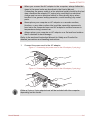
1.
Connect the power cord to the AC adaptor.
Figure 1-1 Connecting the power cord to the AC adaptor (2-pin plug)
Figure 1-2 Connecting the power cord to the AC adaptor (3-pin plug)
Either a 2-pin or 3-pin adaptor/cord will be included with the computer
depending on the model.
User's Manual
1-4
Satellite P770/P775
2.
Connect the AC adaptor’s DC output plug to the DC IN 19V jack on
the right of the computer.
Figure 1-3 Connecting the DC output plug to the computer
1
2
1. DC IN 19V jack
3.
2. DC output plug
Plug the power cord into a live wall outlet - the Battery and DC IN
indicators on the front of the computer should glow.
Opening the display
The display panel can be opened to a wide range of angles for optimal
viewing.
While holding down the palm rest with one hand so that the main body of
the computer is not raised, slowly lift the display panel - this will allow the
angle of the display panel to be adjusted to provide optimum clarity.
Figure 1-4 Opening the display panel
1
1. Display panel
Use reasonable care when opening and closing the display panel. Opening
it vigorously or slamming it shut could damage the computer.
Be careful not to open the display panel too far as this could put stress
on the display panel’s hinges and cause damage.
Do not press or push on the display panel.
Do not lift the computer by the display panel.
Do not close the display panel with pens or any other objects left in
between the display panel and the keyboard.
User's Manual
1-5
Satellite P770/P775
When opening or closing the display panel, place one hand on the
palm rest to hold the computer in place and use the other hand to
slowly open or close the display panel (Do not use excessive force
when opening or closing the display panel).
Turning on the power
This section describes how to turn on the power - the Power indicator will
then indicate the status. Please refer to the Monitoring of power condition
section in Chapter 5, Power and Power-Up Modes for more information.
After you turn on the power for the first time, do not turn it off until you
have set up the operating system.
Volume cannot be adjusted during Windows Setup.
1.
2.
Open the display panel.
Press and hold the computer's power button for two or three seconds.
Figure 1-6 Turning on the power
1
1. Power button
Product appearance depends on the model you purchased.
Starting up for the first time
The Windows 7 Startup Screen will be the first screen displayed when you
turn on the power. Follow the on-screen instructions on each screen in
order to properly install the operating system.
User's Manual
1-6
Satellite P770/P775
When it is displayed, be sure to read the Software License Terms
carefully.
Turning off the power
The power can be turned off in one of three modes, either Shut Down
Mode, Hibernation Mode or Sleep Mode.
Shut Down Mode
When you turn off the power in Shut Down Mode no data will be saved and
the computer will boot to the operating system's main screen the next time
it is turned on.
1.
2.
If you have entered data, either save it to the hard disk drive or to
other storage media.
Make sure all disk/disc activity has stopped before removing the disc
or floppy diskette.
Make sure the Hard Disk Drive/Optical Disc Drive indicator is off. If
you turn off the power while a disk (disc) is being accessed, you may
lose data or damage the disk.
Never turn off the power while an application is running. Doing so
could cause loss of data.
Never turn off the power, disconnect an external storage device or
remove storage media during data read/write. Doing so can cause
data loss.
3.
4.
5.
Click Start.
).
Click the Shut down button (
Turn off any peripheral devices connected to your computer.
Do not turn the computer or peripheral devices back on immediately - wait
a short period to avoid any potential damage.
Sleep Mode
If you have to interrupt your work, you are able to turn off the power without
exiting from your software by placing the computer into Sleep Mode. In this
mode data is maintained in the computer's main memory so that when you
turn on the power again, you can continue working right where you left off.
When you have to turn off your computer aboard an aircraft or in places
where electronic devices are regulated or controlled, always completely
shut down the computer. This includes turning off any wireless
communication functionalities, and cancelling settings that reactivate the
User's Manual
1-7
Satellite P770/P775
computer automatically, such as a timer recording function. Failure to
completely shut down the computer in this way could allow the operating
system to reactivate and run pre-programmed tasks or preserve unsaved
data, which could interfere with aviation or other systems, possibly causing
serious injury.
Before entering Sleep Mode, be sure to save your data.
Do not install or remove a memory module while the computer is in
Sleep Mode. The computer or the memory module could be damaged.
Do not remove the battery pack while the computer is in Sleep Mode
(unless the computer is connected to an AC power source). Data in
memory could be lost.
When the AC adaptor is connected, the computer will go into Sleep
Mode according to the settings in the Power Options (to access it,
Start -> Control Panel -> System and Security -> Power Options).
To restore the operation of the computer from Sleep Mode, press and
hold the power button or any key on the keyboard for a short amount
of time. Please note that keyboard keys can only be used if the Wakeup on Keyboard option is enabled within the HW Setup utility.
If the computer enters Sleep Mode while a network application is
active, the application might not be restored when the computer is
next turned on and the system returns from Sleep Mode.
To prevent the computer from automatically entering Sleep Mode,
disable Sleep Mode within the Power Options (to access it, Start ->
Control Panel -> System and Security -> Power Options).
To use the Hybrid Sleep function, configure it in the Power Options.
Benefits of Sleep Mode
The Sleep Mode feature provides the following benefits:
Restores the previous working environment more rapidly than does
the Hibernation Mode feature.
Saves power by shutting down the system when the computer
receives no input or hardware access for the time period set by the
System Sleep Mode feature.
Allows the use of the panel power off feature.
Executing Sleep Mode
You can also enable Sleep Mode by pressing FN + F3 - please refer to the
Hot key functions section in Chapter 3, Operating Basics, for further details.
You can enter Sleep Mode in one of three ways:
User's Manual
1-8
Satellite P770/P775
Click Start, point to the arrow icon (
) and then select Sleep from
the menu.
Close the display panel. Please note that this feature must be enabled
within the Power Options (to access it, click Start -> Control Panel ->
System and Security -> Power Options).
Press the power button. Please note that this feature must be enabled
within the Power Options (to access it, click Start -> Control Panel ->
System and Security -> Power Options).
When you turn the power back on, you can continue where you left when
you shut down the computer.
When the computer is in Sleep Mode, the power indicator will blink
amber.
If you are operating the computer on battery power, you can lengthen
the overall operating time by turning it off into Hibernation Mode Sleep Mode will consume more power while the computer is off.
Sleep Mode limitations
Sleep Mode will not function under the following conditions:
Power is turned back on immediately after shutting down.
Memory circuits are exposed to static electricity or electrical noise.
Hibernation Mode
The Hibernation Mode feature saves the contents of memory to the hard
disk drive when the computer is turned off so that, the next time it is turned
on, the previous state is restored. Please note that the Hibernation Mode
feature does not save the status of any peripheral devices connected to the
computer.
Save your data. While entering Hibernation Mode, the computer saves
the contents of memory to the hard disk drive. However, for safety
sake, it is best to save your data manually.
Data will be lost if you remove the battery or disconnect the AC
adaptor before the save is completed. Wait for the Hard Disk Drive/
Optical Disc Drive indicator to go out.
Do not install or remove a memory module while the computer is in
Hibernation Mode. Data will be lost.
Benefits of Hibernation Mode
The Hibernation Mode feature provides the following benefits:
Saves data to the hard disk drive when the computer automatically
shuts down because of a low battery condition.
User's Manual
1-9
Satellite P770/P775
You can return to your previous working environment immediately
when you turn on the computer.
Saves power by shutting down the system when the computer
receives no input or hardware access for the time period set by the
System Hibernate feature.
Allows the use of the panel power off feature.
Starting Hibernation Mode
You can also enable Hibernation Mode by pressing FN + F4 - please refer
to the Hot key functions section in Chapter 3, Operating Basics, for further
details.
To enter Hibernation Mode, follow the steps below.
1.
2.
Click Start.
Point to the arrow icon (
menu.
) and then select Hibernate from the
Automatic Hibernation Mode
The computer can be configured to enter Hibernation Mode automatically
when you press the power button or close the lid. In order to define these
settings, you can follow the steps as described below:
1.
2.
3.
4.
5.
Click Start and click the Control Panel.
Click System and Security and click Power Options.
Click Choose what the power buttons do or Choose what closing
the lid does.
Enable the desired Hibernation Mode settings for When I press the
power button and When I close the lid.
Click the Save changes button.
Data save in Hibernation Mode
When you turn off the power in Hibernation Mode, the computer will take a
moment to save the current data in memory to the hard disk drive. During
this time, the Hard Disk Drive/Optical Disc Drive indicator will glow.
After you turn off the computer, and the content of memory has been saved
to the hard disk drive, turn off the power to any peripheral devices.
Do not turn the computer or devices back on immediately. Wait a moment
to let all capacitors fully discharge.
Restarting the computer
Certain conditions require that you reset the computer, for example if:
You change certain computer settings.
User's Manual
1-10
Satellite P770/P775
An error occurs and the computer does not respond to your keyboard
commands.
If you need to restart the computer, there are three ways this can be
achieved:
Click Start, point to the arrow icon (
) and then select Restart from
the menu.
Press CTRL, ALT and DEL simultaneously (once) to display the menu
window, then select Restart from the Shut down options.
Press the power button and hold it down for five seconds. Once the
computer has turned itself off, wait between ten and fifteen seconds
before turning the power on again by pressing the power button.
User's Manual
1-11
Satellite P770/P775
Chapter 2
The Grand Tour
This chapter identifies the various components of the computer - it is
recommended that you become familiar with each before you operate the
computer.
Legal Footnote (Non-applicable Icons)
For more information regarding Non-applicable Icons, please refer to the
Legal Footnotes section in Appendix C.
Please handle your computer carefully to avoid scratching or damaging the
surface.
Front with the display closed
The following figure shows the computer’s front with its display panel in the
closed position.
Figure 2-1 Front of the computer with display panel closed
2
1
3
4
1. Infrared receiver window*
2. Memory media slot
3. DC IN indicator
4. Power indicator
5. Battery indicator
5
6
7
8
9
6. Hard Disk Drive/Optical Disc Drive indicator
7. Memory media slot indicator
8. Wireless communication indicator
9. Wireless WAN/WiMAX indicator
* Provided with some models.
Product appearance depends on the model you purchased.
Infrared receiver win- This is a sensor window that receives signals
dow
from the remote controller which is provided with
your computer.
User's Manual
2-1
Satellite P770/P775
Models which do not include a remote controller are not equipped with an
infrared receiver so the computer cannot be operated with a remote
controller.
Memory media slot
This slot lets you insert an SD™/SDHC™/
SDXC™ memory card, miniSD™/microSD™
Card, Memory Stick™ (Duo™/PRO™/PRO
Duo™/Micro™), xD-Picture Card™ and
MultiMediaCard™. Refer to the Optional devices
section in Chapter 3, Operating Basics for more
information.
Keep foreign metal objects, such as screws, staples and paper clips, out of
the Memory media slot. Foreign metal objects can create a short circuit,
which can cause damage and fire, possibly resulting in serious injury.
DC IN indicator
The DC IN indicator normally glows white when
power is being correctly supplied from the AC
power adaptor.
Power indicator
The Power indicator normally glows white when
the computer is turned on. However, if you turn
the computer off into Sleep Mode, this indicator
will flash amber - approximately two seconds on,
two seconds off - both while the system is
shutting down and while it remains turned off.
Battery indicator
The Battery indicator shows the condition of the
battery's charge - white indicates the battery is
fully charged, amber indicates the battery is
charging, and flashing amber indicates a low
battery condition. Please refer to Chapter 5,
Power and Power-Up Modes for more
information on this feature.
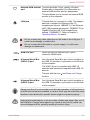
Hard Disk Drive/Opti- The Hard Disk Drive/Optical Disc Drive
cal Disc Drive indica- indicator blinks white whenever the computer is
tor
accessing the built-in hard disk drive or optical
disc drive.
Memory media slot in- The Memory media slot indicator blinks white
dicator
when the computer is accessing the Memory
media slot.
User's Manual
2-2
Satellite P770/P775
Wireless communica- The Wireless communication indicator glows
tion indicator
amber when the Wireless functions are turned
on.
Some models are equipped with Wireless
functions.
Wireless WAN/WiMAX The Wireless WAN/WiMAX indicator glows blue
indicator
when the Wireless WAN/WiMAX functions are
turned on.
In some models, the indicator will glow and blink
in order to indicate the connection status of the
Wireless WAN/WiMAX function.
Some models are equipped with a Wireless
WAN/WiMAX function.
Left side
The following figure shows the computer’s left side.
Figure 2-2 The left side of the computer
1
2
3
1. TV Tuner jack*
2. Cooling vents
3. External RGB monitor port
4. LAN jack
4
5
6
7
5. HDMI out port
6. Universal Serial Bus (USB 3.0) port
7. Universal Serial Bus (USB 2.0) port
* Provided with some models.
Product appearance depends on the model you purchased.
TV Tuner jack
Connect the coaxial cable to this port to watch
TV programs on your computer or record
them.The dimensions and shape of the TV Tuner
jack vary for different regions.Some models are
equipped with a TV tuner.
Cooling vents
The cooling vents help the processor to avoid
overheating.
Do not block the cooling vents. Keep foreign metal objects, such as
screws, staples and paper clips, out of the cooling vents. Foreign metal
objects can create a short circuit, which can cause damage and fire,
possibly resulting in serious injury.
User's Manual
2-3
Satellite P770/P775
External RGB monitor This port provides 15-pin, analog VGA port.
port
Please refer to Appendix A for information on
external RGB monitor port pin assignment.
This port allows you to connect an external RGB
monitor to the computer.
LAN jack
This jack lets you connect to a LAN. The adaptor
has built-in support for Ethernet LAN (10
megabits per second, 10BASE-T), Fast Ethernet
LAN (100 megabits per second, 100BASE-TX) or
Gigabit Ethernet LAN (1000 megabits per
second, 1000BASE-T). Refer to chapter 3,
Operating Basics, for details.
Do not connect any cable other than a LAN cable to the LAN jack. It
could cause damage or malfunction.
Do not connect the LAN cable to a power supply. It could cause
damage or malfunction.
HDMI out port
HDMI out port can connect with Type A
connector HDMI cable.
Universal Serial Bus
(USB 3.0) port
One Universal Serial Bus port, which complies to
the USB 3.0 standard, is provided on the left side
of the computer.
The USB 3.0 port is compliant with USB 3.0
standard and backward compatible with USB 2.0
devices.
The port with the icon
function.
Universal Serial Bus
(USB 2.0) port
has Sleep and Charge
One Universal Serial Bus port, which complies to
the USB 2.0 standard, is provided on the left side
of the computer.
Please note that it is not possible to confirm the operation of all functions of
all USB devices that are available. In view of this it may be noted that some
functions associated with a specific device might not operate properly.
Keep foreign metal objects, such as screws, staples and paper clips, out of
the USB port. Foreign metal objects can create a short circuit, which can
cause damage and fire, possibly resulting in serious injury.
User's Manual
2-4
Satellite P770/P775
Right side
The following figure shows the computer’s right side.
Figure 2-3 The right side of the computer
1
2
3
4
1. Headphone jack
2. Microphone jack
3. Universal Serial Bus (USB 2.0) port
5
6
4. Optical disc drive
5. DC IN 19V jack
6. Security lock slot
Headphone jack
A 3.5 mm mini headphone jack enables
connection of stereo headphones.
Microphone jack
A 3.5 mm mini microphone jack enables
connection of a three-conductor mini jack for
stereo microphone input.
The jack with the icon has Sleep and Music
function.
The integrated sound system provides support for the computer's internal
speakers and microphone, as well as allowing an external microphone and
headphones to be connected via the appropriate jacks.
Universal Serial Bus
(USB 2.0) port
Two Universal Serial Bus ports, which comply to
the USB 2.0 standard, are provided on the right
side of the computer.
Please note that it is not possible to confirm the operation of all functions of
all USB devices that are available. In view of this it may be noted that some
functions associated with a specific device might not operate properly.
Keep foreign metal objects, such as screws, staples and paper clips, out of
the USB port. Foreign metal objects can create a short circuit, which can
cause damage and fire, possibly resulting in serious injury.
Optical disc drive
The computer may be configured with a DVD
Super Multi, Blu-ray™ Combo drive or Blu-ray™
Writer drive.
2.6GB and 5.2GB DVD-RAM media cannot be read from or written to.
User's Manual
2-5
Satellite P770/P775
DC IN 19V jack
The AC adaptor connects to this jack in order to
power the computer and charge its internal
batteries. Please note that you should only use
the model of AC adaptor supplied with the
computer at the time of purchase - using the
wrong AC adaptor can cause damage to the
computer.
Security lock slot
A security cable can be attached to this slot and
then connected to a desk or other large object in
order to deter theft of the computer.
Back
The following figure shows the computer’s back.
Figure 2-4 The back of the computer
1
1. Battery pack
Battery pack
The rechargeable lithium-ion battery pack
provides power to the computer when the AC
adaptor is not connected. For more detailed
information on the use and operation of the
battery pack please refer to Chapter 5, Power
and Power-Up Modes.
Legal Footnote (Battery Life)
For more information regarding Battery Life, please refer to the Legal
Footnotes section in Appendix C.
Underside
The following figure shows the underside of the computer. You should
ensure that the display is closed before the computer is turned over to
avoid causing any damage.
User's Manual
2-6
Satellite P770/P775
Figure 2-5 The underside of the computer
1
2
4
3
1. Battery lock
2. Battery release latch
3. Memory module slot
4. Cooling vents
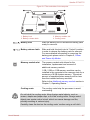
Battery lock
Slide the battery lock to release the battery pack
ready for removal.
Battery release latch
Slide and hold this latch into its "Unlock" position
in order to release the battery pack for removal.
For more detailed information on removing the
battery pack please refer to Chapter 5, Power
and Power-Up Modes.
Memory module slot
The memory module slot allows for the
installation, replacement and removal of
additional memory module.
1 GB, 2 GB or 4 GB memory modules can be
installed in the computer's two memory slots for a
maximum of 8 GB system memory. The actual
amount of useable system memory will be less
than the installed memory modules.
Refer to the Additional memory module section in
Chapter 3, Operating Basics.
Cooling vents
The cooling vents help the processor to avoid
overheating.
Do not block the cooling vents. Keep foreign metal objects, such as
screws, staples and paper clips, out of the cooling vents. Foreign metal
objects can create a short circuit, which can cause damage and fire,
possibly resulting in serious injury.
Carefully clean the dust on the cooling vents’ surface using a soft cloth.
User's Manual
2-7
Satellite P770/P775
Front with the display open
This section shows the computer with the display panel open. In order to
open the display, lift the display panel up and position it at a comfortable
viewing angle for you.
Figure 2-6 The front of the computer with the display panel open
1
2
3
4
5
8
9
6
10
7
8
11
12
9
14
User's Manual
13
2-8
Satellite P770/P775
Figure 2-7 The front of the computer with the display panel open
4
1
3
4
2
15
2
5
8
9
6
10
7
8
11
12
9
14
1. Wireless LAN antennas and Wireless
WAN antennas (not shown)*
2. Microphone*
3. Web Camera LED*
4. Web Camera*
5. Display screen
6. Function buttons
7. Power button
8. Display hinge
13
9. Stereo speakers
10. Keyboard
11. Touch Pad ON/OFF button
12. Touch Pad
13. Touch Pad control buttons
14. LCD Sensor switch (not shown)
15. 3D Vision IR emitter*
* Provided with some models.
Product appearance depends on the model you purchased.
Wireless LAN antennas
Some computers in this series are equipped with
the Wireless LAN antennas.
Legal Footnote (Wireless LAN)
For more information regarding Wireless LAN, please refer to the Legal
Footnotes section in Appendix C.
Wireless WAN/WiMAX Some computers in this series are equipped with
antennas
the Wireless WAN/WiMAX antennas.
User's Manual
Microphone
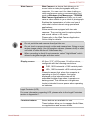
One or two built-in microphone(s) allow you to
import and record sounds for your application please refer to the Sound System section in
Chapter 3, Operating Basics for more
information.
Web Camera LED
The Web Camera LED glows when the Web
Camera is operating.
2-9
Satellite P770/P775
Web Camera
Web Camera is a device that allows you to
record video or take photographs with your
computer. You can use it for video chatting or
video conferences using a communication tool
such as Windows Live Messenger. TOSHIBA
Web Camera Application will help you to add
various video effects to your video or photograph.
Enables the transmission of video and use of
video chat via the internet using specialized
applications.
Some models are equipped with two web
cameras. They can be used to capture photos
and record videos in 3D mode.
Please refer to the Web Camera Application
Online Help for details.
Do not point the web camera directly at the sun.
Do not touch or press strongly on the web camera lens. Doing so may
reduce image quality. Use an eyeglass cleaner (cleaner cloth) or other
soft cloth to clean the lens if it becomes dirty.
When recording in dimly lit environments, select "Night Mode" which
allows for brighter images with less noise.
Display screen
43.9cm (17.3”) LCD screen, 16 million colors,
configured with the following resolutions:
FHD, 1920 horizontal x 1080 vertical pixels
HD+, 1600 horizontal x 900 vertical pixels
Please be aware that, when the computer is
operating on the AC adaptor, the image
displayed on the internal screen will be
somewhat brighter than when it operates on
battery power. This difference in brightness
levels is intended to save power when operating
on batteries.
Legal Footnote (LCD)
For more information regarding LCD, please refer to the Legal Footnotes
section in Appendix C.
Function buttons
Seven buttons are available for use.
These buttons allow you to manage Audio/Video,
run applications and access utilities.
User's Manual
2-10
Satellite P770/P775
Power button
Press this button to turn the computer's power on
and off.
Display hinges
The display hinges allow the display panel to be
positioned at a variety of easy-to-view angles.
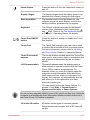
Stereo speakers
The speakers emit sound generated by your
software as well as audio alarms, such as low
battery condition, generated by the system.
Keyboard
The internal keyboard provides the dedicated
numeric keys, dedicated cursor control keys,
and Keys. Refer to the The Keyboard section
in Chapter 3, Operating Basics, for details.
Touch Pad ON/OFF
button
Press this button to enable or disable the Touch
Pad function.
Touch Pad
The Touch Pad located in the palm rest is used
to control the movement of the on-screen pointer.
For more information, please refer to the Using
the Touch Pad in Chapter 3, Operating Basics.
Touch Pad control
buttons
The control buttons located below the Touch Pad
allow you to select menu items or manipulate text
and graphics as designated by the on-screen
pointer.
LCD Sensor switch
This switch senses when the display panel is
either closed or opened and activates the Panel
Power Off/On feature as appropriate. For
example, when you close the display panel the
computer enters Hibernation Mode and shuts
itself down and then, when you next open the
display, the computer will automatically start up
and return you to the application you were
previously working on.
You can specify within the Power Options. To
access it, click Start -> Control Panel ->
System and Security -> Power Options.
Do not put any magnetic objects close to this switch as they may cause the
computer to automatically enter Hibernation Mode and shut down even if
the Panel Power Off feature is disabled.
3D Vision IR emitter
IR emitter sends signal to wireless glasses.
Some models are equipped with a 3D Vision IR
emitter.
User's Manual
2-11
Satellite P770/P775
Function buttons
Seven buttons are available for use:
eco, Wireless On/Off, Programmable button (or 3D, depending on the
model you purchased), CD/DVD Play/Pause, Mute, Volume-, Volume+.
Only touch the buttons with your fingers. Do not press the buttons too
strongly, or use a ballpoint pen or any other pointed object to touch the
buttons. Doing so may damage the buttons.
Figure 2-8 Function buttons (models without 3D function)
Figure 2-9 Function buttons (models with 3D function)
eco button
Touching this button to launch the TOSHBIA eco
Utility. This button changes "On" and "Off" of eco
Mode. When eco Mode is On, the icon turns
green. When eco Mode is Off, the icon turns
gray.
Wireless On/Off button
Touching this button to turn the Wireless
communication functions on and off.
Programmable button Some models are provided with Programmable
button.
Touching this button to launch Bulletin Board.
When Bulletin Board is lauched, this button
allows you to display Bulletin Board on top, or
switch between available Boards.
3D button
Some models are provided with 3D button.
Touching this button to enable or disable 3D
vision.
This button also allows you to enable or disable
2Dto3D conversion function when TOSHIBA
VIDEO PLAYER is running.
Before using 3D button, 3D Vision setup should
be finished. Please refer to NVIDIA® 3D
VISION™ section in Chapter 3, Operating Basics
for more information on 3D vision.
User's Manual
2-12
Satellite P770/P775
CD/DVD Play/Pause
button
Touching this button to launch the corresponding
player application according to the type of disc
inserted. Please refer to the table below.
This button also allows you to play/pause
chapters or tracks once the player application is
launched.
Inserted disc type
Corresponding player application
Blu-ray Disc™
WinDVD BD for TOSHIBA
DVD
TOSHIBA VIDEO PLAYER
CD
Windows Media Player
Mute button
Touching this button turns the sound on and off.
Volume -
Touching this button to decrease the volume.
Volume +
Touching this button to increase the volume.
Remote Controller
A remote controller, which is provided with some models, enables you to
perform some functions of your computer from a distant location.
You can use your remote controller with Media Center to play CDs, DVDs
and videos, to view pictures and to watch and record television programs.
The remote controller helps you navigate through Media Center just as a
cable TV remote control navigates cable TV options or controls the
playback of a movie in a VCR or DVD player.
Using the remote controller, you can:
Navigate and control all Media Center windows.
Control the video or live TV display.
Place the computer in and out of Sleep Mode.
Refer to the Using the Remote Controller section in this chapter for
information on how to use the remote controller as well as how to install
and remove its batteries.
User's Manual
2-13
Satellite P770/P775
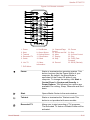
Figure 2-10 Remote controller
2
3
1
5
6
4
7
9
10
8
11
12
13
14
15
17
16
18
19
20
21
22
23
24
25
1. Power
8. Red Button
2. Start
3. Teletext
4. Recorded TV
5. Guide
9. Green Button
10.Yellow Button
11. Blue Button
12. Back
6. Live TV
13. More
Information
14. Channel/Page
Control
15. Arrows and OK
16. Mute
17. Replay
18. Skip
19. Record
20. Pause
21.Stop
22. Volume Control
23. Play
24. FWD (Fast
Forward)
25. REW (Rewind)
7. DVD Menu
User's Manual
Power
Starts or terminates the operating system. This
button functions like the Power button of your
computer. By default, the Sleep Mode is
equivalent to the Power Off state of your
computer. To change the setting, click Start ->
Control Panel -> System and Security ->
Power Options. The following four options are
available: Do nothing, Sleep, Hibernate and Shut
down.
Start
Opens Media Center to the main window.
Teletext
Starts or terminates the Teletext mode.This
button is not provided with some models.
Recorded TV
Allows you to start recording of TV programs.
The Recorded TV feature of Media Center will be
activated.
2-14
Satellite P770/P775
User's Manual
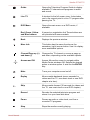
Guide
Opens the Television Program Guide to display
available TV channels and programs to watch
and record.
Live TV
A shortcut to the full screen view. It also takes
you to the current point in a live TV program after
pausing live TV.
DVD Menu
Opens the main menu on a DVD movie, if
available.
Red, Green, Yellow
and Blue buttons
It jumps to a registration link.These buttons are
not provided with some models.
Back
Displays the previous window.
More Info
This button has the same function as the
secondary (right) mouse button. Use it to display
more executable options.
Channel/Page up (+)
and down (-)
Changes the TV channel or moves a page up
and down, depending on the available options.
Arrows and OK
Arrows: Moves the cursor to navigate within
Media Center windows.OK: Selects the desired
action or window option. It acts like the ENTER
Key.
Mute
Turns your computer sound on/off.
Replay
Moves media backward (seven seconds for
videos and live TV, one music track or one DVD
chapter at a time).
Skip
Moves media forward (30 seconds for videos and
live TV, one music track or one DVD chapter).
Record
Records the selected television program and
stores it on your hand disk drive.
Pause
Pauses an audio or video track, and live or
recorded TV programs.
Stop
Stops the media currently playing.
2-15
Satellite P770/P775
Volume Control
Increases or decreases the volume while
watching TV, viewing DVD's or replaying CD's.
Play
Plays the selected media.
FWD (Fast Forward)
Moves the media (video, DVD, music, and so on)
forwards.
REW (Rewind)
Moves the media (video, DVD, music, and so on)
backwards.
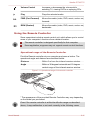
Using the Remote Controller
Some computers include a remote control unit, which allows you to control
some of your computer’s functions from a distant location.
The remote controller is designed specifically for this computer.
Some application programs may not support remote control functions.
Operational range of the Remote Controller
Point the Remote controller at your computer and press a button. The
operational angle and distance are described below.
Distance
Within 5 m from the infrared receiver window.
Angle
Within a 30 degree horizontal and 15 degree
vertical range of the infrared receiver window.
30˚
Figure 2-11 Operational range of the remote controller
30˚
5m
15˚
15˚
* The appearance of the provided Remote Controller may vary depending
on the model you purchased.
Even if the remote controller is within the effective range as described
above, it may malfunction or not work correctly in the following cases.
User's Manual
2-16
Satellite P770/P775
When an obstacle stands between the infrared receiver window of
your computer and the Remote Controller.
When direct sunlight or strong fluorescent light strikes the infrared
receiver window.
When the infrared receiver window or the infrared emission part of the
Remote Controller is dirty.
When other computers which use an infrared remote controller are
used near to your computer.
When a low battery condition is present.
Installing/Removing batteries
Be sure to install the provided batteries before using the remote controller.
Store the battery for the remote control beyond the reach of children.If a
child swallows a battery, this might result in choking. If it happens, contact
a doctor immediately.
Observe the following precautions when using the battery of the Remote
Controller.
Do not use batteries other than those specified.
Ensure that you insert the batteries with their polarities correctly
aligned (+ or -).
Do not recharge, heat, disassemble or short the battery, or put it into a
fire or flame.
Do not use a battery whose "recommended expiration date" has been
reached, or which is completely discharged.
Do not use different types of batteries or old and new batteries at the
same time.
Do not carry the battery together with metal necklaces, hairpins or
other metal accessories.
When storing or disposing of used batteries, make sure to put some
insulation tape on their terminals (+ and -) to avoid short-circuits.
If these precautions are not followed, heating, fluid leakage or explosion
may occur. This may cause burns or personal injury. If battery fluid gets on
your skin or clothes, wash immediately with clean water. If battery fluid gets
in your eyes, rinse your eyes with clean water immediately and see a
doctor. Do not touch the battery fluid on instruments or devices with bare
hands. Wipe off with a cloth or paper towel.
When the battery shipped with the Remote Controller is discharged,
replace it with commercially available CR2032 battery. Other types of
battery should not be used.
User's Manual
2-17
Satellite P770/P775
Installing and replacing the battery
1.
2.
Open the battery cover on the back side of the remote controller.
Slide the battery out of battery case.
Figure 2-12 Installing/Replacing the battery
MCE IR Remote Control
Model: G83C000BF116
1x 3V CR2032 Lithium battery
RC6
ir
Made in China
3.
4.
Insert the new battery in place. Be sure to place the batteries with
correct polarities. Push it forward to fit into the battery case.
Close the battery cover securely.
3D vision glass
Some models are provided with a 3D vision glass.
Please refer to NVIDIA® 3D VISION™ section in Chapter 3, Operating
Basics for more information on 3D vision.
Figure 2-13 3D vision glass
1
2
3
4
5
1. IR receiver
2. ON button
3. Indicator light
IR receiver
User's Manual
4. USB connection
5. Nose piece
Do not block this side of your glasses. It must be
in-line-of-sight with the IR emitter.
2-18
Satellite P770/P775
ON button
Press to turn glasses on. They will turn off
automatically after 10 minutes of inactivity.
Indicator light
The indicator light shows for 30 sec. after
switching glasses on.
Green: Up to 40 hours of battery life.
Red: Flashing red indicates two hours or
less battery life.
No light: Battery charge is exhausted.
USB connection
Connect the provided USB cable to charge
glasses (light flashes amber when charging.
Solid amber when fully charged).
Nose piece
Replace with one of three sizes for a comfortable
fit.
3D Vision glasses are designed to fit over most standard glasses.
The 3D Vision glasses are not prescription eyewear, sunglasses, nor a
protective goggle. Do not use the glasses for any general eyewear
purposes (e.g., driving, reading, protection from sunlight or ultraviolet light,
etc.) as such use may result in injury.
Internal Hardware Components
This section describes the internal hardware components of your computer.
The actual specifications may vary depending on the model you
purchased.
CPU
The processor type varies depending on model.
To check which type of processor is included in
your model, open the TOSHIBA PC Diagnostic
Tool Utility by clicking Start -> All Programs ->
TOSHIBA -> Utilities -> PC Diagnostic Tool.
Legal Footnote (CPU)
For more information regarding CPU, please refer to the Legal Footnotes
section in Appendix C.
User's Manual
2-19
Satellite P770/P775
Hard Disk Drive or
Solid State Drive
The size of the hard disk drive varies depending
on the model.
To check which type of HDD/SSD is included in
your model, open the TOSHIBA PC Diagnostic
Tool Utility by clicking Start -> All Programs ->
TOSHIBA -> Utilities -> PC Diagnostic Tool.
Two HDD computer models are available, a
model with a single hard disk drive and a model
with two hard disk drives.
Please note that part of the hard disk's overall
capacity is reserved as administration space.
In this manual, the word "HDD" or "Hard disk drive" also refers to the
SSD unless otherwise stated.
SSD is a large-capacity storage media which uses Solid-State
Memory in place of a magnetic disk of the hard disk.
Under certain unusual conditions of prolonged non-use and/or exposure to
high temperatures, the SSD may be vulnerable to data retention errors.
Legal Footnote (Hard Disk Drive (HDD) Capacity)
For more information regarding Hard Disk Drive (HDD) Capacity, please
refer to the Legal Footnotes section in Appendix C.
RTC battery
The internal RTC battery backs up the Real Time
Clock (RTC) and calendar.
Video RAM
The memory in a computer's graphics adaptor,
used to store the image displayed on a bitmap
display.
The amount of Video RAM available is
dependent on the computer's system memory.
Start -> Control Panel -> Appearance and
Personalization -> Display -> Adjust
resolution.
The amount of Video RAM can be verified by
clicking the Advanced settings button in the
Screen Resolution window.
Legal Footnote (Memory (Main System))
For more information regarding Memory (Main System), please refer to the
Legal Footnotes section in Appendix C.
User's Manual
2-20
Satellite P770/P775
Display controller
The display controller interprets software
commands into hardware commands that turn
particular parts on the screen on or off.
The display controller also controls the video
mode and uses industry standard rules to govern
the screen resolution and the maximum number
of colors that can be displayed at any one time.
Therefore, software written for a given video
mode will run on any computer that supports that
mode.
Due to the display panel's increased resolution, lines may appear broken in
when displaying images in full-screen text mode.
Graphics controller
The graphics controller maximizes display
performance.
Legal Footnote (Graphics Processing Unit ("GPU"))
For more information regarding Graphics Processing Unit ("GPU"), please
refer to the Legal Footnotes section in Appendix C.
Intel® Display Power Saving Technology
Intel GPU model may include the Display Power Saving Technology
feature that can save the computer's power consumption by optimizing
picture contrast on the internal LCD.
This feature can be used if the computer is:
running under battery mode
using the internal LCD display only
The Display Power Saving Technology feature is enabled at factory default.
If you want to disable the feature, you can disable it.
The Display Power Saving Technology feature can be disabled in the Intel®
Graphics and Media Control Panel.
You can access this control panel in one of the following ways:
Click Start -> Control Panel. Select Large icons or Small icons in
View by, and then click Intel(R) Graphics and Media.
Right-click on the desktop and click Graphics Properties....
In this control panel:
1.
2.
3.
4.
User's Manual
Click Power.
Select On battery from the drop-down menu in Power Source.
Clear the Display Power Saving Technology check box.
Click OK.
2-21
Satellite P770/P775
If you want to enable this feature, under the conditions mentioned above,
select the Display Power Saving Technology check box.
Graphics Control
Some NVIDIA graphics models may include NVIDIA® Optimus™
technology feature.
NVIDIA® Optimus™ technology intelligently optimizes notebook
performance by seamlessly switching between a discrete NVIDIA GPU for
great graphics performance and an Intel integrated graphics chip for
sustained battery life. Switching is automatic and does not require the user
to reboot the computer.
In the Manage 3D Settings menu of NVIDIA Control Panel, you can change
the global 3D settings and create overrides for specific programs. The
overrides will be used automatically each time the specified programs are
launched.
Please use the default setting for NVIDIA Optimus technology.
If the program does not run normally after the setting has been
changed, please restore the program to the default setting.
If the program does not run normally, please restore the Preferred
graphics processor to the default setting.
When you use some video playback programs to play video files, the
preferred graphics processor in "Program Settings" tab can not be
changed to the graphics other than "Integrated Graphics".
To access the Program Settings, click "NVIDIA Control Panel" ->
"Manage 3D settings" -> "Program Settings".
To launch the NVIDIA Control Panel, Click Start -> Control Panel. Select
Large icons or Small icons in View by, and then click NVIDIA Control
Panel.
For more information about the NVIDIA Control Panal system, please refer
to the NVIDIA Control Panel Help. To access it, click Help from the main
menu and then select NVIDIA Control Panel Help.
On Optimus models, two kinds of Display Drivers are installed: “Intel® HD
Graphics Driver” and “NVIDIA Graphics Driver XXX.XX”.
Do not uninstall the display driver from “Uninstall Program” in the Control
Panel.
If you have to uninstall the display driver, please follow the steps below:
1. Uninstall “NVIDIA Graphics Driver XXX.XX”.
2. Then uninstall “Intel® HD Graphics Driver”.
User's Manual
2-22
Satellite P770/P775
Chapter 3
Operating Basics
This chapter describes the basic operations of your computer, highlights
the precautions that should be taken when using it.
Using the Touch Pad
To use the Touch Pad, simply touch and move your fingertip across it in
the direction you want the on-screen pointer to go.
Figure 3-1 Touch Pad and Touch Pad control buttons
1
2
3
1. Touch Pad ON/OFF button
2. Touch Pad
3. Touch Pad control buttons
Press Touch Pad ON/OFF button could enable or disable the Touch Pad
function.
The two buttons below the Touch Pad are used like the buttons on a
standard mouse - press the left button to select a menu item or to
manipulate text or graphics designated by the pointer, and press the right
button to display a menu or other function depending on the software you
are using.
You can also tap the Touch Pad to perform functions similar to those of the
left button on a standard mouse.
Click: Tap once
Double-click: Tap twice
Drag and drop: Tap to select the item(s) you want to move, leave your
finger on the Touch Pad after the second tap and then move the item(s) to
their new destination.
User's Manual
3-1
Satellite P770/P775
Touch pad gesture
Please refer to the touch pad settings in mouse properties.
The Keyboard
The computer’s keyboard layouts are compatible with a 104/105-key
enhanced keyboard - by pressing some keys in combination, all of the
104/105-key enhanced keyboard functions can be performed on the
computer.
The number of keys available on your keyboard will depend on which
country/region your computer is configured for, with keyboards being
available for numerous languages.
In use there are five different types of keys, specifically typewriter keys,
function keys, soft keys, Hot keys and Windows special keys.
Never remove the key caps on your keyboard. Doing so could cause
damage to the parts under the key caps.
Keyboard indicators
The following figures show the positions of the CAPS LOCK indicator and
the NUM LOCK indicator which show the following conditions:
When the CAPS LOCK indicator glows, the keyboard will produce
capitals when any letter is typed.
When the NUM LOCK indicator glows, the ten key allows you to enter
numbers.
Figure 3-2 Keypad indicators
2
1
1. CAPS LOCK indicator
User's Manual
2. NUM LOCK indicator
CAPS LOCK
This indicator glows green when letter keys are
locked into their uppercase format.
NUM LOCK
When the NUM LOCK indicator glows, you can
use the number keys on the keyboard for number
entry.
3-2
Satellite P770/P775
Function keys: F1 … F9
The function keys (not to be confused with the special FN key) are the nine
keys at the top of your keyboard - these keys function differently from other
keys.
F1 through F9 are called function keys because they execute programmed
functions when pressed and, when used in combination with the FN key,
those keys marked with icons also execute specific functions on the
computer.
Soft keys: FN key combinations
The FN (function) is used in combination with other keys to form soft keys.
Soft keys are key combinations that enable, disable or configure specific
features.
Please note that some software may disable or interfere with soft-key
operations, and that the soft-key settings are not restored when the
computer returns from Sleep Mode.
Hot key functions
Hot key functions let you enable or disable certain features of the
computer. The Hot key functions can be performed using either the Hot
Key Cards or by pressing the associated Hot keys.
Hot Key Cards
The Hot Key Cards are normally hidden from view. The Cards appear
when you press the FN key.
To use the Hot Key Cards:
1.
2.
Press and hold the FN key. The TOSHIBA Cards appear along the top
of the screen.
Select the desired option.
3.
The selected Card is displayed full-size with its available options
below it. All other Cards are again hidden from view.
Click the desired option.
To use a Hot Key Card using a hot key:
1.
2.
3.
User's Manual
Press and hold the FN key.
Press the hot key associated with the desired function. The associated
hot key card appears at the top of the screen with its available options
below it.
To cycle through the displayed options, hold down FN and press the
hot key repeatedly. Release the FN key when the desired option is
selected.
3-3
Satellite P770/P775
For more information, please refer to the TOSHIBA Flash Cards Help file.
To access this help, click Start -> All Programs -> TOSHIBA -> Utilities > Flash Cards - Help.
Hot keys
This section describes the associated functions of the hot keys.
Mute
Pressing FN + ESC turns the volume on and off.
Lock
Pressing FN + F1 enters ''Lock computer mode''. To restore your
desktop, you need to log on again.
Power Plan
Pressing FN + F2 changes the power settings.
Sleep
Pressing FN + F3 switches the system to Sleep Mode.
Hibernate
Pressing FN + F4 switches the system to Hibernation Mode.
Output
Pressing FN + F5 changes the active display device.
To use a simultaneous mode, you must set the resolution of the internal
display panel to match the resolution of the external display device.
Brightness Down
Pressing FN + F6 decreases the computer's display panel brightness
in individual steps.
Brightness Up
Pressing FN + F7 increases the computer's display panel brightness in
individual steps.
Wireless
Pressing FN + F8 switches the active wireless devices.
If no wireless communication device is installed, no dialog box will appear.
Touch Pad
Pressing FN + F9 enables or disables the Touch Pad.
Zoom (Display resolution)
Pressing FN + Space changes the display resolution.
ODD
Pressing FN + TAB ejects the disc tray.
Reduce
Pressing FN + 1 reduces the icon size on the desktop or the font sizes
within one of the supported application windows.
Enlarge
Pressing FN + 2 enlarges the icon size on the desktop or the font
sizes within one of the supported application windows.
User's Manual
3-4
Satellite P770/P775
Volume down
Pressing FN + 3 decreases the volume in increment.
Volume up
Pressing FN + 4 increases the volume in increment.
Zoom
Pressing FN + Space changes the display resolution.
Keyboard illumination (supported with some models)
Pressing FN + Z turns the illumination of the keyboard on and off.
FN Sticky key
You can use the TOSHIBA Accessibility Utility to make the FN key sticky,
that is, you can press it once, release it, and then press an "F Number"
key. To start the TOSHIBA Accessibility utility, click Start -> All Programs
-> TOSHIBA -> Utilities -> Accessibility.
Windows special keys
The keyboard provides two keys that have special functions in Windows,
the Windows Start Button key activates the Start menu while the
application key has the same function as the secondary (right) mouse
button.
This key activates the Windows Start menu.
This key has the same function as the secondary (right) mouse button.
Generating ASCII characters
Not all ASCII characters can be generated using normal keyboard
operation, but you are able to generate these characters using their
specific ASCII codes.
1.
2.
3.
Hold down ALT with the overlay on or ALT + FN with overlay off.
Using the overlay keys, type the ASCII code of the character you
require.
Release ALT or ALT + FN - the ASCII character will appear on the
display screen.
NVIDIA® 3D VISION™
NVIDIA® 3D Vision™, which is provided with some models, enables 3D
Vision feature on your computer.
Some individuals may experience health-related complications when
exposed to certain 3D images. Parents should monitor and/or supervise
their children’s use of 3D Vision™. If you or your child should experience
any problem, immediately stop using 3D Vision™ and consult a physician.
User's Manual
3-5
Satellite P770/P775
Carefully read the "Health and Safety Information" that is shown during 3D
Vision setup and take the "Vision Test" in the setup wizard before you or
your child use 3D Vision™. If you see excessive flicker in your peripheral
vision, change the refresh rate of your display.
Detail usage of the 3D Vision, please refer to "3D Vision™ QUICK START
GUIDE" in 3D Vision set.
3D Vision can work with internal LCD or external 3D devices connected via
an HDMI output only. When you connect external display that doesn't
support 3D, please disable 3D Vision.
Setup 3D Vision
Before starting 3D Vision Setup, Network settings should be done to see
some information at Web site.
Follow the steps as detailed below to setup 3D Vision and don’t execute
other operation while running 3D Vision Setup.
1.
2.
3.
4.
5.
Launch the 3D Vision Setup by clicking Start -> All Programs ->
NVIDIA Corporation -> 3D Vision -> Enable 3D Vision. The Setup
Wizard takes you through setting up your display, and configuring the
glasses.
Select Next to begin the Setup Wizard. The Wizard is very intuitive
and easy to follow.
Turn on your glasses.
Test your hardware setup.
This screen is used to verify that your hardware is properly configured
to view stereoscopic 3D effects and that your glasses and emitter are
functioning properly. Follow the directions on the screen.
Do you notice flicker in your peripheral vision when looking
through the glasses lens?
If you are seeing excessive flicker in your peripheral vision, this screen
allows you to change the refresh rate of your display. When you select
Yes, the refresh rate option is displayed. So please select suitable
refresh rate on your environment. When you select No, 120Hz is
selected.
User's Manual
3-6
Satellite P770/P775
6.
Verify your ability to view stereoscopic 3D content.
Now that we know your hardware can interpret stereoscopic 3D
content, we need to make sure you can. Inability to see the Medical
Test image in stereoscopic 3D may be due to:
- Adjustments needed for improved stereoscopic 3D viewing. Select
Back and verify that you can see stereoscopic 3D on the test your
hardware setup screen.
- Visual problems. Refer to the "Health and Safety Information".
Consult a physician if you suspect a physical problem seeing
stereoscopic 3D.
After reading "Health and Safety Information", check I have read and
understand the "Health and Safety Information". (You can return to 3D
Vision setup screen by selecting "GeForce 3D Vision Setup Wizard"
on Taskbar).
If you fail the medical test and can not see the test image, NVIDIA
recommends that you do not use 3D Vision. Please consult your eye doctor
for any possible vision anomaly. 3D Vision should not be enabled.
7.
Setup complete.
Congratulations! You are now ready to see in stereoscopic 3D! For
detailed information on the NVIDIA Control Panel, refer to the 3D
Vision User Guide available from http://www.nvidia.com/object/3dvision-main.html. After finishing the Setup, a slideshow of 3D game
images will start as default. Press Esc key to finish the slideshow.
Optical disc drives
The computer may be installed with a DVD Super Multi drive, Blu-ray™
Combo drive or Blu-ray™ Writer drive. When the computer is accessing an
optical disc, an indicator on the drive glows.
Formats
The drives support the following formats.
DVD Super Multi drive
The drive supports the following formats: CD-ROM, DVD-ROM, DVDVideo, CD-DA, CD-Text, Photo CD™ (single/multi-session), CD-ROM
Mode 1/Mode 2, CD-ROM XA Mode 2 (Form1, Form2), Enhanced CD (CDEXTRA), Addressing Method 2, DVD-R, DVD-RW, DVD+R, DVD+RW,
DVD-RAM, DVD-R DL (Format1), DVD+R DL.
Blu-ray™ Combo drive
In addition to the above formats, Blu-ray™ Combo drive supports BD-ROM
and BD-ROM DL.
User's Manual
3-7
Satellite P770/P775
Blu-ray™ Writer drive
In addition to the above formats, Blu-ray™ Writer drive supports BD-R, BDR DL, BD-RE and BD-RE DL.
Some types and formats of DVD-R DL and DVD+R DL discs may be
unreadable.
Using optical disc drives
The full-size drive provides high-performance execution of disc based
programs. You can run either 12 cm (4.72") or 8 cm (3.15") discs without
an adaptor.
Use the DVD playback application to view DVD-Video discs.
For precautions on writing to discs, refer to the Writing CD/DVD/Blu-ray™
discs section .
To load discs, follow the steps as detailed below:
1.
2.
When the computer’s power is on, press the eject button to open the
disc tray slightly.
Grasp the disc tray gently and pull until it is fully opened.
Figure 3-5 Pressing the eject button and pulling the disc tray open
1
2
1. Eject button
User's Manual
2. Disc tray
3-8
Satellite P770/P775
3.
Lay the disc, label side up, in the disc tray.
Figure 3-6 Inserting a disc
1
1. Laser lens
When the disc tray is fully opened, the edge of the computer will cover
slightly over the disc tray. Therefore, you will need to turn the disc at an
angle when you place it in the disc tray. After seating the disc, however,
make sure it lies flat.
Do not touch the laser lens or any portion of its surrounding casing as
this could cause misalignment.
Prevent foreign objects from entering the drive. Check the surface of
the disc tray, especially the area behind the front edge of the disc tray,
to make sure there are no such objects before closing the drive.
4.
5.
Press gently at the center of the disc until you feel it click into place.
The disc should lie below the top of the spindle, flush with the spindle
base.
Push the center of the disc tray to close it. Press gently until it locks
into place.
If the disc is not seated properly when the disc tray is closed, the disc might
be damaged. Also, the disc tray might not open fully when you press the
eject button.
Removing discs
To remove the disc, follow the steps as detailed below:
Do not press the eject button while the computer is accessing the media
drive. Wait for the optical disc drive indicator to go out before you open the
disc tray. Also, if the disc is spinning when you open the disc tray, wait for it
to stop before you remove it.
User's Manual
3-9
Satellite P770/P775
1.
To pop the disc tray partially open, press the eject button. Gently pull
the disc tray out until it is fully opened.
When the disc tray pops open slightly, wait a moment to make sure the
disc has stopped spinning before pulling the disc tray fully open.
2.
3.
The disc extends slightly over the sides of the disc tray so you can
grasp it. Gently lift out the disc.
Push the center of the disc tray to close it. Press gently until it locks
into place.
How to remove disc when the disc tray will not open
Pressing the eject button will not open the disc tray when the computer
power is off. If the power is off, you can open the disc tray by inserting a
slender object (about 15 mm) such as a straightened paper clip into the
eject hole near the eject button.
Figure 3-7 Manual release with the eject hole
Φ1.0mm
1
1. Eject hole
Turn off the power before you use the eject hole. If the disc is spinning
when you open the disc tray, the disc could fly off the spindle and cause
injury.
Writable discs
This section describes the types of writable discs. Check the specifications
of your drive to see the types of discs it can write. Use TOSHIBA Disc
Creator and Corel Digital Studio to write compact discs.
CDs
CD-R discs can be written only once. The recorded data cannot be
erased or changed.
CD-RW discs including multi speed CD-RW discs, high-speed CD-RW
discs and ultra-speed CD-RW discs can be recorded more than once.
DVDs
DVD-R, DVD+R, DVD-R DL and DVD+R DL discs can be written only
once. The recorded data cannot be erased or changed.
User's Manual
3-10
Satellite P770/P775
DVD-RW, DVD+RW and DVD-RAM discs can be recorded more than
once.
Blu-ray™ discs
BD-R, BD-R DL discs can be written only once. The recorded data
cannot be erased or changed.
BD-RE, BD-RE DL discs can be recorded more than once.
Writing CD/DVD/Blu-ray™ discs
The TOSHIBA Disc Creator and Corel Digital Studio are provided as writing
software with this computer.
Corel Digital Studio can be used to write files in video format. TOSHIBA
Disc Creator can be used to write data.
You can use the DVD Super Multi drive or Blu-ray™ Combo drive to write
data to either CD-R, CD-RW, DVD-R, DVD-R DL, DVD-RW, DVD+R, DVD
+R DL, DVD+RW or DVD-RAM discs.
You can use the Blu-ray™ Writer drive to write data to either CD-R, CDRW, DVD-R, DVD-R DL, DVD-RW, DVD+R, DVD+R DL, DVD+RW, DVDRAM, BD-R, BD-R DL, BD-RE or BD-RE DL discs.
When writing information to media using an optical drive, you should
always ensure that you connect the AC adaptor to a live power socket. It is
possible that, if data is written while powered by the battery pack, the write
process may sometimes fail due to low battery power - in these instances
data loss may occur.
Important message
Before you write or rewrite to any of the media supported by the DVD
Super Multi Drive or Blu-ray™ Combo/Blu-ray™ Writer drive, please read
and follow all of the setup and operating instructions in this section. If you
fail to do so, you may find that the DVD Super Multi drive or Blu-ray™
Combo/Blu-ray™ Writer drive may not function properly, and you may fail
to write or rewrite information successfully - this may cause you to either
lose data or incur other damage to the drive or media.
Disclaimer
TOSHIBA does not bear responsibility for the following:
Damage to any disc that may be caused by writing or rewriting with
this product.
Any change or loss of the recorded contents of media that may be
caused by writing or rewriting with this product, or for any business
profit loss or business interruption that may be caused by the change
or loss of the recorded contents.
User's Manual
3-11
Satellite P770/P775
Damage that may be caused by using third party equipment or
software.
Given the technological limitations of current optical disc writing drives, you
may experience unexpected writing or rewriting errors due to disc quality or
problems with hardware devices. In view of this, it is good practice to make
two or more copies of important data, in case of any undesired change or
loss of the recorded contents.
Before writing or rewriting
Based on TOSHIBA's limited compatibility testing, we suggest the
following manufacturers of disc media, however, it must be noted that
disc quality can affect write or rewrite success rates. Please also be
aware that in no event does TOSHIBA guarantee the operation,
quality or performance of any disc.
CD-R:
TAIYO YUDEN CO., Ltd.
MITSUBISHI KAGAKU MEDIA CO., LTD.
CD-RW: (Multi-Speed, High-Speed and Ultra-Speed)
MITSUBISHI KAGAKU MEDIA CO., LTD.
DVD-R:
DVD Specifications for Recordable Disc for General Version 2.0
TAIYO YUDEN Co.,Ltd. (for 8x and 16x speed media)
MITSUBISHI KAGAKU MEDIA CO., LTD. (for 8x and 16x speed media)
Hitachi Maxell, Ltd. (for 8x and 16x speed media)
DVD-R DL:
MITSUBISHI KAGAKU MEDIA CO., LTD. (for 4x and 8x speed media)
DVD-R for Labelflash:
FUJIFILM CORPORATION (for 16x speed media)
DVD+R:
MITSUBISHI KAGAKU MEDIA CO., LTD. (for 8x and 16x speed media)
TAIYO YUDEN CO., Ltd. (for 8x and 16x speed media)
DVD+R DL:
MITSUBISHI KAGAKU MEDIA CO., LTD. (for 8x speed media)
DVD+R for Labelflash:
FUJIFILM CORPORATION (for 16x speed media)
User's Manual
3-12
Satellite P770/P775
DVD-RW:
DVD Specifications for Recordable Disc for Version 1.1 or version
1.2
Victor Company of Japan, Ltd. (JVC) (for 2x, 4x and 6x speed media)
MITSUBISHI KAGAKU MEDIA CO., LTD. (for 2x, 4x and 6x speed
media)
DVD+RW:
MITSUBISHI KAGAKU MEDIA CO., LTD. (for 4x and 8x speed media)
DVD-RAM: (DVD Super Multi drive only)
DVD Specifications for DVD-RAM Disc for Version 2.0, Version 2.1 or
Version 2.2
Panasonic Corporation (for 3x and 5x speed media)
Hitachi Maxell, Ltd. (for 3x and 5x speed media)
BD-R:
Panasonic Corporation
BD-R DL:
Panasonic Corporation
BD-RE:
Panasonic Corporation
BD-RE DL:
Panasonic Corporation
Some types and formats of DVD-R DL and DVD+R DL discs may be
unreadable.
DISC created in DVD-R DL format4 (Layer Jump Recording) cannot
be read.
When writing or rewriting
Please observe the following points while you write or rewrite data to a
media:
Always copy data from the hard disk drive to the optical media - do not
use the cut-and-paste function as the original data will be lost if there
is a write error.
User's Manual
3-13
Satellite P770/P775
Do not perform any of the following actions:
Change users in the Operating Systems.
Operate the computer for any other function, including such tasks
as using a mouse or Touch Pad, or closing/opening the display
panel.
Start a communication application.
Apply impact or vibration to the computer.
Install, remove or connect external devices, including such items
as a memory media card, USB device, external monitor or an
optical digital device.
Use the audio/video control button to reproduce music or voice.
Open the optical disc drive.
Do not use shut down, log off, Sleep Mode or Hibernation Mode
functions while writing or rewriting.
Make sure that the write/rewrite operation is completed before going
into either Sleep Mode or Hibernation Mode (You can remove an
optical media on the optical disc drive after writing is completed).
If the media is of poor quality, or is dirty or damaged, writing or
rewriting errors may occur.
Set the computer on a level surface and avoid places subject to
vibration such as airplanes, trains or cars. In addition, do not use the
computer on an unstable surface such as a stand.
Keep mobile phones and other wireless communication devices away
from the computer.
TOSHIBA Disc Creator
Please be aware of the following limitations when you use the TOSHIBA
Disc Creator:
DVD Video cannot be created using TOSHIBA Disc Creator.
DVD Audio cannot be created using TOSHIBA Disc Creator.
You cannot use TOSHIBA Disc Creator's "Audio CD" function to
record music to DVD-R, DVD-R DL, DVD-RW, DVD+R, DVD+R DL or
DVD+RW media.
Do not use the "Disc Backup" function of TOSHIBA Disc Creator in
order to copy DVD Video or DVD-ROM material that has copyright
protection.
DVD-RAM discs cannot be backed up using the "Disc Backup"
function of TOSHIBA Disc Creator.
You cannot back up CD-ROM, CD-R or CD-RW media to DVD-R,
DVD-R DL or DVD-RW media using the "Disc Backup" function of
TOSHIBA Disc Creator.
You cannot back up CD-ROM, CD-R or CD-RW media to DVD+R,
DVD+R DL or DVD+RW media using the "Disc Backup" function of
TOSHIBA Disc Creator.
User's Manual
3-14
Satellite P770/P775
You cannot back up DVD-ROM, DVD Video, DVD-R, DVD-R DL,
DVD-RW, DVD+R, DVD+R DL or DVD+RW to CD-R or CD-RW media
using the "Disc Backup" function of TOSHIBA Disc Creator.
TOSHIBA Disc Creator cannot record in packet format.
You might not be able to use the "Disc Backup" function of TOSHIBA
Disc Creator to back up a DVD-R, DVD-R DL, DVD-RW, DVD+R,
DVD+R DL or DVD+RW disc that was made with other software on a
different optical media recorder.
If you add data to a DVD-R, DVD-R DL, DVD+R or DVD+R DL disc
that you have already recorded to, you might not be able to read the
added data under some circumstances. For example, it cannot be
read under 16-bit operating systems, such as Windows 98SE and
Windows Me, while in Windows NT4 you will need Service Pack 6 or
later, and in Windows 2000, you will need Service Pack 2. In addition
to this, some DVD-ROM and DVD-ROM / CD-R/RW drives cannot
read this added data regardless of the operating system.
TOSHIBA Disc Creator does not support recording to DVD-RAM discs
- to achieve this you should use Windows Explorer or another similar
utility.
When you back up a DVD disc, be sure that the source drive supports
recording to DVD-R, DVD-R DL, DVD-RW, DVD+R, DVD+R DL or
DVD+RW media - if this is not the case then the source disc might not
be backed up correctly.
When you back up a DVD-R, DVD-R DL, DVD-RW, DVD+R, DVD+R
DL or DVD+RW disc, be sure to use the same type of disc.
You cannot partially delete any data written to a CD-RW, DVD-RW or
DVD+RW disc.
Data Verification
To verify that data has been written or rewritten correctly to a data CD/DVD
you should follow the steps below before you begin the write/rewrite
process:
1.
2.
Click Start -> All Programs -> TOSHIBA -> CD&DVD Applications > Disc Creator to access the TOSHIBA Disc creator utility.
Display the setting dialog box by one of the following two steps:
Click the Recording settings button (
toolbar in the Data CD/DVD mode.
3.
4.
5.
) for writing on the main
Select Settings for Each Mode -> Data CD/DVD in the Settings
menu.
Mark the Verify Written Data check box.
Select File Open or Full Compare mode.
Click the OK button.
How to learn more about TOSHIBA Disc Creator
Please refer to the Help files for additional TOSHIBA Disc Creator
information.
User's Manual
3-15
Satellite P770/P775
Using Corel Digital Studio for TOSHIBA
This feature is supported with some models.
How to make a Labelflash DVD
Simplified steps for making a Labelflash DVD:
1.
Insert a Labelflash disc in optical disc drive.
Set PRINTING SIDE for underside.
2.
3.
Click Start -> All Programs -> Corel Digital Studio for TOSHIBA ->
Corel Digital Studio for TOSHIBA -> Create.
Click Create Disc Label.
How to make a DVD-Video or a Blu-ray Disc™ Movie
Simplified steps for making a DVD-Video or a Blu-ray Disc™ movie from
adding video source:
1.
2.
3.
4.
5.
6.
7.
8.
9.
Click Start -> All Programs -> Corel Digital Studio for TOSHIBA ->
Corel Digital Studio for TOSHIBA to launch Corel Digital Studio.
Insert a DVD-R, DVD+R, DVD-RW, DVD+RW, BD-R or BD-RE disc in
optical disc drive.
Find a source video and drag it onto Media Tray.
Click Burn -> Video Disc.
Select DVD or Blu-ray in Select disc.
Select DVD-Video or BDMV in Project format.
Input project name and select a style.
Click the Go to menu editing button.
Click the Burn button.
How to learn more about Corel Digital Studio
Please refer to the Help and Manual files for additional Corel Digital Studio
information.
Opening the Corel Digital Studio Manual
Press F1 key when Corel Digital Studio is launched.
Important information for use
Note the following limitations when you write Video DVD or Blu-ray Disc™
movie, file convert or playback files.
Editing digital video
Log in with Administrator rights to use Corel Digital Studio.
Make sure that your computer is running on AC power when using
Corel Digital Studio.
User's Manual
3-16
Satellite P770/P775
Operate the computer at Full Power. Do not use power-saving
features.
While you are editing DVD, you can display preview. However, if
another application is running. The preview might not display properly.
Corel Digital Studio cannot edit or play copy protected content.
Do not enter Sleep or Hibernation Mode while using Corel Digital
Studio.
Do not operate Corel Digital Studio immediately after turning on the
computer. Please wait until all Disc Drive activity has stopped.
CD recorder, DVD-Audio, Video CD functions are not supported in this
version.
Do not run software like a screen saver because it can put a heavy
load on the CPU.
Do not support mp3 decode and encode.
DVD-VR format is not support in this version.
Before recording the video to DVD or Blu-ray Disc™
When you record DVD disc or Blu-ray Disc™, please use only discs
recommended by the Drive manufacturer.
Do not set the working drive to a slow device like a USB1.1 hard disk
drive or it will fail to write DVD or Blu-ray Disc™.
Do not perform any of the following actions:
Operate the computer for any other function, including using a mouse
or Touch Pad, or closing/opening the display panel.
Bump or cause vibration to the computer.
Use the Mode control button and Audio/Video control button to
reproduce music or voice.
Open the DVD/Blu-ray™ drive.
Install, remove or connect external devices, including the following:
memory media card, USB device, external display, optical digital
devices.
Please verify your disc after recording important data.
Not support to output VCD and SVCD format.
Force eject disc.
About recorded DVDs and Blu-ray™ discs
Some DVD-ROM drives for personal computers or other DVD players
may not be able to read DVD-R/+R/-RW/+RW/-RAM discs.
When playing your recorded DVD on your computer, please use the
TOSHIBA VIDEO PLAYER software application.
When playing your recorded Blu-ray Disc™ on your computer, please
use the WinDVD BD for TOSHIBA software application.
If you use an over-used rewritable disc, the full formatting might be
locked. Please use a brand new disc.
User's Manual
3-17
Satellite P770/P775
TOSHIBA VIDEO PLAYER
Please be aware of the following limitations when you use the TOSHIBA
VIDEO PLAYER:
Notes on use
This software can only be used on Windows 7.
TOSHIBA VIDEO PLAYER software is supported for playback of
DVD-Video and DVD-VR.
Frame dropping, audio skipping or out of sync audio and video may
occur during playback of some DVD-Video titles.
Close all other applications when using the TOSHIBA VIDEO
PLAYER. Do not open any other applications or carry out any other
operations during video playback. Playback may stop or not function
properly in some situations.
Unfinalized DVDs created on home DVD recorders may not be
playable on the computer.
Use DVD-Video discs with a region code which is either "the same as
the factory default setting" (if applicable) or "ALL".
Do not playback video while watching or recording television programs
using other applications. Doing so may cause DVD-Video playback or
television program recording errors. In addition, if prescheduled
recording starts during DVD-Video playback it may cause DVD-Video
playback or television program recording errors. Please view DVDVideo during times when there is no recording prescheduled.
The resume function cannot be used with some discs on the
TOSHIBA VIDEO PLAYER.
It is recommended the AC adaptor be connected when playing video.
Power saving features may interfere with smooth playback. When
playing DVD-Video using battery power, set the Power Options to
"Balance".
The screen saver is disabled during video playback using the
TOSHIBA VIDEO PLAYER. The computer will not automatically go
into Hibernation, Sleep, or shut-down mode.
Do not configure the Display automatic power off function to run while
the TOSHIBA VIDEO PLAYER is running.
Do not switch to Hibernation or Sleep Mode when running the
TOSHIBA VIDEO PLAYER.
Do not lock the computer using the Windows logo (
) + L keys or
the FN + F1 keys when running the TOSHIBA VIDEO PLAYER.
The TOSHIBA VIDEO PLAYER does not have a parental control
function.
In order to protect copyrights, the Windows Print Screen function is
disabled when TOSHIBA VIDEO PLAYER is running.
User's Manual
3-18
Satellite P770/P775
(Print Screen functions are disabled even when running other
applications besides TOSHIBA VIDEO PLAYER and when TOSHIBA
VIDEO PLAYER is minimized.) Please close the TOSHIBA VIDEO
PLAYER to use the Print Screen function.
Carry out the installation/uninstallation of the TOSHIBA VIDEO
PLAYER under a user account with administrator rights.
Do not change Windows Users while TOSHIBA VIDEO PLAYER is
running.
For some DVD-Video discs, using the control window to change the
audio track will also change the subtitle track.
If you see the screen blinking while playing DVD with subtitle on at
Media Player, please use TOSHIBA VIDEO PLAYER or Media Center
to play DVD.
Display Devices & Audio
TOSHIBA VIDEO PLAYER will only run when "Colors" is set to "True
Color (32 bit)". Click Start -> Control Panel -> Appearance and
Personalization -> Display -> Adjust resolution, click "Advanced
settings", select "Monitor" tab, set "colors" to "True color (32 bit)".
If the DVD-Video image is not displayed on an external display or
television, stop the TOSHIBA VIDEO PLAYER, and change the
screen resolution. To change the screen resolution, click Start ->
Control Panel -> Appearance and Personalization -> Display ->
Adjust resolution. However, video cannot be output to some external
displays and televisions due to output or playback conditions.
When viewing DVD-Video on an external display or TV, change the
display device before playing. DVD-Video cannot be displayed
simultaneously (in clone mode) on both the computer's display panel
and an external display.
Do not change the screen resolution while running the TOSHIBA
VIDEO PLAYER.
Do not change the display device while running the TOSHIBA VIDEO
PLAYER.
3D playback feature
TOSHIBA VIDEO PLAYER has 3D playback function, which can playback
3D video content, and 2D home video content (DVD or video file) in 3D
using real-time 2Dto3D conversion.
Effect of 3D can be shown on an internal display (3D Vision model
only), or external 3D devices connected via an HDMI out put.
The 2Dto3D conversion function uses TOSHIBA's original algorithm to
apply a 3D effect to your own 2D videos. However, note that this
function does not provide the same video content as a video originally
provided in 3D, and does not create a new video in the 3D format but
only plays 2D videos in a 3D like mode.
User's Manual
3-19
Satellite P770/P775
The 2Dto3D conversion function is meant for the enjoyment of your
own 2D home video and other 2D contents you created, in 3D
according to your personal preferences.
The “TOSHIBA VIDEO PLAYER” is set by default in the 2D format. By
pressing the 2Dto3D conversion function button, you decide to
activate the 2Dto3D conversion function and therefore decide to watch
your 2D content in 3D. The “TOSHIBA VIDEO PLAYER” will not run
the 2Dto3D conversion function automatically. Please see the
warnings in this section as regard to potential copyright infringement
and confirm you have any necessary authorization.
The “TOSHIBA VIDEO PLAYER” is intended for playing DVD-Video,
DVD-VR and video files and for viewing 2D home video content in 3D.
The 3D playback of any video content not created by the user may
require the permission of third parties, where such content is protected
by copyright. The protection of intellectual property rights is essential
for Toshiba. In this respect, Toshiba underlines that the Player should
not be used in a manner infringing such rights. It is your responsibility
to ensure that you do not infringe any applicable intellectual property
laws when you decide to use the Player and, more specifically, the
2Dto3D conversion function of the “TOSHIBA VIDEO PLAYER”.
Some functions are not functionable during 3D playback. In such
cases, any corresponding buttons will be disabled.
You may experience some time lag if you perform any of the following
operations when the “Video Display Window” is at full-screen size.
Bring up windows such as [Right-Click Menu], [Settings Window],
[Title/Chapter Search], [File Select] or [Error Message].
Operate on Windows
Operate on other applications
Please make sure AC adapter is used when playing with the enabled
3D playback feature.
3D playback occurs only in full-screen size. When you enable 3D
playback, the “Video Display Window” automatically enlarges to
fullscreen size.
In order for 3D playback to work on external display/TV, you need a
3D enabled display/TV that has an HDCP complaint HDMI port.
The 3D effect differs among individuals.
Viewing 3D playback may cause discomfort. In this case, please stop
viewing and consult your doctor.
Please consider if it is suitable or a need for time limit before allowing
your child to watch a 3D content.
Depending on the lighting condition of your room, you may experience
some flickerings when you have the 3D glasses on.
Upconvert and 3D Playback functions cannot be used at the same
time. Switching to 3D playback while upconvert is running will cause
the upconvert function to switch off automatically.
Depending on the video content, it might not be able to playback in
3D.
User's Manual
3-20
Satellite P770/P775
Only Side-by-Side and Interleave 3D video formats are supported for
playback of 3D video content.
Starting TOSHIBA VIDEO PLAYER
Use the following procedure to start TOSHIBA VIDEO PLAYER.
1.
2.
Insert an DVD-Video in the optical disc drive while Windows® 7 is
running.
When an DVD-Video disc is set in the DVD drive (for models with DVD
drive), if the application selection screen appears, select Play DVD
movie (using TOSHIBA VIDEO PLAYER) to launch the TOSHIBA
VIDEO PLAYER.
Select Start -> All Programs -> TOSHIBA VIDEO PLAYER ->
TOSHIBA VIDEO PLAYER to start TOSHIBA VIDEO PLAYER.
Operating TOSHIBA VIDEO PLAYER
Notes on Using TOSHIBA VIDEO PLAYER.
Screen display and available features may vary amongst DVD-Videos
and scenes.
If the menu is opened in the Display Area using the Control window's
Top Menu or Menu buttons, touch pad and mouse menu operations
may not be able to be used.
Open TOSHIBA VIDEO PLAYER HELP
TOSHIBA VIDEO PLAYER features and instructions are also explained in
detail in "TOSHIBA VIDEO PLAYER HELP". Use the following procedure
to open "TOSHIBA VIDEO PLAYER HELP".
Click the "Help" button (
) in the Display Area.
Using WinDVD BD for TOSHIBA
Please be aware of the following limitations when you use WinDVD BD for
TOSHIBA:
Notes on use
“WinDVD BD for TOSHIBA” is for Blu-ray Disc™ playback only. DVD
playback is not supported. Please use “TOSHIBA VIDEO PLAYER” for
DVD playback.
Playback of high bit rate content may cause frame dropping, audio
skipping or decrease in computer performance.
Close all other applications before playing back Blu-ray Disc™. Do not
open any other applications or carry out any other operations during
Blu-ray Disc™ playback.
Do not switch to Hibernation or Sleep Mode when running the
“WinDVD BD for TOSHIBA”.
User's Manual
3-21
Satellite P770/P775
Because Blu-ray Disc™ playback operates according to programs
built into the content, operation methods, operation screens, sound
effects, icons and other features may vary from disc to disc. For more
information on these items refer to instructions included with content
or contact the content manufacturers directly.
Make sure to connect the computer's AC adapter when playing a Bluray Disc™.
“WinDVD BD for TOSHIBA” supports AACS (Advanced Access
Control System) copy protection technology. Renewal of the AACS
key integrated into this product is required for uninterrupted enjoyment
of Blu-ray Disc™. An Internet connection is required for renewal.
AACS key renewal is provided free of charge for 5 years after the
purchase of this product, however renewal beyond 5 years is subject
to conditions specified by the software provider, Corel Corporation.
Do not playback Blu-ray Disc™ while recording television programs
using “Windows Media Center” “My TV” or other applications. Doing
so may cause Blu-ray Disc™ playback or television program recording
errors. In addition, if pre-scheduled recording starts during Blu-ray
Disc™ Video playback it may cause Blu-ray Disc™ Video playback or
television program recording errors. Please view Blu-ray Disc™ Video
during times when there is no recording prescheduled.
While playing a BD-J title, keyboard shortcut is ineffective.
Resume play function cannot be used with some discs on “WinDVD
BD for TOSHIBA”.
The interactive function on Blu-ray™ discs may not work depending
on the contents or network situation.
Blu-ray™ drives and their associated media are manufactured
according to the specifications of three marketing regions. Region
codes can be set from WinDVD BD ([Region] tab in [Setup] dialogue).
When you purchase Blu-ray™ Video, make sure it matches your drive,
otherwise it will not play properly.
To playback video on an external display or TV using “WinDVD BD for
TOSHIBA”, use output devices like external displays or TV that have
HDCP supported HDMI port. The video cannot be displayed on an
external display or TV connected to the RGB connector.
The Blu-ray Disc™ movie can be played only on internal LCD displays
or external devices connected via an HDMI output. In Clone mode
(Dual View), WinDVD plays on a display which set to as the Primary
display and shows black screen on the other displays.
This product does not play HD DVD discs. Blu-ray™ discs with
highdefinition content are required for HD viewing.
3D playback feature
(Only some models)
WinDVD BD for TOSHIBA supports the playback of Blu-ray 3D™ discs on
external 3D display/TV using HDMI 1.4.
User's Manual
3-22
Satellite P770/P775
Before playback Blu-ray 3D™ discs, configure the 3D Playback.
1.
2.
3.
4.
Click Tools.
Select 3D Playback.
Check Prefer to play in 3D mode to enable 3D playback.
Specify display device information.
Monitor Type:
Choose the correct monitor type in the drop-down menu.
To play on external 3D enabled display/TV with HDMI, set the "HDMI
1.4 Video Output".
Display size:
Move the slider to adjust the size (in inches) of your computer.
Notes on playing Blu-ray 3D™
On NVIDIA Graphics models, Blu-ray 3D™ playback works only in full
screen size. When you play the Blu-ray 3D™, WinDVD automatically
resizes to full screen. When you switch WinDVD to window mode or
minimize it, playback will be stopped. If there’s any pop-up message,
WinDVD will be back to window mode.
WinDVD will use all available graphic hardware resources to display
3D video. On NVIDIA Graphics models, operations such as Setup,
Help, some function buttons and remote control functions will be
temporarily disabled.
WinDVD BD for TOSHIBA does not support 2Dto3D conversion
function. Please use “TOSHIBA VIDEO PLAYER” for 3D playback of
DVD or 3D video file.
The 3D effect differs among individuals.
Depending on the lighting condition of your room, you may experience
some flickerings when you have the 3D glasses on.
Viewing 3D playback may cause discomfort. In this case, please stop
viewing and consult your doctor.
Please consider if it is suitable or a need for time limit before allowing
your child to watch a 3D content.
The 3D effect can be shown on external 3D enabled display/TV that
supports HDMI 1.4.
To play the Blu-ray 3D™ on external 3D enabled display/TV, please
change the display mode to HDMI only (Projector only), and use the
3D glasses that come with your external 3D enabled display/TV.
When play the Blu-ray 3D™ on external display that does not support
3D function, clear “Prefer to play in 3D mode” check box in 3D
Playback properties of WinDVD BD for TOSHIBA.
Starting WinDVD BD for TOSHIBA
Use the following procedure to start “WinDVD BD for TOSHIBA”.
User's Manual
3-23
Satellite P770/P775
1.
2.
When a Blu-ray Disc™ is set in the Blu-ray™ drive, WinDVD BD for
TOSHIBA starts automatically.
Select Start -> All Programs -> Corel -> Corel WinDVD BD to start
"WinDVD BD for TOSHIBA".
Operating WinDVD BD for TOSHIBA
Notes on Using “WinDVD BD for TOSHIBA”.
1.
2.
Screen display and available features may vary amongst Blu-ray™
Videos and scenes.
If the menu is opened in the Display Area using the Control window's
Top Menu or Menu buttons, Touch Pad and mouse menu operations
may not be able to be used.
Open WinDVD BD for TOSHIBA HELP
WinDVD BD for TOSHIBA features and instructions are also explained in
detail in “WinDVD Help”. Use the following procedure to open “WinDVD
Help”.
Click the “Corel Guide” button (
) in the Display Area.
Wireless communications
The computer’s wireless communication function supports some wireless
communication devices.
Only some models are equipped with both Wireless LAN and Bluetooth
functions.
Do not use the Wireless LAN (Wi-Fi) or Bluetooth functionalities near a
microwave oven or in areas subject to radio interference or magnetic
fields. Interference from a microwave oven or other source can disrupt
Wi-Fi or Bluetooth operation.
Turn all wireless functionalities off when near a person who may have
a cardiac pacemaker implant or other medical electric device. Radio
waves may affect pacemaker or medical device operation, possibly
resulting in serious injury. Follow the instruction of your medical device
when using any wireless functionality.
Always turn off wireless functionality if the computer is near automatic
control equipment or appliances such as automatic doors or fire
detectors. Radio waves can cause malfunction of such equipment,
possibly resulting in serious injury.
It may not be possible to make a network connection to a specified
network name using the ad hoc network function. If this occurs, the
new network(*) will have to be configured for all computers connected
to the same network in order to re-enable network connections.
* Please be sure to use new network name.
User's Manual
3-24
Satellite P770/P775
Wireless LAN
The Wireless LAN is compatible with other LAN systems based on Direct
Sequence Spread Spectrum / Orthogonal Frequency Division Multiplexing
radio technology that complies with the IEEE802.11 Wireless LAN
standard.
Frequency Channel Selection of 5GHz for IEEE 802.11a or/and
IEEE802.11n
Frequency Channel Selection of 2.4GHz for IEEE 802.11b/g or/and
IEEE802.11n
Roaming over multiple channels
Card power management
Wired Equivalent Privacy (WEP) data encryption based on an 128-bit
encryption algorithm
Wi-Fi Protected Access™ (WPA™)
The transmission speed over the wireless LAN, and the distance over
which the wireless LAN can reach, may vary depending on surrounding
electromagnetic environment, obstacles, access point design and
configuration, client design and software/hardware configurations. The
transmission rate described is the theoretical maximum speed as specified
under the appropriate standard - the actual transmission speed will be
lower than the theoretical maximum speed.
Setting
1.
2.
3.
4.
Please make sure that the Wireless Communication function is on.
Click Start -> Control Panel -> Network and Internet -> Network
and Sharing Center.
Click Set up a new connection or network.
Follow the wizard. You will need the name of the wireless network
together with security settings. Consult the documentation
accompanied with your router or ask your wireless network
administrator for the settings.
Security
TOSHIBA strongly recommend that you enable encryption
functionality, otherwise your computer will be open to illegal access by
an outsider using a wireless connection. If this occurs, the outsider
may illegally access your system, eavesdrop, or cause the loss or
destruction of stored data.
TOSHIBA is not liable for the loss of data due to eavesdropping or
illegal access through the wireless LAN and the damage thereof.
Card Specifications
Form Factor
User's Manual
PCI Express Mini Card
3-25
Satellite P770/P775
Compatibility
IEEE 802.11 Standard for Wireless LANs
Wi-Fi (Wireless Fidelity) certified by the WiFi Alliance. The "Wi-Fi CERTIFIED" logo is a
certification mark of the Wi-Fi Alliance.
Network Operating
System
Microsoft Windows Networking
Media Access Protocol
CSMA/CA (Collision Avoidance) with
Acknowledgment (ACK)
Radio Characteristics
Radio Characteristics of Wireless LAN module may vary according to:
Country/region where the product was purchased
Type of product
Wireless communication is often subject to local radio regulations.
Although Wireless LAN wireless networking products have been designed
for operation in the license-free 2.4GHz and 5GHz band, local radio
regulations may impose a number of limitations to the use of wireless
communication equipment.
Radio Frequency
Band 5GHz (5150-5850 MHz) (Revision a
and n)
Band 2.4GHz (2400-2483.5 MHz) (Revision
b/g and n)
The range of the wireless signal is related to the transmit rate of the
wireless communication. Communications at lower transmit range may
travel larger distances.
The range of your wireless devices can be affected when the
antennas are placed near metal surfaces and solid high-density
materials.
Range is also impacted due to "obstacles" in the signal path of the
radio that may either absorb or reflect the radio signal.
Bluetooth wireless technology
Some computers in this series have Bluetooth wireless communication
function which eliminates the need for cables between electronic devices
such as computers, printers and mobile phones. When it is enabled,
Bluetooth provides the wireless personal area network environment which
is safe and trustworthy, that is quick and easy.
You cannot use the computer's built-in Bluetooth functions and an external
Bluetooth adaptor simultaneously. For reference, Bluetooth wireless
technology has the following features:
User's Manual
3-26
Satellite P770/P775
Worldwide operation
The Bluetooth radio transmitter and receiver operate in the 2.4GHz band,
which is license-free and compatible with radio systems in most countries
in the world.
Radio links
You can easily establish links between two or more devices, with these
links being maintained even if the devices are not within a line-of-sight of
each other.
Security
Two advanced security mechanisms ensure a high level of security:
Authentication prevents access to critical data and makes it impossible
to falsify the origin of a message.
Encryption prevents eavesdropping and maintains link privacy.
Bluetooth Stack for Windows by TOSHIBA
Please note that this software is specifically designed for the following
operating systems:
Windows 7
Information regarding the use of this software with these operating systems
is listed below, with further details being contained with the electronic help
files supplied with the software.
This Bluetooth Stack is based on the Bluetooth Version 1.1/1.2/2.0+EDR/
2.1+EDR/3.0/3.0+HS specification, depending on the model you
purchased. However, TOSHIBA cannot confirm the compatibility between
any computing products and/or other electronic devices that use Bluetooth,
other than TOSHIBA notebook computers.
Release Notes related to the Bluetooth Stack for Windows
by TOSHIBA
1.
2.
Fax application software: Please be aware that there is some fax
application software that you cannot use on this Bluetooth Stack.
Multi-user considerations: The use of Bluetooth is not supported in a
multi-user environment. This means that, when you use Bluetooth,
other users that are logged into the same computer will not be able to
use this type of functionality.
Product Support:
The latest information regarding operating system support, language
support or available upgrades can be found on our web site http://
www.toshiba-europe.com/computers/tnt/bluetooth.htm in Europe or
www.pcsupport.toshiba.com in the United States.
User's Manual
3-27
Satellite P770/P775
LAN
The computer has built-in support for Ethernet LAN (10 megabits per
second, 10BASE-T), Fast Ethernet LAN (100 megabits per second,
100BASE-TX) or Gigabit Ethernet LAN (1000 megabits per second,
1000BASE-T).
This section describes how to connect/disconnect to a LAN.
Do not install or remove a memory module while Wake-up on LAN is
enabled.
The Wake-up on LAN function consumes power even when the
system is off. Leave the AC adaptor connected while using this
feature.
The Link speed (10/100/1000 megabits per second) changes
automatically depending on the network conditions (connected device,
cable or noise and so on).
LAN cable types
The computer must be configured properly before connecting to a LAN.
Logging onto a LAN using the computer’s default settings could cause a
malfunction in LAN operation. Check with your LAN administrator regarding
set-up procedures.
If you are using Gigabit Ethernet LAN (1000 megabits per second,
1000BASE-T), be sure to connect with a CAT5e cable or higher. You
cannot use a CAT3 or CAT5 cable.
If you are using Fast Ethernet LAN (100 megabits per second, 100BASETX), be sure to connect with a CAT5 cable or higher. You cannot use a
CAT3 cable.
If you are using Ethernet LAN (10 megabits per second, 10BASE-T), you
can connect with a CAT3 or higher cable.
Connecting the LAN cable
To connect the LAN cable, follow the steps as detailed below:
Connect the AC adaptor before connecting the LAN cable. The AC
adaptor must remain connected during LAN use. If you disconnect the
AC Adaptor while the computer is accessing a LAN, the system may
hang up.
Do not connect any other cable to the LAN jack except the LAN cable.
Otherwise, malfunctions or damage may occur.
User's Manual
3-28
Satellite P770/P775
Do not connect any power supplying device to the LAN cable that is
connected to the LAN jack. Otherwise, malfunctions or damage may
occur.
1.
2.
Turn off the power to all external devices connected to the computer.
Plug one end of the cable into the LAN jack. Press gently until you
hear the latch click into place.
Figure 3-8 Connecting the LAN cable
1
2
1. LAN jack
3.
2. LAN cable
Plug the other end of the cable into a LAN hub connector or router.
Check with your LAN administrator and hardware or software vendor
before using or configuring a network connection.
Optional devices
Optional devices can expand the computer's capabilities and its versatility.
This section describes the connection or installation of the following
devices:
Cards/memory
Memory media slot
Secure Digital™ (SD) Card (SD memory card, SDHC memory
card , SDXC memory card, miniSD Card, microSD Card)
Memory Stick (Memory Stick, Memory Stick PRO, Memory Stick
Duo, Memory Stick PRO Duo, Memory Stick Micro)
MultiMediaCard
xD picture card
Additional memory module
Peripheral devices
External monitor
Other
Security lock
Optional TOSHIBA accessories
User's Manual
3-29
Satellite P770/P775
Memory media slot
The computer is equipped with a Memory media slot that can
accommodate some kinds of memory media with various memory
capacities so that you can easily transfer data from devices, such as digital
cameras and Personal Digital Assistants.
Keep foreign objects out of the Memory media slot. Never allow metal
objects, such as screws, staples and paper clips, to enter the Memory
media slot. Foreign metal objects can create a short circuit, which can
cause computer damage and fire, possibly resulting in serious injury.
This Memory media slot supports the following memory media.
Secure Digital (SD) Card (SD memory card, SDHC memory card,
SDXC memory card, miniSD Card, microSD Card)
Memory Stick (Memory Stick, Memory Stick PRO, Memory Stick
Duo, Memory Stick PRO Duo, Memory Stick Micro)
xD picture card
MultiMediaCard (MMC™)
Please note that an adaptor is required to use miniSD/microSD Card/
Memory Stick Duo/Memory Stick PRO Duo/Memory Stick Micro.
Please note that not all memory media have been tested and verified
to work correctly. Therefore, it is not possible to guarantee that all
memory media will operate properly.
The slot does not support Magic Gate functions.
Figure 3-9 Examples of memory media
Secure Digital (SD)
Card
microSD card adaptor
and microSD card
Memory Stick
xD picture card
MultiMediaCard (MMC)
Memory media
This section provides the important safety precautions in order to handle
your memory media.
User's Manual
3-30
Satellite P770/P775
Points to note about the memory media card
SD/SDHC/SDXC memory cards comply with SDMI (Secure Digital Music
Initiative), which is a technology adopted to prevent unlawful copy or
playback of digital music. For this reason, you cannot copy or playback
protected material on another computer or other device, and you may not
reproduce any copyrighted material except for your personal enjoyment.
Below is a simple explanation for distinguishing SD memory cards from
SDHC memory cards.
SD, SDHC and SDXC memory cards appear the same externally.
However, the logo on memory cards is different, so pay careful
attention to the logo when purchasing.
The SD memory card logo is (
).
The SDHC memory card logo is (
The SDXC memory card logo is (
).
TM
).
The maximum capacity of SD memory cards is 2GB. The maximum
capacity of SDHC memory cards is 32GB. The maximum capacity of
SDXC memory cards is 64GB.
Card Type Capacities
SD
8MB, 16MB, 32MB, 64MB, 128MB, 256MB,
512MB, 1GB, 2GB
SDHC
4GB, 8GB, 16GB, 32GB
SDXC
64GB
Memory media format
New media cards are formatted according to specific standards. If you wish
to reformat a media card, be sure to do so with a device that uses media
cards.
Formatting an memory media card
Memory media cards are sold already formatted in conformity to specific
standards. If you reformat an memory card, be sure to reformat it with a
device such as digital camera or digital audio player that uses the memory
cards, not with the format command provided within Windows.
Should you need to format all areas of the memory card, including the
protected area, you will need to obtain an appropriate application that
applies the copy protection system.
Media care
Observe the following precautions when handling the card.
User's Manual
3-31
Satellite P770/P775
Card care
Do not twist or bend cards.
Do not expose cards to liquids or store in humid areas or lay media
close to containers of liquid.
Do not touch the metal part of a card or expose it to liquids or let it get
dirty.
After using card, return it to its case.
The card is designed so that it can be inserted only one way. Do not
try to force the card into the slot.
Do not leave a card partially inserted in the slot. Press the card until
you hear it click into place.
Memory card care
Set the write-protect switch to the lock position, if you do not want to
record data.
Memory cards have a limited lifespan, so it is important to backup
important data.
Do not write to a card if the battery power is low. Low power could
affect writing accuracy.
Do not remove a card while read/write is in progress.
For more details on using memory cards, see manuals accompanying the
cards.
About the write-protect
The memory media cards have a function for protect.
SD Card (SD memory card, SDHC memory card and SDXC memory
card)
Memory Stick (Memory Stick, Memory Stick PRO, Memory Stick Duo,
Memory Stick PRO Duo and Memory Stick Micro)
Set the write-protect switch to the lock position, if you do not want to record
data.
Inserting a memory media
The following instructions apply to all types of supported media devices. To
insert a memory media, follow the steps as detailed below:
1.
2.
3.
User's Manual
Turn the memory media so that the contacts (metal areas) are face
down.
Insert the memory media into the Memory media slot on the front of
the computer.
Press the memory media gently to ensure a firm connection is made.
3-32
Satellite P770/P775
Figure 3-10 Inserting a memory media
1
2
1. Memory media slot
2. Memory media
Make sure memory media is oriented properly before you insert it. If
you insert the media in wrong direction, you may not be able to
remove it.
When inserting memory media, do not touch the metal contacts. You
could expose the storage area to static electricity, which can destroy
data.
Do not turn the computer off or switch to Sleep Mode or Hibernation
Mode while files are being copied - doing so may cause data to be
lost.
Removing a memory media
The following instructions apply to all types of supported media devices. To
remove a memory media, follow the steps as detailed below:
1.
2.
3.
4.
Open the Safely Remove Hardware and Eject Media icon on the
Windows Taskbar.
Point to memory media and click the left Touch Pad control button.
Press the memory media to partially extend it out of the computer.
Grasp the media and remove it.
Make sure the Memory media slot indicator is out before you remove
the memory media or turn off the computer’s power. If you remove the
memory media or turn off the power while the computer is accessing
the memory media, you may lose data or damage the media.
Do not remove the memory media while the computer is in Sleep or
Hibernation Mode. The computer could become unstable or data in
the memory media could be lost.
Do not remove only the Memory Stick Duo/Memory Stick PRO Duo/
Memory Stick Micro/miniSD/microSD Card while leaving the adaptor in
the Memory media slot.
User's Manual
3-33
Satellite P770/P775
Additional memory module
You can install additional memory into the computer in order to increase
the amount of system memory that is available. This section describes how
to install and remove optional memory modules.
You should place a mat beneath the computer in order to prevent the
computer's lid from becoming scratched or damaged when you are
installing/replacing the memory module. In this instance you should
avoid mats that are made of materials that hold or generate static
electricity.
When installing or removing a memory module, you must ensure that
you do not touch any other internal areas of the computer.
Insert the two memory modules into Slot A and Slot B respectively.
The computer will operate in dual channel mode.You can access the
inserted memory modules efficiently in dual channel.
Use only memory modules approved by TOSHIBA.
Do not try to install or remove a memory module under the following
conditions.
a. The computer is turned on.
b. The computer was shut down in either Sleep or Hibernation Mode.
c. Wake-up on LAN is enabled.
d. The wireless communication function is on.
e. Sleep and Charge function is enabled.
Be careful not to let screws or other foreign matter fall into the
computer. It could cause malfunction or electric shock.
Additional memory module is a precision electronic component that
may be fatally damaged by static electricity. Since the human body
can carry static electricity, it is important that you discharge yourself
before touching or installing any additional memory modules. To
discharge your body’s static electricity, simply touch any metal close to
you with bare hands.
Use a point size 0 Phillips screwdriver to remove and fasten the screws the use of an incorrect screwdriver can damage the screw heads.
Installing a memory module
To install a memory module, follow the steps as detailed below:
1.
User's Manual
Shut down the computer - make sure the Power indicator is off (refer
to the Turning off the power section in Chapter 1, Getting Started if
required).
3-34
Satellite P770/P775
2.
3.
4.
5.
Remove the AC adaptor and all cables and peripherals connected to
the computer.
Close the display panel.
Turn the computer upside down and remove the battery pack (refer to
Replacing the battery pack section in Chapter 5, Power and Power-Up
Modes, if required).
Loosen the screw(s) securing the memory module cover in place please note that the screw(s) are attached to the cover in order to
prevent them from being lost.
Use a point size 0 Phillips screwdriver.
6.
Slide your fingernail or a thin object under the cover and lift it off.
Figure 3-11 Removing the memory module cover
1
2
1. Memory module cover
User's Manual
2. Screw
3-35
Satellite P770/P775
7.
Align the notch of the memory module with that of the memory slot
and gently insert the module into the slot at about a 30 degree angle
before holding it down until the latches on either side snap into place.
Figure 3-12 Seating the memory module
3
2
1
1. Notch
2. Slot B
3. Slot A
Never allow metal objects, such as screws, staples and paper clips, to
enter the computer. Foreign metal objects can create a short circuit,
which can cause computer damage and fire, possibly resulting in
serious injury.
Do not touch the connectors on the memory module or on the
computer. Debris on the connectors may cause memory access
problems.
Align the grooves along the edges of the memory module with the
locking tabs on the connector and insert the module into the connector
firmly - if you find it difficult to install the memory module, gently prise
the locking tabs outwards using the tip of your finger.
Please also ensure that you hold the memory module along its left and
right hand edges - the edges with the grooves in.
User's Manual
3-36
Satellite P770/P775
8.
Seat the memory module cover in place and secure it with the
screw(s).
Take care to ensure that the memory module cover is firmly closed.
Figure 3-13 Seating the memory module cover
1
2
1. Memory module cover
2. Screw
9.
Install the battery pack - refer to Replacing the battery pack section in
Chapter 5, Power and Power-Up Modes, if required.
10. Turn your computer over.
11. Turn the computer on and make sure the added memory is recognized
- to confirmed it, Start -> Control Panel -> System and Security ->
System icon.
Removing a memory module
To remove the memory module, follow the steps as detailed below:
1.
2.
3.
4.
5.
6.
7.
User's Manual
Shut down the computer - make sure the Power indicator is off (refer
to the Turning off the power section in Chapter 1, Getting Started if
required).
Remove the AC adaptor and all cables and peripherals connected to
the computer.
Close the display panel.
Turn the computer upside down and remove the battery pack.
Loosen the screw(s) securing the memory module cover in place please note that the screws are attached to the cover in order to
prevent them from being lost.
Slide your fingernail or a thin object under the cover and lift it off.
Push the latches away from the module in order to release it - a spring
will force one end of the module up at an angle.
3-37
Satellite P770/P775
8.
Grasp the module by its edges and remove it from the computer.
If you use the computer for a long time, the memory modules and the
circuits locating close to the memory modules will become hot. In this
case, let them cool to room temperature before you replace them. Or
you will get burnt if you touch any of them.
Do not touch the connectors on the memory module or on the
computer. Debris on the connectors may cause memory access
problems.
Figure 3-14 Removing the memory module
1
1. Latches
9.
Seat the memory module cover in place and secure it with the
screw(s).
Take care to ensure that the memory module cover is firmly closed.
10. Install the battery pack.
11. Turn your computer over.
TV Tuner
Use the My TV feature of Windows Media Center to watch TV programs or
record them.The dimensions and shape of the TV Tuner jack vary for
different regions.Some models are equipped with a TV tuner.
When the Media Center is going to be used, be sure that the computer is
hooked up to an AC adaptor, and please use the AC power. If this is used
under battery power, you are in danger of experiencing recording failures,
sound fades, or frames being dropped from videos due to power-saving
feature or battery depletion.
Some computer models are equipped with a tuner capable of
receiving digital broadcasts. These tuners can receive DVB-T digital
broadcasts. Digital broadcasts cannot be received in regions where
DVB-T digital broadcasts are not available.
User's Manual
3-38
Satellite P770/P775
Simultaneous reception and recording cannot be used when an
external video device is connected and the above settings are made.
Simultaneous reception and recording cannot be used when the settop box is connected and the above settings are made.
According to the government regulations, it is not permitted to bring
PAL/SECAM TV tuners into Korea.
Using the TV Tuner
Antenna
The quality of sounds and pictures greatly depends on the radio
propagation conditions.
When you use your computer in areas where the radio waves are
weak, which results in poor radio receiving conditions, contact the
dealer you purchased it from, or use a commercially available antenna
booster. Please refer to the manual provided with the booster for
details.
Connecting the Cable
This section describes how to connect the coaxial cable to your computer.
Connecting the coaxial cable
When lightning occurs, do not touch the antenna line. This may cause an
electric shock.
If you have to operate your computer during a thunderstorm and are
connecting the TV tuner to an outside antenna, you should operate your
computer using AC power mode. The AC adaptor offers some protection
against (but does not entirely prevent) possible electric shock caused by
lightning. For complete protection, do not operate your computer during a
thunderstorm.
1.
2.
User's Manual
Save data, shutdown Windows and turn off the power.
Connect the coaxial cable to the TV Tuner jack of your computer.
3-39
Satellite P770/P775
Figure 3-15 Connecting the coaxial cable
1
2
1. TV Tuner jack
2. Coaxial cable
When you have been using a descrambler to receive the programs on
cable TV or satellite broadcasting, connect the set-top box and splitter to
the coaxial cable.
External monitor
An external analog monitor can be connected to the External RGB monitor
port on the computer. To connect a monitor, follow the steps as detailed
below:
Connecting the monitor cable
1.
Connect the monitor cable to the External RGB monitor port.
Figure 3-16 Connecting the monitor cable to the External RGB monitor port
1
2
1. External RGB monitor port
2. Monitor cable
There are no fastening screws for an external monitor cable on this
computer's External RGB monitor port. However, external monitor cables
which have connectors with fastening screws can still be used.
2.
Turn the external monitor's power on.
When you turn on the power, the computer will automatically recognize the
monitor and determine whether it is a color or monochrome device. In the
event that you find that there are issues getting an image displayed on the
correct monitor, you should consider using the FN + F5 hot key to change
User's Manual
3-40
Satellite P770/P775
the display settings (if you then disconnect the external monitor before you
turn the computer's power off, be sure to press FN + F5 hot key again to
switch to the internal display).
Please refer to the The Keyboard section for further details on using hot
keys to change the display setting.
Do not disconnect the external monitor while in Sleep or Hibernation Mode.
Turn off the computer before disconnecting the external monitor.
When displaying desktop at external analog monitor, desktop is sometimes
displayed on the center of the monitor with black bars around desktop (with
small size).
At that time, please read the manual of the monitor and set the display
mode which is supporting at the monitor. Then it will be displayed with
suitable size with correct aspect ratio.
HDMI
Some models are equipped with an HDMI out port.
An HDMI monitor can be connected to the HDMI out port on the computer.
To connect monitor, follow the steps as detailed below:
As the port operation of all HDMI (High-Definition Multimedia Interface)
monitors have not been confirmed, some HDMI monitors may not function
properly.
Connecting the HDMI out port
1.
2.
Plug one end of the HDMI cable into the HDMI out port of the HDMI
device.
Plug the other end of the HDMI cable into the HDMI out port on your
computer.
Figure 3-17 Connecting the HDMI out port
1
2
1. HDMI out port
User's Manual
2. HDMI cable
3-41
Satellite P770/P775
Please connect or disconnect an HDMI device to or from the computer
under the following conditions:
The computer is turned on.
The computer is completely turned off.
Do not do so when the computer is in Sleep Mode or Hibernation Mode.
When you connect a television or external monitor to the HDMI port,
the display output device is set to HDMI.
When you unplug the HDMI cable and re-plug it, please wait at least 5
seconds before you re-plug the HDMI cable again.
When you change the display output device by hot key like FN + F5,
the playback device may not switch automatically. In this case, in
order to set the playback device to the same device as the display
output device, please adjust the playback device manually by the
following steps:
a. Click Start -> Control Panel -> Hardware and Sound -> Sound.
b. In the Playback tab, select the playback device which you want to
switch to.
c. To use the internal speakers on your computer, select Speakers.
To use the television or the external monitor that you have connected
to the computer, select a different playback device.
d. Click the Set Default button.
e. Click OK to close the Sound dialog.
Settings for display video on HDMI
To view video on the HDMI device, be sure to configure the following
settings otherwise you may find that nothing is displayed.
Be sure to use the FN + F5 HotKey to select the display device before
starting to play video. Do not change the display device while playing
video.
Do not change the display device under the following conditions.
While data is being read or written.
While communication is being carried out.
Select HD Format
To select the display mode, follow the steps as detailed below:
1.
2.
User's Manual
Click Start and click Control Panel.
Click Appearance and Personalization.
3-42
Satellite P770/P775
3.
4.
5.
6.
7.
Click Display.
Click Change display settings.
Click Advanced settings.
Click List All Modes.
Select the one of the below selection at List All Modes.
Display mode at List All Modes
HD Format
1920 by 1080, True Color (32bit), 60Hz
1080p
1920 by 1080, True Color (32bit), 30Hz (Interlaced)
1080i
1280 by 720, True Color (32bit), 60Hz
720p
720 by 576, True Color (32bit), 50Hz
576p
720 by 480, True Color (32bit), 60Hz
480p
The above display mode is a typical HDMI display mode. The selectable
display modes will vary for different HDMI monitors.
NVIDIA® 3DTV Play
Only some models are supported with NVDIA® 3DTV Play function.
When a television is connected to HDMI port and the television is
supporting 3D feature, the NVDIA® 3DTV Play feature may be enabled
through the following procedure.
Before setting up the NVDIA® 3DTV Play feature, please ensure the
Internet setup is completed in order to receive notifications via the Internet.
Follow the steps as detailed below to setup 3D Vision and don’t execute
other operation while running 3D Vision Setup.
*As not all 3D televisions’ port operations have been fully tested yet,
NVDIA® 3DTV Play feature may not be functional on some 3D television
models.
1.
2.
3.
4.
5.
User's Manual
Connect to a television which supports 3D.
Then a message "What would you like to do with your 3D TV" may
pop up on the screen (this will be displayed only first time when you
connected 3D TV).
Press FN + F5 and set display device to HDMI device only.
Select "Set up 3DTV Play" at "What would you like to do with your 3D
TV" (Click Start -> All Programs -> NVIDIA Corporation -> 3D
Vision -> Enable 3D Vision when the message "What would you like
to do with your 3D TV" does not appear).
"Setup NVDIA 3D TV Play" screen will appear (When the "Set up
NVIDIA 3D Vision" screen displays, 3D TV Play feature is not
supported on your television. Click "Exit" and finish setup).
3-43
Satellite P770/P775
6.
7.
8.
9.
10.
11.
12.
13.
14.
15.
16.
Click the Next button.
"Turn on your glasses" screen will appear. Turn on your glasses of 3D
TV and click the Next button.
When the "Test your hardware setup" screen appears, put on your
glasses, close your eyes alternately and select the image you see.
Click the Next button (When "Hardware test failed" screen appears,
your television does not support HDMI 1.4 3D Video feature. Click
"Exit" and finish setup).
When "Verify your ability to view stereoscopic 3D Content" screen
appears, put on your glasses and select the image you see.
Click Health and Safety Information, and Internet Explorer will be
launched and displays "Health and Safety Information". Please read it
carefully.
Select "GeForce 3D Vision Setup Wizard" from the task bar after
reading the information.
Select the "I have read and understand the ’Health and Safety
Information’" check box.
Click the Next button.
Click the Finish button.
Then Sample 3D image displays. If you want to finish it, please press
ESC key.
NVIDIA 3D TV Play feature is only supported at two resolutions:
1920x1080 24Hz and 1280x720 60Hz.
When you want to play game with 3D mode, please set the resolution and
refresh rates at the game side.
To use the 2Dto3D conversion feature of TOSHIBA Video Player, the
following operation is required before playing DVD by TOSHIBA Video
Player.
1.
2.
3.
4.
Click Start -> Control Panel -> Hardware and Sound -> NVIDIA
Control Panel.
Click Change resolution from Select a Task....
Choose below resolution from "Resolution": HD 3D: 720p, 1280 x 720
Click the Apply button.
You are now ready to watch 3D video on your 3D TV.
Do not choose this 3D resolution setting when you watch 2D DVD/Bluray™ video.
REGZA Link (PC Control)
Some models are supported with the REGZA Link (PC Control).
HDMI out port can connect with Type A connector HDMI cable.
One HDMI cable can send and receive video, audio and control signals.
HDMI-CEC (Consumer Electronics Control) is a standard in the CE
Industry which allows devices to work together over an HDMI cable.
User's Manual
3-44
Satellite P770/P775
By connecting a TV which supports HDMI Control to this port, the remote
control for the connected TV can be used to operate some of the computer
functions.
Using REGZA Link (PC Control)
Toshiba notebooks with REGZA Link (PC Control) include a Toshiba utility
dedicated to take advantage of its capabilities which can allow you to:
Use the TV remote control to output the computer screen onto the TV
screen.
Use the TV remote control to launch, operate and close applications
on your computer.
Turn on the TV when the HDMI output is selected using the FN + F5
key.
Switch the video output (HDMI or LCD) when executing certain
desktop icons.
Enable/Disable the REGZA Link (PC Control) function on the
computer.
Security lock
A security locks enable you to anchor your computer a desk or other heavy
object in order to help prevent unauthorized removal or theft. The computer
has a security lock slot on its right side into which you can attach one end
of the security cable, while the other end attaches to a desk or similar
object. The methods used for attaching security cables differ from product
to product. Please refer to the instructions for the product you are using for
more information.
Connecting the security lock
In order to connect a security cable to the computer, follow the steps as
detailed below:
1.
2.
Turn the computer so its right side faces you.
Align the security cable with the lock slot and secure it in place.
Figure 3-18 Security lock
1
1. Security lock slot
User's Manual
3-45
Satellite P770/P775
Optional TOSHIBA Accessories
You are able to add a number of options and accessories in order to make
your computer even more powerful and convenient to use. For reference,
the following list details some of the items that are available from your
reseller or TOSHIBA dealer:
Memory Kit
A 1 GB, 2 GB or 4GB memory module
(DDR3-1333) can easily be installed in the
computer.
The available option memory depends on
TOSHIBA authorization.
Universal AC Adaptor If you frequently use your computer at more than
one site, it may be convenient to purchase an
additional AC adaptor to be kept at each site in
order to remove the need to always carry the
adaptor with you.
Battery Pack
An additional battery pack can be purchased for
use as either a spare or replacement. Please
refer to Chapter 5, Power and Power-Up Modes
for further information.
Sound System
This section describes some of the audio control functions.
Volume Mixer
The Volume Mixer utility lets you control the audio volume for playback of
devices and applications under Windows.
To launch the Volume Mixer utility, right click on the speaker icon on
the Taskbar, and select Open Volume Mixer from the sub menu.
To adjust the volume level of speakers or headphones, move the
Speakers slider.
To adjust the volume level of an application that you are using, move
the slider for the corresponding application.
Microphone Level
Follow the steps below to change the microphone recording level.
1.
2.
3.
Right click on the speaker icon on the Taskbar, and select Recording
devices from the sub menu.
Select Microphone, and click Properties.
On the Levels tab move the Microphone slider to increase or
decrease the microphone volume level.
If you feel the microphone volume level is inadequate, move the
Microphone Boost slider to a higher level.
User's Manual
3-46
Satellite P770/P775
Audio Enhancements
In order to apply the sound effects for your current speaker, follow the
steps below.
1.
2.
3.
Right click on the speaker icon on the Taskbar, and select Playback
devices from the sub menu.
Select Speakers, and click Properties.
On the Enhancements tab select the sound effects you would like,
and click Apply.
Dolby Advanced Audio
Dolby Advanced Audio provides a stunning listening experience from any
pair of speakers or headphones. Adding a new level of realism to movies,
music, and games, this is the quality audio customers have been missing
from your computers.
Dolby Advanced Audio includes:
High-Frequency Enhancer: Analyzes and restores high frequencies
lost during encoding. Works on any speaker for a higher level of audio
than was previously possible.
Audio Optimization: Corrects common audio problems caused by
laptop limitations for a better entertainment experience.
Natural Bass: Extends the bass response of any speakers by up to an
octave.
Dolby Headphone: Enables personal surround sound using any set of
headphones.
To access Dolby Advanced Audio function, follow the steps as detailed
below:
1.
2.
3.
Right-click on the speaker icon on the Taskbar, and select Playback
devices from the sub menu.
Select Speakers, and click Properties.
Click the Dolby tab.
Realtek HD Audio Manager
You can confirm and change the audio configuration using the Realtek HD
Audio Manager. To launch the Realtek HD Audio Manager, click Start ->
Control Panel, select Large icons from View by, then click Realtek HD
Audio Manager.
When you first launch the Realtek HD Audio Manager, you will see two
device tabs. Speakers is the default output device. Microphone is the
default input device. To change the default device, click the Set Default
Device button under the chosen device tab.
User's Manual
3-47
Satellite P770/P775
Information
to view hardware information, software
Click the Information button
information, and language setting.
Power Management
The audio controller in your computer can be turned off when the audio
function is not used. To adjust the configuration of audio power
management, click the Power Management button
.
When audio power management is enabled, the circle button at the
upper left of the Power Management is blue and convex.
When audio power management is disabled, the button is black and
concave.
Speaker Configuration
Click the Auto Test button
to confirm the internal speakers or the
headphone sound is coming from the right direction.
Default Format
You can change the sample rate and bit depth of sound.
Video mode
Video mode settings are configured via the Screen Resolution dialog.
To open the Screen Resolution dialog, click Start -> Control Panel ->
Appearance and Personalization -> Display -> Change display
settings.
If you are running some applications (for example a 3D application or video
playback and so on), you may see some disturbance, flickering or frame
dropping on your screen.
If that occurs, adjust the resolution of display, lowering it until the screen is
displayed properly.
Disabling Windows AeroTM may also help correct this issue.
Computer Handling
This section explains computer handling and maintenance.
Cleaning the computer
To help ensure long, trouble-free operation, keep the computer free of dust
and dirt, and use care with all liquids around it.
User's Manual
3-48
Satellite P770/P775
Be careful not to spill liquids into the computer. If the computer does
get wet, turn the power off immediately and let the computer dry
completely - in these circumstance you should get the computer
inspected by an authorized service provider in order to assess the
scope of any damage.
Clean the plastics of the computer using a slightly water dampened
cloth.
You can clean the display screen by spraying a small amount of glass
cleaner onto a soft, clean cloth and then wiping the screen gently with
the cloth.
Never spray cleaner directly onto the computer or let liquid run into any part
of it. Never use harsh or caustic chemical products to clean the computer.
Moving the computer
While the computer is designed for flexible day-to-day usage you should
exercise a few simple precautions when moving it in order to help ensure
trouble-free operation.
Before moving the computer, it is recommended that you change the
setting associated with the Hard Disk Drive Protection feature. Please
refer to the section, Heat dispersal, in this chapter for further
information.
Make sure all disk/disc activity has ended before moving the computer
- check that the HDD and other indicators on the front of the computer
are off.
Turn off (shut down) the computer.
Disconnect the AC adaptor and all peripherals before moving the
computer.
Close the display panel.
Do not pick up the computer by its display panel.
Before carrying your computer, shut it down, disconnect the AC
adaptor and allow it to cool down - a failure to follow this instruction
may result in minor heat injury.
Be careful not to subject the computer to impact or shock - a failure to
follow this instruction could result in damage to computer, computer
failure or loss of data.
Never transport your computer with any cards installed - this may
cause damage to either the computer and/or the card resulting in
product failure.
Always use a suitable carry case when transporting the computer.
When carrying your computer, be sure to hold it securely so that it
does not fall or hit anything.
Do not carry your computer by holding any of its protruding elements.
User's Manual
3-49
Satellite P770/P775
Heat dispersal
To protect against overheating, the processor is equipped with an internal
temperature sensor which activates a cooling fan or lowers the processing
speed if the computer's internal temperature rises to a certain level. You
are able to select whether to control this temperature by either turning on
the fan first, then if necessary lowering the processor speed, or by lowering
the processor speed first, then if necessary turning on the fan. Both of
these functions are controlled through the Power Options.
When the processor's temperature falls within normal range, the fan will be
turned off and the processor operation returned to its standard speed.
If the processor's temperature reaches an unacceptably high level with
either setting, the computer automatically shuts down to prevent any
damage. In this instance all unsaved data in memory will be lost.
User's Manual
3-50
Satellite P770/P775
Chapter 4
Utilities & Advanced Usage
This chapter describes the utilities and special features in this computer,
and the advanced usage of some utilities.
Utilities and Applications
This section describes the pre-installed utilities that come with the
computer and details how to start them. For further information on their
operation, you may refer to each utility's online manual, help files or
README.TXT file (if applicable).
TOSHIBA Power Sav- TOSHIBA Power Saver provides you with the
er
features of more various power supply
managements.
TOSHIBA Button Sup- This utility controls the following computer panel
port
functions.
The applications associated with each of the
following panels can be assigned by the user.
Panels: Assign applications to the eco,
Programmable button (or 3D), CD/DVD Play/
Pause, Mute panels.
TOSHIBA PC Diagnostic Tool
The TOSHIBA PC Diagnostic Tool will display
basic system configuration information and allow
the functionality of some of the computer's builtin hardware devices to be tested.
TOSHIBA Password
Utility
The TOSHIBA Password utility allows you to set
a password in order to restrict access to the
computer.
TOSHIBA Flash Cards The TOSHIBA Flash Cards provide a quick way
to modify selected system functions.
Hot key function
HW Setup
User's Manual
This utility allows you to customize your
hardware settings according to the way you work
with the computer and the peripherals you use.
4-1
Satellite P770/P775
TOSHIBA Accessibili- The TOSHIBA Accessibility utility provides
ty
support to movement impaired users when they
need to use the TOSHIBA Hot-key functions. In
use, the utility allows you to make the FN key
"sticky", that is you can press it once, release it,
and they press one of the Function keys in order
to access its specific function. When set, the FN
key will remain active until another key is
pressed.
TOSHIBA Face Recognition
TOSHIBA Face Recognition uses a face
verification library to verify the face data of users
when they log in to Windows. If the verification is
successful, the user will be logged into Windows
automatically. The user can thus avoid having to
enter a password or the like, which makes the
login process easier.
For more information, please refer to the Using
the TOSHIBA Face Recognition section.
TOSHIBA VIDEO
PLAYER
This software is provided for playback of DVD
Video. Its 3D playback function can playback 3D
video content, and 2D home video content (DVD
or video file) in 3D using real-time 2Dto3D
conversion.
To access this utility, click Start -> All Programs
-> TOSHIBA VIDEO PLAYER -> TOSHIBA
VIDEO PLAYER.
For details on how to use TOSHIBA VIDEO
PLAYER, see the help file.
Bluetooth Stack for
Windows by Toshiba
This software enables communication between
the computer and external Bluetooth devices
such as printers and mobile phones.
Bluetooth functions cannot be used in models
that do not have a Bluetooth module installed.
TOSHIBA Assist
TOSHIBA Assist is a graphical user interface that
provides access to specific tools, utilities and
applications that make the use and configuration
of the computer easier.
To access this utility, click Start -> All Programs
-> TOSHIBA -> Utilities -> TOSHIBA Assist .
User's Manual
4-2
Satellite P770/P775
TOSHIBA ConfigFree TOSHIBA ConfigFree is a suite of utilities that
improve the ease and control of communication
devices and network connections, help in the
identification of communication problems and
allow the creation of profiles if you need to switch
between different locations and communication
networks.
To access this utility, click Start -> All Programs
-> TOSHIBA -> ConfigFree.
TOSHIBA eco Utility
This computer is equipped with "eco mode". This
mode slightly lowers performance of some
devices to reduce electric power consumption.
You can realize measurable power savings by
using it continuously. TOSHIBA eco Utility helps
you monitor your power savings by showing
approximate real time power consumption.
Furthermore, it shows approximate accumulated
power consumption and approximate
accumulated power savings when using eco
mode daily, weekly, and monthly. You can track
power savings by using eco mode continuously.
To access this utility, click Start -> All Programs
-> TOSHIBA -> Utilities -> eco Utility.
TOSHIBA Disc Creator
You can create CDs and DVDs in a number of
formats including audio CDs that can be played
on a standard CD player, and data CD/DVDs
which can store copies of the files and folders on
your computer's hard disk drive. This software
can be used on models with a DVD Super Multi
drive or a Blu-ray™ Combo/Blu-ray™ Writer
drive.
To start this utility, click Start -> All Programs ->
TOSHIBA -> CD&DVD Applications -> Disc
Creator.
TOSHIBA DVD-RAM
Utility
This utility has the function of Physical Format
and Write-Protect to DVD-RAM. This utility is
contained the setup module of TOSHIBA Disc
Creator. To start this utility, click Start -> All
Programs -> TOSHIBA -> CD&DVD
Applications -> DVD-RAM Utility.
TOSHIBA HDD/SSD
Alert Utility
This utility includes wizard functions to monitor
the Disk Drive operating status and execute the
system backup.
To access the utility, click Start -> All Programs
-> TOSHIBA -> Utilities -> HDD SSD Alert.
User's Manual
4-3
Satellite P770/P775
WinDVD BD for
TOSHIBA
This software is provided for playback of Blu-ray
Disc™. It has an on-screen interface and
functions.
To start this utility, click Start -> All Programs ->
Corel -> Corel WinDVD BD.
Corel Digital Studio
for TOSHIBA
Corel Digital Studio for TOSHIBA allows users to
instantly create Blu-ray Disc™ movie, DVD video
or slideshow discs via a user-friendly wizard
interface with specific task oriented features.
The Labelflash feature also allows texts and
images to be printed on the label surface of
Labelflash compatible media without using a
printer.
This feature of Corel Digital Studio for TOSHIBA
is only available in some models.
Corel Label@Once
Label@Once allows users to design and print
labels for discs.
The Labelflash™ feature also allows texts and
images to be printed on the label surface of
Labelflash compatible media without using a
printer.
This feature of Corel Digital Studio is only
available in some models.
For more information, please refer to the Using
Corel Digital Studio for TOSHIBA section in
Chapter 3, Operating Basics.
TOSHIBA Service Sta- This application allows your computer to
tion
automatically search for TOSHIBA software
updates or other alerts from TOSHIBA that are
specific to your computer system and its
programs. When enabled, this application
periodically transmits to our servers a limited
amount of system information, which will be
treated in strict accordance with the rules and
regulations as well as applicable data protection
law.
To access this utility, click Start -> All Programs
-> TOSHIBA -> Utilities -> Service Station.
User's Manual
4-4
Satellite P770/P775
TOSHIBA Bulletin
Board
Bulletin Board is a convenient place to pin things
to visually organize in a fun and creative way.
Simply drag and drop your favorite pictures, files
or notes to pin them on the Board. You can use it
to create thumbnail shortcuts, reminders, to-do
list and so on according to your personal style.
To access this utility, click Start -> All Programs
-> TOSHIBA -> TOSHIBA Bulletin Board.
TOSHIBA ReelTime
This application is a graphical history/indexing
tool that enables you to view recently accessed
files in a fun and easy-to-use format. View and
scroll through your history of opened or imported
files via thumbnails in an intuitive user interface.
To access this utility, click Start -> All Programs
-> TOSHIBA -> TOSHIBA ReelTime.
TOSHIBA Sleep Utility This utility is able to either enable or disable the
following functions:
Sleep and Charge: By connecting to the
USB port with the icon , devices such as
digital audio players are able to charge,
even when the computer is in Standby/Sleep
Mode, Hibernation Mode or shutdown state.
Sleep and Music: By connecting the audio
cable to the Microphone jack with the icon
, devices such as digital audio players are
able to play sound with the computer's builtin speaker, even when the computer is in
Standby/Sleep Mode, Hibernation Mode or
shutdown state.
To access this utility, click Start -> All Programs
-> TOSHIBA -> Utilities -> Sleep Utility.
TOSHIBA Wireless
LAN Indicator
TOSHIBA Wireless LAN Indicator utility displays
the system's Wireless LAN connection status on
the logon screen.
You can quickly check the current Wireless LAN
connection status before logging into Windows.
To change the settings of this utility, click Start ->
All Programs -> TOSHIBA -> Networking ->
Wireless Indicator - Settings.
User's Manual
4-5
Satellite P770/P775
TOSHIBA Media Con- This application allows you to control your music,
troller
pictures and videos by streaming content to any
compatible device in your home.
To access this utility, click Start -> All Programs
-> TOSHIBA -> TOSHIBA Media Controller ->
TOSHIBA Media Controller.
For more information, please refer to the
TOSHIBA Media Controller Help.
TOSHIBA Speech
System
The TOSHIBA Speech System consists of a
voice-composition application (text-to-speech)
that analyzes documents and reads them aloud,
and a speech-recognition application that
recognizes the words you speak into a
microphone. This allows you to control and
operate various Windows programs by voice
command rather than using the keyboard or a
mouse.
To access this utility, click Start -> All Programs
-> TOSHIBA -> Speech System.
For more information, please refer to the
TOSHIBA Speech System Help.
TOSHIBA Resolution+ The plug-in lets you upconverts wmv and mp4
Plug-in For Windows videos on Windows Media Player.
Media Player
For more information, please refer to the
TOSHIBA Resolution+ Plug-in for Windows
Media Player Help.
To access it, click Start -> All Programs ->
TOSHIBA -> TOSHIBA Resolution+ Plug-in
for Windows Media Player -> TOSHIBA
Resolution+ Plug-in for Windows Media
Player Help.
Special features
The following features are either unique to TOSHIBA computers or are
advanced features which make the computer more convenient to use.
Access each function using the following procedures.
*1 To access the Power Options, click Start -> Control Panel -> System
and Security -> Power Options.
Hot keys
User's Manual
Hot keys are specific key combinations that let
you quickly change the system configuration
directly from the keyboard without running a
system program.
4-6
Satellite P770/P775
Display automatic
power off *1
This feature automatically cuts off power to the
computer's display panel when there is no
keyboard input for a specified time, with power
being restored the next time a key is pressed.
This can be specified in the Power Options.
HDD automatic power This feature automatically cuts off power to the
hard disk drive when it is not accessed for a
off *1
specified time, with power being restored when
the hard disk drive is next accessed. This can be
specified in the Power Options.
System automatic
Sleep/Hibernation
Mode *1
This feature automatically shuts down the system
into either Sleep Mode or Hibernation Mode
when there is no input or hardware access for a
specified time. This can be specified in the Power
Options.
Power on password
Two levels of password security, supervisor and
user, are available to prevent unauthorized
access to your computer.
Instant security
A specific hot key function automatically locks the
system providing data security.
Intelligent power sup- A microprocessor in the computer's intelligent
power supply detects the battery's charge,
ply *1
automatically calculates the remaining battery
capacity and protects electronic components
from abnormal conditions such as a voltage
overload from the AC adaptor. This can be
specified in the Power Options.
Battery save mode *1
This feature lets you configure the computer in
order to save battery power. This can be
specified in the Power Options.
Panel power on/off *1
This feature automatically turns power to the
computer off when the display panel is closed,
and turns it back on when the display panel is
opened. This can be specified in the Power
Options.
Low battery automat- When battery power is exhausted to the point
ic Hibernation Mode *1 that computer operation cannot be continued, the
system automatically enters Hibernation Mode
and shuts itself down. This can be specified in
the Power Options.
User's Manual
4-7
Satellite P770/P775
Heat dispersal *1
To protect against overheating, the processor
has an internal temperature sensor so that, if the
computer's internal temperature rises to a certain
level, the cooling fan is turned on or the
processing speed is lowered. This can be
specified in the Power Options.
TOSHIBA HDD Protection
This feature uses the acceleration sensor built in
the computer to detect vibration and shocks, and
automatically moves the hard disk drive's read/
write head to a safe position in order to reduce
the risk of damage that could be caused by headto-disk contact. Refer to the Using the Hard Disk
Drive (HDD) Protection section for more details.
Hibernation Mode
This feature lets you turn off the power to the
computer without exiting from your software. The
contents of main memory are automatically
saved to the hard disk drive so that when you
next turn the power on again, you can continue
working right where you left off. Refer to the
Turning off the power section in Chapter 1,
Getting Started, for more details.
Sleep Mode
If you have to interrupt your work, you can use
this feature to allow you to turn off power to the
computer without exiting from your software.
Data is maintained in the computer's main
memory so that when you next turn on the
power, you can continue working right where you
left off.
USB Wakeup function This function restores the computer from Sleep
Mode depending on the external devices
connected to the USB ports.
For example, if a mouse or USB keyboard is
connected to a USB port, clicking the mouse
button or pressing the keyboard will wakeup the
computer.
TOSHIBA PC Health
Monitor
User's Manual
The TOSHIBA PC Health Monitor application
proactively monitors a number of system
functions such as power consumption, battery
health and system cooling, informing you of
significant system conditions. This application
recognizes the system and individual component
serial numbers and will track specific activities
related to their usage.
4-8
Satellite P770/P775
Using the TOSHIBA Sleep Utility
The TOSHIBA Sleep Utility is used for changing settings of the following
function(s):
Sleep and Charge
Sleep and Music
It also displays the remaining battery capacity.
Sleep and Charge
Your computer can supply USB bus power (DC5V) to the USB port even
when the power of the computer is turned OFF. "Power OFF" includes
Sleep Mode, Hibernation Mode or shutdown state.
This function can be used for ports that support the Sleep and Charge
function (hereinafter called "compatible ports").
Compatible ports are USB ports that have the (
) symbol icon.
You can use the Sleep and Charge function to charge certain USBcompatible external devices such as mobile phones or portable digital
music players.
However, the Sleep and Charge function may not work with certain
external devices even if they are compliant with the USB specification. In
those cases, turn the power of the computer ON to charge the device.
When Sleep and Charge function is enabled, USB bus power (DC5V)
will be supplied to compatible ports even when the power of the
computer is turned OFF. USB bus power (DC5V) is similarly supplied
to the external devices which are connected to the compatible ports.
However, some external devices cannot be charged solely by
supplying USB bus power (DC5V). As for the specifications of the
external devices, please contact the device manufacturer or check the
specifications of the external devices thoroughly before use.
Using the sleep and charge function to charge external devices will
take longer than charging the devices with their own chargers.
If Sleep and Charge function is enabled, the computer’s battery will
discharge during hibernation or when the computer is turned off. It is
recommended that you connect the AC adaptor to the computer when
enabling the Sleep and Charge function.
External devices connected to the USB bus power (DC5V) function
that interfaces with the power ON/OFF of the computer may always be
in an operational state.
When there is a current overflow of the external devices connected to
the compatible ports, USB bus power (DC5V) supply may be stopped
for safety reasons.
User's Manual
4-9
Satellite P770/P775
When Sleep and Charge function is enabled, the USB Wakeup
function does not work for compatible ports. In that case, if there is a
USB port that does not have the Sleep and Charge functioncompatible icon ( ), attach the mouse or keyboard to it. If all USB
ports have the Sleep and Charge function-compatible icon ( ), change
to disable Sleep and Charge function. The USB Wakeup function will
now work, but the Sleep and Charge function will be disabled.
Metal paper clips or hair pins/clips will generate heat if they come into
contact with USB ports. Do not allow USB ports to come into contact with
metal products, for example when carrying the computer in your bag.
Sleep and Music
Your can use your computer’s speaker for the portable audio device, even
when the power of the computer is turned OFF.
"Power OFF" includes Sleep Mode, Hibernation Mode or shutdown state.
The Microphone jack supports the Sleep and Music function.
When Sleep and Music function is enabled, it is not possible to mute
sound from the speaker even by connecting headphones to the
Headphone jack. There is also no sound from the headphone.
When Sleep and Music function is enabled, it is possible to play sound
from the computer’s speaker by connecting an audio cable to the
Microphone jack. Using this function discharges the computer’s
battery. Therefore, it is recommended that the computer be connected
to an external power source via the AC Adaptor.
When using the Sleep and Music function, connect the computer and
Audio device with an audio cable.
When using the Sleep and Music function, the volume level can not be
changed from the computer.
The volume adjustment and mute setting might be different between
Windows mode and Sleep and Music mode. Before connecting the
audio device to the computer, turn down the volume of the audio
device. Sound quality may also be different.
Use the Sleep and Music function with the display open.
Starting the TOSHIBA Sleep Utility
To start the utility, click Start -> All Programs -> TOSHIBA -> Utilities ->
Sleep Utility.
User's Manual
4-10
Satellite P770/P775
Enabling Sleep and Charge
This utility can be used to enable and disable the Sleep and Charge
function.
Select the Enable Sleep and Charge check box to enable this function for
the compatible USB ports. The default state is disabled.
Power supply mode settings
Your PC has multiple charging modes so that many different USB devices
can be supported for Sleep and Charge function. Auto Mode (Default) is
suitable for a wide range of digital audio players.
However, determining which mode is suitable for your USB device is
unknown without trying. Try each mode, using the following procedure,
from Auto Mode to Alternate Mode(*1) to find the suitable mode for your
USB device to charge.
This function may not be able to be used with some connected external
devices even if the appropriate mode is selected. In this situation, clear the
"Enable Sleep and Charge" check box and stop using this function.
*1. Some computers may not support all modes.
Enabling Sleep and Music
You can enable Sleep and Music by selecting the Enable Sleep and
Music check box and clicking the Apply button.
Battery Settings
This utility can be used to specify the lower limit of remaining battery life for
Sleep and Charge. Move the slider bar to specify the lower limit. If the
remaining battery life falls below the setting, the Sleep and Charge function
will be stopped. Clearing the "Enable under Battery Mode" check box sets
the utility to only charge when the AC adaptor is connected.
Using the TOSHIBA Face Recognition
TOSHIBA Face Recognition uses a face verification library to verify the
face data of users when they log in to Windows. The user can thus avoid
having to enter a password or the like, which makes the login process
easier.
TOSHIBA Face Recognition does not guarantee the correct
identification of a user. Changes to the likeness of a registrant, such
as hair style changes, wearing a cap, or wearing glasses may effect
the recognition rates when such changes occur after the registrant had
registered.
User's Manual
4-11
Satellite P770/P775
TOSHIBA Face Recognition may incorrectly recognize faces that are
similar to a registrant.
For high security purposes, TOSHIBA Face Recognition is not a
suitable substitute for Windows passwords. When security is a high
priority, use your established Windows passwords to log in.
Bright background light and/or shadows may prevent a registrant from
being recognized correctly. In that case, log in using your Windows
password. If recognition of a registrant fails repeatedly, refer to your
computer documentation to learn ways to improve recognition
performance.
TOSHIBA Face Recognition records face data in a log when face
recognition fails. When transferring ownership or disposing of your
computer, please uninstall the application or delete all the logs created
by the application. For details on how to do this, see help file.
TOSHIBA Face Recognition can be used only in Windows Vista and
Windows 7.
Disclaimer
TOSHIBA does not guarantee that the face recognition utility technology
will be completely secure or error-free. TOSHIBA does not guarantee that
the face recognition utility will accurately screen out unauthorized users at
all times. TOSHIBA is not liable for any failure or damage that might arise
out of the use of the face recognition software or utility.
TOSHIBA, ITS AFFILIATES AND SUPPLIERS SHALL HAVE NO
RESPONSIBILITY FOR DAMAGE TO OR LOSS OF ANY BUSINESS,
PROFITS, PROGRAMS, DATA, NETWORK SYSTEMS OR REMOVABLE
STORAGE MEDIA ARISING OUT OF OR RESULTING FROM THE USE
OF THE PRODUCT, EVEN IF ADVISED OF THE POSSIBILITY
THEREOF.
How to register the Face Recognition Data
Take a picture for facial verification purposes, and register the data needed
when you log in. To register the data needed when you log in, follow the
steps as described below:
1.
To launch this utility, click Start -> All Programs -> TOSHIBA ->
Utilities -> Face Recognition.
The Registration screen is displayed for a logged-in user whose face
has not been registered.
The Management screen is displayed for a logged-in user whose face
has already been registered.
User's Manual
4-12
Satellite P770/P775
2.
Click Run as administrator in lower left of the Management screen,
and then click the Register button. The Registration screen is
displayed.
If you wish to practice, click on the Next button in the Registration
screen.
3.
4.
5.
6.
If you do not wish to practice, click on the Skip button in the
Registration screen.
Click the Next button to start the guide. Please follow the guide to
practice
Click the Back button to practice the guide once more.
Click the Next button to start image-capturing process.
Adjust the position of your face so that it fits within the face-shaped
frame.
Once your face has been positioned properly, the recording will
commence.
Start moving your neck very slightly to the left and right, and then
move your neck up and down.
Registration will end after you have repeatedly moved your neck left,
right, up and down.
When the register succeeds, below message will be displayed on the
screen:
"Registration successful. Now we’ll do the verification test. Click the
Next button."
7.
Click the Next button to perform the verification test.
Perform the verification test. Face the screen as you do when you
register.
If verification fails, click the Back button and re-register. Please refer
to step 6 from step 4.
8. If verification is successful, click the Next button and register an
account.
9. Register the account. Fill in all the fields.
10. The Management screen is displayed. The registered account name
will be displayed. Clicking on it will cause the captured image of your
face to be displayed on the left.
How to Delete the Face Recognition Data
Delete image data, account information, and personal record data created
during registration. To delete the Face Recognition Data, follow the steps
as described below:
1.
2.
3.
User's Manual
To launch this utility, click Start -> All Programs -> TOSHIBA ->
Utilities -> Face Recognition. The Management screen is displayed.
Select a user which is displayed in the Management screen.
Click the Delete button. "You are about to delete the user data. Would
you like to continue?" will be displayed on the screen.
4-13
Satellite P770/P775
If you do not want the data to be deleted, click the No button and you
will then be returned to the Management screen.
Clicking on the Yes button will remove the selected user from the
Management screen.
How to launch the help file
For further information on this utility, please refer to help file.
To launch the help file, click on the Help button in the Management
screen.
Windows Logon via TOSHIBA Face Recognition
This section explains how to login to Windows with TOSHIBA Face
Recognition. Two authentication modes are provided.
1:N Mode Login screen: If the face authentication tile is selected by
default, you can log in without using the keyboard or mouse.
1:1 Mode Login screen: This mode is essentially the same as AUTO
mode, but the Select Account screen will appear before the Display
Captured Image screen, and you will need to select the user account
to be authenticated in order to start the authentication process.
1:N Mode Login screen
1.
2.
3.
4.
5.
6.
Turn on the computer.
The Select Tiles screen will be displayed.
Select Start face recognition ( ).
"Please face the camera" will be displayed.
Verification will be performed. If the authentication is successful, the
image data taken in step 4 will be faded in and placed over one
another.
If an error occurs during authentication, you will be returned to the
Select Tiles screen.
The Windows Welcome screen will be displayed, and will be logged in
automatically to Windows.
1:1 Mode Login screen
1.
2.
3.
4.
5.
6.
User's Manual
Turn on the computer.
The Select Tiles screen will be displayed.
Select Start face recognition ( ).
The Select Account screen will be displayed.
Select the account, and click the arrow button.
"Please face the camera" will be displayed.
4-14
Satellite P770/P775
7.
8.
Verification will be performed. If the authentication is successful, the
image data taken in step 6 will be faded in and placed over one
another.
If an error occurs during authentication, you will be returned to the
Select Tiles screen.
The WindowsWelcomescreen will be displayed, and will be logged in
automatically to Windows.
If authentication was successful, but an authentication error
subsequently occurred during the login to Windows, you will be asked
to provide your account information.
TOSHIBA Password Utility
The TOSHIBA Password Utility provides two levels of password security:
User and Supervisor.
Passwords set by the TOSHIBA Password Utility function are different from
the Windows password.
User Password
To start the utility, point to or click the following items:
Start -> All Programs -> TOSHIBA -> Utilities -> TOSHIBA Assist ->
SECURE -> User password
Registered
Click to register a password of up to 10 characters. After a password
is set, you will be prompted to enter it when you start the computer.
Not Registered
Click to delete a registered password. Before you can delete a
password, you must first enter the current password correctly.
Owner String (text box)
You can use this box to associate text with the password. After you
enter text, click Apply or OK, then, each time the computer is
switched on, this text will be displayed along with the prompt for the
password.
Supervisor Password
If you set a Supervisor Password, some functions will be restricted when a
user logs on with the User Password. To set a Supervisor Password:
Click Start -> All Programs -> TOSHIBA -> Utilities -> TOSHIBA Assist > SECURE -> Supervisor password
This utility lets you do the following:
Register or delete the Supervisor Password.
Specify restrictions for general users.
User's Manual
4-15
Satellite P770/P775
Starting the computer by password
If you have already registered a password, there is one way to start the
computer:
Enter the password manually.
The password is necessary only if the computer was shut down in boot
mode, not in Hibernation or Sleep mode.
To enter a password manually, follow these steps:
1.
Turn on the power as described in Chapter 1, Getting Started. The
following message will appear in the screen:
Enter Password [ ]
At this point, the hotkeys FN + F1 to F9 do not work. They will function after
you enter the password.
2.
3.
Enter the Password.
Press ENTER.
If you enter the password incorrectly three times in a row, the computer
shuts off. In this case, you must turn the computer back on to retry
password entry.
HW Setup
This section explains how to use the TOSHIBA HW Setup program to
configure your computer, and provides information on settings for various
functions.
Accessing HW Setup
To run the HW Setup program, click Start -> All Programs -> TOSHIBA ->
Utilities -> HWSetup.
HW Setup window
The HW Setup window contains a number of tabs (General, Password,
Display, Boot Setting, Keyboard, LAN, SATA, USB and Button Setting) to
allow specific functions of the computer to be configured.
In addition there are also three buttons : OK, Cancel and Apply.
User's Manual
OK
Accepts your changes and closes the HW Setup
window.
Cancel
Closes the window without accepting your
changes.
Apply
Accepts all your changes without closing the HW
Setup window.
4-16
Satellite P770/P775
General
This window displays the BIOS/EC version and contains two buttons :
Default and About.
Default
Return all HW Setup values to the factory
settings.
About
Display the HW Setup version.
Setup
This field displays the installed BIOS version, date and EC version.
Password
This option allows you to set or reset the user password for power on.
User Password
Lets you register a new password or change/remove an existing password.
Not Registered
Changes or remove the password. (Default)
Registered
Selects the password. A dialogue box will appear
to allow you to set the password.
To enter a user password:
1.
Select Registered to display the following prompt:
Enter Password:
2.
3.
Enter a password of up to 10 characters. Valid characters for the
password are "0" through "9", "a" through "z" and ",.+-*/". The
character string you enter is displayed as a string of asterisk.
Click OK. The following message appears, allowing you to verify the
password.
Verify Password:
If character strings match, the password is registered. Click OK. If they
do not match, the following message appears. You must repeat from
step 1.
Entry Error!!!
To delete a user password:
User's Manual
1.
Select Not Registered to display the following prompt:
2.
Enter Password:
Enter the currently registered password. The character string you
enter is displayed as a string of asterisks.
4-17
Satellite P770/P775
3.
Click OK. If the character string you enter matches the registered
password, the password option is reset and the display changes to:
Not registered
If they do not match, the following message appears. You must repeat
from step 1.
Incorrect Password.
Owner String
This blank field is used to display a message when the password field is
displayed on startup. If a password is not registered the message will not
be shown.
Display
This tab lets you customize your computer’s display settings for either the
internal display or an external monitor.
Power On Display
This tab allows you to select the display to be used when the computer is
started. Please note that this setting is only available on standard VGA
mode and is not available as part of the Windows Desktop properties.
The Power On Display is supported with some models.
Auto-Selected
Selects an external monitor if one is connected,
otherwise, it selects the internal display. (Default)
System LCD Only
Selects the internal LCD, even if an external
monitor is connected.
Boot Setting
This function allows you to modify the boot settings.
Boot Priority Options
This tab allows you to set the priority for booting the computer. The Boot
Priority Options setting window will be displayed. Click the up and down
arrow buttons to adjust the priority.
To change the boot drive, follow the steps below.
1.
2.
User's Manual
Hold down F12 and boot the computer. when the TOSHIBA Leading
Innovation >>> screen appears, release the F12 key.
Use the up and down cursor keys to select the boot device you want
and press ENTER.
4-18
Satellite P770/P775
If a Supervisor Password has been set, manual boot device selection
functions may be restricted.
The boot device selection methods described above will not change the
boot priority settings that have been configured in HW Setup. In addition, if
you press a key other than one of those listed, or if the selected device is
not installed, the system will continue to boot according to the current and
available settings in HW Setup.
Boot Speed
This feature allows you to select system boot-up speed.
Fast
Reduces system boot-up time. System can boot
only from the built-in HDD and only internal LCD
and keyboard are supported during the boot
process.
Normal
System boots up at normal speed. (Default)
Panel Open - Power On
This feature allows you to change the Panel Open - Power On setting.
Enabled
Enables the Panel Open - Power On function.
When you open the display panel while your
computer is turned off, the system will boot up
automatically.
Disabled
Disables the Panel Open - Power On function.
(Default)
Keyboard
Wake-up on Keyboard
When this feature is enabled, and the computer is in Sleep Mode, you can
turn on the system by pressing any key. However, please be aware that
this option will only work with the internal keyboard and only when the
computer is in Sleep Mode.
Enabled
Enables the Wake-up on Keyboard function.
Disabled
Disables the Wake-up on Keyboard function.
(Default)
LAN
Wake-up on LAN
This feature lets the computer's power be turned on from shutdown when it
receives a wake-up packet (Magic packet) from the LAN.
User's Manual
4-19
Satellite P770/P775
Do not install or remove a memory module while Wake-up on LAN is
enabled.
The Wake-up on LAN function consumes power even when the
system is off. Leave the AC adaptor connected while using this
feature.
Regarding Wake-up on LAN from sleep or hibernation, you must
check the "Allow the device to wake the computer" check box within
the LAN Device properties. (This feature does not effect the Wake-up
on LAN from sleep or hibernation.)
Power will be automatically turned on when a signal is received from an
administrator's computer which is connected via a network.
The following settings can be changed when the Built-in LAN is Enabled.
Connect the AC adaptor when using the Wake-up on LAN function. The
battery retention time will be shorter than the times listed in this manual
when this function is enabled. Refer to User Information Guide about
Retaining time.
Enabled
Enables Wake-up on LAN from shutdown.
Disabled
Disables Wake-up on LAN from shutdown.
(Default)
Built-in LAN
This feature enables or disables the Built-in LAN.
Enabled
Enables Built-in LAN functions. (Default)
Disabled
Disables Built-in LAN functions.
USB
Legacy USB Support
Use this option to enable or disable USB Legacy Emulation. If your
operating system does not support USB, you can still use a USB mouse
and keyboard by setting the Legacy USB Support item to enabled.
Enabled
Enables the USB Legacy Emulation. (Default)
Disabled
Disabled Disables the USB Legacy Emulation.
SATA
This feature allows you to set conditions for SATA.
SATA Interface setting
This feature allows you to set SATA interface setting.
User's Manual
4-20
Satellite P770/P775
Performance
Let HDD/SSD work with maximum performance.
(Default)
Battery life
Let HDD/SSD work with battery life mode. If this
setting is selected, this caused performance
down.
Button Setting
Function Button
This feature allows you to set conditions of the front operation panel.
Enabled
Enables the front operation panel. (Default)
Disabled
Disables the front operation panel.
Function Button Sound Notification
Use this option to enable or disable sound of the front operation panel.
Enabled
Enables sound of the front operation panel.
(Default)
Disabled
Disables sound of the front operation panel.
TOSHIBA PC Health Monitor
The TOSHIBA PC Health Monitor application proactively monitors a
number of system functions such as power consumption, battery health
and the system cooling, informing you of significant system conditions. This
application recognizes the system and individual component serial
numbers, and will track specific activities related to the computer and their
usage.
The collected information includes device operation time and number of
actuations or status changes (i.e.: number of power button and FN key
combination uses, AC adaptor, battery, LCD, fan, HDD, sound volume,
wireless communication functionalities, TOSHIBA Express Port Replicator
and USB information), date of initial system use, and also computer and
device usage (i.e.: power settings, battery temperature and recharging,
CPU, memory, backlight illumination time, and temperatures for various
devices). The stored data uses a very small portion of the total hard disk
capacity, approximately 10MB or less per year.
This information is used to identify and provide a notification of system
conditions which may effect the performance of your TOSHIBA computer. It
may also be used to help diagnose problems should the computer require
service by TOSHIBA or TOSHIBA's authorized service providers.
Additionally, TOSHIBA may also use this information for quality assurance
analysis.
Subject to the use restrictions above, the HDD data logged may be
transferred to entities located outside of your country or region of residence
User's Manual
4-21
Satellite P770/P775
(e.g., European Union). Those countries may or may not have the same
data protection laws or data protection levels as required by your home
country or region.
Once enabled, you may disable the TOSHIBA PC Health Monitor at any
time by uninstalling the software via Uninstall a program in the Control
Panel. Doing so will automatically delete all collected information from the
HDD.
The TOSHIBA PC Health Monitor software does not extend or modify
TOSHIBA's obligations under its standard limited warranty in any way.
TOSHIBA's standard limited warranty terms and limitations apply.
Starting the TOSHIBA PC Health Monitor
The TOSHIBA PC Health Monitor can be started using the following
methods:
Click Start -> All Programs -> TOSHIBA -> Utilities -> PC Health
Monitor.
Click the icon ( ) in the notification area, then click the "Enable PC
Health Monitor..." message the first time you run the application and
"Run PC Health Monitor..." every time thereafter.
No matter which method is used, the TOSHIBA PC Health Monitor
explanation screen will be displayed.
Clicking Next will display the "PC Health Monitor Software Notice &
Acceptance" screen. Please carefully read the information displayed.
Selecting ACCEPT and clicking OK will enable the program. By enabling
the TOSHIBA PC Health Monitor software, you agree with these terms and
conditions and to the use and sharing of the collected information. Once
the program is enabled, the TOSHIBA PC Health Monitor screen is
displayed, and the program will begin monitoring system functions and
collecting information.
If a TOSHIBA PC Health Monitor message is displayed.
A message will be displayed if any changes which may interfere with the
operation of the program are detected. Follow the instructions displayed on
screen in the message.
Using the Hard Disk Drive (HDD) Protection
This computer has a function for reducing the risk of damage on the hard
disk drive.
Using an acceleration sensor built into the computer, TOSHIBA HDD
Protection detects vibration shocks and similar signs of movement of the
computer, and automatically moves the Hard Disk Drive head to a safe
position to reduce the risk of damage that could be caused by head-to-disk
contact.
User's Manual
4-22
Satellite P770/P775
The TOSHIBA HDD Protection function does not guarantee that the
hard disk drive will not be damaged.
During audio/video playback, when the computer detects a shock or
vibration and the hard disk drive's head is parked, the playback might
be temporarily interrupted.
TOSHIBA HDD Protection cannot be used in models that are
equipped with SSD.
When vibration is detected, a message will be displayed on the screen, and
the icon in the Taskbar notification area will change to the protection state.
This message is displayed until the OK button is pressed or 30 seconds
pass. When vibration subsides, the icon returns to the normal state.
Taskbar icon
Normal
TOSHIBA HDD Protection is enabled.
Protection
TOSHIBA HDD Protection is active. The hard
disk drive head is in a safe position.
OFF
TOSHIBA HDD Protection is disabled.
TOSHIBA HDD Protection Properties
You can change the TOSHIBA HDD Protection settings by using the
TOSHIBA HDD Protection Properties window. To open the window, click
Start -> All Programs -> TOSHIBA -> Utilities -> HDD Protection
settings. The window can also be started from the icon on the Taskbar or
from the Control Panel.
HDD Protection
You can choose whether to enable or disable TOSHIBA HDD Protection.
Detection Level
This function can be set to four levels. The sensitivity levels in which
vibrations, impacts and their similar signs are detected can be set to OFF,
1, 2 and 3 in ascending order. Level 3 is recommended for better protection
of the computer. However, when the computer is used in a mobile
environment or in other unstable conditions, setting the detection level to 3
could result in frequent execution of TOSHIBA HDD Protection, which will
slow Hard Disk Drive reading and writing. Set a lower detection level when
the speed of Hard Disk Drive reading and writing is a priority.
Different detection levels can be set depending on whether the computer is
used as handheld or mobile usages, or whether it is used in a stable
User's Manual
4-23
Satellite P770/P775
environment such as on a table in the workplace or at home. By setting
different detection levels for the computer depending on whether it runs
with the AC power (desktop) or with batteries (handheld or mobile usage),
the detection level automatically switches according to the power
connection mode.
3D Viewer
This feature displays a 3D object on the screen which moves in according
to tilting or vibration of the computer.
When the TOSHIBA HDD Protection detects computer vibration the Hard
Disk Drive head is parked and the 3D object disk rotation will stop. When
the head is un-parked the disk will begin to rotate again.
The 3D Viewer can be started from the icon in the task tray.
This 3D object virtually represents the Computer's internal Hard Disk
Drive. This representation may vary from the actual number of disks,
disk rotation, head movement, part size, shape and direction.
This feature may use a large amount of CPU and memory on some
models. The computer may become slow or sluggish when attempting
to run other applications while the 3D Viewer is displayed.
Intensely shaking the computer or other subjecting it to strong impacts
may cause damage to the computer.
Details
To open the Details window, click the Setup Detail button in the TOSHIBA
HDD Protection Properties window.
Detection Level Amplification
When the AC adaptor is disconnected or the lid is closed, HDD Detection
assumes that the computer will be carried and sets the detection level to
the maximum for 10 seconds.
HDD Protection Message
Specify whether to display a message when TOSHIBA HDD Protection is
active.
This function does not work when the computer is booting, in Sleep Mode,
in Hibernation Mode, in transition to Hibernation Mode, recovering from
Hibernation Mode, or powered off. Do not subject the computer to vibration
or impact while the function is disabled.
User's Manual
4-24
Satellite P770/P775
TOSHIBA Button Support
You can update and assign other applications to the operation panels using
the TOSHIBA Button Support utility.To open TOSHIBA Button Support,
click Start -> All Programs -> TOSHIBA -> Utilities -> TOSHIBA Assist,
and then click the OPTIMIZE tab in the TOSHIBA Assist window. In the
OPTIMIZE tab page, click TOSHIBA Button Support.
The TOSHIBA Button Support dialog box will appear. Follow the following
steps to assign a function to the selected panel.
1.
2.
3.
4.
In the Button Name list, select one of the following panel name such
as eco, Programmable button (or, 3D), CD/DVD Play/Pause, Mute.
If CD/DVD Play/Pause is selected, the Advanced button will appear
on the dialog box. You can either assign other applications to this
panel by following the steps listed below, or configure the play/pause
function on this panel by clicking Advanced. Refer to the CD/DVD
Play/Pause operation section for more details.
Click Browse.., select the application you would like to assign to the
panel, and then click Open. The "Description" and "Target Path" of the
selected application will appear.
Click Apply. The selected application will be launched the next time
you press that panel.
Should you want to delete the information related to a specified panel,
click Factory Default.
Click OK.
CD/DVD Play/Pause operation
If CD/DVD Play/Pause is selected in Step1 of the TOSHIBA Button
Support section, the TOSHIBA Button Support dialog box will be displayed
as shown below:
1.
User's Manual
Click Advanced. The following dialog box will appear.
4-25
Satellite P770/P775
2.
Select either CD/DVD Play/Pause (default) or Play/Pause.
If CD/DVD Play/Pause is selected, this panel allows you to
launch the corresponding player application according to the type
of disc inserted. Please refer to the table below. This panel also
allows you to play/pause chapters or tracks once the player
application is launched.
Inserted
disc type
Corresponding player
application
Blu-ray Disc™
WinDVD BD for TOSHIBA
DVD
TOSHIBA VIDEO PLAYER
CD
Windows Media Player
If Play/Pause is selected, this panel only allows you to play/
pause chapters or tracks when a player application is launched.
System Recovery
There is a hidden partition allocated on the hard disk drive for the System
Recovery Options in the event of a problem.
You can also create recovery media and restore the system.
The following items will be described in this section:
System Recovery Options
Create Recovery Media
Restoring the pre-installed software from your created Recovery
Media
Restoring the pre-installed software from the Recovery hard disk drive
System Recovery Options
The System Recovery Options feature is installed on the hard disk when
shipped from the factory. The System Recovery Options menu includes
tools to repair startup problems, run diagnostics or restore the system.
See the Windows Help and Support content for more information about
Startup Repair.
The System Recovery Options can also be run manually to repair
problems.
The procedure is as follows. Follow the instructions shown on the onscreen menu.
1.
2.
3.
4.
User's Manual
Turn off the computer.
While holding the F8 key, turn on the computer.
The Advanced Boot Options menu will be displayed. Use the arrow
keys to select Repair Your Computer and press ENTER.
Follow the on-screen instructions.
4-26
Satellite P770/P775
Check your Windows® manual for more information on backing up your
system (including the system image backup feature).
Creating Recovery Media
This section describes how to create Recovery Media.
Be sure to connect the AC adaptor when you create Recovery Media.
Be sure to close all other software programs except the Recovery
Media Creator.
Do not run software such as screen savers which can put a heavy
load on the CPU.
Operate the computer at full power.
Do not use power-saving features.
Do not write to the media when the virus check software is running.
Wait for it to finish, then disable virus detection programs including any
software that checks files automatically in the background.
Do not use utilities, including those intended to enhance hard disk
drive access speed. They may cause unstable operation and damage
data.
Do not shut down/log off or Sleep/Hibernate while writing or rewriting
the media.
Set the computer on a level surface and avoid places subjected to
vibrations such as airplanes, trains, or cars.
Do not use on an unstable surface such as a stand.
A recovery image of the software on your computer is stored on the hard
disk drive, and can be copied to either DVD or USB Flash Memory by using
the following steps:
1.
Select either blank DVD or USB Flash Memory.
The application will allow you to choose from a variety of different
media onto which the recovery image can be copied including DVD-R,
DVD-R DL, DVD-RW, DVD+R, DVD+R DL, DVD+RW and USB Flash
Memory.
Please note that some of the above media may not be compatible with
the optical disc drive connected to your computer. You should
therefore verify the optical disc drive supports the blank media you
have chosen before proceeding.
USB Flash Memory will be formatted and all the data in the USB Flash
Memory will be lost when proceeding.
2.
User's Manual
Turn on your computer and allow it to load the Windows 7 operating
system from the hard disk drive as normal.
4-27
Satellite P770/P775
3.
4.
5.
Insert the first blank disc into the optical disc drive tray, or Insert the
USB Flash Memory into one available USB port.
Double click the Recovery Media Creator icon on the Windows 7
desktop, or select the application from Start Menu.
After Recovery Media Creator starts, select the type of media and the
title you wish to copy, and then click the Create button.
Restoring the pre-installed software from your created
Recovery Media
If the pre-installed files are damaged, you are able to either use the
Recovery Media you have created or the hard disk drive recovery process
to restore the computer to the state it was in when you originally received it.
To perform this restoration, follow the steps below:
When the sound mute feature has been activated by pressing the FN +
ESC key, be sure to disable this to allow sounds to be heard before starting
the restore process. Please refer to The Keyboard in Chapter 3, Operating
Basics, for further details.
You can not use System Recovery Options if restoring the pre-installed
software without System Recovery Options.
When you reinstall the Windows operating system, the hard disk will be
reformatted and all data will be lost.
1.
2.
3.
4.
5.
Load the Recovery Media into the computer or insert the recovery
USB Flash Memory into one available USB port.
Turn off the computer's power.
While holding down F12 key on the keyboard, turn on your computer when the TOSHIBA Leading Innovation >>> logo screen appears,
release the F12 key.
Use the up and down cursor key to select the appropriate option from
the menu according to your actual recovery media. Please refer to the
Boot Setting section for further information.
A menu will be displayed from which you should follow the on-screen
instructions.
When drivers/utilities are installed, you can setup the respective drivers/
utilities from the following place. To open the setup files, Click Start -> All
Programs -> TOSHIBA -> Applications and Drivers.
If you have previously chosen to remove the recovery partition and are
trying to create "Recovery Media", you will see the following message: "The
Recovery Media Creator can not be launched because there is no recovery
partition."
User's Manual
4-28
Satellite P770/P775
When there is no recovery partition, the Recovery Media Creator cannot
make Recovery Media.
However, if you have already created a "Recovery Media", you can use it
to restore the recovery partition.
If you have not created "Recovery Media", please contact TOSHIBA
support for assistance.
Restoring the pre-installed software from the
Recovery hard disk drive
A portion of the total hard disk drive space is configured as a hidden
recovery partition. This partition stores files which can be used to restore
pre-installed software in the event of a problem.
If you subsequently set up your hard disk drive again, do not change,
delete or add partitions in a manner other than specified in the manual,
otherwise you may find that space for the required software is not
available.
In addition, if you use a third-party partitioning program to reconfigure the
partitions on your hard disk drive, you may find that it becomes impossible
to setup your computer.
When the sound mute feature has been activated by pressing the FN +
ESC key, be sure to disable this to allow sounds to be heard before starting
the restore process. Please refer to The Keyboard in Chapter 3, Operating
Basics, for further details.
You can not use System Recovery Options if restoring the pre-installed
software without System Recovery Options.
When you reinstall the Windows operating system, the hard disk will be
reformatted and all data will be lost.
1.
2.
3.
User's Manual
Turn off your computer.
While holding down 0 (zero) key on the keyboard, turn on your
computer.
A menu will be displayed from which you should follow the on-screen
instructions.
4-29
Satellite P770/P775
Chapter 5
Power and Power-Up Modes
The computer's power resources include the AC adaptor, battery pack and
any internal batteries. This chapter provides details on making the most
effective use of these resources, and includes information on charging and
changing batteries, tips for saving battery power, and information on the
different power-up modes.
Power conditions
The computer's operating capability and battery charge status are affected
by different power conditions, including whether an AC adaptor is
connected, whether a battery pack is installed and what the charge level is
for that battery.
Power on
Power off
(no operation)
AC adaptor
connected
Battery fully
charged
• Operates
• No charge
• No charge
• LED:
• LED:
Battery white
Battery white
DC IN white
DC IN white
Battery partially
charged or no
charge
• Operates
• Quick charge
• Charge
• LED:
• LED:
Battery amber
Battery amber
DC IN white
DC IN white
No battery
installed
• Operates
• No charge
• No charge
• LED:
• LED:
Battery off
Battery off
DC IN white
DC IN white
User's Manual
5-1
Satellite P770/P775
Power on
Power off
(no operation)
AC adaptor
not
connected
Remaining
battery capacity
is above low
battery trigger
point
Remaining
battery capacity
is below low
battery trigger
point
• Operates
• LED:
Battery off
DC IN off
• Operates
• LED:
Battery
flashes amber
DC IN off
Remaining
battery capacity
is exhausted
Computer shuts
down
No battery
installed
• No operation
• LED:
Battery off
DC IN off
Monitoring of power condition
As shown in the below table, the Battery, DC IN and Power indicators on
the system indicator alert you to the computer’s operating capability and
battery charge status.
Battery indicator
Check the Battery indicator to determine the status of the battery pack.
The following indicator lights indicate the battery status:
User's Manual
Flashing amber
The battery charge is low, the AC adaptor must
be connected in order to recharge the battery.
Amber
Indicates the AC adaptor is connected and the
battery is charging.
White
Indicates the AC adaptor is connected and the
battery is fully charged.
No light
Under any other conditions, the indicator does
not light.
5-2
Satellite P770/P775
If the battery pack becomes too hot while it is being charged, the charge
will stop and the Battery indicator will go out. When the battery pack's
temperature falls to a normal range, charging will resume - this process will
occur regardless of whether the computer's power is on or off.
DC IN indicator
Check the DC IN indicator to determine the power status with the AC
adaptor connected - the following indicator conditions should be noted:
White
Indicates the AC adaptor is connected and is
correctly supplying power to the computer.
No light
Under any other conditions, the indicator does
not light.
Power indicator
Check the Power indicator to determine the power status of the computer the following indicator conditions should be noted:
White
Indicates power is being supplied to the
computer and the computer is turned on.
Blinking amber
Indicates that the computer is in Sleep Mode and
that there is sufficient power available (AC
adaptor or battery) to maintain this condition. In
Sleep Mode, this indicator will turn on for one
second and off for two seconds.
No light
Under any other conditions, the indicator does
not light.
Battery
This section explains battery types, use, recharging methods and handling.
Battery types
The computer has different types of batteries.
Battery pack
When the AC adaptor is not connected, the computer's main power source
is a removable lithium ion battery pack, also referred to in this manual as
the main battery. You can purchase additional battery packs for extended
use of the computer away from an AC power source although you should
not change the battery pack while the AC adaptor is connected.
Before you remove the battery pack, save your data and shut down the
computer, or place the computer into Hibernation Mode. Please be aware
User's Manual
5-3
Satellite P770/P775
that, when placing the computer into Hibernation Mode, the contents of
memory will be saved to the hard disk drive, although for safety sake, it is
best to also save your data manually.
Real Time Clock (RTC) battery
The Real Time Clock (RTC) battery provides power for the internal real
time clock and calendar function and also maintains the system
configuration while the computer is turned off. If the RTC battery becomes
completely discharged, the system will lose this information and the real
time clock and calendar will stop working.
You can change the Real Time Clock settings by turning on the computer
while pressing the F2 key and then release F2 key when the TOSHIBA
Leading Innovation >>> screen appears. Please refer to Chapter 6
Troubleshooting for further information.
The RTC battery does not charge while the computer is turned off even if
the AC adaptor is attached.
Care and use of the battery pack
This section provides the important safety precautions in order to handle
your battery pack properly.
Refer to the enclosed Instruction Manual for Safety and Comfort for
detailed precautions and handling instructions.
Make sure the battery is securely installed in the computer before
attempting to charge the battery pack. Improper installation could
generate smoke or fire, or cause the battery pack to rupture.
Keep the battery pack out of reach of infants and children. It can
cause injury.
The lithium ion battery pack can explode if not replaced, used,
handled or disposed of properly. Dispose of the battery as required by
local ordinances or regulations. Use only batteries recommended by
TOSHIBA as replacements.
The computer's RTC battery is a lithium battery and should be
replaced only by your dealer or by a TOSHIBA service representative.
The battery can explode if not properly replaced, used, handled or
disposed. Dispose of the battery as required by local ordinances or
regulations.
Charge the battery pack only in an ambient temperature between 5
and 35 degrees Celsius. Otherwise, the electrolyte solution might leak,
battery pack performance might deteriorate and the battery life might
be shortened.
User's Manual
5-4
Satellite P770/P775
Never install or remove the battery pack without first turning off the
power and disconnecting the AC adaptor. Never remove the battery
pack while the computer is in Sleep Mode. Data could be lost.
Never remove the battery pack while the Wake-up on LAN function is
enabled. Data will be lost. Before you remove a battery pack, disable the
Wake-up on LAN function.
Charging the batteries
When the power in the battery pack becomes low, the Battery indicator will
flash amber to indicate that only a few minutes of battery power remain. If
you continue to use the computer while the Battery indicator flashes, the
computer will enable Hibernation Mode so that you do not lose any data,
and automatically turn itself off.
You must recharge a battery pack when it becomes discharged.
Procedures
To recharge a battery pack while it is installed in the computer, connect the
AC adaptor to the DC IN 19V jack and plug the other end into a working
outlet - the Battery indicator will glow amber while the battery is being
charged.
Use only the computer connected to an AC power source or optional
TOSHIBA Battery charger to charge the battery pack. Never attempt to
charge the battery pack with any other charger.
Time
Refer to User Information Guide about Charging time.
Battery charging notice
The battery may not begin charging immediately under the following
conditions:
The battery is extremely hot or cold (if the battery is extremely hot, it
might not charge at all). To ensure the battery charges to its full
capacity, you should charge it at room temperature of between 5°C to
35°C (41°F to 95°F).
The battery is nearly completely discharged. In this instance you
should leave the AC adaptor connected for a few minutes and the
battery should begin charging.
The Battery indicator may show a rapid decrease in battery operating time
when you try to charge a battery under the following conditions:
The battery has not been used for a long time.
User's Manual
5-5
Satellite P770/P775
The battery has completely discharged and been left in the computer
for a long time.
A cool battery is installed in a warm computer.
In such cases you should follow the steps as detailed below:
1.
2.
3.
Fully discharge the battery by leaving it in the computer with the power
on until the system automatically turns itself off.
Connect the AC adaptor to the DC IN 19V jack of the computer, and to
a wall outlet that is supplying power.
Charge the battery until the Battery indicator glows white.
Repeat these steps two or three times until the battery recovers normal
capacity.
Monitoring battery capacity
Remaining battery power can be monitored using the following methods.
Clicking the battery icon on the Taskbar
Via the Battery Status in the Windows Mobility Center window
You should wait at least 16 seconds after turning on the computer
before trying to monitor the remaining operating time. This is because
the computer needs this time to check the battery's remaining capacity
and then calculate the remaining operating time, based on this
together with the current power consumption.
Please be aware that the actual remaining operating time may differ
slightly from the calculated time.
With repeated discharges and recharges, the battery's capacity will
gradually decrease. In view of this it will be noted that an often used,
older battery will not operate for as long as a new battery even when
both are fully charged.
Maximizing battery operating time
A battery's usefulness depends on how long it can supply power on a
single charge, while how long the charge lasts in a battery depends on:
Processor speed
Screen brightness
System Sleep Mode
System Hibernation Mode
Display power off period
Hard disk drive power off period
How often and for how long you use the hard disk drive and external
disk(c) drives, for example, optical disc and floppy diskette drive.
How much charge the battery contained to begin with.
How you use optional devices, such as a USB device, to which the
battery supplies power.
User's Manual
5-6
Satellite P770/P775
Whether you enable Sleep Mode, which can conserve battery power if
you are frequently turning the computer off and on.
Where you store your programs and data.
Whether you close the display panel when you are not using the
keyboard - closing the display saves power.
The environmental temperature - operating time decreases at low
temperatures.
The condition of the battery terminals - you should always ensure the
terminals stay clean by wiping them with a clean dry cloth before
installing the battery pack.
Batteries exhausted time
Refer to User Information Guide about Retaining time.
Extending battery life
To maximize the life of your battery packs:
At least once a month, disconnect the computer from a power source
and operate it on battery power until the battery pack fully discharges.
Before doing so, follow the steps as detailed below.
1. Turn off the computer's power.
2. Disconnect the AC adaptor and turn on the computer's power - if it
does not turn on then go to Step 4.
3. Operate the computer on battery power for five minutes. If you find
that the battery pack has at least five minutes of operating time,
continue operating until the battery pack is fully discharged, however, if
the Battery indicator flashes or there is some other warning to indicate
a low battery condition, go to Step 4.
4. Connect the AC adaptor to the DC IN 19V jack of the computer, and
to a wall outlet that is supplying power. The DC IN indicator should
glow white, and the Battery indicator should glow amber to indicate
that the battery pack is being charged, however, in the event that DC
IN indicator does not glow this indicates that power is not being
supplied - check the connections for the AC adaptor and the power
cord.
5. Charge the battery pack until the Battery indicator glows white.
If you have extra battery packs, rotate their use.
If you will not be using the system for an extended period, for example
for more than one month, remove the battery pack from the computer.
Store spare battery packs in a cool dry place out of direct sunlight.
Replacing the battery pack
Please be aware that the battery pack is classified as a consumable item.
User's Manual
5-7
Satellite P770/P775
The operating life of the battery pack will gradually reduce through
repeated charging and discharging, and will need to be replaced when it
reaches the end of its operating life. In addition to this, you might also
replace a discharged battery pack with a charged spare when you are
operating your computer away from an AC power source for an extended
period of time.
This section explains how to remove and install the battery pack, and
begins with the removal process which is detailed through the following
steps.
Do not remove the battery pack while the computer is in Sleep Mode.
Data is stored in RAM, so if the computer loses power it could be lost.
In Hibernation Mode, data will be lost if you remove the battery pack or
disconnect the AC adaptor before the save is completed. Wait for the
Hard Disk Drive/Optical Disk Drive indicator to go out.
Do not touch the battery release latch while holding the computer or
the battery pack might fall out due to the unintentional release of the
battery release latch and cause injuries.
Removing the battery pack
To remove a discharged battery, follow the steps as detailed below:
1.
2.
3.
4.
5.
6.
Save your work.
Turn the computer's power off - ensure that the Power indicator is off.
Remove all cables and peripherals that are connected to the
computer.
Close the display panel and turn the computer upside down.
Slide the battery lock into its unlock ( ) position.
Slide and hold the battery release latch to disengage the battery pack
and then remove it from the computer.
Figure 5-1 Releasing the battery pack
1
1. Battery lock
2. Battery release latch
3
2
3. Battery pack
Installing the battery pack
To install a battery pack, follow the steps as detailed below:
User's Manual
5-8
Satellite P770/P775
Do not touch the battery release latch while holding the computer or the
battery pack might fall out due to the unintentional release of the battery
release latch and cause injuries.
1.
2.
3.
Insert the battery pack as far as it will go into the computer.
Ensure that the battery pack is securely in place and the battery lock is
in its lock position.
Turn your computer over.
Power-up modes
The computer has three different power-up modes as follows:
Shut Down Mode: The computer will shut down without saving data in view of this you must always save your work before you turn the
computer off.
Hibernation Mode: Data in memory will be saved to the hard disk
drive.
Sleep Mode: Data will be maintained in the computer's memory.
Please refer to the sections Turning on the power and Turning off the
power in Chapter 1, Getting Started for further information.
Windows utilities
You can configure various settings associated with both Sleep Mode and
Hibernation Mode within the Power Options (to access it, Start -> Control
Panel -> System and Security -> Power Options).
Hot keys
You can use the FN + F3 hot key to enter Sleep Mode or FN + F4 to enter
Hibernation Mode.
Panel power on/off
You can set up your computer so that power is turned off automatically
when you close the display panel, and turned on again when you open it.
Please note that this function is only available for Sleep Mode or
Hibernation Mode, not for Shut Down Mode.
If the panel power off function is enabled, and you manually shut down
Windows, do not close the display panel until the shut down process has
been completed.
User's Manual
5-9
Satellite P770/P775
System automatic Sleep/Hibernation
This feature automatically turns off the system in Sleep or Hibernation
Mode if the computer is not used for a set duration. Refer to Special
features, in Chapter 4 for an explanation of how to set the duration.
User's Manual
5-10
Satellite P770/P775
Chapter 6
Troubleshooting
TOSHIBA have designed this computer for durability, however, should
problems occur you are able to use the procedures detailed in this chapter
to help determine the cause.
All users should become familiar with this chapter as knowing what might
go wrong can help prevent problems from occurring in the first place.
Problem solving process
Resolving problems will be much easier if you observe the following
guidelines:
Stop immediately when you recognize a problem exists as taking
further action may result in data loss or damage, or you may destroy
valuable problem related information that can help solve the problem.
Observe what is happening - write down what the system is doing and
what actions you performed immediately before the problem occurred.
Make a screenshot of the current display.
Please also be aware that the questions and procedures described in this
chapter are meant only as a guide, they are not definitive problem solving
techniques. In reality many problems can be solved simply, but a few may
require help from TOSHIBA Support - if you find you need to consult
others, be prepared to describe the problem in as much detail as possible.
Preliminary checklist
You should always consider the simplest solution first - the items detailed
in this checklist are easy to fix and yet can cause what appears to be a
serious problem:
Make sure you turn on all peripheral devices before you turn on the
computer - this includes your printer and any other external device you
are using.
Before you attach an external device you should first turn the
computer off, then when you turn the computer back on again it will
recognize the new device.
Make sure all optional accessories are configured properly in the
computer's setup program and that all required driver software has
been loaded (please refer to the documentation included with the
optional accessories for further information on its installation and
configuration).
User's Manual
6-1
Satellite P770/P775
Check all cables to ensure they are correctly and firmly attached to the
computer - loose cables can cause signal errors.
Inspect all connecting cables for loose wires and all connectors for
loose pins.
Check that your CD/DVD/Blu-ray™ media is correctly loaded
Always try to make detailed notes of your observations and keep them in a
permanent error log - this will help you to describe your problems to
TOSHIBA Support. In addition, if a problem recurs, the log you have made
will help to identify the problem faster.
Analyzing the problem
Sometimes the computer will give you clues that can help you identify why
it is malfunctioning. In view of this you should keep the following questions
in mind:
Which part of the computer is not operating properly - keyboard, hard
disk drive, display panel, touch pad, touch pad control buttons - as
each device will produce different symptoms.
Check the options within the operating system to ensure that its
configuration is set properly.
What appears on the display? Does it display any messages or
random characters? Make a screenshot of the current display and, if
possible, look up the messages in the documentation included with the
computer, software or operating system.
Check that all connecting cables are correctly and firmly attached as
loose cables can cause erroneous or intermittent signals.
Do any indicators light, if so, which ones, what color are they and do
they stay on or blink? Write down what you see.
Do you hear any beeps, if so how many, are they long or short and are
they high pitched or low pitched? In addition, is the computer making
any unusual noises? Write down what you hear.
Record your observations so you can describe them in detail to TOSHIBA
Support.
Software
The problems may be caused by your software
or disk. If you cannot load a software package,
the media may be damaged or the program
might be corrupted - in these instances try
loading another copy of the software if possible.
If an error message appears while you are using
a software package you should refer to the
documentation supplied with it as this will usually
include a problem solving section or a summary
of error messages.
Next, you should check any error messages
against the operating system documentation.
User's Manual
6-2
Satellite P770/P775
Hardware
If you cannot find a software problem, you should
then check the setup and configuration of your
hardware. First run through the items in the
preliminary checklist as described previously
then, if you still cannot correct the problem, try to
identify the source - the next section provides
checklists for individual components and
peripherals.
Before using a peripheral device or application software that is not an
authorized TOSHIBA part or product, make sure the device or software can
be used with your computer. Use of incompatible devices may cause injury
or may damage your computer.
If something goes wrong
Your program stops responding
If you are working with a program that suddenly freezes all operations,
chances are the program has stopped responding. You can exit the failed
program without shutting down the operating system or closing other
programs.
To close a program that has stopped responding:
1.
2.
3.
4.
Press CTRL, ALT, and DEL simultaneously (once), then click Start
Task Manager. The Windows® Task Manager window appears.
Click the Applications tab. If a program has stopped responding, the
words "not responding" appear beside its name in the list.
Select the program you want to close, then click End Task. Closing
the failed program should allow you to continue working. If it does not,
continue with the next step.
Close the remaining programs one by one by selecting the program
name, then End Task. Closing all programs should allow you to
continue working. If it does not, power off your computer and then
restart it.
The computer will not start
Make sure you attached the AC adaptor and power cord/cable properly or
installed a charged battery.
If you are using the AC adaptor, check that the wall outlet is working by
plugging in another device, such as a lamp.
Verify that the computer is on by looking at the ON/OFF indicator.
If the indicator is glowing, the computer is on. Also, try turning the computer
off and then on.
If you are using an AC adaptor, verify that the computer is receiving power
from the external power source by looking at the DC IN indicator. If the
User's Manual
6-3
Satellite P770/P775
indicator is glowing, the computer is connected to a live external power
source.
Hardware and system checklist
This section discusses problems caused by your computer’s hardware or
attached peripherals. Basic problems may occur in the following areas:
Power
Keyboard
Internal display panel
Hard disk drive
Optical Disc Drive
Memory Media Card
Pointing Device
USB device
Additional memory module
Sound system
External monitor
LAN
Wireless LAN
Bluetooth
Power
When the computer is not plugged into an AC power outlet, the battery
pack is the primary power source. However, your computer also has a
number of other power resources, including an intelligent power supply and
a Real Time Clock (RTC) battery, all of which are interrelated with any one
having the ability to produce apparent power problems.
Overheating power down
If the processor's temperature reaches an unacceptably high level with
either setting, the computer will automatically shuts down to prevent any
damage - in this instance all unsaved data in memory will be lost.
Problem
Procedure
Computer shuts
down automatically.
Leave the computer off computer reaches room
temperature. If the computer has reached room
temperature and it still does not start, or if it starts
but shuts down quickly, contact TOSHIBA Support.
AC power
If you have trouble turning on the computer with the AC adaptor connected
you should check the status of the DC IN/Battery indicator. Please refer to
Chapter 5, Power and Power-Up Modes for further information.
User's Manual
6-4
Satellite P770/P775
Problem
Procedure
AC adaptor doesn’t
power the computer
(DC IN indicator
does not glow white)
Check the connections to make sure that the
power cord/adaptor is firmly connected to the
computer and a working power outlet.
Check the condition of the cord and terminals. If
the cord is frayed or damaged it should be
replaced, while if the terminals are soiled, they
should be cleaned with a clean cotton cloth.
If the AC adaptor still does not power the
computer, you should contact TOSHIBA Support.
Battery
If you suspect a problem with the battery, you should check the status of
the DC IN indicator as well as the Battery indicator.
User's Manual
Problem
Procedure
Battery doesn’t
power the computer
The battery may be discharged - connect the AC
adaptor to recharge the battery.
6-5
Satellite P770/P775
Problem
Procedure
Battery doesn’t
charge when the AC
adaptor is attached
(Battery indicator
does not glow
amber).
If the battery is completely discharged, it will not
begin charging immediately, in these instances you
should wait a few minutes before trying again. If
the battery still does not charge, you should check
that the power outlet the AC adaptor is connected
to is supplying power - this can be tested by
plugging another appliance into it.
Check whether the battery is hot or cold to the
touch - if so, it will not charge properly and should
be allowed to reach room temperature before you
try again.
Unplug the AC adaptor and remove the battery to
make sure its connecting terminals are clean - if
necessary wipe them with a soft dry cloth lightly
dipped in alcohol.
Connect the AC adaptor and replace the battery,
taking care to ensure that it is securely seated in
the computer.
Check the Battery indicator - if it does not glow,
allow the computer to charge the battery for at
least twenty minutes. If the Battery indicator starts
to glow after this period, allow the battery to
continue to charge for at least another twenty
minutes before turning on the computer. However,
if the indicator still does not glow, the battery may
be at the end of its operating life and should be
replaced. However, if you do not believe the
battery is at the end of its operating life, you should
speak to TOSHIBA Support.
Battery doesn’t
power the computer
as long as expected
If you frequently recharge a partially charged
battery, the battery might not charge to its full
potential - in these instances you should fully
discharge the battery and then attempt to charge it
again.
Check the Power saver option under Select a
power plan in the Power Options.
User's Manual
6-6
Satellite P770/P775
Real Time Clock
Problem
Procedure
The BIOS setting
and system date/
time are lost.
The charge in the Real Time Clock (RTC) battery
has run out - you will need to set the date and time
in the BIOS setup application by using the
following steps:
1.
2.
3.
4.
5.
6.
Turn on the computer.
Press the F2 key when the TOSHIBA
Leading Innovation >>> screen appears the BIOS setup application will load.
Set the date in the System Date field.
Set the time in the System Time field.
Press F10 - a confirmation message will be
displayed.
Press the ENTER key - the BIOS setup
application will end and the computer will
restart.
Keyboard
Keyboard problems can be caused by the setup and configuration of the
computer - please refer to the section The Keyboard in Chapter 3,
Operating Basics, for further information.
Problem
Procedure
Output to screen is
garbled
Please refer to your software's documentation to
ensure that its is not remapping the keyboard in
any way (remapping involves changing or
reassigning the function of each key).
If you are still unable to use the keyboard, you
should contact TOSHIBA Support.
Internal display panel
Apparent computer's display panel problems may be related to the
computer's setup and configuration - please refer to the HW Setup section
in Chapter 4, Utilities & Advanced Usage, for further information.
User's Manual
Problem
Procedure
No display
Press the FN + F5 hot keys to adjust the display
priority, and to make sure it is not set for output to
an external monitor.
6-7
Satellite P770/P775
Problem
Procedure
Markings appear on
the computer's
display panel.
These marks may have come from contact with the
keyboard and Touch Pad while the display panel
has been closed. You should try to remove the
marks by gently wiping the display panel with a
clean dry cloth or, if this fails, with a good quality
LCD screen cleaner. In this latter instance you
should always follow the instructions with the
screen cleaner and always ensure you let the
display panel dry properly before closing it.
Hard disk drive
Problem
Procedure
Computer does not
boot from hard disk
drive
Check to see whether there is a CD-ROM/DVDROM/BD-ROM in the optical disc drive - if so
remove it and try to start the computer again.
If this has no effect, check the Boot Priority
setting within the TOSHIBA HW Setup utility please refer to the Boot Setting section in Chapter
4, Utilities & Advanced Usage for further
information.
Slow performance
The files on the hard disk drive may be fragmented
- in this instance you should run the disk
Defragmentation utility to check the condition of
your files and the hard disk drive. Please refer to
the operating system's documentation or online
Help File for further information on operating and
using the Defragmentation utility.
As a last resort you should reformat the hard disk
drive and then reload the operating system and all
other files and data. If you are still unable to
resolve the problem, contact TOSHIBA Support.
Optical Disc Drive
For more information, refer to Chapter 3, Operating Basics.
User's Manual
6-8
Satellite P770/P775
Problem
Procedure
You cannot access a Make sure the drive’s disc tray is securely closed.
CD/DVD/Blu-ray™ in Press gently until it clicks into place.
the drive
Open the disc tray and make sure the disc is
properly seated. It should lie flat with the label
facing up.
A foreign object in the disc tray could block laser
light from reading the disc. Make sure there is no
obstruction. Remove any foreign object.
Check whether the disc is dirty. If it is, wipe it with
a clean cloth dipped in water or a neutral cleaner.
Refer to the Media care section in Chapter 3 for
details on cleaning.
Memory Media Card
For further information, please refer to Chapter 3, Operating Basics.
Problem
Procedure
Memory media card
error occurs
Remove the memory media card from the
computer and then reinsert it in order to ensure it is
firmly connected.
If the problem persists, then you should refer to the
documentation supplied with your memory media
card for further information.
You cannot write to
a memory media
card
Remove the memory media card from the
computer and check to ensure that it is not write
protected.
You cannot read a
file
Check to ensure the required file is actually on the
memory media card that is inserted into the
computer.
If you are still unable to resolve the problem,
contact TOSHIBA Support.
Pointing device
If you are using a USB mouse, you should also refer to both the USB
mouse section in this chapter, and the documentation supplied with your
mouse.
User's Manual
6-9
Satellite P770/P775
Touch Pad
Problem
Procedure
The Touch Pad does Check the Device Select settings.
not work.
Click Start -> Control Panel -> Hardware and
Sound -> Mouse.
Pressing FN + F9 or Touch Pad ON/OFF button to
enables.
On-screen pointer
does not respond to
pointing device
operation
In this instance the system might be busy - Try
moving the mouse again after waiting a short
while.
Double-tapping
(Touch Pad) does
not work
In this instance, you should initially try changing
the double-click speed setting within the Mouse
Control utility.
1.
2.
3.
The on-screen
pointer moves too
fast or too slow
To access this utility, click Start -> Control
Panel -> Hardware and Sound -> Mouse.
Within the Mouse Properties window, click the
Buttons tab.
Set the Double Click Speed as required and
click OK.
In this instance, you should initially try changing
the speed setting within the Mouse Control utility.
1.
2.
3.
To access this utility, click Start -> Control
Panel -> Hardware and Sound -> Mouse.
Within the Mouse Properties window, click the
Pointer Options tab.
Set the pointer speed as required and click
OK.
If you are still unable to resolve the problem,
contact TOSHIBA Support.
User's Manual
6-10
Satellite P770/P775
Problem
Procedure
The reaction of
Touch pad is either
too sensitive or not
sensitive enough.
Adjust the touch Sensitivity.
1.
2.
3.
4.
5.
6.
7.
Click Start -> Control Panel -> Hardware
and Sound -> Mouse.
Within the Mouse Properties window, click the
Device Settings tab.
Click the Settings... button.
Properties for Synaptics TouchPad V7.4 on
PS/2 Port window is displayed.
Select Sensitivity from the Select an item
list.
Select Touch Sensitivity and move the slider
bar to adjust the sensitivity.
Click the OK button.
USB mouse
Problem
Procedure
On-screen pointer
does not respond to
mouse operation
In this instance the system might be busy - Try
moving the mouse again after waiting a short
while.
Remove the mouse from the computer and then
reconnect it to a free USB port it in order to ensure
it is firmly attached.
Double-clicking does In this instance, you should initially try changing
not work
the double-click speed setting within the Mouse
Control utility.
1.
2.
3.
The on-screen
pointer moves too
fast or too slow
In this instance, you should initially try changing
the speed setting within the Mouse Control utility.
1.
2.
3.
User's Manual
To access this utility, click Start -> Control
Panel -> Hardware and Sound -> Mouse.
Within the Mouse Properties window, click the
Buttons tab.
Set the double-click speed as required and
click OK.
To access this utility, click Start -> Control
Panel -> Hardware and Sound -> Mouse.
Within the Mouse Properties window, click the
Pointer Options tab.
Set the pointer speed as required and click
OK.
6-11
Satellite P770/P775
Problem
Procedure
The on-screen
pointer moves
erratically
The elements of the mouse responsible for
detecting movement might be dirty - please refer to
the documentation supplied with the mouse for
instructions on how to clean it.
If you are still unable to resolve the problem,
contact TOSHIBA Support.
USB device
In addition to the information in this section, please also refer to the
documentation supplied with your USB device.
Problem
Procedure
USB device does not Remove the USB device from the computer and
work
then reconnect it to a free port in order to ensure it
is firmly attached.
Ensure that any required USB device drivers are
properly installed - to achieve this you should refer
to both the device documentation and the
operating system documentation.
Sleep and Charge function
For more information and settings, please refer to the Using the TOSHIBA
Sleep Utility section in Chapter 4, Utilities & Advanced Usage.
User's Manual
6-12
Satellite P770/P775
Problem
Procedure
I cannot use the
Sleep and Charge
function.
Sleep and Charge function may be disabled.
Select the "Enable Sleep and Charge" check box
in the TOSHIBA Sleep utility to enable this
function.
When there is a current overflow of the external
device connected to the compatible port, USB bus
power (DC5V) supply may be stopped for safety
reasons. When this happens, disconnect an
external device if some external devices are
connected. After that, turn the power of the
computer ON/OFF to restore the function. If this
function can not be still used even if only one
external device is connected, stop using the
external device because its current is over the
acceptable value of this computer.
Some external devices may not be able to use the
Sleep and Charge function. In this case, please try
one or more of the following methods.
Select another mode.
Turn OFF the computer while external devices
are connected.
Connect external devices after turning OFF of
the computer.
If this function can not be still used, change the
setting to disable the function and stop using this
function.
User's Manual
The battery depletes
quickly even when I
turned OFF the
power of the
computer.
If Sleep and Charge function is enabled, the
computer's battery will discharge during
hibernation or when the computer is turned off.
External devices
connected to the
compatible ports do
not work when
connected to a
compatible port.
Some external devices may not work when
connected to a compatible port if the Sleep and
Charge function is enabled.
Connect the AC adaptor to the computer or disable
the Sleep and Charge function.
Reconnect the external device after turning the
computer ON.
If the external device still does not work, connect
device to an USB port that does not have the
Sleep and Charge function-compatible icon ( ) or
change to disable the Sleep and Charge function.
6-13
Satellite P770/P775
Problem
Procedure
The "USB Wakeup
function" does not
work.
When Sleep and Charge function is enabled, the
"USB WakeUp" function does not work for ports
that support the Sleep and Charge function.
In that case, use an USB port that does not have
the USB Sleep and Charge function-compatible
icon ( ) or change to disable Sleep and Charge
function.
Sound system
In addition to the information in this section, please also refer to the
documentation supplied with your audio device.
Problem
Procedure
No sound is heard
Adjust the volume.
To increase the volume click the volume up button,
and to decrease it click the volume down button.
Check the software volume settings.
Please check to see if Mute is turned to Off
Check to make sure the headphone connection is
secure.
Check within the Windows Device Manager
application to ensure the sound device is enabled
and that the device is properly working.
Annoying sound is
heard
In this instance you may be experiencing feedback
from either the internal microphone or an external
microphone connected to the computer - please
refer to Sound System in Chapter 3, Operating
Basics for further information.
Volume cannot be adjusted during Windows start
up or shut down.
If you are still unable to resolve the problem,
contact TOSHIBA Support.
External monitor
Please also refer to Chapter 3, Operating Basics, and to the documentation
supplied with your monitor for further information.
User's Manual
6-14
Satellite P770/P775
Problem
Procedure
Monitor does not
turn on
After confirming that the monitor's power switch is
on, you should check the connections to make
sure that the power cord/adaptor is firmly
connected to the monitor and to a working power
outlet.
No display
Try adjusting the contrast and brightness controls
on the external monitor.
Press the FN + F5 hot key in order to change the
display priority and ensure that it is not set for the
internal display only.
Check to see if the external monitor is connected.
When the external monitor is set as the primary
display device in extended desktop mode, it will not
display when the computer wakes up from Sleep
Mode if the external monitor has been
disconnected while in Sleep Mode.
To keep this from happening, do not disconnect
the external monitor while the computer is in Sleep
or Hibernation Mode.
Remember to turn off the computer before
disconnecting the external monitor.
When the display panel and an external monitor
are set to clone mode and they are turned off by
the timer, the display panel or the external monitor
may not display when turned on again.
If this occurs, press FN + F5 to re-set the display
panel and external monitor to clone mode.
Display error occurs
Check that the cable connecting the external
monitor to the computer is firmly attached.
If you are still unable to resolve the problem,
contact TOSHIBA Support.
LAN
User's Manual
Problem
Procedure
Cannot access LAN
Check for a firm cable connection between the
LAN jack and the LAN hub.
6-15
Satellite P770/P775
Problem
Procedure
Wake-up on LAN
does not work
Make sure the AC adaptor is connected. The
Wake-up on LAN function consumes power even
when the system is off.
If problems persist, consult your LAN administrator.
Wireless LAN
If the following procedures do not restore LAN access, consult your LAN
administrator. For more information on wireless communication, refer to
Chapter 3, Operating Basics.
Problem
Procedure
Cannot access
Wireless LAN
Make sure the computer's Wireless communication
function is on.
If problems persist, contact your LAN
administrator.
Bluetooth
For further information on Bluetooth wireless communication, please refer
to Chapter 3, Operating Basics.
Problem
Procedure
Cannot access
Bluetooth device
Check to ensure the computer's Wireless
Communication function is on.
Check to ensure the Bluetooth Manager
application is running on the computer and that
power to the external Bluetooth device is turned
on.
Check to ensure that no optional Bluetooth Adaptor
is installed in the computer - the built-in Bluetooth
hardware cannot operate simultaneously with
another Bluetooth controller.
If you are still unable to resolve the problem,
contact TOSHIBA Support.
TOSHIBA support
If you require any additional help using your computer or if you are having
problems operating the computer, you may need to contact TOSHIBA for
additional technical assistance.
User's Manual
6-16
Satellite P770/P775
Before you call
Some problems you experience may be related to software or the
operating system so it is important that you investigate other sources of
assistance first. Before contacting TOSHIBA, try the following:
Review troubleshooting sections in the documentation supplied with
your software and/or peripheral devices.
If a problem occurs when you are running software applications,
consult the software documentation for troubleshooting suggestions
and consider calling the software company's technical support
department for assistance.
Consult the reseller or dealer from where you purchased your
computer and/or software - they are your best resource for current
information and support.
TOSHIBA technical support
If you are still unable to solve the problem and suspect that it is hardware
related, visit TOSHIBA technical support website http://www.toshiba.co.jp/
worldwide/.
User's Manual
6-17
Satellite P770/P775
Appendix A
Specifications
This appendix summarizes the computer’s technical specifications.
Physical Dimensions
Size
413.6 (w) x 274 (d) x 28~36 (h) millimeters (not
including parts that extend beyond the main
body).
Environmental Requirements
Conditions
Ambient temperature
Relative humidity
Operating
5°C (41°F) to 35°C
(95°F)
20% to 80%
(noncondensing)
Non-operating
-20°C (-4°F) to 60°C
(140°F)
10% to 90%
(noncondensing)
Wet-bulb temperature 26°C maximum
Conditions
Altitude (from sea
level)
Operating
-60 to 3,000 meters
Non-operating
-60 to 10,000 meters
maximum
Power Requirements
AC adaptor
100-240 volts AC
50 or 60 hertz (cycles per second)
Computer
User's Manual
19V DC
A-1
Satellite P770/P775
External RGB monitor port pin assignment
5
1
10
6
15
11
Pin
Signal Name
Description
I/O
1
CRV
Red Video Signal
O
2
CGV
Green Video Signal
O
3
CBV
Blue Video Signal
O
4
Reserved
Reserved
5
GND
Ground
6
GND
Ground
7
GND
Ground
8
GND
Ground
9
+5V
Power Supply
10
GND
Ground
11
Reserved
Reserved
12
SDA
Data Signal
I/O
13
HSYNC
Horizontal Sync Signal
O
14
VSYNC
Vertical Sync Signal
O
15
SCL
Data Clock Signal
O
I/O (I): Input to computer
I/O (O): Output from computer
User's Manual
A-2
Satellite P770/P775
Appendix B
AC Power Cord and Connectors
The power cord’s AC input plug must be compatible with the various
international AC power outlets and the cord must meet the standards for
the country/region in which it is used. All cords must meet the following
specifications:
Wire size:
Minimum 0.75 mm2
Current rating:
Minimum 2.5 amperes
Certification agencies
China:
CQC, CEMC
U.S. and Canada:
UL listed and CSA certified
No. 18 AWG, Type SVT or SPT-2
Australia:
AS
Japan:
DENANHO
Europe:
Austria:
OVE
Italy:
IMQ
Belgium:
CEBEC
The Netherlands:
KEMA
Denmark:
DEMKO
Norway:
NEMKO
Finland:
FIMKO
Sweden:
SEMKO
France:
LCIE
Switzerland:
SEV
Germany:
VDE
United Kingdom:
BSI
In Europe, two conductors power cord must be VDE type, H05VVH2-F or
H03VVH2-F and for three conductors power cord must be VDE type,
H05VV-F.
For the United States and Canada, two pin plug configuration must be a
2-15P (250V) or 1-15P (125V) and three pin plug configuration must be
User's Manual
B-1
Satellite P770/P775
6-15P (250V) or 5-15P (125V) as designated in the U.S. National Electrical
code handbook and the Canadian Electrical Code Part II.
The following illustrations show the plug shapes for the U.S.A. and
Canada, the United Kingdom, Australia, Europe and China.
User's Manual
USA
United Kingdom
UL approved
BS approved
Australia
Europe
AS approved
Approved by the appropriate
agency
Canada
China
CSA approved
CCC approved
B-2
Satellite P770/P775
Appendix C
Legal Footnotes
This chapter states the Legal Footnotes information applicable to TOSHIBA
computers.
Non-applicable Icons
Certain computer chassis are designed to accommodate all possible
configurations for an entire product series. Therefore, please be aware that
your selected model may not have all the features and specifications
corresponding to all of the icons or switches shown on the computer
chassis.
CPU
Central Processing Unit ("CPU") Performance Legal Footnotes.
CPU performance in your computer product may vary from specifications
under the following conditions:
use of certain external peripheral products
use of battery power instead of AC power
use of certain multimedia, computer generated graphics or video
applications
use of standard telephone lines or low speed network connections
use of complex modeling software, such as high end computer aided
design applications
use of several applications or functionalities simultaneously
use of computer in areas with low air pressure (high altitude >1,000
meters or >3,280 feet above sea level)
use of computer at temperatures outside the range of 5°C to 30°C
(41°F to 86°F) or >25°C (77°F) at high altitude (all temperature
references are approximate and may vary depending on the specific
computer model - please refer to your computer documentation or visit
the TOSHIBA website at www.pcsupport.toshiba.com for details).
CPU performance may also vary from specifications due to design
configuration.
Under some conditions, your computer product may automatically shutdown. This is a normal protective feature designed to reduce the risk of lost
data or damage to the product when used outside recommended
conditions. To avoid risk of lost data, always make back-up copies of data
by periodically storing it on an external storage medium. For optimum
performance, use your computer product only under recommended
User's Manual
C-1
Satellite P770/P775
conditions. Read additional restrictions in your product documentation.
Contact TOSHIBA technical service and support, refer to TOSHIBA support
section in Chapter 6, Troubleshooting for more information.
64-Bit Computing
64-bit processors are designed to take advantage of 32 and 64 bit
computing.
64-bit computing requires that the following hardware and software
requirements are met:
64-bit Operating System
64-bit CPU, Chipset and BIOS (Basic Input/Output System)
64-bit Device drivers
64-bit applications
Certain device drivers and/or applications may not be compatible with a 64bit CPU and therefore may not function properly.
Memory (Main System)
Part of the main system memory may be used by the graphics system for
graphics performance and therefore reduce the amount of main system
memory available for other computing activities. The amount of main
system memory allocated to support graphics may vary depending on the
graphics system, applications utilized, system memory size and other
factors.
If your computer is configured with more than 3 GB memory, the memory
might be displayed as approximately 3 GB only (depending on the
computer’s hardware specifications).
This is correct because the operating system usually displays the available
memory instead of the physical memory (RAM) built into the computer.
Various system components (like the video adapter’s GPU and PCI
devices like Wireless LAN, etc.) require their own memory space. Since a
32-bit operating system cannot address more than 4 GB of memory, these
system resources overlap the physical memory. It is a technical limitation
that the overlapped memory is not available to the operating system. Even
though some tools might display the actual physical memory built into your
computer, the memory available to the operating system will still be
approximately 3 GB only.
Computers configured with a 64-bit operating system can address 4 GB or
more of system memory.
Battery Life
Battery life may vary considerably depending on product model,
configuration, applications, power management settings and features
utilized, as well as the natural performance variations produced by the
design of individual components. Published battery life numbers are
User's Manual
C-2
Satellite P770/P775
achieved on select models and configurations tested by TOSHIBA at the
time of publication. Recharge time varies depending on usage. Battery may
not charge while computer is consuming full power.
After going through many charge and discharge cycles, the battery will lose
its ability to perform at maximum capacity and will need to be replaced.
This is a normal phenomenon for all batteries. To purchase a new battery
pack, see the accessories information that is shipped with your computer.
Hard Disk Drive (HDD) Capacity
1 Gigabyte (GB) means 109 = 1,000,000,000 bytes using powers of 10.
The computer operating system, however, reports storage capacity using
powers of 2 for the definition of 1 GB = 230 = 1,073,741,824 bytes, and
therefore shows less storage capacity. Available storage capacity will also
be less if the product includes one or more pre-installed operating systems,
such as Microsoft Operating System and/or pre-installed software
applications, or media content. Actual formatted capacity may vary.
LCD
Over a period of time, and depending on the usage of the computer, the
brightness of the LCD screen will deteriorate. This is an intrinsic
characteristic of LCD technology.
Maximum brightness is only available when operating in AC power mode.
Screen will dim when the computer is operated on battery power and you
may not be able to increase the brightness of the screen.
Graphics Processing Unit ("GPU")
Graphics processing unit ("GPU") performance may vary depending on
product model, design configuration, applications, power management
settings and features utilized. GPU performance is only optimized when
operating in AC power mode and may decrease considerably when
operating in battery power mode.
Total Available Graphics Memory is the total of, as applicable, Dedicated
Video Memory, System Video Memory and Shared System Memory.
Shared System Memory will vary depending on system memory size and
other factors.
Wireless LAN
The transmission speed over the wireless LAN and the distance over which
wireless LAN can reach may vary depending on surrounding
electromagnetic environment, obstacles, access point design and
configuration, and client design and software/hardware configurations.
The actual transmission speed will be lower than the theoretical maximum
speed.
User's Manual
C-3
Satellite P770/P775
Copy Protection
Applicable copy protection standards included in certain media may
prevent or limit recording or viewing of the media.
User's Manual
C-4
Satellite P770/P775
Appendix D
Information for Wireless Devices
Wireless LAN Interoperability
The Wireless LAN is compatible with other LAN systems Direct Sequence
Spread Spectrum (DSSS) /Orthogonal Frequency Division Multiplexing
(OFDM) radio technology, and is compliant to:
The IEEE 802.11 Standard on Wireless LANs (Revision a/b/g/n or b/g/
n), as defined and approved by the Institute of Electrical and
Electronics Engineers.
The Wireless Fidelity (Wi-Fi ®) certification as defined by the Wi-Fi
Alliance ®.
The Wi-Fi CERTIFIED™ logo is a certification mark of the Wi-Fi Alliance®.
Bluetooth wireless technology Interoperability
Bluetooth™ Cards from TOSHIBA are designed to be interoperable with
any product with Bluetooth wireless technology that is based on Frequency
Hopping Spread Spectrum (FHSS) radio technology, and is compliant to:
Bluetooth Specification Ver. 3.0+HS or Ver. 3.0 (depending on the
model you purchased), as defined and approved by the Bluetooth
Special Interest Group.
Logo certification with Bluetooth wireless technology as defined by the
Bluetooth Special interest Group.
CAUTION about Wireless Devices
The wireless devices have not completed verification of connection and
operation with all devices which are using the Wireless LAN or Bluetooth
radio technology.
Bluetooth and Wireless LAN devices operate within the same radio
frequency range and may interfere with one another. If you use Bluetooth
and Wireless LAN devices simultaneously, you may occasionally
experience a less than optimal network performance or even lose your
network connection.
If you should experience any such problem, immediately turn off either one
of your Bluetooth or Wireless LAN.
User's Manual
D-1
Satellite P770/P775
Please visit http://www.pc.support.global.toshiba.com, if you have any
questions about using Wireless LAN or Bluetooth Card from TOSHIBA.
In Europe visit http://www.toshiba-europe.com/computers/tnt/bluetooth.htm
Your Bluetooth product is not compatible with devices using Bluetooth
Version 1.0B specifications
Wireless Devices and your health
Wireless products, like other radio devices, emit radio frequency
electromagnetic energy. The level of energy emitted by Wireless products
however is far much less than the electromagnetic energy emitted by
wireless devices like for example mobile phones.
Because Wireless products operate within the guidelines found in radio
frequency safety standards and recommendations, TOSHIBA believes
Wireless products is safe for use by consumers. These standards and
recommendations reflect the consensus of the scientific community and
result from deliberations of panels and committees of scientists who
continually review and interpret the extensive research literature.
In some situations or environments, the use of Wireless products may be
restricted by the proprietor of the building or responsible representatives of
the organization. These situations may for example include:
Using the Wireless products equipment on board of airplanes, or
In any other environment where the risk of interference to other
devices or services is perceived or identified as harmful.
If you are uncertain of the policy that applies on the use of wireless devices
in a specific organization or environment (e.g. airports), you are
encouraged to ask for authorization to use the Wireless device prior to
turning on the equipment.
Radio Regulatory Information
The Wireless device is must be installed and used in strict accordance with
the manufacturer’s instructions as described in the user documentation that
comes with the product. This product complies with the following radio
frequency and safety standards.
Europe
Restrictions for Use of 2400.0-2483.5MHz Frequencies in
Europe
France:
User's Manual
Outdoor use
limited to 10mW
e.i.r.p. within the
band
2454-2483.5MHz
Military Radiolocation
use.Refarming of the 2.4GHz band
has been ongoing in recent years to
allow current relaxed regulation Full
implementation planned 2012.
D-2
Satellite P770/P775
Italy:
-
For private use, a general
authorization is required if WAS/
RLAN’s are used outside own
premises. For public use, a general
authorization is required.
Luxembourg:
Implemented
General authorization required for
network and service supply.
Norway:
Implemented
This subsection does not apply for
the geographical area within a
radius of 20 km from the centre of
Ny-Alesund.
Russian
Federation:
-
Only for indoor applications.
Restrictions for Use of 5150-5350MHz Frequencies in Europe
Italy:
-
For private use, a general
authorization is required if WAS/
RLAN’s are used outside own
premises.
Luxembourg:
Implemented
General authorization required for
network and service supply.
Russian
Federation:
Limited
e.i.r.p 100mW. Permitted to use
only for indoor applications, closed
industrial and warehouse areas,
and on board aircraft.
1.
2.
User's Manual
Permitted to use for local
networks of aircraft crew
service communications on
board aircraft in area of the
airport and at all stages of
flight.
Permitted to use for public
wireless access local networks
on board aircraft during a flight
at the altitude not less than
3000m.
D-3
Satellite P770/P775
Restrictions for Use of 5470-5725MHz Frequencies in Europe
Italy:
-
For private use, a general
authorization is required if WAS/
RLAN’s are used outside own
premises.
Luxembourg:
Implemented
General authorization required for
network and service supply
Russian
Federation:
Limited
e.i.r.p 100mW. Permitted to use
only for indoor applications, closed
industrial and warehouse areas,
and on board aircraft.
1.
2.
Permitted to use for local
networks of aircraft crew
service communications on
board aircraft in area of the
airport and at all stages of
flight.
Permitted to use for public
wireless access local networks
on board aircraft during a flight
at the altitude not less than
3000m.
To remain in conformance with European spectrum usage laws for
Wireless LAN operation, the above 2.4GHz and 5GHz channel limitations
apply for outdoor usage. The user should use the wireless LAN utility to
check the current channel of operation. If operation is occurring outside of
the allowable frequencies for outdoor use, as listed above, the user must
contact the applicable national spectrum regulator to request a license for
outdoor operation.
Canada - Industry Canada (IC)
This device complies with RSS 210 of Industry Canada. Operation is
subject to the following two conditions: (1) this device may not cause
interference, and (2) this device must accept any interference, including
interference that may cause undesired operation of this device.
The term “IC” before the equipment certification number only signifies that
the Industry Canada technical specifications were met.
USA-Federal Communications Commission (FCC)
This equipment has been tested and found to comply with the limits for a
Class B digital device, pursuant to Part 15 of FCC Rules. These limits are
User's Manual
D-4
Satellite P770/P775
designed to provide reasonable protection against harmful interference in a
residential installation.
Refer to the FCC information section for the detailed information.
Caution: Exposure to Radio Frequency Radiation
The radiated output power of the Wireless device is far below the FCC
radio frequency exposure limits. Nevertheless, the Wireless device shall be
used in such a manner that the potential for human contact during normal
operation is minimized.
In the usual operating configuration, the distance between the antenna and
the user should not be less than 20cm. Please refer to the computer user’s
manual for the details regarding antenna location.
The installer of this radio equipment must ensure that the antenna is
located or pointed such that it does not emit RF field in excess of Health
Canada limits for the general population; consult Safety Code 6, obtainable
from Health Canada’s website www.hc-sc.gc.ca
Caution: Radio Frequency Interference Requirements
This device is restricted to indoor use due to its operation in the 5.15 to
5.25GHz frequency range.
Taiwan
Article 12
Without permission granted by the NCC, any
company, enterprise, or user is not allowed to
change frequency, enhance transmitting power or
alter original characteristic as well as performance
to an approved low power radio frequency devices.
Article 14
The low power radio-frequency devices shall not
influence aircraft security and interfere legal
communications;
If found, the user shall cease operating
immediately until no interference is achieved.
The said legal communications means radio
communications is operated in compliance with the
Telecommunications Act.
The low power radio-frequency devices must be
susceptible with the interference from legal
communications or ISM radio wave radiated
devices.
User's Manual
D-5
Satellite P770/P775
Using this equipment in Japan
In Japan, the frequency bandwidth of 2,400MHz to 2,483.5MHz for second
generation low-power data communication systems such as this equipment
overlaps that of mobile object identification systems (premises radio station
and specified low-power radio station).
1. Important notice
The frequency bandwidth of this equipment may operate within the same
range as industrial devices, scientific devices, medical devices, microwave
ovens, licensed radio stations and non-licensed specified low-power radio
stations for mobile object identification systems (RFID) used in factory
production lines (Other Radio Stations).
1.
2.
3.
Before using this equipment, ensure that it does not interfere with any
of the equipment listed above.
If this equipment causes RF interference to other radio stations,
promptly change the frequency being used, change the location of
use, or turn off the source of emissions.
Contact an authorized TOSHIBA service provider if you have
problems with interference caused by this product to Other Radio
Stations.
2. Indication for Wireless LAN
The indication shown below appears on this equipment.
1.
2.
3.
4.
5.
2.4 : This equipment uses a frequency of 2.4GHz.
DS : This equipment uses DS-SS modulation.
OF : This equipment uses OFDM modulation.
4 : The interference range of this equipment is less than 40m.
: This equipment uses a frequency bandwidth from 2,400MHz
to 2,483.5MHz. It is possible to avoid the band of mobile object
identification systems.
3. Indication for Bluetooth
The indication shown below appears on this equipment.
1.
2.
3.
User's Manual
2.4 : This equipment uses a frequency of 2.4 GHz.
FH : This equipment uses FH-SS modulation.
1 : The interference range of this equipment is less than 10 m.
D-6
Satellite P770/P775
4.
: This equipment uses a frequency bandwidth from 2,400
MHz to 2,483.5 MHz. It is impossible to avoid the band of mobile
object identification systems.
4. About the JEITA
5GHz Wireless LAN supports W52/W53/W56 Channel.
Device Authorization
This device obtains the Technical Regulation Conformity Certification and it
belongs to the device class of radio equipment of low-power data
communication system radio station stipulated in the Telecommunications
Business Law of Japan.
Atheros AR9285 Wireless Network Adapter b/g/n (b/g) Wireless LAN
The Name of the radio equipment: AR5B95
DSP Research, Inc.
Approval Number: D081038003
Realtek® RTL8188CE Wireless LAN 802.11n PCI-E NIC b/g/n
Wireless LAN
The Name of the radio equipment: RTL8188CE
Japan Approvals Institute for Telecommunications Equipment
Approval Number: D100075001
Atheros AR9002WB-1NG Wireless Network Adapter b/g/n (b/g)
Wireless LAN and Bluetooth
The Name of the radio equipment: AR5B195
DSP Research, Inc.
Approval Number: D091014003
The following restrictions apply:
Do not disassemble or modify the device.
Do not install the embedded wireless module into other device.
When using the wireless device in any country or region, refer to the
section Approved Countries/Regions for use in the online manual.
Radio approvals for wireless devices
Approved Countries/Regions for the Atheros® AR9285
Wireless Network Adapter b/g/n (b/g) Wireless LAN
This equipment is approved to the radio standard by the countries/regions
in the following table.
User's Manual
D-7
Satellite P770/P775
Do not use this equipment in the countries/regions which are not listed in
the table below.
Available channel of Peer-to-peer connection by ad-hoc mode is Ch1Ch11.
Connection with an access point by the Infrastructure mode is Ch1Ch13.
As of Mar. 2011
User's Manual
Albania
Australia
Austria
Azerbaijan
Argentina
Bahrain
Belgium
Bolivia
Bosnia and
Herzegovina
Bulgaria
Canada
Cambodia
Chile
China
Colombia
Costa Rica
Croatia
Cyprus
Czech Republic
Denmark
Dominican Republic
Ecuador
Egypt
El Salvador
Estonia
Finland
France
Germany
Ghana
Greece
Guatemala
Hong Kong
Hungary
Iceland
India
Indonesia
Ireland
Italy
Japan
Jordan
Kazakhstan
Kenya
Kuwait
Kyrgyzstan
Latvia
Lebanon
Liechtenstein
Lithuania
Luxembourg
Macedonia
Malaysia
Malta
Mexico
Monaco
Montenegro
Netherlands
New Zealand
Norway
Oman
Panama
Pakistan
Papua New
Guinea
Paraguay
Peru
Philippines
Poland
Portugal
Puerto Rico
Qatar
Romania
Saudi Arabia
Serbia
Singapore
Slovak Republic
Slovenia
South Africa
South Korea
Spain
Sri Lanka
Sweden
Switzerland
Taiwan
Thailand
Turkey
UAE
UK
Ukraine
USA
D-8
Satellite P770/P775
Uruguay
Venezuela
Vietnam
Yemen
Zimbabwe
Approved Countries/Regions for the Realtek®
RTL8188CE Wireless LAN 802.11n PCI-E NIC b/g/n
Wireless LAN
This equipment is approved to the radio standard by the countries/regions
in the following table.
Do not use this equipment in the countries/regions which are not listed in
the table below.
An ad-hoc mode is not available in 802.11n mode.
Available channel of Peer-to-peer connection by ad-hoc mode is Ch1Ch11.
Connection with an access point by the Infrastructure mode is Ch1Ch13.
As of Mar. 2011
User's Manual
Argentina
Australia
Austria
Azerbaijan
Bahrain
Belgium
Bolivia
Bosnia and
Herzegovina
Brazil
Bulgaria
Cambodia
Canada
Chile
China
Colombia
Costa Rica
Croatia
Cyprus
Czech Republic
Denmark
Dominican Republic
Ecuador
Egypt
El Salvador
Estonia
Finland
France
Germany
Ghana
Greece
Guatemala
Hong Kong
Hungary
Iceland
India
Indonesia
Ireland
Italy
Japan
Jordan
Kazakhstan
Kenya
Kuwait
Kyrgyzstan
Latvia
Lebanon
Lesotho
Liechtenstein
Lithuania
Luxembourg
Macedonia
Malaysia
Malta
Mexico
Monaco
Montenegro
Mozambique
Namibia
Netherlands
New Zealand
D-9
Satellite P770/P775
Norway
Oman
Pakistan
Panama
Papua New Guinea
Paraguay
Peru
Philippines
Poland
Portugal
Puerto Rico
Qatar
Romania
Saudi Arabia
Senegal
Serbia
Singapore
Slovak Republic
Slovenia
South Africa
South Korea
Spain
Sri Lanka
Sweden
Switzerland
Taiwan
Thailand
Turkey
Ukraine
UAE
UK
USA
Uruguay
Venezuela
Vietnam
Approved Countries/Regions for the Atheros
AR9002WB-1NG Wireless Network Adapter b/g/n (b/g)
Wireless LAN and Bluetooth
This equipment is approved to the radio standard by the countries/regions
in the following table.
Do not use this equipment in the countries/regions which are not listed in
the table below.
Available channel of Peer-to-peer connection by ad-hoc mode is Ch1Ch11.
Connection with an access point by the Infrastructure mode is Ch1Ch13.
As of Mar. 2011
User's Manual
Albania
Algeria
Angola
Argentina
Australia
Austria
Azerbaijan
Bahrain
Bangladesh
Belarus
Belgium
Bolivia
Bosnia and
Herzegovina
Botswana
Brazil
Bulgaria
Burkina Faso
Burundi
Cambodia
Cameroon
Canada
Central African
Republic
Chile
China
Colombia
Comoros
Costa Rica
Croatia
D-10
Satellite P770/P775
User's Manual
Cyprus
Czech Republic
Democratic
Republic of the
Congo
Denmark
Dominican Republic
Ecuador
Egypt
El Salvador
Estonia
Finland
France
Georgia
Germany
Ghana
Greece
Guatemala
Honduras
Hong Kong
Hungary
Iceland
India
Indonesia
Ireland
Israel
Italy
Ivory Coast
Japan
Jordan
Kazakhstan
Kenya
Kuwait
Kyrgyzstan
Latvia
Lebanon
Lesotho
Liberia
Liechtenstein
Lithuania
Luxembourg
Libia
Madagascar
Malawi
Malaysia
Malta
Mauritius
Mexico
Monaco
Montenegro
Morocco
Mozambique
Namibia
Netherland
s
New Zealand
Nicaragua
Niger
Nigeria
Norway
Oman
Pakistan
Panama
Paraguay
Peru
Philippines
Poland
Portugal
Puerto Rico
Qatar
Republic of
Chad
Republic of Djibouti
Republic of The
Gambia
Reunion
Romania
Rwanda
Saudi Arabia
Senegal
Serbia
Sierra Leone
Singapore
Slovak Republic
Slovenia
South Africa
South Korea
Spain
Sri Lanka
Swaziland
Sweden
Switzerland
Taiwan
Tajikistan
Thailand
Togo
Tunisia
Turkey
Turkmenista
UAE
UK
Ukraine
Uruguay
USA
Venezuela
Vietnam
Yemen
Zambia
Zimbabwe
D-11
Satellite P770/P775
Index
A
indicator 2-2
DC IN indicator 5-3
AC adaptor
additional 3-46
connecting 1-3
DC IN 19V jack 2-6
Display
automatic power off 4-7
brightness down 3-4
brightness up 3-4
hinges 2-11
opening 1-5
screen 2-10
ASCII characters 3-5
B
Battery
extending life 5-7
monitoring capacity 5-6
real time clock 2-20, 5-4
save mode 4-7
types 5-3
Display controller 2-21
Battery indicator
DVD Super Multi drive
using
Battery pack
additional 5-1
replacing 5-7
Documentation list 1-1
Dual Pointing Device
Touch Pad 6-10
E
Equipment checklist 1-1
Bluetooth
Bluetooth Stack for
Windows by Toshiba 4-2
problems 6-16
Boot Priority 4-18
C
Cleaning the computer 3-48
Cooling vents 2-3, 2-7
External RGB monitor 2-4
F
FN + 1 (Reduce) 3-4
FN + 2 (Enlarge) 3-4
FN + 2 (TOSHIBA Zooming
Utility enlarge) 3-5
D
DC IN
User's Manual
External monitor
problems 6-15
FN + ESC (Mute)
Index-1
Satellite P770/P775
Wireless 3-4
Zoom (Display
resolution) 3-4
FN + F1 (Lock)
FN + F2 (Power Plan)
FN + F3 (Sleep)
HW Setup
accessing 4-16
Boot 4-18
display 4-18
general 4-17
keyboard 4-19
LAN 4-19
SATA 4-20
USB 4-20
window 4-16
FN + F4 (Hibernate)
FN + F5 (Output)
FN + F6 (Brightness Down)
FN + F7 (Brightness Up)
FN + F8 (Wireless)
FN + F9 (Touch Pad)
FN + space (Zoom)
Function keys 3-3
K
Keyboard
FN Sticky key 3-5
Function keys F1...F9 3-3
Hot key functions 3-3
problems 6-7
Windows special keys 3-5
G
Graphics controller 2-21
H
Hard disk drive
automatic power off 4-7
L
LAN
cable types 3-28
connecting 3-28
problems 6-15
HDD Protection 4-22
HDMI out port 2-4
Heat dispersal 3-50, 4-8
Hibernation Mode 1-9, 4-8
Hot keys
Brightness Down 3-4
Brightness Up 3-4
Hibernate 3-4
Lock 3-4
Mute 3-4
Output 3-4
Power Plan 3-4
Sleep 3-4
Touch Pad 3-4
User's Manual
M
Media care
Card care 3-32
Memory card care 3-32
Memory
additional 3-46
installing 3-34
removing 3-37
Index-2
Satellite P770/P775
Hardware and system
checklist 6-4
Internal display panel 6-7
Keyboard 6-7
LAN 6-15, 6-16
Memory Media Card 6-9
Optical Disc Drive 6-8
Overheating power
down 6-4
Pointing device 6-9
Power 6-4
Real Time Clock 6-7
Sound system 6-14
TOSHIBA support 6-16
Touch Pad 6-10
USB device 6-12
USB mouse 6-11
Wireless LAN 6-16
memory media card
inserting 3-32
removing 3-33
Memory media slot 3-30
Moving the computer 3-49
MultiMediaCard
removing 3-33
P
Password
power on 4-7
Starting the computer
by 4-16
Supervisor 4-15
user 4-15
R
Recovery hard disk drive 4-29
Pointing Device
Touch Pad 2-11, 3-1
Touch Pad control
buttons 3-1
Power
conditions 5-1
Hibernation Mode 1-9
panel on/off 4-7, 5-9
Shut Down mode (Boot
Mode) 1-7
Sleep Mode 1-7
System Auto Off 5-10
turning off 1-7
turning on 1-6
Problems
AC power 6-4
Analyzing the problem 6-2
Battery 6-5
Bluetooth 6-16
External monitor 6-14
Hard disk drive 6-8
User's Manual
Recovery Media 4-28
Restarting the computer 1-10
S
SD/SDHC/SDXC Card
formatting 3-31
note 3-31
Security lock 3-45
Sleep Mode
setting 1-7
System automatic 4-7
Sound system
problems 6-14
Index-3
Satellite P770/P775
T
TOSHIBA Assist 4-2
TOSHIBA ConfigFree 4-3
TOSHIBA Disc Creator 3-14,
4-3
TOSHIBA DVD-RAM
Utility 4-3
TOSHIBA HDD/SSD Alert
Utility 4-3
TOSHIBA PC Diagnostic
Tool 4-1
TV Tuner jack
U
USB device
problems 6-12
V
Video mode 3-48
Video RAM 2-20
W
Web Camera 2-10
Wireless communication
indicator 2-3
Wireless LAN
problems 6-16
Wireless WAN
indicator 2-3
User's Manual
Index-4
Satellite P770/P775
Glossary
The terms in this glossary cover topics related to this manual. Alternate
naming is included for reference.
Abbreviations
AC: Alternating current
ANSI: American National Standards Institute
AMT: Intel Active Management Technology
ASCII: American Standard Code for Information Interchange
BIOS: basic input/output system
bps: bits per second
CD: compact disc
CD-ROM: Compact Disc Read-Only Memory
CD-RW: Compact Disc-ReWritable
CMOS: complementary metal-oxide semiconductor
CPU: central processing unit
CRT: cathode ray tube
DC: direct current
DDR: double data rate
DIMM: dual inline memory module
DVD: digital versatile disc
DVD-R: Digital Versatile Disc-Recordable
DVD-RAM: Digital Versatile Disc-Random Access Memory
DVD-R DL: Digital Versatile Disc Recordable Dual Layer
DVD-ROM: Digital Versatile Disc-Read Only Memory
DVD-RW: Digital Versatile Disc-ReWritable
DVD+R DL: Digital Versatile Disc Recordable Double Layer
FDD: floppy diskette drive
FIR: fast infrared
GB: gigabyte
HDD: hard disk drive
HDMI: High-Definition Multimedia Interface
IDE: integrated drive electronics
IEEE: Institute of Electrical and Electronics Engineers
I/O: input/output
IRQ: interrupt request
KB: kilobyte
User's Manual
Glossary-1
Satellite P770/P775
LAN: local area network
LCD: liquid crystal display
LED: light emitting diode
MB: megabyte
MMC: multi media card
OCR: optical character recognition (reader)
PC: personal computer
PCI: peripheral component interconnect
RAM: random access memory
RGB: red, green, and blue
ROM: read only memory
RTC: real time clock
S/P DIF: Sony/Philips Digital Interface Format
SD: Secure Digital
SDHC: Secure Digital High Capacity
SDRAM: synchronous dynamic random access memory
SLI: Scalable Link Interface
SSD: Solid state drive
TFT: thin-film transistor
USB: Universal Serial Bus
UXGA: ultra extended graphics array
VGA: video graphics array
WAN: wide area network
WSXGA: wide super extended graphics array
WSXGA+: wide super extended graphics array plus
WUXGA: Wide Ultra Extended Graphics Array
WXGA: wide extended graphics array
WXGA+: wide extended graphics array plus
XGA: extended graphics array
User's Manual
Glossary-2