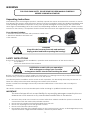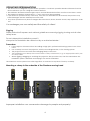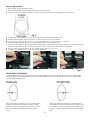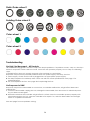
1
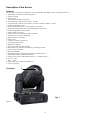
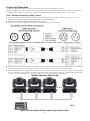
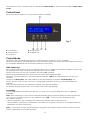
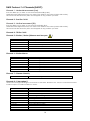
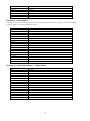
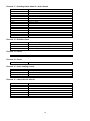
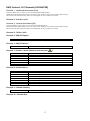
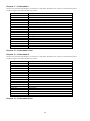
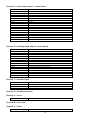
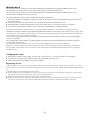
Phantom 575 Basic EB ORDERCODE 40183 V2 Congratulations! You have bought a great, innovative product from Showtec. The Showtec Phantom brings excitement to any venue. Whether you want simple plug-&-play action or a sophisticated DMX show, this product provides the effect you need. You can rely on Showtec, for more excellent lighting products. We design and manufacture professional light equipment for the entertainment industry. New products are being launched regularly. We work hard to keep you, our customer, satisfied. For more information: [email protected] You can get some of the best quality, best priced products on the market from Showtec. So next time, turn to Showtec for more great lighting equipment. Always get the best -- with Showtec ! Thank you! Showtec Showtec Phantom™ Product Guide Warning.................................................................................…...……………..…………………………….…………. Safety-instructions………………………………………………………………………………………………………. Operating Determinations.…………………………………………………………………………………………… Rigging.……………………………………………………………………………………………………………………. Return Procedure……………………………………………………………………………...................................... Claims……………………………………………………………………………......................................................... 2 2 4 4 5 5 Description...............................................................................…...………………………………………….………… Features and Overview ………………………………...….……………….………….……….……….……………. Backside…………………………………………………...…...….……………….…………………...……………….. 6 6 7 Installation...............................................................................…...…………………………………………………..… Installing the Lamp ........................................................…………………………………………………….……… Lamp Adjustment.….......................................................………………………………………..…………………. 7 7 8 Set Up and Operation............................................................................................................................................. One / Multiple Phantom DMX Control......................................…………………………………………………. 9 9 DMX-Protocol…...................................................……………………………………………………………………….. Fixture Linking…………………............……..……………………………………..…………………..…………..….. Data Cabling……………….........……..……………………………………………..………………………….……. Control Panel….............……....................................……………………………………………………………….. Control Mode........................................……………………………………………………………………………… MENU OVERVIEW ……..……………………………………..…………………………………….…….……….…..... Control panel functions...................................……………………………………………………………………… DMX addressing...................................………………………………………………………………………………. DMX Channels………………………………………………………………………………………………………….. 16 Channels (BASIC) …………………………………………………………………………………………….. 26 Channels (ADVANCED)…….……………………………………………………………………………….. Channel settings……………………………………………………………………………………………………….. 10 10 10 11 11 12 13 13 14 14 17 21 Maintenance...................................................................................………..………….…….……………………..… Changing the Lamp........................................................................…………………….………………...……… Replacing the Fuse........................................................................…………………….………………………….. Replacing a Gobo from the Rotating Gobo-wheel …..............................…….……….…………………….. Gobo Orientation...............................................................…………………….………………………………….. Colorwheel 1+ 2, Static Gobowheel, Rotating Gobowheel……………….………………………………….. 22 22 22 23 23 24 Troubleshooting............................................................................………………….………………….……………… No Light, No Movement - All Products............................................………………….…………………………. No Response to DMX ....................................................................………………….……………………………. 24 24 24 Product Specifications.................................................................……………….…….……………………………… 26 1 WARNING FOR YOUR OWN SAFETY, PLEASE READ THIS USER MANUAL CAREFULLY BEFORE YOUR INITIAL START-UP! Unpacking Instructions Immediately upon receiving this product, carefully unpack the carton and check the contents to ensure that all parts are present, and have been received in good condition. Notify the dealer immediately and retain packing material for inspection if any parts appear damaged from shipping or the carton itself shows signs of mishandling. Save the carton and all packing materials. In the event that a fixture must be returned to the factory, it is important that the fixture be returned in the original factory box and packing. Your shipment includes: • Showtec Phantom 575 Basic with powercon cable 1,5m • Quick-lock brackets and M10 nuts •User manual CAUTION! Keep this device away from rain and moisture! Unplug mains lead before opening the housing! SAFETY INSTRUCTIONS Every person involved with the installation, operation and maintenance of this device has to: be qualified follow the instructions of this manual CAUTION! Be careful with your operations. With a dangerous voltage you can suffer a dangerous electric shock when touching the wires! Before your initial start-up, please make sure that there is no damage caused by transportation. Should there be any, consult your dealer and do not use the device. To maintain perfect condition and to ensure a safe operation, it is absolutely necessary for the user to follow the safety instructions and warning notes written in this manual. Please consider that damages caused by manual modifications to the device are not subject to warranty. This device contains no user-serviceable parts. Refer servicing to qualified technicians only. IMPORTANT: The manufacturer will not accept liability for any resulting damages caused by the nonobservance of this manual or any unauthorized modification to the device. Never let the power-cord come into contact with other cables! Handle the power-cord and all connections with the mains with particular caution! Never remove warning or informative labels from the unit. Never use anything to cover the ground contact. Never run the device without lamp! Never ignite the lamp if the objective-lens or any housing-cover is open, as discharge lamps may expose and emit a high ultraviolet radiation, which may cause burns. 2 Never lift the fixture by holding it at the projector-head, as the mechanics may be damaged. Always hold the fixture at the transport handles. Never place any material over the lens. Never look directly into the light source. Never leave any cables lying around. Never unscrew the screws of the rotating gobo, as the ball bearing will otherwise be opened. Do not insert objects into air vents. Do not connect this device to a dimmerpack. Do not switch the device on and off in short intervals, as this would reduce the lamp’s life. Do not touch the device’s housing bare-handed during its operation (housing becomes very hot). Allow the fixture to cool for at least 5 minutes before handling. Do not shake the device. Avoid brute force when installing or operating the device. Only use device indoor, avoid contact with water or other liquids. Only operate the fixture after having checked that the housing is firmly closed and all screws are tightly fastened. Only operate the device after having familiarized with its functions. Avoid flames and do not put close to flammable liquids or gases. Always replace the lamp, when it is damaged or deformed due to the heat. Always keep case closed while operating. Always allow free air space of at least 50 cm around the unit for ventilation. Always disconnect power from the mains, when device is not used, before cleaning or when replacing lamp! Only handle the power-cord by the plug. Never pull out the plug by tugging the power-cord. To ensure the longest and most efficient use of the lamp always wait 15 minutes before reapplying power after a shutdown. Failure to do so could result in premature aging of the lamp and failure to the electronics that drive it. Make sure that the device is not exposed to extreme heat, moisture or dust. Make sure that the available voltage is not higher than stated on the rear panel. Make sure that the power-cord is never crimped or damaged. Check the device and the powercord from time to time. If the lens is obviously damaged, it has to be replaced. So that its functions are not impaired, due to cracks or deep scratches. If device is dropped or struck, disconnect mains power supply immediately. Have a qualified engineer inspect for safety before operating. If the device has been exposed to drastic temperature fluctuation (e.g. after transportation), do not switch it on immediately. The arising condensation water might damage your device. Leave the device switched off until it has reached room temperature. If your Showtec device fails to work properly, discontinue use immediately. Pack the unit securely (preferably in the original packing material), and return it to your Showtec dealer for service. For adult use only. Movinghead must be installed out of the reach of children. Never leave the unit running unattended. Never attempt to bypass the thermostatic switch or fuses. For replacement use lamps and fuses of same type and rating only. Replace the lamp if it becomes defective or worn out, or before usage exceeds the maximum service life. Allow the fixture to cool down for 15 minutes, before opening the fixture and replacing lamp. Protect your hands and eyes with gloves and safety glasses. This device falls under protection class I. Therefore it is essential to connect the yellow/green conductor to earth. During the initial start-up some smoke or smell may arise. This is a normal process and does not necessarily mean that the device is defective. Repairs, servicing and electric connection must be carried out by a qualified technician. WARRANTY: Till one year after date of purchase. CAUTION ! EYEDAMAGES !. Avoid looking directly into the light source. (meant especially for epileptics) ! 3 OPERATING DETERMINATIONS • This device is not designed for permanent operation. Consistent operation breaks will ensure that the device will serve you for a long time without defects. • The minimum distance between light-output and the illuminated surface must be more than 1 meter. • The maximum ambient temperature ta = 45°C must never be exceeded. • If this device is operated in any other way, than the one described in this manual, the product may suffer damages and the warranty becomes void. • Any other operation may lead to dangers like short-circuit, burns, electric shock, lamp explosion, crash etc. You endanger your own safety and the safety of others! Rigging Please follow the European and national guidelines concerning rigging, trussing and all other safety issues. Do not attempt the installation yourself ! Always let the installation be carried out by an authorized dealer ! Procedure: If the projector is lowered from the ceiling or high joists, professional trussing systems have to be used. Use a clamp to mount the projector, with the mounting-bracket, to the trussing system. The projector must never be fixed swinging freely in the room. The installation must always be secured with a safety attachment, e.g. an appropriate safety net or safety-cable. When rigging, derigging or servicing the projector, always make sure, that the area below the installation place is blocked and staying in the area is forbidden. The Phantom can be placed on a flat stage floor or mounted to any kind of truss by a clamp. Mounting a clamp to the underside of the Phantom moving head Improper installation can cause serious damage to people and property ! 4 Connection with the mains Connect the device to the mains with the power-plug. Always pay attention, that the right color cable is connected to the right place. International EU Cable UK Cable US Cable Pin L BROWN RED YELLOW/COPPER FASE N BLUE BLACK SILVER NUL YELLOW/GREEN GREEN GREEN EARTH Make sure that the device is always connected properly to the earth! Return Procedure Returned merchandise must be sent prepaid and in the original packing, call tags will not be issued. Package must be clearly labeled with a Return Authorization Number (RMA number). Products returned without an RMA number will be refused. Highlite will not accept the returned goods or any responsibility. Call Highlite 0031-455667723 or mail [email protected] and request an RMA prior to shipping the fixture. Be prepared to provide the model number, serial number and a brief description of the cause for the return. Be sure to properly pack fixture, any shipping damage resulting from inadequate packaging is the customer’s responsibility. Highlite reserves the right to use its own discretion to repair or replace product(s). As a suggestion, proper UPS packing or double-boxing is always a safe method to use. Note: If you are given an RMA number, please include the following information on a piece of paper inside the box: 1) Your name 2) Your address 3) Your phone number 4) A brief description of the symptoms Claims The client has the obligation to check the delivered goods immediately upon delivery for any shortcomings and/or visible defects, or perform this check after our announcement that the goods are at their disposal. Damage incurred in shipping is the responsibility of the shipper; therefore the damage must be reported to the carrier upon receipt of merchandise. It is the customer's responsibility to notify and submit claims with the shipper in the event that a fixture is damaged due to shipping. Transportation damage has to be reported to us within one day after receipt of the delivery. Any return shipment has to be made post-paid at all times. Return shipments must be accompanied with a letter defining the reason for return shipment. Non-prepaid return shipments will be refused, unless otherwise agreed in writing. Complaints against us must be made known in writing or by fax within 10 working days after receipt of the invoice. After this period complaints will not be handled anymore. Complaints will only then be considered if the client has so far complied with all parts of the agreement, regardless of the agreement of which the obligation is resulting. 5 Description of the device Features The Showtec Phantom 575 Basic is a moving-head with high output and great effects. • 16/26 DMX-control channels required • Stylish housing • Sharp optics • Automatic Pan/Tilt correction • Colourwheel 1 with 8 vivid colours + white • Colourwheel 2 with 6 vivid colours, 2 color correction filters + white • Interchangeable colors • Static Gobowheel with 7 static gobos and open • Rotating Gobowheel with 6 rotating gobos and open • Interchangeable Gobosystem • Gobo Shake Function • DMX-control via standard DMX-controller • Seamless Zoom (13-27 degrees) • Built in Macro's via DMX • DMX Focus • 3 and 5 pin XLR connectors • rotating 3-facet prism • Bright LCD display • User selectable pan/tilt ranges • Basic(16CH) or Advanced (26CH) operating modes • Lamp on/off via DMX • Electronic Ballast • Mounting System: Quick-lock brackets and M10 nuts • Mechanical Dimmer/Shutter/Strobe • Strobe-effect with adjustable speed (1 - 10 flashes/sec.) • Pan 0º -- 540º • Tilt 0º -- 270º • Lamp HMI 575 (ordercode 80901O) • Fuse T7A / 250V Overview 1 Fig. 1 1) Lens 6 Backside 2 3 4 Fig. 2 5 6 7 8 9 10 11 2) DMX signal connector (IN) 5-pin 3) DMX signal connector (OUT) 5-pin 4) Fuse 7A 5) Menu Buttons 6) LCD Display 7) DMX LED 8) DMX signal connector (IN) 3-pin 9) DMX signal connector (OUT) 3-pin 10) Powercon 11) ON / OFF Installation Installing the Lamp The Showtec Phantom uses the HMI 575 (ordercode 80901O) bulb as manufactured by all popular manufacturers. Use only the appropriate lamp for your unit. Note that, product versions that use other lamps, may be offered in the future. Check your product specification label for information. Always disconnect from electric mains power supply before changing lamps. The lamp has to be replaced when it is damaged or deformed due to the heat. Do not install lamps with a higher wattage! Lamps with a higher wattage generate temperatures the device was not designed for. Damages caused by non-observance are not subject to warranty. Procedure : 1. Loosen the 4 screws (W, X, Y, Z) on the back of the housing. 2. Gently tilt the head so the small metal housing will slide out more easy. 3. Read lamp instructions. Do not touch the lamp bulb glass. (See Figure 3.) Oil on hands shortens the lamp life. (If you touch the bulb glass, wipe off the glass with a clean, lint-free towel and rubbing alcohol.). 4. Insert the lamp into the small bracket in the lamp socket. You can adjust the distance between the lamp and the lens by turning the 4 screws (A, B, C, D) on the back of the cover. 5. Put the lamp cover back and fasten the screws snugly. 1 2 3 4 5 Fig. 3 7 Lamp Adjustment You can adjust the lamp’s position by turning the screws A, B, C, D. The lamp position is set in the factory. As the lamps, which can be used, differ from manufacturer to manufacturer, it can be necessary to readjust the position. The lamp must be readjusted e.g., if the light does not seem to be evenly distributed within the ray of light. Ignite the lamp and focus the ray of light on an even surface (wall). As the optimal distance between the lamp and the lens was already set during the installation. Only the "Hot Spot" ( the brightest part of the ray of light) must be centered. If the Hot Spot appears too bright, you can weaken its intensity, by moving the lamp closer to the reflector. Turn in addition all screws (A, B, C, D), until the light is evenly distributed. If the light at the outside edge of the ray of light appears brighter as in the center, the lamp is too close to the reflector. In this case move the lamp away from the reflector, until the light is evenly distributed and the ray of light appears bright enough. Backside Lamp Board Fig. 4 Lock / Unlock the Moving-head You can lock the moving head by pressing the top button (Red). To unlock you have to press the bottom button (Green). Fig. 5 8 Set Up and Operation Follow the directions below, as they pertain to your preferred operation mode. Before plugging the unit in, always make sure that the power supply matches the product specification voltage. Do not attempt to operate a 120V specification product on 230V power, or vice versa. One / Multiple Phantom(s) DMX Control 1. Fasten the effect light onto firm trussing (Use a 30-kg rated or stronger C-clamp fastened onto the Phantom ). Leave at least 1 meter on all sides for air circulation. 2. Always use a safety cable (ordercode 70140 / 70141). 3. Use a 3-p or 5-p XLR cable to connect the Phantoms and other devices. 3. Link the units as shown in (figure 5), Connect a DMX signal cable from the first unit's DMX "out" socket to the second unit's "in" socket. Repeat this process to link the second, third, and fourth units. 4. Supply electric power: Plug electric mains power cords into each unit's Powercon socket, then plug the other end of the mains power cord into proper electric power supply sockets, starting with the first unit. Do not supply power before the whole system is set up and connected properly. Multiple Phantoms DMX Set Up Fig. 6 Note : Link all cables before connecting electric power 9 Fixture Linking You will need a serial data link to run light shows of one or more fixtures using a DMX-512 controller or to run synchronized shows on two or more fixtures set to a master/slave operating mode. The combined number of channels required by all the fixtures on a serial data link determines the number of fixtures the data link can support. Important: Fixtures on a serial data link must be daisy chained in one single line. To comply with the EIA-485 standard no more than 30 devices should be connected on one data link. Connecting more than 30 fixtures on one serial data link without the use of a DMX optically isolated splitter may result in deterioration of the digital DMX signal. Maximum recommended DMX data link distance: 100 meters Maximum recommended number of Phantoms on a DMX data link: 30 fixtures Data Cabling To link fixtures together you must obtain data cables. You can purchase DAP Audio certified DMX cables directly from a dealer/distributor or construct your own cable. If you choose to create your own cable please use data-grade cables that can carry a high quality signal and are less prone to electromagnetic interference. DAP Audio Certified DMX Data Cables • DAP Audio Basic microphone cable for allround use. bal. XLR/M 3 p. > XLR/F 3 p. Ordercode FL01150 (1,5m.), FL013 (3m.), FL016 (6m.), FL0110 (10m.), FL0115 (15m.), FL0120 (20m.). • DAP Audio cable for the demanding user with exceptional audio-qualities and connector made by Neutrik®. Ordercode FL71150 (1,5m.), FL713 (3m.), FL716 (6m.), FL7110 (10m.). 10 The Phantom can be operated with a controller in control mode or without the controller in stand-alone mode. Control Panel When the indicator light is on, means the Phantom is working Fig. 7 A. LCD Display B. MODE button C. Up Button D. Down Button E. ENTER Button Control Mode The fixtures are individually addressed on a data-link and connected to the controller. The fixtures respond to the DMX signal from the controller. (When you select the DMX address and save it, the controller will display the saved DMX address the next time.) DMX Addressing The control panel on the front side of the base allows you to assign the DMX fixture address, which is the first channel from which the Phantom will respond to the controller. Please note when you use the controller, the unit has 26 channels. When using multiple Phantoms, make sure you set the DMX addresses right. Therefore, the DMX address of the first Phantom should be 1(001); the DMX address of the second Phantom should be 1+26=27 (027); the DMX address of the third Phantom should be 27+26=43 (043), etc. Please, be sure that you don’t have any overlapping channels in order to control each Phantom correctly. If two or more Phantoms are addressed similarly, they will work similarly. For address settings, please refer to the instructions under ”Addressing”. Controlling: After having addressed all Phantom fixtures, you may now start operating these via your lighting controller. Note: After switching on, the Phantom will automatically detect whether DMX 512 data is received or not. If there is no data received at the DMX-input, the “LED “ on the control panel will not flash. The problem may be: - The XLR cable from the controller is not connected with the input of the Phantom. - The controller is switched off or defective, the cable or connector is detective, or the signal wires are swapped in the input connector. Note: It’s necessary to insert a XLR termination plug (with 120 Ohm) in the last fixture in order to ensure proper transmission on the DMX data link. 11 Menu Overview 12 Control Panel Functions For synchronous operation of multiple fixtures the fixtures must all be connected on a data-link. Note: Disconnect the fixtures from the DMX controller before operating, otherwise data collisions can occur and the fixtures will not work properly! It’s necessary to insert the XLR termination plug (with 120 Ohm ) into the input of the first fixture and into the output of the last fixture in the data-link, in order to ensure proper transmission on the data link. DMX Addressing With this menu you can set the DMX address. 1) Press Mode/Esc, until the display shows . 2) Press Enter to confirm, the display will show (with actually stored address). 3) You can choose 512 different DMX addresses. Use the Up / Down buttons to select the required address from 000 – 511. 13 DMX Protocol 16 Channels (BASIC) Channel 1 - Horizontal movement (Pan) Push the slider up, in order to move head horizontally (PAN). Gradual head adjustment from one end of the slider to the other (0-255, 128-center). The head can be turned by 540° and stopped at any position you wish. Channel 2 - Pan fine 16 bit Channel 3 - Vertical movement (Tilt) Push the slider, up in order to move head vertically (TILT). Gradual head adjustment from one end of the slider to the other (0-255, 128-center). The head can be turned by 270° and stopped at any position you wish. Channel 4 - Tilt fine 16 bit Channel 5 – Shutter / Strobe (Dimmer must be open 0-3 4-7 8-127 128-191 192-223 224-251 252-255 ) Shutter closed / Blackout Shutter open Strobe effect, from slow to fast (0-10 flashes/sec.) Pulse-effect, in sequences from slow to fast Shutter Effect Random strobe effect, from slow to fast Shutter open Channel 6 – Shutter Macro 0-31 32-63 64-95 96-127 128-159 160-191 192-223 224-255 No Function Blackout during Pan/Tilt movement Blackout during Static/Rot. Gobowheel movement Blackout during Pan/Tilt or Static/Rot. Gobowheel movement Blackout during Colorwheel 1+2 movement Blackout during Pan/Tilt or Colorwheel 1+2 movement Blackout during Static/Rot. Gobowheel or Colorwheel 1+2 movement Blackout during Pan/Tilt, Static/Rot. Gobowheel or Colorwheel 1+2 Channel 7 – Dimmer intensity 0-255 From black to brightest Channel 8 – Colourwheel 1 Linear color change following the movement of the slider. Between 164 - 255, the color-wheel rotates continuously the so-called “Rainbow” effect. 0 1-14 15-29 30-44 45-59 60-69 70-84 85-99 100-114 115-131 132-135 136-139 140-143 Open / White From White to Green From Green to Blue From Blue to Orange From Orange to Orange-Red From Orange-Red to Light Green From Light Green to Purple From Purple to Red From Red to Light Blue From Light Blue to White Green Blue Orange 14 144-147 148-151 152-155 156-159 160-163 164-209 210-255 Orange-Red Light Green Purple Red Light Blue Forwards rainbow effect from fast to slow Backwards rainbow effect from fast to slow Channel 9 – Colourwheel 2 Linear color change following the movement of the slider. Between 164 - 255, the color-wheel rotates continuously the so-called “Rainbow” effect. 0 1-14 15-29 30-44 45-59 60-72 73-87 88-102 103-115 116-131 132-135 136-139 140-143 144-147 148-151 152-155 156-159 160-163 164-209 210-255 Open / White From White to Dark Red From Dark Red to Dark Blue From Dark Blue to Pink From Pink to UV From UV to Yellow From Yellow to Pink-Purple From Pink-Purple to Color Correction 5600 º K From Color Correction 5600 º K to Color Correction 3200 º K From Color Correction 3200 º K to White Dark Red Dark Blue Pink UV Yellow Pink-Purple Color Correction 5600 º K Color Correction 3200 º K Forwards rainbow effect from fast to slow Backwards rainbow effect from fast to slow Channel 10 – Static Gobo-wheel 1 + Gobo Shake 0-7 8-15 16-23 24-31 32-39 40-47 48-55 56-63 64-71 72-79 80-87 88-95 96-103 104-111 112-119 120-127 128-191 192-255 Open / White Gobo 1 Gobo 2 Gobo 3 Gobo 4 Gobo 5 Gobo 6 Gobo 7 Open / White Gobo Shake 1 from slow to fast Gobo Shake 2 from slow to fast Gobo Shake 3 from slow to fast Gobo Shake 4 from slow to fast Gobo Shake 5 from slow to fast Gobo Shake 6 from slow to fast Gobo Shake 7 from slow to fast Forwards rainbow effect from slow to fast Backwards rainbow effect from fast to slow 15 Channel 11 – Rotating Gobo-wheel 2 + Gobo Shake 0-9 10-19 20-29 30-39 40-49 50-59 60-69 70-71 72-80 81-89 90-98 99-107 108-116 117-127 128-191 192-255 Open / White Metal Gobo 1 Metal Gobo 2 Metal Gobo 3 Metal Gobo 4 Glass Gobo 5 Glass Gobo 6 Open / White Gobo Shake 1 from slow to fast Gobo Shake 2 from slow to fast Gobo Shake 3 from slow to fast Gobo Shake 4 from slow to fast Gobo Shake 5 from slow to fast Gobo Shake 6 from slow to fast Forwards rainbow effect from slow to fast Backwards rainbow effect from fast to slow Channel 12 – Rotation Gobo 0-63 64-127 128-191 192-255 Gobo-indexing Forwards and backwards gobo rotation from slow to fast Forwards gobo rotation from slow to fast Backwards gobo rotation from slow to fast Channel 13 – Focus 0-255 Continuous adjustment from far to near Channel 14 – Zoom 0-255 From Zoom out to Zoom in Channel 15 – Prism rotating control 0-3 4-63 64-126 127-191 192-255 No Prism Prism Index Forwards and backwards prism rotation from slow to fast Forwards rotation from slow to fast Backwards rotation from slow to fast Channel 16 – Lamp ON OFF & Reset 0-151 152-167 168-183 184-199 200-215 216-231 232-247 248-255 No Function High Speed for fan Auto adjust speed according to the temperature Low speed for fan Reserved Lamp Off Reset after 10 seconds. Lamp off and on after 5 min. Lamp On 16 DMX Protocol 26 Channels (ADVANCED) Channel 1 - Horizontal movement (Pan) Push the slider up, in order to move head horizontally (PAN). Gradual head adjustment from one end of the slider to the other (0-255, 128-center). The head can be turned by 540° and stopped at any position you wish. Channel 2 - Pan fine 16 bit Channel 3 - Vertical movement (Tilt) Push the slider, up in order to move head vertically (TILT). Gradual head adjustment from one end of the slider to the other (0-255, 128-center). The head can be turned by 270° and stopped at any position you wish. Channel 4 - Tilt fine 16 bit Channel 5 –PAN/TILT Speed 0-255 From Max Speed (0) to Min. Speed (255) Channel 6 –PAN/TILT Macro 0-255 Pan/Tilt Built-in Programs Channel 7 – Shutter / Strobe (Dimmer must be open 0-3 4-7 8-127 128-191 192-223 224-251 252-255 ) Shutter closed / Blackout Shutter open Strobe effect, from slow to fast (0-10 flashes/sec.) Pulse-effect, in sequences from slow to fast Shutter Effect Random strobe effect, from slow to fast Shutter open Channel 8 – Shutter Macro 0-31 32-63 64-95 96-127 128-159 160-191 192-223 224-255 No Function Blackout during Pan/Tilt movement Blackout during Static/Rot. Gobowheel movement Blackout during Pan/Tilt or Static/Rot. Gobowheel movement Blackout during Colorwheel 1+2 movement Blackout during Pan/Tilt or Colorwheel 1+2 movement Blackout during Static/Rot. Gobowheel or Colorwheel 1+2 movement Blackout during Pan/Tilt, Static/Rot. Gobowheel or Colorwheel 1+2 Channel 9 – Dimmer intensity 0-255 From black to brightest Channel 10 – Dimmer Fine 17 Channel 11 – Colourwheel 1 Linear color change following the movement of the slider. Between 164 - 255, the color-wheel rotates continuously the so-called “Rainbow” effect. 0 1-14 15-29 30-44 45-59 60-69 70-84 85-99 100-114 115-131 132-135 136-139 140-143 144-147 148-151 152-155 156-159 160-163 164-209 210-255 Open / White From White to Green From Green to Blue From Blue to Orange From Orange to Orange-Red From Orange-Red to Light Green From Light Green to Purple From Purple to Red From Red to Light Blue From Light Blue to White Green Blue Orange Orange-Red Light Green Purple Red Light Blue Forwards rainbow effect from fast to slow Backwards rainbow effect from fast to slow Channel 12 – Colourwheel 1 Fine Channel 13 – Colourwheel 2 Linear color change following the movement of the slider. Between 164 - 255, the color-wheel rotates continuously the so-called “Rainbow” effect. 0 1-14 15-29 30-44 45-59 60-72 73-87 88-102 103-115 116-131 132-135 136-139 140-143 144-147 148-151 152-155 156-159 160-163 164-209 210-255 Open / White From White to Dark Red From Dark Red to Dark Blue From Dark Blue to Pink From Pink to UV From UV to Yellow From Yellow to Pink-Purple From Pink-Purple to Color Correction 5600 º K From Color Correction 5600 º K to Color Correction 3200 º K From Color Correction 3200 º K to White Dark Red Dark Blue Pink UV Yellow Pink-Purple Color Correction 5600 º K Color Correction 3200 º K Forwards rainbow effect from fast to slow Backwards rainbow effect from fast to slow Channel 14 – Colourwheel 2 Fine 18 Channel 15 – Static Gobo-wheel 1 + Gobo Shake 0-7 8-15 16-23 24-31 32-39 40-47 48-55 56-63 64-71 72-79 80-87 88-95 96-103 104-111 112-119 120-127 128-191 192-255 Open / White Gobo 1 Gobo 2 Gobo 3 Gobo 4 Gobo 5 Gobo 6 Gobo 7 Open / White Gobo Shake 1 from slow to fast Gobo Shake 2 from slow to fast Gobo Shake 3 from slow to fast Gobo Shake 4 from slow to fast Gobo Shake 5 from slow to fast Gobo Shake 6 from slow to fast Gobo Shake 7 from slow to fast Forwards rainbow effect from slow to fast Backwards rainbow effect from fast to slow Channel 16 – Rotating Gobo-wheel 2 + Gobo Shake 0-9 10-19 20-29 30-39 40-49 50-59 60-69 70-71 72-80 81-89 90-98 99-107 108-116 117-127 128-191 192-255 Open / White Metal Gobo 1 Metal Gobo 2 Metal Gobo 3 Metal Gobo 4 Glass Gobo 5 Glass Gobo 6 Open / White Gobo Shake 1 from slow to fast Gobo Shake 2 from slow to fast Gobo Shake 3 from slow to fast Gobo Shake 4 from slow to fast Gobo Shake 5 from slow to fast Gobo Shake 6 from slow to fast Forwards rainbow effect from slow to fast Backwards rainbow effect from fast to slow Channel 17 – Rotation Gobo 0-63 64-127 128-191 192-255 Gobo-indexing Forwards and backwards gobo rotation from slow to fast Forwards gobo rotation from slow to fast Backwards gobo rotation from slow to fast Channel 18 – Rotation Gobo Fine Channel 19 – Focus 0-255 Continuous adjustment from far to near Channel 20 – Focus Fine Channel 21 – Zoom 0-255 From Zoom out to Zoom in 19 Channel 22 – Zoom Fine Channel 23 – Prism rotating control 0-127 128-255 Open 3-facet Prism Effect Channel 24 – Prism rotating control 0-63 64-127 128-191 192-255 Prism Index Forwards and backwards prism rotation from slow to fast Forwards rotation from slow to fast Backwards rotation from slow to fast Channel 25 – Prism Fine Channel 26 – Lamp ON OFF & Reset 0-151 152-167 168-183 184-199 200-215 216-231 232-247 248-255 No Function High Speed for fan Auto adjust speed according to the temperature Low speed for fan Reserved Lamp Off Reset after 10 seconds. Lamp off and on after 5 min. Lamp On 20 Channels settings 21 Maintenance The operator has to make sure that safety-relating and machine-technical installations are to be inspected by an expert after every year in the course of an acceptance test. The operator has to make sure that safety-relating and machine-technical installations are to be inspected by a skilled person once a year. The following points have to be considered during the inspection: 1. All screws used for installing the device or parts of the device have to be tightly connected and must not be corroded. 2. There may not be any deformations on housings, fixations and installation spots. 3. Mechanically moving parts like axles, eyes and others may not show any traces of wearing. 4. The electric power supply cables must not show any damages or material fatigue. The Showtec Phantom requires almost no maintenance. However, you should keep the unit clean. Otherwise, the fixture’s light-output will be significantly reduced. Disconnect the mains power supply, and then wipe the cover with a damp cloth. Do not immerse in liquid. Wipe lens clean with glass cleaner and a soft cloth. Do not use alcohol or solvents. The front lens will require weekly cleaning, as smoke-fluid tends to build up residues, reducing the lightoutput very quickly. The cooling-fans, colour-filters, the gobowheel, the gobos and the internal lenses should be cleaned monthly with a soft brush. Please clean internal components once a year with a light brush and vacuum cleaner. Keep connections clean. Disconnect electric power, and then wipe the DMX and audio connections with a damp cloth. Make sure connections are thoroughly dry before linking equipment or supplying electric power. Changing the Lamp 1. Disconnect mains power supply. Loosen the 4 screws (W, X, Y, Z) on the back of the housing.. 2. Gently tilt the head so the small metal housing will slide out more easy. 3. Follow directions for installing a new lamp, page 7. Replacing a Fuse Power surges, short-circuit or inappropriate electrical power supply may cause a fuse to burn out. If the fuse burns out, the product will not function whatsoever. If this happens, follow the directions below to do so. 1. Unplug the unit from electric power source. 2. Insert a flat-head screwdriver into a slot in the fuse cover. Turn the screwdriver to the left, at the same time gently push a bit (Turn and Push).. The fuse will come out. 3. Remove the used fuse. If brown or unclear, it is burned out. 4. Insert the replacement fuse into the holder where the old fuse was. Reinsert the fuse cover. Be sure to use a fuse of the same type and specification. See the product specification label for details. 22 Replacing a Gobo Gobo-wheel with rotating gobo’s 1. Disconnect mains power supply and set the switch to OFF. 2. Make sure that the gobo you want to insert has the same size. For the right size, see below. Fig. 8 3. Loosen the 4 screws on top of the housing. Remove the maintenance cap. 4. Turn the gobo wheel, with the gobo you want to remove, to the upside. 4. Gently lift up the gobo holder 10º and then gently pull out the gobo from its position. 5. Very carefully take the gobo out of the gobo holder with a pair of pliers. 6. Place the new gobo in the gobo holder. Carefully put the pinchcock back, gently press the pinchcock a little bit together. Possibly use a pair of pliers to press the pinchcock a little bit together. 7. Put the gobo holder back under the pressing snap and push it back. 8. Replace the maintenance cap and fasten all screws. Fig. 9 Glass Gobo Orientation Coated glass gobos are inserted with the coating against the rim of the holder (away from the spring). Textured gobos are inserted with the smooth side against the spring. This provides the best results when combining rotating gobos. When an object is held up to the coated side there is no space between the object and its reflection. The back edge of the gobo cannot be seen when looking through the coated side. When an object is held up to the uncoated side there is a space between the object and its reflection. The back edge of the gobo can be seen when looking through the uncoated side. 23 Static Gobo-wheel 1 Rotating Gobo-wheel 2 Color-wheel 1 Color-wheel 2 Troubleshooting No Light, No Movement - All Products This troubleshooting guide is meant to help solve simple problems. If a problem occurs, carry out the steps below in sequence until a solution is found. Once the unit operates properly, do not carry out following steps. If the light effect does not operate properly, refer servicing to a technician. Response: Suspect three potential problem areas: the power supply, the lamp, the fuse. 1. Power supply. Check that the unit is plugged into an appropriate power supply. 2. The lamp. Replace the old lamp with a new one with the same specifications. See page 7 for replacing lamps. 3. The fuse. Replace the fuse. See page 22 for replacing the fuse. No Response to DMX Response: Suspect the DMX cable or connectors, a controller malfunction, a light effect DMX card malfunction. 1. Check the DMX cable: Unplug the unit; change the DMX cable; then reconnect to electrical power. Try your DMX control again. 2. Determine whether the controller or light effect is at fault. Does the controller operate properly with other DMX products ? If not, take the controller in for repair. If so, take the DMX cable and the light effect to a qualified technician. See next page for more problem solving. 24 Problem One or more fixtures are completely dead. Fixtures reset correctly, but all respond erratically or not at all to the controller. Probable cause(s) No power to the fixture Remedy · Check that power is switched on and cables are plugged in. Primary fuse blown. · Replace fuse. The controller is not connected. 3-pin XLR Out of the controller does not match XLR Out of the first fixture on the link (i.e. signal is reversed). · Connect controller. · Install a phase reversing cable between the controller and the first fixture on the link. · Check data quality. If much lower than 100 percent, the problem may be a bad data link connection, poor quality or broken cables, missing termination plug, or a defective fixture disturbing the link. Poor data quality Bad data link connection Fixtures reset correctly, but some respond erratically or not at all to the controller. Data link not terminated with 120 Ohm termination plug. Incorrect addressing of the fixtures. One of the fixtures is defective and disturbs data transmission on the link. 3-pin XLR Out on the fixtures does not match (pins 2 and 3 reversed). Shutter closes suddenly No light Lamp cuts out intermittently. The color wheel, gobo wheel, or a gobo has lost its index position and the fixture is resetting the effect. The power supply settings do not match local AC voltage and frequency. Lamp missing or blown Fixture is too hot. The power supply settings do not match local AC voltage and frequency. 25 · Inspect connections and cables. Correct poor connections. Repair or replace damaged cables. · Insert termination plug in output jack of the last fixture on the link. · Check address setting. · Bypass one fixture at a time until normal operation is regained: unplug both connectors and connect them directly together. · Have the defective fixture serviced by a qualified technician. · Install a phase-reversing cable between the fixtures or swap pin 2 and 3 in the fixture, that behaves erratically. · Contact a technician for servicing if the problem persists. · Disconnect fixture. Check settings and correct if necessary. · Disconnect fixture and replace lamp. · Allow fixture to cool. · Clean fan. · Make sure air vents at control panel and front lens are not blocked. · Turn up the air conditioning. · Disconnect fixture. Check settings and correct if necessary. Product Specification Model: Showtec Phantom 575 Basic with Electronic Ballast Voltage: 240V-50Hz (CE) Fuse: 7A / 250V Dimensions: 530x500x665mm (LxWxH) Weight: 39 kg Operation and Programming Signal pin OUT: pin 1 earth, pin 2 (-), pin 3 (+) Set Up and Addressing: LED control panel DMX Channels: 16 or 26 Signal input 3-pin + 5-pin XLR male Signal output 3-pin + 5-pin XLR female Lamp Allowed lamp models*: Osram HMI 575 (1000 hr) ordercode 80901O Control: Automatic and DMX remote ON / OFF Electro-mechanical effects Automatic Pan/Tilt correction Colourwheel 1 with 8 vivid colours + white Colourwheel 2 with 6 vivid colours, 2 color correction filters + white Interchangeable colors Static Gobowheel with 7 static gobos and open Rotating Gobowheel with 6 rotating gobos and open Interchangeable Gobosystem Gobo Shake Function Seamless Zoom (13-27 degrees) Built in Macro's via DMX DMX Focus rotating 3-facet prism Bright LCD display User selectable pan/tilt ranges Lamp on/off via DMX Mechanical Dimmer/Shutter/Strobe Strobe-effect with adjustable speed (1 - 10 flashes/sec.) Pan 0º -- 540º Tilt 0º -- 270º Gobos Colourwheel: heat-resistant and intensify glass; dichroic glas coating Max. ambient temperature ta: 40°C; Max. housing temperature tB: 80°C Cooling: 8 axial fans - 4 fans in the projector and 4 in the base Motor: high quality stepping-motor controlled by microprocessors Minimum distance: Minimum distance from flammable surfaces: 0.5m Minimum distance to lighted object: 1.3m *: Versions for other lamps may be produced. Please check the specification label on your product. Design and product specifications are subject to change without prior notice. Website: www.Showtec.info Email: [email protected] 26