1
User Guide
For Network Attached Storage
Ver.2.1.0.0211
(For ADM 2.1)
ASUSTOR NAS User Guide
Table of Contents
1.
Introduction ....................................................................................................... 5
2.
Pre-Installed Apps............................................................................................... 6
2.1.
Settings ....................................................................................................... 6
2.1.1.
General .................................................................................................... 6
2.1.2.
Network ................................................................................................... 6
2.1.3.
VPN ......................................................................................................... 7
2.1.4.
Regional Options........................................................................................ 7
2.1.5.
Hardware.................................................................................................. 7
2.1.6.
Notification ............................................................................................... 8
2.1.7.
ADM Defender ........................................................................................... 9
2.1.8.
ADM Update ............................................................................................ 10
2.1.9.
Network Recycle Bin ................................................................................. 10
2.1.10. Energy Saver .......................................................................................... 10
2.1.11. Ease of Access ......................................................................................... 11
2.1.12. Factory Default ........................................................................................ 11
2.1.13. Registration ............................................................................................ 11
2.2.
Services ..................................................................................................... 12
2.2.1.
Windows................................................................................................. 12
2.2.2.
Mac OS X................................................................................................ 12
2.2.3.
NFS ....................................................................................................... 13
2.2.4.
FTP Server .............................................................................................. 13
2.2.5.
WebDAV ................................................................................................. 14
2.2.6.
Web Server ............................................................................................. 15
2.2.7.
MySQL Server ......................................................................................... 15
2.2.8.
Terminal ................................................................................................. 15
2.2.9.
Rsync Server ........................................................................................... 16
Page 2 of 53
ASUSTOR NAS User Guide
2.3.
Storage Manager ......................................................................................... 17
2.3.1.
Volume .................................................................................................. 17
2.3.2.
Disk ....................................................................................................... 19
2.3.3.
iSCSI ..................................................................................................... 19
2.3.4.
MyArchive ............................................................................................... 20
2.4.
Access Control............................................................................................. 21
2.4.1.
Local Users ............................................................................................. 21
2.4.2.
Local Groups ........................................................................................... 21
2.4.3.
Domain Users .......................................................................................... 22
2.4.4.
Domain Groups ....................................................................................... 22
2.4.5.
Shared Folders ........................................................................................ 23
2.4.6.
App Privileges ......................................................................................... 23
2.5.
Backup & Restore ........................................................................................ 25
2.5.1.
Remote Sync ........................................................................................... 25
2.5.2.
FTP Backup ............................................................................................. 26
2.5.3.
Cloud Backup .......................................................................................... 26
2.5.4.
External Backup ...................................................................................... 27
2.5.5.
One Touch Backup ................................................................................... 27
2.5.6.
System Settings ...................................................................................... 28
2.6.
App Central................................................................................................. 29
2.7.
External Devices .......................................................................................... 30
2.7.1.
Disk ....................................................................................................... 30
2.7.2.
Printer .................................................................................................... 30
2.7.3.
Wi-Fi ...................................................................................................... 30
2.7.4.
UPS ....................................................................................................... 31
2.7.5.
Bluetooth Devices .................................................................................... 31
Page 3 of 53
ASUSTOR NAS User Guide
2.8.
3.
4.
System Information ..................................................................................... 32
2.8.1.
About This NAS ....................................................................................... 32
2.8.2.
Network ................................................................................................. 32
2.8.3.
Log ........................................................................................................ 32
2.8.4.
Online Users ........................................................................................... 32
2.8.5.
Dr. ASUSTOR .......................................................................................... 33
2.9.
Activity Monitor ........................................................................................... 34
2.10.
File Explorer................................................................................................ 35
2.11.
FTP Explorer ............................................................................................... 36
From App Central .............................................................................................. 37
3.1.
Download Center ......................................................................................... 37
3.2.
Surveillance Center ...................................................................................... 38
3.3.
UPnP AV Media Server .................................................................................. 39
3.4.
iTunes Server .............................................................................................. 40
Appendix ......................................................................................................... 41
4.1.
Permission Mapping Table ............................................................................. 41
5.
EULA ............................................................................................................... 42
6.
GNU General Public License ................................................................................ 44
Page 4 of 53
ASUSTOR NAS User Guide
1. Introduction
Thank you for choosing ASUSTOR network attached storage (NAS).
From cross-platform file sharing to multimedia server applications to App Central, ASUSTOR
NAS provides you with a rich assortment of features, allowing you to explore the unlimited
potential of NAS.
Your NAS comes preloaded with ASUSTOR Data Master (ADM), an operating system
developed by ASUSTOR. ADM provides you with an intuitive and user friendly interface. This
user manual will introduce you to all the preloaded applications (Apps) on your NAS.
Online Resources
Type
URL
Forum (English)
http://forum.asustor.com
Downloads
http://www.asustor.com/service/downloads
Technical Support
http://www.asustor.com/service/online_support
Terms of Use
All ASUSTOR products have undergone stringent and comprehensive testing. Under normal
user operation and within the warranty period, ASUSTOR will assume responsibility for any
hardware failures. Before using this product, please read the End-User License Agreement
(EULA) located at the end of this user manual.
Page 5 of 53
ASUSTOR NAS User Guide
2. Pre-Installed Apps
Pre-installed Apps include the configuration of function and service settings for hard disks and
hardware. You can configure everything from system related settings to user access rights.
2.1 Settings
2.1.1.
General
Here you can manage the system HTTP port and auto logout settings. Auto logout will
logout users if they remain idle past the specified period of time.
System HTTP Port: This is used to specify the port you wish to use to connect to
ADM’s web based user interface. You can access your NAS by opening a web browser
and entering your IP address followed by a colon and the specified port number.
For example: http://192.168.1.168:8000
Timeout timer: For security concerns, users that remain idle past the specified
period of time after logging on will be automatically logged off.
2.1.2.
Network
Note: This function may differ depending on the NAS model in use.
Here you can configure the server name, LAN and Wi-Fi settings. Other settings include IP
address, DNS server and default gateway.
Server Name:
An online name for your NAS.
Default Gateway: The default gateway that you wish to use.
DNS Server: Here you can set the DNS server that you wish to use. Should you
choose to obtain your IP address via DHCP the system will automatically obtain the
available DNS servers for you. If you choose to manually enter an IP address then
you will have to manually enter a DNS server as well.
Reminder: Using an invalid DNS server will affect some network related
functions. (i.e., Download Center). If you are uncertain about how to
proceed, please choose to obtain your IP address automatically.
See More
NAS 105 – Networking: A Beginner’s Guide
NAS 307 – Networking: Link Aggregation
Page 6 of 53
ASUSTOR NAS User Guide
2.1.3.
VPN
Here you can let your ASUSTOR NAS become a VPN client, and via PPTP or Open VPN,
connect to a VPN server to access a virtual private network. ASUSTOR NAS supports the
use of different connection settings files, allowing you to connect to the VPN server of your
choice. The ASUSTOR VPN client currently supports the two most common connection
protocols: PPTP and OpenVPN.
2.1.4.
Regional Options
Here you can adjust the settings for date and time, display format, time zone and daylight
saving time.
2.1.5.
Hardware
Note: This function may differ depending on the NAS model in use.
Here you can configure settings for the LED indicators, buzzer, hard disk hibernation,
power usage, fan speed and LCD display panel.
System: Here you can choose to disable any of the LED indicators to save power.
By selecting “night mode”, only the system power LED indicator will be enabled. It
will flash an orange light every 10 seconds. You can also configure settings for the
buzzer and reset button here.
Disk: Your hard disks will enter hibernation mode when left idle for the period of
time specified here.
Power: Here you can manage power usage settings such as Wake-On-LAN (WOL)
and power scheduling.
Fan Control: Here you can set the rotation speed for the fan. If you are not sure
about which speed to select, you can simply select Auto. This will automatically
adjust the fan speed in accordance with the temperature of the system.
LCD Panel: You can have the LCD panel display a customized scrolling message or
the local temperature. This function is only available on the following models: AS604T, AS-606T, AS-608T.
Reminder: If you choose to display the local temperature, the system will
use your current IP address to determine the temperature at your present
location. The results of this may vary, depending on your exact location.
Page 7 of 53
ASUSTOR NAS User Guide
Reset Button
If for some reason you cannot connect to your NAS, this button can be used to
return a portion of the settings to their default values.
The system administrator account (admin) password will be reset back to
“admin”.
The system HTTP and HTTPS ports will be reset back to 8000 and 8001
respectively.
The system will revert to automatically obtaining an IP address. You can then
use ASUSTOR Control Center to search for your NAS.
ADM Defender will be reset and will allow all connections.
Reminder: You must hold the reset button down until you hear a "beep" for the
settings mentioned above to be reset.
2.1.6.
Notification
You can configure this setting to send you notification immediately in the event that the
system encounters any problems.
Send: Here you can set the accounts that will be used for sending e-mail or SMS
notifications. Multiple accounts can be set up but only one may be used as the
primary account.
Receive: Here you can set up the accounts that will be used to receive e-mail and
SMS notifications. You can also set the type of system notifications that will be
received by these accounts.
Push Notification: Here you can enable the push notification setting for the AiMaster
mobile app which can be downloaded from the Apple App Store or Google Play.
When designated system events occur, your ASUSTOR NAS will immediately send
notification to the Apple/Google push notification server which will then forward it to
your mobile device.
About Push Notification
If you wish to use this feature, you must first install AiMaster on your mobile device
and enable push notifications on the device. Currently, AiMaster is available for both
iOS and Android devices.
Page 8 of 53
ASUSTOR NAS User Guide
Supports iOS 5.0 and onwards
Supports Android 2.2 and onwards
Downloading AiMaster
In order to download AiMaster please open the App Store (for Apple devices) or
Google Play (for Android devices) on your mobile device and search for the keywords
“asustor” and “AiMaster”.
Warning: Push notifications are transmitted to your device from Apple/Google’s
push notification servers. A poor Internet connection or abnormalities in
Apple/Google’s push notification service could potentially prevent AiMaster from
correctly receiving notifications.
2.1.7.
ADM Defender
ADM Defender can protect your NAS from malicious Internet attacks, ensuring the security
of your system.
Firewall: Here you can block specific IP addresses or only allow specific IP addresses
to access your NAS.
Network Defender: After enabling this function, the client IP address will be blocked
if there are too many unsuccessful login attempts within the specified time period.
For example, in the graphic below, after a user has attempted 5 unsuccessful logins
within a 10 minute time period, he/she will be blocked forever.
About Network Defender
Network Defender can protect you from malicious attacks and prevent hackers from
trying to access your NAS. Supported protocols are as follows:
ADM system login (HTTP & HTTPS)
Windows File Service (CIFS/SAMBA)
Apple Filing Protocol (AFP)
File Transfer Protocol (FTP)
Secure Shell (SSH)
Page 9 of 53
ASUSTOR NAS User Guide
2.1.8.
ADM Update
Here you can obtain the latest version of ADM to ensure system stability and to upgrade
software features.
Live Update: After enabling Live Update, the system will notify you of any available
updates when you log in to ADM.
Manual Update: You can go to ASUSTOR’s official website (http://www.asustor.com)
to download the latest version of ADM.
2.1.9.
Network Recycle Bin
When you enable Network Recycle Bin, the system will create a Recycle Bin “X” for each
logical volume. For example, “Volume 1” will have a corresponding “Recycle Bin 1” created
for it and “Volume 2” a “Recycle Bin 2”. Any deleted files will then be moved to the
Recycle Bin, letting you recover any accidentally deleted files.
About Network Recycle Bin
After enabling Network Recycle Bin, all files deleted via the following protocols will be
moved to the Recycle Bin.
Windows File Service (CIFS/SAMBA)
Apple Filing Protocol (AFP)
File Transfer Protocol (FTP)
File Explorer
Once a Recycle Bin has been created, it cannot be removed.
2.1.10. Energy Saver
Energy Saver can help you to reduce power consumption when your NAS is inactive or
being lightly used.
Page 10 of 53
ASUSTOR NAS User Guide
2.1.11. Ease of Access
Here you can configure all the necessary settings for remote access.
Cloud Connect: Here you can obtain a Cloud ID for your NAS. By entering the Cloud
ID into ASUSTOR client applications, you can access your NAS without having to
enter the host/IP information.
EZ-Router: Here you can set up your network router automatically for direct NAS
access from any device with Internet access.
Reminder: Your router must support UPnP/NAT-PMP. Please note that not
all routers support automatic configuration. Please see the hardware
compatibility list found on the ASUSTOR website for more information.
DDNS: Here you can create or configure your DDNS account. DDNS allows you to
use a persistent host name (i.e., nas.asustor.com) to connect to your NAS. You
won’t have to worry about remembering your NAS’s IP address. This feature is often
used in dynamic IP environments.
2.1.12. Factory Default
Here you can restore the system back to its factory default settings. After this, the system
will return to its pre-initialized state. For security reasons, you will be asked to enter the
administrator password before performing this operation. You can then initialize the
system again through Control Center or by logging into ADM.
Warning: After the system is restored to its factory default settings, all previous
settings and files will be permanently deleted. You will not be able to recover
these settings and files. Please ensure that you have backed up the data on your
NAS before you begin this operation.
2.1.13. Registration
Here you can sign up for a personal account (ASUSTOR ID) and register your product.
Once the product has been registered, your ASUSTOR ID will be automatically enabled.
Reminder: A valid ASUSTOR ID is required for downloading any apps from the
App Central or applying Cloud ID service.
Page 11 of 53
ASUSTOR NAS User Guide
2.2 Services
Here you can configure network related services such as FTP server, Web server and MySQL
server.
2.2.1. Windows
After enabling Windows File Service, you can access your NAS via any Windows operating
system (i.e., Windows 7). Windows File Service is also known as CIFS or SAMBA. If you
are using Windows Active Directory (hereafter referred to as “AD”), you can add your NAS
to your AD domain.
Workgroup: This is the workgroup on your local area network that your NAS belongs
to.
Local Master Browser: After enabling this option, your NAS will, from your local area
network, collect the names of all other computers in its workgroup.
Reminder: Enabling this feature may prevent your hard disk(s) from going into
hibernation.
About Windows Active Directory
After successfully adding your NAS to your AD domain, you can then configure access
rights using the Domain Users, Domain Groups and Shared Folders settings found in
the Access Control system app (see section 2.4 Access Control). AD users can then use
their own AD accounts to log in and access the NAS.
See More
NAS 106 – Using NAS with Microsoft Windows
NAS 206 – Using NAS with Windows Active Directory
2.2.2. Mac OS X
After enabling Mac OS X file service, you can access your NAS via any Mac OS X operating
system (i.e., Mac OS X v10.7). This file transfer protocol is called AFP (Apple Filing
Protocol). You can also use Time Machine to back up data to your NAS.
Apple Filing Protocol (AFP): This is the protocol used when transferring files between
Mac OS X and local area networks. Go to the Finder and click “Go” in the Finder menu,
then select “Connect to Server.” This will bring up the Connect to Server dialog box.
Here you can enter the IP address that you want to connect to.
For example: afp://192.168.1.168
Page 12 of 53
ASUSTOR NAS User Guide
Bonjour Service Name: Your NAS will be identified by this name in the Finder.
Time Machine Support: Here you can enable Time Machine support and select the
shared folder that you wish to back up to. If multiple Mac users wish to access this
feature simultaneously, please see NAS 159 – Time Machine: Best Practice for
guidance.
About Bonjour
Bonjour, also known as zero-configuration networking, has been widely used in Apple
related products. It will scan your vicinity for other Apple devices and then let you
directly connect to them without having to know their actual IP addresses.
After enabling this service, you will be able to see your NAS in the left hand panel of
the Finder under “Shared”. Simply click on your NAS to connect to it.
See More
NAS 108 – Using NAS with Apple Mac OS X
NAS 159 – Time Machine: Best Practice
2.2.3. NFS
After enabling NFS, you will be able to access your NAS via UNIX or Linux operating
systems.
About NFS
After enabling NFS service, you can configure access rights using the Shared Folders
setting found in the Access Control system app (see section 2.4 Access Control). This
option will be hidden if NFS service has not been enabled.
2.2.4. FTP Server
After enabling the FTP server setting, you will be able to access your NAS via any FTP
client program (i.e., FileZilla). FTP server access rights are the same as those for the
system (ADM). Should you wish to change or configure these access rights, you may do so
using the shared folders setting found in the Access Control system app (see section 2.4
Access Control).
Page 13 of 53
ASUSTOR NAS User Guide
Unicode support: Please enable this option if your FTP client program supports
Unicode.
Enable anonymous: Enabling this option will allow FTP client programs to access your
NAS anonymously, without the need for a username or password. For security
reasons, this is not recommended.
Enable SSL/TLS: Enable encryption for FTP connections.
Maximum number of all FTP connections: The maximum number of simultaneous FTP
connections allowed.
Maximum number of connections per IP: The maximum number of connections
allowed per IP or system.
Max upload rate: The maximum upload speed per connection. 0 represents no
limitation.
Max download rate: The maximum download speed per connection. 0 represents no
limitation.
Passive FTP: To minimize the security concerns of connecting from a server to a
client, a type of connection mode called Passive Mode (PASV) was developed. When
a client program starts to connect, it will notify the server to activate Passive Mode.
About Passive FTP
Passive mode FTP can be used to overcome the problem of active mode FTP being
blocked by firewalls. Passive FTP makes the FTP client establish all connections to the
FTP server, as opposed to the web host supplying the return port. Firewalls typically
allow passive FTP connections without requiring additional configuration information.
2.2.5. WebDAV
After enabling WebDAV you can access your NAS via HTTP or HTTPS protocol by using a
Web browser or other client programs.
See More
NAS 208 – WebDAV: A Secure File Sharing Alternative to FTP
Page 14 of 53
ASUSTOR NAS User Guide
2.2.6. Web Server
ADM comes built-in with an independent web server (apache) that you can use to host
your own website. After enabling this feature, the system will create a shared folder called
“Web” that will serve as the web server’s root directory.
PHP register_globals: This feature is not enabled, by default. Enable this if a website
program specifically requests you to. Otherwise, it is recommended that you leave
this feature disabled for system security reasons.
Virtual Host: You can use this feature to simultaneously host several websites on
your NAS.
See More
NAS 321 – Hosting Multiple Websites with a Virtual Host
2.2.7. MySQL Server
ADM comes pre-installed with MySQL, which you can use for website databases.
Reminder: You can manage your MySQL server with phpMyAdmin which can be
downloaded and installed from App Central.
Reset Password: If you happen to forget your MySQL login password, you can reset
the password for the “root” account (The default password is “admin”). This is also
the default administrator account.
Reinitialize Database: Here you can reinitialize your entire MySQL database. Upon
reinitialization, all of your MySQL databases will be erased.
About MySQL
For the MySQL administrator account, the default username is “root” and the default
password is “admin”. For security reasons, please remember to change the password
for this account.
2.2.8. Terminal
You can enable SSH service if you wish to manage your NAS over Secure Shell (SSH). If
you wish to transfer data to your NAS through SFTP (Secure FTP) you can enable that
here as well.
Page 15 of 53
ASUSTOR NAS User Guide
Note: For security reasons, SSH only allows the “admin” account or the “root”
account to log in. The passwords for both these accounts are identical.
2.2.9. Rsync Server
After enabling Rsync server, your NAS will become a backup server and will allow remote
backup from another ASUSTOR NAS or any other Rsync-compatible servers.
Enable Rsync server: If you wish to permit encrypted backup for clients, please
enable support for encrypted transmission via SSH. If you enable this feature the
system will then automatically enable SSH service (2.2.8 Terminal).
Manage Rysnc User: If you wish to create restrictions on the Rsync connections that
can back up to your NAS, please click on Manage Users to create different Rsync
user accounts.
Reminder: Rsync accounts are different and independent from system
accounts.
Add New Backup Modules: Click on Add to create a new backup module. Each backup
module will then correspond to a physical path within the system. When an Rsync
client connects to your NAS, it will be able to select a backup module. Data will then
be backed up to the module’s corresponding physical path.
See More
NAS 259 – Using Remote Sync (Rsync) to Protect Your Data
NAS 351 – Remote Sync (Rsync): Best Practice
Page 16 of 53
ASUSTOR NAS User Guide
2.3 Storage Manager
2.3.1. Volume
Note: This function may differ depending on the NAS model in use.
Storage space on your NAS consists of logical volumes which are made up of a single disk
or multiple disks combined together. Here you can set up new storage space for your NAS
and, according to your data protection needs, select the most suitable RAID level. In order
to maintain data integrity, you may only use internal disks when creating storage space
for your NAS. ADM does not support the use of external disks for storage space.
Reminder: The RAID levels that you may employ will depend on your NAS product
model and the number of disks that you are using.
When setting up new storage space, ADM offers the following two options:
Quick Setup: You need only specify the requirements for the storage space (i.e., you
wish to have a higher level of data protection). Based on this and the number of disks
you have, ADM will automatically create a storage volume and select an appropriate
RAID level for it.
Advanced Setup: Based on the current number of disks, you can manually select a
RAID level or set up a spare disk.
Reminder: In order to optimize disk space utilization, it is recommended that you
use disks of the same size when creating storage space.
About RAID
In order to provide optimal storage space utilization and data protection, ADM
supports multiple RAID levels allowing you to select the appropriate level for your
needs. The following volume types levels are all supported by ADM:
Non-RAID Volume Types
Single: Only uses a single disk in the creation of storage space. This
configuration does not offer any type of data protection.
JBOD: An acronym for “just a bunch of disks”, JBOD uses a combination of
two or more disks to create storage space. The total storage capacity is the
capacities of all the disks added together. The advantage of this
configuration is that it allows you to use different sized disks together and
provides a large amount of storage space. The downside is that it does not
offer any sort of data protection.
RAID Volume Types
Page 17 of 53
ASUSTOR NAS User Guide
RAID 0: Uses a combination of two or more disks to create storage space.
The total storage capacity is the capacities of all the disks added together.
The advantage of this configuration is that it allows you to use different sized
disks together and provides a large amount of storage space. Also, data in
RAID 0 volumes is accessed in parallel which provides improved
performance. The downside is that RAID 0 does not offer any sort of data
protection.
RAID 1: In RAID 1 your data is written identically on two disks, thereby
producing a “mirrored set”. Exactly the same data is stored on the two disks
at all times. RAID 1 protects your data from loss should one of your disks
fail. RAID 1’s advantage is that it offers protection for your data by providing
data redundancy. The downside of this configuration is that when combining
two disks of differing sizes, the total storage space will be equal to the size
of the smaller disk. Therefore, you will be unable to use a portion of the
larger disk.
Total available storage space = (size of smaller disk) * (1)
RAID 5: Combines three or more disks to create a storage space that is able
to support one failed disk. Should one of your disks fail, your data will still
be protected from loss. In the event of disk failure, simply replace the failed
disk with a new one. The new disk will automatically be accommodated into
the RAID 5 configuration. The advantage of using RAID 5 is that is that it
provides data protection through data redundancy. The downside to using
RAID 5 is that when combining disks of differing sizes, the total storage
space will be calculated based on the size of the smallest disk.
Total available storage space = (size of smallest disk) * (total number of
disks – 1)
RAID 6: Combines four of more disks to create a storage space that is able
to support two failed disks. Should two of your disks fail, your data will still
be protected from loss. In the event of disk failure, simply replace the failed
disks with new ones. The new disks will automatically be accommodated into
the RAID 6 configuration. The advantage of using RAID 6 is that it is able to
provide superior data protection through data redundancy. The downside to
using RAID 6 is that when combining disks of differing sizes, the total
storage space will be calculated based on the size of the smallest disk.
Total available storage space = (size of smallest disk) * (total number of
disks – 2)
RAID 10 (1+0): Combines four or more disk to create a storage space that
is able to support multiple failed disks (as long as the failed disks do not
belong to the same “mirrored set”). RAID 10 provides the data protection of
RAID 1 along with the access efficiency of RAID 0. With respect to data
protection, RAID 10 uses the RAID 1 method of having the exact same data
written identically on two disks, producing “mirrored sets”. These “mirrored
sets” are then combined together in a RAID 0 configuration. RAID 10
requires an even number of four or more disks. When combining disks of
differing sizes, the total storage space will be calculated based on the size of
Page 18 of 53
ASUSTOR NAS User Guide
the smallest disk.
Total available storage space = (size of smallest disk) * (total number of
disks / 2)
See More
NAS 251 – Introduction to RAID
NAS 352 – Online RAID Level Migration and Capacity Expansion
2.3.2. Disk
Here you can check on the status of all your disks. You can also inspect their S.M.A.R.T.
information and conduct tests on your disks.
S.M.A.R.T. Info: S.M.A.R.T. is an acronym for Self-Monitoring Analysis and Report
Technology. It is a type of self-monitoring mechanism for disks that detects and
reports on various indicators of reliability, with the hope of anticipating failures.
Disk Doctor: Here you can check your disks for bad sectors or conduct S.M.A.R.T.
tests.
2.3.3. iSCSI
iSCSI is a type of network storage technology that offers high expandability and low
implementation costs. Through existing network infrastructure and iSCSI you can use your
NAS to expand existing storage space or have it act as a backup destination. iSCSI
consists of two ends, a target and an initiator. The initiator is used to search for iSCSI
hosts and to set up targets.
IQN: IQN (iSCSI Qualified Name) is the unique name for each iSCSI target. This
name should not be the same as any of the other target IQNs on other hosts.
CHAP Authentication: CHAP authentication can be used to verify a user’s identity. If
you choose to use CHAP authentication, a CHAP password must first be entered from
the initiator for verification before it can connect to the target.
Mutual CHAP Authentication: Mutual CHAP authentication requires both the target
and the initiator to have usernames and passwords. When establishing a connection,
the target and the initiator will have to authenticate each other using their respective
credentials.
LUN Pool: Here you can check on the status of all iSCSI LUNs and assign
corresponding iSCSI targets.
Page 19 of 53
ASUSTOR NAS User Guide
See More
NAS 308 – Introduction to iSCSI
2.3.4. MyArchive
Note: This function may differ depending on the NAS model in use.
MyArchive is a function designed especially for data management and sharing, giving you
added flexibility when using multiple hard disks for data backup or exchange. When
MyArchive hard disks have been inserted into the MyArchive disk bay, you will immediately
be able to access the data on the hard disk.
MyArchive Hard Disk: Users will need to first convert hard disks into MyArchive hard
disks before being able to use the MyArchive function.
MyArchive Disk Bay: Located in the last one or two disk bays, towards the right side
of the NAS (the number and position of the disk bays will depend on the model in
use). If you wish to use the MyArchive function please remember to first leave a
MyArchive disk bay empty.
Page 20 of 53
ASUSTOR NAS User Guide
2.4 Access Control
2.4.1. Local Users
Here you can manage (add, edit or remove) the local users in the system and assign their
access rights to shared folders.
Reminder: If you only have a few users on the system, you can set up the access
rights for each of them one by one.
Within ADM, a single user’s access rights with regards to shared folders will depend on the
user’s existing access rights and on the access rights of the group that the user belongs to.
Both sets of access rights will be checked against each other in order to determine priority
(please see Appendix 4.1). For convenience, the system provides a preview mode which
allows you to first preview any changes that you make to access rights.
About Local Users
After initialization, the system will automatically create user accounts for “admin”
and “guest”. “admin” is the default administrator account and possesses a
majority of the access rights. If you wish, you can change the access rights and
password for this account. “guest” is the default guest account which is only
suitable for use with CIFS/SAMBA and AFP. This account does not possess login
and authentication rights, so you cannot change its password.
See More
Appendix 4.1 – Permission Mapping Table
2.4.2. Local Groups
Here you can manage (add, edit or remove) the local groups in the system and assign
access rights for shared folders.
Reminder: If you have a relatively large number of users on the system, you can
conveniently assign access rights by user group instead of assigning access
rights for each user one by one.
Within ADM, a single user’s access rights with regards to shared folders will depend on the
user’s existing access rights and on the access rights of the group that the user belongs to.
Both sets of access rights will be checked against each other in order to determine priority
(please see Appendix 5.1). For convenience, the system provides a preview mode which
allows you to first preview any changes that you make to access rights.
Page 21 of 53
ASUSTOR NAS User Guide
About Local Groups
After initialization, the system will automatically create two user groups,
“administrators” and “users”. “administrators” is the default administrator group.
If a user is added to this group, they will possess a majority of the administrator
access rights. The “admin” account belongs to the “administrators” group by
default and cannot be removed from it.
See More
Appendix 4.1 – Permission Mapping Table
2.4.3. Domain Users
Here you can view all AD user accounts and manage their access rights to shared folders
once your NAS has been successfully added to an AD domain.
Reminder: ASUSTOR NAS can support more than 200,000 AD users and groups.
When joining an AD domain for the first time, depending on the number of users
and groups, it may take a while for all of them to become visible.
See More
Appendix 4.1 – Permission Mapping Table
2.4.4. Domain Groups
Here you can view all AD user groups and manage their access rights to shared folders
once your NAS has been successfully added to an AD domain.
Reminder: ASUSTOR NAS can support more than 200,000 AD users and groups.
When joining an AD domain for the first time, depending on the number of users
and groups, it may take a while for all of them to become visible.
See More
Appendix 4.1 – Permission Mapping Table
Page 22 of 53
ASUSTOR NAS User Guide
2.4.5. Shared Folders
Here you can manage your shared folders and set up their access rights in relation to
users and user groups. Shared folders allow your NAS to become a file server. They are
fundamental in sharing files with the outside world. Consequently, correctly setting up
their access rights is very important in the management of your data.
Invisible in “Network” or “My Network Places”: This setting only applies if you are
using Microsoft Windows. When you enable this setting, your NAS will cease to
automatically appear in “Network” or in “My Network Places”. Please note that
enabling this setting will not affect the connection to your NAS in any way.
Encrypt this shared folder: Here you can choose whether or not you want to encrypt
your shared folder and whether or not you want to auto-mount it at system startup.
Should you choose to encrypt your folder, after the system restarts, you will have to
manually enter the password for the folder in order to access it. Encrypted folders are
normally used for the storage of critical or confidential data. Should you lose your
NAS you still needn’t worry about your data leaking out and falling into the wrong
hands.
Reminder: You can choose to enable or disable encryption for folders even
after they have been created. Encryption is available for use with all shared
folders and is not just limited to system default folders. The access speed for
encrypted folders will normally be slower than for unencrypted folders.
Warning: When choosing to use encrypted shared folders, please make it a
point to remember your password. Should you forget your password, the
data in the shared folder will become unrecoverable.
NFS Privileges: Here you can set NFS privileges for individual folders after first
enabling NFS service.
About Shared Folders
After initialization, the system will automatically create a shared folder “public”. By
default, all users can access the files in this folder. Additionally, the system will
automatically create a personal folder for each user (using the user’s account name)
that by default, can only be accessed by the mentioned user.
See More
Appendix 4.1 – Permission Mapping Table
2.4.6. App Privileges
Here you can configure the users’ or user groups’ access rights to apps. For example, if a
particular user’s account is denied access to the Surveillance Center app, once he/she logs
Page 23 of 53
ASUSTOR NAS User Guide
in, he/she will not be able to see the Surveillance Center app icon on their ADM home
screen. The user will have no way of opening or accessing the app.
Web applications may be public in nature (i.e., WordPress) or have their own account
management systems (i.e., Joomla). Therefore, there is no way to restrict access to
them through ADM.
With regards to domain users, the system only offers the option of setting their File
Explorer access rights.
Page 24 of 53
ASUSTOR NAS User Guide
2.5 Backup & Restore
2.5.1. Remote Sync
Remote Sync (Rsync) can allow your NAS to be used as a backup destination or backup
source. When using your NAS as a backup source, you can choose to back up the data
from your NAS onto another remote ASUSTOR NAS or Rsync compatible server. When
your NAS acts as a backup destination, you can back up the data from another remote
ASUSTOR NAS or Rsync compatible server onto your NAS.
Reminder: If you wish to use Remote Sync while using your NAS in conjunction
with another remote ASUSTOR NAS, please remember to enable the Rsync server
feature on the remote NAS (Services -> Rsync Server). For more information
please see Rsync Server 2.2.9.
Use encrypted transmission: If you choose to use encrypted transmission, you will
have to enter the other host’s SSH connection information in addition to your Rsync
account information.
Use 1 on 1 folder synchronization: If you decide to use 1 on 1 folder synchronization,
all the data in the designated destination folder will be synchronized with the data in
your source folder (you may only select one folder). The contents of both folders will
be exactly the same. If you decide not to use this feature, all your chosen source
folders (you may select multiple folders) will be copied one by one to the destination
folder.
Keep extra files at the destination: Once the copying and synchronization of files is
completed, the data at the source and destination should be exactly the same.
However, sometimes there are extra files present at the destination. These files are
only present at the destination but not at the source. By enabling this option, these
extra files will be kept at the destination and will remain untouched.
Archive mode (incremental backup): After enabling this feature, successive backup
jobs (after your first backup job) will only copy the data that has changed since your
last backup job (block level). For example, if you have made some small changes to a
10 MB file, incremental backup will only copy the portions that you have made
changes to. This can significantly reduce bandwidth usage.
Compress data during the transfer: During backup you can compress the data that is
being transferred thereby lowering bandwidth usage.
Keep file metadata: When you enable this option, certain file properties (permissions,
extensions, attributes, owner, groups, etc.) will be sent along with the file to the
destination.
Support sparse files replication: You will only need to enable this option when the
data that you wish to back up contains sparse files. Normally, you will not have to
enable this option.
Mission Mode: Sometimes backup jobs may be stopped because of various
connection problems with a busy server on the other end. ASUSTOR’s Mission Mode
option allows you to configure the number of connection attempts and time interval
for connection attempts, ensuring for the successful completion of your backup job.
Page 25 of 53
ASUSTOR NAS User Guide
This also gives IT administrators a significant amount of flexibility when configuring
backup jobs.
See More
NAS 259 – Using Remote Sync (Rsync) to Protect Your Data
NAS 351 – Remote Sync (Rsync): Best Practice
2.5.2. FTP Backup
FTP backup can allow for your NAS to be used as a backup destination or backup source.
When using your NAS as a backup source, you can choose to back up the data from your
NAS onto another remote ASUSTOR NAS or FTP server. When your NAS acts as a backup
destination, you can back up the data from another remote ASUSTOR NAS or FTP server
onto your NAS.
Mission Mode: Sometimes backup jobs may be stopped because of various connection
problems with a busy server on the other end. ASUSTOR’s Mission Mode option allows
you to configure the number of connection attempts and time interval for connection
attempts, ensuring for the successful completion of your backup job.
Reminder: If you wish to use FTP backup while using your NAS in conjunction
with another remote ASUSTOR NAS, please remember to enable the FTP server
feature on the remote NAS (Services -> FTP Server). For more information
please see FTP Server 2.2.4.
About FTP Backup
Normally, FTP backup is suitable for use with a majority of FTP servers. However,
incompatibility issues do arise from time to time. Therefore, it is recommended that you
use two ASUSTOR NAS units to execute your backup jobs.
2.5.3. Cloud Backup
Note: This function may differ depending on the NAS model in use.
Using Cloud Backup, you can schedule regular backups of your NAS data to a cloud
storage space or back up the data from a cloud storage space onto your NAS. Currently
supported cloud storage services are as follows:
Amazon S3
Page 26 of 53
ASUSTOR NAS User Guide
Mission Mode: Sometimes backup jobs may be stopped because of various connection
problems with a busy server on the other end. ASUSTOR’s Mission Mode option allows you
to configure the number of connection attempts and time interval for connection attempts,
ensuring for the successful completion of your backup job.
2.5.4. External Backup
Here you can choose to backup data from USB or eSATA external hard disks to your NAS
or backup data from your NAS to these external hard disks. In addition to supporting twoway backup, this feature also supports scheduled backups, making sure that your data is
always backed up.
Mission Mode: Sometimes backup jobs may be stopped because of various connection
problems with a busy server on the other end. ASUSTOR’s Mission Mode option for
external backup allows you to configure the time interval for connection attempts,
ensuring for the successful completion of your backup job. This also gives IT
administrators a significant amount of flexibility when configuring backup jobs.
2.5.5. One Touch Backup
Note: This function may differ depending on the NAS model in use.
One Touch Backup allows you to preset the function of the USB backup button found on
the front of your NAS. Here you can designate your preferred backup direction and
directory. After setting up One Touch Backup and plugging in an external USB drive to
your NAS, you will only have to push the USB backup button to execute your backup job.
Transfer Modes:
From USB device to NAS: The system will back up the entire contents of the USB
drive, based on the existing directory structure, to the NAS folder path that you set.
From NAS to USB device: The system will take the contents of the specified NAS
directory and, based on the existing directory structure, back it up to the USB
drive’s root directory.
Backup Methods:
Copy: If you select this method, your system will copy your data from the back up
source to the destination, be it the USB device or your NAS. Files or folders of the
same name will be replaced and extra files at the destination will be kept. This
method is suitable for one time backups.
Synchronization: If you select this method, all the data in the designated
destination folder will be synchronized with the data in your source folder. The
contents of both folders will be exactly the same. Extra files at the destination will
be automatically deleted. This method is suitable for ensuring your most recent
data is backed up and for scheduled weekly backups. For example, you may choose
Page 27 of 53
ASUSTOR NAS User Guide
to have regularly scheduled backups of your NAS’s data so you always keep a USB
drive plugged into your NAS for this purpose.
Save in new folder: After selecting this method, you will then have to specify a
naming format for the new folder. Every time you run a backup job the system will
create a new folder according to this format and then proceed to back up your data
into the folder. This method is suitable for those who wish to keep complete copies
of each backup job, or those who just wish to back up their regular data from
external devices onto their NAS. For example, you may back up the data from your
work computer onto your USB drive and then proceed to back up the data from
your USB drive onto your NAS at home.
About One Touch Backup
Once the USB backup button is held down for 1.5 seconds, One Touch Backup will be
triggered. During the backup process, the USB backup LED indicator light will blink
continuously. After the backup process has finished, the light will cease to blink and will
then return to its previous state. If you wish to disable One Touch Backup, you can
adjust the settings accordingly.
2.5.6. System Settings
Here you can export or restore system settings in .bak format (file extension). This feature
also supports scheduled backup, which means that you can create scheduled backup jobs
and then export the settings to a specified location on your NAS.
Page 28 of 53
ASUSTOR NAS User Guide
2.6 App Central
Note: This function may differ depending on the NAS model in use.
You can use App Central to download apps that are suitable for use with your NAS. App
Central provides you with a rich variety of applications, allowing you to install software
that is uniquely suited to your needs. Whether your interests lie in digital entertainment,
e-commerce, blogging or website construction, App Central has it all.
Before you begin downloading, you must first register and log in with a valid
ASUSTOR ID. Please see Registration 2.1.12 for more information.
All newly installed apps will be immediately enabled after installation has finished.
Should you choose to remove an app, all settings and information relating to the app
will be removed as well. If you wish to reinstall the app at a later date, the system
will not be able to return the app to its previous state with all of its previous settings
and information still intact.
About App Central
App Central may contain applications developed by ASUSTOR, open source software
and software by third-party developers. For applications that have been officially
verified, ASUSTOR provides a limited warranty with regards to its installation and
execution. If you have any questions regarding a particular application, please contact
the developer directly.
ASUSTOR cannot guarantee the stability of your system if you choose to install
applications that have not been officially verified. Should you choose to do this, you will
have to assume responsibility for all risks. Before you start using App Central you must
first read and agree to the Terms of Use.
Page 29 of 53
ASUSTOR NAS User Guide
2.7 External Devices
2.7.1. Disk
Here you can view and format all USB or eSATA external hard disks that are connected to
your NAS. Supported file systems are as follows:
FAT32: for use with Windows and Mac OS X
NTFS: for use with Windows
HFS+: for use with Mac OS X
EXT4: for use with Linux
Reminder: If your device cannot be detected, please try connecting again using
another cable or port.
2.7.2. Printer
Here you can view all the USB printers that are connected to your NAS and their
respective printing logs. Additionally, ASUSTOR NAS also supports Apple AirPrint.
Reminder: ASUSTOR NAS supports up to three USB printers.
Management: Here you can activate and configure device names for AirPrint. You can
send printing instructions from your Apple mobile device to your printer when they
are part of the same local area network as your NAS.
Clear All Waiting Jobs: Here you can choose to cancel all waiting print jobs.
2.7.3. Wi-Fi
After connecting your USB Wi-Fi adapter to your NAS, you can view its detailed
information here.
About Using Wi-Fi with your NAS
If you wish to use Wi-Fi with your NAS, please take a look at the compatibility list on
the ASUSTOR website before purchasing a Wi-Fi adapter. Wi-Fi signal strength and
stability will vary according to the hardware that you are using (e.g., Wi-Fi network
card and wireless access point) and any physical barriers that are present. Therefore,
ASUSTOR has no way of guaranteeing Wi-Fi signal strength or stability. For best
results, a wired Ethernet connection is recommended.
Page 30 of 53
ASUSTOR NAS User Guide
2.7.4. UPS
A UPS can provide backup power to your NAS in the event of a power outage. Using a UPS
can protect your data and NAS from sudden shutdown or service interruptions.
Network UPS: Here you can setup your NAS to be the network UPS server (Master
mode) and set its IP address, when the UPS’s USB cable is connected to your NAS.
Other devices that are in the same local area network will be then set to slave mode.
In the event of a power outage, the master and slave devices will immediately detect
this stoppage in power and then determine whether or not to commence shutdown
procedures based on the time period that has been set.
Reminder: When the NAS is configured as the network UPS server (Master mode),
the default username is “admin” and the password is “11111” when connecting
to the network UPS server.
2.7.5. Bluetooth Devices
After you have connected your Bluetooth device to the NAS, you will be able to view its
detailed information here.
About Using Bluetooth Devices with the NAS
If you wish to use Bluetooth devices with the NAS, please check ASUSTOR’s online
compatibility list before purchasing. The signal strength and stability will vary according
to the hardware that you are using and any physical barriers that are present.
Therefore, ASUSTOR has no way of guaranteeing Bluetooth signal strength or stability.
It is recommended that you connect your Bluetooth device within the maximum
effective range (around 10 meters).
You can directly stream music from the NAS using iTunes and SoundsGood via
Bluetooth speakers.
Page 31 of 53
ASUSTOR NAS User Guide
2.8 System Information
2.8.1. About This NAS
Here you can view general information about your NAS such as the hardware model
number, software version, and present state of the system.
2.8.2. Network
Here you can review information about your network settings (i.e., IP address and MAC
address).
2.8.3. Log
Here you can review logs of all system events. These logs include the system log,
connection log and file access log. ASUSTOR NAS also supports Syslog. This can allow you
to employ centralized management by sending your system event information to a Syslog
server.
System log:All log entries about system events
Connection log:All log entries about system connections.
File access log:All log entries about file access.
2.8.4. Online Users
Here you can view the users that are currently logged in to ADM or any users that are
using other transfer protocols to connect to your NAS.
About Online Users
ADM is able to display any users who connect to your NAS using the following methods:
ADM system login (HTTP & HTTPS)
Windows File Service (CIFS/SAMBA)
Apple Filing Protocol (AFP)
Page 32 of 53
ASUSTOR NAS User Guide
File Transfer Protocol (FTP)
Secure Shell (SSH)
iSCSI
WebDAV
2.8.5. Dr. ASUSTOR
Dr. ASUSTOR performs checkups based the current state of your system, settings and
connectivity. After performing these checkups, Dr. ASUSTOR will diagnose any problems
and provide you with appropriate recommendations.
Page 33 of 53
ASUSTOR NAS User Guide
2.9 Activity Monitor
Note: This function may differ depending on the NAS model in use.
Activity Monitor dynamically monitors your NAS. Here you can view current usage
information such as:
CPU Usage
Memory (RAM) Usage
Network Traffic
Storage Space Usage
Resources Being Used by System Programs
Page 34 of 53
ASUSTOR NAS User Guide
2.10 File Explorer
File Explorer comes pre-installed with ADM and can be used to browse and manage the
files on your NAS. File Explorer displays accessible directories to users based on the
access rights that are assigned to them. Additionally, ADM supports three simultaneously
open File Explorer windows. You can easily make copies of files by dragging and dropping
them into a different File Explorer window.
ISO Mounting: You no longer need to burn ISO files onto CDs in order to read them.
Now you can select ISO files from your NAS and directly mount them to shared
folders (“read only” access rights). You can then use your computer to access and
read them. Later, when you are finished with the files, simply unmounts them.
Share Link: You can use Share Links to share files with people who don’t have
accounts on your NAS. Share Links allow you to instantly create download links for
designated files that you want to share. Expiry dates can also be set for each Share
Link that you create, allowing for safe and flexible management.
My Computer: My Computer allows you to use File Explorer to browse the files on
your local computer. This allows you to use to use the File Explorer interface to
manage all the files stored on your NAS and local computer.
Task Monitor: Task Monitor allows you to view the upload/download speed; time
elapsed and estimated time of completion for file transfers. Additionally, Task Monitor
supports multitasking, allowing you to transfer multiple files simultaneously. There is
no need to wait for file transfers to complete one at a time.
Reminder: Currently, File Explorer can only show up to the first 10000 files
contained within folders.
Page 35 of 53
ASUSTOR NAS User Guide
2.1 1 FTP Explorer
FTP Explorer is ADM’s built-in FTP client. It can be used to connect to different FTP servers
and execute direct file transfers. This increases transfer efficiency as the file transfer
process does not require the use of any computers. FTP Explorer supports the following
functions:
Site management, allowing you to configure multiple sets of FTP server connection
information
Drag and drop file transfers
Encrypted transmission protocols (SSL/TLS)
Resuming downloads
Custom transfer speeds
Page 36 of 53
ASUSTOR NAS User Guide
3. From App Central
In addition to the built-in apps that come with ADM, every ASUSTOR NAS comes with several
pre-installed apps. You can choose whether you want to keep or remove these apps. At your
convenience, you can also browse through and download any additional apps that peak your
interest from App Central.
3.1 Download Center
Download Center allows you to easily download and save files to your NAS. Your NAS can
effectively replace your computer in helping you with any download jobs. This provides
you with data protection and energy saving benefits. An ASUSTOR NAS consumes far less
power during operation than a normal computer does. No longer will you have to leave
your computer on for long periods of time while downloading files. Download Center
supports HTTP, FTP, and BitTorrent downloads along with the scheduling of download
tasks and the limiting of download and upload speeds.
Furthermore, Download Center supports selective downloading with respect to BitTorrent
downloads. This gives you the ability to select and download only the files that you wish to
from within a torrent. You no longer need to waste bandwidth and storage space
downloading unnecessary files that you don’t want. Finally, you can remotely control
Download Center using our exclusive mobile app (iOS and Android).
BitTorrent Downloads: When you upload torrent files to Download Center, the system
will automatically create a new download task and then proceed to add this task to
the download list. Download Center also supports directly inputting the torrent’s
download link as well as the use of magnet links.
HTTP/FTP Downloads: Download Center supports HTTP and FTP downloads. You only
need to paste or enter the link of your choice. The system will then immediately
begin your download.
RSS Subscriptions and Downloads: RSS downloading (also known as Broadcatching)
is a type of technology that allows you to select the items you wish to download from
within the contents of RSS feeds. Additionally, Download Center also offers an RSS
automatic downloader. In accordance with your settings, the system will regularly
update RSS feeds and then proceed to download items based on your set keywords
and preferences. This is frequently used with items that require regular downloading.
For example, weekly TV shows.
Search: Download Center allows you to use keywords to search for files that you wish
to download.
See More
NAS 162 – Introduction to Download Center
NAS 265 – Automating Download Center
Page 37 of 53
ASUSTOR NAS User Guide
3.2 Surveillance Center
Surveillance Center allows you to manage an array of IP cameras and features Live View
and Playback functions. All video recorded from IP cameras can be directly and safely
stored on the NAS. Using Surveillance Center’s exclusive playback interface you can
review previously recorded video at any time.
Surveillance Center also supports several different recording modes such as schedule,
motion detection and alarm trigger. Additionally, you also have the option of receiving
notification in response to specific events. Notifications are sent by either SMS or e-mail.
Settings: The installation wizard will guide you through the simple process of setting
up Surveillance Center. You will be able to add new cameras, set video formats, and
schedule recording times. You are also able to add new cameras or make changes to
your original settings at any time.
Live View: Here you can view live feeds from all cameras that have been set up. You
can also control and monitor camera functions such as PTZ (pan, tilt, zoom), preset
points, snapshots, manual recording and sound controls.
Playback: You can simultaneously play back previously recorded video from multiple
cameras. Should you discover any unusual events, you can use the Snapshot or
Export functions to transfer the selected images or video to a local computer.
See More
NAS 161 – Introduction to Surveillance Center
NAS 261 – Advanced Setup for Surveillance Center
Page 38 of 53
ASUSTOR NAS User Guide
3.3 UPnP AV Media Server
The UPnP AV Media Server app can turn your NAS into your home’s multimedia streaming
server. As long as you have devices that support UPnP or DLNA (for example, SONY
BRAVIA TV or PlayStation3® ), you can directly browse and stream the pictures, music and
videos stored on your NAS.
Additionally, you can use UPnP/DLNA compatible applications on your mobile device (for
example, a notebook, iPhone or iPad) to stream multimedia files from your NAS.
You only need to have your multimedia files stored in the shared folders “Media” or
“Music” to be able to broadcast them. UPnP Multimedia Server will automatically scan
designated directories for supported multimedia files.
UPnP AV Multimedia Server currently only supports on-the-fly transcoding for photos
and music.
Reminder: The media formats that are playable may vary between devices.
About UPnP AV Multimedia Server
UPnP AV Multimedia Server supports the following file formats:
Video: 3GP, 3G2, ASF, AVI, DAT, FLV, ISO, M2T, M2V, M2TS, M4V, MKV, MPv4,
MPEG1, MPEG2, MPEG4, MTS, MOV, QT, SWF, TP, TRP, TS, VOB, WMV, RMVB,
VDR, MPE
Audio: 3GP, AAC, AC3, AIFC, AIFF, AMR, APE, AU, AWB, FLAC1, M4A, M4R, MP2,
MP3, OGG Vorbis1, PCM, WAV, WMA
Photo: BMP, GIF, ICO, JPG, PNG, PSD, TIF, RAW Image1 (3FR, ARW, CR2, CRW,
DCR, DNG, ERF, KDC, MEF, MOS, MRW, NEF, NRW, ORF, PEF, PPM, RAF, RAW,
RW2, SR2, X3F)
1
You must first enable real time transcoding for these files in order to play them.
See More
NAS 168 – Your Home Media Center
Page 39 of 53
ASUSTOR NAS User Guide
3.4 iTunes Server
The iTunes Server app can turn your NAS into your home’s audio and video streaming
center. It allows you to share music and movies from your NAS with computers in the
same network environment.
After enabling the iTunes server app and adding music files to the “Music” shared
folder, open iTunes on your PC or MAC. You will see your NAS under the “Shared”
heading in the left hand panel of the iTunes window. Click on it to begin browsing and
streaming your music.
If you wish to restrict clients’ access to your music, you can set up a password from
within the iTunes Server app.
iTunes Server supports pairing with the iOS Remote app.
Reminder: Music files that are newly added to your NAS may not immediately
appear inside iTunes. This is because the iTunes Server app scans your
directories for new music at regularly scheduled intervals. Rest assured that all
newly added music files will eventually appear inside of iTunes.
About iTunes Server
iTunes Server supports the following file formats:
Audio: AIF, M4A (AAC & Apple Lossless), M4P, M4R, MP3, WAV
Playlist: M3U, WPL
Video: M4V, MOV, MP4
See More
NAS 165 – Introduction to iTunes Server
Page 40 of 53
ASUSTOR NAS User Guide
4. Appendix
4.1 Permission Mapping Table
Deny
Read & Write
Read Only
No Settings
Deny
Deny
Deny
Deny
Deny
Read & Write
Deny
Read & Write
Read & Write
Read & Write
Read Only
Deny
Read & Write
Read Only
Read Only
No Settings
Deny
Read & Write
Read Only
Deny
X
Y
X: User access rights for shared folders
Y: Group access rights for shared folders
Priority of access rights: Deny Access > Read & Write > Read Only > No Settings
Page 41 of 53
ASUSTOR NAS User Guide
5. EULA
END-USER LICENSE AGREEMENT FOR ASUSTOR DATA MASTER (“ADM”) IMPORTANT PLEASE
READ THE TERMS AND CONDITIONS OF THIS LICENSE AGREEMENT CAREFULLY BEFORE
CONTINUING WITH THIS PROGRAM INSTALLTION: ASUSTOR End-User License Agreement
("EULA") is a legal agreement between you and ASUSTOR Inc. for the ASUSTOR software
product(s) identified above which may include associated software components, media, printed
materials, and "online" or electronic documentation ("SOFTWARE PRODUCT"). By installing,
copying, or otherwise using the SOFTWARE PRODUCT, you agree to be bound by the terms of
this EULA. This license agreement represents the entire agreement concerning the program
between you and ASUSTOR Inc., (referred to as "licenser"), and it supersedes any prior
proposal, representation, or understanding between the parties. If you do not agree to the
terms of this EULA, do not install or use the SOFTWARE PRODUCT.
The SOFTWARE PRODUCT is protected by copyright laws and international copyright treaties, as
well as other intellectual property laws and treaties. The SOFTWARE PRODUCT is licensed, not
sold.
1. GRANT OF LICENSE.
The SOFTWARE PRODUCT is licensed as follows:
Installation and Use.
ASUSTOR Inc. grants you the right to install and use copies of the SOFTWARE PRODUCT on
your computer running a validly licensed copy of the operating system for which the SOFTWARE
PRODUCT was designed [e.g., Microsoft Windows 7 and Mac OS X].
2. DESCRIPTION OF OTHER RIGHTS AND LIMITATIONS.
(a) Maintenance of Copyright Notices.
You must not remove or alter any copyright notices on any and all copies of the SOFTWARE
PRODUCT.
(b) Distribution.
You may not distribute registered copies of the SOFTWARE PRODUCT to third parties. Official
versions available for download from ASUSTOR's websites may be freely distributed.
(c) Prohibition on Reverse Engineering, Decompilation, and Disassembly.
You may not reverse engineer, decompile, or disassemble the SOFTWARE PRODUCT, except and
only to the extent that such activity is expressly permitted by applicable law notwithstanding
this limitation.
(d) Support and Update Services.
ASUSTOR may provide you with support services related to the SOFTWARE PRODUCT ("Support
Services"). Any supplemental software code provided to you as part of the Support Services
shall be considered part of the SOFTWARE PRODUCT and subject to the terms and conditions of
this EULA.
(e) Compliance with Applicable Laws.
You must comply with all applicable laws regarding use of the SOFTWARE PRODUCT.
3. TERMINATION
Without prejudice to any other rights, ASUSTOR may terminate this EULA if you fail to comply
with the terms and conditions of this EULA. In such event, you must destroy all copies of the
SOFTWARE PRODUCT in your possession.
Page 42 of 53
ASUSTOR NAS User Guide
4. COPYRIGHT
All title, including but not limited to copyrights, in and to the SOFTWARE PRODUCT and any
copies thereof are owned by ASUSTOR or its suppliers. All title and intellectual property rights in
and to the content which may be accessed through use of the SOFTWARE PRODUCT is the
property of the respective content owner and may be protected by applicable copyright or other
intellectual property laws and treaties. This EULA grants you no rights to use such content. All
rights not expressly granted are reserved by ASUSTOR.
5. LIMITED WARRANTY
ASUSTOR offers limited warranty for the SOFTWARE PRODUCT, and the warranty does not
apply if the software (a) has been customized, modified, or altered by anyone other than
ASUSTOR, (b) has not been installed, operated, or maintained in accordance with instructions
provided by ASUSTOR, (c) is used in ultra-hazardous activities.
6. LIMITATION OF LIABILITY
In no event shall ASUSTOR be liable for any damages (including, without limitation, lost profits,
business interruption, or lost information) rising out of 'Authorized Users' use of or inability to
use the SOFTWARE PRODUCT, even if ASUSTOR has been advised of the possibility of such
damages. In no event will ASUSTOR be liable for loss of data or for indirect, special, incidental,
consequential (including lost profit), or other damages based in contract, tort or otherwise.
ASUSTOR shall have no liability with respect to the content of the SOFTWARE PRODUCT or any
part thereof, including but not limited to errors or omissions contained therein, libel,
infringements of rights of publicity, privacy, trademark rights, business interruption, personal
injury, loss of privacy, moral rights or the disclosure of confidential information.
Page 43 of 53
ASUSTOR NAS User Guide
6. GNU General Public License
GNU GENERAL PUBLIC LICENSE
Version 3, 29 June 2007
Copyright (C) 2007 Free Software Foundation, Inc. <http://fsf.org/> Everyone is permitted to
copy and distribute verbatim copies of this license document, but changing it is not allowed.
Preamble
The GNU General Public License is a free, copyleft license for software and other kinds of works.
The licenses for most software and other practical works are designed to take away your
freedom to share and change the works. By contrast, the GNU General Public License is
intended to guarantee your freedom to share and change all versions of a program--to make
sure it remains free software for all its users. We, the Free Software Foundation, use the GNU
General Public License for most of our software; it applies also to any other work released this
way by its authors. You can apply it to your programs, too.
When we speak of free software, we are referring to freedom, not price. Our General Public
Licenses are designed to make sure that you have the freedom to distribute copies of free
software (and charge for them if you wish), that you receive source code or can get it if you
want it, that you can change the software or use pieces of it in new free programs, and that you
know you can do these things.
To protect your rights, we need to prevent others from denying you these rights or asking you
to surrender the rights. Therefore, you have certain responsibilities if you distribute copies of
the software, or if you modify it: responsibilities to respect the freedom of others.
For example, if you distribute copies of such a program, whether gratis or for a fee, you must
pass on to the recipients the same freedoms that you received. You must make sure that they,
too, receive or can get the source code. And you must show them these terms so they
know their rights.
Developers that use the GNU GPL protect your rights with two steps:
(1) assert copyright on the software, and (2) offer you this License giving you legal permission
to copy, distribute and/or modify it.
For the developers' and authors' protection, the GPL clearly explains that there is no warranty
for this free software. For both users' and authors' sake, the GPL requires that modified
versions be marked as changed, so that their problems will not be attributed erroneously to
authors of previous versions.
Some devices are designed to deny users access to install or run modified versions of the
software inside them, although the manufacturer can do so. This is fundamentally incompatible
with the aim of protecting users' freedom to change the software. The systematic pattern of
such abuse occurs in the area of products for individuals to use, which is precisely where it is
most unacceptable. Therefore, we have designed this version of the GPL to prohibit the practice
for those products. If such problems arise substantially in other domains, we stand ready to
extend this provision to those domains in future versions of the GPL, as needed to protect the
freedom of users.
Page 44 of 53
ASUSTOR NAS User Guide
Finally, every program is threatened constantly by software patents. States should not allow
patents to restrict development and use of software on general-purpose computers, but in those
that do; we wish to avoid the special danger that patents applied to a free program could make
it effectively proprietary. To prevent this, the GPL assures that patents cannot be used to
render the program non-free.
The precise terms and conditions for copying, distribution and modification follow.
TERMS AND CONDITIONS
0. Definitions.
"This License" refers to version 3 of the GNU General Public License.
"Copyright" also means copyright-like laws that apply to other kinds of works, such as
semiconductor masks.
"The Program" refers to any copyrightable work licensed under this License. Each licensee is
addressed as "you". "Licensees" and "recipients" may be individuals or organizations.
To "modify" a work means to copy from or adapt all or part of the work in a fashion requiring
copyright permission, other than the making of an exact copy. The resulting work is called a
"modified version" of the earlier work or a work "based on" the earlier work.
A "covered work" means either the unmodified Program or a work based on the Program.
To "propagate" a work means to do anything with it that, without permission, would make you
directly or secondarily liable for infringement under applicable copyright law, except executing it
on a computer or modifying a private copy. Propagation includes copying, distribution (with or
without modification), making available to the public, and in some countries other activities as
well.
To "convey" a work means any kind of propagation that enables other parties to make or
receive copies. Mere interaction with a user through a computer network, with no transfer of a
copy, is not conveying.
An interactive user interface displays "Appropriate Legal Notices" to the extent that it includes a
convenient and prominently visible feature that (1) displays an appropriate copyright notice,
and (2) tells the user that there is no warranty for the work (except to the extent that
warranties are provided), that licensees may convey the work under this License, and how to
view a copy of this License. If the interface presents a list of user commands or options, such
as a menu, a prominent item in the list meets this criterion.
1. Source Code.
The "source code" for a work means the preferred form of the work for making modifications to
it. "Object code" means any non-source form of a work.
A "Standard Interface" means an interface that either is an official standard defined by a
recognized standards body, or, in the case of interfaces specified for a particular programming
language, one that is widely used among developers working in that language.
Page 45 of 53
ASUSTOR NAS User Guide
The "System Libraries" of an executable work include anything, other than the work as a whole,
that (a) is included in the normal form of packaging a Major Component, but which is not part
of that Major Component, and (b) serves only to enable use of the work with that Major
Component, or to implement a Standard Interface for which an implementation is available to
the public in source code form. A "Major Component", in this context, means a major essential
component (kernel, window system, and so on) of the specific operating system (if any) on
which the executable work runs, or a compiler used to produce the work, or an object code
interpreter used to run it.
The "Corresponding Source" for a work in object code form means all the source code needed to
generate, install, and (for an executable work) run the object code and to modify the work,
including scripts to control those activities. However, it does not include the work's System
Libraries, or general-purpose tools or generally available free programs which are used
unmodified in performing those activities but which are not part of the work. For example,
Corresponding Source includes interface definition files associated with source files for the work,
and the source code for shared libraries and dynamically linked subprograms that the work is
specifically designed to require, such as by intimate data communication or control flow
between those subprograms and other parts of the work.
The Corresponding Source need not include anything that users can regenerate automatically
from other parts of the Corresponding Source.
The Corresponding Source for a work in source code form is that same work.
2. Basic Permissions.
All rights granted under this License are granted for the term of copyright on the Program, and
are irrevocable provided the stated conditions are met. This License explicitly affirms your
unlimited permission to run the unmodified Program. The output from running a covered work
is covered by this License only if the output, given its content, constitutes a covered work. This
License acknowledges your rights of fair use or other equivalent, as provided by copyright law.
You may make, run and propagate covered works that you do not convey, without conditions so
long as your license otherwise remains in force. You may convey covered works to others for
the sole purpose of having them make modifications exclusively for you, or provide you with
facilities for running those works, provided that you comply with the terms of this License in
conveying all material for which you do not control copyright. Those thus making or running
the covered works for you must do so exclusively on your behalf, under your direction and
control, on terms that prohibit them from making any copies of your copyrighted material
outside their relationship with you.
Conveying under any other circumstances is permitted solely under the conditions stated below.
Sublicensing is not allowed; section 10 makes it unnecessary.
3. Protecting Users' Legal Rights From Anti-Circumvention Law.
No covered work shall be deemed part of an effective technological measure under any
applicable law fulfilling obligations under article 11 of the WIPO copyright treaty adopted on 20
December 1996, or similar laws prohibiting or restricting circumvention of such measures.
When you convey a covered work, you waive any legal power to forbid circumvention of
technological measures to the extent such circumvention is effected by exercising rights under
this License with respect to the covered work, and you disclaim any intention to limit operation
Page 46 of 53
ASUSTOR NAS User Guide
or modification of the work as a means of enforcing, against the work's users, your or third
parties' legal rights to forbid circumvention of technological measures.
4. Conveying Verbatim Copies.
You may convey verbatim copies of the Program's source code as you receive it, in any medium,
provided that you conspicuously and appropriately publish on each copy an appropriate
copyright notice; keep intact all notices stating that this License and any non-permissive terms
added in accord with section 7 apply to the code; keep intact all notices of the absence of any
warranty; and give all recipients a copy of this License along with the Program.
You may charge any price or no price for each copy that you convey, and you may offer support
or warranty protection for a fee.
5. Conveying Modified Source Versions.
You may convey a work based on the Program, or the modifications to produce it from the
Program, in the form of source code under the terms of section 4, provided that you also meet
all of these conditions:
a) The work must carry prominent notices stating that you modified it, and giving a relevant
date.
b) The work must carry prominent notices stating that it is released under this License and any
conditions added under section 7. This requirement modifies the requirement in section 4 to
"keep intact all notices".
c) You must license the entire work, as a whole, under this License to anyone who comes into
possession of a copy. This License will therefore apply, along with any applicable section 7
additional terms, to the whole of the work, and all its parts, regardless of how they are
packaged. This License gives no permission to license the work in any other way, but it does
not invalidate such permission if you have separately received it.
d) If the work has interactive user interfaces, each must display Appropriate Legal Notices;
however, if the Program has interactive interfaces that do not display Appropriate Legal Notices,
your work need not make them do so.
A compilation of a covered work with other separate and independent works, which are not by
their nature extensions of the covered work, and which are not combined with it such as to form
a larger program, in or on a volume of a storage or distribution medium, is called an
"aggregate" if the compilation and its resulting copyright are not used to limit the access or
legal rights of the compilation's users beyond what the individual works permit. Inclusion of a
covered work in an aggregate does not cause this License to apply to the other parts of the
aggregate.
6. Conveying Non-Source Forms.
You may convey a covered work in object code form under the terms of sections 4 and 5,
provided that you also convey the machine-readable Corresponding Source under the terms of
this License, in one of these ways:
Page 47 of 53
ASUSTOR NAS User Guide
a) Convey the object code in, or embodied in, a physical product (including a physical
distribution medium), accompanied by the Corresponding Source fixed on a durable physical
medium customarily used for software interchange.
b) Convey the object code in, or embodied in, a physical product (including a physical
distribution medium), accompanied by a written offer, valid for at least three years and valid for
as long as you offer spare parts or customer support for that product model, to give anyone
who possesses the object code either (1) a copy of the Corresponding Source for all the
software in the product that is covered by this License, on a durable physical medium
customarily used for software interchange, for a price no more than your reasonable cost of
physically performing this conveying of source, or (2) access to copy the Corresponding Source
from a network server at no charge.
c) Convey individual copies of the object code with a copy of the written offer to provide the
Corresponding Source. This alternative is allowed only occasionally and noncommercially, and
only if you received the object code with such an offer, in accord with subsection 6b.
d) Convey the object code by offering access from a designated place (gratis or for a charge),
and offer equivalent access to the Corresponding Source in the same way through the same
place at no further charge. You need not require recipients to copy the Corresponding Source
along with the object code. If the place to copy the object code is a network server, the
Corresponding Source may be on a different server (operated by you or a third party) that
supports equivalent copying facilities, provided you maintain clear directions next to the object
code saying where to find the Corresponding Source. Regardless of what server hosts the
Corresponding Source, you remain obligated to ensure that it is available for as long as needed
to satisfy these requirements.
e) Convey the object code using peer-to-peer transmission, provided you inform other peers
where the object code and Corresponding Source of the work are being offered to the general
public at no charge under subsection 6d.
A separable portion of the object code, whose source code is excluded from the Corresponding
Source as a System Library, need not be included in conveying the object code work.
A "User Product" is either (1) a "consumer product", which means any tangible personal
property which is normally used for personal, family, or household purposes, or (2) anything
designed or sold for incorporation into a dwelling. In determining whether a product is a
consumer product, doubtful cases shall be resolved in favor of coverage. For a particular
product received by a particular user, "normally used" refers to a typical or common use of that
class of product, regardless of the status of the particular user or of the way in which the
particular user actually uses, or expects or is expected to use, the product. A product is a
consumer product regardless of whether the product has substantial commercial, industrial or
non-consumer uses, unless such uses represent the only significant mode of use of the product.
"Installation Information" for a User Product means any methods, procedures, authorization
keys, or other information required to install and execute modified versions of a covered work in
that User Product from a modified version of its Corresponding Source. The information must
suffice to ensure that the continued functioning of the modified object code is in no case
prevented or interfered with solely because modification has been made.
If you convey an object code work under this section in, or with, or specifically for use in, a
User Product, and the conveying occurs as part of a transaction in which the right of possession
and use of the User Product is transferred to the recipient in perpetuity or for a fixed term
Page 48 of 53
ASUSTOR NAS User Guide
(regardless of how the transaction is characterized), the Corresponding Source conveyed under
this section must be accompanied by the Installation Information. But this requirement does
not apply if neither you nor any third party retains the ability to install modified object code on
the User Product (for example, the work has been installed in ROM).
The requirement to provide Installation Information does not include a requirement to continue
to provide support service, warranty, or updates for a work that has been modified or installed
by the recipient, or for the User Product in which it has been modified or installed. Access to a
network may be denied when the modification itself materially and adversely affects the
operation of the network or violates the rules and protocols for communication across the
network.
Corresponding Source conveyed, and Installation Information provided, in accord with this
section must be in a format that is publicly documented (and with an implementation available
to the public in source code form), and must require no special password or key for unpacking,
reading or copying.
7. Additional Terms.
"Additional permissions" are terms that supplement the terms of this License by making
exceptions from one or more of its conditions. Additional permissions that are applicable to the
entire Program shall be treated as though they were included in this License, to the extent that
they are valid under applicable law. If additional permissions apply only to part of the Program,
that part may be used separately under those permissions, but the entire Program remains
governed by this License without regard to the additional permissions.
When you convey a copy of a covered work, you may at your option remove any additional
permissions from that copy, or from any part of it. (Additional permissions may be written to
require their own removal in certain cases when you modify the work.) You may place
additional permissions on material, added by you to a covered work, for which you have or can
give appropriate copyright permission.
Notwithstanding any other provision of this License, for material you add to a covered work,
you may (if authorized by the copyright holders of that material) supplement the terms of this
License with terms:
a) Disclaiming warranty or limiting liability differently from the terms of sections 15 and 16 of
this License; or
b) Requiring preservation of specified reasonable legal notices or author attributions in that
material or in the Appropriate Legal Notices displayed by works containing it; or
c) Prohibiting misrepresentation of the origin of that material, or requiring that modified
versions of such material be marked in reasonable ways as different from the original version;
or
d) Limiting the use for publicity purposes of names of licensors or authors of the material; or
e) Declining to grant rights under trademark law for use of some trade names, trademarks, or
service marks; or
f) Requiring indemnification of licensors and authors of that material by anyone who conveys
the material (or modified versions of it) with contractual assumptions of liability to the recipient,
Page 49 of 53
ASUSTOR NAS User Guide
for any liability that these contractual assumptions directly impose on those licensors and
authors.
All other non-permissive additional terms are considered "further restrictions" within the
meaning of section 10. If the Program as you received it, or any part of it, contains a notice
stating that it is governed by this License along with a term that is a further restriction, you
may remove that term. If a license document contains a further restriction but permits
relicensing or conveying under this License, you may add to a covered work material governed
by the terms of that license document, provided that the further restriction does not survive
such relicensing or conveying.
If you add terms to a covered work in accord with this section, you must place, in the relevant
source files, a statement of the additional terms that apply to those files, or a notice indicating
where to find the applicable terms. Additional terms, permissive or non-permissive, may be
stated in the form of a separately written license, or stated as exceptions; the above
requirements apply either way.
8. Termination.
You may not propagate or modify a covered work except as expressly provided under this
License. Any attempt otherwise to propagate or modify it is void, and will automatically
terminate your rights under this License (including any patent licenses granted under the third
paragraph of section 11).
However, if you cease all violation of this License, then your license from a particular copyright
holder is reinstated (a) provisionally, unless and until the copyright holder explicitly and finally
terminates your license, and (b) permanently, if the copyright holder fails to notify you of the
violation by some reasonable means prior to 60 days after the cessation.
Moreover, your license from a particular copyright holder is reinstated permanently if the
copyright holder notifies you of the violation by some reasonable means, this is the first time
you have received notice of violation of this License (for any work) from that copyright holder,
and you cure the violation prior to 30 days after your receipt of the notice.
Termination of your rights under this section does not terminate the licenses of parties who
have received copies or rights from you under this License. If your rights have been terminated
and not permanently reinstated, you do not qualify to receive new licenses for the same
material under section 10.
9. Acceptance Not Required for Having Copies.
You are not required to accept this License in order to receive or run a copy of the Program.
Ancillary propagation of a covered work occurring solely as a consequence of using peer-to-peer
transmission to receive a copy likewise does not require acceptance. However, nothing other
than this License grants you permission to propagate or modify any covered work. These
actions infringe copyright if you do not accept this License. Therefore, by modifying or
propagating a covered work, you indicate your acceptance of this License to do so.
10. Automatic Licensing of Downstream Recipients.
Each time you convey a covered work, the recipient automatically receives a license from the
original licensors, to run, modify and propagate that work, subject to this License. You are not
responsible for enforcing compliance by third parties with this License.
Page 50 of 53
ASUSTOR NAS User Guide
An "entity transaction" is a transaction transferring control of an organization, or substantially
all assets of one, or subdividing an organization, or merging organizations. If propagation of a
covered work results from an entity transaction, each party to that transaction who receives a
copy of the work also receives whatever licenses to the work the party's predecessor in interest
had or could give under the previous paragraph, plus a right to possession of the Corresponding
Source of the work from the predecessor in interest, if the predecessor has it or can get it with
reasonable efforts.
You may not impose any further restrictions on the exercise of the rights granted or affirmed
under this License. For example, you may not impose a license fee, royalty, or other charge for
exercise of rights granted under this License, and you may not initiate litigation (including a
cross-claim or counterclaim in a lawsuit) alleging that any patent claim is infringed by making,
using, selling, offering for sale, or importing the Program or any portion of it.
11. Patents.
A "contributor" is a copyright holder who authorizes use under this License of the Program or a
work on which the Program is based. The work thus licensed is called the contributor's
"contributor version".
A contributor's "essential patent claims" are all patent claims owned or controlled by the
contributor, whether already acquired or hereafter acquired, that would be infringed by some
manner, permitted by this License, of making, using, or selling its contributor version, but do
not include claims that would be infringed only as a consequence of further modification of the
contributor version. For purposes of this definition, "control" includes the right to grant patent
sublicenses in a manner consistent with the requirements of this License.
Each contributor grants you a non-exclusive, worldwide, royalty-free patent license under the
contributor's essential patent claims, to make, use, sell, offer for sale, import and otherwise run,
modify and propagate the contents of its contributor version.
In the following three paragraphs, a "patent license" is any express agreement or commitment,
however denominated, not to enforce a patent (such as an express permission to practice a
patent or covenant not to sue for patent infringement). To "grant" such a patent license to a
party means to make such an agreement or commitment not to enforce a patent against the
party.
If you convey a covered work, knowingly relying on a patent license, and the Corresponding
Source of the work is not available for anyone to copy, free of charge and under the terms of
this License, through a publicly available network server or other readily accessible means, then
you must either (1) cause the Corresponding Source to be so available, or (2) arrange to
deprive yourself of the benefit of the patent license for this particular work, or (3) arrange, in a
manner consistent with the requirements of this License, to extend the patent license to
downstream recipients. "Knowingly relying" means you have actual knowledge that, but for the
patent license, your conveying the covered work in a country, or your recipient's use of the
covered work in a country, would infringe one or more identifiable patents in that country that
you have reason to believe are valid.
If, pursuant to or in connection with a single transaction or arrangement, you convey, or
propagate by procuring conveyance of, a covered work, and grant a patent license to some of
the parties receiving the covered work authorizing them to use, propagate, modify or convey a
Page 51 of 53
ASUSTOR NAS User Guide
specific copy of the covered work, then the patent license you grant is automatically extended
to all recipients of the covered work and works based on it.
A patent license is "discriminatory" if it does not include within the scope of its coverage,
prohibits the exercise of, or is conditioned on the non-exercise of one or more of the rights that
are specifically granted under this License. You may not convey a covered work if you are a
party to an arrangement with a third party that is in the business of distributing software, under
which you make payment to the third party based on the extent of your activity of conveying
the work, and under which the third party grants, to any of the parties who would receive the
covered work from you, a discriminatory patent license (a) in connection with copies of the
covered work conveyed by you (or copies made from those copies), or (b) primarily for and in
connection with specific products or compilations that contain the covered work, unless you
entered into that arrangement, or that patent license was granted, prior to 28 March 2007.
Nothing in this License shall be construed as excluding or limiting any implied license or other
defenses to infringement that may otherwise be available to you under applicable patent law.
12. No Surrender of Others' Freedom.
If conditions are imposed on you (whether by court order, agreement or otherwise) that
contradict the conditions of this License, they do not excuse you from the conditions of this
License. If you cannot convey a covered work so as to satisfy simultaneously your obligations
under this License and any other pertinent obligations, then as a consequence you may not
convey it at all. For example, if you agree to terms that obligate you to collect a royalty for
further conveying from those to whom you convey the Program, the only way you could satisfy
both those terms and this License would be to refrain entirely from conveying the Program.
13. Use with the GNU Affero General Public License.
Notwithstanding any other provision of this License, you have permission to link or combine any
covered work with a work licensed under version 3 of the GNU Affero General Public License into
a single combined work, and to convey the resulting work. The terms of this License will
continue to apply to the part which is the covered work, but the special requirements of the
GNU Affero General Public License, section 13, concerning interaction through a network will
apply to the combination as such.
14. Revised Versions of this License.
The Free Software Foundation may publish revised and/or new versions of the GNU General
Public License from time to time. Such new versions will be similar in spirit to the present
version, but may differ in detail to address new problems or concerns.
Each version is given a distinguishing version number. If the Program specifies that a certain
numbered version of the GNU General Public License "or any later version" applies to it, you
have the option of following the terms and conditions either of that numbered version or of any
later version published by the Free Software Foundation. If the Program does not specify a
version number of the GNU General Public License, you may choose any version ever published
by the Free Software Foundation.
If the Program specifies that a proxy can decide which future versions of the GNU General
Public License can be used, that proxy's public statement of acceptance of a version
permanently authorizes you to choose that version for the Program.
Page 52 of 53
ASUSTOR NAS User Guide
Later license versions may give you additional or different permissions. However, no additional
obligations are imposed on any author or copyright holder as a result of your choosing to follow
a
later version.
15. Disclaimer of Warranty.
THERE IS NO WARRANTY FOR THE PROGRAM, TO THE EXTENT PERMITTED BY APPLICABLE LAW.
EXCEPT WHEN OTHERWISE STATED IN WRITING THE COPYRIGHT HOLDERS AND/OR OTHER
PARTIES PROVIDE THE PROGRAM "AS IS" WITHOUT WARRANTY OF ANY KIND, EITHER
EXPRESSED OR IMPLIED, INCLUDING, BUT NOT LIMITED TO, THE IMPLIED WARRANTIES OF
MERCHANTABILITY AND FITNESS FOR A PARTICULAR PURPOSE. THE ENTIRE RISK AS TO THE
QUALITY AND PERFORMANCE OF THE PROGRAM IS WITH YOU. SHOULD THE PROGRAM PROVE
DEFECTIVE, YOU ASSUME THE COST OF ALL NECESSARY SERVICING, REPAIR OR CORRECTION.
16. Limitation of Liability.
IN NO EVENT UNLESS REQUIRED BY APPLICABLE LAW OR AGREED TO IN WRITING WILL ANY
COPYRIGHT HOLDER, OR ANY OTHER PARTY WHO MODIFIES AND/OR CONVEYS THE PROGRAM
AS PERMITTED ABOVE, BE LIABLE TO YOU FOR DAMAGES, INCLUDING ANY GENERAL, SPECIAL,
INCIDENTAL OR CONSEQUENTIAL DAMAGES ARISING OUT OF THE USE OR INABILITY TO USE
THE PROGRAM (INCLUDING BUT NOT LIMITED TO LOSS OF DATA OR DATA BEING RENDERED
INACCURATE OR LOSSES SUSTAINED BY YOU OR THIRD PARTIES OR A FAILURE OF THE
PROGRAM TO OPERATE WITH ANY OTHER PROGRAMS), EVEN IF SUCH HOLDER OR OTHER
PARTY HAS BEEN ADVISED OF THE POSSIBILITY OF SUCH DAMAGES.
17. Interpretation of Sections 15 and 16.
If the disclaimer of warranty and limitation of liability provided above cannot be given local legal
effect according to their terms, reviewing courts shall apply local law that most closely
approximates an absolute waiver of all civil liability in connection with the Program, unless a
warranty or assumption of liability accompanies a copy of the Program in return for a fee.
END OF TERMS AND CONDITIONS
Page 53 of 53













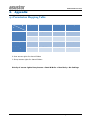



![[User-Manual]](http://vs1.manualzilla.com/store/data/005694860_1-a110ecd9b75056c42b066f9fe48fba59-150x150.png)