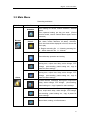
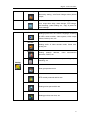
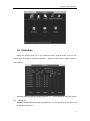
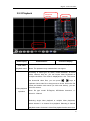
1
Digital Video Recorder Preface Thanks for choosing our products, and we will provide the best products and service for you. This instruction is suitable for many series of digital video recorder of our company. This instruction takes embedded digital video recorder of HD intelligent 98 series operating instruction as an example, the configuration of different model may have little difference. Please adhere to the actual product instead. This manual is just for reference, the contents of this manual will be updated according to function enhancement of products. Updated contents will be added in new instruction book, and you can download it on our website. Your timely suggestion and feedback will be appreciated, there may be some mistakes in the instruction book, such as mistaken technical specifications, product function, unmatched operation, or wrong printing. , we will improve it in the future. Digital Video Recorder Features Basic function Embedded Linux OS; Standard H.264 compression; 4/8/16/24 Ch. video input; Support 8/4 Ch. 720P or 4/2 Ch 1080P HD IPC input; Support 1 Ch VGA video output, CVBS, 16 Ch loop-out simultaneously, support HDMI,VGA,CVBS,SPOT output. Support 4/8/16 Ch andio input. 1 Ch audio output. Support RS-485 interface,can control PTZ, extend a variety of decoding protocols RS-232 interface, equipment upgraded and extended application Support 16 Ch record playback simultaneously; Support audio intercom. Built-in WEB Server,convenient to remote controlling management. Support mobile phone viewer (Windows Mobile/Symbian/iPhone/ Android/BlackBerry) Support multiple DDNS (Oray, 3322, DynDNS); support TB HDD; H.264 compression algorithm, flexible for network transmission 4/8/16/24 channels video input RS232 interface support keyboard control, series port connection and upgrade, matrix control, etc RS-485 interface support PTZ and comparable for all protocols Multi-level user management Compression H.264 video compression algorithm, independent hardware compression of real time 25fps CIF D1 resolution. Some models can be independent hardware compression of real time 25fps CIF resolution. Support dynamic bit rate, dynamic frame rate, the video image quality can be set while the compressed video image stream be limited. Support 4 channels / 8 channels / 16 channels/24 channels video & audio signal, real-time compression for video & audio signal of each channel, synchronized video and audio Resolution 1080P(1920*1080) 、720P(1280*720) 、D1(704*576) 、CIF(352*288)、 QCIF(176*144)video resolution Support OSD, date and time can be set as you want, Support multi zones to be Digital Video Recorder masked. Storage backup Built-in 1 / 2 / 4 /8SATA interface, Support TB HDD (1TB = 1000GB) for each interface. Backup from USB interface (USB Disk, mobile hard disk etc.) The files in HDD can be downloaded through network. Non-working HDD hibernation for reducing the working temperature and power consumption. Looping record and non-looping record can be included. Special video file format, prevent malice tampering and overwritten Network Support a 10M/100M/1000M compatible Ethernet interface. Web setting to preview video and audio signal and check DVR status, Network PTZ controlling and setting the camera’s parameter: iris, zoom, etc. Remote alarm and system log enquiry. Record file enquiry and real-time playback mode Multi-level user management and administrator authorization, Set up the permissions of users and different user groups. Networking method: PSTN、ISDN、ADSL、DDNS、LAN、WEB, etc. Network real-time multi channel playback simultaneously Video Playback ◆ Real-time recording for every channel, support 16 Ch. synchronous playback Search the playback recorded files on DVR through network; Multiple recording mode: manual, normal, alarm trigger, motion detection, and pre -recording Live video search and record video search Playback mode: slow play, fast play, backward play and frame play Any part of image can be chosen to be magnified while full-screen playback of single screen. The files in the DVR can be checked through network while playback. Real-time Monitoring Support PAL / NTSC High definition, clear video, live display On-display video channel status information: recording, motion detection, video loss, Digital Video Recorder video freeze etc. Video split and channel looping display Video adjustment: hue, contrast, saturation, brightness On-display character overlay: camera name and location, time and date Analog video output and VGA output, support monitor and TV display On-display bit rate and recording occupied hard disk storage (MB/h). Local, remote system log can be checked. Audio 1 / 4 / 8 /16channels audio input, 1 channel audio output. Synchronized video & audio input,clear and fluent audio quality,no noise. Synchronized monitering image and remote audio monitering. Two-way audio (Support BNC interface and 3.`5mm interface) Synchronized video & audio recording storage for every channel Synchronized video & audio playback Alarm 4/8/16 Ch. Alarm in,1/2/4Ch. relay output. Support IR sensor, smoke detector and other alarm devices Intelligent features: tracking, perimeter control, intrusion, retrograde, pacing, suspicious object, missing object and camera tampering. Alarm linkage mode, alarm trigger start to recording and invoke flash light, bell or other alarm devices Pre-recording mode: pre-recording before alarm trigger started.pre-recording time can be set. Motion detection can be set in any camera. Decide whether to activate alarm and flashing light or other alarm devices according to whether there is moving or changes of objects in the motion detection areas. Multi channel alarm reply output, easy to implement all the alarm applications Protection Circuit on alarm input and output Intelligent Features Support front panel, remote control and mouse operation mode. Any local part of image can be magnified while playback,support mouse to control PTZ. Fast & convenience shortcut operation: copy & paste for same settings Digital Video Recorder Contents FEATURES .................................................................................................................................................. - 3 BASIC FUNCTION ..................................................................................................................................... - 3 COMPRESSION ......................................................................................................................................... - 3 STORAGE BACKUP .................................................................................................................................. - 4 NETWORK................................................................................................................................................... - 4 VIDEO PLAYBACK ..................................................................................................................................... - 4 REAL-TIME MONITORING ...................................................................................................................... - 4 AUDIO .......................................................................................................................................................... - 5 ALARM......................................................................................................................................................... - 5 INTELLIGENT FEATURES ....................................................................................................................... - 5 CONTENTS ................................................................................................................................................. - 6 1 INTRODUCTION .................................................................................................................................... 12 1.1 PURPOSE............................................................................................................................................ 12 1.2 SCOPE ................................................................................................................................................ 12 1.3 REFERENCE ....................................................................................................................................... 12 2 INSTRUCTIONS ..................................................................................................................................... 12 2.1HARDWARE ENVIRONMENT ................................................................................................................. 12 2.2SOFTEWARE ENVIRONMENT ................................................................................................................ 13 2.3NETWORK ............................................................................................................................................ 13 2.4FRONT PANEL ...................................................................................................................................... 13 2.4.1 Front Panel of 98 Series ............................................................................................................. 13 FRONT PANEL DIAGRAM OF 98 2U MODEL ......................................................................................... 13 2.4.2 Black Board of 98 Seri ................................................................................................................ 15 2.5MOUSE ................................................................................................................................................. 15 2.6 A COMMON REMOTE CONTROLLER ..................................................................................................... 17 REMOTE CONTROL KEYS ........................................................................................................................... 17 B COMFORTABEL REMOTE CONTROLLER ................................................................................................... 18 REMOTE CONTROL KEYS ........................................................................................................................ 19 3 SYSTEM INTRODUCTION ................................................................................................................... 21 3.1 SYSTEM MENU TREE ......................................................................................................................... 21 3.2 MAIN MENU ........................................................................................................................................ 22 MANAGEMNT TOOLS .................................................................................................................................. 24 Digital Video Recorder 3.3 SHORTCUT MENU............................................................................................................................... 25 3.4 OPERATION OF MAIN MENU ............................................................................................................... 25 1, PRESS ENTER BUTTON ON THE PANEL TO ENTER MAIN MENU DIRECTLY ......................... 26 3.5 RECORD ............................................................................................................................................. 26 3.5.1 Schedule ....................................................................................................................................... 27 PACK DURATION: CHOOSE THE TIME SLICE OF VIDEO FILE ........................................................ 28 3.5.2 Playback ....................................................................................................................................... 29 FAST FORWARD AND SLOW PLAYBACK ............................................................................................... 30 BACKWARD PLAYBACK AND FRAME BY FRAME PLAYBACK .......................................................... 30 3.5.3Backup ........................................................................................................................................... 31 3.6 ALARM ................................................................................................................................................ 32 3.6.1 Motion Detection .......................................................................................................................... 32 ENABLE: FUNCTION ENABLE SWITCH ................................................................................................. 33 ALARM OUTPUT: WHEN ALARM OCCURRED, SYSTEM ENABLES PERIPHERAL ALARM DEVICES ........................................................................................................................................................ 33 3.6.2 Privacy Mask ................................................................................................................................ 34 ENABLE: FUNCTION ENABLE SWITCH ................................................................................................. 35 BUZZER: DEFAULT IS ―OFF‖ ..................................................................................................................... 36 3.6.3 Video Lost ..................................................................................................................................... 37 ENABLE: FUNCTION ENABLE SWITCH ................................................................................................. 37 BUZZER: DEFAULT IS ―OFF‖ ..................................................................................................................... 39 3.6.4 Alarm Input.................................................................................................................................... 39 USER CAN SAVE EACH CHANNEL CONFIGURE OR SAVE ONCE TILL ALL CHANNELS ARE SET .................................................................................................................................................................. 39 ALARM INPUT: SELECT ALARM CHANNEL NUMBER ........................................................................ 39 BUZZER: DEFAULT IS ―OFF‖ ..................................................................................................................... 41 3.6.5 Alarm Output ................................................................................................................................ 41 3.6.6 Abnormity ...................................................................................................................................... 42 DISK ERROR: THE SYSTEM CAN NOT RECOGNIZE BECAUSE OF DISK ERROR ..................... 42 ENABLE: FUNCTION ENABLE SWITCH, REVERSE MEANS ―ON‖ ................................................... 42 3.6.7 Digital Alarm ................................................................................................................................. 43 ALARM OUTPUT: WHEN ALARM OCCURRED, SYSTEM ENABLES PERIPHERAL ALARM DEVICES ........................................................................................................................................................ 43 BUZZER: DEFAULT IS ―OFF‖ ..................................................................................................................... 43 Digital Video Recorder 3.7 SETTING ............................................................................................................................................. 44 3.7.1 General ......................................................................................................................................... 44 SYSTEM TIME: HERE IS FOR YOU TO SET SYSTEM TIME .............................................................. 45 TIME FORMAT: 24-HOUR AND 12-HOUR ............................................................................................... 45 3.7.2 Encode .......................................................................................................................................... 46 CHANNEL: SELECT CHANNEL NUMBER .............................................................................................. 46 3.7.3 Network ......................................................................................................................................... 47 DHCP: HIGHLIGHT MEANS SELECT DYNAMIC HOST CONFIGURATION PROTOCOL; ..... 47 HTTP PORT: DEFAULT 80, CONFIGURABLE ACCORDING TO USER’S DEMAND ....................... 47 QOS: HERE YOU CAN SELECT THE PRIORITY BETWEEN FLUENCY/VIDEO QUALITIES ........ 47 DNS ................................................................................................................................................................. 48 PRIMARY DNS:ACCORDING TO LOCAL DNS .................................................................................... 48 DDNSDDNS TYPE: SUPPORT DDNS SERVER ..................................................................................... 48 PPPOE ............................................................................................................................................................ 48 3.7.4 Display ........................................................................................................................................ 49 CHANNEL DISPLAY: YOU CAN SELECT TO DISPLAY CHANNEL NAME BY IE OR PLAYBACK.; .......................................................................................................................................................................... 50 3.7.5 Account ...................................................................................................................................... 50 NOTE:.............................................................................................................................................................. 51 ADD GROUP: ADD GROUP AND SET GROUP AUTHORITY .............................................................. 52 ADD USER: ADD GROUP USER AND SELECT CORRESPONDING RIGHTS ................................ 52 3.7.6 PTZ ................................................................................................................................................ 53 3.7.7 RS232 ........................................................................................................................................... 54 3.7.8 Tour ................................................................................................................................................ 55 3.8 ADANCED............................................................................................................................................ 55 3.8.1 HDD Management ....................................................................................................................... 55 3.8.2 Digital Channle .......................................................................................................................... 56 3.8.3 USB Update ............................................................................................................................... 57 3.8.4 Configuration ................................................................................................................................ 57 3.8.5 Maintenance ................................................................................................................................. 58 3.8.6 Default ........................................................................................................................................... 58 YOU CAN HIGHLIGHT TO RESTORE DEFAULT FACTORY SETUP. ........................................ 58 SELECT ALL................................................................................................................................................... 58 3.8.7 Exit ................................................................................................................................................. 59 3.9 SYSTEM INFORMATION ....................................................................................................................... 60 Digital Video Recorder 3.9.1 HDD Information .......................................................................................................................... 60 3.9.2 BPS ................................................................................................................................................ 61 3.9.3 LOG ............................................................................................................................................... 62 3.9.4 Version .......................................................................................................................................... 62 3.10 RECORD CONTROL ...................................................................................................................... 63 THE CORRESPONDING INDICATION LIGHT IN FRONT PANEL WILL TURN ON .......................... 64 3.11 PTZ CONTROL............................................................................................................................. 64 CLICK ICON ZOOM, FOCUS, IRIS, AND TO ADJUST ZOOM, FOCUS AND IRIS ... 65 PATROL SETUP (TOUR SETUP) ............................................................................................................... 66 ACTIVATE PATROL (TOUR) ....................................................................................................................... 66 INPUT PATROL (TOUR) NUMBER IN THE NO. BLANK AND CLICK PATROL BUTTON................. 66 PATTERN SETUP ......................................................................................................................................... 66 AUTO SCAN SETUP .................................................................................................................................... 66 CLICK BORDER BUTTON. USE DIRECTION ARROWS TO SELECT CAMERA LEFT LIMIT ........ 66 ACTIVATE AUTO SCAN .............................................................................................................................. 67 3.12 COLOR SETTING .......................................................................................................................... 67 3.13 TV ADJUST .................................................................................................................................. 68 ADDENDA A FAQ ....................................................................................................................................... 69 APPREDA B DVR INSTALLATION .......................................................................................................... 73 CHECK UNPACKED DVR ........................................................................................................................... 73 FRONT PANEL AND REAR PANEL .......................................................................................................... 73 CHECK AFTER OPEN THE CASE CONVERTER .................................................................................. 73 HDD INSTALLATION ................................................................................................................................... 73 8. AND THEN CONNECT POWER CORD TO THE HDD....................................................................... 76 9. CLOSE THE DVR ENCLOSURE AND SCREW FIRMLY ................................................................... 76 RACK MOUNTING ...................................................................................................................................... 76 WE DVR USES STANDARD 2U ENCLOSURE AND ADAPT FOR INDUSTRY RACK MOUNT ...... 76 VIDEO INPUT AND OUTPUT ........................................................................................................................ 77 VIDEO INPUT CONNECTIONS: ................................................................................................................. 77 VIDEO OUTPUT CONNECTION ................................................................................................................ 78 AUDIO INPUT AND OUTPUT ........................................................................................................................ 78 ALARM INPUT AND OUTPUT........................................................................................................................ 79 ALARM OUTPUT SOCKETS ...................................................................................................................... 79 RELAY SPECIFICATION: ......................................................................................................................... 79 Digital Video Recorder ALARM OUTPUT NOTE: .......................................................................................................................... 80 MAX ALARM OUTPUT NO MORE THAN 1A ........................................................................................... 80 ALARM INPUT SOCKETS: ......................................................................................................................... 80 ALARM INPUT NOTE: ................................................................................................................................. 80 PTZ CONTROL CONNECTION ..................................................................................................................... 81 PTZ & DVR CONNECTION ......................................................................................................................... 81 2、CONNECT THE SPEED DOME CAMERA VIDEO CABLE TO DRV VIDEO INPUT .................... 81 PTZ CONNECTION NOTE: ......................................................................................................................... 81 APPREDA C OVERVIEW OF NAVIGATION AND CONTROLS ............................................................. 82 System Boot up...................................................................................................................................... 82 Login ........................................................................................................................................................ 82 System Shutdown.................................................................................................................................. 83 METHOD 2: SYSTEM MENU -> SHUT DOWN THE SYSTEM ............................................................. 83 PREVIEW........................................................................................................................................................ 83 Auto Resume after Power Failure ....................................................................................................... 83 Replace Button Battery ......................................................................................................................... 83 APPREDA E: WEB CLIENT OPERATION ................................................................................................. 84 IE BROWSER SETUP ................................................................................................................................. 84 LOGIN ........................................................................................................................................................ 84 DEFAULT FACTORY NAME IS ADMIN AND PASSWORD IS 123456 ................................................. 84 WEB CLIENT REVIEW INTERFACE.......................................................................................................... 85 TOOLBAR ................................................................................................................................................... 85 THERE ARE FEW FUNCTION BUTTONS IN THE TOOLBAR, AT UPSIDE AND DOWNSIDE ....... 85 PLAYBACK:RECORD VIDEO INQUIRY, PLAYBACK AND DOWNLOAD ......................................... 85 PREVIEW WINDOW SWITCH ....................................................................................................................... 85 REVIEW THE CHANNEL .............................................................................................................................. 86 REVIEW .......................................................................................................................................................... 87 REVIEW TOOLBAR IN THE UP-RIGHT SIDE OF CHANNEL, SHOWN AS BELOW ;87 PTZ CONTROL FUNCTION.......................................................................................................................... 87 CLICK PTZ SETUP BUTTON YOU CAN SEE THE FOLLOWING INTERFACE................................. 89 COLOR SETTING ........................................................................................................................................ 89 SET HUE, BRIGHTNESS, CONTRAST, SATURATION AND AGC ....................................................... 89 OTHER SETTING ........................................................................................................................................ 90 Digital Video Recorder WEB CLIENT CONFIGURE ......................................................................................................................... 91 SYSTEM INFO ............................................................................................................................................ 91 SYSTEM SETTING ...................................................................................................................................... 92 General ................................................................................................................................................... 92 GENERAL INTERFACE IS SHOWN AS BELOW.; ................................................................................ 92 Encode .................................................................................................................................................... 93 ENCODE SETUP INCLUDES THE FOLLOWING ITEMS ...................................................................... 93 Schedule ................................................................................................................................................. 94 SCHEDULE INCLUDES THE FOLLOWING INTERFACE ...................................................................... 94 Tip ............................................................................................................................................................ 94 RS232 ..................................................................................................................................................... 95 Network ................................................................................................................................................... 96 THIS INTERFACE INCLUDES THE FOLLOWING ITEMS; ................................................................. 96 RESET TO DEFAULT: RESET SELECTED FUNCTIONS TO DEFAULT ............................................. 98 ALARM ....................................................................................................................................................... 99 ALARM OUTPUT: SELECT ALARM ACTIVATION CHANNEL WHEN ALARM OCCURS. ................ 99 ADVANCED ............................................................................................................................................... 100 UPGRADE: SELECT UPDATE FILE TO UPGRADE THE DVR; ....................................................... 101 RECORD CONTROL : SET RECORD STATUS: SCHEDULE / MANUAL / STOP ........................... 102 User Account ........................................................................................................................................ 102 ADDENDA D ................................................................................................................................................. 103 FRONT & REAR PANEL............................................................................................................................. 103 FRONT PANEL ........................................................................................................................................... 104 FRONT PANEL ........................................................................................................................................... 105 FRONT PANEL ........................................................................................................................................... 106 FRONT PANEL ........................................................................................................................................... 107 FRONT PANEL ........................................................................................................................................... 107 FRONT PANEL ........................................................................................................................................... 108 90SERIES FRONT & REAR PANEL ........................................................................................................... 114 97SERIES FRONT & REAR PANEL ........................................................................................................... 116 1 Introduction 1.1 Purpose This user manual is provided mainly for the project managers, sales personnel, end users, engineering installers and other related personnel, facilitating the installation and maintenance and improving the work efficiency. 1.2 Scope Usage of the user manual: project managers, project installers, maintenance personel and end users, etc. Content of the user manual: introduction and instructions of the features, parameters of embedded DVRs Models of DVRs in this user manual: We series of embedded DVRs 1.3 Reference GA/T367-2001 Technical requirements for video security monitoring system; GA/T368-2001 Technical requirements for intrusion alarm system; GB8898-2001 Safety requirements of audio, video and similar electronic equipment. 2 Instructions 2.1Hardware Environment Power: 100V ~ 240V AC, UPS or voltage stabilizer for better power input Cables: Cat 5 network cable, AV cable, audio cable, 485 control cable Temperature: 0°C—55°C, too heat or freeze will cause the malfunction of DVR, Digital Video Recorder strictly prohibit to install the DVR above the heat source Humidity: 10%--90%, keep the DVR away from rain or wet place, installation must stay away from water source Ventilation: install the DVR in an airy place, keep away from dusty Installation: horizon installation or cabinet installation, protective casing needed when outdoor installation 2.2Softeware Environment OS: embedded Linux system Device firmware: Universal version (Please check We website for latest version) 2.3Network Protocols: TCP/IP、HTTP、DNS、DHCP、ARP、RARP etc. 2.4Front Panel 2.4.1 Front Panel of 98 Series Front Panel Diagram of 98 2U model S/N Key pad name Icon Main function Activate current control, modify setup, increase/decrease 1 Up & down Increase/decrease numeral, assistant function such as PTZ 13 Digital Video Recorder Num Pad (1) Num/Letter Pad (3/def) Shift current activated control. When playback Right & left PTZ control Num/Letter Pad (2/abc) Num/Letter Pad (4/ghi) Confirm operation Enter Open the system menu when in preview 2 shift shift Switch between function and numeral Multiple slow play speeds or normal playback Slow Play ZoomNumber/Letter 8/tuv In playback mode, playback the previous video Play Previous FocusNumber/Letter 7/pqrs In playback mode, playback the next video 3 Play Next Focus+ Number/Letter 6/mno Various fast speeds and normal playback. Fast play Zoom+ Number/Letter 5/jkl Manually stop/start recording Recording REC PTZ enter to the setting page. POW 4 indicator Light Power light Net light NET Record light 5 Remote IR REC Receive remote control signal 14 Digital Video Recorder 2.4.2 Black Board of 98 Seri S/N Function S/N Function 1 4 Channel Video Output 7 1 Channel Alarm Output 2 1 Channel Audio Input 8 Power button 3 4 Channel Audio Input 9 1 Channel Audio Input 4 RJ45 10 USB OTG 2.0 interface( Only for USB storage device ) 5 RS485 port 11 DC 12V 6 4chanel alarm input 12 VGA Output 2.5Mouse * For right-hand mouse The DVR could be operated by mouse, connect the USB mouse into the USB port in front panel System pops up password input dialogue box if you have not logged in. In real-time monitor mode, you can go to the main menu. Left click mouse When you have selected one menu item, left click mouse to view menu content. Implement the control operation. Modify checkbox or motion detection status. Click combo box to pop up drop down list. 15 Digital Video Recorder In input box, you can select input methods. Left click the corresponding button on the panel you can input numeral/English character (small/capitalized). Here ← stands for backspace button. _ stands for space button. In English input mode: _stands for input a backspace icon and ← stands for deleting the previous character. In numeral input mode: _ stands for clear and ← stands for deleting the previous numeral. When input special sign, you can click corresponding numeral in the front panel to input. For example, click numeral 1 you can input―/‖ , or you can click the numeral in the on-screen keyboard directly. Implement special control operation such as double click one item in the file list to Double left click mouse playback the video. In multiple-window mode, double left click one channel to view in full-window. Double left click current video again to go back to previous multiple-window mode. In real-time monitor mode, pops up shortcut menu: one-window, four-window, nine-window and sixteen-window, Pan/Tilt/Zoom, color setting, search, record, alarm input, alarm output, main menu. Right click mouse Among which, Pan/Tilt/Zoom and color setting applies for current selected channel. If you are in multiple-window mode, system automatically switches to the corresponding channel. Exit current menu without saving the modification. In numeral input box: Press middle button Move mouse Increase or decrease numeral value. Switch the items in the check box. Page up or page down Select current control or move control Select motion detection zone Drag mouse Select privacy mask zone. 16 Digital Video Recorder 2.6 A Common Remote Controller Remote Control Keys S/N Name 1 Recording 2 Numeral keys 0-9 Function Icon REC 0-9 Manually stop/start recording Input password, switch channel and input numeral. Playback or paused mode, click this button to realize 3 Play/Pause 4 Reverse/Pause 5 Play previous normal playback Iris + In normal playback or pause mode, click this button to reverse playback Iris In playback mode, playback the previous video Focus - 17 Digital Video Recorder In playback mode, playback the next video 6 Play next Focus + 7 Backup BACKUP 8 ESC ESC Into the backup interface, start backup operating Close upper interface or controls Enter DVR No. setting 9 Add ID *999 for Administrator *DVR No. setting: Main Menu->Setting->General: DVR number 10 Turn off 11 Assistant Turn off button Support Multi-function: Shift PTZ control manual, Delete the previous Fn character, Realize special functions Various fast speeds and normal playback 12 Fast play Zoom + Multiple slow play speeds or normal playback 13 Slow play Zoom - 14 Screen mode Screen mode PTZ PTZ 15 Preview switch video interface to 1/4/8/16 screen modes In PTZ function: enable PTZ Click this button to switch between numeral, English (Small/Capitalized), Shift Chinese 16 Shortcut Menu 17 LOCK Sub Menu pops up shortcut menu LOCK Log off current user Activate current control, modify setup Up/down Increase/decrease numeral, assistant function such as PTZ menu. 18 Shift current activated control Left/right When playback, click these buttons to control playback bar, PTZ control. Confirm operation 19 Enter Enter Go to the main menu B Comfortabel Remote Controller 18 Digital Video Recorder Remote Control Keys S/N 1 Name Icon Window switch Function Switch between one-window and multiple-window display modes. Enter DVR No. setting 2 Add ID *999 for Administrator *DVR No. setting: Main Menu->Setting->General: DVR number 3 Numeral keys 0-9 0-9 Input password, switch channel and input numeral. PTZ PTZ In PTZ function: enable PTZ 4 Click Shift this button to switch between numeral, English (Small/Capitalized), Chinese Support Multi-function: Shift PTZ control manual, Delete the previous 5 Assistant Fn character, Realize special functions Confirm operation 6 Enter Enter Go to the main menu 7 ESC ESC Close upper interface or controls Activate current control, modify setup, Up/down Increase/decrease numeral, assistant function such as PTZ menu. 8 Shift current activated control Left/right When playback, click these buttons to control playback bar, PTZ control. stop/start recording, working with direction keys Manually 9 Record Record or PTZ numeral keys,PTZ setting In function: 10 Shortcut Menu Sub Menu pops up shortcut menu 19 Digital Video Recorder Play/Pause Playback or paused mode, click this button to realize Iris + playback normal In normal playback or pause mode, click this button to reverse Reverse/Pause playback Iris Various fast speeds and normal playback Fast play Zoom + 11 Multiple slow play speeds or normal playback Slow play Zoom In playback mode, playback the previous video Play previous Focus In playback mode, playback the next video Play next Focus + 20 Digital Video Recorder 3 System Introduction 3.1 System Menu Tree Schedule Record Search Motion Detection Camera Masking Backup Video Lost Alarm General Encode Main Menu 单 Alarm Input Alarm Output Network Abnormality Setting Display Account PTZ System RS232 HDD Manage Tour Online Users TV Adjust Tool USB Update HDD Information Maintenance BPS Info Default Log Version Shut Down Record Playback Record Control Record Backup Alarm Output Pan/Tilt/Zoom Color Setting T V Adjust Logout Video Split 21 Digital Video Recorder 3.2 Main Menu Recording and Alarm Main Menu Sub Menu Schedule Record Search Function Time setting for record, motion detection, external alarm. Time operated setting per day per week (Period time for record, receive external alarm signal, motion detection) Record enquiry and playback, sorted by video type (All, alarm, motion detection, all alarm), channels, time, the result will be displayed in file list, choose the file to play R- Regular recording file A – Alarming recoding file M – Motion detection file H-Manual Backup Record backup operation and setting Motion Detection Include channel, enable/off, sensitive, detection zone, arming time, output time delay, alarm linkage, PTZ linkage, pre-recording, patrol setting etc., copy & paste for same settings Camera Masking Include channel, enable/off, sensitive, detection zone, arming time, output time delay, alarm linkage, PTZ linkage, pre-recording, patrol setting etc., copy & paste for same settings Alarm Video Lost Alarm Input Include channel, enable/off, arming time, output time delay, alarm linkage, PTZ linkage, pre-recording, patrol setting etc., copy & paste for same settings Include channel, enable/off, alarm input type, arming time, output time delay, alarm linkage, PTZ linkage, pre-recording, patrol setting etc., copy & paste for same settings Alarm Output Alarm Mode, setting, on/off and status 22 Digital Video Recorder Abnormity Abnormity setting, on/off and linkage action (Alarm output, Digital Alarm General Include channel, enable/off, alarm input type, arming time, output time delay, alarm linkage, PTZ linkage, pre-recording, patrol setting etc., copy & paste for same settings Setting system time, time format, language, recording in HDD, series number, video system, video output format, stand-by time, etc. Encode Setting audio & video encode mode, frame rate, quality, etc. Network Display Setting network address, protocols, DHCP, etc. video transmission Setting channel name, front output, coding output, masking, etc. Setting Account User group and account PTZ PTZ control protocols and bit rate RS232 Setting series port and bit rate Tour Setting preview, tour time, etc. 23 Digital Video Recorder Managemnt Tools HDD Manage HDD management, delete data and etc. Note: System will restart after setting HDD Online Users Online user management TV Adjust Adjust picture’s up, down, left, right deflate. USB Update File Tool system, U-BOOT , Kernel, Application update, Configuration, Maintenance Save system configuration as a file, easy to save or load for quick setting. Configuration Restart system and delete files. Default Restore all to default or partially by selection Note: Not for user account Shut Down User logout, system shutdown, restart, etc... HDD Information Info SATA interface status, capacity for each HDD and total, remaining capacity, video start/stop time, etc. Type: read-write disk, read-only disk, redundancy disk etc. BPS Each channel’s bit rate and occupied HDD capacity per hour. 24 Digital Video Recorder Log Display important event log and designate needed log. Version Display system hardware, software version and release date, etc. 3.3 Shortcut Menu Record Playback Record video inquiry and playback Record Control Set record status: schedule/manual/stop Record Backup Record backup operation and setting Alarm Output Pan/Tilt/Zoom Alarm output setting, on/off and status PTZ control protocols and bit rate Menu Color Setting TV Adjust Logout Set hue, brightness, contrast, saturation Adjust picture’s up, down, left, right deflate. User logout, system shutdown View 1 / 4 / 8 / 16 channel display Mute Buzzer off 3.4 Operation of Main Menu Main menu includes: video function, alarm function, system setup, management tool, system information. Note: All sub-menu setup will be effective by confirming ―SAVE‖, otherwise ineffective. 25 Digital Video Recorder When check box is highlighted, it means certain function is selected. If unfilled means not selected. Enter main menu method: 1, press ENTER button on the panel to enter main menu directly 2, press Esc button on the panel, select MAIN MENU. 3.5 Record Note: User should have “Record” authority, HDD should be installed and format properly, Setting video setup and playback function, including schedule, motion detection, and exterior alarm setting. Inquire according to video type (ALL, NORMAL, ALARM, MOTION DETECTION), channel, time. The result will be displayed in a list 26 Digital Video Recorder 3.5.1 Schedule When the system boots up, it is in default 24-hour regular mode. You can set record type and time in schedule interface. Setting at Main menu> Video function> video setting. Including schedule setting regarding Regular(R), motion detection video (M), Alarm (A) Manual (H) Channel: Please select the channel number first. You can select ―all‖ if you want to set for the whole channels. 27 Digital Video Recorder Redundancy: System supports redundancy backup function. You can highlight Redundancy button to activate this function. Please note, before enable this function, please set at least one HDD as redundant. (Main menu->Advanced->HDD Management) Pack Duration: Choose the time slice of video file Pre-record: record the video previously than motion detection Video control: single option, ―●‖ means selected, there are ―config‖, ―all the time‖, ―close‖ 3 options. Week day: There are eight options: ranges from Saturday to Sunday and all. Time period: means current channel is recording in this period. ―■‖ setting regular, motion detection, alarm, status, it can be single or multiple choices. 6 time periods to set. Also allows you to copy one channel setup to another. After setting in channel 1, you can click paste button and turn to channel 2 and then click copy button. You can finish setting for one channel and then click save button or you can finish all setup and then click save button to memorize all the settings. 28 Digital Video Recorder 3.5.2 Playback Playback Window Channle Select File List File Informati on Search Inquiry Video inquiry enter video playback menu demonstration on-screen display Select video function from main menu to enter menu page Notet: The password may needed when user logout. According to video type: all, alarm, motion detection, all alarm video, channel, time etc., you can inquire video file based on multiple conditions. The result is displayed as a list. The screen list shows128 video files, you can press Video playback operation 、 keys to up/down check video file or drag mouse to check. Select the file name and double click mouse (or click enter button), you can view file content. Note: file type model: R-Regular, MD-Motion detection, AAlarm.H-Manual Selecting single video playback or multiple video playbacks, select channel 1 or channel 2 to playback. Selecting 2 channel playback means 2 window’s video files playback at the same time. 29 Digital Video Recorder Playback video ( screen displays channel, date, time, play speed, play progress), control speed, replay (automatically replay video file according to inquiry result), full screen display ect. Playback Note: The status bar will be hidden automaticlly when full screen operation display, Channels switch move mouse to display again. When video playback, press number button to switch playback when playback channel Right click mouse to select any zone when playback, and Left Partial zoom click to zoom in, Right click to exit. Fast forward and Slow playback Button Illustration In playback mode, click this button to switch between various fast play modes such as fast play 1,fast play 2 and more.(Fast play 1 means fast play level 1 or not about speed) Fast play slow play key In playback mode, click this button to switch between various slow play modes such as slow play 1 or slow play 2. In slow playback mode, click this button to switch Play/Pause between play/pause modes. In playback mode, you can click Previous/next and to view previous or next video in current channel. Backward playback and frame by frame playback Button Backward play Illustration In normal playback mode, Remarks left click When system is in 30 Digital Video Recorder in playback interface. Manual playback frame by frame. backward play button, system begins backward playback. Double click backward play button again, system goes to pause mode. Click pause button in normal playback mode, slowly turn the jog (inner dial) clock-wise to view frame by frame, counter clock wise to view I frame playback. backward play or frame by frame playback mode, you can click play button to go to normal playback. 3.5.3Backup Backup the recorded files to local storage device, support USB storage devices, support FAT32, NTFS; Detect: Detect the USB portable device connected with DVR, and display the device name, Free space / Total space status USB Backup: list and backup the selected file, to the USB Devices, could be sorted by Record type, channel, time Erase: erase all the data in the USB device Start: Backup start 31 Digital Video Recorder 3.6 Alarm Sub-menu: motion detection, camera masking, video loss, alarm input, alarm input, abnormality. 3.6.1 Motion Detection By analyzing video, when system detects sensitive moving signal, it will start motion detection alarm. 32 Digital Video Recorder Operation method: Channel: select the channel you want to implement motion detection. Enable: function enable switch Sensitivity: System supports 6 levels. The sixth level has the highest sensitivity. Region: can set 396(22*18)zones. The black is open zone; the pink is motion detection zone. Period: Click set button, you can see an interface is shown as in below. Here you can set your own setup for business day and non-business day 。 Alarm output: when alarm occurred, system enables peripheral alarm devices Tigger Delay: System auto delays detecting for a specified time. The value ranges from 10-600 (Unit: second) 33 Digital Video Recorder Latch: when motion detection complete, system auto delays detecting for a specified time. The value ranges from 10-300 (Unit: second) On-screen: reverse display means allowing on-screen. There is connection motion on the screen when alarm signal happens. Send email: System can send out email to alert you when alarm occurs. Channel: select the channel to activate recording function once alarm occurred. Please make sure you have set MD record in encode interface (Main Menu->Setting->Schedule) and schedule record in manual record interface (Main Menu->Advanced->Manual Record) PTZ activation: Here you can set PTZ movement when alarm occurs. Such as go to preset, tour &pattern when there is an alarm. Click ―select‖ button, Tour: Here you can enable tour function when alarm occurs. It is a one-window tour. Latch: when motion detection, system auto delays recording for a specified time. The value ranges from 10-300 (Unit: second) Buzzer: Default is ―off‖ 3.6.2 Privacy Mask When someone viciously masks lens, the system can alert you to guarantee video 34 Digital Video Recorder continuity. You can select Alarm output, On-screen, PTZ Linkage. Operation method: Channel: select the channel to record when camera mask occurred. Enable: function enable switch Sensitivity: there are six levels. The six-level has the highest sensitivity. Period: Click set button, you can see an interface is shown as below. Here you can set for business day and non-business day. You can set up six time period, but they can’t be repeated. The linear graphics show the period, you can copy the setting to other days 35 Digital Video Recorder Alarm output: when camera masking occurred, system enables peripheral alarm devices Latch: when camera masking, system auto delays detecting for a specified time. The value ranges from 10-300 (Unit: second) On-screen: reverse display means allowing on-screen. There is connection motion on the screen when alarm signal happens. Send email: System can send out email to alert you when alarm occurs. Channel: select the channel to activate recording function once alarm occurred. Please make sure you have set MD record in encode interface (Main Menu->Setting->Schedule) and schedule record in manual record interface (Main Menu->Advanced->Manual Record) PTZ activation: Here you can set PTZ movement when alarm occurs. Such as go to preset, tour &pattern when there is an alarm. Click ―select‖ button, Tour: Here you can enable tour function when alarm occurs. It is a one-window tour. Recording Latch: when motion detection complete, system auto delays recording for a specified time. The value ranges from 10-300 (Unit: second) Buzzer: Default is ―Off‖ 36 Digital Video Recorder 3.6.3 Video Lost When video loss happens, you can select ALARM OUTPUT or video loss show information in local mainframe screen. Operation method: Channel: select the channel you want to enable lens shading alarm. Enable: function enable switch Period: Click set button, you can see an interface is shown as in below. Here you can set for business day and non-business day. You can set up six time period, but they can’t be repeated. The linear graphics show the period, you can copy the setting to other days 37 Digital Video Recorder Alarm output: when alarm occurred, system enables peripheral alarm devices. Show Message: reverse display means allowing on-screen. There is connection motion on the screen when alarm signal happens. Send email: System can send out email to alert you when alarm occurs. Channel: select the channel to record when video loss occurred. PTZ activation: Here you can set PTZ movement when alarm occurs. Such as go to preset, tour & pattern when there is an alarm. Tour; Here you can enable tour function when alarm occurs. It is a one-window tour. Latch: when video lost complete, system auto delays detecting for a specified time. The value ranges from 10-300 (Unit: second) 38 Digital Video Recorder Channel: select the channel to activate recording function once alarm occurred. Please make sure you have set MD record in encode interface (Main Menu->Setting->Schedule) and schedule record in manual record interface (Main Menu->Advanced->Manual Record) Recording Latch: when video lost complete, system auto delays recording for a specified time. The value ranges from 10-300 (Unit: second) Buzzer: Default is ―off‖ 3.6.4 Alarm Input Setting at main menu>alarm function>alarm input. According to the introduction of 2.4 alarm input/output device connection, please make sure you have properly connected alarm devices such as Alarm, lighter) User can save each channel configure or save once till all channels are set Alarm input: select alarm channel number Enable: function enable switch Type: normal open or normal close. 39 Digital Video Recorder Period: Click set button, you can see an interface is shown as in below. Here you can set for business day and non-business day. You can set up six time period, but they can’t be repeated. The linear graphics show the period, you can copy the setting to other days Latch: Here is for you to set proper delay duration. Value ranges from 0 to 600 seconds. Alarm output: activate peripheral alarm device when motion detection occurred. Show message: System can pop up a message to alarm you in the local host screen if you enabled this function Send email: System can send out email to alert you when alarm occurs. Record channel: you can select proper channel to record alarm video (Multiple choices) PTZ activation: Here you can set PTZ movement when alarm occurs. Such as go to preset, tour& pattern when there is an alarm. 40 Digital Video Recorder Tour: Here you can enable tour function when alarm occurs. It is a one-window tour Latch: when alarm input, system auto delays detecting for a specified time. The value ranges from 10-300 (Unit: second) Recording Latch: when alarm input complete, system auto delays recording for a specified time. The value ranges from 10-300 (Unit: second) Buzzer: Default is ―off‖ 3.6.5 Alarm Output Setting at main menu>alarm function>alarm output. Alarm Type: There are two types for you to select. Schedule: Select all or ―1‖●, ―2‖●, ―3‖●, ―4‖● for the first channel、second channel、 41 Digital Video Recorder third channel or forth channel. Manual: Select all or ―1‖●, ―2‖●, ―3‖●, ―4‖● for the first channel、second channel、third channel or forth channel. Stop: close alarm output. Status: current device alarm output status. 3.6.6 Abnormity Main menu→Alarm→Abnormity Abnormality, as shows in picture 5-22, Event type: no disk space, hard disk error, Not enough space, network failure ,IP address conflict,,. No disk space: DVR does not connect to the disk or hardware is error. Disk error: The system can not recognize because of disk error Not enough space: Not enough space for the disk (the percentage of free space will be showed) Network failure: The network connection disrupted or network connection error IP conflict: The IP address of disk recorder network is fixed, the conflict will occur once there is another same IP is set in the internet. Enable: function enable switch, reverse means ―on‖ Alarm output: when exception occurred, system enables peripheral alarm devices On-screen: reverse display means allowing on-screen. There is connection motion on the screen when alarm signal happens. Latch: system auto delays for a specified time. The value ranges from 10-300 (Unit: second) Send email: System can send out email to alert you when alarm occurs. Buzzer: Default is ―off‖ 42 Digital Video Recorder 3.6.7 Digital Alarm Setting at : Main menu→Alarm→Digital Alarm Channel: select the channel to activate recording function once alarm occurred. Please make sure you have set MD record in encode interface (Main Menu->Setting->Schedule) and schedule record in manual record interface (Main Menu->Advanced->Manual Record) PTZ activation: Here you can set PTZ movement when alarm occurs. Such as go to preset, tour &pattern when there is an alarm. Click ―select‖ button, Alarm output: when alarm occurred, system enables peripheral alarm devices Tigger Delay: System auto delays detecting for a specified time. The value ranges from 10-600 (Unit: second) Latch: when motion detection complete, system auto delays detecting for a specified time. The value ranges from 10-300 (Unit: second) On-screen: reverse display means allowing on-screen. There is connection motion on the screen when alarm signal happens. Send email: System can send out email to alert you when alarm occurs. Tour: Here you can enable tour function when alarm occurs. It is a one-window tour. Latch: when motion detection, system auto delays recording for a specified time. The value ranges from 10-300 (Unit: second) Buzzer: Default is ―off‖ 43 Digital Video Recorder 3.7 Setting Submenu: General, Encode, Network, Input, User Management, Pan/Tilt/Zoom, Serial Port, Tour. Note: system setup will be done by user who has the authority 3.7.1 General 44 Digital Video Recorder System time: here is for you to set system time Date format: there are three types: YYYYY-MM-DD: MM-DD-YYYYY or DD-MM-YYYY. DST: Here you can set DST time and date. Please enable DST function and then click set button. Date separator: there are three denotations to separate date: dot, beeline and solidus. Time format: 24-hour and 12-hour Language: system supports languages: Chinese (simplified), English, HDD full: Here is for you to select working mode when hard disk is full. There are two options: stop recording or rewrite. Stop or rewrite may be selected while no space for the disk. The condition of stopping recording is the present working disk is full or under covering and the next disk is non-empty. The condition of rewrite is the present working disk is full and the next disk is non-empty. DVR No: when you are using one remote control to control several DVRs, you can give a name to each DVR for your management. Video standard: There are two formats: NTSC and PAL. Output method: you can set self-adaptable, VGA input; TV input 3 types, support VGA and TV input at the same time. Pack duration: Here is for you to set proper User’s operation duration. Value ranges from 0 to 60 Minutes. User need re-login the system after time out. 45 Digital Video Recorder 3.7.2 Encode Support dual streaming: main streaming and sub streaming Channel: select channel number Compression: H.264; Resolution: CIF or QCIF Frame rate: PAL:1-25 f/s, 25 levels optional;NTSC:1-30 f/s, 30 levels optional Bit rate: system supports two types: CBR and VBR Quality: There are six levels ranging from 1 to 6. The sixth level has the highest image quality. Bit rate: 0kb/s-4096kb/s optional Frame interval: can set 1 frame, 2-12 optional. Copy the same settings to all channels. 46 Digital Video Recorder 3.7.3 Network IP address, Subnet mask, Gateway: input from Front panel figure buttons to modify IP address, and subnet mask, gateway. DHCP: highlight means select Dynamic Host Configuration Protocol; TCP port: Default 34567, configurable according to user’s demand HTTP port: Default 80, configurable according to user’s demand UTP port: Default 37778, configurable according to user’s demand Max connection: system support maximal 10 users. 0 means there is no connection QoS: Here you can select the priority between fluency/video qualities Network download: System can process the downloaded data first if you enable this function. SMTP Server: Input server address and then enable this function. Port: Default value is 25. You can modify it if necessary. User Name: The sender email account user name. Password: The sender email account password. Sender: Sender email address. 47 Digital Video Recorder Subject: Input email subject here. Receiver: Receiver email address. Note: Please fulfill the postfix of the mail address if it is virtual,(e.g. [email protected]) otherwise it is not allowed. (e.g. xxxx) DNS Primary DNS:According to local DNS Secondary DNS :According to local DNS DDNSDDNS Type: Support DDNS server Domain Name: Your self-defined domain name. User: The user name you input to log in the server. Password: The password you input to log in the server. Server IP: DDNS server IP address Server Port: DDNS server port. PPPoE 48 Digital Video Recorder User name: ADSL user name Password: ADSL password IP address: IP is distributed after successful dialing External HTTP port: The external HTTP port of router, corresponds to the HTTP port of the equipment. External HTTP port: The external TCP port of router, corresponds to the HTTP port of the equipment. 3.7.4 Display Channel display: Click modify button. You can see an interface is shown as above, , including time display, channel display, recording state, alarm state . Transparency: Here is for you to adjust transparency. The value ranges from 128 to 255. 49 Digital Video Recorder Channel: select the channel needed to set. Cover area (Private masking): Here is for you to set window blanking section. You can drag you mouse to set proper section size Time Display: You can select to display time by IE or playback. Channel Display: You can select to display channel name by IE or playback.; Setting: You can move or change the display location of ―time display‖ , ‖channel display‖ 3.7.5 Account Management user account 50 Digital Video Recorder Note: The user name and group name can consist of six bytes. characters, number, underline, subtraction sign, dot, other characters are not allowed. System account adopts two-level management: group and user. No limit to group or user amount. For group or user management, there are two levels: admin and user. User management adopts group and user 2 class ways, group name can not repeat, user name can not repeat, each user must belong to certain group; one user can belong to one group only. One user should belong to one group. User right can not exceed group right. Modify password: select user name, input new password in new password blank and re-confirm password. Click SAVE button to confirm Password modify: elect user name, input new password in new password blank and re-confirm password. Click save button to confirm. Space bar is allowed except the first and last character. In addition, users who have users account can not only change the personal password but also change other users’ password. 51 Digital Video Recorder Add group: add group and set group authority Enter adding group menu page, confirm the group name, select 47 corresponding rights, including control panel, shut down device, real time review, playback, record, backup, PTZ control, user account, system information, alarm input/output setup, system setup, log inquiry, deleting logging, updating system, device control, etc. Modify group: modify existing group. Add user: add group user and select corresponding rights 52 Digital Video Recorder There are 2 default users: ―admin‖ ―guest‖. ―admin‖ users have administrator right. The default password is ―123456‖ for all 2 default users’ account. ―guest‖ user only can review playback and backup. About reusable function: this function allows multiple users use the same account to login. Once select the user to a group, the user authority can not surpass this group authority property. We recommend that normal user’s authority lower than other advanced user. 3.7.6 PTZ Note: The camera video should be in the current screen. Before setup, please check the following connections are right: Address: input corresponding PTZ address. 53 Digital Video Recorder Decoder A (B) line connects with DVR A (B) line. Boot up the DVR, input user name and password. In the main menu, click setting, and then click Pan/Tilt Control button。 Channel: select the current camera channel. Protocol: select corresponding PTZ protocol, 18 protocols embedded. Address: default address is 1. Attention: this address must accord with camera’s address; otherwise camera can not be controlled. Baud rate: select corresponding baud rate. Default value is 9600. Data bits: select corresponding data bits. Default value is 8. Stop bits: select corresponding stop bits. Default value is 1. Parity: there are five options: odd/even/none/blank. Default is none. 3.7.7 RS232 Function: There are various devices for you to select. Console is for serial port or min-end platform to upgrade program. Keyboard is for you to control current device. Baud rate: You can select proper baud rate. Data bit: You can select proper data bit. Stop bit: There are three values: 1/2. Parity: there are 4 choices: none/odd/even/blank System default: Console, Baud rate is 115200, data bit is 8 digits, stop bit is 1, and Parity is none. 54 Digital Video Recorder 3.7.8 Tour Set tour and time, interval is 5-120s, includes single picture, 4 pictures, 8 pictures, 9 /16pictures. 3.8 Adanced Management tool menu includes: HDD management, On-line user, TV adjust, USB update, Auto Maintenance, Restore, and Shut Down. 3.8.1 HDD Management 55 Digital Video Recorder Support 2 SATA MANAGEMENT.DVR HDD. supports Enter 2 SATA MENU>ADVANCED HDD. Enter OPTION>HDD MENU>ADVANCED OPTION>HDD MANAGEMENT. If 2pcs HDD installed, then displayed as 1-2 in HDD. If selecting the first HDD, it displays current type, total capacity, and record time. You can modify HDD attribute, read-only disk, read-write disk, redundancy disk or delete all the data in the HDD. After all the setups please click OK button, system goes back to the previous menu Note: You can set proper mode for each hard disk from the dropdown list. When you use redundant backup function, you can set one or more redundant HDD(s). Please note you need to set at least one read-write disk, otherwise system will not record video. 3.8.2 Digital Channle Channel: select the current camera channel. Enable: function enable switch 56 Digital Video Recorder Type: normal open or normal close. Decode Policy: Set the digital channel policy, there are 5 selects Video Audio: Select the Audio or Video or both Remote Channle: Select the channel for remote Steamtype: Main stream or Sub stream IP Address: Set the device IP address Port: Set the port value Preset: Set the device preset Name: Set the user name Password: Set the user password Device Search: Search the device and list in the below 3.8.3 USB Update Connect to the USB port on the rear panel with the USB device, which has upgrade file, and then select the file to upgrade. The upgrade includes kernel, u-boot, setting, applications and file system. 3.8.4 Configuration Output setting Connect to the USB interface on the rear panel with the USB equipment, set the system output into a file named cfg.coi 57 Digital Video Recorder Input setting Connect to the USB interface on the rear panel with the USB equipment, select setting file to input. 3.8.5 Maintenance Here you can set auto-reboot time and auto-delete old files setup... You can select proper setup from dropdown list. After all the setups please click save button, system goes back to the previous menu. 3.8.6 Default You can highlight to restore default factory setup. Select all General Encode Schedule 58 Digital Video Recorder Network Alarm Detect Pan/tilt/zoom Display Channel name RS232 setting Abnormity 3.8.7 Exit Logout: exit menu, you need to provide password again when entering the menu next time. Shut down machine: logout system turns off power Restart system: system begins rebooting. Switch: switch users When push the power switch button, will appear a confirmation progress bar, shut down 3 seconds after, can been cancelled during progress. You have to input password to exit 59 Digital Video Recorder 3.9 System Information 3.9.1 HDD Information Here is to list hard disk type, total space, free space, video start time and status Note: Please remove the broken hard disk before you add a new one. Once there is a hard disk confliction, please check hard disk time and system time is the same or not. Please go to setting then general to modify system time. At last, reboot the system to solve this problem. Note: ○ means current HDD is normal. X means there is error. - means there is no HDD. Please remove the broken hard disk before you add anew one. If disk is damaged, system shows as ―?‖ After system start, if there is conflict, will jump to HDD information page immediately, user can check the system time and HDD time, If conflict please enter normal setup to modify system time, or enter advanced HDD management to format HDD, then restart device. 60 Digital Video Recorder HDD array according to SATA interface sequence. For example, SATA1 HDD in the first, SATA2 HDD in the last. 3.9.2 BPS Here is for you to view current video data stream (KB/s) and occupied hard d isk storage (MB/h) 61 Digital Video Recorder 3.9.3 LOG Here is for you to view system log file. System lists the following information. Log types include system operation, configuration operation, data management, alarm event, record operation, log clear and etc. Pleased select start time and end time, then click search button. You can view the log files. Please page up/down button to view if there are more than ten files. 3.9.4 Version Display system hardware’s feature, software version and issue date etc. 62 Digital Video Recorder 3.10 Record Control There are two ways for you to go to manual record menu. Right click mouse or in the main menu, Advanced->Manual Record. In live viewing mode, click record button in the front panel or record button in the remote control There are three statuses: schedule/manual/stop. Highlight icon―○‖ to select corresponding channel. 1. Manual: the highest priority. After manual setup, all selected channels will begin ordinary recording. 2. Schedule: channel records as you have set in recording setup (Main Menu->Setting->Schedule) 3. Stop: all channels stop recording. 63 Digital Video Recorder Enable all channel recording: system enable all channel recording Stop all channel recording: System stops all channel recording 1.Enable/disable record Please check current channel status: ―○‖ means it is not in recording status, ―●‖ means it is in recording status. You can use mouse or direction key to highlight channel number. Enable all channel recording Highlight ○ below All, you can enable all channel recording. All channel schedule record Please highlight ―ALL‖ after ―Schedule‖. When system is in schedule recording, all channels will record as you have previously set (Main menu->Setting->Schedule). The corresponding indication light in front panel will turn on 2.All channel manual record Please highlight ―ALL‖ after ―Manual.‖. When system is in manual recording, all scheduled set up you have set in will be null ((Main menu->Setting->Schedule)). You can see indication light in front panel turns on, system begins manual record now. 3.Stop all channel recording Please highlight ―ALL‖ after ―Stop‖. System stops all channel recording no matter what mode you have set in the menu (Main menu->Setting->Schedule) 3.11 PTZ Control Note: The protocols not supported will be displayed in grey color. 64 Digital Video Recorder Here you can set the following items: Step, Speed, Zoom, Focus, Iris, Presets, Patrol, Pattern, Line Scan, AGC, BLC, etc. Hide PTZ menu by double click the menu title. Click Pan/Tilt/Zoom, the interface is shown as below, Speed: mainly to control direction. For example, step 8 is much faster than step 1. (Input the number 1~8 by mouse click or front panel, 8 is the biggest) Click icon zoom, focus, iris, and to adjust zoom, focus and iris Please click direction arrows to adjust PTZ position. There are total 8 direction arrows, up, down, left, right, left-up, right-up, left-down, right-down respectively. (up, down, left, right only when using front panel) Name Function key function Shortcut key Function key function Zoom Near Far Focus Near Far Iris close Open Shortcut Key Click the ―set‖ button. The interface is shown as below. (shortcut key: video key ―●‖) . Here you can set the following items: Preset, Tour, Pattern, and Border. 65 Digital Video Recorder The function in figure 2 mainly according to protocols. If not support will be displayed as gray, right click mouse or press ESC key on the front panel back to figure 1. Patrol setup (Tour Setup) Click patrol button. The interface is shown as below. Input preset number and add this preset to a patrol (tour). For each patrol (tour), you can input max 80 presets. Activate Patrol (tour) Input patrol (tour) number in the No. blank and click patrol button Pattern Setup Click pattern button and then click ―begin‖ button. The interface is shown as below. Then you can modify zoom, focus, iris and direction. Click ―end‖ button. You can memorize all these operations as pattern 1. Input mode value in the No. blank, and click pattern button. Auto Scan Setup Click border button. Use direction arrows to select camera left limit Then please click left limit button Repeat the above procedures to set right limit. 66 Digital Video Recorder Activate Auto Scan Click ―Auto Scan‖ button, the system begins auto scan. Correspondingly, the auto scan button becomes to stop button. Click stop button to terminate scan operation. [Horizontal rotation] Enter the page as shows on Figure 5-65, click the button to turn the camera rotate horizontally (compare with the present position). Note: Preset, tour and pattern all need the value to be the control parameter. You can define it as you require. You need to refer to your speed dome user’s manual for Aux definition. In some cases, it can be used for special process. 3.12 Color Setting According to time period, set hue, brightness, contrast, saturation and AGC, range is0~100,default is 50 67 Digital Video Recorder 3.13 TV Adjust Adjust picture’s up, down, left, right deflate. Please drag slide bar to adjust each item, adjust range value from 0 ~ 100, default value 0. 68 Digital Video Recorder Addenda A FAQ 1. DVR cannot boot up properly. There are following possibilities: Input power is not correct. Power connection is not correct. Power switch button is damaged. Program upgrade is wrong. HDD malfunction or something wrong with HDD ribbon. Front panel error. Main board is damaged. 2. Remote control does not work. There are following possibilities: Remote control address is not correct. Distance is too far or control angle is too small. Remote control battery power is low Remote control is damaged or DVR front panel is damaged. Check if the system is lockup, login again 3. DVR often automatically shuts down or stop running. There are following possibilities: Input voltage is not stable or it is too low. HDD malfunction or something wrong wit the ribbon. Button power is not enough. Front video signal is not stable. Working environment is too harsh, too much dust. Hardware malfunction. 4. System cannot detect hard disk. There are following possibilities: HDD is broken. HDD ribbon is damaged. HDD cable connection is loose. 5. There is no video output whether it is one-channel, multiple-channel or all-channel output. There are following possibilities: Program is not compatible. Please upgrade to the latest version. Brightness is 0. Please restore factory default setup. There is no video input signal or it is too weak. Check privacy mask setup or your screen saver. DVR hardware malfunctions. 69 Digital Video Recorder 6. Real-time video color is distorted. There are following possibilities: When using BNC output, NTSC and PAL setup is not correct. The real-time video becomes black and white. DVR and monitor resistance is not compatible. Video transmission is too long or degrading is too huge. DVR color or brightness setup is not correct. 7. Cannot search local records. There are following possibilities: HDD ribbon is damaged. HDD is broken. Upgraded program is not compatible. The recorded file has been overwritten. Record function has been disabled. 8. Video is distorted when searching local records. There are following possibilities: Video quality setup is too low. Program read error, bit data is too small. There is mosaic in the full screen. Please restart the DVR to solve this problem. HDD data ribbon error. HDD malfunction. DVR hardware malfunctions. 9. There is no audio when monitor. There are following possibilities: It is not a power picker. It is not a power acoustics. Audio cable is damaged. DVR hardware malfunctions. 10. There is audio when monitor but there is no audio when system playback. There are following possibilities: Setup is not correct. Please enable audio function Corresponding channel has no video input. Playback is not continuous when the screen is blue. 11. Time display is not correct. There are following possibilities: Setup is not correct Battery contact is not correct or voltage is too low. 70 Digital Video Recorder Crystal is not broken. 12. DVR cannot control PTZ. There are following possibilities: Front panel PTZ error PTZ decoder setup, connection or installation is not correct. Cable connection is not correct. PTZ setup is not correct. PTZ decoder and DVR protocol is not compatible. PTZ decoder and DVR address is not compatible. When there are several decoders, please add 120 Ohm between the PTZ decoder A/B cables furthest end to delete the reverberation or impedance matching. Otherwise the PTZ control is not stable. The distance is too far. 13. Motion detection function does not work. There are following possibilities: Period setup is not correct. Motion detection zone setup is not correct. Sensitivity is too low. For some versions, there is hardware limit. 14. Cannot log in client-end or web. There are following possibilities: For Windows 98 or Windows ME user, please update your system to Windows 2000 sp4. Or you can install client-end software of lower version. Please note right now, our DVR is not compatible with Windows VISTA control. ActiveX control has been disabled. No dx8.1 or higher. Please upgrade display card driver. Network connection error. Network setup error. Password or user name is invalid. Client-end is not compatible with DVR program. 15. There is only mosaic no video when preview or playback video file remotely. There are following possibilities: Network fluency is not good. Client-end resources are limit. There is multiple-cast group setup in DVR. This mode can result in mosaic. Usually we do not recommend this mode. There is privacy mask or channel protection setup. Current user has no right to monitor. DVR local video output quality is not good. 71 Digital Video Recorder 16. Network connection is not stable. There are following possibilities: Network is not stable. IP address conflict. MAC address conflict. PC or DVR network card is not good. 17. Alarm signal cannot been disarmed. There are following possibilities: Alarm setup is not correct. Alarm output has been open manually. Input device error or connection is not correct. Some program versions may have this problem. Please upgrade your system. 18. Alarm function is null. There are following possibilities: Alarm setup is not correct. Alarm cable connection is not correct. Alarm input signal is not correct. There are two loops connect to one alarm device. 19. Record storage period is not enough. There are following possibilities: Camera quality is too low. Lens is dirty. Camera is installed against the light. Camera aperture setup is not correct. HDD capacity is not enough. HDD is damaged. 20. Cannot playback the downloaded file. There are following possibilities: There is no media player. No DXB8.1 or higher graphic acceleration software. There is no DivX503Bundle.exe control when you play the file transformed to AVI via media player. No DivX503Bundle.exe or ffdshow-2004 1012 .exe in Windows XP OS. 21. Forget local menu operation password or network password Please contact your local service engineer or our sales person for help. We can guide you to solve this problem. 72 Digital Video Recorder Appreda B DVR installation Check unpacked DVR When you receive the DVR from the shipping agency, please check whether there is any visible damage to the DVR appearance. Open the box to check the accessories. Please check the items in accordance with the list on the warranty card Remove the protective film of the DVR Front Panel and rear Panel This series DVR has two different front panels. You can refer to instruction The product model in front panel is the important information, please check with your orders The sticker on the rear panel is very important for our sales service, please keep it in a good situation, do not tear up, and diskard. It is needed to provide the product series number when you call for sales service Check after open the case converter Please check whether there is any visible damage on the cover, and the data cable in front panel, power cable, fan power connections. Please carefully read those warning and any query please contact us. 1. Before installation, please open the package and check all the components listed. Note: See attachment file B 2. All installation and operation here should conform to local electrical safety codes 3. The DVR should be installed in a cool, dry place away from direct sunlight, inflammable, explosive substances and etc. Heavy stress, violent vibration or water splash are not allowed during transportation, storage and installation. HDD installation DVR need install HDD first, 1 ~ 2 HDDs could be installed into DVR enclosure (no 73 Digital Video Recorder capacity limit), we recommend high-speed HDD 7200rpm or higher, and the SATA cable included in package 1.Loosen the screws on the top cover 2.open the cover 3. Put the HDD on the HDD bracket 74 Digital Video Recorder 4. Use provided HDD screws, install HDD on the bracket 5. Fix the HDD bracket on the DVR HDD bracket 6. Use SATA cable connect to the DVR main board SATA ports, 75 Digital Video Recorder 8. And then connect power cord to the HDD 9. Close the DVR enclosure and screw firmly Rack Mounting We DVR uses standard 2U enclosure and adapt for industry rack mount 76 Digital Video Recorder Steps and notes: 1 Fix the enclosure by 6 screws 2 Temperature should be lower than 35℃ (95°f). 3 15 cm (6 Inch) free space around the unit, be sure air flow is not obstructed. 4 Install the unit from top to bottom 5 Please check input voltage and device power button match or not. This version of User’s Manual for Standard 1U / 2U and Compact enclosure, Video Input and Output Video input connections: DVR provide BNC video input connector, input signal format PAL / NTSC (1.0VP-P,75Ω) We suggest use coaxial cable for better video quality, video gain amplifier device or optic fiber may needed if long distance transmission Please make sure all coaxial cables are connected filmy. Note: The camera should be installed in a proper location, avoid direct sunshine backlighting, or low lighting. We recommend using the camera with backlighting compensation and low light compensation function 77 Digital Video Recorder Make sure both camera and DVR are grounding properly The coaxial cable should away from any devices or circuit with electromagnetic interference Video output connection DVR have BNC (PAL BNC 1.0VP-P, 75Ω) video output and VGA video output, can display at the same time When you connect the DVR with a TV monitor or VGA monitor, the DVR can automatically detects the monitor type We recommend surveillance the monitor specially designed for best display quality When you use TV monitor or PC monitor, please note: Make sure the monitor grounding properly Degaussing frequently for better display quality Away from any devices or circuit with electromagnetic interference Not suitable for continuously working Audio input and output ,can directly connect to low impedance headphones, active speakers, or other devices via amplifier Note: if the active speakers and microphones are too close, there will cause high-frequency noise output, to avoid: Adjust the speakers volume to lower level Adjust the speakers and microphones location Use more sound-absorbing material in application environment, to reduce the audio 78 Digital Video Recorder reflection Use better directional microphones Alarm input and output Alarm output sockets C1 NO1 ; C2 NO2 are 2 groups normal open linkage output(switching value), "↓ ":grounding 2 channels switching alarm output(normal open contact), alarm device should be with individual power supply Alarm when loop alarm grounding To avoid overload, please refer to relay specification as below: Relay specification: JRC-27F Model: Material of the touch Silver Rated switch capacity 30VDC 2A, 125VAC 1A Rating (resistance Maximum switch power 125VA 160W load) Maximum switch voltage 250VAC, 220VDC Maximum switch currency 1A Between contacts with same polarity 1000VAC 1minute 50/60Hz Between contacts with different polarity 1000VAC 1minute 50/60Hz Between contact and winding 1000VAC 1minute 50/60Hz Between contacts with same polarity 1500V (10×160us) Insulation Surge voltage 79 Digital Video Recorder Length of open time Max 3ms. Length of close time Max 3ms. Longevity Mechanical 50×106 times (3Hz) Electrical 200×103 times (0.5Hz) -40℃ ~+70℃ Temperature Alarm output note: Max alarm output no more than 1A Avoid the power overload when output loop, may cause the damage Use the co contactor to isolate when high-power load Alarm input sockets: Show on the figure, the second row 1, 2, 3, 4, 5, 6, 7, 8, corresponded to alarm input ALARM1~ALARM8 Alarm input type could be normal open or normal close Grounding joining-up in parallel with Alarm detector and DVR Alarm detector NC port connected to DVR alarm input(ALARM) The alarm device should be grounding with DVR when use the outer power supply Alarm input note: Grounding alarm input Alarm input require the grounding voltage signal Use the co contactor to isolate when the alarm device connected to 2 sets of DVR, or 1 set of DVR and other device 80 Digital Video Recorder PTZ control connection Show as on figure, ―RS-485, A, B‖ refer to RS485 A, B wire, connect to encoder or other control device PTZ & DVR connection 1、Connect the speed dome camera RS485 cable to DVR RS 485 port 2、Connect the speed dome camera video cable to DRV video input 3、Connect power supply PTZ connection note: Make sure both grounding for PTZ decoder and DVR, or else common mode voltage will cause the malfunction of PTZ control, we recommend to use the shielded twisted-pair cable Avoid the high voltage power interference, ensure the good cable wiring and avoid the lightning stroke 120-ohms resistance should be needed to ensure the signal quality, if more PTZ decoder connected The DVR RS485 cable should not be parallel connected with other RS485 devices The voltage between decoder wire A,B port should be less than 5V 81 Digital Video Recorder Make sure the grounding for front device Appreda C overview of Navigation and Controls System Boot up Connect the power supply, press switcher on backside panel, indicator light up and DVR boot up. Default display mode is multiple picture output System will start record video if set at schedule record mode, and the record channel indicator light up. Login When the system boots up, Click Enter or left click mouse, you can see the login interface. There are 2 default users: ―admin‖ ―guest‖. ―admin‖ users have administrator right. The default password is ―123456‖ for all 2 default users’ account. ―guest‖ user only can review playback and backup. Password protection: you can input password 5 times within 30 minutes, otherwise the account will be locked. For your system security, please modify you password after first login. You can use USB mouse, front panel, remote controller or keyboard to input. About input method: Click to switch between numeral, English character (small/capitalized) and Chinese 82 Digital Video Recorder System Shutdown Note: Power off system before change the HDD. Method 1: Press the POWER button at the front over 3sec to stop the disc video recorder, then shut the power off at the rear panel. Method 2: System menu -> Shut down the system Method 3: System menu -> Main menu ->Management tools -> Shut down the system. Preview Enter into ―Preview‖ menu, you can setup date and time according to ―General Setting‖, or setup the channel name according to ―Output Mode‖ The logo displayed on The logo displayed on the screen 1 the screen when 2 when motion detection recording The logo displayed on The logo displayed on the screen 3 the screen when video 4 when camera masking occur lost occur Auto Resume after Power Failure The system can automatically backup video and resume previous working status after power failure. Replace Button Battery Please make sure to use the same battery model if possible. We recommend replace battery regularly (such as one-year) to guarantee system time accuracy 83 Digital Video Recorder Appreda E: WEB CLIENT OPERATION IE Browser Setup Please make sure your PC installed Microsoft Internet Explorer 6.0, and DirectX 9.0 or higher version., Note: Please turn off the Firewall and Antivirus Software if necessary. When log in the DVR first time, if all the functions run properly, in this case you could set the Security as default level. Login This chapter mainly introduces DVR’s Web client-end operation. Open IE and input DVR address in the address column. For example, if your DVR IP is 192.168.1.108, then please input http:// 192.168.1.108 in IE address column... System pops up warning information to ask you whether install webrec.cab control or not. Please click yes button Please input your user name and password. Default factory name is admin and password is 123456 Note: For security reasons, please modify your password after you first login Please check the following items: 6.1 Network connection is right 6.2 DVR and PC network setup is right. IP address, Subnet Mask, Gateway, Please refer to network setup(main menu->setting->network) 3, Use order ping ***.***.***.***(* DVR IP address) to check connection is OK or not. TTL value 64 4. Web OCX will be downloading and install automatically, when update a new OCX, old version OCX should be uninstalled System can automatically download latest web control and the new version can overwrite the previous one. 84 Digital Video Recorder WEB client review interface After you logged in, you can see the main window, double click the channel number in the right side tree structure, when the icon becomes a small camera, you can review this channel. Toolbar There are few function buttons in the toolbar, at upside and downside Playback:Record video inquiry, playback and download Configuration:DVR parameter configuration。 About: DVR Web Server version; Quit: Quit the Web Server。 Preview window switch :Set Fluency :Full screen display; :Single channel display 85 Digital Video Recorder :4-channel display; :6-channel display; :8-channel display; :9-channel display; : 13-channel display; :16-channel display; :20-channel display; :25-channel display; :36-channel display。 Review the channel Double click the channel number in the right side tree structure, when the icon become a small camera, you can review this channel. 86 Digital Video Recorder Review Review toolbar in the up-right side of channel, shown as below ; : Capture picture. You can snapshoot important video. All images are memorized in folder C:\RC\; : Local record. When you click local record button, the system begins recording and this button becomes highlighted, all videos are memorized in folder C:\RC\ ; : voice talk : Close video。 PTZ control function WEB client’s PTZ function: 87 Digital Video Recorder Direction Key: 8 direction keys, Click and holding for continuous control. Step Speed: Control PTZ speed and patrol speed. Zoom: adjust and control PTZ zoom Focus: adjust and control PTZ focus Iris: adjust and control PTZ iris. Presets: Call preset after set preset value Pattern: you can input pattern value and then click start record button to begin PTZ movement. Flip: control PTZ camera to start vertical flip Auto Scan: control PTZ camera to start auto scan Auto tour: input auto tour value and preset value. Click add button, you have added one preset in the tour PTZ: Auto scan, Tour, Pattern, Present settings 88 Digital Video Recorder Click PTZ setup button you can see the following interface Click the PTZ camera channel, move the camera to you desired location and then click left limit button. Then move the camera again and then click right limit button to set a right limit. Now you have set one auto scan Click the PTZ camera channel, move the camera to your desired location and then input preset value. Click add button, you have set one preset. You can click to set one preset, or delete one preset Click the PTZ camera channel, input auto tour value and preset value. Click add button, you have added one preset in the tour. Repeat the above procedures you can add more presets in one tour. Color setting Set hue, brightness, contrast, saturation and AGC : Brightness; : Contrast; 89 Digital Video Recorder : Hue; : Saturation; : Reset all to default; Other setting snapshot:Snapshot, and path:C:\RC\ record path:Record path:C:\RC\ reboot:Restart the device record size:Set file size 90 Digital Video Recorder WEB CLIENT Configure System Info In the main window, click config button, you can see an interface is shown as System Information: Click device configuration button, you can see the following interface, Hardware version, HDD information, Interface, Log inquiry. Setting: Setting includes the following items: General, Encode setup, Schedule, RS232, Network, MUL-DDNS, FTP, Alarm setup, Detect, Pan/Tilt/Zoom, Tool Advanced: set DVR’s record, auto maintenance 91 System Setting General General interface is shown as below.; System time: Here is for you to modify system time. Please click Save after your modification Data format: Here you can select data format from the dropdown list. Data separator: Please select separator such as – or /. Time format: there are two options: 24-H and 12-H. HDD full: there are two options: stop recording or overwrite the previous files when HDD is full. Pack duration: Here you can select file size. Default setup is 60 minutes. Device No.: when you are using one remote control to manage multiple DVRs, you can give these DVRs serial numbers respectively. Click address button in your remote control and then input the correct device number, now you can control the DVR now. Video standard: PAL. (for your reference only) Digital Video Recorder Encode Encode setup includes the following items Channel: Here is for you to select a channel. Compression: H.264; Data stream: Regular and extra data stream; AV enable: Video/Audio. System only displays video by default. You need to manually enable audio function Resolution: CIF / QCIF Differentiating rate: stocking differentiating rate’s type is CIF or QCIF; Bit rate: There are two options: CBR and VBR. You can only set video quality in VBR mode, 10Kb/s-4096Kb/s variable Frame rate: The value ranges from 1f/s to 25f/s (PAL) and 1f/s to 30f/s (NTSC) Bit rate number: set bit rate according to web status, 10kb/s-4096kb/s adjustable; Frame interval: can set 1 frame, 2-12 optional. Image control: brightness, contrast, color, saturation and AGC for selected channel; OSD Overlay: time, date, title overlay. Click ―copy‖ as following chart showing: 93 Digital Video Recorder Schedule Schedule includes the following interface When DVR boots up, it is in 24-hour continuous record. In this interface you can set record type, record time and period. Record type includes regular record(R), motion detection record (M) and alarm record (A). Channel: select the channel number you desire. Week: you can select from the dropdown list. Or you can select at the bottom of the interface. Prerecord: system can record the three to five seconds video before activating the record operation into the file.(Depends on data size) Period: There are six periods for you to set. Please click set button of the corresponding period. Please note all the setup here shall be in one day. E.g. 00.00 to 24.00. Tip After you finished setup for one channel, you can click ―save as‖ button, system pops up the following interface. Now you can copy one channel setup to other channels.; 94 RS232 RS232 includes the following items. Function: There are various devices for you to select. Console is for serial port or min-end platform to upgrade program. Keyboard is for you to use special keyboard to control current device. Baud rate: Please select as you desire. Data bit: The value ranges from 5 to 8. Stop bit: There are three options: 1/1.5/2. Parity: There are three options: none/odd /even. Network Network interface is shown as below. This interface includes the following items; DNS: Set DNS and backup DNS address DDNS: Set DDNS type, Domain name, User name, Password; UPNP: Set UPNP, Web Port, TCP Port Digital Video Recorder User Manual PPPoE: Set PPPoE User name, password, and IP address PTZ: Set PTZ channel, protocols, bitrate, stop bit, data bit, varity, Default: PELCOD,1,9600,8,1, 97 Digital Video Recorder User Manual Reset to default: Reset selected functions to default 98 Digital Video Recorder User Manual Alarm Alarm in: Select corresponding alarm in channel Video Detect: Set video detection area, latch, output channel, PTZ, Buzzer. Alarm output: select alarm activation channel when alarm occurs. 99 Digital Video Recorder User Manual Exception Deal: Event type: no disk space, hard disk error, Not enough space, network failure ,IP address conflict, Buzzer, send e-mail Advanced set DVR’s record, Read, Write, auto maintenance。 Disk Manage: Set HDD as Read, Write, Read-only, Reduncey, Erase the data, 100 Digital Video Recorder User Manual Restore Upgrade: Select update file to upgrade the DVR; 101 Digital Video Recorder User Manual Record Control : Set record status: Schedule / Manual / Stop User Account User Account: Management user account, adding users, modity users, password, group. Auto Maintenance, Reboot, auto delete old file 102 Digital Video Recorder User Manual Addenda D Front & Rear Panel S/N Name Icon Function Activate current control, modify setup, increase/decrease numeral Activate current control, modify setup, increase/decrease numeral Up/down number 1 number|letter 3 def Shift current activated control. When playback 1 PTZ control Left/right number|letter 2 abc Confirm current operation Enter System menu in review window 2 Shift Shift Function and number key switch Multiple slow play speeds or normal playback Zoom- Slow Play Numeral | Letter 3 def In playback mode, playback the previous video Focus- Play Previous Numeral 1 In playback mode, playback the next video 3 Focus+ Play Nex Numeral | Letter 2 abc Various fast speeds and normal playback. Zoom+ Fast play Numeral | Letter 4 ghi Record REC Manually stop/start recording 103 number|letter 4 ghi Digital Video Recorder User Manual Enter PTZ setting in PTZ setting 4 Power indicator Light 5 Remote control PWR Power indicator light NET Network indicator light REC Record indicator light IR Receive remote control signal Front panel S/N Name Icon 1 Sub Menu Sub Menu Function Right-click sub menu Numeral | Letter 7 pqrs Assistant function, PTZ control PTZ 2 PTZ Numeral | Letter 8 tuv Input Switch between different input methods Playback or paused mode, click this button to realize normal playback Play/Pause Iris+ Adjust iris Numeral | Letter 6 mno In normal playback or pause mode, click this button to reverse In reverse playback, click this button to pause. Reverse/Pause ZoomNumeral | Letter 5 jkl 3 Various fast speeds and normal playback. Fast play Zoom+ Numeral | Letter 4 ghi Multiple slow play speeds or normal playback Slow Play ZoomNumeral | Letter 3 def 104 Digital Video Recorder User Manual In playback mode, playback the next video Play Next Focus+ Numeral | Letter 2 abc In playback mode, playback the previous video Play Previous FocusNumeral 1 Assistant function: PTZ control and image color. In PTZ menu, shift PTZ 4 Assistant Fn control menu. Numeral | Letter 9 wxyz Manually stop/start recording 5 Record REC Enter PTZ setting in PTZ setting Numeral Key 0 6 Switch Switch 7 ESC ESC Switch between function and numeral Close upper interface or controls. Activate current control, modify setup, increase/decrease numeral, assistant function such as PTZ menu Up/down Increase/decrease numeral, assistant function such as PTZ menu Shift current activated control. When playback, click these buttons to control 8 playback bar. Left/right PTZ control Confirm current operation Enter System menu in review window Power 9 indicator Light Network Status Power indicator light Network indicator light When push any key, status indicator light will be on 10 Power Button 11 Remote control IR Receive remote control signal 12 USB interface USB Only support USB mouse Power button, press for 3 seconds to shut down DVR. Front panel 105 Digital Video Recorder User Manual S/N Name Icon Menu/enter MENU Function Enter operation Open system menu to view image REC REC Manually stop/start recording Playback or paused mode, click this button to realize Play/Pause normal playback 1 Multi-image Multi-image switch,activated control switch,move down switch/gxiang Revise the setup,reduce the number,assistant control switch,PTZ control Direction down Switch up chanel while single image,move right Right PTZ control ESC ESC Power 2 Indicater light Network Recording Close upper interface or controls. Power indicater light Network indicator light Record indicator light Front panel S/N Name Icon 1 Enter OK Function Confirm current operation System menu in review window Activate current control, modify setup, increase/decrease numeral, Up/down assistant function such as PTZ menu Increase/decrease numeral, assistant function such as PTZ menu 2 Shift current activated control. When playback, click these buttons to control playback bar. Left/right PTZ control 3 ESC ESC Power 4 Indicater light Network Recording Close upper interface or controls. Power indicater light Network indicator light Record indicator light 106 Digital Video Recorder User Manual Front panel S/N Name Icon 1 Enter OK Function Confirm current operation System menu in review window Activate current control, modify setup, increase/decrease numeral, Up/down assistant function such as PTZ menu function such as PTZ menu Increase/decrease numeral, assistant 2 Shift current activated control. When playback, click these buttons to control playbackr. Left/right PTZ control 3 ESC 4 Indicater light ESC Power Network Close upper interface or controls. Power indicater light Network indicator light Front panel S/N Name Icon 1 Remote control IR 2 Indicater light Power Network Function Receive remote control signal Power indicater light Network indicator light 107 Digital Video Recorder User Manual Front panel S/N Name Icon 1 Remote control IR Power 2 Indicater light Function Receive remote control signal Power indicater light Network Network indicator light Recording Record indicator light 4Ch. arear panel: S/N Function S/N Function 1 4 Channel Video Output 7 1 Channel Alarm Output 2 1 Channel Audio Input 8 Power button 3 4 Channel Audio Input 9 1 Channel Audio Input 4 RJ45 10 USB OTG 2.0 interface( Only for USB storage device ) 5 RS485 port 11 DC 12V 6 4chanel alarm input 12 VGA Output 8Ch. A rear panel: 108 Digital Video Recorder User Manual S/N Function S/N Function 1 8 Channel Video Input 8 1 VGA Output 2 1 Channel Video Output 9 Power button 3 8 Channel Audio Input 10 1 Channel Audio Input 4 RJ45 11 USB OTG 2.0(Only for USB storage device) 5 2 Channel Alarm Output 12 8 Channel Alarm Output 6 RS485 13 DC 12V 7 GND 16Ch. S rear panel: S/N Function S/N Function 1 16 Channel Video Input 6 1 Channel Audio Input 2 1 VGA Output 7 1 Channel Audio Output 3 RJ45 8 USB OTG 2.0(Only for USB storage device) 4 Power button 9 DC 12V 5 1 Channel Video Output 12 1Channel Alarm Input/Output/ RS485 4Ch. S rear panel: 109 Digital Video Recorder User Manual S/N Function S/N 1 4 Channel Video Input 6 2 1 VGA Output 7 3 Power button 8 Function 1 Channel audio Input RJ45 2 USB OTG 2.0 (Only for USB storage device) 4 1 Channel Video Output 9 RS485 5 1 Channel Audio Output 10 DC 12V 8 Ch. S rear panel: S/N Function S/N Function 1 8 Channel Audio Input 6 1 Channel Audio output 2 1 VGA Output 7 RJ45 3 Power button 8 2 USB OTG 2.0 device) 4 1 Channel Video Output 9 110 RS485 (Only for USB storage Digital Video Recorder User Manual 5 1 Channel Audio Input 10 DC 12V 1.5U enclosure’s front panel S/N Name Icon 1-16ch 1 Function Indicator Light ON: recording ALARM Alarm STATUS Fn light (If no Fn light on the front panel) Network Net light Indicator light HDD HDD working PWR power Playback or paused mode, click this button to realize normal playback Play/Pause Iris+ Adjust iris + Num|Letter 6 mno In normal playback or pause mode, click this button to reverse In reverse playback, click this button to pause. Reverse/Pa Iris- Adjust irisNum|Letter 5 jkl Various fast speeds and normal playback. Fast play Zoom+ Num|Letter 4 ghi 2 Multiple slow play speeds or normal playback Slow Play ZoomNum|Letter 3 def In playback mode, playback the next video Play Next Focus+ Num|Letter 2 abc In playback mode, playback the previous video Play Previous FocusNum 1 111 Digital Video Recorder User Manual pops up shortcut menu Shortcut Menu Sub Menu PTZ PTZ Num|Letter 7 pqrs In PTZ function: enable PTZ Num|Letter 8 tuv Click this button to switch between numeral, English (Small/Capitalized), Chinese Shift Num|Letter 9 wxyz Manually stop/start recording Record REC PTZ enter to the setting page. Num Outside key 3 Speed shuttle 4 Power Inside key 0 Same function as Right & Left key Playing previous, fast/slow play function; Other situation: Same function as Up/Down key Power button, press for 3 seconds Activate current control, modify setup, Up/down Increase/decrease numeral, assistant function such as PTZ menu. Shift current activated control 5 Left/right When playback, click these buttons to control playback bar, PTZ control. Confirm operation Enter Go to the main menu ESC ESC Close upper interface or controls Preview switch video interface to one or more screen modes Mult Mult Switch HDMI,CVBS & VGA output by pressing Mult and Enter Switch resolution ratio by pressing Mult and Down key 6 Assistant function: PTZ control and image color. In PTZ menu, shift PTZ Assistant Fn control menu. 2U play Play In playback mode, playback the previous video shift Shift Switch between function and number 7 10+ 8 USB Switch to channel 10+, press 10+ and last number USB Front USB enclosure’s front panel 112 Digital Video Recorder User Manual S/N Name Icon 1 Power 2 Remote IR 3 USB USB Power button, press for 3 seconds 1-16ch 4 Function Receive remote control signal Only support USB mouse Indicator Light ON: recording ALARM Alarm STATUS Fn light (If no Fn light on the front panel) Indicator light Network Net light Number keys HDD HDD working PWR power Num Input password, switch channel and input numeral Shift Click this button to switch between numeral, English (Small/Capitalized), 10+ Chinese Switch to channel 10+, press 10+ and last number Playback or paused mode, click this button to realize normal playback Play/Pause Iris+ Adjust iris + In normal playback or pause mode, click this button to reverse Reverse/Pa In reverse click this button to pause. IrisAdjustplayback, irisVarious fast speeds and normal playback. 5 Fast play Zoom+ Multiple slow play speeds or normal playback Slow Play ZoomIn playback mode, playback the next video Play Next Focus+ In playback mode, playback the previous video Play Previous FocusAssistant 6 Fn Support Multi-function: Shift PTZ control manual, Delete the previous character, Realize special functions Activate current control, modify setup, Up/down Increase/decrease numeral, assistant function such as PTZ menu. Left/right Shift current activated control 113 Digital Video Recorder User Manual When playback, click these buttons to control playback bar, PTZ control. Confirm operation Enter Go to the main menu ESC ESC Close upper interface or controls Record Rec Record setup Preview switch video interface to one or more screen modes Mult Mult Switch HDMI,CVBS & VGA output by pressing Mult and Enter Switch resolution ratio by pressing Mult and Down key Outside key 7 Speed shuttle Inside key Same function as Right & Left key Playing previous, fast/slow play function; Other situation: Same function as Up/Down key 90series Front & Rear Panel S/N Name 1 Power 2 Remote control IR 3 窗 USB USB Only support USB mouse 4 indicator Light 1-16 1-16 channel indicator Light Numeral 1-0 Numeral | Letter | Character 5 Icon Function Power button, press for 3 seconds to shut down DVR. Receive remote control signal Switch between function and numeral SHIFT Switch above 10+ channels 10+ Assistant function: PTZ control and image color. In PTZ menu, shift PTZ control Assistant Fn menu. 6 Activate current control, modify setup, increase/decrease numeral, Up/down assistant function such as PTZ menu Increase/decrease numeral, assistant function such as PTZ menu 114 Digital Video Recorder User Manual Shift current activated control. When playback, click these buttons to control playback Left/right bar. PTZ control Confirm current operation Enter System menu in review window 7 Close upper interface or controls. ESC ESC Rec Record Mult Multi Multi display channels ACT LED Indicators LED STATUS NETWORK Manually stop/start recording When push any key, status indicator light will be on Network indicator light Playback or paused mode, click this button to realize normal playback Play/Pause Iris+ Adjust iris In normal playback or pause mode, click this button to reverse Reverse/Pause In reverse playback, click this button to pause. Iris- Adjust iris Various fast speeds and normal playback. Fast play Zoom+ 8 Multiple slow play speeds or normal playback Slow Play ZoomIn playback mode, playback the next video Play Next Focus+ In playback mode, playback the previous video Play Previous Focus- 9 Outer ring Left / Right Inter ring Up / Down / Left / Right, and Fast play / Slow play Jog Dial 115 Digital Video Recorder User Manual S/N Function S/N Function 1 CVBS 10 16 channel video input 2 SPOT 11 RJ45 3 Audio Output 12 4 channel relay output 4 Audio Input 13 16channel alarm input 5 MIC Input / Output 14 RS-485 6 Line in 15 GND 7 VGA 16 Power 8 HDMI 17 DC12V 9 USB 97series Front & Rear Panel S/N Name Icon 1 Sub Menu Sub Menu Function Right-click sub menu Numeral | Letter 7 pqrs 116 Digital Video Recorder User Manual Assistant function, PTZ control PTZ PTZ Numeral | Letter 8 tuv 2 Switch between different input methods Input Playback or paused mode, click this button to realize normal playback Iris+ Adjust iris Play/Pause Numeral | Letter 6 mno In normal playback or pause mode, click this button to reverse In reverse playback, click this button to pause. Zoom- Reverse/Pause Numeral | Letter 5 jkl Various fast speeds and normal playback. Fast play Zoom+ Numeral | Letter 4 ghi 3 Multiple slow play speeds or normal playback Slow Play ZoomNumeral | Letter 3 def In playback mode, playback the next video Play Next Focus+ Numeral | Letter 2 abc In playback mode, playback the previous video Play Previous FocusNumeral 1 Assistant function: PTZ control and image color. In PTZ menu, shift PTZ control 4 Assistant Fn menu. Numeral | Letter 9 wxyz Manually stop/start recording 5 Record REC Enter PTZ setting in PTZ setting Numeral Key 0 6 Switch Switch Switch between function and numeral Manually stop/start recording 7 Record REC Enter PTZ setting in PTZ setting Numeral Key 0 Activate current control, modify setup, increase/decrease numeral, Up/down assistant function such as PTZ menu Increase/decrease numeral, assistant function such as PTZ menu 8 Shift current activated control. When playback, click these buttons to control playback bar. Left/right PTZ control 117 Digital Video Recorder User Manual Confirm current operation Enter System menu in review window Power Power indicator light Power 9 Network Network indicator light indicator Light Status Power button, press for 4 seconds to shut down DVR. 10 Power Button 11 Remote control IR 12 signal receiver USB Port USB S/N When push any key, status indicator light will be on Receive remote control signal Only support USB mouse Function S/N Function 1 8 channel video input 8 RJ45 2 CVBS 9 Esata 3 8 channel Audio Input 10 8 channel alarm input 4 1 channel Audio Output 11 2 channel relay output 5 VGA 12 DC12V 6 Line in 13 Power 7 USB 14 Fan S/N Name Icon 1 Power indicator Light Power Function Power indicator light 118 Digital Video Recorder User Manual Switch Switch indicator light Ready Ready indicator light Alarm Alarm indicator light Record Record indicator light Status When push any key, status indicator light will be on Network HDD Network indicator light HDD indicator light Playback or paused mode, click this button to realize normal playback Play/Pause Iris+ Adjust iris Numeral | Letter 6 mno In normal playback or pause mode, click this button to reverse In reverse playback, click this button to pause. Reverse/Pause ZoomNumeral | Letter 5 jkl Various fast speeds and normal playback. Fast play Zoom+ 2 Numeral | Letter 4 ghi Multiple slow play speeds or normal playback Slow Play ZoomNumeral | Letter 3 def In playback mode, playback the next video Play Next Focus+ Numeral | Letter 2 abc In playback mode, playback the previous video Play Previous FocusNumeral 1 Right-click sub menu 3 Sub Menu Sub Menu Numeral | Letter 7 pqrs Assistant function, PTZ control PTZ PTZ Numeral | Letter 8 tuv 4 Switch between different input methods Input Assistant function: PTZ control and image color. In PTZ menu, shift PTZ control 5 Assistant Fn menu. Numeral | Letter 9 wxyz 6 Switch Switch Switch between function and numeral 119 Digital Video Recorder User Manual Manually stop/start recording 7 Record REC Enter PTZ setting in PTZ setting Numeral Key 0 Activate current control, modify setup, increase/decrease numeral, assistant function such as PTZ menu Up/down Increase/decrease numeral, assistant function such as PTZ menu Shift current activated control. When playback, click these buttons to control playback 8 bar. Left/right PTZ control Confirm current operation Enter System menu in review window 9 ESC ESC 10 Remote control signal IR 11 receiver Power Button 12 USB Port S/N Close upper interface or controls. Receive remote control signal Power button, press for 4 seconds to shut down DVR. USB Only support USB mouse Function S/N Function 1 16 channel video input 8 RJ45 2 Line in 9 USB 3 Audio Output 10 4 channel alarm input 4 CVBS 11 1 channel relay output 5 Esata 12 RS-485 6 8 channel Audio Input 13 DC12V 7 VGA 14 Power 120 Digital Video Recorder User Manual S/N Name Icon 1 Mult Mult 2 Alt Alt 3 Assistant Fn Function Switch the display window HDMI Output、CVBS Output、VGA Output Assistant function: PTZ control and image color. In PTZ menu, shift PTZ control menu. 4 ESC Esc Close upper interface or controls. Activate current control, modify setup, increase/decrease numeral, assistant function such as PTZ menu Up/down Increase/decrease numeral, assistant function such as PTZ menu Shift current activated control. When playback, click these buttons to control 8 playback bar. Left/right PTZ control Confirm current operation Enter System menu in review window Numeral 0 ~ 9 Switch above 10+ channels 10+ Rec 6 Record Manually stop/start recording Focus- Focus- Focus+ Focus+ Zoom- Zoom- Zoom+ Zoom+ Iris- Iris- Iris+ Iris+ Power Power indicator light ACT Remote indicator light STATUS 7 Numeral | Letter | Character When push any key, status indicator light will be on Indicator light NETWORK IP CAM HDD Network indicator light IP Camera indicator light HDD indicator light 121 Digital Video Recorder User Manual 8 Outer ring Left / Right Inter ring Up / Down / Left / Right, and Fast play / Slow play Jog Dial 9 Power button, press for 3 seconds to shut down DVR. Power Remote control IR USB USB Receive remote control signal 10 S/N Only support USB mouse Function S/N Function 1 video input 10 Esata 2 CVBS 11 RJ45 3 SPOT 12 16channel alarm input 4 Audio Output 13 4 channel relay output 5 Line in 14 RS-485 6 Audio Input 15 DC12V 7 VGA 16 Power 8 HDMI 17 GND 9 USB 122