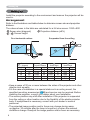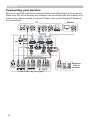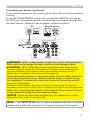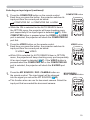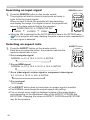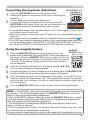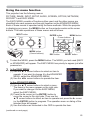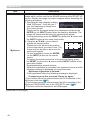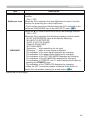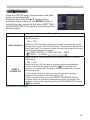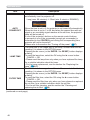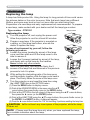
1
Projector CP-DW10N User's Manual (detailed) Operating Guide Thank you for purchasing this projector. WARNING►Before using this product, please read all manuals for this product. Be sure to read “Safety Guide” first. After reading them, store them in a safe place for future reference. About this manual Various symbols are used in this manual. The meanings of these symbols are described below. WARNING This symbol indicates information that, if ignored, could possibly result in personal injury or even death due to incorrect handling. CAUTION This symbol indicates information that, if ignored, could possibly result in personal injury or physical damage due to incorrect handling. NOTICE This entry notices of fear of causing trouble. Please refer to the pages written following this symbol. • The information in this manual is subject to change without notice. NOTE • The manufacturer assumes no responsibility for any errors that may appear in this manual. • The reproduction, transfer or copy of all or any part of this document is not permitted without express written consent. Trademark acknowledgment • Mac® is a registered trademark of Apple Inc. • Windows® is a registered trademark of Microsoft Corporation in the U.S. and/or other countries. • VESA and DDC are trademarks of the Video Electronics Standard Association. • HDMI, the HDMI logo and High-Definition Multimedia Interface are trademarks or registered trademarks of HDMI Licensing LLC. • DVI is a trademark of Digital Display Working Group. • Trademark PJLink is a trademark applied for trademark rights in Japan, the United States of America and other countries and areas. • "Blu-ray Disc" is a trademark. All other trademarks are the properties of their respective owners. 1 Contents Contents About this manual . . . . . . . . . . . 1 Contents . . . . . . . . . . . . . . . . . . 2 Projector features . . . . . . . . . . . 3 Preparations . . . . . . . . . . . . . . . 3 Checking the contents of package . . . 3 Fastening the lens cover . . . . . . . . . . 4 Part names . . . . . . . . . . . . . . . . 5 Projector . . . . . . . . . . . . . . . . . . . . . . 5 Control panel. . . . . . . . . . . . . . . . . . . 6 Rear panel . . . . . . . . . . . . . . . . . . . . 6 Remote control . . . . . . . . . . . . . . . . . 7 Setting up . . . . . . . . . . . . . . . . . 8 Arrangement . . . . . . . . . . . . . . . . . . . 8 Connecting your devices. . . . . . . . . 10 Connecting power supply . . . . . . . . 14 Using the security bar and slot . . . . 14 Remote control . . . . . . . . . . . . 15 Installing the batteries . . . . . . . . . . . 15 About the remote control signal . . . 15 Changing the frequency of remote control signal . . . . . . . . . . . . . . . . 16 Power on/off . . . . . . . . . . . . . . 17 Turning on the power . . . . . . . . . . . 17 Turning off the power . . . . . . . . . . . 17 Operating . . . . . . . . . . . . . . . . 18 Adjusting the volume. . . . . . . . . . . . 18 Temporarily muting the sound . . . . . 18 Selecting an input signal . . . . . . . . . 18 Searching an input signal . . . . . . . . 20 Selecting an aspect ratio. . . . . . . . . 20 Adjusting the projector's elevator . . 21 Adjusting the focus . . . . . . . . . . . . . 21 Using the automatic adjustment feature . . . 22 Adjusting the position . . . . . . . . . . . 22 Correcting the keystone distortions . . 23 Using the magnify feature . . . . . . . . 23 Temporarily freezing the screen . . . 24 Temporarily blanking the screen . . 24 Using the menu function . . . . . . . . 25 EASY MENU. . . . . . . . . . . . . . . 27 COLOR TEMP, COLOR, TINT, SHARPNESS, MY MEMORY IMAGE menu . . . . . . . . . . . . . . 32 ASPECT, OVER SCAN, V POSITION, H POSITION, H PHASE, H SIZE, AUTO ADJUST EXECUTE INPUT menu . . . . . . . . . . . . . . 34 PROGRESSIVE, VIDEO NR, COLOR SPACE, VIDEO FORMAT, HDMI FORMAT, HDMI RANGE, COMPUTER IN, FRAME LOCK, RESOLUTION SETUP menu . . . . . . . . . . . . . . 38 D-ZOOM, D-SHIFT V, D-SHIFT H, PICT. POSIT. H, KEYSTONE, ECO MODE, MIRROR, STANDBY MODE, MONITOR OUT AUDIO menu . . . . . . . . . . . . . . 40 VOLUME, SPEAKER, AUDIO SOURCE, HDMI AUDIO SCREEN menu . . . . . . . . . . . . . 41 LANGUAGE, MENU POSITION, BLANK, START UP, MyScreen, MyScreen Lock, MESSAGE, SOURCE NAME, TEMPLATE, C.C. OPTION menu . . . . . . . . . . . . . 47 AUTO SEARCH, DIRECT POWER ON, AUTO POWER OFF, LAMP TIME, FILTER TIME, MY BUTTON, MY SOURCE, SERVICE NETWORK menu . . . . . . . . . . . 55 SETUP, PROJECTOR NAME, MY IMAGE, AMX D.D., INFORMATION, SERVICE SECURITY menu . . . . . . . . . . . 60 SECURITY PASSWORD CHANGE, MyScreen PASSWORD, PIN LOCK, TRANSITION DETECTOR, MY TEXT PASSWORD, MY TEXT DISPLAY, MY TEXT WRITING Maintenance . . . . . . . . . . . . . . 66 Replacing the lamp . . . . . . . . . . . . . 66 Cleaning and replacing the air filter . . 68 Replacing the internal clock battery . . 69 Other care . . . . . . . . . . . . . . . . . . . . 70 Troubleshooting . . . . . . . . . . . 71 Related messages . . . . . . . . . . . . . 72 Regarding the indicator lamps . . . . 73 ASPECT, D-ZOOM, KEYSTONE, PICTURE MODE, Shutting the projector down . . . . . . 75 ECO MODE, MIRROR, RESET, FILTER TIME, Resetting all settings . . . . . . . . . . . . 75 LANGUAGE, ADVANCED MENU, EXIT Phenomena that may be easy PICTURE menu . . . . . . . . . . . . 29 to be mistaken for machine defects . . 75 BRIGHTNESS, CONTRAST, GAMMA, Specifications . . . . . . . . . . . . . 80 2 Projector features / Preparations Projector features The projector provides you with the broad use by the following features. The unique optics system produces a large projected image in a short distance, which provides you with various ways of use. The double layer filter system is expected to function longer and offers you less maintenance frequency. The HDMI port can support various image equipment which have digital interface to get clearer pictures on a screen. This projector can be controlled and monitored via LAN connection. This projector's network supports the PJLinkTM standard. PJLinkTM is a unified standard for operating and controlling data projectors. PJLinkTM enables central control of projectors manufactured by different vendors and projectors can be operated by a controller. PJLinkTM compliant equipment can be managed and controlled at any time and in any place, regardless of manufacturer. For the command of PJLinkTM, see "Technical". For specifications of PJLinkTM, see the web site of the Japan Business Machine and Information System Industries Association. URL: http://pjlink.jbmia.or.jp Preparations Checking the contents of package Your projector should come with the items shown below. Check that all the items are included. Require of your dealer immediately if any items are missing. (1) Remote control with two AA batteries (2) Power cord (3) Computer cable (4) Lens cover and Strap (5) User’s manuals (Book x1, CD x1) (6) Security label (1) VIDEO ASPECT MAGNIFY (4) MY SOURCE/ COMPUTER DOC.CAMERA AUTO FREEZE SEARCH BLANK PAGE UP VOLUME 㧗 ON DOWN OFF KEYSTONE MY BUTTON 1 MUTE 2 MENU POSITION ENTER ESC RESET (2) (5) (3) (6) NOTE • Keep the original packing materials, for future reshipment. Be sure to use the original packing materials when moving the projector. Use special caution for the lens. 3 Projector features / Preparations Fastening the lens cover Strap hole To avoid losing the cover, please fasten the lens cover to the projector using the included strap. Lens cover Strap slit the strap to the strap hole as shown 1. Fasten in the figure for step 1. Please note that the knot on the strap is used to fasten it to the lens cover in step 2. 2. Put the strap end into the slit of the lens cover with the knot on the side of the lens. Make sure that the strap is inserted to the end of the slit. 1 CAUTION ►Do not hang the lens cover in front of the lens when the projector is mounted upside down such as when mounted on the ceiling. Otherwise, the lens cover may block the light from the projector or hit the lens, which may cause damage to it. When mounting the projector upside down, hang the lens cover on the side of the projector or place it on the projector. For instance, wrap the strap around the elevator foot to hang the lens cover (refer to the figure). 4 2 Strap Part names Part names (1) HOT! (3) (8) (9) Projector (1) Lamp cover (66) The lamp unit is inside. (2) Focus ring (21) (3) Control panel (6) (6) (4) Elevator buttons (x 2) (21) (2) (7) (5) Elevator feet (x 2) (21) (6) Remote sensor (15) (7) Lens (70) (8) Intake vents (9) Filter cover (68) The air filter and intake vent are inside. (10) Speaker (40) (11) Exhaust vent (15) (12) AC IN (AC inlet) (14) (13) (13) Rear panel (6) (14) (14) Security bar (14) (15) Security slot (14) (17) (16) Strap hole (4) (17) Battery cover (69) (10) (16) (5) (4) (12) (11) HOT! WARNING ►HOT! : Do not touch around the lamp cover and the exhaust vent during use or just after use, since it is too hot. ►Do not look into the lens or vent while the lamp is on, since the strong light is not good for your eyes. ►Do not handle the elevator buttons without holding the projector, since the projector may drop down. CAUTION ►Maintain normal ventilation to prevent the projector from heating up. Do not cover, block or plug up the vents. Do not place anything that can stick or be sucked to the vents, around the intake vents. Clean the air filter periodically. ►Do not use the security bar and slot to prevent the projector from falling down, since it is not designed for it. 5 Part names Control panel (6) (1) STANDBY/ON button (17) (2) INPUT button (18, 25) (3) MENU button (25) It consists of four cursor buttons. (4) POWER indicator (14, 17, 73) (5) TEMP indicator (73) (6) LAMP indicator (73) Rear panel STANDBY/ON INPUT MENU LAMP TEMP POWER (1) (2) (3) (5) (4) (10) (1) AUDIO IN1 port (2) AUDIO IN2 port (3) COMPUTER IN1 port (4) COMPUTER IN2 port (5) MONITOR OUT port (6) Shutdown switch (75) (7) CONTROL port (12) (13) (8) VIDEO port (9) S-VIDEO port (10) AUDIO IN3 (R, L) ports (11) AUDIO OUT (R, L) ports (12) HDMI port (13) LAN port (3) (7) (4) (6) (5) LAN HDMI (9) (8) (2) (1) (10) (11) CAUTION ►Use the shutdown switch only when the projector is not turned off by normal procedure, since pushing this switch stops operation of the projector without cooling it down. 6 Part names Remote control (1) VIDEO button (19) (2) COMPUTER button (19) (3) SEARCH button (20) (4) STANDBY/ON button (17) (5) ASPECT button (20) (6) AUTO button (22) (7) BLANK button (24) (8) MAGNIFY - ON button (23) (9) MAGNIFY - OFF button (16, 23) (10) MY SOURCE/DOC.CAMERA button (19, 49) (11) VOLUME - button (16, 18) (12) PAGE UP button * (13) PAGE DOWN button * (14) VOLUME + button (18) (15) MUTE button (18) (16) FREEZE button (24) (17) MY BUTTON - 1 button (49) (18) MY BUTTON - 2 button (49) (19) KEYSTONE button (23) (20) POSITION button (22, 26) (21) MENU button (25) (22) ▲/▼/◄/► cursor buttons (25) (23) ENTER button (25) (24) ESC button (25) (25) RESET button (25) (26) Battery cover (15) (2) (1) (6) (5) (16) (8) (9) (19) (17) (20) (22) VIDEO ASPECT MAGNIFY MY SOURCE/ COMPUTER DOC.CAMERA AUTO FREEZE SEARCH BLANK PAGE UP VOLUME 㧗 ON DOWN OFF KEYSTONE MY BUTTON 1 MUTE 2 MENU POSITION ENTER ESC RESET (24) (10) (4) (3) (7) (12) (14) (11) (13) (15) (18) (21) (23) (25) (26) Back of the remote control NOTE • Any button marked with “*” is not supported on this projector (72). 7 Setting up Setting up Install the projector according to the environment and manner the projector will be used in. Arrangement Refer to the illustrations and tables below to determine screen size and projection distance. The values shown in the table are calculated for a full size screen: 1280 x 800 a Screen size (diagonal) b Projection distance (±8%) c1 , c2 Screen height Suspended from the ceiling On a horizontal surface b c1 a c2 c2 a c1 b Screen size (diagonal) m type(inch) 60 1.5 70 1.8 80 2.0 90 2.3 100 2.5 a b Projection distance m inch 0.634 0.748 0.862 0.975 1.089 25 29 34 38 43 c1 Screen height m inch 0.264 0.298 0.331 0.364 0.397 10 12 13 14 16 c2 Screen height m inch 1.072 1.240 1.408 1.575 1.743 42 49 55 62 69 • Keep a space of 30 cm or more between the sides of the projector and other objects such as walls. • For the case of installation in a special state such as ceiling mount, the specified mounting accessories (80) and service may be required. Before installing the projector, consult your dealer about your installation. • The screen position may shift after installation if the projector is suspended from the ceiling or other location due to the flexibility of the plastic projector body. If readjustment is necessary, consult with your dealer or service personnel. • The projected image position and/or focus may change during warmup (approx. 30 minutes after the lamp is turned on) or when the ambient conditions change. Readjust the image position and/or focus as necessary. 8 Setting up Arrangement (continued) WARNING ►Place the projector in a stable horizontal position. If the projector falls or is knocked over, it could cause injury and/or damage to the projector. Using a damaged projector could then result in fire and/or electric shock. • Do not place the projector on an unstable, slanted or vibrational surface such as a wobbly or inclined stand. • Do not place the projector on its side, front or rear position. • Consult with your dealer before a special installation such as suspending from a ceiling or somewhere else. ►Place the projector in a cool place, and ensure that there is sufficient ventilation. The high temperature of the projector could cause fire, burns and/or malfunction of the projector. • Do not place or attach anything that would block the lens or vent holes. • Keep a space of 30 cm or more between the sides of the projector and other objects such as walls. • Do not place the projector on metallic thing or anything weak in heat. • Do not place the projector on carpet, cushions or bedding. • Do not place the projector in direct sunlight or near hot objects such as heaters. Do not place the projector where the air from an air conditioner or similar unit will blow on it directly. • Do not place anything near the projector lens or vents, or on top of the projector. • Do not place anything that may be sucked into or stick to the vents on the bottom of the projector. This projector has some intake vents also on the bottom. ►Do not place the projector anyplace where it may get wet. Getting the projector wet or inserting liquid into the projector could cause fire, electric shock and/or malfunction of the projector. • Do not place the projector in a bathroom or the outdoors. • Do not place anything containing liquid near the projector. ►Use only the mounting accessories the manufacturer specified, and leave installing and removing the projector with the mounting accessories to the service personnel. • Read and keep the user’s manual of the mounting accessories used. CAUTION ►Avoid placing the projector in smoky, humid or dusty place. Placing the projector in such places could cause fire, electric shock and/or malfunction of the projector. • Do not place the projector near humidifiers, smoking spaces or a kitchen. ►Position the projector to prevent light from directly hitting the projector's remote sensor. ►Do not place the product in a place where radio interference may be caused. ►Do not place this product in a magnetic field. NOTE • The projector may make a rattling sound when tilted, moved or shaken, since a flap to control the air flow inside of the projector has moved. Be aware that this is not a failure or malfunction. 9 Setting up Connecting your devices Be sure to read the manuals for devices before connecting them to the projector. Make sure that all the devices are suitable to be connected with this product, and prepare the cables required to connect. Please refer to the following illustrations to connect them. Monitor PC AUDIO OUT RGB OUT AUDIO OUT RGB OUT RS-232C RGB IN LAN HDMI Speakers HDMI S-VIDEO OUT L R AUDIO OUT VIDEO OUT L R AUDIO OUT L R AUDIO OUT Y CB/PB CR/PR COMPONENT VIDEO OUT VCR/DVD/Blu-ray Disc player 10 L R AUDIO IN (with an amplifier) Setting up Connecting your devices (continued) To use network functions of the projector, connect the LAN port to the computer's LAN port. To use NETWORK BRIDGE function, also connect the CONTROL port and an RS-232C port of the external device to communicate as a network terminal. See the User's Manual - Network Guide for details of network functions. PC LAN External device RS-232C LAN HDMI WARNING ►Do not disassemble or modify the projector and accessories. ►Be careful not to damage the cables, and do not use damaged cables. CAUTION ►Turn off all devices and unplug their power cords prior to connecting them to projector. Connecting a live device to the projector may generate extremely loud noises or other abnormalities that may result in malfunction or damage to the device and the projector. ►Use appropriate accessory or designated cables. Ask your dealer about nonaccessory cables which may be required a specific length or a ferrite core by the regulations. For cables with a core only at one end, connect the end with the core to the projector. ►Make sure that devices are connected to the correct ports. An incorrect connection may result in malfunction or damage to the device and the projector. ►Be sure to consult the administrator of the network. Do not connect LAN port to any network that might have the excessive voltage. NOTICE ►Use the cables with straight plugs, not L-shaped ones, as the input ports of the projector are recessed. NOTE • The COMPUTER IN1/2 port can support a component signal also. The specific adapter or the specific cable is required for a component video input to the projector. 11 Setting up Connecting your devices (continued) NOTE • Be sure to read the manuals for devices before connecting them to the projector, and make sure that all the devices are suitable to be connected with this product. Before connecting to a PC, check the signal level, the signal timing, and the resolution. - Some signal may need an adapter to input this projector. - Some PCs have multiple screen display modes that may include some signals which are not supported by this projector. - Although the projector can display signals with resolution up to UXGA (1600X1200), the signal will be converted to the projector’s panel resolution before being displayed. The best display performance will be achieved if the resolutions of the input signal and the projector panel are identical. • While connecting, make sure that the shape of the cable's connector fits the port to connect with. And be sure to tighten the screws on connectors with screws. • When connecting a laptop PC to the projector, be sure to activate the PC’s external RGB output. (Set the laptop PC to CRT display or to simultaneous LCD and CRT display.) For details on how this is done, please refer to the instruction manual of the corresponding laptop PC. • When the picture resolution is changed on a PC depending on an input, automatic adjustment function may take some time and may not be completed. In this case, you may not be able to see a check box to select “Yes/No” for the new resolution on Windows. Then the resolution will go back to the original. It might be recommended to use other CRT or LCD monitors to change the resolution. • In some cases, this projector may not display a proper picture or display any picture on screen. For example, automatic adjustment may not function correctly with some input signals. An input signal of composite sync or sync on G may confuse this projector, so the projector may not display a proper picture. • The HDMI port of this model is compatible with HDCP (High-bandwidth Digital Content Protection) and therefore capable of displaying a video signal from HDCP compatible DVD players or the like. 12 Setting up Connecting your devices (continued) About Plug-and-Play capability Plug-and-Play is a system composed of a PC, its operating system and peripheral equipment (i.e. display devices). This projector is VESA DDC 2B compatible. Plug-and-Play can be used by connecting this projector to a PC that is VESA DDC (display data channel) compatible. • Take advantage of this feature by connecting a computer cable to the COMPUTER IN1 port (DDC 2B compatible). Plug-and-Play may not work properly if any other type of connection is attempted. • Please use the standard drivers in your PC as this projector is a Plug-andPlay monitor. NOTE for HDMI • The HDMI supports the following signals. -Video signal : 480i@60,480p@60,576i@50,576p@50,720p@50/60,1080i@50 /60,1080p@50/60 -PC signals : See User's Manual(detailed) - Technical • This projector can be connected with another equipment that has HDMI or DVI connector, but with some equipment the projector may not work properly, something like no video. • Be sure to use an HDMI cable that has the HDMI logo. • When the projector is connected with a device having DVI connector, use a DVI to HDMI cable to connect with the HDMI input. 13 Setting up Connecting power supply the connector of the power cord into the 1. Put AC IN (AC inlet) of the projector. plug the power cord’s plug into the 2. Firmly outlet. In a couple of seconds after the power supply connection, the POWER indicator will light up in steady orange. Please remember that when the DIRECT POWER ON function activated (47), the connection of the power supply make the projector turn on. AC IN Power cord WARNING ►Please use extra caution when connecting the power cord, as incorrect or faulty connections may result in fire and/or electrical shock. • Only use the power cord that came with the projector. If it is damaged, consult your dealer to get a new one. • Only plug the power cord into an outlet whose voltage is matched to the power cord. The power outlet should be close to the projector and easily accessible. Remove the power cord for complete separation. • Never modify the power cord. Using the security bar and slot A commercial anti-theft chain or wire up to 10 mm in diameter can be attached to the security bar on the projector. Also this product has the security slot for the Kensington lock. For details, see the manual of the security tool. Security slot Security bar Anti-theft chain or wire WARNING ►Do not use the security bar and slot to prevent the projector from falling down, since it is not designed for it. CAUTION ►Do not place anti-theft chain or wire near the exhaust vent. It may become too hot. NOTE • The security bar and slot is not comprehensive theft prevention measures. It is intended to be used as supplemental theft prevention measure. 14 Remote control Remote control Installing the batteries Please insert the batteries into the remote control before using it. If the remote control starts to malfunction, try to replace the batteries. If you will not use the remote control for long period, remove the batteries from the remote control and store them in a safe place. Holding the hook part of the battery 1 2 3 cover, remove it. Align and insert the two AA batteries (HITACHI MAXELL, Part No. LR6 or R6P) according to their plus and minus terminals as indicated in the remote control. Replace the battery cover in the direction of the arrow and snap it back into place. 1. 2. 3. WARNING ►Always handle the batteries with care and use them only as directed. Improper use may result in battery explosion, cracking or leakage, which could result in fire, injury and/or pollution of the surrounding environment. • Be sure to use only the batteries specified. Do not use batteries of different types at the same time. Do not mix a new battery with used one. • Make sure the plus and minus terminals are correctly aligned when loading a battery. • Keep a battery away from children and pets. • Do not recharge, short circuit, solder or disassemble a battery. • Do not place a battery in a fire or water. Keep batteries in a dark, cool and dry place. • If you observe battery leakage, wipe out the leakage and then replace a battery. If the leakage adheres to your body or clothes, rinse well with water immediately. • Obey the local laws on disposing the battery. About the remote control signal The remote control works with the projector’s remote sensor. This projector has a remote sensor on the front. The sensor senses the signal within the following range when the sensor is active: 60 degrees (30 degrees to the left and right of the sensor) within 3 meters about. 30º 30º Approx. 3m NOTE • The remote control signal reflected in the screen or the like may be available. If it is difficult to send the signal to the sensor directly, attempt to make the signal reflect. • The remote control uses infrared light to send signals to the projector (Class 1 LED), so be sure to use the remote control in an area free from obstacles that could block the remote control’s signal to the projector. • The remote control may not work correctly if strong light (such as direct sun light) or light from an extremely close range (such as from an inverter fluorescent lamp) shines on the remote sensor of the projector. Adjust the position of projector avoiding those lights. 15 Remote control Changing the frequency of remote control signal The accessory remote control has the two choices on signal frequency, Mode 1:NORMAL and Mode 2:HIGH. If the remote control does not function properly, attempt to change the signal frequency. In order to set the Mode, please keep pressing the (2) combination of the two buttons listed below simultaneously for about 3 seconds. VIDEO ASPECT MAGNIFY MY SOURCE/ COMPUTER DOC.CAMERA AUTO FREEZE SEARCH BLANK PAGE UP VOLUME 㧗 ON DOWN OFF KEYSTONE MY BUTTON 1 MUTE 2 MENU POSITION ENTER (1) Set to Mode 1:NORMAL... the VOLUME - and the RESET buttons (2) Set to Mode 2:HIGH... the MAGNIFY OFF and the ESC buttons Please remember that the REMOTE FREQ. in the SERVICE item of the OPTION menu (51) of the projector to be controlled should be set to the same mode as the remote control. 16 ESC RESET (1) Power on/off Power on/off STANDBY/ON button POWER indicator Turning on the power Make sure that the power cord is firmly and correctly connected to the projector and the outlet. Make sure that the POWER indicator is steady orange (73). Then remove the lens cover. Press the STANDBY/ON button on the projector or the remote control. The projection lamp will light up and the POWER indicator will begin blinking in green. When the power is completely on, the indicator will stop blinking and light in steady green (73). To display the picture, select an input signal according to the section “Selecting an input signal” (18). 1. STANDBY/ON INPUT MENU LAMP TEMP POWER 2. VIDEO ASPECT MAGNIFY MY SOURCE/ COMPUTER DOC.CAMERA AUTO FREEZE SEARCH BLANK PAGE UP VOLUME 㧗 ON 3. DOWN OFF KEYSTONE MY BUTTON 1 MUTE 2 MENU POSITION ENTER ESC RESET Turning off the power the STANDBY/ON button on the projector or the remote control. The 1. Press message “Power off?” will appear on the screen for about 5 seconds. the STANDBY/ON button again while the message appears. 2. Press The projector lamp will go off, and the POWER indicator will begin blinking 3. in orange. Then the POWER indicator will stop blinking and light in steady orange when the lamp cooling is complete (73). Attach the lens cover, after the POWER indicator turns in steady orange. Do not turn the projector on for about 10 minutes or more after turning it off. Turning the projector on again too soon could shorten the lifetime of some consumable parts of the projector. WARNING ►A strong light is emitted when the projector’s power is on. Do not look into the lens of the projector or look inside of the projector through any of the projector’s openings. ►Do not touch around the lamp cover and the exhaust vent during use or just after use, since it is too hot. NOTE • Turn the power on/off in right order. Please power on the projector prior to the connected devices. • This projector has the function that can make the projector automatically turn on/ off. Please refer to the DIRECT POWER ON (47) and the AUTO POWER OFF (48) items of the OPTION menu. • Use the shutdown switch (75) only when the projector is not turned off by normal procedure. 17 Operating Operating Adjusting the volume VOLUME +/- buttons the VOLUME +/- buttons to adjust the volume. 1. Use A dialog will appear on the screen to aid you in adjusting the VIDEO ASPECT MY SOURCE/ COMPUTER DOC.CAMERA AUTO SEARCH BLANK volume. If you do not do anything, the dialog will automatically disappear after a few seconds. ● When is selected for current picture input port, the volume adjustment is disabled. Please see the AUDIO SOURCE item of the AUDIO menu (40). ● When the projector is in the standby state, the volume can be adjusted if is not selected for the AUDIO OUT STANDBY and the NORMAL is selected to the STANDBY MODE in the SETUP menu (39). MAGNIFY FREEZE PAGE UP VOLUME 㧗 ON DOWN OFF KEYSTONE MY BUTTON 1 2 MENU POSITION Temporarily muting the sound MUTE MUTE button the MUTE button on the remote control. 1. APress dialog will appear on the screen indicating that you have VIDEO MY SOURCE/ COMPUTER DOC.CAMERA muted the sound. To restore the sound, press the MUTE, VOLUME + or VOLUME - button. Even if you do not do anything, the dialog will automatically disappear after a few seconds. ● When is selected for current picture input port, the sound is always muted. Please see the AUDIO SOURCE item of the AUDIO menu (40). ● The C.C. (Closed Caption) is automatically activated when sound is muted and an input signal containing C.C. is received. This function is available only when the signal is NTSC for the VIDEO or S-VIDEO, or 480i@60 for the COMPUTER IN1 or COMPUTER IN2, and when the AUTO is selected for the DISPLAY in the C.C. menu under the SCREEN menu (46). ASPECT MAGNIFY AUTO FREEZE SEARCH BLANK PAGE UP VOLUME 㧗 ON DOWN OFF KEYSTONE MY BUTTON 1 POSITION MUTE 2 MENU Selecting an input signal 1. Press the INPUT button on the projector. Each time you press the button, the projector switches its input port from the current port as below. COMPUTER IN1 COMPUTER IN2 VIDEO S-VIDEO HDMI ● While the ON is selected for the AUTO SEARCH item in the OPTION menu (47), the projector will keep checking the ports in above order repeatedly till an input signal is detected. (continued on next page) 18 INPUT button NDBY/ON INPUT MEN Operating Selecting an input signal (continued) the COMPUTER button on the remote control. 1. Press Each time you press the button, the projector switches its COMPUTER button input port from the current port as below. COMPUTER IN1 COMPUTER IN2 HDMI VIDEO ASPECT MAGNIFY MY SOURCE/ COMPUTER DOC.CAMERA AUTO FREEZE SEARCH BLANK PAGE UP VOLUME 㧗 ON ● While the ON is selected for the AUTO SEARCH item in the OPTION menu, the projector will keep checking every port sequentially till an input signal is detected (47). If the COMPUTER button is pressed when the VIDEO or S-VIDEO port is selected, the projector will check the COMPUTER IN1 port first. the VIDEO button on the remote control. 1. Press Each time you press the button, the projector switches its KEYSTONE MUTE 2 MENU VIDEO button VIDEO VIDEO MY BUTTON 1 POSITION input port from the current port as below. S-VIDEO DOWN OFF ASPECT MAGNIFY MY SOURCE/ COMPUTER DOC.CAMERA AUTO FREEZE SEARCH BLANK PAGE UP VOLUME 㧗 ON ● While ON is selected for AUTO SEARCH item in OPTION menu, the projector will keep checking every port sequentially till an input signal is detected (47). If the VIDEO button is pressed when the COMPUTER IN1 or the COMPUTER IN2 port is selected, the projector will check the S-VIDEO port first. the MY SOURCE / DOC. CAMERA button on 1. Press the remote control. The input signal will be changed DOWN OFF KEYSTONE MY BUTTON 1 MUTE 2 MENU POSITION MY SOURCE / DOC. CAMERA button into the signal you set as the MY SOURCE (49). ● This function also can use for document camera. Select the input port that connected the document camera. VIDEO ASPECT MAGNIFY MY SOURCE/ COMPUTER DOC.CAMERA AUTO FREEZE SEARCH BLANK PAGE UP VOLUME 㧗 ON OFF KEYSTONE POSITION DOWN MY BUTTON 1 MUTE 2 MENU 19 Operating Searching an input signal SEARCH button the SEARCH button on the remote control. 1. Press The projector will start to check its input ports as below in VIDEO ASPECT order to find any input signals. When an input is found, the projector will stop searching and display the image. If no signal is found, the projector will return to the state selected before the operation. COMPUTER IN1 COMPUTER IN2 VIDEO S-VIDEO HDMI MAGNIFY MY SOURCE/ COMPUTER DOC.CAMERA AUTO FREEZE SEARCH BLANK PAGE UP VOLUME 㧗 ON DOWN OFF KEYSTONE MY BUTTON 1 MUTE 2 MENU POSITION ● While the ON is selected for the AUTO SEARCH item in the OPTION menu (47), the projector will keep checking the ports in above order repeatedly till an input signal is detected. Selecting an aspect ratio 1. Press the ASPECT button on the remote control. Each time you press the button, the projector switches the mode for aspect ratio in turn. ASPECT button For a computer signal NORMAL 4:3 16:9 16:10 NATIVE VIDEO ASPECT MAGNIFY AUTO FREEZE SEARCH BLANK PAGE UP VOLUME OFF DOWN MY BUTTON 1 MUTE 2 POSITION For a video signal, s-video signal or component video signal 4:3 16:9 16:10 14:9 NATIVE For no signal 16:10 (fixed) ● The ASPECT button does not work when no proper signal is inputted. ● The NORMAL mode keeps the original aspect ratio setting. ● The on-screen menu might be displayed outside of the image display area depending on the adjustment value of the ASPECT, D-ZOOM and KEYSTONE. Changing the values of ASPECT, D-ZOOM and KEYSTONE may fix the symptom. 20 㧗 ON KEYSTONE For an HDMI signal NORMAL 4:3 16:9 16:10 14:9 NATIVE MY SOURCE/ COMPUTER DOC.CAMERA MENU Operating Adjusting the projector's elevator When the place to put the projector is slightly uneven to the left or right, use the elevator feet to place the projector horizontally. Using the feet can also tilt the projector in order to project at a suitable angle to the screen, elevating the front side of 3° the projector within 3 degrees. This projector has 2 elevator feet and 2 elevator buttons. An elevator foot is adjustable while pushing the elevator button on the same side as it. 1. Holding the projector, push the elevator buttons to loose the elevator feet. 2. Position the front side of the projector to the desired height. 3. Release the elevator buttons in order to lock the elevator feet. making sure that the elevator feet are locked, put the projector down 4. After gently. necessary, the elevator feet can be manually twisted to make more precise 5. Ifadjustments. Hold the projector when twisting the feet. 1 5 To loose an elevator foot, push the elevator button on the same side as it. To finely adjust, twist the foot. CAUTION ►Do not handle the elevator buttons without holding the projector, since the projector may drop down. ►Do not tilt the projector other than elevating its front within 3 degrees using the adjuster feet. A tilt of the projector exceeding the restriction could cause malfunction or shortening the lifetime of consumables, or the projector itself. Adjusting the focus Use the focus ring to focus the picture. Focus ring 21 Operating Using the automatic adjustment feature AUTO button Press the AUTO button on the remote control. Pressing this button performs the following. For a computer signal The vertical position, the horizontal position and the horizontal phase will be automatically adjusted. Make sure that the application window is set to its maximum size prior to attempting to use this feature. A dark picture may still be incorrectly adjusted. Use a bright picture when adjusting. For a video signal and s-video signal The video format best suited for the respective input signal will be selected automatically. This function is available only when the AUTO is selected for the VIDEO FORMAT item in the INPUT menu (35). The vertical position and horizontal position will be automatically set to the default. For a component video signal The vertical position and horizontal position will be automatically set to the default. The horizontal phase will be automatically adjusted. ● The automatic adjustment operation requires approx. 10 seconds. Also please note that it may not function correctly with some input. ● When this function is performed for a video signal, a certain extra such as a line may appear outside a picture. ● When this function is performed for a computer signal, a black frame may be displayed on the edge of the screen, depending on the PC model. ● The items adjusted by this function may vary when the FINE or DISABLE is selected for the AUTO ADJUST item of the SERVICE item in the OPTION menu (50). 1. VIDEO ASPECT MAGNIFY MY SOURCE/ COMPUTER DOC.CAMERA AUTO SEARCH BLANK PAGE UP VOLUME FREEZE 㧗 ON DOWN OFF KEYSTONE MY BUTTON 1 the POSITION button on the remote control while no 1. Press menu is on screen, to display the D-SHIFT (38) dialog on screen. KEYSTONE 2 MENU POSITION Adjusting the position MUTE MY BUTTON 1 MUTE 2 MENU POSITION ENTER ESC RESET the ▲, ▼, ◄ and ► buttons to adjust the picture position. 2. Use Press the POSITION button again to finish this operation. POSITION button ● This is a function to shift the position of the shrunken picture by the D-ZOOM (38) function. ● When an OSD (On Screen Display) menu is displayed, this operation moves the position of the OSD menu, but the picture position is not (26). ● The D-SHIFT adjustment values are not valid when the D-ZOOM is set to 320 (full screen). 22 Operating Correcting the keystone distortions 1. 2. KEYSTONE button AUTO ASPECT Press the KEYSTONE button on the remote control. A dialog will appear on the screen to aid you in correcting the distortion. Use the ◄/► cursor buttons for adjustment. To close the dialog and complete this operation, press the KEYSTONE button again. Even if you do not do anything, the dialog will automatically disappear after a few seconds. MAGNIFY FREEZE SEARCH BLANK PAGE UP VOLUME 㧗 ON DOWN OFF KEYSTONE MY BUTTON 1 MUTE 2 ● The adjustable range of this function varies for each input signal. For some input, this function may not work well. ● When the projector is inclined to near ±6 degrees or over, this function may not work well. ● This function will be unavailable when the Transition Detector is activated (63). ● The OSD menu might be displayed outside of the image display area depending on the adjustment value of the ASPECT, D-ZOOM and KEYSTONE. Changing the values of ASPECT, D-ZOOM and KEYSTONE may fix the symptom. Using the magnify feature Press the MAGNIFY ON button on the remote control. The 1. picture will be magnified, and the MAGNIFY dialog will appear on MAGNIFY ON/OFF buttons the screen. When the MAGNIFY ON button is pressed for the first time after the projector is turned on, the picture will be zoomed by 1.5 times. On the dialog, triangle marks to show each direction will be displayed. While the triangles are displayed on the dialog, use the ▲/▼/◄/► cursor buttons to shift the magnifying area. VIDEO ASPECT MAGNIFY MY SOURCE/ COMPUTER DOC.CAMERA AUTO FREEZE SEARCH BLANK PAGE UP VOLUME 㧗 ON OFF KEYSTONE DOWN MY BUTTON 1 MUTE 2. magnifying glass icon will be displayed on the dialog when the MAGNIFY ON 3. Abutton is pressed while the dialog with the triangles is displayed. the magnifying glass icon is displayed on the dialog, use the ▲/▼ cursor 4. While buttons to adjust the magnification ratio. The magnification ratio will be adjusted 5. 2 with fine steps. And changes in the ratio in single steps are subtle so they may be hard to recognize. Press the MAGNIFY OFF button on the remote control to exit magnification. NOTE • The MAGNIFY dialog will automatically disappear in several seconds with no operation. The dialog will appear again if the MAGNIFY ON button is pressed when the dialog has automatically disappeared. • While the MAGNIFY dialog is displayed, press the MAGNIFY ON button to switch the dialog between magnifying area shifting (with the triangles) and magnification ratio adjustment (with the magnifying glass icon). • The magnification is automatically disabled when the displaying signal or its display condition is changed. • While the magnification is active, the keystone distortion condition may vary. It will be restored when the magnification is disabled. • Some horizontal stripes might be visible on the image while magnification is active. 23 Operating Temporarily freezing the screen 1. Press the FREEZE button on the remote control. The “FREEZE” indication will appear on the screen (however, the indication will not appear when the OFF is selected for the MESSAGE item in the SCREEN menu (43)), and the projector will go into the FREEZE mode, which the picture is frozen. To exit the FREEZE mode and restore the screen to normal, press the FREEZE button again. FREEZE button VIDEO ASPECT MAGNIFY MY SOURCE/ COMPUTER DOC.CAMERA AUTO FREEZE SEARCH BLANK PAGE UP VOLUME 㧗 ON DOWN OFF KEYSTONE MY BUTTON 1 MUTE 2 ● The projector automatically exits from the FREEZE mode when some control buttons are pressed. ● If the projector continues projecting a still image for a long time, the LCD panel might possibly be burned in. Do not leave the projector in the FREEZE mode for too long. ● Images might appear degraded when this function is operated, but it is not a malfunction. Temporarily blanking the screen 1. Press the BLANK button on the remote control. The BLANK screen will be displayed instead of the screen of input signal. Please refer to the BLANK item in the SCREEN menu (41). To exit from the BLANK screen and return to the input signal screen, press the BLANK button again. BLANK button VIDEO ASPECT MAGNIFY MY SOURCE/ COMPUTER DOC.CAMERA AUTO FREEZE SEARCH BLANK PAGE UP VOLUME 㧗 ON OFF KEYSTONE DOWN MY BUTTON 1 MUTE 2 ● The projector automatically exits from the BLANK mode when some control buttons are pressed. CAUTION ►If you wish to have a blank screen while the projector's lamp is on, use the BLANK function above. Any other method of blocking the projection light, such as attaching something to the lens or placing something in front of the lens, may cause the damage to the projector. NOTE • The sound is not connected with the BLANK screen function. If necessary, set the volume or mute first. To display the BLANK screen and mute the sound at one time, use the AV MUTE function (49). 24 Operating Using the menu function This projector has the following menus: PICTURE, IMAGE, INPUT, SETUP, AUDIO, SCREEN, OPTION, NETWORK, SECURITY and EASY MENU. The EASY MENU consists of functions often used, and the other menus are classified into each purpose and brought together as the ADVANCED MENU. Each of these menus is operated using the same methods. While the projector is displaying any menu, the MENU button on the projector works as the cursor buttons. The basic operations of these menus are as follows. INPUT button STANDBY/ON INPUT MENU LAMP TEMP ENTER button MENU button Cursor buttons MENU POSITION VIDEO ASPECT MAGNIFY MY SOURCE/ COMPUTER DOC.CAMERA AUTO FREEZE SEARCH BLANK PAGE UP VOLUME 㧗 ON DOWN OFF POWER ENTER KEYSTONE MY BUTTON 1 MUTE 2 MENU POSITION ENTER ESC MENU button (Cursor buttons) ESC button RESET ESC RESET RESET button start the MENU, press the MENU button. The MENU you last used (EASY 1. To or ADVANCED) will appear. The EASY MENU has priority to appear just after powered on. EASY MENU 2. In(1)the Use the ▲/▼ cursor buttons to select an item to operate. If you want to change it to the ADVANCED MENU, select the ADVANCED MENU. (2) Use the ◄/► cursor buttons to operate the item. In the ADVANCED MENU (1) Use the ▲/▼ cursor buttons to select a menu. The items in the menu appear on the right side. If you want to change it to the EASY MENU, select the EASY MENU. (2) Press the ► cursor (or the ENTER) button to move the cursor to the right side. Then use the ▲/▼ cursor buttons to select an item to operate and press the ► cursor (or the ENTER) button to progress. The operation menu or dialog of the selected item will appear. (3) Use the buttons as instructed in the OSD to operate the item. (continued on next page) 25 Operating Using the menu function (continued) close the MENU, press the MENU button again or select the EXIT and 3. To press the ◄ cursor (or the ENTER) button. Even if you do not do anything, the dialog will automatically disappear after about 30 seconds. ● If you want to move the menu position, use the cursor buttons after pressing the POSITION button. ● Some functions cannot be performed when a certain input port is selected, or when a certain input signal is displayed. ● When you want to reset the operation, press the RESET button on the remote control during the operation. Note that some items (ex. LANGUAGE, VOLUME) cannot be reset. ● In the ADVANCED MENU, when you want to return to the previous display, press the ◄ cursor (or the ESC) button on the remote control. Indication in OSD (On Screen Display) The meanings of the general words on the OSD are as follows. Indication Meaning EXIT Selecting this word finishes the OSD menu. It's the same as pressing the MENU button on the remote control. RETURN Selecting this word returns the menu to the previous menu. CANCEL or NO OK or YES 26 Selecting this word cancels the operation in the present menu and returns to the previous menu. Selecting this word executes the prepared function or shifts the menu to the next menu. EASY MENU EASY MENU From the EASY MENU, items shown in the table below can be performed. Select an item using the ▲/▼ cursor buttons. Then perform it according to the following table. Item Description ASPECT Using the ◄/► cursor buttons switches the mode for aspect ratio. See the ASPECT item in the IMAGE menu (32). • The on-screen menu might be displayed outside of the image display area depending on the adjustment value of the ASPECT, D-ZOOM and KEYSTONE. Changing the values of ASPECT, D-ZOOM and KEYSTONE may fix the symptom. D-ZOOM Using the ◄/► cursor buttons adjusts the magnification ratio. Small Large See the D-ZOOM item in the SETUP menu (38). • The on-screen menu might be displayed outside of the image display area depending on the adjustment value of the ASPECT, D-ZOOM and KEYSTONE. Changing the values of ASPECT, D-ZOOM and KEYSTONE may fix the symptom. KEYSTONE Using the ◄/► cursor buttons corrects the vertical keystone distortion. See the KEYSTONE item in the SETUP menu (38). • The on-screen menu might be displayed outside of the image display area depending on the adjustment value of the ASPECT, D-ZOOM and KEYSTONE. Changing the values of ASPECT, D-ZOOM and KEYSTONE may fix the symptom. Using the ◄/► cursor buttons switches the picture mode. The picture modes are combinations of the GAMMA and the COLOR TEMP settings. Choose a suitable mode according to the projected source. NORMAL CINEMA DYNAMIC BOARD(BLACK) DAYTIME WHITEBOARD BOARD(GREEN) PICTURE MODE NORMAL CINEMA DYNAMIC BOARD(BLACK) BOARD(GREEN) WHITEBOARD DAYTIME GAMMA 1 DEFAULT 2 DEFAULT 3 DEFAULT 4 DEFAULT 4 DEFAULT 5 DEFAULT 6 DEFAULT COLOR TEMP 2 MID 3 LOW 1 HIGH 4 Hi-BRIGHT-1 5 Hi-BRIGHT-2 2 MID 6 Hi-BRIGHT-3 • When the combination of the GAMMA and the COLOR TEMP differs from pre-assigned modes above, the display on the menu for the PICTURE MODE is “CUSTOM”. Please refer to the GAMMA and the COLOR TEMP (29, 30) items in the PICTURE menu. • Lines or other noise might appear on the screen when this function is operated, but it is not a malfunction. (continued on next page) 27 EASY MENU Item ECO MODE Description Using the ◄/► cursor buttons turns off/on the eco mode. See the ECO MODE item in the SETUP menu (38). MIRROR Using the ◄/► cursor buttons switches the mode for mirror status. See the MIRROR item in the SETUP menu (39). RESET Performing this item resets all of the EASY MENU items except the FILTER TIME and the LANGUAGE. A dialog is displayed for confirmation. Selecting the OK using the ► cursor button performs resetting. FILTER TIME The usage time of the air filter is shown in the menu. Performing this item resets the filter time which counts usage time of the air filter. A dialog is displayed for confirmation. Selecting the OK using the ► cursor button performs resetting. See the FILTER TIME item in the OPTION menu (48). LANGUAGE Using the ◄/► cursor buttons changes the display language. See the LANGUAGE item in the SCREEN menu (41). ADVANCED MENU Press the ► cursor (or the ENTER) button to use the ADVANCED MENU. EXIT Press the ◄ cursor (or the ENTER) button to finish the OSD menu. 28 PICTURE menu PICTURE menu From the PICTURE menu, items shown in the table below can be performed. Select an item using the ▲/▼ cursor buttons, and press the ► cursor (or the ENTER) button to execute the item. Then perform it according to the following table. Item BRIGHTNESS CONTRAST Description Using the ◄/► cursor buttons adjusts the brightness. Dark Light Using the ◄/► cursor buttons adjusts the contrast. Weak Strong Using the ▲/▼ cursor buttons switches the gamma mode. 6 CUSTOM 3 CUSTOM 1 DEFAULT 1 CUSTOM 2 DEFAULT 2 CUSTOM 3 DEFAULT 6 DEFAULT 5 CUSTOM 5 DEFAULT 4 CUSTOM 4 DEFAULT To adjust CUSTOM GAMMA Selecting a mode whose name includes the CUSTOM and then pressing the ► cursor (or the ENTER) button displays a dialog to aid you in adjusting the mode. This function is useful when you want to change the brightness of particular tones. Choose an item using the ◄/► cursor buttons, and adjust the level using the ▲/▼ cursor buttons. You can display a test pattern for checking the effect of your adjustment by pressing the ENTER (or the INPUT) button. Each time you press the ENTER (or the INPUT) button, the pattern changes as below. No pattern Gray scale of 9 steps Ramp Gray scale of 15 steps The eight equalizing bars correspond to eight tone levels of the test pattern (Gray scale of 9 steps) except the darkest in the left end. If you want to adjust the 2nd tone from left end on the test pattern, use the equalizing adjustment bar “1”. The darkest tone at the left end of the test pattern cannot be controlled with any of equalizing adjustment bar. • Lines or other noise might appear on the screen when this function is operated, but it is not a malfunction. (continued on next page) 29 PICTURE menu Item Description Using the ▲/▼ cursor buttons switches the color temperature mode. 2 MID 2 CUSTOM 1 HIGH 1 CUSTOM 6 CUSTOM 6 Hi-BRIGHT-3 3 CUSTOM 3 LOW 5 CUSTOM 5 Hi-BRIGHT-2 4 CUSTOM 4 Hi-BRIGHT-1 To adjust CUSTOM COLOR TEMP Selecting a mode whose name includes the CUSTOM and then pressing the ► cursor (or the ENTER) button displays a dialog to aid you in adjusting the OFFSET and GAIN of the selected mode. The OFFSET adjustments change the color intensity on the whole tones of the test pattern. GAIN adjustments mainly affect color intensity on the brighter tones of the test pattern. Choose an item using the ◄/► cursor buttons, and adjust the level using the ▲/▼ cursor buttons. You can display a test pattern for checking the effect of your adjustment by pressing the ENTER (or the INPUT) button. Each time you press the ENTER (or the INPUT) button, the pattern changes as below. No pattern Gray scale of 9 steps Ramp Gray scale of 15 steps • Lines or other noise might appear on the screen when this function is operated, but it is not a malfunction. COLOR Using the ◄/► cursor buttons adjusts the strength of whole color. Weak Strong • This item can be selected when input signals are video, s-video or component video signals. • When input signal is HDMI, this item can also be selected if either 1) or 2) applies. 1) HDMI FORMAT is set to VIDEO. 2) HDMI FORMAT is set to AUTO, and the projector recognizes that it receives video signals. (continued on next page) 30 PICTURE menu Item Description TINT Using the ◄/► cursor buttons adjusts the tint. Reddish Greenish • This item can be selected when input signals are video, s-video or component video signals. • When input signal is HDMI, this item can also be selected if either 1) or 2) applies. 1) HDMI FORMAT is set to VIDEO. 2) HDMI FORMAT is set to AUTO, and the projector recognizes that it receives video signals. SHARPNESS Using the ◄/► cursor buttons adjusts the sharpness. Weak Strong • There may be some noise and/or the screen may flicker for a moment when an adjustment is made. This is not a malfunction. This projector has 4 memories for adjustment data (for all the items of the PICTURE menu). Selecting a function using the ▲/▼ cursor buttons and pressing the ► cursor (or the ENTER) button performs each function. SAVE-1 SAVE-2 SAVE-3 SAVE-4 LOAD-4 LOAD-3 LOAD-2 LOAD-1 MY MEMORY SAVE-1, SAVE-2, SAVE-3, SAVE-4 Performing a SAVE function saves the current adjustment data into the memory linked in the number included in the function’s name. • Remember that the current data being stored of a memory will be lost by saving new data into the memory. LOAD-1, LOAD-2, LOAD-3, LOAD-4 Performing a LOAD function loads the data from the memory linked in the number included in the function’s name, and adjusts the picture automatically depending on the data. • The LOAD functions whose linked memory has no data are skipped. • Remember that the current adjusted condition will be lost by loading data. If you want to keep the current adjustment, please save it before performing a LOAD function. • There may be some noise and the screen may flicker for a moment when loading data. This is not malfunction. • You can perform the LOAD function using the MY BUTTONs. Please see the MY BUTTON item in the OPTION menu (49). 31 IMAGE menu IMAGE menu From the IMAGE menu, items shown in the table below can be performed. Select an item using the ▲/▼ cursor buttons, and press the ► cursor (or the ENTER) button to execute the item. Then perform it according to the following table. Item Description Using the ▲/▼ cursor buttons switches the mode for aspect ratio. For a computer signal NORMAL 4:3 16:9 16:10 NATIVE For an HDMI signal NORMAL 4:3 16:9 16:10 14:9 NATIVE ASPECT For a video signal, s-video signal or component video signal 4:3 16:9 16:10 14:9 NATIVE For no signal 16:10 (fixed) • The NORMAL mode keeps the original aspect ratio of the signal. • The on-screen menu might be displayed outside of the image display area depending on the adjustment value of the ASPECT, D-ZOOM and KEYSTONE. Changing the values of ASPECT, D-ZOOM and KEYSTONE may fix the symptom. Using the ◄/► cursor buttons adjusts the over-scan ratio. Small (It magnifies picture) Large (It reduces picture) OVER SCAN • This item can be selected when input signals are video, s-video or component video signals. • When input signal is HDMI, this item can also be selected if either 1) or 2) applies. 1) HDMI FORMAT is set to VIDEO. 2) HDMI FORMAT is set to AUTO, and the projector recognizes that it receives video signals. • When this adjustment is too large, certain degradation may appear at the frame area of the picture. In such a case, please adjust small. V POSITION Using the ◄/► cursor buttons adjusts the vertical position. Down Up • Over-adjusting the vertical position may cause noise to appear on the screen. If this occurs, please reset the vertical position to the default setting. Pressing the RESET button on the remote control when the V POSITION is selected will reset the V POSITION to the default setting. • When this function is performed on a video signal or s-video signal, the range of this adjustment depends on the OVER SCAN (above) setting. It is not possible to adjust when the OVER SCAN is set to 10. • This item cannot be selected for an HDMI signal. (continued on next page) 32 IMAGE menu Item Description H POSITION Using the ◄/► cursor buttons adjusts the horizontal position. Right Left • Over-adjusting the horizontal position may cause noise to appear on the screen. If this occurs, please reset the horizontal position to the default setting. Pressing the RESET button on the remote control when the H POSITION is selected will reset the H POSITION to the default setting. • When this function is performed on a video signal or s-video signal, the range of this adjustment depends on the OVER SCAN (32) setting. It is not possible to adjust when the OVER SCAN is set to 10. • This item cannot be selected for an HDMI signal. H PHASE Using the ◄/► cursor buttons adjusts the horizontal phase to eliminate flicker. Right Left • This item can be selected only for a computer signal or a component video signal. H SIZE Using the ◄/► cursor buttons adjusts the horizontal size. Small Large • This item can be selected only for a computer signal. • When this adjustment is excessive, the picture may not be displayed correctly. In such a case, please reset the adjustment by pressing the RESET button on the remote control during this operation. • Images might appear degraded when this function is operated, but it is not a malfunction. AUTO ADJUST EXECUTE Selecting this item performs the automatic adjustment feature. For a computer signal The vertical position, the horizontal position and the horizontal phase will be automatically adjusted. Make sure that the application window is set to its maximum size prior to attempting to use this feature. A dark picture may still be incorrectly adjusted. Use a bright picture when adjusting. For a video signal and s-video signal The video format best suited for the respective input signal will be selected automatically. This function is available only when the AUTO is selected for the VIDEO FORMAT item in the INPUT menu (35). The vertical position and horizontal position will be automatically set to the default. For a component video signal The vertical position and horizontal position will be automatically set to the default. The horizontal phase will be automatically adjusted. • The automatic adjustment operation requires approx. 10 seconds. Also please note that it may not function correctly with some input. • When this function is performed for a video signal, a certain extra such as a line may appear outside a picture. • When this function is performed for a computer signal, a black frame may be displayed on the edge of the screen, depending on the PC model. • The items adjusted by this function may vary when the FINE or the DISABLE is selected for the AUTO ADJUST item of the SERVICE item in the OPTION menu (50). 33 INPUT menu INPUT menu From the INPUT menu, items shown in the table below can be performed. Select an item using the ▲/▼ cursor buttons, and press the ► cursor (or the ENTER) button to execute the item. Then perform it according to the following table. Item Description Using the ▲/▼ cursor buttons switches the progress mode. TV FILM OFF PROGRESSIVE • This function works only for a video signal, s-video signal, component video signal or HDMI signal of 480i@60 or 576i@50. • When the TV or the FILM is selected, the screen image will be sharp. The FILM adapts to the 2-3 Pull-Down conversion system. But these may cause a certain defect (for example, jagged line) of the picture for a quick moving object. In such a case, please select the OFF, even though the screen image may lose sharpness. Using the ▲/▼ cursor buttons switches the noise reduction mode. HIGH MID LOW VIDEO NR • This function works only for a video signal, s-video signal, component video signal or HDMI signal of 480i@60 or 576i@50. • When this function is excessive, it may cause a certain degradation of the picture. Using the ▲/▼ cursor buttons switches the mode for color space. AUTO RGB SMPTE240 REC709 REC601 COLOR SPACE • This item can be selected only for a computer signal or a component video signal. • The AUTO mode automatically selects the optimum mode. • The AUTO operation may not work well at some signals. In such a case, it might be good to select a suitable mode except the AUTO. (continued on next page) 34 INPUT menu Item Description VIDEO FORMAT The video format for the S-VIDEO port and the VIDEO port can be set. (1) Use the ▲/▼ cursor buttons to select the input port. S-VIDEO VIDEO (2) Using the ◄/► cursor buttons switches the mode for video format. AUTO NTSC PAL SECAM N-PAL M-PAL NTSC4.43 • This item is performed only for a video signal from the VIDEO port or the S-VIDEO port. • The AUTO mode automatically selects the optimum mode. • The AUTO operation may not work well for some signals. If the picture becomes unstable (e.g. an irregular picture, lack of color), please select the mode according to the input signal. Set the video format for the HDMI port. Using the ▲/▼ cursor buttons switches the digital signal format. AUTO VIDEO COMPUTER HDMI FORMAT AUTO VIDEO COMPUTER Feature Selecting the optimum mode automatically. Suitable for DVD signals. Suitable for computer signals. • If the COMPUTER is selected, COLOR, TINT, OVERSCAN can not be selected. Set the digital range for HDMI port. Using the ▲/▼ cursor buttons changes the digital signal mode. AUTO NORMAL ENHANCED HDMI RANGE AUTO NORMAL ENHANCED Feature Selecting the optimum mode automatically. Suitable for DVD signals (16-235) Suitable for computer signals (0-255) • If the contrast of the screen image is too strong or too weak, try finding a more suitable mode. (continued on next page) 35 INPUT menu Item Description COMPUTER IN The computer input signal type for the COMPUTER IN1 and IN2 ports can be set. (1) Use the ▲/▼ cursor buttons to select the COMPUTER IN port to be set. COMPUTER IN1 COMPUTER IN2 (2) Use the ◄/► cursor buttons to select the computer input signal type. AUTO SYNC ON G OFF • Selecting the AUTO mode allows you to input a sync on G signal or component video from the port. • In the AUTO mode, the picture may be distorted with certain input signals. In such a case, remove the signal connector so that no signal is received and select the SYNC ON G OFF, and then reconnect the signal. • The COMPUTER IN1/2 port can support a component signal also (10). Set the frame lock function on/off for each port. (1) Use the ▲/▼ cursor buttons to select the input ports. FRAME LOCK (2) Use the ◄/► cursor buttons to turn the frame lock function on/off. ON OFF • This item can be performed only on a signal with a vertical frequency of 50 to 60 Hz. • When the ON is selected, moving pictures are displayed more smoothly. • This function may cause a certain degradation of the picture. In such a case, please select the OFF. (continued on next page) 36 INPUT menu Item Description The resolution for the COMPUTER IN1 and the COMPUTER IN2 input signals can be set on this projector. In the RESOLUTION menu select the resolution you wish to display using the ▲/▼ cursor buttons. ■AUTO Selecting AUTO will set a resolution appropriate to the input signal. ■STANDARD Pressing the ► cursor (or the ENTER) button when selecting a STANDARD resolution will automatically adjust the horizontal and vertical positions, clock phase and horizontal size. The INPUT_INFORMATION dialog will be displayed. RESOLUTION STANDARD ↓ ■CUSTOM (1) To set a custom resolution use the ▲/▼ cursor buttons to select the CUSTOM and the RESOLUTION_CUSTOM box will be displayed. CUSTOM Set the horizontal (HORZ) and ↓ vertical (VERT) resolutions using the ▲/▼/◄/► cursor buttons. This function is may not support all resolutions. (2) Move the cursor to the OK on screen and press the ► cursor (or the ENTER) button. The message "ARE YOU SURE YOU WISH TO CHANGE RESOLUTION?" appears. To save the setting, press the ► cursor button. The horizontal and vertical positions, clock phase and horizontal size will be automatically adjusted. To revert back to the previous resolution without saving changes, move the cursor to the CANCEL on screen and press the ◄ cursor (or the ENTER) button. The screen will then return to the RESOLUTION menu displaying the previous resolution. • For some pictures, this function may not work well. 37 SETUP menu SETUP menu From the SETUP menu, items shown in the table below can be performed. Select an item using the ▲/▼ cursor buttons, and press the ► cursor (or the ENTER) buttonn to execute the item. Then perform it according to the following table. Item D-ZOOM Description Using the ◄/► cursor buttons adjusts the magnification ratio. Small Large • The on-screen menu might be displayed outside of the image display area depending on the adjustment value of the ASPECT, D-ZOOM and KEYSTONE. Changing the values of ASPECT, D-ZOOM and KEYSTONE may fix the symptom. D-SHIFT V Using the ◄/► cursor buttons adjusts the vertical picture position. Down Up • The D-SHIFT adjustment values are not valid when the D-ZOOM is set to 320 (full screen). D-SHIFT H Using the ◄/► cursor buttons adjusts the horizontal picture position. Left Right • The D-SHIFT adjustment values are not valid when the D-ZOOM is set to 320 (full screen). PICT. POSIT. H Using the ▲/▼ cursor buttons selects the horizontal picture position. LEFT MID RIGHT The PICTURE POSITION is not changed if any of the following cases apply. • The ASPECT is set to 16:9 or 16:10. • The input signal has an aspect ratio of 16:9, 16:10 or vertically smaller than 16:10, while ASPECT is set to NORMAL. • Horizontal size of the displayed image is full on the effective display area, while the ASPECT is set to NATIVE. • One of the following messages is displayed on the screen: "NO INPUT IS DETECTED" "SYNC IS OUT OF RANGE" "INVALID SCAN FREQ." • The BLANK or TEMPLATE function is selected. KEYSTONE Using the ◄/► cursor buttons corrects the vertical keystone distortion. Shrink the bottom of the image Shrink the top of the image • The adjustable range of this function will vary among inputs. For some input, this function may not work well. • This function will be unavailable when the Transition Detector is on (63). • The on-screen menu might be displayed outside of the image display area depending on the adjustment value of the ASPECT, D-ZOOM and KEYSTONE. Changing the values of ASPECT, D-ZOOM and KEYSTONE may fix the symptom. ECO MODE Using the ▲/▼ cursor buttons turns off/on the eco mode. NORMAL ECO • When the ECO is selected, acoustic noise and screen brightness are reduced. (continued on next page) 38 SETUP menu Item Description Using the ▲/▼ cursor buttons switches the mode for mirror status. MIRROR NORMAL H:INVERT V:INVERT H&V:INVERT If the Transition Detector is on and the MIRROR status is changed, the TRANSITION DETECTOR ON alarm (63) will be displayed when projector is restarted after the AC power is turned off. STANDBY MODE MONITOR OUT Using ▲/▼ cursor buttons switches the standby mode setting between the NORMAL and the SAVING. NORMAL SAVING • When the SAVING is selected and the projector is in the standby state, the power consumption is lowered with some functional restriction as below. - The RS-232C communication control is disabled except turning the projector on and changing the STANDBY MODE setting. - The STANDBY of the MONITOR OUT (below) is invalid, and no signal is output from the MONITOR OUT port. - The AUDIO OUT STANDBY of the AUDIO SOURCE (40) is invalid, and no signal is output from the AUDIO OUT ports (18). • If the COMMUNICATION TYPE in the COMMUNICATION menu is set to NETWORK BRIDGE, all of the RS-232C commands are disabled (52). The combination of a picture shown on screen and output from the MONITOR OUT port can be arranged in the menu. The picture coming into the port selected in the (2) is output to the MONITOR OUT port while an image from the port chosen in the (1) is on screen. (1) Choose a picture input port using ▲/▼ cursor buttons. • Select STANDBY to specify the output from the MONITOR OUT port in the standby state. This selection is available only when NORMAL is selected for the STANDBY MODE (above). (2) Select one of the COMPUTER IN ports using the ◄/► cursor buttons. Choosing the COMPUTER IN1 allows the following choice. COMPUTER IN1 OFF Choosing the COMPUTER IN2 allows the following choice. COMPUTER IN2 OFF Choosing other input or the STANDBY allows the following choice. COMPUTER IN1 COMPUTER IN2 OFF • The OFF disables the MONITOR OUT port. 39 AUDIO menu AUDIO menu From the AUDIO menu, items shown in the table below can be performed. Select an item using the ▲/▼ cursor buttons, and press the ► cursor (or the ENTER) button to execute the item. Then perform it according to the following table. Item VOLUME Description Using the ◄/► cursor buttons adjusts the volume. Low High Using the ▲/▼ cursor buttons turns on/off the built-in speaker. SPEAKER AUDIO SOURCE ON OFF When the OFF is selected, the built-in speaker does not work. The combination of a picture and audio input port can be arranged in the menu. The audio coming into the port selected in the (2) is output while an image from the port chosen in the (1) is on screen. (1) Choose a picture input port using the ▲/▼ cursor buttons. • Choose the AUDIO OUT STANDBY, to select the audio output to the AUDIO OUT ports in the standby state. The built-in speaker does not work in the standby state. • While the RETURN is selected, pressing the ◄ cursor (or the ENTER) button returns to the previous menu. (2) Select one of the AUDIO IN ports using the ◄/► cursor buttons. AUDIO IN1 AUDIO IN2 AUDIO IN3 H • "H" is abbreviation of HDMI. • H can be selected for HDMI port only. When H is selected, the audio signal to HDMI port will be output if HDMI is chosen as a picture source. • disables the audio output. • The C.C. (Closed Caption) is automatically activated when is selected and an input signal containing C.C. is received. This function is available only when the signal is NTSC for the VIDEO or the S-VIDEO, or 480i@60 for the COMPUTER IN1 or the COMPUTER IN2, and when the AUTO is selected for the DISPLAY in the C.C. menu under the SCREEN menu (46). HDMI AUDIO 40 The HDMI AUDIO is set to 1 as default. In case the HDMI audio does not work well, try 2. 12 SCREEN menu SCREEN menu From the SCREEN menu, items shown in the table below can be performed. Select an item using the ▲/▼ cursor buttons, and press the ► cursor (or the ENTER) button to execute the item. Then perform it according to the following table. Item Description LANGUAGE Using the ▲/▼/◄/► cursor buttons switches the OSD (On Screen Display) language. ENGLISH, FRANÇAIS, DEUTSCH, ESPAÑOL... (shown in the LANGUAGE dialog) Press the ENTER (or the INPUT) button to save the language setting. MENU POSITION Using the ▲/▼/◄/► cursor buttons adjusts the menu position. To quit the operation, press the MENU button on the remote control or keep no operation for about 10 seconds. Using the ▲/▼ cursor buttons switches the mode for the blank screen. The blank screen is a screen for the temporarily blanking feature (24). It is displayed by pressing the BLANK button on the remote control. MyScreen ORIGINAL BLUE WHITE BLACK BLANK MyScreen : Screen can be registered by the MyScreen item (42). ORIGINAL : Screen preset as the standard screen. BLUE, WHITE, BLACK : Plain screens in each color. • To avoid remaining as an afterimage, the MyScreen or the ORIGINAL screen will change to the plain black screen after several minutes. Using the ▲/▼ cursor buttons switches the mode for the start-up screen. The start-up screen is a screen displayed when no signal or an unsuitable signal is detected. MyScreen ORIGINAL OFF START UP MyScreen : The screen can be registered by the MyScreen item (42). ORIGINAL : The screen preset as the standard screen. OFF : Plain black screen. • To avoid remaining as an afterimage, the MyScreen or the ORIGINAL screen will change to the BLANK screen (24) after several minutes. If also the BLANK screen is the MyScreen or the ORIGINAL, the plain black screen is instead used. • When the ON is selected to the MyScreen PASSWORD item in the SECURITY menu (61), the START UP is fixed to the MyScreen. (continued on next page) 41 SCREEN menu Item Description MyScreen This item allows you to capture an image for use as a MyScreen image which can be used as the BLANK screen and the START UP screen. Display the image you want to capture before executing the following procedure. 1. Selecting this item displays a dialog titled “MyScreen”. It will ask you if you start capturing an image from the current screen. Please wait for the target image to be displayed, and press the ENTER (or the INPUT) button when the image is displayed. The image will freeze and the frame for capturing will appear. To stop performing, press the RESET (or press the ◄ cursor and the INPUT buttons at the same time) button. 2. Using the ▲/▼/◄/► cursor buttons adjusts the frame position. Please move the frame to the position of the image which you want to use. The frame may not be able to be moved for some input signals. To start registration, press the ENTER (or the INPUT) button on the remote control. To restore the screen and return to the previous dialog, press the RESET (or press the ◄ cursor and the INPUT buttons at the same time) button. Registration takes several minutes. When the registration is completed, the registered screen and the following message is displayed for several seconds: “MyScreen registration is finished.” If the registration failed, the following message is displayed: “A capturing error has occurred. Please try again.” • This function cannot be selected when the ON is selected to the MyScreen Lock item (43). • This function cannot be selected when the ON is selected to the MyScreen PASSWORD item in the SECURITY menu (61). • This item cannot be selected for an HDMI signal. (continued on next page) 42 SCREEN menu Item Description MyScreen Lock Using the ▲/▼ cursor buttons turns on/off the MyScreen lock function. ON OFF When the ON is selected, the item MyScreen is locked. Use this function for protecting the current MyScreen. • This function cannot be selected when the ON is selected to the MyScreen PASSWORD item in the SECURITY menu (61). MESSAGE Using the ▲/▼ cursor buttons turns on/off the message function. ON OFF When the ON is selected, the following message function works. “AUTO IN PROGRESS” while automatically adjusting “NO INPUT IS DETECTED” “SYNC IS OUT OF RANGE” “INVALID SCAN FREQ.” “NOT AVAILABLE” “Searching….” while searching for the input “Detecting….” while an input signal is detected The indication of the input signal displayed by changing The indication of the aspect ratio displayed by changing The indication of the PICTURE MODE displayed by changing The indication of the MY MEMORY displayed by changing The indication of “FREEZE” and “II” while freezing the screen by pressing the FREEZE button. The indication of the TEMPLATE displayed by changing. • When the OFF is selected, please remember if the picture is frozen. Do not mistake freezing for a malfunction (24). (continued on next page) 43 SCREEN menu Item Description SOURCE NAME Each input port for this projector can have a name applied to it. (1) Use the ▲/▼ cursor buttons on the SCREEN menu to select the SOURCE NAME and press the ► cursor (or the ENTER) button. The SOURCE NAME menu will be displayed. (2) Use the ▲/▼ cursor buttons on the SOURCE NAME menu to select the port to be named and press the ► cursor button. Right side of the menu is blank until a name is specified. The SOURCE NAME dialog will be displayed. (3) The current name will be displayed on the first line. Use the ▲/▼/◄/► cursor buttons and the ENTER (or the INPUT) button to select and enter characters. To erase 1 character at one time, press the RESET (or press the ◄ cursor and the INPUT buttons at the same time) button. Also if you move the cursor to the DELETE or the ALL CLEAR on screen and press the ENTER (or the INPUT) button, 1 character or all characters will be erased. The name can be a maximum of 16 characters. (4) To change an already inserted character, press the ▲ cursor button to move the cursor to the first line, and use the ◄/► cursor buttons to move the cursor on the character to be changed. After pressing the ENTER (or the INPUT) button, the character is selected. Then, follow the same procedure as described at the item (3) above. (5) To finish entering text, move the cursor to the OK on screen and press the ► cursor (or the ENTER / the INPUT) button. To revert to the previous name without saving changes, move the cursor to the CANCEL on screen and press the ◄ cursor (or the ENTER / the INPUT) button. (continued on next page) 44 SCREEN menu Item Description TEMPLATE Using the ▲/▼ cursor buttons switches the mode for the template screen. Press the ► cursor (or the ENTER) button to display the selected template, and press the ◄ cursor button to close the displayed screen. The last selected template is displayed when the MY BUTTON allocated to the TEMPLATE function is pressed (49). TEST PATTERN DOT-LINE1 DOT-LINE2 DOT-LINE3 MAP2 MAP1 CIRCLE2 CIRCLE1 DOT-LINE4 You can turn a map upside down and scroll it horizontally when MAP1 or MAP2 is selected. To invert or scroll the map, display the guidance by pressing the RESET button on the remote three seconds or more when MAP1 or MAP2 appears. While the guidance is displayed: • Press the ▲ cursor button and then press the ENTER or INPUT button to place the Northern Hemisphere on the top. • Press the ▼ cursor button and then press the ENTER or INPUT button to place the Southern Hemisphere on the top. • Press the ◄/► cursor button and then press the ENTER or INPUT button to scroll the map horizontally. (continued on next page) 45 SCREEN menu Item Description The C.C. is the function that displays a transcript or dialog of the audio portion of a video, files or other presentation or other relevant sounds. It is required to have NTSC format video or 480i@60 format component video source supporting C.C. feature to utilize this function. It may not work properly, depending on equipment or signal source. In this case, please turn off the Closed Caption. DISPLAY Select the Closed Caption DISPLAY setting from following options using the ▲/▼ cursor buttons. AUTO ON OFF C.C. (Closed Caption) AUTO : Closed Caption automatically displays when the volume is muted. ON : The Closed Caption is on. OFF : The Closed Caption is off. • The caption is not displayed when the OSD menu is active. • The Closed Caption is the function to display the dialogue, narration, and / or sound effects of a television program or other video sources. The Closed Caption availability is depending upon broadcaster and/or content. MODE Select the Closed Caption MODE setting from following options using the ▲/▼ cursor buttons. CAPTIONS TEXT CAPTIONS : Display Closed Caption. TEXT : Display Text data, which is for additional information such as news reports or a TV program guide. The information covers the entire screen. Not all of the C.C. program has Text information. CHANNEL Select the Closed Caption CHANNEL from following options using the ▲/▼ cursor buttons. 1234 1: Channel 1, primary channel / language 2: Channel 2 3: Channel 3 4: Channel 4 The channel data may vary, depending on the content. Some channel might be used for secondary language or empty. 46 OPTION menu OPTION menu From the OPTION menu, items shown in the table below can be performed. Select an item using the ▲/▼ cursor buttons, and press the ► cursor (or the ENTER) button to execute the item, except for the items LAMP TIME and FILTER TIME. Then perform it according to the following table. Item Description AUTO SEARCH Using the ▲/▼ cursor buttons turns on/off the automatic signal search function. ON OFF When the ON is selected, detecting no signal automatically cycles through input ports in the following order. The search is started from the current port. Then when an input is found, the projector will stop searching and display the image. COMPUTER IN1 COMPUTER IN2 HDMI VIDEO S-VIDEO DIRECT POWER ON Using the ▲/▼ cursor buttons turns on/off the DIRECT POWER ON function. ON OFF When set to the ON, the lamp in projector will be automatically turned on without the usual procedure (17), only when the projector is supplied with the power after the power was cut while the lamp was on. • This function does not work as long as the power has been supplied to the projector while the lamp is off. • After turning the lamp on by the DIRECT POWER ON function, if neither input nor operation is detected for about 30 minutes, the projector is turned off, even though the AUTO POWER OFF function (48) is disabled. (continued on next page) 47 OPTION menu Item Description Using the ▲/▼ cursor buttons adjusts the time to count down to automatically turn the projector off. Long (max. 99 minutes) Short (min. 0 minute = DISABLE) AUTO POWER OFF When the time is set to 0, the projector is not turned off automatically. When the time is set to 1 to 99, and when the passed time with nosignal or an unsuitable signal reaches at the set time, the projector lamp will be turned off. If one of the projector's buttons or the remote control buttons is pressed or one of the commands (except get commands) is transmitted to the CONTROL port during the corresponding time, projector will not be turned off. Please refer to the section the “Turning off the power” (17). LAMP TIME The lamp time is the usage time of the lamp, counted after the last resetting. It is shown in the OPTION menu. Pressing the ► cursor (or the ENTER / the RESET) button displays a dialog. To reset the lamp time, select the OK using the ► cursor button. CANCEL OK • Please reset the lamp time only when you have replaced the lamp, for a suitable indication about the lamp. • For the lamp replacement, see the section the “Replacing the lamp” (66,67). FILTER TIME The filter time is the usage time of the air filter, counted after the last resetting. It is shown in the OPTION menu. Pressing the ► cursor (or the ENTER / the RESET) button displays a dialog. To reset the filter time, select the OK using the ► cursor button. CANCEL OK • Please reset the filter time only when you have cleaned or replaced the air filter, for a suitable indication about the air filter. • For the air filter cleaning, see the section the “Cleaning and replacing the air filter” (68). (continued on next page) 48 OPTION menu Item Description MY BUTTON This item is to assign one of the following functions to the MY BUTTON 1/2 on the remote control (7). (1) Use the ▲/▼ cursor buttons on the MY BUTTON menu to select a MY BUTTON - (1/2) and press the ► cursor (or the ENTER) button to display the MY BUTTON setup dialog. (2) Then using the ▲/▼/◄/► cursor buttons sets one of the following functions to the chosen button. Press the ENTER (or the INPUT) button to save the setting. • COMPUTER IN1: Sets port to the COMPUTER IN1. • COMPUTER IN2: Sets port to the COMPUTER IN2. • HDMI: Sets port to HDMI. • S-VIDEO: Sets port to the S-VIDEO. • VIDEO: Sets port to the VIDEO. • MY IMAGE: Displays the MY IMAGE menu (58). • MESSENGER: Turns the messenger text displayed on the screen on/ off (Messenger Function of the User's Manual - Network Guide). When there is no transferred text data to display, the message ”NO MESSENGER DATA" appears. • INFORMATION: Displays the SYSTEM_INFORMATION, INPUT_ INFORMATION (54), NETWORK_INFORMATION(59) or nothing. • MY MEMORY: Loads one of adjustment data stored (31). When more than one data are saved, the adjustment changes every time the MY BUTTON is pressed. When no data is saved in memory, the dialog "No saved data" appears. When the current adjustment is not saved to memory, the dialog as shown in the right appears. If you want to keep the current adjustment, please press the ► cursor button to exit. Otherwise loading a data will overwrite the current adjusted condition. • PICTURE MODE: Changes the PICTURE MODE (27). • FILTER RESET: Displays the filter time reset confirmation dialogue (48). • TEMPLATE: Makes the template pattern selected to the TEMPLATE item (45) appear or disappear. • AV MUTE: Turns the picture and audio on/off. • D-ZOOM: Turns the D-ZOOM mode on/off. When the D-ZOOM mode is on, use the ▲/▼ cursor buttons to adjust the magnification ratio. • D-SHIFT: Turns the D-SHIFT mode on/off. When the D-SHIFT mode is on, use the ▲/▼/◄/► cursor buttons to move the magnifying area. • RESOLUTION: Turns the RESOLUTION menu on/off (37). MY SOURCE Using the ▲/▼ cursor buttons selects the picture input port to be selected with pressing the MY SOURCE/DOC.CAMERA button on the remote control. Select the picture input that is connected with a document camera. COMPUTER IN1 COMPUTER IN2 VIDEO S-VIDEO HDMI (continued on next page) 49 OPTION menu Item Description Selecting this item displays the SERVICE menu. Select an item using the ▲/▼ cursor buttons, and press the ► cursor (or the ENTER) button on the remote control to execute the item. FAN SPEED Using the ▲/▼ cursor buttons switches the rotation speed of the cooling fans. The HIGH is the mode for use at highlands etc. Note that the projector is noisier when the HIGH is selected. HIGH NORMAL AUTO ADJUST Using the ▲/▼ cursor buttons to select one of the mode. When the DISABLE is selected, the automatic adjustment feature is disabled. FINE FAST DISABLE SERVICE FINE: Finer tuning including the H.SIZE adjustment. FAST: Faster tuning, setting the H.SIZE to prearranged data for the input signal. • Depending on conditions, such as input image, signal cable to the projector, environment around the projector, etc., the automatic adjustment may not work correctly. In such a case, please choose the DISABLE to disable the automatic adjustment, and make adjustment manually. GHOST 1. Select a color element of ghost using the ◄/► cursor buttons. 2. Adjust the selected element using the ▲/▼ cursor buttons to disappear ghost. FILTER MESSAGE Use the ▲/▼ cursor button to set the timer for notifying by the message when to replace the filter unit 500h 1000h 2000h 3000h 4000h 5000h OFF After choosing an item except the OFF, the message the “REMINDER ***HRS PASSED .....” will appear after the timer reaches the interval time set by this feature (72). When the OFF is chosen, the message will not appear. Utilize this feature to keep the air filter clean, setting the suitable time according to your environment of this projector. • Please take care of the filter unit periodically, even if there is no message. If the air filter becomes to be blocked by dust or other matter, the internal temperature will rise, which could cause malfunction, or reduce the lifetime of the projector. • Please be careful with the operating environment of the projector and the condition of the filter unit. (continued on next page) 50 OPTION menu Item Description KEY LOCK Using the ▲/▼ buttons turns on/off the key lock feature. When ON is selected, the buttons on the projector except the STANDBY/ON button are locked. ON OFF • Please use this function to prevent tampering or accidental operation. This function does not have any effect on the remote control. SERVICE (continued) REMOTE FREQ. (1) Use the ▲/▼ button to change the projector's remote sensor frequency setting (5). 1:NORMAL 2:HIGH (2) Use the ◄/► button to change the projector's remote sensor on or off. ON OFF The factory default setting is for both 1:NORMAL and 2:HIGH to be on. If the remote control does not function correctly, disable either of them (16). It's not possible to disable both options at the same time. Selecting this item displays COMMUNICATION menu. In this menu, you can configure the serial communication settings of the projector using the CONTROL port. COMMUNICATION • Select an item using the cursor buttons ▲/▼. Then pressing the ► button opens the submenu for the setting item you selected. Or, pressing the ◄ button instead of the ► button makes the menu back to the previous one without changing the setup. Each submenu can be operated as described above. • When COMMUNICATION TYPE (52) is set to OFF, the other items in COMMUNICATION menu are invalid. • For the function of serial communication, refer to the User's Manual - Network Guide. (continued on next page) 51 OPTION menu Item Description COMMUNICATION TYPE Select the communication type for transmission via the CONTROL port. NETWORK BRIDGE OFF NETWORK BRIDGE: Select this type, if it is required to control an external device as a network terminal, via this projector from the computer. The CONTROL port doesn't accept RS-232C commands.(Controlling the external device via the projector (using the NETWORK BRIDGE function) of the User’s Manual - Network Guide) OFF: Select this mode to receive RS-232C commands using the CONTROL port. • OFF is selected as the default setting. • When you select the NETWORK BRIDGE, check the item, TRANSMISSTION METHOD (below). SERVICE (continued) COMMUNICATION (continued) SERIAL SETTINGS Select the serial communication condition for the CONTROL port. BAUD RATE 4800bps 9600bps 19200bps 38400bps PARITY NONE ODD EVEN • The BAUD RATE is fixed to 19200bps and PARITY is fixed NONE when the COMMUNICATION TYPE is set to OFF (above). TRANSMISSION METHOD Select the transmission method for communication by the NETWORK BRIDGE from the CONTROL port. HALF-DUPLEX FULL-DUPLEX HALF-DUPLEX: This method lets the projector make two way communication, but only one direction, either transmitting or receiving data, is allowed at a time. FULL-DUPLEX: This method lets the projector make two way communication, transmitting and receiving data at the same time. • HALF-DUPLEX is selected as the default setting. • When you select HALF-DUPLEX, check the items, RESPONSE LIMIT TIME and BYTES INTERVAL TIMEOUT (53). (continued on next page) 52 OPTION menu Item Description RESPONSE LIMIT TIME Select the time period to wait for receiving response data from other device communicating by the NETWORK BRIDGE and the HALF-DUPLEX through the CONTROL port. OFF 1s 2s 3s SERVICE (continued) OFF: Select this mode if it is not required to check the responses from the device that the projector sends data to. In this mode, the projector can send out data from the computer continuously. 1s /2s /3s: Select the time period to keep the projector waiting for response from the device that the projector sends data to. While waiting the response, the projector does not send out any data from the CONTROL port. COMMUNICATION • This menu is available only when the NETWORK (continued) BRIDGE is selected for the COMMUNICATION TYPE and the HALF-DUPLEX is selected for the TRANSMISSION METHOD (52). • OFF is selected as the default setting. BYTES INTERVAL TIMEOUT Select the blank time length to judge that the response data has finished in the communicating in the condition of the NETWORK BRIDGE and the HALF-DUPLEX through the CONTROL port. 50ms 100ms 150ms 200ms • This menu is available only when NETWORK BRIDGE is selected for the COMMUNICATION TYPE and HALF-DUPLEX is selected for the TRANSMISSION METHOD (52). • 50ms is selected as the default setting. (continued on next page) 53 OPTION menu Item Description INFORMATION Selecting this item displays a dialog titled “INPUT_INFORMATION”. It shows the information about the current input. SERVICE (continued) • The “FRAME LOCK” message on the dialog means the frame lock function is working. • This item can't be selected for no signal and sync out. • When the MY TEXT DISPLAY is set to ON, the MY TEXT is displayed together with the input information in the INPUT_ INFORMATION box (65). FACTORY RESET Selecting OK using the ► cursor button performs this function. By this function, all the items in all of menus will collectively return to the initial setting. Note that the LAMP TIME, FILTER TIME, LANGUAGE, FILTER MESSAGE, NETWORK, STANDBY MODE, SECURITY settings, and others are not reset. CANCEL OK 54 NETWORK menu NETWORK menu Remember that incorrect network settings on this projector may cause trouble on the network. Be sure to consult with your network administrator before connecting to an existing access point on your network. Select “NETWORK” from the main menu to access the following functions. Select an item using the ▲/▼ cursor buttons on the projector or remote control, and press the ► cursor button on the projector or remote control, or ENTER button on the remote control to execute the item. Then perform it according to the following table. See the User’s Manual - Network Guide for details of NETWORK operation. NOTE • If you are not utilizing SNTP (Date/Time Settings of the User’s Manual - Network Guide), then you must set the DATE AND TIME during the initial installation. • The network communication control is disabled while the projector is in standby mode if the STANDBY MODE item of SETUP menu is set to SAVING. Please connect the network communication to the projector after setting the STANDBY MODE to NORMAL (39). Item Description Selecting this item displays the SETUP Menu for the network. Use the ▲/▼ buttons to select an item, and the ► or ENTER button on the remote control to perform the item. SETUP Use the ▲/▼ buttons to turn DHCP on/off. ON OFF Select OFF when the network does not have DHCP enabled. DHCP (Dynamic Host • When the “DHCP” setting changes to “ON”, it Configuration takes a little time to obtain IP address from DHCP Protocol) server. • Auto IP function will be assigned an IP address if the projector could not obtain an IP address from server even if DHCP is “ON”. (continued on next page) 55 NETWORK menu Item SETUP (continued) Description IP ADDRESS Use the ▲/▼/◄/► buttons to enter the IP ADDRESS. This function can only be used when DHCP is set to OFF. • The IP ADDRESS is the number that identifies this projector on the network. You cannot have two devices with the same IP ADDRESS on the same network. • The IP ADDRESS “0.0.0.0” is prohibited. SUBNET MASK Use the ▲/▼/◄/► buttons to enter the same SUBNET MASK used by your computer. This function can only be used when DHCP is set to OFF. • The SUBNET MASK “0.0.0.0” is prohibited. DEFAULT GATEWAY Use the ▲/▼/◄/► buttons to enter the DEFAULT GATEWAY (a node on a computer network that serves as an access point to another network) address. This function can only be used when DHCP is set to OFF. DNS SERVER Use the ▲/▼/◄/► buttons to input the DNS server address. The DNS server is a system to control domain names and IP addresses on the Network. TIME DIFFERENCE Use the ▲/▼ buttons to enter the TIME DIFFERENCE. Set the same TIME DIFFERENCE as the one set on your computer. If unsure, consult your IT manager. Use the ► button to return to the menu after setting the TIME DIFFERENCE. DATE AND TIME (continued on next page) 56 Use the ▲/▼/◄/► buttons to enter the Year (last two digits), Month, Date, Hour and Minute. • The projector will override this setting and retrieve DATE AND TIME information from the Time server when SNTP is enabled. ( Date/Time Settings of the User’s Manual - Network Guide) NETWORK menu Item Description PROJECTOR NAME (1) Use the ▲/▼ buttons on the NETWORK menu to select the PROJECTOR NAME and press the ► button. The PROJECTOR NAME dialog will be displayed. (2) The current PROJECTOR NAME will be displayed on the first 3 lines. If not yet written, the lines will be blank. Use the ▲/▼/◄/► buttons and the ENTER or INPUT button to select and enter characters. To erase 1 character at one time, press the RESET button or press the ◄ and INPUT button at the same time. Also if you move the cursor to DELETE or ALL CLEAR on screen and push the ENTER or INPUT button, 1 character or all characters will be erased.The PROJECTOR NAME can be input up to 64 characters. (3) To change an already inserted character, press the ▲/▼ button to move the cursor to one of the first 3 lines, and use the ◄/► buttons to move the cursor on the character to be changed. After pressing the ENTER or INPUT button, the character is selected. Then, follow the same procedure as described at the item (2) above. (4) To finish entering text, move the cursor to the OK on screen and press the ►, ENTER or INPUT button. To revert to the previous PROJECTOR NAME without saving changes, move the cursor to the CANCEL on screen and press the ◄, ENTER or INPUT button. (continued on next page) 57 NETWORK menu Item Description Selecting this item displays the MY IMAGE menu. The application software “PJImage” is required to store image(s) into the projector. Use the ▲/▼ buttons to select an item which is a still image by the MY IMAGE ( MY IMAGE (Still Image Transfer) Display of the User’s Manual - Network Guide) and the ► or ENTER button to display the image. • The item without image stored cannot be selected. • The image names are each displayed in 16 characters or less. MY IMAGE To switch the image displayed Use the ▲/▼ buttons. To return to the menu Press the ◄ button on the remote control. To erase the image displayed and its source file in the projector. (1) Press the RESET button on the remote control while displaying an image to display the MY IMAGE DELETE menu. (2) Press the ► button to perform to erase. To stop erasing, press the ◄ button. AMX D.D. (AMX Device Discovery) Use the ▲/▼ buttons to turn the AMX Device Discovery on/off. ON OFF When ON is selected, the projector can be detected by controllers of AMX connected to the same network. For the details of AMX Device Discovery, visit the AMX web site. URL: http://www.amx.com/ (continued on next page) 58 NETWORK menu Item Description Selecting this item displays the NETWORK_INFORMATION dialog for confirming the network settings. INFORMATION • Only the first 16 characters of the projector neme are displayed. • Nothing (blank) is shown in the “PROJECTOR NAME” field until you setup the item (57). • When the voltage level of the battery for the built in clock decreases, the set time may become incorrect even though accurate date and time are input. Replace the battery suitably (69). • IP ADDRESS, SUBNET MASK and DEFAULT GATEWAY indicate “0.0.0.0” when DHCP is ON and the projector has not gotten address from DHCP server. Executing this item restarts and initializes the network functions. Choose the RESTART EXECUTE using the button ►. Then use the button ► to execute. SERVICE Network will be once cut off when choose restart. If DHCP is selected on, IP address may be changed. After selecting RESTART EXECUTE, NETWORK menu may not be controlled approx. 30 seconds. 59 SECURITY menu SECURITY menu This projector is equipped with security functions. From the SECURITY menu, items shown in the table below can be performed. To use SECURITY menu: User registration is required before using the security functions. Enter the SECURITY menu 1. Use the ▲/▼ cursor buttons on the SECURITY menu to select ENTER PASSWORD and press the ► cursor (or the ENTER) button. The ENTER PASSWORD box will be displayed. 2. Use the ▲/▼/◄/► cursor buttons to enter the registered password. The factory default password is 3410. This password can be changed ( below). Move the cursor to the right side of the ENTER PASSWORD box and press the ► cursor (or the ENTER) button to display the SECURITY menu. • It is strongly recommended the factory default password to be changed as soon as possible. • If an incorrect password is input, the ENTER PASSWORD box will be displayed again. If incorrect password is input 3 times, the projector will turn off. Afterwards the projector will turn off every time an incorrect password is input. 3. Items shown in the table below can be performed. If you have forgotten your password (1) While the ENTER PASSWORD box is displayed, press and hold the RESET (or press the ◄ cursor and the INPUT buttons at the same time) button for about 3 seconds. (2) The 10 digit Inquiring Code will be displayed. Contact your dealer with the 10 digit Inquiring Code. Your password will be sent after your user registration information is confirmed. • If there is no key input for about 55 seconds while the Inquiring Code is displayed, the menu will close. If necessary, repeat the process from (1). Item SECURITY PASSWORD CHANGE Description (1) Use the ▲/▼ cursor buttons on the SECURITY menu to select SECURITY PASSWORD CHANGE and press the ► cursor (or the ENTER) button to display the ENTER NEW PASSWORD box. (2) Use the ▲/▼/◄/► cursor buttons to enter the new password. (3) Move the cursor to the right side of the ENTER NEW PASSWORD box and press the ► cursor (or the ENTER) button to display the NEW PASSWORD AGAIN box, enter the same password again. (4) Move the cursor to the right side of the NEW PASSWORD AGAIN box and press the ► cursor (or the ENTER) button and the NOTE NEW PASSWORD box will be displayed for about 30 seconds, please make note of the password during this time. Pressing the ► cursor (or the ENTER) button will close the NOTE NEW PASSWORD box. • Please do not forget your password. (continued on next page) 60 SECURITY menu Item Description The MyScreen PASSWORD function can be used to prohibit access to the MyScreen function and prevent the currently registered MyScreen image from being overwritten. 1 Turning on the MyScreen PASSWORD MyScreen PASSWORD 1-1 Use the ▲/▼ cursor buttons on the SECURITY menu to select MyScreen PASSWORD and press the ► cursor (or the ENTER) button to display the MyScreen PASSWORD on/off menu. 1-2 Use the ▲/▼ cursor buttons on the MyScreen PASSWORD on/off menu to select ON. The ENTER NEW PASSWORD box (small) will be displayed. ENTER NEW PASSWORD 1-3 Use the ▲/▼/◄/► cursor buttons to enter box (small) the password. Move the cursor to the right side of the ENTER NEW PASSWORD box (small) and press the ► cursor (or the ENTER) button to display the NEW PASSWORD AGAIN box, enter the same PASSWORD again. 1-4 Move the cursor to the right side of the NEW PASSWORD AGAIN box and press the ► cursor (or the ENTER) button to display the NOTE NEW PASSWORD box for about 30 seconds, please make note of the password during this time. Pressing the ► cursor (or the ENTER) button will return to the MyScreen PASSWORD on/off menu. When a password is set for the MyScreen: • The MyScreen registration function (and menu) will be unavailable. • The MyScreen Lock menu will be unavailable. • The START UP setting will be locked on MyScreen (and the menu will be unavailable). Turning the MyScreen PASSWORD off will allow normal operation of these functions. • Please do not forget your MyScreen PASSWORD. 2 Turning off the MyScreen PASSWORD 2-1 Follow the procedure in 1-1 to display the MyScreen PASSWORD on/off menu. 2-2 Select the OFF to display the ENTER PASSWORD box (large). Enter the registered password and the screen will return to the MyScreen PASSWORD on/off menu. ENTER PASSWORD box (large) If an incorrect PASSWORD is input, the menu will close. If necessary, repeat the process from 2-1. 3 If you have forgotten your password 3-1 Follow the procedure in 1-1 to display the MyScreen PASSWORD on/off menu. 3-2 Select the OFF to display the ENTER PASSWORD box (large). The 10 digit Inquiring Code will be displayed inside the box. 3-3 Contact your dealer with the 10 digit Inquiring Code. Your password will be sent after your user registration information is confirmed. (continued on next page) 61 SECURITY menu Item Description The PIN LOCK is a function which prevents the projector from being used unless a registered Code is input. 1 Turning on the PIN LOCK PIN LOCK 1-1 Use the ▲/▼ cursor buttons on the SECURITY menu to select PIN LOCK and press the ► cursor (or the ENTER) button to display the PIN LOCK on/off menu. 1-2 Use the ▲/▼ cursor buttons on the PIN LOCK on/off menu to select ON and the Enter PIN Code box will be displayed. 1-3 Input a 4 part PIN code using the ▲/▼/◄/►cursor and the COMPUTER (or the INPUT) button. The PIN Code again box will appear. Reenter the same PIN code. This will complete the PIN code registration. • If there is no key input for about 55 seconds while the Enter PIN Code box or the PIN Code again box is displayed, the menu will close. If necessary, repeat the process from 1-1. Afterwards, anytime the projector is restarted after AC power is turned off the Enter PIN Code box will be displayed. Enter the registered the PIN code. The projector can be used after entering the registered the PIN code. If an incorrect PIN code is input, the Enter PIN code box will be displayed again. If an incorrect PIN Code is input 3 times, the projector will turn off. Afterwards the projector will turn off every time an incorrect PIN code is input. The projector will also turn off if there is no key input for about 5 minutes while the Enter PIN code box is displayed. This function will activate only when the projector is started after AC power is turned off. • Please do not forget your PIN code. 2 Turning off the PIN LOCK 2-1 Follow the procedure in 1-1 to display the PIN LOCK on/off menu. 2-2 Use the ▲/▼ cursor buttons to select the OFF and the Enter PIN Code box will be displayed. Enter the registered the PIN code to turn the PIN LOCK function off. If an incorrect the PIN Code is input 3 times, the menu will close. 3 If you have forgotten your PIN Code 3-1 While the Enter PIN Code box is displayed, press and hold the RESET (or press the ◄ cursor and the INPUT buttons at the same time) button for 3 seconds. The 10 digit Inquiring Code will be displayed. • If there is no key input for about 5 minutes while the Inquiring Code is displayed, the projector will turn off. 3-2 Contact your dealer with the 10 digit Inquiring Code. Your PIN Code will be sent after your user registration information is confirmed. (continued on next page) 62 SECURITY menu Item Description ・Transition Detector alarm shown below might appear on screen, if the projector has been moved or re-installed. ・Transition Detector alarm might appear on screen, if the MIRROR setting has been changed. • To display the signal again, set this function to the OFF. • After about 5 minutes of displaying the TRANSITION DETECTOR ON alarm, the lamp will turn off. • Keystone adjustment feature has been prohibited as long as the Transition Detector function is on. 1 Turning on the TRANSITION DETECTOR TRANSITION DETECTOR 1-1 Use the ▲/▼ cursor buttons on the SECURITY menu to select the TRANSITION DETECTOR and press the ► cursor (or the ENTER) button to display the TRANSITION DETECTOR on/off menu. 1-2 Use the ▲/▼ cursor buttons on the TRANSITION DETECTOR on/off menu to select the ON. Select the ON and the current angle and the MIRROR setting will be recorded. The ENTER NEW PASSWORD box (small) will be displayed. ENTER NEW PASSWORD box (small) 1-3 Use the ▲/▼/◄/► cursor buttons to enter a password. Move the cursor to the right side of the ENTER NEW PASSWORD box (small) and press the ► cursor (or the ENTER) button to display the NEW PASSWORD AGAIN box, enter the same password again. 1-4 Move the cursor to the right side of the NEW PASSWORD AGAIN box and press the ► cursor (or the ENTER) button to display the NOTE NEW PASSWORD box for about 30 seconds, please make note of the password during this time. Pressing the ► cursor (or the ENTER) button will return to the TRANSITION DETECTOR on/off menu. • Please do not forget your TRANSITION DETECTOR password. • This function will activate only when the projector is started after turning off the AC power. • This feature may not function properly if the projector is not in a stable position when the ON is selected. 2 Turning off the TRANSITION DETECTOR 2-1 Follow the procedure in 1-1 to display the TRANSITION DETECTOR on/off menu. 2-2 Select the OFF to display the ENTER PASSWORD box (large). Enter the registered password and the screen will return to the TRANSITION DETECTOR on/off menu. If an incorrect password is input, the menu will ENTER PASSWORD box close. If necessary, repeat the process from 2-1. (large) 3 If you have forgotten your password 3-1 Follow the procedure in 1-1 to display the TRANSITION DETECTOR on/off menu. 3-2 Select the OFF to display the ENTER PASSWORD box (large). The 10 digit Inquiring Code will be displayed inside the box. 3-3 Contact your dealer with the 10 digit Inquiring Code. Your password will be sent after your user registration information is confirmed. (continued on next page) 63 SECURITY menu Item Description The MY TEXT PASSWORD function can prevent the MY TEXT from being overwritten. When the password is set for the MY TEXT; • The MY TEXT DISPLAY menu will be unavailable, which can prohibit changing the DISPLAY setting. • The MY TEXT WRITING menu will be unavailable, which can prevent the MY TEXT from being overwritten. 1 Turning on the MY TEXT PASSWORD MY TEXT PASSWORD 1-1 Use the ▲/▼ cursor buttons on the SECURITY menu to select the MY TEXT PASSWORD and press the ► cursor (or the ENTER) button to display the MY TEXT PASSWORD on/off menu. 1-2 Use the ▲/▼ cursor buttons on the MY TEXT PASSWORD on/off menu to select the ON. The ENTER NEW PASSWORD box (small) will be displayed. 1-3 Use the ▲/▼/◄/► cursor buttons to enter ENTER NEW PASSWORD box (small) the password. Move the cursor to the right side of the ENTER NEW PASSWORD box (small) and press the ► cursor (or the ENTER) button to display the NEW PASSWORD AGAIN box, and then enter the same password again. 1-4 Move the cursor to the right side of the NEW PASSWORD AGAIN box and press the ► cursor (or the ENTER) button to display the NOTE NEW PASSWORD box for about 30 seconds, then please make note of the password during this time. Pressing the ► cursor (or the ENTER) button will return to the MY TEXT PASSWORD on/off menu. 2 Turning off the MY TEXT PASSWORD 2-1 Follow the procedure in 1-1 to display the MY TEXT PASSWORD on/off menu. 2-2 Select the OFF to display the ENTER PASSWORD box (large). Enter the registered password and the screen will return to the MY TEXT PASSWORD on/off ENTER PASSWORD box (large) menu. If an incorrect password is input, the menu will close. If necessary, repeat the process from 2-1. 3 If you have forgotten your password 3-1 Follow the procedure in 1-1 to display the MY TEXT PASSWORD on/off menu. 3-2 Select the OFF to display the ENTER PASSWORD box (large). The 10 digit inquiring code will be displayed inside the box. 3-3 Contact your dealer with the 10 digit inquiring code. Your password will be sent after your user registration information is confirmed. (continued on next page) 64 SECURITY menu Item Description MY TEXT DISPLAY (1) Use the ▲/▼ cursor buttons on the SECURITY menu to select the MY TEXT DISPLAY and press the ► cursor (or the ENTER) button to display the MY TEXT DISPLAY on/off menu. (2) Use the ▲/▼ cursor buttons on the MY TEXT DISPLAY on/off menu to select on or off. ON OFF When it is set to the ON, the MY TEXT will be displayed on the START UP screen and the INPUT_INFORMATION when the INFORMATION on the SERVICE menu is chosen. • This function is available only when the MY TEXT PASSWORD function is set to the OFF. MY TEXT WRITING (1) Use the ▲/▼ cursor buttons on the SECURITY menu to select the MY TEXT WRITING and press the ► cursor (or the ENTER) button. The MY TEXT WRITING dialog will be displayed. (2) The current the MY TEXT will be displayed on the first 3 lines. If not yet written, the lines will be blank. Use the ▲/▼/◄/► cursor buttons and the ENTER (or the INPUT) button to select and enter characters. To erase 1 character at one time, press the RESET (or press the ◄ cursor and the INPUT buttons at the same time) button. Also if you move the cursor to the DELETE or the ALL CLEAR on screen and press the ENTER (or the INPUT) button, 1 character or all characters will be erased. The MY TEXT can be input up to 24 characters on each line. (3) To change an already inserted character, press the ▲/▼ cursor button to move the cursor to one of the first 3 lines, and use the ◄/► cursor buttons to move the cursor on the character to be changed. After pressing the ENTER (or the INPUT) button, the character is selected. Then, follow the same procedure as described at the item (2) above. (4) To finish entering text, move the cursor to the OK on screen and press the ► cursor (or the ENTER/the INPUT) button. To revert to the previous MY TEXT without saving changes, move the cursor to the CANCEL on screen and press the ◄ cursor (or the ENTER/the INPUT) button. The MY TEXT WRITING function is available only when the MY TEXT • PASSWORD function is set to the OFF. 65 Maintenance Maintenance Replacing the lamp A lamp has finite product life. Using the lamp for long periods of time could cause the pictures darker or the color tone poor. Note that each lamp has a different lifetime, and some may burst or burn out soon after you start using them. Preparation of a new lamp and early replacement are recommended. To prepare a new lamp, make contact with your dealer and tell the lamp type number. Type number : DT01091 lamp cover Replacing the lamp Turn the projector off, and unplug the power cord. Allow the projector to cool for at least 45 minutes. Prepare a new lamp. If the projector is mounted on a ceiling, or if the lamp has broken, also ask the dealer to replace the lamp. In case of replacement by yourself, follow the following procedure. Loosen the screw (marked by arrow) of the lamp cover and then slide and lift the lamp cover to the side to remove it. Loosen the 2 screws (marked by arrow) of the lamp, and slowly pick up the lamp by the handles. Never loosen any other screws. Insert the new lamp, and retighten firmly the 2 screws of the lamp that are loosened in the previous process to lock it in place. While putting the interlocking parts of the lamp cover and the projector together, slide the lamp cover back in Handles place. Then firmly fasten the screw of the lamp cover. Turn the projector on and reset the lamp time using the LAMP TIME item in the OPTION menu. (1) Press the MENU button to display a menu. (2) Point at the ADVANCED MENU in the menu using the ▲/▼ cursor buttons, then press the ► cursor (or the ENTER) button. (3) Point at the OPTION in the left column of the menu using the ▲/▼ cursor buttons, then press the ► cursor (or the ENTER) button. (4) Point at the LAMP TIME using the ▲/▼ cursor buttons, then press the ► cursor (or the ENTER / the RESET) button. A dialog will appear. (5) Press the ► cursor button to select the “OK” on the dialog. It performs resetting the lamp time. CAUTION ►Do not touch any inner space of the projector, while the lamp is taken out. 1. 2. 3. 4. 5. 6. 7. NOTE • Please reset the lamp time only when you have replaced the lamp, for a suitable indication about the lamp. 66 Maintenance Replacing the lamp (continued) Lamp warning HIGH VOLTAGE HIGH TEMPERATURE HIGH PRESSURE WARNING ►The projector uses a high-pressure mercury glass lamp. The lamp can break with a loud bang, or burn out, if jolted or scratched, handled while hot, or worn over time. Note that each lamp has a different lifetime, and some may burst or burn out soon after you start using them. In addition, if the bulb bursts, it is possible for shards of glass to fly into the lamp housing, and for gas containing mercury and dust containing fine particles of glass to escape from the projector’s vent holes. ►About disposal of a lamp: This product contains a mercury lamp; do not put it in a trash. Dispose of it in accordance with environmental laws. • For lamp recycling, go to www.lamprecycle.org (in the US). • For product disposal, consult your local government agency or www.eiae.org (in the US) or www.epsc.ca (in Canada). For more information, call your dealer. Disconnect the plug from the power outlet • If the lamp should break (it will make a loud bang when it does), unplug the power cord from the outlet, and make sure to request a replacement lamp from your local dealer. Note that shards of glass could damage the projector’s internals, or cause injury during handling, so please do not try to clean the projector or replace the lamp yourself. • If the lamp should break (it will make a loud bang when it does), ventilate the room well, and make sure not to inhale the gas or fine particles that come out from the projector's vent holes, and not to get them into your eyes or mouth. • Before replacing the lamp, turn the projector off and unplug the power cord, then wait at least 45 minutes for the lamp to cool sufficiently. Handling the lamp while hot can cause burns, as well as damaging the lamp. • Never unscrew except the appointed (marked by an arrow) screws. • Do not open the lamp cover while the projector is suspended from a ceiling. This is dangerous, since if the lamp’s bulb has broken, the shards will fall out when the cover is opened. In addition, working in high places is dangerous, so ask your local dealer to have the lamp replaced even if the bulb is not broken. • Do not use the projector with the lamp cover removed. At the lamp replacing, make sure that the screws are screwed in firmly. Loose screws could result in damage or injury. • Use only the lamp of the specified type. Use of a lamp that does not meet the lamp specifications for this model could damage or shorten the life of this product. • If the lamp breaks soon after the first time it is used, it is possible that there are electrical problems elsewhere besides the lamp. If this happens, consult your local dealer or a service representative. • Handle with care: jolting or scratching could cause the lamp bulb to burst during use. • Using the lamp for long periods of time, could cause it dark, not to light up or to burst. When the pictures appear dark, or when the color tone is poor, please replace the lamp as soon as possible. Do not use old (used) lamps; this is a cause of breakage. 67 Maintenance Cleaning and replacing the air filter The air filter has two kinds of filters inside. Please check and clean the air filter periodically. When the indicators or a message prompts you to clean the air filter, comply with it as soon as possible. If the filters are damaged or heavily soiled, replace them with the new ones. To prepare the new filters, make contact with your dealer and tell the following type number. Type number : UX35971 (Filter unit) When you replace the lamp, please replace the air filter. An air filter of specified type will come together with a replacement lamp for this projector. 2. Turn the projector off, and unplug the power cord. Allow the projector to sufficiently cool down. Use a vacuum cleaner on and around the filter cover. 1. 2. 3. 4. 5. 6. 7. 8. 9. 3. Filter cover Pick and pull up the filter cover knobs to take it off. Use a vacuum cleaner for the filter vent of the projector. Take the fine meshed filter out while holding the filter cover. It is recommended to leave the coarse meshed filter in the filter cover as it is. Use a vacuum cleaner on both sides of the fine meshed filter while holding it so it will not be sucked in. Use a vacuum cleaner for the inside of the filter cover to clean up the coarse meshed filter. If the filters are damaged or heavily soiled, replace them with new ones. Put the fine meshed filter on the coarse meshed one, turning its stitched side up. Put the filter unit back into the projector. Filter cover knobs 4. Intake vent Filter unit Filter cover 7. Turn the projector on and reset the filter time using the FILTER TIME item in the EASY MENU. Filter (1) Press the MENU button to display a menu. (coarse meshed) (2) Point at the FILTER TIME using the ▲/▼ cursor buttons, Filter (fine meshed) then press the ► cursor (or the ENTER / the RESET) button. A dialog will appear. Stitched (3) Press the ► cursor button to select the “OK” on the dialog. side It performs resetting the filter time. WARNING ►Before taking care of the air filter, make sure the power cable is not plugged in, then allow the projector to cool sufficiently. ►Use only the air filter of the specified type. Do not use the projector without the air filter or the filter cover. It could result in a fire or malfunction to the projector. ►Clean the air filter periodically. If the air filter becomes clogged by dust or the like, internal temperatures rise and could cause a fire, a burn or malfunction to the projector. NOTE • Please reset the filter time only when you have cleaned or replaced the air filter, for a suitable indication about the air filter. • The projector may display the message such as the “CHECK THE AIR FLOW” or turn off the projector, to prevent the internal heat level rising. 68 Maintenance Replacing the internal clock battery Consumption of the battery makes the clock not to work correctly. When the clock is wrong or it has stopped, please replace the battery according to the following procedures.. 1. 2. Turn the projector off, and unplug the power cord. Allow the projector to cool sufficiently. 3. Turn the battery cover fully in the direction indicated “OPEN” using a coin or the like, and pick the cover up to remove it. 4. Pry up the battery using a flathead screwdriver or the like to take it out. While prying it up, put a finger lightly on the battery since it may pop out of the holder. 5. Replace the battery with a newHITACHI MAXELL, Part No.CR2032 or CR2032H. Slide the battery in under the plastic claw, and push it into the holder until it clicks. 6. Replace the battery cover in place, then turn it in the direction indicated “CLOSE” using such as coins, to fix. Battery Cover After making sure that the projector has cooled adequately, slowly turn over the projector, so that the bottom is facing. 90° OPEN OPEN CLOSE OPEN CLOSE OPEN CLOSE CLOSE 90° WARNING ►Always handle the batteries with care and use them only as directed. Battery may explode if mistreated. Do not recharge, disassemble or dispose of in fire. And also improper use may result in cracking or leakage, which could result in fire, injury and/or pollution of the surrounding environment. ・Be sure to use only the batteries specified. ・Make sure the plus and minus terminals are correctly aligned when loading a battery. ・Keep a battery away from children and pets. If swallowed consult a physician immediately for emergency treatment. ・Do not short circuit or solder a battery. ・Do not allow a battery in a fire or water. Keep batteries in a dark, cool and dry place. ・If you observe battery leakage, wipe out the leakage and then replace a battery. If the leakage adheres to your body or clothes, rinse well with water immediately. ・Obey the local laws on disposing a battery. 69 Maintenance Other care Inside of the projector In order to ensure the safe use of your projector, please have it cleaned and inspected by your dealer about once every year. Caring for the lens • If the lens is flawed, soiled or fogged, it can cause deterioration in display quality. Handle the projector carefully to prevent the lens from being scratched or soiled. • If the lens is soiled or fogged, please take care of the lens by following steps below. the projector off, and unplug the power cord. Allow the projector to cool 1. Turn sufficiently. making sure that the projector is cool adequately, lightly wipe the lens 2. After with a commercially available lens-cleaning wipe. Do not touch the lens directly with your hand. Caring for the cabinet and remote control Incorrect care could have adverse influence such as discoloration, peeling paint, etc. Turn the projector off, and unplug the power cord. Allow the projector to cool sufficiently. After making sure that the projector is cool adequately, lightly wipe with gauze or a soft cloth. If the projector is extremely dirty, dip soft cloth in water or a neutral cleaner diluted in water, and wipe lightly after wringing well. Then, wipe lightly with a soft, dry cloth. 1. 2. WARNING ►Before caring, make sure the power cord is not plugged in, and then allow the projector to cool sufficiently. The care in a high temperature state of the projector could cause a burn and/or malfunction to the projector. ►Never try to care for the inside of the projector personally. Doing is so dangerous. ►Avoid wetting the projector or inserting liquids in the projector. It could result in a fire, an electric shock, and/or malfunction to the projector. • Do not put anything containing water, cleaners or chemicals near the projector. • Do not use aerosols or sprays. CAUTION ►Please take right care of the projector according to the following. Incorrect care could cause not only an injury but adverse influence such as discoloration, peeling paint, etc. ►Do not use cleaners or chemicals other than those specified in this manual. ►Do not polish or wipe with hard objects. 70 Troubleshooting Troubleshooting If an abnormal operation should occur, stop using the projector immediately. WARNING ►Never use the projector if abnormal operations such as smoke, strange odor, excessive sound, damaged casing or elements or cables, penetration of liquids or foreign matter, etc. should occur. In such cases, immediately disconnect the power plug from the power outlet. After making sure that the smoke or odor has stopped, contact to your dealer or service company. Otherwise if a problem occurs with the projector, the following checks and measures are recommended before requesting repair. If this does not resolve the problem, please contact your dealer or service company. They will tell you what warranty condition is applied. (continued on next page) 71 Troubleshooting Related messages When some message appears, check and cope with it according to the following table. Although these messages will be automatically disappeared around several minutes, it will be reappeared every time the power is turned on. Message Description There is no input signal. Please confirm the signal input connection, and the status of the signal source. The horizontal or vertical frequency of the input signal is not within the specified range. Please confirm the specs for your projector or the signal source specs. An improper signal is input. Please confirm the specs for your projector or the signal source specs. The interior temperature is too high, or has increased or decreased in a short term. Please turn the power off, and allow the projector to cool down at least 20 minutes. After having confirmed the following items, please turn the power on again. • Is there blockage of the air passage aperture? • Is the air filter dirty? • Does the peripheral temperature exceed 35°C? • Does warm or cool air from an air conditioner or similar unit blow on the projector directly? If the same indication is displayed after the remedy, please set FAN SPEED of the SERVICE item in the OPTION menu to HIGH. A note of precaution when cleaning the air filter. Please immediately turn the power off, and clean or change the air filter referring to the “Cleaning and replacing the air filter” section of this manual. After you have cleaned or changed the air filter, please be sure to reset the filter time (48). The button operation is not available (7). 72 Troubleshooting Regarding the indicator lamps When operation of the POWER, TEMP and LAMP indicators differs from usual, check and cope with it according to the following table. POWER TEMP LAMP Description Lighting The projector is in a standby state. Turned Turned In Please refer to the section “Power on/off”. off off Orange Blinking The projector is warming up. Turned Turned In Please wait. off off Green Lighting The projector is in an on state. Turned Turned In Ordinary operations may be performed. off off Green Blinking The projector is cooling down. Turned Turned In Please wait. off off Orange Blinking (discre- (discreIn Red tionary) tionary) Blinking In Red Turned Lighting or off In Red Lighting In Red The projector is cooling down. A certain error has been detected. Please wait until POWER indicator finishes blinking, and then perform the proper measure using the item descriptions below. The lamp does not light, and there is a possibility that interior portion has become heated. Please turn the power off, and allow the projector to cool down at least 20 minutes. After the projector has sufficiently cooled down, please make confirmation of the following items, and then turn the power on again. • Is there blockage of the air passage aperture? • Is the air filter dirty? • Does the peripheral temperature exceed 35°C? If the same indication is displayed after the remedy, please change the lamp referring to the section “Replacing the lamp”. The lamp cover has not been properly fixed. Please turn the power off, and allow the projector to Blinking cool down at least 45 minutes. After the projector has In Red Turned Blinking sufficiently cooled down, please make confirmation of or off In Red the attachment state of the lamp cover. After performing Lighting any needed maintenance, turn the power on again. If the In Red same indication is displayed after the remedy, please contact your dealer or service company. (Continued on next page) 73 Troubleshooting Regarding the indicator lamps (continued) Description The cooling fan is not operating. Please turn the power off, and allow the projector to cool Blinking down at least 20 minutes. After the projector has sufficiently In Red Blinking Turned cooled down, please make confirmation that no foreign or matter has become caught in the fan, etc., and then turn the In Red off Lighting power on again. In Red If the same indication is displayed after the remedy, please contact your dealer or service company. POWER TEMP LAMP There is a possibility that the interior portion has become heated. Please turn the power off, and allow the projector to cool down at least 20 minutes. After the projector has sufficiently cooled down, please make confirmation of the following Blinking items, and then turn the power on again. In Red Lighting Turned • Is there blockage of the air passage aperture? or • Is the air filter dirty? In Red off Lighting • Does the peripheral temperature exceed 35°C? In Red • Does air from an air conditioner or similar unit blow on the projector directly? If the same indication is displayed after the remedy, please set FAN SPEED of SERVICE item in OPTION menu to HIGH (50). Lighting In Green Lighting In Green Simultaneous blinking in Red It is time to clean the air filter. Please immediately turn the power off, and clean or change the air filter referring to the section “Cleaning and replacing the air filter”. After cleaning or changing the air filter, please be sure to reset the filter timer. After the remedy, reset the power to ON. Alternative blinking in Red There is a possibility that the interior portion has become overcooled. Please use the unit within the usage temperature parameters (5°C to 35°C). After the treatment, reset the power to ON. Blinking In Green Turned Turned At least 1 Power ON schedule is saved to the projector. for Please refer to "Schedule Settings" section of User’s Manual off off approx. - Network Guide. 3 seconds NOTE • When the interior portion has become overheated, for safety purposes, the projector is automatically shut down, and the indicator lamps may also be turned off. In such a case, disconnect the power cord, and wait at least 45 minutes. After the projector has sufficiently cooled down, please make confirmation of the attachment state of the lamp and lamp cover, and then turn the power on again. 74 Troubleshooting Shutting the projector down Shutdown switch Only when the projector can not be turned off by usual procedure (17), please push the shutdown switch using a pin or similar, and disconnect the power plug from the power outlet. Before turning it on again, wait at least 10 minutes to make the projector cool down enough. Resetting all settings If it is hard to correct some wrong settings, the FACTORY RESET function of SERVICE item in OPTION menu (54) can reset all settings (except LANGUAGE, FILTER TIME, LAMP TIME, FILTER MESSAGE, NETWORK, STANDBY MODE, SECURITY settings, and others) to the factory default. Phenomena that may be easy to be mistaken for machine defects About the phenomenon confused with a machine defect, check and cope with it according to the following table. Phenomenon Cases not involving a machine defect The electrical power cord is not plugged in. Correctly connect the power cord. Reference page 14 The main power source has been interrupted during operation such as by a power outage (blackout), etc. Power does not come on. Please disconnect the power plug from the power outlet, and allow the projector to cool down at least 10 minutes, then turn the power on again. 14, 17 Either there is no lamp and/or lamp cover, or either of these has not been properly fixed. Please turn the power off and disconnect the power plug from the power outlet, and allow the projector to cool down at least 45 minutes. After the projector has sufficiently cooled down, please make confirmation of the attachment state of the lamp and lamp cover, and then turn the power on again. The signal cables are not correctly connected. Correctly connect the connection cables. 66, 67 10 Signal source does not correctly work. Correctly set up the signal source device by referring to the manual of the source device. Neither sounds nor pictures are outputted. The input changeover settings are mismatched. Select the input signal, and correct the settings. – 18, 19 The BLANK function for pictures and the MUTE function for sounds are working. AV MUTE may be active. Refer to the item “Sound does not come out” and “No pictures are displayed” on the next page to turn off the MUTE and BLANK functions. (Continued on next page) 18, 24, 49 75 Troubleshooting Phenomena that may be easy to be mistaken for machine defects (continued) Phenomenon Cases not involving a machine defect The signal cables are not correctly connected. Correctly connect the audio cables. Reference page 10 The MUTE function is working. Restore the sound pressing MUTE or VOLUME +/- button on the remote control. 18 The volume is adjusted to an extremely low level. Adjust the volume to a higher level using the menu function or the remote control. 18 The AUDIO SOURCE/SPEAKER setting is not correct. Sound does not come out. Correctly set the AUDIO SOURCE/SPEAKER in AUDIO menu. 40 The audio on your HDMI equipment is not set to Linear PCM. The HDMI input on this projector supports Linear PCM audio only. Check the audio setting on your HDMI equipment. 11 The audio on the HDMI input is muted. Change the audio setting in the AUDIO menu. 40 The digital audio in HDMI signal does not work well. Use the analogue audio, connecting either an RCA audio cable or stereo mini cable. 10 The lens cover is attached. Remove the lens cover. The signal cables are not correctly connected. Correctly connect the connection cables. 4 10 The brightness is adjusted to an extremely low level. No pictures are displayed. Adjust BRIGHTNESS to a higher level using the menu function. The computer cannot detect the projector as a plug and play monitor. Make sure that the computer can detect a plug and play monitor using another plug and play monitor. The BLANK screen is displayed. Press the BLANK button on the remote control. (Continued on next page) 76 29 13 24 Troubleshooting Phenomena that may be easy to be mistaken for machine defects (continued) Phenomenon No pictures or disturbed pictures are displayed on HDMI input. Video screen display freezes. Cases not involving a machine defect Reference page The HDMI cable is not correctly connected. Correctly connect the HDMI cable. 10 Your HDMI equipment is not compatible with the projector. This projector can be connected with another equipment that has HDMI or DVI connector, but with some equipment the projector may not work properly. 11 Your HDMI equipment and the projector are not harmonized. Turn off the both equipment, and turn on them again. - The signal format on the HDMI is not supported. Check the video setting on your HDMI equipment. 11 The FREEZE function is working. Press the FREEZE button to restore the screen to normal. 24 Color settings are not correctly adjusted. Colors have a faded- out appearance, or Color tone is poor. Pictures appear dark. Pictures appear blurry. Perform picture adjustments by changing the COLOR TEMP, COLOR, TINT and/or COLOR SPACE settings, using the menu functions. 30, 31, 34 COLOR SPACE setting is not suitable. Change the COLOR SPACE setting to AUTO, RGB, SMPTE240, REC709 or REC601. 34 The brightness and/or contrast are adjusted to an extremely low level. Adjust the BRIGHTNESS and/or the CONTRAST settings to a higher level using the menu function. 29 The ECO MODE function is working. Select the NORMAL for the ECO MODE item in the SETUP menu. 38 The lamp is approaching the end of its product lifetime. Replace the lamp. 66, 67 Either the focus and/or horizontal phase settings are not properly adjusted. Adjust the focus using the focus ring, and/or the H PHASE using the menu function. 21, 33 The lens is dirty or misty. Clean the lens referring to the section “Caring for the lens”. 70 (Continued on next page) 77 Troubleshooting Phenomena that may be easy to be mistaken for machine defects (continued) Phenomenon Cases not involving a machine defect Reference page When the ASPECT is set to NATIVE, PICTURE POSITION does not work even if the vertical size of the displayed image does not fit visually on the effective display area. Vertical resolution of the input signal is equal to or more than the vertical resolution of display area that is determined by 1.5 x D-ZOOM adjustment value. Change input signal resolution or/and D-ZOOM adjustment value so that vertical resolution of the input signal is less than 1.5 x D-ZOOM adjustment value (34). 38 No signal is output from the MONITOR OUT The SAVING function is working in the standby state. and AUDIO Select the NORMAL for the STANDBY MODE item in the OUT ports. SETUP menu. RS-232C does not work. 39 RS-232C does not work. The COMMUNICATION TYPE for the CONTROL port is set to NETWORK BRIDGE. Select OFF for COMMUNICATION TYPE item in the OPTION - SERVICE - COMMUNICATION menu. 52 Network does not work. The SAVING function is working. Select the NORMAL for the STANDBY MODE item in the SETUP menu. 39 NETWORK BRIDGE function does not work. The NETWORK BRIDGE function is turned off. Select NETWORK BRIDGE for COMMUNICATION TYPE item in the OPTION - SERVICE - COMMUNICATION menu. 52 Schedule function does not work. The SAVING function is working. Select the NORMAL for the STANDBY MODE item in the SETUP menu. 39 Scheduled Power command does not work. Scheduled Input Source command function does not work. 78 Some specific kinds of errors have been detected. Check the status of the POWER, TEMP, LAMP indicators on the control panel of the projector and take countermeasures referring to the table on page 73 and 74. Security features are activated and the projector is locked. Please release the security lock. 73, 74 60 Troubleshooting Phenomena that may be easy to be mistaken for machine defects (continued) Phenomenon Scheduled Display Image command does not work. Cases not involving a machine defect The lamp is turned off. If the projector is in the standby state, please press the STANDBY/ON button on the projector or the remote control to turn on the lamp. If the POWER, TEMP, LAMP indicators on the control panel of the projector represent some errors (such as temperature error, lamp error), take countermeasures referring to the table on page 73 and 74 and then turn on the lamp. Security features are activated and the projector is locked. Please release the security lock. Image data for display is not stored in the projector. No image data for display is registered in the specified data store number. Store image data for display in the projector. (please refer to "3.5 MY IMAGE (Still Image Transfer) Display" in the Network guide.) The lamp is turned off. If the projector is in the standby state, please press the STANDBY/ON button on the projector or the remote control to turn on the lamp. If the POWER, TEMP, LAMP indicators on the control panel of the projector represent some errors (such as temperature error, lamp error), take countermeasures referring to the table on page 73 and 74 and then turn on the lamp. Scheduled Display Text command does not work. Reference page 17, 73, 74 60 - 17, 73, 74 No text data for display is registered. No text data for display is registered in the specified data store number. Store the text data for display. ( please refer to "3.6 Messenger Function" in the Network guide.) - High-priority text data is being displayed. ( please refer to ”3.6 Messenger Function" in the Network guide and the application manual for the Messenger function.) The projector is forced to turn the lamp on and displayed the high-priority text data. Text display by the scheduling function will not start until the projector completes the display of high-priority text data. - NOTE • Although bright spots or dark spots may appear on the screen, this is a unique characteristic of liquid crystal displays, and it does not constitute or imply a machine defect. 79 Specifications Specifications Specifications Item Product name Liquid Crystal Panel Lamp Speaker Power supply Power consumption Temperature range Size Weight (mass) Ports Optional parts 80 Specification Liquid crystal projector 1,024,000 pixels (1280 horizontal x 800 vertical) 180 W UHB 10 W AC 100-120V/3.1A, AC220-240V/1.5A 270 W 5 ~ 35°C (Operating) 333 (W) x 103 (H) x 303 (D) mm * Not including protruding parts. Please refer to the following figure. approx. 3.7 kg Computer input port COMPUTER IN1 .....................................D-sub 15 pin mini x1 COMPUTER IN2 .....................................D-sub 15 pin mini x1 Computer output port MONITOR OUT ........................................D-sub 15 pin mini x1 Video input port S-VIDEO ........................................................ mini DIN 4 pin x1 VIDEO .......................................................................... RCA x1 HDMI input port HDMI ..........................................................HDMI connector x1 Audio input/output port AUDIO IN1 ......................................................... Stereo mini x1 AUDIO IN2 ......................................................... Stereo mini x1 AUDIO IN3 (R, L) .......................................................... RCA x2 AUDIO OUT (R, L) ........................................................ RCA x2 Others CONTROL ......................................................... D-sub 9 pin x1 LAN.............................................................................. RJ45 x1 Lamp: DT01091 Filter set: UX35971 Mounting accessary: HAS-AW100 (Bracket for ceiling mount) HAS-203L (Fixing adaptor for low ceilings) HAS-P100 (Fixing adaptor for high ceilings) Laser remote control: RC-R008 Cable cover: CCAW100 * For more information, please consult your dealer. Specificationsv 303 Specifications (continued) 333 125 67 103 131 [unit: mm] 81