1
Direct Attached Fast Ethernet
Print Server
FPS-1001
User’s Manual
Copyright (C) 2004 PLANET Technology Corp. All rights reserved.
The products and programs described in this User’s Manual are licensed products of PLANET
Technology, This User’s Manual contains proprietary information protected by copyright, and this User’s
Manual and all accompanying hardware, software, and documentation are copyrighted.
No part of this User’s Manual may be copied, photocopied, reproduced, translated, or reduced to any
electronic medium or machine-readable form by any means by electronic or mechanical. Including
photocopying, recording, or information storage and retrieval systems, for any purpose other than the
purchaser's personal use, and without the prior express written permission of PLANET Technology.
Disclaimer
PLANET Technology does not warrant that the hardware will work properly in all environments and
applications, and makes no warranty and representation, either implied or expressed, with respect to the
quality, performance, merchantability, or fitness for a particular purpose.
PLANET has made every effort to ensure that this User’s Manual is accurate; PLANET disclaims liability for
any inaccuracies or omissions that may have occurred.
Information in this User’s Manual is subject to change without notice and does not represent a
commitment on the part of PLANET. PLANET assumes no responsibility for any inaccuracies that may be
contained in this User’s Manual. PLANET makes no commitment to update or keep current the information
in this User’s Manual, and reserves the right to make improvements to this User’s Manual and/or to the
products described in this User’s Manual, at any time without notice.
If you find information in this manual that is incorrect, misleading, or incomplete, we would appreciate your
comments and suggestions.
CE mark Warning
There are class A and class B device, In a domestic environment, this product may cause radio interference,
in which case the user may be required to take adequate measures.
Trademarks
The PLANET logo is a trademark of PLANET Technology. This documentation may refer to numerous
hardware and software products by their trade names. In most, if not all cases, these designations are
claimed as trademarks or registered trademarks by their respective companies.
Revision
User’s Manual for PLANET Direct Attached Fast Ethernet Print Server
Model: FPS-1001
Rev: 1.0 (November. 2004)
Part No. EM-FPS1001
Table of Contents
CHAPTER1
INTRODUCTION............................................ 5
1.1
Product Introduction ..............................................................................................................................5
1.2
Product Package...................................................................................................................................5
1.3
Network Printing Architecture................................................................................................................5
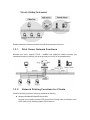
1.3.1 Print Server Network Functions.......................................................................................................6
1.3.2 Network Printing Functions for Clients ............................................................................................6
1.3.3 Network Printing Functions for Network Server...............................................................................7
1.4
Printer Compatibility ..............................................................................................................................7
1.5
Firmware & Printing Function ................................................................................................................7
CHAPTER2
HARDWARE INSTALLATION ...................... 9
CHAPTER3
WINDOWS PEER-TO-PEER NETWORK ... 10
3.1
3.2
System Architecture ............................................................................................................................10
PS Wizard ...........................................................................................................................................10
CHAPTER4
4.1
4.2
4.3
WINDOWS SERVER NETWORK................ 13
System Architecture ............................................................................................................................13
Windows Server Installation and Setup...............................................................................................13
User Installation and Setup .................................................................................................................13
CHAPTER5
MAC OS INSTALLATION ........................... 15
5.1
Rendezvous Uses in MAC OS 10.2 ....................................................................................................15
5.2
Setting Up Apple Talk/LPR Printing ....................................................................................................17
5.2.1 MAC OS X ....................................................................................................................................17
5.2.2 MAC OS 9.....................................................................................................................................18
CHAPTER6
UNIX SYSTEM NETWORK ......................... 21
6.1
Introduction .........................................................................................................................................21
6.2
Enable Print Server’s TCP/IP Support ................................................................................................21
6.3
Setup Print Server’s IP Address..........................................................................................................21
6.3.1 DHCP............................................................................................................................................21
6.3.2 BOOTP .........................................................................................................................................21
6.4
Verify Print Server’s IP Address ..........................................................................................................22
6.5
Configure Remote LPD Printing on the Host.......................................................................................23
CHAPTER7
7.1
7.2
PS UTILITY.................................................. 25
Installation ...........................................................................................................................................25
PS Utility Configuration .......................................................................................................................27
CHAPTER8
WEB MANAGEMENT.................................. 29
8.1
Management .......................................................................................................................................29
8.1.1 System ..........................................................................................................................................29
8.1.2 Network.........................................................................................................................................30
8.1.3 User ..............................................................................................................................................31
8.2
Configuration.......................................................................................................................................32
8.2.1 System ..........................................................................................................................................32
8.2.2 Network.........................................................................................................................................33
8.2.3 User ..............................................................................................................................................34
8.2.4 E-mail............................................................................................................................................35
8.2.5
8.3.1
8.3.2
8.3.3
8.3.4
8.3.5
8.3.6
SNMP............................................................................................................................................36
8.3
Tools 36
Print Test .......................................................................................................................................36
E-mail............................................................................................................................................37
Reset.............................................................................................................................................37
Factory Reset................................................................................................................................38
Firmware Upgrade ........................................................................................................................38
Backup ..........................................................................................................................................39
8.4
Help 39
CHAPTER9
IPP PRINTING ............................................. 40
9.1
Introduction .........................................................................................................................................40
9.2
System Setup......................................................................................................................................40
9.2.1 Print Server ....................................................................................................................................40
9.2.2 Client ...............................................................................................................................................40
Chapter1 Introduction
1.1 Product Introduction
Thank you for purchasing PLANET FPS-1001. The FPS-1001 allows you to share parallel
printers over any network. It is not only giving network users greater flexibility, but also takes the
load off the file server; thus enhances both printing performance as well as overall network
performance. In addition, by using our Windows based installation program, configuration can be
completed in minutes. Equipped with the printing interface – DB36, the FPS-1001 provides a
direct connection to your printer.
The FPS-1001 is configurable through a Web Browser or a windows-based management utility.
With various network printing methods support, including Windows Peer-to-Peer printing, Serverbased Queues printing (Windows Server, NetWare 5.x or above), LPD printing, Internet Printing
Protocol (IPP), Mail Printing and AppleTalk for Macintosh, the FPS-1001 is the ideal solution for
printer sharing in every network.
1.2 Product Package
This package contains the following components:
1 x FPS-1001
1 x Power Adapter
1 x Driver and User’s Manual CD
1 x Quick Installation Guide
1.3 Network Printing Architecture
This section illustrates how FPS-1001 functions and operates on the network. Before you install
and use FPS-1001, it is strongly suggested that you read this section completely, and select only
the chapters you need according to your network operating system.
This section will first introduce the role every component plays in the network-printing
environment.
Print Server
Client User
Network Server (optional)
Detailed examples will then be illustrated through actual network environment.
1.3.1
Print Server Network Functions
Because print server supports TCP/IP , NetBEUI and AppleTalk network protocols, any
networked computer can directly print to the print server from any of its installed protocol.
1.3.2
Network Printing Functions for Clients
Common operating systems for clients are classified as following:
Windows 95/98/Me/NT/2000/XP/Server 2003
Our print server system provides PTPP (Peer-to-Peer Printing) utility for Windows users.
PTPP (Peer-to-Peer Printing) supports TCP/IP protocol.
UNIX / Linux
UNIX (include HP/UX, SCO Unix, SunOS, Solaris, Unixware DECUnix, IBM AIX and
others) and Linux use the system-standard LPR to print to print server.
MAC OS
MAC OS can use the system-standard AppleTalk or LPR network to print to print server.
1.3.3
Network Printing Functions for Network Server
Common network servers are classified as following:
Windows NT/2000/XP and Server 2003
Our print server system provides PTPP (Peer-to-Peer Printing) utility for Windows
NT/2000/XP and Server 2003. After run the PTPP utility, the server can directly print to
print server. Adding this printing function into Windows Server allows print queue, user
authority management, and many other advanced features.
NetWare 5.x and above
In NetWare environment, print server offers various printing modes like print queue,
remote printer, etc.
1.4 Printer Compatibility
For more and more printers are fit to low cost SOHO market. There are some new technologies
apply to those host-base printers, such as GDI (Graphical Device Interface), PPA (Printing
Performance Architecture) and CAPT (Canon Advanced Printing Technology). Those new
technologies have to co-work with PC’s CPU. Thus the printers cannot work with printserver.
Please refer to the bundled CD-ROM for the GDI printers list.
Except for the printer with special technology, the low duty cycle printers are also not suitable to
work with print server. This kind of printer is not design for network printing. They might work with
print server at beginning. However, we cannot sure what would happen after long time operating.
1.5 Firmware & Printing Function
The print server provides a complete network printing solution. The feature set is listed below:
PTPP (Peer-to-Peer-Printing)
TCP/IP (LPR, SMB)
IPP Printing
Mail Printing
NetWare Bindery Printing (TCP/IP)
AppleTalk
C h a p t e r 2 H a r d w a r e I n s ta l l a t i o n
1. Unpack the print server package and check all the items listed in section 1.2.
2. Connect the print server to the printer you want to share on the network directly.
3. Connect print server LAN port to a switch or hub.
4. Connect the power adapter to the print server.
5. The print server will perform Power-On-Self-Test (POST) after it is powered on. After few
seconds, the LPT LED will blink three times to indicate that the print server is ready.
NOTE1: MUST use the power adapter shipped with the print server, do NOT use any other
power adapter from any sources.
NOTE2: Please refer to section 1.4 to make sure your printer is suitable to work with print
server.
NOTE3: To prevent the compatibility problem between print server and a few printer, it is
recommended that you power on the print server before the printer.
C h a p t e r 3 Wi n d o w s P e e r - t o - P e e r
Network
3.1 System Architecture
Print server supports Windows Peer-to-Peer network printing mode, which is suitable for most
medium and small network environments. Through quick and simple installation procedure, users
can immediately enjoy the convenience of network printing.
3.2 PS Wizard
The wizard can be performed on Windows 95/98/Me/NT/2000/XP/Server2003. Before executing
the wizard, please verify that your network protocol is installed on your PC (TCP/IP). It will be
helpful in your installation process.
NOTE: For some specific printers, you may need to connect the printer to the computer and
install the driver. Then connect the printer to print server.
1. Insert Drivers and User’s Manual CD into the CD-ROM drive to initiate the autorun program.
Once completed, a menu screen will appear.
2. Click on “Print Server Installation” hyper link to initiate the installation. If the autorun program
doesn’t execute, you can click the “Start” button and choose “Run”. (Suppose “E” is your CDROM drive). When the dialog box appears, enter “E:\Driver \Setup.exe” and press enter key.
You will see the dialog box as below. Please click “Next>” to continue.
3. In the following screen, select the printer that FPS-1001 is connected in the Printer List. Then
click “Next >”.
4. Select Print Server port in the Print Server List, and click “Next >”.
5. The print server port is now added to your PC, press “Finish” to complete the installation. If
there exists another FPS-1001, please press “Continue” to add other print server port.
TIP: If you are use Windows 98/Me, the system may ask you to restart to complete the
installation. Please press “Yes” to restart.
C h a p t e r 4 Wi n d o w s S e r v e r N e t w o r k
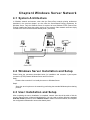
4.1 System Architecture
In Windows network environment, other than the Peer-to-Peer network printing architecture
described in the previous chapter, we also offer the Server-Based Printing architecture for
Windows Server. Only the Windows Server is required to have Windows PTPP (Peer-to-Peer
Printing) installed and share the printing service on the network. Other network users can simply
connect to the server and access the shared printer. (see below)
4.2 Windows Server Installation and Setup
Please follow the procedures described below for installation and construct a peer-to-peer
connection (PTPP) between Windows Server and Print Server.
Step1.
Pleaesr refer to section 3.2 to install print server to Windows Server.
Step2.
Share the server’s printer to the network by performing the standard Windows printer sharing
process.
4.3 User Installation and Setup
After completing the server installation is completed, network client should be able to find the
server’s shared printer in Network Neighborhood. You only need to perform Window’s standard
Add New Printer procedure, select “Network Printer” shown in the screen below, and complete
the configurations afterwards to access the shared printer.
C h a p t e r 5 M A C O S I n s ta l l a t i o n
5.1 Rendezvous Uses in MAC OS 10.2
The latest version of MAC OS provides a new feature that is called Rendezvous. Rendezvous is
a revolutionary networking technology standard that lets you create an instant network of
computers and devices, which can be used throughout Mac OS 10.2 to provide innovative ways
to share files and printers and even contact other people on the network.
For the printer connection, the Mac OS 10.2 Print Center application uses Rendezvous to
discover Rendezvous-enabled printers on the network. When you add your computer to a
network, Print Center automatically discovers the available printers. All you have to do is
selecting the one you want to use and then start printing. You can add a new printer to the
network and all the users on the network will see the new printer automatically appear in their
Print Center, without any configuration.
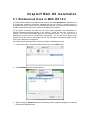
The following instructions provide a common procedure of installing the printer:
1. Launch Print Center. Press and hold the Option key, click the Add button.
2. Select Rendezvous from the pop-up menu.
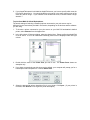
3. When clicking the Rendezvous item, the following window appears to display the connected
Rendezvous-enabled printers.
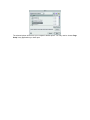
4. Select the desired printer, and the following pop-up menu displays the printer’s manufacturer.
Select Generic.
5. The printer is installed into the system successfully.
5.2 Setting Up Apple Talk/LPR Printing
5.2.1
MAC OS X
With MAC OS X, you can use AppleTalk or LPR printers to print through the print server. Follow
the instructions below for setting up the print server:
1. After attaching the print server to your network, change the IP Address of your Macintosh
computer to access the print server’s web configuration. The default IP Address of the print
server is 192.168.0.1. Change your IP Address to 102.168.0.x, where x is any number
between 2 and 254.
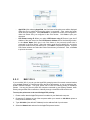
2. Open the System Preference window and click Network. In the Network window, select the
AppleTalk tab and check the Make AppleTalk Active option.
3. To print, open a document and select File > Print from the menu.
4. Select Edit Printer List from the Printer dialog box.
5. Click Add Printer. Then select the desired printing protocol (AppleTalk or LPR Printers
using IP).
-
AppleTalk: After selecting AppleTalk, the Port Name of the print server will be displayed.
Select the Port to which the post-script printer is connected. Then, select the printer
model from the dialog box. Click Add Printer to complete the Printer Port configuration.
Select the Printer Port just configured in the Print window. Click Print to print your
document.
-
LPR Printers using IP: When you select LPR Printers using IP Protocol, type the IP
Address of the print server into the LPR Printer’s Address field of the following window.
In the Queue Name field, type in the Port Name of the post-script printer that is
connected to the Print Server. Select the printer model from the dialog box, and select
the printer model from the pull-down menu. Click Add to complete the process. Close all
Print Center windows and select the Printer Port that was just selected. Then, click Print
to print the document.
5.2.2
MAC OS 9
If you use MAC OS 9, you can use the AppleTalk network protocol for network communications
over standard Ethernet or Fast Ethernet using the EtherTalk transport, or over a proprietary lowspeed LocalTalk transport. Your print server can be used for network printing to PostScript
printers. You can print from any MAC OS computer connected to your Ethernet network, either
directly using an EtherTalk connection or indirectly through a LocalTalk-to-EtherTalk router.
To set up the print server to be used for AppleTalk printing:
1. Please confirm that the AppleTalk protocol is enabled in your Macintosh computer.
2. Change the IP Address on one of the computers within your network to 192.168.0.x (where x
is any number between 2-254).
3. Type 192.168.0.1 (the default IP Address) into the address field of your browser.
4. Select the Network tab and scroll to the AppleTalk protocol section.
5. If your AppleTalk network is divided into AppleTalk zones, you have to specify which zone the
Print Server should be in. You should locate the print server in the same zone as most of the
users who will be using it. If your network is not divided into zones, it should contain a single
asterisk “*”.
To print from MAC OS Client Workstations:
The actual settings of selecting a PostScript printer connected to your print server may be
different from the instructions provided in this section, depending on the devices and the software
you are using.
1. To choose a printer connected to your print server as your MAC OS workstation’s default
printer, select Chooser from the Apple menu.
2. In the left column of Chooser window, select the desired item. Please confirm that AppleTalk
is set to Active. A list of all networked PostScript printers will be displayed within the right
column.
3. Double-click the name of the Printer Port you wish to use. The Printer Ports shown are
examples only.
4. If you have not previously set this printer as the default, your computer will prompt you for a
PostScript Printer Description file. Choose Select PPD.
5. Select the appropriate printer description file for your printer. Click Open. (If your printer is
not listed, click Generic to use a generic printer description.)
The selected printer will become your computer’s default printer. You may need to choose Page
Setup in any applications you have open.
Chapter6 UNIX System Network
6.1 Introduction
The print server is available for TCP/IP printing by Unix LPD (Line Printer Daemon) protocol. The
LPD protocol originated with Unix release is based on the BSD version of Unix and supported
under most versions of Unix.
This chapter explains how to configure the print server for TCP/IP operation, and how to modify
configuration files on your Unix system to allow printing to the print server. The configuration
examples in this manual follow the syntax for BSD based Unix systems. Please refer to the
related system documentation for the correct syntax of your systems.
To configure the print server for LPD printing, perform the procedures below:
1. Enable Print Server’s TCP/IP Support.
2. Set up Print Server’s IP address.
3. Verify Print Server’s IP Address.
4. Configure remote LPD printing on the host.
5. Print a test page.
In the next sections, we will describe these five procedures step by step.
6.2 Enable Print Server’s TCP/IP Support
The default configuration of the print server is with TCP/IP support enabled. Anyway, you can
configure the print server to enable TCP/IP support using the configuration program or PSETUP
program in our CD-ROM included with the Print server.
6.3 Setup Print Server’s IP Address
The print server must have a unique IP address in order to be recognized by the network.
You can set up the IP address on the various Unix systems using any one of the following
methods:
1. DHCP (Dynamic Host Configuration Protocol)
2. BOOTP (Bootstrap Protocol)
The print server will use the last three methods to obtain its IP address automatically if its IP
address is configured as Auto (0.0.0.0).
6.3.1
DHCP
There are many Unix systems that support DHCP protocol, and the procedures to configure the
DHCP server database are different. This manual does not describe the DHCP server
configuration on the Unix systems. It is highly recommended that the DHCP server should be
located on the same network as the print server.
6.3.2
BOOTP
If you have the BOOTP daemon, bootpd, running on your UNIX system that is accessible by the
print server, you can use the BOOTP protocol to set up the IP address of the print server. We
recommend that the BOOTP server should be located on the same subnet as the print server. If
you use Network Information Services (NIS) in your system, you may need to rebuild the NIS
map with the BOOTP services before doing the following BOOTP configuration. To rebuild the
NIS map, please refer to your system documentation.
To configure the IP address data for the BOOTP server, you will need to log in the host of
BOOTP server as the superuser (root). Perform the following steps to add address entries.
1. Optionally, assign a name corresponding to the print server’s IP address. You can add this
address to the /etc/hosts file, by adding a line such as:
203.66.191.12
pserver
2. Add an entry to the host’s /etc/bootptab file, similar to the following:
hostname:\
:ht=1:\
:ha=print_server_ethernet_address:\
:ip=print_server_ip_address:
Lines should be indented with tabs.
Where hostname is the device name of a print server, the ht=1 tag specifies the hardware type is
Ethernet, the ha= tag specifies the Ethernet address of a print server, which is the Node ID
located on the print server. The ha tag must be preceded by the ht tag. The ip= tag should
correspond to the IP address you want to assign to the print server.
For example, a print server with the following configuration:
Node ID: 00304F010101 (this implies Ethernet
address is 0304F010101),
IP address: 203.66.191.12
The entry for this print server in the /etc/bootptab file should be:
PL010101:\
:ht=1:\
:ha=00304F010101:\
:ip=203.66.191.12:
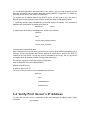
6.4 Verify Print Server’s IP Address
To verify that your print server is responding to the newly assigned IP address using a PING
command:
ping ip-address
6.5 Configure Remote LPD Printing on the
Host
The procedure you use to configure your Unix host(s) to allow printing to your network remote
print server varies between different varieties of Unix. The procedure below can be used for Unix
variants that are related to BSD Unix, such as SunOS or Linux. For other versions of Unix,
consult your system documentation, keeping in mind that:
1. The print server should be treated as a BSD networked print server host.
2. The host name should be the name (or IP address) that you have assigned to the print server.
3. The printer name (or queue name) on the remote host should be lpt1, lpt2 or lpt3, the name of
the printer port on the print server.
You will need to perform the tasks below, logged in as the superuser (root). To configure your
Unix host for printing,
1. Optionally, assign a name corresponding to the print server’s IP address. You can add this
address to the /etc/hosts file, by adding a line such as:
203.66.191.186
pserver
2. Create a spool directory for the printer in the same directory where spool directories are
normally kept on the machine, such as /var/spool or /var/spool/LPD:
mkdir /var/spool/LPD/pserverd
chown daemon /var/spool/LPD/pserverd
chgrp daemon /var/spool/LPD/pserverd
chmod 775 /var/spool/LPD/pserverd
3. Add an entry to the host’s /etc/printcap file, similar to the following:
printer-name:\
:lp=:\
:rm=203.66.191.186:\
:rp=lpt1:\
:lf=/var/spool/LPD/pserverd.log:\
:sd=/var/spool/LPD/pserverd:\
:mx#0:
Lines should be indented with tabs. More than one printer name can be used, with variants
separated by vertical bars (name1|name2).
The rm= entry should correspond to the IP address you have assigned to the print server. You
can also use a host name if you have assigned one in the /etc/hosts file.
The sd= entry should correspond to the spool directory you created in the previous step.
The rp= entry should correspond to the port name of the remote printer. The values should be
lpt1.
The print server should now be available for printing from your Unix host.
Chapter7 PS Utility
This utility provides the full management and configuration functions on the print server side. This
utility only provides configuration functions for print server itself; it does not include configuration
functions for client side or other file server or NetWare server in the network environment.
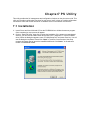
7.1 Installation
1. Insert Drivers and User’s Manual CD into the CD-ROM drive to initiate the autorun program.
Once completed, a menu screen will appear.
2. Click on “Install PS Utility” hyper link to initiate the installation. If the autorun program doesn’t
execute, you can click the “Start” button and choose “Run”. (Suppose “E” is your CD-ROM
drive). When the dialog box appears, enter “E:\Utility\Setup.exe” and press enter key. You will
see the dialog box as below. Please click “Next>” to continue. Once executed, the setup
program will extract files to launch the InstallShield Wizard. Click “Next >” in the welcome
screen of InstallShield Wizard.
3. Choose the destination location. If no specific requirement, leave the default setting and click
“Next >”.
4. The InstallShield Wizard starts to install the software, and the Progress bar indicates the
installation is proceeding.
5. When completed, click “Finish”.
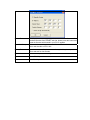
7.2 PS Utility Configuration
After successfuly installing the utility, you can find the application program by clicking Start menu
> Programs > PS-Utility. Executing this utility, you can see the configuration screen below.
Option
Description
Discover Device
When PS Utility starts, it will search all the print server in your network
and show them in the list above. If you don’t see your print server in the
list , click this button to search again.
Change IP Address
The default IP address of FPS-1001 is 192.168.0.1. If you want to
change the IP address, please click this button. You will see a dialog box
appears. Enter the IP settinigs in this dialog box and press “OK” to save
the settings. If there is a DHCP Server in your network, you may select
“DHCP Assign Automatically” to obtain an IP address from the DHCP
Server.
Update Firmware
PS Utility allows user to upgrade print server with latest firmware. After
download firmware from PLANET web site, please press this button and
locate the firmware which saved in your PC to upgrade.
Show Web Setup
Click on this button, the web browser will be activated and connect to the
built-in web interface of FPS-1001.
Factory Reset
If you want to reset this print server to factory default, please press this
button and wait for few seconds.
Information
Shows current print server settings.
About
Shows PS Utility version.
Close
Exits PS Utility.
C h apter 8 We b M anagement
You can access and manage the Print Server through: 1) the enclosed software PS-Utility, and 2)
a web browser. This chapter describes the second method - the Web Configuration, and explains
how to set up your print server with the web browser.
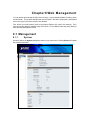
First, launch your web browser (such as the Internet Explorer 6.0 used in this manual). Then,
type print server default IP address (http://192.168.0.1) in the address field and press [Enter] to
enter the Web Management screen.
8.1 Management
8.1.1
System
As shown below, the System displays the status of your print server. Clicking Refresh will update
the showing information.
Option
Description
Device Status
The information about the print server, including the server name, model
name, firmware version, MAC address, IP address and Up time, that can be
found in this field.
The items in this field display the information of the printer, such as the given
name for the printer, speed, printer status, and status of your printing tasks,
etc.
Printer Status
Ethernet Status
8.1.2
You can monitor the networking status in this field, including the network
connection, speed, and the packets status.
Network
Click Network to display the information of the LAN. Clicking Refresh will update the information.
Option
Description
Auto IP
This field contains the current settings of TCP/IP, including DHCP/BOOTP,
UPnP, and MAC Rendezvous. The items in this field are configured in
Configuration > Network > TCP/IP.
TCP/IP Printing
In this field, you can monitor the status of TCP/IP printing tasks.
Microsoft Network In this field, you can monitor the status of Microsoft Network printing tasks.
Printing
MAC AppleTalk
Printing
8.1.3
In this field, you can monitor the status of MAC AppleTalk printing tasks.
User
Click the User item in the left column to display the user(s) information.
Option
Description
Users Printing
Log
The items in this field will display the user(s) information, which includes the
user(s) MAC address, IP address, name, and status of printing tasks.
8.2 Configuration
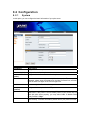
8.2.1
System
In this option, you can configure the basic information of your print server.
Parameters
Description
Server Name
Assign a name to the print server.
Location (option)
Assign a location for the print server.
Admin
(option)
Password
Contact Assign the Admin Contact’s name for the print server.
Enter the Administrator password (3-8 characters). To set up the
password, please enter the password in the New Password box, and then
enter the same one again in the Confirm Again box.
Port Name
You can assign the Port Name for the print server.
Description
(optional)
Speed
Configure the description for the LPT port.
PJL Printer
This print server is DMA mode supported. Some printers are not support
DMA mode. If the printer is an old model printer or your printer can not
work with print server properly, you may select “Low” to disable DMA
mode. Default is “High”.
PJL (Print Job Language) has certain job requirements that must be met to
work correctly. For more information, please refer to your printer’s manual.
8.2.2
Network
In this option, you can configure print server settings to fit to your network.
Parameters
Description
IP Address
DNS Server
Address
UPnP
If you need the print server to automatically obtain an IP address from LAN
DHCP server, select “Automatically Assign”. Or you can select “Manaually
Assign” to manually assign “IP Address”, “Subnet Mask” and “Gateway” for
the print server.
Type up to two DNS numbers in the fieldes. Please check to your ISP with
this DNS information.
This option allows you to enable or disable UPnP mode.
MAC Rendezvous
This option allows you to enable or disable MAC Rendezvous mode.
Second HTTP
Server
It is for remote web configuration and IPP printing. If this print server has a
public IP address, you may enable this setting and set a port number for
Internet access.
Enter the name of the Workgroup that you want the print server associated
with in this field.
Workgroup
AppleTalk Zone
This determines which Apple systems can gain access to this printer.
Printer Type
These are text fields, used to describe the printer driver used for each port.
The Print Server is designed to work with LaserWriter (or 100%
compatible) printers.
PostScript Level
Select from the pull-down menu (Level 1 or Level 2).
Font Group
Select the correct font group of your operating environment from the pulldown menu.
8.2.3
User
In this option, you can set a list to control the client access of this print server.
Parameters
Description
Enable User
Printing Control
Allow Undefined
Users Printing
Enable the user printing control function by Yes or No. Please press Save
button to apply.
For the user(s) who is not in the User List, you can also limit the access
right by setting the Allow Undefined Users Printing option to Yes or No.
Please press Save button to apply.
Please enter the User Name and his MAC Address, Then define the user
is printing access allow or not. Press Add button to add this user to User
List.
Please select the user in Delete User pull-down list. Press Delete button to
delete this user.
Add User
Delete User
8.2.4
E-mail
Parameters
Description
Print Server E-mail
Address
You can assign an E-mail address to the print server, so that the mails
which send to this account will be printed out directly through the printer
(ASCII text only).
Enter the IP Address of E-mail Server which FPS-1001 will receive Email from this server.
Incoming E-mail
(POP3) Server
Address
Outgoing E-mail
(SMTP) Server
Address
Account Name
Password
E-mail Notification
Email Printing
Enter the IP Address of E-mail Server which FPS-1001 will used to send
E-mail to network administrator.
The name of the E-mail account used by the print server.
Enter the password for the above E-mail account here.
You can set the print server to send an alert message when the printer
status changes through E-mail. To enable this function, set the Enable
e-mail notification for printer status changing option to Yes. Then,
input the administrator’s E-mail address in the Admin E-mail Address
box.
E-mail Printing (ASCII Text Only): Select Enable to enable the E-mail
printing function.
Receive E-mail Interval: Enter the number in this box to set up the time
that print server will check/receive E-mail regularly.
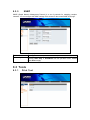
8.2.5
SNMP
SNMP (Simple Network Management Protocol) is a set of protocols for managing complex
networks. You can configure the SNMP settings of this screen for the remote SNMP utility login.
Parameters
Description
Community1-3
Enter a name in the Name box, and configure the Access Right by
selecting Read Only or Read/Write from the pull-down menu. Please
press Save to apply.
8.3 Tools
8.3.1
Print Test
Please press Test to print a test page to make sure the printer and print server can co-work
properly.
8.3.2
E-mail
Your may click Test to send a test E-mail to the administrator’s E-mail address. Or click Yes to
receive mail from print server mail box and print out immediately.
8.3.3
Reset
Click Yes to immediately reset the print server.
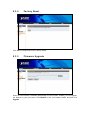
8.3.4
Factory Reset
Click Yes to reset print server to the factory default.
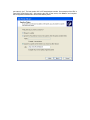
8.3.5
Firmware Upgrade
When the new firmware is available (downloading from the PLANET website), you can upgrade
the firmware to your print server. Click Browse to find out firmware location, and then click
Upgrade.
8.3.6
Backup
In this screen, you can backup current settings to a file or reload the settings to this print server
from a file. Please click Backup and follow the steps to save current configuration of the print
server to a file. When you want to reload the configuration that you had saved before, please click
Browse to locate the backup config file, and click Restore.
8.4 Help
This screen shows the current firmware version.
Chapter9 IPP Printing
9.1 Introduction
IPP (Internet Printing Protocol) Printing provides a convenient way of remote printing service by
TCP/IP. The print server can support IPP printing by default. It is needless to do any setting. Any
PC that can support IPP printing, for example Windows 2000/XP and Server 2003, can directly
uses the print server by IP. By using the IPP printing, you can share the printer to all the PC’s that
can access the print server by IP. You can even share your printer to Internet users. Before use
IPP printing, please make sure your PC and print server are work with public IP address. If one of
them is work with private IP address, the connection will fail since they can not connect to Internet.
9.2 System Setup
9.2.1
Print Server
It is needless to do any setting on the print server except making sure the print server has correct
IP settings. If you want to share the printers to Internet users, you have to set a public IP to the
print server. You also have to make sure that any gateway, router or firewall would not block IPP
protocol if you have these gateway devices installed in your network.
9.2.2
Client
You only need to perform Window’s standard Add New Printer procedure, select “Network
Printer” shown in the screen below and click “Next >”.
Select “Connect to a printer on the Internet or on a home or office network” and enter the URL of
print server. The URL format is “http://IP/LPT_PORT:631”. The IP should be the print server’s IP.
LPT_PORT is the port name of print server that your printer is connected to. In the illustration, the
port name is “lpt1”. The last number 631 is IPP standard port number. One example of the URL is
“http://203.70.249.54/lpt1:631”. After entering the URL of print server, click “Next >” and complete
the configurations afterwards to access the shared printer.