1
A Feather-weight Virtual Machine for Windows Applications
Yang Yu
Fanglu Guo
Susanta Nanda
Lap-chung Lam
Tzi-cker Chiueh
Computer Science Department
Stony Brook University
{yyu, fanglu, susanta, lclam, chiueh}@cs.sunysb.edu
Abstract
Many fault-tolerant and intrusion-tolerant systems require the ability to execute unsafe programs in a realistic environment without leaving permanent damages. Virtual machine technology meets
this requirement perfectly because it provides an execution environment that is both realistic and isolated. In this paper, we introduce an OS level virtual machine architecture for Windows applications called Feather-weight Virtual Machine (FVM), under which
virtual machines share as many resources of the host machine as
possible while still isolated from one another and from the host
machine. The key technique behind FVM is namespace virtualization, which isolates virtual machines by renaming resources at the
OS system call interface. Through a copy-on-write scheme, FVM
allows multiple virtual machines to physically share resources but
logically isolate their resources from each other. A main technical challenge in FVM is how to achieve strong isolation among
different virtual machines and the host machine, due to numerous
namespaces and interprocess communication mechanisms on Windows. Experimental results demonstrate that FVM is more flexible
and scalable, requires less system resource, incurs lower start-up
and run-time performance overhead than existing hardware-level
virtual machine technologies, and thus makes a compelling building block for security and fault-tolerant applications.
Categories and Subject Descriptors D.4.5 [Operating Systems]:
Reliability; D.4.6 [Operating Systems]: Security and Protection
General Terms
Reliability, Security
Keywords virtual machine, namespace virtualization, system call
interception, copy on write, mobile code security
1. Introduction
Virtual machine is a technology that creates one or multiple execution environments on a single physical machine. Each virtual machine (VM) represents a distinct instance of the underlying physical
machine, and does not interfere with one another or with the underlying machine. This isolation property makes virtual machine a
possible building block for security and fault-tolerant applications.
For example, running unsafe mobile code in a VM can protect the
underlying physical machine from being compromised.
Permission to make digital or hard copies of all or part of this work for personal or
classroom use is granted without fee provided that copies are not made or distributed
for profit or commercial advantage and that copies bear this notice and the full citation
on the first page. To copy otherwise, to republish, to post on servers or to redistribute
to lists, requires prior specific permission and/or a fee.
VEE’06 June 14–16, 2006, Ottawa, Ontario, Canada.
c 2006 ACM 1-59593-332-6/06/0006. . . $5.00.
Copyright °
When applying virtual machine technology to fault-tolerant and
intrusion-tolerant systems, a common requirement is to run a potentially malicious transaction in a specially created VM, whose
operating environment is analogous to the current host environment. One can satisfy this requirement by creating a new VM, and
copying the hosting machine’s environment to the new VM. However, this approach is impractical for most existing virtual machine
technologies [1, 2, 3, 4]. The reason is that these technologies support virtualization at an abstraction level close to hardware and are
heavy-weight in that each VM is created as a full-fledged operating
environment. Initializing such a VM incurs too much overhead in
terms of both disk space and invocation latency.
Different from hardware-level virtual machine technologies,
OS-level virtual machines have the virtualization layer between
the operating system and application programs. The virtualization
layer can be designed in a way that allows processes in VMs to access as many resources of the host machine as possible, but never
to tamper with them. In other words, every VM shares the same
execution environment as the host machine, and only keeps any
diverges from the host environment in the VM’s local state. Therefore, such a VM can have very small resource requirement and thus
can achieve large scalability. Moreover, under this architecture, it is
also possible for the VM and the host machine to synchronize state
changes conveniently when necessary. For example, the legitimate
state change in a VM can be committed to the host machine, while
patches or reconfiguration of the host machine can be synchronized
immediately in a VM.
In this paper, we present a Windows-based OS-level virtualization architecture called Feather-weight Virtual Machine (FVM),
which is specifically designed to reduce the invocation latency of a
new VM and to scale to a large number of VMs by minimizing perVM resource requirement. The key idea behind FVM is namespace
virtualization, which renames system resources through a virtualization layer, called FVM layer, at the OS system call interface.
Microsoft Windows supports numerous types of namespaces for
various system resources, such as files, registries, kernel objects,
network address, daemon services, window classes, etc. The FVM
layer manipulates the names of all these resources when a process
makes system calls to access them. Through resource renaming,
the namespaces visible to processes in one VM are guaranteed to
be disjoint from those visible to processes in another VM. As a
result, two VMs never share any resources and therefore cannot interact with each other directly. For example, suppose an application
in one VM (say vm1) tries to access a file /a/b, then the FVM layer
will redirect it to access /vm1/a/b. When a process in another VM
(say vm2) accesses /a/b, it will try a different file, i.e., /vm2/a/b,
which is different from the file /a/b in vm1.
However, completely separating namespaces of different VMs
may require unnecessary duplication of common system resources
and may lead to the same performance overhead as many heavyweight virtual machine technologies. Being feather-weight, the
FVM architecture enables VMs to share most resources with the
host environment while isolating state changes of each VM through
a special copy on write scheme. A new created VM initially can
share all the resources of the host machine. Later on, if processes
in the VM make only read requests to system resources, they can
simply access the shared resources on the host machine. The VM
does not occupy any private resources until processes in the VM
try to modify the host machine’s resources. Therefore, the resource
requirement of each VM is significantly reduced under the FVM
architecture.
Although the idea of namespace virtualization is not new and
is in fact used in systems such as FreeBSD Jails [5], Solaris Containers [6] and Linux VServer [7], there are several technical challenges to implement it correctly on the Windows platform. First of
all, there are too many types of namespaces on Windows. Only handling files and registries virtualization is far from being complete in
providing isolated VMs. For example, many processes use named
kernel objects or named GUI windows to interact with other processes. The FVM layer must identify all of these objects and virtualize their namespaces. Second, Windows comes with a set of daemon services which has special management mechanisms. Some of
the services are as important as the kernel and are inappropriate or
difficult to be duplicated in each VM. As a result, namespace virtualization must handle special resources created by these shared
processes. Finally, there are numerous Windows-specific interprocess communications mechanisms, some of which are not directly
based on names, for example, GUI window message. These communication mechanisms must also be confined in order to achieve
strong isolation between different VMs.
There are also many Windows-based technologies working at a
similar virtualization level to FVM, such as PDS [8] and Softricity [9]. The main difference between them and FVM is that, FVM
aims to develop a comprehensive virtualization technology with
strong isolation. Consequently, under FVM architecture, not only
files and registries are virtualized, but system objects and interprocess communications are also virtualized to a large extent. Without
this effort, it is not even possible to run multiple processes of the
same Windows application (e.g., Microsoft Word) on a single host
machine. Also, under FVM architecture, it is now possible to run
multiple web servers each of which listens to port 80 and uses a
different IP address. As a result, multiple VMs can coexist simultaneously without interfering with one another. Another advantage
with FVM architecture is that the FVM layer is more difficult to be
bypassed or subverted because it is mainly at kernel mode instead
of user-mode system libraries.
Compared with many existing virtual machine technologies
such as VMware [10] and Virtual PC [3], which virtualize at the
hardware abstraction layer, or Bochs [1], which emulates at the
instruction set architecture level, FVM is more flexible and scalable, incurs less start-up latency, and yet achieves strong isolation
among different VMs. In particular, FVM guarantees that even a
high-privileged process in one VM cannot compromise resources
of another VM or the host machine, and therefore can be applied
to many fault-tolerant and security-related applications that require
frequent spawning of new VMs. We have applied the FVM technology to protect an end user’s machine from malicious mobile code,
by running each vulnerable application program or downloaded
mobile code in a separate VM.
The rest of the paper is organized as follows: Section 2 reviews virtual machine technologies that work at different levels of
abstraction, including various confinement mechanisms at the OS
level. Section 3 describes the virtualization principles for files, registries, kernel objects and other system resources in the FVM architecture. Section 4 introduces the system call interception mechanism and the implementation issues of each module in the FVM
layer. Section 5 shows the performance measurements of the current FVM prototype. Section 6 describes FVM’s applications, especially the application on securing mobile code execution. Section 7
summaries the main features of FVM and outlines the future work.
2. Related Work
Hardware abstraction layer virtualization. VMware [2, 10] and
Microsoft Virtual PC [3] have the virtualization interface at the
hardware abstraction layer. They virtualize common PC hardware
like processor, memory and peripheral I/O devices such that multiple operating system instances of different type can be installed on
a single physical x86 machine.
Some so-called light-weight virtual machines on the hardware
abstraction layer [11, 4, 12] virtualize only a subset of the hardware. Denali [11] uses para-virtualization techniques to scale
up the number of concurrent VMs running server applications.
Xen [4] also uses para-virtualization techniques to support full
multi-application operating systems with small performance overhead. Linux has been ported to Xen architecture and the performance is close to native Linux. User-Mode Linux (UML) [12] ports
the Linux kernel to Linux itself and runs the kernel in the user space
of the host Linux. The system calls made by UML processes are
intercepted and redirected to UML kernel.
All of the above virtualization technologies try to simulate the
hardware abstraction layer to create multiple instances of VMs for
the guest operating system. The advantage of these technologies
is the full isolation between different VMs and the host machine,
while their disadvantage are normally due to large resource requirement and performance overhead. Although para-virtualization in
Xen and copy-on-write schemes in VMware ESX server [13] can
improve the runtime performance and scalability, these hardwarelevel virtualization technologies are not as flexible as operating
system level virtualization technologies for applications that require frequent invocation and termination of “playground” VMs.
Operating system level virtualization. The FreeBSD Jail [5] utility can create multiple virtual execution environments called jails,
each of which has its own file system root and IP address. Processes
in a particular jail can only access resources within that jail. This
utility requires chroot() system call and a few kernel modifications
to separate the namespaces of different jails.
The Linux VServer project [7] is a more advanced jail-like implementation for Linux. It modifies the kernel code related to process management, file system, network address, root capabilities
and system V interprocess communications to separate user-space
environment into distinct Virtual Private Servers. It supports a unification feature that uses hard links to reduce disk space consumption. The Linux VServer is very similar to what FVM can do except
that FVM supports a copy-on-write scheme to isolate file systems
of different VMs, and FVM handles more complicated interprocess
communications on Windows.
Similar to Linux VServers, Solaris Containers [6], or Solaris
Zones with resource management facility, allows multiple execution environments to be isolated on a single instance of the Solaris
OS. It achieves a finer isolation granularity than Dynamic System
Domains [6], each of which runs its own copy of Solaris OS on the
single physical machine. Solaris Containers supports dynamic resource reallocation for CPU, memory and network bandwidth, and
is thus a flexible mechanism for server consolidation. Sphera [14]
and SWsoft’s Virtuozzo [15] also provide similar isolated environments called Virtual Dedicated Server or Virtual Private Server
(VPS) on Linux platform. Each VPS can be rebooted independently
and have its own user accounts, IP address, processes, system libraries and configuration files. Virtuozzo can even support virtualization on Microsoft Windows server platform and is therefore
close to FVM, but it is not clear whether it can also be used to isolate desktop applications which are normally involved with more
communication channels such as window message.
In addition to server consolidation purpose, several products
and projects [8, 9, 16, 17] develop isolated execution environment
for a new software deployment scheme called application streaming [18], under which application software is stored on a central
streaming server but run on local desktops on demand, with each
application executed in its own VM without pre-installation. The
Progress Deployment System (PDS) [8] intercepts a subset of Windows APIs to create a separate VM for each asset without conflict with each other. It selects the APIs to be intercepted in the
same way as FVM but only handles virtualization of files and
registries. Some commercial products on Windows with similar
goals and techniques are Softricity Desktop [9], AppStream [16]
and Thinstall [17]. In particular, Softricity Desktop [9] implements
comprehensive virtualizations to execute sequenced applications.
It virtualizes all major components of a Windows application’s
runtime environment, including process environment variables and
many interprocess communications such as COM and named pipes.
These Windows-based systems have the virtualization layer at the
user-level system library interface. In contrast, FVM’s virtualization layer is mainly at the kernel-mode system call interface and
is thus more difficult to be bypassed. Moreover, because FVM virtualizes kernel objects and network address as well, it can achieve
better isolations that can support both desktop and server applications.
Trigence AE [19] and Meiosys [20] support application encapsulation/streaming on Solaris/Linux platform. In addition, Meiosys’s
MetaCluster can further checkpoint an application’s running states,
such as opened sockets, in its virtual application containers. Such
a checkpoint/restart feature enables stateful relocation of running
applications on Linux. MobiDesk [21] also supports stateful migration of Linux applications through computing sessions. Different
from Meiosys, each of these sessions is hosted on servers in a
VM while the user’s desktop simply acts as a terminal. The current FVM prototype does not support process checkpoint/restart on
Windows and will include it in the future. Moreover, FVM may
also work with Windows Terminal Server to support virtualized
hosted clients.
The Alcatraz project [22] provides an isolated environment for
executing untrusted programs on Linux. File modifications by untrusted processes are redirected to a modification cache invisible to
other processes. It is implemented at the user level through system
call interposition and incurs large performance overhead. Safe Execution Environment (SEE) [23] extends Alcatraz by implementing isolations within the kernel at the VFS layer. It also introduces a systematic way to commit file modifications to the outside of a SEE. However, the two projects mainly isolate file system
changes on Linux instead of supporting a comprehensive virtualization framework which should include virtualization of network
and interprocess communications, and maintenance of VM states.
GreenBorder [24] creates a secure execution environment on
Windows called a Desktop DMZ in which internet content is executed but isolated from host machine’s resources. So is the security wrappers for Windows NT/2000 [25], which can secure the
execution of Outlook, MS Office and Internet Explorer by virtualizing process operations that violate security policies. Similarly,
Windows Vista has an interesting feature that enables legitimate applications requiring administrator privilege to run virtually without
actually granting users the administrator privilege [26]. These systems and approaches can stop the damages of malicious code while
not breaking legitimate applications. However, they do not have
the FVM’s flexibility of starting multiple sandboxed environments
or resolving conflicts among multiple application instances.
There are also several interesting virtualization or emulation
technologies at the operating system level with cross-platform
support. Wine [27] provides a Windows API emulation layer
that can enable some unmodified Windows programs to run on
any Unix-like operating system, while Cygwin [28] provides a
Linux API emulation layer that can rebuild Linux applications
and make them run on Windows. These emulation layers are implemented at the user level and are not designed as a solution
to create multiple isolated VMs for security-related applications.
File versioning techniques. In some sense, FVM is equal to versioning of system resources plus visibility control. In particular,
The file virtualization module in FVM is similar to many versioning file system projects, such as [29, 30, 31], which attempt
to efficiently maintain multiple versions of the same file. Most if
not all of the versioning file systems use block-based versioning
rather than file-based versioning to avoid duplicating common file
blocks. For simplicity, the current FVM prototype uses a copy-onwrite scheme that copies the entire file on the host machine to a
VM when the file is to be modified by the VM for the first time.
Windows confinement mechanisms. Windows itself implements
several confinement mechanisms [32], such as session, window station, desktop and job object. Sessions are used to support multiple
interactive users in Windows Terminal Services [33]. Each session
has its own namespace for kernel objects, as well as the keyboard,
mouse and display device. As a result, multiple instances of the
same application can run in multiple terminal sessions on the same
terminal server. However, sessions do not isolate access to files and
registries, and are not completely supported on Windows platforms
other than Windows servers.
Window station objects [32] are mainly used to separate highprivileged daemon services from interactive user applications with
normal privilege. Each window station contains multiple desktops [32], each of which has separate window object management
so a window in one desktop cannot see or send message to windows
on a different desktop. FVM uses a different mechanism to control
window visibility among different VMs by intercepting windowrelated APIs.
A job object [32] allows multiple processes associated with it to
be managed as a unit. Restrictions about user-interface and resource
utilization can be specified for each job object and in turn applied
to all its associated processes. FVM integrates this confinement
mechanism by assigning a job object for each VM to limit the CPU
and memory utilization of untrusted processes in the VM.
3. FVM Architecture
3.1 Design Overview
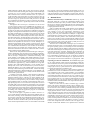
As an OS-level virtualization technology, FVM puts the virtualization layer at the OS’s system call interface, as shown in Figure 1.
All the VMs share the host OS’s kernel-mode component, including the hardware abstraction layer, device drivers, OS kernel and
executive, as well as system boot components. Moreover, the file
system image is also shared by default. Each new VM starts with
exactly the same operating environment as the current host. Therefore, both the startup delay and the initial resource requirement for
a VM are minimized. Because the resource virtualization is performed by simply renaming system call arguments instead of complicated resource mappings or instruction interpretations, an application’s runtime performance in a VM is also improved.
Because the FVM virtualization layer is on top of the system
call interface, it can see all the resource requests from user-mode
processes. As a result, it can direct higher level requests targeting
at the same object to lower level requests targeting at different
VM-n
VM-1
Host APP
VM APP
VM APP
Library interface
User mode
FVM virtualization layer
Kernel mode
Kernel-mode system call interface
OS Executive
OS Kernel
Device Drivers
HAL interface
Hardware Abstraction Layer (HAL)
ISA interface
Hardware (x86)
Figure 1. The FVM virtualization layer is at the OS’s system call
interface.
versions of the same object. FVM uses namespace virtualization
and resource copy-on-write to implement the access redirection
and isolation between different VMs. When a new VM(say vm1)
is created, it shares all the system resources(e.g. disk files) with
the host machine. Later on, when different types of requests from
a process p in the VM pass through the FVM layer, these requests
can be redirected as follows:
• If p attempts to create a new file /a/b, the FVM layer will
redirect the request to create a new file vm1/a/b.
• If p attempts to open an existing file /a/b, the FVM layer will
redirect the request to open a file vm1/a/b. If file vm1/a/b exists, there is no further processing in the FVM layer; otherwise,
the FVM layer will check the access type of the open request. If
the access is “open for read”, the request will go to the original file /a/b; if it is “open for write”, the FVM layer will
copy /a/b to vm1/a/b, and then redirect the request to open
vm1/a/b.
• If p attempts to read or write an existing file, the FVM layer will
simply pass the request through, because read/write request is
based on a file handle, which is returned by a previous open
request. If the open request is redirected, all the subsequent
read/write requests based on the same file handle are also redirected.
• If p attempts to delete an existing file /a/b, the FVM layer will
simply add the file name /a/b to a per-VM data structure, called
delete log, without deleting /a/b.
• If p attempts to make any types of interprocess communica-
tions, such as sending window message, to another local process, the FVM layer will block the communications unless the
two processes are running in the same VM.
The above examples describe basic redirection mechanisms
for implementing namespace virtualization in the FVM layer. Although most of these mechanisms are about renaming and redirection for files, they can be similarly applied for isolating requests to
registry entries and kernel object as well. Through such resource
renaming techniques, resource updates by processes in a VM can
be fully isolated from other VMs and the host machine, although
all the VMs, including the host machine, are sharing the same operating system.
There are many types of system resources under different
namespaces on Windows. A fundamental issue with FVM design
is to identify each type of system resources that should be virtualized in order to achieve strong isolation between VMs. First, file
and registry represent persistent data and system settings and thus
must be virtualized. Second, Windows applications can use kernel
objects and GUI window management mechanisms to synchronize
with each other. For example, many application programs (e.g. Mi-
crosoft Office) allow only one instance of itself to be started on the
same machine at one time. In other words, no matter how many
files the program are operating simultaneously, there is at most one
process of the program on the same machine. This instance limitation can be implemented by checking the existence of certain kernel
objects, which share one namespace; or by broadcasting window
message to other existing windows, which can receive message
and make replies. Therefore, to break the instance limitation and
enable multiple instances of the same application program to run
independently of each other in different VMs, kernel objects must
be virtualized and many Windows-specific interprocess communications such as window message should be confined. Finally, many
network server applications (e.g. Apache) start as daemon services,
which are registered to and managed by a special Windows system
component called Service Control Manager. To enable multiple
instances of the same network server application to run in different VMs, the daemon service management mechanism should be
virtualized. Moreover, the network address should be virtualized as
well so each server application instance can start successfully by
listening on the same port but at a different IP address.
The current FVM architecture consists of 6 modules to perform
virtualization of file, registry, kernel object, network address, interprocess communication confinement and daemon service virtualization. Their implementation details will be addressed in Section
4.
3.2 VM State
Under FVM architecture, the state of a VM refers to the information
that should be retained when the VM stops running. A VM’s state
is defined as follows:
• A virtual machine Id,
• An IP address,
• A root file directory containing file updates by the VM,
• A root registry hive containing registry updates by the VM,
• A root object directory containing object updates by the VM,
• A log of files and registry entries deleted/renamed by the VM,
• A set of policies regarding to resource quota and network ac-
cess.
The virtual machine Id is used to identify a VM and the mapping
between a VM and its associated processes. It is also used as a
prefix when renaming system resources in namespaces such as
files, registries, kernel objects, daemon services and window titles.
An IP address can be assigned to a VM when the VM is created,
because this allows multiple instance of the same server application
coexist on the same host machine, with each running in a different
VM and binding to different IP address.
Three types of directories can be specified as the root directories
containing private version of files, registries and objects of an VM
when the VM is created. Each of these root directories is physically
residing on the host directory namespace of the same type but only
visible to the VM itself. The logical image of a VM’s file directory
is the union of the VM’s root file directory and the current host file
directory, minus the file entries that have been deleted or renamed
by the VM. The same semantic is applied for a VM’s registry and
kernel object images. To maintain the correct image states during a
VM’s lifecycle, the deleted/renamed files and registries are dumped
into a log file when the VM is stopped, and brought into memory
when the VM is restarted. Because FVM currently does not support
process checkpoint/restart, the running state of all the processes in
a VM, including kernel objects manipulated by those processes, are
not maintained when a VM is stopped.
To prevent denial-of-service attacks and also support performance isolation, a set of policies regarding to resource quota and
network access can be specified when a VM is created. The FVM
layer limits the total system resource allocated to the VM according to these policies. This is achieved by assigning a Windows job
object to the VM, initializing the job object with the policy settings
and associating all the processes in the VM to the job object. A job
object can specify the CPU scheduling priority, physical memory
limit, working set size, process execution time, etc, all of which are
enforced by Windows at runtime. In addition, FVM periodically
checks and controls the disk space utilization of each active VM.
Although not implemented, FVM can further analyze and limit the
network traffic of a VM to stop worms or spam generators running
in the VM.
3.3 VM Operation
FVM provides a comprehensive set of operations for users to manipulate VMs, as follows:
CreateVM creates a new VM whose initial image is identical to
the host environment at the time of creation. The new VM starts
a VM shell process, which is similar to the Windows explorer process. Users can start application processes in the VM shell by clicking a file icon or typing a command. All the descendant processes
of the VM shell are associated with the same VM automatically.
CopyVM creates a new VM whose initial image is duplicated
from another VM.
ConfigureVM creates a new VM with an initial image that users
can configure explicitly. This operation allows one to limit the visibility of a new VM to part of the host environment. For example,
one can initiate a new VM configuration that restricts file access to
a protected directory from the VM, and thus can prevent leakage of
sensitive information.
StartVM starts a stopped VM, initializes it based on previous
VM state and activates its VM shell.
StopVM terminates all the active processes running in the VM,
saves the VM’s state to disk and renders it inactive.
SuspendVM suspends all threads of all the processes in a VM. In
addition, for each process in the VM, it sets the working set size to
zero and makes all windows of the process invisible. As a result, all
the processes in the suspended VM stop utilizing CPU and physical
memory, and the system resource held by the VM is minimized.
ResumeVM is the reverse operation of SuspendVM. It resumes
all threads of all the processes in a VM, sets the working set size of
each process in the VM to normal and make the related windows
visible.
DeleteVM deletes a VM and its state completely.
CommitVM merges file and registry image of a stopped VM to
the host machine and then deletes the VM. FVM supports automatic commit and selective commit of file and registry image of
a VM. Selective commit merges individual file or registry key to
the host environment, while automatic commit overwrites files and
registries in the host using a VM’s local image, and removes files
and registries whose names are listed in the VM’s delete log. If a
process on the host machine locks a file which should be overwritten during the commit, the merge operation for the specific file will
be held until that process is terminated and the reference count to
the file becomes zero.
However, side effects left by malicious programs in a VM’s
image should not be merged to the host environment. Therefore,
FVM analyzes all the resource updates in a VM before they can be
committed, especially files and registry values created or deleted in
security-related file directory and registry entry. For example, committing new registry values to “HKEY LOCAL MACHINE\SOFTWARE\
Microsoft\Windows\CurrentVersion\Run” will be warned
Host APP
VM APP
VM APP
VM APP
FVM virtualization layer(user-mode)
Service
Network Interface Window message
System Libraries(kernel32, user32, advapi32, ws2_32,...)
User mode
Kernel mode
FVM virtualization layer(kernel-mode)
File I/O
Registry
Sync Object Process & Thread
Windows NT Executive(Ntoskrnl.exe)
Window UI management(Win32k.sys)
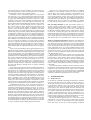
Figure 2. The FVM prototype consists of a kernel-mode component and a user-mode component.
and discouraged because an executable file whose name is added to
this entry will be launched automatically whenever the OS starts.
3.4 Limitation
Although FVM has advantages at VM scalability, runtime performance, resource requirement and state synchronization with host
OS, it also has several limitations that require further research.
First, un-trusted applications that interact with kernel components,
such as mobile code that requires loading a kernel driver, are not
supported to run in a VM. This is because the FVM layer and a
kernel driver are at the same privilege level, and all the kernel components are shared by all the VMs and the host system. Loading
a malicious or buggy kernel driver in a VM may subvert the FVM
layer and corrupt other kernel components, which can further infect
all the other VMs and the host system. For this reason, the current
FVM prototype prohibits processes in a VM from accessing kernel
memory or loading kernel drivers.
Second, some daemon services on Windows are inappropriate
or difficult to be duplicated in each VM, either because they are
started at the system boot time as a boot process component, or because they have close dependencies on some kernel drivers. Consequently, these service processes and the kernel objects they create
have to be shared among all the VMs. This limitation may introduce
implicit resource sharing through shared daemon processes and can
decrease the isolation level FVM can achieve. Ideally, FVM should
identify the VM behind every state update from these shared services so that the update can be attributed to the responsible VM.
However, this requires detailed understanding of the protocol underlying each shared service. The current FVM prototype can virtualize a limited number of daemon services such as MySQL and
Apache.
Finally, because FVM is based on resource renaming, a malicious program may be able to distinguish the virtual environment
from the host environment, and temporarily hold off its malignant
actions when running in a VM. As a result, the user may incorrectly commit a downloaded malicious program to the host machine. Even though this is a valid concern, any malicious code that
activates itself only when it runs on the host environment may slow
itself down, because it needs to wait for the user to commit it to the
host machine. Moreover, FVM can always mark an untrusted program that is committed to the host machine, and later on can start a
VM to confine it whenever it is executed.
4. FVM Implementation
4.1 System Call Interception
The FVM virtualization layer is implemented by intercepting Windows system calls, which are exposed to user-mode applications
through a set of user-mode Dynamic Link Libraries(DLL). We prefer to do the interception at the kernel-mode interface because it is
more difficult to be bypassed or subverted than user mode interceptions.
There are two categories of system calls on NT-based Windows
OS according to the functionalities they provide. The first category
is system calls for basic OS services like file I/O and object management, whose kernel-mode interface is well documented in [34].
However, the second category of system calls, which are composed
of system calls managing daemon service, GUI window and network interface, either have no corresponding kernel mode interface,
or have a kernel mode interface but have no clear documentation.
To intercept this category of system calls, we move the virtualization layer to the user-mode DLL interface. Therefore, the current
FVM virtualization layer consists of two components, as shown in
Figure 2. The kernel-mode component is a kernel driver that modifies the system call entry point in the System Service Dispatch Table(SSDT) within the kernel, while the user-mode component is a
DLL that modifies the library function entry point in the Import Address Table(IAT) of the application process. Once the virtualization
layer is attached to the host machine, it can redirect different requests from user-mode applications through FVM’s virtualization
logic.
For each type of system resources, such as files, registries and
kernel objects, FVM only intercepts a subset of all the system calls
used for that type of resources. This is because most read/write
system calls are based on resource handles, which must be obtained through a previous create/open system call. The current
FVM layer redirects requests at the create/open time. Therefore,
when a read/write system call comes in, the handle it carries already points to the correctly redirected version. Consequently, system calls for read/write requests are not intercepted in the FVM
layer.
When an application process accesses system resources through
the FVM layer, FVM should be able to determine which VM this
process logically belongs to. For this purpose, FVM maintains internal mappings between VM Ids and associated process Ids. Each
VM is assigned a unique Id at the creation time, and initially only
the Id of the VM shell process is associated with this VM Id. Later
on, when descendant processes of the VM shell are created, their Ids
are associated with the same VM Id. This is implemented through
a process creation call-back routine registered by the FVM layer
driver (PsSetCreateProcessNotifyRoutine). The call-back routine is
invoked whenever a process is created, passing in the Ids of both
the parent process and the new process, whose Id will then be associated with the same VM Id of the parent process. In this way,
for a given resource request, the FVM layer can look up the internal mappings to find out the requesting process’s VM Id, based on
which it can rename the resource request accordingly. In addition,
the FVM layer does sanity checks on a process’s VM Id and its
resource request to ensure that a process running in a VM cannot
access other VM’s root directories for files, registries and kernel
objects in any way.
The system call interception mechanism of the FVM layer is
designed to be extensible so that it can serve as a reusable framework for other projects that require similar system call interceptions. However, recent Windows kernel on x64 platform disables
system call interception through PatchGuard [35]. Fortunately, this
restriction can still be bypassed [35]. The current FVM prototype is
implemented and tested on Windows 2000 Professional and Windows 2000 Server. In terms of implementation complexity, the current FVM prototype intercepts 42 kernel-mode system calls and 18
user-mode library functions, with around 10,000 lines of C code in
kernel, and an equal amount of user-level C/C++ code.
4.2 File Virtualization
File virtualization under the FVM architecture isolates, from the
host environment, both regular disk files (file, directory) and special device files (named pipe, mailslot) that are updated by a VM.
For regular disk files, the FVM layer uses a special copy-on-write
(COW) mechanism, under which the entire file is copied instead
of individual file blocks. In other words, the FVM layer copies the
entire file on the host machine to the VM’s root file directory when
the file is opened for write purpose by a process in the VM. Although block-based COW is more efficient than file-based COW,
it is also more complicated as it needs to duplicate some file system metadata. The current FVM prototype uses file-based COW
for simplicity. FVM ensures that the file attribute and its directory
structure are also duplicated when the file is being copied. In particular, FVM may need to convert some DOS 8.3 names to regular
names in order to duplicate the directory structures consistently.
Similar to virtualizing disk files, when a process in a VM tries to
create a special device file like a named pipe, the FVM layer will
create the file in the VM’s root directory. Therefore, such a special
file can only be communicated by processes in the same VM.
In general, file-related system calls that take a file name argument, such as NtCreateFile(), should be intercepted for virtualization, while system calls taking a file handle argument, such as
NtWriteFile(), are not necessary to be intercepted because the file
handle already points to the correct (redirected) file version. However, there are still several handle-based system calls which require
interception and special handling. First, a process in a VM can use
NtQueryInformationFile() to query a file’s various attributes, including the full file path, from a file handle. When the file handle
points to a redirected version of file in this VM, the full file path
obtained from the system call must be renamed back to the original
name on the host machine. Second, when a process in a VM try
to delete or rename a file, it eventually invokes the NtSetInformationFile() system call. Because FVM needs to keep a log of deleted
or renamed files for each VM, it must obtain from the file handle
the file name to be removed and then put the name into the log. In
particular, when the system call is used to rename a file, FVM still
needs to rename the target file name argument in the same way as
its renaming operating on name-based system calls like NtCreateFile(). Finally, a process in a VM can use NtQueryDirectoryFile()
to list file entries under a particular directory. Because the directory entries for a VM may reside at two branches, with original
entries on the host machine and updated versions of some entries
in the VM, the returned directory entries must be the host entries
overwritten by the VM entries of the same directory. To accomplish this task, FVM first obtains all the qualified VM entries and
logs their names in a hash table. When querying file entries in the
VM directory is complete, FVM opens the corresponding directory
on the host and continues to query file entries there. In addition,
FVM must parse the returned results by removing any duplicates
that have been queried on the VM directory, and removing file entries appearing in the delete log.
4.3 Registry Virtualization
Windows registry is the repository where system and user configurations are stored and must be virtualized to isolate any configuration updates in a VM from the host machine. To reduce implementation complexity, FVM embeds a VM’s registry entries in the host
machine’s registry and manages them using Windows’ own registry
subsystem. More concretely, FVM creates a root registry hive under the key \HKEY CURRENT USER for each VM to store the VM’s
local registry entries. For example, when a VM (say vm1) is created,
FVM will add a registry key at \HKEY CURRENT USER\vm1 as the
VM’s registry root. When a process in vm1 accesses a registry key,
FVM can rename the registry key argument by adding the prefix
\HKEY CURRENT USER\vm1 to the path name of the requested registry key.
FVM intercepts all registry-related system calls that use registry
keys as arguments and utilizes a copy-on-write approach similar to
file virtualization to handle registry access in a VM. Depending on
whether a registry key is opened for read or write, FVM directs
the intercepted registry-opening system call to operate on either
the original registry key, or a new version of the registry key under
the VM’s registry root. If a process in a VM tries to create a new
registry key, it always creates the key under the VM’s registry root.
Registry virtualization requires more than just renaming. For
example, a process running in a VM may need to enumerate all
the subkeys or key values under a given registry key, just like to
list all the subdirectories or files under a given file directory. In
order to avoid the implementation effort of merging the subkeys
or key values of a given registry key from the version in the host
registry and the version in the VM’s registry, whenever FVM copies
a registry key from the host machine to a VM, it also copies all
its subkeys and key values. For performance reasons, this copy
operation is not recursive and stops at the first-level children of
the copied registry key. FVM can further verify whether a registry
key in a VM has its first-level children copied from the host registry
when a process in the VM opens the key. This approach also allows
many Windows applications that use a numeric index to access a
subkey to reach the correct subkey when they are running in a VM.
However, this approach cannot be applied to file directories in file
virtualization because copying all subdirectories and files under a
directory incurs too much overhead.
4.4 Object Virtualization
Windows provides many types of named objects in the kernel, including mutant(mutex), semaphore, event, timer, section(shared
memory or file mapping object), port(local/remote procedure
calls [36]), etc. Most of these objects are used for synchronization
between processes and threads, and are sharing a common global
namespace on a physical machine. Many Windows applications use
such named objects to ensure that at most one instance (process)
of the application can be running on the same machine. More concretely, whenever such an application starts, it will check whether
some named object exists under the global namespace. If the object
does not exist, the application creates the object and starts a process
as usual; otherwise, no new process will be started and the control
will be forwarded to the existing process that created the object.
This execution scheme is not appropriate for applications running
under FVM architecture, where each VM should be allowed to run
a separate instance of the same application simultaneously. As a
result, these named objects must be virtualized.
Named objects are named in a hierarchical form similar to
files and registries, and are normally created under some object
directories. FVM intercepts the create/open system calls that access
named objects and creates a root object directory for each VM
when the VM is started. When processes in the VM invoke objectrelated system calls to create a named object, the FVM layer will
rename the object name argument and create the object under the
VM’s root object directory. By this means, the created object is
only visible to processes running in the same VM. When the VM
is stopped, the VM’s root object directory will be removed after all
the opened objects under it are closed.
In some special cases, an application may use create-style system calls, such as NtCreateEvent(), to open an existing global
named object, which is normally created by some critical daemon
services. Because these daemon services are difficult to be duplicated in each VM, they have to be shared among different VMs.
Consequently, those named objects created by them only exists in a
global namespace on the host machine. In order for an application
in a VM to run correctly, the application’s access request to such
global objects must be allowed. Therefore, the FVM layer must be
able to identify the access request to a global object, and direct the
request using the original object name without any virtualization.
Fortunately, recent Windows OS requires an application to append
a prefix Global to an object name when the object the application
tries to access is a global object. The FVM layer can simply check
the Global prefix in the object name argument of intercepted system calls, and stop virtualizing it when the prefix exists.
4.5 Network Interface Virtualization
A network server application starts by creating a socket and making
a bind() call to specify the local IP address and local port number
for the socket. In order to have multiple instances of the same
network server application to start successfully in multiple VMs,
the network interface must be virtualized because the OS does not
allow more than one process to bind to the same IP address and port
number pair.
FVM allows uses to specify a distinct IP address for each VM at
the creation time, and then uses IP aliasing to assign the VM’s IP
address to the physical network interface: when the VM is started,
its IP address is added to the host machine’s physical network
interface as an IP alias; when it is stopped, its IP address is removed
from the physical interface.
However, IP aliasing itself does not segregate network packets
destined to different VMs. For example, when port 80 is not active
in a VM, a packet destined to port 80 of this VM can still be
delivered to a process that listens on port 80 at a wildcard IP
address(INADDR ANY) in another VM. To resolve this problem,
FVM intercepts the socket bind call made by a process running in
a VM and transparently changes the original IP address argument
in the bind call to the VM’s IP address. The original IP address
argument in a bind call can be a wildcard IP address, an explicit IP
address, or an IP address in network 127.0.0.0/8 such as 127.0.0.1.
Regardless of any of the three forms it is, FVM simply makes the
network application bind to the IP address of the VM. In this way,
processes in one VM can neither receive packets destined to other
VMs nor spoof another VM’s IP address when sending packets.
Currently FVM does not intercept the bind call made by a
server process running on the host machine. If such a process binds
its socket to a port with a wildcard IP address (INADDR ANY),
the operating system will not allow this port to be reused by any
other processes, even if they are running in a VM and binding
to a different IP address. A simple solution to this problem is to
apply the special socket option SO REUSEADDR to all the network
server processes running in VMs.
4.6 Interprocess Communication Confinement
To achieve strong isolation, FVM requires that a process running
in one VM not communicate with processes running in other VMs
or in the host machine through interprocess communications (IPC),
unless it has to talk with a daemon service on the host machine that
cannot be virtualized, or it intends to use the IPC to talk to another
physical machine.
Common IPC mechanisms supported by Windows include
shared memory, named pipe, mailslot, local procedure calls, socket,
etc. Through file, object and network interface virtualization described earlier, these common IPC mechanisms across multiple
VMs have been largely confined. However, there are still a few
Windows-specific IPC mechanisms that require further virtualization or confinement.
Window message is a simple IPC mechanism that allows a process to send various types of messages to any window on the same
desktop. The sender process and receiver window may belong to
different processes. A special type of message for Dynamic Data
Exchange (DDE) is widely used by Windows shell to find whether
there is already a running instance of a particular application. The
current FVM prototype does not assign each VM a separate desktop, therefore FVM must confine the window message across multiple VMs by intercepting system calls related to message exchange
(at the user-mode library interface). For example, whenever an application invokes a message-sending system call, such as SendMessage(), the FVM layer will obtain the receiver window’s process Id
from the window handle argument. It then queries the FVM driver
for the VM Id of the receiver process and compares it with the VM
Id of the sender process. The message to be sent will be blocked unless the sender and receiver processes are both running in the same
VM or in the host machine. Window message confinement, plus object virtualization, enables many applications such as Microsoft
Office to start a separate instance in each VM.
Window visibility across multiple VMs also requires confinement because processes in one VM are not supposed to see windows belonging to processes in other VMs. Each window has a
window name and a class name, based on which any process can
use system calls related to window enumeration to find such a window. FVM intercepts these system calls, and prevents the calling
process from obtaining a found window’s handle unless the found
window and the calling process belong to the same VM. Window
visibility confinement, plus object virtualization, enables more applications such as Adobe Acrobat to start a separate instance in
each VM.
In addition to window message and window visibility, FVM
also renames the titles of active top-level windows belonging to a
VM by appending the VM’s name and Id to the original window
title. Finally, other Windows-specific IPC mechanisms, such as
clipboard data transfer and interactions between Component Object
Model (COM) applications also need to be virtualized.
4.7 Daemon Service Virtualization
Daemon processes on Windows are named win32 service and are
managed by a system process called Service Control Manager
(SCM). An application can install a service by adding the service
name and its program image path into the SCM’s database. Later
on, SCM can start the service process at system startup time or
upon an application’s request. To support running service processes
in a VM, FVM needs to ensure that a service process is executed
within the context of a VM where the service is installed. However,
the SCM process is a critical system process with complicated
communications with other OS components and thus cannot be
duplicated in each VM. Therefore, different VM contexts have to
share the same SCM and the same service database in SCM.
FVM intercepts service-related function calls at the system library interface because service management is not at the kernelmode system call interface. The idea is to make some implicit mapping between a service image name and a VM Id at the service installation time and then convert it to the mapping between a process
Id and the VM Id at run time.
To be specific, when a process in a VM invokes CreateService() to install a new service, FVM intercepts the API call and
renames the service name and image path arguments in a way similar to renaming file names in file virtualization. For example, if
the new service named S with program image path /a/b.exe is to
be installed in a VM (say vm1), the actual service name and image
path added to the SCM’s database after renaming will be S-vm1
and vm1/a/b.exe, respectively. In addition to the renaming operation, FVM also needs to copy the image file from /a/b.exe to
vm1/a/b.exe. Later on, when an application in the same VM asks
SCM to start the service S, FVM will redirect it to start service
named S-vm1 by intercepting OpenService() call. When the FVM
kernel driver detects a new process with an image file in a VM’s
root file directory, such as vm1/a/b.exe, is to be created by SCM,
it can associate the process Id with the VM Id, and save this mapping into the same data structure used for generic processes. In this
way, a service installed from a VM can be started successfully in
the same VM’s context. Although not used for mappings between a
service process and a VM, the name of a service must be renamed
because SCM does not allow more than one service with the same
name to be installed in the SCM’s database.
However, the name of a service may be used in the service program code, such as dispatching service control command received
from SCM based on service names. Although renaming a service
name is fine at the installation time, it may cause inconsistency
that breaks the service application at run time. Although the current FVM prototype resolves some inconsistency problems and can
virtualize a large number of service processes, including Apache
and MySQL, similar inconsistency problems may still exist with
untested service applications. Our future goal to service virtualization is to intercept and modify the whole service management
library in order to remove the service application’s dependency on
a single shared SCM on the host machine.
5. Performance Evaluation
The performance overhead of FVM comes from the overhead of
executing additional instructions associated with every intercepted
system call. This overhead includes two aspects:
• The system call interception overhead, which refers to the over-
head of mapping a process to a VM, allocating additional memory, parsing and renaming the name argument, etc. In other
words, it is equivalent to the total system call overhead when
there is no file or registry copying involved.
• The file and registry copying overhead for an “open-for-write”
system call. This overhead occurs only when an application
opens a file or registry key for write for the first time. In
some sense, this overhead can be considered as a part of the
total overhead in starting up a new heavy-weight VM, only
distributed over time.
In the following experiments, we evaluate the system call interception overhead, runtime overhead of command line programs,
and startup latency of interactive applications under FVM, and
compare them with same types of measurements on the host machine and VMware Workstation 5.0. We also discuss the resource
requirement and scalability of VMs under FVM architecture. The
test-bed we are using is a Pentium-4 2.8GHz Dell Dimension 4700
with 512MB memory running Windows 2000 Server.
5.1 System Call Interception Overhead
To measure the system call interception overhead, we first disable
the FVM virtualization layer, run a set of Windows applications
natively on the host environment, and count the average CPU cycles
spent in each system call through rdtsc instruction. Second, we
enable the FVM layer and run the same applications in a VM to
do the test again. To exclude the overhead due to file and registry
copying, we run each application at least once in the VM before
we start the measurement. This is because most files and registries
required by an application are copied to the VM’s local space at
the first time this application is executed. In both tests, the average
CPU cycles for each system call is calculated from 500 invokes.
A set of file-related system calls and their average CPU cycles in
our test-bed are shown in Table 1. These file-related system calls
usually require more CPU cycles to complete than other types of
system calls due to disk access.
The large overhead of NtOpenFile() shown in the table is largely
due to the current redirection algorithm. To be specific, when a
NtCreateFile
NtOpenFile
NtQueryAttributesFile
NtQueryFullAttributesFile
NtSetInformationFile
Native
(CPU Cycles)
340568
171508
144010
198261
47244
FVM
(CPU Cycles)
412087
303569
263355
330123
48814
Difference
(%)
21%
77%
83%
67%
3%
Table 1. A few file-related system calls have large interception
overhead (more than 60%), but many others not shown in this table
have zero overhead, e.g., system calls used for file read and write.
Average startup time in Host OS, FVM and VMware
1600
1400
(milliseconds)
System Calls
1200
1000
Host OS
800
FVM
600
VMware
400
200
0
1.doc file(35KB); 2.pdf file(6KB); 3.xls file(153KB); 4.ppt file(1.6MB)
Native
(msec)
687(100%)
15(100%)
25640(100%)
FVM
(msec)
747(109%)
16(107%)
30306(118%)
VMWare
(msec)
1110(162%)
32(213%)
35563(139%)
Table 2. Running command line programs under FVM has less
than 20% overhead, which is smaller than the overhead of VMware
Workstation. (Win32 unzips a 667KB file; Reg imports a 92KB file;
BCC32 complies a set of C++ files whose total size is 127KB.)
tested application in a VM invokes NtOpenFile() to open a file,
the FVM layer needs to check whether this file has a version in
the VM’s local space. It does so by trying to open that version. If
the open request fails, the FVM layer then directs NtOpenFile() to
open the original file without renaming. Consequently, this system
call may be invoked twice for one open request and therefore incurs
large overhead. The same reason is for the large overhead of other
system calls like NtQueryAttributesFile(). However, this kind of
overhead can be reduced by caching file names in the future. In
addition, the system calls with large interception overhead are only
a small portion of all the system calls an application will invoke at
run time. Most system calls like NtWriteFile() have no interception
overhead because they are not intercepted. As a result, the overall
impact of system call interception on an application’s execution
time is still insignificant, as shown in the next subsection.
5.2
Runtime and Startup Overhead
In this experiment, we measure the runtime overhead of several
command line programs and the startup latency of several interactive applications. The runtime overhead refers to the average
elapsed time from when a program starts to execute to when it terminates, while the startup latency refers to the average elapsed time
from when the application process is created to when it finishes
initialization and is waiting for user input. All the test results are
calculated from 10 runs.
Table 2 shows the runtime overhead of three command line
programs running in an FVM virtual machine and in a VM of
VMware Workstation. Winzip32 and Reg have runtime overhead
less than 10% when they are running under FVM, because they
only invoke a small number of system calls intercepted by FVM.
However, BCC32 has higher overhead than the other two programs
because it opens many C/C++ source and header files, most of
which are not in the VM’s local space and requires two system
calls in order to be opened. In contrast, the run-time overhead of
VMware Workstation for the three applications are 62%, 113% and
39%, respectively.
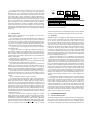
Figure 3 shows the startup time of four interactive applications
when they are running in an FVM virtual machine and in a VM
of VMware Workstation. We use a testing program to launch the
tested application through the CreateProcess() API, and then use
Figure 3. Running interactive applications has smaller startup
overhead under FVM than in VMware Workstation.
Initial Startup Time and Average Startup Time
9000
d =594
8000
7000
(milliseconds)
Test
Program
Winzip32
Reg
BCC32
6000
5000
d =298
4000
3000
d =47
2000
1000
d =62
d =110
d =94
d =16
d =16
0
1.doc file(35KB);
2.pdf file(6KB);
Initial Startup Time(Native)
Average Startup Time(Native)
3.xls file(153KB);
4.ppt file(1.6MB)
Initial Startup Time(FVM)
Average Startup Time(FVM)
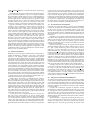
Figure 4. The initial startup time and the average startup time of
four Windows applications when they are executed natively and
under FVM.
the WaitforInputIdle() API to monitor the application’s initialization status. The startup time for each application is obtained by
measuring the elapsed time between the moments when these two
APIs return. The test results indicate that the application startup
overhead in VMware Workstation can be twice larger than FVM.
To recognize the file and registry copying overhead under FVM,
we define the initial startup time as the startup time when an interactive application runs for the first time after the machine reboots,
and the average startup time as the startup time on average when
the application runs for the second time onwards. These two values
have the following attributes: (1) The initial startup time is larger
than the average startup time, no matter whether the tested application process runs natively (on the host machine) or under FVM,
because the process needs to build up its working set at the first run;
(2) The initial startup time is larger when an application runs under
FVM than it runs natively, due to both the system call interception overhead and file/registry copying overhead; (3) The average
startup time is larger when an application runs under FVM than it
runs natively, only due to system call interception overhead. Based
on the second and third attributes, we can estimate the file and registry copying overhead for a tested application under FVM. For
example, in the test of running Adobe Acrobat Reader against
a 6KB pdf file, the total virtualization overhead is 594 msec, 110
msec of which belongs to the system call interception overhead,
and the rest 484 msec can be attributed to file/registry copying overhead, as shown in Figure 4.
5.3 Resource Requirement and Scalability
Finally, we compare FVM with VMware Workstation in terms of
resource requirement and scalability. Each VM under FVM requires minimal disk space because it shares most files with the host
machine. It only needs the space to hold its VM state and file system image updates, often from several kilobytes to megabytes. In
contrast, each VM of VMware Workstation may require gigabytes
of disk space. Unlike VMware that takes minutes to start a VM,
FVM needs no more than a second to perform the same operation,
including VM creation. The memory requirement of an FVM virtual machine consists of the memory used by applications running
in the VM, and an additional 2MB used by FVM itself, while each
VM of VMware Workstation needs at least 180MB memory. The
difference in memory requirement between FVM and VMware results at significant difference in their scalability. In our test-bed machine with 512MB memory, VMware Workstation can start at most
two VMs simultaneously without serious performance degradation,
whereas the total number of concurrent VMs under FVM can be an
order of magnitude higher, only depending on the memory utilization of the applications running in these VMs.
Overall, all the experimental results demonstrate FVM’s advantage in performance overhead and resource requirement over existing heavy-weight virtual machines. However, one cannot say that
OS-level virtual machines such as FVM are a better design than
hardware-level virtual machines. Being at the hardware abstraction
layer, VMware and other heavy-weight virtual machines have an
obvious advantage that FVM does not provide: full isolation. As a
result, FVM is more suitable to support light-weight “playground”
VMs that wrap user-mode applications for security and management purpose, while hardware-level virtual machines are more suitable to support application scenarios requiring full isolation or different OS, such as software debugging and testing.
6. Application: Secure Mobile Code Execution
Mobile code refers to programs that come into an end user’s computer over the network and start to execute with or without the
user’s knowledge or consent [37, 38]. Examples of mobile code
include self-contained binaries, such as an explicitly downloaded
installer program or an implicitly installed plug-in file, and various
active scripts embedded within downloaded documents and web
content [39]. Because mobile code typically runs in the context of
the user who downloads it, it can invoke any system calls that the
user is allowed to make, such as modifying registries and deleting
files, and thus can compromise the system when it is malicious.
A conventional technique against malicious mobile code is
signature-based anti-virus, which scans suspicious content based
on signatures of existing malicious code. This approach is not sufficient because there is always a time gap between when an unknown
malicious code first attacks and when its signature is derived and
distributed to user sites. A different technique targeting at zero-day
exploits is behavior blocking [40], which sandboxes the execution
of untrusted applications by monitoring runtime behavior according to pre-defined security policies. However, it is difficult to set
up a proper sandboxing policy that can block all attacks without
breaking legitimate applications.
In contrast, FVM enables an intrusion-tolerant approach, which
is more effective in protecting the host machine from malicious mobile code. Vulnerable network applications, such as email clients
and web browsers, and any untrusted content, such as downloaded
programs and documents, can be executed in the context of one or
multiple VMs. Processes in a VM see the entire host environment,
and have similar runtime performance as they run natively. Their
modifications to the host environment, regardless of being legitimate or malicious, are automatically confined in the VM’s context.
In addition, such confined updates can be selectively committed to
the host environment. To hide confidential files on the host machine
from untrusted mobile code in a VM, the default file system image
visible to this VM can be set to a subset of the file system image of
the host machine.
It is relatively straightforward to implement a secure execution
environment for untrusted mobile code based on the FVM infrastructure. The only additional work is the following:
• Automatically start a new VM to host a vulnerable application
process, such as Internet Explorer, whenever such an application is launched, and
• Mark an untrusted binary or document file when the file is
committed to the host environment. When the file is opened
later on from the host, automatically start a new VM to host the
opening process.
We have tested several adwares and spywares that corrupt Windows’s registries or file systems in a VM. The experimental results
demonstrate FVM’s effectiveness in isolating any side effects in a
VM from the host environment.
7. Conclusion
The ability to test-drive one or multiple potentially malicious programs in a realistic execution environment has become an important building block for many security-related applications. Virtual
machine technology meets this requirement perfectly because it
provides an execution environment that is both realistic and isolated. Unfortunately, most existing virtual machine technologies
virtualize the system resources at an abstraction level close to the
hardware, and therefore incur large startup overhead which may not
be acceptable when VMs need to be started and terminated on an
routine basis. The Feather-weight Virtual Machine (FVM) architecture described in this paper attempted to address this deficiency
through namespace virtualization at the system call interface. Although many projects have applied similar ideas of resource renaming at the OS level to build isolated execution environments, they
are either not working on Windows platform, or not as comprehensive as FVM in terms of the set of namespaces virtualized, and the
degree of isolation achieved.
A major contribution of the paper is to demonstrate that it is indeed possible to create strongly isolated OS-level virtual machines
on Windows platform through interception at the system call interface. On the other hand, FVM’s implementation efforts also indicate that the idea of namespace virtualization should be more
comfortable with a platform that does not have such complicated
interprocess communications as Windows. We hope this paper can
provide researchers and developers a clear picture of how a comprehensive virtual machine system is accomplished on the Windows platform, and promote more novel system development on
this platform.
We also demonstrate the effectiveness of FVM by successfully
applying it to a secure mobile code execution system, which takes
an intrusion-tolerant approach and is able to protect an end user’s
machine from zero-day attacks or exploits. Performance measurements on a fully operational FVM prototype show that the latency
of creating and starting a new VM is less than one second, and
the run-time virtualization overhead is below 20% of the total execution time of the tested applications. More aggressive optimizations, such as name caching and block-based copy-on-write for
files, should reduce this overhead to below 10%.
We are currently improving the isolation between VMs and the
host machine by implementing our own daemon service management APIs in order to reduce the number of shared service processes. Name caching is also to be added to reduce the system call
interception overhead. In addition, we are applying the FVM architecture to other application areas, such as application streaming [18] and un-intrusive vulnerability assessment [41] to further
stress-test its completeness. Finally, we will investigate process migration techniques [42] on Windows to support checkpoint/restart
of FVM processes.
[21] R. A. Baratto, S. Potter, G. Su, and J. Nieh, “Mobidesk: Mobile virtual
desktop computing,” in Proceedings of the 10th ACM Conference on
Mobile Computing and Networking, 2004.
References
[23] W. Sun, Z. Liang, V. Venkatakrishnan, and R. Sekar, “One-way
isolation: An effective approach for realizing safe execution environments,” in Proceedings of 12th Annual Network and Distributed
System Security Symposium, 2005.
[1] K. Lawton, B. Denney, N. D. Guarneri, V. Ruppert, C. Bothamy, and
M. Calabrese, “Bochs user manual,” http://bochs.sourceforge.net/doc/
docbook/user/index.html.
[2] VMware, “Vmware products,” http://www.vmware.com/products/,
2006.
[22] Z. Liang, V. Venkatakrishnan, and R. Sekar, “Isolated program
execution: An application transparent approach for executing
untrusted programs,” in Proceedings of 19th Annual Computer
Security Applications Conference, December 2003.
[24] GreenBorder, “Greenborder’s proactive security architecture,”
http://www.greenborder.com/solutions/technology.php.
[3] Microsoft, “Microsoft virtual pc 2004,” http://www.microsoft.com/win
dows/virtualpc/default.mspx.
[25] R. Balzer, “Safe email, safe office, and safe web browser,” in
Proceedings of the DARPA Information Survivability Conference
and Exposition, 2003.
[4] P. Barham, B. Dragovic, K. Fraser, S. Hand, T. Harris, A. Ho,
R. Neugebauer, I. Pratt, and A. Warfield, “Xen and the art of
virtualization,” in Proceedings of the 19th ACM Symposium on
Operating Systems Principles. ACM Press, 2003, pp. 164–177.
[26] K. Brown, “Security in longhorn: Focus on least privilege,”
http://msdn.microsoft.com/library/default.asp?url=/library/enus/dnlong/ html/leastprivlh.asp, 2004.
[5] P. Kamp and R. Watson, “Jails: Confining the omnipotent root,” in
Proceedings of the 2nd International SANE Conference, 2000.
[27] Wine, “Wine user guide,” http://www.winehq.com/site/docs/wineusrguide/index.
[6] Sun Microsystems, “Solaris containers: Server virtualization and
manageability,” http://www.sun.com/software/whitepapers/solaris10/grid
containers.pdf, September 2004.
[28] Red Hat, Inc, “Cygwin user’s guide,” http://cygwin.com/cygwin-ugnet/cygwin-ug-net.html.
[7] H. Potzl, “Linux-vserver technology,” http://linux-vserver.org/LinuxVServer-Paper, 2004.
[8] B. Alpern, J. Auerbach, V. Bala, T. Frauenhofer, T. Mummert,
and M. Pigott, “Pds: A virtual execution environment for software
deployment,” in Proceedings of the 1st International Conference on
Virtual Execution Environments, 2005.
[9] Softricity, “Application virtualization technology,” http://www.softri
city.com/products/virtualization.asp.
[10] J. Sugerman, G. Venkitachalam, and B. Lim, “Virtualizing i/o
devices on vmware workstation’s hosted virtual machine monitor,” in
Proceedings of the 2001 USENIX Annual Technical Conference, June
2001.
[11] A. Whitaker, M. Shaw, and S. D. Gribble, “Denali: Lightweight
virtual machines for distributed and networked applications,” in
Proceedings of the USENIX Annual Technical Conference, June
2002.
[12] J. Dike, “A user-mode port of the linux kernel,” in Proceedings of the
4th Annual Linux Showcase and Conference, 2001.
[13] C. A. Waldspurger, “Memory resource management in vmware esx
server,” in Proceedings of the 5th Symposium on Operating Systems
Design and Implementation, December 2002.
[14] Sphera, “Sphera server virtualization,” http://www.sphera.com/prodserv-server virtualization.php.
[15] SWsoft, “Virtuozzo for windows & linux server virtualization,”
http://www.virtuozzo.com/en/products/virtuozzo/.
[16] AppStream, “Appstream technology overview,” http://www.appstream.
com/products-technology.html.
[17] Thinstall, “Application virtualization: A technical overview of the
thinstall application virtualization platform,” https://thinstall.com/pro
ducts/documents/ThinstallTechnicalOverview V1Feb06.pdf.
[18] A. Dornan, “Application streaming: The virtual thin client,”
http://www.itarchitectmag.com/shared/article/showArticle.jhtml?arti
cleId=175001526&pgno=1, January 2006.
[19] Trigence, “Optimized application management with trigence ae,”
http://www.trigence.com/whitepaper/download/OptAppMgmt.pdf,
2005.
[20] A. Ernst, “Meiosys: Application virtualization and stateful application
relocation,” http://www.virtual-strategy.com/article/articleview/680/1/2/,
2005.
[29] C. Soules, G. Goodson, J. Strunk, and G. Ganger, “Metadata
efficiency in a comprehensive versioning file system,” in Proceedings
of USENIX Conference on File and Storage Technologies, April 2003.
[30] N. Zhu and T. Chiueh, “Design, implementation, and evaluation of
repairable file service,” in Proceedings of the 2003 International
Conference on Dependable Systems and Networks, June 2003.
[31] K.-K. Muniswamy-Reddy, C. P. Wright, A. Himmer, , and E. Zadok,
“A versatile and user-oriented versioning file system,” in Proceedings
of USENIX Conference on File and Storage Technologies, 2004.
[32] T. Close, A. H. Karp, and M. Stiegler, “Shatter-proofing windows,”
Technical Report HPL-2005-87, HP Laboratories Palo Alto, May
2005.
[33] M. Corporation, “Technical overview of windows server 2003 terminal services,” http://download.microsoft.com/download/2/8/1/281f4d94ee89-4b21-9f9e-9accef44a743/TerminalServerOverview.doc, January 2005.
[34] G. Nebbett, Windows NT/2000 Native API Reference.
Publishing, 2000.
New Riders
[35] skape and Skywing, “Bypassing patchguard on windows x64,”
http://www.uninformed.org/?v=3&a=3&t=pdf, December 2005.
[36] D. A. Solomon and M. E. Russinovich, Inside Microsoft Windows
2000. Microsoft Press, 2000, ch. 3.
[37] T. Chiueh, L. Lam, Y. Yu, P. Cheng, and C. Chang, “Secure mobile
code execution service,” in Proceedings of 2004 Virus Bulletin
Conference, August 2004.
[38] T. Chiueh, H. Sankaran, and A. Neogi, “Spout: A transparent
distributed execution engine for java applets,” IEEE Journal of
Selected Areas in Communications, vol. 20, no. 7, September 2002.
[39] R. A. Grimes, Malicious Mobile Code - Virus Protection for Windows.
O’Reilly, 2001, ch. 1.
[40] A. Conry-Murray, “Product focus: Behavior-blocking stops unknown
malicious code,” http://www.itarchitect.com/article/NMG20020603S0009,
June 2002.
[41] F. Guo, Y. Yu, and T. cker Chiueh, “Automated and safe vulnerability
assessment,” in Proceedings of the 21th Annual Computer Security
Applications Conference, December 2005.
[42] J. Srouji, P. Schuster, M. Bach, and Y. Kuzmin, “A transparent
checkpoint facility on nt,” in Proceedings of 2nd USENIX Windows
NT Symposium, August 1998.