1
V. COMFORT ADJUSTMENTS
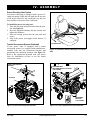
Seatback Angle Adjustment
If your power chair is equipped with an adjustable seatback, you can adjust it to four (4) different angles: 90°,
102°, 105° or 107°.
To adjust the seatback angle:
1. Remove the adjusting screws from each seat hinge.
See figure 18.
2. Set the seatback at the desired angle.
3. Reinstall the adjusting screws to each seat hinge
and tighten.
Armrest Width Adjustment
You can change each armrest’s width independently of
the other.
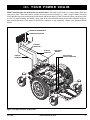
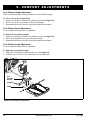
LOCKING
NUT
ARMREST ANGLE
ADJUSTING
SCREW
ARMREST
HEIGHT
ADJUSTING
SETSCREWS
SEATBACK ANGLE
ADJUSTING SCREW
NOTE: Changing the armrest width may increase the
overall width of your power chair.
To change the armrest width:
1. Locate the two armrest knobs on each side of the
armrest receiver bracket. See figure 18.
2. Loosen the knobs.
3. Slide the armrests in or out to the desired width.
4. Tighten the knobs.
ARMREST KNOB
Figure 18. Seatback/Armrest Adjustment
Armrest Angle Adjustment
To change the armrest angle:
1. Lift the armrest straight up so that it is perpendicular to the floor. See figure 18.
2. Loosen the locking nut.
3. Turn the adjusting screw to raise or lower the front
of the armrest.
4. Tighten the locking nut to lock the adjusting screw
into place.
Armrest Height Adjustment
To change the armrest height:
1. Loosen the two setscrews located on the armrest
receiver. See figure 18.
2. Raise or lower the armrest to the desired height.
3. Tighten the setscrews to secure the armrest.
26
www.pridemobility.com
Q6 Edge