1
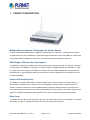
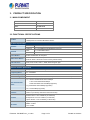
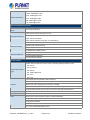
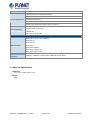
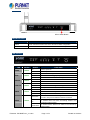
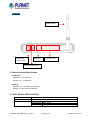
Product Specification of WNRT-617 Product Specification 150Mbps 802.11n Wireless Broadband Router WNRT-617 Version 1.0 This document contains confidential proprietary information and is property of PLANET. The contents of this document should not be disclosed to unauthorized persons without the written consent of PLANET. Change History: Revision Date Author Change List Version 0.9 2011/01/24 Miki Draft version release Version 1.0 2011/02/04 Initial release Author Miki Editor: Miki Reviewed by: Kent, Jay Approved by: Tom 1. PRODUCT DESCRIPTION Multiple Wireless Network Technologies for Greater Access PLANET Wireless Broadband Router, WNRT-617 features 802.11n radio with 1T1R antenna technology compliant with 802.11b/g/n standards. Compared with general wireless routers, the WNRT-617 offers more powerful and flexible capability for LAN client to access Internet with management functions. Wide Range of Wireless Security Support The WNRT-617 supports one WAN port for wired cable or DSL service connection. To secure the wireless communication, the WNRT-617 supports up-to-date encryption, WPA/WPA2-PSK with TKIP/AES. In order to simplify the security settings, the WNRT-617 supports Wi-Fi Protected Setup(WPS) configuration with PBC/PIN type, by just clicking the options and the secure connection between AP and wireless client will be built immediately. Advanced Firewall Security The WNRT-617 supports NAT function to allow multiple users to access Internet via a single legal IP. It also provides Virtual Server for LAN PC to act as an application server and offer certain service to the clients on Internet. Furthermore, the SPI (Stateful Packet Inspection) firewall protects your Intranet PCs from unauthorized accesses and many kinds of DoS attacks from the Internet. In the aspect of firewall, the WNRT-617 supplies IP-based and MAC-based access control, and prevent possible hackers attack. Easy Setup The WNRT-617 provides a total solution for the home and the SOHO users. With the MIMO 11n wireless technology, it’s easy to combine the wireless devices with existing wired network. Filename: PS-WNRT-617_v1.0.doc Page 2 of 9 Printed on 2/9/2011 2. PRODUCT FEATURES ¾ Industrial Compliant Wireless LAN & LAN Compliant with IEEE 802.11n wireless technology capable of up to 150Mbps data rate Backward compatible with 802.11b/g standard Equipped with four LAN ports (10/100Mbps) and one WAN port (10/100Mbps), Auto MDI/MDI-X supported ¾ ¾ Fixed-network Broadband Router Supported Internet types: Dynamic IP/ Static IP / PPPoE / Telstra Big Pond / L2TP / PPTP Support Static Routing, WDS, UPnP, Dynamic DNS Secure Network Connection Support Wi-Fi Protected Setup (WPS) Advanced security: 64/128/152-bit WEP, WPA/WPA2 and WPA-PSK/WPA2-PSK(TKIP/AES), 802.1x ¾ ¾ Support NAT firewall features, with SPI function to protect against DoS attacks. Support IP / Protocol-based access control and MAC Filtering Advanced Networking function for Specific Application Support multiple sessions IPSec, L2TP and PPTP VPN pass-through Support Virtual Server, ALG, DMZ and UPnP for various networking applications Support DHCP Server Easy to install & Management Web-based UI for and Quick setup for easy configuration Remote Management allows configuration from a remote site System status monitoring includes DHCP Client, System Log Filename: PS-WNRT-617_v1.0.doc Page 3 of 9 Printed on 2/9/2011 3. PRODUCT SPECIFICATION 3.1 MAIN COMPONENT CPU & Switch : Atheros AR7240 MAC, Broadband & Wireless : Atheros AR9285 RAM : 32 MB DDR Flash : 4 MB 3.2 FUNCTIONAL SPECIFICATIONS Product WNRT-617 150Mbps 802.11n Wireless Broadband Router Hardware Specification Interface Antenna Power Button WPS / Reset Button WAN Port: 1 x 10/100Mbps Auto MDI/MDI-X RJ45 port LAN Port: 4 x 10/100Mbps Auto MDI/MDI-X RJ45 port Gain: 1 x Fixed 5dBi Antenna Orientation: Omni-directional Power On/Off button at rear panel WPS / Reset button at front panel Push for above 5 seconds to reset to factory default setting LED Indicators PWR, SYS, WLAN, LAN x 4, WAN, WPS with green light Material Plastic Wireless interface Specification Standard Compliance with IEEE 802.11b/g/n Frequency Band 2.4~2.4835GHz Extend Frequency DSSS Modulation Type DBPSK, DQPSK, QPSK, CCK and OFDM (BPSK/QPSK/16-QAM/ 64-QAM) 11n: 135/121.5/108/81/54/40.5/27/13.5Mbps Data Transmission Rates 130/117/104/78/52/39/26/13Mbps 65/58.5/52/39/26/19.5/13/6.5Mbps (Dynamic) 11g: 54/48/36/24/18/12/9/6Mbps (Dynamic) 11b: 11/5.5/2/1Mbps (Dynamic) Transmission Indoor up to 100m Distance outdoor up to 300m (it is limited to the environment) America/ FCC: 2.414~2.462GHz (11 Channels) Channel Europe/ ETSI: 2.412~2.472GHz (13 Channels) Japan/ TELEC: 2.412~2.484GHz (14 Channels) High: 18 dBm (max) RF Power Middle: 15 dBm Low: 12 dBm Filename: PS-WNRT-617_v1.0.doc Page 4 of 9 Printed on 2/9/2011 130M: -68dBm@10% PER 108M: -68dBm@10% PER Receive Sensitivity 54M: -68dBm@10% PER 11M: -85dBm@8% PER 6M: -88dBm@10% PER 1M: -90dBm@8% PER Wireless Management Features Wireless Operation Mode AP, WDS (AP+Bridge) WEP (64/128/152-bit) encryption security Encryption Security WPA-PSK / WPA2-PSK (TKIP/AES) WPA / WPA2 (TKIP/AES) WPA / WPA2 enterprise mode (802.1x authentication) Provide wireless LAN ACL (Access Control List) filtering Wireless Security Wireless MAC address filtering Support WPS(WIFI Protected Setup ) Enable/Disable SSID Broadcast Support 802.11e WMM (Wi-Fi Multimedia) Wireless Advanced Support Wireless Roaming Provide Wireless Statistics Router Features Shares data and Internet access for users, supporting following internet access: PPPoE Internet Connection Type Dynamic IP Static IP Telstra Big Pond PPTP L2TP NAT firewall with SPI (Stateful Packet Inspection) NAT with ALG (Application Layer Gateway) Firewall Built-in NAT server supporting Virtual Server, and DMZ Built-in firewall with IP address filtering, Domain Name filtering, and MAC address filtering Support ICMP-FLOOD, UDP-FLOOD, TCP-SYN-FLOOD filter, DoS protection Routing Protocol Static Routing VPN Pass-through PPTP, L2TP, IPSec LAN Built-in DHCP server supporting static IP address distributing Support UPnP, Dynamic DNS Support Flow Statistics IP & MAC Binding IP / Protocol-based Bandwidth Control Filename: PS-WNRT-617_v1.0.doc Page 5 of 9 Printed on 2/9/2011 Session Number: Max 5210 Web-based (HTTP) management interface Remote management System Management SNTP time synchronize Easy firmware upgrade System Log supports auto mail and save to local host Windows 7(32-bit/64-bit) OS Compatibility Windows Vista (32-bit/64-bit) Windows XP Mac OS X 10.4 and higher Standards Conformance IEEE 802.11n (1T1R, up to 150Mbps) IEEE 802.11g IEEE 802.11b IEEE Standards IEEE 802.11i IEEE 802.3 10Base-T IEEE 802.3u 100Base-TX IEEE 802.3x Flow Control Others Protocols and Standards CSMA/CA, CSMA/CD, TCP/IP, DHCP, ICMP, NAT, PPPoE, SNTP 3.3 Physical Specification Dimension 174 x 110 x 23 mm (W x D x H) Weight 200g Filename: PS-WNRT-617_v1.0.doc Page 6 of 9 Printed on 2/9/2011 Front Panel WPS / Reset Button WPS/Reset Button ACTIVE TIME WPS Press and hold the button less than 5 seconds for WPS configuration Reset Press and hold the button more than 8 seconds to the factory default setting LED definition LED COLOR PWR Green SYS Green WLAN Green LAN 1-4 Green WAN Green STATE Device power on Off Device power off On Device is initializing Slow Flash The device is working properly Quick Flash Press and hold the reset button longer than 5 seconds Flash The Wireless function is enabled. Off The Wireless function is disabled. On Link is established Flash Packets are transmitting or receiving Off LAN port is not connected On Link is established Flash Packets are transmitting or receiving Off WAN port is not connected Slow Flash WPS Green FUNCTION On On Quick Flash Filename: PS-WNRT-617_v1.0.doc A wireless device is connecting to the network by WPS function. This process will last in the first 2 minutes. A wireless device has been successfully added to the network by WPS function. A wireless device failed to be added to the network by WPS function. Page 7 of 9 Printed on 2/9/2011 Rear Panel 5dBi Antenna WAN Port Power Jack LAN Port 1~4 9V DC, 0.6A Power ON/OFF Button 3.4 Environmental Specification Temperature Operating: 0 ~ 40 degree C Storage: -40 ~ 70 degree C Humidity Operating: 10 ~ 90% (Non-Condensing) Storage: 5 ~ 90% (Non-Condensing) 3.5 ELECTRICAL SPECIFICATION Input Voltage: Power Consumption: Power Adapter: 9V DC 5.2 watts maximum Power Input 100~240V/50-60Hz Switching Power Supply Power Output 9VDC / 0.6A Regulator CE, RoHS Filename: PS-WNRT-617_v1.0.doc Page 8 of 9 Printed on 2/9/2011 3.6 Regulatory Compliance CE, FCC, Compliant with RoHS 3.7 BASIC PACKAGING WNRT-617 x 1 Power Adapter x 1 CD (Includes User’s Manual) x 1 Quick Installation Guide x 1 Ethernet Cable x 1 3.8 PACKAGING INFORMATION Dimension: 260 x 180 x 70 mm (W x D x H) Weight: 540g (gross weight) 20 pcs in one carton Filename: PS-WNRT-617_v1.0.doc Page 9 of 9 Printed on 2/9/2011