1
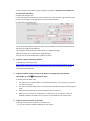
Yealink FAQ Catalogues IP Phone Settings .............................................................................................................................. 1 IP Phone Installation /Upgrade ......................................................................................................... 7 Call Features...................................................................................................................................... 8 Auto Provisioning ............................................................................................................................ 10 RPS .................................................................................................................................................. 11 Troubleshooting and Hardware Maintenance ................................................................................ 11 IP Phone Settings 1. Q: How can I get the IP address, Firmware version of the phone? A: For T2/T3/VP530 phones: Press the OK button on the phone when the phone is in idle status for T2/T3/VP530 phones. For DECT phone: Press Page key on the base unit, you can see the IP address on the registered handset. Or press OK to enter menu, then enter Status sub-menu. 2. Q: How to obtain the MAC address of a phone? A: You can find it from the carton box and the back of phone. 3. Q: What’re the main differences between T28&T26? A: model LCD Logo Display Line Key T28 320*160 236*82 6 lines T26 132*64 132*64 3 lines 4. Q: What are the main differences between T26&T22? A: T26 Support extension module/EHS36 Support 10 DSS Key T22 Doesn’t support extension module/EHS36 Doesn’t have DSS key 5. Q: What’s the different between T22&T20? A: model LCD Logo Display Line Xml phonebook SMS T22 132*64 Picture logo 3 lines Support Support T20 2 *15 characters Text logo 2 lines Not support Not support 6. Q: Why can’t I upload my two ringtones to the phone, how to remove default ringtone? A: User can only upload not more than 100K size ringtone file to the phone, and the default ringtone can’t be removed. If you really need your own ring tone, contact local distributor for support. 7. Q: After I upgrade to V70 firmware, why the action URI/URL feature doesn’t work? I can’t make the call with webpage dialing. A: We make our V70 more security, please refer to our admin guide for the detail settings: T2X(Page172): http://www.yealink.com/Upload/Version/T2XV70/Yealink%20SIP-T2xP%20IP%20Phone%20F amily%20Administrator%20Guide_V2.1.pdf T3X(Page151) http://www.yealink.com/Upload/Features/Yealink%20SIP-T3xG%20IP%20phones%20Troubl eshooting%20Tips.pdf 8. Q: Can Yealink phone support music on hold, and how to set it? A: Yes, you can upgrade to our latest firmware, then access to the phone webpage-Account-Advanced, and fill the Music Server URI 9. Q: What does “on code” and “off code” mean? A: They are the codes specified on the server which the phone uses to activate or deactivate a certain action by sending it to the server. On Code is to activate a feature, while Off Code is to deactivate a feature. Take the On Code for Always forward for example, if you set the On Code to be *78 (this code is supposed to be a feature code to activate Always forward on the server), and the target as 201. When you enable Always forward, the Forward feature on the phone-side is for sure activated, at the same time the code *78201 will be sent to the server, hence the server-side will also know that this phone is set to Always forward its calls to 201. So the server-side will be able to get the right status of the extension. 10. Q: What is “BLF List URI” used for? A: This parameter is for BroadSoft platform. On BroadSoft platform, you can set up a BLF group containing several extension numbers. A name should be specified to this group that is the so-called BLF List URI. Normally when you use BLF, you should set them up in DSS Keys and the phone will subscribe to the server for each extension once, with BLF List URI, the subscription will be simplified. The phone will only use the group name of the BLF List URI to subscribe to the server once and the server will know to let subscribe all the extension numbers in that group. This will greatly reduce the heavy burdens on the server. For example, if you have 10 extensions, normally you will have to subscribe with the server for 10 times from the first extension number to the last. However, if you specify a BLF List URI including these 10 extensions and name it “Sales”, you will only need to subscribe “Sales” with the server, which happens only for once. For more details, please refer to the document: Using BLF List Feature on Yealink SIP-T2XP phones Rev_70.0 11. Q: What is “SCA “feature used for? A: The Shared Call Appearance feature allows a line that is an address-of-record, to place and receive calls on multiple endpoints. Although the endpoints each register with the BroadWorks server with different unique URIs, the call appears to the other party to be originating from or terminating at the same line, no matter which of the endpoints sharing the line is used. For more details, please refer to the document, Using BroadWorks SCA Feature on Yealink SIP-T2XP Phones Rev_61.0 12. Q: What is the difference between remote phonebook and local phonebook? A: Remote phonebook is placed on a server, while local phonebook is placed on the phone flash. Remote phonebook can be used by everyone that can access the server, while local phonebook can only be used by a specific phone itself. Remote phonebook is always used as a central phonebook for a company. That is, everyone in the company can load this phonebook and each time they reach the remote phonebook, the data is passed real-time from the certain server. 13. Q: What is the difference between user name, register name and display name? A: Both user name and register name are defined by the server. A user name is used to identify the account while a register name matches with a password which is used for authentication if the server requires. Display name is the caller ID that will be displayed on the called party. Some servers also define the display name so this parameter set on the phone may not take effect. 14. Q: Is there a SIP message that can make the phone reboot? A: Yes. The message format is like this: NOTIFY sip:<user>@<dsthost> SIP/2.0 To: sip:<user>@<dsthost> From: sip:sipsak@<srchost> CSeq: 10 NOTIFY Call-ID: 1234@<srchost> Event: check-sync;reboot=true For more details, you can refer to the document. http://www.yealink.com/Upload/document/HowtoremoterebootphonethroughSIPmessage/ HowtoremoterebootphonethroughSIPmessageRev_610-20460023840.pdf 15. Q: Why do Yealink phones use DOB format logo file instead of popular BMP, JPG and so on? A: The picture the phone can recognize has some special requirements. It is not easy for the phone to resolve a popular picture format such as BMP and JPG. To make it easy, we enable only DOB file. There’s a tool for you to convert a BMP file to DOB file. You can download the tool and instructions from below link, How to change the logo of Yealink Phones Rev_61.0 16. Q: How to change the “Yealink” logo on LCD? A: Please refer to the document: How to change the logo of Yealink Phones Rev_61.0 17. Q: How to make ringtone for Yealink phone? A: You can use the Cooledit tool to make the ringtone you like, and upload the ringtone to the phone. For more details, you can refer to the document for T2 series: How to Make Ringtone for Yealink SIP-T2XP Phones Rev_61.0 18. Q: Why I can’t send a SMS to any other phone? A: SMS is a feature that needs your server’s support. Please just check it with your system manager. 19. Q: How can we reset the phone to default settings? A: If you can access to the phone by admin, please click to page Upgrade -> Basic, then click Reset button to reset the phone to factory default. Or you can press the Menu->Settings->Advanced Settings->Reset to factory through phone UI to reset the phone to factory default. 20. Q: Why the phone cannot obtain an IP address via DHCP? A: Please check the connection with the network cable. Make sure the network and the DHCP server both work fine, and there isn’t more than one DHCP server. 21. Q: What is the mechanism of DHCP? A: The DHCP mechanism is like below: 1. When a phone is set to DHCP mode, the phone will send DHCP request and the DHCP server will response and IP address is assigned 2. After half of the lease time, the phone will send the DHCP request to the DHCP server apply for renewal 3. If the server has no response to it, the phone will send DHCP request to the server again at 75% of the lease time. 4. If the server has no response again, the phone will not send the DHCP request. 5. If the lease time is out, the phone will release the assigned IP. 22. Q: How to make the call using SRTP? A: SRTP needs the server and the two phone parties support, also you should enable it in the phone webpageAccountAdvancedVoice Encryption (SRTP) on both call parties. 23. Q: What is XML browser feature? A: With xml browser feature, customers can personalize their features,such as weather forecast inquiry, stock information, date inquiry, access to address book, Google search, news browsing, music playing, terminal parameters configuration and other functions. For more details, please refer to the document of T2 series, Using XML Browser Feature on Yealink SIP-T2XP phones Rev_61.0 24. Q: Why MWI (Message Waiting Indication) is not working? A: You can use the WireShark tool to capture the trace and check whether IP PBX has sent a standard sip notify message to the device. 25. Q: Where can I get the release note for the firmware upgrading? A: You can go and get it from below link, and chose the model of the phone. http://www.yealink.com/SupportDownloadfiles.aspx?CateId=147&flag=142 26. Q: How to use the remote phonebook? A: You should first place the remote phonebook file on the server, and fill in the file’s address into the Phone book URL on Contacts Remote Phone Book of Web UI of the phone. And give it a name in the “phone book name” field. 27. Q: How to set the DST (Daylight Saving Time)? A: You can set it on PhonePreference of web UI of the phone. It will adjust the DST automatically based on the time zone that you selected. 28. Q: Why after I reset the phone to factory default, some fields still keep filled for example the password of the account, is it correct? A: Yes, it is correct. The reason why these fields still keep filled is because to ensure the security of the configuration information , the phone encrypted all the parameters which has relationship to the security, for example password of the account, the AES key of the phone and so on. After reset the phone to factory default, the values of these fields is empty, the program still encrypted the values, so you can see these fields keep filled. 29. Q: How can I hide the password during talking? A: There is a feature called Suppress DTMF Display in the phone webpagePhoneFeaturesGeneral Information, when enabled this feature, if you press the DTMF during talking, it will show the * to hide the DTMF immediately. When enabled the Suppress DTMF Display Delay, first you can see the digit you press, after a while, it will turn to be * symbol. 30. Q: What is BLF feature? A: You can use the BLF feature to monitor a specific user for status changes on the phone. For example, you can configure a BLF key on the phone for monitoring the status of a friend’s phone (busy or idle). When the friend picks up his phone to make a call, the BLF key (memory key) LED illuminates solid red on your phone to indicate that the friend’s phone is in use and busy. For more details, you can refer to the user manual. http://www.yealink.com/Upload/Version/T2XV70/Yealink_SIP_T28P_User_Guide_V70.pdf 31. Q: How can the phone support keep using the headset? A: There is a feature called headset prior feature under the phone->feature page, by enable this feature, the headset light will be on, when talking, the voice will be transmitted through the headset, if you press the speaker button, you can change the voice channel, but after the call is finished the headset light will be still on , even you reboot the phone. If you press the headset again, it will disable this feature. IP Phone Installation/Upgrade 1. Q: Where can I find the latest firmware? A: You can find the latest firmware for every model on our website, for example, you can find the latest firmware of T28P as below: http://www.yealink.com/SupportDownloadfiles_detail.aspx?CateId=184&flag=142 2. Q: How many expansion modules can be connected to T28\T26\T38? A: You can connect at most six extension modules to T28\T26\T38. Note, when you connect 3 expansion modules to the phone, you need to connect one more adapter to the third extension module. 3. Q: What will happen if I connect both POE cable and power adapter? Who has the priority? A: The ones manufactured before January 2010 use the power adapter prior, while afterwards the phones use POE prior. 4. Q: Why the phone can’t upgrade successfully? A: The below items may cause this issue, please check 1. Target firmware is the same as current used firmware. 2. Target firmware is not applicable for the model. 3. Current or target firmware is protected. Please select the applicable and authorized firmware for upgrade according to firmware naming rule. Yealink firmware naming rule: T28:2.x.x.x. T26:6.x.x.x T22:7.x.x.x. T20:9.x.x.x. T38: 38.x.x.x T32:32.x.x.x VP530:23.x.x.x. 5. Q: When I use wireless headset with EXP38/39 and EHS36, the headset doesn’t work, what can I do? A: First, please check whether our EHS36 compatible with your wireless headset: http://www.yealink.com/Upload/manual/TestedWirelessHeadsetListCompatiblewithEHS3603324790608.pdf If your headset is in our compatible list, try to upgrade your EXP38/39 and EHS36: Upgrade the EXP39: How to upgrade the Yealink EXP39 via T28 or T26 Upgrade the EXP38: How to upgrade the Yealink EXP38 via T28 Upgrade the EHS36: http://www.yealink.com/Upload/document/HowtoUpgradeEHS36FirmwareviaT26V11-1936 5260359.pdf http://www.yealink.com/Upload/document/HowtoUpgradeEHS36FirmwareviaT28V11-1936 3670088.pdf Call Features 1. Q: If I configure the “Ringer Device for Headset” setting on the WEB UI, why the ring still plays by speaker? A: If you would like to play ringtone by headset, besides configure the setting of “Ringer Device for Headset”, the Headset should be enabled by pressing the Headset button on the keyboard (the LED of the headset will be on). 2. Q: Why my phone was dialed by a third party? Is my phone attacked? A: Please upgrade to our latest V70 firmware, there’s some security issue in our previous firmware, but we already fixed it in our V70 firmware. http://www.yealink.com/SupportDownloadfiles_detail.aspx?CateId=184&flag=142 3. Q: What is “Semi-attended Transfer”? A: As defined in RFC5589, it is “a hybrid between a fully attended transfer and an unattended transfer”. We know that when a transferor makes an attended transfer to a certain target, it waits till the target party answers and then complete the transfer, this is attended transfer. If the server supports, the transferor can hang up the call before the target party answers, and the transfer can also be completed, this is called semi-attended transfer. For Yealink phones, there’s an option for you to enable/disable semi-attended transfer. Access to the phone webpagePhoneFeaturesTransfer Settings 4. Q: How to increase the volume on Speaker & on Headset? A: The volumes in different cases are separated. Anytime you want to increase or reduce the voice you are hearing, just use the volume buttons under the navigation keys. When in idle, it tunes the ringer volume. In talking status, it tunes the receiving volume. In dialing status, it tunes the volume for dial tone. When you are using speaker, it tunes for speaker and when you are using headset, it tunes for headset. The sending volume can only be adjusted via auto provision for now. 5. Q: Why the phone play tone when held, how can I disable it? A: When the phone is hold, it will play out tone every 30 seconds to prompt that the phone is being hold status. There is a parameter PlayHoldTone in feature page of T2X phone, also PlayHoldToneDelay defines the interval time. If you disable this parameter, the phone will not play out tone when held. 6. Q: How can I use the Group Listening feature? A: You can configure one DSS key with Group Listening feature. By pressing the Group listening key, you can activate two modes, handset +speaker mode, and headset + speaker mode. In these two modes, you can talk with the other party with the handset or headset, the other people only can hear the voice from the speaker. During talking, pressing the Group Listening key to enable this feature, if you press this key again, it will disable this feature. 7. Q: What is Call Completion feature? A: You can use the call completion feature to notify the caller of a failed call when the callee becomes available to receive a call. For more details, you can refer to the user manual, http://www.yealink.com/Upload/ip/T38G/QuickInstall/YealinkSIPT38GUserGuide-17182927 946.pdf 8. Q: How can I use the dual headset feature? A: If enable this feature, you can connect first headset to the headset port, connect the second headset to the handset port. When talking with the other party, the two headsets can hear the voice at the same time, but only the first headset can talk with the other party. This feature often used in the training mode, the student can hear the communication between the coach and the trainer. Access to the phone webpagePhoneFeaturesAudio Settings, and enable the Dual headset option. Auto Provisioning 1. Q: When it comes to auto provision, what is the difference between a Common CFG file and MAC-Oriented CFG file? A: During provisioning, a phone will try to download 2 CFG files, one is Common CFG file and the other is MAC-Oriented CFG file. Common CFG file will be used by a specific model while MAC-Oriented CFG file will be used only by the phone that is using the specific MAC address. For example, during provision, for a T28 with MAC 0015651130DB, it will try to download y000000000000.cfg that is for all T28, and 0015651130DB.cfg that is only for this phone. The format of the content of these 2 files is completely the same. If there’s any conflict, the MAC-Oriented file has higher priority. For more details, please refer to Auto Provision Manual. http://www.yealink.com/Upload/AutoProvisoning-17095068456.zip 2. Q: Why can’t I upload the local phonebook via auto provision? A: Please check whether the format and file name of your phonebook.xml file is correct. If you don’t know what’s local phonebook format , you can export a local phonebook from the phone to view. The name must be “contactData1.xml”. 3. Q: What is PnP which mentioned in auto provision? A: PnP stands for Plug and Play. It is a method for our phones to get the provisioning URL. If the phone is with PnP enabled, when it boots up, it will send multi-broadcast message to its network, any server (usually the PBX) recognizes the message will respond with the preconfigured provisioning URL, so the phone will be able to download the CFG files from that URL. It needs the server’s support. 4. Q: How to use the AES Encryption tool? A: Please refer to the document: http://www.yealink.com/Upload/document/AES%20Encryption%20Tool.rar 5. Q: What is M7? A: M7 is a new mechanism of auto provision, it is only can be used in the V70 version or higher. M7 has its own file header #!version:1.0.0.1 which can’t be deleted in the auto provision file .for more details, you can refer to the auto provision user manual. Yealink T2XP-T3XG-VP530 phones Auto Provisioning User Guide Rev_70.0 6. Q: How can I upgrade the phone from V61 to V70 via auto provision? A: You can still use the old auto provision file to upgrade the phone from V61 to the V70 firmware, once upgrade successfully, you can use the M7 mechanism to do the auto provision. RPS 1. Q: What is RPS? A: RPS is a free service for Yealink customers all over the world. By simply entering the MAC address of an IP phone and the URL of the provision server into Yealink's RPS, upon initial boot-up the phone can be redirected to its pre-assigned server for configuration updating. Consequently, it is no longer necessary to unpack, configure or repack a phone before shipping to the customer. This greatly simplifies mass deployment by automatically configuration, and saves a lot of time and money for deployment. For more details, please refer to Yealink web site http://www.yealink.com/product_info.aspx?ProductsCateID=227&CateId=217&BaseInfoCate Id=227&Cate_Id=227&parentcateid=217 2. Q: How can I get RPS? A: Send your application request to [email protected] with your Company E-mail. We will process your application carefully. Please include your company website link in your E-mail. Alternatively, you can directly contact our local distributor for assistance via E-mail or telephone. Troubleshooting and Hardware Maintenance 1. Q: If I want to contact Yealink technical support team to report some issues, which information should I sent to them, so they can locate this issue? A: Please describe the issue in details and also please also send the config.bin file, PCAP trace and level 6 syslog to Yealink for investigating. Please refer to below instruction to obtain the PCAP trace, config.bin file and level6 syslog. For T2 series phone: 1. Log on the web UI, go to upgrade->Advanced page 2. Set the system log level to level 6, 3. Then click the confirm button, then the phone will reboot. (The phone must reboot for this parameter take effect) 4. Export the config.bin file 5. Click start button, the phone will start to capture the trace, and then reproduce this issue, once the issue happen, click stop button, and export the PCAP file. 6. Export the level 6 system log. For T3 series and VP530, the steps to obtain the information are the same as the T2series, but the path maybe a little different. The config.bin file and syslog are under Phone-> Configuration page While the PCAP trace is under Phone->Upgrade page. Also you can use a Wrieshark tool to capture the trace. 2. Q: How to capture a Wireshark packet? A: Please refer to the document: http://www.yealink.com/Upload/document/Wireshark%20tool%20and%20instruction.rar Please note, if you want to catch the trace by this tool, the pc and the phone should be connected to the same hub. 3. Q: Why the phone unable to obtain an IP address, Prompting message “Network Unavailable” and icon is displayed on LCD? A: Please check the blow items; 1. First Check if your network cable is connected with PC port, if yes, please try to connect it to the Internet port. 2. Check if the network cable is OK, to make sure the connection between cable and phone is OK. 3. Check if network parameters such as IP address are set correctly. 4. Make sure your network is working fine, i.e. DHCP server is running fine, if there is available IP address in DHCP server, if more than one DHCP servers conflict there. 4. Q: Why it show “IP conflict” on the LCD? A: Please use the below two ways try to fix this issue. 1. Try to set another available IP address for your phone. 2. Re-burn a correct MAC address for your phone using the burning tool provided by manufacturer. 5. Q: Why I can see there is ringing, but no sound after the call picked up? A: This issue appears is because the media stream is blocked, signaling is transferred by the server, while the media stream is transferred end-to-end, so it will cause this issue when the signaling reaches but the media stream doesn’t. So please check your network setting to make sure the two devices can communicate with each other. 6. Q: I find the "speaker", "transfer" and "hold" keys of one phone suddenly can’t working, when I press them, they don’t have response, other keys are working properly, how can I fix it ? A: Please check if the below suggestion can work, 1. Reboot the phone 2. Reset the phone to the factory default 3. If item 1, 2 can’t work, maybe there are some problem in the mainboard, please change the mainboard, for how to change it, please refer to another FAQ which says “How can I change DSS keyboard, LCD, mainboard and key?”. 7. Q: I find the phone has a bad display (display error), how can fix it? A: There may be some problems of the LCD, please change the LCD if you can, for how to change the LCD, please refer to another FAQ which says “How can I change DSS keyboard ,LCD ,mainboard and key?”. 8. Q: The phone can enter standby interface, there is no Audio in the handset, but the speaker works well, how can I fix this issue? A: Please check if the handset is connected to the handset port correctly, and if the connection is OK, please change the handset to check if it can fix this issue. 9. Q: How can I change DSS keyboard, LCD, mainboard and key? A: Please refer to the maintenance instruction of T2 series. http://www.yealink.com/Upload/document/Hardware_maintenance_instruction.rar Also we have document which includes some common issues of the phone and instruction about how to repair them, for example no audio, not display, or power issue, you can refer to the document, http://www.yealink.com/Upload/document/SIP-T2X%20Defective%20phones%20checking% 20list%20and%20repair%20instruction.rar