1
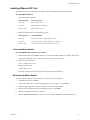
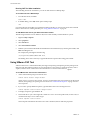
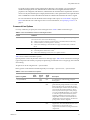
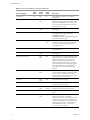
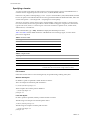
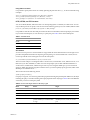
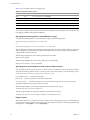
OVF Tool User Guide VMware OVF Tool 1.0 EN-000143-00 OVF Tool User Guide You can find the most up-to-date technical documentation on the VMware Web site at: http://www.vmware.com/support/ The VMware Web site also provides the latest product updates. If you have comments about this documentation, submit your feedback to: [email protected] © 2009 VMware, Inc. All rights reserved. This product is protected by U.S. and international copyright and intellectual property laws. VMware products are covered by one or more patents listed at http://www.vmware.com/go/patents. VMware, the VMware “boxes” logo and design, Virtual SMP, and VMotion are registered trademarks or trademarks of VMware, Inc. in the United States and/or other jurisdictions. All other marks and names mentioned herein may be trademarks of their respective companies. VMware, Inc. 3401 Hillview Ave. Palo Alto, CA 94304 www.vmware.com 2 VMware, Inc. Contents About This Book 5 Using VMware OVF Tool 7 About VMware OVF Tool 7 Features Highlights 7 OVF Standard 8 Benefits of OVF 8 VMware Platforms Using OVF 8 Space Requirements of OVF Packages 9 VMware OVF Tool Delta Disk Facilities 9 Supported Operating Systems 10 Installing VMware OVF Tool 11 Linux Installation Details 11 Windows Installation Details 11 Running OVF Tool After Installation 12 Using VMware OVF Tool 12 Command‐Line Options 13 Specifying a Locator 16 File Locators 16 HTTP, HTTPS, and FTP Locators 17 VI Locators 17 Specifying the Inventory Path to a Virtual Machine or vApp 18 Specifying the Inventory Path for a Cluster, Host, or Resource Pool Partial Locators 18 Configuration Files 20 Examples of Using VMware OVF Tool Usage 20 Convert a VMX to an OVF 20 Convert a VMX to an OVA 20 Convert an OVF to a VMX 20 Convert VMX to a VI 21 Deploy an OVF Package Directly on an ESX Host 21 Deploy an OVF Package and Power It On 21 Export a Running Virtual Machine or vApp from VI 21 Rename the OVF Package 21 Omit Disks in the VMware OVF Tool Output 21 Compress an OVF Package 21 Chunk or Split OVF Package Files 22 Validate an OVF 1.0 Descriptor 22 Download an OVF Package from a Protected Web Site 22 Use a Proxy 22 Overwrite a Running Virtual Machine or vApp from VI 23 Set OVF Properties When Deploying to vSphere 23 Set OVF Network Mappings When Deploying to vSphere 23 Obtain Progress Feedback from VMware OVF Tool 23 Cancel VMware OVF Tool While it Is Running 23 Probe Mode 24 VMware, Inc. 18 3 OVF Tool User Guide Appendix: OVF Package Signing 25 Creating an RSA Public/Private Key Pair and Certificate 25 Signing an OVF Package 26 Validating an OVF Package 26 Index 27 4 VMware, Inc. About This Book This OVF Tool User Guide provides information about how to use VMware® OVF Tool to package virtual machines and vApps into Open Virtualization Format (OVF) standard packages. Intended Audience This book is intended for anyone who needs to convert an OVF package to a virtual machine, or a virtual machine to an OVF package. Users typically include people who do software development and testing or work with multiple operating systems or computing environments: system administrators, software developers, QA engineers, and anyone who wants to package or unpackage virtual machines using open industry standards. Document Feedback VMware welcomes your suggestions for improving our documentation. If you have comments, send your feedback to [email protected]. Technical Support and Education Resources The following sections describe the technical support resources available to you. To access the current version of this book and other books, go to http://www.vmware.com/support/pubs. Online and Telephone Support To use online support to submit technical support requests, view your product and contract information, and register your products, go to http://www.vmware.com/support. Customers with appropriate support contracts should use telephone support for the fastest response on priority 1 issues. Go to http://www.vmware.com/support/phone_support. Support Offerings To find out how VMware support offerings can help meet your business needs, go to http://www.vmware.com/support/services. VMware Professional Services VMware Education Services courses offer extensive hands‐on labs, case study examples, and course materials designed to be used as on‐the‐job reference tools. Courses are available onsite, in the classroom, and live online. For onsite pilot programs and implementation best practices, VMware Consulting Services provides offerings to help you assess, plan, build, and manage your virtual environment. To access information about education classes, certification programs, and consulting services, go to http://www.vmware.com/services. VMware, Inc. 5 OVF Tool User Guide 6 VMware, Inc. Using VMware OVF Tool Open Virtualization Format (OVF) is an industry standard that describes metadata about virtual machine images in XML format. VMware® OVF Tool is a command‐line utility that enables a user to import and export OVF packages to and from a wide variety of VMware products. This guide contains the following topics: “About VMware OVF Tool” on page 7. “Installing VMware OVF Tool” on page 11. “Using VMware OVF Tool” on page 12 “Examples of Using VMware OVF Tool Usage” on page 20. About VMware OVF Tool You can use OVF Tool to distribute and import virtual machines and vApps. For example, you can create a virtual machine within VMware vSphere™, and use OVF Tool to export it into an OVF package for installation, either within your organization or for distribution to other organizations. OVF facilitates the use of vApps, which consist of preconfigured virtual machines that package applications with the operating system that they require. OVF Tool 1.0 replaces an earlier Java‐based OVF Tool that was experimental. OVF Tool supports OVF version 1.0 and is backward compatible with OVF 0.9 that was supported by the Java‐based OVF Tool, VirtualCenter 2.5, and VMware ESX™ 3.5. OVF Tool 1.0 allows you to script OVF import and export on products such as VMware vCenter™ 4.0, VirtualCenter 2.5 and later, ESX 3.5 and later, VMware Server 2.0 and later, and VMware Workstation 6.0 and later. Features Highlights OVF Tool 1.0 provides the following key features: Includes full OVF 1.0 support and backward‐compatible mode for importing existing OVF 0.9 packages Supports both import and generation of OVA packages (OVA is the portable virtual machine format from XenSource.) Directly converts between any VI, VMX, or OVF source format to any VI, VMX, or OVF target format Accesses OVF sources using HTTP, HTTPS, or FTP, or from a local file Deploys and exports vApp configurations on vSphere 4 targets Provides options to power on a VM or vApp after deployment, and to power off a virtual machine or vApp before exporting (caution advised) Show information about the content of any source in probe mode Provides context sensitive error messages for vSphere sources and targets, showing possible completions for common errors, such as an incomplete vCenter inventory path or missing datastore and network mappings VMware, Inc. 7 OVF Tool User Guide Provides an optional output format to support scripting when another program calls OVF Tool Uses new optimized upload and download API (optimized for vSphere 4) Signs OVF packages and validates OVF package signatures Validates XML Schema of OVF 1.0 descriptors OVF Standard The OVF specification describes a secure, portable, efficient, and flexible method to package and distribute virtual machines and components. It originated from the Distributed Management Task Force (DMTF) after vendor initiative. Companies that contributed to the standard include Dell, HP, IBM, Microsoft, VMware, and Citrix. Version 1.0 was published in April 2009 and is available on the DMTF Web site, along with a white paper. Specification: http://www.dmtf.org/standards/published_documents/DSP0243_1.0.0.pdf Whitepaper: http://www.dmtf.org/standards/published_documents/DSP2017_1.0.0.pdf Benefits of OVF Using OVF to distribute virtual machines has the following benefits: Ease of use. When users receive a package in OVF format, they do not have to unzip files, execute binaries, or convert disk formats. Adding a vApp can be as simple as typing a URL and clicking Install. Virtual hardware validation. OVF supports fast and robust hardware validation. You do not have to install a complete virtual machine before determining whether it is compatible with an ESX host (for example, because it uses IDE virtual disks). Metadata inclusion. Additional metadata, such as an end‐user license agreement, can be packaged with the OVF and displayed before installation. Optimized download from the Internet. Large virtual disks are compressed for fast download and to reduce disk space for large template libraries. VMware Platforms Using OVF VMware supports OVF on the following platforms: For VirtualCenter 2.5 and later, and ESX 3.5 and later, the VI Client supports OVF 0.9 import and export. For vCenter 4.0, VirtualCenter 2.x and later, ESX 3.x and later, VMware Server 2, Workstation 5.x and later, use OVF Tool 1.0 documented here. VMware Studio 1.0 and later can generate OVF packages. For most of the current VMware products, you can also use Converter to import and export OVF. OVF support is built into the vSphere Client that installs from, and is compatible with, vCenter 4.0 and ESX 4.0. It is also built into the VI Client that installs from and is compatible with VirtualCenter 2.5 and later, and ESX 3.5 and later. Using the vSphere Client 4, you can import an OVF package and export a vApp into an OVF package. For example, to import an OVF package using vSphere Client 4: Click File > Deploy OVF Template For example, to export a vApp into an OVF package using vSphere Client 4: Click File > Export > Export OVF Template 8 VMware, Inc. Using VMware OVF Tool Using the VI Client 2.5, you can import an OVF virtual machine into an ESX host and export a virtual machine to an OVF file (note that VI Client 2.5 is limited to OVF 0.9). For example, to import an OVF vApp into an ESX host using VI Client 2.5: Click File > Virtual Appliance > Import For example, to export a virtual machine to an OVF file using VI Client 2.5: Click File > Virtual Appliance > Export OVF packages imported or exported by OVF Tool are completely compatible with packages imported or exported by the vSphere Client or the VI Client. Space Requirements of OVF Packages A virtual machine is stored as a set of files on disk. In the VMware runtime format, these files have extensions .vmx, .vmdk, .vmsd, .vmxf, and .nvram. The VMware hypervisor requires these file formats, which are optimized for efficient execution. An ESX host often uses fully allocated flat disks in a VMFS file system to optimize virtual machine performance. OVF supports efficient, secure distribution of vApps and virtual machine templates. OVF is optimized for these goals, rather than for efficient runtime execution. OVF does not include specific information on runtime disk format because such information is not required until the virtual machine is deployed. When you package appliances with OVF, you can optimize one vApp for high performance in a production environment, and optimize another for minimal storage space during evaluation. Table contrasts a virtual machine in VMware file format with a virtual machine in OVF format. OVF employs a compressed sparse format for VMDK files. Virtual disks in that format cannot be used directly for execution without conversion. Table 1. VMware-Format File Sizes Compared to OVF and OVA File Sizes Files VMware Format OVF Format OVA Format LinuxBasedAppliance.nvram LinuxBasedAppliance.ovf LinuxBasedAppliance.ova LinuxBasedAppliance.vmdk LinuxBasedAppliance‐0.vmdk LinuxBasedAppliance‐s001.vmdk LinuxBasedAppliance‐1.vmdk LinuxBasedAppliance‐s002.vmdk LinuxBasedAppliance‐2.vmdk LinuxBasedAppliance.vmsd LinuxBasedAppliance.vmx LinuxBasedAppliance.vmxf Total size 251MB using thin provisioning 132MB 132MB 4000MB using thick provisioning VMware OVF Tool Delta Disk Facilities VMware OVF Tool automatically compresses disk files. In the streaming VMDK files that OVF Tool generates, the tool compresses each 64KB disk grain. It is possible to achieve even better compression using the --compress option. In addition, if a package contains multiple virtual machines, it is possible to compress an OVF package even more using a technique called delta disk compression. This compression algorithm is invoked using the --makeDeltaDisks option. ovftool --makeDeltaDisks package.ovf output-dir/ Delta disk compression identifies disk segments that are equal and combines these equal parts in a parent disk. This process prevents storing the same segment twice. VMware, Inc. 9 OVF Tool User Guide As an example, consider a software solution that consists of an Apache Web server virtual machine and a MySQL database virtual machine, both installed on top of a single‐disk Ubuntu server. The two virtual machines were created with the following process: 1 Create a plain Ubuntu installation on one virtual machine. 2 Clone the virtual machine. 3 Install Apache on the first virtual machine. 4 Install MySQL on the second virtual machine. Using delta disk compression on the two virtual machine disks creates a parent disk containing all of the information they share, which is essentially the entire operation system and two child disks containing the MySQL and Apache parts. A plain Ubuntu server can use 400–500MB of space, and two would use 800–1000MB of space. By contrast, using delta disk compression, an OVF package with these two servers uses only 400–500MB (plus the size of the MySQL and Apache installations), which saves 400–500MB by not duplicating the Ubuntu server. Any number of disks can be combined creating various disk trees and saving more space. vSphere 4 and later support the deployment of OVF packages that contain delta disk hierarchies. For delta disk compression, keep in mind the following: Only disks with equal capacity can be combined. If you expect to use delta disk compression, you must keep disk capacities equal. Delta disk compression necessitates that segments that might be put in a parent disk are at the same offset from the beginning of their respective files. In the Ubuntu example, if the setup varies between the two installations, it can completely offset each segment on one of the disks from the segments on the other disk. In this case, delta disk compression does not produce any significant disk space savings. This is why the example specified cloning the Ubuntu server before installing the MySQL and Apache parts, respectively. Delta disk compression takes OVF packages and vSphere and VMX files as input, but not OVA packages. The delta disk compression algorithm needs to read the contents of each disk up to two times. It might make sense to invoke OVF Tool on a local copy of the OVF package. The delta disk compression algorithm always generates an OVF package in the given output directory. To convert this OVF package into an OVA package, reinvoke OVF Tool. Supported Operating Systems OVF Tool supports the operating systems shown in Table 2. Table 2. Supported Operating Systems Windows 32 bit (x86) and 64 bit (x86_64) Linux 32 bit (x86) and 64 bit (x86_64) Windows XP CentOS 5.x Windows 2003 Fedora Core 10.x Windows Vista RedHat Enterprise Linux (RHEL) 5.x Windows 2K8 SUSE Enterprise Server 10.x Ubuntu Desktop 9.x 10 VMware, Inc. Using VMware OVF Tool Installing VMware OVF Tool The VMware OVF Tool is available as an installer or ZIP file, depending on the operating system. To install VMware OVF Tool 1 2 Download VMware OVF Tool: Operating System Download Filename Linux 32 bit VMware-OVF-Tool.sh Linux 64 bit VMware-OVF-Tool.x86_64.sh Windows 32 bit VMware-OVF-Tool.exe Install using the method for your operating system: Operating System Installation Method Linux 32 bit Run the shell script as ./VMware-OVF-Tool.sh Linux 64 bit Run the shell script as ./VMware-OVF-Tool.x86_64.sh Windows 32 bit Double click on the installer, VMware-OVF-Tool.exe Linux Installation Details To install VMware OVF Tool on a Linux machine 1 Download the installer script (VMware-OVF-Tool.sh for 32 bit or VMware-OVF-Tool.x86_64.sh for 64 bit). You must download the script as a binary file; otherwise the install script fails. 2 Make the script executable. chmod +x VMware-OVF-Tool.sh 3 Run the installer script. ./VMware-OVF-Tool.sh The script is interactive and prompts for the EULA and installation directory. Windows Installation Details The following are screen by screen instructions for a Windows 32‐bit installation: 1 At the Welcome screen, click Next. 2 At the license agreement, read the license agreements, select “I agree...” and click Next. 3 Accept the path suggested or change to a path of your choice and click Next. 4 When you have finished choosing your installation options, click Install. 5 When the installation is complete, click Next. 6 Deselect Show the readme file if you do not want to view the readme file, and click Finish to exit. VMware, Inc. 11 OVF Tool User Guide Running OVF Tool After Installation After installing OVF Tools on Windows, you can run OVF Tool from a DOS prompt. To run OVF Tool from a DOS Prompt 1 From the Start menu, click Run. Start > Run 2 In the Run dialog, write cmd, which opens a DOS prompt. cmd If you have the OVF Tool folder in your Path environment variable, you can run OVF Tool at the command line. For instructions on running the utility, see “Using VMware OVF Tool” on page 12. To add VMware OVF Tool to your Path environment variable The following instructions are for Windows XP, but it is done similarly on other Windows systems. 1 Right‐click My Computer 2 Select properties 3 Select Advanced 4 Select Environment Variables 5 Find the system variable called Path and add the OVF Tool install directory by selecting the variable, click Edit and adding the text. For example, the path might be the following: ;C:\Program Files\VMware\VMware OVF Tool\ The leading semi‐colon is necessary to append the OVF Tool path to the existing path variable. Using VMware OVF Tool VMware OVF Tool is a command‐line utility that supports importing and exporting of OVF packages from ESX hosts and other VMware products. A VI location refers to any location on a VMware product, such as vSphere, VMware Server or ESX. This section describes how to run and select OVF Tool options. To run VMware OVF Tool from the command line 1 At the command‐line prompt, run the OVF Tool. ovftool <source locator> <target locator> where <source locator> and <target locator> are the paths to the source and target for the virtual machine, OVF package, OVA package or VI location. See “Command‐Line Options” on page 13 for the various options. 2 If you want to specify additional options, type them before the source and target locators. ovftool <options> <source locator> <target locator> 3 To display all options, type ovftool -h. 4 Probe mode allows you to investigate the contents of a source. To invoke probe mode, use the ovftool command with only a source and no target. ovftool <options> <source locator> OVF Tool prints information about the source such as hardware, EULAs and OVF properties. 12 VMware, Inc. Using VMware OVF Tool Use probe mode to examine an OVF package before deploying it. For example, you can examine the download and deployment sizes, determine the set of networks to be mapped, determine the OVF properties to be configured, read the EULA, and determine the virtual hardware requirements. OVF Tool must access only the OVF descriptor to display this information, so the operation does not require the entire OVA or VMDK files to be downloaded. Probe mode also validates the certificate if the source is signed. For more information about Probe Mode and an example of the output, see “Probe Mode” on page 24. Table 3 describes the source and target locators. For more information, see “Specifying a Locator” on page 16. Command-Line Options For every command, you specify the source and target locators. Table 3 defines each locator type. Table 3. OVF Tool Definitions of Source and Target Locators Locator <source locator> Definition Path to the source, which must be either a virtual machine, vApp, or an OVF package. The source locator can be one of the following: <target locator> A path to an OVF or OVA file (a local file path, or an HTTP, HTTPS, or FTP URL) A virtual machine (a local file path to a .vmx file) A VI locator identifying a virtual machine or vApp on vCenter, ESX, or VMware Server The target locator can be one of the following: A local file path for VMX, OVF, or OVA A VI locator identifying a cluster, host, or a vSphere location Table 4 shows all the command‐line options. Options perform actions only between certain source and target types. Table 4 shows which source and target types each option works with. If you specify an option using an irrelevant source or target type, the command does nothing. All options can be set using the form --option=value. Binary options can be enabled or disabled explicitly. For example: --option=true, --option=false. Table 4. OVF Tool Command-Line Options Relevant Source Types Relevant Target Types --acceptAllEulas OVF, OVA N/A Accept all EULAs without being prompted. Binary option. --chunkSize N/A OVF, OVA Specifies the chunk size to use for files in a generated OVF package. Default is not to chunk. When using this option, all output files (except the OVF descriptor, manifest and certificate files) are sliced into the specified chunk size. This is useful if you need to transport an OVF package on a series of 800MB CD‐ROMs, or are only able to create files up to 2GB on FAT32 file systems. Chunking combined with an OVA package as output makes an OVA in which all the files are chunked, like for the OVF package, but the OVA package itself is still be a single file. --compress N/A OVF, OVA Compresses the disk when given an OVF or OVA target locator. The value must be between 1 and 9. The fastest is 1, but gives the worst compression. The slowest is 9, but gives the best compression. Option Long Name VMware, Inc. Option Short Name Description 13 OVF Tool User Guide Table 4. OVF Tool Command-Line Options (Continued) Option Long Name Option Short Name Relevant Source Types Relevant Target Types --datastore -ds N/A VI Target datastore name for a VI or vSphere deployment. --deploymentOption OVF, OVA N/A Deployment options for a deployed OVF package. An OVF package can contain several deployment configurations. This option allows you to select which configuration to use when deploying to the VI target. --disableVerification OVF, OVA N/A Skips validation of signature and certificate. Binary option. N/A VMX, VI Selects target disk format. Common formats are monolithicSparse, monolithicFlat, twoGbMaxExtentSparse, twoGbMaxExtentFlat, streamOptimized, thin (VI target), thick (VI target) N/A OVF, OVA Inserts the EULA in the first virtual system or virtual system collection in the OVF. If the EULA is in a file, use the following option format: --diskMode -dm --eula Description --eula@=filename N/A N/A Prints the VMware OVF Tool help message with usage information. --hideEula OVF, OVA N/A Does not include the EULA in the probe output. Binary option. --ipAllocationPolicy OVF, OVA N/A IP allocation policy for a deployed OVF package. Supported values are: fixed, transient, and dhcp. In OVF descriptors, you can specify a VMware specific IP assignment policy that guides the deployment process by expressing which of the policies the OVF package supports. Only values listed in the OVF descriptor are supported when the OVF or OVA package is deployed. --ipProtocol OVF, OVA N/A Selects the IP protocol to use. For example, IPv4, IPv6. As with the ipAllocationPolicy option, you can specify which IP version this OVF package uses when it is deployed. Use only the values listed in the OVF descriptor. --locale OVF, OVA N/A Selects the locale for the target. --machineOutput N/A N/A Outputs OVF Tool messages in a machine readable format. Binary option. --makeDeltaDisks OVF, VI, VMX Must be directory Use delta disk compression to create an OVF package from a disk source. Binary option. N/A All Specifies the target name. Defaults to the source name. OVF, OVA N/A Sets a network assignment in the deployed OVF package. For example, --net:<OVF name>=<target name>. OVF packages contain symbolic names for network names which are assigned with this option. For multiple network mappings, repeat the option, separating them with a blank, for example, --net:s1=t1 --net:s2=t2 --net:s3=t3. --help --name --net 14 -h -n VMware, Inc. Using VMware OVF Tool Table 4. OVF Tool Command-Line Options (Continued) Option Long Name Option Short Name Relevant Source Types Relevant Target Types --network -nw OVF, OVA N/A Target network for a vSphere deployment. Use this option in place of the --net option when only one network exists in the OVF package. This option maps the symbolic OVF name to the specified network name. --overwrite -o N/A All Forces overwrite of existing files. Binary option. --powerOffSource VI N/A Ensures that a virtual machine or vApp is powered off before importing from a VI source. Binary option. --powerOffTarget N/A VI Ensures that a virtual machine or vApp is powered off before overwriting a VI target. Binary option. --powerOn N/A VI Powers on a virtual machine or vApp deployed on a VI target. Binary option. --privateKey N/A OVF, OVA Signs the OVF package with the given private key (.pem file). The file must contain a private key and a certificate. --privateKeyPassword N/A OVF, OVA Password for the private key. Used in conjunction with --privateKey if the private key requires password authentication. If required but not specified, the tool prompts for the password. --prop OVF, OVA N/A Sets a property in the deployed OVF package. For example, --prop:<key>=<value>. Use probe mode to learn which properties an OVF package can set. For multiple property mappings, repeat the option, separating them with a blank, for example --prop:p1=v1 --prop:p2=v2 --prop:p3=v3. --proxy OVF, OVA, VI OVF, OVA, VI Proxy used for HTTP, HTTPS, FTP, and VI access. The proxy is expressed as the URL to the proxy. For example, for proxy.example.com, the option value is: Description https://proxy.example.com:345 OVF Tool supports proxies that require authentication. If you do not provide credentials in the URL, OVF Tool prompts for them. N/A N/A Prints no output to the screen except for errors. Binary option. --schemaValidate OVF, OVA N/A Validates OVF descriptor against the OVF schema. Binary option. --skipManifestCheck OVF, OVA N/A Skips validation of the OVF package manifest. Binary option. --skipManifestGeneration N/A OVF, OVA Skips generation of the OVF package manifest. Binary option. --quiet -q --sourceType -st All All Explicitly expresses that the source is OVF, OVA, VMX, or VI. --targetType -tt All All Explicitly express that the target is OVF, OVA, VMX, or VI. --version -v N/A N/A Shows version information for OVF Tool. Binary option. --vmFolder -vf N/A VI The target virtual machine folder in VI inventory (for a datacenter). VMware, Inc. 15 OVF Tool User Guide Specifying a Locator A source or target locator points to some resource. Locators must specify a protocol, which defines how to reach the resource. Supported protocols are file access, VI, HTTP, HTTPS, and FTP. File locators can point to an OVF package (.ovf or .ova) or a virtual machine (.vmx). HTTP, HTTPS, and FTP locators can point to OVF and OVA files. The resource type is determined from the filename suffix, unless one or both of the options --sourceType and --targetType are used explicitly. VI locators can point to various resource types: virtual machines, vApps, hosts, clusters, or resource pools. For a source locator, the resource type must be a virtual machine or vApp. For a target locator, the resource type must be a host, cluster, or a resource pool. A VI locator is used for a vSphere server, vCenter Server, VMware Server, or an ESX host. At the command line, type --help locators to display the online help for locators. Table 5 and Table 6 list the default extensions of the different source and target types, as well as which protocols are supported. Table 5. Source Locator Source Type Default File Extension Protocol OVF .ovf File, HTTP, HTTPS, FTP OVA .ova File, HTTP, HTTPS, FTP VMX .vmx File VI N/A VI Table 6. Target Locator Target Type File Extension Protocol OVF .ovf File OVA .ova File VMX .vmx File (Source must be a single virtual machine) VI N/A VI (If the VI target locator is on a VMware Server system, or directly on an ESX host, the source must be a single virtual machine) File Locators File locators are the same for source and target. They are specified using ordinary path syntax. Windows Path Syntax On Windows, paths are specified as either absolute or relative. This is an example of an absolute path on Windows: C:\folder1\folder2\package.ovf These examples show relative paths on Windows: ..\folder1\package1.ovf package1.ovf Linux Path Syntax On Linux, paths are specified, similarly, as either absolute or relative. The following is an example of an absolute path on Linux: /folder1/folder2/package.ovf The following are examples of relative paths on Linux: ../folder1/package1.ovf package1.ovf 16 VMware, Inc. Using VMware OVF Tool Using URIs as Locators It is possible to specify file locations as a URI by prefixing the path with file://, as shown in the following examples: file://c:\folder1\folder2\package.ovf (Absolute, Windows) file:///folder1/folder2/package.ovf (Absolute, Linux) file://package.ovf (Relative for both Windows and Linux) HTTP, HTTPS, and FTP Locators You can use HTTP, HTTPS, and FTP to refer to an OVF package (OVF or OVA file) on a Web server. You can only use these protocols to specify a source locator. In the following syntax, protocol is HTTP, HTTPS or FTP: protocol://username:password@host:port/<path to OVF package> It is possible to omit the user name and password from the locator. If needed, OVF Tool prompts you for them. If you use the standard port, it is not necessary to specify the port. Table 7 shows the standard ports. Table 7. Standard Ports Protocol Port HTTP 80 HTTPS 443 FTP 21 VI Locators VI source locators point to a virtual machine or vApp within the virtual infrastructure. The VI target locator provides all required information for importing an OVF package or virtual machine into a cluster, host or resource pool. Both source and target locator use the same syntax: vi://<username>:<password>@<host>:<port>/<search-term> The server name and port can designate either a vCenter server, VirtualCenter server, VMware Server, or an ESX host. If you omit credentials, in which case OVF Tool prompts you for them. Default installations of vCenter Server, VirtualCenter, and ESX use port 443. If you are using the default port, you do not need to specify it. When using OVF Tool against a VMware Server, you must explicitly specify port 8333, which is the default port for VMware Server. The search term has the following format: <path>[?<query>=<value>] If a query is not given, a VC inventory path lookup is performed using the specified path. Otherwise, the object matching the query is used. The meaning of the query depends on the object type. Table 8 shows the different values that you can use in the query field. Table 8. Source and Target Values for All Query Types Name Query Source Target BIOS bios BIOS ID of a virtual machine BIOS ID of a host Datastore ds Datastore path to a virtual machine N/A IP Address ip IP address of a virtual machine IP address of a host DNS dns DNS name of a virtual machine DNS name of a host Mo‐Ref moref Managed object reference (vSphere specific identifier) of a virtual machine or vApp Managed object reference (vSphere specific identifier) of a host, cluster, or resource pool VMware, Inc. 17 OVF Tool User Guide Table 9 shows example values for each query type. Table 9. Examples of Query Values Name Query Example Value BIOS bios vi://localhost?bios=234290984 Datastore ds vi://localhost/TestDatacenter?ds=[foo]/myvm/myvm.vmx IP Address ip vi://localhost?ip=123.231.232.232 DNS dns vi://localhost?dns=production-vm3.example.com Mo‐Ref moref vi://localhost?moref=vim.vm.VirtualMachine:vm-23423 You can enter a partial source locator if you do not know the entire inventory path. In this case, the tool fails but suggests possible inventory path completions. Specifying the Inventory Path to a Virtual Machine or vApp To specify an inventory path for a virtual machine or vApp, use the following syntax: <datacenter name>/vm/<folders>/<vm or vApp name> or <datacenter name>/host/<resource pool path>/<vm or vApp name> The use of the vm tag after the datacenter name specifies that you are locating a virtual machine or vApp in the VM and Template view. Use the host tag after the datacenter name if you are locating a virtual machine or vApp in the Host and Clusters view. The following example shows an inventory path without any folders: MyDatacenter/vm/MyVM The following example shows an inventory path with two nested folders: MyDatacenter/vm/Folder 1/Sub Folder/MyVM Specifying the Inventory Path for a Cluster, Host, or Resource Pool You can specify an inventory path for a host or a resource pool. You can nest resource pools similar to folders. To specify an inventory path for a host or a resource pool as part of target locators, use the following syntax: <datacenter name>/host/<host name>/Resources/<resource pool> host and Resources – Fixed parts of the path. Resources – Specify only when a resource pool is specified. <resource pool> – Can take the value of one or more nested resource pools. If no resource pools are specified, the default resource pool for the host is used. The following example is of an inventory path without a specified resource pool: TestDatacenter/host/esx-host3.example.com The following example is of an inventory path with a specified resource pool: TestDatacenter/host/esx-host3.example.com/Resources/SmallResourcePool Partial Locators When using OVF Tool, it is often not necessary to specify source and target types as long as certain filename conventions are used. It is possible to the ignore locator type and specify the source and target explicitly using the arguments --sourceType=... and --targetType=. 18 VMware, Inc. Using VMware OVF Tool OVF Tool assumes the locator type based on the following rules: If the name starts with vi://, OVF Tool assumes VI type. If the name ends with .ovf, OVF Tool assumes OVF type. If the name ends with .vmx, OVF Tool assumes VMX type. If the name ends with .ova, the OVT tool assumes OVA type. Similarly, source and target types can be inferred from folder locators. OVF Tool assumes the type according the following rules: If the source locator is a folder, OVF Tool assumes that the source is an OVF package and that the OVF descriptor is called the same as the folder, for example, my-ovf/my-ovf.ovf. If the source is an OVF package and the target locator is a directory, such as MyVirtualMachines/, OVF Tool assumes that the target is a VMX locator. The created VMX/VMDK file is put in a directory with the target name, for example, MyVirtualMachines/MyVM/MyVM.vmx. If the source is a VMX locator and the target locator is a directory, OVF Tool assumes that the target is an OVF package. If the source is a VI locator, and the target locator is a directory, OVF Tool assumes that the target is an OVF package. OVF Tool supports partial VI locators when deploying or exporting. For an incomplete locator path, the tool suggests completions at the command line. Example 1 shows the command‐line dialog when partial locators are used. Example 1. Partial Locators at the Command Line > ovftool LAMP.ovf vi://localhost/ Opening source: LAMP.ovf Opening target: vi://user@localhost/ Error: Found wrong kind of object (Folder) Possible completions are: Datacenter/ Remote Datacenter/ Secondary Datacenter/ > ovftool LAMP.ovf vi://localhost/Datacenter Opening source: LAMP.ovf Opening target: vi://user@localhost/Datacenter Error: Found wrong kind of object (Datacenter) Possible completions are: vm/ host/ > ovftool LAMP.ovf vi://localhost/Datacenter/host Opening source: LAMP.ovf Opening target: vi://user@localhost/Datacenter/host Error: Found wrong kind of object (Folder) Possible completions are: host1.foo.com/ host2.foo.com/ > ovftool LAMP.ovf vi://localhost/Datacenter/vm/host1.foo.com VMware, Inc. 19 OVF Tool User Guide Configuration Files OVF Tool has many options. Rather than repeatedly entering long commands on the command line, you can create a configuration file. A configuration file uses the following syntax: option1=value ... #comment optionN=value The following is an example of a configuration file: proxy=http://proxy.example.com datastore=storage-test42 # Comment on something locale=dk You can create local or global configuration files. A local configuration file has the .ovftool suffix and is read in the folder from which you invoke OVF Tool. A global configuration file is per user. On Windows, the global configuration file is read from the following location: C:\Documents and Settings\$USERNAME\VMware\ovftool.cfg On Linux, the global configuration file is read from the following location: $HOME/.ovftool When using configuration files, globally defined options are overwritten by locally defined and command‐line options. Locally defined options are overwritten by command‐line options. You can use the ovftool --help config command to get information about how to use a configuration file. In addition, the current contents of the global configuration file as well as any local configuration file is shown. Examples of Using VMware OVF Tool Usage At the command line, type --help examples to display examples of ovftool commands. Convert a VMX to an OVF To convert a virtual machine in VMware runtime format (.vmx) to an OVF package, type a command like the following: > ovftool f:/myvms/BigDemo.vmx x:/ovf/BigDemo.ovf Convert a VMX to an OVA To convert a VMX to an OVA file, type a command like the following: > ovftool vmxs/Nostalgia.vmx ovfs/Nostalgia.ova Convert an OVF to a VMX To convert an OVF package to a file in VMware format, type a command like the following: > ovftool http://www.mycompany.com/ovflib/BigDemo.ovf x:/myvms/BigDemo.vmx Because the source is an OVF package, you can specify it as a URL or a local file path. If you convert an OVF package to a VMX file without specifying the target directory, OVF Tool creates a directory using the OVF package name and writes the VMX file in it. > ovftool “Windows 7.ovf” . The VMX file is written at Windows 7/Windows 7.vmx. 20 VMware, Inc. Using VMware OVF Tool Convert VMX to a VI You can convert any VI, or VMX source to any VI, or VMX target format without an intermediate OVF conversion. The following example uses OVF Tool to directly convert a VMX file to a VI file, without first doing a VMX to OVF conversion and then an OVF to VI conversion. > ovftool Nostaliga.vmx vi://user:pwd@host/Datacenter/host/host1.foo.com Deploy an OVF Package Directly on an ESX Host The following command deploys an OVF package on an ESX host. > ovftool package.ovf vi://my.esx-machine.example.com/ Deploy an OVF Package and Power It On OVF Tool can power on a virtual machine or vApp after deployment. This action can be done on all supported platforms. The following example powers on the virtual machine or vApp to a particular host through vCenter Server > ovftool --powerOn package.ovf vi://MyvCenterServer/?dns=fast-esx-host1.example.com. Export a Running Virtual Machine or vApp from VI You must power off a virtual machine or vApp before exporting it. The following example locates the virtual machine or vApp based on its DNS name through the vCenter Server and powers it off. > ovftool --powerOffSource vi://MyvCenterServer/?dns=test-vm test-vm.ova NOTE This option does not perform a shutdown, where the operating system shuts down by itself. This is only a power off operation. Rename the OVF Package You can rename an OVF package by converting the OVF to an OVF. This action also renames all the disk names and changes the references in the OVF descriptor. > ovftool “Windows 7.ovf” win7.ovf Omit Disks in the VMware OVF Tool Output If you want only information about the OVF descriptor and not about the disks that it refers to, you can suppress the output. The following example command omits disk output and simply copies the OVF descriptor and any message bundle files that might be associated with it: > ovftool --noDisks http://example.com/ovf/InterestingVirtualAppliance package.ovf Compress an OVF Package For maximum compression of an OVF package with multiple virtual machines, set both the --compress=9 and --makeDeltaDisks options. The following are examples of using maximum compression: > ovftool --compress=9 --makeDeltaDisks package.ovf output-dir > ovftool --compress=9 --makeDeltaDisks vi://localhost/dc/vm/VirtualAppDemo output-dir/ If the source contains only a single virtual machine, the --makeDeltaDisks option does not yield any compression boost. In this case, the --compress=9 option gives maximum compression. VMware, Inc. 21 OVF Tool User Guide Chunk or Split OVF Package Files Some file systems have a restriction on maximum file size. For example, FAT32 allows files only up to 2GB.You can split the OVF files from a generated package into pieces of a specified maximum size. The default measurement is megabytes (keyword mb). You can specify other units using one of the following keywords: Unit Keyword Bytes b Kilobytes kb Gigabytes gb For example, to create an OVF package optimized for a FAT32 file system, use the following command: > ovftool --chunkSize=2gb <source> package.ovf Each file chunk has a sequentially numbered suffix. For example, for a 6GB disk, the chunks have these names: disk1.vmdk.000000000, disk1.vmdk.000000001, disk1.vmdk.000000002 Validate an OVF 1.0 Descriptor If you are generating OVF 1.0 descriptors manually, you can check whether the descriptors comply with the OVF 1.0. The following examples show how to validate descriptors: > > > > ovftool ovftool ovftool ovftool --schemaValidate --schemaValidate --schemaValidate --schemaValidate package.ovf package.ova http://example.com/folder1/package.ovf http://example.com/folder1/package.ova If everything is correct, OVF Tool outputs the result of probing the OVF. Otherwise, a list of warnings and errors is shown. IMPORTANT Being compliant with the OVF 1.0 schema is only part of the requirements for being a valid OVF package. The schema validation does not check for all the requirements specified in the OVF 1.0 specification. Download an OVF Package from a Protected Web Site OVF Tool can read sources given by a URL using both HTTP and HTTPS. You access it with the user name and password. The following example downloads the LAMP OVF package and puts it in an OVA package. > ovftool https://user:[email protected]/repository/ovf/LAMP.ovf LAMP.ova If you omit the user name and password, in which case OVF Tool prompts you for them. Use a Proxy You can specify a proxy for OVF Tool. The following examples show the use of the --proxy option: > ovftool --proxy=proxy.example.com http://external-site.com/ovf/package.ovf > ovftool --proxy=http://proxy.example.com http://external-site.com/ovf/package.ovf OVF Tool allows proxies that require authentication. Credentials are supplied in the proxy path as shown in the following example: > ovftool --proxy=user:[email protected] http://external-site.com/ovf/package.ovf You can omit the username and password for a proxy server that requires authentication. OVF Tool prompts for them. 22 VMware, Inc. Using VMware OVF Tool Overwrite a Running Virtual Machine or vApp from VI VMware OVF Tool supports overwriting existing targets. If a target virtual machine or vApp has the same name as the source, OVF Tool overwrites the target when the --overwrite option is specified. If the target virtual machine or vApp is running, OVF Tool cannot overwrite it. OVF Tool does not automatically power off the target. To power off the target before overwriting it, use the --powerOffTarget option. > ovftool --overwrite --powerOffTarget package.ovf vi://localhost/?dns=production-host.example.com You can also power on the newly written virtual machine or vApp at the same time. In the following example, the target machine is powered off and deleted, the package.ovf is imported, and the imported virtual machine or vApp is powered on. > ovftool --overwrite --powerOffTarget --powerOn package.ovf vi://localhost/?dns=production-host.example.com Set OVF Properties When Deploying to vSphere OVF descriptors can contain configuration properties for the deployed OVF package. You can set only one property at a time, but you can have multiple instances of the option per command. The property option has the following syntax: --prop:<option>=<value> The following example sets two properties: the administrator’s email address and the number of concurrent sessions. > ovftool --prop:[email protected] --prop:concurrentSessions=200 package.ovf vi://localhost/?dns=fast-esx=host1.example.com Set OVF Network Mappings When Deploying to vSphere OVF descriptors can use symbolic identifiers for network names. These identifiers must be mapped to a network that is available on the chosen VI platform. If only one network is available on the target and only one network is described in the OVF descriptor, OVF Tool selects that network automatically. In this case, you do not need to specify a network mapping. The --net option has the following syntax: --net:<OVF network name>=<target network name> In the following example, a network is selected. > ovftool --net:”Example net 1”=”VM Network” <source> <VI locator> If the OVF descriptor only specifies one network name, you can specify the target network name of the network mapping, as in the following example: > ovftool --network=”VM Network” <source> <VI locator> Obtain Progress Feedback from VMware OVF Tool You can have machine readable progress feedback displayed on the command line. The progress is simply written as the percentage finished. > ovftool --machineOutput source target 0 1 3 10 ... 99 100 Cancel VMware OVF Tool While it Is Running To cancel OVF Tool while it is running, enter Ctrl-C. This halts OVF Tool and cleans up any generated files. VMware, Inc. 23 OVF Tool User Guide Probe Mode Probe mode reveals information about the content of a source. You can probe OVA and OVF packages, VMX, and VI source types. You can use the information gathered to find out how it can be configured when you deploy it. To use the probe feature, omit the target locator when invoking OVF Tool. For example, at the command line, type: ovftool LAMP.ovf. The tool displays all available information about the LAMP.ovf. When probe mode is used on an OVF or OVA package, OVF Tool also validates the certificate file, if present. As part of the information displayed in probe mode, the EULA is displayed by default. To prevent the EULA from displaying, use the --hideEula option. > ovftool --hideEula LAMP.ovf The following example shows the result of probing the LAMP.ovf. OVF version: Name: Version: Vendor: Product URL: 1.0 LAMP running PHP-Fusion 0.1 VMware Aarhus http://example.com/ovf/1.0/LAMP/readme.txt Annotation: This vApp offers the programming environment stack: Linux, Apache, MySQL and PHP prgramming environmnent, LAMP. More specifically the vApp contains a database server running MySQL and a Web server VM running Apache2 and PHP. End-user License Agreements: Present: Yes (1) Download Size: 604.07 MB Deployment Sizes: Flat disks: 16.00 GB Sparse disks: Unknown Networks: Name: VM Network Description: The VM Network network Virtual Hardware: Family: vmx-04 Disk Types: SCSI-lsilogic Properties: Key: Label: Type: Description: Key: Label: Type: Description: db-ip IP address ip:VM Network The IP address of the database server. ws-ip IP address ip:VM Network The IP address of the Web server. IP Allocation Policy: Schemes: ovfenv dhcp Protocols: IPv4 24 VMware, Inc. Appendix: OVF Package Signing A valid OVF signature requires two special files, a manifest (.mf) file that contains the SHA1 hash codes of all the files in the package (except the .mf and .cert files), and a certificate file (.cert) that contains the signed SHA1 of the manifest file and the X.509 encoded certificate. This appendix specifies how to use OpenSSL and VMware OVF Tools commands to sign and validate OVF packages. This appendix contains the following topics: “Creating an RSA Public/Private Key Pair and Certificate” on page 25 “Signing an OVF Package” on page 26 “Validating an OVF Package” on page 26 Creating an RSA Public/Private Key Pair and Certificate To sign a package, a public/private key pair and certificate that wraps the public key is required. The private key and the certificate, which includes the public key, is stored in a .pem file. The following OpenSSL command creates a .pem file: > openssl req -x509 -nodes -sha1 -days 365 -newkey rsa:1024 -keyout myself.pem -out myself.pem NOTE No password is necessary. To include a password, remove the --nodes option. Example A‐1 shows the contents of the myself.pem file. Example A-1. Myself.pem File Contents -----BEGIN RSA PRIVATE KEY----MIICXAIBAAKBgQDe0dCCKNfQ45+D0ezGGAuVSbhE8buqFCQnQnfi27Wt6bu4DhcE bQtjgfzuEpcl4e31txJcu18XTv4icRL74DP7i2pMN2UVj6DZW/B7jIw4UPG2g96f ... -----END RSA PRIVATE KEY---------BEGIN CERTIFICATE----MIIC5DCCAk2gAwIBAgIJAKgUiZPOajC0MA0GCSqGSIb3DQEBBAUAMFYxCzAJBgNV BAYTAkRLMRMwEQYDVQQIEwpTb21lLVN0YXRlMQ8wDQYDVQQHEwZBYXJodXMxITAf ... -----END CERTIFICATE----- To display the contents of a .pem file at the command line, type the following: >openssl x509 -text -noout -in <filename>.pem Certificate: Data: Version: 3 (0x2) Serial Number: .... VMware, Inc. 25 OVF Tool User Guide To create a trusted certificate, use the OpenSSL command, omitting the --x509 option. This creates a certificate request in a .pem file that you can send to any public authority, such as Verisign. Signing an OVF Package Signing an OVF package enables the person deploying it to validate the authenticity of the OVF package. Once the package is signed, OVF package files cannot be changed, without invalidating the signature. When a package comes from a trusted source and has a valid OVF signature, you can deploy the package knowing it has not been tampered with. Signing an OVF package requires a .pem file that contains a private key and a certificate, as shown in section “Creating an RSA Public/Private Key Pair and Certificate” on page 25. To sign a generated OVF package, include the ‐‐privateKey option. The option syntax is shown in the following example: > ovftool --privateKey=<path to .pem file> <source> <output OVF or OVA file> When this option is used, OVF Tool uses the private key and certificate to generate a signature based on the SHA1 digest of each file that is included in the OVF package, including the OVF descriptor itself. OVF Tool generates an additional .cert file with a signed SHA1 signature and the certificate used to sign it. Example A‐2 shows an example of the .cert file generated by OVF Tool. Example A-2. Certificate File Created by OVF Tool SHA1(signed-package.mf)=5d9a307f0acdc1a424079eb38ff8954c153f978e599ed374dd784c853bab1856415fa16ef 378bde3487cd5dfa4d11a3017eda91886f98e3bba3adc2f4e28ce6d0ba3a19eef80ac0729511311603 dcb221f9ba7a6008f1a87fe15ebf3699c8a8744bd05c43b1387dd53d73723e7f0a3720d489e147e31c 4570d15fb7a3beae770 -----BEGIN CERTIFICATE----MIIDTzCCArigAwIBAgIJAKDgFLg9WvBwMA0GCSqGSIb3DQEBBQUAMHkxCzAJBgNV BAYTAkRLMQ8wDQYDVQQHEwZBYXJodXMxFTATBgNVBAoTDFZNd2FyZSwgSW5jLjEM MAoGA1UECxMDVklNMREwDwYDVQQDEwhLcmlzdGlhbjEhMB8GCSqGSIb3DQEJARYS a2xhc3NlbkB2bXdhcmUuY29tMB4XDTA5MDMwNjEzMDUwNFoXDTEwMDMwNjEzMDUw NFoweTELMAkGA1UEBhMCREsxDzANBgNVBAcTBkFhcmh1czEVMBMGA1UEChMMVk13 YXJlLCBJbmMuMQwwCgYDVQQLEwNWSU0xETAPBgNVBAMTCEtyaXN0aWFuMSEwHwYJ KoZIhvcNAQkBFhJrbGFzc2VuQHZtd2FyZS5jb20wgZ8wDQYJKoZIhvcNAQEBBQAD gY0AMIGJAoGBAM2xxX9a1YITiiRrxpXGg9xbEP4Oepcs71ZcNp8Z3mQIb95mpEc6 SZemmjOsqwpkvV/82RALOBgmJ/hot1noSkiAZi0liPmX1M0BU3OS/pSim7VNKBmV SUJfOC4T6/MygVpyfkSUhB5EWx0JCUvowRex6Ytl220MOGcXnLpvdfO9AgMBAAGj gd4wgdswHQYDVR0OBBYEFM2KkX7pWTQmMg+iD6HWMOZRLrfJMIGrBgNVHSMEgaMw gaCAFM2KkX7pWTQmMg+iD6HWMOZRLrfJoX2kezB5MQswCQYDVQQGEwJESzEPMA0G A1UEBxMGQWFyaHVzMRUwEwYDVQQKEwxWTXdhcmUsIEluYy4xDDAKBgNVBAsTA1ZJ TTERMA8GA1UEAxMIS3Jpc3RpYW4xITAfBgkqhkiG9w0BCQEWEmtsYXNzZW5Adm13 YXJlLmNvbYIJAKDgFLg9WvBwMAwGA1UdEwQFMAMBAf8wDQYJKoZIhvcNAQEFBQAD gYEANaNxv4QrN7iI0rDCordYDh1G7Z3jl28ntSoxehGmz6ghYAfBNhTVhWUZuX9X UXKn8QltOF/Ynijuo6JTJwO/5V1o6TAaCmFahDW/Om02AXPdSbw4UQdidGmmgrAs DYVQz2CNPk2YbkXITNeGBNHomTqsVU7MGDjReu96+V6O2zY= -----END CERTIFICATE----- Validating an OVF Package If an OVF certificate file is present, OVF Tool always verifies if the signature fits the SHA1 digest of the files in the package and tests the authenticity of the certificate. To quickly validate the authenticity of an OVF package, use the probe mode as shown in the following example: > ovftool signed-package.ovf 26 VMware, Inc. Index B I benefits of OVF 8 command line, running OVF Tool from 12 command-line options 13 --compress 9 compression 9 configuration files 20 installing OVF 11 Linux details 11 Windows details 11 installing OVF Tool 11 introduction to OVF Tool 7 inventory path host or resource pool 18 virtual machine or vApp 18 D L delta disk compression introduction 9 limitations 10 download file names 11 Linux path syntax for file locators 16 Linux installation of OVF 11 Linux operating systems supported 10 E M examples cancelling OVF Tool while running 23 chunking 22 convert .ovf to .vmx 20 convert .vmx to .ova 20 convert .vmx to .ovf 20 convert source to target 21 deploying and powering on 21 deploying OVF package 21 downloading from a protected site 22 exporting a running virtual machine or vApp 21 maximum compression 21 obtaining progress feedback 23 omitting disks in output 21 overwriting a running virtual machine or vApp 23 probe mode 24 renaming the OVF package 21 setting OVF network mappings 23 setting OVF properties 23 using a proxy 22 validating 22 --makeDeltaDisks 9 C F feature highlights 7 file locators 16 file size comparisons 9 O operating systems supported 10 OVF package space requirements 9 OVF standard 8 OVF support in vSphere 8 OVF Tool adding to PATH variable 12 command-line options 13 examples 20 installation 11 installing 11 partial locators 18 running 12 running from command line 12 source and target locator definitions 13 P partial locators command-line dialog 19 OVF Tool assumptions 18 PATH variable, adding OVF Tool 12 platforms supported 8 protocol locators, HTTP, HTTPS, FTP 17 R running OVF Tool after install 12 VMware, Inc. 27 OVF Tool User Guide S V source locator definition 13 VI 17 space requirements 9 supported platforms 8 VI source locators definition 17 query values 18 source and target values 17 virtual machine file extensions 9 vSphere support for OVF 8 T target locator definition 13 technical support resources 5 U W Windows path syntax for file locators 16 Windows installation details 11 Windows operating systems supported 10 URI, using for file locators 17 URI, using for locators 16 28 VMware, Inc.