1
Preface
Thank you for purchasing our products, hope that this product can bring security and happiness to your trip!
In order to make you as soon as possible to as soon as operate this product, we prepared a user manual for you. please read
this user manual in detail before using it, so that you can use this product better.
We do our best to write this user manual, if there are different between the actual operation and the user manual ,please refer
to the actual operation.
This user manual includes car recorder operating instructions, specifications and solutions to common problems. Please
keep this manual, hope that our products can meet your needs and long-term service to you!
Product overview
This product is developed by using the latest Ambarella technology, can provide you with super HD, super vision, super
smooth "super three" video recording services. The appearance of concise and general, convenient operation and easy installation
This product can can recording full DH video, and have HDR function. motion trigger detection, G_Sensor automatically lock /
manual lock files, pictures, HDMI output, ,the options function including super HD 1926P and lane departure warning system and
other functions.It is a stylish and high-end driving recorder
Attention
To ensure that the product can normal and efficient service for you, please use the random equipped car charger. For HD
video store a large amount of data,
please use above class 6 Micro SD card
Production Features:
◆ Maximum video resolution: 1920*1080 30fps (Options 1296P)
◆ HDR function
◆ wide lens
◆ Motion trigger function
◆ G-sensor trigger lock files and manual lock files
◆ Cycle recording (set the segment length);
◆ Seamless video, prevent the data missing
◆ Electric automatic start, automatic recording function
◆ LDWS function(options)
◆ H.264 image compression technology
◆ 3.0inch LCD
◆ The maximum support 32GB Micro SD
◆ HDMI function
◆ USB 2.0 ;
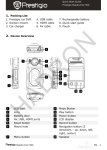
Product stuctureInstallation and Fixed
1.
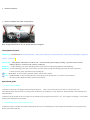
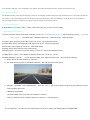
Holder fixed photo:
2.
Device installation and cable arrange photo:
Note: orange dotted line for the car charger line layout diagram。
The keyboard function
Power key-- on/off button: when shutdown state,short press to power on;when boot state,short pree to off display,long press
3 sec to power off.
REC/OK key -- video/photo /OK button: in video mode,used for starding and ending recording ; in picture mode, used for
making a picture ; in menu mode, used for confirming.
MODE key -- mode switching: for mode switching (video mode / photo mode and playback mode switching)
MENU key--menu switching/ menu exit / lock button: used for menu setting and switching and exit the menu operation.
in video process, quick operation key for locking file.
key -- up turn key : in menu mode / playback mode, used to select switch
key -- under turn key: in the recording process, press this key can quickly turn on / off the record sound; in
the menu mode /playback mode, used to select switch.
Operational guide
> > connect car charger
1.1 Please connect the car charger before using this product, after a good connection, start the car the recorder can
automatically start and automatic recording. The car flameout, according to set the delay time, delay shutdown automatically and
save video files
1.2 Please use the output of 5V car charger for the machine power supply (recommend
use
the original car charger) if use others
maybe cause damage to the machine.
> > install and remove the memory card
2.1 Please note the card direction when inserting the SD card, to avoid damage to the machine and the Micro SD card. please use
above class 6 Micro SD card.
2.2 If the file in SD card is not compatible, may appear some abnormal phenomenon, please format the SD card.
> > turn on / turnoff
3.1 shutdown mode, press the power button can boot; the starting condition long press the power button for 3 seconds to power off.
3.2 in order to save the battery, please set the delay automatic shutdown, when the machine is in the absence of any operation
and recording condition, will be set according to the time delay automatic shutdown.
> > The video
mode
Press MODE key to set video mode,in video mode, press "REC" key to start or end recording;
> The video menu function
4.1 Video resolution: the size of the video resolution(can be set:2560*1080 30fps(option)、2304*1296 30fps(option)、1920*1080
45fps(option)、1920*1080 30fps、HDR1920*1080 30 fps、1280*720 60 fps、1280*720 30 fps)
4.2 Video quality: the quality of the video option (can be set:super fine/fine/normal)
4.3 Meter Mode setting: metering light mode setting (can be set:center/average/spot)
4.4 Anti-flicker: light frequency (can be set:Auto/60HZ/50HZ)
4.5 Stamp setting: date and time stamp mode setting
4.6 Video Recycle:the vodeo recycle time setting(can be set:1min/2min/3min/4min/5min)
4.7 LDWS detect(option):Lane Departure Warning System set(can be set:off/on)
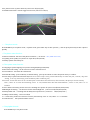
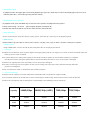
4.8 LDWS calibration(option): use for adjust the LDWS, lease adjustment before use,the method as following:
1) Please choose the road solidline for calibration.
2) The LDWS detect set On,enter the LDWS calibration,
the LCD display as below figure.
3) Press the“ Up/Down ”key to adjust the line, press the“MODE ”key to select the line. If adjust ok, press OK key to set and
Press the Menu key to exit.
Calibration requirements
Purple line: With the current road tow solid lines to intersect
Red line:With the current road tow solid lines to intersect (as below figure)
4) A fter calibration,the video process if the transform track, emits a beep, the display flashes red "DEPATURE" .
4.9 G_sensor Level: G_sensor level set( can be set: off/1/2/3/4/5)
4.10 Motion Detection: motion trigger function set( can be set: off/on)
> > The photo mode
Press MODE key to set photo mode,in photo mode, press "REC" key to take a picture; (and can press photo key to take a picture
Quickly
> The photo menu function
5.1 Photo resolution: the size of the photo resolution (can be set:4M(2688*1512 16:9)
5.2 Quality: photo quality set (can be set: super fine/ fine/normal)
5.3 Stamp: photo date stamp set
>>The system menu function
6.1 Language: system language set (can be set:english/slmp/rusian/trad)
6.2 Record mode setting:can be set auto record or manual record
6.3 Card Volume:check the SD card volume
6.4 Driver ID setting:press mode key to Switch setting,press up and down to select and press ok key to confirm.
6.5 Time setup: system sate and time set(Press OK to enter setup screen, press the Mode key to switch the year / month / day/ time
setting, to set up / down keys, press the OK key after confirming set)
6.6 Format : format the micro sd card. In this option on the Micro SD card format, after selection, will prompt "format memory
card? ", select" O "to enter the formatting, select" X " exit; all data files in SD card will be deleted! ", select" X "exit, select " O " to
continue.
6.7 Auto Power Off setting: set the time of no working auto power off (can be set:off/1min/3min/5min)
6.8 Backlight off setting: set the time of auto LCD backlight off (can be set:off/1min/3min/5min)
6.9 Delay Power Off: recording end the delay time of power off(can be set: off/15s/30s/1min)
6.10 Beep sound setting:can be set off/on
6.11 Default setting: all data will be restored to the factory default settings, select " X "exit, select " O " to continue.
6.12 Version info: the system firmware version.
>>The playback mode
Press MODE key to set photo mode
>The playback type
In playback mode, the upper right corner show playback type, press up / down keys tos witch the display type (can be set: lock
video file/video file) ,choose the type and press the OK key.
>The playback menu function
In playback mode, press the MENU key to enter the menu options, the playback menu options:
7.1 Play mode setting:can be set :play one/play all/repeat one/repeat all)
7.2 delete files: delete the file set (can be set: delete this file / delete all files)
> play operation
Choose to play the file, press the OK key to play / pause , press the up / down keys to set playback speed .
>>USB connect
Please use Micro 5p usb cable to connect, after connect, can play / view, copy or delete the file in card by the computer.
>>HDMI connect
Using a HDMI cable, connect the HD TV, the video/photo file can be play by the HD TV.
> > using tips
8.1 When the car flameout, if the cigarette lighter still supply, please pull the car charge out, in order to avoid consumed within the
battery power or other accidents
8.2 In vehicle flameout or other power supply is turned off, save the machine can use the built-in battery to complete
the video document, during this period will not remove the Micro SD card, so as not to document a damaged.
8.3 Please use original parts as far as possible, so as to avoid some damaged.
8.4 In order to have a good record ,please set the cycle recording, if the SD card is full, it will automatically delete the
previous recording files .
8.5 Do not attempt to repair or disassemble the machine and parts .
> > SD card related tips
9.1 Please use the capacity more than 2GB, above Class6 Micro SD card (maximum support 32GB)
9.2 To avoid the other file in the SD card to cause some danger machine image, advice before use,to format the SD card
9.3 Micro SD card capacity and recording time corresponding to the following (only for reference)
Capacity
1080P/30fps
1080P/30fp(HDR)
720P/60fps
720P/30fps
8GB
60min
60min
80min
130min
16GB
120min
120min
160min
260min
32GB
240min
240min
320min
520min
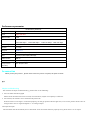
Performance parameter
Performance parameter
Image sensor
COMS(OV4689)
Lens
Super wide lens
Video codec
H.264
Video resolution
2056*1080 30P(option) 、2304*1296 30P(option) 、1920*1080 60fps HDR
1920*1080 45fps 、1920*1080 30fps 、1280*720 60fps、1280*720 30fps
Recording format
MP4
Screen
3.0’LCD
Out put
HDMI OUT
Memory card
Micro SD card(max upto32 GB)
Size
92.5mm(C)*60mm(W)*38mm(H)
USB connect
USB 2.0
Battery
3.7V 320mAH(内置)
Temperature
/
-20°~60°/0%~60%
humidity
Accessoriies
When you buy the product , please check in the box parts is complete, the parts as below
配件
Simple troubleshooting
The methods of simple troubleshooting , please refer to the following:
1 Can not Video and Photograph
Please check the Micro SD card is normal, if normal write, maybe card capacity is sufficient .
2 Cars started, the machine is not automatically start work
Pease check the car charger is connected properly, car charger power indicator light is lit, if it is not lit, please check is the car
charger bad or the car cigarette lighter is on voltage output
3 Prompt file repair
Because when the last shutdown, due to abnormal cause document failed to properly store, please select "O" for repair
4 Images are not clear or the night video lighting light rhyme anomaly
Please check the lens surface is clean, if dirty, please wipe dry