Download open - Phonak

Transcript
027-0441-02_GB_DWA_family.qxp:027-0441-02_GB_DWA_family.qxp
13.3.2009
15:58 Uhr
Seite 1
iCom
myPilot
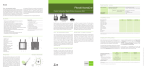
iCom – communication interface
iCom offers the most convenient way to interface any Phonak
CORE hearing instrument (excl. Petite models) to modern
communication devices. The binaural digital transmission in
stereo quality is extremely robust against any sort of
interference. It wirelessly connects the hearing instruments
to Bluetooth devices or phones and also offers a 3.5 mm
stereo jack for cabled connections and can integrate an FM
receiver via europlug.
Incoming signals are prioritized automatically and the hearing
instruments will automatically switch to the individual hearing
programs EasyAudio and EasyBluetooth. The large central
button makes sure all users can easily accept and reject a call
or stop and restart streaming audio. Find details about iCom
on http://icom.phonak.com
myPilot – command center for convenient control and
status information
myPilot is in fact more than a one touch binaural program and
volume control unit. Program icons and names can easily be
changed to fit your customers preferences. The most
important program and volume setting can be stored and
recalled at any time with a simple button press. In the
ZoomControl screen the users can comfortably select the 4
ZoomControl directions without touching the hearing
instruments.
Product information DWA family
Key features
Key features
Wirelessly connects CORE products to a huge variety of
external devices
True stereo audio transmission to the hearing instruments
Receives input in 3 different ways: Bluetooth wireless
(speech and stereo music), wired stereo audiojack and FM
via europlug
Ergonomic design with one simple button
True hands-free operation with directional microphone
pickup
Rechargeable battery
Small, attractive and unobtrusive
Fully automatic switching of hearing programs, which can
be individually fine tuned via fitting software
Signal priorities
1 Acoustic phone with magnet
via microphone or T-coil
2 Bluetooth phone call (HSP or HFP
profile) via iCom
3 Audio jack via iCom
iCom
EasyAudio
EasyAudio
EasyBluetooth
5 Bluetooth audio streaming (A2DP
profile mono or stereo) via iCom
If there are several signal sources the hearing instrument will activate the signals according to
their priorities.
9 10 11
2
4
myPilot – command center for convenient
control and status information
Click’nTalk – mobile phone conversations
Click’nTalk opens up a new era in mobile phone conversations
for the hearing instruments wearers. Perfect sound quality and
the most stable connection while making phone calls with a
mobile phone are essential to every user. Being able to
intuitively use the most recent mobile phones makes the use
of such communication systems enjoyable.
7
Microphone directionality
BP
-30
The pairing procedure allows you to control which
Bluetooth devices are permitted to communicate with
each other. This procedure needs to be completed
only once for each device you wish to use with your iCom.
0
10
0
30
-10
-60
60
-20
-30
-90
Press the iCom Bluetooth pairing button for two seconds
until the Bluetooth indicator flashes blue. Repeat the same
procedure for the other Bluetooth device following the
device user manual.
iCom – communication interface
myPilot is an advanced remote control that offers one-touch
binaural program and volume control.
To have full and discreet control on the current settings of
hearing instruments at any time and any place and also being
able to change settings easily provides reassurance for the
hearing instrument wearer. The full color display makes
myPilot really easy to use.
Remote control for volume and program, including separate left/right adjustments
Quick access to a pre-defined program and volume setting
Full-color display with a choice of two attractive home screen designs. Full iconic view or direct access to programs
Access to ZoomControl for compatible hearing instruments for user-controlled, focused listening in any direction
Read-out of hearing instrument status, including battery, program and volume levels
Convenient time/date and alarm functions
Customizable program names and icons for easy program identification
Storage of hearing care professional contact information
Two attractive color options, high-tech gray or white
Technical description
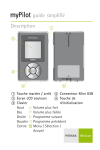
1 ON/OFF button
2 Color LCD display
3 Keypad
Up
Volume up
Down
Volume down
Right
Next program
Left
Previous program
Center
Menu/select/home
4 Mini USB connection
5 Reset button
iView – reassurance at the touch of a button
3
Pairing button
communication and entertainment devices such as mobile
and home phone conversations or stereo TV and MP3 players.
Controlling volume, program settings or giving information
about the battery status of the hearing instruments is made
easy and enjoyable. Phonak’s DWA are easy to handle, couple
and fit to the CORE hearing instruments. The end user will love
their intuitive use in daily life.
The hearing instruments will act as a convenient wireless
headset and allow the wearer to benefit from its hands-free
functionality while iCom is connected via a Bluetooth, cable or
optional FM receiver.
1
6
iView
Phonak’s DWA (Digital Wireless Accessories) cover a variety of
devices that are able to solve specific hearing instrument
wearer’s needs. From unmatched stereo digital sound quality
and speech access to full control over hearing instruments, the
DWA portfolio forms a unique network of interconnected
devices. Hearing instruments simply become part of the unique
Phonak HiBAN (Hearing instrument Body Area Network)
wireless environment which is a robust connection to modern
Leading an active life and keeping in touch with the environment means being able to interface with a diverse range of
communication systems like telephones, televisions, MP3
players, computers or other audio sources. iCom is the
communication interface at the center of the HiBAN wireless
network that opens up the world of connectivity to users.
12
5
myPilot
EasyBluetooth
4 FM receiver via iCom Europlug
8
Click’nTalk
EasyPhone
Technical description
1 ON/OFF button
2 Commuication button
3 Bluetooth pairing button
4 Reset button
5 Audio input (3.5 mm jack)
6 FM input
7 Charging input (mini-USB)
8 Microphone openings
9 Battery indicator
10 Audio streaming indicator
11 Bluetooth indicator
12 Neckloop
It controls all Phonak CORE hearing instruments (excl. Petite
models). Find details about myPilot on
http://mypilot.phonak.com
90
120
-120
320 HZ
960 HZ
2080 HZ
2720 HZ
3680 HZ
150
-150
180
Click’nTalk is characterized by unmatched digital and bilateral
sound quality while making mobile phone conversations
through hearing instruments. Simply the most natural phone
experience with no charging or pairing.
The iView status viewer provides perfect support for parents,
caregivers and teachers. The iView status viewer gives those
people reassurance - a simple push of a button gives instant
information about battery status, program setting and volume
level. iView can monitor both monaurally and binaurally fitted
Phonak CORE hearing instruments. In a school environment
iView can be used to monitor the status of numerous students'
hearing systems.
1
2
3
5
4
Transmission technology
HiBAN (Hearing instrument Body Area Network) is a digital inductive 10.6 MHz technology, which wirelessly transfers stereo
audio and control information to CORE enabled hearing instruments from Phonak or even audio and control signals between
the hearing instruments. myPilot as well as the other DWA devices presented access this technology, forming a network of
interconnected nodes.
XXX-XXXX-02/VX.00/2009-01/rz Printed
027-0441-02/V1.00/2009-03/rz
Printed in
in Switzerland
Switzerland ©© Phonak
Phonak AG
AG All
All rights
rights reserved
reserved
The choice of two Home screen modes confesses the real
potential of myPilot. Choose between detailed program
overview in the standard mode, or the direct program access
capabilities in the direct control-mode.
027-0441-02_GB_DWA_family.qxp:027-0441-02_GB_DWA_family.qxp
13.3.2009
15:58 Uhr
Seite 2
iView
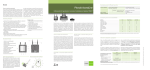
Compatibility overview
Click’nTalk
Hearing instrument
Click’nTalk – direct mobile phone conversations
Click'nTalk transmits the call wirelessly from a mobile phone
to both hearing instruments simultaneously in digital quality.
It is compatible with all CORE hearing instruments from
Phonak (excl. Petite models).
Click'nTalk is automatically detected once connected to the
mobile phone. The hearing instruments will automatically
switch to the EasyBluetooth program as soon as Click'nTalk is
within range (<25 cm, 9'').
Find details about Click'nTalk on
http://clickntalk.phonak.com
Exélia Art
Exélia
Versáta
Certéna
Naída
Audéo YES
Nios micro
iCom
Click’nTalk
myPilot
iView
iView – reassurance at the touch of a button
iView is capable of reading out the status of any Phonak
CORE hearing instrument (excl. Petite models) with a simple
push of a button.
No pairing or grouping is necessary, therefore monaurally or
binaurally fitted instruments of different people can be
checked with one iView.
All Digital Wireless Accessories from Phonak are compatible with all CORE products of Phonak, except the Petite models. The current compatibility list can be found on www.phonak.com
Key features
Key features
Directly plugs to the mobile phone
Powered by the mobile phone
Device is activated automatically
Hearing instruments will automatically
switch to EasyBluetooth mode during a call
No charging, no cables
So small to always have it at hand
No maintenance
Works with all CORE hearing instruments without fitting (excl. Petite models)
Link distance to hearing instruments up to 25 cm (9’’)
Robust digital wireless link to both hearing instruments simultaneously
Allows your customers to use the latest mobile phone technology
Grouping and Fitting in iPFG
“Grouping” is the process to pair and save the accessory to the
individual hearing instruments. “Selection” is a simple
registration of the accessory within the fitting software. Serial
number registration or printing instructions within the
Reports section of the fitting software is only possible for
selected devices.
Click on “Accessory Grouping” to start the grouping wizard.
Follow the instructions to complete the grouping process.
For best results it is recommended to fine-tune the precalculated EasyBluetooth and EasyAudio programs, as e.g.
the mobile phones input varies from type to type.
Compability
As Click’nTalk physically connects to the mobile phone, it is important to use the right combination of Click’nTalk and mobile
phone model. Go to the compatibility page http://clickntalk.phonak.com/compatibility and follow the instructions to find the
actual overview of mobile phone models, which support Click’nTalk.
Technical description
1
Selection/serial number adding
Grouping required
Fitting
Device options via iPFG
EasyBluetooth
2
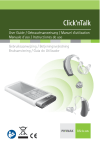
1 CS44 jack (not used)
2 Plug (varies depending on phone model)
3 Microphone opening
EasyAudio
Instructions printing
iCom
Via Grouping
Yes
Click’nTalk
Optional *)
-
myPilot
Via Grouping
Yes
iView
Optional
-
Various settings
Pre-calculated and
manual fine-tuning
Pre-calculated and
manual fine-tuning
Yes
Pre-calculated and
manual fine-tuning
-
Various settings
-
-
-
-
-
Yes
Yes
*) Pre-calculated EasyBluetooth program applies if neither Click’nTalk nor iCom were selected as accessories. The EasyBluetooth automatic program will be accessible for fine tuning after
selecting/grouping either of the devices.
1 button status readout
Hearing instrument information:
- Program name
- Volume setting
- Battery status
- Serial number
Works with all CORE wireless hearing instruments (excl. Petite models)
Reads out right and left hearing instrument simultaneously
No grouping required
Rechargeable battery
Robust and small attractive design
Technical description
1
2
3
4
5
ON/OFF button
Color LCD display
Status read out button
Mini USB connection
Reset button
1
2
3
3
5
4
Power consumption
Click’nTalk is powered by the mobile phone. Therefore the standby time of the mobile phone might be reduced by 10% depending
on the usage. To charge the phone, unplug Click’nTalk.
Operating range
The status read out range is up to 50 cm (20'').
This is the same for the status readout range of myPilot.
Usage
Important points
1. Plug the device to the phone connector
2. Accept and end calls using the mobile phone buttons
3. After accepting the call, hold the phone close to one ear.
The hearing instruments will automatically switch to
EasyBluetooth program within 1 second
Enabling key tones of the mobile phone will speed up the
connection setup to the hearing instruments
If Click’nTalk is out of range the hearing instruments will
switch back to the hearing program within 13 seconds
The ring tone signal cannot be heard through the
wireless link usually. Therefore make sure loud ring tones
and/or vibrating ring tone is switched on
Best results are achieved by fine-tuning the
EasyBluetooth program within the fitting software