1
USER
MANUAL
NVP1015 / 1017– 801/1601
1U 15” / 17” LCD
Keyboard Drawer with PS/2 KVM
NVP1015 / NVP1017
User Manual
Table of Contents
1.
Table of Content
P.1
2.
Introduction
P.2
3.
Features
P.2
4.
Package Contents
P.3
5.
Optional Accessories
P.4
6.
Peripheral Products
P.4
7.
Important Safeguards
P.5
8.
Structure Diagram
P.6
9.
Dimension Diagram
NVP1015-8/1601
P.7
NVP1017-8/1601
LCD Session
P.8
10.
P.10
11.
LCD Membrane Diagram
LCD OSD Control
Main Menu
Sub Menu
Resolution Settings
For Windows
For SUN Servers
KVM Session
Front View
P.16
Rear View
P.17
Installation Steps
P .18
Cascading
P.19
Start Up
P.20
HotKey Command
P.20
12.
P.10
P.11-12
P.13
P.14
HotKey Command Operation
P.21-22
KVM On Screen Display Control
13.
14.
OSD Structure Diagram
P.23
OSD Menu Operation
P.24
P.25
P.26-27
FAQ
Technical Specification
1
i-Tech Company LLC TOLL FREE: (888) 483-2418 • EMAIL: [email protected] • WEB: www.iTechLCD.com
NVP1015 / NVP1017
User Manual
2. Introduction
NVP Series is a combination of keyboard, mouse and monitor into a drawer, with features such as
flip-up design, adjustable brackets, built in LCD OSD to provide effective assistant for an
administrator to control PC system.
NVP Series provides cost effective for your limited IT budget over using CRT and rack mounting.
Also, it will be space saving for your compact environment rack and effective assistant for an
administrator to control PC system.
3. Features
• Adjustable mounting brackets from 390 to 790mm (front to rear 19”mount)
• Lightweight aluminium construction—with black anodise finish
• Slim Size keyboard with GlidePoint touch pad mouse
• Standard D-Sub 15-pin VGA input connector
• Supplied with 12V 5A remote power adapter (single power resource)
• Built in On Screen Display controlled by integral membrane switches
• 1U Height, separate sliding screen and keyboard using unique miniature Cyber slides
• Unique monitor flip-up design allows viewing through closed glass door of cabinet.
• Built-in KVM switch function for easy controlling and monitoring up to 16 residing servers / platforms
• Support eight characters password protection and search PC server name
• Auto scan mode for monitoring PCs and flexible scan time from 5 ~ 99 seconds
• Hot Pluggable—Add or remove computers without powering down the switch
• Easily switch individual button to select the PC channel using the pushbutton channel selector
switches, Hot keys, or via the On-Screen
Disclaimer
This information is subject to change without notice. The producer of this manual accepts no
responsibility for damage or claims, resulting from misuse or misinterpretation
2
i-Tech Company LLC TOLL FREE: (888) 483-2418 • EMAIL: [email protected] • WEB: www.iTechLCD.com
NVP1015 / NVP1017
User Manual
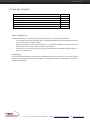
4. Package Contents
LCD Monitor Drawer with PS/2 KVM Switch
User Manual
DC Power Adapter
Power Cord
Mounting Bracket
Fasteners
ND-6 3-in-1 KVM cable
1 Piece
1 Piece
1 Piece
1 Piece
1 Pair
4 Pieces
8 Pieces
Before Unpacking
It is very important to locate the LCD Keyboard Drawer in a suitable environment.
•
The surface for placing and fixing the LCD Keyboard Drawer should be stable and level
or mounted into a suitable cabinet.
•
Make sure the place has good ventilation, is out of direct sunlight, away from sources of
excessive dust, dirt, heat, water, moisture and vibration.
•
Convenience for connecting the LCD Keyboard Drawer to the related facilities should
be well considers too.
Unpacking
The LCD Keyboard Drawer comes with the standard parts shown as above. Check and make
sure they are included and in good condition. If anything is missing, or damage, contact the
supplier immediately.
3
i-Tech Company LLC TOLL FREE: (888) 483-2418 • EMAIL: [email protected] • WEB: www.iTechLCD.com
NVP1015 / NVP1017
User Manual
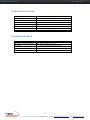
5. Optional Accessories
KVM Cable
ND-6 / 10 / 15
Cascade Cable
NA-2 / 6 / 10 / 15
Conversion Adapter
SUN-31
Others
6ft / 10ft / 15ft PS/2 3-in-1 cable
2ft / 6ft / 10ft / 15ft PS/2 3-to-3 cable
SUN / iMAC USB to PS/2 adapter
Video Input
12V / 24V / 48V DC Power Supply
6. Peripheral Products
Model
NV-401 / NV-801 / NV-1601
NV-1602
NV-S801 / NV-S1601
NV-S1602
NV-101
Description
NV-401 / NV-801 / NV-1601
16-Port 2-Console PS/2 KVM switch
8-Port /16-port USB KVM switch
16-port 2-Console USB KVM switch
CAT.5 PS/2 KVM extender
4
i-Tech Company LLC TOLL FREE: (888) 483-2418 • EMAIL: [email protected] • WEB: www.iTechLCD.com
NVP1015 / NVP1017
User Manual
7. Important Safeguards
Please read all of these instructions carefully before you use the device.
Save this manual for future reference.
•
Unplug the LCD Keyboard Drawer from the power outlet before cleaning.
•
Do not spray liquid cleaners or aerosol directly on the device. Wet a cloth with a neutral
detergent (e.g. clean water) and squeeze it tight, then clean the screen slightly with it.
•
Do not expose the LCD Keyboard Drawer directly to rain, water, moisture or sunlight.
•
Avoid pressure on the LCD screen to prevent permanent damage to the display.
•
Do not attempt to service the device yourself. Improper operation may void your
warranty. Refer all servicing to qualified service personnel.
•
Safe storage environment of the LCD Keyboard Drawer is ranging between –20oC
and 60oC. Permanent damage could occur if the LCD Keyboard Drawer is stored
outside the safe range.
•
Unplug the LCD Keyboard Drawer immediately and call
personnel under the following conditions:
1. If the monitor has been exposed to rain, liquid or water.
2. If the monitor has been dropped or the casing has been damaged.
qualified
service
What the warranty does not dover
1.
Any product, on which the serial number has been defaced, modified or removed.
2.
Damage, deterioration or malfunction resulting from:
a) Accident, misuse, neglect, fire, water, lightning, or other acts of nature, unauthorized
product modification, or failure to follow instructions supplied with the product.
b) Repair or attempted repair by anyone not authorized by us.
c) Any damage of the product due to shipment.
d) Removal or installation of the product.
e) Causes external to the product, such as electric power fluctuation or failure.
f)
Use of supplies or parts not meeting our specifications.
g) Normal wear and tear.
h) Any other causes which does not relate to a product defect.
3.
Removal, installation, and set-up service charges.
5
i-Tech Company LLC TOLL FREE: (888) 483-2418 • EMAIL: [email protected] • WEB: www.iTechLCD.com
NVP1015 / NVP1017
User Manual
8. Structure Diagram
1.
PS/2 keyboard
2.
Aluminium front panel
3.
Class A active matrix TFT LCD panel
4.
Rear metal case
5.
Analog to digital signal converter board
6.
LCD inverter
7.
LCD membrane
8.
Ball bearing telescopic slides with stopper
9.
Adjustable mounting bracket
10.
KVM membrane & KVM switch board
6
i-Tech Company LLC TOLL FREE: (888) 483-2418 • EMAIL: [email protected] • WEB: www.iTechLCD.com
NVP1015 / NVP1017
User Manual
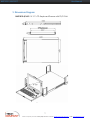
9. Dimensions Diagram
NVP1015-8/1601 1U 15” LCD Keyboard Drawer with PS/2 KVM
7
i-Tech Company LLC TOLL FREE: (888) 483-2418 • EMAIL: [email protected] • WEB: www.iTechLCD.com
NVP1015 / NVP1017
User Manual
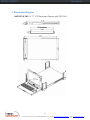
9. Dimensions Diagram
NVP1017-8/1601 1U 17” LCD Keyboard Drawer with PS/2 KVM
8
i-Tech Company LLC TOLL FREE: (888) 483-2418 • EMAIL: [email protected] • WEB: www.iTechLCD.com
NVP1015 / NVP1017
User Manual
LCD
Session
9
i-Tech Company LLC TOLL FREE: (888) 483-2418 • EMAIL: [email protected] • WEB: www.iTechLCD.com
NVP1015 / NVP1017
User Manual
10. LCD Session
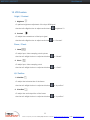
LCD Membrane diagram
Main Menu
Bright / Contrast
• To enter into the Bright, Black level & Contrast sub-menu
Auto Adjust
• To perform automatic optimisations of all functions
• An “ Adjusting” message is displayed during the process
Phase / Clock
• To enter into the phase & clock sub menu
H/V Position
• To enter into the H/VPosition sub-menu
MISC
• To enter into the MISC sub-menu
Reset
• Reset to the default factory settings
10
i-Tech Company LLC TOLL FREE: (888) 483-2418 • EMAIL: [email protected] • WEB: www.iTechLCD.com
NVP1015 / NVP1017
User Manual
10. LCD Session
Bright / Contrast
1. Brightness
• To perform brightness adjustment of the input RGB signal
• Use the Left & Right button to adjust and button to
“Brightness” 2.
2. Contrast
• To adjust the contrast level of the input signal
• Use the Left & Right button to adjust and button
to “Contrast”
Phase / Clock
1. Phase
• To adjust input video sampling clock’s phase
• Use the Left & Right button to adjust and button
to “Phase”
2. Clock
• To adjust input video sampling clock
• Use the Left & Right button to adjust and button
to “Clock”
H/V Position
1. H.Position
• To adjust the horizontal size of the frame
• Use the Left & Right button to adjust and button
to “H.position”.
2. V.Position
• To adjust the vertical position of the frame
• Use the Left & Right button to adjust and button
to “V.position”.
11
i-Tech Company LLC TOLL FREE: (888) 483-2418 • EMAIL: [email protected] • WEB: www.iTechLCD.com
NVP1015 / NVP1017
User Manual
10. LCD Session
MISC
1.
•
2.
Information
The first header row shows the current resolution setup
•
The second header row shows the horizontal frequency of the current input
signal
•
The third header row shows the vertical frequency of the current input signal
OSD Timer
• To modify the duration of the OSD time-out
3.
Color
a) 5500K
• Select Colour Temp at 5500K
b) 6500K
• Select Colour Temp at 6500K
c) 9500K
• Select Colour Temp at 9500K
d) User
• Change Colour Temp by manual
4.
Language
• To select the language of OSD menu 7 Languages :
(1)
English
(2)
Japanese
(3)
Chinese
(4)
German
(5)
Francais
(6)
Espanol
(7)
Italiano
12
i-Tech Company LLC TOLL FREE: (888) 483-2418 • EMAIL: [email protected] • WEB: www.iTechLCD.com
NVP1015 / NVP1017
User Manual
10. LCD Session
Resolutions Settings
For Microsoft Windows
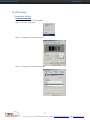
Step 1 – Press right click on the desktop
Step 2 – Choose “Properties”
Step 3 – Change the “Screen Resolution”
Step 4 – Change the “Screen refresh rate”
13
i-Tech Company LLC TOLL FREE: (888) 483-2418 • EMAIL: [email protected] • WEB: www.iTechLCD.com
NVP1015 / NVP1017
User Manual
10. LCD Session
Resolutions Settings
For SUN Servers
•
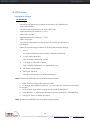
Resolution configuration procedures should be run by qualified SUN
server administrator
•
Sun Servers are using resolution at 1152 x 900 x 76Hz.
•
Supported resolution mode for 15” LCD:
•
1024 x 768 x 70/75Hz
•
Supported resolution mode for 17” LCD:
•
1280 x 1024 x 75Hz
•
You need to change the Sun Server resolution before you connect to
LCD Display.
•
Please do the following procedures to change the resolution settings :
1.
As root:
You may find the following comment 7user/sbin/m64config”.
2.
To view current resolution:
Type 7user/sbin/m64config - prconf.
3.
To change to 1024x768 @ 70MHz:
Type 7user/sbin/m64config - res 1024x768x70 now”.
4.
The screen will be rubbish.
5.
Then type “pkill Xsun”.
And Type “pkill Xsession” to restart the Xsession.
Note : Remember to RESTART the server after these processes.
• Under Common Desktop Environment (CDE).
• To change the OpenBoot resolution, you can type the following command in
OK prompt.
1.
In OK prompt, type “setenv output-device screen:r1024x768x70”.
2.
Type “printenv” to confirm the resolution has been changed to 1024x768x70Hz.
3.
Then type, “reset” to restart the system.
Note : Remember to RESTART the server after these processes.
14
i-Tech Company LLC TOLL FREE: (888) 483-2418 • EMAIL: [email protected] • WEB: www.iTechLCD.com
NVP1015 / NVP1017
User Manual
KVM
Session
15
i-Tech Company LLC TOLL FREE: (888) 483-2418 • EMAIL: [email protected] • WEB: www.iTechLCD.com
NVP1015 / NVP1017
User Manual
11. KVM Session
Front View
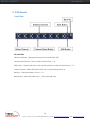
LED Indication
Selected Channel - Displayed channel on monitor & red in LED.
Channel select button - Press to select channel from 1 – 8.
Shift button - Press & Hold follow with a channel button to select channel from 9 – 16.
Online Channel - Green LED state the PC has connected and power on.
Bank no. - Display the Bank no. from 1 – 8.
Bank button - Select the bank from 1 – 8 (for cascade only).
16
i-Tech Company LLC TOLL FREE: (888) 483-2418 • EMAIL: [email protected] • WEB: www.iTechLCD.com
NVP1015 / NVP1017
User Manual
11. KVM Session
Rear View
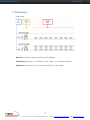
DC Power -connect to external 12V DC power adapter.
Cascade Port -connect to additional KVM switch for channel expansion.
Channel Port -connect to PC computer with ND-6 3-in-1 KVM cable.
17
i-Tech Company LLC TOLL FREE: (888) 483-2418 • EMAIL: [email protected] • WEB: www.iTechLCD.com
NVP1015 / NVP1017
User Manual
11. KVM Session
Installation Steps
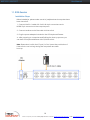
Before installation, please make sure all of peripherals and computers have
been turned off.
1. Connect the 3-in-1cable with 2 mini-din 6-pin connectors and a
HDDB 15-pin connector to the computer ports.
2. Connect another end of the cable to KVM switch.
3. Plug the power adapter included to the LCD Keyboard Drawer.
4. After powering on computers and finishing the boot-up process, you
can start LCD keyboard drawer with PS/2 KVM switch.
Note: Please don’t switch the PC port (i.e. Don’t press the push button of
KVM switch or run hot key) during the computers are under
boot-up.
18
i-Tech Company LLC TOLL FREE: (888) 483-2418 • EMAIL: [email protected] • WEB: www.iTechLCD.com
NVP1015 / NVP1017
User Manual
11. KVM Session
Cascading
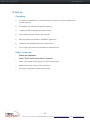
Using NA-6 PS/2 KVM cable to connect from Bank 1’s “Cascade port” to
Bank 2’s “Console port”. After connected please press “Bank” & “Channel”
button on the front of the PS/2 KVM switch to reset the PS/2 KVM switch.
Cascade level Max. : 8 level
•
Max. PC connection is 128 or with additional 122 PCs.
•
All PS/2 KVM switch is compatible & can cascade with each other.
•
Using NA-6 PS/2 KVM cable to cascade.
•
Normal distance from one PS/2 KVM to another is 15 feet.
19
i-Tech Company LLC TOLL FREE: (888) 483-2418 • EMAIL: [email protected] • WEB: www.iTechLCD.com
NVP1015 / NVP1017
User Manual
12. Start Up
Cascading
1.
The channels that have PC connected and it is switch on will have a green LED
on that channel.
2.
The red LED will indicate the selected channel.
3.
7 segments LED will display the bank number.
4.
Press channel button to select the channel.
5.
Enter the password, default is “00000000” eight zeros.
6.
Otherwise the keyboard & mouse will be locked.
7.
If you forget your password, send back to Manufacturer.
HotKey Command
•
Simple key sequence.
•
Press “ Scroll Lock” twice within 2 seconds.
•
Follow with a beep sound, going into the hot key mode.
•
Need to key in the hot key within 2 seconds.
•
Go back to Operation System Control state.
20
i-Tech Company LLC TOLL FREE: (888) 483-2418 • EMAIL: [email protected] • WEB: www.iTechLCD.com
NVP1015 / NVP1017
User Manual
12. Start Up
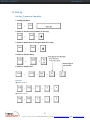
Hot-key Command Operation
1. Calling OSD Menu
2. Switch to Previous Port (powered on PC only)
3. Switch to Next Power On Port (powered on PC only)
4. Switch to Previous Bank
5. Switch to Specific Port
Example
a) Bank 1 Port 4
a) Bank 2 Port 16
21
i-Tech Company LLC TOLL FREE: (888) 483-2418 • EMAIL: [email protected] • WEB: www.iTechLCD.com
NVP1015 / NVP1017
User Manual
12. Start Up
Hot-key Command Operation
6. Switch to Next Bank
7. Enable / Disable beeper sound
Note: The default Beeper function is ON and beeper control is only for
8. Auto Scan for Powered on PC
9. Reset to factory Default Setting
Note: Not available for password reset.
10. Reset to factory Default Setting
Note: When the above dialogue appear, type the PC name and the OSD Menu
will search PC name starting from 1st powered on PC port.
22
i-Tech Company LLC TOLL FREE: (888) 483-2418 • EMAIL: [email protected] • WEB: www.iTechLCD.com
NVP1015 / NVP1017
User Manual
12. Start Up
OSD Structure Diagram
OSD Menu Operation
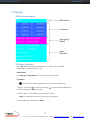
Use “Tab” key to select session like Bank, PC, OSD, SCAN, CHANGE
PASSWORD, CONSOLE ON/OFF, etc…
Bank Session
Use Page Up & Page Down to switch previous or next bank
PC Session
1. “
” next to the PC name represents the PC system is powered on
2. Use up arrow key “ ” or down arrow key “ ” to select port for destination
PC name and press “Enter” to select
3. Edit PC name - Press “Ins” key for editing PC name
Note: PC name should not be more than 8 characters.
4. When editing is finished press “Enter”.
23
i-Tech Company LLC TOLL FREE: (888) 483-2418 • EMAIL: [email protected] • WEB: www.iTechLCD.com
NVP1015 / NVP1017
User Manual
12. Start Up
KVM Settings Session
1. OSD
OSD Menu on screen time
default is 10 seconds.
● It can be modified from 05 – 99
seconds.
●
2. Scan
Scan interval from one PC port
to next PC port when applying
auto scan, its default is 10
seconds.
● It can be modified to 99
seconds for maximum.
3. Change Password
● Default password “00000000”
8 zeros
● Choose “Change Password” in
KVM Setting Session.
● Key-in the existing password.
● Enter the New Password.
● Re-Enter the New Password.
● Changing Password complete.
● The steps are shown as next
picture:
4. Console On/OFF
● ON – any user can use the
console
● OFF – user is not allowed to
use the console port, unless
password is entered.
● Default – OFF, you need to
key-in password.
5. Escape
● When the following screen is
appeared, you can press
”ESC” key to escape.
●
24
i-Tech Company LLC TOLL FREE: (888) 483-2418 • EMAIL: [email protected] • WEB: www.iTechLCD.com
NVP1015 / NVP1017
User Manual
13. FAQ
1. Don’t press any keys on the keyboard while the selected
computer is booting up. Otherwise, it might cause the
keyboard error or keyboard is not detected at PC side.
2. The computer boot up fine, but keyboard doesn’t work.
● Make sure the keyboard works when directly plugged into the computer.
● Try a different keyboard, but use only 101, 102 or 104-key keyboard.
3. The Mouse is not detected during PC boot up.
● Make sure the mouse works when directly plugged into the computer.
● Make sure the mouse is a true PS/2 mouse. A combo mouse will work just as long
as it is set for PS/2 mode with the correct adapter. Try a different mouse.
● Avoid moving the mouse or pressing the mouse buttons when switching ports.
● Avoiding switching ports during shutting down the PC process.
● When you switch one PC port to another PC port, the best scan time setting need to
be set to 5 seconds or more. Normally, the VGA monitor change one resolution
mode to another will take one or two seconds. So, the scan time is not
recommended to below 5 seconds.
4. Sun Server connection problem.
PS/2 KVM switch are using standard PS/2 type keyboard, mouse and D-sub 15pin
VGA for connection. If you need to connect Sun Server to PS/2 KVM switch, you need
a separate converter kit.
5. Sun – 31 Kit
● Convert USB to P/S 2 Keyboard & Mouse.
● New model Sun Micro Server are using D-sub 15 pin Standard VGA.
25
i-Tech Company LLC TOLL FREE: (888) 483-2418 • EMAIL: [email protected] • WEB: www.iTechLCD.com
NVP1015 / NVP1017
User Manual
14. Technical Specification of KVM
KVM
Item
KVM Channel Port
KVM Channel Interface
PC Computer Interface
Cascade Port Connector
KVM Cable Connection
PC selection
LED
On Screen Display Control
Scan Mode Intervals
VGA Resolution
Bandwidth
Cascade MAX. Level
Housing
Power Adapter
Operation Temperature
Storage Temperature
Humidity
Specification
NVP101X-801: 8 port / NVP101X-1601: 16 port
HDDB 15 pin
PS/2 Keyboard: Mini Din 6 pin Female PS/2
Mouse: Mini Din 6 pin Female
VGA : HDDB 15pin Female
PS/2 Keyboard: Mini Din 6 pin Female
PS/2 Mouse: Mini Din 6 pin Female
VGA: HDDB 15pin Female
3-in-one HDDB 15-pin KVM Cable (NA-6/ 10/ 15)
On Screen Display, Hot Key & Push Button
1 Bank LED
4 / 8 / 16 Online LED (Green) & Selected LED
(Red)
Yes
5~99 Sec.
1,920 x 1,440
200MHz
8 levels with addition 112 PCs connection
Metal
DC 12V 1A
0~40°c
-20 ~ 60°c
0~80%, Non-Condensing
26
i-Tech Company LLC TOLL FREE: (888) 483-2418 • EMAIL: [email protected] • WEB: www.iTechLCD.com
NVP1015 / NVP1017
User Manual
14. Technical Specification of LCD
LCD
Item
LCD Screen
Manufacturer
LCD Origin
Panel
Resolution
Brightness
Color
Contrast Ratio
Viewing Angle
Display Area
Pixel Pitch
Response Time (Tr)
Response Time (Tf)
Back Light
Horizontal Sync.
Vertical Sync.
Input Signal
Power Management
OSD Control
Power Input
Video Input
Dimension
Weight
Specification
South Korea
15” TFT
17” TFT
1,024 x 768
1,280 x 1,024
300 cd/m2
350 cd/m2
16.2 Million
16.2 Million
450:1
350:1
140° x 125°
140° x 130°
304 x 228 mm
337 x 270 mm
0.297 mm
0.264 mm
5ms
20ms
4 x Cold Cathode Fluorescent Tube
48.4 kHz
64 ~ 80 kHz
65 MHz
60 ~ 75 Hz
Analog RGB 0.7Vp-p
VESA DPMS
Brightness, Contract, Colour, Clock
H.Position, V.Position, Phase, Scaling
Auto Config., Input Select, Multi-Window
Clear EEPROM, OSD adjust
12V DC Adapter
15-pin D-Sub Connector
43.9(W) x 4.45(H) x 65(D) cm
NVP1015-801/1601 : 11 / 12 kg
NVP1017-801/1601 : 12 / 13 kg
*All brand names, logo registered trademarks are properties of their respective owners.
27
i-Tech Company LLC TOLL FREE: (888) 483-2418 • EMAIL: [email protected] • WEB: www.iTechLCD.com